



Skip to content
  • Home
  • Aktuell
  • Tags
  • 0 Ungelesen 0
  • Kategorien
  • Unreplied
  • Beliebt
  • GitHub
  • Docu
  • Hilfe
Skins
  • Light
  • Brite
  • Cerulean
  • Cosmo
  • Flatly
  • Journal
  • Litera
  • Lumen
  • Lux
  • Materia
  • Minty
  • Morph
  • Pulse
  • Sandstone
  • Simplex
  • Sketchy
  • Spacelab
  • United
  • Yeti
  • Zephyr
  • Dark
  • Cyborg
  • Darkly
  • Quartz
  • Slate
  • Solar
  • Superhero
  • Vapor

  • Standard: (Kein Skin)
  • Kein Skin
Einklappen
ioBroker Logo

Community Forum

donate donate
  1. ioBroker Community Home
  2. Deutsch
  3. ioBroker Allgemein
  4. iobroker neu installation... befehl geht nicht

NEWS

  • Jahresrückblick 2025 – unser neuer Blogbeitrag ist online! ✨
    BluefoxB
    Bluefox
    17
    1
    3.8k

  • Neuer Blogbeitrag: Monatsrückblick - Dezember 2025 🎄
    BluefoxB
    Bluefox
    13
    1
    1.2k

  • Weihnachtsangebot 2025! 🎄
    BluefoxB
    Bluefox
    25
    1
    2.5k

iobroker neu installation... befehl geht nicht

Geplant Angeheftet Gesperrt Verschoben ioBroker Allgemein
68 Beiträge 3 Kommentatoren 6.5k Aufrufe 2 Watching
  • Älteste zuerst
  • Neuste zuerst
  • Meiste Stimmen
Antworten
  • In einem neuen Thema antworten
Anmelden zum Antworten
Dieses Thema wurde gelöscht. Nur Nutzer mit entsprechenden Rechten können es sehen.
  • K Offline
    K Offline
    klaris
    schrieb am zuletzt editiert von
    #6
    pi@raspberrydi:~ $ sudo timedatectl set-time "2024-08-31 19:33:56"
    Failed to set time: Automatic time synchronization is enabled
    
    
    1 Antwort Letzte Antwort
    0
    • K Offline
      K Offline
      klaris
      schrieb am zuletzt editiert von klaris
      #7
      pi@raspberrydi:~ $ sudo systemctl stop systemd-timesyncd
      pi@raspberrydi:~ $ sudo systemctl disable systemd-timesyncd
      Removed "/etc/systemd/system/dbus-org.freedesktop.timesync1.service".
      Removed "/etc/systemd/system/sysinit.target.wants/systemd-timesyncd.service".
      pi@raspberrydi:~ $ sudo timedatectl set-time "2024-08-31 19:33:56"
      pi@raspberrydi:~ $ timedatectl
                     Local time: Sat 2024-08-31 19:34:49 CEST
                 Universal time: Sat 2024-08-31 17:34:49 UTC
                       RTC time: Sat 2024-08-31 17:34:49
                      Time zone: Europe/Berlin (CEST, +0200)
      System clock synchronized: no
                    NTP service: inactive
                RTC in local TZ: no
      
      
      Thomas BraunT 1 Antwort Letzte Antwort
      0
      • Thomas BraunT Thomas Braun

        @klaris sagte in iobroker neu installation... befehl geht nicht:

        RTC time: Thu 1970-01-01 01:17:17

        Hat der Pi5 eine Echtzeituhr? Hier hast du irgendwas komplett schräg eingestellt.

        HomoranH Nicht stören
        HomoranH Nicht stören
        Homoran
        Global Moderator Administrators
        schrieb am zuletzt editiert von
        #8

        @thomas-braun sagte in iobroker neu installation... befehl geht nicht:

        Hat der Pi5 eine Echtzeituhr?

        ja, aber die Batterie ist optional

        kein Support per PN! - Fragen im Forum stellen - es gibt fast nichts, was nicht auch für andere interessant ist.

        Benutzt das Voting rechts unten im Beitrag wenn er euch geholfen hat.

        der Installationsfixer: curl -fsL https://iobroker.net/fix.sh | bash -

        1 Antwort Letzte Antwort
        0
        • K klaris
          pi@raspberrydi:~ $ sudo systemctl stop systemd-timesyncd
          pi@raspberrydi:~ $ sudo systemctl disable systemd-timesyncd
          Removed "/etc/systemd/system/dbus-org.freedesktop.timesync1.service".
          Removed "/etc/systemd/system/sysinit.target.wants/systemd-timesyncd.service".
          pi@raspberrydi:~ $ sudo timedatectl set-time "2024-08-31 19:33:56"
          pi@raspberrydi:~ $ timedatectl
                         Local time: Sat 2024-08-31 19:34:49 CEST
                     Universal time: Sat 2024-08-31 17:34:49 UTC
                           RTC time: Sat 2024-08-31 17:34:49
                          Time zone: Europe/Berlin (CEST, +0200)
          System clock synchronized: no
                        NTP service: inactive
                    RTC in local TZ: no
          
          
          Thomas BraunT Online
          Thomas BraunT Online
          Thomas Braun
          Most Active
          schrieb am zuletzt editiert von
          #9

          @klaris

          Schaut bei mir anders aus. Ist aber auch ein PI4.

          echad@chet:~ $ timedatectl 
                         Local time: Sat 2024-08-31 19:43:21 CEST
                     Universal time: Sat 2024-08-31 17:43:21 UTC
                           RTC time: n/a
                          Time zone: Europe/Berlin (CEST, +0200)
          System clock synchronized: yes
                        NTP service: active
                    RTC in local TZ: no
          echad@chet:~ $
          

          Linux-Werkzeugkasten:
          https://forum.iobroker.net/topic/42952/der-kleine-iobroker-linux-werkzeugkasten
          NodeJS Fixer Skript:
          https://forum.iobroker.net/topic/68035/iob-node-fix-skript
          iob_diag: curl -sLf -o diag.sh https://iobroker.net/diag.sh && bash diag.sh

          HomoranH 1 Antwort Letzte Antwort
          0
          • Thomas BraunT Thomas Braun

            @klaris

            Schaut bei mir anders aus. Ist aber auch ein PI4.

            echad@chet:~ $ timedatectl 
                           Local time: Sat 2024-08-31 19:43:21 CEST
                       Universal time: Sat 2024-08-31 17:43:21 UTC
                             RTC time: n/a
                            Time zone: Europe/Berlin (CEST, +0200)
            System clock synchronized: yes
                          NTP service: active
                      RTC in local TZ: no
            echad@chet:~ $
            
            HomoranH Nicht stören
            HomoranH Nicht stören
            Homoran
            Global Moderator Administrators
            schrieb am zuletzt editiert von
            #10

            @thomas-braun sagte in iobroker neu installation... befehl geht nicht:

            Schaut bei mir anders aus

            bei @klaris ist kein ntp service aktiv

            kein Support per PN! - Fragen im Forum stellen - es gibt fast nichts, was nicht auch für andere interessant ist.

            Benutzt das Voting rechts unten im Beitrag wenn er euch geholfen hat.

            der Installationsfixer: curl -fsL https://iobroker.net/fix.sh | bash -

            K 1 Antwort Letzte Antwort
            0
            • HomoranH Homoran

              @thomas-braun sagte in iobroker neu installation... befehl geht nicht:

              Schaut bei mir anders aus

              bei @klaris ist kein ntp service aktiv

              K Offline
              K Offline
              klaris
              schrieb am zuletzt editiert von
              #11

              @homoran und wie aktivieren wir ihn ,kennst den befehl?

              HomoranH Thomas BraunT 2 Antworten Letzte Antwort
              0
              • K klaris

                @homoran und wie aktivieren wir ihn ,kennst den befehl?

                HomoranH Nicht stören
                HomoranH Nicht stören
                Homoran
                Global Moderator Administrators
                schrieb am zuletzt editiert von Homoran
                #12

                @klaris der sollte standardmäßig laufen.
                hat vielleicht dein Router keinen ntp server?

                edit:
                in deinem ersten Output war er noch aktiv

                kein Support per PN! - Fragen im Forum stellen - es gibt fast nichts, was nicht auch für andere interessant ist.

                Benutzt das Voting rechts unten im Beitrag wenn er euch geholfen hat.

                der Installationsfixer: curl -fsL https://iobroker.net/fix.sh | bash -

                1 Antwort Letzte Antwort
                0
                • K klaris

                  @homoran und wie aktivieren wir ihn ,kennst den befehl?

                  Thomas BraunT Online
                  Thomas BraunT Online
                  Thomas Braun
                  Most Active
                  schrieb am zuletzt editiert von Thomas Braun
                  #13

                  @klaris

                  ~~https://www.creativeturtle.de/tutorials/raspberry-pi-mit-ntp-client/#Einrichtung_als_NTP-Client~~
                  Edit: Würde ich so nicht machen, sondern timesyncd verwenden:

                  https://wiki.ubuntuusers.de/systemd/timesyncd/

                  Die FritzBox kann als ntp-Server fungieren. So hab ich das bei mir z. B. eingestellt.

                  Linux-Werkzeugkasten:
                  https://forum.iobroker.net/topic/42952/der-kleine-iobroker-linux-werkzeugkasten
                  NodeJS Fixer Skript:
                  https://forum.iobroker.net/topic/68035/iob-node-fix-skript
                  iob_diag: curl -sLf -o diag.sh https://iobroker.net/diag.sh && bash diag.sh

                  K 1 Antwort Letzte Antwort
                  0
                  • Thomas BraunT Thomas Braun

                    @klaris

                    ~~https://www.creativeturtle.de/tutorials/raspberry-pi-mit-ntp-client/#Einrichtung_als_NTP-Client~~
                    Edit: Würde ich so nicht machen, sondern timesyncd verwenden:

                    https://wiki.ubuntuusers.de/systemd/timesyncd/

                    Die FritzBox kann als ntp-Server fungieren. So hab ich das bei mir z. B. eingestellt.

                    K Offline
                    K Offline
                    klaris
                    schrieb am zuletzt editiert von
                    #14

                    @thomas-braun das ist mir zu kompliziert ...mit den 2 raspberry pi 3 gibt es keine probleme gleicher router ...

                    Thomas BraunT HomoranH 2 Antworten Letzte Antwort
                    0
                    • K klaris

                      @thomas-braun das ist mir zu kompliziert ...mit den 2 raspberry pi 3 gibt es keine probleme gleicher router ...

                      Thomas BraunT Online
                      Thomas BraunT Online
                      Thomas Braun
                      Most Active
                      schrieb am zuletzt editiert von Thomas Braun
                      #15

                      @klaris

                      Ja und nun?
                      Mit der Eieruhr wirst du beständig in so 'seltsame Probleme' wie im Ursprungsposting rennen.
                      Muss also richtig eingestellt werden.

                      Linux-Werkzeugkasten:
                      https://forum.iobroker.net/topic/42952/der-kleine-iobroker-linux-werkzeugkasten
                      NodeJS Fixer Skript:
                      https://forum.iobroker.net/topic/68035/iob-node-fix-skript
                      iob_diag: curl -sLf -o diag.sh https://iobroker.net/diag.sh && bash diag.sh

                      K 1 Antwort Letzte Antwort
                      0
                      • Thomas BraunT Thomas Braun

                        @klaris

                        Ja und nun?
                        Mit der Eieruhr wirst du beständig in so 'seltsame Probleme' wie im Ursprungsposting rennen.
                        Muss also richtig eingestellt werden.

                        K Offline
                        K Offline
                        klaris
                        schrieb am zuletzt editiert von
                        #16

                        @thomas-braun die frage ist warum ist das beim raspberry 5 so ,und wie gehe ich vor schritt anleitung vieleicht
                        ..ich bin kein experte auf dem gebiet..
                        ps .gerade neu instaliert und uhrzeit ist wieder auf 4 juli 2:17: das ist mir echt neu !! das machte der raspberry pi 3 nicht ..

                        Thomas BraunT 1 Antwort Letzte Antwort
                        0
                        • K klaris

                          @thomas-braun die frage ist warum ist das beim raspberry 5 so ,und wie gehe ich vor schritt anleitung vieleicht
                          ..ich bin kein experte auf dem gebiet..
                          ps .gerade neu instaliert und uhrzeit ist wieder auf 4 juli 2:17: das ist mir echt neu !! das machte der raspberry pi 3 nicht ..

                          Thomas BraunT Online
                          Thomas BraunT Online
                          Thomas Braun
                          Most Active
                          schrieb am zuletzt editiert von
                          #17

                          @klaris sagte in iobroker neu installation... befehl geht nicht:

                          und wie gehe ich vor schritt anleitung vieleicht

                          Steht doch im Ubuntu-Wiki drin.

                          Linux-Werkzeugkasten:
                          https://forum.iobroker.net/topic/42952/der-kleine-iobroker-linux-werkzeugkasten
                          NodeJS Fixer Skript:
                          https://forum.iobroker.net/topic/68035/iob-node-fix-skript
                          iob_diag: curl -sLf -o diag.sh https://iobroker.net/diag.sh && bash diag.sh

                          K 1 Antwort Letzte Antwort
                          0
                          • Thomas BraunT Thomas Braun

                            @klaris sagte in iobroker neu installation... befehl geht nicht:

                            und wie gehe ich vor schritt anleitung vieleicht

                            Steht doch im Ubuntu-Wiki drin.

                            K Offline
                            K Offline
                            klaris
                            schrieb am zuletzt editiert von klaris
                            #18

                            @thomas-braun ich erstelle eine text Datei in /etc/systemd/timesyncd.conf
                            mit den text "[Time]
                            NTP=192.168.178.1 192.168.8.1
                            FallbackNTP=0.de.pool.ntp.org 1.de.pool.ntp.org 2.de.pool.ntp.org 3.de.pool.ntp.org
                            verstehe ich das richtig ?

                            Thomas BraunT 3 Antworten Letzte Antwort
                            0
                            • K klaris

                              @thomas-braun ich erstelle eine text Datei in /etc/systemd/timesyncd.conf
                              mit den text "[Time]
                              NTP=192.168.178.1 192.168.8.1
                              FallbackNTP=0.de.pool.ntp.org 1.de.pool.ntp.org 2.de.pool.ntp.org 3.de.pool.ntp.org
                              verstehe ich das richtig ?

                              Thomas BraunT Online
                              Thomas BraunT Online
                              Thomas Braun
                              Most Active
                              schrieb am zuletzt editiert von
                              #19

                              @klaris

                              In der /etc/systemd/timesyncd.conf sollte schon was drin stehen, du musst die Einträge also nur anpassen.
                              MIt dem bevorzugten Editor, am einfachsten wohl mit nano.

                              Linux-Werkzeugkasten:
                              https://forum.iobroker.net/topic/42952/der-kleine-iobroker-linux-werkzeugkasten
                              NodeJS Fixer Skript:
                              https://forum.iobroker.net/topic/68035/iob-node-fix-skript
                              iob_diag: curl -sLf -o diag.sh https://iobroker.net/diag.sh && bash diag.sh

                              1 Antwort Letzte Antwort
                              0
                              • K klaris

                                @thomas-braun ich erstelle eine text Datei in /etc/systemd/timesyncd.conf
                                mit den text "[Time]
                                NTP=192.168.178.1 192.168.8.1
                                FallbackNTP=0.de.pool.ntp.org 1.de.pool.ntp.org 2.de.pool.ntp.org 3.de.pool.ntp.org
                                verstehe ich das richtig ?

                                Thomas BraunT Online
                                Thomas BraunT Online
                                Thomas Braun
                                Most Active
                                schrieb am zuletzt editiert von Thomas Braun
                                #20

                                @klaris sagte in iobroker neu installation... befehl geht nicht:

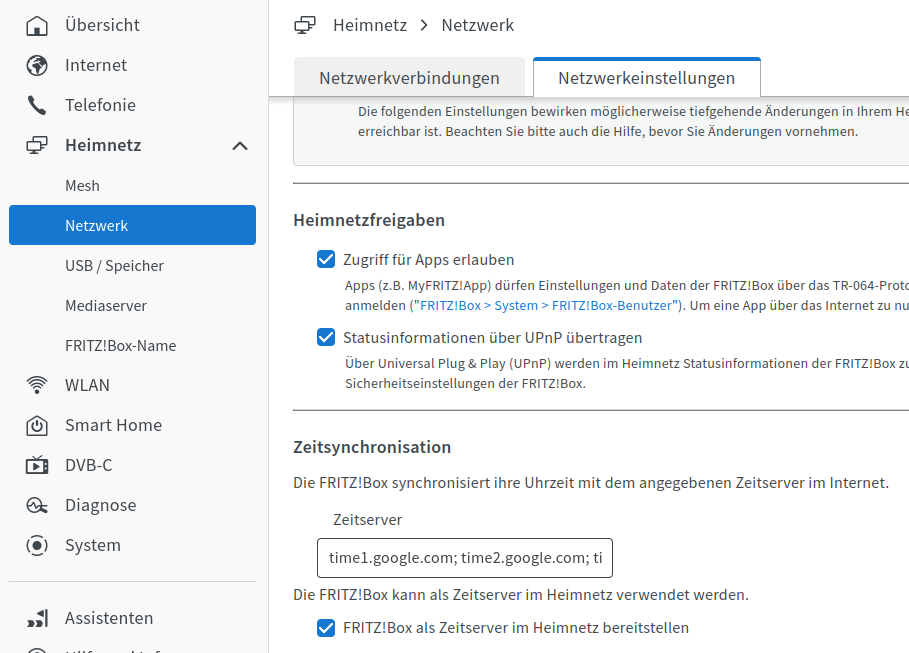
                                NTP=192.168.178.1 192.168.8.1

                                Setzt natürlich voraus, das dort ein ntp-Server läuft. Bei der Fritzbox muss das u. U. noch aktiviert werden.
                                f0672135-d37b-4ddd-a59f-9bce54cc9bc9-grafik.png

                                Linux-Werkzeugkasten:
                                https://forum.iobroker.net/topic/42952/der-kleine-iobroker-linux-werkzeugkasten
                                NodeJS Fixer Skript:
                                https://forum.iobroker.net/topic/68035/iob-node-fix-skript
                                iob_diag: curl -sLf -o diag.sh https://iobroker.net/diag.sh && bash diag.sh

                                K 1 Antwort Letzte Antwort
                                1
                                • K klaris

                                  @thomas-braun ich erstelle eine text Datei in /etc/systemd/timesyncd.conf
                                  mit den text "[Time]
                                  NTP=192.168.178.1 192.168.8.1
                                  FallbackNTP=0.de.pool.ntp.org 1.de.pool.ntp.org 2.de.pool.ntp.org 3.de.pool.ntp.org
                                  verstehe ich das richtig ?

                                  Thomas BraunT Online
                                  Thomas BraunT Online
                                  Thomas Braun
                                  Most Active
                                  schrieb am zuletzt editiert von
                                  #21

                                  @klaris

                                  Meine timesyncd.conf schaut so aus:

                                  echad@chet:~ $ cat /etc/systemd/timesyncd.conf
                                  #  This file is part of systemd.
                                  #
                                  #  systemd is free software; you can redistribute it and/or modify it under the
                                  #  terms of the GNU Lesser General Public License as published by the Free
                                  #  Software Foundation; either version 2.1 of the License, or (at your option)
                                  #  any later version.
                                  #
                                  # Entries in this file show the compile time defaults. Local configuration
                                  # should be created by either modifying this file, or by creating "drop-ins" in
                                  # the timesyncd.conf.d/ subdirectory. The latter is generally recommended.
                                  # Defaults can be restored by simply deleting this file and all drop-ins.
                                  #
                                  # See timesyncd.conf(5) for details.
                                  
                                  [Time]
                                  NTP=fritz.box 0.de.pool.ntp.org 1.de.pool.ntp.org 2.de.pool.ntp.org
                                  FallbackNTP=0.arch.pool.ntp.org 1.arch.pool.ntp.org 2.arch.pool.ntp.org 3.arch.pool.ntp.org
                                  #FallbackNTP=0.debian.pool.ntp.org 1.debian.pool.ntp.org 2.debian.pool.ntp.org 3.debian.pool.ntp.org
                                  #RootDistanceMaxSec=5
                                  #PollIntervalMinSec=32
                                  #PollIntervalMaxSec=2048
                                  #ConnectionRetrySec=30
                                  #SaveIntervalSec=60
                                  echad@chet:~ $ 


                                  Linux-Werkzeugkasten:
                                  https://forum.iobroker.net/topic/42952/der-kleine-iobroker-linux-werkzeugkasten
                                  NodeJS Fixer Skript:
                                  https://forum.iobroker.net/topic/68035/iob-node-fix-skript
                                  iob_diag: curl -sLf -o diag.sh https://iobroker.net/diag.sh && bash diag.sh

                                  1 Antwort Letzte Antwort
                                  0
                                  • K Offline
                                    K Offline
                                    klaris
                                    schrieb am zuletzt editiert von
                                    #22

                                    mein timesyncd

                                    #  This file is part of systemd.
                                    #
                                    #  systemd is free software; you can redistribute it and/or modify it under the
                                    #  terms of the GNU Lesser General Public License as published by the Free
                                    #  Software Foundation; either version 2.1 of the License, or (at your option)
                                    #  any later version.
                                    #
                                    # Entries in this file show the compile time defaults. Local configuration
                                    # should be created by either modifying this file, or by creating "drop-ins" in
                                    # the timesyncd.conf.d/ subdirectory. The latter is generally recommended.
                                    # Defaults can be restored by simply deleting this file and all drop-ins.
                                    #
                                    # See timesyncd.conf(5) for details.
                                    
                                    [Time]
                                    #NTP=
                                    #FallbackNTP=0.debian.pool.ntp.org 1.debian.pool.ntp.org 2.debian.pool.ntp.org 3.debian.pool.ntp.org
                                    #RootDistanceMaxSec=5
                                    #PollIntervalMinSec=32
                                    #PollIntervalMaxSec=2048
                                    #ConnectionRetrySec=30
                                    #SaveIntervalSec=60
                                    
                                    
                                    Thomas BraunT 1 Antwort Letzte Antwort
                                    0
                                    • K klaris

                                      mein timesyncd

                                      #  This file is part of systemd.
                                      #
                                      #  systemd is free software; you can redistribute it and/or modify it under the
                                      #  terms of the GNU Lesser General Public License as published by the Free
                                      #  Software Foundation; either version 2.1 of the License, or (at your option)
                                      #  any later version.
                                      #
                                      # Entries in this file show the compile time defaults. Local configuration
                                      # should be created by either modifying this file, or by creating "drop-ins" in
                                      # the timesyncd.conf.d/ subdirectory. The latter is generally recommended.
                                      # Defaults can be restored by simply deleting this file and all drop-ins.
                                      #
                                      # See timesyncd.conf(5) for details.
                                      
                                      [Time]
                                      #NTP=
                                      #FallbackNTP=0.debian.pool.ntp.org 1.debian.pool.ntp.org 2.debian.pool.ntp.org 3.debian.pool.ntp.org
                                      #RootDistanceMaxSec=5
                                      #PollIntervalMinSec=32
                                      #PollIntervalMaxSec=2048
                                      #ConnectionRetrySec=30
                                      #SaveIntervalSec=60
                                      
                                      
                                      Thomas BraunT Online
                                      Thomas BraunT Online
                                      Thomas Braun
                                      Most Active
                                      schrieb am zuletzt editiert von
                                      #23

                                      @klaris
                                      Da ist ja nix aktiv. Und deswegen wird da auch nix abgeglichen.

                                      Linux-Werkzeugkasten:
                                      https://forum.iobroker.net/topic/42952/der-kleine-iobroker-linux-werkzeugkasten
                                      NodeJS Fixer Skript:
                                      https://forum.iobroker.net/topic/68035/iob-node-fix-skript
                                      iob_diag: curl -sLf -o diag.sh https://iobroker.net/diag.sh && bash diag.sh

                                      K 1 Antwort Letzte Antwort
                                      0
                                      • Thomas BraunT Thomas Braun

                                        @klaris
                                        Da ist ja nix aktiv. Und deswegen wird da auch nix abgeglichen.

                                        K Offline
                                        K Offline
                                        klaris
                                        schrieb am zuletzt editiert von
                                        #24

                                        @thomas-braun habe leider kein zugriffsrecht diese datei zu löschen bzw zu ändern

                                        Thomas BraunT 1 Antwort Letzte Antwort
                                        0
                                        • Thomas BraunT Thomas Braun

                                          @klaris sagte in iobroker neu installation... befehl geht nicht:

                                          NTP=192.168.178.1 192.168.8.1

                                          Setzt natürlich voraus, das dort ein ntp-Server läuft. Bei der Fritzbox muss das u. U. noch aktiviert werden.

                                          f0672135-d37b-4ddd-a59f-9bce54cc9bc9-grafik.png

                                          K Offline
                                          K Offline
                                          klaris
                                          schrieb am zuletzt editiert von
                                          #25

                                          @thomas-braun :+1:

                                          1 Antwort Letzte Antwort
                                          0
                                          Antworten
                                          • In einem neuen Thema antworten
                                          Anmelden zum Antworten
                                          • Älteste zuerst
                                          • Neuste zuerst
                                          • Meiste Stimmen


                                          Support us

                                          ioBroker
                                          Community Adapters
                                          Donate
                                          FAQ Cloud / IOT
                                          HowTo: Node.js-Update
                                          HowTo: Backup/Restore
                                          Downloads
                                          BLOG

                                          659

                                          Online

                                          32.7k

                                          Benutzer

                                          82.4k

                                          Themen

                                          1.3m

                                          Beiträge
                                          Community
                                          Impressum | Datenschutz-Bestimmungen | Nutzungsbedingungen | Einwilligungseinstellungen
                                          ioBroker Community 2014-2025
                                          logo
                                          • Anmelden

                                          • Du hast noch kein Konto? Registrieren

                                          • Anmelden oder registrieren, um zu suchen
                                          • Erster Beitrag
                                            Letzter Beitrag
                                          0
                                          • Home
                                          • Aktuell
                                          • Tags
                                          • Ungelesen 0
                                          • Kategorien
                                          • Unreplied
                                          • Beliebt
                                          • GitHub
                                          • Docu
                                          • Hilfe