




iobroker neu installation... befehl geht nicht
-
Hallo leute
wollte auf meinen neuen Rasperry Pi 5 mit 4GB iobroker installieren.
zuerst Rasperry Pi Os Lite (64-bit) installiert
dann den befehl "curl -sLf https://iobroker.net/install.sh | bash -" leider passiert nichts....
kommt die fehlemeldung
pi@raspberrydi:~ $ curl -sSLf https://iobroker.net/install.sh | bash -
curl: (60) SSL certificate problem: certificate is not yet valid
More details here: https://curl.se/docs/sslcerts.html
was mache ich falsch ..hat immer funktioniert
eingabe mache ich über windows powershell...ps.noch ein schönes wochenende
update es liegt am falschen datum des raspberry nach eingabe ~ $ sudo date
Thu 4 Jul 03:27:03 CEST 2024 !!
mit welchen befehl kann ich das aktuelle datum und uhrzeit ändern@klaris sagte in iobroker neu installation... befehl geht nicht:
was mache ich falsch ..hat immer funktioniert
Hier funktioniert es auch.
Versuch es einfach nochmal.timedatectlsagt?
-
pi@raspberrydi:~ $ ~ $ sudo date Thu 4 Jul 03:27:03 CEST 2024 timedatectl -bash: /home/pi: Is a directory -bash: Thu: command not found Local time: Thu 2024-07-04 03:29:56 CEST Universal time: Thu 2024-07-04 01:29:56 UTC RTC time: Thu 1970-01-01 01:17:17 Time zone: Europe/Berlin (CEST, +0200) System clock synchronized: no NTP service: active RTC in local TZ: no -
pi@raspberrydi:~ $ ~ $ sudo date Thu 4 Jul 03:27:03 CEST 2024 timedatectl -bash: /home/pi: Is a directory -bash: Thu: command not found Local time: Thu 2024-07-04 03:29:56 CEST Universal time: Thu 2024-07-04 01:29:56 UTC RTC time: Thu 1970-01-01 01:17:17 Time zone: Europe/Berlin (CEST, +0200) System clock synchronized: no NTP service: active RTC in local TZ: no@klaris sagte in iobroker neu installation... befehl geht nicht:
RTC time: Thu 1970-01-01 01:17:17
Hat der Pi5 eine Echtzeituhr? Hier hast du irgendwas komplett schräg eingestellt.
Linux-Werkzeugkasten:
https://forum.iobroker.net/topic/42952/der-kleine-iobroker-linux-werkzeugkasten
NodeJS Fixer Skript:
https://forum.iobroker.net/topic/68035/iob-node-fix-skript
iob_diag: curl -sLf -o diag.sh https://iobroker.net/diag.sh && bash diag.sh -
@klaris sagte in iobroker neu installation... befehl geht nicht:
RTC time: Thu 1970-01-01 01:17:17
Hat der Pi5 eine Echtzeituhr? Hier hast du irgendwas komplett schräg eingestellt.
@thomas-braun ich hab garicht gemacht ,ich hab das ganze ohne gui installiert wie immer ..da wird nirgends nach uhrzeit abgefragt ..sehr komisch ...
-
pi@raspberrydi:~ $ sudo systemctl stop systemd-timesyncd pi@raspberrydi:~ $ sudo systemctl disable systemd-timesyncd Removed "/etc/systemd/system/dbus-org.freedesktop.timesync1.service". Removed "/etc/systemd/system/sysinit.target.wants/systemd-timesyncd.service". pi@raspberrydi:~ $ sudo timedatectl set-time "2024-08-31 19:33:56" pi@raspberrydi:~ $ timedatectl Local time: Sat 2024-08-31 19:34:49 CEST Universal time: Sat 2024-08-31 17:34:49 UTC RTC time: Sat 2024-08-31 17:34:49 Time zone: Europe/Berlin (CEST, +0200) System clock synchronized: no NTP service: inactive RTC in local TZ: no -
@klaris sagte in iobroker neu installation... befehl geht nicht:
RTC time: Thu 1970-01-01 01:17:17
Hat der Pi5 eine Echtzeituhr? Hier hast du irgendwas komplett schräg eingestellt.
@thomas-braun sagte in iobroker neu installation... befehl geht nicht:
Hat der Pi5 eine Echtzeituhr?
ja, aber die Batterie ist optional
-
pi@raspberrydi:~ $ sudo systemctl stop systemd-timesyncd pi@raspberrydi:~ $ sudo systemctl disable systemd-timesyncd Removed "/etc/systemd/system/dbus-org.freedesktop.timesync1.service". Removed "/etc/systemd/system/sysinit.target.wants/systemd-timesyncd.service". pi@raspberrydi:~ $ sudo timedatectl set-time "2024-08-31 19:33:56" pi@raspberrydi:~ $ timedatectl Local time: Sat 2024-08-31 19:34:49 CEST Universal time: Sat 2024-08-31 17:34:49 UTC RTC time: Sat 2024-08-31 17:34:49 Time zone: Europe/Berlin (CEST, +0200) System clock synchronized: no NTP service: inactive RTC in local TZ: noSchaut bei mir anders aus. Ist aber auch ein PI4.
echad@chet:~ $ timedatectl
               Local time: Sat 2024-08-31 19:43:21 CEST
           Universal time: Sat 2024-08-31 17:43:21 UTC
                 RTC time: n/a
                Time zone: Europe/Berlin (CEST, +0200)
System clock synchronized: yes
              NTP service: active
          RTC in local TZ: no
echad@chet:~ $
Linux-Werkzeugkasten:
https://forum.iobroker.net/topic/42952/der-kleine-iobroker-linux-werkzeugkasten
NodeJS Fixer Skript:
https://forum.iobroker.net/topic/68035/iob-node-fix-skript
iob_diag: curl -sLf -o diag.sh https://iobroker.net/diag.sh && bash diag.sh -
Schaut bei mir anders aus. Ist aber auch ein PI4.
echad@chet:~ $ timedatectl Local time: Sat 2024-08-31 19:43:21 CEST Universal time: Sat 2024-08-31 17:43:21 UTC RTC time: n/a Time zone: Europe/Berlin (CEST, +0200) System clock synchronized: yes NTP service: active RTC in local TZ: no echad@chet:~ $@thomas-braun sagte in iobroker neu installation... befehl geht nicht:
Schaut bei mir anders aus
bei @klaris ist kein ntp service aktiv
-
@thomas-braun sagte in iobroker neu installation... befehl geht nicht:
Schaut bei mir anders aus
bei @klaris ist kein ntp service aktiv
-
@klaris der sollte standardmäßig laufen.
hat vielleicht dein Router keinen ntp server?edit:
in deinem ersten Output war er noch aktiv -
~~https://www.creativeturtle.de/tutorials/raspberry-pi-mit-ntp-client/#Einrichtung_als_NTP-Client~~
Edit: Würde ich so nicht machen, sondern timesyncd verwenden:https://wiki.ubuntuusers.de/systemd/timesyncd/
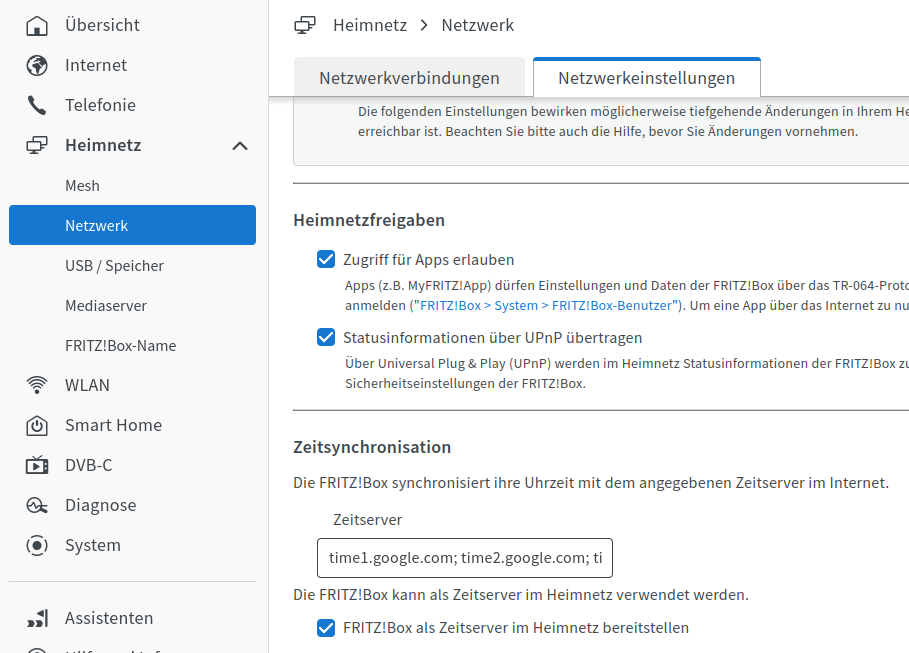
Die FritzBox kann als ntp-Server fungieren. So hab ich das bei mir z. B. eingestellt.
-
~~https://www.creativeturtle.de/tutorials/raspberry-pi-mit-ntp-client/#Einrichtung_als_NTP-Client~~
Edit: Würde ich so nicht machen, sondern timesyncd verwenden:https://wiki.ubuntuusers.de/systemd/timesyncd/
Die FritzBox kann als ntp-Server fungieren. So hab ich das bei mir z. B. eingestellt.
@thomas-braun das ist mir zu kompliziert ...mit den 2 raspberry pi 3 gibt es keine probleme gleicher router ...
-
@thomas-braun das ist mir zu kompliziert ...mit den 2 raspberry pi 3 gibt es keine probleme gleicher router ...
Ja und nun?
Mit der Eieruhr wirst du beständig in so 'seltsame Probleme' wie im Ursprungsposting rennen.
Muss also richtig eingestellt werden. -
Ja und nun?
Mit der Eieruhr wirst du beständig in so 'seltsame Probleme' wie im Ursprungsposting rennen.
Muss also richtig eingestellt werden.@thomas-braun die frage ist warum ist das beim raspberry 5 so ,und wie gehe ich vor schritt anleitung vieleicht
..ich bin kein experte auf dem gebiet..
ps .gerade neu instaliert und uhrzeit ist wieder auf 4 juli 2:17: das ist mir echt neu !! das machte der raspberry pi 3 nicht .. -
@thomas-braun die frage ist warum ist das beim raspberry 5 so ,und wie gehe ich vor schritt anleitung vieleicht
..ich bin kein experte auf dem gebiet..
ps .gerade neu instaliert und uhrzeit ist wieder auf 4 juli 2:17: das ist mir echt neu !! das machte der raspberry pi 3 nicht ..@klaris sagte in iobroker neu installation... befehl geht nicht:
und wie gehe ich vor schritt anleitung vieleicht
Steht doch im Ubuntu-Wiki drin.
-
@klaris sagte in iobroker neu installation... befehl geht nicht:
und wie gehe ich vor schritt anleitung vieleicht
Steht doch im Ubuntu-Wiki drin.
@thomas-braun ich erstelle eine text Datei in /etc/systemd/timesyncd.conf
mit den text "[Time]
NTP=192.168.178.1 192.168.8.1
FallbackNTP=0.de.pool.ntp.org 1.de.pool.ntp.org 2.de.pool.ntp.org 3.de.pool.ntp.org
verstehe ich das richtig ? -
@thomas-braun ich erstelle eine text Datei in /etc/systemd/timesyncd.conf
mit den text "[Time]
NTP=192.168.178.1 192.168.8.1
FallbackNTP=0.de.pool.ntp.org 1.de.pool.ntp.org 2.de.pool.ntp.org 3.de.pool.ntp.org
verstehe ich das richtig ?In der
/etc/systemd/timesyncd.confsollte schon was drin stehen, du musst die Einträge also nur anpassen.
MIt dem bevorzugten Editor, am einfachsten wohl mitnano. -
@thomas-braun ich erstelle eine text Datei in /etc/systemd/timesyncd.conf
mit den text "[Time]
NTP=192.168.178.1 192.168.8.1
FallbackNTP=0.de.pool.ntp.org 1.de.pool.ntp.org 2.de.pool.ntp.org 3.de.pool.ntp.org
verstehe ich das richtig ?@klaris sagte in iobroker neu installation... befehl geht nicht:
NTP=192.168.178.1 192.168.8.1
Setzt natürlich voraus, das dort ein ntp-Server läuft. Bei der Fritzbox muss das u. U. noch aktiviert werden.
-
@thomas-braun ich erstelle eine text Datei in /etc/systemd/timesyncd.conf
mit den text "[Time]
NTP=192.168.178.1 192.168.8.1
FallbackNTP=0.de.pool.ntp.org 1.de.pool.ntp.org 2.de.pool.ntp.org 3.de.pool.ntp.org
verstehe ich das richtig ?Meine timesyncd.conf schaut so aus:
echad@chet:~ $ cat /etc/systemd/timesyncd.conf
#  This file is part of systemd.
#
#  systemd is free software; you can redistribute it and/or modify it under the
#  terms of the GNU Lesser General Public License as published by the Free
#  Software Foundation; either version 2.1 of the License, or (at your option)
#  any later version.
#
# Entries in this file show the compile time defaults. Local configuration
# should be created by either modifying this file, or by creating "drop-ins" in
# the timesyncd.conf.d/ subdirectory. The latter is generally recommended.
# Defaults can be restored by simply deleting this file and all drop-ins.
#
# See timesyncd.conf(5) for details.

[Time]
NTP=fritz.box 0.de.pool.ntp.org 1.de.pool.ntp.org 2.de.pool.ntp.org
FallbackNTP=0.arch.pool.ntp.org 1.arch.pool.ntp.org 2.arch.pool.ntp.org 3.arch.pool.ntp.org
#FallbackNTP=0.debian.pool.ntp.org 1.debian.pool.ntp.org 2.debian.pool.ntp.org 3.debian.pool.ntp.org
#RootDistanceMaxSec=5
#PollIntervalMinSec=32
#PollIntervalMaxSec=2048
#ConnectionRetrySec=30
#SaveIntervalSec=60
echad@chet:~ $

Hey! Du scheinst an dieser Unterhaltung interessiert zu sein, hast aber noch kein Konto.
Hast du es satt, bei jedem Besuch durch die gleichen Beiträge zu scrollen? Wenn du dich für ein Konto anmeldest, kommst du immer genau dorthin zurück, wo du zuvor warst, und kannst dich über neue Antworten benachrichtigen lassen (entweder per E-Mail oder Push-Benachrichtigung). Du kannst auch Lesezeichen speichern und Beiträge positiv bewerten, um anderen Community-Mitgliedern deine Wertschätzung zu zeigen.
Mit deinem Input könnte dieser Beitrag noch besser werden 💗
Registrieren Anmelden424
Online33.0k
Benutzende83.7k
Themen1.3m
Beiträge