




Wie vis debuggen - vis beendet sich gleich nach Start mit
-
Hallo zusammen, bin ein iobroker-User schon seit sehr, sehr langer Zeit - und konnte mir auch meist selbst helfen. Meine Installation ist aber mittlerweile recht ungepflegt und ich habe sie mal kürzlich hochziehen wollen von einem sehr alten Stand, node 10 oder noch älter, Ubuntu 18.04 auf einem Odroid N2 und einer wirklich alten iobroker Installation die von einem Odroid XU3 schon umgezogen wurde. Also viele Altlasten ...
Habe es mittlerweile geschafft die Installation grob auf aktuellen Stand (Beta wegen eines speziellen Adapters den ich mittlerweile nutzen will). Durch stetes Aufrufen von
iob fix, Hochziehen von Ubuntu auf zumindest 20.04, node auf 18.17 und jetzt 20.irgendwas viaiobroker nodejs-update. Ich hatte auch viele npm Probleme durch Verzeichnisse die bereits existierten (die ich letztlich einfach alle vor jedem npm Aufruf gelöscht hatte via
find /opt/iobroker/node_modules/ -name .*-???????? -print -exec rm -rf {} \;
), etc. Dann war admin erstmal furchtbar langsam und unvollständig (trotz kaum CPU-Last) - und jetzt ist es wieder da.Zum Problem (das schon irgendwann während meiner Odyssee auftrat): vis ist nicht erreichbar weil es offensichtlich nicht wirklich auf die Beine kommt. Das war sowohl mit vis-Versionen während des langen Update-Prozesses der Fall als auch jetzt mit der latest Beta. Ob es vorher schon Probleme gab weiß ich nicht mehr, da ich vis mit meinen paar Seiten die seit bereits sehr vielen Jahren existierten und nach heutigen Maßstäben furchtbar häßlich sind schon lange nicht mehr nutzte. Im Wesentlichen geht es einfach darum dass ich keine Ahnung habe woran es liegt, die Fehlermeldung Terminated (NO_ERROR): Without reason ist nicht wirklich hilfreich. Ich suche einfach nach der "Reason".
vis.0
2024-08-27 19:44:21.383	info	Terminated (NO_ERROR): Without reason

vis.0
2024-08-27 19:44:20.613	info	starting. Version 1.5.6 in /opt/iobroker/node_modules/iobroker.vis, node: v20.17.0, js-controller: 6.0.11

vis.0
2024-08-27 19:44:20.470	debug	States connected to redis: 127.0.0.1:9000

vis.0
2024-08-27 19:44:20.380	debug	States create User PubSub Client

vis.0
2024-08-27 19:44:20.376	debug	States create System PubSub Client

vis.0
2024-08-27 19:44:20.352	debug	Redis States: Use Redis connection: 127.0.0.1:9000

vis.0
2024-08-27 19:44:20.306	debug	Objects connected to redis: 127.0.0.1:9001

vis.0
2024-08-27 19:44:20.298	debug	Objects client initialize lua scripts

vis.0
2024-08-27 19:44:20.234	debug	Objects create User PubSub Client

vis.0
2024-08-27 19:44:20.233	debug	Objects create System PubSub Client

vis.0
2024-08-27 19:44:20.230	debug	Objects client ready ... initialize now

vis.0
2024-08-27 19:44:20.177	debug	Redis Objects: Use Redis connection: 127.0.0.1:9001
Gib es Infos wie man hier tiefer reindebuggen kann oder den klassischen Fehler finden kann?
-
Hallo zusammen, bin ein iobroker-User schon seit sehr, sehr langer Zeit - und konnte mir auch meist selbst helfen. Meine Installation ist aber mittlerweile recht ungepflegt und ich habe sie mal kürzlich hochziehen wollen von einem sehr alten Stand, node 10 oder noch älter, Ubuntu 18.04 auf einem Odroid N2 und einer wirklich alten iobroker Installation die von einem Odroid XU3 schon umgezogen wurde. Also viele Altlasten ...
Habe es mittlerweile geschafft die Installation grob auf aktuellen Stand (Beta wegen eines speziellen Adapters den ich mittlerweile nutzen will). Durch stetes Aufrufen von
iob fix, Hochziehen von Ubuntu auf zumindest 20.04, node auf 18.17 und jetzt 20.irgendwas viaiobroker nodejs-update. Ich hatte auch viele npm Probleme durch Verzeichnisse die bereits existierten (die ich letztlich einfach alle vor jedem npm Aufruf gelöscht hatte via
find /opt/iobroker/node_modules/ -name .*-???????? -print -exec rm -rf {} \;
), etc. Dann war admin erstmal furchtbar langsam und unvollständig (trotz kaum CPU-Last) - und jetzt ist es wieder da.Zum Problem (das schon irgendwann während meiner Odyssee auftrat): vis ist nicht erreichbar weil es offensichtlich nicht wirklich auf die Beine kommt. Das war sowohl mit vis-Versionen während des langen Update-Prozesses der Fall als auch jetzt mit der latest Beta. Ob es vorher schon Probleme gab weiß ich nicht mehr, da ich vis mit meinen paar Seiten die seit bereits sehr vielen Jahren existierten und nach heutigen Maßstäben furchtbar häßlich sind schon lange nicht mehr nutzte. Im Wesentlichen geht es einfach darum dass ich keine Ahnung habe woran es liegt, die Fehlermeldung Terminated (NO_ERROR): Without reason ist nicht wirklich hilfreich. Ich suche einfach nach der "Reason".
vis.0
2024-08-27 19:44:21.383	info	Terminated (NO_ERROR): Without reason

vis.0
2024-08-27 19:44:20.613	info	starting. Version 1.5.6 in /opt/iobroker/node_modules/iobroker.vis, node: v20.17.0, js-controller: 6.0.11

vis.0
2024-08-27 19:44:20.470	debug	States connected to redis: 127.0.0.1:9000

vis.0
2024-08-27 19:44:20.380	debug	States create User PubSub Client

vis.0
2024-08-27 19:44:20.376	debug	States create System PubSub Client

vis.0
2024-08-27 19:44:20.352	debug	Redis States: Use Redis connection: 127.0.0.1:9000

vis.0
2024-08-27 19:44:20.306	debug	Objects connected to redis: 127.0.0.1:9001

vis.0
2024-08-27 19:44:20.298	debug	Objects client initialize lua scripts

vis.0
2024-08-27 19:44:20.234	debug	Objects create User PubSub Client

vis.0
2024-08-27 19:44:20.233	debug	Objects create System PubSub Client

vis.0
2024-08-27 19:44:20.230	debug	Objects client ready ... initialize now

vis.0
2024-08-27 19:44:20.177	debug	Redis Objects: Use Redis connection: 127.0.0.1:9001
Gib es Infos wie man hier tiefer reindebuggen kann oder den klassischen Fehler finden kann?
-
Bitte:
Skript v.2024-05-22 *** BASE SYSTEM *** Static hostname: o-n2 Icon name: computer Operating System: Ubuntu 20.04.6 LTS Kernel: Linux 4.9.337-138 Architecture: arm64 Docker : false Virtualization : none Kernel : aarch64 Userland : 64 bit Systemuptime and Load: 21:34:52 up 1 day, 8:44, 1 user, load average: 0.80, 0.67, 0.73 CPU threads: 6 *** Time and Time Zones *** Local time: Tue 2024-08-27 21:34:52 UTC Universal time: Tue 2024-08-27 21:34:52 UTC RTC time: Tue 2024-08-27 21:34:53 Time zone: Etc/UTC (UTC, +0000) System clock synchronized: yes NTP service: active RTC in local TZ: no *** Users and Groups *** User that called 'iob diag': odroid HOME=/home/odroid GROUPS=odroid adm dialout cdrom sudo dip plugdev lpadmin lightdm nopasswdlogin pulse-access iobroker User that is running 'js-controller': iobroker HOME=/home/iobroker GROUPS=iobroker tty dialout audio video plugdev bluetooth *** Display-Server-Setup *** Display-Server: true Desktop: Terminal: tty Boot Target: graphical.target *** MEMORY *** total used free shared buff/cache available Mem: 3.7G 1.3G 1.7G 25M 630M 2.2G Swap: 1.0G 266M 757M Total: 4.7G 1.6G 2.5G Active iob-Instances: 13 3712 M total memory 1347 M used memory 916 M active memory 727 M inactive memory 1734 M free memory 213 M buffer memory 416 M swap cache 1023 M total swap 266 M used swap 757 M free swap *** top - Table Of Processes *** top - 21:34:53 up 1 day, 8:44, 1 user, load average: 0.80, 0.67, 0.73 Tasks: 499 total, 1 running, 498 sleeping, 0 stopped, 0 zombie %Cpu(s): 2.8 us, 4.2 sy, 0.0 ni, 93.0 id, 0.0 wa, 0.0 hi, 0.0 si, 0.0 st MiB Mem : 3712.1 total, 1733.4 free, 1348.1 used, 630.6 buff/cache MiB Swap: 1024.0 total, 757.9 free, 266.0 used. 2173.9 avail Mem *** FAILED SERVICES *** UNIT LOAD ACTIVE SUB DESCRIPTION * evcc.service loaded failed failed evcc LOAD = Reflects whether the unit definition was properly loaded. ACTIVE = The high-level unit activation state, i.e. generalization of SUB. SUB = The low-level unit activation state, values depend on unit type. 1 loaded units listed. *** FILESYSTEM *** Filesystem Type Size Used Avail Use% Mounted on udev devtmpfs 1.9G 0 1.9G 0% /dev tmpfs tmpfs 372M 2.4M 369M 1% /run /dev/mmcblk0p2 ext4 29G 24G 4.2G 85% / tmpfs tmpfs 1.9G 32K 1.9G 1% /dev/shm tmpfs tmpfs 5.0M 4.0K 5.0M 1% /run/lock tmpfs tmpfs 1.9G 0 1.9G 0% /sys/fs/cgroup /dev/mmcblk0p1 vfat 128M 23M 106M 18% /media/boot tmpfs tmpfs 372M 8.0K 372M 1% /run/user/114 tmpfs tmpfs 372M 4.0K 372M 1% /run/user/1000 Messages concerning ext4 filesystem in dmesg: [Mon Aug 26 12:50:23 2024] EXT4-fs (mmcblk0p2): mounted filesystem with ordered data mode. Opts: (null) [Mon Aug 26 12:50:24 2024] EXT4-fs (mmcblk0p2): re-mounted. Opts: errors=remount-ro Show mounted filesystems: TARGET SOURCE FSTYPE OPTIONS / /dev/mmcblk0p2 ext4 rw,relatime,errors=remount-ro,stripe=32716,data=ordered |-/sys sysfs sysfs rw,nosuid,nodev,noexec,relatime | |-/sys/kernel/security securityfs securityfs rw,nosuid,nodev,noexec,relatime | |-/sys/fs/cgroup tmpfs tmpfs ro,nosuid,nodev,noexec,mode=755 | | |-/sys/fs/cgroup/unified cgroup2 cgroup2 rw,nosuid,nodev,noexec,relatime | | |-/sys/fs/cgroup/systemd cgroup cgroup rw,nosuid,nodev,noexec,relatime,xattr,name=systemd | | |-/sys/fs/cgroup/debug cgroup cgroup rw,nosuid,nodev,noexec,relatime,debug | | |-/sys/fs/cgroup/cpu,cpuacct cgroup cgroup rw,nosuid,nodev,noexec,relatime,cpu,cpuacct | | |-/sys/fs/cgroup/pids cgroup cgroup rw,nosuid,nodev,noexec,relatime,pids | | |-/sys/fs/cgroup/schedtune cgroup cgroup rw,nosuid,nodev,noexec,relatime,schedtune | | |-/sys/fs/cgroup/cpuset cgroup cgroup rw,nosuid,nodev,noexec,relatime,cpuset | | |-/sys/fs/cgroup/net_cls,net_prio cgroup cgroup rw,nosuid,nodev,noexec,relatime,net_cls,net_prio | | |-/sys/fs/cgroup/freezer cgroup cgroup rw,nosuid,nodev,noexec,relatime,freezer | | |-/sys/fs/cgroup/blkio cgroup cgroup rw,nosuid,nodev,noexec,relatime,blkio | | |-/sys/fs/cgroup/devices cgroup cgroup rw,nosuid,nodev,noexec,relatime,devices | | |-/sys/fs/cgroup/perf_event cgroup cgroup rw,nosuid,nodev,noexec,relatime,perf_event | | `-/sys/fs/cgroup/memory cgroup cgroup rw,nosuid,nodev,noexec,relatime,memory | |-/sys/fs/pstore pstore pstore rw,nosuid,nodev,noexec,relatime | |-/sys/fs/bpf bpf bpf rw,nosuid,nodev,noexec,relatime | |-/sys/kernel/debug debugfs debugfs rw,nosuid,nodev,noexec,relatime | | `-/sys/kernel/debug/tracing tracefs tracefs rw,nosuid,nodev,noexec,relatime | |-/sys/kernel/tracing tracefs tracefs rw,nosuid,nodev,noexec,relatime | |-/sys/kernel/config configfs configfs rw,nosuid,nodev,noexec,relatime | `-/sys/fs/fuse/connections fusectl fusectl rw,nosuid,nodev,noexec,relatime |-/proc proc proc rw,nosuid,nodev,noexec,relatime | `-/proc/sys/fs/binfmt_misc systemd-1 autofs rw,relatime,fd=28,pgrp=1,timeout=0,minproto=5,maxproto=5,direct | `-/proc/sys/fs/binfmt_misc binfmt_misc binfmt_misc rw,nosuid,nodev,noexec,relatime |-/dev udev devtmpfs rw,nosuid,relatime,size=1891312k,nr_inodes=472828,mode=755 | |-/dev/pts devpts devpts rw,nosuid,noexec,relatime,gid=5,mode=620,ptmxmode=000 | |-/dev/shm tmpfs tmpfs rw,nosuid,nodev | `-/dev/mqueue mqueue mqueue rw,nosuid,nodev,noexec,relatime |-/run tmpfs tmpfs rw,nosuid,noexec,relatime,size=380124k,mode=755 | |-/run/lock tmpfs tmpfs rw,nosuid,nodev,noexec,relatime,size=5120k | |-/run/user/1000 tmpfs tmpfs rw,nosuid,nodev,relatime,size=380124k,mode=700,uid=1000,gid=1000 | `-/run/user/114 tmpfs tmpfs rw,nosuid,nodev,relatime,size=380124k,mode=700,uid=114,gid=117 | `-/run/user/114/gvfs gvfsd-fuse fuse.gvfsd-fuse rw,nosuid,nodev,relatime,user_id=114,group_id=117 `-/media/boot /dev/mmcblk0p1 vfat rw,relatime,fmask=0077,dmask=0077,codepage=437,iocharset=iso8859-1,shortname=mixed,errors=remount-ro Files in neuralgic directories: /var: 3.4G /var/ 2.8G /var/log/journal/e00bd6223a7245d0aa6e19e0ab12a024 2.8G /var/log/journal 2.8G /var/log 408M /var/lib Archived and active journals take up 2.7G in the file system. /opt/iobroker/backups: 22M /opt/iobroker/backups/ /opt/iobroker/iobroker-data: 9.2G /opt/iobroker/iobroker-data/ 8.2G /opt/iobroker/iobroker-data/history 842M /opt/iobroker/iobroker-data/files 493M /opt/iobroker/iobroker-data/files/javascript.admin 461M /opt/iobroker/iobroker-data/files/javascript.admin/static The five largest files in iobroker-data are: 27M /opt/iobroker/iobroker-data/files/tankerkoenig.admin/build/index.js.map 26M /opt/iobroker/iobroker-data/objects.jsonl 26M /opt/iobroker/iobroker-data/files/echarts/static/js/main.bad2715c.js.map 26M /opt/iobroker/iobroker-data/files/echarts.admin/chart/static/js/main.bad2715c.js.map 24M /opt/iobroker/iobroker-data/files/echarts.admin/static/js/main.6c4f5a4e.js.map USB-Devices by-id: USB-Sticks - Avoid direct links to /dev/tty* in your adapter setups, please always prefer the links 'by-id': No Devices found 'by-id' *** NodeJS-Installation *** /usr/bin/nodejs v20.17.0 /usr/bin/node v20.17.0 /usr/bin/npm 10.8.2 /usr/bin/npx 10.8.2 /usr/bin/corepack 0.29.3 nodejs: Installed: 20.17.0-1nodesource1 Candidate: 20.17.0-1nodesource1 Version table: *** 20.17.0-1nodesource1 1001 500 https://deb.nodesource.com/node_20.x nodistro/main arm64 Packages 100 /var/lib/dpkg/status 20.16.0-1nodesource1 1001 500 https://deb.nodesource.com/node_20.x nodistro/main arm64 Packages 20.15.1-1nodesource1 1001 500 https://deb.nodesource.com/node_20.x nodistro/main arm64 Packages 20.15.0-1nodesource1 1001 500 https://deb.nodesource.com/node_20.x nodistro/main arm64 Packages 20.14.0-1nodesource1 1001 500 https://deb.nodesource.com/node_20.x nodistro/main arm64 Packages 20.13.1-1nodesource1 1001 500 https://deb.nodesource.com/node_20.x nodistro/main arm64 Packages 20.13.0-1nodesource1 1001 500 https://deb.nodesource.com/node_20.x nodistro/main arm64 Packages 20.12.2-1nodesource1 1001 500 https://deb.nodesource.com/node_20.x nodistro/main arm64 Packages 20.12.1-1nodesource1 1001 500 https://deb.nodesource.com/node_20.x nodistro/main arm64 Packages 20.12.0-1nodesource1 1001 500 https://deb.nodesource.com/node_20.x nodistro/main arm64 Packages 20.11.1-1nodesource1 1001 500 https://deb.nodesource.com/node_20.x nodistro/main arm64 Packages 20.11.0-1nodesource1 1001 500 https://deb.nodesource.com/node_20.x nodistro/main arm64 Packages 20.10.0-1nodesource1 1001 500 https://deb.nodesource.com/node_20.x nodistro/main arm64 Packages 20.9.0-1nodesource1 1001 500 https://deb.nodesource.com/node_20.x nodistro/main arm64 Packages 20.8.1-1nodesource1 1001 500 https://deb.nodesource.com/node_20.x nodistro/main arm64 Packages 20.8.0-1nodesource1 1001 500 https://deb.nodesource.com/node_20.x nodistro/main arm64 Packages 20.7.0-1nodesource1 1001 500 https://deb.nodesource.com/node_20.x nodistro/main arm64 Packages 20.6.1-1nodesource1 1001 500 https://deb.nodesource.com/node_20.x nodistro/main arm64 Packages 20.6.0-1nodesource1 1001 500 https://deb.nodesource.com/node_20.x nodistro/main arm64 Packages 20.5.1-1nodesource1 1001 500 https://deb.nodesource.com/node_20.x nodistro/main arm64 Packages 20.5.0-1nodesource1 1001 500 https://deb.nodesource.com/node_20.x nodistro/main arm64 Packages 20.4.0-1nodesource1 1001 500 https://deb.nodesource.com/node_20.x nodistro/main arm64 Packages 20.3.1-1nodesource1 1001 500 https://deb.nodesource.com/node_20.x nodistro/main arm64 Packages 20.3.0-1nodesource1 1001 500 https://deb.nodesource.com/node_20.x nodistro/main arm64 Packages 20.2.0-1nodesource1 1001 500 https://deb.nodesource.com/node_20.x nodistro/main arm64 Packages 20.1.0-1nodesource1 1001 500 https://deb.nodesource.com/node_20.x nodistro/main arm64 Packages 20.0.0-1nodesource1 1001 500 https://deb.nodesource.com/node_20.x nodistro/main arm64 Packages 10.19.0~dfsg-3ubuntu1.6 500 500 http://ports.ubuntu.com/ubuntu-ports focal-updates/universe arm64 Packages 500 http://ports.ubuntu.com/ubuntu-ports focal-security/universe arm64 Packages 10.19.0~dfsg-3ubuntu1 500 500 http://ports.ubuntu.com/ubuntu-ports focal/universe arm64 Packages Temp directories causing npm8 problem: 0 No problems detected Errors in npm tree: *** ioBroker-Installation *** ioBroker Status iobroker is running on this host. Objects type: jsonl States type: jsonl Core adapters versions js-controller: 6.0.11 admin: 7.0.25 javascript: 8.8.2 nodejs modules from github: 1 | `-- xmlbuilder@0.4.2 invalid: "https://github.com/hobbyquaker/xmlbuilder-js/tarball/29fe5030dc6852007dc8d1bfd5109d75f8da58d5" from node_modules/homematic-xmlrpc Adapter State + system.adapter.admin.0 : admin : o-n2 - enabled, port: 8081, bind: 0.0.0.0, run as: admin system.adapter.bmw.0 : bmw : o-n2 - disabled system.adapter.cloud.0 : cloud : o-n2 - disabled system.adapter.discovery.0 : discovery : o-n2 - disabled system.adapter.dwd.0 : dwd : o-n2 - disabled system.adapter.echarts.0 : echarts : o-n2 - disabled system.adapter.firetv.0 : firetv : o-n2 - disabled system.adapter.flot.0 : flot : o-n2 - disabled + system.adapter.followthesun.0 : followthesun : o-n2 - enabled system.adapter.fritzbox.0 : fritzbox : o-n2 - disabled + system.adapter.history.0 : history : o-n2 - enabled system.adapter.hm-rega.0 : hm-rega : o-n2 - disabled system.adapter.hm-rpc.0 : hm-rpc : o-n2 - disabled, port: 0 + system.adapter.homeconnect.0 : homeconnect : o-n2 - enabled system.adapter.icons-mfd-png.0 : icons-mfd-png : o-n2 - disabled system.adapter.influxdb.0 : influxdb : o-n2 - disabled, port: 8086 + system.adapter.javascript.0 : javascript : o-n2 - enabled system.adapter.lgtv.0 : lgtv : o-n2 - disabled system.adapter.mobile.0 : mobile : o-n2 - disabled system.adapter.modbus.0 : modbus : o-n2 - disabled + system.adapter.mqtt.0 : mqtt : o-n2 - enabled, port: 1883, bind: 0.0.0.0 system.adapter.mqtt.1 : mqtt : o-n2 - disabled, port: 1883, bind: 0.0.0.0 system.adapter.nanoleaf-lightpanels.0 : nanoleaf-lightpanels : o-n2 - disabled, port: 16021 system.adapter.openweathermap.0 : openweathermap : o-n2 - disabled + system.adapter.ping.0 : ping : o-n2 - enabled system.adapter.rickshaw.0 : rickshaw : o-n2 - disabled + system.adapter.shelly.0 : shelly : o-n2 - enabled, port: 1882, bind: 0.0.0.0 system.adapter.sonoff.0 : sonoff : o-n2 - disabled, port: 1883, bind: 0.0.0.0 + system.adapter.tankerkoenig.0 : tankerkoenig : o-n2 - enabled + system.adapter.tr-064.0 : tr-064 : o-n2 - enabled system.adapter.vis-canvas-gauges.0 : vis-canvas-gauges : o-n2 - disabled system.adapter.vis-history.0 : vis-history : o-n2 - enabled system.adapter.vis-lcars.0 : vis-lcars : o-n2 - disabled system.adapter.vis-map.0 : vis-map : o-n2 - disabled system.adapter.vis-plumb.0 : vis-plumb : o-n2 - disabled system.adapter.vis-weather.0 : vis-weather : o-n2 - disabled system.adapter.vis.0 : vis : o-n2 - enabled + system.adapter.vw-connect.0 : vw-connect : o-n2 - enabled system.adapter.weatherunderground.0 : weatherunderground : o-n2 - disabled system.adapter.web.0 : web : o-n2 - disabled, port: 8082, bind: 0.0.0.0, run as: admin + system.adapter.yahka.0 : yahka : o-n2 - enabled system.adapter.yamaha.0 : yamaha : o-n2 - disabled + instance is alive Enabled adapters with bindings + system.adapter.admin.0 : admin : o-n2 - enabled, port: 8081, bind: 0.0.0.0, run as: admin + system.adapter.mqtt.0 : mqtt : o-n2 - enabled, port: 1883, bind: 0.0.0.0 + system.adapter.shelly.0 : shelly : o-n2 - enabled, port: 1882, bind: 0.0.0.0 ioBroker-Repositories ┌─────────┬───────────┬─────────────────────────────────────────────────────────────────────────────────────────────┬──────────────┐ │ (index) │ name │ url │ auto upgrade │ ├─────────┼───────────┼─────────────────────────────────────────────────────────────────────────────────────────────┼──────────────┤ │ 0 │ 'sources' │ 'conf/sources-dist.json' │ false │ │ 1 │ 'online' │ 'https://raw.githubusercontent.com/ioBroker/ioBroker.repositories/master/sources-dist.json' │ false │ │ 2 │ 'stable' │ 'http://download.iobroker.net/sources-dist.json' │ false │ │ 3 │ 'beta' │ 'http://download.iobroker.net/sources-dist-latest.json' │ false │ └─────────┴───────────┴─────────────────────────────────────────────────────────────────────────────────────────────┴──────────────┘ Active repo(s): beta Upgrade policy: none Installed ioBroker-Instances Used repository: beta Adapter "admin" : 7.0.25 , installed 7.0.25 Adapter "bmw" : 2.8.0 , installed 2.8.0 Adapter "cloud" : 5.0.1 , installed 5.0.1 Adapter "discovery" : 5.0.0 , installed 5.0.0 Adapter "dwd" : 2.8.5 , installed 2.8.5 Adapter "echarts" : 1.9.0 , installed 1.9.0 Adapter "firetv" : 2.1.0 , installed 2.1.0 Adapter "flot" : 1.12.0 , installed 1.12.0 Adapter "followthesun" : 0.5.1 , installed 0.5.1 Adapter "fritzbox" : 0.6.0 , installed 0.6.0 Adapter "history" : 3.0.1 , installed 3.0.1 Adapter "hm-rega" : 5.0.0 , installed 5.0.0 Adapter "hm-rpc" : 2.0.2 , installed 2.0.2 Adapter "homeconnect" : 1.4.1 , installed 1.4.1 Adapter "icons-mfd-png": 1.2.1 , installed 1.2.1 Adapter "influxdb" : 4.0.2 , installed 4.0.2 Adapter "jarvis" : 3.1.8 , installed 3.1.8 Adapter "javascript" : 8.8.2 , installed 8.8.2 Controller "js-controller": 6.0.11 , installed 6.0.11 Adapter "lgtv" : 2.2.0 , installed 2.2.0 Adapter "mobile" : 1.0.1 , installed 1.0.1 Adapter "modbus" : 6.2.3 , installed 6.2.3 Adapter "mqtt" : 6.0.2 , installed 6.0.2 Adapter "nanoleaf-lightpanels": 1.5.0, installed 1.5.0 Adapter "openweathermap": 1.1.2 , installed 1.1.2 Adapter "ping" : 1.7.3 , installed 1.7.3 Adapter "rickshaw" : 1.0.0 , installed 1.0.0 Adapter "shelly" : 8.1.1 , installed 8.1.1 Adapter "simple-api" : 2.8.0 , installed 2.8.0 Adapter "socketio" : 6.7.1 , installed 6.7.1 Adapter "sonoff" : 3.1.2 , installed 3.1.2 Adapter "tankerkoenig" : 3.4.0 , installed 3.4.0 Adapter "tr-064" : 4.3.0 , installed 4.3.0 Adapter "vis" : 1.5.6 , installed 1.5.6 Adapter "vis-canvas-gauges": 1.0.1, installed 1.0.1 Adapter "vis-history" : 1.0.0 , installed 1.0.0 Adapter "vis-lcars" : 1.1.1 , installed 1.1.1 Adapter "vis-map" : 1.1.2 , installed 1.1.2 Adapter "vis-plumb" : 1.0.2 , installed 1.0.2 Adapter "vis-weather" : 2.5.9 , installed 2.5.9 Adapter "vw-connect" : 0.6.0 , installed 0.6.0 Adapter "weatherunderground": 3.7.0, installed 3.7.0 Adapter "web" : 6.3.0 , installed 6.3.0 Adapter "ws" : 2.6.2 , installed 2.6.2 Adapter "yahka" : 1.0.4 , installed 1.0.4 Adapter "yamaha" : 0.5.4 , installed 0.5.4 Objects and States Please stand by - This may take a while Objects: 9064 States: 7668 *** OS-Repositories and Updates *** Hit:1 http://ppa.launchpad.net/timescale/timescaledb-ppa/ubuntu focal InRelease Hit:2 http://ports.ubuntu.com/ubuntu-ports focal InRelease Hit:3 http://ports.ubuntu.com/ubuntu-ports focal-updates InRelease Hit:4 https://apt.grafana.com stable InRelease Hit:5 http://ports.ubuntu.com/ubuntu-ports focal-backports InRelease Hit:6 http://ports.ubuntu.com/ubuntu-ports focal-security InRelease Hit:7 https://deb.nodesource.com/node_20.x nodistro InRelease Hit:8 http://deb.odroid.in/n2 focal InRelease Hit:9 http://archive.canonical.com/ubuntu focal InRelease Reading package lists... Pending Updates: 1 *** Listening Ports *** Active Internet connections (only servers) Proto Recv-Q Send-Q Local Address Foreign Address State User Inode PID/Program name tcp 0 0 127.0.0.53:53 0.0.0.0:* LISTEN 102 25749 3141/systemd-resolv tcp 0 0 0.0.0.0:22 0.0.0.0:* LISTEN 0 23788 3390/sshd: /usr/sbi tcp 0 0 127.0.0.1:631 0.0.0.0:* LISTEN 0 326913 60543/cupsd tcp 0 0 127.0.0.1:5432 0.0.0.0:* LISTEN 122 23889 3453/postgres tcp 0 0 127.0.0.1:8088 0.0.0.0:* LISTEN 123 20116 3334/influxd tcp 0 0 127.0.0.1:5433 0.0.0.0:* LISTEN 122 24929 3454/postgres tcp 0 0 0.0.0.0:1883 0.0.0.0:* LISTEN 1001 446972 74678/io.mqtt.0 tcp 0 0 127.0.0.1:33287 0.0.0.0:* LISTEN 1001 448167 74799/io.yahka.0 tcp 0 0 127.0.0.1:9000 0.0.0.0:* LISTEN 1001 440200 74579/iobroker.js-c tcp 0 0 127.0.0.1:9001 0.0.0.0:* LISTEN 1001 447927 74579/iobroker.js-c tcp6 0 0 :::80 :::* LISTEN 0 24901 3455/apache2 tcp6 0 0 :::8081 :::* LISTEN 1001 440248 74607/io.admin.0 tcp6 0 0 :::8086 :::* LISTEN 123 24175 3334/influxd tcp6 0 0 :::22 :::* LISTEN 0 23790 3390/sshd: /usr/sbi tcp6 0 0 ::1:631 :::* LISTEN 0 326912 60543/cupsd tcp6 0 0 :::3000 :::* LISTEN 124 28670 3637/grafana tcp6 0 0 ::1:5432 :::* LISTEN 122 20124 3453/postgres tcp6 0 0 ::1:5433 :::* LISTEN 122 24928 3454/postgres tcp6 0 0 :::43873 :::* LISTEN 1001 447191 74799/io.yahka.0 udp 0 0 0.0.0.0:5683 0.0.0.0:* 1001 870090 106377/io.shelly.0 udp 0 0 127.0.0.53:53 0.0.0.0:* 102 25746 3141/systemd-resolv udp 0 0 0.0.0.0:45667 0.0.0.0:* 118 25828 3204/avahi-daemon: udp 0 0 0.0.0.0:631 0.0.0.0:* 0 334556 60546/cups-browsed udp 0 0 0.0.0.0:5353 0.0.0.0:* 118 25826 3204/avahi-daemon: udp6 0 0 :::34921 :::* 118 25829 3204/avahi-daemon: udp6 0 0 fe80::49d:1fae:71cb:546 :::* 0 29136 3208/NetworkManager udp6 0 0 :::5353 :::* 118 25827 3204/avahi-daemon: *** Log File - Last 25 Lines *** 2024-08-27 20:40:28.396 - info: admin.0 (74607) <== Disconnect system.user.admin from ::ffff:192.168.178.172 admin 2024-08-27 20:40:39.405 - info: admin.0 (74607) ==> Connected system.user.admin from ::ffff:192.168.178.172 2024-08-27 20:40:59.406 - info: admin.0 (74607) <== Disconnect system.user.admin from ::ffff:192.168.178.172 admin 2024-08-27 20:41:13.995 - info: admin.0 (74607) ==> Connected system.user.admin from ::ffff:192.168.178.172 2024-08-27 20:45:19.016 - info: admin.0 (74607) <== Disconnect system.user.admin from ::ffff:192.168.178.172 admin 2024-08-27 20:53:46.008 - info: admin.0 (74607) ==> Connected system.user.admin from ::ffff:192.168.178.172 2024-08-27 20:53:48.682 - info: admin.0 (74607) <== Disconnect system.user.admin from ::ffff:192.168.178.172 adminund Zusammenfassung
======================= SUMMARY ======================= v.2024-05-22 Static hostname: o-n2 Icon name: computer Operating System: Ubuntu 20.04.6 LTS Kernel: Linux 4.9.337-138 Architecture: arm64 Installation: native Kernel: aarch64 Userland: 64 bit Timezone: Etc/UTC (UTC, +0000) User-ID: 1000 Display-Server: true Boot Target: graphical.target Pending OS-Updates: 1 Pending iob updates: 0 Nodejs-Installation: /usr/bin/nodejs v20.17.0 /usr/bin/node v20.17.0 /usr/bin/npm 10.8.2 /usr/bin/npx 10.8.2 /usr/bin/corepack 0.29.3 Recommended versions are nodejs 20.17.0 and npm 10.8.2 Your nodejs installation is correct MEMORY: total used free shared buff/cache available Mem: 3.7G 1.4G 1.3G 25M 986M 2.1G Swap: 1.0G 266M 757M Total: 4.7G 1.7G 2.1G Active iob-Instances: 13 Upgrade policy: none ioBroker Core: js-controller 6.0.11 admin 7.0.25 ioBroker Status: iobroker is running on this host. Objects type: jsonl States type: jsonl Status admin and web instance: + system.adapter.admin.0 : admin : o-n2 - enabled, port: 8081, bind: 0.0.0.0, run as: admin system.adapter.web.0 : web : o-n2 - disabled, port: 8082, bind: 0.0.0.0, run as: admin Objects: 9064 States: 7668 Size of iob-Database: 26M /opt/iobroker/iobroker-data/objects.jsonl 9.8M /opt/iobroker/iobroker-data/objects.json.migrated 9.8M /opt/iobroker/iobroker-data/objects.json.bak.migrated 0 /opt/iobroker/iobroker-data/objects.json.broken 7.9M /opt/iobroker/iobroker-data/states.jsonl 1.1M /opt/iobroker/iobroker-data/states.json.migrated 1.1M /opt/iobroker/iobroker-data/states.json.bak.migrated 0 /opt/iobroker/iobroker-data/states.json.broken =================== END OF SUMMARY ==================== -
Bitte:
Skript v.2024-05-22 *** BASE SYSTEM *** Static hostname: o-n2 Icon name: computer Operating System: Ubuntu 20.04.6 LTS Kernel: Linux 4.9.337-138 Architecture: arm64 Docker : false Virtualization : none Kernel : aarch64 Userland : 64 bit Systemuptime and Load: 21:34:52 up 1 day, 8:44, 1 user, load average: 0.80, 0.67, 0.73 CPU threads: 6 *** Time and Time Zones *** Local time: Tue 2024-08-27 21:34:52 UTC Universal time: Tue 2024-08-27 21:34:52 UTC RTC time: Tue 2024-08-27 21:34:53 Time zone: Etc/UTC (UTC, +0000) System clock synchronized: yes NTP service: active RTC in local TZ: no *** Users and Groups *** User that called 'iob diag': odroid HOME=/home/odroid GROUPS=odroid adm dialout cdrom sudo dip plugdev lpadmin lightdm nopasswdlogin pulse-access iobroker User that is running 'js-controller': iobroker HOME=/home/iobroker GROUPS=iobroker tty dialout audio video plugdev bluetooth *** Display-Server-Setup *** Display-Server: true Desktop: Terminal: tty Boot Target: graphical.target *** MEMORY *** total used free shared buff/cache available Mem: 3.7G 1.3G 1.7G 25M 630M 2.2G Swap: 1.0G 266M 757M Total: 4.7G 1.6G 2.5G Active iob-Instances: 13 3712 M total memory 1347 M used memory 916 M active memory 727 M inactive memory 1734 M free memory 213 M buffer memory 416 M swap cache 1023 M total swap 266 M used swap 757 M free swap *** top - Table Of Processes *** top - 21:34:53 up 1 day, 8:44, 1 user, load average: 0.80, 0.67, 0.73 Tasks: 499 total, 1 running, 498 sleeping, 0 stopped, 0 zombie %Cpu(s): 2.8 us, 4.2 sy, 0.0 ni, 93.0 id, 0.0 wa, 0.0 hi, 0.0 si, 0.0 st MiB Mem : 3712.1 total, 1733.4 free, 1348.1 used, 630.6 buff/cache MiB Swap: 1024.0 total, 757.9 free, 266.0 used. 2173.9 avail Mem *** FAILED SERVICES *** UNIT LOAD ACTIVE SUB DESCRIPTION * evcc.service loaded failed failed evcc LOAD = Reflects whether the unit definition was properly loaded. ACTIVE = The high-level unit activation state, i.e. generalization of SUB. SUB = The low-level unit activation state, values depend on unit type. 1 loaded units listed. *** FILESYSTEM *** Filesystem Type Size Used Avail Use% Mounted on udev devtmpfs 1.9G 0 1.9G 0% /dev tmpfs tmpfs 372M 2.4M 369M 1% /run /dev/mmcblk0p2 ext4 29G 24G 4.2G 85% / tmpfs tmpfs 1.9G 32K 1.9G 1% /dev/shm tmpfs tmpfs 5.0M 4.0K 5.0M 1% /run/lock tmpfs tmpfs 1.9G 0 1.9G 0% /sys/fs/cgroup /dev/mmcblk0p1 vfat 128M 23M 106M 18% /media/boot tmpfs tmpfs 372M 8.0K 372M 1% /run/user/114 tmpfs tmpfs 372M 4.0K 372M 1% /run/user/1000 Messages concerning ext4 filesystem in dmesg: [Mon Aug 26 12:50:23 2024] EXT4-fs (mmcblk0p2): mounted filesystem with ordered data mode. Opts: (null) [Mon Aug 26 12:50:24 2024] EXT4-fs (mmcblk0p2): re-mounted. Opts: errors=remount-ro Show mounted filesystems: TARGET SOURCE FSTYPE OPTIONS / /dev/mmcblk0p2 ext4 rw,relatime,errors=remount-ro,stripe=32716,data=ordered |-/sys sysfs sysfs rw,nosuid,nodev,noexec,relatime | |-/sys/kernel/security securityfs securityfs rw,nosuid,nodev,noexec,relatime | |-/sys/fs/cgroup tmpfs tmpfs ro,nosuid,nodev,noexec,mode=755 | | |-/sys/fs/cgroup/unified cgroup2 cgroup2 rw,nosuid,nodev,noexec,relatime | | |-/sys/fs/cgroup/systemd cgroup cgroup rw,nosuid,nodev,noexec,relatime,xattr,name=systemd | | |-/sys/fs/cgroup/debug cgroup cgroup rw,nosuid,nodev,noexec,relatime,debug | | |-/sys/fs/cgroup/cpu,cpuacct cgroup cgroup rw,nosuid,nodev,noexec,relatime,cpu,cpuacct | | |-/sys/fs/cgroup/pids cgroup cgroup rw,nosuid,nodev,noexec,relatime,pids | | |-/sys/fs/cgroup/schedtune cgroup cgroup rw,nosuid,nodev,noexec,relatime,schedtune | | |-/sys/fs/cgroup/cpuset cgroup cgroup rw,nosuid,nodev,noexec,relatime,cpuset | | |-/sys/fs/cgroup/net_cls,net_prio cgroup cgroup rw,nosuid,nodev,noexec,relatime,net_cls,net_prio | | |-/sys/fs/cgroup/freezer cgroup cgroup rw,nosuid,nodev,noexec,relatime,freezer | | |-/sys/fs/cgroup/blkio cgroup cgroup rw,nosuid,nodev,noexec,relatime,blkio | | |-/sys/fs/cgroup/devices cgroup cgroup rw,nosuid,nodev,noexec,relatime,devices | | |-/sys/fs/cgroup/perf_event cgroup cgroup rw,nosuid,nodev,noexec,relatime,perf_event | | `-/sys/fs/cgroup/memory cgroup cgroup rw,nosuid,nodev,noexec,relatime,memory | |-/sys/fs/pstore pstore pstore rw,nosuid,nodev,noexec,relatime | |-/sys/fs/bpf bpf bpf rw,nosuid,nodev,noexec,relatime | |-/sys/kernel/debug debugfs debugfs rw,nosuid,nodev,noexec,relatime | | `-/sys/kernel/debug/tracing tracefs tracefs rw,nosuid,nodev,noexec,relatime | |-/sys/kernel/tracing tracefs tracefs rw,nosuid,nodev,noexec,relatime | |-/sys/kernel/config configfs configfs rw,nosuid,nodev,noexec,relatime | `-/sys/fs/fuse/connections fusectl fusectl rw,nosuid,nodev,noexec,relatime |-/proc proc proc rw,nosuid,nodev,noexec,relatime | `-/proc/sys/fs/binfmt_misc systemd-1 autofs rw,relatime,fd=28,pgrp=1,timeout=0,minproto=5,maxproto=5,direct | `-/proc/sys/fs/binfmt_misc binfmt_misc binfmt_misc rw,nosuid,nodev,noexec,relatime |-/dev udev devtmpfs rw,nosuid,relatime,size=1891312k,nr_inodes=472828,mode=755 | |-/dev/pts devpts devpts rw,nosuid,noexec,relatime,gid=5,mode=620,ptmxmode=000 | |-/dev/shm tmpfs tmpfs rw,nosuid,nodev | `-/dev/mqueue mqueue mqueue rw,nosuid,nodev,noexec,relatime |-/run tmpfs tmpfs rw,nosuid,noexec,relatime,size=380124k,mode=755 | |-/run/lock tmpfs tmpfs rw,nosuid,nodev,noexec,relatime,size=5120k | |-/run/user/1000 tmpfs tmpfs rw,nosuid,nodev,relatime,size=380124k,mode=700,uid=1000,gid=1000 | `-/run/user/114 tmpfs tmpfs rw,nosuid,nodev,relatime,size=380124k,mode=700,uid=114,gid=117 | `-/run/user/114/gvfs gvfsd-fuse fuse.gvfsd-fuse rw,nosuid,nodev,relatime,user_id=114,group_id=117 `-/media/boot /dev/mmcblk0p1 vfat rw,relatime,fmask=0077,dmask=0077,codepage=437,iocharset=iso8859-1,shortname=mixed,errors=remount-ro Files in neuralgic directories: /var: 3.4G /var/ 2.8G /var/log/journal/e00bd6223a7245d0aa6e19e0ab12a024 2.8G /var/log/journal 2.8G /var/log 408M /var/lib Archived and active journals take up 2.7G in the file system. /opt/iobroker/backups: 22M /opt/iobroker/backups/ /opt/iobroker/iobroker-data: 9.2G /opt/iobroker/iobroker-data/ 8.2G /opt/iobroker/iobroker-data/history 842M /opt/iobroker/iobroker-data/files 493M /opt/iobroker/iobroker-data/files/javascript.admin 461M /opt/iobroker/iobroker-data/files/javascript.admin/static The five largest files in iobroker-data are: 27M /opt/iobroker/iobroker-data/files/tankerkoenig.admin/build/index.js.map 26M /opt/iobroker/iobroker-data/objects.jsonl 26M /opt/iobroker/iobroker-data/files/echarts/static/js/main.bad2715c.js.map 26M /opt/iobroker/iobroker-data/files/echarts.admin/chart/static/js/main.bad2715c.js.map 24M /opt/iobroker/iobroker-data/files/echarts.admin/static/js/main.6c4f5a4e.js.map USB-Devices by-id: USB-Sticks - Avoid direct links to /dev/tty* in your adapter setups, please always prefer the links 'by-id': No Devices found 'by-id' *** NodeJS-Installation *** /usr/bin/nodejs v20.17.0 /usr/bin/node v20.17.0 /usr/bin/npm 10.8.2 /usr/bin/npx 10.8.2 /usr/bin/corepack 0.29.3 nodejs: Installed: 20.17.0-1nodesource1 Candidate: 20.17.0-1nodesource1 Version table: *** 20.17.0-1nodesource1 1001 500 https://deb.nodesource.com/node_20.x nodistro/main arm64 Packages 100 /var/lib/dpkg/status 20.16.0-1nodesource1 1001 500 https://deb.nodesource.com/node_20.x nodistro/main arm64 Packages 20.15.1-1nodesource1 1001 500 https://deb.nodesource.com/node_20.x nodistro/main arm64 Packages 20.15.0-1nodesource1 1001 500 https://deb.nodesource.com/node_20.x nodistro/main arm64 Packages 20.14.0-1nodesource1 1001 500 https://deb.nodesource.com/node_20.x nodistro/main arm64 Packages 20.13.1-1nodesource1 1001 500 https://deb.nodesource.com/node_20.x nodistro/main arm64 Packages 20.13.0-1nodesource1 1001 500 https://deb.nodesource.com/node_20.x nodistro/main arm64 Packages 20.12.2-1nodesource1 1001 500 https://deb.nodesource.com/node_20.x nodistro/main arm64 Packages 20.12.1-1nodesource1 1001 500 https://deb.nodesource.com/node_20.x nodistro/main arm64 Packages 20.12.0-1nodesource1 1001 500 https://deb.nodesource.com/node_20.x nodistro/main arm64 Packages 20.11.1-1nodesource1 1001 500 https://deb.nodesource.com/node_20.x nodistro/main arm64 Packages 20.11.0-1nodesource1 1001 500 https://deb.nodesource.com/node_20.x nodistro/main arm64 Packages 20.10.0-1nodesource1 1001 500 https://deb.nodesource.com/node_20.x nodistro/main arm64 Packages 20.9.0-1nodesource1 1001 500 https://deb.nodesource.com/node_20.x nodistro/main arm64 Packages 20.8.1-1nodesource1 1001 500 https://deb.nodesource.com/node_20.x nodistro/main arm64 Packages 20.8.0-1nodesource1 1001 500 https://deb.nodesource.com/node_20.x nodistro/main arm64 Packages 20.7.0-1nodesource1 1001 500 https://deb.nodesource.com/node_20.x nodistro/main arm64 Packages 20.6.1-1nodesource1 1001 500 https://deb.nodesource.com/node_20.x nodistro/main arm64 Packages 20.6.0-1nodesource1 1001 500 https://deb.nodesource.com/node_20.x nodistro/main arm64 Packages 20.5.1-1nodesource1 1001 500 https://deb.nodesource.com/node_20.x nodistro/main arm64 Packages 20.5.0-1nodesource1 1001 500 https://deb.nodesource.com/node_20.x nodistro/main arm64 Packages 20.4.0-1nodesource1 1001 500 https://deb.nodesource.com/node_20.x nodistro/main arm64 Packages 20.3.1-1nodesource1 1001 500 https://deb.nodesource.com/node_20.x nodistro/main arm64 Packages 20.3.0-1nodesource1 1001 500 https://deb.nodesource.com/node_20.x nodistro/main arm64 Packages 20.2.0-1nodesource1 1001 500 https://deb.nodesource.com/node_20.x nodistro/main arm64 Packages 20.1.0-1nodesource1 1001 500 https://deb.nodesource.com/node_20.x nodistro/main arm64 Packages 20.0.0-1nodesource1 1001 500 https://deb.nodesource.com/node_20.x nodistro/main arm64 Packages 10.19.0~dfsg-3ubuntu1.6 500 500 http://ports.ubuntu.com/ubuntu-ports focal-updates/universe arm64 Packages 500 http://ports.ubuntu.com/ubuntu-ports focal-security/universe arm64 Packages 10.19.0~dfsg-3ubuntu1 500 500 http://ports.ubuntu.com/ubuntu-ports focal/universe arm64 Packages Temp directories causing npm8 problem: 0 No problems detected Errors in npm tree: *** ioBroker-Installation *** ioBroker Status iobroker is running on this host. Objects type: jsonl States type: jsonl Core adapters versions js-controller: 6.0.11 admin: 7.0.25 javascript: 8.8.2 nodejs modules from github: 1 | `-- xmlbuilder@0.4.2 invalid: "https://github.com/hobbyquaker/xmlbuilder-js/tarball/29fe5030dc6852007dc8d1bfd5109d75f8da58d5" from node_modules/homematic-xmlrpc Adapter State + system.adapter.admin.0 : admin : o-n2 - enabled, port: 8081, bind: 0.0.0.0, run as: admin system.adapter.bmw.0 : bmw : o-n2 - disabled system.adapter.cloud.0 : cloud : o-n2 - disabled system.adapter.discovery.0 : discovery : o-n2 - disabled system.adapter.dwd.0 : dwd : o-n2 - disabled system.adapter.echarts.0 : echarts : o-n2 - disabled system.adapter.firetv.0 : firetv : o-n2 - disabled system.adapter.flot.0 : flot : o-n2 - disabled + system.adapter.followthesun.0 : followthesun : o-n2 - enabled system.adapter.fritzbox.0 : fritzbox : o-n2 - disabled + system.adapter.history.0 : history : o-n2 - enabled system.adapter.hm-rega.0 : hm-rega : o-n2 - disabled system.adapter.hm-rpc.0 : hm-rpc : o-n2 - disabled, port: 0 + system.adapter.homeconnect.0 : homeconnect : o-n2 - enabled system.adapter.icons-mfd-png.0 : icons-mfd-png : o-n2 - disabled system.adapter.influxdb.0 : influxdb : o-n2 - disabled, port: 8086 + system.adapter.javascript.0 : javascript : o-n2 - enabled system.adapter.lgtv.0 : lgtv : o-n2 - disabled system.adapter.mobile.0 : mobile : o-n2 - disabled system.adapter.modbus.0 : modbus : o-n2 - disabled + system.adapter.mqtt.0 : mqtt : o-n2 - enabled, port: 1883, bind: 0.0.0.0 system.adapter.mqtt.1 : mqtt : o-n2 - disabled, port: 1883, bind: 0.0.0.0 system.adapter.nanoleaf-lightpanels.0 : nanoleaf-lightpanels : o-n2 - disabled, port: 16021 system.adapter.openweathermap.0 : openweathermap : o-n2 - disabled + system.adapter.ping.0 : ping : o-n2 - enabled system.adapter.rickshaw.0 : rickshaw : o-n2 - disabled + system.adapter.shelly.0 : shelly : o-n2 - enabled, port: 1882, bind: 0.0.0.0 system.adapter.sonoff.0 : sonoff : o-n2 - disabled, port: 1883, bind: 0.0.0.0 + system.adapter.tankerkoenig.0 : tankerkoenig : o-n2 - enabled + system.adapter.tr-064.0 : tr-064 : o-n2 - enabled system.adapter.vis-canvas-gauges.0 : vis-canvas-gauges : o-n2 - disabled system.adapter.vis-history.0 : vis-history : o-n2 - enabled system.adapter.vis-lcars.0 : vis-lcars : o-n2 - disabled system.adapter.vis-map.0 : vis-map : o-n2 - disabled system.adapter.vis-plumb.0 : vis-plumb : o-n2 - disabled system.adapter.vis-weather.0 : vis-weather : o-n2 - disabled system.adapter.vis.0 : vis : o-n2 - enabled + system.adapter.vw-connect.0 : vw-connect : o-n2 - enabled system.adapter.weatherunderground.0 : weatherunderground : o-n2 - disabled system.adapter.web.0 : web : o-n2 - disabled, port: 8082, bind: 0.0.0.0, run as: admin + system.adapter.yahka.0 : yahka : o-n2 - enabled system.adapter.yamaha.0 : yamaha : o-n2 - disabled + instance is alive Enabled adapters with bindings + system.adapter.admin.0 : admin : o-n2 - enabled, port: 8081, bind: 0.0.0.0, run as: admin + system.adapter.mqtt.0 : mqtt : o-n2 - enabled, port: 1883, bind: 0.0.0.0 + system.adapter.shelly.0 : shelly : o-n2 - enabled, port: 1882, bind: 0.0.0.0 ioBroker-Repositories ┌─────────┬───────────┬─────────────────────────────────────────────────────────────────────────────────────────────┬──────────────┐ │ (index) │ name │ url │ auto upgrade │ ├─────────┼───────────┼─────────────────────────────────────────────────────────────────────────────────────────────┼──────────────┤ │ 0 │ 'sources' │ 'conf/sources-dist.json' │ false │ │ 1 │ 'online' │ 'https://raw.githubusercontent.com/ioBroker/ioBroker.repositories/master/sources-dist.json' │ false │ │ 2 │ 'stable' │ 'http://download.iobroker.net/sources-dist.json' │ false │ │ 3 │ 'beta' │ 'http://download.iobroker.net/sources-dist-latest.json' │ false │ └─────────┴───────────┴─────────────────────────────────────────────────────────────────────────────────────────────┴──────────────┘ Active repo(s): beta Upgrade policy: none Installed ioBroker-Instances Used repository: beta Adapter "admin" : 7.0.25 , installed 7.0.25 Adapter "bmw" : 2.8.0 , installed 2.8.0 Adapter "cloud" : 5.0.1 , installed 5.0.1 Adapter "discovery" : 5.0.0 , installed 5.0.0 Adapter "dwd" : 2.8.5 , installed 2.8.5 Adapter "echarts" : 1.9.0 , installed 1.9.0 Adapter "firetv" : 2.1.0 , installed 2.1.0 Adapter "flot" : 1.12.0 , installed 1.12.0 Adapter "followthesun" : 0.5.1 , installed 0.5.1 Adapter "fritzbox" : 0.6.0 , installed 0.6.0 Adapter "history" : 3.0.1 , installed 3.0.1 Adapter "hm-rega" : 5.0.0 , installed 5.0.0 Adapter "hm-rpc" : 2.0.2 , installed 2.0.2 Adapter "homeconnect" : 1.4.1 , installed 1.4.1 Adapter "icons-mfd-png": 1.2.1 , installed 1.2.1 Adapter "influxdb" : 4.0.2 , installed 4.0.2 Adapter "jarvis" : 3.1.8 , installed 3.1.8 Adapter "javascript" : 8.8.2 , installed 8.8.2 Controller "js-controller": 6.0.11 , installed 6.0.11 Adapter "lgtv" : 2.2.0 , installed 2.2.0 Adapter "mobile" : 1.0.1 , installed 1.0.1 Adapter "modbus" : 6.2.3 , installed 6.2.3 Adapter "mqtt" : 6.0.2 , installed 6.0.2 Adapter "nanoleaf-lightpanels": 1.5.0, installed 1.5.0 Adapter "openweathermap": 1.1.2 , installed 1.1.2 Adapter "ping" : 1.7.3 , installed 1.7.3 Adapter "rickshaw" : 1.0.0 , installed 1.0.0 Adapter "shelly" : 8.1.1 , installed 8.1.1 Adapter "simple-api" : 2.8.0 , installed 2.8.0 Adapter "socketio" : 6.7.1 , installed 6.7.1 Adapter "sonoff" : 3.1.2 , installed 3.1.2 Adapter "tankerkoenig" : 3.4.0 , installed 3.4.0 Adapter "tr-064" : 4.3.0 , installed 4.3.0 Adapter "vis" : 1.5.6 , installed 1.5.6 Adapter "vis-canvas-gauges": 1.0.1, installed 1.0.1 Adapter "vis-history" : 1.0.0 , installed 1.0.0 Adapter "vis-lcars" : 1.1.1 , installed 1.1.1 Adapter "vis-map" : 1.1.2 , installed 1.1.2 Adapter "vis-plumb" : 1.0.2 , installed 1.0.2 Adapter "vis-weather" : 2.5.9 , installed 2.5.9 Adapter "vw-connect" : 0.6.0 , installed 0.6.0 Adapter "weatherunderground": 3.7.0, installed 3.7.0 Adapter "web" : 6.3.0 , installed 6.3.0 Adapter "ws" : 2.6.2 , installed 2.6.2 Adapter "yahka" : 1.0.4 , installed 1.0.4 Adapter "yamaha" : 0.5.4 , installed 0.5.4 Objects and States Please stand by - This may take a while Objects: 9064 States: 7668 *** OS-Repositories and Updates *** Hit:1 http://ppa.launchpad.net/timescale/timescaledb-ppa/ubuntu focal InRelease Hit:2 http://ports.ubuntu.com/ubuntu-ports focal InRelease Hit:3 http://ports.ubuntu.com/ubuntu-ports focal-updates InRelease Hit:4 https://apt.grafana.com stable InRelease Hit:5 http://ports.ubuntu.com/ubuntu-ports focal-backports InRelease Hit:6 http://ports.ubuntu.com/ubuntu-ports focal-security InRelease Hit:7 https://deb.nodesource.com/node_20.x nodistro InRelease Hit:8 http://deb.odroid.in/n2 focal InRelease Hit:9 http://archive.canonical.com/ubuntu focal InRelease Reading package lists... Pending Updates: 1 *** Listening Ports *** Active Internet connections (only servers) Proto Recv-Q Send-Q Local Address Foreign Address State User Inode PID/Program name tcp 0 0 127.0.0.53:53 0.0.0.0:* LISTEN 102 25749 3141/systemd-resolv tcp 0 0 0.0.0.0:22 0.0.0.0:* LISTEN 0 23788 3390/sshd: /usr/sbi tcp 0 0 127.0.0.1:631 0.0.0.0:* LISTEN 0 326913 60543/cupsd tcp 0 0 127.0.0.1:5432 0.0.0.0:* LISTEN 122 23889 3453/postgres tcp 0 0 127.0.0.1:8088 0.0.0.0:* LISTEN 123 20116 3334/influxd tcp 0 0 127.0.0.1:5433 0.0.0.0:* LISTEN 122 24929 3454/postgres tcp 0 0 0.0.0.0:1883 0.0.0.0:* LISTEN 1001 446972 74678/io.mqtt.0 tcp 0 0 127.0.0.1:33287 0.0.0.0:* LISTEN 1001 448167 74799/io.yahka.0 tcp 0 0 127.0.0.1:9000 0.0.0.0:* LISTEN 1001 440200 74579/iobroker.js-c tcp 0 0 127.0.0.1:9001 0.0.0.0:* LISTEN 1001 447927 74579/iobroker.js-c tcp6 0 0 :::80 :::* LISTEN 0 24901 3455/apache2 tcp6 0 0 :::8081 :::* LISTEN 1001 440248 74607/io.admin.0 tcp6 0 0 :::8086 :::* LISTEN 123 24175 3334/influxd tcp6 0 0 :::22 :::* LISTEN 0 23790 3390/sshd: /usr/sbi tcp6 0 0 ::1:631 :::* LISTEN 0 326912 60543/cupsd tcp6 0 0 :::3000 :::* LISTEN 124 28670 3637/grafana tcp6 0 0 ::1:5432 :::* LISTEN 122 20124 3453/postgres tcp6 0 0 ::1:5433 :::* LISTEN 122 24928 3454/postgres tcp6 0 0 :::43873 :::* LISTEN 1001 447191 74799/io.yahka.0 udp 0 0 0.0.0.0:5683 0.0.0.0:* 1001 870090 106377/io.shelly.0 udp 0 0 127.0.0.53:53 0.0.0.0:* 102 25746 3141/systemd-resolv udp 0 0 0.0.0.0:45667 0.0.0.0:* 118 25828 3204/avahi-daemon: udp 0 0 0.0.0.0:631 0.0.0.0:* 0 334556 60546/cups-browsed udp 0 0 0.0.0.0:5353 0.0.0.0:* 118 25826 3204/avahi-daemon: udp6 0 0 :::34921 :::* 118 25829 3204/avahi-daemon: udp6 0 0 fe80::49d:1fae:71cb:546 :::* 0 29136 3208/NetworkManager udp6 0 0 :::5353 :::* 118 25827 3204/avahi-daemon: *** Log File - Last 25 Lines *** 2024-08-27 20:40:28.396 - info: admin.0 (74607) <== Disconnect system.user.admin from ::ffff:192.168.178.172 admin 2024-08-27 20:40:39.405 - info: admin.0 (74607) ==> Connected system.user.admin from ::ffff:192.168.178.172 2024-08-27 20:40:59.406 - info: admin.0 (74607) <== Disconnect system.user.admin from ::ffff:192.168.178.172 admin 2024-08-27 20:41:13.995 - info: admin.0 (74607) ==> Connected system.user.admin from ::ffff:192.168.178.172 2024-08-27 20:45:19.016 - info: admin.0 (74607) <== Disconnect system.user.admin from ::ffff:192.168.178.172 admin 2024-08-27 20:53:46.008 - info: admin.0 (74607) ==> Connected system.user.admin from ::ffff:192.168.178.172 2024-08-27 20:53:48.682 - info: admin.0 (74607) <== Disconnect system.user.admin from ::ffff:192.168.178.172 adminund Zusammenfassung
======================= SUMMARY ======================= v.2024-05-22 Static hostname: o-n2 Icon name: computer Operating System: Ubuntu 20.04.6 LTS Kernel: Linux 4.9.337-138 Architecture: arm64 Installation: native Kernel: aarch64 Userland: 64 bit Timezone: Etc/UTC (UTC, +0000) User-ID: 1000 Display-Server: true Boot Target: graphical.target Pending OS-Updates: 1 Pending iob updates: 0 Nodejs-Installation: /usr/bin/nodejs v20.17.0 /usr/bin/node v20.17.0 /usr/bin/npm 10.8.2 /usr/bin/npx 10.8.2 /usr/bin/corepack 0.29.3 Recommended versions are nodejs 20.17.0 and npm 10.8.2 Your nodejs installation is correct MEMORY: total used free shared buff/cache available Mem: 3.7G 1.4G 1.3G 25M 986M 2.1G Swap: 1.0G 266M 757M Total: 4.7G 1.7G 2.1G Active iob-Instances: 13 Upgrade policy: none ioBroker Core: js-controller 6.0.11 admin 7.0.25 ioBroker Status: iobroker is running on this host. Objects type: jsonl States type: jsonl Status admin and web instance: + system.adapter.admin.0 : admin : o-n2 - enabled, port: 8081, bind: 0.0.0.0, run as: admin system.adapter.web.0 : web : o-n2 - disabled, port: 8082, bind: 0.0.0.0, run as: admin Objects: 9064 States: 7668 Size of iob-Database: 26M /opt/iobroker/iobroker-data/objects.jsonl 9.8M /opt/iobroker/iobroker-data/objects.json.migrated 9.8M /opt/iobroker/iobroker-data/objects.json.bak.migrated 0 /opt/iobroker/iobroker-data/objects.json.broken 7.9M /opt/iobroker/iobroker-data/states.jsonl 1.1M /opt/iobroker/iobroker-data/states.json.migrated 1.1M /opt/iobroker/iobroker-data/states.json.bak.migrated 0 /opt/iobroker/iobroker-data/states.json.broken =================== END OF SUMMARY ====================@hoich sagte in Wie vis debuggen - vis beendet sich gleich nach Start mit:
Local time: Tue 2024-08-27 21:34:52 UTCIst falsch. Setz da deine richtige Zeitzone.
Display-Server: true
Boot Target: graphical.targetIst falsch. Auf einem Server läuft kein Display-Server.
- evcc.service loaded failed failed evcc
Warum startet der nicht?
-
@hoich sagte in Wie vis debuggen - vis beendet sich gleich nach Start mit:
Local time: Tue 2024-08-27 21:34:52 UTCIst falsch. Setz da deine richtige Zeitzone.
Display-Server: true
Boot Target: graphical.targetIst falsch. Auf einem Server läuft kein Display-Server.
- evcc.service loaded failed failed evcc
Warum startet der nicht?
@thomas-braun said in Wie vis debuggen - vis beendet sich gleich nach Start mit:
@hoich sagte in Wie vis debuggen - vis beendet sich gleich nach Start mit:
Local time: Tue 2024-08-27 21:34:52 UTCIst falsch. Setz da deine richtige Zeitzone.
UTC ist immer richtig, muss man nur umrechnen ;)
Display-Server: true
Boot Target: graphical.targetIst falsch. Auf einem Server läuft kein Display-Server.
Das odroid ubuntu Image von damals gab es nur als Desktopversion. Ist aber schon immer so gewesen auch wenn ich den mate Desktop deinstalliert hatte.
- evcc.service loaded failed failed evcc
Warum startet der nicht?
War da einer der frühen User und hab das dann auf iobroker umgestellt um mit meinen Warp-Chargern mit PV-Überschuss zu laden.
Alle Dinge oben sind evtl. seltsam aber sollten auf iobroker keinen Einfluss haben. War auch schon früher so und da hatte es nicht gestört.
Gibt es ein besseres Log für Adapter oder die Möglichkeit Breakpoints zu setzen? Die Fehlermeldung „kein Fehler“ passt einfach nicht zum Verhalten.
-
@thomas-braun said in Wie vis debuggen - vis beendet sich gleich nach Start mit:
@hoich sagte in Wie vis debuggen - vis beendet sich gleich nach Start mit:
Local time: Tue 2024-08-27 21:34:52 UTCIst falsch. Setz da deine richtige Zeitzone.
UTC ist immer richtig, muss man nur umrechnen ;)
Display-Server: true
Boot Target: graphical.targetIst falsch. Auf einem Server läuft kein Display-Server.
Das odroid ubuntu Image von damals gab es nur als Desktopversion. Ist aber schon immer so gewesen auch wenn ich den mate Desktop deinstalliert hatte.
- evcc.service loaded failed failed evcc
Warum startet der nicht?
War da einer der frühen User und hab das dann auf iobroker umgestellt um mit meinen Warp-Chargern mit PV-Überschuss zu laden.
Alle Dinge oben sind evtl. seltsam aber sollten auf iobroker keinen Einfluss haben. War auch schon früher so und da hatte es nicht gestört.
Gibt es ein besseres Log für Adapter oder die Möglichkeit Breakpoints zu setzen? Die Fehlermeldung „kein Fehler“ passt einfach nicht zum Verhalten.
@hoich sagte in Wie vis debuggen - vis beendet sich gleich nach Start mit:
UTC ist immer richtig, muss man nur umrechnen
Macht aber nicht jeder Adapter. Deswegen ist da die korrekte Zeitzone zu setzen.
-
@thomas-braun said in Wie vis debuggen - vis beendet sich gleich nach Start mit:
@hoich sagte in Wie vis debuggen - vis beendet sich gleich nach Start mit:
Local time: Tue 2024-08-27 21:34:52 UTCIst falsch. Setz da deine richtige Zeitzone.
UTC ist immer richtig, muss man nur umrechnen ;)
Display-Server: true
Boot Target: graphical.targetIst falsch. Auf einem Server läuft kein Display-Server.
Das odroid ubuntu Image von damals gab es nur als Desktopversion. Ist aber schon immer so gewesen auch wenn ich den mate Desktop deinstalliert hatte.
- evcc.service loaded failed failed evcc
Warum startet der nicht?
War da einer der frühen User und hab das dann auf iobroker umgestellt um mit meinen Warp-Chargern mit PV-Überschuss zu laden.
Alle Dinge oben sind evtl. seltsam aber sollten auf iobroker keinen Einfluss haben. War auch schon früher so und da hatte es nicht gestört.
Gibt es ein besseres Log für Adapter oder die Möglichkeit Breakpoints zu setzen? Die Fehlermeldung „kein Fehler“ passt einfach nicht zum Verhalten.
@hoich läuft inzwischen der web Adapter?
-
@homoran said in Wie vis debuggen - vis beendet sich gleich nach Start mit:
@hoich läuft inzwischen der web Adapter?
Das war der richtige Hinweis! Ich kann nicht sagen warum der nicht lief (bzw. bin mir nicht mal sicher dass es den schon immer gab - die ursprüngliche Installation ist bestimmt von 2014 oder 2015 ;) ), aber nachdem ich web gestartet hatte geht vis wieder. Man rostet ein :)
Ein Hinweis dennoch, dass die Fehlermeldung leider nicht ausagekräftig ist. Vielleicht kann man da bei Gelegenheit mal eine Warnung ausgeben, dass vis beendet wird weil kein web-Adapter gestartet wurde.
Sengs!
-
@homoran said in Wie vis debuggen - vis beendet sich gleich nach Start mit:
@hoich läuft inzwischen der web Adapter?
Das war der richtige Hinweis! Ich kann nicht sagen warum der nicht lief (bzw. bin mir nicht mal sicher dass es den schon immer gab - die ursprüngliche Installation ist bestimmt von 2014 oder 2015 ;) ), aber nachdem ich web gestartet hatte geht vis wieder. Man rostet ein :)
Ein Hinweis dennoch, dass die Fehlermeldung leider nicht ausagekräftig ist. Vielleicht kann man da bei Gelegenheit mal eine Warnung ausgeben, dass vis beendet wird weil kein web-Adapter gestartet wurde.
Sengs!
@hoich sagte in Wie vis debuggen - vis beendet sich gleich nach Start mit:
bin mir nicht mal sicher dass es den schon immer gab
Natürlich!
der stellt das Webinterface auf Port 8082 zur Verfügung!
ohne den läuft keine Visu.@hoich sagte in Wie vis debuggen - vis beendet sich gleich nach Start mit:
Ein Hinweis dennoch, dass die Fehlermeldung leider nicht ausagekräftig ist.
welche?
vis läuft doch!
nur du siehst es nicht weil du kein Webinterface dafür hastkein Support per PN! - Fragen im Forum stellen - Benutzt das Voting rechts unten im Beitrag wenn er euch geholfen hat.
Das Forum freut sich über eine Spende. Benutzt dazu den Spendenbutton oben rechts. Danke!
der Installationsfixer: curl -fsL https://iobroker.net/fix.sh | bash - -
@hoich sagte in Wie vis debuggen - vis beendet sich gleich nach Start mit:
bin mir nicht mal sicher dass es den schon immer gab
Natürlich!
der stellt das Webinterface auf Port 8082 zur Verfügung!
ohne den läuft keine Visu.@hoich sagte in Wie vis debuggen - vis beendet sich gleich nach Start mit:
Ein Hinweis dennoch, dass die Fehlermeldung leider nicht ausagekräftig ist.
welche?
vis läuft doch!
nur du siehst es nicht weil du kein Webinterface dafür hastwelche?
Solche "Kollege ist in Urlaub" Loggings sind immer schwierig ...
Vis müsste zyklisch prüfen, ob die zugeordnete Web Instanz läuft, und dann Alarm geben, wenn nicht verfügbar.
Machen andere Adapter doch häufig auch, wenn die Schäfchen, die sie zu hüten haben nicht mehr vollzählig sind
Intel(R) Celeron(R) CPU N3000 @1.04GHz 8G RAM 480G SSD * Virtualization : unprivileged lxc container on Proxmox * 6 GByte RAM für den iobroker Container * Remote-Access über Wireguard meiner Fritzbox
-
welche?
Solche "Kollege ist in Urlaub" Loggings sind immer schwierig ...
Vis müsste zyklisch prüfen, ob die zugeordnete Web Instanz läuft, und dann Alarm geben, wenn nicht verfügbar.
Machen andere Adapter doch häufig auch, wenn die Schäfchen, die sie zu hüten haben nicht mehr vollzählig sind @martinp sagte in Wie vis debuggen - vis beendet sich gleich nach Start mit:
Solche "Kollege ist in Urlaub" Loggings sind immer schwierig ...
@Hoich hatte nach vis gefiltert.
ich gehe davon aus, dass eine Meldung vom admin oder controller auch irgendwann aufgetaucht sein wird.Deswegen bringen ganz allgemein Logschnipsel ohne den umgebenden Zusammenhang sehr selten etwas.
Außerdem ist vis ein Schäfchen von web. nicht umgekehrt
-
@martinp sagte in Wie vis debuggen - vis beendet sich gleich nach Start mit:
Solche "Kollege ist in Urlaub" Loggings sind immer schwierig ...
@Hoich hatte nach vis gefiltert.
ich gehe davon aus, dass eine Meldung vom admin oder controller auch irgendwann aufgetaucht sein wird.Deswegen bringen ganz allgemein Logschnipsel ohne den umgebenden Zusammenhang sehr selten etwas.
Außerdem ist vis ein Schäfchen von web. nicht umgekehrt
Mein Problem ist gelöst. Was eben nur verbesserungswürdig wäre ist die Ausgabe eines Fehlers wenn web nicht läuft anstatt zu sagen NO_ERROR, Terminated
Und tatsächlich gab es im Log mWn keinen Fehler - zumindest nicht bei mir. Hier die Ausgabe wenn man Web stoppt - vis ist erstmal happy (aber es geht keine Verbindung mehr) - beim Restart dann das von mir beschriebene Verhalten einer Beendigung ohne Grund und ohne Fehler. Sobald man web wieder startet geht auch das Zombie-vis wieder.
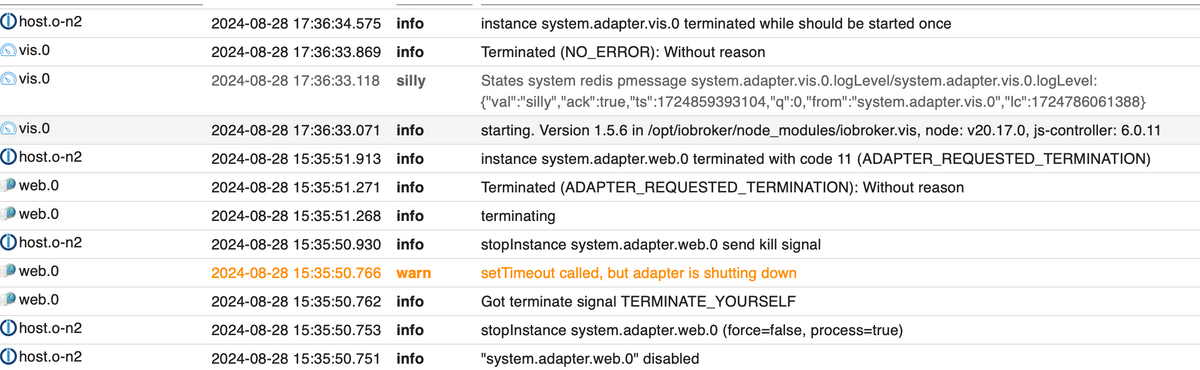
Wenn andere danach suchen finden sie ja vielleicht diesen Thread.
-
Mein Problem ist gelöst. Was eben nur verbesserungswürdig wäre ist die Ausgabe eines Fehlers wenn web nicht läuft anstatt zu sagen NO_ERROR, Terminated
Und tatsächlich gab es im Log mWn keinen Fehler - zumindest nicht bei mir. Hier die Ausgabe wenn man Web stoppt - vis ist erstmal happy (aber es geht keine Verbindung mehr) - beim Restart dann das von mir beschriebene Verhalten einer Beendigung ohne Grund und ohne Fehler. Sobald man web wieder startet geht auch das Zombie-vis wieder.
Wenn andere danach suchen finden sie ja vielleicht diesen Thread.
@hoich sagte in Wie vis debuggen - vis beendet sich gleich nach Start mit:
anstatt zu sagen NO_ERROR, Terminated
was soll vis denn sonst sagen?
im vis Adapter gibt es keinen Fehler, der die Beendigung verursacht.Heisst doch übersetzt: such bitte woanders.
Je nach Installation kann das alles mögliche sein, bis über nodejs hinunter ins Betriebssystem.
Das kann möglicherweise auch der ws Adapter sein.@hoich sagte in Wie vis debuggen - vis beendet sich gleich nach Start mit:
Sobald man web wieder startet geht auch das Zombie-vis wieder.
nochmal:
ohne das notwendige Webinterface, das vom web-Adapter bereitgestellt wird, kann man auf jeine Visu zugreifen.und bitte keine Screenshots von logs. Die sind mobil nicht zu lesen, zitieten ginge auch nicht.
Bitte als Text in code-tags posten.siehe auch
https://forum.iobroker.net/topic/51555/hinweise-für-gute-forenbeiträge/1 -
Mein Problem ist gelöst. Was eben nur verbesserungswürdig wäre ist die Ausgabe eines Fehlers wenn web nicht läuft anstatt zu sagen NO_ERROR, Terminated
Und tatsächlich gab es im Log mWn keinen Fehler - zumindest nicht bei mir. Hier die Ausgabe wenn man Web stoppt - vis ist erstmal happy (aber es geht keine Verbindung mehr) - beim Restart dann das von mir beschriebene Verhalten einer Beendigung ohne Grund und ohne Fehler. Sobald man web wieder startet geht auch das Zombie-vis wieder.
Wenn andere danach suchen finden sie ja vielleicht diesen Thread.
@hoich sagte in Wie vis debuggen - vis beendet sich gleich nach Start mit:
Was eben nur verbesserungswürdig wäre ist die Ausgabe eines Fehlers wenn web nicht läuft anstatt zu sagen NO_ERROR, Terminated
das problem ist, das vis1 keinen aktiven serverprozess hat. (bei vis-2 gibt es einen kleinen serverprozess, aber der macht auch nicht soviel und ist beim aktiven arbeiten mit vis nicht wirklich involviert (soviel ich weiß)
vis registriert einfach nur alle dateien, die vom webserver (also web) ausgeliefert werden sollen.wenn der webserver auch nicht läuft, dann siehst du im browser den fehler, das der server nicht reagiert.
-
Mein Problem ist gelöst. Was eben nur verbesserungswürdig wäre ist die Ausgabe eines Fehlers wenn web nicht läuft anstatt zu sagen NO_ERROR, Terminated
Und tatsächlich gab es im Log mWn keinen Fehler - zumindest nicht bei mir. Hier die Ausgabe wenn man Web stoppt - vis ist erstmal happy (aber es geht keine Verbindung mehr) - beim Restart dann das von mir beschriebene Verhalten einer Beendigung ohne Grund und ohne Fehler. Sobald man web wieder startet geht auch das Zombie-vis wieder.
Wenn andere danach suchen finden sie ja vielleicht diesen Thread.
@hoich
Ich versuch es mal ohne das log als Text!wenn ich den Screenshot richtig entziffern kann, steht in der ersten Zeile dass vis gestoppt wird, weil du es zum zweiten mal versuchst zu starten.
Also läuft vis zu dem Zeitpunkt noch -
@hoich
Ich versuch es mal ohne das log als Text!wenn ich den Screenshot richtig entziffern kann, steht in der ersten Zeile dass vis gestoppt wird, weil du es zum zweiten mal versuchst zu starten.
Also läuft vis zu dem Zeitpunkt nochSiehe erster Post (da ist noch alles als Text, sorry dass Bild vorhin einfacher war und die Info eh redundant, siehe erster Post) - die Meldung ist genau gleich. Im ersten Post ist das die Meldung beim Start von iobroker - also ohne jegliche Vorinstanzen. Im Screenshot ist es nach Neustart von vis.
Mein Punkt war einzig, dass eine Meldung im Log kommt, diese aber inkorrekt ist und so nicht hilfreich war. Interessant wäre warum vis diese Meldung ausgibt wenn es doch nicht wissen kann ob es selbst terminiert ist (aber ohne Fehler). Ist aber vielleicht auch müßig, es scheint ja mittlerweile einen Nachfolger zu geben, ich hatte die Entwicklung die letzten Jahre nicht so sehr verfolgt.
-
Siehe erster Post (da ist noch alles als Text, sorry dass Bild vorhin einfacher war und die Info eh redundant, siehe erster Post) - die Meldung ist genau gleich. Im ersten Post ist das die Meldung beim Start von iobroker - also ohne jegliche Vorinstanzen. Im Screenshot ist es nach Neustart von vis.
Mein Punkt war einzig, dass eine Meldung im Log kommt, diese aber inkorrekt ist und so nicht hilfreich war. Interessant wäre warum vis diese Meldung ausgibt wenn es doch nicht wissen kann ob es selbst terminiert ist (aber ohne Fehler). Ist aber vielleicht auch müßig, es scheint ja mittlerweile einen Nachfolger zu geben, ich hatte die Entwicklung die letzten Jahre nicht so sehr verfolgt.
@hoich sagte in Wie vis debuggen - vis beendet sich gleich nach Start mit:
Siehe erster Post (da ist noch alles als Text,
da finde ich keine Zeile, die das enthält.
@hoich sagte in Wie vis debuggen - vis beendet sich gleich nach Start mit:
Im Screenshot ist es nach Neustart von vis.
eben nicht!
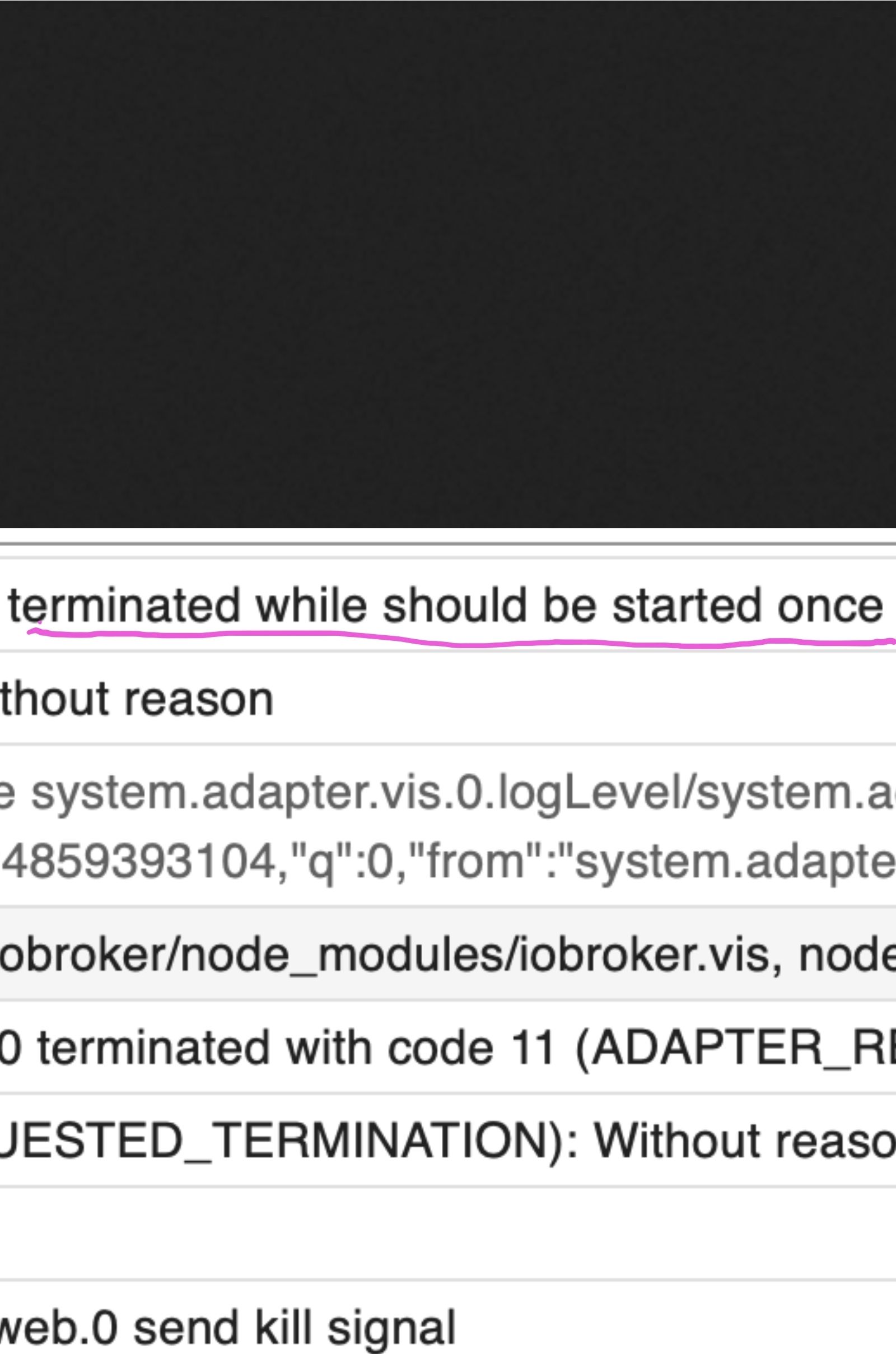
das scheint der Versuch ein weiteres mal zu starten zu sein.
Die Meldung sagt dass nur einmal gestartet wrrden darf.kann's leider nicht zitieren.
dann eben so!
@hoich sagte in Wie vis debuggen - vis beendet sich gleich nach Start mit:
es scheint ja mittlerweile einen Nachfolger zu geben,
nicht ganz. ist eine komplett neue visu, lediglichvder Name ist angelehnt.



Hey! Du scheinst an dieser Unterhaltung interessiert zu sein, hast aber noch kein Konto.
Hast du es satt, bei jedem Besuch durch die gleichen Beiträge zu scrollen? Wenn du dich für ein Konto anmeldest, kommst du immer genau dorthin zurück, wo du zuvor warst, und kannst dich über neue Antworten benachrichtigen lassen (entweder per E-Mail oder Push-Benachrichtigung). Du kannst auch Lesezeichen speichern und Beiträge positiv bewerten, um anderen Community-Mitgliedern deine Wertschätzung zu zeigen.
Mit deinem Input könnte dieser Beitrag noch besser werden 💗
Registrieren Anmelden470
Online33.0k
Benutzende83.7k
Themen1.3m
Beiträge