
NEWS




[gelöst] "node-gyp rebuild" wird ausgeführt - Warum?
-
@gaspode sagte in [gelöst] "node-gyp rebuild" wird ausgeführt - Warum?:
da für 95 % aller Adapter nicht erforderlich.
Stimmt, ist nur für solche Adapter erforderlich, die Module reinholen die nicht bereits vorkompiliert worden sind.
Die github-Seite von node-gyp hast du ja bestimmt schon studiert, da steht eigentlich soweit alles drin, was node-gyp in welchen Versionen benötigt.
@thomas-braun said in [gelöst] "node-gyp rebuild" wird ausgeführt - Warum?:
Die github-Seite von node-gyp hast du ja bestimmt schon studiert, da steht eigentlich soweit alles drin, was node-gyp in welchen Versionen benötigt.
Jep, Danke. Auf nem jungfräulichen Rechner ist das anscheinend auch recht einfach. Auf meinen zwei Rechnern und weiteren VMs hatte ich jedenfalls keine Probleme, das zum Laufen zu bringen.
Wenn sich aber 47 verschiedene Python Versionen aus Altlasten tummeln, scheint es schwieriger zu werden. Bei @sigi234 klappt es ja anscheinend nicht, die zu verwendende Installation per Umgebungsvariable zu erzwingen, warum auch immer. Mal sehen, ob er noch weitere Infos beisteuern kann. -
@thomas-braun said in [gelöst] "node-gyp rebuild" wird ausgeführt - Warum?:
Die github-Seite von node-gyp hast du ja bestimmt schon studiert, da steht eigentlich soweit alles drin, was node-gyp in welchen Versionen benötigt.
Jep, Danke. Auf nem jungfräulichen Rechner ist das anscheinend auch recht einfach. Auf meinen zwei Rechnern und weiteren VMs hatte ich jedenfalls keine Probleme, das zum Laufen zu bringen.
Wenn sich aber 47 verschiedene Python Versionen aus Altlasten tummeln, scheint es schwieriger zu werden. Bei @sigi234 klappt es ja anscheinend nicht, die zu verwendende Installation per Umgebungsvariable zu erzwingen, warum auch immer. Mal sehen, ob er noch weitere Infos beisteuern kann.@gaspode sagte in [gelöst] "node-gyp rebuild" wird ausgeführt - Warum?:
@thomas-braun said in [gelöst] "node-gyp rebuild" wird ausgeführt - Warum?:
Bei @sigi234 klappt es ja anscheinend nicht, die zu verwendende Installation per Umgebungsvariable zu erzwingen, warum auch immer. Mal sehen, ob er noch weitere Infos beisteuern kann.
Kommen sobald ich wieder kann.
-
@sigi234 said in [gelöst] "node-gyp rebuild" wird ausgeführt - Warum?:
Ja
Du bist heute aber nicht besonders gesprächig ;)
Ich versuche Infos zu sammeln, um das Problem direkt bei der Installation anzugehen, dafür brauche ich aber eure Mithilfe.
Was sagte denn
py --list-paths?
Und das Setzen der Variable npm_config_python hat nichts verändert?
@gaspode sagte in [gelöst] "node-gyp rebuild" wird ausgeführt - Warum?:
py --list-paths
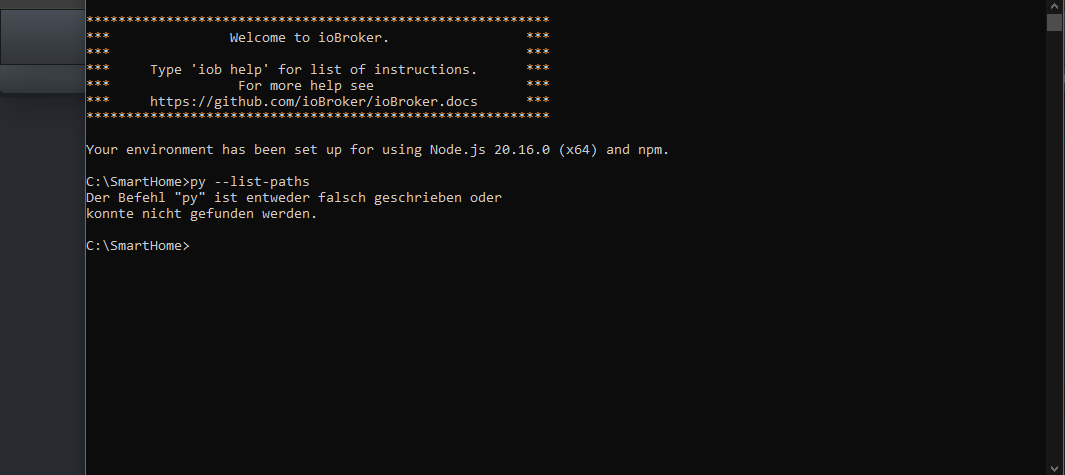
Bin ich da Richtig?
Bitte benutzt das Voting rechts unten im Beitrag wenn er euch geholfen hat.
Immer Daten sichern! -
@gaspode sagte in [gelöst] "node-gyp rebuild" wird ausgeführt - Warum?:
py --list-paths
Bin ich da Richtig?
@sigi234 said in [gelöst] "node-gyp rebuild" wird ausgeführt - Warum?:
Bin ich da Richtig?
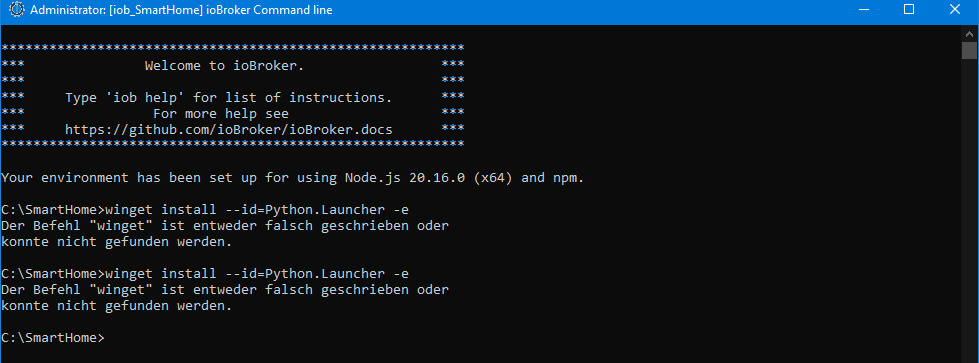
Ja, prinzipiell schon. Anscheinend wird der Python Launcher nicht automatisch installiert, wenn man winget nutzt (im Gegensatz zur MSI Installation :( ).
Versuch bitte mal
winget install --id=Python.Launcher -eUnd dann nochmal
py --list-pathsSorry für das hin und her, ich lerne das auch gerade. :D
-
@sigi234 said in [gelöst] "node-gyp rebuild" wird ausgeführt - Warum?:
Bin ich da Richtig?
Ja, prinzipiell schon. Anscheinend wird der Python Launcher nicht automatisch installiert, wenn man winget nutzt (im Gegensatz zur MSI Installation :( ).
Versuch bitte mal
winget install --id=Python.Launcher -eUnd dann nochmal
py --list-pathsSorry für das hin und her, ich lerne das auch gerade. :D
@gaspode sagte in [gelöst] "node-gyp rebuild" wird ausgeführt - Warum?:
@sigi234 said in [gelöst] "node-gyp rebuild" wird ausgeführt - Warum?:
Bin ich da Richtig?
Ja, prinzipiell schon. Anscheinend wird der Python Launcher nicht automatisch installiert, wenn man winget nutzt (im Gegensatz zur MSI Installation :( ).
Versuch bitte mal
winget install --id=Python.Launcher -eUnd dann nochmal
py --list-pathsSorry für das hin und her, ich lerne das auch gerade. :D
Bitte benutzt das Voting rechts unten im Beitrag wenn er euch geholfen hat.
Immer Daten sichern! -
@gaspode sagte in [gelöst] "node-gyp rebuild" wird ausgeführt - Warum?:
@sigi234 said in [gelöst] "node-gyp rebuild" wird ausgeführt - Warum?:
Bin ich da Richtig?
Ja, prinzipiell schon. Anscheinend wird der Python Launcher nicht automatisch installiert, wenn man winget nutzt (im Gegensatz zur MSI Installation :( ).
Versuch bitte mal
winget install --id=Python.Launcher -eUnd dann nochmal
py --list-pathsSorry für das hin und her, ich lerne das auch gerade. :D
-
@sigi234 said in [gelöst] "node-gyp rebuild" wird ausgeführt - Warum?:
winget install --id=Python.Launcher -e
Jetzt kapier ich gar nix mehr, winget hattest du doch gerade gestern noch verwendet?
@gaspode sagte in [gelöst] "node-gyp rebuild" wird ausgeführt - Warum?:
@sigi234 said in [gelöst] "node-gyp rebuild" wird ausgeführt - Warum?:
winget install --id=Python.Launcher -e
Jetzt kapier ich gar nix mehr, winget hattest du doch gerade gestern noch verwendet?
Nein, darum ja ich gebe auf...das kam gestern schon so
Bitte benutzt das Voting rechts unten im Beitrag wenn er euch geholfen hat.
Immer Daten sichern! -
@gaspode sagte in [gelöst] "node-gyp rebuild" wird ausgeführt - Warum?:
@sigi234 said in [gelöst] "node-gyp rebuild" wird ausgeführt - Warum?:
winget install --id=Python.Launcher -e
Jetzt kapier ich gar nix mehr, winget hattest du doch gerade gestern noch verwendet?
Nein, darum ja ich gebe auf...das kam gestern schon so
-
@sigi234
Alternativ die Installation per Download:https://www.python.org/ftp/python/3.12.5/python-3.12.5-amd64.exe
Ok, die alte Version deinstallieren?
Bitte benutzt das Voting rechts unten im Beitrag wenn er euch geholfen hat.
Immer Daten sichern! -
@sigi234 said in [gelöst] "node-gyp rebuild" wird ausgeführt - Warum?:
Ok, die alte Version deinstallieren?
Ist der Ordnung halber wohl besser, muss aber nicht sein. Auf meinem Arbeitsrechner hab ich 7 Python Versionen parallel und node-gyp funktioniert erstaunlicherweise und nimmt die richtige Version. :D
-
@sigi234 said in [gelöst] "node-gyp rebuild" wird ausgeführt - Warum?:
Ok, die alte Version deinstallieren?
Ist der Ordnung halber wohl besser, muss aber nicht sein. Auf meinem Arbeitsrechner hab ich 7 Python Versionen parallel und node-gyp funktioniert erstaunlicherweise und nimmt die richtige Version. :D
@gaspode sagte in [gelöst] "node-gyp rebuild" wird ausgeführt - Warum?:
@sigi234 said in [gelöst] "node-gyp rebuild" wird ausgeführt - Warum?:
Ok, die alte Version deinstallieren?
Ist der Ordnung halber wohl besser, muss aber nicht sein. Auf meinem Arbeitsrechner hab ich 7 Python Versionen parallel und node-gyp funktioniert erstaunlicherweise und nimmt die richtige Version. :D

Bitte benutzt das Voting rechts unten im Beitrag wenn er euch geholfen hat.
Immer Daten sichern! -
@gaspode sagte in [gelöst] "node-gyp rebuild" wird ausgeführt - Warum?:
@sigi234 said in [gelöst] "node-gyp rebuild" wird ausgeführt - Warum?:
Ok, die alte Version deinstallieren?
Ist der Ordnung halber wohl besser, muss aber nicht sein. Auf meinem Arbeitsrechner hab ich 7 Python Versionen parallel und node-gyp funktioniert erstaunlicherweise und nimmt die richtige Version. :D
-
@gaspode sagte in [gelöst] "node-gyp rebuild" wird ausgeführt - Warum?:
@sigi234
wenn das eine Frage ist, am Besten die beiden unteren Häkchen anklicken.Habe den Pfad angepasst. Ok so?

-
Bitte benutzt das Voting rechts unten im Beitrag wenn er euch geholfen hat.
Immer Daten sichern! -
@sigi234 said in [gelöst] "node-gyp rebuild" wird ausgeführt - Warum?:
Jetzt das:
Jep. Jetzt wird es spannend :)
@gaspode sagte in [gelöst] "node-gyp rebuild" wird ausgeführt - Warum?:
@sigi234 said in [gelöst] "node-gyp rebuild" wird ausgeführt - Warum?:
Jetzt das:
Jep. Jetzt wird es spannend :)
********************************************************** *** Welcome to ioBroker. *** *** *** *** Type 'iob help' for list of instructions. *** *** For more help see *** *** https://github.com/ioBroker/ioBroker.docs *** ********************************************************** Your environment has been set up for using Node.js 20.16.0 (x64) and npm. C:\SmartHome>npm i diskusage npm error code 1 npm error path C:\SmartHome\node_modules\diskusage npm error command failed npm error command C:\WINDOWS\system32\cmd.exe /d /s /c node-gyp rebuild npm error gyp info it worked if it ends with ok npm error gyp info using node-gyp@10.1.0 npm error gyp info using node@20.16.0 | win32 | x64 npm error gyp info find Python using Python version 3.12.5 found at "C:\Python\python.exe" npm error gyp ERR! find VS npm error gyp ERR! find VS msvs_version not set from command line or npm config npm error gyp ERR! find VS VCINSTALLDIR not set, not running in VS Command Prompt npm error gyp ERR! find VS could not use PowerShell to find Visual Studio 2017 or newer, try re-running with '--loglevel silly' for more details. npm error gyp ERR! find VS npm error gyp ERR! find VS Failure details: undefined npm error gyp ERR! find VS checking VS2019 (16.11.35130.168) found at: npm error gyp ERR! find VS "C:\Program Files (x86)\Microsoft Visual Studio\2019\BuildTools" npm error gyp ERR! find VS - found "Visual Studio C++ core features" npm error gyp ERR! find VS - missing any VC++ toolset npm error gyp ERR! find VS could not find a version of Visual Studio 2017 or newer to use npm error gyp ERR! find VS could not use PowerShell to find Visual Studio 2017 or newer, try re-running with '--loglevel silly' for more details. npm error gyp ERR! find VS npm error gyp ERR! find VS Failure details: undefined npm error gyp ERR! find VS unsupported version "16.11.35130.168" found at "C:\Program Files (x86)\Microsoft Visual Studio\2019\BuildTools" npm error gyp ERR! find VS could not find a version of Visual Studio 2017 or newer to use npm error gyp ERR! find VS not looking for VS2015 as it is only supported up to Node.js 18 npm error gyp ERR! find VS not looking for VS2013 as it is only supported up to Node.js 8 npm error gyp ERR! find VS npm error gyp ERR! find VS ************************************************************** npm error gyp ERR! find VS You need to install the latest version of Visual Studio npm error gyp ERR! find VS including the "Desktop development with C++" workload. npm error gyp ERR! find VS For more information consult the documentation at: npm error gyp ERR! find VS https://github.com/nodejs/node-gyp#on-windows npm error gyp ERR! find VS ************************************************************** npm error gyp ERR! find VS npm error gyp ERR! configure error npm error gyp ERR! stack Error: Could not find any Visual Studio installation to use npm error gyp ERR! stack at VisualStudioFinder.fail (C:\Program Files\nodejs\node_modules\npm\node_modules\node-gyp\lib\find-visualstudio.js:116:11) npm error gyp ERR! stack at VisualStudioFinder.findVisualStudio (C:\Program Files\nodejs\node_modules\npm\node_modules\node-gyp\lib\find-visualstudio.js:72:17) npm error gyp ERR! stack at process.processTicksAndRejections (node:internal/process/task_queues:95:5) npm error gyp ERR! stack at async createBuildDir (C:\Program Files\nodejs\node_modules\npm\node_modules\node-gyp\lib\configure.js:95:26) npm error gyp ERR! stack at async run (C:\Program Files\nodejs\node_modules\npm\node_modules\node-gyp\bin\node-gyp.js:81:18) npm error gyp ERR! System Windows_NT 10.0.19045 npm error gyp ERR! command "C:\\Program Files\\nodejs\\node.exe" "C:\\Program Files\\nodejs\\node_modules\\npm\\node_modules\\node-gyp\\bin\\node-gyp.js" "rebuild" npm error gyp ERR! cwd C:\SmartHome\node_modules\diskusage npm error gyp ERR! node -v v20.16.0 npm error gyp ERR! node-gyp -v v10.1.0 npm error gyp ERR! not ok npm error A complete log of this run can be found in: C:\Users\Sigi\AppData\Local\npm-cache\_logs\2024-08-21T12_54_44_661Z-debug-0.log C:\SmartHome> -
Hi,
Achtung: Windows-System. Ich denke aber nicht, dass das Problem Windows spezifisch ist.
Plötzlich wird bei jedem Adapter Update "node-gyp rebuild" ausgeführt. So genau weiß ich nicht seit wann.
Das rebuild geht schief, weil ich node-gyp gar nicht eingerichtet habe (hab gar kein Python auf dem Server) und es eigentlich auch nicht brauche.$ iobroker upgrade backitup@3.0.16 --debug Update backitup from @3.0.15 to @3.0.16 NPM version: 10.8.1 Installing iobroker.backitup@3.0.16... (System call) > node-gyp rebuild gyp info it worked if it ends with ok gyp info using node-gyp@8.4.1 gyp info using node@20.16.0 | win32 | x64 gyp ERR! find Python gyp ERR! find Python Python is not set from command line or npm configuration gyp ERR! find Python Python is not set from environment variable PYTHON gyp ERR! find Python checking if "python3" can be used gyp ERR! find Python - "python3" is not in PATH or produced an error gyp ERR! find Python checking if "python" can be used gyp ERR! find Python - "python" is not in PATH or produced an error gyp ERR! find Python checking if Python is C:\WINDOWS\system32\config\systemprofile\AppData\Local\Programs\Python\Python39\python.exe gyp ERR! find Python - "C:\WINDOWS\system32\config\systemprofile\AppData\Local\Programs\Python\Python39\python.exe" could not be run gyp ERR! find Python checking if Python is C:\Program Files\Python39\python.exe gyp ERR! find Python - "C:\Program Files\Python39\python.exe" could not be run gyp ERR! find Python checking if Python is C:\WINDOWS\system32\config\systemprofile\AppData\Local\Programs\Python\Python39-32\python.exe gyp ERR! find Python - "C:\WINDOWS\system32\config\systemprofile\AppData\Local\Programs\Python\Python39-32\python.exe" could not be run gyp ERR! find Python checking if Python is C:\Program Files\Python39-32\python.exe gyp ERR! find Python - "C:\Program Files\Python39-32\python.exe" could not be run gyp ERR! find Python - Set the environment variable PYTHON gyp ERR! find Python - Set the npm configuration variable python: gyp ERR! find Python npm config set python "C:\Path\To\python.exe" gyp ERR! find Python For more information consult the documentation at: gyp ERR! stack Error: Could not find any Python installation to use gyp ERR! stack at PythonFinder.fail (C:\ioBroker\XXXXXXX\node_modules\node-gyp\lib\find-python.js:330:47) gyp ERR! stack at PythonFinder.runChecks (C:\ioBroker\XXXXXXX\node_modules\node-gyp\lib\find-python.js:159:21) gyp ERR! stack at PythonFinder.<anonymous> (C:\ioBroker\XXXXXXX\node_modules\node-gyp\lib\find-python.js:228:18) gyp ERR! stack at PythonFinder.execFileCallback (C:\ioBroker\XXXXXXX\node_modules\node-gyp\lib\find-python.js:294:16) gyp ERR! stack at exithandler (node:child_process:430:5) gyp ERR! stack at ChildProcess.errorhandler (node:child_process:442:5) gyp ERR! System Windows_NT 10.0.19045 gyp ERR! command "C:\\Program Files\\nodejs\\node.exe" "C:\\ioBroker\\XXXXXXX\\node_modules\\node-gyp\\bin\\node-gyp.js" "rebuild" gyp ERR! cwd C:\ioBroker\XXXXXXX\node_modules\diskusage gyp ERR! node -v v20.16.0 gyp ERR! node-gyp -v v8.4.1 gyp ERR! not ok > unix-dgram@2.0.6 install > node-gyp rebuild gyp info using node-gyp@8.4.1 gyp info using node@20.16.0 | win32 | x64 gyp ERR! find Python checking if "python" can be used gyp ERR! find Python - "python" is not in PATH or produced an error gyp ERR! find Python checking if Python is C:\WINDOWS\system32\config\systemprofile\AppData\Local\Programs\Python\Python39\python.exe gyp ERR! find Python - "C:\Program Files\Python39\python.exe" could not be run gyp ERR! find Python checking if Python is C:\WINDOWS\system32\config\systemprofile\AppData\Local\Programs\Python\Python39-32\python.exe gyp ERR! find Python - "C:\WINDOWS\system32\config\systemprofile\AppData\Local\Programs\Python\Python39-32\python.exe" could not be run gyp ERR! find Python - "C:\Program Files\Python39-32\python.exe" could not be run gyp ERR! find Python checking if Python is C:\Program Files (x86)\Python39-32\python.exe gyp ERR! find Python - "C:\WINDOWS\system32\config\systemprofile\AppData\Local\Programs\Python\Python38\python.exe" could not be run gyp ERR! find Python checking if Python is C:\Program Files\Python38\python.exe gyp ERR! find Python - "C:\Program Files\Python38\python.exe" could not be run gyp ERR! find Python checking if Python is C:\WINDOWS\system32\config\systemprofile\AppData\Local\Programs\Python\Python38-32\python.exe gyp ERR! find Python - "C:\WINDOWS\system32\config\systemprofile\AppData\Local\Programs\Python\Python38-32\python.exe" could not be run gyp ERR! find Python checking if Python is C:\Program Files\Python38-32\python.exe gyp ERR! find Python - "C:\Program Files\Python38-32\python.exe" could not be run gyp ERR! find Python checking if Python is C:\Program Files (x86)\Python38-32\python.exe gyp ERR! find Python - "C:\Program Files (x86)\Python38-32\python.exe" could not be run gyp ERR! find Python checking if Python is C:\WINDOWS\system32\config\systemprofile\AppData\Local\Programs\Python\Python37\python.exe gyp ERR! find Python - "C:\Program Files\Python36\python.exe" could not be run gyp ERR! find Python checking if Python is C:\WINDOWS\system32\config\systemprofile\AppData\Local\Programs\Python\Python36-32\python.exe gyp ERR! find Python - "C:\WINDOWS\system32\config\systemprofile\AppData\Local\Programs\Python\Python36-32\python.exe" could not be run gyp ERR! find Python checking if Python is C:\Program Files\Python36-32\python.exe gyp ERR! find Python - "C:\Program Files\Python36-32\python.exe" could not be run gyp ERR! find Python gyp ERR! find Python ********************************************************** gyp ERR! find Python you can try one of the following options: gyp ERR! find Python - Use the switch --python="C:\Path\To\python.exe" gyp ERR! find Python (accepted by both node-gyp and npm) gyp ERR! stack at exithandler (node:child_process:430:5) gyp ERR! stack at ChildProcess.errorhandler (node:child_process:442:5) gyp ERR! stack at ChildProcess.emit (node:events:519:28) gyp ERR! stack at ChildProcess._handle.onexit (node:internal/child_process:292:12) gyp ERR! stack at onErrorNT (node:internal/child_process:484:16) gyp ERR! stack at process.processTicksAndRejections (node:internal/process/task_queues:82:21) gyp ERR! node -v v20.16.0 gyp ERR! not ok added 1 package, changed 4 packages, and audited 1261 packages in 25s 147 packages are looking for funding run `npm fund` for details 66 vulnerabilities (6 low, 37 moderate, 22 high, 1 critical) To address issues that do not require attention, run: npm audit fix To address all issues possible (including breaking changes), run: npm audit fix --force Some issues need review, and may require choosing a different dependency. Run `npm audit` for details. Update "system.adapter.backitup.0" upload [95] backitup.admin C:/ioBroker/XXXXXXX/node_modules/iobroker.backitup/admin/adapter-settings.js adapter-settings.js application/javascript upload [90] backitup.admin C:/ioBroker/XXXXXXX/node_modules/iobroker.backitup/admin/cifs.jsonConfig.json5 cifs.jsonConfig.json5 application/json5 upload [80] backitup.admin C:/ioBroker/XXXXXXX/node_modules/iobroker.backitup/admin/custom/i18n/pt.json custom/i18n/pt.json application/json upload [70] backitup.admin C:/ioBroker/XXXXXXX/node_modules/iobroker.backitup/admin/custom/static/js/src_AdapterExist_jsx-src_BackupNow_jsx-src_CheckConfigInvisible_jsx-src_DetectConfig_jsx-src_-1b9e72.11bed00e.chunk.js custom/static/js/src_AdapterExist_jsx-src_BackupNow_jsx-src_CheckConfigInvisible_jsx-src_DetectConfig_jsx-src_-1b9e72.11bed00e.chunk.js application/javascript upload [60] backitup.admin C:/ioBroker/XXXXXXX/node_modules/iobroker.backitup/admin/custom/static/js/vendors-node_modules_mui_material_Button_Button_js-node_modules_mui_material_Chip_Chip_js-nod-6ae257.a0771a5e.chunk.js custom/static/js/vendors-node_modules_mui_material_Button_Button_js-node_modules_mui_material_Chip_Chip_js-nod-6ae257.a0771a5e.chunk.js application/javascript upload [50] backitup.admin C:/ioBroker/XXXXXXX/node_modules/iobroker.backitup/admin/custom/static/js/vendors-node_modules_react-dropzone_dist_es_index_js.8635b033.chunk.js custom/static/js/vendors-node_modules_react-dropzone_dist_es_index_js.8635b033.chunk.js application/javascript upload [40] backitup.admin C:/ioBroker/XXXXXXX/node_modules/iobroker.backitup/admin/grafana.jsonConfig.json5 grafana.jsonConfig.json5 application/json5 upload [30] backitup.admin C:/ioBroker/XXXXXXX/node_modules/iobroker.backitup/admin/i18n/ru/translations.json i18n/ru/translations.json application/json upload [20] backitup.admin C:/ioBroker/XXXXXXX/node_modules/iobroker.backitup/admin/manifest.json manifest.json application/json upload [19] backitup.admin C:/ioBroker/XXXXXXX/node_modules/iobroker.backitup/admin/mysql.jsonConfig.json5 mysql.jsonConfig.json5 application/json5 upload [18] backitup.admin C:/ioBroker/XXXXXXX/node_modules/iobroker.backitup/admin/notifications.jsonConfig.json5 notifications.jsonConfig.json5 application/json5 upload [17] backitup.admin C:/ioBroker/XXXXXXX/node_modules/iobroker.backitup/admin/onedrive.jsonConfig.json5 onedrive.jsonConfig.json5 application/json5 upload [16] backitup.admin C:/ioBroker/XXXXXXX/node_modules/iobroker.backitup/admin/pgsql.jsonConfig.json5 pgsql.jsonConfig.json5 application/json5 upload [15] backitup.admin C:/ioBroker/XXXXXXX/node_modules/iobroker.backitup/admin/redis.jsonConfig.json5 redis.jsonConfig.json5 application/json5 upload [14] backitup.admin C:/ioBroker/XXXXXXX/node_modules/iobroker.backitup/admin/restore.jsonConfig.json5 restore.jsonConfig.json5 application/json5 upload [13] backitup.admin C:/ioBroker/XXXXXXX/node_modules/iobroker.backitup/admin/sqlite.jsonConfig.json5 sqlite.jsonConfig.json5 application/json5 upload [12] backitup.admin C:/ioBroker/XXXXXXX/node_modules/iobroker.backitup/admin/static/css/main.bd1167d4.css static/css/main.bd1167d4.css text/css upload [11] backitup.admin C:/ioBroker/XXXXXXX/node_modules/iobroker.backitup/admin/static/css/main.bd1167d4.css.map static/css/main.bd1167d4.css.map application/json upload [10] backitup.admin C:/ioBroker/XXXXXXX/node_modules/iobroker.backitup/admin/static/js/main.ce422ec2.js static/js/main.ce422ec2.js application/javascript upload [9] backitup.admin C:/ioBroker/XXXXXXX/node_modules/iobroker.backitup/admin/static/js/main.ce422ec2.js.LICENSE.txt static/js/main.ce422ec2.js.LICENSE.txt text/plain upload [8] backitup.admin C:/ioBroker/XXXXXXX/node_modules/iobroker.backitup/admin/static/js/main.ce422ec2.js.map static/js/main.ce422ec2.js.map application/json upload [7] backitup.admin C:/ioBroker/XXXXXXX/node_modules/iobroker.backitup/admin/static/media/history.d21dcfa508bd8a624c85.png static/media/history.d21dcfa508bd8a624c85.png image/png upload [6] backitup.admin C:/ioBroker/XXXXXXX/node_modules/iobroker.backitup/admin/style.css style.css text/css upload [5] backitup.admin C:/ioBroker/XXXXXXX/node_modules/iobroker.backitup/admin/tab_m.css tab_m.css text/css upload [4] backitup.admin C:/ioBroker/XXXXXXX/node_modules/iobroker.backitup/admin/tab_m.html tab_m.html text/html upload [3] backitup.admin C:/ioBroker/XXXXXXX/node_modules/iobroker.backitup/admin/tab_m.js tab_m.js application/javascript upload [2] backitup.admin C:/ioBroker/XXXXXXX/node_modules/iobroker.backitup/admin/webdav.jsonConfig.json5 webdav.jsonConfig.json5 application/json5 upload [1] backitup.admin C:/ioBroker/XXXXXXX/node_modules/iobroker.backitup/admin/words.js words.js application/javascript upload [0] backitup.admin C:/ioBroker/XXXXXXX/node_modules/iobroker.backitup/admin/zigbee2mqtt.jsonConfig.json5 zigbee2mqtt.jsonConfig.json5 application/json5 Process exited with code 0$ iobroker upgrade backitup@3.0.16 --debugWie werde ich das wieder los? Hat jemand eine Idee?
Edit:
Ach ja, das passiert nur bei Adapter Update über den Admin. Per npm über CLI passiert das nicht.Nochmal Edit:
Soweit ich herausfinden konnte, liegt es an der optionalen dependency diskusage in JS-Controller, dafür wird node-gyp gebraucht. Das Modul ist (zumindest unter Windows) wohl nicht zwingend erforderlich, daher können die nervigen Meldungen ignoriert werden, falls sie auftauchen.
Eine andere Option ist es, node-gyp zu instrallieren. auf einem frischen Windows 11 System war ich auf diese Weise erfolgreich:
winget install --id=Python.Python.3.12
winget install Microsoft.VisualStudio.2019.BuildTools
Jetzt muss ein neues iob Cmd Fenster geöffnet werden (wegen Path-Änderungen), dann
npm i node-gyp -g
npm i diskusage
Und nochmal Edit:
Wie sich herausgestellt hat, verhält es sich auf anderen Rechnern anders.
Dort hat @sigi234 es schließlich hinbekommen, indem er vorgagangen ist, wie weiter hinten in diesem Thread von ihm beschrieben.Ich installiere mal VS neu
Ergebnis:

Habe VS 2022 installiert und bei VS 2019 das Setup verändert.
Edit:
Adapter aktuallisiert, Meldung weg!

$ iobroker upgrade echarts@1.9.0 --debug Update echarts from @1.7.2 to @1.9.0 host.SmartHome Adapter "system.adapter.echarts.0" is stopped. NPM version: 10.8.1 Installing iobroker.echarts@1.9.0... (System call) added 12 packages, removed 10 packages, changed 12 packages, and audited 1920 packages in 23s 405 packages are looking for funding run `npm fund` for details 77 vulnerabilities (8 low, 36 moderate, 30 high, 3 critical) To address issues that do not require attention, run: npm audit fix To address all issues possible (including breaking changes), run: npm audit fix --force Some issues need review, and may require choosing a different dependency. Run `npm audit` for details. Adapter "system.adapter.vis-2.0" restarted. upload [17] echarts C:/SmartHome/node_modules/iobroker.echarts/www/asset-manifest.json asset-manifest.json application/json upload [16] echarts C:/SmartHome/node_modules/iobroker.echarts/www/favicon.ico favicon.ico image/vnd.microsoft.icon upload [10] echarts C:/SmartHome/node_modules/iobroker.echarts/www/preview/manifest.json preview/manifest.json application/json upload [9] echarts C:/SmartHome/node_modules/iobroker.echarts/www/preview/static/css/main.e631bfb5.css preview/static/css/main.e631bfb5.css text/css upload [7] echarts C:/SmartHome/node_modules/iobroker.echarts/www/preview/static/js/main.bf2caf7b.js preview/static/js/main.bf2caf7b.js application/javascript upload [6] echarts C:/SmartHome/node_modules/iobroker.echarts/www/preview/static/js/main.bf2caf7b.js.LICENSE.txt preview/static/js/main.bf2caf7b.js.LICENSE.txt text/plain upload [5] echarts C:/SmartHome/node_modules/iobroker.echarts/www/preview/static/js/main.bf2caf7b.js.map preview/static/js/main.bf2caf7b.js.map application/json upload [2] echarts C:/SmartHome/node_modules/iobroker.echarts/www/static/js/main.bad2715c.js static/js/main.bad2715c.js application/javascript upload [1] echarts C:/SmartHome/node_modules/iobroker.echarts/www/static/js/main.bad2715c.js.LICENSE.txt static/js/main.bad2715c.js.LICENSE.txt text/plain upload [0] echarts C:/SmartHome/node_modules/iobroker.echarts/www/static/js/main.bad2715c.js.map static/js/main.bad2715c.js.map application/json Update "system.adapter.echarts.0" upload [28] echarts.admin C:/SmartHome/node_modules/iobroker.echarts/admin/asset-manifest.json asset-manifest.json application/json upload [19] echarts.admin C:/SmartHome/node_modules/iobroker.echarts/admin/chart/static/js/main.bad2715c.js.map chart/static/js/main.bad2715c.js.map application/json upload [18] echarts.admin C:/SmartHome/node_modules/iobroker.echarts/admin/echarts.png echarts.png image/png upload [17] echarts.admin C:/SmartHome/node_modules/iobroker.echarts/admin/favicon.ico favicon.ico image/vnd.microsoft.icon upload [15] echarts.admin C:/SmartHome/node_modules/iobroker.echarts/admin/preview/asset-manifest.json preview/asset-manifest.json application/json upload [14] echarts.admin C:/SmartHome/node_modules/iobroker.echarts/admin/preview/favicon.ico preview/favicon.ico image/vnd.microsoft.icon upload [13] echarts.admin C:/SmartHome/node_modules/iobroker.echarts/admin/preview/index.html preview/index.html text/html upload [12] echarts.admin C:/SmartHome/node_modules/iobroker.echarts/admin/preview/manifest.json preview/manifest.json application/json upload [11] echarts.admin C:/SmartHome/node_modules/iobroker.echarts/admin/preview/static/css/main.e631bfb5.css preview/static/css/main.e631bfb5.css text/css upload [10] echarts.admin C:/SmartHome/node_modules/iobroker.echarts/admin/preview/static/css/main.e631bfb5.css.map preview/static/css/main.e631bfb5.css.map application/json upload [9] echarts.admin C:/SmartHome/node_modules/iobroker.echarts/admin/preview/static/js/main.bf2caf7b.js preview/static/js/main.bf2caf7b.js application/javascript upload [8] echarts.admin C:/SmartHome/node_modules/iobroker.echarts/admin/preview/static/js/main.bf2caf7b.js.LICENSE.txt preview/static/js/main.bf2caf7b.js.LICENSE.txt text/plain upload [7] echarts.admin C:/SmartHome/node_modules/iobroker.echarts/admin/preview/static/js/main.bf2caf7b.js.map preview/static/js/main.bf2caf7b.js.map application/json upload [6] echarts.admin C:/SmartHome/node_modules/iobroker.echarts/admin/static/css/main.f21b47ed.css static/css/main.f21b47ed.css text/css upload [5] echarts.admin C:/SmartHome/node_modules/iobroker.echarts/admin/static/css/main.f21b47ed.css.map static/css/main.f21b47ed.css.map application/json upload [4] echarts.admin C:/SmartHome/node_modules/iobroker.echarts/admin/static/js/main.6c4f5a4e.js static/js/main.6c4f5a4e.js application/javascript upload [3] echarts.admin C:/SmartHome/node_modules/iobroker.echarts/admin/static/js/main.6c4f5a4e.js.LICENSE.txt static/js/main.6c4f5a4e.js.LICENSE.txt text/plain upload [2] echarts.admin C:/SmartHome/node_modules/iobroker.echarts/admin/static/js/main.6c4f5a4e.js.map static/js/main.6c4f5a4e.js.map application/json upload [1] echarts.admin C:/SmartHome/node_modules/iobroker.echarts/admin/tab.html tab.html text/html host.SmartHome Adapter "system.adapter.echarts.0" is started Process exited with code 0 -
Hi,
Achtung: Windows-System. Ich denke aber nicht, dass das Problem Windows spezifisch ist.
Plötzlich wird bei jedem Adapter Update "node-gyp rebuild" ausgeführt. So genau weiß ich nicht seit wann.
Das rebuild geht schief, weil ich node-gyp gar nicht eingerichtet habe (hab gar kein Python auf dem Server) und es eigentlich auch nicht brauche.$ iobroker upgrade backitup@3.0.16 --debug Update backitup from @3.0.15 to @3.0.16 NPM version: 10.8.1 Installing iobroker.backitup@3.0.16... (System call) > node-gyp rebuild gyp info it worked if it ends with ok gyp info using node-gyp@8.4.1 gyp info using node@20.16.0 | win32 | x64 gyp ERR! find Python gyp ERR! find Python Python is not set from command line or npm configuration gyp ERR! find Python Python is not set from environment variable PYTHON gyp ERR! find Python checking if "python3" can be used gyp ERR! find Python - "python3" is not in PATH or produced an error gyp ERR! find Python checking if "python" can be used gyp ERR! find Python - "python" is not in PATH or produced an error gyp ERR! find Python checking if Python is C:\WINDOWS\system32\config\systemprofile\AppData\Local\Programs\Python\Python39\python.exe gyp ERR! find Python - "C:\WINDOWS\system32\config\systemprofile\AppData\Local\Programs\Python\Python39\python.exe" could not be run gyp ERR! find Python checking if Python is C:\Program Files\Python39\python.exe gyp ERR! find Python - "C:\Program Files\Python39\python.exe" could not be run gyp ERR! find Python checking if Python is C:\WINDOWS\system32\config\systemprofile\AppData\Local\Programs\Python\Python39-32\python.exe gyp ERR! find Python - "C:\WINDOWS\system32\config\systemprofile\AppData\Local\Programs\Python\Python39-32\python.exe" could not be run gyp ERR! find Python checking if Python is C:\Program Files\Python39-32\python.exe gyp ERR! find Python - "C:\Program Files\Python39-32\python.exe" could not be run gyp ERR! find Python - Set the environment variable PYTHON gyp ERR! find Python - Set the npm configuration variable python: gyp ERR! find Python npm config set python "C:\Path\To\python.exe" gyp ERR! find Python For more information consult the documentation at: gyp ERR! stack Error: Could not find any Python installation to use gyp ERR! stack at PythonFinder.fail (C:\ioBroker\XXXXXXX\node_modules\node-gyp\lib\find-python.js:330:47) gyp ERR! stack at PythonFinder.runChecks (C:\ioBroker\XXXXXXX\node_modules\node-gyp\lib\find-python.js:159:21) gyp ERR! stack at PythonFinder.<anonymous> (C:\ioBroker\XXXXXXX\node_modules\node-gyp\lib\find-python.js:228:18) gyp ERR! stack at PythonFinder.execFileCallback (C:\ioBroker\XXXXXXX\node_modules\node-gyp\lib\find-python.js:294:16) gyp ERR! stack at exithandler (node:child_process:430:5) gyp ERR! stack at ChildProcess.errorhandler (node:child_process:442:5) gyp ERR! System Windows_NT 10.0.19045 gyp ERR! command "C:\\Program Files\\nodejs\\node.exe" "C:\\ioBroker\\XXXXXXX\\node_modules\\node-gyp\\bin\\node-gyp.js" "rebuild" gyp ERR! cwd C:\ioBroker\XXXXXXX\node_modules\diskusage gyp ERR! node -v v20.16.0 gyp ERR! node-gyp -v v8.4.1 gyp ERR! not ok > unix-dgram@2.0.6 install > node-gyp rebuild gyp info using node-gyp@8.4.1 gyp info using node@20.16.0 | win32 | x64 gyp ERR! find Python checking if "python" can be used gyp ERR! find Python - "python" is not in PATH or produced an error gyp ERR! find Python checking if Python is C:\WINDOWS\system32\config\systemprofile\AppData\Local\Programs\Python\Python39\python.exe gyp ERR! find Python - "C:\Program Files\Python39\python.exe" could not be run gyp ERR! find Python checking if Python is C:\WINDOWS\system32\config\systemprofile\AppData\Local\Programs\Python\Python39-32\python.exe gyp ERR! find Python - "C:\WINDOWS\system32\config\systemprofile\AppData\Local\Programs\Python\Python39-32\python.exe" could not be run gyp ERR! find Python - "C:\Program Files\Python39-32\python.exe" could not be run gyp ERR! find Python checking if Python is C:\Program Files (x86)\Python39-32\python.exe gyp ERR! find Python - "C:\WINDOWS\system32\config\systemprofile\AppData\Local\Programs\Python\Python38\python.exe" could not be run gyp ERR! find Python checking if Python is C:\Program Files\Python38\python.exe gyp ERR! find Python - "C:\Program Files\Python38\python.exe" could not be run gyp ERR! find Python checking if Python is C:\WINDOWS\system32\config\systemprofile\AppData\Local\Programs\Python\Python38-32\python.exe gyp ERR! find Python - "C:\WINDOWS\system32\config\systemprofile\AppData\Local\Programs\Python\Python38-32\python.exe" could not be run gyp ERR! find Python checking if Python is C:\Program Files\Python38-32\python.exe gyp ERR! find Python - "C:\Program Files\Python38-32\python.exe" could not be run gyp ERR! find Python checking if Python is C:\Program Files (x86)\Python38-32\python.exe gyp ERR! find Python - "C:\Program Files (x86)\Python38-32\python.exe" could not be run gyp ERR! find Python checking if Python is C:\WINDOWS\system32\config\systemprofile\AppData\Local\Programs\Python\Python37\python.exe gyp ERR! find Python - "C:\Program Files\Python36\python.exe" could not be run gyp ERR! find Python checking if Python is C:\WINDOWS\system32\config\systemprofile\AppData\Local\Programs\Python\Python36-32\python.exe gyp ERR! find Python - "C:\WINDOWS\system32\config\systemprofile\AppData\Local\Programs\Python\Python36-32\python.exe" could not be run gyp ERR! find Python checking if Python is C:\Program Files\Python36-32\python.exe gyp ERR! find Python - "C:\Program Files\Python36-32\python.exe" could not be run gyp ERR! find Python gyp ERR! find Python ********************************************************** gyp ERR! find Python you can try one of the following options: gyp ERR! find Python - Use the switch --python="C:\Path\To\python.exe" gyp ERR! find Python (accepted by both node-gyp and npm) gyp ERR! stack at exithandler (node:child_process:430:5) gyp ERR! stack at ChildProcess.errorhandler (node:child_process:442:5) gyp ERR! stack at ChildProcess.emit (node:events:519:28) gyp ERR! stack at ChildProcess._handle.onexit (node:internal/child_process:292:12) gyp ERR! stack at onErrorNT (node:internal/child_process:484:16) gyp ERR! stack at process.processTicksAndRejections (node:internal/process/task_queues:82:21) gyp ERR! node -v v20.16.0 gyp ERR! not ok added 1 package, changed 4 packages, and audited 1261 packages in 25s 147 packages are looking for funding run `npm fund` for details 66 vulnerabilities (6 low, 37 moderate, 22 high, 1 critical) To address issues that do not require attention, run: npm audit fix To address all issues possible (including breaking changes), run: npm audit fix --force Some issues need review, and may require choosing a different dependency. Run `npm audit` for details. Update "system.adapter.backitup.0" upload [95] backitup.admin C:/ioBroker/XXXXXXX/node_modules/iobroker.backitup/admin/adapter-settings.js adapter-settings.js application/javascript upload [90] backitup.admin C:/ioBroker/XXXXXXX/node_modules/iobroker.backitup/admin/cifs.jsonConfig.json5 cifs.jsonConfig.json5 application/json5 upload [80] backitup.admin C:/ioBroker/XXXXXXX/node_modules/iobroker.backitup/admin/custom/i18n/pt.json custom/i18n/pt.json application/json upload [70] backitup.admin C:/ioBroker/XXXXXXX/node_modules/iobroker.backitup/admin/custom/static/js/src_AdapterExist_jsx-src_BackupNow_jsx-src_CheckConfigInvisible_jsx-src_DetectConfig_jsx-src_-1b9e72.11bed00e.chunk.js custom/static/js/src_AdapterExist_jsx-src_BackupNow_jsx-src_CheckConfigInvisible_jsx-src_DetectConfig_jsx-src_-1b9e72.11bed00e.chunk.js application/javascript upload [60] backitup.admin C:/ioBroker/XXXXXXX/node_modules/iobroker.backitup/admin/custom/static/js/vendors-node_modules_mui_material_Button_Button_js-node_modules_mui_material_Chip_Chip_js-nod-6ae257.a0771a5e.chunk.js custom/static/js/vendors-node_modules_mui_material_Button_Button_js-node_modules_mui_material_Chip_Chip_js-nod-6ae257.a0771a5e.chunk.js application/javascript upload [50] backitup.admin C:/ioBroker/XXXXXXX/node_modules/iobroker.backitup/admin/custom/static/js/vendors-node_modules_react-dropzone_dist_es_index_js.8635b033.chunk.js custom/static/js/vendors-node_modules_react-dropzone_dist_es_index_js.8635b033.chunk.js application/javascript upload [40] backitup.admin C:/ioBroker/XXXXXXX/node_modules/iobroker.backitup/admin/grafana.jsonConfig.json5 grafana.jsonConfig.json5 application/json5 upload [30] backitup.admin C:/ioBroker/XXXXXXX/node_modules/iobroker.backitup/admin/i18n/ru/translations.json i18n/ru/translations.json application/json upload [20] backitup.admin C:/ioBroker/XXXXXXX/node_modules/iobroker.backitup/admin/manifest.json manifest.json application/json upload [19] backitup.admin C:/ioBroker/XXXXXXX/node_modules/iobroker.backitup/admin/mysql.jsonConfig.json5 mysql.jsonConfig.json5 application/json5 upload [18] backitup.admin C:/ioBroker/XXXXXXX/node_modules/iobroker.backitup/admin/notifications.jsonConfig.json5 notifications.jsonConfig.json5 application/json5 upload [17] backitup.admin C:/ioBroker/XXXXXXX/node_modules/iobroker.backitup/admin/onedrive.jsonConfig.json5 onedrive.jsonConfig.json5 application/json5 upload [16] backitup.admin C:/ioBroker/XXXXXXX/node_modules/iobroker.backitup/admin/pgsql.jsonConfig.json5 pgsql.jsonConfig.json5 application/json5 upload [15] backitup.admin C:/ioBroker/XXXXXXX/node_modules/iobroker.backitup/admin/redis.jsonConfig.json5 redis.jsonConfig.json5 application/json5 upload [14] backitup.admin C:/ioBroker/XXXXXXX/node_modules/iobroker.backitup/admin/restore.jsonConfig.json5 restore.jsonConfig.json5 application/json5 upload [13] backitup.admin C:/ioBroker/XXXXXXX/node_modules/iobroker.backitup/admin/sqlite.jsonConfig.json5 sqlite.jsonConfig.json5 application/json5 upload [12] backitup.admin C:/ioBroker/XXXXXXX/node_modules/iobroker.backitup/admin/static/css/main.bd1167d4.css static/css/main.bd1167d4.css text/css upload [11] backitup.admin C:/ioBroker/XXXXXXX/node_modules/iobroker.backitup/admin/static/css/main.bd1167d4.css.map static/css/main.bd1167d4.css.map application/json upload [10] backitup.admin C:/ioBroker/XXXXXXX/node_modules/iobroker.backitup/admin/static/js/main.ce422ec2.js static/js/main.ce422ec2.js application/javascript upload [9] backitup.admin C:/ioBroker/XXXXXXX/node_modules/iobroker.backitup/admin/static/js/main.ce422ec2.js.LICENSE.txt static/js/main.ce422ec2.js.LICENSE.txt text/plain upload [8] backitup.admin C:/ioBroker/XXXXXXX/node_modules/iobroker.backitup/admin/static/js/main.ce422ec2.js.map static/js/main.ce422ec2.js.map application/json upload [7] backitup.admin C:/ioBroker/XXXXXXX/node_modules/iobroker.backitup/admin/static/media/history.d21dcfa508bd8a624c85.png static/media/history.d21dcfa508bd8a624c85.png image/png upload [6] backitup.admin C:/ioBroker/XXXXXXX/node_modules/iobroker.backitup/admin/style.css style.css text/css upload [5] backitup.admin C:/ioBroker/XXXXXXX/node_modules/iobroker.backitup/admin/tab_m.css tab_m.css text/css upload [4] backitup.admin C:/ioBroker/XXXXXXX/node_modules/iobroker.backitup/admin/tab_m.html tab_m.html text/html upload [3] backitup.admin C:/ioBroker/XXXXXXX/node_modules/iobroker.backitup/admin/tab_m.js tab_m.js application/javascript upload [2] backitup.admin C:/ioBroker/XXXXXXX/node_modules/iobroker.backitup/admin/webdav.jsonConfig.json5 webdav.jsonConfig.json5 application/json5 upload [1] backitup.admin C:/ioBroker/XXXXXXX/node_modules/iobroker.backitup/admin/words.js words.js application/javascript upload [0] backitup.admin C:/ioBroker/XXXXXXX/node_modules/iobroker.backitup/admin/zigbee2mqtt.jsonConfig.json5 zigbee2mqtt.jsonConfig.json5 application/json5 Process exited with code 0$ iobroker upgrade backitup@3.0.16 --debugWie werde ich das wieder los? Hat jemand eine Idee?
Edit:
Ach ja, das passiert nur bei Adapter Update über den Admin. Per npm über CLI passiert das nicht.Nochmal Edit:
Soweit ich herausfinden konnte, liegt es an der optionalen dependency diskusage in JS-Controller, dafür wird node-gyp gebraucht. Das Modul ist (zumindest unter Windows) wohl nicht zwingend erforderlich, daher können die nervigen Meldungen ignoriert werden, falls sie auftauchen.
Eine andere Option ist es, node-gyp zu instrallieren. auf einem frischen Windows 11 System war ich auf diese Weise erfolgreich:
winget install --id=Python.Python.3.12
winget install Microsoft.VisualStudio.2019.BuildTools
Jetzt muss ein neues iob Cmd Fenster geöffnet werden (wegen Path-Änderungen), dann
npm i node-gyp -g
npm i diskusage
Und nochmal Edit:
Wie sich herausgestellt hat, verhält es sich auf anderen Rechnern anders.
Dort hat @sigi234 es schließlich hinbekommen, indem er vorgagangen ist, wie weiter hinten in diesem Thread von ihm beschrieben.Fazit:
@gaspode sagte in [gelöst] "node-gyp rebuild" wird ausgeführt - Warum?:
Alternativ die Installation per Download:
https://www.python.org/ftp/python/3.12.5/python-3.12.5-amd64.exeDas hat dann funktioniert mit Python
@sigi234 sagte in [gelöst] "node-gyp rebuild" wird ausgeführt - Warum?:
Jetzt das:
Copy to Clipboardnpm i diskusageHier kam der Fehler wegen VS
Habe dann via Installer vom VS die Installation angepasst, habe da Haken gesetzt:

Ich denke mal das der Standard vom Installer da was nicht installiert.
Bitte benutzt das Voting rechts unten im Beitrag wenn er euch geholfen hat.
Immer Daten sichern! -
Fazit:
@gaspode sagte in [gelöst] "node-gyp rebuild" wird ausgeführt - Warum?:
Alternativ die Installation per Download:
https://www.python.org/ftp/python/3.12.5/python-3.12.5-amd64.exeDas hat dann funktioniert mit Python
@sigi234 sagte in [gelöst] "node-gyp rebuild" wird ausgeführt - Warum?:
Jetzt das:
Copy to Clipboardnpm i diskusageHier kam der Fehler wegen VS
Habe dann via Installer vom VS die Installation angepasst, habe da Haken gesetzt:
Ich denke mal das der Standard vom Installer da was nicht installiert.
Hi Sigi,
schön dass es klappt und vielen Dank für deine Berichte.
@sigi234 said in [gelöst] "node-gyp rebuild" wird ausgeführt - Warum?:
Ich denke mal das der Standard vom Installer da was nicht installiert.
Das nervige ist, dass sich die Sache anscheinend auf jedem Rechner ein wenig anders verhält. Auf meiner Win 11 Test VM klappte es so, wie im ersten Beitrag beschrieben, auf anderen Installationen wieder nicht. Ich bleibe auf jeden Fall dran.




Hey! Du scheinst an dieser Unterhaltung interessiert zu sein, hast aber noch kein Konto.
Hast du es satt, bei jedem Besuch durch die gleichen Beiträge zu scrollen? Wenn du dich für ein Konto anmeldest, kommst du immer genau dorthin zurück, wo du zuvor warst, und kannst dich über neue Antworten benachrichtigen lassen (entweder per E-Mail oder Push-Benachrichtigung). Du kannst auch Lesezeichen speichern und Beiträge positiv bewerten, um anderen Community-Mitgliedern deine Wertschätzung zu zeigen.
Mit deinem Input könnte dieser Beitrag noch besser werden 💗
Registrieren Anmelden279
Online33.1k
Benutzende83.7k
Themen1.3m
Beiträge