Skip to content
  • Home
  • Aktuell
  • Tags
  • 0 Ungelesen 0
  • Kategorien
  • Unreplied
  • Beliebt
  • GitHub
  • Docu
  • Hilfe
Skins
  • Light
  • Brite
  • Cerulean
  • Cosmo
  • Flatly
  • Journal
  • Litera
  • Lumen
  • Lux
  • Materia
  • Minty
  • Morph
  • Pulse
  • Sandstone
  • Simplex
  • Sketchy
  • Spacelab
  • United
  • Yeti
  • Zephyr
  • Dark
  • Cyborg
  • Darkly
  • Quartz
  • Slate
  • Solar
  • Superhero
  • Vapor

  • Standard: (Kein Skin)
  • Kein Skin
Einklappen
ioBroker Logo

Community Forum

donate donate
  1. ioBroker Community Home
  2. Deutsch
  3. ioBroker Allgemein
  4. [gelöst] Iobroker startet nicht

NEWS

  • Jahresrückblick 2025 – unser neuer Blogbeitrag ist online! ✨
    BluefoxB
    Bluefox
    16
    1
    1.4k

  • Neuer Blogbeitrag: Monatsrückblick - Dezember 2025 🎄
    BluefoxB
    Bluefox
    13
    1
    818

  • Weihnachtsangebot 2025! 🎄
    BluefoxB
    Bluefox
    25
    1
    2.1k

[gelöst] Iobroker startet nicht

Geplant Angeheftet Gesperrt Verschoben ioBroker Allgemein
15 Beiträge 4 Kommentatoren 1.1k Aufrufe 3 Watching
  • Älteste zuerst
  • Neuste zuerst
  • Meiste Stimmen
Antworten
  • In einem neuen Thema antworten
Anmelden zum Antworten
Dieses Thema wurde gelöscht. Nur Nutzer mit entsprechenden Rechten können es sehen.
  • peterk34P Offline
    peterk34P Offline
    peterk34
    schrieb am zuletzt editiert von peterk34
    #1

    Hallo,
    ich habe meinen Raspi getauscht. Alles ist auf Festplatte und funktioniert von Anfang an. Leider startet der Iobroker nicht richtig
    Log:

    2024-08-14 13:21:36.815  - info: host.pi4iobroker iobroker.js-controller version 6.0.10 js-controller starting
    2024-08-14 13:21:36.821  - info: host.pi4iobroker Copyright (c) 2014-2024 bluefox, 2014 hobbyquaker
    2024-08-14 13:21:36.822  - info: host.pi4iobroker hostname: pi4iobroker, node: v20.16.0
    2024-08-14 13:21:36.825  - info: host.pi4iobroker ip addresses: 192.168.8.164 fd00::da03:2108:e015:d64b fe80::1c6:8c0c:c2f6:1482
    2024-08-14 13:21:37.282  - info: host.pi4iobroker connected to Objects and States
    2024-08-14 13:21:37.311  - info: host.pi4iobroker added notifications configuration of host
    2024-08-14 13:21:37.773  - info: host.pi4iobroker 52 instances found
    2024-08-14 13:21:37.798  - warn: host.pi4iobroker does not start any instances on this host
    

    fix, Neustart bringt nichts

    gibts eine Idee?

    Thomas BraunT CodierknechtC 2 Antworten Letzte Antwort
    0
    • peterk34P peterk34

      Hallo,
      ich habe meinen Raspi getauscht. Alles ist auf Festplatte und funktioniert von Anfang an. Leider startet der Iobroker nicht richtig
      Log:

      2024-08-14 13:21:36.815  - info: host.pi4iobroker iobroker.js-controller version 6.0.10 js-controller starting
      2024-08-14 13:21:36.821  - info: host.pi4iobroker Copyright (c) 2014-2024 bluefox, 2014 hobbyquaker
      2024-08-14 13:21:36.822  - info: host.pi4iobroker hostname: pi4iobroker, node: v20.16.0
      2024-08-14 13:21:36.825  - info: host.pi4iobroker ip addresses: 192.168.8.164 fd00::da03:2108:e015:d64b fe80::1c6:8c0c:c2f6:1482
      2024-08-14 13:21:37.282  - info: host.pi4iobroker connected to Objects and States
      2024-08-14 13:21:37.311  - info: host.pi4iobroker added notifications configuration of host
      2024-08-14 13:21:37.773  - info: host.pi4iobroker 52 instances found
      2024-08-14 13:21:37.798  - warn: host.pi4iobroker does not start any instances on this host
      

      fix, Neustart bringt nichts

      gibts eine Idee?

      Thomas BraunT Online
      Thomas BraunT Online
      Thomas Braun
      Most Active
      schrieb am zuletzt editiert von
      #2

      @peterk34 sagte in Iobroker startet nicht:

      gibts eine Idee?

      iob diag
      

      anschauen ist immer eine Idee.

      Linux-Werkzeugkasten:
      https://forum.iobroker.net/topic/42952/der-kleine-iobroker-linux-werkzeugkasten
      NodeJS Fixer Skript:
      https://forum.iobroker.net/topic/68035/iob-node-fix-skript
      iob_diag: curl -sLf -o diag.sh https://iobroker.net/diag.sh && bash diag.sh

      peterk34P 2 Antworten Letzte Antwort
      0
      • Thomas BraunT Thomas Braun

        @peterk34 sagte in Iobroker startet nicht:

        gibts eine Idee?

        iob diag
        

        anschauen ist immer eine Idee.

        peterk34P Offline
        peterk34P Offline
        peterk34
        schrieb am zuletzt editiert von
        #3

        @thomas-braun vorher Iob stop?

        1 Antwort Letzte Antwort
        0
        • Thomas BraunT Thomas Braun

          @peterk34 sagte in Iobroker startet nicht:

          gibts eine Idee?

          iob diag
          

          anschauen ist immer eine Idee.

          peterk34P Offline
          peterk34P Offline
          peterk34
          schrieb am zuletzt editiert von peterk34
          #4

          @thomas-braun

          ======================= SUMMARY =======================
          			v.2024-05-22
          
          
           Static hostname: pi4iobroker
                 Icon name: computer
          Operating System: Debian GNU/Linux 12 (bookworm)
                    Kernel: Linux 6.6.31+rpt-rpi-v8
              Architecture: arm64
          
          Installation: 		native
          Kernel: 		aarch64
          Userland: 		64 bit
          Timezone: 		Europe/Vienna (CEST, +0200)
          User-ID: 		1000
          Display-Server: 	false
          Boot Target: 		multi-user.target
          
          Pending OS-Updates: 	0
          Pending iob updates: 	0
          
          Nodejs-Installation:
          /usr/bin/nodejs 	v20.16.0
          /usr/bin/node 		v20.16.0
          /usr/bin/npm 		10.8.1
          /usr/bin/npx 		10.8.1
          /usr/bin/corepack 	0.28.2
          
          Recommended versions are nodejs  and npm 
          Your nodejs installation is correct
          
          MEMORY: 
                         total        used        free      shared  buff/cache   available
          Mem:            8.2G        1.5G        6.2G        1.2M        667M        6.7G
          Swap:           209M          0B        209M
          Total:          8.4G        1.5G        6.4G
          
          Active iob-Instances: 	1
          Upgrade policy: none
          
          ioBroker Core: 		js-controller 		6.0.10
          			admin 			7.0.22
          
          ioBroker Status: 	iobroker is running on this host.
          
          At least one iobroker host is running.
          
          Objects type: redis
          States  type: redis
          
          Status admin and web instance:
            system.adapter.admin.0                  : admin                 : raspberrypi                              -  enabled, port: 8081, bind: 0.0.0.0, run as: admin
            system.adapter.web.0                    : web                   : raspberrypi                              -  enabled, port: 8082, bind: 0.0.0.0, run as: admin
          
          Objects: 		53315
          States: 		46851
          
          Size of iob-Database:
          
          5.0M	/opt/iobroker/iobroker-data/objects.jsonl
          116K	/opt/iobroker/iobroker-data/states.jsonl


          =================== END OF SUMMARY ====================
          

          bevor er loslegt kommt:

          The state system.host.pi4iobroker.versions.nodeNewestNext was not found!
          The state system.host.pi4iobroker.versions.npmNewestNext was not found!
          The state system.host.pi4iobroker.versions.nodeCurrent was not found!
          
          Thomas BraunT 2 Antworten Letzte Antwort
          0
          • peterk34P peterk34

            @thomas-braun

            ======================= SUMMARY =======================
            			v.2024-05-22
            
            
             Static hostname: pi4iobroker
                   Icon name: computer
            Operating System: Debian GNU/Linux 12 (bookworm)
                      Kernel: Linux 6.6.31+rpt-rpi-v8
                Architecture: arm64
            
            Installation: 		native
            Kernel: 		aarch64
            Userland: 		64 bit
            Timezone: 		Europe/Vienna (CEST, +0200)
            User-ID: 		1000
            Display-Server: 	false
            Boot Target: 		multi-user.target
            
            Pending OS-Updates: 	0
            Pending iob updates: 	0
            
            Nodejs-Installation:
            /usr/bin/nodejs 	v20.16.0
            /usr/bin/node 		v20.16.0
            /usr/bin/npm 		10.8.1
            /usr/bin/npx 		10.8.1
            /usr/bin/corepack 	0.28.2
            
            Recommended versions are nodejs  and npm 
            Your nodejs installation is correct
            
            MEMORY: 
                           total        used        free      shared  buff/cache   available
            Mem:            8.2G        1.5G        6.2G        1.2M        667M        6.7G
            Swap:           209M          0B        209M
            Total:          8.4G        1.5G        6.4G
            
            Active iob-Instances: 	1
            Upgrade policy: none
            
            ioBroker Core: 		js-controller 		6.0.10
            			admin 			7.0.22
            
            ioBroker Status: 	iobroker is running on this host.
            
            At least one iobroker host is running.
            
            Objects type: redis
            States  type: redis
            
            Status admin and web instance:
              system.adapter.admin.0                  : admin                 : raspberrypi                              -  enabled, port: 8081, bind: 0.0.0.0, run as: admin
              system.adapter.web.0                    : web                   : raspberrypi                              -  enabled, port: 8082, bind: 0.0.0.0, run as: admin
            
            Objects: 		53315
            States: 		46851
            
            Size of iob-Database:
            
            5.0M	/opt/iobroker/iobroker-data/objects.jsonl
            116K	/opt/iobroker/iobroker-data/states.jsonl


            =================== END OF SUMMARY ====================
            

            bevor er loslegt kommt:

            The state system.host.pi4iobroker.versions.nodeNewestNext was not found!
            The state system.host.pi4iobroker.versions.npmNewestNext was not found!
            The state system.host.pi4iobroker.versions.nodeCurrent was not found!
            
            Thomas BraunT Online
            Thomas BraunT Online
            Thomas Braun
            Most Active
            schrieb am zuletzt editiert von
            #5

            @peterk34

            Die Langfassung bitte.

            Linux-Werkzeugkasten:
            https://forum.iobroker.net/topic/42952/der-kleine-iobroker-linux-werkzeugkasten
            NodeJS Fixer Skript:
            https://forum.iobroker.net/topic/68035/iob-node-fix-skript
            iob_diag: curl -sLf -o diag.sh https://iobroker.net/diag.sh && bash diag.sh

            1 Antwort Letzte Antwort
            0
            • peterk34P peterk34

              Hallo,
              ich habe meinen Raspi getauscht. Alles ist auf Festplatte und funktioniert von Anfang an. Leider startet der Iobroker nicht richtig
              Log:

              2024-08-14 13:21:36.815  - info: host.pi4iobroker iobroker.js-controller version 6.0.10 js-controller starting
              2024-08-14 13:21:36.821  - info: host.pi4iobroker Copyright (c) 2014-2024 bluefox, 2014 hobbyquaker
              2024-08-14 13:21:36.822  - info: host.pi4iobroker hostname: pi4iobroker, node: v20.16.0
              2024-08-14 13:21:36.825  - info: host.pi4iobroker ip addresses: 192.168.8.164 fd00::da03:2108:e015:d64b fe80::1c6:8c0c:c2f6:1482
              2024-08-14 13:21:37.282  - info: host.pi4iobroker connected to Objects and States
              2024-08-14 13:21:37.311  - info: host.pi4iobroker added notifications configuration of host
              2024-08-14 13:21:37.773  - info: host.pi4iobroker 52 instances found
              2024-08-14 13:21:37.798  - warn: host.pi4iobroker does not start any instances on this host
              

              fix, Neustart bringt nichts

              gibts eine Idee?

              CodierknechtC Offline
              CodierknechtC Offline
              Codierknecht
              Developer Most Active
              schrieb am zuletzt editiert von
              #6

              @peterk34 sagte in Iobroker startet nicht:

              Alles ist auf Festplatte und funktioniert von Anfang an

              Redis auch?

              "Any fool can write code that a computer can understand. Good programmers write code that humans can understand." (Martin Fowler, "Refactoring")

              Proxmox 9.1.1 LXC|8 GB|Core i7-6700
              HmIP|ZigBee|Tasmota|Unifi
              Zabbix Certified Specialist
              Konnte ich Dir helfen? Dann benutze bitte das Voting unten rechts im Beitrag

              1 Antwort Letzte Antwort
              0
              • peterk34P peterk34

                @thomas-braun

                ======================= SUMMARY =======================
                			v.2024-05-22
                
                
                 Static hostname: pi4iobroker
                       Icon name: computer
                Operating System: Debian GNU/Linux 12 (bookworm)
                          Kernel: Linux 6.6.31+rpt-rpi-v8
                    Architecture: arm64
                
                Installation: 		native
                Kernel: 		aarch64
                Userland: 		64 bit
                Timezone: 		Europe/Vienna (CEST, +0200)
                User-ID: 		1000
                Display-Server: 	false
                Boot Target: 		multi-user.target
                
                Pending OS-Updates: 	0
                Pending iob updates: 	0
                
                Nodejs-Installation:
                /usr/bin/nodejs 	v20.16.0
                /usr/bin/node 		v20.16.0
                /usr/bin/npm 		10.8.1
                /usr/bin/npx 		10.8.1
                /usr/bin/corepack 	0.28.2
                
                Recommended versions are nodejs  and npm 
                Your nodejs installation is correct
                
                MEMORY: 
                               total        used        free      shared  buff/cache   available
                Mem:            8.2G        1.5G        6.2G        1.2M        667M        6.7G
                Swap:           209M          0B        209M
                Total:          8.4G        1.5G        6.4G
                
                Active iob-Instances: 	1
                Upgrade policy: none
                
                ioBroker Core: 		js-controller 		6.0.10
                			admin 			7.0.22
                
                ioBroker Status: 	iobroker is running on this host.
                
                At least one iobroker host is running.
                
                Objects type: redis
                States  type: redis
                
                Status admin and web instance:
                  system.adapter.admin.0                  : admin                 : raspberrypi                              -  enabled, port: 8081, bind: 0.0.0.0, run as: admin
                  system.adapter.web.0                    : web                   : raspberrypi                              -  enabled, port: 8082, bind: 0.0.0.0, run as: admin
                
                Objects: 		53315
                States: 		46851
                
                Size of iob-Database:
                
                5.0M	/opt/iobroker/iobroker-data/objects.jsonl
                116K	/opt/iobroker/iobroker-data/states.jsonl


                =================== END OF SUMMARY ====================
                

                bevor er loslegt kommt:

                The state system.host.pi4iobroker.versions.nodeNewestNext was not found!
                The state system.host.pi4iobroker.versions.npmNewestNext was not found!
                The state system.host.pi4iobroker.versions.nodeCurrent was not found!
                
                Thomas BraunT Online
                Thomas BraunT Online
                Thomas Braun
                Most Active
                schrieb am zuletzt editiert von
                #7

                @peterk34

                apt policy redis
                

                sagt?

                Linux-Werkzeugkasten:
                https://forum.iobroker.net/topic/42952/der-kleine-iobroker-linux-werkzeugkasten
                NodeJS Fixer Skript:
                https://forum.iobroker.net/topic/68035/iob-node-fix-skript
                iob_diag: curl -sLf -o diag.sh https://iobroker.net/diag.sh && bash diag.sh

                peterk34P 1 Antwort Letzte Antwort
                0
                • Thomas BraunT Thomas Braun

                  @peterk34

                  apt policy redis
                  

                  sagt?

                  peterk34P Offline
                  peterk34P Offline
                  peterk34
                  schrieb am zuletzt editiert von
                  #8

                  @thomas-braun
                  ich hab wohl einen Fehler entdeckt ... ich hatte den host namen geändert ... war offenbar eine blöde idee.

                  Thomas BraunT 1 Antwort Letzte Antwort
                  0
                  • peterk34P peterk34

                    @thomas-braun
                    ich hab wohl einen Fehler entdeckt ... ich hatte den host namen geändert ... war offenbar eine blöde idee.

                    Thomas BraunT Online
                    Thomas BraunT Online
                    Thomas Braun
                    Most Active
                    schrieb am zuletzt editiert von
                    #9

                    @peterk34

                    iob host this
                    

                    bringt das in Ordnung.

                    Linux-Werkzeugkasten:
                    https://forum.iobroker.net/topic/42952/der-kleine-iobroker-linux-werkzeugkasten
                    NodeJS Fixer Skript:
                    https://forum.iobroker.net/topic/68035/iob-node-fix-skript
                    iob_diag: curl -sLf -o diag.sh https://iobroker.net/diag.sh && bash diag.sh

                    peterk34P 1 Antwort Letzte Antwort
                    0
                    • Thomas BraunT Thomas Braun

                      @peterk34

                      iob host this
                      

                      bringt das in Ordnung.

                      peterk34P Offline
                      peterk34P Offline
                      peterk34
                      schrieb am zuletzt editiert von peterk34
                      #10

                      @thomas-braun ich habe ihn zurückbenannt, jetzt läuft er wieder, zeigt unter hosts aber zewi an

                      Bildschirmfoto 2024-08-14 um 14.01.15.png

                      wie kriege ich den zweiten weg?

                      Bildschirmfoto 2024-08-14 um 14.02.49.png

                      HomoranH Thomas BraunT 2 Antworten Letzte Antwort
                      0
                      • peterk34P peterk34

                        @thomas-braun ich habe ihn zurückbenannt, jetzt läuft er wieder, zeigt unter hosts aber zewi an

                        Bildschirmfoto 2024-08-14 um 14.01.15.png

                        wie kriege ich den zweiten weg?

                        Bildschirmfoto 2024-08-14 um 14.02.49.png

                        HomoranH Nicht stören
                        HomoranH Nicht stören
                        Homoran
                        Global Moderator Administrators
                        schrieb am zuletzt editiert von Homoran
                        #11

                        @peterk34 sagte in Iobroker startet nicht:

                        wie kriege ich den zweiten weg?

                        da ist eine Mülltonne!

                        EDIT:
                        Wo kommt denn jetzt der Screenshot her?

                        kein Support per PN! - Fragen im Forum stellen - es gibt fast nichts, was nicht auch für andere interessant ist.

                        Benutzt das Voting rechts unten im Beitrag wenn er euch geholfen hat.

                        der Installationsfixer: curl -fsL https://iobroker.net/fix.sh | bash -

                        1 Antwort Letzte Antwort
                        0
                        • peterk34P peterk34

                          @thomas-braun ich habe ihn zurückbenannt, jetzt läuft er wieder, zeigt unter hosts aber zewi an

                          Bildschirmfoto 2024-08-14 um 14.01.15.png

                          wie kriege ich den zweiten weg?

                          Bildschirmfoto 2024-08-14 um 14.02.49.png

                          Thomas BraunT Online
                          Thomas BraunT Online
                          Thomas Braun
                          Most Active
                          schrieb am zuletzt editiert von
                          #12

                          @peterk34 sagte in Iobroker startet nicht:

                          ich habe ihn zurückbenannt

                          Warum? Und wie?
                          Mit hostnames musst du vorsichtig umgehen.

                          Linux-Werkzeugkasten:
                          https://forum.iobroker.net/topic/42952/der-kleine-iobroker-linux-werkzeugkasten
                          NodeJS Fixer Skript:
                          https://forum.iobroker.net/topic/68035/iob-node-fix-skript
                          iob_diag: curl -sLf -o diag.sh https://iobroker.net/diag.sh && bash diag.sh

                          peterk34P 1 Antwort Letzte Antwort
                          0
                          • Thomas BraunT Thomas Braun

                            @peterk34 sagte in Iobroker startet nicht:

                            ich habe ihn zurückbenannt

                            Warum? Und wie?
                            Mit hostnames musst du vorsichtig umgehen.

                            peterk34P Offline
                            peterk34P Offline
                            peterk34
                            schrieb am zuletzt editiert von
                            #13

                            @thomas-braun
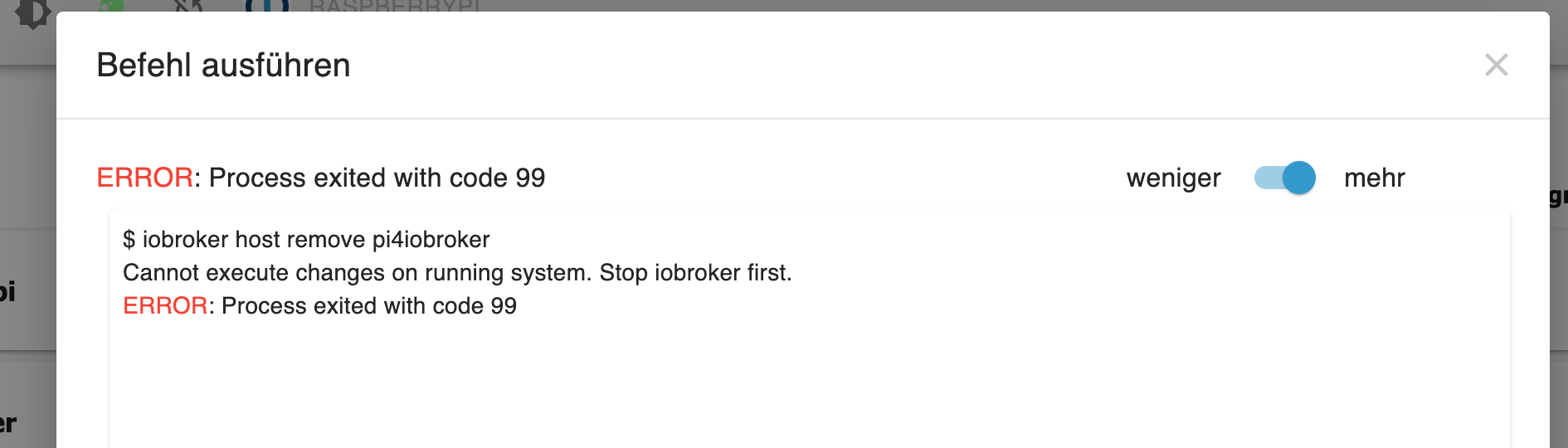
                            ich hab ihn über die raspi-config auf den Namen gestellt den der pi vorher hatte.
                            nach iob stop habe ich den 2. host mit

                            iobroker host remove pi4iobroker
                            

                            wegbekommen.
                            So wies aussieht läuft jetzt alles.

                            Danke für Deine Unterstützung

                            HomoranH 1 Antwort Letzte Antwort
                            0
                            • peterk34P peterk34

                              @thomas-braun
                              ich hab ihn über die raspi-config auf den Namen gestellt den der pi vorher hatte.
                              nach iob stop habe ich den 2. host mit

                              iobroker host remove pi4iobroker
                              

                              wegbekommen.
                              So wies aussieht läuft jetzt alles.

                              Danke für Deine Unterstützung

                              HomoranH Nicht stören
                              HomoranH Nicht stören
                              Homoran
                              Global Moderator Administrators
                              schrieb am zuletzt editiert von
                              #14

                              @peterk34 sagte in [gelöst] Iobroker startet nicht:

                              ich hab ihn über die raspi-config auf den Namen gestellt den der pi vorher hatte.

                              und hoffentlich danach rebootet!??

                              kein Support per PN! - Fragen im Forum stellen - es gibt fast nichts, was nicht auch für andere interessant ist.

                              Benutzt das Voting rechts unten im Beitrag wenn er euch geholfen hat.

                              der Installationsfixer: curl -fsL https://iobroker.net/fix.sh | bash -

                              peterk34P 1 Antwort Letzte Antwort
                              0
                              • HomoranH Homoran

                                @peterk34 sagte in [gelöst] Iobroker startet nicht:

                                ich hab ihn über die raspi-config auf den Namen gestellt den der pi vorher hatte.

                                und hoffentlich danach rebootet!??

                                peterk34P Offline
                                peterk34P Offline
                                peterk34
                                schrieb am zuletzt editiert von
                                #15

                                @homoran yep

                                1 Antwort Letzte Antwort
                                0
                                Antworten
                                • In einem neuen Thema antworten
                                Anmelden zum Antworten
                                • Älteste zuerst
                                • Neuste zuerst
                                • Meiste Stimmen


                                Support us

                                ioBroker
                                Community Adapters
                                Donate
                                FAQ Cloud / IOT
                                HowTo: Node.js-Update
                                HowTo: Backup/Restore
                                Downloads
                                BLOG

                                531

                                Online

                                32.6k

                                Benutzer

                                82.0k

                                Themen

                                1.3m

                                Beiträge
                                Community
                                Impressum | Datenschutz-Bestimmungen | Nutzungsbedingungen | Einwilligungseinstellungen
                                ioBroker Community 2014-2025
                                logo
                                • Anmelden

                                • Du hast noch kein Konto? Registrieren

                                • Anmelden oder registrieren, um zu suchen
                                • Erster Beitrag
                                  Letzter Beitrag
                                0
                                • Home
                                • Aktuell
                                • Tags
                                • Ungelesen 0
                                • Kategorien
                                • Unreplied
                                • Beliebt
                                • GitHub
                                • Docu
                                • Hilfe