Weiter zum Inhalt
  • Home
  • Aktuell
  • Tags
  • 0 Ungelesen 0
  • Kategorien
  • Unreplied
  • Beliebt
  • GitHub
  • Docu
  • Hilfe
Skins
  • Hell
  • Brite
  • Cerulean
  • Cosmo
  • Flatly
  • Journal
  • Litera
  • Lumen
  • Lux
  • Materia
  • Minty
  • Morph
  • Pulse
  • Sandstone
  • Simplex
  • Sketchy
  • Spacelab
  • United
  • Yeti
  • Zephyr
  • Dunkel
  • Cyborg
  • Darkly
  • Quartz
  • Slate
  • Solar
  • Superhero
  • Vapor

  • Standard: (Kein Skin)
  • Kein Skin
Einklappen
ioBroker Logo

Community Forum

donate donate
  1. ioBroker Community Home
  2. Deutsch
  3. ioBroker Allgemein
  4. Betriebssystem-Paket Update

NEWS

  • Monatsrückblick Januar/Februar 2026 ist online!
    BluefoxB
    Bluefox
    18
    1
    823

  • Jahresrückblick 2025 – unser neuer Blogbeitrag ist online! ✨
    BluefoxB
    Bluefox
    18
    1
    6.3k

  • Neuer Blogbeitrag: Monatsrückblick - Dezember 2025 🎄
    BluefoxB
    Bluefox
    13
    1
    1.6k

Betriebssystem-Paket Update

Geplant Angeheftet Gesperrt Verschoben ioBroker Allgemein
44 Beiträge 6 Kommentatoren 3.6k Aufrufe 5 Beobachtet
  • Älteste zuerst
  • Neuste zuerst
  • Meiste Stimmen
Antworten
  • In einem neuen Thema antworten
Anmelden zum Antworten
Dieses Thema wurde gelöscht. Nur Nutzer mit entsprechenden Rechten können es sehen.
  • S sebaboehm

    Hallo zusammen
    ich bekomme seit heute die Meldung, das Betriebssystem-Paket Updates vorhanden sind:
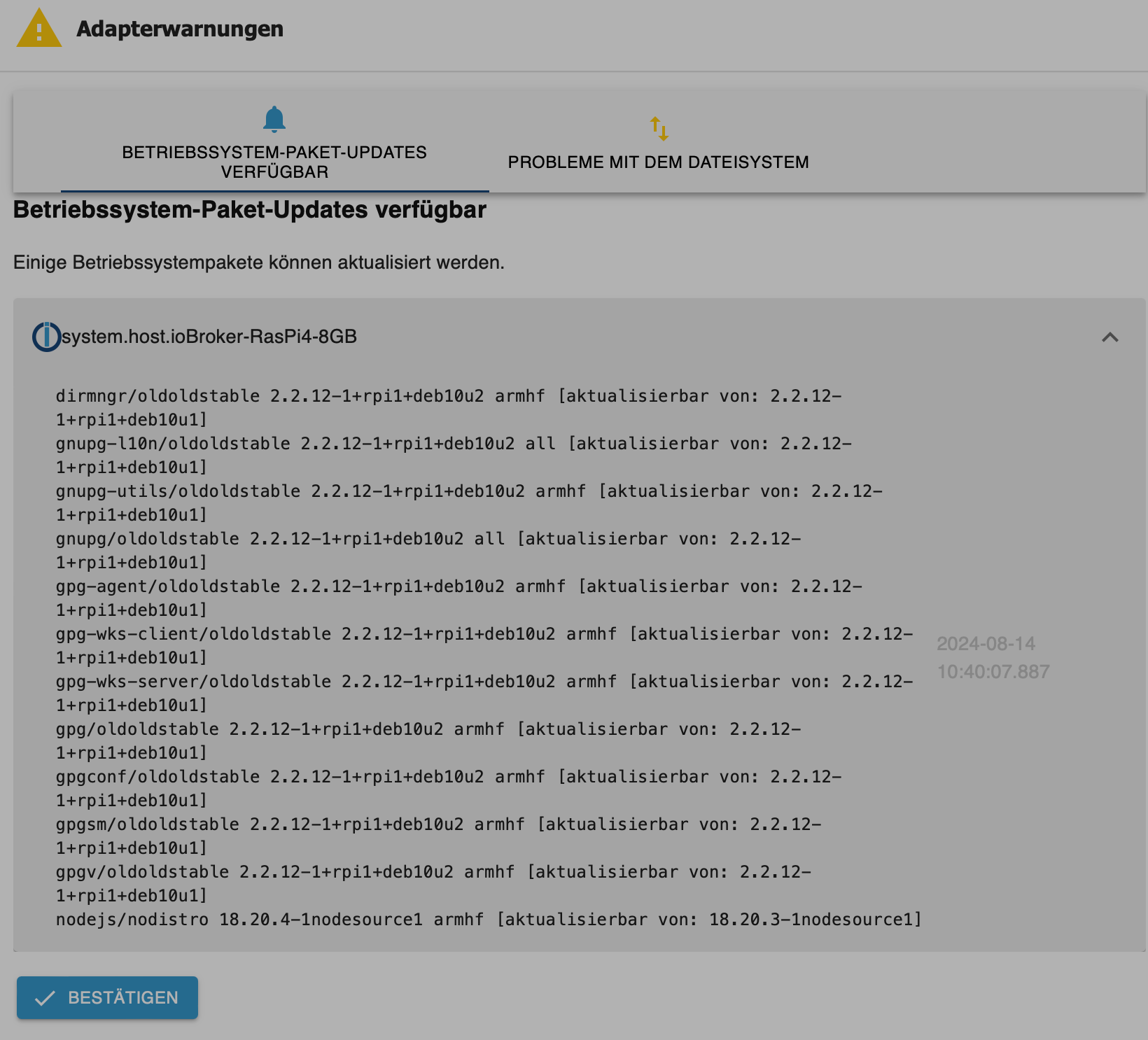
    bc9ac09e-d48b-4fd9-ad62-cd2185ad0525-image.png

    folgendes habe ich bereits versucht, hilf aber nicht:

    iob stop
    sudo apt update
    sudo apt full-upgrade
    sudo reboot

    Zudem kam jetzt noch diese Meldung dazu:
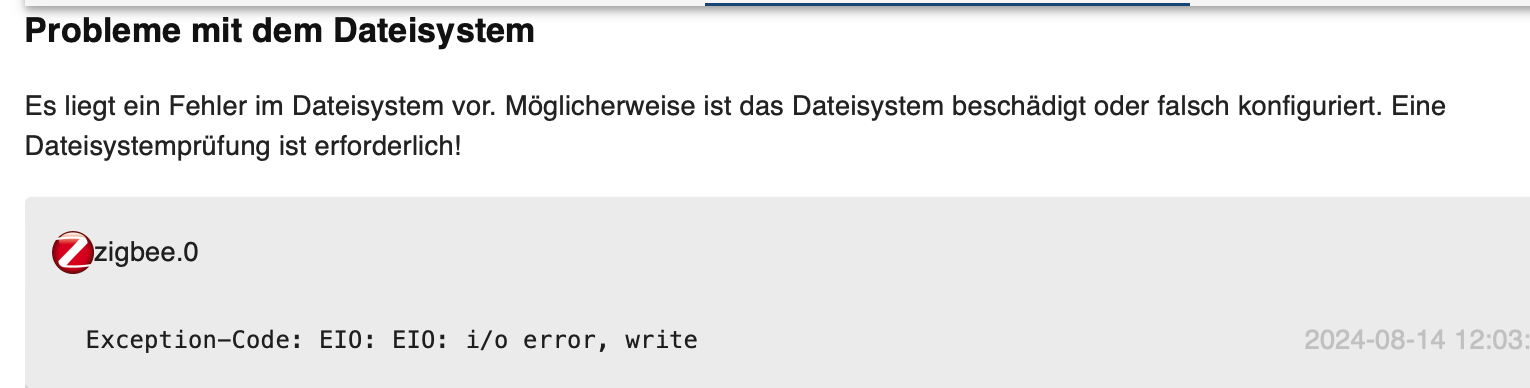
    0f1989a2-b546-475b-abbb-64a0d4d329e8-image.png

    Installiert ist der ioBroker auf einem Raspberry
    Kann mir bitte jemand helfen?

    CodierknechtC Offline
    CodierknechtC Offline
    Codierknecht
    Developer Most Active
    schrieb am zuletzt editiert von
    #2

    @sebaboehm
    Zeig mal die Langfassung von

    iob diag
    

    Dem "deb10" entnehme ich schon mal, dass Dein System veraltet ist.

    "Any fool can write code that a computer can understand. Good programmers write code that humans can understand." (Martin Fowler, "Refactoring")

    Proxmox 9.1.1 LXC|8 GB|Core i7-6700
    HmIP|ZigBee|Tasmota|Unifi
    Zabbix Certified Specialist
    Konnte ich Dir helfen? Dann benutze bitte das Voting unten rechts im Beitrag

    1 Antwort Letzte Antwort
    0
    • S sebaboehm

      Hallo zusammen
      ich bekomme seit heute die Meldung, das Betriebssystem-Paket Updates vorhanden sind:

      bc9ac09e-d48b-4fd9-ad62-cd2185ad0525-image.png

      folgendes habe ich bereits versucht, hilf aber nicht:

      iob stop
      sudo apt update
      sudo apt full-upgrade
      sudo reboot

      Zudem kam jetzt noch diese Meldung dazu:
      0f1989a2-b546-475b-abbb-64a0d4d329e8-image.png

      Installiert ist der ioBroker auf einem Raspberry
      Kann mir bitte jemand helfen?

      Thomas BraunT Online
      Thomas BraunT Online
      Thomas Braun
      Most Active
      schrieb am zuletzt editiert von Thomas Braun
      #3

      @sebaboehm

      Dein Betriebssystem ist total veraltet.
      Muss neu aufgesetzt werden.

      Genaueres kann man evtl. sagen, wenn man die Ausgabe von

      iob diag
      

      in der Langfassung sehen könnte.

      Linux-Werkzeugkasten:
      https://forum.iobroker.net/topic/42952/der-kleine-iobroker-linux-werkzeugkasten
      NodeJS Fixer Skript:
      https://forum.iobroker.net/topic/68035/iob-node-fix-skript
      iob_diag: curl -sLf -o diag.sh https://iobroker.net/diag.sh && bash diag.sh

      S 1 Antwort Letzte Antwort
      0
      • Thomas BraunT Thomas Braun

        @sebaboehm

        Dein Betriebssystem ist total veraltet.
        Muss neu aufgesetzt werden.

        Genaueres kann man evtl. sagen, wenn man die Ausgabe von

        iob diag
        

        in der Langfassung sehen könnte.

        S Offline
        S Offline
        sebaboehm
        schrieb am zuletzt editiert von
        #4

        dann kommt dies:

        7e1a43c3-6240-443a-9e94-64b352163c8b-image.png

        Thomas BraunT 1 Antwort Letzte Antwort
        0
        • S sebaboehm

          dann kommt dies:

          7e1a43c3-6240-443a-9e94-64b352163c8b-image.png

          Thomas BraunT Online
          Thomas BraunT Online
          Thomas Braun
          Most Active
          schrieb am zuletzt editiert von
          #5

          @sebaboehm

          Bitte keine Screenshots von Text...

          iob stop 
          iob fix
          iob start
          

          und dann nochmal

          iob diag
          

          Linux-Werkzeugkasten:
          https://forum.iobroker.net/topic/42952/der-kleine-iobroker-linux-werkzeugkasten
          NodeJS Fixer Skript:
          https://forum.iobroker.net/topic/68035/iob-node-fix-skript
          iob_diag: curl -sLf -o diag.sh https://iobroker.net/diag.sh && bash diag.sh

          S 1 Antwort Letzte Antwort
          0
          • Thomas BraunT Thomas Braun

            @sebaboehm

            Bitte keine Screenshots von Text...

            iob stop 
            iob fix
            iob start
            

            und dann nochmal

            iob diag
            
            S Offline
            S Offline
            sebaboehm
            schrieb am zuletzt editiert von
            #6

            @thomas-braun
            Da kommt ganz schön viel :-D
            Soll ich das alles kopieren oder einen bestimmten Bereich?

            Thomas BraunT 1 Antwort Letzte Antwort
            0
            • S sebaboehm

              @thomas-braun
              Da kommt ganz schön viel :-D
              Soll ich das alles kopieren oder einen bestimmten Bereich?

              Thomas BraunT Online
              Thomas BraunT Online
              Thomas Braun
              Most Active
              schrieb am zuletzt editiert von
              #7

              @sebaboehm

              Alles innerhalb der Kopiermarken.

              Linux-Werkzeugkasten:
              https://forum.iobroker.net/topic/42952/der-kleine-iobroker-linux-werkzeugkasten
              NodeJS Fixer Skript:
              https://forum.iobroker.net/topic/68035/iob-node-fix-skript
              iob_diag: curl -sLf -o diag.sh https://iobroker.net/diag.sh && bash diag.sh

              CodierknechtC S 2 Antworten Letzte Antwort
              0
              • Thomas BraunT Thomas Braun

                @sebaboehm

                Alles innerhalb der Kopiermarken.

                CodierknechtC Offline
                CodierknechtC Offline
                Codierknecht
                Developer Most Active
                schrieb am zuletzt editiert von
                #8

                @thomas-braun sagte in Betriebssystem-Paket Update:

                Alles innerhalb der Kopiermarken.

                @sebaboehm
                ... und zwar bevor Du eine Taste drückst. Sonst kommt nur die Zusammenfassung.

                "Any fool can write code that a computer can understand. Good programmers write code that humans can understand." (Martin Fowler, "Refactoring")

                Proxmox 9.1.1 LXC|8 GB|Core i7-6700
                HmIP|ZigBee|Tasmota|Unifi
                Zabbix Certified Specialist
                Konnte ich Dir helfen? Dann benutze bitte das Voting unten rechts im Beitrag

                1 Antwort Letzte Antwort
                1
                • Thomas BraunT Thomas Braun

                  @sebaboehm

                  Alles innerhalb der Kopiermarken.

                  S Offline
                  S Offline
                  sebaboehm
                  schrieb am zuletzt editiert von
                  #9

                  @thomas-braun ok, dann erstmal das:

                  Copy text starting here:

                  ======================= SUMMARY =======================
                  			v.2024-05-22
                  
                  
                     Static hostname: ioBroker-RasPi4-8GB
                           Icon name: computer
                    Operating System: Raspbian GNU/Linux 10 (buster)
                              Kernel: Linux 5.10.103-v7l+
                        Architecture: arm
                  
                  Installation: 		native
                  Kernel: 		armv7l
                  Userland: 		32 bit
                  Timezone: 		Europe/Berlin (CEST, +0200)
                  User-ID: 		1000
                  Display-Server: 	false
                  Boot Target: 		graphical.target
                  
                  Pending OS-Updates: 	0
                  Pending iob updates: 	0
                  
                  Nodejs-Installation:
                  /usr/bin/nodejs 	v18.20.4
                  /usr/bin/node 		v18.20.4
                  /usr/bin/npm 		10.7.0
                  /usr/bin/npx 		10.7.0
                  /usr/bin/corepack 	0.28.0
                  
                  Recommended versions are nodejs 20.16.0 and npm 10.8.1
                  Your nodejs installation is correct
                  
                  MEMORY:
                                total        used        free      shared  buff/cache   available
                  Mem:           7.9G        209M        6.9G        8.0M        807M        7.4G
                  Swap:           99M          0B         99M
                  Total:         8.0G        209M        7.0G
                  
                  Active iob-Instances: 	1
                  Upgrade policy: none
                  
                  ioBroker Core: 		js-controller 		6.0.9
                  			admin 			7.0.22
                  
                  ioBroker Status: 	iobroker is not running on this host.
                  
                  
                  Objects type: jsonl
                  States  type: jsonl
                  
                  Status admin and web instance:
                    system.adapter.admin.0                  : admin                 : ioBroker-RasPi4-8GB                      -  enabled, port: 8081, bind: 0.0.0.0, run as: admin
                    system.adapter.web.0                    : web                   : ioBroker-RasPi4-8GB                      -  enabled, port: 8082, bind: 0.0.0.0, run as: admin
                  
                  Objects: 		16346
                  States: 		13162
                  
                  Size of iob-Database:
                  
                  21M	/opt/iobroker/iobroker-data/objects.jsonl
                  14M	/opt/iobroker/iobroker-data/objects.json.migrated
                  14M	/opt/iobroker/iobroker-data/objects.json.bak.migrated
                  2.9M	/opt/iobroker/iobroker-data/states.jsonl
                  2.3M	/opt/iobroker/iobroker-data/states.json.migrated
                  2.3M	/opt/iobroker/iobroker-data/states.json.bak.migrated


                  =================== END OF SUMMARY ====================
                  

                  === Mark text until here for copying ===

                  Wenn du alles brauchst muss ich das nochmal ausführen, moment

                  S 1 Antwort Letzte Antwort
                  0
                  • CodierknechtC Offline
                    CodierknechtC Offline
                    Codierknecht
                    Developer Most Active
                    schrieb am zuletzt editiert von
                    #10

                    @sebaboehm
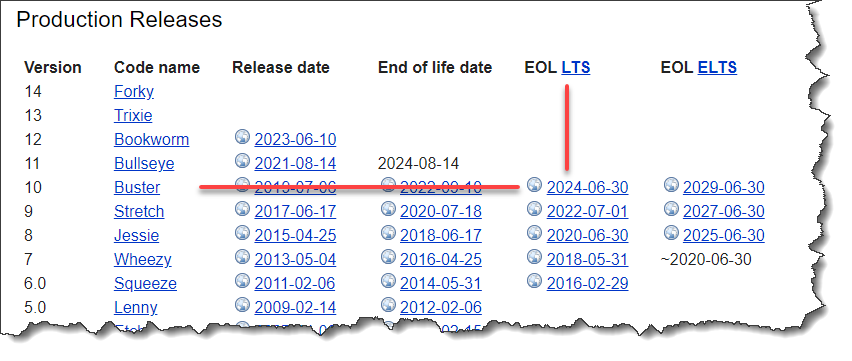
                    Operating System: Raspbian GNU/Linux 10 (buster)

                    Ist bereits beerdigt.

                    cea08cd8-7fff-4bff-9c51-13b33a9f3931-image.png
                    Das kannst Du nur durch eine komplette Neuinstallation fixen.
                    Dann am besten gleich ein 64Bit-OS.

                    https://forum.iobroker.net/topic/51869/installation-auf-raspi-einfacher-geht-s-nicht

                    Also:

                    • Backup ziehen
                    • neu aufsetzen
                    • Backup rein
                    • glücklich sein

                    "Any fool can write code that a computer can understand. Good programmers write code that humans can understand." (Martin Fowler, "Refactoring")

                    Proxmox 9.1.1 LXC|8 GB|Core i7-6700
                    HmIP|ZigBee|Tasmota|Unifi
                    Zabbix Certified Specialist
                    Konnte ich Dir helfen? Dann benutze bitte das Voting unten rechts im Beitrag

                    S 1 Antwort Letzte Antwort
                    2
                    • S sebaboehm

                      @thomas-braun ok, dann erstmal das:

                      Copy text starting here:

                      ======================= SUMMARY =======================
                      			v.2024-05-22
                      
                      
                         Static hostname: ioBroker-RasPi4-8GB
                               Icon name: computer
                        Operating System: Raspbian GNU/Linux 10 (buster)
                                  Kernel: Linux 5.10.103-v7l+
                            Architecture: arm
                      
                      Installation: 		native
                      Kernel: 		armv7l
                      Userland: 		32 bit
                      Timezone: 		Europe/Berlin (CEST, +0200)
                      User-ID: 		1000
                      Display-Server: 	false
                      Boot Target: 		graphical.target
                      
                      Pending OS-Updates: 	0
                      Pending iob updates: 	0
                      
                      Nodejs-Installation:
                      /usr/bin/nodejs 	v18.20.4
                      /usr/bin/node 		v18.20.4
                      /usr/bin/npm 		10.7.0
                      /usr/bin/npx 		10.7.0
                      /usr/bin/corepack 	0.28.0
                      
                      Recommended versions are nodejs 20.16.0 and npm 10.8.1
                      Your nodejs installation is correct
                      
                      MEMORY:
                                    total        used        free      shared  buff/cache   available
                      Mem:           7.9G        209M        6.9G        8.0M        807M        7.4G
                      Swap:           99M          0B         99M
                      Total:         8.0G        209M        7.0G
                      
                      Active iob-Instances: 	1
                      Upgrade policy: none
                      
                      ioBroker Core: 		js-controller 		6.0.9
                      			admin 			7.0.22
                      
                      ioBroker Status: 	iobroker is not running on this host.
                      
                      
                      Objects type: jsonl
                      States  type: jsonl
                      
                      Status admin and web instance:
                        system.adapter.admin.0                  : admin                 : ioBroker-RasPi4-8GB                      -  enabled, port: 8081, bind: 0.0.0.0, run as: admin
                        system.adapter.web.0                    : web                   : ioBroker-RasPi4-8GB                      -  enabled, port: 8082, bind: 0.0.0.0, run as: admin
                      
                      Objects: 		16346
                      States: 		13162
                      
                      Size of iob-Database:
                      
                      21M	/opt/iobroker/iobroker-data/objects.jsonl
                      14M	/opt/iobroker/iobroker-data/objects.json.migrated
                      14M	/opt/iobroker/iobroker-data/objects.json.bak.migrated
                      2.9M	/opt/iobroker/iobroker-data/states.jsonl
                      2.3M	/opt/iobroker/iobroker-data/states.json.migrated
                      2.3M	/opt/iobroker/iobroker-data/states.json.bak.migrated


                      =================== END OF SUMMARY ====================
                      

                      === Mark text until here for copying ===

                      Wenn du alles brauchst muss ich das nochmal ausführen, moment

                      S Offline
                      S Offline
                      sebaboehm
                      schrieb am zuletzt editiert von
                      #11

                      @sebaboehm
                      ======== Start marking the full check here =========

                      Skript v.2024-05-22
                      
                      *** BASE SYSTEM ***
                         Static hostname: ioBroker-RasPi4-8GB
                               Icon name: computer
                        Operating System: Raspbian GNU/Linux 10 (buster)
                                  Kernel: Linux 5.10.103-v7l+
                            Architecture: arm
                      
                      Model		: Raspberry Pi 4 Model B Rev 1.4
                      Docker          : false
                      Virtualization  : none
                      Kernel          : armv7l
                      Userland        : 32 bit
                      
                      Systemuptime and Load:
                       13:40:43 up 38 min,  1 user,  load average: 0.01, 0.46, 0.87
                      CPU threads: 4
                      
                      
                      *** RASPBERRY THROTTLING ***
                      Current issues:
                      No throttling issues detected.
                      
                      Previously detected issues:
                      No throttling issues detected.
                      
                      *** Time and Time Zones ***
                                     Local time: Wed 2024-08-14 13:40:43 CEST
                                 Universal time: Wed 2024-08-14 11:40:43 UTC
                                       RTC time: n/a
                                      Time zone: Europe/Berlin (CEST, +0200)
                      System clock synchronized: yes
                                    NTP service: active
                                RTC in local TZ: no
                      
                      *** Users and Groups ***
                      User that called 'iob diag':
                      pi
                      HOME=/home/pi
                      GROUPS=pi adm dialout cdrom sudo audio video plugdev games users input netdev gpio i2c spi iobroker
                      
                      User that is running 'js-controller':
                      js-controller is not running
                      
                      *** Display-Server-Setup ***
                      Display-Server: false
                      Desktop:
                      Terminal: 	tty
                      Boot Target: 	graphical.target
                      
                      *** MEMORY ***
                                    total        used        free      shared  buff/cache   available
                      Mem:           7.9G        208M        6.9G        8.0M        807M        7.4G
                      Swap:           99M          0B         99M
                      Total:         8.0G        208M        7.0G
                      
                      Active iob-Instances: 	1
                      
                               7898 M total memory
                                208 M used memory
                                425 M active memory
                                401 M inactive memory
                               6882 M free memory
                                212 M buffer memory
                                595 M swap cache
                                 99 M total swap
                                  0 M used swap
                                 99 M free swap
                      
                      *** top - Table Of Processes  ***
                      top - 13:40:44 up 38 min,  1 user,  load average: 0.01, 0.46, 0.87
                      Tasks: 123 total,   1 running, 122 sleeping,   0 stopped,   0 zombie
                      %Cpu(s):  0.0 us,  3.0 sy,  0.0 ni, 97.0 id,  0.0 wa,  0.0 hi,  0.0 si,  0.0 st
                      MiB Mem :   7898.7 total,   6882.9 free,    207.9 used,    807.9 buff/cache
                      MiB Swap:    100.0 total,    100.0 free,      0.0 used.   7398.9 avail Mem
                      
                      *** FAILED SERVICES ***
                      
                        UNIT             LOAD   ACTIVE SUB    DESCRIPTION
                      * iobroker.service loaded failed failed ioBroker Server
                      
                      LOAD   = Reflects whether the unit definition was properly loaded.
                      ACTIVE = The high-level unit activation state, i.e. generalization of SUB.
                      SUB    = The low-level unit activation state, values depend on unit type.
                      
                      1 loaded units listed. Pass --all to see loaded but inactive units, too.
                      To show all installed unit files use 'systemctl list-unit-files'.
                      
                      *** FILESYSTEM ***
                      Filesystem     Type      Size  Used Avail Use% Mounted on
                      /dev/root      ext4       29G   18G   11G  62% /
                      devtmpfs       devtmpfs  3.7G     0  3.7G   0% /dev
                      tmpfs          tmpfs     3.9G     0  3.9G   0% /dev/shm
                      tmpfs          tmpfs     3.9G  8.5M  3.9G   1% /run
                      tmpfs          tmpfs     5.0M  4.0K  5.0M   1% /run/lock
                      tmpfs          tmpfs     3.9G     0  3.9G   0% /sys/fs/cgroup
                      /dev/mmcblk0p1 vfat      253M   49M  204M  20% /boot
                      tmpfs          tmpfs     790M     0  790M   0% /run/user/1000
                      
                      Messages concerning ext4 filesystem in dmesg:
                      [Wed Aug 14 13:02:21 2024] Kernel command line: coherent_pool=1M 8250.nr_uarts=0 snd_bcm2835.enable_compat_alsa=0 snd_bcm2835.enable_hdmi=1  smsc95xx.macaddr=DC:A6:32:B6:16:58 vc_mem.mem_base=0x3ec00000 vc_mem.mem_size=0x40000000  console=ttyS0,115200 console=tty1 root=PARTUUID=6c586e13-02 rootfstype=ext4 elevator=deadline fsck.repair=yes rootwait
                      [Wed Aug 14 13:02:22 2024] EXT4-fs (mmcblk0p2): mounted filesystem with ordered data mode. Opts: (null)
                      [Wed Aug 14 13:02:22 2024] VFS: Mounted root (ext4 filesystem) readonly on device 179:2.
                      [Wed Aug 14 13:02:25 2024] EXT4-fs (mmcblk0p2): re-mounted. Opts: (null)
                      
                      Show mounted filesystems:
                      TARGET                                SOURCE         FSTYPE     OPTIONS
                      /                                     /dev/mmcblk0p2 ext4       rw,noatime
                      |-/dev                                devtmpfs       devtmpfs   rw,relatime,size=3879288k,nr_inodes=74941,mode=755
                      | |-/dev/shm                          tmpfs          tmpfs      rw,nosuid,nodev
                      | |-/dev/pts                          devpts         devpts     rw,nosuid,noexec,relatime,gid=5,mode=620,ptmxmode=000
                      | `-/dev/mqueue                       mqueue         mqueue     rw,relatime
                      |-/sys                                sysfs          sysfs      rw,nosuid,nodev,noexec,relatime
                      | |-/sys/kernel/security              securityfs     securityfs rw,nosuid,nodev,noexec,relatime
                      | |-/sys/fs/cgroup                    tmpfs          tmpfs      ro,nosuid,nodev,noexec,mode=755
                      | | |-/sys/fs/cgroup/unified          cgroup2        cgroup2    rw,nosuid,nodev,noexec,relatime,nsdelegate
                      | | |-/sys/fs/cgroup/systemd          cgroup         cgroup     rw,nosuid,nodev,noexec,relatime,xattr,name=systemd
                      | | |-/sys/fs/cgroup/net_cls,net_prio cgroup         cgroup     rw,nosuid,nodev,noexec,relatime,net_cls,net_prio
                      | | |-/sys/fs/cgroup/blkio            cgroup         cgroup     rw,nosuid,nodev,noexec,relatime,blkio
                      | | |-/sys/fs/cgroup/freezer          cgroup         cgroup     rw,nosuid,nodev,noexec,relatime,freezer
                      | | |-/sys/fs/cgroup/cpuset           cgroup         cgroup     rw,nosuid,nodev,noexec,relatime,cpuset
                      | | |-/sys/fs/cgroup/perf_event       cgroup         cgroup     rw,nosuid,nodev,noexec,relatime,perf_event
                      | | |-/sys/fs/cgroup/cpu,cpuacct      cgroup         cgroup     rw,nosuid,nodev,noexec,relatime,cpu,cpuacct
                      | | |-/sys/fs/cgroup/devices          cgroup         cgroup     rw,nosuid,nodev,noexec,relatime,devices
                      | | `-/sys/fs/cgroup/pids             cgroup         cgroup     rw,nosuid,nodev,noexec,relatime,pids
                      | |-/sys/fs/bpf                       none           bpf        rw,nosuid,nodev,noexec,relatime,mode=700
                      | |-/sys/kernel/debug                 debugfs        debugfs    rw,relatime
                      | `-/sys/kernel/config                configfs       configfs   rw,relatime
                      |-/proc                               proc           proc       rw,relatime
                      | `-/proc/sys/fs/binfmt_misc          systemd-1      autofs     rw,relatime,fd=35,pgrp=1,timeout=0,minproto=5,maxproto=5,direct
                      |-/run                                tmpfs          tmpfs      rw,nosuid,nodev,mode=755
                      | |-/run/lock                         tmpfs          tmpfs      rw,nosuid,nodev,noexec,relatime,size=5120k
                      | |-/run/rpc_pipefs                   sunrpc         rpc_pipefs rw,relatime
                      | `-/run/user/1000                    tmpfs          tmpfs      rw,nosuid,nodev,relatime,size=808828k,mode=700,uid=1000,gid=1000
                      `-/boot                               /dev/mmcblk0p1 vfat       rw,relatime,fmask=0022,dmask=0022,codepage=437,iocharset=ascii,shortname=mixed,errors=remount-ro
                      
                      Files in neuralgic directories:
                      
                      /var:
                      2.7G	/var/
                      2.4G	/var/cache/apt
                      2.4G	/var/cache
                      2.3G	/var/cache/apt/archives
                      164M	/var/lib
                      
                      Archived and active journals take up 8.0M in the file system.
                      
                      /opt/iobroker/backups:
                      5.9G	/opt/iobroker/backups/
                      
                      /opt/iobroker/iobroker-data:
                      1.2G	/opt/iobroker/iobroker-data/
                      779M	/opt/iobroker/iobroker-data/files
                      441M	/opt/iobroker/iobroker-data/files/javascript.admin
                      409M	/opt/iobroker/iobroker-data/files/javascript.admin/static
                      408M	/opt/iobroker/iobroker-data/files/javascript.admin/static/js
                      
                      The five largest files in iobroker-data are:
                      38M	/opt/iobroker/iobroker-data/files/iot.admin/static/js/main.d3d286bd.js.map
                      35M	/opt/iobroker/iobroker-data/files/devices.admin/static/js/main.24f2bb56.js.map
                      27M	/opt/iobroker/iobroker-data/files/backitup.admin/static/js/main.ce422ec2.js.map
                      24M	/opt/iobroker/iobroker-data/files/web.admin/static/js/main.135279a0.js.map
                      24M	/opt/iobroker/iobroker-data/files/scenes.admin/static/js/main.1e6546bb.js.map
                      
                      USB-Devices by-id:
                      USB-Sticks -  Avoid direct links to /dev/tty* in your adapter setups, please always prefer the links 'by-id':
                      
                      /dev/serial/by-id/usb-dresden_elektronik_ingenieurtechnik_GmbH_ConBee_II_DE2428212-if00
                      
                      HINT:
                      Your zigbee.0 COM-Port is NOT matching 'by-id'. Please check your setting:
                      /dev/ttyACM0


                      *** NodeJS-Installation ***
                      
                      /usr/bin/nodejs 	v18.20.4
                      /usr/bin/node 		v18.20.4
                      /usr/bin/npm 		10.7.0
                      /usr/bin/npx 		10.7.0
                      /usr/bin/corepack 	0.28.0
                      
                      
                      nodejs:
                        Installed: 18.20.4-1nodesource1
                        Candidate: 18.20.4-1nodesource1
                        Version table:
                       *** 18.20.4-1nodesource1 600
                              500 https://deb.nodesource.com/node_18.x nodistro/main armhf Packages
                              100 /var/lib/dpkg/status
                           18.20.3-1nodesource1 600
                              500 https://deb.nodesource.com/node_18.x nodistro/main armhf Packages
                           18.20.2-1nodesource1 600
                              500 https://deb.nodesource.com/node_18.x nodistro/main armhf Packages
                           18.20.1-1nodesource1 600
                              500 https://deb.nodesource.com/node_18.x nodistro/main armhf Packages
                           18.20.0-1nodesource1 600
                              500 https://deb.nodesource.com/node_18.x nodistro/main armhf Packages
                           18.19.1-1nodesource1 600
                              500 https://deb.nodesource.com/node_18.x nodistro/main armhf Packages
                           18.19.0-1nodesource1 600
                              500 https://deb.nodesource.com/node_18.x nodistro/main armhf Packages
                           18.18.2-1nodesource1 600
                              500 https://deb.nodesource.com/node_18.x nodistro/main armhf Packages
                           18.18.1-1nodesource1 600
                              500 https://deb.nodesource.com/node_18.x nodistro/main armhf Packages
                           18.18.0-1nodesource1 600
                              500 https://deb.nodesource.com/node_18.x nodistro/main armhf Packages
                           18.17.1-1nodesource1 600
                              500 https://deb.nodesource.com/node_18.x nodistro/main armhf Packages
                           18.17.0-1nodesource1 600
                              500 https://deb.nodesource.com/node_18.x nodistro/main armhf Packages
                           18.16.1-1nodesource1 600
                              500 https://deb.nodesource.com/node_18.x nodistro/main armhf Packages
                           18.16.0-1nodesource1 600
                              500 https://deb.nodesource.com/node_18.x nodistro/main armhf Packages
                           18.15.0-1nodesource1 600
                              500 https://deb.nodesource.com/node_18.x nodistro/main armhf Packages
                           18.14.2-1nodesource1 600
                              500 https://deb.nodesource.com/node_18.x nodistro/main armhf Packages
                           18.14.1-1nodesource1 600
                              500 https://deb.nodesource.com/node_18.x nodistro/main armhf Packages
                           18.14.0-1nodesource1 600
                              500 https://deb.nodesource.com/node_18.x nodistro/main armhf Packages
                           18.13.0-1nodesource1 600
                              500 https://deb.nodesource.com/node_18.x nodistro/main armhf Packages
                           18.12.0-1nodesource1 600
                              500 https://deb.nodesource.com/node_18.x nodistro/main armhf Packages
                           18.11.0-1nodesource1 600
                              500 https://deb.nodesource.com/node_18.x nodistro/main armhf Packages
                           18.10.0-1nodesource1 600
                              500 https://deb.nodesource.com/node_18.x nodistro/main armhf Packages
                           18.9.1-1nodesource1 600
                              500 https://deb.nodesource.com/node_18.x nodistro/main armhf Packages
                           18.9.0-1nodesource1 600
                              500 https://deb.nodesource.com/node_18.x nodistro/main armhf Packages
                           18.8.0-1nodesource1 600
                              500 https://deb.nodesource.com/node_18.x nodistro/main armhf Packages
                           18.7.0-1nodesource1 600
                              500 https://deb.nodesource.com/node_18.x nodistro/main armhf Packages
                           18.6.0-1nodesource1 600
                              500 https://deb.nodesource.com/node_18.x nodistro/main armhf Packages
                           18.5.0-1nodesource1 600
                              500 https://deb.nodesource.com/node_18.x nodistro/main armhf Packages
                           18.4.0-1nodesource1 600
                              500 https://deb.nodesource.com/node_18.x nodistro/main armhf Packages
                           18.3.0-1nodesource1 600
                              500 https://deb.nodesource.com/node_18.x nodistro/main armhf Packages
                           18.2.0-1nodesource1 600
                              500 https://deb.nodesource.com/node_18.x nodistro/main armhf Packages
                           18.1.0-1nodesource1 600
                              500 https://deb.nodesource.com/node_18.x nodistro/main armhf Packages
                           18.0.0-1nodesource1 600
                              500 https://deb.nodesource.com/node_18.x nodistro/main armhf Packages
                           10.24.0~dfsg-1~deb10u3 500
                              500 http://raspbian.raspberrypi.org/raspbian buster/main armhf Packages
                      
                      Temp directories causing npm8 problem: 0
                      No problems detected
                      
                      Errors in npm tree:
                      
                      *** ioBroker-Installation ***
                      
                      ioBroker Status
                      iobroker is not running on this host.
                      
                      
                      Objects type: jsonl
                      States  type: jsonl
                      
                      Core adapters versions
                      js-controller: 	6.0.9
                      Thomas BraunT 1 Antwort Letzte Antwort
                      0
                      • CodierknechtC Codierknecht

                        @sebaboehm
                        Operating System: Raspbian GNU/Linux 10 (buster)

                        Ist bereits beerdigt.

                        cea08cd8-7fff-4bff-9c51-13b33a9f3931-image.png
                        Das kannst Du nur durch eine komplette Neuinstallation fixen.
                        Dann am besten gleich ein 64Bit-OS.

                        https://forum.iobroker.net/topic/51869/installation-auf-raspi-einfacher-geht-s-nicht

                        Also:

                        • Backup ziehen
                        • neu aufsetzen
                        • Backup rein
                        • glücklich sein
                        S Offline
                        S Offline
                        sebaboehm
                        schrieb am zuletzt editiert von
                        #12

                        @codierknecht kann man das nicht updaten?
                        Wie konnte das passieren?

                        L CodierknechtC 2 Antworten Letzte Antwort
                        0
                        • S sebaboehm

                          @codierknecht kann man das nicht updaten?
                          Wie konnte das passieren?

                          L Offline
                          L Offline
                          legro
                          schrieb am zuletzt editiert von
                          #13

                          @sebaboehm

                          Wie gesagt, dein System ist uralt, da hilft dann in der Tat bloß eine Neuinstallation.😖

                          Ich habe einen Umzug von einem Pi4 auf einen Pi5 hinter mir. Da half auch bloß eine Neuinstallation. Was es dabei ggf. alles zu bedenken gilt, kannst hier nachlesen.

                          Viel Erfolg!

                          Raspberry Pi 5 mit 8GB + 120GB SSD + Coordinator COD-m + ioBroker ..

                          1 Antwort Letzte Antwort
                          0
                          • S sebaboehm

                            @codierknecht kann man das nicht updaten?
                            Wie konnte das passieren?

                            CodierknechtC Offline
                            CodierknechtC Offline
                            Codierknecht
                            Developer Most Active
                            schrieb am zuletzt editiert von
                            #14

                            @sebaboehm sagte in Betriebssystem-Paket Update:

                            kann man das nicht updaten?

                            Nein.
                            Und das ist ein 32-Bit-OS. Für den Pi4 solltest Du eh auf 64-Bit wechseln.

                            @sebaboehm sagte in Betriebssystem-Paket Update:

                            Wie konnte das passieren?

                            Regelmäßig hier mitlesen. Oder bei SocialMedia.
                            Dann hättest Du vermutlich mitbekommen, dass buster abgekündigt ist und man reagieren sollte.

                            "Any fool can write code that a computer can understand. Good programmers write code that humans can understand." (Martin Fowler, "Refactoring")

                            Proxmox 9.1.1 LXC|8 GB|Core i7-6700
                            HmIP|ZigBee|Tasmota|Unifi
                            Zabbix Certified Specialist
                            Konnte ich Dir helfen? Dann benutze bitte das Voting unten rechts im Beitrag

                            1 Antwort Letzte Antwort
                            0
                            • S sebaboehm

                              @sebaboehm
                              ======== Start marking the full check here =========

                              Skript v.2024-05-22
                              
                              *** BASE SYSTEM ***
                                 Static hostname: ioBroker-RasPi4-8GB
                                       Icon name: computer
                                Operating System: Raspbian GNU/Linux 10 (buster)
                                          Kernel: Linux 5.10.103-v7l+
                                    Architecture: arm
                              
                              Model		: Raspberry Pi 4 Model B Rev 1.4
                              Docker          : false
                              Virtualization  : none
                              Kernel          : armv7l
                              Userland        : 32 bit
                              
                              Systemuptime and Load:
                               13:40:43 up 38 min,  1 user,  load average: 0.01, 0.46, 0.87
                              CPU threads: 4
                              
                              
                              *** RASPBERRY THROTTLING ***
                              Current issues:
                              No throttling issues detected.
                              
                              Previously detected issues:
                              No throttling issues detected.
                              
                              *** Time and Time Zones ***
                                             Local time: Wed 2024-08-14 13:40:43 CEST
                                         Universal time: Wed 2024-08-14 11:40:43 UTC
                                               RTC time: n/a
                                              Time zone: Europe/Berlin (CEST, +0200)
                              System clock synchronized: yes
                                            NTP service: active
                                        RTC in local TZ: no
                              
                              *** Users and Groups ***
                              User that called 'iob diag':
                              pi
                              HOME=/home/pi
                              GROUPS=pi adm dialout cdrom sudo audio video plugdev games users input netdev gpio i2c spi iobroker
                              
                              User that is running 'js-controller':
                              js-controller is not running
                              
                              *** Display-Server-Setup ***
                              Display-Server: false
                              Desktop:
                              Terminal: 	tty
                              Boot Target: 	graphical.target
                              
                              *** MEMORY ***
                                            total        used        free      shared  buff/cache   available
                              Mem:           7.9G        208M        6.9G        8.0M        807M        7.4G
                              Swap:           99M          0B         99M
                              Total:         8.0G        208M        7.0G
                              
                              Active iob-Instances: 	1
                              
                                       7898 M total memory
                                        208 M used memory
                                        425 M active memory
                                        401 M inactive memory
                                       6882 M free memory
                                        212 M buffer memory
                                        595 M swap cache
                                         99 M total swap
                                          0 M used swap
                                         99 M free swap
                              
                              *** top - Table Of Processes  ***
                              top - 13:40:44 up 38 min,  1 user,  load average: 0.01, 0.46, 0.87
                              Tasks: 123 total,   1 running, 122 sleeping,   0 stopped,   0 zombie
                              %Cpu(s):  0.0 us,  3.0 sy,  0.0 ni, 97.0 id,  0.0 wa,  0.0 hi,  0.0 si,  0.0 st
                              MiB Mem :   7898.7 total,   6882.9 free,    207.9 used,    807.9 buff/cache
                              MiB Swap:    100.0 total,    100.0 free,      0.0 used.   7398.9 avail Mem
                              
                              *** FAILED SERVICES ***
                              
                                UNIT             LOAD   ACTIVE SUB    DESCRIPTION
                              * iobroker.service loaded failed failed ioBroker Server
                              
                              LOAD   = Reflects whether the unit definition was properly loaded.
                              ACTIVE = The high-level unit activation state, i.e. generalization of SUB.
                              SUB    = The low-level unit activation state, values depend on unit type.
                              
                              1 loaded units listed. Pass --all to see loaded but inactive units, too.
                              To show all installed unit files use 'systemctl list-unit-files'.
                              
                              *** FILESYSTEM ***
                              Filesystem     Type      Size  Used Avail Use% Mounted on
                              /dev/root      ext4       29G   18G   11G  62% /
                              devtmpfs       devtmpfs  3.7G     0  3.7G   0% /dev
                              tmpfs          tmpfs     3.9G     0  3.9G   0% /dev/shm
                              tmpfs          tmpfs     3.9G  8.5M  3.9G   1% /run
                              tmpfs          tmpfs     5.0M  4.0K  5.0M   1% /run/lock
                              tmpfs          tmpfs     3.9G     0  3.9G   0% /sys/fs/cgroup
                              /dev/mmcblk0p1 vfat      253M   49M  204M  20% /boot
                              tmpfs          tmpfs     790M     0  790M   0% /run/user/1000
                              
                              Messages concerning ext4 filesystem in dmesg:
                              [Wed Aug 14 13:02:21 2024] Kernel command line: coherent_pool=1M 8250.nr_uarts=0 snd_bcm2835.enable_compat_alsa=0 snd_bcm2835.enable_hdmi=1  smsc95xx.macaddr=DC:A6:32:B6:16:58 vc_mem.mem_base=0x3ec00000 vc_mem.mem_size=0x40000000  console=ttyS0,115200 console=tty1 root=PARTUUID=6c586e13-02 rootfstype=ext4 elevator=deadline fsck.repair=yes rootwait
                              [Wed Aug 14 13:02:22 2024] EXT4-fs (mmcblk0p2): mounted filesystem with ordered data mode. Opts: (null)
                              [Wed Aug 14 13:02:22 2024] VFS: Mounted root (ext4 filesystem) readonly on device 179:2.
                              [Wed Aug 14 13:02:25 2024] EXT4-fs (mmcblk0p2): re-mounted. Opts: (null)
                              
                              Show mounted filesystems:
                              TARGET                                SOURCE         FSTYPE     OPTIONS
                              /                                     /dev/mmcblk0p2 ext4       rw,noatime
                              |-/dev                                devtmpfs       devtmpfs   rw,relatime,size=3879288k,nr_inodes=74941,mode=755
                              | |-/dev/shm                          tmpfs          tmpfs      rw,nosuid,nodev
                              | |-/dev/pts                          devpts         devpts     rw,nosuid,noexec,relatime,gid=5,mode=620,ptmxmode=000
                              | `-/dev/mqueue                       mqueue         mqueue     rw,relatime
                              |-/sys                                sysfs          sysfs      rw,nosuid,nodev,noexec,relatime
                              | |-/sys/kernel/security              securityfs     securityfs rw,nosuid,nodev,noexec,relatime
                              | |-/sys/fs/cgroup                    tmpfs          tmpfs      ro,nosuid,nodev,noexec,mode=755
                              | | |-/sys/fs/cgroup/unified          cgroup2        cgroup2    rw,nosuid,nodev,noexec,relatime,nsdelegate
                              | | |-/sys/fs/cgroup/systemd          cgroup         cgroup     rw,nosuid,nodev,noexec,relatime,xattr,name=systemd
                              | | |-/sys/fs/cgroup/net_cls,net_prio cgroup         cgroup     rw,nosuid,nodev,noexec,relatime,net_cls,net_prio
                              | | |-/sys/fs/cgroup/blkio            cgroup         cgroup     rw,nosuid,nodev,noexec,relatime,blkio
                              | | |-/sys/fs/cgroup/freezer          cgroup         cgroup     rw,nosuid,nodev,noexec,relatime,freezer
                              | | |-/sys/fs/cgroup/cpuset           cgroup         cgroup     rw,nosuid,nodev,noexec,relatime,cpuset
                              | | |-/sys/fs/cgroup/perf_event       cgroup         cgroup     rw,nosuid,nodev,noexec,relatime,perf_event
                              | | |-/sys/fs/cgroup/cpu,cpuacct      cgroup         cgroup     rw,nosuid,nodev,noexec,relatime,cpu,cpuacct
                              | | |-/sys/fs/cgroup/devices          cgroup         cgroup     rw,nosuid,nodev,noexec,relatime,devices
                              | | `-/sys/fs/cgroup/pids             cgroup         cgroup     rw,nosuid,nodev,noexec,relatime,pids
                              | |-/sys/fs/bpf                       none           bpf        rw,nosuid,nodev,noexec,relatime,mode=700
                              | |-/sys/kernel/debug                 debugfs        debugfs    rw,relatime
                              | `-/sys/kernel/config                configfs       configfs   rw,relatime
                              |-/proc                               proc           proc       rw,relatime
                              | `-/proc/sys/fs/binfmt_misc          systemd-1      autofs     rw,relatime,fd=35,pgrp=1,timeout=0,minproto=5,maxproto=5,direct
                              |-/run                                tmpfs          tmpfs      rw,nosuid,nodev,mode=755
                              | |-/run/lock                         tmpfs          tmpfs      rw,nosuid,nodev,noexec,relatime,size=5120k
                              | |-/run/rpc_pipefs                   sunrpc         rpc_pipefs rw,relatime
                              | `-/run/user/1000                    tmpfs          tmpfs      rw,nosuid,nodev,relatime,size=808828k,mode=700,uid=1000,gid=1000
                              `-/boot                               /dev/mmcblk0p1 vfat       rw,relatime,fmask=0022,dmask=0022,codepage=437,iocharset=ascii,shortname=mixed,errors=remount-ro
                              
                              Files in neuralgic directories:
                              
                              /var:
                              2.7G	/var/
                              2.4G	/var/cache/apt
                              2.4G	/var/cache
                              2.3G	/var/cache/apt/archives
                              164M	/var/lib
                              
                              Archived and active journals take up 8.0M in the file system.
                              
                              /opt/iobroker/backups:
                              5.9G	/opt/iobroker/backups/
                              
                              /opt/iobroker/iobroker-data:
                              1.2G	/opt/iobroker/iobroker-data/
                              779M	/opt/iobroker/iobroker-data/files
                              441M	/opt/iobroker/iobroker-data/files/javascript.admin
                              409M	/opt/iobroker/iobroker-data/files/javascript.admin/static
                              408M	/opt/iobroker/iobroker-data/files/javascript.admin/static/js
                              
                              The five largest files in iobroker-data are:
                              38M	/opt/iobroker/iobroker-data/files/iot.admin/static/js/main.d3d286bd.js.map
                              35M	/opt/iobroker/iobroker-data/files/devices.admin/static/js/main.24f2bb56.js.map
                              27M	/opt/iobroker/iobroker-data/files/backitup.admin/static/js/main.ce422ec2.js.map
                              24M	/opt/iobroker/iobroker-data/files/web.admin/static/js/main.135279a0.js.map
                              24M	/opt/iobroker/iobroker-data/files/scenes.admin/static/js/main.1e6546bb.js.map
                              
                              USB-Devices by-id:
                              USB-Sticks -  Avoid direct links to /dev/tty* in your adapter setups, please always prefer the links 'by-id':
                              
                              /dev/serial/by-id/usb-dresden_elektronik_ingenieurtechnik_GmbH_ConBee_II_DE2428212-if00
                              
                              HINT:
                              Your zigbee.0 COM-Port is NOT matching 'by-id'. Please check your setting:
                              /dev/ttyACM0


                              *** NodeJS-Installation ***
                              
                              /usr/bin/nodejs 	v18.20.4
                              /usr/bin/node 		v18.20.4
                              /usr/bin/npm 		10.7.0
                              /usr/bin/npx 		10.7.0
                              /usr/bin/corepack 	0.28.0
                              
                              
                              nodejs:
                                Installed: 18.20.4-1nodesource1
                                Candidate: 18.20.4-1nodesource1
                                Version table:
                               *** 18.20.4-1nodesource1 600
                                      500 https://deb.nodesource.com/node_18.x nodistro/main armhf Packages
                                      100 /var/lib/dpkg/status
                                   18.20.3-1nodesource1 600
                                      500 https://deb.nodesource.com/node_18.x nodistro/main armhf Packages
                                   18.20.2-1nodesource1 600
                                      500 https://deb.nodesource.com/node_18.x nodistro/main armhf Packages
                                   18.20.1-1nodesource1 600
                                      500 https://deb.nodesource.com/node_18.x nodistro/main armhf Packages
                                   18.20.0-1nodesource1 600
                                      500 https://deb.nodesource.com/node_18.x nodistro/main armhf Packages
                                   18.19.1-1nodesource1 600
                                      500 https://deb.nodesource.com/node_18.x nodistro/main armhf Packages
                                   18.19.0-1nodesource1 600
                                      500 https://deb.nodesource.com/node_18.x nodistro/main armhf Packages
                                   18.18.2-1nodesource1 600
                                      500 https://deb.nodesource.com/node_18.x nodistro/main armhf Packages
                                   18.18.1-1nodesource1 600
                                      500 https://deb.nodesource.com/node_18.x nodistro/main armhf Packages
                                   18.18.0-1nodesource1 600
                                      500 https://deb.nodesource.com/node_18.x nodistro/main armhf Packages
                                   18.17.1-1nodesource1 600
                                      500 https://deb.nodesource.com/node_18.x nodistro/main armhf Packages
                                   18.17.0-1nodesource1 600
                                      500 https://deb.nodesource.com/node_18.x nodistro/main armhf Packages
                                   18.16.1-1nodesource1 600
                                      500 https://deb.nodesource.com/node_18.x nodistro/main armhf Packages
                                   18.16.0-1nodesource1 600
                                      500 https://deb.nodesource.com/node_18.x nodistro/main armhf Packages
                                   18.15.0-1nodesource1 600
                                      500 https://deb.nodesource.com/node_18.x nodistro/main armhf Packages
                                   18.14.2-1nodesource1 600
                                      500 https://deb.nodesource.com/node_18.x nodistro/main armhf Packages
                                   18.14.1-1nodesource1 600
                                      500 https://deb.nodesource.com/node_18.x nodistro/main armhf Packages
                                   18.14.0-1nodesource1 600
                                      500 https://deb.nodesource.com/node_18.x nodistro/main armhf Packages
                                   18.13.0-1nodesource1 600
                                      500 https://deb.nodesource.com/node_18.x nodistro/main armhf Packages
                                   18.12.0-1nodesource1 600
                                      500 https://deb.nodesource.com/node_18.x nodistro/main armhf Packages
                                   18.11.0-1nodesource1 600
                                      500 https://deb.nodesource.com/node_18.x nodistro/main armhf Packages
                                   18.10.0-1nodesource1 600
                                      500 https://deb.nodesource.com/node_18.x nodistro/main armhf Packages
                                   18.9.1-1nodesource1 600
                                      500 https://deb.nodesource.com/node_18.x nodistro/main armhf Packages
                                   18.9.0-1nodesource1 600
                                      500 https://deb.nodesource.com/node_18.x nodistro/main armhf Packages
                                   18.8.0-1nodesource1 600
                                      500 https://deb.nodesource.com/node_18.x nodistro/main armhf Packages
                                   18.7.0-1nodesource1 600
                                      500 https://deb.nodesource.com/node_18.x nodistro/main armhf Packages
                                   18.6.0-1nodesource1 600
                                      500 https://deb.nodesource.com/node_18.x nodistro/main armhf Packages
                                   18.5.0-1nodesource1 600
                                      500 https://deb.nodesource.com/node_18.x nodistro/main armhf Packages
                                   18.4.0-1nodesource1 600
                                      500 https://deb.nodesource.com/node_18.x nodistro/main armhf Packages
                                   18.3.0-1nodesource1 600
                                      500 https://deb.nodesource.com/node_18.x nodistro/main armhf Packages
                                   18.2.0-1nodesource1 600
                                      500 https://deb.nodesource.com/node_18.x nodistro/main armhf Packages
                                   18.1.0-1nodesource1 600
                                      500 https://deb.nodesource.com/node_18.x nodistro/main armhf Packages
                                   18.0.0-1nodesource1 600
                                      500 https://deb.nodesource.com/node_18.x nodistro/main armhf Packages
                                   10.24.0~dfsg-1~deb10u3 500
                                      500 http://raspbian.raspberrypi.org/raspbian buster/main armhf Packages
                              
                              Temp directories causing npm8 problem: 0
                              No problems detected
                              
                              Errors in npm tree:
                              
                              *** ioBroker-Installation ***
                              
                              ioBroker Status
                              iobroker is not running on this host.
                              
                              
                              Objects type: jsonl
                              States  type: jsonl
                              
                              Core adapters versions
                              js-controller: 	6.0.9
                              Thomas BraunT Online
                              Thomas BraunT Online
                              Thomas Braun
                              Most Active
                              schrieb am zuletzt editiert von Thomas Braun
                              #15

                              @sebaboehm

                              Wie schon gesagt muss die Kiste komplett neuinstalliert werden.
                              Diesmal direkt in der 64Bit-Version.
                              Und mit einem User, der weder pi noch iobroker (oder VaRian7en davon) heißt.

                              Schau dir per

                              systemctl status iobroker
                              

                              an wo es da klemmen könnte.

                              Zu zigbee: Stell da den Link 'by-id' ein.

                              Bring das System auf nodejs@20.~

                              Edit: nodejs 20 läuft auf deinem System schon nicht mehr, kannste also vergessen.

                              kann man das nicht updaten?

                              Nein, nicht auf das Bookworm-Release (Debian 12) und nicht mit dem Architektur-Wechsel auf 64Bit.

                              Wie konnte das passieren?

                              Releases folgen einem Release Plan. Den hat @Codierknecht oben zitiert. Ist also kein Ereignis aus heiterem Himmel sondern schon Jahre im Voraus bekannt.

                              Ich würde versuchen das Ding auf einen möglichst aktuellen Stand zu bringen und dann davon ein Backup ziehen und damit umziehen.

                              Linux-Werkzeugkasten:
                              https://forum.iobroker.net/topic/42952/der-kleine-iobroker-linux-werkzeugkasten
                              NodeJS Fixer Skript:
                              https://forum.iobroker.net/topic/68035/iob-node-fix-skript
                              iob_diag: curl -sLf -o diag.sh https://iobroker.net/diag.sh && bash diag.sh

                              S 1 Antwort Letzte Antwort
                              0
                              • Thomas BraunT Thomas Braun

                                @sebaboehm

                                Wie schon gesagt muss die Kiste komplett neuinstalliert werden.
                                Diesmal direkt in der 64Bit-Version.
                                Und mit einem User, der weder pi noch iobroker (oder VaRian7en davon) heißt.

                                Schau dir per

                                systemctl status iobroker
                                

                                an wo es da klemmen könnte.

                                Zu zigbee: Stell da den Link 'by-id' ein.

                                Bring das System auf nodejs@20.~

                                Edit: nodejs 20 läuft auf deinem System schon nicht mehr, kannste also vergessen.

                                kann man das nicht updaten?

                                Nein, nicht auf das Bookworm-Release (Debian 12) und nicht mit dem Architektur-Wechsel auf 64Bit.

                                Wie konnte das passieren?

                                Releases folgen einem Release Plan. Den hat @Codierknecht oben zitiert. Ist also kein Ereignis aus heiterem Himmel sondern schon Jahre im Voraus bekannt.

                                Ich würde versuchen das Ding auf einen möglichst aktuellen Stand zu bringen und dann davon ein Backup ziehen und damit umziehen.

                                S Offline
                                S Offline
                                sebaboehm
                                schrieb am zuletzt editiert von
                                #16

                                @thomas-braun
                                Wenn ich das jetzt neu installiere und dann das Backup einspiele, ist dann alles wieder da?
                                auch die Zigbee Geräte?

                                CodierknechtC HomoranH Thomas BraunT L 4 Antworten Letzte Antwort
                                0
                                • S sebaboehm

                                  @thomas-braun
                                  Wenn ich das jetzt neu installiere und dann das Backup einspiele, ist dann alles wieder da?
                                  auch die Zigbee Geräte?

                                  CodierknechtC Offline
                                  CodierknechtC Offline
                                  Codierknecht
                                  Developer Most Active
                                  schrieb am zuletzt editiert von
                                  #17

                                  @sebaboehm sagte in Betriebssystem-Paket Update:

                                  @thomas-braun
                                  Wenn ich das jetzt neu installiere und dann das Backup einspiele, ist dann alles wieder da?
                                  auch die Zigbee Geräte?

                                  In der Regel: Ja!
                                  Dauert je nach Größe der Installation max. 1-2 Stunden.

                                  "Any fool can write code that a computer can understand. Good programmers write code that humans can understand." (Martin Fowler, "Refactoring")

                                  Proxmox 9.1.1 LXC|8 GB|Core i7-6700
                                  HmIP|ZigBee|Tasmota|Unifi
                                  Zabbix Certified Specialist
                                  Konnte ich Dir helfen? Dann benutze bitte das Voting unten rechts im Beitrag

                                  1 Antwort Letzte Antwort
                                  0
                                  • S sebaboehm

                                    @thomas-braun
                                    Wenn ich das jetzt neu installiere und dann das Backup einspiele, ist dann alles wieder da?
                                    auch die Zigbee Geräte?

                                    HomoranH Nicht stören
                                    HomoranH Nicht stören
                                    Homoran
                                    Global Moderator Administrators
                                    schrieb am zuletzt editiert von
                                    #18

                                    @sebaboehm sagte in Betriebssystem-Paket Update:

                                    auch die Zigbee Geräte?

                                    @codierknecht sagte in Betriebssystem-Paket Update:

                                    In der Regel: Ja!

                                    ...vorausgesetzt du hast die entsprechenden Optionen konfiguriert

                                    kein Support per PN! - Fragen im Forum stellen -
                                    Benutzt das Voting rechts unten im Beitrag wenn er euch geholfen hat.
                                    Das Forum freut sich über eine Spende. Benutzt dazu den Spendenbutton oben rechts. Danke!
                                    der Installationsfixer: curl -fsL https://iobroker.net/fix.sh | bash -

                                    S 1 Antwort Letzte Antwort
                                    0
                                    • S sebaboehm

                                      @thomas-braun
                                      Wenn ich das jetzt neu installiere und dann das Backup einspiele, ist dann alles wieder da?
                                      auch die Zigbee Geräte?

                                      Thomas BraunT Online
                                      Thomas BraunT Online
                                      Thomas Braun
                                      Most Active
                                      schrieb am zuletzt editiert von
                                      #19

                                      @sebaboehm sagte in Betriebssystem-Paket Update:

                                      Wenn ich das jetzt neu installiere und dann das Backup einspiele, ist dann alles wieder da?

                                      Das ist der Sinn und Zweck von Backups.

                                      auch die Zigbee Geräte?

                                      In der Regel schon. Ob es mit einem ConBee_II funktioniert weiß ich aber nicht. Musste vielleicht mal nachlesen.

                                      Linux-Werkzeugkasten:
                                      https://forum.iobroker.net/topic/42952/der-kleine-iobroker-linux-werkzeugkasten
                                      NodeJS Fixer Skript:
                                      https://forum.iobroker.net/topic/68035/iob-node-fix-skript
                                      iob_diag: curl -sLf -o diag.sh https://iobroker.net/diag.sh && bash diag.sh

                                      1 Antwort Letzte Antwort
                                      0
                                      • HomoranH Homoran

                                        @sebaboehm sagte in Betriebssystem-Paket Update:

                                        auch die Zigbee Geräte?

                                        @codierknecht sagte in Betriebssystem-Paket Update:

                                        In der Regel: Ja!

                                        ...vorausgesetzt du hast die entsprechenden Optionen konfiguriert

                                        S Offline
                                        S Offline
                                        sebaboehm
                                        schrieb am zuletzt editiert von
                                        #20

                                        @homoran welche Optionen?
                                        Ich meine ich musste damals da noch etwas mehr installieren auf dem Pi oder?

                                        Sorry, bin da seit längerer Zeit nicht mehr im Thema und weiss nicht mehr was ich damals alles gemacht hatte

                                        CodierknechtC 1 Antwort Letzte Antwort
                                        0
                                        • S sebaboehm

                                          @homoran welche Optionen?
                                          Ich meine ich musste damals da noch etwas mehr installieren auf dem Pi oder?

                                          Sorry, bin da seit längerer Zeit nicht mehr im Thema und weiss nicht mehr was ich damals alles gemacht hatte

                                          CodierknechtC Offline
                                          CodierknechtC Offline
                                          Codierknecht
                                          Developer Most Active
                                          schrieb am zuletzt editiert von
                                          #21

                                          Mal so ganz allgemein gesprochen:

                                          @sebaboehm sagte in Betriebssystem-Paket Update:

                                          bin da seit längerer Zeit nicht mehr im Thema

                                          So ein Server ist kein "fire & forget" System. Mit sowas muss man sich von Zeit zu Zeit auch beschäftigen.
                                          Wer einen ioBroker aufsetzt, macht sich automatisch zum Server-Admin ... mit den entsprechenden Pflichten.

                                          "never change a running system" war noch nie 'ne gute Idee.

                                          "Any fool can write code that a computer can understand. Good programmers write code that humans can understand." (Martin Fowler, "Refactoring")

                                          Proxmox 9.1.1 LXC|8 GB|Core i7-6700
                                          HmIP|ZigBee|Tasmota|Unifi
                                          Zabbix Certified Specialist
                                          Konnte ich Dir helfen? Dann benutze bitte das Voting unten rechts im Beitrag

                                          1 Antwort Letzte Antwort
                                          1

                                          Hey! Du scheinst an dieser Unterhaltung interessiert zu sein, hast aber noch kein Konto.

                                          Hast du es satt, bei jedem Besuch durch die gleichen Beiträge zu scrollen? Wenn du dich für ein Konto anmeldest, kommst du immer genau dorthin zurück, wo du zuvor warst, und kannst dich über neue Antworten benachrichtigen lassen (entweder per E-Mail oder Push-Benachrichtigung). Du kannst auch Lesezeichen speichern und Beiträge positiv bewerten, um anderen Community-Mitgliedern deine Wertschätzung zu zeigen.

                                          Mit deinem Input könnte dieser Beitrag noch besser werden 💗

                                          Registrieren Anmelden
                                          Antworten
                                          • In einem neuen Thema antworten
                                          Anmelden zum Antworten
                                          • Älteste zuerst
                                          • Neuste zuerst
                                          • Meiste Stimmen


                                          Support us

                                          ioBroker
                                          Community Adapters
                                          Donate
                                          FAQ Cloud / IOT
                                          HowTo: Node.js-Update
                                          HowTo: Backup/Restore
                                          Downloads
                                          BLOG

                                          338

                                          Online

                                          32.8k

                                          Benutzer

                                          82.7k

                                          Themen

                                          1.3m

                                          Beiträge
                                          Community
                                          Impressum | Datenschutz-Bestimmungen | Nutzungsbedingungen | Einwilligungseinstellungen
                                          ioBroker Community 2014-2025
                                          logo
                                          • Anmelden

                                          • Du hast noch kein Konto? Registrieren

                                          • Anmelden oder registrieren, um zu suchen
                                          • Erster Beitrag
                                            Letzter Beitrag
                                          0
                                          • Home
                                          • Aktuell
                                          • Tags
                                          • Ungelesen 0
                                          • Kategorien
                                          • Unreplied
                                          • Beliebt
                                          • GitHub
                                          • Docu
                                          • Hilfe