




pivCCU nach Update node.js nicht erreichbar
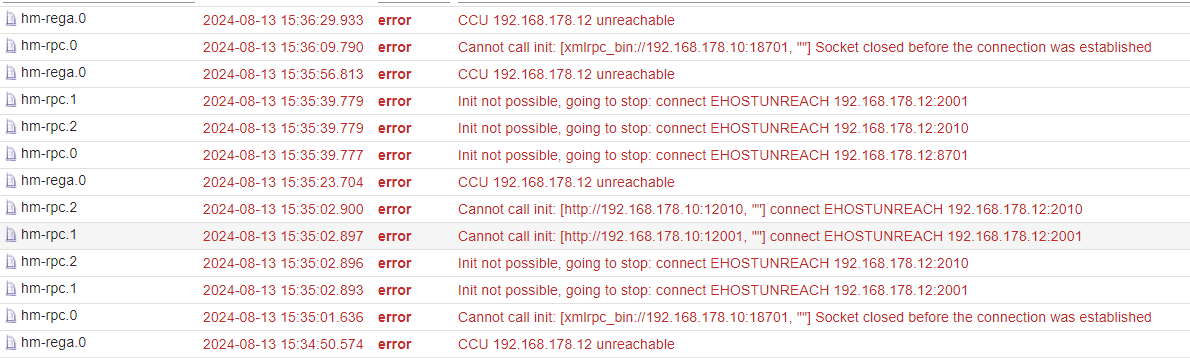
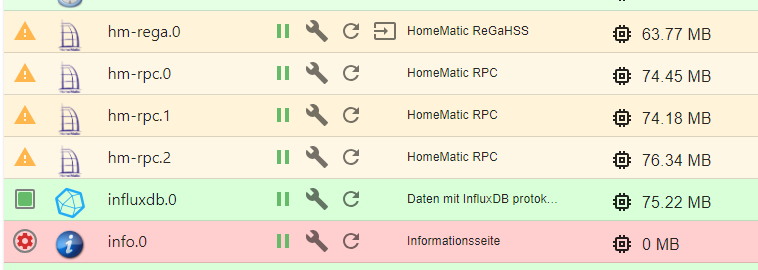
-
Es ist dir doch oben schon einmal gelungen, klopp bitte die lange Fassung in </> (codetags) hier rein.
Das ist sonst grottenschlecht zu lesen.
@meister-mopper sagte in pivCCU nach Update node.js nicht erreichbar:
Das ist sonst grottenschlecht zu lesen.
======================= SUMMARY ======================= v.2024-05-22 Static hostname: iobroker-pi Icon name: computer Operating System: Raspbian GNU/Linux 11 (bullseye) Kernel: Linux 6.6.44-v7l+ Architecture: arm Installation: native Kernel: armv7l Userland: 32 bit Timezone: Europe/Berlin (CEST, +0200) User-ID: 1000 Display-Server: false Boot Target: multi-user.target Pending OS-Updates: 0 Pending iob updates: 1 Nodejs-Installation: /usr/bin/nodejs v20.16.0 /usr/bin/node v20.16.0 /usr/bin/npm 10.8.1 /usr/bin/npx 10.8.1 /usr/bin/corepack 0.28.2 Recommended versions are nodejs 20.16.0 and npm 10.8.1 Your nodejs installation is correct MEMORY: total used free shared buff/cache available Mem: 3.9G 945M 2.3G 1.0M 604M 2.8G Swap: 99M 0B 99M Total: 4.0G 945M 2.4G Active iob-Instances: 21 Active repo(s): stable ioBroker Core: js-controller 5.0.19 admin 7.0.22 ioBroker Status: iobroker is running on this host. Objects type: jsonl States type: jsonl Status admin and web instance: + system.adapter.admin.0 : admin : iobroker-pi - enabled, port: 8081, bind: 0.0.0.0, run as: admin + system.adapter.web.0 : web : iobroker-pi - enabled, port: 8082, bind: 0.0.0.0, run as: admin Objects: 7430 States: 6297 Size of iob-Database: 9.6M /opt/iobroker/iobroker-data/objects.jsonl 13M /opt/iobroker/iobroker-data/states.jsonl =================== END OF SUMMARY ==================== -
Es ist dir doch oben schon einmal gelungen, klopp bitte die lange Fassung in </> (codetags) hier rein.
Das ist sonst grottenschlecht zu lesen.
@meister-mopper sagte in pivCCU nach Update node.js nicht erreichbar:
klopp bitte die lange Fassung in </> (codetags) hier rein.
Die Ausgabe von iob diag hat die schon dabei. Muss nur kopiert und eingefügt werden.
Jetzt sind zwei CodeTags drumherum, das ist auch falsch. -
Es ist dir doch oben schon einmal gelungen, klopp bitte die lange Fassung in </> (codetags) hier rein.
Das ist sonst grottenschlecht zu lesen.
@meister-mopper sagte in pivCCU nach Update node.js nicht erreichbar:
klopp bitte die lange Fassung in </> (codetags) hier rein
Ist es besser?
Skript v.2024-05-22 *** BASE SYSTEM *** Static hostname: iobroker-pi Icon name: computer Operating System: Raspbian GNU/Linux 11 (bullseye) Kernel: Linux 6.6.44-v7l+ Architecture: arm Model : Raspberry Pi 4 Model B Rev 1.5 Docker : false Virtualization : none Kernel : armv7l Userland : 32 bit Systemuptime and Load: 16:21:41 up 13 min, 1 user, load average: 1.00, 1.08, 0.80 CPU threads: 4 *** RASPBERRY THROTTLING *** Current issues: No throttling issues detected. Previously detected issues: No throttling issues detected. *** Time and Time Zones *** Local time: Tue 2024-08-13 16:21:42 CEST Universal time: Tue 2024-08-13 14:21:42 UTC RTC time: n/a Time zone: Europe/Berlin (CEST, +0200) System clock synchronized: yes NTP service: active RTC in local TZ: no *** Users and Groups *** User that called 'iob diag': wibear HOME=/home/wibear GROUPS=wibear adm dialout cdrom sudo audio video plugdev games users input render netdev gpio i2c spi iobroker User that is running 'js-controller': iobroker HOME=/home/iobroker GROUPS=iobroker tty dialout audio video plugdev bluetooth gpio i2c *** Display-Server-Setup *** Display-Server: false Desktop: Terminal: tty Boot Target: multi-user.target *** MEMORY *** total used free shared buff/cache available Mem: 3.9G 941M 2.3G 1.0M 626M 2.8G Swap: 99M 0B 99M Total: 4.0G 941M 2.4G Active iob-Instances: 21 3885 M total memory 942 M used memory 230 M active memory 1233 M inactive memory 2317 M free memory 76 M buffer memory 550 M swap cache 99 M total swap 0 M used swap 99 M free swap *** top - Table Of Processes *** top - 16:21:42 up 13 min, 1 user, load average: 1.00, 1.08, 0.80 Tasks: 194 total, 1 running, 193 sleeping, 0 stopped, 0 zombie %Cpu(s): 30.0 us, 11.4 sy, 0.0 ni, 52.9 id, 4.3 wa, 0.0 hi, 1.4 si, 0.0 st MiB Mem : 3885.9 total, 2316.9 free, 942.0 used, 627.0 buff/cache MiB Swap: 100.0 total, 100.0 free, 0.0 used. 2817.4 avail Mem *** FAILED SERVICES *** UNIT LOAD ACTIVE SUB DESCRIPTION * pivccu-dkms.service loaded failed failed piVCCU DKMS Modules * pivccu-rpi-modules.service loaded failed failed piVCCU RPi Kernel loader LOAD = Reflects whether the unit definition was properly loaded. ACTIVE = The high-level unit activation state, i.e. generalization of SUB. SUB = The low-level unit activation state, values depend on unit type. 2 loaded units listed. *** FILESYSTEM *** Filesystem Type Size Used Avail Use% Mounted on /dev/root ext4 29G 11G 18G 39% / devtmpfs devtmpfs 1.7G 0 1.7G 0% /dev tmpfs tmpfs 1.9G 0 1.9G 0% /dev/shm tmpfs tmpfs 778M 1.1M 777M 1% /run tmpfs tmpfs 5.0M 4.0K 5.0M 1% /run/lock /dev/mmcblk0p1 vfat 255M 63M 193M 25% /boot tmpfs tmpfs 389M 0 389M 0% /run/user/1000 Messages concerning ext4 filesystem in dmesg: [Tue Aug 13 16:08:37 2024] Kernel command line: coherent_pool=1M 8250.nr_uarts=1 snd_bcm2835.enable_headphones=0 snd_bcm2835.enable_headphones=1 snd_bcm2835.enable_hdmi=1 snd_bcm2835.enable_hdmi=0 smsc95xx.macaddr=D8:3A:DD:16:18:C4 vc_mem.mem_base=0x3f000000 vc_mem.mem_size=0x3f600000 console=tty1 root=PARTUUID=e605bf32-02 rootfstype=ext4 fsck.repair=yes rootwait [Tue Aug 13 16:08:38 2024] EXT4-fs (mmcblk0p2): mounted filesystem d3104e7d-5f59-47e0-8621-290882475163 ro with ordered data mode. Quota mode: none. [Tue Aug 13 16:08:38 2024] VFS: Mounted root (ext4 filesystem) readonly on device 179:2. [Tue Aug 13 16:08:39 2024] EXT4-fs (mmcblk0p2): re-mounted d3104e7d-5f59-47e0-8621-290882475163 r/w. Quota mode: none. Show mounted filesystems: TARGET SOURCE FSTYPE OPTIONS / /dev/mmcblk0p2 ext4 rw,noatime |-/dev devtmpfs devtmpfs rw,relatime,size=1726396k,nr_inodes=34271,mode=755 | |-/dev/shm tmpfs tmpfs rw,nosuid,nodev | |-/dev/pts devpts devpts rw,nosuid,noexec,relatime,gid=5,mode=620,ptmxmode=000 | `-/dev/mqueue mqueue mqueue rw,nosuid,nodev,noexec,relatime |-/proc proc proc rw,relatime | `-/proc/sys/fs/binfmt_misc systemd-1 autofs rw,relatime,fd=30,pgrp=1,timeout=0,minproto=5,maxproto=5,direct |-/sys sysfs sysfs rw,nosuid,nodev,noexec,relatime | |-/sys/kernel/security securityfs securityfs rw,nosuid,nodev,noexec,relatime | |-/sys/fs/cgroup cgroup2 cgroup2 rw,nosuid,nodev,noexec,relatime | |-/sys/fs/pstore pstore pstore rw,nosuid,nodev,noexec,relatime | |-/sys/fs/bpf bpf bpf rw,nosuid,nodev,noexec,relatime,mode=700 | |-/sys/kernel/tracing tracefs tracefs rw,nosuid,nodev,noexec,relatime | |-/sys/kernel/debug debugfs debugfs rw,nosuid,nodev,noexec,relatime | |-/sys/kernel/config configfs configfs rw,nosuid,nodev,noexec,relatime | `-/sys/fs/fuse/connections fusectl fusectl rw,nosuid,nodev,noexec,relatime |-/run tmpfs tmpfs rw,nosuid,nodev,size=795828k,nr_inodes=819200,mode=755 | |-/run/lock tmpfs tmpfs rw,nosuid,nodev,noexec,relatime,size=5120k | |-/run/rpc_pipefs sunrpc rpc_pipefs rw,relatime | `-/run/user/1000 tmpfs tmpfs rw,nosuid,nodev,relatime,size=397912k,nr_inodes=99478,mode=700,uid=1000,gid=1000 |-/boot /dev/mmcblk0p1 vfat rw,relatime,fmask=0022,dmask=0022,codepage=437,iocharset=ascii,shortname=mixed,errors=remount-ro `-/var/lib/lxcfs lxcfs fuse.lxcfs rw,nosuid,nodev,relatime,user_id=0,group_id=0,allow_other Files in neuralgic directories: /var: du: cannot access '/var/lib/lxcfs/cgroup': Input/output error 4.7G /var/ 3.3G /var/log 2.9G /var/log/journal/6462312882a642219bbda7aff5f4f5b9 2.9G /var/log/journal 738M /var/lib Archived and active journals take up 2.8G in the file system. /opt/iobroker/backups: 82M /opt/iobroker/backups/ /opt/iobroker/iobroker-data: 746M /opt/iobroker/iobroker-data/ 594M /opt/iobroker/iobroker-data/files 441M /opt/iobroker/iobroker-data/files/javascript.admin 409M /opt/iobroker/iobroker-data/files/javascript.admin/static 408M /opt/iobroker/iobroker-data/files/javascript.admin/static/js The five largest files in iobroker-data are: 27M /opt/iobroker/iobroker-data/files/backitup.admin/static/js/main.ce422ec2.js.map 24M /opt/iobroker/iobroker-data/files/web.admin/static/js/main.135279a0.js.map 13M /opt/iobroker/iobroker-data/states.jsonl 9.6M /opt/iobroker/iobroker-data/objects.jsonl 8.7M /opt/iobroker/iobroker-data/files/javascript.admin/static/js/838.0aa41cb0.chunk.js.map USB-Devices by-id: USB-Sticks - Avoid direct links to /dev/tty* in your adapter setups, please always prefer the links 'by-id': No Devices found 'by-id' *** NodeJS-Installation *** /usr/bin/nodejs v20.16.0 /usr/bin/node v20.16.0 /usr/bin/npm 10.8.1 /usr/bin/npx 10.8.1 /usr/bin/corepack 0.28.2 nodejs: Installed: 20.16.0-1nodesource1 Candidate: 20.16.0-1nodesource1 Version table: *** 20.16.0-1nodesource1 600 500 https://deb.nodesource.com/node_20.x nodistro/main armhf Packages 100 /var/lib/dpkg/status 20.15.1-1nodesource1 600 500 https://deb.nodesource.com/node_20.x nodistro/main armhf Packages 20.15.0-1nodesource1 600 500 https://deb.nodesource.com/node_20.x nodistro/main armhf Packages 20.14.0-1nodesource1 600 500 https://deb.nodesource.com/node_20.x nodistro/main armhf Packages 20.13.1-1nodesource1 600 500 https://deb.nodesource.com/node_20.x nodistro/main armhf Packages 20.13.0-1nodesource1 600 500 https://deb.nodesource.com/node_20.x nodistro/main armhf Packages 20.12.2-1nodesource1 600 500 https://deb.nodesource.com/node_20.x nodistro/main armhf Packages 20.12.1-1nodesource1 600 500 https://deb.nodesource.com/node_20.x nodistro/main armhf Packages 20.12.0-1nodesource1 600 500 https://deb.nodesource.com/node_20.x nodistro/main armhf Packages 20.11.1-1nodesource1 600 500 https://deb.nodesource.com/node_20.x nodistro/main armhf Packages 20.11.0-1nodesource1 600 500 https://deb.nodesource.com/node_20.x nodistro/main armhf Packages 20.10.0-1nodesource1 600 500 https://deb.nodesource.com/node_20.x nodistro/main armhf Packages 20.9.0-1nodesource1 600 500 https://deb.nodesource.com/node_20.x nodistro/main armhf Packages 20.8.1-1nodesource1 600 500 https://deb.nodesource.com/node_20.x nodistro/main armhf Packages 20.8.0-1nodesource1 600 500 https://deb.nodesource.com/node_20.x nodistro/main armhf Packages 20.7.0-1nodesource1 600 500 https://deb.nodesource.com/node_20.x nodistro/main armhf Packages 20.6.1-1nodesource1 600 500 https://deb.nodesource.com/node_20.x nodistro/main armhf Packages 20.6.0-1nodesource1 600 500 https://deb.nodesource.com/node_20.x nodistro/main armhf Packages 20.5.1-1nodesource1 600 500 https://deb.nodesource.com/node_20.x nodistro/main armhf Packages 20.5.0-1nodesource1 600 500 https://deb.nodesource.com/node_20.x nodistro/main armhf Packages 20.4.0-1nodesource1 600 500 https://deb.nodesource.com/node_20.x nodistro/main armhf Packages 20.3.1-1nodesource1 600 500 https://deb.nodesource.com/node_20.x nodistro/main armhf Packages 20.3.0-1nodesource1 600 500 https://deb.nodesource.com/node_20.x nodistro/main armhf Packages 20.2.0-1nodesource1 600 500 https://deb.nodesource.com/node_20.x nodistro/main armhf Packages 20.1.0-1nodesource1 600 500 https://deb.nodesource.com/node_20.x nodistro/main armhf Packages 20.0.0-1nodesource1 600 500 https://deb.nodesource.com/node_20.x nodistro/main armhf Packages 12.22.12~dfsg-1~deb11u4 500 500 http://raspbian.raspberrypi.org/raspbian bullseye/main armhf Packages Temp directories causing npm8 problem: 0 No problems detected Errors in npm tree: *** ioBroker-Installation *** ioBroker Status iobroker is running on this host. Objects type: jsonl States type: jsonl Core adapters versions js-controller: 5.0.19 admin: 7.0.22 javascript: 8.7.6 nodejs modules from github: 1 +-- iobroker.vw-connect@0.5.3 (git+ssh://git@github.com/TA2k/ioBroker.vw-connect.git#b5fbfb41f65b8a1efb646e9efb68f1cbd1627d27) Adapter State + system.adapter.admin.0 : admin : iobroker-pi - enabled, port: 8081, bind: 0.0.0.0, run as: admin + system.adapter.alexa2.0 : alexa2 : iobroker-pi - enabled + system.adapter.backitup.0 : backitup : iobroker-pi - enabled + system.adapter.device-reminder.0 : device-reminder : iobroker-pi - enabled + system.adapter.discovery.0 : discovery : iobroker-pi - enabled + system.adapter.ems-esp.0 : ems-esp : iobroker-pi - enabled + system.adapter.fb-checkpresence.0 : fb-checkpresence : iobroker-pi - enabled system.adapter.habpanel.0 : habpanel : iobroker-pi - enabled + system.adapter.history.0 : history : iobroker-pi - enabled + system.adapter.hm-rega.0 : hm-rega : iobroker-pi - enabled + system.adapter.hm-rpc.0 : hm-rpc : iobroker-pi - enabled, port: 18701 system.adapter.hm-rpc.1 : hm-rpc : iobroker-pi - enabled, port: 12001 system.adapter.hm-rpc.2 : hm-rpc : iobroker-pi - enabled, port: 12010 + system.adapter.influxdb.0 : influxdb : iobroker-pi - enabled, port: 8086 system.adapter.info.0 : info : iobroker-pi - enabled + system.adapter.javascript.0 : javascript : iobroker-pi - enabled + system.adapter.mqtt.0 : mqtt : iobroker-pi - enabled, port: 1883, bind: 192.168.178.10 system.adapter.netatmo-crawler.0 : netatmo-crawler : iobroker-pi - enabled + system.adapter.rpi2.0 : rpi2 : iobroker-pi - enabled + system.adapter.shelly.0 : shelly : iobroker-pi - enabled, port: 1882, bind: 0.0.0.0 + system.adapter.simple-api.0 : simple-api : iobroker-pi - enabled, port: 8087, bind: 0.0.0.0, run as: admin + system.adapter.tr-064.0 : tr-064 : iobroker-pi - enabled system.adapter.tuya.0 : tuya : iobroker-pi - disabled + system.adapter.vw-connect.0 : vw-connect : iobroker-pi - enabled system.adapter.weatherunderground.0 : weatherunderground : iobroker-pi - disabled + system.adapter.web.0 : web : iobroker-pi - enabled, port: 8082, bind: 0.0.0.0, run as: admin + system.adapter.whatsapp-cmb.0 : whatsapp-cmb : iobroker-pi - enabled + instance is alive Enabled adapters with bindings + system.adapter.admin.0 : admin : iobroker-pi - enabled, port: 8081, bind: 0.0.0.0, run as: admin + system.adapter.hm-rpc.0 : hm-rpc : iobroker-pi - enabled, port: 18701 system.adapter.hm-rpc.1 : hm-rpc : iobroker-pi - enabled, port: 12001 system.adapter.hm-rpc.2 : hm-rpc : iobroker-pi - enabled, port: 12010 + system.adapter.influxdb.0 : influxdb : iobroker-pi - enabled, port: 8086 + system.adapter.mqtt.0 : mqtt : iobroker-pi - enabled, port: 1883, bind: 192.168.178.10 + system.adapter.shelly.0 : shelly : iobroker-pi - enabled, port: 1882, bind: 0.0.0.0 + system.adapter.simple-api.0 : simple-api : iobroker-pi - enabled, port: 8087, bind: 0.0.0.0, run as: admin + system.adapter.web.0 : web : iobroker-pi - enabled, port: 8082, bind: 0.0.0.0, run as: admin ioBroker-Repositories stable : http://download.iobroker.net/sources-dist.json beta : http://download.iobroker.net/sources-dist-latest.json Active repo(s): stable Installed ioBroker-Instances Used repository: stable Adapter "admin" : 7.0.22 , installed 7.0.22 Adapter "alexa2" : 3.26.5 , installed 3.26.5 Adapter "backitup" : 3.0.16 , installed 3.0.16 Adapter "device-reminder": 3.1.2 , installed 3.1.2 Adapter "discovery" : 4.5.0 , installed 4.5.0 Adapter "ems-esp" : 3.5.0 , installed 3.5.0 Adapter "fb-checkpresence": 1.2.4 , installed 1.2.4 Adapter "habpanel" : 0.5.0 , installed 0.5.0 Adapter "history" : 3.0.1 , installed 3.0.1 Adapter "hm-rega" : 4.0.0 , installed 4.0.0 Adapter "hm-rpc" : 1.17.0 , installed 1.17.0 Adapter "influxdb" : 4.0.2 , installed 4.0.2 Adapter "javascript" : 8.7.6 , installed 8.7.6 Controller "js-controller": 6.0.9 , installed 5.0.19 [Updatable] Adapter "mqtt" : 5.2.0 , installed 5.2.0 Adapter "netatmo-crawler": 0.8.1 , installed 0.8.1 Adapter "rpi2" : 1.3.2 , installed 1.3.2 Adapter "shelly" : 7.0.0 , installed 7.0.0 Adapter "simple-api" : 2.8.0 , installed 2.8.0 Adapter "socketio" : 6.7.1 , installed 6.7.1 Adapter "tr-064" : 4.3.0 , installed 4.3.0 Adapter "tuya" : 3.15.0 , installed 3.15.0 Adapter "weatherunderground": 3.7.0, installed 3.7.0 Adapter "web" : 6.2.5 , installed 6.2.5 Adapter "whatsapp-cmb" : 0.3.0 , installed 0.3.0 Adapter "ws" : 2.6.2 , installed 2.6.2 Objects and States Please stand by - This may take a while Objects: 7430 States: 6279 *** OS-Repositories and Updates *** Hit:1 https://repos.influxdata.com/debian bullseye InRelease Hit:2 http://archive.raspberrypi.org/debian bullseye InRelease Hit:3 http://raspbian.raspberrypi.org/raspbian bullseye InRelease Hit:4 https://deb.nodesource.com/node_20.x nodistro InRelease Hit:5 https://apt.pivccu.de/piVCCU stable InRelease Hit:6 https://packages.grafana.com/oss/deb stable InRelease Reading package lists... Pending Updates: 0 *** Listening Ports *** Active Internet connections (only servers) Proto Recv-Q Send-Q Local Address Foreign Address State User Inode PID/Program name tcp 0 0 10.0.3.1:53 0.0.0.0:* LISTEN 0 6228 814/dnsmasq tcp 0 0 0.0.0.0:22 0.0.0.0:* LISTEN 0 6194 785/sshd: /usr/sbin tcp 0 0 192.168.178.10:12001 0.0.0.0:* LISTEN 1001 39110 5590/io.hm-rpc.1 tcp 0 0 192.168.178.10:12010 0.0.0.0:* LISTEN 1001 36706 5591/io.hm-rpc.2 tcp 0 0 0.0.0.0:1882 0.0.0.0:* LISTEN 1001 9377 1407/io.shelly.0 tcp 0 0 192.168.178.10:1883 0.0.0.0:* LISTEN 1001 8528 1324/io.mqtt.0 tcp 0 0 127.0.0.1:9001 0.0.0.0:* LISTEN 1001 7195 905/iobroker.js-con tcp 0 0 127.0.0.1:9000 0.0.0.0:* LISTEN 1001 5644 905/iobroker.js-con tcp 0 0 127.0.0.1:8088 0.0.0.0:* LISTEN 999 6272 730/influxd tcp6 0 0 :::22 :::* LISTEN 0 6196 785/sshd: /usr/sbin tcp6 0 0 :::3000 :::* LISTEN 111 5642 904/grafana tcp6 0 0 :::8086 :::* LISTEN 999 6362 730/influxd tcp6 0 0 :::8087 :::* LISTEN 1001 6952 1464/io.simple-api. tcp6 0 0 :::8082 :::* LISTEN 1001 7769 1483/io.web.0 tcp6 0 0 :::8081 :::* LISTEN 1001 7239 990/io.admin.0 udp 0 0 0.0.0.0:5353 0.0.0.0:* 108 787 337/avahi-daemon: r udp 0 0 0.0.0.0:47656 0.0.0.0:* 108 789 337/avahi-daemon: r udp 0 0 10.0.3.1:53 0.0.0.0:* 0 6227 814/dnsmasq udp 0 0 0.0.0.0:67 0.0.0.0:* 0 6224 814/dnsmasq udp 0 0 0.0.0.0:68 0.0.0.0:* 0 897 598/dhclient udp6 0 0 :::5353 :::* 108 788 337/avahi-daemon: r udp6 0 0 :::34059 :::* 108 790 337/avahi-daemon: r *** Log File - Last 25 Lines *** 2024-08-13 16:21:48.384 - info: hm-rpc.2 (4770) Terminated (NO_ERROR): Without reason 2024-08-13 16:21:49.099 - info: host.iobroker-pi instance system.adapter.hm-rpc.1 terminated with code 0 (NO_ERROR) 2024-08-13 16:21:49.099 - info: host.iobroker-pi Restart adapter system.adapter.hm-rpc.1 because enabled 2024-08-13 16:21:49.099 - info: host.iobroker-pi instance system.adapter.hm-rpc.2 terminated with code 0 (NO_ERROR) 2024-08-13 16:21:49.100 - info: host.iobroker-pi Restart adapter system.adapter.hm-rpc.2 because enabled 2024-08-13 16:21:49.884 - info: hm-rpc.0 (5004) starting. Version 1.17.0 in /opt/iobroker/node_modules/iobroker.hm-rpc, node: v20.16.0, js-controller: 5.0.19 2024-08-13 16:21:50.185 - info: hm-rpc.0 (5004) binrpc server is trying to listen on 192.168.178.10:18701 2024-08-13 16:21:50.187 - info: hm-rpc.0 (5004) binrpc client is trying to connect to 192.168.178.12:8701/ with ["xmlrpc_bin://192.168.178.10:18701","iobroker-pi:hm-rpc.0:586ced57dee52ef270bfb61be9f07a73"] 2024-08-13 16:21:50.457 - error: hm-rpc.0 (5004) Init not possible, going to stop: connect EHOSTUNREACH 192.168.178.12:8701 2024-08-13 16:21:50.461 - error: hm-rega.0 (1231) CCU 192.168.178.12 unreachable 2024-08-13 16:22:19.230 - info: host.iobroker-pi instance system.adapter.hm-rpc.1 started with pid 5590 2024-08-13 16:22:19.243 - info: host.iobroker-pi instance system.adapter.hm-rpc.2 started with pid 5591 2024-08-13 16:22:20.462 - info: hm-rpc.0 (5004) binrpc -> 192.168.178.12:8701/ init ["xmlrpc_bin://192.168.178.10:18701",""] 2024-08-13 16:22:20.481 - error: hm-rpc.0 (5004) Cannot call init: [xmlrpc_bin://192.168.178.10:18701, ""] Socket closed before the connection was established 2024-08-13 16:22:20.542 - info: hm-rpc.0 (5004) terminating 2024-08-13 16:22:20.544 - info: hm-rpc.0 (5004) Terminated (NO_ERROR): Without reason 2024-08-13 16:22:21.115 - info: host.iobroker-pi instance system.adapter.hm-rpc.0 terminated with code 0 (NO_ERROR) 2024-08-13 16:22:23.573 - error: hm-rega.0 (1231) CCU 192.168.178.12 unreachable 2024-08-13 16:22:21.116 - info: host.iobroker-pi Restart adapter system.adapter.hm-rpc.0 because enabled 2024-08-13 16:22:25.483 - info: hm-rpc.1 (5590) starting. Version 1.17.0 in /opt/iobroker/node_modules/iobroker.hm-rpc, node: v20.16.0, js-controller: 5.0.19 2024-08-13 16:22:25.516 - info: hm-rpc.2 (5591) starting. Version 1.17.0 in /opt/iobroker/node_modules/iobroker.hm-rpc, node: v20.16.0, js-controller: 5.0.19 2024-08-13 16:22:25.834 - info: hm-rpc.1 (5590) xmlrpc server is trying to listen on 192.168.178.10:12001 2024-08-13 16:22:25.835 - info: hm-rpc.1 (5590) xmlrpc client is trying to connect to 192.168.178.12:2001/ with ["http://192.168.178.10:12001","iobroker-pi:hm-rpc.1:b7e0bbb00b214da627cd2ac33e1e6a94"] 2024-08-13 16:22:25.863 - info: hm-rpc.2 (5591) xmlrpc server is trying to listen on 192.168.178.10:12010 2024-08-13 16:22:25.865 - info: hm-rpc.2 (5591) xmlrpc client is trying to connect to 192.168.178.12:2010/ with ["http://192.168.178.10:12010","iobroker-pi:hm-rpc.2:53dc961ed27d3c18a140cba29ed780cc"] -
@meister-mopper sagte in pivCCU nach Update node.js nicht erreichbar:
klopp bitte die lange Fassung in </> (codetags) hier rein
Ist es besser?
Skript v.2024-05-22 *** BASE SYSTEM *** Static hostname: iobroker-pi Icon name: computer Operating System: Raspbian GNU/Linux 11 (bullseye) Kernel: Linux 6.6.44-v7l+ Architecture: arm Model : Raspberry Pi 4 Model B Rev 1.5 Docker : false Virtualization : none Kernel : armv7l Userland : 32 bit Systemuptime and Load: 16:21:41 up 13 min, 1 user, load average: 1.00, 1.08, 0.80 CPU threads: 4 *** RASPBERRY THROTTLING *** Current issues: No throttling issues detected. Previously detected issues: No throttling issues detected. *** Time and Time Zones *** Local time: Tue 2024-08-13 16:21:42 CEST Universal time: Tue 2024-08-13 14:21:42 UTC RTC time: n/a Time zone: Europe/Berlin (CEST, +0200) System clock synchronized: yes NTP service: active RTC in local TZ: no *** Users and Groups *** User that called 'iob diag': wibear HOME=/home/wibear GROUPS=wibear adm dialout cdrom sudo audio video plugdev games users input render netdev gpio i2c spi iobroker User that is running 'js-controller': iobroker HOME=/home/iobroker GROUPS=iobroker tty dialout audio video plugdev bluetooth gpio i2c *** Display-Server-Setup *** Display-Server: false Desktop: Terminal: tty Boot Target: multi-user.target *** MEMORY *** total used free shared buff/cache available Mem: 3.9G 941M 2.3G 1.0M 626M 2.8G Swap: 99M 0B 99M Total: 4.0G 941M 2.4G Active iob-Instances: 21 3885 M total memory 942 M used memory 230 M active memory 1233 M inactive memory 2317 M free memory 76 M buffer memory 550 M swap cache 99 M total swap 0 M used swap 99 M free swap *** top - Table Of Processes *** top - 16:21:42 up 13 min, 1 user, load average: 1.00, 1.08, 0.80 Tasks: 194 total, 1 running, 193 sleeping, 0 stopped, 0 zombie %Cpu(s): 30.0 us, 11.4 sy, 0.0 ni, 52.9 id, 4.3 wa, 0.0 hi, 1.4 si, 0.0 st MiB Mem : 3885.9 total, 2316.9 free, 942.0 used, 627.0 buff/cache MiB Swap: 100.0 total, 100.0 free, 0.0 used. 2817.4 avail Mem *** FAILED SERVICES *** UNIT LOAD ACTIVE SUB DESCRIPTION * pivccu-dkms.service loaded failed failed piVCCU DKMS Modules * pivccu-rpi-modules.service loaded failed failed piVCCU RPi Kernel loader LOAD = Reflects whether the unit definition was properly loaded. ACTIVE = The high-level unit activation state, i.e. generalization of SUB. SUB = The low-level unit activation state, values depend on unit type. 2 loaded units listed. *** FILESYSTEM *** Filesystem Type Size Used Avail Use% Mounted on /dev/root ext4 29G 11G 18G 39% / devtmpfs devtmpfs 1.7G 0 1.7G 0% /dev tmpfs tmpfs 1.9G 0 1.9G 0% /dev/shm tmpfs tmpfs 778M 1.1M 777M 1% /run tmpfs tmpfs 5.0M 4.0K 5.0M 1% /run/lock /dev/mmcblk0p1 vfat 255M 63M 193M 25% /boot tmpfs tmpfs 389M 0 389M 0% /run/user/1000 Messages concerning ext4 filesystem in dmesg: [Tue Aug 13 16:08:37 2024] Kernel command line: coherent_pool=1M 8250.nr_uarts=1 snd_bcm2835.enable_headphones=0 snd_bcm2835.enable_headphones=1 snd_bcm2835.enable_hdmi=1 snd_bcm2835.enable_hdmi=0 smsc95xx.macaddr=D8:3A:DD:16:18:C4 vc_mem.mem_base=0x3f000000 vc_mem.mem_size=0x3f600000 console=tty1 root=PARTUUID=e605bf32-02 rootfstype=ext4 fsck.repair=yes rootwait [Tue Aug 13 16:08:38 2024] EXT4-fs (mmcblk0p2): mounted filesystem d3104e7d-5f59-47e0-8621-290882475163 ro with ordered data mode. Quota mode: none. [Tue Aug 13 16:08:38 2024] VFS: Mounted root (ext4 filesystem) readonly on device 179:2. [Tue Aug 13 16:08:39 2024] EXT4-fs (mmcblk0p2): re-mounted d3104e7d-5f59-47e0-8621-290882475163 r/w. Quota mode: none. Show mounted filesystems: TARGET SOURCE FSTYPE OPTIONS / /dev/mmcblk0p2 ext4 rw,noatime |-/dev devtmpfs devtmpfs rw,relatime,size=1726396k,nr_inodes=34271,mode=755 | |-/dev/shm tmpfs tmpfs rw,nosuid,nodev | |-/dev/pts devpts devpts rw,nosuid,noexec,relatime,gid=5,mode=620,ptmxmode=000 | `-/dev/mqueue mqueue mqueue rw,nosuid,nodev,noexec,relatime |-/proc proc proc rw,relatime | `-/proc/sys/fs/binfmt_misc systemd-1 autofs rw,relatime,fd=30,pgrp=1,timeout=0,minproto=5,maxproto=5,direct |-/sys sysfs sysfs rw,nosuid,nodev,noexec,relatime | |-/sys/kernel/security securityfs securityfs rw,nosuid,nodev,noexec,relatime | |-/sys/fs/cgroup cgroup2 cgroup2 rw,nosuid,nodev,noexec,relatime | |-/sys/fs/pstore pstore pstore rw,nosuid,nodev,noexec,relatime | |-/sys/fs/bpf bpf bpf rw,nosuid,nodev,noexec,relatime,mode=700 | |-/sys/kernel/tracing tracefs tracefs rw,nosuid,nodev,noexec,relatime | |-/sys/kernel/debug debugfs debugfs rw,nosuid,nodev,noexec,relatime | |-/sys/kernel/config configfs configfs rw,nosuid,nodev,noexec,relatime | `-/sys/fs/fuse/connections fusectl fusectl rw,nosuid,nodev,noexec,relatime |-/run tmpfs tmpfs rw,nosuid,nodev,size=795828k,nr_inodes=819200,mode=755 | |-/run/lock tmpfs tmpfs rw,nosuid,nodev,noexec,relatime,size=5120k | |-/run/rpc_pipefs sunrpc rpc_pipefs rw,relatime | `-/run/user/1000 tmpfs tmpfs rw,nosuid,nodev,relatime,size=397912k,nr_inodes=99478,mode=700,uid=1000,gid=1000 |-/boot /dev/mmcblk0p1 vfat rw,relatime,fmask=0022,dmask=0022,codepage=437,iocharset=ascii,shortname=mixed,errors=remount-ro `-/var/lib/lxcfs lxcfs fuse.lxcfs rw,nosuid,nodev,relatime,user_id=0,group_id=0,allow_other Files in neuralgic directories: /var: du: cannot access '/var/lib/lxcfs/cgroup': Input/output error 4.7G /var/ 3.3G /var/log 2.9G /var/log/journal/6462312882a642219bbda7aff5f4f5b9 2.9G /var/log/journal 738M /var/lib Archived and active journals take up 2.8G in the file system. /opt/iobroker/backups: 82M /opt/iobroker/backups/ /opt/iobroker/iobroker-data: 746M /opt/iobroker/iobroker-data/ 594M /opt/iobroker/iobroker-data/files 441M /opt/iobroker/iobroker-data/files/javascript.admin 409M /opt/iobroker/iobroker-data/files/javascript.admin/static 408M /opt/iobroker/iobroker-data/files/javascript.admin/static/js The five largest files in iobroker-data are: 27M /opt/iobroker/iobroker-data/files/backitup.admin/static/js/main.ce422ec2.js.map 24M /opt/iobroker/iobroker-data/files/web.admin/static/js/main.135279a0.js.map 13M /opt/iobroker/iobroker-data/states.jsonl 9.6M /opt/iobroker/iobroker-data/objects.jsonl 8.7M /opt/iobroker/iobroker-data/files/javascript.admin/static/js/838.0aa41cb0.chunk.js.map USB-Devices by-id: USB-Sticks - Avoid direct links to /dev/tty* in your adapter setups, please always prefer the links 'by-id': No Devices found 'by-id' *** NodeJS-Installation *** /usr/bin/nodejs v20.16.0 /usr/bin/node v20.16.0 /usr/bin/npm 10.8.1 /usr/bin/npx 10.8.1 /usr/bin/corepack 0.28.2 nodejs: Installed: 20.16.0-1nodesource1 Candidate: 20.16.0-1nodesource1 Version table: *** 20.16.0-1nodesource1 600 500 https://deb.nodesource.com/node_20.x nodistro/main armhf Packages 100 /var/lib/dpkg/status 20.15.1-1nodesource1 600 500 https://deb.nodesource.com/node_20.x nodistro/main armhf Packages 20.15.0-1nodesource1 600 500 https://deb.nodesource.com/node_20.x nodistro/main armhf Packages 20.14.0-1nodesource1 600 500 https://deb.nodesource.com/node_20.x nodistro/main armhf Packages 20.13.1-1nodesource1 600 500 https://deb.nodesource.com/node_20.x nodistro/main armhf Packages 20.13.0-1nodesource1 600 500 https://deb.nodesource.com/node_20.x nodistro/main armhf Packages 20.12.2-1nodesource1 600 500 https://deb.nodesource.com/node_20.x nodistro/main armhf Packages 20.12.1-1nodesource1 600 500 https://deb.nodesource.com/node_20.x nodistro/main armhf Packages 20.12.0-1nodesource1 600 500 https://deb.nodesource.com/node_20.x nodistro/main armhf Packages 20.11.1-1nodesource1 600 500 https://deb.nodesource.com/node_20.x nodistro/main armhf Packages 20.11.0-1nodesource1 600 500 https://deb.nodesource.com/node_20.x nodistro/main armhf Packages 20.10.0-1nodesource1 600 500 https://deb.nodesource.com/node_20.x nodistro/main armhf Packages 20.9.0-1nodesource1 600 500 https://deb.nodesource.com/node_20.x nodistro/main armhf Packages 20.8.1-1nodesource1 600 500 https://deb.nodesource.com/node_20.x nodistro/main armhf Packages 20.8.0-1nodesource1 600 500 https://deb.nodesource.com/node_20.x nodistro/main armhf Packages 20.7.0-1nodesource1 600 500 https://deb.nodesource.com/node_20.x nodistro/main armhf Packages 20.6.1-1nodesource1 600 500 https://deb.nodesource.com/node_20.x nodistro/main armhf Packages 20.6.0-1nodesource1 600 500 https://deb.nodesource.com/node_20.x nodistro/main armhf Packages 20.5.1-1nodesource1 600 500 https://deb.nodesource.com/node_20.x nodistro/main armhf Packages 20.5.0-1nodesource1 600 500 https://deb.nodesource.com/node_20.x nodistro/main armhf Packages 20.4.0-1nodesource1 600 500 https://deb.nodesource.com/node_20.x nodistro/main armhf Packages 20.3.1-1nodesource1 600 500 https://deb.nodesource.com/node_20.x nodistro/main armhf Packages 20.3.0-1nodesource1 600 500 https://deb.nodesource.com/node_20.x nodistro/main armhf Packages 20.2.0-1nodesource1 600 500 https://deb.nodesource.com/node_20.x nodistro/main armhf Packages 20.1.0-1nodesource1 600 500 https://deb.nodesource.com/node_20.x nodistro/main armhf Packages 20.0.0-1nodesource1 600 500 https://deb.nodesource.com/node_20.x nodistro/main armhf Packages 12.22.12~dfsg-1~deb11u4 500 500 http://raspbian.raspberrypi.org/raspbian bullseye/main armhf Packages Temp directories causing npm8 problem: 0 No problems detected Errors in npm tree: *** ioBroker-Installation *** ioBroker Status iobroker is running on this host. Objects type: jsonl States type: jsonl Core adapters versions js-controller: 5.0.19 admin: 7.0.22 javascript: 8.7.6 nodejs modules from github: 1 +-- iobroker.vw-connect@0.5.3 (git+ssh://git@github.com/TA2k/ioBroker.vw-connect.git#b5fbfb41f65b8a1efb646e9efb68f1cbd1627d27) Adapter State + system.adapter.admin.0 : admin : iobroker-pi - enabled, port: 8081, bind: 0.0.0.0, run as: admin + system.adapter.alexa2.0 : alexa2 : iobroker-pi - enabled + system.adapter.backitup.0 : backitup : iobroker-pi - enabled + system.adapter.device-reminder.0 : device-reminder : iobroker-pi - enabled + system.adapter.discovery.0 : discovery : iobroker-pi - enabled + system.adapter.ems-esp.0 : ems-esp : iobroker-pi - enabled + system.adapter.fb-checkpresence.0 : fb-checkpresence : iobroker-pi - enabled system.adapter.habpanel.0 : habpanel : iobroker-pi - enabled + system.adapter.history.0 : history : iobroker-pi - enabled + system.adapter.hm-rega.0 : hm-rega : iobroker-pi - enabled + system.adapter.hm-rpc.0 : hm-rpc : iobroker-pi - enabled, port: 18701 system.adapter.hm-rpc.1 : hm-rpc : iobroker-pi - enabled, port: 12001 system.adapter.hm-rpc.2 : hm-rpc : iobroker-pi - enabled, port: 12010 + system.adapter.influxdb.0 : influxdb : iobroker-pi - enabled, port: 8086 system.adapter.info.0 : info : iobroker-pi - enabled + system.adapter.javascript.0 : javascript : iobroker-pi - enabled + system.adapter.mqtt.0 : mqtt : iobroker-pi - enabled, port: 1883, bind: 192.168.178.10 system.adapter.netatmo-crawler.0 : netatmo-crawler : iobroker-pi - enabled + system.adapter.rpi2.0 : rpi2 : iobroker-pi - enabled + system.adapter.shelly.0 : shelly : iobroker-pi - enabled, port: 1882, bind: 0.0.0.0 + system.adapter.simple-api.0 : simple-api : iobroker-pi - enabled, port: 8087, bind: 0.0.0.0, run as: admin + system.adapter.tr-064.0 : tr-064 : iobroker-pi - enabled system.adapter.tuya.0 : tuya : iobroker-pi - disabled + system.adapter.vw-connect.0 : vw-connect : iobroker-pi - enabled system.adapter.weatherunderground.0 : weatherunderground : iobroker-pi - disabled + system.adapter.web.0 : web : iobroker-pi - enabled, port: 8082, bind: 0.0.0.0, run as: admin + system.adapter.whatsapp-cmb.0 : whatsapp-cmb : iobroker-pi - enabled + instance is alive Enabled adapters with bindings + system.adapter.admin.0 : admin : iobroker-pi - enabled, port: 8081, bind: 0.0.0.0, run as: admin + system.adapter.hm-rpc.0 : hm-rpc : iobroker-pi - enabled, port: 18701 system.adapter.hm-rpc.1 : hm-rpc : iobroker-pi - enabled, port: 12001 system.adapter.hm-rpc.2 : hm-rpc : iobroker-pi - enabled, port: 12010 + system.adapter.influxdb.0 : influxdb : iobroker-pi - enabled, port: 8086 + system.adapter.mqtt.0 : mqtt : iobroker-pi - enabled, port: 1883, bind: 192.168.178.10 + system.adapter.shelly.0 : shelly : iobroker-pi - enabled, port: 1882, bind: 0.0.0.0 + system.adapter.simple-api.0 : simple-api : iobroker-pi - enabled, port: 8087, bind: 0.0.0.0, run as: admin + system.adapter.web.0 : web : iobroker-pi - enabled, port: 8082, bind: 0.0.0.0, run as: admin ioBroker-Repositories stable : http://download.iobroker.net/sources-dist.json beta : http://download.iobroker.net/sources-dist-latest.json Active repo(s): stable Installed ioBroker-Instances Used repository: stable Adapter "admin" : 7.0.22 , installed 7.0.22 Adapter "alexa2" : 3.26.5 , installed 3.26.5 Adapter "backitup" : 3.0.16 , installed 3.0.16 Adapter "device-reminder": 3.1.2 , installed 3.1.2 Adapter "discovery" : 4.5.0 , installed 4.5.0 Adapter "ems-esp" : 3.5.0 , installed 3.5.0 Adapter "fb-checkpresence": 1.2.4 , installed 1.2.4 Adapter "habpanel" : 0.5.0 , installed 0.5.0 Adapter "history" : 3.0.1 , installed 3.0.1 Adapter "hm-rega" : 4.0.0 , installed 4.0.0 Adapter "hm-rpc" : 1.17.0 , installed 1.17.0 Adapter "influxdb" : 4.0.2 , installed 4.0.2 Adapter "javascript" : 8.7.6 , installed 8.7.6 Controller "js-controller": 6.0.9 , installed 5.0.19 [Updatable] Adapter "mqtt" : 5.2.0 , installed 5.2.0 Adapter "netatmo-crawler": 0.8.1 , installed 0.8.1 Adapter "rpi2" : 1.3.2 , installed 1.3.2 Adapter "shelly" : 7.0.0 , installed 7.0.0 Adapter "simple-api" : 2.8.0 , installed 2.8.0 Adapter "socketio" : 6.7.1 , installed 6.7.1 Adapter "tr-064" : 4.3.0 , installed 4.3.0 Adapter "tuya" : 3.15.0 , installed 3.15.0 Adapter "weatherunderground": 3.7.0, installed 3.7.0 Adapter "web" : 6.2.5 , installed 6.2.5 Adapter "whatsapp-cmb" : 0.3.0 , installed 0.3.0 Adapter "ws" : 2.6.2 , installed 2.6.2 Objects and States Please stand by - This may take a while Objects: 7430 States: 6279 *** OS-Repositories and Updates *** Hit:1 https://repos.influxdata.com/debian bullseye InRelease Hit:2 http://archive.raspberrypi.org/debian bullseye InRelease Hit:3 http://raspbian.raspberrypi.org/raspbian bullseye InRelease Hit:4 https://deb.nodesource.com/node_20.x nodistro InRelease Hit:5 https://apt.pivccu.de/piVCCU stable InRelease Hit:6 https://packages.grafana.com/oss/deb stable InRelease Reading package lists... Pending Updates: 0 *** Listening Ports *** Active Internet connections (only servers) Proto Recv-Q Send-Q Local Address Foreign Address State User Inode PID/Program name tcp 0 0 10.0.3.1:53 0.0.0.0:* LISTEN 0 6228 814/dnsmasq tcp 0 0 0.0.0.0:22 0.0.0.0:* LISTEN 0 6194 785/sshd: /usr/sbin tcp 0 0 192.168.178.10:12001 0.0.0.0:* LISTEN 1001 39110 5590/io.hm-rpc.1 tcp 0 0 192.168.178.10:12010 0.0.0.0:* LISTEN 1001 36706 5591/io.hm-rpc.2 tcp 0 0 0.0.0.0:1882 0.0.0.0:* LISTEN 1001 9377 1407/io.shelly.0 tcp 0 0 192.168.178.10:1883 0.0.0.0:* LISTEN 1001 8528 1324/io.mqtt.0 tcp 0 0 127.0.0.1:9001 0.0.0.0:* LISTEN 1001 7195 905/iobroker.js-con tcp 0 0 127.0.0.1:9000 0.0.0.0:* LISTEN 1001 5644 905/iobroker.js-con tcp 0 0 127.0.0.1:8088 0.0.0.0:* LISTEN 999 6272 730/influxd tcp6 0 0 :::22 :::* LISTEN 0 6196 785/sshd: /usr/sbin tcp6 0 0 :::3000 :::* LISTEN 111 5642 904/grafana tcp6 0 0 :::8086 :::* LISTEN 999 6362 730/influxd tcp6 0 0 :::8087 :::* LISTEN 1001 6952 1464/io.simple-api. tcp6 0 0 :::8082 :::* LISTEN 1001 7769 1483/io.web.0 tcp6 0 0 :::8081 :::* LISTEN 1001 7239 990/io.admin.0 udp 0 0 0.0.0.0:5353 0.0.0.0:* 108 787 337/avahi-daemon: r udp 0 0 0.0.0.0:47656 0.0.0.0:* 108 789 337/avahi-daemon: r udp 0 0 10.0.3.1:53 0.0.0.0:* 0 6227 814/dnsmasq udp 0 0 0.0.0.0:67 0.0.0.0:* 0 6224 814/dnsmasq udp 0 0 0.0.0.0:68 0.0.0.0:* 0 897 598/dhclient udp6 0 0 :::5353 :::* 108 788 337/avahi-daemon: r udp6 0 0 :::34059 :::* 108 790 337/avahi-daemon: r *** Log File - Last 25 Lines *** 2024-08-13 16:21:48.384 - info: hm-rpc.2 (4770) Terminated (NO_ERROR): Without reason 2024-08-13 16:21:49.099 - info: host.iobroker-pi instance system.adapter.hm-rpc.1 terminated with code 0 (NO_ERROR) 2024-08-13 16:21:49.099 - info: host.iobroker-pi Restart adapter system.adapter.hm-rpc.1 because enabled 2024-08-13 16:21:49.099 - info: host.iobroker-pi instance system.adapter.hm-rpc.2 terminated with code 0 (NO_ERROR) 2024-08-13 16:21:49.100 - info: host.iobroker-pi Restart adapter system.adapter.hm-rpc.2 because enabled 2024-08-13 16:21:49.884 - info: hm-rpc.0 (5004) starting. Version 1.17.0 in /opt/iobroker/node_modules/iobroker.hm-rpc, node: v20.16.0, js-controller: 5.0.19 2024-08-13 16:21:50.185 - info: hm-rpc.0 (5004) binrpc server is trying to listen on 192.168.178.10:18701 2024-08-13 16:21:50.187 - info: hm-rpc.0 (5004) binrpc client is trying to connect to 192.168.178.12:8701/ with ["xmlrpc_bin://192.168.178.10:18701","iobroker-pi:hm-rpc.0:586ced57dee52ef270bfb61be9f07a73"] 2024-08-13 16:21:50.457 - error: hm-rpc.0 (5004) Init not possible, going to stop: connect EHOSTUNREACH 192.168.178.12:8701 2024-08-13 16:21:50.461 - error: hm-rega.0 (1231) CCU 192.168.178.12 unreachable 2024-08-13 16:22:19.230 - info: host.iobroker-pi instance system.adapter.hm-rpc.1 started with pid 5590 2024-08-13 16:22:19.243 - info: host.iobroker-pi instance system.adapter.hm-rpc.2 started with pid 5591 2024-08-13 16:22:20.462 - info: hm-rpc.0 (5004) binrpc -> 192.168.178.12:8701/ init ["xmlrpc_bin://192.168.178.10:18701",""] 2024-08-13 16:22:20.481 - error: hm-rpc.0 (5004) Cannot call init: [xmlrpc_bin://192.168.178.10:18701, ""] Socket closed before the connection was established 2024-08-13 16:22:20.542 - info: hm-rpc.0 (5004) terminating 2024-08-13 16:22:20.544 - info: hm-rpc.0 (5004) Terminated (NO_ERROR): Without reason 2024-08-13 16:22:21.115 - info: host.iobroker-pi instance system.adapter.hm-rpc.0 terminated with code 0 (NO_ERROR) 2024-08-13 16:22:23.573 - error: hm-rega.0 (1231) CCU 192.168.178.12 unreachable 2024-08-13 16:22:21.116 - info: host.iobroker-pi Restart adapter system.adapter.hm-rpc.0 because enabled 2024-08-13 16:22:25.483 - info: hm-rpc.1 (5590) starting. Version 1.17.0 in /opt/iobroker/node_modules/iobroker.hm-rpc, node: v20.16.0, js-controller: 5.0.19 2024-08-13 16:22:25.516 - info: hm-rpc.2 (5591) starting. Version 1.17.0 in /opt/iobroker/node_modules/iobroker.hm-rpc, node: v20.16.0, js-controller: 5.0.19 2024-08-13 16:22:25.834 - info: hm-rpc.1 (5590) xmlrpc server is trying to listen on 192.168.178.10:12001 2024-08-13 16:22:25.835 - info: hm-rpc.1 (5590) xmlrpc client is trying to connect to 192.168.178.12:2001/ with ["http://192.168.178.10:12001","iobroker-pi:hm-rpc.1:b7e0bbb00b214da627cd2ac33e1e6a94"] 2024-08-13 16:22:25.863 - info: hm-rpc.2 (5591) xmlrpc server is trying to listen on 192.168.178.10:12010 2024-08-13 16:22:25.865 - info: hm-rpc.2 (5591) xmlrpc client is trying to connect to 192.168.178.12:2010/ with ["http://192.168.178.10:12010","iobroker-pi:hm-rpc.2:53dc961ed27d3c18a140cba29ed780cc"]@wibear sagte in pivCCU nach Update node.js nicht erreichbar:
Ist es besser?
Wie Du vielleicht selbst siehst - nein ;)
Lehrling seit 1975 !!!
Beitrag geholfen ? dann gerne ein upvote rechts unten im Beitrag klicken ;)
https://forum.iobroker.net/topic/51555/hinweise-für-gute-forenbeiträge -
@wibear sagte in pivCCU nach Update node.js nicht erreichbar:
Ist es besser?
Wie Du vielleicht selbst siehst - nein ;)
@djmarc75 sagte in pivCCU nach Update node.js nicht erreichbar:
@wibear sagte in pivCCU nach Update node.js nicht erreichbar:
Ist es besser?
Wie Du vielleicht selbst siehst - nein ;)
jetzt, ja!
im ersten hab ich nicht alle versteckten code-tags finden und fixen können
EDIT: Jetzt aber!
-
@wibear sagte in pivCCU nach Update node.js nicht erreichbar:
UNIT LOAD ACTIVE SUB DESCRIPTION
pivccu-dkms.service loaded failed failed piVCCU DKMS Modules
pivccu-rpi-modules.service loaded failed failed piVCCU RPi Kernel loaderDa klemmt es. Hat aber nix mit nodejs oder dem ioBroker zu tun, da werden die pivCCU Module nicht geladen.
Und wo du einmal dran bist:
Controller "js-controller": 6.0.9 , installed 5.0.19 [Updatable]
iob stop iob update iob upgrade self iob start@thomas-braun sagte in pivCCU nach Update node.js nicht erreichbar:
Controller "js-controller": 6.0.9 , installed 5.0.19 [Updatable]
ausgeführt
-
@thomas-braun sagte in pivCCU nach Update node.js nicht erreichbar:
Controller "js-controller": 6.0.9 , installed 5.0.19 [Updatable]
ausgeführt
Dann ist ioBroker-seitig jetzt alles i.O.
-
iob diag
Model : Raspberry Pi 4 Model B Rev 1.5
Docker : false
Virtualization : none
Kernel : armv7l
Userland : 32 bitSystemuptime and Load:
15:51:21 up 35 min, 1 user, load average: 1.13, 0.75, 2.22
CPU threads: 4Copy text starting here:
======================= SUMMARY =======================
                        v.2024-05-22


*** RASPBERRY THROTTLING ***
Current issues:
No throttling issues detected.

Previously detected issues:
No throttling issues detected.

*** Time and Time Zones ***
               Local time: Tue 2024-08-13 15:51:21 CEST
           Universal time: Tue 2024-08-13 13:51:21 UTC
                 RTC time: n/a
                Time zone: Europe/Berlin (CEST, +0200)
System clock synchronized: yes
              NTP service: active
          RTC in local TZ: no

*** Users and Groups ***
User that called 'iob diag':
wibear
HOME=/home/wibear
GROUPS=wibear adm dialout cdrom sudo audio video plugdev games users input render netdev gpio i2c spi iobroker

User that is running 'js-controller':
iobroker
HOME=/home/iobroker
GROUPS=iobroker tty dialout audio video plugdev bluetooth gpio i2c

*** Display-Server-Setup ***
Display-Server: false
Desktop:
Terminal:       tty
Boot Target:    multi-user.target

*** MEMORY ***
               total        used        free      shared  buff/cache   available
Mem:            3.9G        1.1G        2.2G        1.0M        568M        2.6G
Swap:            99M          0B         99M
Total:          4.0G        1.1G        2.3G

Active iob-Instances:   20

         3885 M total memory
         1134 M used memory
          179 M active memory
         1411 M inactive memory
         2182 M free memory
           64 M buffer memory
          504 M swap cache
           99 M total swap
            0 M used swap
           99 M free swap

*** top - Table Of Processes  ***
top - 15:51:22 up 35 min,  1 user,  load average: 1.13, 0.75, 2.22
Tasks: 219 total,   3 running, 216 sleeping,   0 stopped,   0 zombie
%Cpu(s): 25.8 us,  9.7 sy,  0.0 ni, 54.8 id,  6.5 wa,  0.0 hi,  3.2 si,  0.0 st
MiB Mem :   3885.9 total,   2184.1 free,   1132.9 used,    568.8 buff/cache
MiB Swap:    100.0 total,    100.0 free,      0.0 used.   2635.5 avail Mem

*** FAILED SERVICES ***

  UNIT                       LOAD   ACTIVE SUB    DESCRIPTION
* pivccu-dkms.service        loaded failed failed piVCCU DKMS Modules
* pivccu-rpi-modules.service loaded failed failed piVCCU RPi Kernel loader

LOAD   = Reflects whether the unit definition was properly loaded.
ACTIVE = The high-level unit activation state, i.e. generalization of SUB.
SUB    = The low-level unit activation state, values depend on unit type.
2 loaded units listed.

*** FILESYSTEM ***
Filesystem     Type      Size  Used Avail Use% Mounted on
/dev/root      ext4       29G   11G   18G  39% /
devtmpfs       devtmpfs  1.7G     0  1.7G   0% /dev
tmpfs          tmpfs     1.9G     0  1.9G   0% /dev/shm
tmpfs          tmpfs     778M  1.1M  777M   1% /run
tmpfs          tmpfs     5.0M  4.0K  5.0M   1% /run/lock
/dev/mmcblk0p1 vfat      255M   63M  193M  25% /boot
tmpfs          tmpfs     389M     0  389M   0% /run/user/1000

Messages concerning ext4 filesystem in dmesg:
[Tue Aug 13 15:15:44 2024] Kernel command line: coherent_pool=1M 8250.nr_uarts=1 snd_bcm2835.enable_headphones=0 snd_bcm2835.enable_headphones=1 snd_bcm2835.enable_hdmi=1 snd_bcm2835.enable_hdmi=0  smsc95xx.macaddr=D8:3A:DD:16:18:C4 vc_mem.mem_base=0x3f000000 vc_mem.mem_size=0x3f600000  console=tty1 root=PARTUUID=e605bf32-02 rootfstype=ext4 fsck.repair=yes rootwait
[Tue Aug 13 15:15:45 2024] EXT4-fs (mmcblk0p2): mounted filesystem d3104e7d-5f59-47e0-8621-290882475163 ro with ordered data mode. Quota mode: none.
[Tue Aug 13 15:15:45 2024] VFS: Mounted root (ext4 filesystem) readonly on device 179:2.
[Tue Aug 13 15:15:46 2024] EXT4-fs (mmcblk0p2): re-mounted d3104e7d-5f59-47e0-8621-290882475163 r/w. Quot   Static hostname: iobroker-pi
         Icon name: computer
  Operating System: Raspbian GNU/Linux 11 (bullseye)
            Kernel: Linux 6.6.44-v7l+
      Architecture: arm

Installation:           native
Kernel:                 armv7l
Userland:               32 bit
Timezone:               Europe/Berlin (CEST, +0200)
User-ID:                1000
Display-Server:         false
Boot Target:            multi-user.target

Pending OS-Updates:     0
Pending iob updates:    1

Nodejs-Installation:
/usr/bin/nodejs         v20.16.0
/usr/local/bin/node             v18.18.0
/usr/local/bin/npm              10.8.2
/usr/local/bin/npx              10.8.2
/usr/local/bin/corepack         0.19.0

Recommended versions are nodejs 20.16.0 and npm 10.8.1
*** nodejs is NOT correctly installed ***
Wrong installation path detected. This needs to be fixed.

Please execute
iobroker nodejs-update
to fix these errors.

MEMORY:
               total        used        free      shared  buff/cache   available
Mem:            3.9G        1.2G        2.0G        1.0M        649M        2.5G
Swap:            99M          0B         99M
Total:          4.0G        1.2G        2.1G

Active iob-Instances:   20
Active repo(s): stable

ioBroker Core:          js-controller           5.0.19
                        admin                   7.0.22

ioBroker Status:        iobroker is running on this host.


Objects type: jsonl
States  type: jsonl

Status admin and web instance:
+ system.adapter.admin.0                  : admin                 : iobroker-pi                              -  enabled, port: 8081, bind: 0.0.0.0, run as: admin
+ system.adapter.web.0                    : web                   : iobroker-pi                              -  enabled, port: 8082, bind: 0.0.0.0, run as: admin

Objects:                7401
States:                 6256

Size of iob-Database:

15M     /opt/iobroker/iobroker-data/objects.jsonl
9.0M    /opt/iobroker/iobroker-data/states.jsonl


=================== END OF SUMMARY ====================
=== Mark text until here for copying ===
wibear@iobroker-pi:~ $ ======== Start marking the full check here ========= -bash: ========: command not found wibear@iobroker-pi:~ $ wibear@iobroker-pi:~ $ > Skript v.2024-05-22 > > *** BASE SYSTEM *** > Static hostname: iobroker-pi > Icon name: computer > Operating System: Raspbian GNU/Linux 11 (bullseye) > Kernel: Linux 6.6.44-v7l+ > Architecture: arm > > Model : Raspberry Pi 4 Model B Rev 1.5 > Docker : false > Virtualization : none > Kernel : armv7l > Userland : 32 bit > > Systemuptime and Load: > 15:51:21 up 35 min, 1 user, load average: 1.13, 0.75, 2.22 > CPU threads: 4 > > > *** RASPBERRY THROTTLING *** > Current issues: > No throttling issues detected. > > Previously detected issues: > No throttling issues detected. > > *** Time and Time Zones *** > Local time: Tue 2024-08-13 15:51:21 CEST > Universal time: Tue 2024-08-13 13:51:21 UTC > RTC time: n/a /> Time zone: Europe/Berlin (CEST, +0200) > System clock synchronized: yes > NTP service: active > RTC in local TZ: no > > *** Users and Groups *** > User that called 'iob diag': > wibear > HOME=/home/wibear > GROUPS=wibear adm dialout cdrom sudo audio video plugdev games users input render netdev gpio i2c spi iobroker > > User that is running 'js-controller': > iobroker > HOME=/home/iobroker > GROUPS=iobroker tty dialout audio video plugdev bluetooth gpio i2c > > *** Display-Server-Setup *** > Display-Server: false > Desktop: > Terminal: tty > Boot Target: multi-user.target > > *** MEMORY *** > total used free shared buff/cache available > Mem: 3.9G 1.1G 2.2G 1.0M 568M 2.6G > Swap: 99M 0B 99M > Total: 4.0G 1.1G 2.3G > > Active iob-Instances: 20 > > 3885 M total memory > 1134 M used memory > 179 M active memory > 1411 M inactive memory > 2182 M free memory > 64 M buffer memory > 504 M swap cache > 99 M total swap > 0 M used swap > 99 M free swap > > *** top - Table Of Processes *** > top - 15:51:22 up 35 min, 1 user, load average: 1.13, 0.75, 2.22 > Tasks: 219 total, 3 running, 216 sleeping, 0 stopped, 0 zombie > %Cpu(s): 25.8 us, 9.7 sy, 0.0 ni, 54.8 id, 6.5 wa, 0.0 hi, 3.2 si, 0.0 st > MiB Mem : 3885.9 total, 2184.1 free, 1132.9 used, 568.8 buff/cache > MiB Swap: 100.0 total, 100.0 free, 0.0 used. 2635.5 avail Mem > > *** FAILED SERVICES *** > > UNIT LOAD ACTIVE SUB DESCRIPTION > * pivccu-dkms.service loaded failed failed piVCCU DKMS Modules > * pivccu-rpi-modules.service loaded failed failed piVCCU RPi Kernel loader > > LOAD = Reflects whether the unit definition was properly loaded. > ACTIVE = The high-level unit activation state, i.e. generalization of SUB. > SUB = The low-level unit activation state, values depend on unit type. > 2 loaded units listed. > > *** FILESYSTEM *** > Filesystem Type Size Used Avail Use% Mounted on > /dev/root ext4 29G 11G 18G 39% / > devtmpfs devtmpfs 1.7G 0 1.7G 0% /dev > tmpfs tmpfs 1.9G 0 1.9G 0% /dev/shm > tmpfs tmpfs 778M 1.1M 777M 1% /run > tmpfs tmpfs 5.0M 4.0K 5.0M 1% /run/lock > /dev/mmcblk0p1 vfat 255M 63M 193M 25% /boot > tmpfs tmpfs 389M 0 389M 0% /run/user/1000 > > Messages concerning ext4 filesystem in dmesg: > [Tue Aug 13 15:15:44 2024] Kernel command line: coherent_pool=1M 8250.nr_uarts=1 snd_bcm2835.enable_headphones=0 snd_bcm2835.enable_headphones=1 snd_bcm2835.enable_hdmi=1 snd_bcm2835.enable_hdmi=0 smsc95xx.macaddr=D8:3A:DD:16:18:C4 vc_mem.mem_base=0x3f000000 vc_mem.mem_size=0x3f600000 console=tty1 root=PARTUUID=e605bf32-02 rootfstype=ext4 fsck.repair=yes rootwait > [Tue Aug 13 15:15:45 2024] EXT4-fs (mmcblk0p2): mounted filesystem d3104e7d-5f59-47e0-8621-290882475163 ro with ordered data mode. Quota mode: none. > [Tue Aug 13 15:15:45 2024] VFS: Mounted root (ext4 filesystem) readonly on device 179:2. > [Tue Aug 13 15:15:46 2024] EXT4-fs (mmcblk0p2): re-mounted d3104e7d-5f59-47e0-8621-290882475163 r/w. Quota mode: none. > > Show mounted filesystems: > TARGET SOURCE FSTYPE OPTIONS > / /dev/mmcblk0p2 ext4 rw,noatime > |-/dev devtmpfs devtmpfs rw,relatime,size=1726396k,nr_inodes=34271,mode=755 > | |-/dev/shm tmpfs tmpfs rw,nosuid,nodev > | |-/dev/pts devpts devpts rw,nosuid,noexec,relatime,gid=5,mode=620,ptmxmode=000 > | `-/dev/mqueue mqueue mqueue rw,nosuid,nodev,noexec,relatime -bash: Skript: command not found -bash: node_modules: command not found -bash: Static: command not found -bash: Icon: command not found -bash: command substitution: line 7: syntax error near unexpected token `(' -bash: command substitution: line 7: ` Operating System: Raspbian GNU/Linux 11 (bullseye)' -bash: -/dev/mqueue: No such file or directory wibear@iobroker-pi:~ $ |-/proc proc proc rw,relatime -bash: syntax error near unexpected token `|' wibear@iobroker-pi:~ $ | `-/proc/sys/fs/binfmt_misc systemd-1 autofs rw,relatime,fd=30,pgrp=1,timeout=0,minproto=5,maxproto=5,direct -bash: syntax error near unexpected token `|' wibear@iobroker-pi:~ $ |-/sys sysfs sysfs rw,nosuid,nodev,noexec,relatime -bash: syntax error near unexpected token `|' wibear@iobroker-pi:~ $ | |-/sys/kernel/security securityfs securityfs rw,nosuid,nodev,noexec,relatime -bash: syntax error near unexpected token `|' wibear@iobroker-pi:~ $ | |-/sys/fs/cgroup cgroup2 cgroup2 rw,nosuid,nodev,noexec,relatime -bash: syntax error near unexpected token `|' wibear@iobroker-pi:~ $ | |-/sys/fs/pstore pstore pstore rw,nosuid,nodev,noexec,relatime -bash: syntax error near unexpected token `|' wibear@iobroker-pi:~ $ | |-/sys/fs/bpf bpf bpf rw,nosuid,nodev,noexec,relatime,mode=700 -bash: syntax error near unexpected token `|' wibear@iobroker-pi:~ $ | |-/sys/kernel/tracing tracefs tracefs rw,nosuid,nodev,noexec,relatime -bash: syntax error near unexpected token `|' wibear@iobroker-pi:~ $ | |-/sys/kernel/debug debugfs debugfs rw,nosuid,nodev,noexec,relatime -bash: syntax error near unexpected token `|' wibear@iobroker-pi:~ $ | |-/sys/fs/fuse/connections fusectl fusectl rw,nosuid,nodev,noexec,relatime -bash: syntax error near unexpected token `|' wibear@iobroker-pi:~ $ | `-/sys/kernel/config configfs configfs rw,nosuid,nodev,noexec,relatime -bash: syntax error near unexpected token `|' wibear@iobroker-pi:~ $ |-/run tmpfs tmpfs rw,nosuid,nodev,size=795828k,nr_inodes=819200,mode=755 -bash: syntax error near unexpected token `|' wibear@iobroker-pi:~ $ | |-/run/lock tmpfs tmpfs rw,nosuid,nodev,noexec,relatime,size=5120k -bash: syntax error near unexpected token `|' wibear@iobroker-pi:~ $ | |-/run/rpc_pipefs sunrpc rpc_pipefs rw,relatime -bash: syntax error near unexpected token `|' wibear@iobroker-pi:~ $ | `-/run/user/1000 tmpfs tmpfs rw,nosuid,nodev,relatime,size=397912k,nr_inodes=99478,mode=700,uid=1000,gid=1000 -bash: syntax error near unexpected token `|' wibear@iobroker-pi:~ $ |-/boot /dev/mmcblk0p1 vfat rw,relatime,fmask=0022,dmask=0022,codepage=437,iocharset=ascii,shortname=mixed,errors=remount-ro -bash: syntax error near unexpected token `|' wibear@iobroker-pi:~ $ `-/var/lib/lxcfs lxcfs fuse.lxcfs rw,nosuid,nodev,relatime,user_id=0,group_id=0,allow_other > > Files in neuralgic directories: > > /var: > du: cannot access '/var/lib/lxcfs/cgroup': Input/output error > 4.6G /var/ > 3.3G /var/log > 2.9G /var/log/journal/6462312882a642219bbda7aff5f4f5b9 > 2.9G /var/log/journal > 729M /var/lib > > Archived and active journals take up 2.8G in the file system. > > /opt/iobroker/backups: > 82M /opt/iobroker/backups/ > > /opt/iobroker/iobroker-data: > 747M /opt/iobroker/iobroker-data/ > 594M /opt/iobroker/iobroker-data/files > 441M /opt/iobroker/iobroker-data/files/javascript.admin > 409M /opt/iobroker/iobroker-data/files/javascript.admin/static > 408M /opt/iobroker/iobroker-data/files/javascript.admin/static/js > > The five largest files in iobroker-data are: > 27M /opt/iobroker/iobroker-data/files/backitup.admin/static/js/main.ce422ec2.js.map > 24M /opt/iobroker/iobroker-data/files/web.admin/static/js/main.135279a0.js.map > 15M /opt/iobroker/iobroker-data/objects.jsonl > 8.7M /opt/iobroker/iobroker-data/states.jsonl > 8.7M /opt/iobroker/iobroker-data/files/javascript.admin/static/js/838.0aa41cb0.chunk.js.map > > USB-Devices by-id: > USB-Sticks - Avoid direct links to /dev/tty* in your adapter setups, please always prefer the links 'by-id': > > No Devices found 'by-id' > > > > > *** NodeJS-Installation *** > > /usr/bin/nodejs v20.16.0 > /usr/local/bin/node v18.18.0 > /usr/local/bin/npm 10.8.2 0 : device-reminder > /usr/local/bin/npx 10.8.2 > /usr/local/bin/corepack 0.19.0 > *** nodejs is NOT correctly installed *** > > nodejs: > Installed: 20.16.0-1nodesource1 > Candidate: 20.16.0-1nodesource1 > Version table: > *** 20.16.0-1nodesource1 600 > 500 https://deb.nodesource.com/node_20.x nodistro/main armhf Packages > 100 /var/lib/dpkg/status > 20.15.1-1nodesource1 600 > 500 https://deb.nodesource.com/node_20.x nodistro/main armhf Packages > 20.15.0-1nodesource1 600 > 500 https://deb.nodesource.com/node_20.x nodistro/main armhf Packages > 20.14.0-1nodesource1 600 > 500 https://deb.nodesource.com/node_20.x nodistro/main armhf Packages > 20.13.1-1nodesource1 600 > 500 https://deb.nodesource.com/node_20.x nodistro/main armhf Packages > 20.13.0-1nodesource1 600 > 500 https://deb.nodesource.com/node_20.x nodistro/main armhf Packages > 20.12.2-1nodesource1 600 > 500 https://deb.nodesource.com/node_20.x nodistro/main armhf Packages > 20.12.1-1nodesource1 600 > 500 https://deb.nodesource.com/node_20.x nodistro/main armhf Packages > 20.12.0-1nodesource1 600 > 500 https://deb.nodesource.com/node_20.x nodistro/main armhf Packages > 20.11.1-1nodesource1 600 > 500 https://deb.nodesource.com/node_20.x nodistro/main armhf Packages > 20.11.0-1nodesource1 600 > 500 https://deb.nodesource.com/node_20.x nodistro/main armhf Packages > 20.10.0-1nodesource1 600 > 500 https://deb.nodesource.com/node_20.x nodistro/main armhf Packages > 20.9.0-1nodesource1 600 > 500 https://deb.nodesource.com/node_20.x nodistro/main armhf Packages > 20.8.1-1nodesource1 600 > 500 https://deb.nodesource.com/node_20.x nodistro/main armhf Packages > 20.8.0-1nodesource1 600 > 500 https://deb.nodesource.com/node_20.x nodistro/main armhf Packages > 20.7.0-1nodesource1 600 > 500 https://deb.nodesource.com/node_20.x nodistro/main armhf Packages > 20.6.1-1nodesource1 600 > 500 https://deb.nodesource.com/node_20.x nodistro/main armhf Packages > 20.6.0-1nodesource1 600 > 500 https://deb.nodesource.com/node_20.x nodistro/main armhf Packages > 20.5.1-1nodesource1 600 > 500 https://deb.nodesource.com/node_20.x nodistro/main armhf Packages > 20.5.0-1nodesource1 600 > 500 https://deb.nodesource.com/node_20.x nodistro/main armhf Packages > 20.4.0-1nodesource1 600 > 500 https://deb.nodesource.com/node_20.x nodistro/main armhf Packages > 20.3.1-1nodesource1 600 > 500 https://deb.nodesource.com/node_20.x nodistro/main armhf Packages > 20.3.0-1nodesource1 600 > 500 https://deb.nodesource.com/node_20.x nodistro/main armhf Packages > 20.2.0-1nodesource1 600 > 500 https://deb.nodesource.com/node_20.x nodistro/main armhf Packages > 20.1.0-1nodesource1 600 > 500 https://deb.nodesource.com/node_20.x nodistro/main armhf Packages > 20.0.0-1nodesource1 600 > 500 https://deb.nodesource.com/node_20.x nodistro/main armhf Packages > 12.22.12~dfsg-1~deb11u4 500 > 500 http://raspbian.raspberrypi.org/raspbian bullseye/main armhf Packages > > Temp directories causing npm8 problem: 0 > No problems detected > > Errors in npm tree: > > *** ioBroker-Installation *** > > ioBroker Status > iobroker is running on this host. > > > Objects type: jsonl > States type: jsonl > > Core adapters versions > js-controller: 5.0.19 > admin: 7.0.22 > javascript: 8.7.6 > > nodejs modules from github: 1 > +-- iobroker.vw-connect@0.5.3 (git+ssh://git@github.com/TA2k/ioBroker.vw-connect.git#b5fbfb41f65b8a1efb646e9efb68f1cbd1627d27) > > Adapter State > + system.adapter.admin.0 : admin : iobroker-pi - enabled, port: 8081, bind: 0.0.0.0, run as: admin > + system.adapter.alexa2.0 : alexa2 : iobroker-pi - enabled > + system.adapter.backitup.0 : backitup : iobroker-pi - enabled > + system.adapter.device-reminder.0 : device-reminder : iobroker-pi - enabled > + system.adapter.discovery.0 : discovery : iobroker-pi - enabled > + system.adapter.ems-esp.0 : ems-esp : iobroker-pi - enabled > + system.adapter.fb-checkpresence.0 : fb-checkpresence : iobroker-pi - enabled > system.adapter.habpanel.0 : habpanel : iobroker-pi - enabled > + system.adapter.history.0 : history : iobroker-pi - enabled > + system.adapter.hm-rega.0 : hm-rega : iobroker-pi - enabled > system.adapter.hm-rpc.0 : hm-rpc : iobroker-pi - enabled, port: 18701 > system.adapter.hm-rpc.1 : hm-rpc : iobroker-pi - enabled, port: 12001 > system.adapter.hm-rpc.2 : hm-rpc : iobroker-pi - enabled, port: 12010 > + system.adapter.influxdb.0 : influxdb : iobroker-pi - enabled, port: 8086 > system.adapter.info.0 : info : iobroker-pi - enabled > + system.adapter.javascript.0 : javascript : iobroker-pi - enabled > + system.adapter.mqtt.0 : mqtt : iobroker-pi - enabled, port: 1883, bind: 192.168.178.10 > system.adapter.netatmo-crawler.0 : netatmo-crawler : iobroker-pi - enabled > + system.adapter.rpi2.0 : rpi2 : iobroker-pi - enabled > + system.adapter.shelly.0 : shelly : iobroker-pi - enabled, port: 1882, bind: 0.0.0.0 > + system.adapter.simple-api.0 : simple-api : iobroker-pi - enabled, port: 8087, bind: 0.0.0.0, run as: admin > + system.adapter.tr-064.0 : tr-064 : iobroker-pi - enabled > system.adapter.tuya.0 : tuya : iobroker-pi - disabled > + system.adapter.vw-connect.0 : vw-connect : iobroker-pi - enabled > system.adapter.weatherunderground.0 : weatherunderground : iobroker-pi - disabled > + system.adapter.web.0 : web : iobroker-pi - enabled, port: 8082, bind: 0.0.0.0, run as: admin > + system.adapter.whatsapp-cmb.0 : whatsapp-cmb : iobroker-pi - enabled > > + instance is alive > > Enabled adapters with bindings > + system.adapter.admin.0 : admin : iobroker-pi - enabled, port: 8081, bind: 0.0.0.0, run as: admin > system.adapter.hm-rpc.0 : hm-rpc : iobroker-pi - enabled, port: 18701 > system.adapter.hm-rpc.1 : hm-rpc : iobroker-pi - enabled, port: 12001 > system.adapter.hm-rpc.2 : hm-rpc : iobroker-pi - enabled, port: 12010 > + system.adapter.influxdb.0 : influxdb : iobroker-pi - enabled, port: 8086 > + system.adapter.mqtt.0 : mqtt : iobroker-pi - enabled, port: 1883, bind: 192.168.178.10 > + system.adapter.shelly.0 : shelly : iobroker-pi - enabled, port: 1882, bind: 0.0.0.0 > + system.adapter.simple-api.0 : simple-api : iobroker-pi - enabled, port: 8087, bind: 0.0.0.0, run as: admin > + system.adapter.web.0 : web : iobroker-pi - enabled, port: 8082, bind: 0.0.0.0, run as: admin > > ioBroker-Repositories > stable : http://download.iobroker.net/sources-dist.json > beta : http://download.iobroker.net/sources-dist-latest.json > > Active repo(s): stable > > Installed ioBroker-Instances > Used repository: stable > Adapter "admin" : 7.0.22 , installed 7.0.22 > Adapter "alexa2" : 3.26.5 , installed 3.26.5 > Adapter "backitup" : 3.0.16 , installed 3.0.16 > Adapter "device-reminder": 3.1.2 , installed 3.1.2 > Adapter "discovery" : 4.5.0 , installed 4.5.0 > Adapter "ems-esp" : 3.5.0 , installed 3.5.0 > Adapter "fb-checkpresence": 1.2.4 , installed 1.2.4 > Adapter "habpanel" : 0.5.0 , installed 0.5.0 > Adapter "history" : 3.0.1 , installed 3.0.1 > Adapter "hm-rega" : 4.0.0 , installed 4.0.0 > Adapter "hm-rpc" : 1.17.0 , installed 1.17.0 > Adapter "influxdb" : 4.0.2 , installed 4.0.2 > Adapter "javascript" : 8.7.6 , installed 8.7.6 > Controller "js-controller": 6.0.9 , installed 5.0.19 [Updatable] > Adapter "mqtt" : 5.2.0 , installed 5.2.0 > Adapter "netatmo-crawler": 0.8.1 , installed 0.8.1 > Adapter "rpi2" : 1.3.2 , installed 1.3.2 > Adapter "shelly" : 7.0.0 , installed 7.0.0 > Adapter "simple-api" : 2.8.0 , installed 2.8.0 > Adapter "socketio" : 6.7.1 , installed 6.7.1 > Adapter "tr-064" : 4.3.0 , installed 4.3.0 > Adapter "tuya" : 3.15.0 , installed 3.15.0 > Adapter "weatherunderground": 3.7.0, installed 3.7.0 > Adapter "web" : 6.2.5 , installed 6.2.5 > Adapter "whatsapp-cmb" : 0.3.0 , installed 0.3.0 > Adapter "ws" : 2.6.2 , installed 2.6.2 > > Objects and States > Please stand by - This may take a while > Objects: 7401 > States: 6256 > > *** OS-Repositories and Updates *** > Hit:1 https://repos.influxdata.com/debian bullseye InRelease > Hit:2 http://raspbian.raspberrypi.org/raspbian bullseye InRelease > Hit:3 http://archive.raspberrypi.org/debian bullseye InRelease > Hit:4 https://deb.nodesource.com/node_20.x nodistro InRelease > Hit:5 https://packages.grafana.com/oss/deb stable InRelease > Hit:6 https://apt.pivccu.de/piVCCU stable InRelease > Reading package lists... > Pending Updates: 0 > > *** Listening Ports *** > Active Internet connections (only servers) > Proto Recv-Q Send-Q Local Address Foreign Address State User Inode PID/Program name > tcp 0 0 127.0.0.1:8088 0.0.0.0:* LISTEN 999 6286 745/influxd > tcp 0 0 0.0.0.0:1882 0.0.0.0:* LISTEN 1001 8815 1209/io.shelly.0 > tcp 0 0 127.0.0.1:9000 0.0.0.0:* LISTEN 1001 6351 884/iobroker.js-con > tcp 0 0 127.0.0.1:9001 0.0.0.0:* LISTEN 1001 5758 884/iobroker.js-con > tcp 0 0 0.0.0.0:22 0.0.0.0:* LISTEN 0 4770 787/sshd: /usr/sbin > tcp 0 0 192.168.178.10:1883 0.0.0.0:* LISTEN 1001 6997 1170/io.mqtt.0 > tcp 0 0 10.0.3.1:53 0.0.0.0:* LISTEN 0 4793 814/dnsmasq > tcp6 0 0 :::8086 :::* LISTEN 999 4863 745/influxd > tcp6 0 0 :::8087 :::* LISTEN 1001 9583 1272/io.simple-api. > tcp6 0 0 :::8082 :::* LISTEN 1001 8850 1314/io.web.0 > tcp6 0 0 :::8081 :::* LISTEN 1001 5806 951/io.admin.0 > tcp6 0 0 :::3000 :::* LISTEN 111 5756 883/grafana 48 ============ Mark until here for C&P ============= > tcp6 0 0 :::22 :::* LISTEN 0 4772 787/sshd: /usr/sbin > udp 0 0 0.0.0.0:5353 0.0.0.0:* 108 5445 372/avahi-daemon: r > udp 0 0 0.0.0.0:55700 0.0.0.0:* 108 5447 372/avahi-daemon: r > udp 0 0 10.0.3.1:53 0.0.0.0:* 0 4792 814/dnsmasq > udp 0 0 0.0.0.0:67 0.0.0.0:* 0 4789 814/dnsmasq > udp 0 0 0.0.0.0:68 0.0.0.0:* 0 4602 596/dhclient > udp6 0 0 :::5353 :::* 108 5446 372/avahi-daemon: r > udp6 0 0 :::48974 :::* 108 5448 372/avahi-daemon: r > > *** Log File - Last 25 Lines *** > > 2024-08-13 15:51:30.782 - info: hm-rpc.2 (6575) xmlrpc client is trying to connect to 192.168.178.12:2010/ with ["http://192.168.178.10:12010","iobroker-pi:hm-rpc.2:325a5da9b9959b38a1d02500f5dff733"] > 2024-08-13 15:51:30.849 - info: hm-rpc.1 (6586) xmlrpc server is trying to listen on 192.168.178.10:12001 > 2024-08-13 15:51:30.850 - info: hm-rpc.1 (6586) xmlrpc client is trying to connect to 192.168.178.12:2001/ with ["http://192.168.178.10:12001","iobroker-pi:hm-rpc.1:77e7296879feb3366411ef62aab861bd"] > 2024-08-13 15:51:33.949 - error: hm-rpc.2 (6575) Init not possible, going to stop: connect EHOSTUNREACH 192.168.178.12:2010 > 2024-08-13 15:51:33.957 - error: hm-rpc.1 (6586) Init not possible, going to stop: connect EHOSTUNREACH 192.168.178.12:2001 > 2024-08-13 15:51:49.143 - info: hm-rpc.0 (6422) binrpc -> 192.168.178.12:8701/ init ["xmlrpc_bin://192.168.178.10:18701",""] > 2024-08-13 15:51:49.160 - error: hm-rpc.0 (6422) Cannot call init: [xmlrpc_bin://192.168.178.10:18701, ""] Socket closed before the connection was established > 2024-08-13 15:51:49.232 - info: hm-rpc.0 (6422) terminating > 2024-08-13 15:51:49.234 - info: hm-rpc.0 (6422) Terminated (NO_ERROR): Without reason > 2024-08-13 15:51:49.835 - info: host.iobroker-pi instance system.adapter.hm-rpc.0 terminated with code 0 (NO_ERROR) > 2024-08-13 15:51:49.836 - info: host.iobroker-pi Restart adapter system.adapter.hm-rpc.0 because enabled > 2024-08-13 15:51:52.253 - error: hm-rega.0 (2659) CCU 192.168.178.12 unreachable > 2024-08-13 15:52:03.933 - error: hm-rpc.2 (6575) Init not possible, going to stop: connect EHOSTUNREACH 192.168.178.12:2010 > 2024-08-13 15:52:03.935 - error: hm-rpc.1 (6586) Init not possible, going to stop: connect EHOSTUNREACH 192.168.178.12:2001 > 2024-08-13 15:52:03.960 - info: hm-rpc.1 (6586) xmlrpc -> 192.168.178.12:2001/ init ["http://192.168.178.10:12001",""] > 2024-08-13 15:52:03.964 - info: hm-rpc.2 (6575) xmlrpc -> 192.168.178.12:2010/ init ["http://192.168.178.10:12010",""] > 2024-08-13 15:52:04.969 - info: hm-rpc.1 (6586) terminating > 2024-08-13 15:52:04.971 - info: hm-rpc.1 (6586) Terminated (NO_ERROR): Without reason > 2024-08-13 15:52:04.978 - info: hm-rpc.2 (6575) terminating > 2024-08-13 15:52:04.980 - info: hm-rpc.2 (6575) Terminated (NO_ERROR): Without reason > 2024-08-13 15:52:05.572 - info: host.iobroker-pi instance system.adapter.hm-rpc.1 terminated with code 0 (NO_ERROR) > 2024-08-13 15:52:05.573 - info: host.iobroker-pi Restart adapter system.adapter.hm-rpc.1 because enabled > 2024-08-13 15:52:05.618 - info: host.iobroker-pi instance system.adapter.hm-rpc.2 terminated with code 0 (NO_ERROR) > 2024-08-13 15:52:05.619 - info: host.iobroker-pi Restart adapter system.adapter.hm-rpc.2 because enabled > 2024-08-13 15:52:19.916 - info: host.iobroker-pi instance system.adapter.hm-rpc.0 started with pid 7348 >-bash: -/var/lib/lxcfs: No such file or directory -bash: Files: command not found -bash: /var:: No such file or directory -bash: du:: command not found -bash: 4.6G: command not found -bash: 3.3G: command not found -bash: 2.9G: command not found -bash: 2.9G: command not found -bash: 729M: command not found -bash: Archived: command not found -bash: /opt/iobroker/backups:: No such file or directory -bash: 82M: command not found -bash: /opt/iobroker/iobroker-data:: No such file or directory -bash: 747M: command not found -bash: 594M: command not found -bash: 441M: command not found -bash: 409M: command not found -bash: 408M: command not found -bash: The: command not found -bash: 27M: command not found -bash: 24M: command not found -bash: 15M: command not found -bash: 8.7M: command not found -bash: 8.7M: command not found -bash: USB-Devices: command not found -bash: USB-Sticks: command not found -bash: No: command not found -bash: node_modules: command not found node:internal/modules/cjs/loader:1148 throw err; ^ Error: Cannot find module '/home/wibear/v20.16.0' at Module._resolveFilename (node:internal/modules/cjs/loader:1145:15) at Module._load (node:internal/modules/cjs/loader:986:27) at Function.executeUserEntryPoint [as runMain] (node:internal/modules/run_main:174:12) at node:internal/main/run_main_module:28:49 { code: 'MODULE_NOT_FOUND', requireStack: [] } Node.js v20.16.0 node:internal/modules/cjs/loader:1080 throw err; ^ Error: Cannot find module '/home/wibear/v18.18.0' at Module._resolveFilename (node:internal/modules/cjs/loader:1077:15) at Module._load (node:internal/modules/cjs/loader:922:27) at Function.executeUserEntryPoint [as runMain] (node:internal/modules/run_main:86:12) at node:internal/main/run_main_module:23:47 { code: 'MODULE_NOT_FOUND', requireStack: [] } Node.js v18.18.0 npm error code ENOVERSIONS npm error No versions available for 10.8.2 npm error A complete log of this run can be found in: /home/wibear/.npm/_logs/2024-08-13T13_53_15_245Z-debug-0.log -bash: node_modules: command not found -bash: nodejs:: command not found -bash: Installed:: command not found -bash: Candidate:: command not found -bash: Version: command not found -bash: node_modules: command not found -bash: 500: command not found -bash: 100: command not found -bash: 20.15.1-1nodesource1: command not found -bash: 500: command not found -bash: 20.15.0-1nodesource1: command not found -bash: 500: command not found -bash: 20.14.0-1nodesource1: command not found -bash: 500: command not found -bash: 20.13.1-1nodesource1: command not found -bash: 500: command not found -bash: 20.13.0-1nodesource1: command not found -bash: 500: command not found -bash: 20.12.2-1nodesource1: command not found -bash: 500: command not found -bash: 20.12.1-1nodesource1: command not found -bash: 500: command not found -bash: 20.12.0-1nodesource1: command not found -bash: 500: command not found -bash: 20.11.1-1nodesource1: command not found -bash: 500: command not found -bash: 20.11.0-1nodesource1: command not found -bash: 500: command not found -bash: 20.10.0-1nodesource1: command not found -bash: 500: command not found -bash: 20.9.0-1nodesource1: command not found -bash: 500: command not found -bash: 20.8.1-1nodesource1: command not found -bash: 500: command not found -bash: 20.8.0-1nodesource1: command not found -bash: 500: command not found -bash: 20.7.0-1nodesource1: command not found -bash: 500: command not found -bash: 20.6.1-1nodesource1: command not found -bash: 500: command not found -bash: 20.6.0-1nodesource1: command not found -bash: 500: command not found -bash: 20.5.1-1nodesource1: command not found -bash: 500: command not found -bash: 20.5.0-1nodesource1: command not found -bash: 500: command not found -bash: 20.4.0-1nodesource1: command not found -bash: 500: command not found -bash: 20.3.1-1nodesource1: command not found -bash: 500: command not found -bash: 20.3.0-1nodesource1: command not found -bash: 500: command not found -bash: 20.2.0-1nodesource1: command not found -bash: 500: command not found -bash: 20.1.0-1nodesource1: command not found -bash: 500: command not found -bash: 20.0.0-1nodesource1: command not found -bash: 500: command not found -bash: 12.22.12~dfsg-1~deb11u4: command not found -bash: 500: command not found -bash: Temp: command not found -bash: No: command not found -bash: Errors: command not found -bash: node_modules: command not found -bash: ioBroker: command not found iobroker [command] Commands: iobroker setup Setup ioBroker iobroker start [all|<adapter>.<instance>|<adapter>] Starts the js-controller or a specified adapter instance or all instances of an adapter iobroker stop [<adapter>.<instance>|<adapter>] stops the js-controller or a specified adapter instance or all instances of an adapter iobroker restart [<adapter>.<instance>|<adapter>] Restarts js-controller or a specified adapter instance or all instances of an adapter [aliases: r] iobroker debug <adapter>[.<instance>] Starts a Node.js debugging session for the adapter instance iobroker info Shows the host info iobroker logs [<adapter>] Monitor log iobroker add <adapter> [desiredNumber] Add instance of adapter [aliases: a] iobroker install <adapter> Installs a specified adapter [aliases: i] iobroker rebuild [<module>] Rebuild all native modules or path iobroker url <url> [<name>] Install adapter from specified url, e.g. GitHub iobroker del <adapter> Remove adapter and all instances from this host [aliases: delete] iobroker del <adapter>.<instance> Remove adapter instance [aliases: delete] iobroker update [<repositoryUrl>] Update repository and list adapters iobroker upgrade Upgrade management iobroker upload [all|<adapter>] Upload management [aliases: u] iobroker object Object management [aliases: o] iobroker state State management [aliases: s] iobroker message <adapter>[.instance] <command> [<message>] Send message to adapter instance/s iobroker list <type> [<filter>] List all entries, like objects iobroker chmod <mode> <file> Change file rights iobroker chown <user> <group> <file> Change file ownership iobroker touch <file> Touch file iobroker rm <file> Remove file iobroker file File management iobroker user User commands iobroker group group management iobroker host <hostname> Set host to given hostname iobroker set <adapter>.<instance> Change settings of adapter config iobroker license <license.file or license.text> Update license by given file iobroker cert Certificate management iobroker clean <yes> Clears all objects and states iobroker backup Create backup iobroker restore <backup name or path> Restore a specified backup iobroker validate <backup name or path> Validate a specified backup iobroker status [all|<adapter>.<instance>] Status of ioBroker or adapter instance [aliases: isrun] iobroker repo [<name>] Show repo information iobroker uuid Show uuid of the installation [aliases: id] iobroker unsetup Reset license, installation secret and language iobroker fix Execute the installation fixer script, this updates your ioBroker installation iobroker nodejs-update [<major-version>] Upgrade the Node.JS installation to the current LTS iobroker multihost Multihost management iobroker compact compact group management iobroker plugin Plugin management iobroker vendor <passphrase> [<vendor.json>] Update the vendor information using given passphrase iobroker version [<adapter>] Show version of js-controller or specified adapter [aliases: v] Options: --help Show help [boolean] -bash: Objects: command not found -bash: States: command not found -bash: Core: command not found -bash: js-controller:: command not found -bash: admin:: command not found -bash: javascript:: command not found node:internal/modules/cjs/loader:1148 throw err; ^ Error: Cannot find module '/home/wibear/modules' at Module._resolveFilename (node:internal/modules/cjs/loader:1145:15) at Module._load (node:internal/modules/cjs/loader:986:27) at Function.executeUserEntryPoint [as runMain] (node:internal/modules/run_main:174:12) at node:internal/main/run_main_module:28:49 { code: 'MODULE_NOT_FOUND', requireStack: [] } Node.js v20.16.0 -bash: command substitution: line 129: syntax error near unexpected token `(' -bash: command substitution: line 129: `+-- iobroker.vw-connect@0.5.3 (git+ssh://git@github.com/TA2k/ioBroker.vw-connect.git#b5fbfb41f65b8a1efb646e9efb68f1cbd1627d27)' -bash: Unknown: command not found wibear@iobroker-pi:~ $ wibear@iobroker-pi:~ $ ============ Mark until here for C&P ============= [1] 7854 -bash: ============: command not found -bash: P: command not found [1]+ Exit 127 ============ Mark until here for C@wibear sagte:
FAILED SERVICES
UNIT                       LOAD   ACTIVE SUB    DESCRIPTION
pivccu-dkms.service        loaded failed failed piVCCU DKMS Modules
pivccu-rpi-modules.service loaded failed failed piVCCU RPi Kernel loader
Das hat nichts mit Node.js oder ioBroker zu tun.
-
systemctl status pivccu-dkms.service
systemctl status pivccu-rpi-modules.service
könnte dir das vielleicht verraten. Ansonsten wäre das ein Fall für die Kollegen eine Tür weiter bei pivCCU.
Linux-Werkzeugkasten:
https://forum.iobroker.net/topic/42952/der-kleine-iobroker-linux-werkzeugkasten
NodeJS Fixer Skript:
https://forum.iobroker.net/topic/68035/iob-node-fix-skript
iob_diag: curl -sLf -o diag.sh https://iobroker.net/diag.sh && bash diag.sh -
systemctl status pivccu-dkms.service
systemctl status pivccu-rpi-modules.service
könnte dir das vielleicht verraten. Ansonsten wäre das ein Fall für die Kollegen eine Tür weiter bei pivCCU.
oder mal mit
sudo pivccu-infonachsehen -
oder mal mit
sudo pivccu-infonachsehen -
@wibear sagte in pivCCU nach Update node.js nicht erreichbar:
pivCCU zeigt State: STOPPED
Das zeigt aber mit Sicherheit noch mehr...
sudo systemctl start pivccu-dkms.service sudo systemctl start pivccu-rpi-modules.service -
systemctl status pivccu-dkms.service
systemctl status pivccu-rpi-modules.service
könnte dir das vielleicht verraten. Ansonsten wäre das ein Fall für die Kollegen eine Tür weiter bei pivCCU.
 systemctl status pivccu-rpi-modules.service
● pivccu-rpi-modules.service - piVCCU RPi Kernel loader
     Loaded: loaded (/lib/systemd/system/pivccu-rpi-modules.service; enabled; v>
     Active: failed (Result: exit-code) since Tue 2024-08-13 16:08:45 CEST; 36m>
    Process: 727 ExecStart=/var/lib/piVCCU/rpi-modules/ensure_headers.sh (code=>
   Main PID: 727 (code=exited, status=1/FAILURE)
        CPU: 15ms

Aug 13 16:08:45 iobroker-pi systemd[1]: Starting piVCCU RPi Kernel loader...
Aug 13 16:08:45 iobroker-pi ensure_headers.sh[727]: Could not determine kernel >
Aug 13 16:08:45 iobroker-pi systemd[1]: pivccu-rpi-modules.service: Main proces>
Aug 13 16:08:45 iobroker-pi systemd[1]: pivccu-rpi-modules.service: Failed with>
Aug 13 16:08:45 iobroker-pi systemd[1]: Failed to start piVCCU RPi Kernel loade>
An wen kann ich mich mit pivCCU wenden?
Hilft es, ein pivCCU Backup einzuspielen? -
@wibear sagte in pivCCU nach Update node.js nicht erreichbar:
pivCCU zeigt State: STOPPED
Das zeigt aber mit Sicherheit noch mehr...
sudo systemctl start pivccu-dkms.service sudo systemctl start pivccu-rpi-modules.service@thomas-braun sagte in pivCCU nach Update node.js nicht erreichbar:
Das zeigt aber mit Sicherheit noch mehr...
sudo systemctl start pivccu-dkms.service Job for pivccu-dkms.service failed because the control process exited with error code. See "systemctl status pivccu-dkms.service" and "journalctl -xe" for details. -
 systemctl status pivccu-rpi-modules.service
● pivccu-rpi-modules.service - piVCCU RPi Kernel loader
     Loaded: loaded (/lib/systemd/system/pivccu-rpi-modules.service; enabled; v>
     Active: failed (Result: exit-code) since Tue 2024-08-13 16:08:45 CEST; 36m>
    Process: 727 ExecStart=/var/lib/piVCCU/rpi-modules/ensure_headers.sh (code=>
   Main PID: 727 (code=exited, status=1/FAILURE)
        CPU: 15ms

Aug 13 16:08:45 iobroker-pi systemd[1]: Starting piVCCU RPi Kernel loader...
Aug 13 16:08:45 iobroker-pi ensure_headers.sh[727]: Could not determine kernel >
Aug 13 16:08:45 iobroker-pi systemd[1]: pivccu-rpi-modules.service: Main proces>
Aug 13 16:08:45 iobroker-pi systemd[1]: pivccu-rpi-modules.service: Failed with>
Aug 13 16:08:45 iobroker-pi systemd[1]: Failed to start piVCCU RPi Kernel loade>
An wen kann ich mich mit pivCCU wenden?
Hilft es, ein pivCCU Backup einzuspielen?Zieh dein Mäusekino breiter. Die Meldungen sind abgeschnitten.
Hilft es, ein pivCCU Backup einzuspielen?
Vermutlich nicht, sind das doch Kernel-Module.
Vielleicht sind die noch nicht gegen den aktuellen Kernel gebaut worden? -
Zieh dein Mäusekino breiter. Die Meldungen sind abgeschnitten.
Hilft es, ein pivCCU Backup einzuspielen?
Vermutlich nicht, sind das doch Kernel-Module.
Vielleicht sind die noch nicht gegen den aktuellen Kernel gebaut worden?@thomas-braun sagte in pivCCU nach Update node.js nicht erreichbar:
Die Meldungen sind abgeschnitten.
systemctl status pivccu-rpi-modules.service ● pivccu-rpi-modules.service - piVCCU RPi Kernel loader Loaded: loaded (/lib/systemd/system/pivccu-rpi-modules.service; enabled; v> Active: failed (Result: exit-code) since Tue 2024-08-13 16:08:45 CEST; 36m> Process: 727 ExecStart=/var/lib/piVCCU/rpi-modules/ensure_headers.sh (code=> Main PID: 727 (code=exited, status=1/FAILURE) CPU: 15ms Aug 13 16:08:45 iobroker-pi systemd[1]: Starting piVCCU RPi Kernel loader... Aug 13 16:08:45 iobroker-pi ensure_headers.sh[727]: Could not determine kernel > Aug 13 16:08:45 iobroker-pi systemd[1]: pivccu-rpi-modules.service: Main proces> Aug 13 16:08:45 iobroker-pi systemd[1]: pivccu-rpi-modules.service: Failed with> Aug 13 16:08:45 iobroker-pi systemd[1]: Failed to start piVCCU RPi Kernel loade> lines 1-12/12 (END)...skipping... ● pivccu-rpi-modules.service - piVCCU RPi Kernel loader Loaded: loaded (/lib/systemd/system/pivccu-rpi-modules.service; enabled; vendor preset: enabled) Active: failed (Result: exit-code) since Tue 2024-08-13 16:08:45 CEST; 36min ago Process: 727 ExecStart=/var/lib/piVCCU/rpi-modules/ensure_headers.sh (code=exited, status=1/FAILURE) Main PID: 727 (code=exited, status=1/FAILURE) CPU: 15ms Aug 13 16:08:45 iobroker-pi systemd[1]: Starting piVCCU RPi Kernel loader... Aug 13 16:08:45 iobroker-pi ensure_headers.sh[727]: Could not determine kernel source. Aug 13 16:08:45 iobroker-pi systemd[1]: pivccu-rpi-modules.service: Main process exited, code=exited, status=1/FAILURE Aug 13 16:08:45 iobroker-pi systemd[1]: pivccu-rpi-modules.service: Failed with result 'exit-code'. Aug 13 16:08:45 iobroker-pi systemd[1]: Failed to start piVCCU RPi Kernel loader. -
Zieh dein Mäusekino breiter. Die Meldungen sind abgeschnitten.
Hilft es, ein pivCCU Backup einzuspielen?
Vermutlich nicht, sind das doch Kernel-Module.
Vielleicht sind die noch nicht gegen den aktuellen Kernel gebaut worden?@thomas-braun sagte in pivCCU nach Update node.js nicht erreichbar:
Vielleicht sind die noch nicht geggen den aktuellen Kernel gebaut worden?
Kann ich da ein downgrade machen?
-
@thomas-braun sagte in pivCCU nach Update node.js nicht erreichbar:
Vielleicht sind die noch nicht geggen den aktuellen Kernel gebaut worden?
Kann ich da ein downgrade machen?
@wibear sagte in pivCCU nach Update node.js nicht erreichbar:
Kann ich da ein downgrade machen?
Du solltest eher ein Upgrade der pivCCU-Pakete machen, wenn es denn welche gibt.
Hier gibt es aber ein paar Hinweise, was man da machen kann:
https://alexreinert.github.io/piVCCU/docs/setup/raspberrypi.html
Linux-Werkzeugkasten:
https://forum.iobroker.net/topic/42952/der-kleine-iobroker-linux-werkzeugkasten
NodeJS Fixer Skript:
https://forum.iobroker.net/topic/68035/iob-node-fix-skript
iob_diag: curl -sLf -o diag.sh https://iobroker.net/diag.sh && bash diag.sh -
@wibear sagte in pivCCU nach Update node.js nicht erreichbar:
Kann ich da ein downgrade machen?
Du solltest eher ein Upgrade der pivCCU-Pakete machen, wenn es denn welche gibt.
Hier gibt es aber ein paar Hinweise, was man da machen kann:
https://alexreinert.github.io/piVCCU/docs/setup/raspberrypi.html
@thomas-braun sagte in pivCCU nach Update node.js nicht erreichbar:
Upgrade der pivCCU-Pakete machen
Habe es schon versucht, es gibt aber momentan keine...




Hey! Du scheinst an dieser Unterhaltung interessiert zu sein, hast aber noch kein Konto.
Hast du es satt, bei jedem Besuch durch die gleichen Beiträge zu scrollen? Wenn du dich für ein Konto anmeldest, kommst du immer genau dorthin zurück, wo du zuvor warst, und kannst dich über neue Antworten benachrichtigen lassen (entweder per E-Mail oder Push-Benachrichtigung). Du kannst auch Lesezeichen speichern und Beiträge positiv bewerten, um anderen Community-Mitgliedern deine Wertschätzung zu zeigen.
Mit deinem Input könnte dieser Beitrag noch besser werden 💗
Registrieren Anmelden399
Online33.0k
Benutzende83.7k
Themen1.3m
Beiträge