
- ioBroker Community Home
- Deutsch
- Visualisierung
- [gelöst] VIS-2 Start über Instanzlink nicht möglich




[gelöst] VIS-2 Start über Instanzlink nicht möglich
-
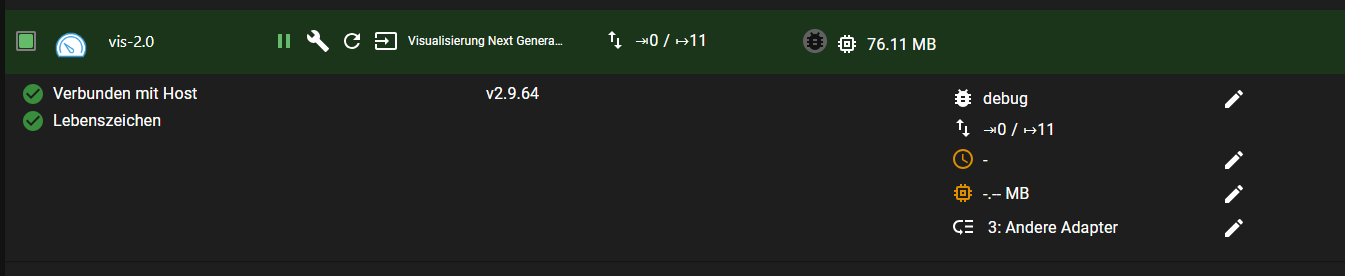
Ich habe VIS-2 hinzugefügt kann aber die VIS nicht starten über den Instanz-Link.
Das zugehörige LOG ist sehr kurz, obwohl debug eingeschaltet.
vis-2.0
2024-07-26 00:21:10.862	info	vis-2 license is OK.

vis-2.0
2024-07-26 00:21:10.650	info	starting. Version 2.9.64 in /opt/iobroker/node_modules/iobroker.vis-2, node: v20.16.0, js-controller: 5.0.19

vis-2.0
2024-07-26 00:21:10.542	debug	Plugin sentry Initialize Plugin (enabled=true)
iob diagSkript v.2024-05-22 *** BASE SYSTEM *** Static hostname: iobrokerPROD Icon name: computer-container Chassis: container ☐ Virtualization: lxc Operating System: Debian GNU/Linux 12 (bookworm) Kernel: Linux 6.8.8-3-pve Architecture: x86-64 model name : 11th Gen Intel(R) Core(TM) i7-1165G7 @ 2.80GHz Docker : false Virtualization : lxc Kernel : x86_64 Userland : 64 bit Systemuptime and Load: 00:24:42 up 1:09, 2 users, load average: 1.35, 1.20, 1.17 CPU threads: 6 *** Time and Time Zones *** Local time: Fri 2024-07-26 00:24:42 CEST Universal time: Thu 2024-07-25 22:24:42 UTC RTC time: n/a Time zone: Europe/Berlin (CEST, +0200) System clock synchronized: yes NTP service: inactive RTC in local TZ: no *** Users and Groups *** User that called 'iob diag': prox HOME=/home/prox GROUPS=prox adm sudo iobroker User that is running 'js-controller': iobroker HOME=/home/iobroker GROUPS=iobroker tty dialout audio video *** Display-Server-Setup *** Display-Server: false Desktop: Terminal: tty Boot Target: multi-user.target *** MEMORY *** total used free shared buff/cache available Mem: 8.6G 3.2G 4.5G 131K 980M 5.4G Swap: 536M 0B 536M Total: 9.1G 3.2G 5.0G Active iob-Instances: 47 8192 M total memory 3005 M used memory 3019 M active memory 746 M inactive memory 4250 M free memory 0 M buffer memory 935 M swap cache 512 M total swap 0 M used swap 512 M free swap *** top - Table Of Processes *** top - 00:24:42 up 1:10, 2 users, load average: 1.32, 1.20, 1.17 Tasks: 77 total, 1 running, 76 sleeping, 0 stopped, 0 zombie %Cpu(s): 0.0 us, 0.0 sy, 0.0 ni,100.0 id, 0.0 wa, 0.0 hi, 0.0 si, 0.0 st MiB Mem : 8192.0 total, 4248.8 free, 3007.7 used, 935.7 buff/cache MiB Swap: 512.0 total, 512.0 free, 0.0 used. 5184.3 avail Mem *** FAILED SERVICES *** UNIT LOAD ACTIVE SUB DESCRIPTION * run-rpc_pipefs.mount loaded failed failed RPC Pipe File System * sys-kernel-config.mount loaded failed failed Kernel Configuration File System * systemd-networkd-wait-online.service loaded failed failed Wait for Network to be Configured LOAD = Reflects whether the unit definition was properly loaded. ACTIVE = The high-level unit activation state, i.e. generalization of SUB. SUB = The low-level unit activation state, values depend on unit type. 3 loaded units listed. *** FILESYSTEM *** Filesystem Type Size Used Avail Use% Mounted on /dev/mapper/pve-vm--150--disk--0 ext4 30G 15G 14G 52% / none tmpfs 492K 4.0K 488K 1% /dev udev devtmpfs 16G 0 16G 0% /dev/tty /dev/mapper/pve-root ext4 94G 29G 61G 33% /mnt/windows tmpfs tmpfs 16G 0 16G 0% /dev/shm tmpfs tmpfs 6.2G 124K 6.2G 1% /run tmpfs tmpfs 5.0M 0 5.0M 0% /run/lock tmpfs tmpfs 3.1G 0 3.1G 0% /run/user/1001 Messages concerning ext4 filesystem in dmesg: dmesg: read kernel buffer failed: Operation not permitted Show mounted filesystems: TARGET SOURCE FSTYPE OPTIONS / /dev/mapper/pve-vm--150--disk--0 ext4 rw,relatime,stripe=16 |-/run tmpfs tmpfs rw,nosuid,nodev,size=6497012k,nr_inodes=819200,mode=755,uid=100000,gid=100000,inode64 | |-/run/lock tmpfs tmpfs rw,nosuid,nodev,noexec,relatime,size=5120k,uid=100000,gid=100000,inode64 | |-/run/user/1001 tmpfs tmpfs rw,nosuid,nodev,relatime,size=3248504k,nr_inodes=812126,mode=700,uid=101001,gid=101001,inode64 | |-/run/credentials/systemd-tmpfiles-setup.service ramfs ramfs ro,nosuid,nodev,noexec,relatime,mode=700 | |-/run/credentials/systemd-sysctl.service ramfs ramfs ro,nosuid,nodev,noexec,relatime,mode=700 | |-/run/credentials/systemd-sysusers.service ramfs ramfs ro,nosuid,nodev,noexec,relatime,mode=700 | `-/run/credentials/systemd-tmpfiles-setup-dev.service ramfs ramfs ro,nosuid,nodev,noexec,relatime,mode=700 |-/dev none tmpfs rw,relatime,size=492k,mode=755,uid=100000,gid=100000,inode64 | |-/dev/shm tmpfs tmpfs rw,nosuid,nodev,uid=100000,gid=100000,inode64 | |-/dev/mqueue mqueue mqueue rw,nosuid,nodev,noexec,relatime | |-/dev/ttyUSB0 udev[/ttyUSB0] devtmpfs rw,nosuid,relatime,size=16208696k,nr_inodes=4052174,mode=755,inode64 | |-/dev/.lxc/proc proc proc rw,relatime | |-/dev/.lxc/sys sys sysfs rw,relatime | |-/dev/full udev[/full] devtmpfs rw,nosuid,relatime,size=16208696k,nr_inodes=4052174,mode=755,inode64 | |-/dev/null udev[/null] devtmpfs rw,nosuid,relatime,size=16208696k,nr_inodes=4052174,mode=755,inode64 | |-/dev/random udev[/random] devtmpfs rw,nosuid,relatime,size=16208696k,nr_inodes=4052174,mode=755,inode64 | |-/dev/tty udev[/tty] devtmpfs rw,nosuid,relatime,size=16208696k,nr_inodes=4052174,mode=755,inode64 | |-/dev/urandom udev[/urandom] devtmpfs rw,nosuid,relatime,size=16208696k,nr_inodes=4052174,mode=755,inode64 | |-/dev/zero udev[/zero] devtmpfs rw,nosuid,relatime,size=16208696k,nr_inodes=4052174,mode=755,inode64 | |-/dev/pts devpts devpts rw,nosuid,noexec,relatime,gid=100005,mode=620,ptmxmode=666,max=1026 | |-/dev/ptmx devpts[/ptmx] devpts rw,nosuid,noexec,relatime,gid=100005,mode=620,ptmxmode=666,max=1026 | |-/dev/console devpts[/0] devpts rw,nosuid,noexec,relatime,gid=100005,mode=620,ptmxmode=666,max=1026 | |-/dev/tty1 devpts[/1] devpts rw,nosuid,noexec,relatime,gid=100005,mode=620,ptmxmode=666,max=1026 | `-/dev/tty2 devpts[/2] devpts rw,nosuid,noexec,relatime,gid=100005,mode=620,ptmxmode=666,max=1026 |-/proc proc proc rw,nosuid,nodev,noexec,relatime | |-/proc/sys proc[/sys] proc ro,relatime | | |-/proc/sys/net proc[/sys/net] proc rw,nosuid,nodev,noexec,relatime | | `-/proc/sys/kernel/random/boot_id none[/.lxc-boot-id] tmpfs ro,nosuid,nodev,noexec,relatime,size=492k,mode=755,uid=100000,gid=100000,inode64 | |-/proc/sysrq-trigger proc[/sysrq-trigger] proc ro,relatime | |-/proc/cpuinfo lxcfs[/proc/cpuinfo] fuse.lxcfs rw,nosuid,nodev,relatime,user_id=0,group_id=0,allow_other | |-/proc/diskstats lxcfs[/proc/diskstats] fuse.lxcfs rw,nosuid,nodev,relatime,user_id=0,group_id=0,allow_other | |-/proc/loadavg lxcfs[/proc/loadavg] fuse.lxcfs rw,nosuid,nodev,relatime,user_id=0,group_id=0,allow_other | |-/proc/meminfo lxcfs[/proc/meminfo] fuse.lxcfs rw,nosuid,nodev,relatime,user_id=0,group_id=0,allow_other | |-/proc/slabinfo lxcfs[/proc/slabinfo] fuse.lxcfs rw,nosuid,nodev,relatime,user_id=0,group_id=0,allow_other | |-/proc/stat lxcfs[/proc/stat] fuse.lxcfs rw,nosuid,nodev,relatime,user_id=0,group_id=0,allow_other | |-/proc/swaps lxcfs[/proc/swaps] fuse.lxcfs rw,nosuid,nodev,relatime,user_id=0,group_id=0,allow_other | `-/proc/uptime lxcfs[/proc/uptime] fuse.lxcfs rw,nosuid,nodev,relatime,user_id=0,group_id=0,allow_other |-/sys sysfs sysfs ro,nosuid,nodev,noexec,relatime | |-/sys/fs/fuse/connections fusectl fusectl rw,nosuid,nodev,noexec,relatime | |-/sys/devices/virtual/net sysfs[/devices/virtual/net] sysfs rw,nosuid,nodev,noexec,relatime | |-/sys/fs/cgroup none cgroup2 rw,nosuid,nodev,noexec,relatime | `-/sys/devices/system/cpu lxcfs[/sys/devices/system/cpu] fuse.lxcfs rw,nosuid,nodev,relatime,user_id=0,group_id=0,allow_other |-/mnt/windows /dev/mapper/pve-root[/mnt/pve/windows] ext4 rw,relatime,errors=remount-ro `-/mnt/nas /dev/mapper/pve-root[/mnt/pve/fritznas] ext4 rw,relatime,errors=remount-ro Files in neuralgic directories: /var: 1.5G /var/ 1.2G /var/log/journal/69ffeed97a1945f88a51d8df571b2606 1.2G /var/log/journal 1.2G /var/log 155M /var/lib Archived and active journals take up 1.1G in the file system. /opt/iobroker/backups: 451M /opt/iobroker/backups/ /opt/iobroker/iobroker-data: 1.3G /opt/iobroker/iobroker-data/ 926M /opt/iobroker/iobroker-data/files 299M /opt/iobroker/iobroker-data/files/javascript.admin 265M /opt/iobroker/iobroker-data/files/javascript.admin/static 264M /opt/iobroker/iobroker-data/files/javascript.admin/static/js The five largest files in iobroker-data are: 87M /opt/iobroker/iobroker-data/states.jsonl 38M /opt/iobroker/iobroker-data/objects.jsonl 38M /opt/iobroker/iobroker-data/files/iot.admin/static/js/main.d3d286bd.js.map 35M /opt/iobroker/iobroker-data/files/devices.admin/static/js/main.24f2bb56.js.map 27M /opt/iobroker/iobroker-data/files/tankerkoenig.admin/build/index.js.map USB-Devices by-id: USB-Sticks - Avoid direct links to /dev/tty* in your adapter setups, please always prefer the links 'by-id': No Devices found 'by-id' HINT: Your zigbee.0 COM-Port is NOT matching 'by-id'. Please check your setting: /dev/ttyUSB0 *** NodeJS-Installation *** /usr/bin/nodejs v20.16.0 /usr/bin/node v20.16.0 /usr/bin/npm 10.8.1 /usr/bin/npx 10.8.1 /usr/bin/corepack 0.28.2 nodejs: Installed: 20.16.0-1nodesource1 Candidate: 20.16.0-1nodesource1 Version table: *** 20.16.0-1nodesource1 1001 500 https://deb.nodesource.com/node_20.x nodistro/main amd64 Packages 100 /var/lib/dpkg/status 20.15.1-1nodesource1 1001 500 https://deb.nodesource.com/node_20.x nodistro/main amd64 Packages 20.15.0-1nodesource1 1001 500 https://deb.nodesource.com/node_20.x nodistro/main amd64 Packages 20.14.0-1nodesource1 1001 500 https://deb.nodesource.com/node_20.x nodistro/main amd64 Packages 20.13.1-1nodesource1 1001 500 https://deb.nodesource.com/node_20.x nodistro/main amd64 Packages 20.13.0-1nodesource1 1001 500 https://deb.nodesource.com/node_20.x nodistro/main amd64 Packages 20.12.2-1nodesource1 1001 500 https://deb.nodesource.com/node_20.x nodistro/main amd64 Packages 20.12.1-1nodesource1 1001 500 https://deb.nodesource.com/node_20.x nodistro/main amd64 Packages 20.12.0-1nodesource1 1001 500 https://deb.nodesource.com/node_20.x nodistro/main amd64 Packages 20.11.1-1nodesource1 1001 500 https://deb.nodesource.com/node_20.x nodistro/main amd64 Packages 20.11.0-1nodesource1 1001 500 https://deb.nodesource.com/node_20.x nodistro/main amd64 Packages 20.10.0-1nodesource1 1001 500 https://deb.nodesource.com/node_20.x nodistro/main amd64 Packages 20.9.0-1nodesource1 1001 500 https://deb.nodesource.com/node_20.x nodistro/main amd64 Packages 20.8.1-1nodesource1 1001 500 https://deb.nodesource.com/node_20.x nodistro/main amd64 Packages 20.8.0-1nodesource1 1001 500 https://deb.nodesource.com/node_20.x nodistro/main amd64 Packages 20.7.0-1nodesource1 1001 500 https://deb.nodesource.com/node_20.x nodistro/main amd64 Packages 20.6.1-1nodesource1 1001 500 https://deb.nodesource.com/node_20.x nodistro/main amd64 Packages 20.6.0-1nodesource1 1001 500 https://deb.nodesource.com/node_20.x nodistro/main amd64 Packages 20.5.1-1nodesource1 1001 500 https://deb.nodesource.com/node_20.x nodistro/main amd64 Packages 20.5.0-1nodesource1 1001 500 https://deb.nodesource.com/node_20.x nodistro/main amd64 Packages 20.4.0-1nodesource1 1001 500 https://deb.nodesource.com/node_20.x nodistro/main amd64 Packages 20.3.1-1nodesource1 1001 500 https://deb.nodesource.com/node_20.x nodistro/main amd64 Packages 20.3.0-1nodesource1 1001 500 https://deb.nodesource.com/node_20.x nodistro/main amd64 Packages 20.2.0-1nodesource1 1001 500 https://deb.nodesource.com/node_20.x nodistro/main amd64 Packages 20.1.0-1nodesource1 1001 500 https://deb.nodesource.com/node_20.x nodistro/main amd64 Packages 20.0.0-1nodesource1 1001 500 https://deb.nodesource.com/node_20.x nodistro/main amd64 Packages 18.19.0+dfsg-6~deb12u2 500 500 http://ftp.debian.org/debian bookworm/main amd64 Packages 18.19.0+dfsg-6~deb12u1 500 500 http://security.debian.org bookworm-security/main amd64 Packages Temp directories causing npm8 problem: 0 No problems detected Errors in npm tree: *** ioBroker-Installation *** ioBroker Status iobroker is running on this host. Objects type: jsonl States type: jsonl Core adapters versions js-controller: 5.0.19 admin: 7.0.19 javascript: 8.6.0 nodejs modules from github: 4 +-- iobroker.alexa2@3.26.5 (git+ssh://git@github.com/Apollon77/ioBroker.alexa2.git#37160cf729a9c70ca70679d4b1d3c16ba51c6456) +-- iobroker.hue-extended@2.0.1 (git+ssh://git@github.com/iobroker-community-adapters/ioBroker.hue-extended.git#f3d1d9187fbc9bcdde5c39c1fbc80371ec7941f2) +-- iobroker.jarvis@3.2.0-beta.47 (git+ssh://git@github.com/Zefau/ioBroker.jarvis.git#b2aa6c5e163660c5447353ff595b6d93441915cd) +-- iobroker.meross@1.17.0 (git+ssh://git@github.com/Apollon77/ioBroker.meross.git#31fe999d84e17f0c79b2c5243f8227776035c718) Adapter State + system.adapter.admin.0 : admin : iobrokerPROD - enabled, port: 8081, bind: 0.0.0.0 (SSL), run as: admin + system.adapter.alexa2.0 : alexa2 : iobrokerPROD - enabled + system.adapter.backitup.0 : backitup : iobrokerPROD - enabled system.adapter.birthdays.0 : birthdays : iobrokerPROD - disabled + system.adapter.bring.0 : bring : iobrokerPROD - enabled + system.adapter.broadlink2.0 : broadlink2 : iobrokerPROD - enabled + system.adapter.cameras.0 : cameras : iobrokerPROD - enabled, port: 8200, bind: 127.0.0.1 + system.adapter.chromecast.0 : chromecast : iobrokerPROD - enabled + system.adapter.cloud.0 : cloud : iobrokerPROD - enabled system.adapter.daswetter.0 : daswetter : iobrokerPROD - enabled system.adapter.devices.0 : devices : iobrokerPROD - enabled + system.adapter.discovery.0 : discovery : iobrokerPROD - enabled system.adapter.dwd.0 : dwd : iobrokerPROD - disabled + system.adapter.echarts.0 : echarts : iobrokerPROD - enabled + system.adapter.email.0 : email : iobrokerPROD - enabled + system.adapter.fahrplan.0 : fahrplan : iobrokerPROD - enabled system.adapter.flot.0 : flot : iobrokerPROD - enabled + system.adapter.fritzdect.0 : fritzdect : iobrokerPROD - enabled + system.adapter.fullybrowser.0 : fullybrowser : iobrokerPROD - enabled + system.adapter.history.0 : history : iobrokerPROD - enabled + system.adapter.hue-extended.0 : hue-extended : iobrokerPROD - enabled system.adapter.hue.0 : hue : iobrokerPROD - disabled, port: 443 system.adapter.ical.0 : ical : iobrokerPROD - enabled + system.adapter.info.0 : info : iobrokerPROD - enabled + system.adapter.iot.0 : iot : iobrokerPROD - enabled + system.adapter.jarvis.0 : jarvis : iobrokerPROD - enabled, port: 8082, bind: 0.0.0.0, run as: admin + system.adapter.jarvis.1 : jarvis : iobrokerPROD - enabled + system.adapter.jarvis.2 : jarvis : iobrokerPROD - enabled, port: 8082, bind: 0.0.0.0, run as: admin + system.adapter.javascript.0 : javascript : iobrokerPROD - enabled system.adapter.javascript.1 : javascript : iobrokerPROD - disabled system.adapter.meross.0 : meross : iobrokerPROD - disabled + system.adapter.mqtt.0 : mqtt : iobrokerPROD - enabled, port: 1885, bind: 0.0.0.0 + system.adapter.notificationforandroidtv.0: notificationforandroidtv: iobrokerPROD - enabled + system.adapter.onvif.0 : onvif : iobrokerPROD - enabled, port: 8000 + system.adapter.onvif.1 : onvif : iobrokerPROD - enabled, port: 8000 system.adapter.pegelalarm.0 : pegelalarm : iobrokerPROD - enabled + system.adapter.ping.0 : ping : iobrokerPROD - enabled system.adapter.proxy.0 : proxy : iobrokerPROD - enabled + system.adapter.pushover.0 : pushover : iobrokerPROD - enabled + system.adapter.rest-api.0 : rest-api : iobrokerPROD - enabled, port: 8093, bind: 0.0.0.0, run as: admin + system.adapter.rssfeed.0 : rssfeed : iobrokerPROD - enabled + system.adapter.simple-api.0 : simple-api : iobrokerPROD - enabled, port: 8087, bind: 0.0.0.0, run as: admin + system.adapter.snmp.0 : snmp : iobrokerPROD - enabled + system.adapter.sonoff.0 : sonoff : iobrokerPROD - enabled, port: 1883, bind: 0.0.0.0 system.adapter.spotify-premium.0 : spotify-premium : iobrokerPROD - disabled + system.adapter.tankerkoenig.0 : tankerkoenig : iobrokerPROD - enabled + system.adapter.telegram.0 : telegram : iobrokerPROD - enabled, port: 8443, bind: 0.0.0.0 + system.adapter.telegram.1 : telegram : iobrokerPROD - enabled, port: 8443, bind: 0.0.0.0 + system.adapter.terminal.0 : terminal : iobrokerPROD - enabled, port: 8088, bind: 0.0.0.0, run as: admin + system.adapter.tr-064.0 : tr-064 : iobrokerPROD - enabled + system.adapter.trashschedule.0 : trashschedule : iobrokerPROD - enabled system.adapter.tvspielfilm.0 : tvspielfilm : iobrokerPROD - enabled system.adapter.twinkly.0 : twinkly : iobrokerPROD - disabled + system.adapter.virtualpowermeter.0 : virtualpowermeter : iobrokerPROD - enabled + system.adapter.vis-2.0 : vis-2 : iobrokerPROD - enabled + system.adapter.web.0 : web : iobrokerPROD - enabled, port: 8082, bind: 0.0.0.0 (SSL), run as: admin + system.adapter.web.1 : web : iobrokerPROD - enabled, port: 8083, bind: 0.0.0.0, run as: admin + system.adapter.wifilight.0 : wifilight : iobrokerPROD - enabled + system.adapter.wled.0 : wled : iobrokerPROD - enabled + system.adapter.zigbee.0 : zigbee : iobrokerPROD - enabled, port: /dev/ttyUSB0 + instance is alive Enabled adapters with bindings + system.adapter.admin.0 : admin : iobrokerPROD - enabled, port: 8081, bind: 0.0.0.0 (SSL), run as: admin + system.adapter.cameras.0 : cameras : iobrokerPROD - enabled, port: 8200, bind: 127.0.0.1 + system.adapter.jarvis.0 : jarvis : iobrokerPROD - enabled, port: 8082, bind: 0.0.0.0, run as: admin + system.adapter.jarvis.2 : jarvis : iobrokerPROD - enabled, port: 8082, bind: 0.0.0.0, run as: admin + system.adapter.mqtt.0 : mqtt : iobrokerPROD - enabled, port: 1885, bind: 0.0.0.0 + system.adapter.onvif.0 : onvif : iobrokerPROD - enabled, port: 8000 + system.adapter.onvif.1 : onvif : iobrokerPROD - enabled, port: 8000 + system.adapter.rest-api.0 : rest-api : iobrokerPROD - enabled, port: 8093, bind: 0.0.0.0, run as: admin + system.adapter.simple-api.0 : simple-api : iobrokerPROD - enabled, port: 8087, bind: 0.0.0.0, run as: admin + system.adapter.sonoff.0 : sonoff : iobrokerPROD - enabled, port: 1883, bind: 0.0.0.0 + system.adapter.telegram.0 : telegram : iobrokerPROD - enabled, port: 8443, bind: 0.0.0.0 + system.adapter.telegram.1 : telegram : iobrokerPROD - enabled, port: 8443, bind: 0.0.0.0 + system.adapter.terminal.0 : terminal : iobrokerPROD - enabled, port: 8088, bind: 0.0.0.0, run as: admin + system.adapter.web.0 : web : iobrokerPROD - enabled, port: 8082, bind: 0.0.0.0 (SSL), run as: admin + system.adapter.web.1 : web : iobrokerPROD - enabled, port: 8083, bind: 0.0.0.0, run as: admin + system.adapter.zigbee.0 : zigbee : iobrokerPROD - enabled, port: /dev/ttyUSB0 ioBroker-Repositories stable : http://download.iobroker.net/sources-dist.json beta : http://download.iobroker.net/sources-dist-latest.json Active repo(s): beta Installed ioBroker-Instances Used repository: beta Adapter "admin" : 7.0.19 , installed 7.0.19 Adapter "alexa2" : 3.26.5 , installed 3.26.5 Adapter "backitup" : 3.0.10 , installed 3.0.10 Adapter "birthdays" : 3.0.1 , installed 3.0.1 Adapter "bring" : 1.8.4 , installed 1.8.4 Adapter "broadlink2" : 2.3.0 , installed 2.3.0 Adapter "cameras" : 2.1.2 , installed 2.1.2 Adapter "chromecast" : 3.4.1 , installed 3.4.1 Adapter "cloud" : 5.0.1 , installed 5.0.1 Adapter "daswetter" : 3.1.15 , installed 3.1.15 Adapter "devices" : 1.1.5 , installed 1.1.5 Adapter "discovery" : 5.0.0 , installed 5.0.0 Adapter "dwd" : 2.8.5 , installed 2.8.5 Adapter "echarts" : 1.8.4 , installed 1.8.4 Adapter "email" : 1.3.1 , installed 1.3.1 Adapter "fahrplan" : 1.2.3 , installed 1.2.3 Adapter "flot" : 1.12.0 , installed 1.12.0 Adapter "fritzdect" : 2.5.9 , installed 2.5.9 Adapter "fullybrowser" : 3.0.12 , installed 2.2.0 [Updatable] Adapter "history" : 3.0.1 , installed 3.0.1 Adapter "hue" : 3.12.0 , installed 3.12.0 Adapter "ical" : 1.15.0 , installed 1.15.0 Adapter "iot" : 3.3.0 , installed 3.3.0 Adapter "jarvis" : 3.1.8 , installed 3.2.0-beta.47 Adapter "javascript" : 8.7.3 , installed 8.6.0 [Updatable] Controller "js-controller": 6.0.9 , installed 5.0.19 [Updatable] Adapter "meross" : 1.17.0 , installed 1.17.0 Adapter "mqtt" : 6.0.0 , installed 6.0.0 Adapter "notificationforandroidtv": 3.0.4, installed 3.0.4 Adapter "onvif" : 1.1.4 , installed 1.1.4 Adapter "pegelalarm" : 1.3.3 , installed 1.3.3 Adapter "ping" : 1.6.2 , installed 1.6.2 Adapter "proxy" : 1.3.2 , installed 1.3.2 Adapter "pushover" : 4.0.0 , installed 4.0.0 Adapter "reolink" : 1.1.0 , installed 1.1.0 Adapter "rest-api" : 2.0.3 , installed 2.0.3 Adapter "rssfeed" : 3.0.0 , installed 3.0.0 Adapter "simple-api" : 2.8.0 , installed 2.8.0 Adapter "snmp" : 3.2.0 , installed 3.2.0 Adapter "socketio" : 6.7.1 , installed 6.7.1 Adapter "sonoff" : 3.1.0 , installed 3.1.0 Adapter "spotify-premium": 1.5.0 , installed 1.5.0 Adapter "tankerkoenig" : 3.4.0 , installed 3.4.0 Adapter "telegram" : 3.9.0 , installed 3.9.0 Adapter "terminal" : 1.0.0 , installed 1.0.0 Adapter "tibberlink" : 3.4.3 , installed 3.4.3 Adapter "tr-064" : 4.3.0 , installed 4.3.0 Adapter "trashschedule": 3.3.0 , installed 3.3.0 Adapter "tvspielfilm" : 2.1.0 , installed 2.1.0 Adapter "twinkly" : 1.0.14 , installed 1.0.14 Adapter "virtualpowermeter": 1.4.6, installed 1.4.6 Adapter "vis-2" : 2.9.64 , installed 2.9.64 Adapter "web" : 6.3.0 , installed 6.3.0 Adapter "wifilight" : 1.2.2 , installed 1.2.2 Adapter "wled" : 0.7.3-beta.0, installed 0.7.2 [Updatable] Adapter "ws" : 2.6.2 , installed 2.6.2 Adapter "zigbee" : 1.10.3 , installed 1.10.3 Objects and States Please stand by - This may take a while Objects: 27922 States: 22122 *** OS-Repositories and Updates *** Hit:1 http://security.debian.org bookworm-security InRelease Hit:2 http://ftp.debian.org/debian bookworm InRelease Hit:3 http://ftp.debian.org/debian bookworm-updates InRelease Hit:4 https://deb.nodesource.com/node_20.x nodistro InRelease Reading package lists... Pending Updates: 3 *** Listening Ports *** Active Internet connections (only servers) Proto Recv-Q Send-Q Local Address Foreign Address State User Inode PID/Program name tcp 0 0 0.0.0.0:1885 0.0.0.0:* LISTEN 1002 2908608 586/io.mqtt.0 tcp 0 0 0.0.0.0:1883 0.0.0.0:* LISTEN 1002 2909656 409/io.sonoff.0 tcp 0 0 127.0.0.1:25 0.0.0.0:* LISTEN 0 2919832 1334/master tcp 0 0 0.0.0.0:111 0.0.0.0:* LISTEN 0 2899893 1/init tcp 0 0 127.0.0.1:8200 0.0.0.0:* LISTEN 1002 2923868 1649/io.cameras.0 tcp 0 0 0.0.0.0:8402 0.0.0.0:* LISTEN 1002 2927763 1871/io.jarvis.2 tcp 0 0 0.0.0.0:8400 0.0.0.0:* LISTEN 1002 2916360 725/io.jarvis.0 tcp 0 0 0.0.0.0:8401 0.0.0.0:* LISTEN 1002 2923337 1810/io.jarvis.1 tcp 0 0 127.0.0.1:9000 0.0.0.0:* LISTEN 1002 2903826 155/iobroker.js-con tcp 0 0 127.0.0.1:9001 0.0.0.0:* LISTEN 1002 2904576 155/iobroker.js-con tcp6 0 0 :::8087 :::* LISTEN 1002 2920853 1474/io.simple-api. tcp6 0 0 :::8082 :::* LISTEN 1002 2912107 683/io.web.0 tcp6 0 0 :::8083 :::* LISTEN 1002 2927793 1892/io.web.1 tcp6 0 0 :::8081 :::* LISTEN 1002 2896741 181/io.admin.0 tcp6 0 0 :::8093 :::* LISTEN 1002 2923142 1740/io.rest-api.0 tcp6 0 0 :::8088 :::* LISTEN 1002 2917396 745/io.terminal.0 tcp6 0 0 :::111 :::* LISTEN 0 2899895 1/init tcp6 0 0 :::22 :::* LISTEN 0 2904527 1/init tcp6 0 0 ::1:25 :::* LISTEN 0 2919833 1334/master udp 0 0 0.0.0.0:15001 0.0.0.0:* 1002 2912479 502/io.broadlink2.0 udp 0 0 0.0.0.0:48534 0.0.0.0:* 1002 2911519 480/io.snmp.0 udp 0 0 0.0.0.0:111 0.0.0.0:* 0 2899894 1/init udp 0 0 0.0.0.0:50201 0.0.0.0:* 1002 2912482 502/io.broadlink2.0 udp 0 0 0.0.0.0:5353 0.0.0.0:* 1002 2922591 1564/io.wled.0 udp 0 0 0.0.0.0:5353 0.0.0.0:* 1002 2913302 606/io.chromecast.0 udp 0 0 0.0.0.0:57664 0.0.0.0:* 1002 2912481 502/io.broadlink2.0 udp 0 0 0.0.0.0:42730 0.0.0.0:* 1002 2912483 502/io.broadlink2.0 udp6 0 0 :::111 :::* 0 2899896 1/init *** Log File - Last 25 Lines *** 2024-07-26 00:21:07.161 - info: host.iobrokerPROD stopInstance system.adapter.vis-2.0 send kill signal 2024-07-26 00:21:07.558 - info: vis-2.0 (15962) terminating 2024-07-26 00:21:07.588 - info: host.iobrokerPROD instance system.adapter.vis-2.0 terminated with code 11 (ADAPTER_REQUESTED_TERMINATION) 2024-07-26 00:21:10.196 - info: host.iobrokerPROD instance system.adapter.vis-2.0 started with pid 17036 2024-07-26 00:21:10.384 - debug: vis-2.0 (17036) Redis Objects: Use Redis connection: 127.0.0.1:9001 2024-07-26 00:21:10.405 - debug: vis-2.0 (17036) Objects client ready ... initialize now 2024-07-26 00:21:10.405 - debug: vis-2.0 (17036) Objects create System PubSub Client 2024-07-26 00:21:10.406 - debug: vis-2.0 (17036) Objects create User PubSub Client 2024-07-26 00:21:10.439 - debug: vis-2.0 (17036) Objects client initialize lua scripts 2024-07-26 00:21:10.441 - debug: vis-2.0 (17036) Objects connected to redis: 127.0.0.1:9001 2024-07-26 00:21:10.459 - debug: vis-2.0 (17036) Redis States: Use Redis connection: 127.0.0.1:9000 2024-07-26 00:21:10.469 - debug: vis-2.0 (17036) States create System PubSub Client 2024-07-26 00:21:10.469 - debug: vis-2.0 (17036) States create User PubSub Client 2024-07-26 00:21:10.527 - debug: vis-2.0 (17036) States connected to redis: 127.0.0.1:9000 2024-07-26 00:21:10.542 - debug: vis-2.0 (17036) Plugin sentry Initialize Plugin (enabled=true) 2024-07-26 00:21:10.650 - info: vis-2.0 (17036) starting. Version 2.9.64 in /opt/iobroker/node_modules/iobroker.vis-2, node: v20.16.0, js-controller: 5.0.19 2024-07-26 00:21:10.862 - info: vis-2.0 (17036) vis-2 license is OK. 2024-07-26 00:21:27.605 - info: javascript.0 (208) script.js.HUE-EXTENDED.HUE-NEWAPI: running function after change of hue-extended.0.lights.001-lampe_tisch.action.level 2024-07-26 00:21:58.530 - info: javascript.0 (208) script.js.HUE-EXTENDED.HUE-NEWAPI: missing update instructions for scenes.status.status 2024-07-26 00:21:58.530 - info: javascript.0 (208) script.js.HUE-EXTENDED.HUE-NEWAPI: {"status":{"status":{"active":"inactive"}}} 2024-07-26 00:22:24.221 - info: javascript.0 (208) script.js.HUE-EXTENDED.HUE-NEWAPI: missing update instructions for scenes.status.status 2024-07-26 00:22:24.221 - info: javascript.0 (208) script.js.HUE-EXTENDED.HUE-NEWAPI: {"status":{"status":{"active":"static"}}} 2024-07-26 00:22:24.273 - info: javascript.0 (208) script.js.HUE-EXTENDED.HUE-NEWAPI: running function after change of hue-extended.0.lights.001-lampe_tisch.action.level 2024-07-26 00:23:18.639 - info: fahrplan.0 (1825) Updated 1 routes, 1 enabled and 0 disabled 2024-07-26 00:23:18.936 - info: fahrplan.0 (1825) Updated 1 departure timetables, 1 enabled and 0 disabledWas kann ich tun? Wo muss ich ansetzen?
Vielen DankEDIT:
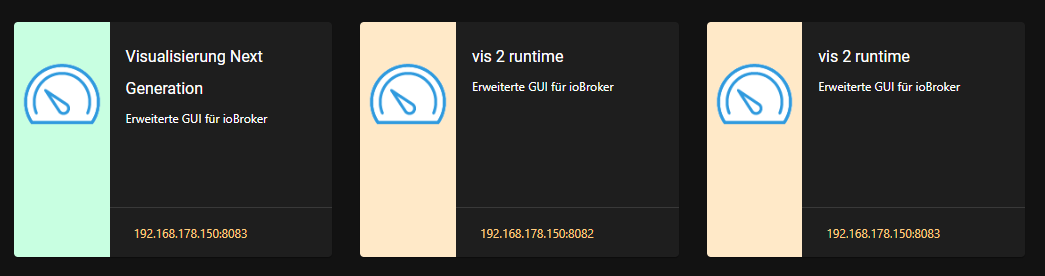
Schau ich in die Übersicht dann sehe ich die Kacheln
und kann diese auch nutzen.
Welche Kachel soll man denn nutzen?
Visualisierung Next Generation (sehr wahrscheinlich) für die Entwicklung
Wofür hat man die "RunTime"-Kacheln? Um direkt ein fertiges Projekt zu starten?@mcu ok und jetzt nochmal für die doofen(also mich)
was willst du starten ?? was den für ein Instanz link ?
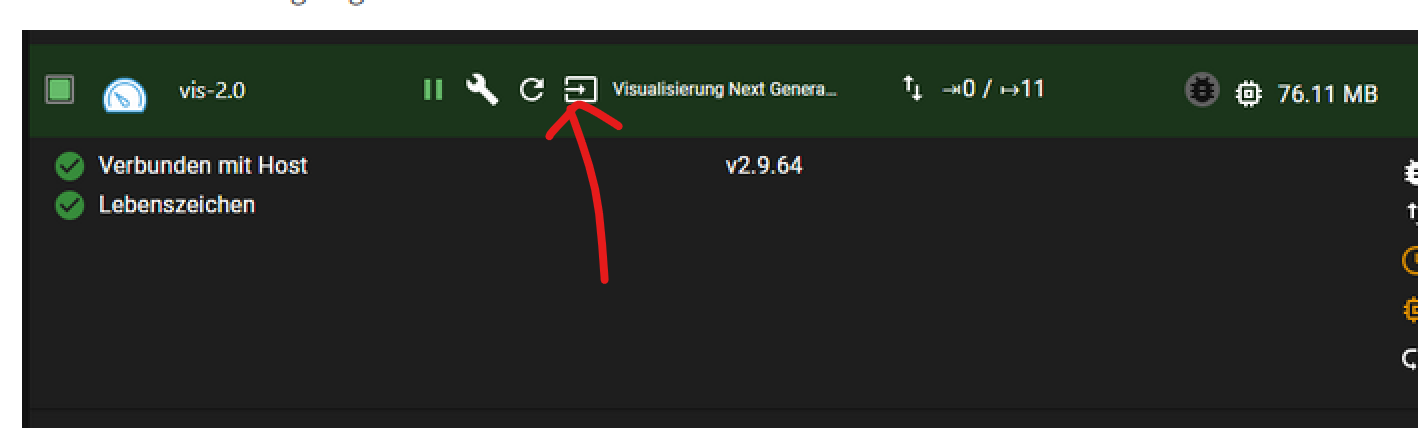
ahhh jetzt weiss ich was du meinst
der hier geht nicht
zigbee hab ich, zwave auch, nuc's genauso und HA auch
-
Ich habe VIS-2 hinzugefügt kann aber die VIS nicht starten über den Instanz-Link.
Das zugehörige LOG ist sehr kurz, obwohl debug eingeschaltet.
vis-2.0
2024-07-26 00:21:10.862	info	vis-2 license is OK.

vis-2.0
2024-07-26 00:21:10.650	info	starting. Version 2.9.64 in /opt/iobroker/node_modules/iobroker.vis-2, node: v20.16.0, js-controller: 5.0.19

vis-2.0
2024-07-26 00:21:10.542	debug	Plugin sentry Initialize Plugin (enabled=true)
iob diagSkript v.2024-05-22 *** BASE SYSTEM *** Static hostname: iobrokerPROD Icon name: computer-container Chassis: container ☐ Virtualization: lxc Operating System: Debian GNU/Linux 12 (bookworm) Kernel: Linux 6.8.8-3-pve Architecture: x86-64 model name : 11th Gen Intel(R) Core(TM) i7-1165G7 @ 2.80GHz Docker : false Virtualization : lxc Kernel : x86_64 Userland : 64 bit Systemuptime and Load: 00:24:42 up 1:09, 2 users, load average: 1.35, 1.20, 1.17 CPU threads: 6 *** Time and Time Zones *** Local time: Fri 2024-07-26 00:24:42 CEST Universal time: Thu 2024-07-25 22:24:42 UTC RTC time: n/a Time zone: Europe/Berlin (CEST, +0200) System clock synchronized: yes NTP service: inactive RTC in local TZ: no *** Users and Groups *** User that called 'iob diag': prox HOME=/home/prox GROUPS=prox adm sudo iobroker User that is running 'js-controller': iobroker HOME=/home/iobroker GROUPS=iobroker tty dialout audio video *** Display-Server-Setup *** Display-Server: false Desktop: Terminal: tty Boot Target: multi-user.target *** MEMORY *** total used free shared buff/cache available Mem: 8.6G 3.2G 4.5G 131K 980M 5.4G Swap: 536M 0B 536M Total: 9.1G 3.2G 5.0G Active iob-Instances: 47 8192 M total memory 3005 M used memory 3019 M active memory 746 M inactive memory 4250 M free memory 0 M buffer memory 935 M swap cache 512 M total swap 0 M used swap 512 M free swap *** top - Table Of Processes *** top - 00:24:42 up 1:10, 2 users, load average: 1.32, 1.20, 1.17 Tasks: 77 total, 1 running, 76 sleeping, 0 stopped, 0 zombie %Cpu(s): 0.0 us, 0.0 sy, 0.0 ni,100.0 id, 0.0 wa, 0.0 hi, 0.0 si, 0.0 st MiB Mem : 8192.0 total, 4248.8 free, 3007.7 used, 935.7 buff/cache MiB Swap: 512.0 total, 512.0 free, 0.0 used. 5184.3 avail Mem *** FAILED SERVICES *** UNIT LOAD ACTIVE SUB DESCRIPTION * run-rpc_pipefs.mount loaded failed failed RPC Pipe File System * sys-kernel-config.mount loaded failed failed Kernel Configuration File System * systemd-networkd-wait-online.service loaded failed failed Wait for Network to be Configured LOAD = Reflects whether the unit definition was properly loaded. ACTIVE = The high-level unit activation state, i.e. generalization of SUB. SUB = The low-level unit activation state, values depend on unit type. 3 loaded units listed. *** FILESYSTEM *** Filesystem Type Size Used Avail Use% Mounted on /dev/mapper/pve-vm--150--disk--0 ext4 30G 15G 14G 52% / none tmpfs 492K 4.0K 488K 1% /dev udev devtmpfs 16G 0 16G 0% /dev/tty /dev/mapper/pve-root ext4 94G 29G 61G 33% /mnt/windows tmpfs tmpfs 16G 0 16G 0% /dev/shm tmpfs tmpfs 6.2G 124K 6.2G 1% /run tmpfs tmpfs 5.0M 0 5.0M 0% /run/lock tmpfs tmpfs 3.1G 0 3.1G 0% /run/user/1001 Messages concerning ext4 filesystem in dmesg: dmesg: read kernel buffer failed: Operation not permitted Show mounted filesystems: TARGET SOURCE FSTYPE OPTIONS / /dev/mapper/pve-vm--150--disk--0 ext4 rw,relatime,stripe=16 |-/run tmpfs tmpfs rw,nosuid,nodev,size=6497012k,nr_inodes=819200,mode=755,uid=100000,gid=100000,inode64 | |-/run/lock tmpfs tmpfs rw,nosuid,nodev,noexec,relatime,size=5120k,uid=100000,gid=100000,inode64 | |-/run/user/1001 tmpfs tmpfs rw,nosuid,nodev,relatime,size=3248504k,nr_inodes=812126,mode=700,uid=101001,gid=101001,inode64 | |-/run/credentials/systemd-tmpfiles-setup.service ramfs ramfs ro,nosuid,nodev,noexec,relatime,mode=700 | |-/run/credentials/systemd-sysctl.service ramfs ramfs ro,nosuid,nodev,noexec,relatime,mode=700 | |-/run/credentials/systemd-sysusers.service ramfs ramfs ro,nosuid,nodev,noexec,relatime,mode=700 | `-/run/credentials/systemd-tmpfiles-setup-dev.service ramfs ramfs ro,nosuid,nodev,noexec,relatime,mode=700 |-/dev none tmpfs rw,relatime,size=492k,mode=755,uid=100000,gid=100000,inode64 | |-/dev/shm tmpfs tmpfs rw,nosuid,nodev,uid=100000,gid=100000,inode64 | |-/dev/mqueue mqueue mqueue rw,nosuid,nodev,noexec,relatime | |-/dev/ttyUSB0 udev[/ttyUSB0] devtmpfs rw,nosuid,relatime,size=16208696k,nr_inodes=4052174,mode=755,inode64 | |-/dev/.lxc/proc proc proc rw,relatime | |-/dev/.lxc/sys sys sysfs rw,relatime | |-/dev/full udev[/full] devtmpfs rw,nosuid,relatime,size=16208696k,nr_inodes=4052174,mode=755,inode64 | |-/dev/null udev[/null] devtmpfs rw,nosuid,relatime,size=16208696k,nr_inodes=4052174,mode=755,inode64 | |-/dev/random udev[/random] devtmpfs rw,nosuid,relatime,size=16208696k,nr_inodes=4052174,mode=755,inode64 | |-/dev/tty udev[/tty] devtmpfs rw,nosuid,relatime,size=16208696k,nr_inodes=4052174,mode=755,inode64 | |-/dev/urandom udev[/urandom] devtmpfs rw,nosuid,relatime,size=16208696k,nr_inodes=4052174,mode=755,inode64 | |-/dev/zero udev[/zero] devtmpfs rw,nosuid,relatime,size=16208696k,nr_inodes=4052174,mode=755,inode64 | |-/dev/pts devpts devpts rw,nosuid,noexec,relatime,gid=100005,mode=620,ptmxmode=666,max=1026 | |-/dev/ptmx devpts[/ptmx] devpts rw,nosuid,noexec,relatime,gid=100005,mode=620,ptmxmode=666,max=1026 | |-/dev/console devpts[/0] devpts rw,nosuid,noexec,relatime,gid=100005,mode=620,ptmxmode=666,max=1026 | |-/dev/tty1 devpts[/1] devpts rw,nosuid,noexec,relatime,gid=100005,mode=620,ptmxmode=666,max=1026 | `-/dev/tty2 devpts[/2] devpts rw,nosuid,noexec,relatime,gid=100005,mode=620,ptmxmode=666,max=1026 |-/proc proc proc rw,nosuid,nodev,noexec,relatime | |-/proc/sys proc[/sys] proc ro,relatime | | |-/proc/sys/net proc[/sys/net] proc rw,nosuid,nodev,noexec,relatime | | `-/proc/sys/kernel/random/boot_id none[/.lxc-boot-id] tmpfs ro,nosuid,nodev,noexec,relatime,size=492k,mode=755,uid=100000,gid=100000,inode64 | |-/proc/sysrq-trigger proc[/sysrq-trigger] proc ro,relatime | |-/proc/cpuinfo lxcfs[/proc/cpuinfo] fuse.lxcfs rw,nosuid,nodev,relatime,user_id=0,group_id=0,allow_other | |-/proc/diskstats lxcfs[/proc/diskstats] fuse.lxcfs rw,nosuid,nodev,relatime,user_id=0,group_id=0,allow_other | |-/proc/loadavg lxcfs[/proc/loadavg] fuse.lxcfs rw,nosuid,nodev,relatime,user_id=0,group_id=0,allow_other | |-/proc/meminfo lxcfs[/proc/meminfo] fuse.lxcfs rw,nosuid,nodev,relatime,user_id=0,group_id=0,allow_other | |-/proc/slabinfo lxcfs[/proc/slabinfo] fuse.lxcfs rw,nosuid,nodev,relatime,user_id=0,group_id=0,allow_other | |-/proc/stat lxcfs[/proc/stat] fuse.lxcfs rw,nosuid,nodev,relatime,user_id=0,group_id=0,allow_other | |-/proc/swaps lxcfs[/proc/swaps] fuse.lxcfs rw,nosuid,nodev,relatime,user_id=0,group_id=0,allow_other | `-/proc/uptime lxcfs[/proc/uptime] fuse.lxcfs rw,nosuid,nodev,relatime,user_id=0,group_id=0,allow_other |-/sys sysfs sysfs ro,nosuid,nodev,noexec,relatime | |-/sys/fs/fuse/connections fusectl fusectl rw,nosuid,nodev,noexec,relatime | |-/sys/devices/virtual/net sysfs[/devices/virtual/net] sysfs rw,nosuid,nodev,noexec,relatime | |-/sys/fs/cgroup none cgroup2 rw,nosuid,nodev,noexec,relatime | `-/sys/devices/system/cpu lxcfs[/sys/devices/system/cpu] fuse.lxcfs rw,nosuid,nodev,relatime,user_id=0,group_id=0,allow_other |-/mnt/windows /dev/mapper/pve-root[/mnt/pve/windows] ext4 rw,relatime,errors=remount-ro `-/mnt/nas /dev/mapper/pve-root[/mnt/pve/fritznas] ext4 rw,relatime,errors=remount-ro Files in neuralgic directories: /var: 1.5G /var/ 1.2G /var/log/journal/69ffeed97a1945f88a51d8df571b2606 1.2G /var/log/journal 1.2G /var/log 155M /var/lib Archived and active journals take up 1.1G in the file system. /opt/iobroker/backups: 451M /opt/iobroker/backups/ /opt/iobroker/iobroker-data: 1.3G /opt/iobroker/iobroker-data/ 926M /opt/iobroker/iobroker-data/files 299M /opt/iobroker/iobroker-data/files/javascript.admin 265M /opt/iobroker/iobroker-data/files/javascript.admin/static 264M /opt/iobroker/iobroker-data/files/javascript.admin/static/js The five largest files in iobroker-data are: 87M /opt/iobroker/iobroker-data/states.jsonl 38M /opt/iobroker/iobroker-data/objects.jsonl 38M /opt/iobroker/iobroker-data/files/iot.admin/static/js/main.d3d286bd.js.map 35M /opt/iobroker/iobroker-data/files/devices.admin/static/js/main.24f2bb56.js.map 27M /opt/iobroker/iobroker-data/files/tankerkoenig.admin/build/index.js.map USB-Devices by-id: USB-Sticks - Avoid direct links to /dev/tty* in your adapter setups, please always prefer the links 'by-id': No Devices found 'by-id' HINT: Your zigbee.0 COM-Port is NOT matching 'by-id'. Please check your setting: /dev/ttyUSB0 *** NodeJS-Installation *** /usr/bin/nodejs v20.16.0 /usr/bin/node v20.16.0 /usr/bin/npm 10.8.1 /usr/bin/npx 10.8.1 /usr/bin/corepack 0.28.2 nodejs: Installed: 20.16.0-1nodesource1 Candidate: 20.16.0-1nodesource1 Version table: *** 20.16.0-1nodesource1 1001 500 https://deb.nodesource.com/node_20.x nodistro/main amd64 Packages 100 /var/lib/dpkg/status 20.15.1-1nodesource1 1001 500 https://deb.nodesource.com/node_20.x nodistro/main amd64 Packages 20.15.0-1nodesource1 1001 500 https://deb.nodesource.com/node_20.x nodistro/main amd64 Packages 20.14.0-1nodesource1 1001 500 https://deb.nodesource.com/node_20.x nodistro/main amd64 Packages 20.13.1-1nodesource1 1001 500 https://deb.nodesource.com/node_20.x nodistro/main amd64 Packages 20.13.0-1nodesource1 1001 500 https://deb.nodesource.com/node_20.x nodistro/main amd64 Packages 20.12.2-1nodesource1 1001 500 https://deb.nodesource.com/node_20.x nodistro/main amd64 Packages 20.12.1-1nodesource1 1001 500 https://deb.nodesource.com/node_20.x nodistro/main amd64 Packages 20.12.0-1nodesource1 1001 500 https://deb.nodesource.com/node_20.x nodistro/main amd64 Packages 20.11.1-1nodesource1 1001 500 https://deb.nodesource.com/node_20.x nodistro/main amd64 Packages 20.11.0-1nodesource1 1001 500 https://deb.nodesource.com/node_20.x nodistro/main amd64 Packages 20.10.0-1nodesource1 1001 500 https://deb.nodesource.com/node_20.x nodistro/main amd64 Packages 20.9.0-1nodesource1 1001 500 https://deb.nodesource.com/node_20.x nodistro/main amd64 Packages 20.8.1-1nodesource1 1001 500 https://deb.nodesource.com/node_20.x nodistro/main amd64 Packages 20.8.0-1nodesource1 1001 500 https://deb.nodesource.com/node_20.x nodistro/main amd64 Packages 20.7.0-1nodesource1 1001 500 https://deb.nodesource.com/node_20.x nodistro/main amd64 Packages 20.6.1-1nodesource1 1001 500 https://deb.nodesource.com/node_20.x nodistro/main amd64 Packages 20.6.0-1nodesource1 1001 500 https://deb.nodesource.com/node_20.x nodistro/main amd64 Packages 20.5.1-1nodesource1 1001 500 https://deb.nodesource.com/node_20.x nodistro/main amd64 Packages 20.5.0-1nodesource1 1001 500 https://deb.nodesource.com/node_20.x nodistro/main amd64 Packages 20.4.0-1nodesource1 1001 500 https://deb.nodesource.com/node_20.x nodistro/main amd64 Packages 20.3.1-1nodesource1 1001 500 https://deb.nodesource.com/node_20.x nodistro/main amd64 Packages 20.3.0-1nodesource1 1001 500 https://deb.nodesource.com/node_20.x nodistro/main amd64 Packages 20.2.0-1nodesource1 1001 500 https://deb.nodesource.com/node_20.x nodistro/main amd64 Packages 20.1.0-1nodesource1 1001 500 https://deb.nodesource.com/node_20.x nodistro/main amd64 Packages 20.0.0-1nodesource1 1001 500 https://deb.nodesource.com/node_20.x nodistro/main amd64 Packages 18.19.0+dfsg-6~deb12u2 500 500 http://ftp.debian.org/debian bookworm/main amd64 Packages 18.19.0+dfsg-6~deb12u1 500 500 http://security.debian.org bookworm-security/main amd64 Packages Temp directories causing npm8 problem: 0 No problems detected Errors in npm tree: *** ioBroker-Installation *** ioBroker Status iobroker is running on this host. Objects type: jsonl States type: jsonl Core adapters versions js-controller: 5.0.19 admin: 7.0.19 javascript: 8.6.0 nodejs modules from github: 4 +-- iobroker.alexa2@3.26.5 (git+ssh://git@github.com/Apollon77/ioBroker.alexa2.git#37160cf729a9c70ca70679d4b1d3c16ba51c6456) +-- iobroker.hue-extended@2.0.1 (git+ssh://git@github.com/iobroker-community-adapters/ioBroker.hue-extended.git#f3d1d9187fbc9bcdde5c39c1fbc80371ec7941f2) +-- iobroker.jarvis@3.2.0-beta.47 (git+ssh://git@github.com/Zefau/ioBroker.jarvis.git#b2aa6c5e163660c5447353ff595b6d93441915cd) +-- iobroker.meross@1.17.0 (git+ssh://git@github.com/Apollon77/ioBroker.meross.git#31fe999d84e17f0c79b2c5243f8227776035c718) Adapter State + system.adapter.admin.0 : admin : iobrokerPROD - enabled, port: 8081, bind: 0.0.0.0 (SSL), run as: admin + system.adapter.alexa2.0 : alexa2 : iobrokerPROD - enabled + system.adapter.backitup.0 : backitup : iobrokerPROD - enabled system.adapter.birthdays.0 : birthdays : iobrokerPROD - disabled + system.adapter.bring.0 : bring : iobrokerPROD - enabled + system.adapter.broadlink2.0 : broadlink2 : iobrokerPROD - enabled + system.adapter.cameras.0 : cameras : iobrokerPROD - enabled, port: 8200, bind: 127.0.0.1 + system.adapter.chromecast.0 : chromecast : iobrokerPROD - enabled + system.adapter.cloud.0 : cloud : iobrokerPROD - enabled system.adapter.daswetter.0 : daswetter : iobrokerPROD - enabled system.adapter.devices.0 : devices : iobrokerPROD - enabled + system.adapter.discovery.0 : discovery : iobrokerPROD - enabled system.adapter.dwd.0 : dwd : iobrokerPROD - disabled + system.adapter.echarts.0 : echarts : iobrokerPROD - enabled + system.adapter.email.0 : email : iobrokerPROD - enabled + system.adapter.fahrplan.0 : fahrplan : iobrokerPROD - enabled system.adapter.flot.0 : flot : iobrokerPROD - enabled + system.adapter.fritzdect.0 : fritzdect : iobrokerPROD - enabled + system.adapter.fullybrowser.0 : fullybrowser : iobrokerPROD - enabled + system.adapter.history.0 : history : iobrokerPROD - enabled + system.adapter.hue-extended.0 : hue-extended : iobrokerPROD - enabled system.adapter.hue.0 : hue : iobrokerPROD - disabled, port: 443 system.adapter.ical.0 : ical : iobrokerPROD - enabled + system.adapter.info.0 : info : iobrokerPROD - enabled + system.adapter.iot.0 : iot : iobrokerPROD - enabled + system.adapter.jarvis.0 : jarvis : iobrokerPROD - enabled, port: 8082, bind: 0.0.0.0, run as: admin + system.adapter.jarvis.1 : jarvis : iobrokerPROD - enabled + system.adapter.jarvis.2 : jarvis : iobrokerPROD - enabled, port: 8082, bind: 0.0.0.0, run as: admin + system.adapter.javascript.0 : javascript : iobrokerPROD - enabled system.adapter.javascript.1 : javascript : iobrokerPROD - disabled system.adapter.meross.0 : meross : iobrokerPROD - disabled + system.adapter.mqtt.0 : mqtt : iobrokerPROD - enabled, port: 1885, bind: 0.0.0.0 + system.adapter.notificationforandroidtv.0: notificationforandroidtv: iobrokerPROD - enabled + system.adapter.onvif.0 : onvif : iobrokerPROD - enabled, port: 8000 + system.adapter.onvif.1 : onvif : iobrokerPROD - enabled, port: 8000 system.adapter.pegelalarm.0 : pegelalarm : iobrokerPROD - enabled + system.adapter.ping.0 : ping : iobrokerPROD - enabled system.adapter.proxy.0 : proxy : iobrokerPROD - enabled + system.adapter.pushover.0 : pushover : iobrokerPROD - enabled + system.adapter.rest-api.0 : rest-api : iobrokerPROD - enabled, port: 8093, bind: 0.0.0.0, run as: admin + system.adapter.rssfeed.0 : rssfeed : iobrokerPROD - enabled + system.adapter.simple-api.0 : simple-api : iobrokerPROD - enabled, port: 8087, bind: 0.0.0.0, run as: admin + system.adapter.snmp.0 : snmp : iobrokerPROD - enabled + system.adapter.sonoff.0 : sonoff : iobrokerPROD - enabled, port: 1883, bind: 0.0.0.0 system.adapter.spotify-premium.0 : spotify-premium : iobrokerPROD - disabled + system.adapter.tankerkoenig.0 : tankerkoenig : iobrokerPROD - enabled + system.adapter.telegram.0 : telegram : iobrokerPROD - enabled, port: 8443, bind: 0.0.0.0 + system.adapter.telegram.1 : telegram : iobrokerPROD - enabled, port: 8443, bind: 0.0.0.0 + system.adapter.terminal.0 : terminal : iobrokerPROD - enabled, port: 8088, bind: 0.0.0.0, run as: admin + system.adapter.tr-064.0 : tr-064 : iobrokerPROD - enabled + system.adapter.trashschedule.0 : trashschedule : iobrokerPROD - enabled system.adapter.tvspielfilm.0 : tvspielfilm : iobrokerPROD - enabled system.adapter.twinkly.0 : twinkly : iobrokerPROD - disabled + system.adapter.virtualpowermeter.0 : virtualpowermeter : iobrokerPROD - enabled + system.adapter.vis-2.0 : vis-2 : iobrokerPROD - enabled + system.adapter.web.0 : web : iobrokerPROD - enabled, port: 8082, bind: 0.0.0.0 (SSL), run as: admin + system.adapter.web.1 : web : iobrokerPROD - enabled, port: 8083, bind: 0.0.0.0, run as: admin + system.adapter.wifilight.0 : wifilight : iobrokerPROD - enabled + system.adapter.wled.0 : wled : iobrokerPROD - enabled + system.adapter.zigbee.0 : zigbee : iobrokerPROD - enabled, port: /dev/ttyUSB0 + instance is alive Enabled adapters with bindings + system.adapter.admin.0 : admin : iobrokerPROD - enabled, port: 8081, bind: 0.0.0.0 (SSL), run as: admin + system.adapter.cameras.0 : cameras : iobrokerPROD - enabled, port: 8200, bind: 127.0.0.1 + system.adapter.jarvis.0 : jarvis : iobrokerPROD - enabled, port: 8082, bind: 0.0.0.0, run as: admin + system.adapter.jarvis.2 : jarvis : iobrokerPROD - enabled, port: 8082, bind: 0.0.0.0, run as: admin + system.adapter.mqtt.0 : mqtt : iobrokerPROD - enabled, port: 1885, bind: 0.0.0.0 + system.adapter.onvif.0 : onvif : iobrokerPROD - enabled, port: 8000 + system.adapter.onvif.1 : onvif : iobrokerPROD - enabled, port: 8000 + system.adapter.rest-api.0 : rest-api : iobrokerPROD - enabled, port: 8093, bind: 0.0.0.0, run as: admin + system.adapter.simple-api.0 : simple-api : iobrokerPROD - enabled, port: 8087, bind: 0.0.0.0, run as: admin + system.adapter.sonoff.0 : sonoff : iobrokerPROD - enabled, port: 1883, bind: 0.0.0.0 + system.adapter.telegram.0 : telegram : iobrokerPROD - enabled, port: 8443, bind: 0.0.0.0 + system.adapter.telegram.1 : telegram : iobrokerPROD - enabled, port: 8443, bind: 0.0.0.0 + system.adapter.terminal.0 : terminal : iobrokerPROD - enabled, port: 8088, bind: 0.0.0.0, run as: admin + system.adapter.web.0 : web : iobrokerPROD - enabled, port: 8082, bind: 0.0.0.0 (SSL), run as: admin + system.adapter.web.1 : web : iobrokerPROD - enabled, port: 8083, bind: 0.0.0.0, run as: admin + system.adapter.zigbee.0 : zigbee : iobrokerPROD - enabled, port: /dev/ttyUSB0 ioBroker-Repositories stable : http://download.iobroker.net/sources-dist.json beta : http://download.iobroker.net/sources-dist-latest.json Active repo(s): beta Installed ioBroker-Instances Used repository: beta Adapter "admin" : 7.0.19 , installed 7.0.19 Adapter "alexa2" : 3.26.5 , installed 3.26.5 Adapter "backitup" : 3.0.10 , installed 3.0.10 Adapter "birthdays" : 3.0.1 , installed 3.0.1 Adapter "bring" : 1.8.4 , installed 1.8.4 Adapter "broadlink2" : 2.3.0 , installed 2.3.0 Adapter "cameras" : 2.1.2 , installed 2.1.2 Adapter "chromecast" : 3.4.1 , installed 3.4.1 Adapter "cloud" : 5.0.1 , installed 5.0.1 Adapter "daswetter" : 3.1.15 , installed 3.1.15 Adapter "devices" : 1.1.5 , installed 1.1.5 Adapter "discovery" : 5.0.0 , installed 5.0.0 Adapter "dwd" : 2.8.5 , installed 2.8.5 Adapter "echarts" : 1.8.4 , installed 1.8.4 Adapter "email" : 1.3.1 , installed 1.3.1 Adapter "fahrplan" : 1.2.3 , installed 1.2.3 Adapter "flot" : 1.12.0 , installed 1.12.0 Adapter "fritzdect" : 2.5.9 , installed 2.5.9 Adapter "fullybrowser" : 3.0.12 , installed 2.2.0 [Updatable] Adapter "history" : 3.0.1 , installed 3.0.1 Adapter "hue" : 3.12.0 , installed 3.12.0 Adapter "ical" : 1.15.0 , installed 1.15.0 Adapter "iot" : 3.3.0 , installed 3.3.0 Adapter "jarvis" : 3.1.8 , installed 3.2.0-beta.47 Adapter "javascript" : 8.7.3 , installed 8.6.0 [Updatable] Controller "js-controller": 6.0.9 , installed 5.0.19 [Updatable] Adapter "meross" : 1.17.0 , installed 1.17.0 Adapter "mqtt" : 6.0.0 , installed 6.0.0 Adapter "notificationforandroidtv": 3.0.4, installed 3.0.4 Adapter "onvif" : 1.1.4 , installed 1.1.4 Adapter "pegelalarm" : 1.3.3 , installed 1.3.3 Adapter "ping" : 1.6.2 , installed 1.6.2 Adapter "proxy" : 1.3.2 , installed 1.3.2 Adapter "pushover" : 4.0.0 , installed 4.0.0 Adapter "reolink" : 1.1.0 , installed 1.1.0 Adapter "rest-api" : 2.0.3 , installed 2.0.3 Adapter "rssfeed" : 3.0.0 , installed 3.0.0 Adapter "simple-api" : 2.8.0 , installed 2.8.0 Adapter "snmp" : 3.2.0 , installed 3.2.0 Adapter "socketio" : 6.7.1 , installed 6.7.1 Adapter "sonoff" : 3.1.0 , installed 3.1.0 Adapter "spotify-premium": 1.5.0 , installed 1.5.0 Adapter "tankerkoenig" : 3.4.0 , installed 3.4.0 Adapter "telegram" : 3.9.0 , installed 3.9.0 Adapter "terminal" : 1.0.0 , installed 1.0.0 Adapter "tibberlink" : 3.4.3 , installed 3.4.3 Adapter "tr-064" : 4.3.0 , installed 4.3.0 Adapter "trashschedule": 3.3.0 , installed 3.3.0 Adapter "tvspielfilm" : 2.1.0 , installed 2.1.0 Adapter "twinkly" : 1.0.14 , installed 1.0.14 Adapter "virtualpowermeter": 1.4.6, installed 1.4.6 Adapter "vis-2" : 2.9.64 , installed 2.9.64 Adapter "web" : 6.3.0 , installed 6.3.0 Adapter "wifilight" : 1.2.2 , installed 1.2.2 Adapter "wled" : 0.7.3-beta.0, installed 0.7.2 [Updatable] Adapter "ws" : 2.6.2 , installed 2.6.2 Adapter "zigbee" : 1.10.3 , installed 1.10.3 Objects and States Please stand by - This may take a while Objects: 27922 States: 22122 *** OS-Repositories and Updates *** Hit:1 http://security.debian.org bookworm-security InRelease Hit:2 http://ftp.debian.org/debian bookworm InRelease Hit:3 http://ftp.debian.org/debian bookworm-updates InRelease Hit:4 https://deb.nodesource.com/node_20.x nodistro InRelease Reading package lists... Pending Updates: 3 *** Listening Ports *** Active Internet connections (only servers) Proto Recv-Q Send-Q Local Address Foreign Address State User Inode PID/Program name tcp 0 0 0.0.0.0:1885 0.0.0.0:* LISTEN 1002 2908608 586/io.mqtt.0 tcp 0 0 0.0.0.0:1883 0.0.0.0:* LISTEN 1002 2909656 409/io.sonoff.0 tcp 0 0 127.0.0.1:25 0.0.0.0:* LISTEN 0 2919832 1334/master tcp 0 0 0.0.0.0:111 0.0.0.0:* LISTEN 0 2899893 1/init tcp 0 0 127.0.0.1:8200 0.0.0.0:* LISTEN 1002 2923868 1649/io.cameras.0 tcp 0 0 0.0.0.0:8402 0.0.0.0:* LISTEN 1002 2927763 1871/io.jarvis.2 tcp 0 0 0.0.0.0:8400 0.0.0.0:* LISTEN 1002 2916360 725/io.jarvis.0 tcp 0 0 0.0.0.0:8401 0.0.0.0:* LISTEN 1002 2923337 1810/io.jarvis.1 tcp 0 0 127.0.0.1:9000 0.0.0.0:* LISTEN 1002 2903826 155/iobroker.js-con tcp 0 0 127.0.0.1:9001 0.0.0.0:* LISTEN 1002 2904576 155/iobroker.js-con tcp6 0 0 :::8087 :::* LISTEN 1002 2920853 1474/io.simple-api. tcp6 0 0 :::8082 :::* LISTEN 1002 2912107 683/io.web.0 tcp6 0 0 :::8083 :::* LISTEN 1002 2927793 1892/io.web.1 tcp6 0 0 :::8081 :::* LISTEN 1002 2896741 181/io.admin.0 tcp6 0 0 :::8093 :::* LISTEN 1002 2923142 1740/io.rest-api.0 tcp6 0 0 :::8088 :::* LISTEN 1002 2917396 745/io.terminal.0 tcp6 0 0 :::111 :::* LISTEN 0 2899895 1/init tcp6 0 0 :::22 :::* LISTEN 0 2904527 1/init tcp6 0 0 ::1:25 :::* LISTEN 0 2919833 1334/master udp 0 0 0.0.0.0:15001 0.0.0.0:* 1002 2912479 502/io.broadlink2.0 udp 0 0 0.0.0.0:48534 0.0.0.0:* 1002 2911519 480/io.snmp.0 udp 0 0 0.0.0.0:111 0.0.0.0:* 0 2899894 1/init udp 0 0 0.0.0.0:50201 0.0.0.0:* 1002 2912482 502/io.broadlink2.0 udp 0 0 0.0.0.0:5353 0.0.0.0:* 1002 2922591 1564/io.wled.0 udp 0 0 0.0.0.0:5353 0.0.0.0:* 1002 2913302 606/io.chromecast.0 udp 0 0 0.0.0.0:57664 0.0.0.0:* 1002 2912481 502/io.broadlink2.0 udp 0 0 0.0.0.0:42730 0.0.0.0:* 1002 2912483 502/io.broadlink2.0 udp6 0 0 :::111 :::* 0 2899896 1/init *** Log File - Last 25 Lines *** 2024-07-26 00:21:07.161 - info: host.iobrokerPROD stopInstance system.adapter.vis-2.0 send kill signal 2024-07-26 00:21:07.558 - info: vis-2.0 (15962) terminating 2024-07-26 00:21:07.588 - info: host.iobrokerPROD instance system.adapter.vis-2.0 terminated with code 11 (ADAPTER_REQUESTED_TERMINATION) 2024-07-26 00:21:10.196 - info: host.iobrokerPROD instance system.adapter.vis-2.0 started with pid 17036 2024-07-26 00:21:10.384 - debug: vis-2.0 (17036) Redis Objects: Use Redis connection: 127.0.0.1:9001 2024-07-26 00:21:10.405 - debug: vis-2.0 (17036) Objects client ready ... initialize now 2024-07-26 00:21:10.405 - debug: vis-2.0 (17036) Objects create System PubSub Client 2024-07-26 00:21:10.406 - debug: vis-2.0 (17036) Objects create User PubSub Client 2024-07-26 00:21:10.439 - debug: vis-2.0 (17036) Objects client initialize lua scripts 2024-07-26 00:21:10.441 - debug: vis-2.0 (17036) Objects connected to redis: 127.0.0.1:9001 2024-07-26 00:21:10.459 - debug: vis-2.0 (17036) Redis States: Use Redis connection: 127.0.0.1:9000 2024-07-26 00:21:10.469 - debug: vis-2.0 (17036) States create System PubSub Client 2024-07-26 00:21:10.469 - debug: vis-2.0 (17036) States create User PubSub Client 2024-07-26 00:21:10.527 - debug: vis-2.0 (17036) States connected to redis: 127.0.0.1:9000 2024-07-26 00:21:10.542 - debug: vis-2.0 (17036) Plugin sentry Initialize Plugin (enabled=true) 2024-07-26 00:21:10.650 - info: vis-2.0 (17036) starting. Version 2.9.64 in /opt/iobroker/node_modules/iobroker.vis-2, node: v20.16.0, js-controller: 5.0.19 2024-07-26 00:21:10.862 - info: vis-2.0 (17036) vis-2 license is OK. 2024-07-26 00:21:27.605 - info: javascript.0 (208) script.js.HUE-EXTENDED.HUE-NEWAPI: running function after change of hue-extended.0.lights.001-lampe_tisch.action.level 2024-07-26 00:21:58.530 - info: javascript.0 (208) script.js.HUE-EXTENDED.HUE-NEWAPI: missing update instructions for scenes.status.status 2024-07-26 00:21:58.530 - info: javascript.0 (208) script.js.HUE-EXTENDED.HUE-NEWAPI: {"status":{"status":{"active":"inactive"}}} 2024-07-26 00:22:24.221 - info: javascript.0 (208) script.js.HUE-EXTENDED.HUE-NEWAPI: missing update instructions for scenes.status.status 2024-07-26 00:22:24.221 - info: javascript.0 (208) script.js.HUE-EXTENDED.HUE-NEWAPI: {"status":{"status":{"active":"static"}}} 2024-07-26 00:22:24.273 - info: javascript.0 (208) script.js.HUE-EXTENDED.HUE-NEWAPI: running function after change of hue-extended.0.lights.001-lampe_tisch.action.level 2024-07-26 00:23:18.639 - info: fahrplan.0 (1825) Updated 1 routes, 1 enabled and 0 disabled 2024-07-26 00:23:18.936 - info: fahrplan.0 (1825) Updated 1 departure timetables, 1 enabled and 0 disabledWas kann ich tun? Wo muss ich ansetzen?
Vielen DankEDIT:
Schau ich in die Übersicht dann sehe ich die Kacheln
und kann diese auch nutzen.
Welche Kachel soll man denn nutzen?
Visualisierung Next Generation (sehr wahrscheinlich) für die Entwicklung
Wofür hat man die "RunTime"-Kacheln? Um direkt ein fertiges Projekt zu starten?Ja da stimmt was nicht:
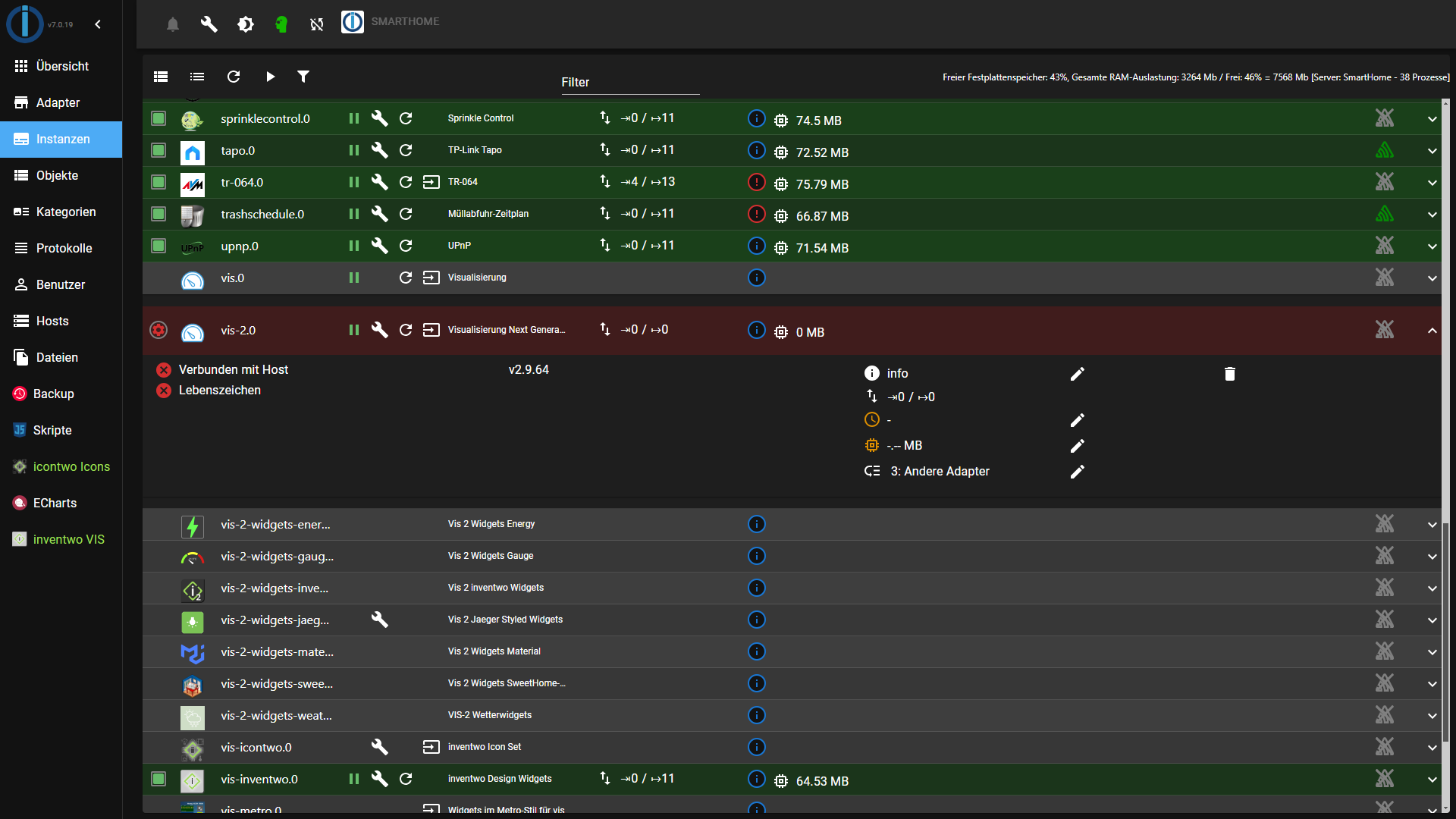
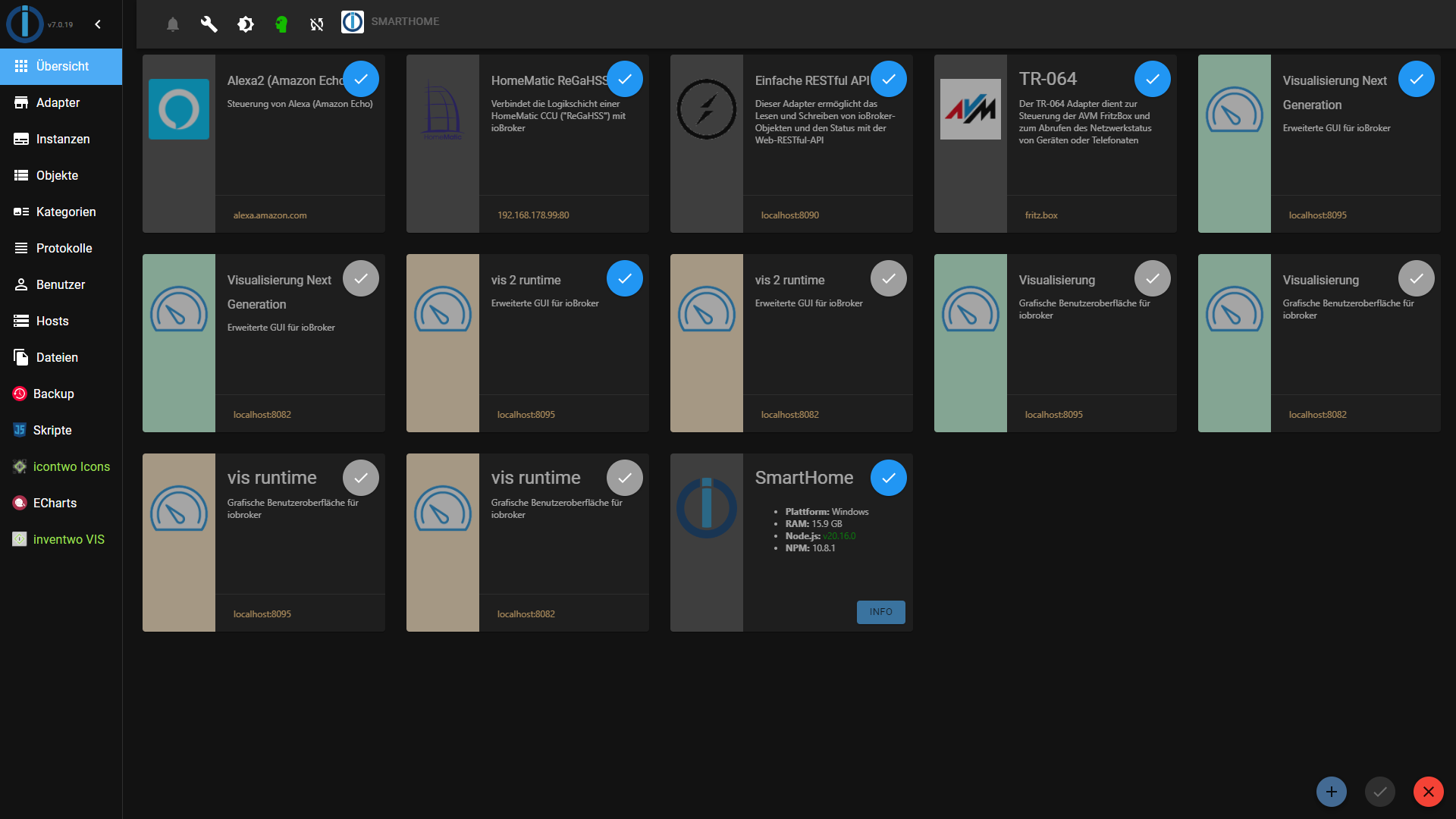
Ist seit Heute so, gestern ging es noch.
Ev. hat es was mit den Updatest zu tun?Admin:7.0.19
JS-Controller: 6.0.9
Node.js: v20.16.0
NPM: 10.8.1Bitte benutzt das Voting rechts unten im Beitrag wenn er euch geholfen hat.
Immer Daten sichern! -
Ja da stimmt was nicht:
Ist seit Heute so, gestern ging es noch.
Ev. hat es was mit den Updatest zu tun?Admin:7.0.19
JS-Controller: 6.0.9
Node.js: v20.16.0
NPM: 10.8.1 -
@arteck Habe ein Issue eröffnet.
https://github.com/ioBroker/ioBroker.admin/issues/2570NUC i7 64GB mit Proxmox ---- Jarvis Infos Aktualisierungen der Doku auf Instagram verfolgen -> mcuiobroker Instagram
Wenn Euch mein Vorschlag geholfen hat, bitte rechts "^" klicken. -
@arteck Habe ein Issue eröffnet.
https://github.com/ioBroker/ioBroker.admin/issues/2570Hatte Gestern auch mal zum testen vis-2 Adapter installiert.
Hier funktioniert es mit beiden Instanz Link (vis und vis-2)
Könnte es vielleicht mit HTTPS zusammenhängen ?
Ich benutzte weiterhin unverschlüsselte Verbindung.
Oder Browser cache löschen ?
Fehler in der Konsole ?Admin:7.0.19
JS-Controller: 6.0.9
Node.js: v20.16.0
NPM: 10.8.1 -
Hatte Gestern auch mal zum testen vis-2 Adapter installiert.
Hier funktioniert es mit beiden Instanz Link (vis und vis-2)
Könnte es vielleicht mit HTTPS zusammenhängen ?
Ich benutzte weiterhin unverschlüsselte Verbindung.
Oder Browser cache löschen ?
Fehler in der Konsole ?Admin:7.0.19
JS-Controller: 6.0.9
Node.js: v20.16.0
NPM: 10.8.1Was mir noch aufgefallen ist das bei mir der vis-2 Adapter die selbe Portnummer hat wie der vis Adapter.
Bei Euch ist eine ander Portnummer.vis Link:
http://xxx.xxx.xxx:8082/vis/edit.html#DemoViewvis-2 Link:
http://xxx.xxx.xxx:8082/vis-2/edit.html#DemoView -
Ich habe VIS-2 hinzugefügt kann aber die VIS nicht starten über den Instanz-Link.
Das zugehörige LOG ist sehr kurz, obwohl debug eingeschaltet.
vis-2.0
2024-07-26 00:21:10.862	info	vis-2 license is OK.

vis-2.0
2024-07-26 00:21:10.650	info	starting. Version 2.9.64 in /opt/iobroker/node_modules/iobroker.vis-2, node: v20.16.0, js-controller: 5.0.19

vis-2.0
2024-07-26 00:21:10.542	debug	Plugin sentry Initialize Plugin (enabled=true)
iob diagSkript v.2024-05-22 *** BASE SYSTEM *** Static hostname: iobrokerPROD Icon name: computer-container Chassis: container ☐ Virtualization: lxc Operating System: Debian GNU/Linux 12 (bookworm) Kernel: Linux 6.8.8-3-pve Architecture: x86-64 model name : 11th Gen Intel(R) Core(TM) i7-1165G7 @ 2.80GHz Docker : false Virtualization : lxc Kernel : x86_64 Userland : 64 bit Systemuptime and Load: 00:24:42 up 1:09, 2 users, load average: 1.35, 1.20, 1.17 CPU threads: 6 *** Time and Time Zones *** Local time: Fri 2024-07-26 00:24:42 CEST Universal time: Thu 2024-07-25 22:24:42 UTC RTC time: n/a Time zone: Europe/Berlin (CEST, +0200) System clock synchronized: yes NTP service: inactive RTC in local TZ: no *** Users and Groups *** User that called 'iob diag': prox HOME=/home/prox GROUPS=prox adm sudo iobroker User that is running 'js-controller': iobroker HOME=/home/iobroker GROUPS=iobroker tty dialout audio video *** Display-Server-Setup *** Display-Server: false Desktop: Terminal: tty Boot Target: multi-user.target *** MEMORY *** total used free shared buff/cache available Mem: 8.6G 3.2G 4.5G 131K 980M 5.4G Swap: 536M 0B 536M Total: 9.1G 3.2G 5.0G Active iob-Instances: 47 8192 M total memory 3005 M used memory 3019 M active memory 746 M inactive memory 4250 M free memory 0 M buffer memory 935 M swap cache 512 M total swap 0 M used swap 512 M free swap *** top - Table Of Processes *** top - 00:24:42 up 1:10, 2 users, load average: 1.32, 1.20, 1.17 Tasks: 77 total, 1 running, 76 sleeping, 0 stopped, 0 zombie %Cpu(s): 0.0 us, 0.0 sy, 0.0 ni,100.0 id, 0.0 wa, 0.0 hi, 0.0 si, 0.0 st MiB Mem : 8192.0 total, 4248.8 free, 3007.7 used, 935.7 buff/cache MiB Swap: 512.0 total, 512.0 free, 0.0 used. 5184.3 avail Mem *** FAILED SERVICES *** UNIT LOAD ACTIVE SUB DESCRIPTION * run-rpc_pipefs.mount loaded failed failed RPC Pipe File System * sys-kernel-config.mount loaded failed failed Kernel Configuration File System * systemd-networkd-wait-online.service loaded failed failed Wait for Network to be Configured LOAD = Reflects whether the unit definition was properly loaded. ACTIVE = The high-level unit activation state, i.e. generalization of SUB. SUB = The low-level unit activation state, values depend on unit type. 3 loaded units listed. *** FILESYSTEM *** Filesystem Type Size Used Avail Use% Mounted on /dev/mapper/pve-vm--150--disk--0 ext4 30G 15G 14G 52% / none tmpfs 492K 4.0K 488K 1% /dev udev devtmpfs 16G 0 16G 0% /dev/tty /dev/mapper/pve-root ext4 94G 29G 61G 33% /mnt/windows tmpfs tmpfs 16G 0 16G 0% /dev/shm tmpfs tmpfs 6.2G 124K 6.2G 1% /run tmpfs tmpfs 5.0M 0 5.0M 0% /run/lock tmpfs tmpfs 3.1G 0 3.1G 0% /run/user/1001 Messages concerning ext4 filesystem in dmesg: dmesg: read kernel buffer failed: Operation not permitted Show mounted filesystems: TARGET SOURCE FSTYPE OPTIONS / /dev/mapper/pve-vm--150--disk--0 ext4 rw,relatime,stripe=16 |-/run tmpfs tmpfs rw,nosuid,nodev,size=6497012k,nr_inodes=819200,mode=755,uid=100000,gid=100000,inode64 | |-/run/lock tmpfs tmpfs rw,nosuid,nodev,noexec,relatime,size=5120k,uid=100000,gid=100000,inode64 | |-/run/user/1001 tmpfs tmpfs rw,nosuid,nodev,relatime,size=3248504k,nr_inodes=812126,mode=700,uid=101001,gid=101001,inode64 | |-/run/credentials/systemd-tmpfiles-setup.service ramfs ramfs ro,nosuid,nodev,noexec,relatime,mode=700 | |-/run/credentials/systemd-sysctl.service ramfs ramfs ro,nosuid,nodev,noexec,relatime,mode=700 | |-/run/credentials/systemd-sysusers.service ramfs ramfs ro,nosuid,nodev,noexec,relatime,mode=700 | `-/run/credentials/systemd-tmpfiles-setup-dev.service ramfs ramfs ro,nosuid,nodev,noexec,relatime,mode=700 |-/dev none tmpfs rw,relatime,size=492k,mode=755,uid=100000,gid=100000,inode64 | |-/dev/shm tmpfs tmpfs rw,nosuid,nodev,uid=100000,gid=100000,inode64 | |-/dev/mqueue mqueue mqueue rw,nosuid,nodev,noexec,relatime | |-/dev/ttyUSB0 udev[/ttyUSB0] devtmpfs rw,nosuid,relatime,size=16208696k,nr_inodes=4052174,mode=755,inode64 | |-/dev/.lxc/proc proc proc rw,relatime | |-/dev/.lxc/sys sys sysfs rw,relatime | |-/dev/full udev[/full] devtmpfs rw,nosuid,relatime,size=16208696k,nr_inodes=4052174,mode=755,inode64 | |-/dev/null udev[/null] devtmpfs rw,nosuid,relatime,size=16208696k,nr_inodes=4052174,mode=755,inode64 | |-/dev/random udev[/random] devtmpfs rw,nosuid,relatime,size=16208696k,nr_inodes=4052174,mode=755,inode64 | |-/dev/tty udev[/tty] devtmpfs rw,nosuid,relatime,size=16208696k,nr_inodes=4052174,mode=755,inode64 | |-/dev/urandom udev[/urandom] devtmpfs rw,nosuid,relatime,size=16208696k,nr_inodes=4052174,mode=755,inode64 | |-/dev/zero udev[/zero] devtmpfs rw,nosuid,relatime,size=16208696k,nr_inodes=4052174,mode=755,inode64 | |-/dev/pts devpts devpts rw,nosuid,noexec,relatime,gid=100005,mode=620,ptmxmode=666,max=1026 | |-/dev/ptmx devpts[/ptmx] devpts rw,nosuid,noexec,relatime,gid=100005,mode=620,ptmxmode=666,max=1026 | |-/dev/console devpts[/0] devpts rw,nosuid,noexec,relatime,gid=100005,mode=620,ptmxmode=666,max=1026 | |-/dev/tty1 devpts[/1] devpts rw,nosuid,noexec,relatime,gid=100005,mode=620,ptmxmode=666,max=1026 | `-/dev/tty2 devpts[/2] devpts rw,nosuid,noexec,relatime,gid=100005,mode=620,ptmxmode=666,max=1026 |-/proc proc proc rw,nosuid,nodev,noexec,relatime | |-/proc/sys proc[/sys] proc ro,relatime | | |-/proc/sys/net proc[/sys/net] proc rw,nosuid,nodev,noexec,relatime | | `-/proc/sys/kernel/random/boot_id none[/.lxc-boot-id] tmpfs ro,nosuid,nodev,noexec,relatime,size=492k,mode=755,uid=100000,gid=100000,inode64 | |-/proc/sysrq-trigger proc[/sysrq-trigger] proc ro,relatime | |-/proc/cpuinfo lxcfs[/proc/cpuinfo] fuse.lxcfs rw,nosuid,nodev,relatime,user_id=0,group_id=0,allow_other | |-/proc/diskstats lxcfs[/proc/diskstats] fuse.lxcfs rw,nosuid,nodev,relatime,user_id=0,group_id=0,allow_other | |-/proc/loadavg lxcfs[/proc/loadavg] fuse.lxcfs rw,nosuid,nodev,relatime,user_id=0,group_id=0,allow_other | |-/proc/meminfo lxcfs[/proc/meminfo] fuse.lxcfs rw,nosuid,nodev,relatime,user_id=0,group_id=0,allow_other | |-/proc/slabinfo lxcfs[/proc/slabinfo] fuse.lxcfs rw,nosuid,nodev,relatime,user_id=0,group_id=0,allow_other | |-/proc/stat lxcfs[/proc/stat] fuse.lxcfs rw,nosuid,nodev,relatime,user_id=0,group_id=0,allow_other | |-/proc/swaps lxcfs[/proc/swaps] fuse.lxcfs rw,nosuid,nodev,relatime,user_id=0,group_id=0,allow_other | `-/proc/uptime lxcfs[/proc/uptime] fuse.lxcfs rw,nosuid,nodev,relatime,user_id=0,group_id=0,allow_other |-/sys sysfs sysfs ro,nosuid,nodev,noexec,relatime | |-/sys/fs/fuse/connections fusectl fusectl rw,nosuid,nodev,noexec,relatime | |-/sys/devices/virtual/net sysfs[/devices/virtual/net] sysfs rw,nosuid,nodev,noexec,relatime | |-/sys/fs/cgroup none cgroup2 rw,nosuid,nodev,noexec,relatime | `-/sys/devices/system/cpu lxcfs[/sys/devices/system/cpu] fuse.lxcfs rw,nosuid,nodev,relatime,user_id=0,group_id=0,allow_other |-/mnt/windows /dev/mapper/pve-root[/mnt/pve/windows] ext4 rw,relatime,errors=remount-ro `-/mnt/nas /dev/mapper/pve-root[/mnt/pve/fritznas] ext4 rw,relatime,errors=remount-ro Files in neuralgic directories: /var: 1.5G /var/ 1.2G /var/log/journal/69ffeed97a1945f88a51d8df571b2606 1.2G /var/log/journal 1.2G /var/log 155M /var/lib Archived and active journals take up 1.1G in the file system. /opt/iobroker/backups: 451M /opt/iobroker/backups/ /opt/iobroker/iobroker-data: 1.3G /opt/iobroker/iobroker-data/ 926M /opt/iobroker/iobroker-data/files 299M /opt/iobroker/iobroker-data/files/javascript.admin 265M /opt/iobroker/iobroker-data/files/javascript.admin/static 264M /opt/iobroker/iobroker-data/files/javascript.admin/static/js The five largest files in iobroker-data are: 87M /opt/iobroker/iobroker-data/states.jsonl 38M /opt/iobroker/iobroker-data/objects.jsonl 38M /opt/iobroker/iobroker-data/files/iot.admin/static/js/main.d3d286bd.js.map 35M /opt/iobroker/iobroker-data/files/devices.admin/static/js/main.24f2bb56.js.map 27M /opt/iobroker/iobroker-data/files/tankerkoenig.admin/build/index.js.map USB-Devices by-id: USB-Sticks - Avoid direct links to /dev/tty* in your adapter setups, please always prefer the links 'by-id': No Devices found 'by-id' HINT: Your zigbee.0 COM-Port is NOT matching 'by-id'. Please check your setting: /dev/ttyUSB0 *** NodeJS-Installation *** /usr/bin/nodejs v20.16.0 /usr/bin/node v20.16.0 /usr/bin/npm 10.8.1 /usr/bin/npx 10.8.1 /usr/bin/corepack 0.28.2 nodejs: Installed: 20.16.0-1nodesource1 Candidate: 20.16.0-1nodesource1 Version table: *** 20.16.0-1nodesource1 1001 500 https://deb.nodesource.com/node_20.x nodistro/main amd64 Packages 100 /var/lib/dpkg/status 20.15.1-1nodesource1 1001 500 https://deb.nodesource.com/node_20.x nodistro/main amd64 Packages 20.15.0-1nodesource1 1001 500 https://deb.nodesource.com/node_20.x nodistro/main amd64 Packages 20.14.0-1nodesource1 1001 500 https://deb.nodesource.com/node_20.x nodistro/main amd64 Packages 20.13.1-1nodesource1 1001 500 https://deb.nodesource.com/node_20.x nodistro/main amd64 Packages 20.13.0-1nodesource1 1001 500 https://deb.nodesource.com/node_20.x nodistro/main amd64 Packages 20.12.2-1nodesource1 1001 500 https://deb.nodesource.com/node_20.x nodistro/main amd64 Packages 20.12.1-1nodesource1 1001 500 https://deb.nodesource.com/node_20.x nodistro/main amd64 Packages 20.12.0-1nodesource1 1001 500 https://deb.nodesource.com/node_20.x nodistro/main amd64 Packages 20.11.1-1nodesource1 1001 500 https://deb.nodesource.com/node_20.x nodistro/main amd64 Packages 20.11.0-1nodesource1 1001 500 https://deb.nodesource.com/node_20.x nodistro/main amd64 Packages 20.10.0-1nodesource1 1001 500 https://deb.nodesource.com/node_20.x nodistro/main amd64 Packages 20.9.0-1nodesource1 1001 500 https://deb.nodesource.com/node_20.x nodistro/main amd64 Packages 20.8.1-1nodesource1 1001 500 https://deb.nodesource.com/node_20.x nodistro/main amd64 Packages 20.8.0-1nodesource1 1001 500 https://deb.nodesource.com/node_20.x nodistro/main amd64 Packages 20.7.0-1nodesource1 1001 500 https://deb.nodesource.com/node_20.x nodistro/main amd64 Packages 20.6.1-1nodesource1 1001 500 https://deb.nodesource.com/node_20.x nodistro/main amd64 Packages 20.6.0-1nodesource1 1001 500 https://deb.nodesource.com/node_20.x nodistro/main amd64 Packages 20.5.1-1nodesource1 1001 500 https://deb.nodesource.com/node_20.x nodistro/main amd64 Packages 20.5.0-1nodesource1 1001 500 https://deb.nodesource.com/node_20.x nodistro/main amd64 Packages 20.4.0-1nodesource1 1001 500 https://deb.nodesource.com/node_20.x nodistro/main amd64 Packages 20.3.1-1nodesource1 1001 500 https://deb.nodesource.com/node_20.x nodistro/main amd64 Packages 20.3.0-1nodesource1 1001 500 https://deb.nodesource.com/node_20.x nodistro/main amd64 Packages 20.2.0-1nodesource1 1001 500 https://deb.nodesource.com/node_20.x nodistro/main amd64 Packages 20.1.0-1nodesource1 1001 500 https://deb.nodesource.com/node_20.x nodistro/main amd64 Packages 20.0.0-1nodesource1 1001 500 https://deb.nodesource.com/node_20.x nodistro/main amd64 Packages 18.19.0+dfsg-6~deb12u2 500 500 http://ftp.debian.org/debian bookworm/main amd64 Packages 18.19.0+dfsg-6~deb12u1 500 500 http://security.debian.org bookworm-security/main amd64 Packages Temp directories causing npm8 problem: 0 No problems detected Errors in npm tree: *** ioBroker-Installation *** ioBroker Status iobroker is running on this host. Objects type: jsonl States type: jsonl Core adapters versions js-controller: 5.0.19 admin: 7.0.19 javascript: 8.6.0 nodejs modules from github: 4 +-- iobroker.alexa2@3.26.5 (git+ssh://git@github.com/Apollon77/ioBroker.alexa2.git#37160cf729a9c70ca70679d4b1d3c16ba51c6456) +-- iobroker.hue-extended@2.0.1 (git+ssh://git@github.com/iobroker-community-adapters/ioBroker.hue-extended.git#f3d1d9187fbc9bcdde5c39c1fbc80371ec7941f2) +-- iobroker.jarvis@3.2.0-beta.47 (git+ssh://git@github.com/Zefau/ioBroker.jarvis.git#b2aa6c5e163660c5447353ff595b6d93441915cd) +-- iobroker.meross@1.17.0 (git+ssh://git@github.com/Apollon77/ioBroker.meross.git#31fe999d84e17f0c79b2c5243f8227776035c718) Adapter State + system.adapter.admin.0 : admin : iobrokerPROD - enabled, port: 8081, bind: 0.0.0.0 (SSL), run as: admin + system.adapter.alexa2.0 : alexa2 : iobrokerPROD - enabled + system.adapter.backitup.0 : backitup : iobrokerPROD - enabled system.adapter.birthdays.0 : birthdays : iobrokerPROD - disabled + system.adapter.bring.0 : bring : iobrokerPROD - enabled + system.adapter.broadlink2.0 : broadlink2 : iobrokerPROD - enabled + system.adapter.cameras.0 : cameras : iobrokerPROD - enabled, port: 8200, bind: 127.0.0.1 + system.adapter.chromecast.0 : chromecast : iobrokerPROD - enabled + system.adapter.cloud.0 : cloud : iobrokerPROD - enabled system.adapter.daswetter.0 : daswetter : iobrokerPROD - enabled system.adapter.devices.0 : devices : iobrokerPROD - enabled + system.adapter.discovery.0 : discovery : iobrokerPROD - enabled system.adapter.dwd.0 : dwd : iobrokerPROD - disabled + system.adapter.echarts.0 : echarts : iobrokerPROD - enabled + system.adapter.email.0 : email : iobrokerPROD - enabled + system.adapter.fahrplan.0 : fahrplan : iobrokerPROD - enabled system.adapter.flot.0 : flot : iobrokerPROD - enabled + system.adapter.fritzdect.0 : fritzdect : iobrokerPROD - enabled + system.adapter.fullybrowser.0 : fullybrowser : iobrokerPROD - enabled + system.adapter.history.0 : history : iobrokerPROD - enabled + system.adapter.hue-extended.0 : hue-extended : iobrokerPROD - enabled system.adapter.hue.0 : hue : iobrokerPROD - disabled, port: 443 system.adapter.ical.0 : ical : iobrokerPROD - enabled + system.adapter.info.0 : info : iobrokerPROD - enabled + system.adapter.iot.0 : iot : iobrokerPROD - enabled + system.adapter.jarvis.0 : jarvis : iobrokerPROD - enabled, port: 8082, bind: 0.0.0.0, run as: admin + system.adapter.jarvis.1 : jarvis : iobrokerPROD - enabled + system.adapter.jarvis.2 : jarvis : iobrokerPROD - enabled, port: 8082, bind: 0.0.0.0, run as: admin + system.adapter.javascript.0 : javascript : iobrokerPROD - enabled system.adapter.javascript.1 : javascript : iobrokerPROD - disabled system.adapter.meross.0 : meross : iobrokerPROD - disabled + system.adapter.mqtt.0 : mqtt : iobrokerPROD - enabled, port: 1885, bind: 0.0.0.0 + system.adapter.notificationforandroidtv.0: notificationforandroidtv: iobrokerPROD - enabled + system.adapter.onvif.0 : onvif : iobrokerPROD - enabled, port: 8000 + system.adapter.onvif.1 : onvif : iobrokerPROD - enabled, port: 8000 system.adapter.pegelalarm.0 : pegelalarm : iobrokerPROD - enabled + system.adapter.ping.0 : ping : iobrokerPROD - enabled system.adapter.proxy.0 : proxy : iobrokerPROD - enabled + system.adapter.pushover.0 : pushover : iobrokerPROD - enabled + system.adapter.rest-api.0 : rest-api : iobrokerPROD - enabled, port: 8093, bind: 0.0.0.0, run as: admin + system.adapter.rssfeed.0 : rssfeed : iobrokerPROD - enabled + system.adapter.simple-api.0 : simple-api : iobrokerPROD - enabled, port: 8087, bind: 0.0.0.0, run as: admin + system.adapter.snmp.0 : snmp : iobrokerPROD - enabled + system.adapter.sonoff.0 : sonoff : iobrokerPROD - enabled, port: 1883, bind: 0.0.0.0 system.adapter.spotify-premium.0 : spotify-premium : iobrokerPROD - disabled + system.adapter.tankerkoenig.0 : tankerkoenig : iobrokerPROD - enabled + system.adapter.telegram.0 : telegram : iobrokerPROD - enabled, port: 8443, bind: 0.0.0.0 + system.adapter.telegram.1 : telegram : iobrokerPROD - enabled, port: 8443, bind: 0.0.0.0 + system.adapter.terminal.0 : terminal : iobrokerPROD - enabled, port: 8088, bind: 0.0.0.0, run as: admin + system.adapter.tr-064.0 : tr-064 : iobrokerPROD - enabled + system.adapter.trashschedule.0 : trashschedule : iobrokerPROD - enabled system.adapter.tvspielfilm.0 : tvspielfilm : iobrokerPROD - enabled system.adapter.twinkly.0 : twinkly : iobrokerPROD - disabled + system.adapter.virtualpowermeter.0 : virtualpowermeter : iobrokerPROD - enabled + system.adapter.vis-2.0 : vis-2 : iobrokerPROD - enabled + system.adapter.web.0 : web : iobrokerPROD - enabled, port: 8082, bind: 0.0.0.0 (SSL), run as: admin + system.adapter.web.1 : web : iobrokerPROD - enabled, port: 8083, bind: 0.0.0.0, run as: admin + system.adapter.wifilight.0 : wifilight : iobrokerPROD - enabled + system.adapter.wled.0 : wled : iobrokerPROD - enabled + system.adapter.zigbee.0 : zigbee : iobrokerPROD - enabled, port: /dev/ttyUSB0 + instance is alive Enabled adapters with bindings + system.adapter.admin.0 : admin : iobrokerPROD - enabled, port: 8081, bind: 0.0.0.0 (SSL), run as: admin + system.adapter.cameras.0 : cameras : iobrokerPROD - enabled, port: 8200, bind: 127.0.0.1 + system.adapter.jarvis.0 : jarvis : iobrokerPROD - enabled, port: 8082, bind: 0.0.0.0, run as: admin + system.adapter.jarvis.2 : jarvis : iobrokerPROD - enabled, port: 8082, bind: 0.0.0.0, run as: admin + system.adapter.mqtt.0 : mqtt : iobrokerPROD - enabled, port: 1885, bind: 0.0.0.0 + system.adapter.onvif.0 : onvif : iobrokerPROD - enabled, port: 8000 + system.adapter.onvif.1 : onvif : iobrokerPROD - enabled, port: 8000 + system.adapter.rest-api.0 : rest-api : iobrokerPROD - enabled, port: 8093, bind: 0.0.0.0, run as: admin + system.adapter.simple-api.0 : simple-api : iobrokerPROD - enabled, port: 8087, bind: 0.0.0.0, run as: admin + system.adapter.sonoff.0 : sonoff : iobrokerPROD - enabled, port: 1883, bind: 0.0.0.0 + system.adapter.telegram.0 : telegram : iobrokerPROD - enabled, port: 8443, bind: 0.0.0.0 + system.adapter.telegram.1 : telegram : iobrokerPROD - enabled, port: 8443, bind: 0.0.0.0 + system.adapter.terminal.0 : terminal : iobrokerPROD - enabled, port: 8088, bind: 0.0.0.0, run as: admin + system.adapter.web.0 : web : iobrokerPROD - enabled, port: 8082, bind: 0.0.0.0 (SSL), run as: admin + system.adapter.web.1 : web : iobrokerPROD - enabled, port: 8083, bind: 0.0.0.0, run as: admin + system.adapter.zigbee.0 : zigbee : iobrokerPROD - enabled, port: /dev/ttyUSB0 ioBroker-Repositories stable : http://download.iobroker.net/sources-dist.json beta : http://download.iobroker.net/sources-dist-latest.json Active repo(s): beta Installed ioBroker-Instances Used repository: beta Adapter "admin" : 7.0.19 , installed 7.0.19 Adapter "alexa2" : 3.26.5 , installed 3.26.5 Adapter "backitup" : 3.0.10 , installed 3.0.10 Adapter "birthdays" : 3.0.1 , installed 3.0.1 Adapter "bring" : 1.8.4 , installed 1.8.4 Adapter "broadlink2" : 2.3.0 , installed 2.3.0 Adapter "cameras" : 2.1.2 , installed 2.1.2 Adapter "chromecast" : 3.4.1 , installed 3.4.1 Adapter "cloud" : 5.0.1 , installed 5.0.1 Adapter "daswetter" : 3.1.15 , installed 3.1.15 Adapter "devices" : 1.1.5 , installed 1.1.5 Adapter "discovery" : 5.0.0 , installed 5.0.0 Adapter "dwd" : 2.8.5 , installed 2.8.5 Adapter "echarts" : 1.8.4 , installed 1.8.4 Adapter "email" : 1.3.1 , installed 1.3.1 Adapter "fahrplan" : 1.2.3 , installed 1.2.3 Adapter "flot" : 1.12.0 , installed 1.12.0 Adapter "fritzdect" : 2.5.9 , installed 2.5.9 Adapter "fullybrowser" : 3.0.12 , installed 2.2.0 [Updatable] Adapter "history" : 3.0.1 , installed 3.0.1 Adapter "hue" : 3.12.0 , installed 3.12.0 Adapter "ical" : 1.15.0 , installed 1.15.0 Adapter "iot" : 3.3.0 , installed 3.3.0 Adapter "jarvis" : 3.1.8 , installed 3.2.0-beta.47 Adapter "javascript" : 8.7.3 , installed 8.6.0 [Updatable] Controller "js-controller": 6.0.9 , installed 5.0.19 [Updatable] Adapter "meross" : 1.17.0 , installed 1.17.0 Adapter "mqtt" : 6.0.0 , installed 6.0.0 Adapter "notificationforandroidtv": 3.0.4, installed 3.0.4 Adapter "onvif" : 1.1.4 , installed 1.1.4 Adapter "pegelalarm" : 1.3.3 , installed 1.3.3 Adapter "ping" : 1.6.2 , installed 1.6.2 Adapter "proxy" : 1.3.2 , installed 1.3.2 Adapter "pushover" : 4.0.0 , installed 4.0.0 Adapter "reolink" : 1.1.0 , installed 1.1.0 Adapter "rest-api" : 2.0.3 , installed 2.0.3 Adapter "rssfeed" : 3.0.0 , installed 3.0.0 Adapter "simple-api" : 2.8.0 , installed 2.8.0 Adapter "snmp" : 3.2.0 , installed 3.2.0 Adapter "socketio" : 6.7.1 , installed 6.7.1 Adapter "sonoff" : 3.1.0 , installed 3.1.0 Adapter "spotify-premium": 1.5.0 , installed 1.5.0 Adapter "tankerkoenig" : 3.4.0 , installed 3.4.0 Adapter "telegram" : 3.9.0 , installed 3.9.0 Adapter "terminal" : 1.0.0 , installed 1.0.0 Adapter "tibberlink" : 3.4.3 , installed 3.4.3 Adapter "tr-064" : 4.3.0 , installed 4.3.0 Adapter "trashschedule": 3.3.0 , installed 3.3.0 Adapter "tvspielfilm" : 2.1.0 , installed 2.1.0 Adapter "twinkly" : 1.0.14 , installed 1.0.14 Adapter "virtualpowermeter": 1.4.6, installed 1.4.6 Adapter "vis-2" : 2.9.64 , installed 2.9.64 Adapter "web" : 6.3.0 , installed 6.3.0 Adapter "wifilight" : 1.2.2 , installed 1.2.2 Adapter "wled" : 0.7.3-beta.0, installed 0.7.2 [Updatable] Adapter "ws" : 2.6.2 , installed 2.6.2 Adapter "zigbee" : 1.10.3 , installed 1.10.3 Objects and States Please stand by - This may take a while Objects: 27922 States: 22122 *** OS-Repositories and Updates *** Hit:1 http://security.debian.org bookworm-security InRelease Hit:2 http://ftp.debian.org/debian bookworm InRelease Hit:3 http://ftp.debian.org/debian bookworm-updates InRelease Hit:4 https://deb.nodesource.com/node_20.x nodistro InRelease Reading package lists... Pending Updates: 3 *** Listening Ports *** Active Internet connections (only servers) Proto Recv-Q Send-Q Local Address Foreign Address State User Inode PID/Program name tcp 0 0 0.0.0.0:1885 0.0.0.0:* LISTEN 1002 2908608 586/io.mqtt.0 tcp 0 0 0.0.0.0:1883 0.0.0.0:* LISTEN 1002 2909656 409/io.sonoff.0 tcp 0 0 127.0.0.1:25 0.0.0.0:* LISTEN 0 2919832 1334/master tcp 0 0 0.0.0.0:111 0.0.0.0:* LISTEN 0 2899893 1/init tcp 0 0 127.0.0.1:8200 0.0.0.0:* LISTEN 1002 2923868 1649/io.cameras.0 tcp 0 0 0.0.0.0:8402 0.0.0.0:* LISTEN 1002 2927763 1871/io.jarvis.2 tcp 0 0 0.0.0.0:8400 0.0.0.0:* LISTEN 1002 2916360 725/io.jarvis.0 tcp 0 0 0.0.0.0:8401 0.0.0.0:* LISTEN 1002 2923337 1810/io.jarvis.1 tcp 0 0 127.0.0.1:9000 0.0.0.0:* LISTEN 1002 2903826 155/iobroker.js-con tcp 0 0 127.0.0.1:9001 0.0.0.0:* LISTEN 1002 2904576 155/iobroker.js-con tcp6 0 0 :::8087 :::* LISTEN 1002 2920853 1474/io.simple-api. tcp6 0 0 :::8082 :::* LISTEN 1002 2912107 683/io.web.0 tcp6 0 0 :::8083 :::* LISTEN 1002 2927793 1892/io.web.1 tcp6 0 0 :::8081 :::* LISTEN 1002 2896741 181/io.admin.0 tcp6 0 0 :::8093 :::* LISTEN 1002 2923142 1740/io.rest-api.0 tcp6 0 0 :::8088 :::* LISTEN 1002 2917396 745/io.terminal.0 tcp6 0 0 :::111 :::* LISTEN 0 2899895 1/init tcp6 0 0 :::22 :::* LISTEN 0 2904527 1/init tcp6 0 0 ::1:25 :::* LISTEN 0 2919833 1334/master udp 0 0 0.0.0.0:15001 0.0.0.0:* 1002 2912479 502/io.broadlink2.0 udp 0 0 0.0.0.0:48534 0.0.0.0:* 1002 2911519 480/io.snmp.0 udp 0 0 0.0.0.0:111 0.0.0.0:* 0 2899894 1/init udp 0 0 0.0.0.0:50201 0.0.0.0:* 1002 2912482 502/io.broadlink2.0 udp 0 0 0.0.0.0:5353 0.0.0.0:* 1002 2922591 1564/io.wled.0 udp 0 0 0.0.0.0:5353 0.0.0.0:* 1002 2913302 606/io.chromecast.0 udp 0 0 0.0.0.0:57664 0.0.0.0:* 1002 2912481 502/io.broadlink2.0 udp 0 0 0.0.0.0:42730 0.0.0.0:* 1002 2912483 502/io.broadlink2.0 udp6 0 0 :::111 :::* 0 2899896 1/init *** Log File - Last 25 Lines *** 2024-07-26 00:21:07.161 - info: host.iobrokerPROD stopInstance system.adapter.vis-2.0 send kill signal 2024-07-26 00:21:07.558 - info: vis-2.0 (15962) terminating 2024-07-26 00:21:07.588 - info: host.iobrokerPROD instance system.adapter.vis-2.0 terminated with code 11 (ADAPTER_REQUESTED_TERMINATION) 2024-07-26 00:21:10.196 - info: host.iobrokerPROD instance system.adapter.vis-2.0 started with pid 17036 2024-07-26 00:21:10.384 - debug: vis-2.0 (17036) Redis Objects: Use Redis connection: 127.0.0.1:9001 2024-07-26 00:21:10.405 - debug: vis-2.0 (17036) Objects client ready ... initialize now 2024-07-26 00:21:10.405 - debug: vis-2.0 (17036) Objects create System PubSub Client 2024-07-26 00:21:10.406 - debug: vis-2.0 (17036) Objects create User PubSub Client 2024-07-26 00:21:10.439 - debug: vis-2.0 (17036) Objects client initialize lua scripts 2024-07-26 00:21:10.441 - debug: vis-2.0 (17036) Objects connected to redis: 127.0.0.1:9001 2024-07-26 00:21:10.459 - debug: vis-2.0 (17036) Redis States: Use Redis connection: 127.0.0.1:9000 2024-07-26 00:21:10.469 - debug: vis-2.0 (17036) States create System PubSub Client 2024-07-26 00:21:10.469 - debug: vis-2.0 (17036) States create User PubSub Client 2024-07-26 00:21:10.527 - debug: vis-2.0 (17036) States connected to redis: 127.0.0.1:9000 2024-07-26 00:21:10.542 - debug: vis-2.0 (17036) Plugin sentry Initialize Plugin (enabled=true) 2024-07-26 00:21:10.650 - info: vis-2.0 (17036) starting. Version 2.9.64 in /opt/iobroker/node_modules/iobroker.vis-2, node: v20.16.0, js-controller: 5.0.19 2024-07-26 00:21:10.862 - info: vis-2.0 (17036) vis-2 license is OK. 2024-07-26 00:21:27.605 - info: javascript.0 (208) script.js.HUE-EXTENDED.HUE-NEWAPI: running function after change of hue-extended.0.lights.001-lampe_tisch.action.level 2024-07-26 00:21:58.530 - info: javascript.0 (208) script.js.HUE-EXTENDED.HUE-NEWAPI: missing update instructions for scenes.status.status 2024-07-26 00:21:58.530 - info: javascript.0 (208) script.js.HUE-EXTENDED.HUE-NEWAPI: {"status":{"status":{"active":"inactive"}}} 2024-07-26 00:22:24.221 - info: javascript.0 (208) script.js.HUE-EXTENDED.HUE-NEWAPI: missing update instructions for scenes.status.status 2024-07-26 00:22:24.221 - info: javascript.0 (208) script.js.HUE-EXTENDED.HUE-NEWAPI: {"status":{"status":{"active":"static"}}} 2024-07-26 00:22:24.273 - info: javascript.0 (208) script.js.HUE-EXTENDED.HUE-NEWAPI: running function after change of hue-extended.0.lights.001-lampe_tisch.action.level 2024-07-26 00:23:18.639 - info: fahrplan.0 (1825) Updated 1 routes, 1 enabled and 0 disabled 2024-07-26 00:23:18.936 - info: fahrplan.0 (1825) Updated 1 departure timetables, 1 enabled and 0 disabledWas kann ich tun? Wo muss ich ansetzen?
Vielen DankEDIT:
Schau ich in die Übersicht dann sehe ich die Kacheln
und kann diese auch nutzen.
Welche Kachel soll man denn nutzen?
Visualisierung Next Generation (sehr wahrscheinlich) für die Entwicklung
Wofür hat man die "RunTime"-Kacheln? Um direkt ein fertiges Projekt zu starten?@mcu sagte in VIS-2 Start über Instanzlink nicht möglich Voraussetzungen?:
Welche Kachel soll man denn nutzen?
Visualisierung Next Generation (sehr wahrscheinlich) für die Entwicklung
Wofür hat man die "RunTime"-Kacheln? Um direkt ein fertiges Projekt zu starten?Korrekt, bei mir öffnet sich dann die DemoView
-
Was mir noch aufgefallen ist das bei mir der vis-2 Adapter die selbe Portnummer hat wie der vis Adapter.
Bei Euch ist eine ander Portnummer.vis Link:
http://xxx.xxx.xxx:8082/vis/edit.html#DemoViewvis-2 Link:
http://xxx.xxx.xxx:8082/vis-2/edit.html#DemoView@bernd1967 Die unterschiedlichen Port nummern kommen von den Web-Instanzen.
Das könnte aber der Grund sein, dafür das der Instanzlink nicht funktioniert?
Da mehrere Web-Instanzen vorhanden sind, weiß er nicht welche er nehmen soll?NUC i7 64GB mit Proxmox ---- Jarvis Infos Aktualisierungen der Doku auf Instagram verfolgen -> mcuiobroker Instagram
Wenn Euch mein Vorschlag geholfen hat, bitte rechts "^" klicken. -
Hatte Gestern auch mal zum testen vis-2 Adapter installiert.
Hier funktioniert es mit beiden Instanz Link (vis und vis-2)
Könnte es vielleicht mit HTTPS zusammenhängen ?
Ich benutzte weiterhin unverschlüsselte Verbindung.
Oder Browser cache löschen ?
Fehler in der Konsole ?Admin:7.0.19
JS-Controller: 6.0.9
Node.js: v20.16.0
NPM: 10.8.1@bernd1967 Cache gelöscht bringt aber nichts. Instanz-Links funktionieren nicht.
NUC i7 64GB mit Proxmox ---- Jarvis Infos Aktualisierungen der Doku auf Instagram verfolgen -> mcuiobroker Instagram
Wenn Euch mein Vorschlag geholfen hat, bitte rechts "^" klicken. -
@bernd1967 Die unterschiedlichen Port nummern kommen von den Web-Instanzen.
Das könnte aber der Grund sein, dafür das der Instanzlink nicht funktioniert?
Da mehrere Web-Instanzen vorhanden sind, weiß er nicht welche er nehmen soll?@mcu sagte in VIS-2 Start über Instanzlink nicht möglich Voraussetzungen?:
@bernd1967 Die unterschiedlichen Port nummern kommen von den Web-Instanzen.
Das könnte aber der Grund sein, dafür das der Instanzlink nicht funktioniert?
Da mehrere Web-Instanzen vorhanden sind, weiß er nicht welche er nehmen soll?Nein, habe auch mehrere Web Instanzen und es hat bis gestern immer funktioniert
Bitte benutzt das Voting rechts unten im Beitrag wenn er euch geholfen hat.
Immer Daten sichern! -
@mcu sagte in VIS-2 Start über Instanzlink nicht möglich Voraussetzungen?:
@bernd1967 Die unterschiedlichen Port nummern kommen von den Web-Instanzen.
Das könnte aber der Grund sein, dafür das der Instanzlink nicht funktioniert?
Da mehrere Web-Instanzen vorhanden sind, weiß er nicht welche er nehmen soll?Nein, habe auch mehrere Web Instanzen und es hat bis gestern immer funktioniert
@sigi234 Hatte man nicht früher eine Auswahl, wenn man drauf geklickt, welche Web-Instanz man nutzen möchte?
NUC i7 64GB mit Proxmox ---- Jarvis Infos Aktualisierungen der Doku auf Instagram verfolgen -> mcuiobroker Instagram
Wenn Euch mein Vorschlag geholfen hat, bitte rechts "^" klicken. -
@sigi234 Hatte man nicht früher eine Auswahl, wenn man drauf geklickt, welche Web-Instanz man nutzen möchte?
@mcu sagte in VIS-2 Start über Instanzlink nicht möglich Voraussetzungen?:
@sigi234 Hatte man nicht früher eine Auswahl, wenn man drauf geklickt, welche Web-Instanz man nutzen möchte?
Ja
Bitte benutzt das Voting rechts unten im Beitrag wenn er euch geholfen hat.
Immer Daten sichern! -
@mcu sagte in VIS-2 Start über Instanzlink nicht möglich Voraussetzungen?:
@sigi234 Hatte man nicht früher eine Auswahl, wenn man drauf geklickt, welche Web-Instanz man nutzen möchte?
Ja
Wenn ich versuche eine zweite Instanz vom vis-2 Adapter hinzuzufügen kommt folgender Fehler:
ERROR: Process exited with code 19
$ iobroker add vis-2 auto --host Server(SmartHome) --debug
host.Server(SmartHome) error: this adapter does not allow multiple instances
ERROR: Process exited with code 19 -
@bernd1967 Ich habe keine 2. VIS-2- Instanz sondern eine 2. WEB-Instanz
NUC i7 64GB mit Proxmox ---- Jarvis Infos Aktualisierungen der Doku auf Instagram verfolgen -> mcuiobroker Instagram
Wenn Euch mein Vorschlag geholfen hat, bitte rechts "^" klicken. -
Wenn ich versuche eine zweite Instanz vom vis-2 Adapter hinzuzufügen kommt folgender Fehler:
ERROR: Process exited with code 19
$ iobroker add vis-2 auto --host Server(SmartHome) --debug
host.Server(SmartHome) error: this adapter does not allow multiple instances
ERROR: Process exited with code 19@bernd1967 sagte in VIS-2 Start über Instanzlink nicht möglich Voraussetzungen?:
Wenn ich versuche eine zweite Instanz vom vis-2 Adapter hinzuzufügen kommt folgender Fehler:
klar doch!
Das tut man ja auch nicht.@bernd1967 sagte in VIS-2 Start über Instanzlink nicht möglich Voraussetzungen?:
this adapter does not allow multiple instances
kein Support per PN! - Fragen im Forum stellen - Benutzt das Voting rechts unten im Beitrag wenn er euch geholfen hat.
Das Forum freut sich über eine Spende. Benutzt dazu den Spendenbutton oben rechts. Danke!
der Installationsfixer: curl -fsL https://iobroker.net/fix.sh | bash - -
@bernd1967 sagte in VIS-2 Start über Instanzlink nicht möglich Voraussetzungen?:
Wenn ich versuche eine zweite Instanz vom vis-2 Adapter hinzuzufügen kommt folgender Fehler:
klar doch!
Das tut man ja auch nicht.@bernd1967 sagte in VIS-2 Start über Instanzlink nicht möglich Voraussetzungen?:
this adapter does not allow multiple instances
-
@sigi234 Hatte man nicht früher eine Auswahl, wenn man drauf geklickt, welche Web-Instanz man nutzen möchte?
@mcu sagte in VIS-2 Start über Instanzlink nicht möglich Voraussetzungen?:
@sigi234 Hatte man nicht früher eine Auswahl, wenn man drauf geklickt, welche Web-Instanz man nutzen möchte?
Hallo, bin mal auf die Stable vom Admin gegangen, gleicher Fehler.
Doch kein Admin Problem? JS-Controller?Bitte benutzt das Voting rechts unten im Beitrag wenn er euch geholfen hat.
Immer Daten sichern! -
@mcu sagte in VIS-2 Start über Instanzlink nicht möglich Voraussetzungen?:
@sigi234 Hatte man nicht früher eine Auswahl, wenn man drauf geklickt, welche Web-Instanz man nutzen möchte?
Hallo, bin mal auf die Stable vom Admin gegangen, gleicher Fehler.
Doch kein Admin Problem? JS-Controller? -
@bernd1967 Nein, keine Änderung.
NUC i7 64GB mit Proxmox ---- Jarvis Infos Aktualisierungen der Doku auf Instagram verfolgen -> mcuiobroker Instagram
Wenn Euch mein Vorschlag geholfen hat, bitte rechts "^" klicken. -
Könnt ihr mal schauen ob es nur der VIS2 Instanz Link ist?
Bei mir gehen schon seit längerem diverse nicht mehr
Bitte keine Fragen per PN, die gehören ins Forum!
Benutzt das Voting rechts unten im Beitrag wenn er euch geholfen hat.





Hey! Du scheinst an dieser Unterhaltung interessiert zu sein, hast aber noch kein Konto.
Hast du es satt, bei jedem Besuch durch die gleichen Beiträge zu scrollen? Wenn du dich für ein Konto anmeldest, kommst du immer genau dorthin zurück, wo du zuvor warst, und kannst dich über neue Antworten benachrichtigen lassen (entweder per E-Mail oder Push-Benachrichtigung). Du kannst auch Lesezeichen speichern und Beiträge positiv bewerten, um anderen Community-Mitgliedern deine Wertschätzung zu zeigen.
Mit deinem Input könnte dieser Beitrag noch besser werden 💗
Registrieren AnmeldenSupport us
193
Online33.0k
Benutzer83.6k
Themen1.3m
Beiträge