



Skip to content
  • Home
  • Aktuell
  • Tags
  • 0 Ungelesen 0
  • Kategorien
  • Unreplied
  • Beliebt
  • GitHub
  • Docu
  • Hilfe
Skins
  • Light
  • Brite
  • Cerulean
  • Cosmo
  • Flatly
  • Journal
  • Litera
  • Lumen
  • Lux
  • Materia
  • Minty
  • Morph
  • Pulse
  • Sandstone
  • Simplex
  • Sketchy
  • Spacelab
  • United
  • Yeti
  • Zephyr
  • Dark
  • Cyborg
  • Darkly
  • Quartz
  • Slate
  • Solar
  • Superhero
  • Vapor

  • Standard: (Kein Skin)
  • Kein Skin
Einklappen
ioBroker Logo

Community Forum

donate donate
  1. ioBroker Community Home
  2. Deutsch
  3. ioBroker Allgemein
  4. Timeout & "Cannot read repository"
NEWS

  • Jahresrückblick 2025 – unser neuer Blogbeitrag ist online! ✨
    BluefoxB
    Bluefox
    15
    1
    601

  • Neuer Blogbeitrag: Monatsrückblick - Dezember 2025 🎄
    BluefoxB
    Bluefox
    13
    1
    625

  • Weihnachtsangebot 2025! 🎄
    BluefoxB
    Bluefox
    25
    1
    1.9k

Timeout & "Cannot read repository"

Geplant Angeheftet Gesperrt Verschoben ioBroker Allgemein
38 Beiträge 5 Kommentatoren 4.4k Aufrufe 3 Watching
  • Älteste zuerst
  • Neuste zuerst
  • Meiste Stimmen
Antworten
  • In einem neuen Thema antworten
Anmelden zum Antworten
Dieses Thema wurde gelöscht. Nur Nutzer mit entsprechenden Rechten können es sehen.
  • Thomas BraunT Thomas Braun

    @happyuser20 sagte in Timeout & "Cannot read repository":

    Ich habe schon gesehen das es Updates gibt, ich traue mich aber nicht zu updaten

    Die Basis ist aber steinalt und abgekündigt. Da wirst du langsam nicht umhinkommen das ganze Spiel auf einen aktuellen Stand zu hieven.

    H Offline
    H Offline
    Happyuser20
    schrieb am zuletzt editiert von
    #9

    @thomas-braun Wenn ich dich richtig verstehe, bezieht sich das auf das Buanet Image oder?
    Wenn ich richtig liege, gibt es dann eine alternative zu Buanet?
    Geht das Updaten ohne Datenverlust bzw. ohne alles nochmal neu einrichten zu müssen.

    sorry für die Fragen

    HappyUser20

    HomoranH Thomas BraunT 2 Antworten Letzte Antwort
    0
    • H Happyuser20

      @thomas-braun Wenn ich dich richtig verstehe, bezieht sich das auf das Buanet Image oder?
      Wenn ich richtig liege, gibt es dann eine alternative zu Buanet?
      Geht das Updaten ohne Datenverlust bzw. ohne alles nochmal neu einrichten zu müssen.

      sorry für die Fragen

      HappyUser20

      HomoranH Nicht stören
      HomoranH Nicht stören
      Homoran
      Global Moderator Administrators
      schrieb am zuletzt editiert von
      #10

      @happyuser20 sagte in Timeout & "Cannot read repository":

      Geht das Updaten ohne Datenverlust bzw. ohne alles nochmal neu einrichten zu müssen.

      sollte bei richtiger Installation und Konfiguration so sein.

      @Andre hat dazu eine super Dokumentation bei buanet angefertigt.

      kein Support per PN! - Fragen im Forum stellen - es gibt fast nichts, was nicht auch für andere interessant ist.

      Benutzt das Voting rechts unten im Beitrag wenn er euch geholfen hat.

      der Installationsfixer: curl -fsL https://iobroker.net/fix.sh | bash -

      1 Antwort Letzte Antwort
      0
      • H Happyuser20

        @thomas-braun Wenn ich dich richtig verstehe, bezieht sich das auf das Buanet Image oder?
        Wenn ich richtig liege, gibt es dann eine alternative zu Buanet?
        Geht das Updaten ohne Datenverlust bzw. ohne alles nochmal neu einrichten zu müssen.

        sorry für die Fragen

        HappyUser20

        Thomas BraunT Online
        Thomas BraunT Online
        Thomas Braun
        Most Active
        schrieb am zuletzt editiert von
        #11

        @happyuser20

        Kann ich dir nicht beantworten, ich verwende keine Docker.
        Aber es gibt ganz bestimmt ein aktuelleres eingedostes Docker-Image.

        Linux-Werkzeugkasten:
        https://forum.iobroker.net/topic/42952/der-kleine-iobroker-linux-werkzeugkasten
        NodeJS Fixer Skript:
        https://forum.iobroker.net/topic/68035/iob-node-fix-skript
        iob_diag: curl -sLf -o diag.sh https://iobroker.net/diag.sh && bash diag.sh

        1 Antwort Letzte Antwort
        0
        • H Happyuser20

          Was kann ich da rauslesen? :grimacing:

          ======== Start marking the full check here =========
          
          
          Skript v.2024-05-22
          
          *** BASE SYSTEM ***
          /home/iobroker/.diag.sh: line 66: hostnamectl: command not found
          
          model name      : Intel(R) Celeron(R) CPU J3355 @ 2.00GHz
          Docker          : false
          /home/iobroker/.diag.sh: line 191: timedatectl: command not found
          Virtualization  : Docker
          Kernel          : x86_64
          Userland        : 64 bit
          
          Systemuptime and Load:
           10:07:42 up 22:34,  0 users,  load average: 4.43, 4.48, 4.34
          CPU threads: 2
          
          
          *** Time and Time Zones ***
          
          *** Users and Groups ***
          User that called 'iob diag':
          root
          HOME=/root
          GROUPS=root
          
          User that is running 'js-controller':
          iobroker
          sudo: unable to resolve host iobroker: Name or service not known
          HOME=/opt/iobroker
          sudo: unable to resolve host iobroker: Name or service not known
          GROUPS=iobroker tty dialout audio video
          
          *** Display-Server-Setup ***
          Display-Server: false
          Desktop: 
          Terminal: 
          /home/iobroker/.diag.sh: line 227: systemctl: command not found
          Boot Target: 
          
          *** MEMORY ***
                        total        used        free      shared  buff/cache   available
          Mem:            15G        5.0G        6.4G        136M        4.5G         10G
          Swap:           11G          0B         11G
          Total:          27G        5.0G         17G
          
          Active iob-Instances:   41
          
                  15854 M total memory
                   5018 M used memory
                   5931 M active memory
                   2690 M inactive memory
                   6383 M free memory
                    582 M buffer memory
                   3869 M swap cache
                  11561 M total swap
                      0 M used swap
                  11561 M free swap
          
          *** top - Table Of Processes  ***
          top - 10:07:43 up 22:34,  0 users,  load average: 4.43, 4.48, 4.34
          Tasks:  48 total,   4 running,  44 sleeping,   0 stopped,   0 zombie
          %Cpu(s): 58.1 us,  9.7 sy,  0.0 ni, 32.3 id,  0.0 wa,  0.0 hi,  0.0 si,  0.0 st
          MiB Mem :  15854.1 total,   6388.2 free,   5013.8 used,   4452.1 buff/cache
          MiB Swap:  11561.9 total,  11561.9 free,      0.0 used.  10376.0 avail Mem 
          
          *** FAILED SERVICES ***
          
          /home/iobroker/.diag.sh: line 254: systemctl: command not found
          
          *** FILESYSTEM ***
          Filesystem     Type   Size  Used Avail Use% Mounted on
          none           aufs   3.6T  3.0T  638G  83% /
          tmpfs          tmpfs   64M     0   64M   0% /dev
          tmpfs          tmpfs  7.8G     0  7.8G   0% /sys/fs/cgroup
          /dev/md2       ext4   3.6T  3.0T  638G  83% /opt/iobroker
          shm            tmpfs   64M     0   64M   0% /dev/shm
          tmpfs          tmpfs  7.8G     0  7.8G   0% /proc/acpi
          tmpfs          tmpfs  7.8G     0  7.8G   0% /proc/scsi
          tmpfs          tmpfs  7.8G     0  7.8G   0% /sys/firmware
          
          Messages concerning ext4 filesystem in dmesg:
          sudo: unable to resolve host iobroker: Name or service not known
          [Tue Jun 25 11:33:49 2024] EXT4-fs (md0): mounting ext3 file system using the ext4 subsystem
          [Tue Jun 25 11:33:49 2024] EXT4-fs (md0): mounted filesystem with ordered data mode. Opts: (null)
          [Tue Jun 25 11:33:49 2024] EXT4-fs (md0): mounting ext3 file system using the ext4 subsystem
          [Tue Jun 25 11:33:49 2024] EXT4-fs (md0): mounted filesystem with ordered data mode. Opts: barrier=1
          [Tue Jun 25 11:33:56 2024] EXT4-fs (md0): mounting ext3 file system using the ext4 subsystem
          [Tue Jun 25 11:33:56 2024] EXT4-fs (md0): mounted filesystem with ordered data mode. Opts: (null)
          [Tue Jun 25 11:33:57 2024] EXT4-fs (md0): mounting ext3 file system using the ext4 subsystem
          [Tue Jun 25 11:33:57 2024] EXT4-fs (md0): mounted filesystem with ordered data mode. Opts: barrier=1
          [Tue Jun 25 11:34:23 2024] EXT4-fs (md2): barriers disabled
          [Tue Jun 25 11:34:23 2024] EXT4-fs (md2): mounted filesystem with writeback data mode. Opts: usrjquota=aquota.user,grpjquota=aquota.group,jqfmt=vfsv0,synoacl
          
          Show mounted filesystems:
          TARGET                           SOURCE                                                                                                     FSTYPE OPTIONS
          /                                none                                                                                                       aufs   rw,relatime,si=7d6ee40d85ed2f3c,dio,dirperm1
          |-/proc                          proc                                                                                                       proc   rw,nosuid,nodev,noexec,relatime
          | |-/proc/bus                    proc[/bus]                                                                                                 proc   ro,nosuid,nodev,noexec,relatime
          | |-/proc/fs                     proc[/fs]                                                                                                  proc   ro,nosuid,nodev,noexec,relatime
          | |-/proc/irq                    proc[/irq]                                                                                                 proc   ro,nosuid,nodev,noexec,relatime
          | |-/proc/sys                    proc[/sys]                                                                                                 proc   ro,nosuid,nodev,noexec,relatime
          | |-/proc/sysrq-trigger          proc[/sysrq-trigger]                                                                                       proc   ro,nosuid,nodev,noexec,relatime
          | |-/proc/acpi                   tmpfs                                                                                                      tmpfs  ro,relatime
          | |-/proc/kcore                  tmpfs[/null]                                                                                               tmpfs  rw,nosuid,size=65536k,mode=755
          | |-/proc/keys                   tmpfs[/null]                                                                                               tmpfs  rw,nosuid,size=65536k,mode=755
          | |-/proc/timer_list             tmpfs[/null]                                                                                               tmpfs  rw,nosuid,size=65536k,mode=755
          | |-/proc/sched_debug            tmpfs[/null]                                                                                               tmpfs  rw,nosuid,size=65536k,mode=755
          | `-/proc/scsi                   tmpfs                                                                                                      tmpfs  ro,relatime
          |-/dev                           tmpfs                                                                                                      tmpfs  rw,nosuid,size=65536k,mode=755
          | |-/dev/console                 devpts[/0]                                                                                                 devpts rw,nosuid,noexec,relatime,gid=5,mode=620,ptmxmode=666
          | |-/dev/pts                     devpts                                                                                                     devpts rw,nosuid,noexec,relatime,gid=5,mode=620,ptmxmode=666
          | |-/dev/mqueue                  mqueue                                                                                                     mqueue rw,nosuid,nodev,noexec,relatime
          | `-/dev/shm                     shm                                                                                                        tmpfs  rw,nosuid,nodev,noexec,relatime,size=65536k
          |-/sys                           sysfs                                                                                                      sysfs  rw,nosuid,nodev,noexec,relatime
          | |-/sys/firmware                tmpfs                                                                                                      tmpfs  ro,relatime
          | `-/sys/fs/cgroup               tmpfs                                                                                                      tmpfs  rw,nosuid,nodev,noexec,relatime,mode=755
          |   |-/sys/fs/cgroup/systemd     cgroup[/docker/b8d452b3801d968a8c641430b33b66a4f32c2d23d1d8a4dac880f761fe76d8e9]                           cgroup rw,nosuid,nodev,noexec,relatime,xattr,release_agent=/usr/lib/systemd/systemd-cgroups-agent,name=systemd
          |   |-/sys/fs/cgroup/synomonitor cgroup[/system.slice/pkg-ContainerManager-dockerd.service]                                                 cgroup rw,nosuid,nodev,noexec,relatime,name=synomonitor
          |   |-/sys/fs/cgroup/memory      cgroup[/docker/b8d452b3801d968a8c641430b33b66a4f32c2d23d1d8a4dac880f761fe76d8e9]                           cgroup rw,nosuid,nodev,noexec,relatime,memory
          |   |-/sys/fs/cgroup/cpu         cgroup[/docker/b8d452b3801d968a8c641430b33b66a4f32c2d23d1d8a4dac880f761fe76d8e9]                           cgroup rw,nosuid,nodev,noexec,relatime,cpu
          |   |-/sys/fs/cgroup/cpuacct     cgroup[/docker/b8d452b3801d968a8c641430b33b66a4f32c2d23d1d8a4dac880f761fe76d8e9]                           cgroup rw,nosuid,nodev,noexec,relatime,cpuacct
          |   |-/sys/fs/cgroup/cpuset      cgroup[/docker/b8d452b3801d968a8c641430b33b66a4f32c2d23d1d8a4dac880f761fe76d8e9]                           cgroup rw,nosuid,nodev,noexec,relatime,cpuset
          |   |-/sys/fs/cgroup/freezer     cgroup[/docker/b8d452b3801d968a8c641430b33b66a4f32c2d23d1d8a4dac880f761fe76d8e9]                           cgroup rw,nosuid,nodev,noexec,relatime,freezer
          |   |-/sys/fs/cgroup/devices     cgroup[/docker/b8d452b3801d968a8c641430b33b66a4f32c2d23d1d8a4dac880f761fe76d8e9]                           cgroup rw,nosuid,nodev,noexec,relatime,devices
          |   `-/sys/fs/cgroup/blkio       cgroup[/docker/b8d452b3801d968a8c641430b33b66a4f32c2d23d1d8a4dac880f761fe76d8e9]                           cgroup rw,nosuid,nodev,noexec,relatime,blkio
          |-/opt/iobroker                  /dev/md2[/docker/iobroker_data]                                                                            ext4   rw,nodev,relatime,synoacl,jqfmt=vfsv0,usrjquota=aquota.user,grpjquota=aquota.group
          |-/etc/resolv.conf               /dev/md2[/@docker/containers/b8d452b3801d968a8c641430b33b66a4f32c2d23d1d8a4dac880f761fe76d8e9/resolv.conf] ext4   rw,nodev,relatime,synoacl,jqfmt=vfsv0,usrjquota=aquota.user,grpjquota=aquota.group
          |-/etc/hostname                  /dev/md2[/@docker/containers/b8d452b3801d968a8c641430b33b66a4f32c2d23d1d8a4dac880f761fe76d8e9/hostname]    ext4   rw,nodev,relatime,synoacl,jqfmt=vfsv0,usrjquota=aquota.user,grpjquota=aquota.group
          `-/etc/hosts                     /dev/md2[/@docker/containers/b8d452b3801d968a8c641430b33b66a4f32c2d23d1d8a4dac880f761fe76d8e9/hosts]       ext4   rw,nodev,relatime,synoacl,jqfmt=vfsv0,usrjquota=aquota.user,grpjquota=aquota.group
          
          Files in neuralgic directories:
          
          /var:
          sudo: unable to resolve host iobroker: Name or service not known
          34M     /var/
          31M     /var/lib
          18M     /var/lib/apt/lists
          18M     /var/lib/apt
          14M     /var/lib/dpkg
          
          /home/iobroker/.diag.sh: line 278: journalctl: command not found
          
          /opt/iobroker/backups:
          402M    /opt/iobroker/backups/
          
          /opt/iobroker/iobroker-data:
          8.0G    /opt/iobroker/iobroker-data/
          7.0G    /opt/iobroker/iobroker-data/History
          635M    /opt/iobroker/iobroker-data/files
          196M    /opt/iobroker/iobroker-data/backup-objects
          139M    /opt/iobroker/iobroker-data/files/javascript.admin
          
          The five largest files in iobroker-data are:
          40M     /opt/iobroker/iobroker-data/objects.jsonl
          38M     /opt/iobroker/iobroker-data/files/iot.admin/static/js/main.d3d286bd.js.map
          35M     /opt/iobroker/iobroker-data/files/devices.admin/static/js/main.24f2bb56.js.map
          27M     /opt/iobroker/iobroker-data/files/tankerkoenig.admin/build/index.js.map
          26M     /opt/iobroker/iobroker-data/states.jsonl
          
          USB-Devices by-id:
          USB-Sticks -  Avoid direct links to /dev/tty* in your adapter setups, please always prefer the links 'by-id':
          
          No Devices found 'by-id'


          *** NodeJS-Installation ***
          
          /usr/bin/nodejs         v18.17.1
          /usr/bin/node           v18.17.1
          /usr/bin/npm            9.6.7
          /usr/bin/npx            9.6.7
          /usr/bin/corepack       0.18.0
          
          
          nodejs:
            Installed: 18.17.1-deb-1nodesource1
            Candidate: 18.17.1-deb-1nodesource1
            Version table:
           *** 18.17.1-deb-1nodesource1 500
                  500 https://deb.nodesource.com/node_18.x buster/main amd64 Packages
                  100 /var/lib/dpkg/status
               10.24.0~dfsg-1~deb10u4 500
                  500 http://security.debian.org/debian-security buster/updates/main amd64 Packages
               10.24.0~dfsg-1~deb10u1 500
                  500 http://deb.debian.org/debian buster/main amd64 Packages
          
          Temp directories causing npm8 problem: 0
          No problems detected
          
          Errors in npm tree:
          
          *** ioBroker-Installation ***
          
          ioBroker Status
          iobroker is running on this host.
          
          
          Objects type: jsonl
          States  type: jsonl
          
          Core adapters versions
          js-controller:  5.0.19
          admin:          6.17.14
          javascript:     8.3.1
          
          nodejs modules from github:     12
          +-- iobroker.apple-find-me@0.0.15 (git+ssh://git@github.com/PfisterDaniel/ioBroker.apple-find-me.git#b7d022dd3412d6945d1a380b53e7c75f10fbecde)
          +-- iobroker.bambulab@0.3.2 (git+ssh://git@github.com/DrozmotiX/ioBroker.bambulab.git#fd28f98d7ec46f36f4a2dae2d9ac740966453704)
          +-- iobroker.energiefluss-erweitert@0.4.1 (git+ssh://git@github.com/SKB-CGN/ioBroker.energiefluss-erweitert.git#f724bf54ab9a69bc6d4533b59f560462e1bb2993)
          +-- iobroker.energiefluss@3.6.0 (git+ssh://git@github.com/SKB-CGN/ioBroker.energiefluss.git#e43b4427386d3425f3347c0dfea37331650e72af)
          +-- iobroker.fronius-solarweb@0.1.0 (git+ssh://git@github.com/TA2k/ioBroker.fronius-solarweb.git#ca2f1a4972992cbd0d14bb25f5f7546219dd5b9e)
          +-- iobroker.klipper-moonraker@0.0.4 (git+ssh://git@github.com/DrozmotiX/ioBroker.klipper-moonraker.git#3d592b417b27cde2561a470eb7958ee43b6d8a0a)
          +-- iobroker.linkeddevices@1.5.5 (git+ssh://git@github.com/Scrounger/ioBroker.linkeddevices.git#2fee2ef78373864dc939f4c858dfc6ed49c780f3)
          +-- iobroker.smartgarden@2.0.0 (git+ssh://git@github.com/jpgorganizer/ioBroker.smartgarden.git#2d972262d6f1dffb2cda512705f7a546359a5e99)
          +-- iobroker.sourceanalytix@0.4.14 (git+ssh://git@github.com/DrozmotiX/ioBroker.sourceanalytix.git#b9a3db457ac1a6e1ef4b7ab6edcfddc0388e4b19)
          +-- iobroker.spritmonitor@0.0.2-beta.10 (git+ssh://git@github.com/ice987987/ioBroker.spritmonitor.git#4059f9e2e3019b0a025fd7af850c259a84a797de)
          | +-- syno@3.0.0 (git+https://git@github.com/MeisterTR/syno.git#0104a973d33fe332aa6b1ab5be7fe8c57d3c68b0)
          +-- iobroker.vis-materialdesign@0.5.94 (git+ssh://git@github.com/Scrounger/ioBroker.vis-materialdesign.git#8b7529d493f223dfc4f1d1f632553fcb35bbcc92)
          
          Adapter State
          + system.adapter.admin.0                  : admin                 : iobroker                                 -  enabled, port: 8081, bind: 0.0.0.0, run as: admin
          + system.adapter.alexa2.0                 : alexa2                : iobroker                                 -  enabled
          + system.adapter.backitup.0               : backitup              : iobroker                                 -  enabled
          + system.adapter.bambulab.0               : bambulab              : iobroker                                 -  enabled, port: 8883
            system.adapter.birthdays.0              : birthdays             : iobroker                                 -  enabled
            system.adapter.daswetter.0              : daswetter             : iobroker                                 -  enabled
          + system.adapter.device-reminder.0        : device-reminder       : iobroker                                 -  enabled
            system.adapter.devices.0                : devices               : iobroker                                 -  enabled
            system.adapter.discovery.0              : discovery             : iobroker                                 - disabled
          + system.adapter.ds18b20.0                : ds18b20               : Slave-Heizraum                           -  enabled
            system.adapter.dwd.0                    : dwd                   : iobroker                                 -  enabled
          + system.adapter.echarts.0                : echarts               : iobroker                                 -  enabled
          + system.adapter.energiefluss-erweitert.0 : energiefluss-erweitert: iobroker                                 -  enabled
          + system.adapter.energiefluss.0           : energiefluss          : iobroker                                 -  enabled
          + system.adapter.fb-checkpresence.0       : fb-checkpresence      : iobroker                                 -  enabled
          + system.adapter.fronius-solarweb.0       : fronius-solarweb      : iobroker                                 -  enabled
          + system.adapter.fronius.0                : fronius               : iobroker                                 -  enabled
          + system.adapter.fullybrowser.0           : fullybrowser          : iobroker                                 -  enabled
          + system.adapter.hass.0                   : hass                  : iobroker                                 -  enabled, port: 8123
          + system.adapter.heizoel.0                : heizoel               : iobroker                                 -  enabled
          + system.adapter.history.0                : history               : iobroker                                 -  enabled
          + system.adapter.hmip.0                   : hmip                  : iobroker                                 -  enabled
            system.adapter.ical.0                   : ical                  : iobroker                                 -  enabled
            system.adapter.ical.1                   : ical                  : iobroker                                 -  enabled
            system.adapter.icons-mfd-svg.0          : icons-mfd-svg         : iobroker                                 -  enabled
          + system.adapter.influxdb.0               : influxdb              : iobroker                                 -  enabled, port: 8086
          + system.adapter.info.0                   : info                  : iobroker                                 -  enabled
          + system.adapter.iot.0                    : iot                   : iobroker                                 -  enabled
          + system.adapter.javascript.0             : javascript            : iobroker                                 -  enabled
            system.adapter.linkeddevices.0          : linkeddevices         : iobroker                                 - disabled
            system.adapter.mqtt-client.0            : mqtt-client           : raspberry_Heizraum_slave                 - disabled, port: 1883
          + system.adapter.mqtt.0                   : mqtt                  : iobroker                                 -  enabled, port: 1883, bind: 0.0.0.0
            system.adapter.parcel.0                 : parcel                : iobroker                                 - disabled
          + system.adapter.pvforecast.0             : pvforecast            : iobroker                                 -  enabled
            system.adapter.reolink.0                : reolink               : iobroker                                 - disabled
            system.adapter.rpi2.2                   : rpi2                  : iobroker                                 - disabled
            system.adapter.sayit.0                  : sayit                 : iobroker                                 - disabled
          + system.adapter.shelly.0                 : shelly                : iobroker                                 -  enabled, port: 1882, bind: 0.0.0.0
          + system.adapter.shelly.1                 : shelly                : iobroker                                 -  enabled, port: 1882, bind: 0.0.0.0
          + system.adapter.simple-api.0             : simple-api            : iobroker                                 -  enabled, port: 8087, bind: 0.0.0.0, run as: admin
          + system.adapter.smartgarden.0            : smartgarden           : iobroker                                 -  enabled
          + system.adapter.smartmeter.1             : smartmeter            : iobroker                                 -  enabled
            system.adapter.snmp.0                   : snmp                  : iobroker                                 - disabled
          + system.adapter.sourceanalytix.0         : sourceanalytix        : iobroker                                 -  enabled
          + system.adapter.spritmonitor.0           : spritmonitor          : iobroker                                 -  enabled
          + system.adapter.synology.0               : synology              : iobroker                                 -  enabled, port: 5000
          + system.adapter.tankerkoenig.0           : tankerkoenig          : iobroker                                 -  enabled
          + system.adapter.text2command.0           : text2command          : iobroker                                 -  enabled
          + system.adapter.tr-064.0                 : tr-064                : iobroker                                 -  enabled
          + system.adapter.trashschedule.0          : trashschedule         : iobroker                                 -  enabled
            system.adapter.trashschedule.1          : trashschedule         : iobroker                                 - disabled
          + system.adapter.upnp.0                   : upnp                  : iobroker                                 -  enabled
          + system.adapter.viessmann.0              : viessmann             : Slave-Heizraum                           -  enabled, port: 3002
            system.adapter.vis-canvas-gauges.0      : vis-canvas-gauges     : iobroker                                 -  enabled
            system.adapter.vis-colorpicker.0        : vis-colorpicker       : iobroker                                 -  enabled
            system.adapter.vis-google-fonts.0       : vis-google-fonts      : iobroker                                 -  enabled
            system.adapter.vis-history.0            : vis-history           : iobroker                                 -  enabled
            system.adapter.vis-hqwidgets.0          : vis-hqwidgets         : iobroker                                 -  enabled
            system.adapter.vis-icontwo.0            : vis-icontwo           : iobroker                                 -  enabled
          + system.adapter.vis-inventwo.0           : vis-inventwo          : iobroker                                 -  enabled
            system.adapter.vis-jqui-mfd.0           : vis-jqui-mfd          : iobroker                                 -  enabled
            system.adapter.vis-justgage.0           : vis-justgage          : iobroker                                 -  enabled
            system.adapter.vis-material-advanced.0  : vis-material-advanced : iobroker                                 -  enabled
            system.adapter.vis-materialdesign.0     : vis-materialdesign    : iobroker                                 -  enabled
            system.adapter.vis-metro.0              : vis-metro             : iobroker                                 -  enabled
            system.adapter.vis-plumb.0              : vis-plumb             : iobroker                                 -  enabled
            system.adapter.vis-rgraph.0             : vis-rgraph            : iobroker                                 -  enabled
            system.adapter.vis-timeandweather.0     : vis-timeandweather    : iobroker                                 -  enabled
            system.adapter.vis.0                    : vis                   : iobroker                                 -  enabled
            system.adapter.weatherunderground.0     : weatherunderground    : iobroker                                 -  enabled
          + system.adapter.web.0                    : web                   : iobroker                                 -  enabled, port: 8082, bind: 0.0.0.0, run as: admin
            system.adapter.whatsapp-cmb.0           : whatsapp-cmb          : iobroker                                 - disabled
          + system.adapter.wled.0                   : wled                  : iobroker                                 -  enabled
          
          + instance is alive
          
          Enabled adapters with bindings
          + system.adapter.admin.0                  : admin                 : iobroker                                 -  enabled, port: 8081, bind: 0.0.0.0, run as: admin
          + system.adapter.bambulab.0               : bambulab              : iobroker                                 -  enabled, port: 8883
          + system.adapter.hass.0                   : hass                  : iobroker                                 -  enabled, port: 8123
          + system.adapter.influxdb.0               : influxdb              : iobroker                                 -  enabled, port: 8086
          + system.adapter.mqtt.0                   : mqtt                  : iobroker                                 -  enabled, port: 1883, bind: 0.0.0.0
          + system.adapter.shelly.0                 : shelly                : iobroker                                 -  enabled, port: 1882, bind: 0.0.0.0
          + system.adapter.shelly.1                 : shelly                : iobroker                                 -  enabled, port: 1882, bind: 0.0.0.0
          + system.adapter.simple-api.0             : simple-api            : iobroker                                 -  enabled, port: 8087, bind: 0.0.0.0, run as: admin
          + system.adapter.synology.0               : synology              : iobroker                                 -  enabled, port: 5000
          + system.adapter.viessmann.0              : viessmann             : Slave-Heizraum                           -  enabled, port: 3002
          + system.adapter.web.0                    : web                   : iobroker                                 -  enabled, port: 8082, bind: 0.0.0.0, run as: admin
          
          ioBroker-Repositories
          Stable (default): http://download.iobroker.net/sources-dist.json
          Beta (latest) : http://download.iobroker.net/sources-dist-latest.json
                        : http://download.iobroker.net/sources-dist.json
          
          Active repo(s): Stable (default)
          
          Installed ioBroker-Instances
          Used repository: Stable (default)
          Adapter    "admin"        : 6.17.14  , installed 6.17.14
          Adapter    "alexa2"       : 3.26.5   , installed 3.26.5
          Adapter    "backitup"     : 2.11.0   , installed 2.11.0
          Adapter    "birthdays"    : 3.0.0    , installed 3.0.0
          Adapter    "coronavirus-statistics": 0.9.0, installed 0.9.0
          Adapter    "daswetter"    : 3.1.15   , installed 3.1.15
          Adapter    "device-reminder": 3.1.2  , installed 3.1.2
          Adapter    "devices"      : 1.1.5    , installed 1.1.5
          Adapter    "discovery"    : 4.5.0    , installed 4.5.0
          Adapter    "dwd"          : 2.8.5    , installed 2.8.5
          Adapter    "echarts"      : 1.7.2    , installed 1.7.2
          Adapter    "ecovacs-deebot": 1.4.15  , installed 1.4.15
          Adapter    "energiefluss" : 3.6.0    , installed 3.6.0
          Adapter    "energiefluss-erweitert": 0.4.1, installed 0.4.1
          Adapter    "fb-checkpresence": 1.2.4 , installed 1.2.4
          Adapter    "flot"         : 1.12.0   , installed 1.12.0
          Adapter    "fronius"      : 2.1.0    , installed 2.1.0
          Adapter    "fronius-solarweb": 0.0.3 , installed 0.1.0
          Adapter    "fullybrowser" : 3.0.12   , installed 3.0.12
          Adapter    "hass"         : 1.4.0    , installed 1.4.0
          Adapter    "heizoel"      : 1.0.3    , installed 1.0.3
          Adapter    "history"      : 3.0.1    , installed 3.0.1
          Adapter    "hmip"         : 1.23.3   , installed 1.23.3
          Adapter    "i2c"          : 1.2.1    , installed 1.2.1
          Adapter    "ical"         : 1.15.0   , installed 1.15.0
          Adapter    "icons-mfd-svg": 1.2.0    , installed 1.2.0
          Adapter    "influxdb"     : 4.0.2    , installed 4.0.2
          Adapter    "iot"          : 3.3.0    , installed 3.3.0
          Adapter    "javascript"   : 8.3.1    , installed 8.3.1
          Controller "js-controller": 5.0.19   , installed 5.0.19
          Adapter    "linkeddevices": 1.5.5    , installed 1.5.5
          Adapter    "mqtt"         : 5.2.0    , installed 5.2.0
          Adapter    "owfs"         : 0.7.0    , installed 0.7.0
          Adapter    "pegelalarm"   : 1.3.3    , installed 1.3.3
          Adapter    "pushover"     : 3.0.6    , installed 3.0.6
          Adapter    "pvforecast"   : 2.9.1    , installed 2.9.1
          Adapter    "reolink"      : 1.1.0    , installed 1.1.0
          Adapter    "rpi2"         : 1.3.2    , installed 1.3.2
          Adapter    "sayit"        : 3.0.5    , installed 3.0.5
          Adapter    "shelly"       : 7.0.0    , installed 7.0.0
          Adapter    "simple-api"   : 2.8.0    , installed 2.8.0
          Adapter    "smartgarden"  : 2.0.0    , installed 2.0.0
          Adapter    "smartmeter"   : 3.4.0    , installed 3.4.0
          Adapter    "snmp"         : 3.2.0    , installed 3.2.0
          Adapter    "socketio"     : 6.7.0    , installed 6.7.0
          Adapter    "synology"     : 3.1.0    , installed 3.1.0
          Adapter    "systeminfo"   : 1.2.0    , installed 1.2.0
          Adapter    "tankerkoenig" : 3.4.0    , installed 3.4.0
          Adapter    "text2command" : 3.0.3    , installed 3.0.3
          Adapter    "tr-064"       : 4.3.0    , installed 4.3.0
          Adapter    "trashschedule": 3.3.0    , installed 3.3.0
          Adapter    "upnp"         : 1.0.21   , installed 1.0.21
          Adapter    "vis"          : 1.5.6    , installed 1.5.6
          Adapter    "vis-canvas-gauges": 1.0.1, installed 1.0.1
          Adapter    "vis-colorpicker": 2.0.3  , installed 2.0.3
          Adapter    "vis-google-fonts": 1.0.4 , installed 1.0.4
          Adapter    "vis-history"  : 1.0.0    , installed 1.0.0
          Adapter    "vis-hqwidgets": 1.5.1    , installed 1.5.1
          Adapter    "vis-icontwo"  : 1.5.0    , installed 1.5.0
          Adapter    "vis-inventwo" : 3.3.4    , installed 3.3.4
          Adapter    "vis-jqui-mfd" : 1.1.1    , installed 1.1.1
          Adapter    "vis-justgage" : 2.1.7    , installed 2.1.7
          Adapter    "vis-material-advanced": 1.7.4, installed 1.7.4
          Adapter    "vis-materialdesign": 0.5.9, installed 0.5.94
          Adapter    "vis-metro"    : 1.2.0    , installed 1.2.0
          Adapter    "vis-plumb"    : 1.0.2    , installed 1.0.2
          Adapter    "vis-rgraph"   : 0.0.2    , installed 0.0.2
          Adapter    "vis-timeandweather": 1.2.2, installed 1.2.2
          Adapter    "weatherunderground": 3.7.0, installed 3.7.0
          Adapter    "web"          : 6.2.5    , installed 6.2.5
          Adapter    "whatsapp-cmb" : 0.2.3    , installed 0.2.3
          Adapter    "wifilight"    : 1.2.2    , installed 1.2.2
          Adapter    "wled"         : 0.7.2    , installed 0.7.2
          Adapter    "ws"           : 2.6.1    , installed 2.6.1
          
          Objects and States
          Please stand by - This may take a while
          Objects:        28175
          States:         0
          
          *** OS-Repositories and Updates ***
          sudo: unable to resolve host iobroker: Name or service not known
          sudo: unable to resolve host iobroker: Name or service not known
          Hit:1 http://security.debian.org/debian-security buster/updates InRelease
          Hit:2 http://deb.debian.org/debian buster InRelease
          Hit:3 http://deb.debian.org/debian buster-updates InRelease
          Hit:4 https://deb.nodesource.com/node_18.x buster InRelease
          Reading package lists...
          Pending Updates: 149
          
          *** Listening Ports ***
          sudo: unable to resolve host iobroker: Name or service not known
          Active Internet connections (only servers)
          Proto Recv-Q Send-Q Local Address           Foreign Address         State       User       Inode      PID/Program name    
          tcp        0      0 0.0.0.0:662             0.0.0.0:*               LISTEN      0          31525      -                   
          tcp        0      0 0.0.0.0:7000            0.0.0.0:*               LISTEN      0          82469      -                   
          tcp        0      0 0.0.0.0:7000            0.0.0.0:*               LISTEN      0          82459      -                   
          tcp        0      0 127.0.0.1:5432          0.0.0.0:*               LISTEN      55         66172      -                   
          tcp        0      0 127.0.0.1:33304         0.0.0.0:*               LISTEN      0          64251      -                   
          tcp        0      0 0.0.0.0:88              0.0.0.0:*               LISTEN      0          25384      -                   
          tcp        0      0 0.0.0.0:8889            0.0.0.0:*               LISTEN      0          104530     -                   
          tcp        0      0 127.0.0.1:18617         0.0.0.0:*               LISTEN      0          91063      -                   
          tcp        0      0 0.0.0.0:1882            0.0.0.0:*               LISTEN      1000       146290     579/io.shelly.1     
          tcp        0      0 0.0.0.0:1883            0.0.0.0:*               LISTEN      1000       140535     470/io.mqtt.0       
          tcp        0      0 0.0.0.0:8123            0.0.0.0:*               LISTEN      0          103935     -                   
          tcp        0      0 0.0.0.0:443             0.0.0.0:*               LISTEN      0          38475      -                   
          tcp        0      0 0.0.0.0:443             0.0.0.0:*               LISTEN      0          38467      -                   
          tcp        0      0 0.0.0.0:892             0.0.0.0:*               LISTEN      0          31274      -                   
          tcp        0      0 0.0.0.0:445             0.0.0.0:*               LISTEN      0          46160      -                   
          tcp        0      0 127.0.0.1:512           0.0.0.0:*               LISTEN      0          106885     -                   
          tcp        0      0 0.0.0.0:8000            0.0.0.0:*               LISTEN      0          82465      -                   
          tcp        0      0 0.0.0.0:8000            0.0.0.0:*               LISTEN      0          82455      -                   
          tcp        0      0 0.0.0.0:8001            0.0.0.0:*               LISTEN      0          82467      -                   
          tcp        0      0 0.0.0.0:8001            0.0.0.0:*               LISTEN      0          82457      -                   
          tcp        0      0 0.0.0.0:2049            0.0.0.0:*               LISTEN      0          44674      -                   
          tcp        0      0 0.0.0.0:161             0.0.0.0:*               LISTEN      0          37250      -                   
          tcp        0      0 0.0.0.0:3493            0.0.0.0:*               LISTEN      0          86366      -                   
          tcp        0      0 0.0.0.0:9000            0.0.0.0:*               LISTEN      1000       132313     224/iobroker.js-con 
          tcp        0      0 192.168.1.111:49160     0.0.0.0:*               LISTEN      0          90816      -                   
          tcp        0      0 0.0.0.0:5000            0.0.0.0:*               LISTEN      0          38469      -                   
          tcp        0      0 0.0.0.0:5000            0.0.0.0:*               LISTEN      0          38461      -                   
          tcp        0      0 0.0.0.0:9001            0.0.0.0:*               LISTEN      1000       132304     224/iobroker.js-con 
          tcp        0      0 0.0.0.0:5001            0.0.0.0:*               LISTEN      0          38471      -                   
          tcp        0      0 0.0.0.0:5001            0.0.0.0:*               LISTEN      0          38463      -                   
          tcp        0      0 0.0.0.0:554             0.0.0.0:*               LISTEN      0          88603      -                   
          tcp        0      0 0.0.0.0:139             0.0.0.0:*               LISTEN      0          46161      -                   
          tcp        0      0 0.0.0.0:9900            0.0.0.0:*               LISTEN      0          82471      -                   
          tcp        0      0 0.0.0.0:9900            0.0.0.0:*               LISTEN      0          82461      -                   
          tcp        0      0 0.0.0.0:9901            0.0.0.0:*               LISTEN      0          82473      -                   
          tcp        0      0 0.0.0.0:9901            0.0.0.0:*               LISTEN      0          82463      -                   
          tcp        0      0 0.0.0.0:4045            0.0.0.0:*               LISTEN      0          44695      -                   
          tcp        0      0 0.0.0.0:5357            0.0.0.0:*               LISTEN      0          40098      -                   
          tcp        0      0 0.0.0.0:5357            0.0.0.0:*               LISTEN      0          40096      -                   
          tcp        0      0 0.0.0.0:111             0.0.0.0:*               LISTEN      0          23020      -                   
          tcp        0      0 0.0.0.0:80              0.0.0.0:*               LISTEN      0          38473      -                   
          tcp        0      0 0.0.0.0:80              0.0.0.0:*               LISTEN      0          38465      -                   
          tcp        0      0 192.168.1.111:50001     0.0.0.0:*               LISTEN      0          80070      -                   
          tcp        0      0 0.0.0.0:50002           0.0.0.0:*               LISTEN      0          80400      -                   
          tcp        0      0 192.168.1.111:49170     0.0.0.0:*               LISTEN      254178     80348      -                   
          tcp        0      0 0.0.0.0:21              0.0.0.0:*               LISTEN      0          44303      -                   
          tcp6       0      0 :::8086                 :::*                    LISTEN      1000       110869     -                   
          tcp6       0      0 :::662                  :::*                    LISTEN      0          31531      -                   
          tcp6       0      0 :::8087                 :::*                    LISTEN      1000       157816     825/io.simple-api.0 
          tcp6       0      0 :::7000                 :::*                    LISTEN      0          82470      -                   
          tcp6       0      0 :::7000                 :::*                    LISTEN      0          82460      -                   
          tcp6       0      0 :::88                   :::*                    LISTEN      0          25386      -                   
          tcp6       0      0 :::8889                 :::*                    LISTEN      0          104533     -                   
          tcp6       0      0 :::43675                :::*                    LISTEN      0          107635     -                   
          tcp6       0      0 :::8123                 :::*                    LISTEN      0          103938     -                   
          tcp6       0      0 :::443                  :::*                    LISTEN      0          38476      -                   
          tcp6       0      0 :::443                  :::*                    LISTEN      0          38468      -                   
          tcp6       0      0 :::892                  :::*                    LISTEN      0          31280      -                   
          tcp6       0      0 :::445                  :::*                    LISTEN      0          46158      -                   
          tcp6       0      0 :::3261                 :::*                    LISTEN      0          45264      -                   
          tcp6       0      0 :::5566                 :::*                    LISTEN      0          69645      -                   
          tcp6       0      0 :::3263                 :::*                    LISTEN      0          45262      -                   
          tcp6       0      0 :::8000                 :::*                    LISTEN      0          82466      -                   
          tcp6       0      0 :::8000                 :::*                    LISTEN      0          82456      -                   
          tcp6       0      0 :::3264                 :::*                    LISTEN      0          45266      -                   
          tcp6       0      0 127.0.0.1:9665          :::*                    LISTEN      0          83695      -                   
          tcp6       0      0 :::8001                 :::*                    LISTEN      0          82468      -                   
          tcp6       0      0 :::8001                 :::*                    LISTEN      0          82458      -                   
          tcp6       0      0 :::3265                 :::*                    LISTEN      0          45900      -                   
          tcp6       0      0 :::2049                 :::*                    LISTEN      0          44685      -                   
          tcp6       0      0 :::161                  :::*                    LISTEN      0          37251      -                   
          tcp6       0      0 ::1:9666                :::*                    LISTEN      0          108791     -                   
          tcp6       0      0 127.0.0.1:9666          :::*                    LISTEN      0          108790     -                   
          tcp6       0      0 :::5000                 :::*                    LISTEN      0          38470      -                   
          tcp6       0      0 :::5000                 :::*                    LISTEN      0          38462      -                   
          tcp6       0      0 :::5001                 :::*                    LISTEN      0          38472      -                   
          tcp6       0      0 :::5001                 :::*                    LISTEN      0          38464      -                   
          tcp6       0      0 :::139                  :::*                    LISTEN      0          46159      -                   
          tcp6       0      0 :::9900                 :::*                    LISTEN      0          82472      -                   
          tcp6       0      0 :::9900                 :::*                    LISTEN      0          82462      -                   
          tcp6       0      0 :::9901                 :::*                    LISTEN      0          82474      -                   
          tcp6       0      0 :::9901                 :::*                    LISTEN      0          82464      -                   
          tcp6       0      0 :::4045                 :::*                    LISTEN      0          44697      -                   
          tcp6       0      0 :::5357                 :::*                    LISTEN      0          40099      -                   
          tcp6       0      0 :::5357                 :::*                    LISTEN      0          40097      -                   
          tcp6       0      0 :::1935                 :::*                    LISTEN      233155     88859      -                   
          tcp6       0      0 :::111                  :::*                    LISTEN      0          23023      -                   
          tcp6       0      0 :::80                   :::*                    LISTEN      0          38474      -                   
          tcp6       0      0 :::80                   :::*                    LISTEN      0          38466      -                   
          tcp6       0      0 :::8081                 :::*                    LISTEN      1000       14143362   4145/io.admin.0     
          tcp6       0      0 :::8082                 :::*                    LISTEN      1000       147509     613/io.web.0        
          tcp6       0      0 :::21                   :::*                    LISTEN      0          44304      -                   
          udp        0      0 0.0.0.0:2049            0.0.0.0:*                           0          44684      -                   
          udp        0      0 0.0.0.0:19996           0.0.0.0:*                           233155     88677      -                   
          udp        0      0 0.0.0.0:19997           0.0.0.0:*                           233155     88676      -                   
          udp        0      0 0.0.0.0:19998           0.0.0.0:*                           233155     88675      -                   
          udp        0      0 0.0.0.0:3702            0.0.0.0:*                           99         33018      -                   
          udp        0      0 0.0.0.0:4045            0.0.0.0:*                           0          44694      -                   
          udp        0      0 0.0.0.0:53350           0.0.0.0:*                           0          10804005   -                   
          udp        0      0 0.0.0.0:37642           0.0.0.0:*                           0          31632      -                   
          udp        0      0 127.0.0.1:45836         0.0.0.0:*                           0          90817      -                   
          udp        0      0 0.0.0.0:5353            0.0.0.0:*                           1000       151715     818/io.wled.0       
          udp        0      0 0.0.0.0:5353            0.0.0.0:*                           0          31630      -                   
          udp        0      0 0.0.0.0:5683            0.0.0.0:*                           1000       142817     500/io.shelly.0     
          udp        0      0 127.0.0.1:55184         0.0.0.0:*                           0          80071      -                   
          udp        0      0 192.168.1.111:55900     0.0.0.0:*                           254178     80350      -                   
          udp        0      0 192.168.1.111:55901     0.0.0.0:*                           0          80072      -                   
          udp        0      0 192.168.1.111:55902     0.0.0.0:*                           0          90818      -                   
          udp        0      0 0.0.0.0:111             0.0.0.0:*                           0          23008      -                   
          udp        0      0 0.0.0.0:123             0.0.0.0:*                           0          32261      -                   
          udp        0      0 192.168.1.255:137       0.0.0.0:*                           0          10805175   -                   
          udp        0      0 192.168.1.111:137       0.0.0.0:*                           0          10805174   -                   
          udp        0      0 0.0.0.0:137             0.0.0.0:*                           0          10805132   -                   
          udp        0      0 192.168.1.255:138       0.0.0.0:*                           0          10805177   -                   
          udp        0      0 192.168.1.111:138       0.0.0.0:*                           0          10805176   -                   
          udp        0      0 0.0.0.0:138             0.0.0.0:*                           0          10805133   -                   
          udp        0      0 0.0.0.0:161             0.0.0.0:*                           0          37248      -                   
          udp        0      0 127.0.0.1:57644         0.0.0.0:*                           254178     80349      -                   
          udp        0      0 127.0.0.1:323           0.0.0.0:*                           0          32259      -                   
          udp        0      0 0.0.0.0:57816           0.0.0.0:*                           0          23019      -                   
          udp        0      0 127.0.0.1:650           0.0.0.0:*                           0          31504      -                   
          udp        0      0 0.0.0.0:662             0.0.0.0:*                           0          31522      -                   
          udp        0      0 0.0.0.0:892             0.0.0.0:*                           0          31271      -                   
          udp        0      0 0.0.0.0:9997            0.0.0.0:*                           0          26189      -                   
          udp        0      0 0.0.0.0:9998            0.0.0.0:*                           0          26188      -                   
          udp        0      0 0.0.0.0:9999            0.0.0.0:*                           0          26187      -                   
          udp        0      0 0.0.0.0:1900            0.0.0.0:*                           1000       153660     694/io.upnp.0       
          udp        0      0 0.0.0.0:1900            0.0.0.0:*                           1000       153658     694/io.upnp.0       
          udp        0      0 0.0.0.0:1900            0.0.0.0:*                           0          90819      -                   
          udp        0      0 0.0.0.0:1900            0.0.0.0:*                           254178     80351      -                   
          udp        0      0 0.0.0.0:1900            0.0.0.0:*                           0          80073      -                   
          udp        0      0 0.0.0.0:1900            0.0.0.0:*                           0          40065      -                   
          udp6       0      0 :::2049                 :::*                                0          44686      -                   
          udp6       0      0 :::3702                 :::*                                99         33020      -                   
          udp6       0      0 :::4045                 :::*                                0          44696      -                   
          udp6       0      0 :::45024                :::*                                0          31633      -                   
          udp6       0      0 :::5353                 :::*                                0          31631      -                   
          udp6       0      0 :::63916                :::*                                0          23022      -                   
          udp6       0      0 :::111                  :::*                                0          23021      -                   
          udp6       0      0 :::123                  :::*                                0          32262      -                   
          udp6       0      0 :::161                  :::*                                0          37249      -                   
          udp6       0      0 ::1:323                 :::*                                0          32260      -                   
          udp6       0      0 :::662                  :::*                                0          31528      -                   
          udp6       0      0 :::892                  :::*                                0          31277      -                   
          
          *** Log File - Last 25 Lines ***
          
          2024-06-26 10:10:37.103  - info: bambulab.0 (1078) State value to set for "bambulab.0.00M09C442300837.finishTime" has to be type "date" but received type "string" 
          2024-06-26 10:10:39.126  - info: bambulab.0 (1078) State value to set for "bambulab.0.00M09C442300837.device.nozzle.0.temp" has to be type "string" but received type "number" 
          2024-06-26 10:10:39.157  - info: bambulab.0 (1078) State value to set for "bambulab.0.00M09C442300837.finishTime" has to be type "date" but received type "string" 
          2024-06-26 10:10:39.174  - info: bambulab.0 (1078) State value to set for "bambulab.0.00M09C442300837.device.nozzle.0.temp" has to be type "string" but received type "number" 
          2024-06-26 10:10:39.235  - info: bambulab.0 (1078) State value to set for "bambulab.0.00M09C442300837.finishTime" has to be type "date" but received type "string" 
          2024-06-26 10:10:41.685  - info: bambulab.0 (1078) State value to set for "bambulab.0.00M09C442300837.device.nozzle.0.temp" has to be type "string" but received type "number" 
          2024-06-26 10:10:41.777  - info: bambulab.0 (1078) State value to set for "bambulab.0.00M09C442300837.finishTime" has to be type "date" but received type "string" 
          2024-06-26 10:10:41.780  - info: bambulab.0 (1078) State value to set for "bambulab.0.00M09C442300837.device.nozzle.0.temp" has to be type "string" but received type "number" 
          2024-06-26 10:10:41.817  - info: bambulab.0 (1078) State value to set for "bambulab.0.00M09C442300837.finishTime" has to be type "date" but received type "string" 
          2024-06-26 10:10:44.021  - info: bambulab.0 (1078) State value to set for "bambulab.0.00M09C442300837.device.nozzle.0.temp" has to be type "string" but received type "number" 
          2024-06-26 10:10:44.043  - info: bambulab.0 (1078) State value to set for "bambulab.0.00M09C442300837.finishTime" has to be type "date" but received type "string" 
          2024-06-26 10:10:44.051  - info: bambulab.0 (1078) State value to set for "bambulab.0.00M09C442300837.device.nozzle.0.temp" has to be type "string" but received type "number" 
          2024-06-26 10:10:44.071  - info: bambulab.0 (1078) State value to set for "bambulab.0.00M09C442300837.finishTime" has to be type "date" but received type "string" 
          2024-06-26 10:10:44.995  - info: bambulab.0 (1078) State value to set for "bambulab.0.00M09C442300837.device.nozzle.0.temp" has to be type "string" but received type "number" 
          2024-06-26 10:10:45.089  - info: bambulab.0 (1078) State value to set for "bambulab.0.00M09C442300837.finishTime" has to be type "date" but received type "string" 
          2024-06-26 10:10:45.508  - info: bambulab.0 (1078) State value to set for "bambulab.0.00M09C442300837.device.nozzle.0.temp" has to be type "string" but received type "number" 
          2024-06-26 10:10:45.600  - info: bambulab.0 (1078) State value to set for "bambulab.0.00M09C442300837.finishTime" has to be type "date" but received type "string" 
          2024-06-26 10:10:47.889  - info: bambulab.0 (1078) State value to set for "bambulab.0.00M09C442300837.device.nozzle.0.temp" has to be type "string" but received type "number" 
          2024-06-26 10:10:47.972  - info: bambulab.0 (1078) State value to set for "bambulab.0.00M09C442300837.finishTime" has to be type "date" but received type "string" 
          2024-06-26 10:10:50.298  - info: bambulab.0 (1078) State value to set for "bambulab.0.00M09C442300837.device.nozzle.0.temp" has to be type "string" but received type "number" 
          2024-06-26 10:10:50.340  - info: bambulab.0 (1078) State value to set for "bambulab.0.00M09C442300837.finishTime" has to be type "date" but received type "string" 
          2024-06-26 10:10:51.693  - info: bambulab.0 (1078) State value to set for "bambulab.0.00M09C442300837.device.nozzle.0.temp" has to be type "string" but received type "number" 
          2024-06-26 10:10:51.735  - info: bambulab.0 (1078) State value to set for "bambulab.0.00M09C442300837.finishTime" has to be type "date" but received type "string" 
          2024-06-26 10:10:51.740  - info: bambulab.0 (1078) State value to set for "bambulab.0.00M09C442300837.device.nozzle.0.temp" has to be type "string" but received type "number" 
          2024-06-26 10:10:51.768  - info: bambulab.0 (1078) State value to set for "bambulab.0.00M09C442300837.finishTime" has to be type "date" but received type "string" 


          ============ Mark until here for C&P =============
          
          iob diag has finished.
          
          
          Press any key for a summary
          
          ======================= SUMMARY =======================
                                  v.2024-05-22
          
          
          /home/iobroker/.diag.sh: line 613: hostnamectl: command not found
          
          Installation: 
          Kernel:                 x86_64
          Userland:               64 bit
          /home/iobroker/.diag.sh: line 622: timedatectl: command not found
          Timezone: 
          User-ID:                0
          Display-Server:         false
          /home/iobroker/.diag.sh: line 629: systemctl: command not found
          Boot Target: 
          
          Pending OS-Updates:     149
          Pending iob updates:    0
          
          Nodejs-Installation:
          /usr/bin/nodejs         v18.17.1
          /usr/bin/node           v18.17.1
          /usr/bin/npm            9.6.7
          /usr/bin/npx            9.6.7
          /usr/bin/corepack       0.18.0
          
          Recommended versions are nodejs 18.20.3 and npm 10.7.0
          Your nodejs installation is correct
          
          MEMORY: 
                        total        used        free      shared  buff/cache   available
          Mem:            15G        5.0G        6.4G        136M        4.5G         10G
          Swap:           11G          0B         11G
          Total:          27G        5.0G         17G
          
          Active iob-Instances:   41
          Active repo(s): Stable (default)
          
          ioBroker Core:          js-controller           5.0.19
                                  admin                   6.17.14
          
          ioBroker Status:        iobroker is running on this host.
          
          
          Objects type: jsonl
          States  type: jsonl
          
          Status admin and web instance:
          + system.adapter.admin.0                  : admin                 : iobroker                                 -  enabled, port: 8081, bind: 0.0.0.0, run as: admin
          + system.adapter.web.0                    : web                   : iobroker                                 -  enabled, port: 8082, bind: 0.0.0.0, run as: admin
          
          Objects:                28175
          States:                 0
          
          Size of iob-Database:
          
          40M     /opt/iobroker/iobroker-data/objects.jsonl
          16M     /opt/iobroker/iobroker-data/objects.json.migrated
          16M     /opt/iobroker/iobroker-data/objects.json.bak.migrated
          15M     /opt/iobroker/iobroker-data/objects.json.broken
          14M     /opt/iobroker/iobroker-data/objects.jso
          43M     /opt/iobroker/iobroker-data/states.jsonl
          3.3M    /opt/iobroker/iobroker-data/states.json.migrated
          3.3M    /opt/iobroker/iobroker-data/states.json.bak.migrated
          2.9M    /opt/iobroker/iobroker-data/states.json.old
          2.7M    /opt/iobroker/iobroker-data/states.JSON


          =================== END OF SUMMARY ====================
          

          Ein Buch mit Sieben Siegeln :grinning:

          Gruß
          HappyUser20

          HomoranH Nicht stören
          HomoranH Nicht stören
          Homoran
          Global Moderator Administrators
          schrieb am zuletzt editiert von
          #12

          noch etwas:

          @happyuser20 sagte in Timeout & "Cannot read repository":

          raspberry_Heizraum_slave

          sind im Heizraum 2 slaves unterwegs?

          @happyuser20 sagte in Timeout & "Cannot read repository":

          Slave-Heizraum

          und dein Master heisst tatsächlich
          @happyuser20 sagte in Timeout & "Cannot read repository":

          iobroker

          ?

          kein Support per PN! - Fragen im Forum stellen - es gibt fast nichts, was nicht auch für andere interessant ist.

          Benutzt das Voting rechts unten im Beitrag wenn er euch geholfen hat.

          der Installationsfixer: curl -fsL https://iobroker.net/fix.sh | bash -

          H 1 Antwort Letzte Antwort
          0
          • HomoranH Homoran

            noch etwas:

            @happyuser20 sagte in Timeout & "Cannot read repository":

            raspberry_Heizraum_slave

            sind im Heizraum 2 slaves unterwegs?

            @happyuser20 sagte in Timeout & "Cannot read repository":

            Slave-Heizraum

            und dein Master heisst tatsächlich
            @happyuser20 sagte in Timeout & "Cannot read repository":

            iobroker

            ?

            H Offline
            H Offline
            Happyuser20
            schrieb am zuletzt editiert von
            #13

            @homoran Im Heizraum ist nur ein Slave. Ein RPI3
            und ja mein Master heisst iobroker, was ist daran verkehrt? Sicherheitsbedenken?

            Gruß
            Hapyyuser20

            HomoranH 1 Antwort Letzte Antwort
            0
            • H Happyuser20

              @homoran Im Heizraum ist nur ein Slave. Ein RPI3
              und ja mein Master heisst iobroker, was ist daran verkehrt? Sicherheitsbedenken?

              Gruß
              Hapyyuser20

              HomoranH Nicht stören
              HomoranH Nicht stören
              Homoran
              Global Moderator Administrators
              schrieb am zuletzt editiert von Homoran
              #14

              @happyuser20 sagte in Timeout & "Cannot read repository":

              Im Heizraum ist nur ein Slave. Ein RPI3

              zeig mal die Seite Hosts
              du hast 2 slaves konfiguriert!
              und mqtt dem einen und weitere Instanzen dem anderen zugeordnet

              @happyuser20 sagte in Timeout & "Cannot read repository":

              was ist daran verkehrt? Sicherheitsbedenken?

              nöö, nur verwirrend, weil der Systemuser so heisst.

              kein Support per PN! - Fragen im Forum stellen - es gibt fast nichts, was nicht auch für andere interessant ist.

              Benutzt das Voting rechts unten im Beitrag wenn er euch geholfen hat.

              der Installationsfixer: curl -fsL https://iobroker.net/fix.sh | bash -

              H 1 Antwort Letzte Antwort
              0
              • HomoranH Homoran

                @happyuser20 sagte in Timeout & "Cannot read repository":

                Im Heizraum ist nur ein Slave. Ein RPI3

                zeig mal die Seite Hosts
                du hast 2 slaves konfiguriert!
                und mqtt dem einen und weitere Instanzen dem anderen zugeordnet

                @happyuser20 sagte in Timeout & "Cannot read repository":

                was ist daran verkehrt? Sicherheitsbedenken?

                nöö, nur verwirrend, weil der Systemuser so heisst.

                H Offline
                H Offline
                Happyuser20
                schrieb am zuletzt editiert von
                #15

                @homoran said in Timeout & "Cannot read repository":

                zeig mal die Seite Hosts
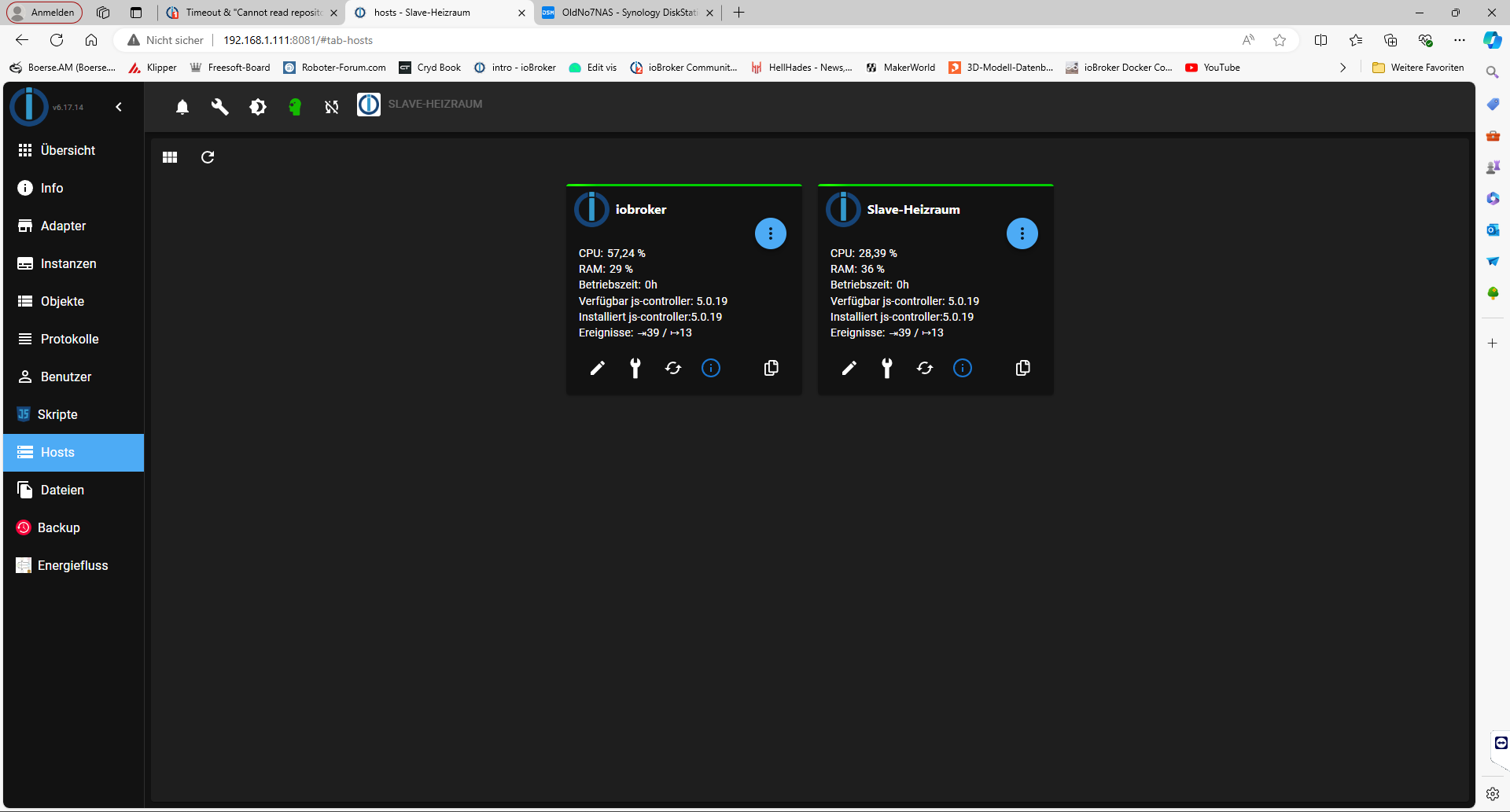
                Hosts.png

                Ich hatte mal noch einen zweiten Slave im 3d Drucker, den habe ich aber gelöscht, evtl. sind da noch überbleibsel vorhanden.

                Habe jetzt auch mal die Speicherkomprimierung in der DS ausgeschalten. die CPU Auslastung ging nicht runter, eher ein wenig höher.
                Ich finde aber auch nichts was die Auslastung verursacht. Ein Prozess ist es meiner Meinung nach nicht.
                In der Übersicht steht "Benutzer 75 Auslastung"???
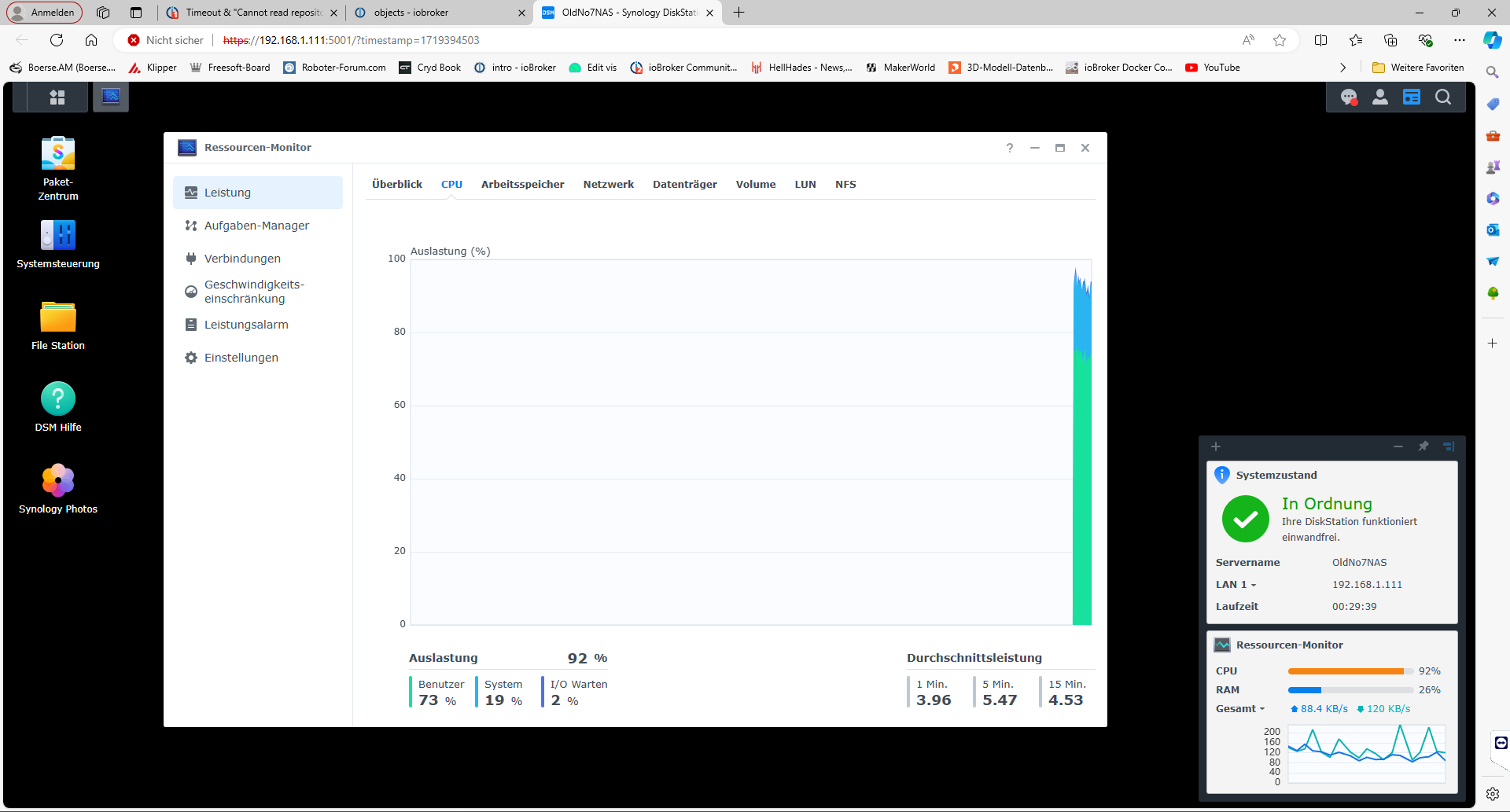
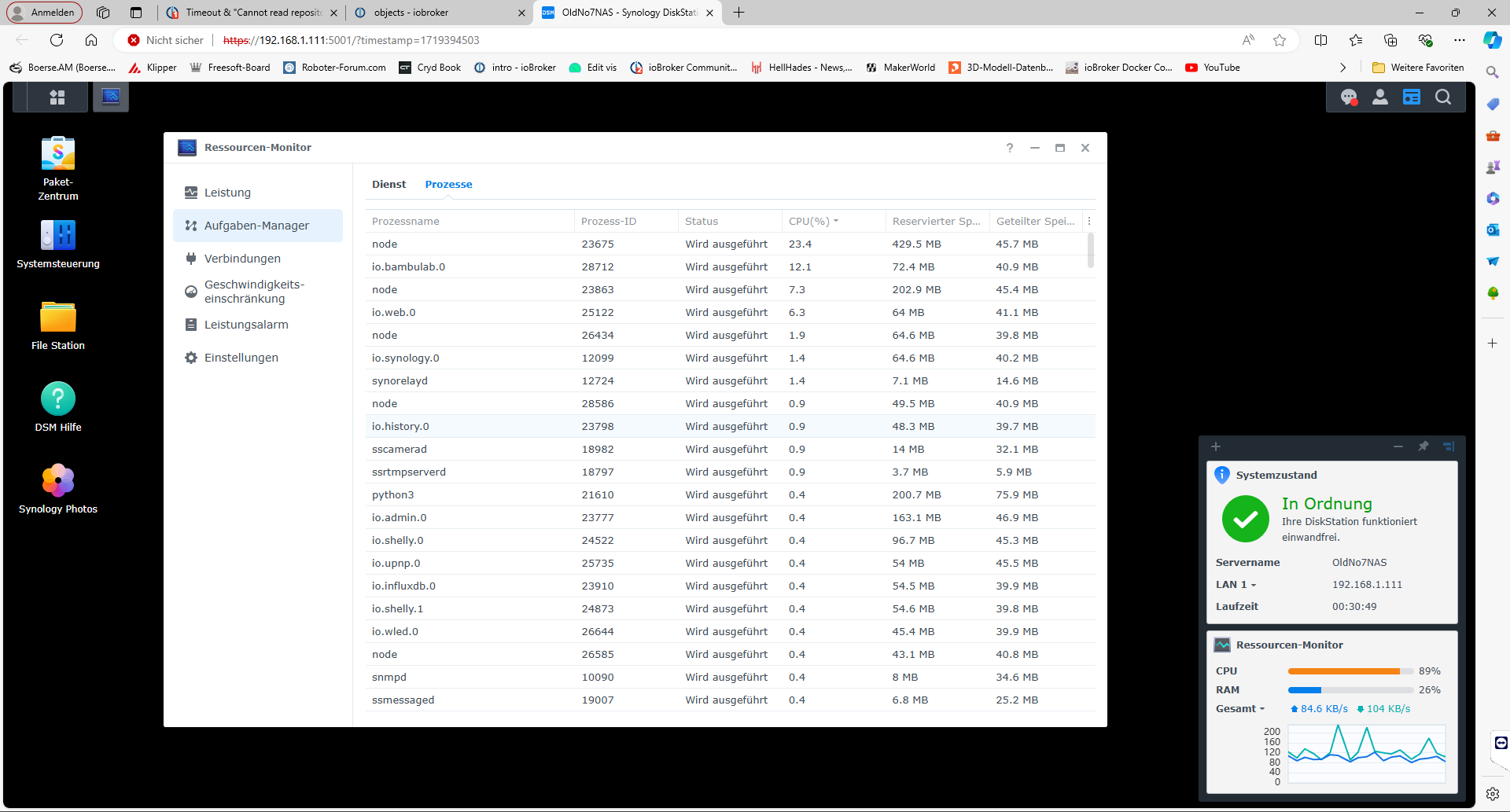
                CPU auslastung1.png

                CPU auslastung2.png

                Gruß
                HappyUser20

                HomoranH 1 Antwort Letzte Antwort
                0
                • H Happyuser20

                  @homoran said in Timeout & "Cannot read repository":

                  zeig mal die Seite Hosts

                  Hosts.png

                  Ich hatte mal noch einen zweiten Slave im 3d Drucker, den habe ich aber gelöscht, evtl. sind da noch überbleibsel vorhanden.

                  Habe jetzt auch mal die Speicherkomprimierung in der DS ausgeschalten. die CPU Auslastung ging nicht runter, eher ein wenig höher.
                  Ich finde aber auch nichts was die Auslastung verursacht. Ein Prozess ist es meiner Meinung nach nicht.
                  In der Übersicht steht "Benutzer 75 Auslastung"???

                  CPU auslastung1.png

                  CPU auslastung2.png

                  Gruß
                  HappyUser20

                  HomoranH Nicht stören
                  HomoranH Nicht stören
                  Homoran
                  Global Moderator Administrators
                  schrieb am zuletzt editiert von Homoran
                  #16

                  @happyuser20 sagte in Timeout & "Cannot read repository":

                  Ich hatte mal noch einen zweiten Slave im 3d Drucker, den habe ich aber gelöscht, evtl. sind da noch überbleibsel vorhanden.

                  und der hieß

                  @homoran sagte in Timeout & "Cannot read repository":

                  raspberry_Heizraum_slave

                  ??

                  dann zeig mal die Objekte unter system.host.xxx
                  nur im Expertenmodus sichtbar!

                  @happyuser20 sagte in Timeout & "Cannot read repository":

                  In der Übersicht steht "Benutzer 75 Auslastung"???

                  und die Grafik steht kurz vor 100%, die load average sogar darüber

                  EDIT:
                  Was zeigst du da?
                  ist das aus deinem Docker?

                  @happyuser20 sagte in Timeout & "Cannot read repository":

                  Ein Prozess ist es meiner Meinung nach nicht.

                  was bildet diese Meinung?

                  Fakten wie die Ausgabe von top sortiert nach CPU würde helfen.

                  kein Support per PN! - Fragen im Forum stellen - es gibt fast nichts, was nicht auch für andere interessant ist.

                  Benutzt das Voting rechts unten im Beitrag wenn er euch geholfen hat.

                  der Installationsfixer: curl -fsL https://iobroker.net/fix.sh | bash -

                  H 1 Antwort Letzte Antwort
                  0
                  • HomoranH Homoran

                    @happyuser20 sagte in Timeout & "Cannot read repository":

                    Ich hatte mal noch einen zweiten Slave im 3d Drucker, den habe ich aber gelöscht, evtl. sind da noch überbleibsel vorhanden.

                    und der hieß

                    @homoran sagte in Timeout & "Cannot read repository":

                    raspberry_Heizraum_slave

                    ??

                    dann zeig mal die Objekte unter system.host.xxx
                    nur im Expertenmodus sichtbar!

                    @happyuser20 sagte in Timeout & "Cannot read repository":

                    In der Übersicht steht "Benutzer 75 Auslastung"???

                    und die Grafik steht kurz vor 100%, die load average sogar darüber

                    EDIT:
                    Was zeigst du da?
                    ist das aus deinem Docker?

                    @happyuser20 sagte in Timeout & "Cannot read repository":

                    Ein Prozess ist es meiner Meinung nach nicht.

                    was bildet diese Meinung?

                    Fakten wie die Ausgabe von top sortiert nach CPU würde helfen.

                    H Offline
                    H Offline
                    Happyuser20
                    schrieb am zuletzt editiert von Happyuser20
                    #17

                    @homoran said in Timeout & "Cannot read repository":

                    @happyuser20 sagte in Timeout & "Cannot read repository":

                    Ich hatte mal noch einen zweiten Slave im 3d Drucker, den habe ich aber gelöscht, evtl. sind da noch überbleibsel vorhanden.

                    und der hieß

                    MainsailOS

                    @homoran sagte in Timeout & "Cannot read repository":

                    raspberry_Heizraum_slave

                    ??

                    Slave Heizraum hies mal raspbery_Heizraum_slave, bevor ich diesen neu aufgesetzt habe

                    dann zeig mal die Objekte unter system.host.xxx
                    nur im Expertenmodus sichtbar!
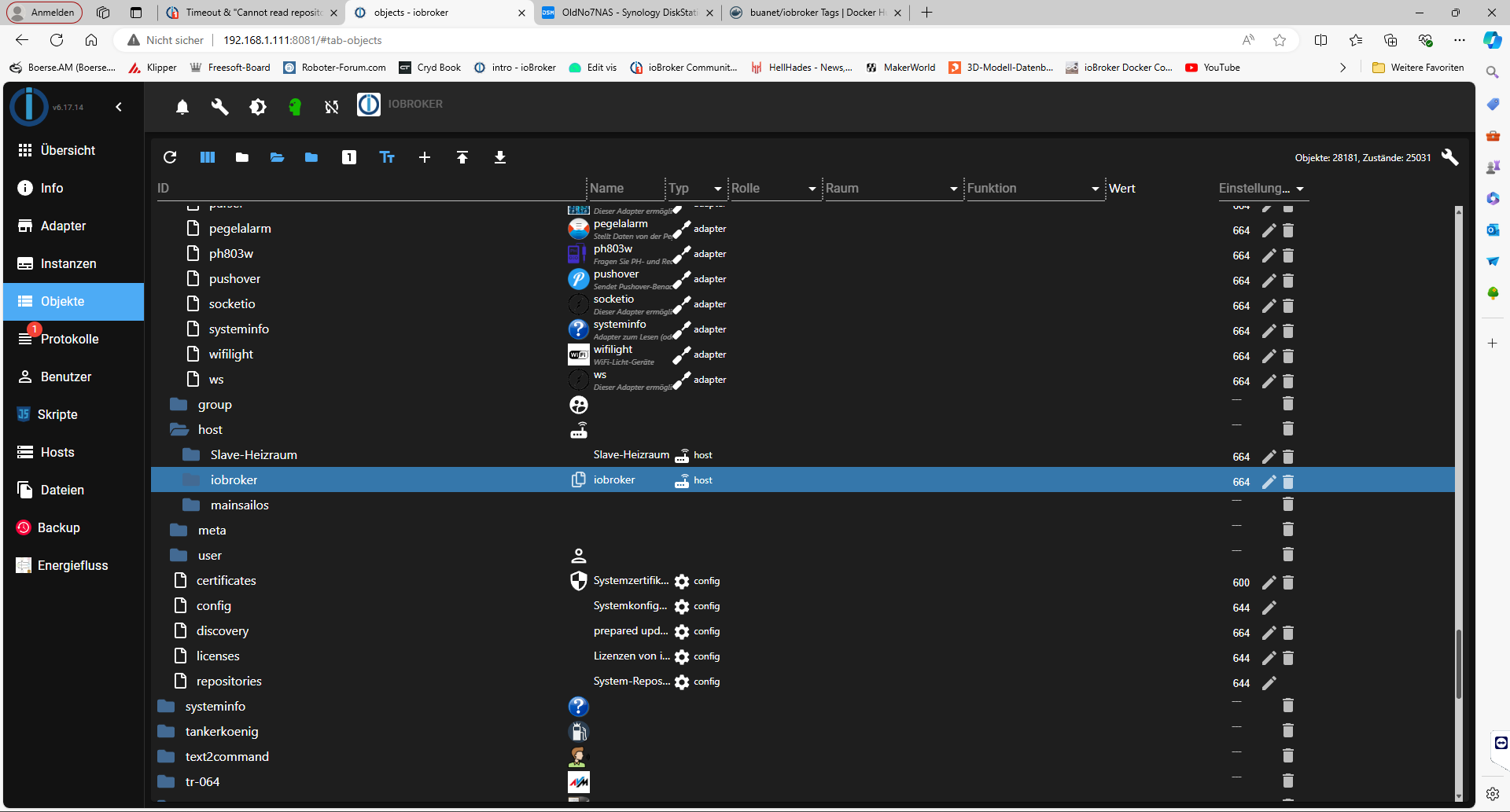
                    System Host.png

                    @happyuser20 sagte in Timeout & "Cannot read repository":

                    In der Übersicht steht "Benutzer 75 Auslastung"???
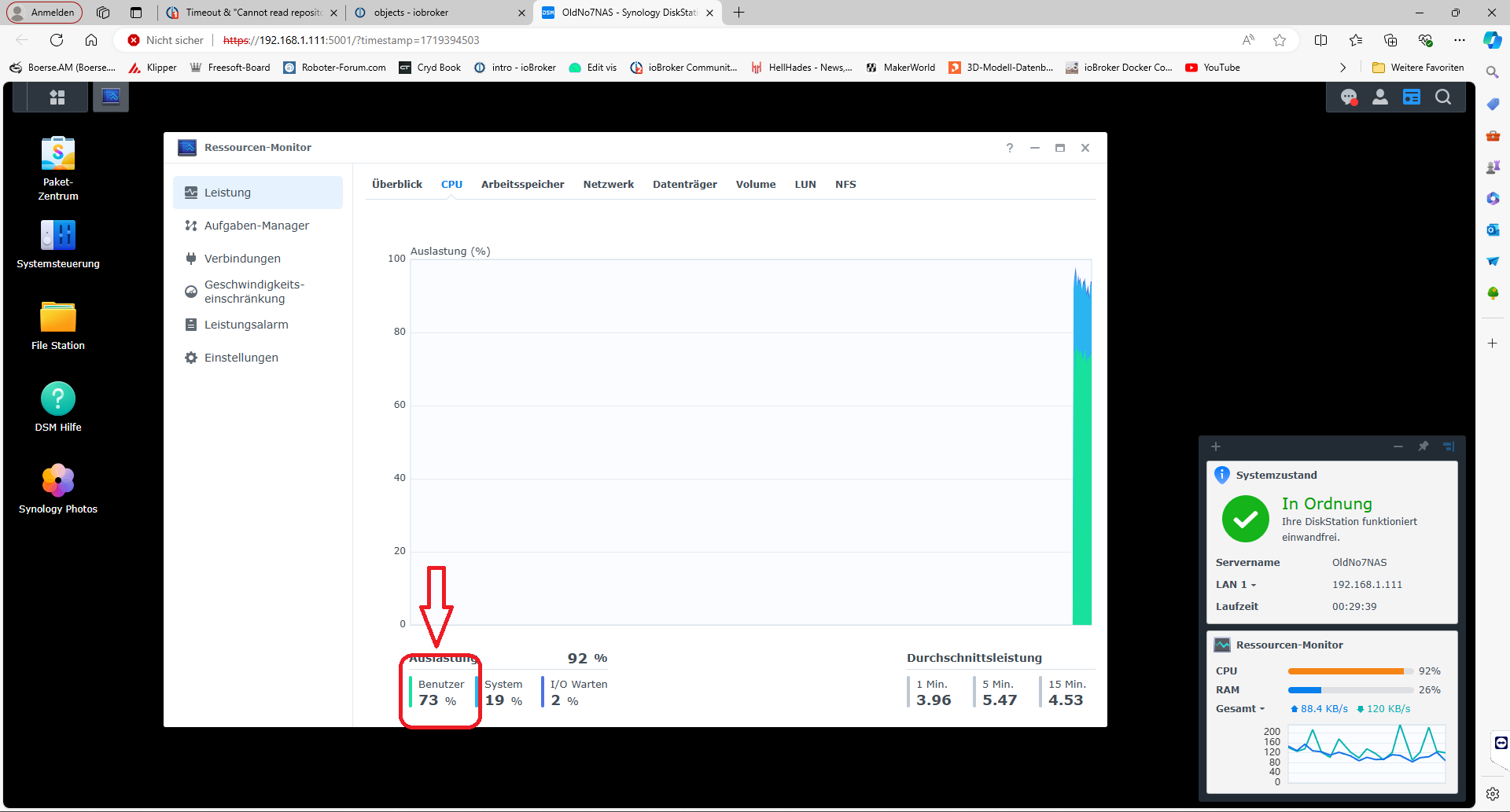
                    CPU auslastung1.png

                    und die Grafik steht kurz vor 100%, die load average sogar darüber

                    EDIT:
                    Was zeigst du da?
                    ist das aus deinem Docker?

                    Das ist die Synology Oberfläche

                    @happyuser20 sagte in Timeout & "Cannot read repository":

                    Ein Prozess ist es meiner Meinung nach nicht.

                    was bildet diese Meinung?
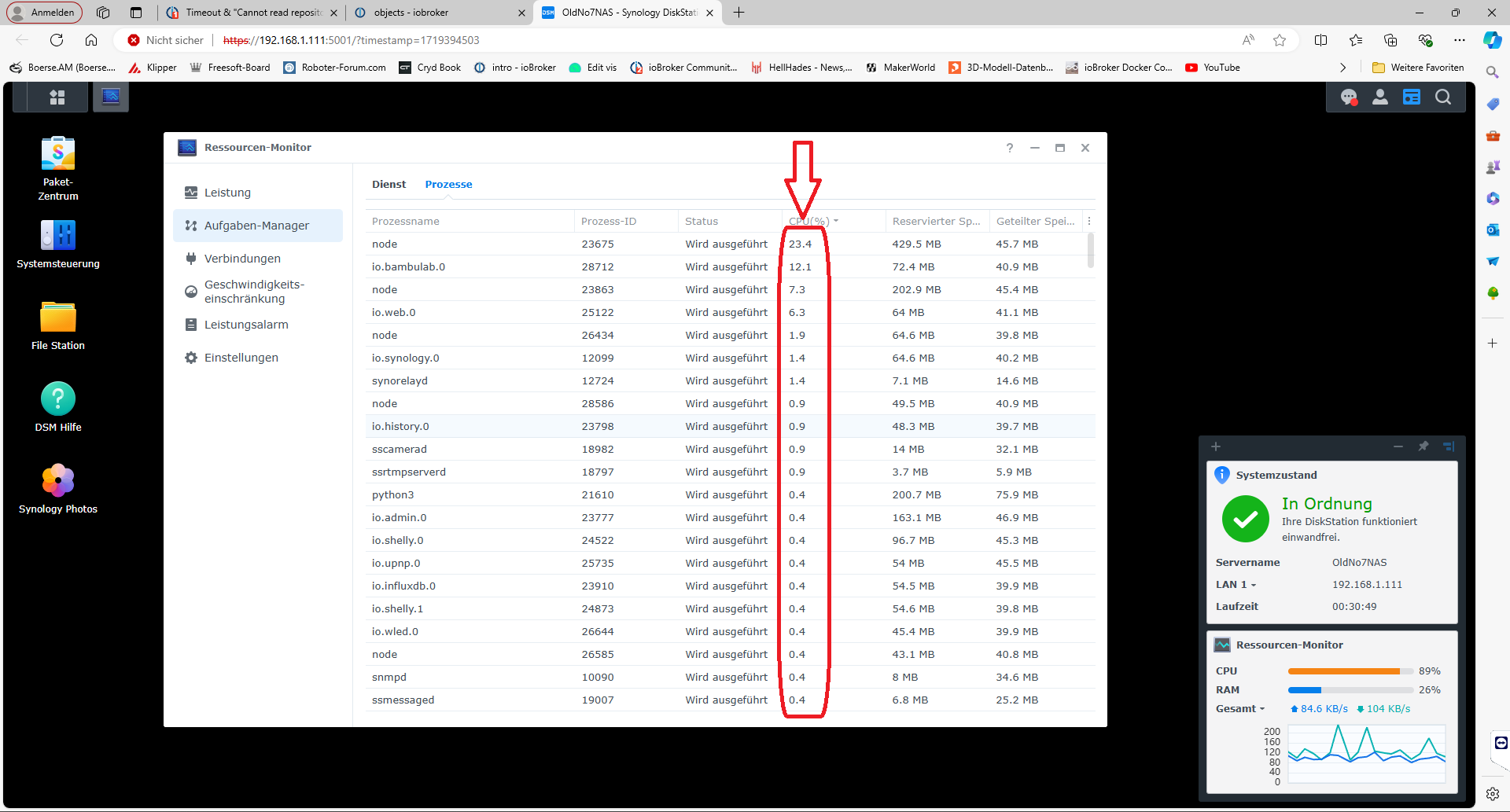
                    CPU auslastung2.png

                    Ist sortiert nach Auslastung und auch von der DS Oberfläche

                    Fakten wie die Ausgabe von top sortiert nach CPU würde helfen.

                    Das ist die Auslastung im Docker, und die ist sehe sehr hoch würde ich sagen :anguished:
                    Docker.png

                    Gruß
                    HappyUser20

                    HomoranH 1 Antwort Letzte Antwort
                    0
                    • H Happyuser20

                      @homoran said in Timeout & "Cannot read repository":

                      @happyuser20 sagte in Timeout & "Cannot read repository":

                      Ich hatte mal noch einen zweiten Slave im 3d Drucker, den habe ich aber gelöscht, evtl. sind da noch überbleibsel vorhanden.

                      und der hieß

                      MainsailOS

                      @homoran sagte in Timeout & "Cannot read repository":

                      raspberry_Heizraum_slave

                      ??

                      Slave Heizraum hies mal raspbery_Heizraum_slave, bevor ich diesen neu aufgesetzt habe

                      dann zeig mal die Objekte unter system.host.xxx
                      nur im Expertenmodus sichtbar!

                      System Host.png

                      @happyuser20 sagte in Timeout & "Cannot read repository":

                      In der Übersicht steht "Benutzer 75 Auslastung"???

                      CPU auslastung1.png

                      und die Grafik steht kurz vor 100%, die load average sogar darüber

                      EDIT:
                      Was zeigst du da?
                      ist das aus deinem Docker?

                      Das ist die Synology Oberfläche

                      @happyuser20 sagte in Timeout & "Cannot read repository":

                      Ein Prozess ist es meiner Meinung nach nicht.

                      was bildet diese Meinung?

                      CPU auslastung2.png

                      Ist sortiert nach Auslastung und auch von der DS Oberfläche

                      Fakten wie die Ausgabe von top sortiert nach CPU würde helfen.

                      Das ist die Auslastung im Docker, und die ist sehe sehr hoch würde ich sagen :anguished:
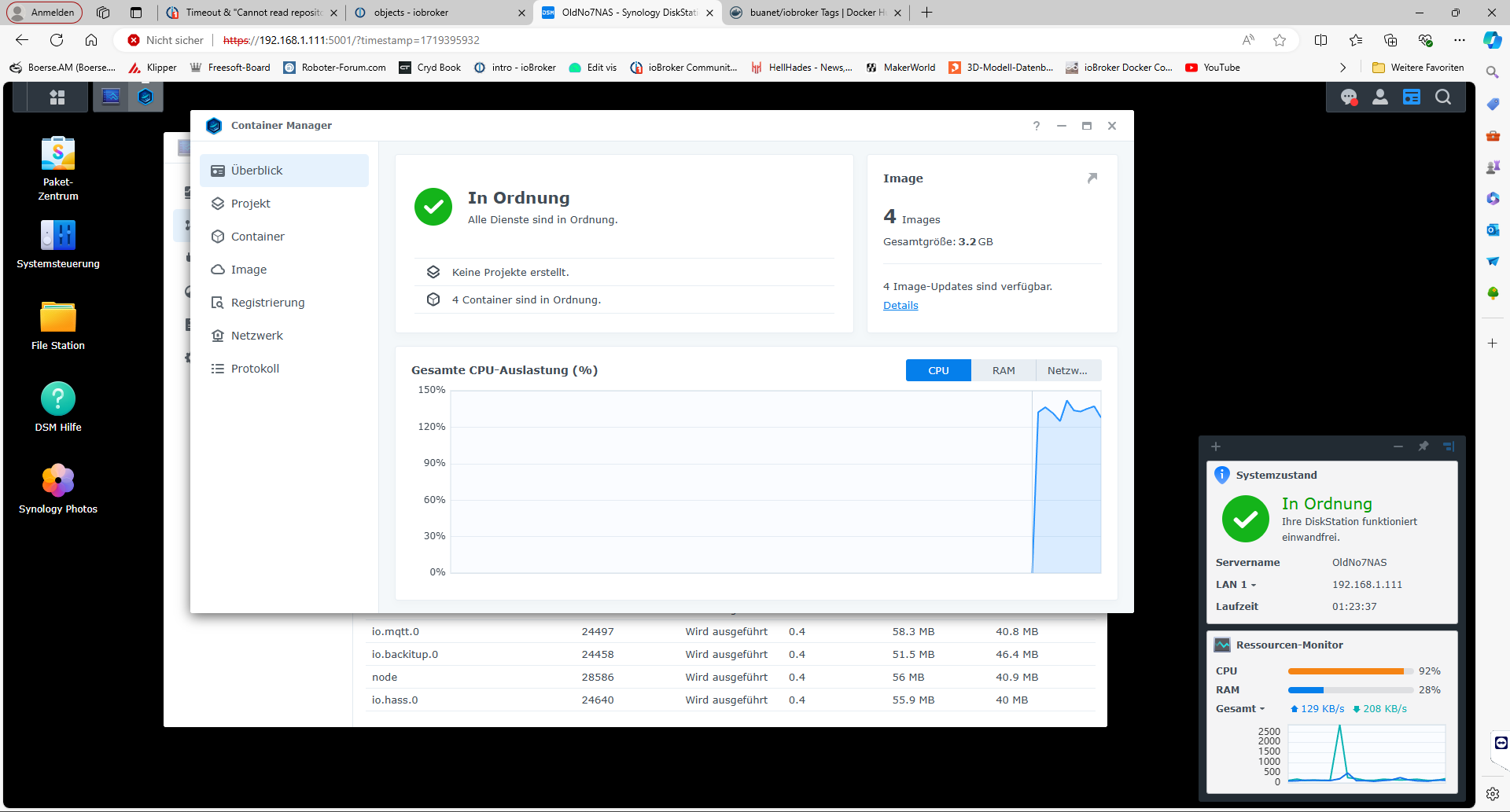
                      Docker.png

                      Gruß
                      HappyUser20

                      HomoranH Nicht stören
                      HomoranH Nicht stören
                      Homoran
                      Global Moderator Administrators
                      schrieb am zuletzt editiert von Homoran
                      #18

                      @happyuser20 sagte in Timeout & "Cannot read repository":

                      Slave Heizraum hies mal raspbery_Heizraum_slave, bevor ich diesen neu aufgesetzt habe

                      dann hast du den alten host nicht gelöscht, oder die Installation nicht mit iob host this initialisiert.

                      auf jeden Fall sucht die Instanz MQTT nach wie vor den alten Slave.

                      sieh in den Instanzen nach!

                      @happyuser20 sagte in Timeout & "Cannot read repository":

                      Das ist die Auslastung im Docker, und die ist sehe sehr hoch würde ich sagen

                      das ist nicht top

                      aber dass bei 150% Auslastung alles zu langsam ist, ist klar!

                      kein Support per PN! - Fragen im Forum stellen - es gibt fast nichts, was nicht auch für andere interessant ist.

                      Benutzt das Voting rechts unten im Beitrag wenn er euch geholfen hat.

                      der Installationsfixer: curl -fsL https://iobroker.net/fix.sh | bash -

                      H 1 Antwort Letzte Antwort
                      0
                      • HomoranH Homoran

                        @happyuser20 sagte in Timeout & "Cannot read repository":

                        Slave Heizraum hies mal raspbery_Heizraum_slave, bevor ich diesen neu aufgesetzt habe

                        dann hast du den alten host nicht gelöscht, oder die Installation nicht mit iob host this initialisiert.

                        auf jeden Fall sucht die Instanz MQTT nach wie vor den alten Slave.

                        sieh in den Instanzen nach!

                        @happyuser20 sagte in Timeout & "Cannot read repository":

                        Das ist die Auslastung im Docker, und die ist sehe sehr hoch würde ich sagen

                        das ist nicht top

                        aber dass bei 150% Auslastung alles zu langsam ist, ist klar!

                        H Offline
                        H Offline
                        Happyuser20
                        schrieb am zuletzt editiert von
                        #19

                        @homoran said in Timeout & "Cannot read repository":

                        @happyuser20 sagte in Timeout & "Cannot read repository":

                        Slave Heizraum hies mal raspbery_Heizraum_slave, bevor ich diesen neu aufgesetzt habe

                        dann hast du den alten host nicht gelöscht, oder die Installation nicht mit iob host this initialisiert.

                        auf jeden Fall sucht die Instanz MQTT nach wie vor den alten Slave.

                        sieh in den Instanzen nach!

                        @happyuser20 sagte in Timeout & "Cannot read repository":

                        Das ist die Auslastung im Docker, und die ist sehe sehr hoch würde ich sagen

                        das ist nicht top

                        aber dass bei 150% Auslastung alles zu langsam ist, ist klar!

                        noch eine Frage zwischendurch
                        ist auch ziemlich sportlich, aber der meist limitierende RAM reicht.

                        @happyuser20 sagte in Timeout & "Cannot read repository":

                        Pending OS-Updates: 149

                        bezieht sich das auf das Buanet bzw Docker Image oder den IOB?

                        Gruß
                        HappyUser20

                        Thomas BraunT HomoranH 2 Antworten Letzte Antwort
                        0
                        • H Happyuser20

                          @homoran said in Timeout & "Cannot read repository":

                          @happyuser20 sagte in Timeout & "Cannot read repository":

                          Slave Heizraum hies mal raspbery_Heizraum_slave, bevor ich diesen neu aufgesetzt habe

                          dann hast du den alten host nicht gelöscht, oder die Installation nicht mit iob host this initialisiert.

                          auf jeden Fall sucht die Instanz MQTT nach wie vor den alten Slave.

                          sieh in den Instanzen nach!

                          @happyuser20 sagte in Timeout & "Cannot read repository":

                          Das ist die Auslastung im Docker, und die ist sehe sehr hoch würde ich sagen

                          das ist nicht top

                          aber dass bei 150% Auslastung alles zu langsam ist, ist klar!

                          noch eine Frage zwischendurch
                          ist auch ziemlich sportlich, aber der meist limitierende RAM reicht.

                          @happyuser20 sagte in Timeout & "Cannot read repository":

                          Pending OS-Updates: 149

                          bezieht sich das auf das Buanet bzw Docker Image oder den IOB?

                          Gruß
                          HappyUser20

                          Thomas BraunT Online
                          Thomas BraunT Online
                          Thomas Braun
                          Most Active
                          schrieb am zuletzt editiert von
                          #20

                          @happyuser20 sagte in Timeout & "Cannot read repository":

                          bezieht sich das auf das Buanet bzw Docker Image oder den IOB?

                          Auf das Image. Weswegen du das aktuell halten sollst.

                          Linux-Werkzeugkasten:
                          https://forum.iobroker.net/topic/42952/der-kleine-iobroker-linux-werkzeugkasten
                          NodeJS Fixer Skript:
                          https://forum.iobroker.net/topic/68035/iob-node-fix-skript
                          iob_diag: curl -sLf -o diag.sh https://iobroker.net/diag.sh && bash diag.sh

                          1 Antwort Letzte Antwort
                          0
                          • H Happyuser20

                            @homoran said in Timeout & "Cannot read repository":

                            @happyuser20 sagte in Timeout & "Cannot read repository":

                            Slave Heizraum hies mal raspbery_Heizraum_slave, bevor ich diesen neu aufgesetzt habe

                            dann hast du den alten host nicht gelöscht, oder die Installation nicht mit iob host this initialisiert.

                            auf jeden Fall sucht die Instanz MQTT nach wie vor den alten Slave.

                            sieh in den Instanzen nach!

                            @happyuser20 sagte in Timeout & "Cannot read repository":

                            Das ist die Auslastung im Docker, und die ist sehe sehr hoch würde ich sagen

                            das ist nicht top

                            aber dass bei 150% Auslastung alles zu langsam ist, ist klar!

                            noch eine Frage zwischendurch
                            ist auch ziemlich sportlich, aber der meist limitierende RAM reicht.

                            @happyuser20 sagte in Timeout & "Cannot read repository":

                            Pending OS-Updates: 149

                            bezieht sich das auf das Buanet bzw Docker Image oder den IOB?

                            Gruß
                            HappyUser20

                            HomoranH Nicht stören
                            HomoranH Nicht stören
                            Homoran
                            Global Moderator Administrators
                            schrieb am zuletzt editiert von
                            #21

                            @happyuser20 sagte in Timeout & "Cannot read repository":

                            noch eine Frage zwischendurch

                            bitte erst ein Thema abarbeiten!
                            Sonst verzettelst du dich noch mehr

                            kein Support per PN! - Fragen im Forum stellen - es gibt fast nichts, was nicht auch für andere interessant ist.

                            Benutzt das Voting rechts unten im Beitrag wenn er euch geholfen hat.

                            der Installationsfixer: curl -fsL https://iobroker.net/fix.sh | bash -

                            H 1 Antwort Letzte Antwort
                            0
                            • HomoranH Homoran

                              @happyuser20 sagte in Timeout & "Cannot read repository":

                              noch eine Frage zwischendurch

                              bitte erst ein Thema abarbeiten!
                              Sonst verzettelst du dich noch mehr

                              H Offline
                              H Offline
                              Happyuser20
                              schrieb am zuletzt editiert von Happyuser20
                              #22

                              @homoran said in Timeout & "Cannot read repository":

                              @happyuser20 sagte in Timeout & "Cannot read repository":

                              noch eine Frage zwischendurch

                              bitte erst ein Thema abarbeiten!
                              Sonst verzettelst du dich noch mehr

                              Ich habe mich schon verzettelt, sch.....e!
                              Ich habe mit dem Backitup Adapter eine sicherung gemacht.
                              Im Docker sagte er mir das ein Update für den Buanet gibt, naturlich draufgeklickt und durchgeführt.
                              Jetzt startet der Container für IOB immer neu und IOB läuft natürlich nicht.

                              Protokoll vom Absturz iobroker.html

                              HomoranH Marc BergM 2 Antworten Letzte Antwort
                              0
                              • H Happyuser20

                                @homoran said in Timeout & "Cannot read repository":

                                @happyuser20 sagte in Timeout & "Cannot read repository":

                                noch eine Frage zwischendurch

                                bitte erst ein Thema abarbeiten!
                                Sonst verzettelst du dich noch mehr

                                Ich habe mich schon verzettelt, sch.....e!
                                Ich habe mit dem Backitup Adapter eine sicherung gemacht.
                                Im Docker sagte er mir das ein Update für den Buanet gibt, naturlich draufgeklickt und durchgeführt.
                                Jetzt startet der Container für IOB immer neu und IOB läuft natürlich nicht.

                                Protokoll vom Absturz iobroker.html

                                HomoranH Nicht stören
                                HomoranH Nicht stören
                                Homoran
                                Global Moderator Administrators
                                schrieb am zuletzt editiert von
                                #23

                                @happyuser20 sagte in Timeout & "Cannot read repository":

                                Jetzt startet der Container für IOB immer neu und IOB läuft natürlich nicht.

                                deswegen hab ich vorab gesagt

                                @homoran sagte in Timeout & "Cannot read repository":

                                sollte bei richtiger Installation und Konfiguration so sein.

                                wie das auszusehen hat steht in der Doku.

                                Da ich mich mit Docket überhaupt nicht auskenne bin ich jetzt hier raus

                                kein Support per PN! - Fragen im Forum stellen - es gibt fast nichts, was nicht auch für andere interessant ist.

                                Benutzt das Voting rechts unten im Beitrag wenn er euch geholfen hat.

                                der Installationsfixer: curl -fsL https://iobroker.net/fix.sh | bash -

                                1 Antwort Letzte Antwort
                                0
                                • H Happyuser20

                                  @homoran said in Timeout & "Cannot read repository":

                                  @happyuser20 sagte in Timeout & "Cannot read repository":

                                  noch eine Frage zwischendurch

                                  bitte erst ein Thema abarbeiten!
                                  Sonst verzettelst du dich noch mehr

                                  Ich habe mich schon verzettelt, sch.....e!
                                  Ich habe mit dem Backitup Adapter eine sicherung gemacht.
                                  Im Docker sagte er mir das ein Update für den Buanet gibt, naturlich draufgeklickt und durchgeführt.
                                  Jetzt startet der Container für IOB immer neu und IOB läuft natürlich nicht.

                                  Protokoll vom Absturz iobroker.html

                                  Marc BergM Offline
                                  Marc BergM Offline
                                  Marc Berg
                                  Most Active
                                  schrieb am zuletzt editiert von
                                  #24

                                  @happyuser20 sagte in Timeout & "Cannot read repository":

                                  Jetzt startet der Container für IOB immer neu und IOB läuft natürlich nicht.

                                  Lt. Protokoll findet er mindestens ein USB-Device nicht. Lösch mal die Umgebungvariable "USBDEVICES" komplett.

                                  NUC10I3+Ubuntu+Docker+ioBroker+influxDB2+Node Red+EMQX+Grafana

                                  Pi-hole, Traefik, Checkmk, Conbee II+Zigbee2MQTT, ESPSomfy-RTS, LoRaWAN, Arduino, KiCad

                                  Benutzt das Voting im Beitrag, wenn er euch geholfen hat.

                                  H 1 Antwort Letzte Antwort
                                  0
                                  • Marc BergM Marc Berg

                                    @happyuser20 sagte in Timeout & "Cannot read repository":

                                    Jetzt startet der Container für IOB immer neu und IOB läuft natürlich nicht.

                                    Lt. Protokoll findet er mindestens ein USB-Device nicht. Lösch mal die Umgebungvariable "USBDEVICES" komplett.

                                    H Offline
                                    H Offline
                                    Happyuser20
                                    schrieb am zuletzt editiert von
                                    #25

                                    @marc-berg said in Timeout & "Cannot read repository":

                                    @happyuser20 sagte in Timeout & "Cannot read repository":

                                    Jetzt startet der Container für IOB immer neu und IOB läuft natürlich nicht.

                                    Lt. Protokoll findet er mindestens ein USB-Device nicht. Lösch mal die Umgebungvariable "USBDEVICES" komplett.

                                    Meinst du in den Container Einstellungen?

                                    Gruß
                                    HappyUser20

                                    Marc BergM 1 Antwort Letzte Antwort
                                    0
                                    • H Happyuser20

                                      @marc-berg said in Timeout & "Cannot read repository":

                                      @happyuser20 sagte in Timeout & "Cannot read repository":

                                      Jetzt startet der Container für IOB immer neu und IOB läuft natürlich nicht.

                                      Lt. Protokoll findet er mindestens ein USB-Device nicht. Lösch mal die Umgebungvariable "USBDEVICES" komplett.

                                      Meinst du in den Container Einstellungen?

                                      Gruß
                                      HappyUser20

                                      Marc BergM Offline
                                      Marc BergM Offline
                                      Marc Berg
                                      Most Active
                                      schrieb am zuletzt editiert von Marc Berg
                                      #26

                                      @happyuser20 sagte in Timeout & "Cannot read repository":

                                      Meinst du in den Container Einstellungen?

                                      ja, genau. Zumindest den angemeckerten Eintrag

                                      /dev/ttyACM0
                                      

                                      entfernen.

                                      EDIT: und natürlich auch das folgende Semikolon+Leerzeichen(?)

                                      88552358-a1d2-49ab-8604-397e3bad0c9e-grafik.png

                                      NUC10I3+Ubuntu+Docker+ioBroker+influxDB2+Node Red+EMQX+Grafana

                                      Pi-hole, Traefik, Checkmk, Conbee II+Zigbee2MQTT, ESPSomfy-RTS, LoRaWAN, Arduino, KiCad

                                      Benutzt das Voting im Beitrag, wenn er euch geholfen hat.

                                      H 1 Antwort Letzte Antwort
                                      0
                                      • Marc BergM Marc Berg

                                        @happyuser20 sagte in Timeout & "Cannot read repository":

                                        Meinst du in den Container Einstellungen?

                                        ja, genau. Zumindest den angemeckerten Eintrag

                                        /dev/ttyACM0
                                        

                                        entfernen.

                                        EDIT: und natürlich auch das folgende Semikolon+Leerzeichen(?)

                                        88552358-a1d2-49ab-8604-397e3bad0c9e-grafik.png

                                        H Offline
                                        H Offline
                                        Happyuser20
                                        schrieb am zuletzt editiert von
                                        #27

                                        @marc-berg said in Timeout & "Cannot read repository":

                                        @happyuser20 sagte in Timeout & "Cannot read repository":

                                        Meinst du in den Container Einstellungen?

                                        ja, genau. Zumindest den angemeckerten Eintrag

                                        /dev/ttyACM0
                                        

                                        entfernen.

                                        Dank dir, jetzt läuft der IOB wieder.
                                        Jedoch brauche ich den USB anschluss, dort hängt der Lesekopf für den Stromzähler dran.
                                        Wenn ich den Eintrag wieder hinzufüge, gehts wohl nicht mehr?

                                        Gruß
                                        HappyUser20

                                        Marc BergM 1 Antwort Letzte Antwort
                                        0
                                        • H Happyuser20

                                          @marc-berg said in Timeout & "Cannot read repository":

                                          @happyuser20 sagte in Timeout & "Cannot read repository":

                                          Meinst du in den Container Einstellungen?

                                          ja, genau. Zumindest den angemeckerten Eintrag

                                          /dev/ttyACM0
                                          

                                          entfernen.

                                          Dank dir, jetzt läuft der IOB wieder.
                                          Jedoch brauche ich den USB anschluss, dort hängt der Lesekopf für den Stromzähler dran.
                                          Wenn ich den Eintrag wieder hinzufüge, gehts wohl nicht mehr?

                                          Gruß
                                          HappyUser20

                                          Marc BergM Offline
                                          Marc BergM Offline
                                          Marc Berg
                                          Most Active
                                          schrieb am zuletzt editiert von
                                          #28

                                          @happyuser20 sagte in Timeout & "Cannot read repository":

                                          Wenn ich den Eintrag wieder hinzufüge, gehts wohl nicht mehr?

                                          Offensichtlich gibt es dieses Device nicht, insofern ergibt ein Hinzufügen wenig Sinn. Der Name des Devices hängt davon ab, wie du die Devices (in den Containereinstellungen) gemappt hast. Da ich diese Einstellungen nicht kenne, kann ich dir im Moment nicht weiter helfen.


                                          NUC10I3+Ubuntu+Docker+ioBroker+influxDB2+Node Red+EMQX+Grafana

                                          Pi-hole, Traefik, Checkmk, Conbee II+Zigbee2MQTT, ESPSomfy-RTS, LoRaWAN, Arduino, KiCad

                                          Benutzt das Voting im Beitrag, wenn er euch geholfen hat.

                                          1 Antwort Letzte Antwort
                                          0
                                          Antworten
                                          • In einem neuen Thema antworten
                                          Anmelden zum Antworten
                                          • Älteste zuerst
                                          • Neuste zuerst
                                          • Meiste Stimmen


                                          Support us

                                          ioBroker
                                          Community Adapters
                                          Donate
                                          FAQ Cloud / IOT
                                          HowTo: Node.js-Update
                                          HowTo: Backup/Restore
                                          Downloads
                                          BLOG

                                          890

                                          Online

                                          32.6k

                                          Benutzer

                                          81.9k

                                          Themen

                                          1.3m

                                          Beiträge
                                          Community
                                          Impressum | Datenschutz-Bestimmungen | Nutzungsbedingungen | Einwilligungseinstellungen
                                          ioBroker Community 2014-2025
                                          logo
                                          • Anmelden

                                          • Du hast noch kein Konto? Registrieren

                                          • Anmelden oder registrieren, um zu suchen
                                          • Erster Beitrag
                                            Letzter Beitrag
                                          0
                                          • Home
                                          • Aktuell
                                          • Tags
                                          • Ungelesen 0
                                          • Kategorien
                                          • Unreplied
                                          • Beliebt
                                          • GitHub
                                          • Docu
                                          • Hilfe