
NEWS




[ESPHome] Beta release 0.5.0-beta.1 ready
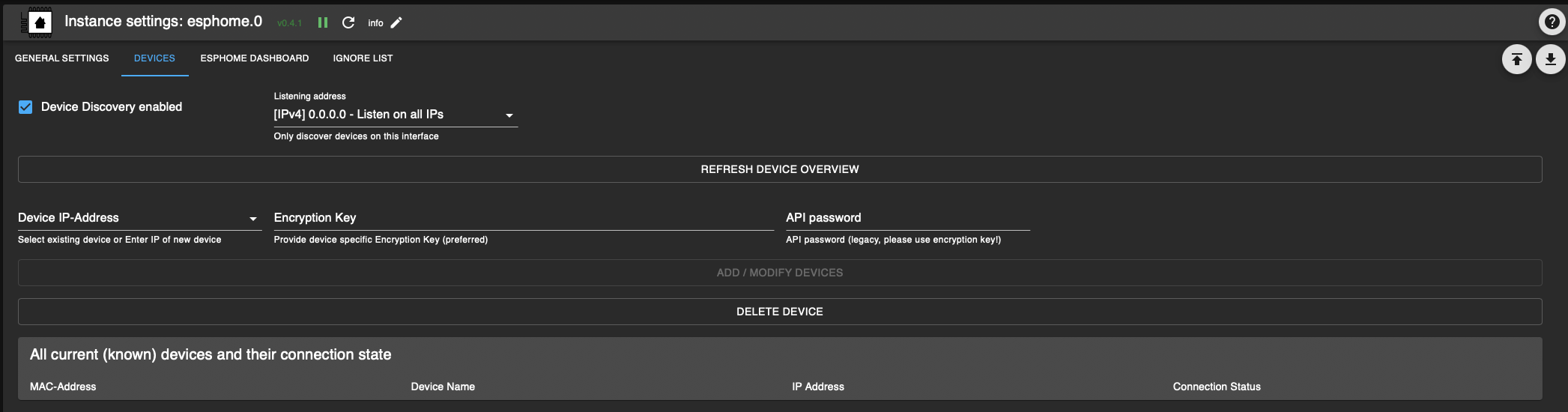
-
@philippio said in [ESPHome] Beta release 0.5.0-beta.1 ready:
Nach diversen Versuchen habe ich dieses Forum gefunden, und auf v0.5.0-beta.10 aktualisiert. Das Fehlerbild war minimal anders: 10.2.0 statt 10.1.0:
Genau das das Problem, gab schonwieder ein notwendiges update.
Habs wieder geupdated
Pls nochmal probiern: https://github.com/SimonFischer04/ioBroker.esphome/tree/fix/latestpillowliegt halt wahrscheinlich dran das du hier eine beta 2024.2.0b1 dashboard installed hast, sonst hätt 10.1.0 reichen müssen, aber habs jetzt auf 10.2.0 updated
@simon42
iob url https://github.com/SimonFischer04/ioBroker.esphome/tree/fix/latestpillow
Danach komm ich nicht mehr auf das Dashboard:
Fatal error starting ESPHomeDashboard | Error: Command failed with exit code 1: /home/iobroker/.cache/autopy/venv/esphome/bin/python3 -m pip install pillow==10.2.0 WARNING: Ignoring invalid distribution ~illow (/home/iobroker/.cache/autopy/venv/esphome/lib/python3.11/site-packages) WARNING: Ignoring invalid distribution ~illow (/home/iobroker/.cache/autopy/venv/esphome/lib/python3.11/site-packages) WARNING: Ignoring invalid distribution ~illow (/home/iobroker/.cache/autopy/venv/esphome/lib/python3.11/site-packages) ERROR: Could not install packages due to an OSError: [Errno 13] Permission denied: '/home/iobroker/.cache/autopy/venv/esphome/lib/python3.11/site-packages/pillow.libs/libharfbuzz-2093a78b.so.0.60830.0' Check the permissions. WARNING: Ignoring invalid distribution ~illow (/home/iobroker/.cache/autopy/venv/esphome/lib/python3.11/site-packages) Collecting pillow==10.2.0 Using cached pillow-10.2.0-cp311-cp311-manylinux_2_28_x86_64.whl.metadata (9.7 kB) Using cached pillow-10.2.0-cp311-cp311-manylinux_2_28_x86_64.whl (4.5 MB) Installing collected packages: pillow | Error: Command failed with exit code 1: /home/iobroker/.cache/autopy/venv/esphome/bin/python3 -m pip install pillow==10.2.0 WARNING: Ignoring invalid distribution ~illow (/home/iobroker/.cache/autopy/venv/esphome/lib/python3.11/site-packages) WARNING: Ignoring invalid distribution ~illow (/home/iobroker/.cache/autopy/venv/esphome/lib/python3.11/site-packages) WARNING: Ignoring invalid distribution ~illow (/home/iobroker/.cache/autopy/venv/esphome/lib/python3.11/site-packages) ERROR: Could not install packages due to an OSError: [Errno 13] Permission denied: '/home/iobroker/.cache/autopy/venv/esphome/lib/python3.11/site-packages/pillow.libs/libharfbuzz-2093a78b.so.0.60830.0' Check the permissions. WARNING: Ignoring invalid distribution ~illow (/home/iobroker/.cache/autopy/venv/esphome/lib/python3.11/site-packages) Collecting pillow==10.2.0 Using cached pillow-10.2.0-cp311-cp311-manylinux_2_28_x86_64.whl.metadata (9.7 kB) Using cached pillow-10.2.0-cp311-cp311-manylinux_2_28_x86_64.whl (4.5 MB) Installing collected packages: pillow at makeError (file:///opt/iobroker/node_modules/autopy/node_modules/execa/lib/error.js:60:11) at handlePromise (file:///opt/iobroker/node_modules/autopy/node_modules/execa/index.js:124:26) at processTicksAndRejections (node:internal/process/task_queues:95:5) at $df9eabe9bda49ea8$export$e522f41234ab669a (file:///opt/iobroker/node_modules/autopy/src/index.ts:257:13) at Esphome.espHomeDashboard (/Users/nl69zh/Developer/community/opensource/ioBroker.esphome/main.js:180:7) at Esphome.onReady (/opt/iobroker/node_modules/iobroker.esphome/main.js:66:4) -
@simon42
iob url https://github.com/SimonFischer04/ioBroker.esphome/tree/fix/latestpillow
Danach komm ich nicht mehr auf das Dashboard:
Fatal error starting ESPHomeDashboard | Error: Command failed with exit code 1: /home/iobroker/.cache/autopy/venv/esphome/bin/python3 -m pip install pillow==10.2.0 WARNING: Ignoring invalid distribution ~illow (/home/iobroker/.cache/autopy/venv/esphome/lib/python3.11/site-packages) WARNING: Ignoring invalid distribution ~illow (/home/iobroker/.cache/autopy/venv/esphome/lib/python3.11/site-packages) WARNING: Ignoring invalid distribution ~illow (/home/iobroker/.cache/autopy/venv/esphome/lib/python3.11/site-packages) ERROR: Could not install packages due to an OSError: [Errno 13] Permission denied: '/home/iobroker/.cache/autopy/venv/esphome/lib/python3.11/site-packages/pillow.libs/libharfbuzz-2093a78b.so.0.60830.0' Check the permissions. WARNING: Ignoring invalid distribution ~illow (/home/iobroker/.cache/autopy/venv/esphome/lib/python3.11/site-packages) Collecting pillow==10.2.0 Using cached pillow-10.2.0-cp311-cp311-manylinux_2_28_x86_64.whl.metadata (9.7 kB) Using cached pillow-10.2.0-cp311-cp311-manylinux_2_28_x86_64.whl (4.5 MB) Installing collected packages: pillow | Error: Command failed with exit code 1: /home/iobroker/.cache/autopy/venv/esphome/bin/python3 -m pip install pillow==10.2.0 WARNING: Ignoring invalid distribution ~illow (/home/iobroker/.cache/autopy/venv/esphome/lib/python3.11/site-packages) WARNING: Ignoring invalid distribution ~illow (/home/iobroker/.cache/autopy/venv/esphome/lib/python3.11/site-packages) WARNING: Ignoring invalid distribution ~illow (/home/iobroker/.cache/autopy/venv/esphome/lib/python3.11/site-packages) ERROR: Could not install packages due to an OSError: [Errno 13] Permission denied: '/home/iobroker/.cache/autopy/venv/esphome/lib/python3.11/site-packages/pillow.libs/libharfbuzz-2093a78b.so.0.60830.0' Check the permissions. WARNING: Ignoring invalid distribution ~illow (/home/iobroker/.cache/autopy/venv/esphome/lib/python3.11/site-packages) Collecting pillow==10.2.0 Using cached pillow-10.2.0-cp311-cp311-manylinux_2_28_x86_64.whl.metadata (9.7 kB) Using cached pillow-10.2.0-cp311-cp311-manylinux_2_28_x86_64.whl (4.5 MB) Installing collected packages: pillow at makeError (file:///opt/iobroker/node_modules/autopy/node_modules/execa/lib/error.js:60:11) at handlePromise (file:///opt/iobroker/node_modules/autopy/node_modules/execa/index.js:124:26) at processTicksAndRejections (node:internal/process/task_queues:95:5) at $df9eabe9bda49ea8$export$e522f41234ab669a (file:///opt/iobroker/node_modules/autopy/src/index.ts:257:13) at Esphome.espHomeDashboard (/Users/nl69zh/Developer/community/opensource/ioBroker.esphome/main.js:180:7) at Esphome.onReady (/opt/iobroker/node_modules/iobroker.esphome/main.js:66:4) -
Der Vollständigkeit halber:
Von direkten Installation von GitHub - insbesondere auf produktiven Systemen - wird explizit abgeraten. GitHub Versionen können sich jederzeit (auch kurzfristig) ändern und durchaus auch in sich inkonsistent und fehlerhaft sein. Versionsangaben von GitHub Installationen sind Schall und Rauch da die Versionsnummer zumindest bei Verwendung der standardmäßigen Umgebung erst im Zuge der Releaseerstellung geändert wird.
Auf explizite Aufforderung durch den Entwickler kann eine GitHub Installation zur Fehlereingrenzung oder zum Test neuer Funktionalität - unter Inkaufnahme des erhöhten Risikos - natürlich erfolgen.
Adapter die nur via GitHub installierbar sind sind mit erhöhter Vorsicht zu betrachten. Hier sollte der Entwickler drum ersucht werden eine Aufnahme in die Repositories zu veranlassen indem z.B. ein Issue im Adapterrepository erstellt wird.
@mcm1957Entwicklung u Betreuung: envertech-pv, hoymiles-ms, ns-client, pid, snmp Adapter;
Support Repositoryverwaltung.Wer 'nen Kaffee spendieren will: https://paypal.me
-
Der Vollständigkeit halber:
Von direkten Installation von GitHub - insbesondere auf produktiven Systemen - wird explizit abgeraten. GitHub Versionen können sich jederzeit (auch kurzfristig) ändern und durchaus auch in sich inkonsistent und fehlerhaft sein. Versionsangaben von GitHub Installationen sind Schall und Rauch da die Versionsnummer zumindest bei Verwendung der standardmäßigen Umgebung erst im Zuge der Releaseerstellung geändert wird.
Auf explizite Aufforderung durch den Entwickler kann eine GitHub Installation zur Fehlereingrenzung oder zum Test neuer Funktionalität - unter Inkaufnahme des erhöhten Risikos - natürlich erfolgen.
Adapter die nur via GitHub installierbar sind sind mit erhöhter Vorsicht zu betrachten. Hier sollte der Entwickler drum ersucht werden eine Aufnahme in die Repositories zu veranlassen indem z.B. ein Issue im Adapterrepository erstellt wird.
@mcm1957@mcm57 said in [ESPHome] Beta release 0.5.0-beta.1 ready:
Versionsangaben von GitHub Installationen sind Schall und Rauch
@mcm57 In diesem Fall ist die Github Angabe ausnahmsweise ok. @Dutchman ist soweit ich seh gerade eh nicht aktiv, hab nur den aktuellen stand geforked und eine Dependency geupdated.
-
@mcm57 said in [ESPHome] Beta release 0.5.0-beta.1 ready:
Versionsangaben von GitHub Installationen sind Schall und Rauch
@mcm57 In diesem Fall ist die Github Angabe ausnahmsweise ok. @Dutchman ist soweit ich seh gerade eh nicht aktiv, hab nur den aktuellen stand geforked und eine Dependency geupdated.
@simon42
Ja passt schon. Sind hier auch im Testerbereich - hab ich ehrlich gesagt erst nach dem Posten bewußt gesehen. Meine Sorge ist nur, dass es immer wieder User giubt die in 2 Jahren was aus einem Topic rausholen und dann wild von Github etc. installieren ...Hab aber auch schon länger nichts mehr von @Dutchman gehört - hatte auch auf Telegramm Ping nicht geantwortet. Hoffe es geht ihm gut und ihm fehlt nur die Zeit für ioBroker.
mcm1957
Entwicklung u Betreuung: envertech-pv, hoymiles-ms, ns-client, pid, snmp Adapter;
Support Repositoryverwaltung.Wer 'nen Kaffee spendieren will: https://paypal.me
-
@simon42
Ja passt schon. Sind hier auch im Testerbereich - hab ich ehrlich gesagt erst nach dem Posten bewußt gesehen. Meine Sorge ist nur, dass es immer wieder User giubt die in 2 Jahren was aus einem Topic rausholen und dann wild von Github etc. installieren ...Hab aber auch schon länger nichts mehr von @Dutchman gehört - hatte auch auf Telegramm Ping nicht geantwortet. Hoffe es geht ihm gut und ihm fehlt nur die Zeit für ioBroker.
mcm1957
@mcm57 said in [ESPHome] Beta release 0.5.0-beta.1 ready:
Meine Sorge ist nur, dass es immer wieder User giubt die in 2 Jahren was aus einem Topic rausholen und dann wild von Github etc. installieren ...
ja und dann wahrscheinlich erneut issues machen ....
@mcm57 said in [ESPHome] Beta release 0.5.0-beta.1 ready:
Hoffe es geht ihm gut und ihm fehlt nur die Zeit für ioBroker.
yes, lets hope
-
@fischje Bitte etwas mehr Informationen:
- System: Windows / Linux (welche Distro: Debian - welche Version, ...) - docker?
- Dashboard-Version
@simon42
Hi, Debian 12 Bookworm, kein Docker.Dashboard esphome : 0.5.0-beta.10 (1~)
Admin-Adapter: 6.15.2 (1~)Was brauchst du noch?
Python: 3.11.2
node: v20.11.1
pip: 23.0.1Bin noch neu im iobroker-Game, deswegen weiss ich leider nicht, was du noch benötigst.
-
@simon42
Hi, Debian 12 Bookworm, kein Docker.Dashboard esphome : 0.5.0-beta.10 (1~)
Admin-Adapter: 6.15.2 (1~)Was brauchst du noch?
Python: 3.11.2
node: v20.11.1
pip: 23.0.1Bin noch neu im iobroker-Game, deswegen weiss ich leider nicht, was du noch benötigst.
@fischje erstell am besten bitten einfach ein Github Issue. Dann ists übersichtlicher und dort gibts auch Vorlage mit allen nötigen/hilfreichen Daten:
https://github.com/DrozmotiX/ioBroker.esphome/issues/new?assignees=DutchmanNL&labels=bug&projects=&template=BugReport.md&title= -
@philippio said in [ESPHome] Beta release 0.5.0-beta.1 ready:
Fehlt mir noch eine Eintragung, um hostname zu IP zu verknüpfen?
mDNS sollte eigentlich automatisch funktionieren, solang die Geräte im gleichen Netzwerk sind. Sind sie das bei dir?
@philippio said in [ESPHome] Beta release 0.5.0-beta.1 ready:
ist schon eine sehr gelungene Lösung!
Danke!
@simon42 Hallo Simon42!
Kleines follow-up zu unserem Austausch Anfang März: Ich habe zwischenzeitlich ein 2. Device angelernt und aktiv. Unterschiedliche Boards, unterschiedliche Beschaltung, andere Skripte. Der Effekt ist der gleiche: ich kann beide unter Instanzen>>esphome>>Einstellungen>>Geräte sehen. Hier werden sie auch als connected angezeigt:
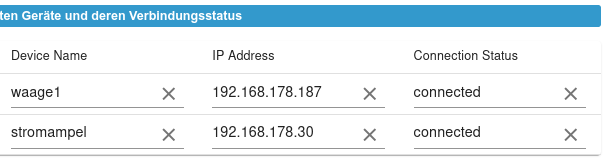
Im Dashboard sind beide aber immer als offline gekennzeichnet:
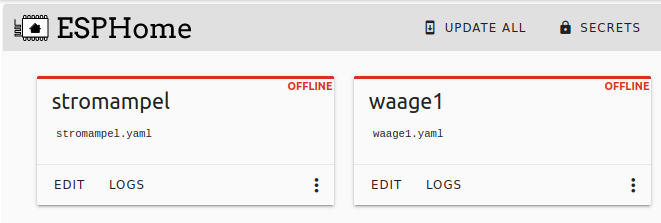
Die Bedienung funktioniert reibungslos, sobald ich im yaml-Skript eine manuelle IP vergebe:
wifi:
  ssid: !secret wifi_ssid
  password: !secret wifi_password

  manual_ip:
    static_ip: 192.168.178.30
    gateway: 192.168.178.1
    subnet: 255.255.255.0
Deinem Hinweis bzgl. mDNS bin ich nachgegangen - und es scheint tatsächlich der Grund zu sein! Standardmäßig ist bei Fritz der DNS-Rebind-Schutz aktiv, der offenbar genau diese netzinterne Auflösung von Domainnamen unterbindet. Hier eine Erklärung von AVM dazu:
AVM: DNS-Auflösung privater IP-Adressen nicht möglich
Da aber ich mit dem work-around über manuelle IP aber gut leben kann, alle Funktionen von EDIT, LOG bis OTA-Flashen problemlos funktionieren, würde ich das von AVM geschilderte Risiko beim Deklarieren von Ausnahmen nicht eingehen. Alles tut wie es soll! Danke Dir erneut für die guten Hinweise.

-
@simon42 Hallo Simon42!
Kleines follow-up zu unserem Austausch Anfang März: Ich habe zwischenzeitlich ein 2. Device angelernt und aktiv. Unterschiedliche Boards, unterschiedliche Beschaltung, andere Skripte. Der Effekt ist der gleiche: ich kann beide unter Instanzen>>esphome>>Einstellungen>>Geräte sehen. Hier werden sie auch als connected angezeigt:
Im Dashboard sind beide aber immer als offline gekennzeichnet:
Die Bedienung funktioniert reibungslos, sobald ich im yaml-Skript eine manuelle IP vergebe:
wifi:
  ssid: !secret wifi_ssid
  password: !secret wifi_password

  manual_ip:
    static_ip: 192.168.178.30
    gateway: 192.168.178.1
    subnet: 255.255.255.0
Deinem Hinweis bzgl. mDNS bin ich nachgegangen - und es scheint tatsächlich der Grund zu sein! Standardmäßig ist bei Fritz der DNS-Rebind-Schutz aktiv, der offenbar genau diese netzinterne Auflösung von Domainnamen unterbindet. Hier eine Erklärung von AVM dazu:
AVM: DNS-Auflösung privater IP-Adressen nicht möglich
Da aber ich mit dem work-around über manuelle IP aber gut leben kann, alle Funktionen von EDIT, LOG bis OTA-Flashen problemlos funktionieren, würde ich das von AVM geschilderte Risiko beim Deklarieren von Ausnahmen nicht eingehen. Alles tut wie es soll! Danke Dir erneut für die guten Hinweise.
@philippio said in [ESPHome] Beta release 0.5.0-beta.1 ready:
@simon42 Hallo Simon42!
Kleines follow-up zu unserem Austausch Anfang März: Ich habe zwischenzeitlich ein 2. Device angelernt und aktiv. Unterschiedliche Boards, unterschiedliche Beschaltung, andere Skripte. Der Effekt ist der gleiche: ich kann beide unter Instanzen>>esphome>>Einstellungen>>Geräte sehen. Hier werden sie auch als connected angezeigt:
Im Dashboard sind beide aber immer als offline gekennzeichnet:
Die Bedienung funktioniert reibungslos, sobald ich im yaml-Skript eine manuelle IP vergebe:
wifi:
  ssid: !secret wifi_ssid
  password: !secret wifi_password

  manual_ip:
    static_ip: 192.168.178.30
    gateway: 192.168.178.1
    subnet: 255.255.255.0
Deinem Hinweis bzgl. mDNS bin ich nachgegangen - und es scheint tatsächlich der Grund zu sein! Standardmäßig ist bei Fritz der DNS-Rebind-Schutz aktiv, der offenbar genau diese netzinterne Auflösung von Domainnamen unterbindet. Hier eine Erklärung von AVM dazu:
AVM: DNS-Auflösung privater IP-Adressen nicht möglich
Da aber ich mit dem work-around über manuelle IP aber gut leben kann, alle Funktionen von EDIT, LOG bis OTA-Flashen problemlos funktionieren, würde ich das von AVM geschilderte Risiko beim Deklarieren von Ausnahmen nicht eingehen. Alles tut wie es soll! Danke Dir erneut für die guten Hinweise.
ok. top, dass du eine für dich zufriedenstellende Lösung gefunden hast. no problem
-
@fischje erstell am besten bitten einfach ein Github Issue. Dann ists übersichtlicher und dort gibts auch Vorlage mit allen nötigen/hilfreichen Daten:
https://github.com/DrozmotiX/ioBroker.esphome/issues/new?assignees=DutchmanNL&labels=bug&projects=&template=BugReport.md&title=@simon42 Ich bekomme mein ESP-Home Dashboard nicht zum Laufen. Sobald ich es einschalte kommen viele Fehlermeldungen und der Adapter ist rot.
Habe die neueste Version des ESP-Home-Adapters installiert. Alle Geräte werden gefunden und in der Geräteliste angezeigt. Einzige Bedingung: ich darf das Dashboard nicht einschalten. Ich hänge mal die Fehlermeldungen an. Vielleicht kann mir ja jemand helfen?host.raspberrypi 2024-07-23 15:51:32.176 error instance system.adapter.esphome.0 terminated with code 6 (UNCAUGHT_EXCEPTION) host.raspberrypi 2024-07-23 15:51:32.176 error Caught by controller[1]: at ModuleWrap.<anonymous> (node:internal/modules/esm/translators:203:29) host.raspberrypi 2024-07-23 15:51:32.175 error Caught by controller[1]: at Function.Module._load (node:internal/modules/cjs/loader:1019:12) host.raspberrypi 2024-07-23 15:51:32.175 error Caught by controller[1]: at Module.load (node:internal/modules/cjs/loader:1203:32) host.raspberrypi 2024-07-23 15:51:32.175 error Caught by controller[1]: at Object.Module._extensions..js (node:internal/modules/cjs/loader:1422:10) host.raspberrypi 2024-07-23 15:51:32.175 error Caught by controller[1]: at Module._compile (node:internal/modules/cjs/loader:1364:14) host.raspberrypi 2024-07-23 15:51:32.175 error Caught by controller[1]: at Object.<anonymous> (/opt/iobroker/node_modules/@mongodb-js/zstd/index.js:131:29) host.raspberrypi 2024-07-23 15:51:32.175 error Caught by controller[1]: at require (node:internal/modules/helpers:177:18) host.raspberrypi 2024-07-23 15:51:32.175 error Caught by controller[1]: at Module.require (node:internal/modules/cjs/loader:1231:19) host.raspberrypi 2024-07-23 15:51:32.175 error Caught by controller[1]: at Function.Module._load (node:internal/modules/cjs/loader:981:27) host.raspberrypi 2024-07-23 15:51:32.175 error Caught by controller[1]: at Function.Module._resolveFilename (node:internal/modules/cjs/loader:1140:15) host.raspberrypi 2024-07-23 15:51:32.174 error Caught by controller[1]: - /opt/iobroker/node_modules/@mongodb-js/zstd/index.js host.raspberrypi 2024-07-23 15:51:32.174 error Caught by controller[1]: Require stack: host.raspberrypi 2024-07-23 15:51:32.174 error Caught by controller[1]: Error: Cannot find module '@mongodb-js/zstd-linux-arm-gnueabihf' host.raspberrypi 2024-07-23 15:51:32.173 error Caught by controller[0]: This error originated either by throwing inside of an async function without a catch block, or by rejecting a promise which was not handled with .catch(). The promise rejected with the reason: esphome.0 2024-07-23 15:51:32.035 error Connection issue for test Error: Not connected | Error: Not connected at EsphomeNativeApiConnection.subscribeStatesService (/opt/iobroker/node_modules/@2colors/esphome-native-api/lib/connection.js:276:36) at EsphomeNativeApiClient.<anonymous> (/opt/iobroker/node_modules/iobroker.esphome/main.js:582:50) at runNextTicks (node:internal/process/task_queues:60:5) at processImmediate (node:internal/timers:447:9) esphome.0 2024-07-23 15:51:32.024 error Connection issue for RC522 RFID Tag05 Error: Not connected | Error: Not connected at EsphomeNativeApiConnection.subscribeStatesService (/opt/iobroker/node_modules/@2colors/esphome-native-api/lib/connection.js:276:36) at EsphomeNativeApiClient.<anonymous> (/opt/iobroker/node_modules/iobroker.esphome/main.js:582:50) at runNextTicks (node:internal/process/task_queues:60:5) at processImmediate (node:internal/timers:447:9) esphome.0 2024-07-23 15:51:32.022 error Connection issue for RC522 RFID Tag04 Error: Not connected | Error: Not connected at EsphomeNativeApiConnection.subscribeStatesService (/opt/iobroker/node_modules/@2colors/esphome-native-api/lib/connection.js:276:36) at EsphomeNativeApiClient.<anonymous> (/opt/iobroker/node_modules/iobroker.esphome/main.js:582:50) at runNextTicks (node:internal/process/task_queues:60:5) at processImmediate (node:internal/timers:447:9) esphome.0 2024-07-23 15:51:32.018 error Connection issue for RC522 RFID Tag06 Error: Not connected | Error: Not connected at EsphomeNativeApiConnection.subscribeStatesService (/opt/iobroker/node_modules/@2colors/esphome-native-api/lib/connection.js:276:36) at EsphomeNativeApiClient.<anonymous> (/opt/iobroker/node_modules/iobroker.esphome/main.js:582:50) at runNextTicks (node:internal/process/task_queues:60:5) at processImmediate (node:internal/timers:447:9) esphome.0 2024-07-23 15:51:31.925 error Connection issue for RC522 RFID Tag03 Error: Not connected | Error: Not connected at EsphomeNativeApiConnection.subscribeStatesService (/opt/iobroker/node_modules/@2colors/esphome-native-api/lib/connection.js:276:36) at EsphomeNativeApiClient.<anonymous> (/opt/iobroker/node_modules/iobroker.esphome/main.js:582:50) at runNextTicks (node:internal/process/task_queues:60:5) at processImmediate (node:internal/timers:447:9) esphome.0 2024-07-23 15:51:31.922 error Connection issue for RC522 RFID Tag02 Error: Not connected | Error: Not connected at EsphomeNativeApiConnection.subscribeStatesService (/opt/iobroker/node_modules/@2colors/esphome-native-api/lib/connection.js:276:36) at EsphomeNativeApiClient.<anonymous> (/opt/iobroker/node_modules/iobroker.esphome/main.js:582:50) at runNextTicks (node:internal/process/task_queues:60:5) at processImmediate (node:internal/timers:447:9) esphome.0 2024-07-23 15:51:31.411 error Connection issue for RC522 RFID Tag01 Error: Not connected | Error: Not connected at EsphomeNativeApiConnection.subscribeStatesService (/opt/iobroker/node_modules/@2colors/esphome-native-api/lib/connection.js:276:36) at EsphomeNativeApiClient.<anonymous> (/opt/iobroker/node_modules/iobroker.esphome/main.js:582:50) at runNextTicks (node:internal/process/task_queues:60:5) at processImmediate (node:internal/timers:447:9) esphome.0 2024-07-23 15:51:31.153 error Exception-Code: MODULE_NOT_FOUND: Cannot find module '@mongodb-js/zstd-linux-arm-gnueabihf'Require stack:- /opt/iobroker/node_modules/@mongodb-js/zstd/index.js esphome.0 2024-07-23 15:51:31.152 error Error: Cannot find module '@mongodb-js/zstd-linux-arm-gnueabihf'Require stack:- /opt/iobroker/node_modules/@mongodb-js/zstd/index.js at Function.Module._resolveFilename (node:internal/modules/cjs/loader:1140:15) at Function.Module._load (node:internal/modules/cjs/loader:981:27) at Module.require (node:internal/modules/cjs/loader:1231:19) at require (node:internal/modules/helpers:177:18) at Object.<anonymous> (/opt/iobroker/node_modules/@mongodb-js/zstd/index.js:131:29) at Module._compile (node:internal/modules/cjs/loader:1364:14) at Object.Module._extensions..js (node:internal/modules/cjs/loader:1422:10) at Module.load (node:internal/modules/cjs/loader:1203:32) at Function.Module._load (node:internal/modules/cjs/loader:1019:12) at ModuleWrap.<anonymous> (node:internal/modules/esm/translators:203:29) esphome.0 2024-07-23 15:51:31.151 error unhandled promise rejection: Cannot find module '@mongodb-js/zstd-linux-arm-gnueabihf'Require stack:- /opt/iobroker/node_modules/@mongodb-js/zstd/index.js esphome.0 2024-07-23 15:51:31.149 error Unhandled promise rejection. This error originated either by throwing inside of an async function without a catch block, or by rejecting a promise which was not handled with .catch().MOD-EDIT: Code in code-tags gesetzt!
Kann leider kein Screenshot hier einstellen, da zu viele Meldungen!
Muss da vielleicht noch etwas nachinstalliert werden?
Danke! -
@tontechniker
Bitte ein paar mehr Infos:
Auf welchem Gerät läuft dein Iobroker?
Raspberry PI?,
Welcher?,
Welche OS Version: Debian 11/12?
32 oder 64bit?Schaut nämlich sehr stark nach einem bekannten Problem mit 32bit OS aus: https://github.com/DrozmotiX/ioBroker.esphome/issues/206
Falls es ein 32bit OS ist: Ist es möglich das zu Updaten? 32bit Support ist mittlerweile generell (zurecht) eher meh -
@tontechniker
Bitte ein paar mehr Infos:
Auf welchem Gerät läuft dein Iobroker?
Raspberry PI?,
Welcher?,
Welche OS Version: Debian 11/12?
32 oder 64bit?Schaut nämlich sehr stark nach einem bekannten Problem mit 32bit OS aus: https://github.com/DrozmotiX/ioBroker.esphome/issues/206
Falls es ein 32bit OS ist: Ist es möglich das zu Updaten? 32bit Support ist mittlerweile generell (zurecht) eher meh@simon42 Danke für Deine Antwort!
Pi 4B
Debian:Linux raspberrypi 6.1.74-v8+ #1725 SMP PREEMPT Mon Jan 22 13:35:32 GMT 2024 aarc h64 GNU/Linux
Version 11.10
64bit
Ich hatte wegen anderer Probleme in "/boot/config.txt", "arm_64bit=0" eingestellt (Tip aus dem Internet - warum und welcher Fehler damals war, kann ich nicht mehr sagen). Jetzt habe ich in der Datei auf "arm_64bit=1" geändert und einen reboot und einen Neustart des Raspi gemacht. Leider keine Änderung, weiterhin die Fehlermeldungen.Edit:
Habe jetzt Linux raspberrypi 6.1.74-v8+ #1725 SMP PREEMPT Mon Jan 22 13:35:32 GMT 2024 aarch64 GNU/Linux
Version 12.6
installiert, Fehlermeldungen sobald ich Dashboard anwähle uns speichern betätige.Edit Edit:
Habe jetzt ESP-Home downgrade auf "v0.5.0-beta.8" mit gleichem Erfolg. -
@tontechniker said in [ESPHome] Beta release 0.5.0-beta.1 ready:
Ich hatte wegen anderer Probleme in "/boot/config.txt", "arm_64bit=0" eingestellt (Tip aus dem Internet - warum und welcher Fehler damals war, kann ich nicht mehr sagen). Jetzt habe ich in der Datei auf "arm_64bit=1" geändert und einen reboot und einen Neustart des Raspi gemacht. Leider keine Änderung, weiterhin die Fehlermeldungen.
Falls du noch eine sd-karte frei hast bitte einmal Neuinstallation versuchen mit echtem 64bit
Z.b. beim Raspberry-Pi Imager "Raspberry Pi OS (64-bit)" auswählenDas Problem ist bereits schon mehrfach bekannt mit kaputten Setups von 64bit kernel aber 32bit Userland.
Bitte einmal output von "iob diag" senden um das zu verifizieren, aber basierend auf dem bereits bereitgestellten Log, ist das schon sehr wahrscheinlich.Siehe:
-
@tontechniker said in [ESPHome] Beta release 0.5.0-beta.1 ready:
Ich hatte wegen anderer Probleme in "/boot/config.txt", "arm_64bit=0" eingestellt (Tip aus dem Internet - warum und welcher Fehler damals war, kann ich nicht mehr sagen). Jetzt habe ich in der Datei auf "arm_64bit=1" geändert und einen reboot und einen Neustart des Raspi gemacht. Leider keine Änderung, weiterhin die Fehlermeldungen.
Falls du noch eine sd-karte frei hast bitte einmal Neuinstallation versuchen mit echtem 64bit
Z.b. beim Raspberry-Pi Imager "Raspberry Pi OS (64-bit)" auswählenDas Problem ist bereits schon mehrfach bekannt mit kaputten Setups von 64bit kernel aber 32bit Userland.
Bitte einmal output von "iob diag" senden um das zu verifizieren, aber basierend auf dem bereits bereitgestellten Log, ist das schon sehr wahrscheinlich.Siehe:
@simon42
Hallo Simon
ja wir sprechen über eine Beta Version von github, darf ich dennoch fragen ob eine Installation derzeit nach Deinem Verständnis für einen einfachen Nutzer funktionieren sollte? Der Kommunikation der Entwickler (https://github.com/DrozmotiX/ioBroker.esphome/pull/183) kann man folgen, aber heißt nicht dass man es auch versteht ;)
Ich möchte auf einem system ESPHome temporär für einen Test nutzen, aber kann dieses System nicht so einfach neu aufsetzen. Es ähnelt für mich stark dem System von @Fischje
wie folgt:
Debian 12 Bookworm, kein Docker.Dashboard esphome : 0.5.0-beta.10
Admin-Adapter: 7.1.5Python: 3.11.2
node: v20.18.1das Ganze erzeugt den Fehler:
esphome.0
	2024-11-21 08:48:09.852	error	Fatal error starting ESPHomeDashboard | Error: Command failed with exit code 1: /home/iobroker/.cache/autopy/venv/esphome/bin/python3 -m pip install esphome==2024.11.0 pillow==10.0.1ERROR: Cannot install esphome==2024.11.0 and pillow==10.0.1 because these package versions have conflicting dependencies.ERROR: ResolutionImpossible: for help visit https://pip.pypa.io/en/latest/topics/dependency-resolution/#dealing-with-dependency-conflicts[notice] A new release of pip is available: 24.0 -> 24.3.1[notice] To update, run: /home/iobroker/.cache/autopy/venv/esphome/bin/python3 -m pip install --upgrade pipCollecting esphome==2024.11.0 Using cached esphome-2024.11.0-py3-none-any.whl.metadata (3.5 kB)Collecting pillow==10.0.1 Using cached Pillow-10.0.1-cp311-cp311-manylinux_2_28_x86_64.whl.metadata (9.5 kB)Collecting cryptography==43.0.0 (from esphome==2024.11.0) Using cached cryptography-43.0.0-cp39-abi3-manylinux_2_28_x86_64.whl.metadata (5.4 kB)Collecting voluptuous==0.14.2 (from esphome==2024.11.0) Using cached voluptuous-0.14.2-py3-none-any.whl.metadata (20 kB)Collecting PyYAML==6.0.2 (from esphome==2024.11.0) Using cached PyYAML-6.0.2-cp311-cp311-manylinux_2_17_x86_64.manylinux2014_x86_64.whl.metadata (2.1 kB)Collecting paho-mqtt==1.6.1 (from esphome==2024.11.0) Using cached paho-mqtt-1.6.1.tar.gz (99 kB) Installing build dependencies: started Installing build dependencies: finished with status 'done' Getting requirements to build wheel: started Getting requirements to build wheel: finished with status 'done' Preparing metadata (pyproject.toml): started Preparing metadata (pyproject.toml): finished with status 'done'Collecting colorama==0.4.6 (from esphome==2024.11.0) Using cached colorama-0.4.6-py2.py3-none-any.whl.metadata (17 kB)Collecting icmplib==3.0.4 (from esphome==2024.11.0) Using cached icmplib-3.0.4-py3-none-any.whl.metadata (19 kB)Collecting tornado==6.4 (from esphome==2024.11.0) Using cached tornado-6.4-cp38-abi3-manylinux_2_5_x86_64.manylinux1_x86_64.manylinux_2_17_x86_64.manylinux2014_x86_64.whl.metadata (2.5 kB)Collecting tzlocal==5.2 (from esphome==2024.11.0) Using cached tzlocal-5.2-py3-none-any.whl.metadata (7.8 kB)Collecting tzdata>=2021.1 (from esphome==2024.11.0) Using cached tzdata-2024.2-py2.py3-none-any.whl.metadata (1.4 kB)Collecting pyserial==3.5 (from esphome==2024.11.0) Using cached pyserial-3.5-py2.py3-none-any.whl.metadata (1.6 kB)Collecting platformio==6.1.16 (from esphome==2024.11.0) Using cached platformio-6.1.16.tar.gz (239 kB) Installing build dependencies: started Installing build dependencies: finished with status 'done' Getting requirements to build wheel: started Getting requirements to build wheel: finished with status 'done' Preparing metadata (pyproject.toml): started Preparing metadata (pyproject.toml): finished with status 'done'Collecting esptool==4.7.0 (from esphome==2024.11.0) Using cached esptool-4.7.0.tar.gz (285 kB) Installing build dependencies: started Installing build dependencies: finished with status 'done' Getting requirements to build wheel: started Getting requirements to build wheel: finished with status 'done' Preparing metadata (pyproject.toml): started Preparing metadata (pyproject.toml): finished with status 'done'Collecting click==8.1.7 (from esphome==2024.11.0) Using cached click-8.1.7-py3-none-any.whl.metadata (3.0 kB)Collecting esphome-dashboard==20241120.0 (from esphome==2024.11.0) Using cached esphome_dashboard-20241120.0-py3-none-any.whl.metadata (1.0 kB)Collecting aioesphomeapi==24.6.2 (from esphome==2024.11.0) Using cached aioesphomeapi-24.6.2-cp311-cp311-manylinux_2_17_x86_64.manylinux2014_x86_64.whl.metadata (4.9 kB)Collecting zeroconf==0.132.2 (from esphome==2024.11.0) Using cached zeroconf-0.132.2-cp311-cp311-manylinux_2_17_x86_64.manylinux2014_x86_64.whl.metadata (6.0 kB)Collecting puremagic==1.27 (from esphome==2024.11.0) Using cached puremagic-1.27-py3-none-any.whl.metadata (5.8 kB)Collecting ruamel.yaml==0.18.6 (from esphome==2024.11.0) Using cached ruamel.yaml-0.18.6-py3-none-any.whl.metadata (23 kB)Collecting glyphsets==1.0.0 (from esphome==2024.11.0) Using cached glyphsets-1.0.0-py3-none-any.whl.metadata (12 kB)INFO: pip is looking at multiple versions of esphome to determine which version is compatible with other requirements. This could take a while.The conflict is caused by: The user requested pillow==10.0.1 esphome 2024.11.0 depends on pillow==10.4.0To fix this you could try to:1. loosen the range of package versions you've specified2. remove package versions to allow pip attempt to solve the dependency conflict | Error: Command failed with exit code 1: /home/iobroker/.cache/autopy/venv/esphome/bin/python3 -m pip install esphome==2024.11.0 pillow==10.0.1ERROR: Cannot install esphome==2024.11.0 and pillow==10.0.1 because these package versions have conflicting dependencies.ERROR: ResolutionImpossible: for help visit https://pip.pypa.io/en/latest/topics/dependency-resolution/#dealing-with-dependency-conflicts[notice] A new release of pip is available: 24.0 -> 24.3.1[notice] To update, run: /home/iobroker/.cache/autopy/venv/esphome/bin/python3 -m pip install --upgrade pipCollecting esphome==2024.11.0 Using cached esphome-2024.11.0-py3-none-any.whl.metadata (3.5 kB)Collecting pillow==10.0.1 Using cached Pillow-10.0.1-cp311-cp311-manylinux_2_28_x86_64.whl.metadata (9.5 kB)Collecting cryptography==43.0.0 (from esphome==2024.11.0) Using cached cryptography-43.0.0-cp39-abi3-manylinux_2_28_x86_64.whl.metadata (5.4 kB)Collecting voluptuous==0.14.2 (from esphome==2024.11.0) Using cached voluptuous-0.14.2-py3-none-any.whl.metadata (20 kB)Collecting PyYAML==6.0.2 (from esphome==2024.11.0) Using cached PyYAML-6.0.2-cp311-cp311-manylinux_2_17_x86_64.manylinux2014_x86_64.whl.metadata (2.1 kB)Collecting paho-mqtt==1.6.1 (from esphome==2024.11.0) Using cached paho-mqtt-1.6.1.tar.gz (99 kB) Installing build dependencies: started Installing build dependencies: finished with status 'done' Getting requirements to build wheel: started Getting requirements to build wheel: finished with status 'done' Preparing metadata (pyproject.toml): started Preparing metadata (pyproject.toml): finished with status 'done'Collecting colorama==0.4.6 (from esphome==2024.11.0) Using cached colorama-0.4.6-py2.py3-none-any.whl.metadata (17 kB)Collecting icmplib==3.0.4 (from esphome==2024.11.0) Using cached icmplib-3.0.4-py3-none-any.whl.metadata (19 kB)Collecting tornado==6.4 (from esphome==2024.11.0) Using cached tornado-6.4-cp38-abi3-manylinux_2_5_x86_64.manylinux1_x86_64.manylinux_2_17_x86_64.manylinux2014_x86_64.whl.metadata (2.5 kB)Collecting tzlocal==5.2 (from esphome==2024.11.0) Using cached tzlocal-5.2-py3-none-any.whl.metadata (7.8 kB)Collecting tzdata>=2021.1 (from esphome==2024.11.0) Using cached tzdata-2024.2-py2.py3-none-any.whl.metadata (1.4 kB)Collecting pyserial==3.5 (from esphome==2024.11.0) Using cached pyserial-3.5-py2.py3-none-any.whl.metadata (1.6 kB)Collecting platformio==6.1.16 (from esphome==2024.11.0) Using cached platformio-6.1.16.tar.gz (239 kB) Installing build dependencies: started Installing build dependencies: finished with status 'done' Getting requirements to build wheel: started Getting requirements to build wheel: finished with status 'done' Preparing metadata (pyproject.toml): started Preparing metadata (pyproject.toml): finished with status 'done'Collecting esptool==4.7.0 (from esphome==2024.11.0) Using cached esptool-4.7.0.tar.gz (285 kB) Installing build dependencies: started Installing build dependencies: finished with status 'done' Getting requirements to build wheel: started Getting requirements to build wheel: finished with status 'done' Preparing metadata (pyproject.toml): started Preparing metadata (pyproject.toml): finished with status 'done'Collecting click==8.1.7 (from esphome==2024.11.0) Using cached click-8.1.7-py3-none-any.whl.metadata (3.0 kB)Collecting esphome-dashboard==20241120.0 (from esphome==2024.11.0) Using cached esphome_dashboard-20241120.0-py3-none-any.whl.metadata (1.0 kB)Collecting aioesphomeapi==24.6.2 (from esphome==2024.11.0) Using cached aioesphomeapi-24.6.2-cp311-cp311-manylinux_2_17_x86_64.manylinux2014_x86_64.whl.metadata (4.9 kB)Collecting zeroconf==0.132.2 (from esphome==2024.11.0) Using cached zeroconf-0.132.2-cp311-cp311-manylinux_2_17_x86_64.manylinux2014_x86_64.whl.metadata (6.0 kB)Collecting puremagic==1.27 (from esphome==2024.11.0) Using cached puremagic-1.27-py3-none-any.whl.metadata (5.8 kB)Collecting ruamel.yaml==0.18.6 (from esphome==2024.11.0) Using cached ruamel.yaml-0.18.6-py3-none-any.whl.metadata (23 kB)Collecting glyphsets==1.0.0 (from esphome==2024.11.0) Using cached glyphsets-1.0.0-py3-none-any.whl.metadata (12 kB)INFO: pip is looking at multiple versions of esphome to determine which version is compatible with other requirements. This could take a while.The conflict is caused by: The user requested pillow==10.0.1 esphome 2024.11.0 depends on pillow==10.4.0To fix this you could try to:1. loosen the range of package versions you've specified2. remove package versions to allow pip attempt to solve the dependency conflict at makeError (file:///opt/iobroker/node_modules/autopy/node_modules/execa/lib/error.js:60:11) at handlePromise (file:///opt/iobroker/node_modules/autopy/node_modules/execa/index.js:124:26) at processTicksAndRejections (node:internal/process/task_queues:95:5) at $df9eabe9bda49ea8$export$e522f41234ab669a (file:///opt/iobroker/node_modules/autopy/src/index.ts:257:13) at Esphome.espHomeDashboard (/Users/nl69zh/Developer/community/opensource/ioBroker.esphome/main.js:180:7) at Esphome.onReady (/opt/iobroker/node_modules/iobroker.esphome/main.js:66:4)
Da ich noch ein system hab wo ESPHome auch im produktiven Einsatz ist, hatte ich mir dort python3 in version 3.9.2 abgeschaut und mit pyenv probiert aber bringt keinen Erfolg.
Kannst Du sagen welchen Status das Ganze hat und ich vielleicht besser die Versuche einstellen sollte?
Danke
-
Du hast mal wieder das "beliebte Pillow Problem".
Der von dir genannte Pr ist noch Zukunftsthema. Da @Dutchman (Hauptentwickler von dem Adapter) gerade irgendwie nicht aktiv ist, passiert hier wenig.In der Zwischenzeit sollte aber immer noch der Github install von meinem Fork funktionieren.:
https://github.com/DrozmotiX/ioBroker.esphome/issues/199#issuecomment-2460713594 -
Du hast mal wieder das "beliebte Pillow Problem".
Der von dir genannte Pr ist noch Zukunftsthema. Da @Dutchman (Hauptentwickler von dem Adapter) gerade irgendwie nicht aktiv ist, passiert hier wenig.In der Zwischenzeit sollte aber immer noch der Github install von meinem Fork funktionieren.:
https://github.com/DrozmotiX/ioBroker.esphome/issues/199#issuecomment-2460713594@simon42
Vielen Dank. Das gibt mir schon mal eine Richtung vor.
Habe Deinen Fork installiert und bekam wieder die Fehlermeldung im log. Dort war etwas bzgl. pip version angemerkt und habe danach pip von 24.0 auf 24.3.1 upgedated
Aber nach Adapterneustart immer noch:esphome.0 2024-11-21 17:06:00.515 error Fatal error starting ESPHomeDashboard | Error: Command failed with exit code 1: /home/iobroker/.cache/autopy/venv/esphome/bin/python3 -m pip install esphome==2024.11.0 pillow==10.2.0 ERROR: Cannot install esphome==2024.11.0 and pillow==10.2.0 because these package versions have conflicting dependencies. ERROR: ResolutionImpossible: for help visit https://pip.pypa.io/en/latest/topics/dependency-resolution/#dealing-with-dependency-conflicts Collecting esphome==2024.11.0 Using cached esphome-2024.11.0-py3-none-any.whl.metadata (3.5 kB) Collecting pillow==10.2.0 Using cached pillow-10.2.0-cp311-cp311-manylinux_2_28_x86_64.whl.metadata (9.7 kB) Collecting cryptography==43.0.0 (from esphome==2024.11.0) Using cached cryptography-43.0.0-cp39-abi3-manylinux_2_28_x86_64.whl.metadata (5.4 kB) Collecting voluptuous==0.14.2 (from esphome==2024.11.0) Using cached voluptuous-0.14.2-py3-none-any.whl.metadata (20 kB) Collecting PyYAML==6.0.2 (from esphome==2024.11.0) Using cached PyYAML-6.0.2-cp311-cp311-manylinux_2_17_x86_64.manylinux2014_x86_64.whl.metadata (2.1 kB) Collecting paho-mqtt==1.6.1 (from esphome==2024.11.0) Using cached paho-mqtt-1.6.1.tar.gz (99 kB) Installing build dependencies: started Installing build dependencies: finished with status 'done' Getting requirements to build wheel: started Getting requirements to build wheel: finished with status 'done' Preparing metadata (pyproject.toml): started Preparing metadata (pyproject.toml): finished with status 'done' Collecting colorama==0.4.6 (from esphome==2024.11.0) Using cached colorama-0.4.6-py2.py3-none-any.whl.metadata (17 kB) Collecting icmplib==3.0.4 (from esphome==2024.11.0) Using cached icmplib-3.0.4-py3-none-any.whl.metadata (19 kB) Collecting tornado==6.4 (from esphome==2024.11.0) Using cached tornado-6.4-cp38-abi3-manylinux_2_5_x86_64.manylinux1_x86_64.manylinux_2_17_x86_64.manylinux2014_x86_64.whl.metadata (2.5 kB) Collecting tzlocal==5.2 (from esphome==2024.11.0) Using cached tzlocal-5.2-py3-none-any.whl.metadata (7.8 kB) Collecting tzdata>=2021.1 (from esphome==2024.11.0) Using cached tzdata-2024.2-py2.py3-none-any.whl.metadata (1.4 kB) Collecting pyserial==3.5 (from esphome==2024.11.0) Using cached pyserial-3.5-py2.py3-none-any.whl.metadata (1.6 kB) Collecting platformio==6.1.16 (from esphome==2024.11.0) Using cached platformio-6.1.16.tar.gz (239 kB) Installing build dependencies: started Installing build dependencies: finished with status 'done' Getting requirements to build wheel: started Getting requirements to build wheel: finished with status 'done' Preparing metadata (pyproject.toml): started Preparing metadata (pyproject.toml): finished with status 'done' Collecting esptool==4.7.0 (from esphome==2024.11.0) Using cached esptool-4.7.0.tar.gz (285 kB) Installing build dependencies: started Installing build dependencies: finished with status 'done' Getting requirements to build wheel: started Getting requirements to build wheel: finished with status 'done' Preparing metadata (pyproject.toml): started Preparing metadata (pyproject.toml): finished with status 'done' Collecting click==8.1.7 (from esphome==2024.11.0) Using cached click-8.1.7-py3-none-any.whl.metadata (3.0 kB) Collecting esphome-dashboard==20241120.0 (from esphome==2024.11.0) Using cached esphome_dashboard-20241120.0-py3-none-any.whl.metadata (1.0 kB) Collecting aioesphomeapi==24.6.2 (from esphome==2024.11.0) Using cached aioesphomeapi-24.6.2-cp311-cp311-manylinux_2_17_x86_64.manylinux2014_x86_64.whl.metadata (4.9 kB) Collecting zeroconf==0.132.2 (from esphome==2024.11.0) Using cached zeroconf-0.132.2-cp311-cp311-manylinux_2_17_x86_64.manylinux2014_x86_64.whl.metadata (6.0 kB) Collecting puremagic==1.27 (from esphome==2024.11.0) Using cached puremagic-1.27-py3-none-any.whl.metadata (5.8 kB) Collecting ruamel.yaml==0.18.6 (from esphome==2024.11.0) Using cached ruamel.yaml-0.18.6-py3-none-any.whl.metadata (23 kB) Collecting glyphsets==1.0.0 (from esphome==2024.11.0) Using cached glyphsets-1.0.0-py3-none-any.whl.metadata (12 kB) INFO: pip is looking at multiple versions of esphome to determine which version is compatible with other requirements. This could take a while. The conflict is caused by: The user requested pillow==10.2.0 esphome 2024.11.0 depends on pillow==10.4.0 To fix this you could try to: 1. loosen the range of package versions you've specified 2. remove package versions to allow pip to attempt to solve the dependency conflict | Error: Command failed with exit code 1: /home/iobroker/.cache/autopy/venv/esphome/bin/python3 -m pip install esphome==2024.11.0 pillow==10.2.0 ERROR: Cannot install esphome==2024.11.0 and pillow==10.2.0 because these package versions have conflicting dependencies. ERROR: ResolutionImpossible: for help visit https://pip.pypa.io/en/latest/topics/dependency-resolution/#dealing-with-dependency-conflicts Collecting esphome==2024.11.0 Using cached esphome-2024.11.0-py3-none-any.whl.metadata (3.5 kB) Collecting pillow==10.2.0 Using cached pillow-10.2.0-cp311-cp311-manylinux_2_28_x86_64.whl.metadata (9.7 kB) Collecting cryptography==43.0.0 (from esphome==2024.11.0) Using cached cryptography-43.0.0-cp39-abi3-manylinux_2_28_x86_64.whl.metadata (5.4 kB) Collecting voluptuous==0.14.2 (from esphome==2024.11.0) Using cached voluptuous-0.14.2-py3-none-any.whl.metadata (20 kB) Collecting PyYAML==6.0.2 (from esphome==2024.11.0) Using cached PyYAML-6.0.2-cp311-cp311-manylinux_2_17_x86_64.manylinux2014_x86_64.whl.metadata (2.1 kB) Collecting paho-mqtt==1.6.1 (from esphome==2024.11.0) Using cached paho-mqtt-1.6.1.tar.gz (99 kB) Installing build dependencies: started Installing build dependencies: finished with status 'done' Getting requirements to build wheel: started Getting requirements to build wheel: finished with status 'done' Preparing metadata (pyproject.toml): started Preparing metadata (pyproject.toml): finished with status 'done' Collecting colorama==0.4.6 (from esphome==2024.11.0) Using cached colorama-0.4.6-py2.py3-none-any.whl.metadata (17 kB) Collecting icmplib==3.0.4 (from esphome==2024.11.0) Using cached icmplib-3.0.4-py3-none-any.whl.metadata (19 kB) Collecting tornado==6.4 (from esphome==2024.11.0) Using cached tornado-6.4-cp38-abi3-manylinux_2_5_x86_64.manylinux1_x86_64.manylinux_2_17_x86_64.manylinux2014_x86_64.whl.metadata (2.5 kB) Collecting tzlocal==5.2 (from esphome==2024.11.0) Using cached tzlocal-5.2-py3-none-any.whl.metadata (7.8 kB) Collecting tzdata>=2021.1 (from esphome==2024.11.0) Using cached tzdata-2024.2-py2.py3-none-any.whl.metadata (1.4 kB) Collecting pyserial==3.5 (from esphome==2024.11.0) Using cached pyserial-3.5-py2.py3-none-any.whl.metadata (1.6 kB) Collecting platformio==6.1.16 (from esphome==2024.11.0) Using cached platformio-6.1.16.tar.gz (239 kB) Installing build dependencies: started Installing build dependencies: finished with status 'done' Getting requirements to build wheel: started Getting requirements to build wheel: finished with status 'done' Preparing metadata (pyproject.toml): started Preparing metadata (pyproject.toml): finished with status 'done' Collecting esptool==4.7.0 (from esphome==2024.11.0) Using cached esptool-4.7.0.tar.gz (285 kB) Installing build dependencies: started Installing build dependencies: finished with status 'done' Getting requirements to build wheel: started Getting requirements to build wheel: finished with status 'done' Preparing metadata (pyproject.toml): started Preparing metadata (pyproject.toml): finished with status 'done' Collecting click==8.1.7 (from esphome==2024.11.0) Using cached click-8.1.7-py3-none-any.whl.metadata (3.0 kB) Collecting esphome-dashboard==20241120.0 (from esphome==2024.11.0) Using cached esphome_dashboard-20241120.0-py3-none-any.whl.metadata (1.0 kB) Collecting aioesphomeapi==24.6.2 (from esphome==2024.11.0) Using cached aioesphomeapi-24.6.2-cp311-cp311-manylinux_2_17_x86_64.manylinux2014_x86_64.whl.metadata (4.9 kB) Collecting zeroconf==0.132.2 (from esphome==2024.11.0) Using cached zeroconf-0.132.2-cp311-cp311-manylinux_2_17_x86_64.manylinux2014_x86_64.whl.metadata (6.0 kB) Collecting puremagic==1.27 (from esphome==2024.11.0) Using cached puremagic-1.27-py3-none-any.whl.metadata (5.8 kB) Collecting ruamel.yaml==0.18.6 (from esphome==2024.11.0) Using cached ruamel.yaml-0.18.6-py3-none-any.whl.metadata (23 kB) Collecting glyphsets==1.0.0 (from esphome==2024.11.0) Using cached glyphsets-1.0.0-py3-none-any.whl.metadata (12 kB) INFO: pip is looking at multiple versions of esphome to determine which version is compatible with other requirements. This could take a while. The conflict is caused by: The user requested pillow==10.2.0 esphome 2024.11.0 depends on pillow==10.4.0 To fix this you could try to: 1. loosen the range of package versions you've specified 2. remove package versions to allow pip to attempt to solve the dependency conflict at makeError (file:///opt/iobroker/node_modules/autopy/node_modules/execa/lib/error.js:60:11) at handlePromise (file:///opt/iobroker/node_modules/autopy/node_modules/execa/index.js:124:26) at processTicksAndRejections (node:internal/process/task_queues:95:5) at $df9eabe9bda49ea8$export$e522f41234ab669a (file:///opt/iobroker/node_modules/autopy/src/index.ts:257:13) at Esphome.espHomeDashboard (/Users/nl69zh/Developer/community/opensource/ioBroker.esphome/main.js:180:7) at Esphome.onReady (/opt/iobroker/node_modules/iobroker.esphome/main.js:66:4)Stimmt hier eine Version noch nicht bei mir? Hier steht was von pillow 10.1.0 und im Fehler von 10.2.0? Danke und sorry für die Fragen.
-
@simon42
Vielen Dank. Das gibt mir schon mal eine Richtung vor.
Habe Deinen Fork installiert und bekam wieder die Fehlermeldung im log. Dort war etwas bzgl. pip version angemerkt und habe danach pip von 24.0 auf 24.3.1 upgedated
Aber nach Adapterneustart immer noch:esphome.0 2024-11-21 17:06:00.515 error Fatal error starting ESPHomeDashboard | Error: Command failed with exit code 1: /home/iobroker/.cache/autopy/venv/esphome/bin/python3 -m pip install esphome==2024.11.0 pillow==10.2.0 ERROR: Cannot install esphome==2024.11.0 and pillow==10.2.0 because these package versions have conflicting dependencies. ERROR: ResolutionImpossible: for help visit https://pip.pypa.io/en/latest/topics/dependency-resolution/#dealing-with-dependency-conflicts Collecting esphome==2024.11.0 Using cached esphome-2024.11.0-py3-none-any.whl.metadata (3.5 kB) Collecting pillow==10.2.0 Using cached pillow-10.2.0-cp311-cp311-manylinux_2_28_x86_64.whl.metadata (9.7 kB) Collecting cryptography==43.0.0 (from esphome==2024.11.0) Using cached cryptography-43.0.0-cp39-abi3-manylinux_2_28_x86_64.whl.metadata (5.4 kB) Collecting voluptuous==0.14.2 (from esphome==2024.11.0) Using cached voluptuous-0.14.2-py3-none-any.whl.metadata (20 kB) Collecting PyYAML==6.0.2 (from esphome==2024.11.0) Using cached PyYAML-6.0.2-cp311-cp311-manylinux_2_17_x86_64.manylinux2014_x86_64.whl.metadata (2.1 kB) Collecting paho-mqtt==1.6.1 (from esphome==2024.11.0) Using cached paho-mqtt-1.6.1.tar.gz (99 kB) Installing build dependencies: started Installing build dependencies: finished with status 'done' Getting requirements to build wheel: started Getting requirements to build wheel: finished with status 'done' Preparing metadata (pyproject.toml): started Preparing metadata (pyproject.toml): finished with status 'done' Collecting colorama==0.4.6 (from esphome==2024.11.0) Using cached colorama-0.4.6-py2.py3-none-any.whl.metadata (17 kB) Collecting icmplib==3.0.4 (from esphome==2024.11.0) Using cached icmplib-3.0.4-py3-none-any.whl.metadata (19 kB) Collecting tornado==6.4 (from esphome==2024.11.0) Using cached tornado-6.4-cp38-abi3-manylinux_2_5_x86_64.manylinux1_x86_64.manylinux_2_17_x86_64.manylinux2014_x86_64.whl.metadata (2.5 kB) Collecting tzlocal==5.2 (from esphome==2024.11.0) Using cached tzlocal-5.2-py3-none-any.whl.metadata (7.8 kB) Collecting tzdata>=2021.1 (from esphome==2024.11.0) Using cached tzdata-2024.2-py2.py3-none-any.whl.metadata (1.4 kB) Collecting pyserial==3.5 (from esphome==2024.11.0) Using cached pyserial-3.5-py2.py3-none-any.whl.metadata (1.6 kB) Collecting platformio==6.1.16 (from esphome==2024.11.0) Using cached platformio-6.1.16.tar.gz (239 kB) Installing build dependencies: started Installing build dependencies: finished with status 'done' Getting requirements to build wheel: started Getting requirements to build wheel: finished with status 'done' Preparing metadata (pyproject.toml): started Preparing metadata (pyproject.toml): finished with status 'done' Collecting esptool==4.7.0 (from esphome==2024.11.0) Using cached esptool-4.7.0.tar.gz (285 kB) Installing build dependencies: started Installing build dependencies: finished with status 'done' Getting requirements to build wheel: started Getting requirements to build wheel: finished with status 'done' Preparing metadata (pyproject.toml): started Preparing metadata (pyproject.toml): finished with status 'done' Collecting click==8.1.7 (from esphome==2024.11.0) Using cached click-8.1.7-py3-none-any.whl.metadata (3.0 kB) Collecting esphome-dashboard==20241120.0 (from esphome==2024.11.0) Using cached esphome_dashboard-20241120.0-py3-none-any.whl.metadata (1.0 kB) Collecting aioesphomeapi==24.6.2 (from esphome==2024.11.0) Using cached aioesphomeapi-24.6.2-cp311-cp311-manylinux_2_17_x86_64.manylinux2014_x86_64.whl.metadata (4.9 kB) Collecting zeroconf==0.132.2 (from esphome==2024.11.0) Using cached zeroconf-0.132.2-cp311-cp311-manylinux_2_17_x86_64.manylinux2014_x86_64.whl.metadata (6.0 kB) Collecting puremagic==1.27 (from esphome==2024.11.0) Using cached puremagic-1.27-py3-none-any.whl.metadata (5.8 kB) Collecting ruamel.yaml==0.18.6 (from esphome==2024.11.0) Using cached ruamel.yaml-0.18.6-py3-none-any.whl.metadata (23 kB) Collecting glyphsets==1.0.0 (from esphome==2024.11.0) Using cached glyphsets-1.0.0-py3-none-any.whl.metadata (12 kB) INFO: pip is looking at multiple versions of esphome to determine which version is compatible with other requirements. This could take a while. The conflict is caused by: The user requested pillow==10.2.0 esphome 2024.11.0 depends on pillow==10.4.0 To fix this you could try to: 1. loosen the range of package versions you've specified 2. remove package versions to allow pip to attempt to solve the dependency conflict | Error: Command failed with exit code 1: /home/iobroker/.cache/autopy/venv/esphome/bin/python3 -m pip install esphome==2024.11.0 pillow==10.2.0 ERROR: Cannot install esphome==2024.11.0 and pillow==10.2.0 because these package versions have conflicting dependencies. ERROR: ResolutionImpossible: for help visit https://pip.pypa.io/en/latest/topics/dependency-resolution/#dealing-with-dependency-conflicts Collecting esphome==2024.11.0 Using cached esphome-2024.11.0-py3-none-any.whl.metadata (3.5 kB) Collecting pillow==10.2.0 Using cached pillow-10.2.0-cp311-cp311-manylinux_2_28_x86_64.whl.metadata (9.7 kB) Collecting cryptography==43.0.0 (from esphome==2024.11.0) Using cached cryptography-43.0.0-cp39-abi3-manylinux_2_28_x86_64.whl.metadata (5.4 kB) Collecting voluptuous==0.14.2 (from esphome==2024.11.0) Using cached voluptuous-0.14.2-py3-none-any.whl.metadata (20 kB) Collecting PyYAML==6.0.2 (from esphome==2024.11.0) Using cached PyYAML-6.0.2-cp311-cp311-manylinux_2_17_x86_64.manylinux2014_x86_64.whl.metadata (2.1 kB) Collecting paho-mqtt==1.6.1 (from esphome==2024.11.0) Using cached paho-mqtt-1.6.1.tar.gz (99 kB) Installing build dependencies: started Installing build dependencies: finished with status 'done' Getting requirements to build wheel: started Getting requirements to build wheel: finished with status 'done' Preparing metadata (pyproject.toml): started Preparing metadata (pyproject.toml): finished with status 'done' Collecting colorama==0.4.6 (from esphome==2024.11.0) Using cached colorama-0.4.6-py2.py3-none-any.whl.metadata (17 kB) Collecting icmplib==3.0.4 (from esphome==2024.11.0) Using cached icmplib-3.0.4-py3-none-any.whl.metadata (19 kB) Collecting tornado==6.4 (from esphome==2024.11.0) Using cached tornado-6.4-cp38-abi3-manylinux_2_5_x86_64.manylinux1_x86_64.manylinux_2_17_x86_64.manylinux2014_x86_64.whl.metadata (2.5 kB) Collecting tzlocal==5.2 (from esphome==2024.11.0) Using cached tzlocal-5.2-py3-none-any.whl.metadata (7.8 kB) Collecting tzdata>=2021.1 (from esphome==2024.11.0) Using cached tzdata-2024.2-py2.py3-none-any.whl.metadata (1.4 kB) Collecting pyserial==3.5 (from esphome==2024.11.0) Using cached pyserial-3.5-py2.py3-none-any.whl.metadata (1.6 kB) Collecting platformio==6.1.16 (from esphome==2024.11.0) Using cached platformio-6.1.16.tar.gz (239 kB) Installing build dependencies: started Installing build dependencies: finished with status 'done' Getting requirements to build wheel: started Getting requirements to build wheel: finished with status 'done' Preparing metadata (pyproject.toml): started Preparing metadata (pyproject.toml): finished with status 'done' Collecting esptool==4.7.0 (from esphome==2024.11.0) Using cached esptool-4.7.0.tar.gz (285 kB) Installing build dependencies: started Installing build dependencies: finished with status 'done' Getting requirements to build wheel: started Getting requirements to build wheel: finished with status 'done' Preparing metadata (pyproject.toml): started Preparing metadata (pyproject.toml): finished with status 'done' Collecting click==8.1.7 (from esphome==2024.11.0) Using cached click-8.1.7-py3-none-any.whl.metadata (3.0 kB) Collecting esphome-dashboard==20241120.0 (from esphome==2024.11.0) Using cached esphome_dashboard-20241120.0-py3-none-any.whl.metadata (1.0 kB) Collecting aioesphomeapi==24.6.2 (from esphome==2024.11.0) Using cached aioesphomeapi-24.6.2-cp311-cp311-manylinux_2_17_x86_64.manylinux2014_x86_64.whl.metadata (4.9 kB) Collecting zeroconf==0.132.2 (from esphome==2024.11.0) Using cached zeroconf-0.132.2-cp311-cp311-manylinux_2_17_x86_64.manylinux2014_x86_64.whl.metadata (6.0 kB) Collecting puremagic==1.27 (from esphome==2024.11.0) Using cached puremagic-1.27-py3-none-any.whl.metadata (5.8 kB) Collecting ruamel.yaml==0.18.6 (from esphome==2024.11.0) Using cached ruamel.yaml-0.18.6-py3-none-any.whl.metadata (23 kB) Collecting glyphsets==1.0.0 (from esphome==2024.11.0) Using cached glyphsets-1.0.0-py3-none-any.whl.metadata (12 kB) INFO: pip is looking at multiple versions of esphome to determine which version is compatible with other requirements. This could take a while. The conflict is caused by: The user requested pillow==10.2.0 esphome 2024.11.0 depends on pillow==10.4.0 To fix this you could try to: 1. loosen the range of package versions you've specified 2. remove package versions to allow pip to attempt to solve the dependency conflict at makeError (file:///opt/iobroker/node_modules/autopy/node_modules/execa/lib/error.js:60:11) at handlePromise (file:///opt/iobroker/node_modules/autopy/node_modules/execa/index.js:124:26) at processTicksAndRejections (node:internal/process/task_queues:95:5) at $df9eabe9bda49ea8$export$e522f41234ab669a (file:///opt/iobroker/node_modules/autopy/src/index.ts:257:13) at Esphome.espHomeDashboard (/Users/nl69zh/Developer/community/opensource/ioBroker.esphome/main.js:180:7) at Esphome.onReady (/opt/iobroker/node_modules/iobroker.esphome/main.js:66:4)Stimmt hier eine Version noch nicht bei mir? Hier steht was von pillow 10.1.0 und im Fehler von 10.2.0? Danke und sorry für die Fragen.
-
pip ist egal. war nur ne info, dass es halt eine neuere Version gibt.
Wie hast du pip geupdated?Bitte nochmal versuchen. Gab schon wieder ein update.
@simon42 said in [ESPHome] Beta release 0.5.0-beta.1 ready:
pip ist egal. war nur ne info, dass es halt eine neuere Version gibt.
Wie hast du pip geupdated?Bezogen auf die notiz:
[notice] A new release of pip is available: 24.0 -> 24.3.1
[notice] To update, run: /home/iobroker/.cache/autopy/venv/esphome/bin/python3 -m pip install --upgrade pip
mit:
sudo /home/iobroker/.cache/autopy/venv/esphome/bin/python3 -m pip install --upgrade pipBitte nochmal versuchen. Gab schon wieder ein update.
ok, danke versuchs.
-
pip ist egal. war nur ne info, dass es halt eine neuere Version gibt.
Wie hast du pip geupdated?Bitte nochmal versuchen. Gab schon wieder ein update.
@simon42 said in [ESPHome] Beta release 0.5.0-beta.1 ready:
Bitte nochmal versuchen. Gab schon wieder ein update.
Vielen Dank. Ist schon was länger her, aber nun hab ich endlich wieder eine ESPHome Möglichkeit zum testen auf dem System


Hey! Du scheinst an dieser Unterhaltung interessiert zu sein, hast aber noch kein Konto.
Hast du es satt, bei jedem Besuch durch die gleichen Beiträge zu scrollen? Wenn du dich für ein Konto anmeldest, kommst du immer genau dorthin zurück, wo du zuvor warst, und kannst dich über neue Antworten benachrichtigen lassen (entweder per E-Mail oder Push-Benachrichtigung). Du kannst auch Lesezeichen speichern und Beiträge positiv bewerten, um anderen Community-Mitgliedern deine Wertschätzung zu zeigen.
Mit deinem Input könnte dieser Beitrag noch besser werden 💗
Registrieren AnmeldenSupport us
347
Online33.1k
Benutzende83.7k
Themen1.3m
Beiträge