



Skip to content
  • Home
  • Aktuell
  • Tags
  • 0 Ungelesen 0
  • Kategorien
  • Unreplied
  • Beliebt
  • GitHub
  • Docu
  • Hilfe
Skins
  • Light
  • Brite
  • Cerulean
  • Cosmo
  • Flatly
  • Journal
  • Litera
  • Lumen
  • Lux
  • Materia
  • Minty
  • Morph
  • Pulse
  • Sandstone
  • Simplex
  • Sketchy
  • Spacelab
  • United
  • Yeti
  • Zephyr
  • Dark
  • Cyborg
  • Darkly
  • Quartz
  • Slate
  • Solar
  • Superhero
  • Vapor

  • Standard: (Kein Skin)
  • Kein Skin
Einklappen
ioBroker Logo

Community Forum

donate donate
  1. ioBroker Community Home
  2. Deutsch
  3. ioBroker Allgemein
  4. [Gelöst] Keine Netzwerkverbindung zum iobroker mehr möglich

NEWS

  • Neuer Blogbeitrag: Monatsrückblick - Dezember 2025 🎄
    BluefoxB
    Bluefox
    11
    1
    507

  • Weihnachtsangebot 2025! 🎄
    BluefoxB
    Bluefox
    24
    1
    1.7k

  • UPDATE 31.10.: Amazon Alexa - ioBroker Skill läuft aus ?
    apollon77A
    apollon77
    48
    3
    9.6k

[Gelöst] Keine Netzwerkverbindung zum iobroker mehr möglich

Geplant Angeheftet Gesperrt Verschoben ioBroker Allgemein
120 Beiträge 8 Kommentatoren 13.0k Aufrufe 6 Watching
  • Älteste zuerst
  • Neuste zuerst
  • Meiste Stimmen
Antworten
  • In einem neuen Thema antworten
Anmelden zum Antworten
Dieses Thema wurde gelöscht. Nur Nutzer mit entsprechenden Rechten können es sehen.
  • A Airframe75

    @thomas-braun

    iobroker@iobroker:~ $ systemctl status iobroker
    ● iobroker.service
         Loaded: masked (Reason: Unit iobroker.service is masked.)
         Active: inactive (dead)
    iobroker@iobroker:~ $
    
    Thomas BraunT Online
    Thomas BraunT Online
    Thomas Braun
    Most Active
    schrieb am zuletzt editiert von Thomas Braun
    #77

    @airframe75

    sudo systemctl unmask iobroker.service
    iob nodejs-update
    sudo reboot
    

    Linux-Werkzeugkasten:
    https://forum.iobroker.net/topic/42952/der-kleine-iobroker-linux-werkzeugkasten
    NodeJS Fixer Skript:
    https://forum.iobroker.net/topic/68035/iob-node-fix-skript
    iob_diag: curl -sLf -o diag.sh https://iobroker.net/diag.sh && bash diag.sh

    A 1 Antwort Letzte Antwort
    0
    • Thomas BraunT Thomas Braun

      @airframe75

      sudo systemctl unmask iobroker.service
      iob nodejs-update
      sudo reboot
      
      A Offline
      A Offline
      Airframe75
      schrieb am zuletzt editiert von
      #78

      @thomas-braun

      Die erste Zeile ging, bei update ging es nicht mehr

      iobroker@iobroker:~ $ systemctl status iobroker
      ● iobroker.service
           Loaded: masked (Reason: Unit iobroker.service is masked.)
           Active: inactive (dead)
      iobroker@iobroker:~ $ systemctl unmask iobroker.service
      ==== AUTHENTICATING FOR org.freedesktop.systemd1.manage-unit-files ===
      Authentication is required to manage system service or unit files.
      Authenticating as: ,,, (iobroker)
      Password:
      ==== AUTHENTICATION COMPLETE ===
      ==== AUTHENTICATING FOR org.freedesktop.systemd1.reload-daemon ===
      Authentication is required to reload the systemd state.
      Authenticating as: ,,, (iobroker)
      Password:
      ==== AUTHENTICATION COMPLETE ===
      
      wendy2702W 1 Antwort Letzte Antwort
      0
      • A Airframe75

        @wendy2702 @hormoran

        Hier der etrakt aus dem curl Befehl

        ======== Start marking the full check here =========

        Skript v.2023-10-10
        
        *** BASE SYSTEM ***
           Static hostname: iobroker
                 Icon name: computer
          Operating System: Debian GNU/Linux 11 (bullseye)
                    Kernel: Linux 6.1.21-v8+
              Architecture: arm64
        
        Model           : Raspberry Pi 4 Model B Rev 1.5
        Docker          : false
        Virtualization  : none
        Kernel          : aarch64
        Userland        : arm64
        
        Systemuptime and Load:
         21:11:36 up  1:35,  1 user,  load average: 0.00, 0.00, 0.00
        CPU threads: 4
        
        
        *** RASPBERRY THROTTLING ***
        Current issues:
        No throttling issues detected.
        
        Previously detected issues:
        No throttling issues detected.
        
        *** Time and Time Zones ***
                       Local time: Sun 2024-02-25 21:11:36 CET
                   Universal time: Sun 2024-02-25 20:11:36 UTC
                         RTC time: n/a
                        Time zone: Europe/Berlin (CET, +0100)
        System clock synchronized: yes
                      NTP service: active
                  RTC in local TZ: no
        
        *** User and Groups ***
        iobroker
        /home/iobroker
        iobroker adm tty dialout cdrom sudo audio video plugdev games users input render netdev bluetooth gpio i2c spi
        
        *** X-Server-Setup ***
        X-Server:       false
        Desktop:
        Terminal:       tty
        Boot Target:    multi-user.target
        
        *** MEMORY ***
                       total        used        free      shared  buff/cache   available
        Mem:            3.8G         85M        3.5G        1.0M        188M        3.6G
        Swap:            99M          0B         99M
        Total:          3.9G         85M        3.6G
        
                 3794 M total memory
                   85 M used memory
                  160 M active memory
                   32 M inactive memory
                 3520 M free memory
                   15 M buffer memory
                  172 M swap cache
                   99 M total swap
                    0 M used swap
                   99 M free swap
        
        Raspberry only:
        oom events: 0
        lifetime oom required: 0 Mbytes
        total time in oom handler: 0 ms
        max time spent in oom handler: 0 ms
        
        *** FAILED SERVICES ***
        
          UNIT             LOAD   ACTIVE SUB    DESCRIPTION
        * influxdb.service loaded failed failed InfluxDB is an open-source, distributed, time series database
        
        LOAD   = Reflects whether the unit definition was properly loaded.
        ACTIVE = The high-level unit activation state, i.e. generalization of SUB.
        SUB    = The low-level unit activation state, values depend on unit type.
        1 loaded units listed.
        
        *** FILESYSTEM ***
        Filesystem     Type      Size  Used Avail Use% Mounted on
        /dev/root      ext4       29G  6.4G   22G  23% /
        devtmpfs       devtmpfs  1.7G     0  1.7G   0% /dev
        tmpfs          tmpfs     1.9G     0  1.9G   0% /dev/shm
        tmpfs          tmpfs     759M  1.2M  758M   1% /run
        tmpfs          tmpfs     5.0M  4.0K  5.0M   1% /run/lock
        /dev/mmcblk0p1 vfat      255M   31M  225M  13% /boot
        tmpfs          tmpfs     380M     0  380M   0% /run/user/1000
        
        Messages concerning ext4 filesystem in dmesg:
        [sudo] password for iobroker:
        [Sun Feb 25 19:36:26 2024] Kernel command line: coherent_pool=1M 8250.nr_uarts=0 snd_bcm2835.enable_headphones=0 snd_bcm2835.enable_headphones=1 snd_bcm2835.enable_hdmi=1 snd_bcm2835.enable_hdmi=0  smsc95xx.macaddr=E4:5F:01:FB:C3:CA vc_mem.mem_base=0x3ec00000 vc_mem.mem_size=0x40000000  console=ttyS0,115200 console=tty1 root=PARTUUID=8f761cd6-02 rootfstype=ext4 fsck.repair=yes rootwait
        [Sun Feb 25 19:36:27 2024] EXT4-fs (mmcblk0p2): mounted filesystem with ordered data mode. Quota mode: none.
        [Sun Feb 25 19:36:27 2024] VFS: Mounted root (ext4 filesystem) readonly on device 179:2.
        [Sun Feb 25 19:36:29 2024] EXT4-fs (mmcblk0p2): re-mounted. Quota mode: none.
        
        Show mounted filesystems \(real ones only\):
        TARGET  SOURCE         FSTYPE OPTIONS
        /       /dev/mmcblk0p2 ext4   rw,noatime
        `-/boot /dev/mmcblk0p1 vfat   rw,relatime,fmask=0022,dmask=0022,codepage=437,iocharset=ascii,shortname=mixed,errors=remount-ro
        
        Files in neuralgic directories:
        
        /var:
        2.9G    /var/
        2.4G    /var/log
        801M    /var/log/journal/54548f5b193440069d487fa9f59dd13a
        801M    /var/log/journal
        288M    /var/cache
        
        Archived and active journals take up 800.4M in the file system.
        
        /opt/iobroker/backups:
        239M    /opt/iobroker/backups/
        
        /opt/iobroker/iobroker-data:
        353M    /opt/iobroker/iobroker-data/
        237M    /opt/iobroker/iobroker-data/files
        75M     /opt/iobroker/iobroker-data/backup-objects
        52M     /opt/iobroker/iobroker-data/files/javascript.admin
        43M     /opt/iobroker/iobroker-data/files/iot.admin
        
        The five largest files in iobroker-data are:
        33M     /opt/iobroker/iobroker-data/files/iot.admin/static/js/main.1797d034.js.map
        24M     /opt/iobroker/iobroker-data/states.jsonl
        21M     /opt/iobroker/iobroker-data/files/web.admin/static/js/main.aaea95f8.js.map
        18M     /opt/iobroker/iobroker-data/objects.jsonl
        18M     /opt/iobroker/iobroker-data/files/text2command.admin/static/js/main.274a4d8d.js.map
        
        USB-Devices by-id:
        USB-Sticks -  Avoid direct links to /dev/* in your adapter setups, please always prefer the links 'by-id':
        
        /dev/serial/by-id/usb-Silicon_Labs_Sonoff_Zigbee_3.0_USB_Dongle_Plus_0001-if00-port0
        
        *** NodeJS-Installation ***
        
        diag.sh: line 277: nodejs: command not found
        
        /usr/bin/node           v18.17.1
        /usr/bin/npm            9.6.7
        /usr/bin/npx            9.6.7
        /usr/bin/corepack       0.18.0
        diag.sh: line 288: nodejs: command not found
        *** nodejs is NOT correctly installed ***
        
        nodejs:
          Installed: 18.17.1-deb-1nodesource1
          Candidate: 18.17.1-deb-1nodesource1
          Version table:
         *** 18.17.1-deb-1nodesource1 500
                500 https://deb.nodesource.com/node_18.x bullseye/main arm64 Packages
                100 /var/lib/dpkg/status
             12.22.12~dfsg-1~deb11u4 500
                500 http://deb.debian.org/debian bullseye/main arm64 Packages
                500 http://security.debian.org/debian-security bullseye-security/main arm64 Packages
        
        Temp directories causing npm8 problem: 0
        No problems detected
        
        Errors in npm tree:
        
        *** ioBroker-Installation ***
        
        ioBroker Status
        
        Core adapters versions
        js-controller:
        admin:
        javascript:
        
        Adapters from github:   1
        
        Adapter State
        
        Enabled adapters with bindings
        
        ioBroker-Repositories
        
        Installed ioBroker-Instances
        
        Objects and States
        Please stand by - This may take a while
        Objects:        0
        States:         0
        
        *** OS-Repositories and Updates ***
        Hit:1 http://archive.raspberrypi.org/debian bullseye InRelease
        Hit:2 http://deb.debian.org/debian bullseye InRelease
        Hit:3 http://security.debian.org/debian-security bullseye-security InRelease
        Hit:4 https://deb.nodesource.com/node_18.x bullseye InRelease
        Hit:5 http://deb.debian.org/debian bullseye-updates InRelease
        Hit:6 https://repos.influxdata.com/debian bullseye InRelease
        Reading package lists... Done
        Pending Updates: 39
        
        *** Listening Ports ***
        Active Internet connections (only servers)
        Proto Recv-Q Send-Q Local Address           Foreign Address         State       User       Inode      PID/Program name
        tcp        0      0 0.0.0.0:22              0.0.0.0:*               LISTEN      0          12181      536/sshd: /usr/sbin
        tcp6       0      0 :::22                   :::*                    LISTEN      0          12192      536/sshd: /usr/sbin
        udp        0      0 0.0.0.0:60921           0.0.0.0:*                           108        14732      391/avahi-daemon: r
        udp        0      0 0.0.0.0:68              0.0.0.0:*                           0          14809      789/dhcpcd
        udp        0      0 0.0.0.0:5353            0.0.0.0:*                           108        14730      391/avahi-daemon: r
        udp6       0      0 :::546                  :::*                                0          1692       789/dhcpcd
        udp6       0      0 :::46147                :::*                                108        14733      391/avahi-daemon: r
        udp6       0      0 :::5353                 :::*                                108        14731      391/avahi-daemon: r
        
        *** Log File - Last 25 Lines ***


        ============ Mark until here for C&P =============

        HomoranH Nicht stören
        HomoranH Nicht stören
        Homoran
        Global Moderator Administrators
        schrieb am zuletzt editiert von
        #79

        @airframe75 sagte in Keine Netzwerkverbindung zum iobroker mehr möglich:

        load average: 0.00, 0.00, 0.00

        läuft da nix?

        @airframe75 sagte in Keine Netzwerkverbindung zum iobroker mehr möglich:

        ioBroker Status

        ist iobroker überhaupt installiert?

        wie hast du das gemacht?
        was hat daran 2 Wochen gedauert?

        kein Support per PN! - Fragen im Forum stellen - es gibt fast nichts, was nicht auch für andere interessant ist.

        Benutzt das Voting rechts unten im Beitrag wenn er euch geholfen hat.

        der Installationsfixer: curl -fsL https://iobroker.net/fix.sh | bash -

        A 2 Antworten Letzte Antwort
        0
        • HomoranH Homoran

          @airframe75 sagte in Keine Netzwerkverbindung zum iobroker mehr möglich:

          load average: 0.00, 0.00, 0.00

          läuft da nix?

          @airframe75 sagte in Keine Netzwerkverbindung zum iobroker mehr möglich:

          ioBroker Status

          ist iobroker überhaupt installiert?

          wie hast du das gemacht?
          was hat daran 2 Wochen gedauert?

          A Offline
          A Offline
          Airframe75
          schrieb am zuletzt editiert von
          #80

          @homoran
          Bis vor zwei Monaten lief alles super.

          Thomas BraunT HomoranH 2 Antworten Letzte Antwort
          0
          • A Airframe75

            @homoran
            Bis vor zwei Monaten lief alles super.

            Thomas BraunT Online
            Thomas BraunT Online
            Thomas Braun
            Most Active
            schrieb am zuletzt editiert von
            #81

            @airframe75

            sudo systemctl unmask iobroker.service
            iob nodejs-update
            sudo reboot
            

            Linux-Werkzeugkasten:
            https://forum.iobroker.net/topic/42952/der-kleine-iobroker-linux-werkzeugkasten
            NodeJS Fixer Skript:
            https://forum.iobroker.net/topic/68035/iob-node-fix-skript
            iob_diag: curl -sLf -o diag.sh https://iobroker.net/diag.sh && bash diag.sh

            1 Antwort Letzte Antwort
            0
            • HomoranH Homoran

              @airframe75 sagte in Keine Netzwerkverbindung zum iobroker mehr möglich:

              load average: 0.00, 0.00, 0.00

              läuft da nix?

              @airframe75 sagte in Keine Netzwerkverbindung zum iobroker mehr möglich:

              ioBroker Status

              ist iobroker überhaupt installiert?

              wie hast du das gemacht?
              was hat daran 2 Wochen gedauert?

              A Offline
              A Offline
              Airframe75
              schrieb am zuletzt editiert von
              #82

              @homoran said in Keine Netzwerkverbindung zum iobroker mehr möglich:

              ist iobroker überhaupt installiert?

              Ja natürlich habe ich den dort installiert :-)

              1 Antwort Letzte Antwort
              0
              • A Airframe75

                @homoran
                Bis vor zwei Monaten lief alles super.

                HomoranH Nicht stören
                HomoranH Nicht stören
                Homoran
                Global Moderator Administrators
                schrieb am zuletzt editiert von
                #83

                @airframe75 sagte in Keine Netzwerkverbindung zum iobroker mehr möglich:

                @homoran
                Bis vor zwei Monaten lief alles super.

                wie hast du iobroker installiert?

                was hastcdu vor Wochen geändert?

                kein Support per PN! - Fragen im Forum stellen - es gibt fast nichts, was nicht auch für andere interessant ist.

                Benutzt das Voting rechts unten im Beitrag wenn er euch geholfen hat.

                der Installationsfixer: curl -fsL https://iobroker.net/fix.sh | bash -

                A 1 Antwort Letzte Antwort
                0
                • A Airframe75

                  @thomas-braun

                  Die erste Zeile ging, bei update ging es nicht mehr

                  iobroker@iobroker:~ $ systemctl status iobroker
                  ● iobroker.service
                       Loaded: masked (Reason: Unit iobroker.service is masked.)
                       Active: inactive (dead)
                  iobroker@iobroker:~ $ systemctl unmask iobroker.service
                  ==== AUTHENTICATING FOR org.freedesktop.systemd1.manage-unit-files ===
                  Authentication is required to manage system service or unit files.
                  Authenticating as: ,,, (iobroker)
                  Password:
                  ==== AUTHENTICATION COMPLETE ===
                  ==== AUTHENTICATING FOR org.freedesktop.systemd1.reload-daemon ===
                  Authentication is required to reload the systemd state.
                  Authenticating as: ,,, (iobroker)
                  Password:
                  ==== AUTHENTICATION COMPLETE ===
                  
                  wendy2702W Online
                  wendy2702W Online
                  wendy2702
                  schrieb am zuletzt editiert von
                  #84

                  @airframe75 sagte in Keine Netzwerkverbindung zum iobroker mehr möglich:

                  @thomas-braun

                  Die erste Zeile ging, bei update ging es nicht mehr

                  Zeigen!

                  Bitte keine Fragen per PN, die gehören ins Forum!

                  Benutzt das Voting rechts unten im Beitrag wenn er euch geholfen hat.

                  A 1 Antwort Letzte Antwort
                  0
                  • HomoranH Homoran

                    @airframe75 sagte in Keine Netzwerkverbindung zum iobroker mehr möglich:

                    @homoran
                    Bis vor zwei Monaten lief alles super.

                    wie hast du iobroker installiert?

                    was hastcdu vor Wochen geändert?

                    A Offline
                    A Offline
                    Airframe75
                    schrieb am zuletzt editiert von
                    #85

                    @homoran said in Keine Netzwerkverbindung zum iobroker mehr möglich:

                    was hastcdu vor Wochen geändert?

                    Ich habe gar nichts gemacht.

                    HomoranH 1 Antwort Letzte Antwort
                    0
                    • A Airframe75

                      @homoran said in Keine Netzwerkverbindung zum iobroker mehr möglich:

                      was hastcdu vor Wochen geändert?

                      Ich habe gar nichts gemacht.

                      HomoranH Nicht stören
                      HomoranH Nicht stören
                      Homoran
                      Global Moderator Administrators
                      schrieb am zuletzt editiert von
                      #86

                      @airframe75 bleibt die Frage

                      @homoran sagte in Keine Netzwerkverbindung zum iobroker mehr möglich:

                      wie hast du iobroker installiert?

                      kein Support per PN! - Fragen im Forum stellen - es gibt fast nichts, was nicht auch für andere interessant ist.

                      Benutzt das Voting rechts unten im Beitrag wenn er euch geholfen hat.

                      der Installationsfixer: curl -fsL https://iobroker.net/fix.sh | bash -

                      A 1 Antwort Letzte Antwort
                      0
                      • wendy2702W wendy2702

                        @airframe75 sagte in Keine Netzwerkverbindung zum iobroker mehr möglich:

                        @thomas-braun

                        Die erste Zeile ging, bei update ging es nicht mehr

                        Zeigen!

                        A Offline
                        A Offline
                        Airframe75
                        schrieb am zuletzt editiert von
                        #87

                        @wendy2702

                        iobroker@iobroker:~ $ systemctl status iobroker
                        ● iobroker.service
                             Loaded: masked (Reason: Unit iobroker.service is masked.)
                             Active: inactive (dead)
                        iobroker@iobroker:~ $ systemctl unmask iobroker.service
                        ==== AUTHENTICATING FOR org.freedesktop.systemd1.manage-unit-files ===
                        Authentication is required to manage system service or unit files.
                        Authenticating as: ,,, (iobroker)
                        Password:
                        ==== AUTHENTICATION COMPLETE ===
                        ==== AUTHENTICATING FOR org.freedesktop.systemd1.reload-daemon ===
                        Authentication is required to reload the systemd state.
                        Authenticating as: ,,, (iobroker)
                        Password:
                        ==== AUTHENTICATION COMPLETE ===
                        iobroker@iobroker:~ $ iob nodejs-update
                        iobroker@iobroker:~ $ sudo reboot```
                        

                        code_text

                        HomoranH Thomas BraunT 2 Antworten Letzte Antwort
                        0
                        • A Airframe75

                          @wendy2702

                          iobroker@iobroker:~ $ systemctl status iobroker
                          ● iobroker.service
                               Loaded: masked (Reason: Unit iobroker.service is masked.)
                               Active: inactive (dead)
                          iobroker@iobroker:~ $ systemctl unmask iobroker.service
                          ==== AUTHENTICATING FOR org.freedesktop.systemd1.manage-unit-files ===
                          Authentication is required to manage system service or unit files.
                          Authenticating as: ,,, (iobroker)
                          Password:
                          ==== AUTHENTICATION COMPLETE ===
                          ==== AUTHENTICATING FOR org.freedesktop.systemd1.reload-daemon ===
                          Authentication is required to reload the systemd state.
                          Authenticating as: ,,, (iobroker)
                          Password:
                          ==== AUTHENTICATION COMPLETE ===
                          iobroker@iobroker:~ $ iob nodejs-update
                          iobroker@iobroker:~ $ sudo reboot```
                          

                          code_text

                          HomoranH Nicht stören
                          HomoranH Nicht stören
                          Homoran
                          Global Moderator Administrators
                          schrieb am zuletzt editiert von
                          #88

                          @airframe75 sagte in Keine Netzwerkverbindung zum iobroker mehr möglich:

                          freedesktop

                          was ist denn das?

                          kein Support per PN! - Fragen im Forum stellen - es gibt fast nichts, was nicht auch für andere interessant ist.

                          Benutzt das Voting rechts unten im Beitrag wenn er euch geholfen hat.

                          der Installationsfixer: curl -fsL https://iobroker.net/fix.sh | bash -

                          A 1 Antwort Letzte Antwort
                          0
                          • HomoranH Homoran

                            @airframe75 bleibt die Frage

                            @homoran sagte in Keine Netzwerkverbindung zum iobroker mehr möglich:

                            wie hast du iobroker installiert?

                            A Offline
                            A Offline
                            Airframe75
                            schrieb am zuletzt editiert von
                            #89

                            @homoran said in Keine Netzwerkverbindung zum iobroker mehr möglich:

                            wie hast du iobroker installiert?

                            Ich habe den ioBroker masterkurs von Matthias Kleine besucht, mir die Videos angeschaut und das nachgemacht.

                            wendy2702W 1 Antwort Letzte Antwort
                            0
                            • A Airframe75

                              @wendy2702

                              iobroker@iobroker:~ $ systemctl status iobroker
                              ● iobroker.service
                                   Loaded: masked (Reason: Unit iobroker.service is masked.)
                                   Active: inactive (dead)
                              iobroker@iobroker:~ $ systemctl unmask iobroker.service
                              ==== AUTHENTICATING FOR org.freedesktop.systemd1.manage-unit-files ===
                              Authentication is required to manage system service or unit files.
                              Authenticating as: ,,, (iobroker)
                              Password:
                              ==== AUTHENTICATION COMPLETE ===
                              ==== AUTHENTICATING FOR org.freedesktop.systemd1.reload-daemon ===
                              Authentication is required to reload the systemd state.
                              Authenticating as: ,,, (iobroker)
                              Password:
                              ==== AUTHENTICATION COMPLETE ===
                              iobroker@iobroker:~ $ iob nodejs-update
                              iobroker@iobroker:~ $ sudo reboot```
                              

                              code_text

                              Thomas BraunT Online
                              Thomas BraunT Online
                              Thomas Braun
                              Most Active
                              schrieb am zuletzt editiert von
                              #90

                              @airframe75 sagte in Keine Netzwerkverbindung zum iobroker mehr möglich:

                              systemctl unmask iobroker.service

                              ist falsch, da gehört ein SUDO davor. Hab ich aber glaube ich jetzt 2x geschrieben...
                              Also ein drittes mal...

                              sudo systemctl unmask iobroker.service
                              

                              Linux-Werkzeugkasten:
                              https://forum.iobroker.net/topic/42952/der-kleine-iobroker-linux-werkzeugkasten
                              NodeJS Fixer Skript:
                              https://forum.iobroker.net/topic/68035/iob-node-fix-skript
                              iob_diag: curl -sLf -o diag.sh https://iobroker.net/diag.sh && bash diag.sh

                              A 1 Antwort Letzte Antwort
                              0
                              • HomoranH Homoran

                                @airframe75 sagte in Keine Netzwerkverbindung zum iobroker mehr möglich:

                                freedesktop

                                was ist denn das?

                                A Offline
                                A Offline
                                Airframe75
                                schrieb am zuletzt editiert von
                                #91

                                @homoran said in Keine Netzwerkverbindung zum iobroker mehr möglich:

                                was ist denn das?

                                Wo steht das denn (freedesktop)

                                CodierknechtC 1 Antwort Letzte Antwort
                                0
                                • Thomas BraunT Thomas Braun

                                  @airframe75 sagte in Keine Netzwerkverbindung zum iobroker mehr möglich:

                                  systemctl unmask iobroker.service

                                  ist falsch, da gehört ein SUDO davor. Hab ich aber glaube ich jetzt 2x geschrieben...
                                  Also ein drittes mal...

                                  sudo systemctl unmask iobroker.service
                                  
                                  A Offline
                                  A Offline
                                  Airframe75
                                  schrieb am zuletzt editiert von
                                  #92

                                  @thomas-braun

                                  Jetzt habe ich es. Sorry für die Blindheit

                                  iobroker@iobroker:~ $ sudo systemctl unmask iobroker.service
                                  iobroker@iobroker:~ $ iob nodejs-update
                                  iobroker@iobroker:~ $ sudo reboot
                                  Connection to iobroker closed by remote host.
                                  Connection to iobroker closed.
                                  PS C:\Users\user>
                                  
                                  1 Antwort Letzte Antwort
                                  0
                                  • A Airframe75

                                    @homoran said in Keine Netzwerkverbindung zum iobroker mehr möglich:

                                    was ist denn das?

                                    Wo steht das denn (freedesktop)

                                    CodierknechtC Online
                                    CodierknechtC Online
                                    Codierknecht
                                    Developer Most Active
                                    schrieb am zuletzt editiert von
                                    #93

                                    @airframe75 sagte in Keine Netzwerkverbindung zum iobroker mehr möglich:

                                    Wo steht das denn (freedesktop)

                                    In Deiner Ausgabe

                                    ==== AUTHENTICATING FOR org.freedesktop.systemd1.reload-daemon ===
                                    

                                    "Any fool can write code that a computer can understand. Good programmers write code that humans can understand." (Martin Fowler, "Refactoring")

                                    Proxmox 9.1.1 LXC|8 GB|Core i7-6700
                                    HmIP|ZigBee|Tasmota|Unifi
                                    Zabbix Certified Specialist
                                    Konnte ich Dir helfen? Dann benutze bitte das Voting unten rechts im Beitrag

                                    A 1 Antwort Letzte Antwort
                                    0
                                    • CodierknechtC Codierknecht

                                      @airframe75 sagte in Keine Netzwerkverbindung zum iobroker mehr möglich:

                                      Wo steht das denn (freedesktop)

                                      In Deiner Ausgabe

                                      ==== AUTHENTICATING FOR org.freedesktop.systemd1.reload-daemon ===
                                      
                                      A Offline
                                      A Offline
                                      Airframe75
                                      schrieb am zuletzt editiert von
                                      #94

                                      @codierknecht

                                      Ich habe nur den Curl link von @hormoran benutzt

                                      1 Antwort Letzte Antwort
                                      0
                                      • HomoranH Nicht stören
                                        HomoranH Nicht stören
                                        Homoran
                                        Global Moderator Administrators
                                        schrieb am zuletzt editiert von Homoran
                                        #95

                                        @Airframe75
                                        Bitte beantworte die Frage wie du iobroker installiert hast!

                                        wenn du iob dermaßen tiefergelegt hast, dass wir mit unserem Wagenheber nicht mehr drunterkommen, müssen wir wenigstens wissen, wo wir angreifen könnten!

                                        kein Support per PN! - Fragen im Forum stellen - es gibt fast nichts, was nicht auch für andere interessant ist.

                                        Benutzt das Voting rechts unten im Beitrag wenn er euch geholfen hat.

                                        der Installationsfixer: curl -fsL https://iobroker.net/fix.sh | bash -

                                        A 1 Antwort Letzte Antwort
                                        0
                                        • HomoranH Homoran

                                          @Airframe75
                                          Bitte beantworte die Frage wie du iobroker installiert hast!

                                          wenn du iob dermaßen tiefergelegt hast, dass wir mit unserem Wagenheber nicht mehr drunterkommen, müssen wir wenigstens wissen, wo wir angreifen könnten!

                                          A Offline
                                          A Offline
                                          Airframe75
                                          schrieb am zuletzt editiert von Airframe75
                                          #96

                                          @homoran

                                          Ich habe mir die Videoanleitung angeschaut und dann das nachgemacht. Aber was für genaue Befehle das waren habe ich mir nicht aufgeschrieben

                                          Anfangs den Resberry PI über den Installer installieren.
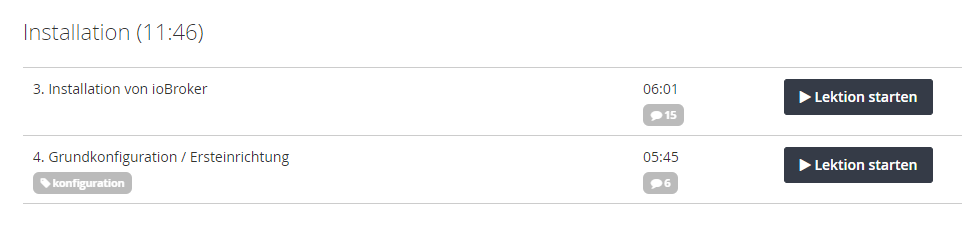
                                          9ae785f9-0261-4083-a5a9-d0e34825d4fe-image.png

                                          Auf jedenfall waren diese Befehle dabei:
                                          sudo apt update
                                          sudo apt full-upgrade

                                          sudo apt install curl

                                          curl -sLf https://iobroker.net/install.sh | bash -

                                          Beantwortet das ungefähr deine Frage?

                                          HomoranH 1 Antwort Letzte Antwort
                                          0
                                          Antworten
                                          • In einem neuen Thema antworten
                                          Anmelden zum Antworten
                                          • Älteste zuerst
                                          • Neuste zuerst
                                          • Meiste Stimmen


                                          Support us

                                          ioBroker
                                          Community Adapters
                                          Donate
                                          FAQ Cloud / IOT
                                          HowTo: Node.js-Update
                                          HowTo: Backup/Restore
                                          Downloads
                                          BLOG

                                          839

                                          Online

                                          32.5k

                                          Benutzer

                                          81.8k

                                          Themen

                                          1.3m

                                          Beiträge
                                          Community
                                          Impressum | Datenschutz-Bestimmungen | Nutzungsbedingungen | Einwilligungseinstellungen
                                          ioBroker Community 2014-2025
                                          logo
                                          • Anmelden

                                          • Du hast noch kein Konto? Registrieren

                                          • Anmelden oder registrieren, um zu suchen
                                          • Erster Beitrag
                                            Letzter Beitrag
                                          0
                                          • Home
                                          • Aktuell
                                          • Tags
                                          • Ungelesen 0
                                          • Kategorien
                                          • Unreplied
                                          • Beliebt
                                          • GitHub
                                          • Docu
                                          • Hilfe

