



Skip to content
  • Home
  • Aktuell
  • Tags
  • 0 Ungelesen 0
  • Kategorien
  • Unreplied
  • Beliebt
  • GitHub
  • Docu
  • Hilfe
Skins
  • Light
  • Brite
  • Cerulean
  • Cosmo
  • Flatly
  • Journal
  • Litera
  • Lumen
  • Lux
  • Materia
  • Minty
  • Morph
  • Pulse
  • Sandstone
  • Simplex
  • Sketchy
  • Spacelab
  • United
  • Yeti
  • Zephyr
  • Dark
  • Cyborg
  • Darkly
  • Quartz
  • Slate
  • Solar
  • Superhero
  • Vapor

  • Standard: (Kein Skin)
  • Kein Skin
Einklappen
ioBroker Logo

Community Forum

donate donate
  1. ioBroker Community Home
  2. Deutsch
  3. Einsteigerfragen
  4. Probleme mit Repositories und RAM Auslastung
NEWS

  • Jahresrückblick 2025 – unser neuer Blogbeitrag ist online! ✨
    BluefoxB
    Bluefox
    17
    1
    3.6k

  • Neuer Blogbeitrag: Monatsrückblick - Dezember 2025 🎄
    BluefoxB
    Bluefox
    13
    1
    1.2k

  • Weihnachtsangebot 2025! 🎄
    BluefoxB
    Bluefox
    25
    1
    2.5k

Probleme mit Repositories und RAM Auslastung

Geplant Angeheftet Gesperrt Verschoben Einsteigerfragen
repositoryiobroker shelly
44 Beiträge 7 Kommentatoren 4.2k Aufrufe 6 Watching
  • Älteste zuerst
  • Neuste zuerst
  • Meiste Stimmen
Antworten
  • In einem neuen Thema antworten
Anmelden zum Antworten
Dieses Thema wurde gelöscht. Nur Nutzer mit entsprechenden Rechten können es sehen.
  • P paddy89

    @guergen Wahrscheinlich liegt es an der Unwissenheit?
    Ich hatte das glaube ich am Anfang mal versucht. Hat aber irgendwie nicht so richtig funktioniert.
    Was schlägst du vor?

    @Thomas Braun
    Ja richtig. In meinen Augen mehr als ausreichend.
    Im Grunde möchte ich nur die Werte live sehen, bisschen schalten können und gernze noch die Daten loggen. Das bekomme ich aber noch nicht hin.
    Wie meinst du das? "Wie bist du da ansonsten unterwegs?"
    Hier der Auszug:

    code_text
    ======== Start marking the full check here =========
    
    
    Skript v.2023-10-10
    
    *** BASE SYSTEM ***
      Static hostname: SmartHome01
            Icon name: computer
     Operating System: Raspbian GNU/Linux 11 (bullseye)
               Kernel: Linux 5.15.76-v7+
         Architecture: arm
    
    Model           : Raspberry Pi 3 Model B Plus Rev 1.3
    Docker          : false
    Virtualization  : none
    Kernel          : armv7l
    Userland        : armhf
    
    Systemuptime and Load:
    11:38:30 up 20 days, 22:26,  1 user,  load average: 0.42, 0.58, 0.34
    CPU threads: 4
    
    
    *** RASPBERRY THROTTLING ***
    Current issues:
    No throttling issues detected.
    
    Previously detected issues:
    No throttling issues detected.
    
    *** Time and Time Zones ***
                  Local time: Tue 2024-02-13 11:38:31 CET
              Universal time: Tue 2024-02-13 10:38:31 UTC
                    RTC time: n/a
                   Time zone: Europe/Berlin (CET, +0100)
    System clock synchronized: yes
                 NTP service: active
             RTC in local TZ: no
    
    *** User and Groups ***
    pi
    /home/pi
    pi adm dialout cdrom sudo audio video plugdev games users input render netdev gpio i2c spi iobroker
    
    *** X-Server-Setup ***
    X-Server:       false
    Desktop:
    Terminal:       tty
    Boot Target:    multi-user.target
    
    *** MEMORY ***
                  total        used        free      shared  buff/cache   available
    Mem:            922M        478M        117M        0.0K        325M        404M
    Swap:            99M         63M         36M
    Total:          1.0G        542M        154M
    
             922 M total memory
             479 M used memory
             250 M active memory
             479 M inactive memory
             117 M free memory
              42 M buffer memory
             282 M swap cache
              99 M total swap
              63 M used swap
              36 M free swap
    
    Raspberry only:
    oom events: 0
    lifetime oom required: 0 Mbytes
    total time in oom handler: 0 ms
    max time spent in oom handler: 0 ms
    
    *** FAILED SERVICES ***
    
     UNIT                          LOAD   ACTIVE SUB    DESCRIPTION
    * systemd-journal-flush.service loaded failed failed Flush Journal to Persistent Storage
    
    LOAD   = Reflects whether the unit definition was properly loaded.
    ACTIVE = The high-level unit activation state, i.e. generalization of SUB.
    SUB    = The low-level unit activation state, values depend on unit type.
    1 loaded units listed.
    
    *** FILESYSTEM ***
    Filesystem     Type      Size  Used Avail Use% Mounted on
    /dev/root      ext4       14G  4.1G  9.4G  31% /
    devtmpfs       devtmpfs  333M     0  333M   0% /dev
    tmpfs          tmpfs     462M     0  462M   0% /dev/shm
    tmpfs          tmpfs     185M  996K  184M   1% /run
    tmpfs          tmpfs     5.0M  4.0K  5.0M   1% /run/lock
    /dev/mmcblk0p1 vfat      255M   50M  206M  20% /boot
    tmpfs          tmpfs      93M     0   93M   0% /run/user/1000
    
    Messages concerning ext4 filesystem in dmesg:
    [Tue Jan 23 13:11:56 2024] Kernel command line: coherent_pool=1M 8250.nr_uarts=1 snd_bcm2835.enable_compat_alsa=0 snd_bcm2835.enable_hdmi=1 video=Composite-1:720x480@60i vc_mem.mem_base=0x3ec00000 vc_mem.mem_size=0x40000000  console=tty1 root=PARTUUID=92f8759a-02 rootfstype=ext4 fsck.repair=yes rootwait
    [Tue Jan 23 13:11:59 2024] EXT4-fs (mmcblk0p2): INFO: recovery required on readonly filesystem
    [Tue Jan 23 13:11:59 2024] EXT4-fs (mmcblk0p2): write access will be enabled during recovery
    [Tue Jan 23 13:11:59 2024] EXT4-fs (mmcblk0p2): orphan cleanup on readonly fs
    [Tue Jan 23 13:11:59 2024] EXT4-fs (mmcblk0p2): 7 orphan inodes deleted
    [Tue Jan 23 13:11:59 2024] EXT4-fs (mmcblk0p2): recovery complete
    [Tue Jan 23 13:11:59 2024] EXT4-fs (mmcblk0p2): mounted filesystem with ordered data mode. Opts: (null). Quota mode: none.
    [Tue Jan 23 13:11:59 2024] VFS: Mounted root (ext4 filesystem) readonly on device 179:2.
    [Tue Jan 23 13:12:03 2024] EXT4-fs (mmcblk0p2): re-mounted. Opts: (null). Quota mode: none.
    
    Show mounted filesystems \(real ones only\):
    TARGET  SOURCE         FSTYPE OPTIONS
    /       /dev/mmcblk0p2 ext4   rw,noatime
    `-/boot /dev/mmcblk0p1 vfat   rw,relatime,fmask=0022,dmask=0022,codepage=437,iocharset=ascii,shortname=mixed,errors=remount-ro
    
    Files in neuralgic directories:
    
    /var:
    1.7G    /var/
    987M    /var/log
    985M    /var/log/journal/ec16586e65944846a75af4f859fe7f90
    985M    /var/log/journal
    345M    /var/cache
    
    Archived and active journals take up 984.1M in the file system.
    
    /opt/iobroker/backups:
    55M     /opt/iobroker/backups/
    24K     /opt/iobroker/backups/0
    
    /opt/iobroker/iobroker-data:
    199M    /opt/iobroker/iobroker-data/
    141M    /opt/iobroker/iobroker-data/history
    48M     /opt/iobroker/iobroker-data/files
    13M     /opt/iobroker/iobroker-data/files/admin.admin/custom/static/js
    13M     /opt/iobroker/iobroker-data/files/admin.admin/custom/static
    
    The five largest files in iobroker-data are:
    6.3M    /opt/iobroker/iobroker-data/files/admin.admin/custom/static/js/vendors-node_modules_iobroker_adapter-react-v5_assets_devices_parseNames_js-node_modules_iobr-99c23e.847b8ad9.chunk.js.map
    5.4M    /opt/iobroker/iobroker-data/objects.jsonl
    4.4M    /opt/iobroker/iobroker-data/files/jarvis/js/vendor.3ed67ef3.js
    2.8M    /opt/iobroker/iobroker-data/files/web.admin/static/js/2.20ad3cfd.chunk.js.map
    2.8M    /opt/iobroker/iobroker-data/files/admin.admin/custom/static/js/vendors-node_modules_iobroker_adapter-react-v5_assets_devices_parseNames_js-node_modules_iobr-99c23e.847b8ad9.chunk.js
    
    USB-Devices by-id:
    USB-Sticks -  Avoid direct links to /dev/* in your adapter setups, please always prefer the links 'by-id':
    
    find: '/dev/serial/by-id/': No such file or directory
    
    *** NodeJS-Installation ***
    
    bash: line 277: nodejs: command not found
    
    /usr/bin/node           v16.18.1
    /usr/bin/npm            8.19.2
    /usr/bin/npx            8.19.2
    /usr/bin/corepack       0.14.1
    bash: line 288: nodejs: command not found
    *** nodejs is NOT correctly installed ***
    
    nodejs:
     Installed: 16.18.1-deb-1nodesource1
     Candidate: 16.20.2-deb-1nodesource1
     Version table:
        16.20.2-deb-1nodesource1 500
           500 https://deb.nodesource.com/node_16.x bullseye/main armhf Packages
    *** 16.18.1-deb-1nodesource1 100
           100 /var/lib/dpkg/status
        12.22.12~dfsg-1~deb11u4 500
           500 http://raspbian.raspberrypi.org/raspbian bullseye/main armhf Packages
    
    Temp directories causing npm8 problem: 0
    No problems detected
    
    Errors in npm tree:
    
    *** ioBroker-Installation ***
    
    ioBroker Status
    iobroker is running on this host.
    
    
    Objects type: jsonl
    States  type: jsonl
    
    Core adapters versions
    js-controller:  4.0.23
    admin:          6.2.23
    javascript:     "javascript" not found
    
    Adapters from github:   0
    
    Adapter State
    + system.adapter.admin.0                  : admin                 : SmartHome01                              -  enabled, port: 8081, bind: 0.0.0.0, run as: admin
    + system.adapter.backitup.0               : backitup              : SmartHome01                              -  enabled
     system.adapter.discovery.0              : discovery             : SmartHome01                              - disabled
     system.adapter.flot.0                   : flot                  : SmartHome01                              -  enabled
     system.adapter.fritzdect.0              : fritzdect             : SmartHome01                              - disabled
    + system.adapter.history.0                : history               : SmartHome01                              -  enabled
     system.adapter.icons-addictive-flavour-png.0: icons-addictive-flavour-png: SmartHome01                              - disabled
     system.adapter.jarvis.0                 : jarvis                : SmartHome01                              - disabled
    + system.adapter.lovelace.0               : lovelace              : SmartHome01                              -  enabled, port: 8091, bind: 0.0.0.0, run as: admin
     system.adapter.mihome.0                 : mihome                : SmartHome01                              - disabled, port: 9898, bind: 0.0.0.0
    + system.adapter.shelly.0                 : shelly                : SmartHome01                              -  enabled, port: 1882, bind: 0.0.0.0
    + system.adapter.shelly.1                 : shelly                : SmartHome01                              -  enabled, port: 1882, bind: 0.0.0.0
    + system.adapter.shelly.2                 : shelly                : SmartHome01                              -  enabled, port: 1882, bind: 0.0.0.0
    + system.adapter.shelly.3                 : shelly                : SmartHome01                              -  enabled, port: 1882, bind: 0.0.0.0
    + system.adapter.simple-api.0             : simple-api            : SmartHome01                              -  enabled, port: 8087, bind: 0.0.0.0, run as: admin
    + system.adapter.smartmeter.0             : smartmeter            : SmartHome01                              -  enabled
     system.adapter.sonoff.0                 : sonoff                : SmartHome01                              - disabled, port: 1883, bind: 0.0.0.0
     system.adapter.sonoff.1                 : sonoff                : SmartHome01                              - disabled, port: 1884, bind: 0.0.0.0
    + system.adapter.web.0                    : web                   : SmartHome01                              -  enabled, port: 8082, bind: 0.0.0.0, run as: admin
    + system.adapter.xterm.0                  : xterm                 : SmartHome01                              -  enabled, port: 8099, bind: 0.0.0.0
    + system.adapter.yeelight-2.1             : yeelight-2            : SmartHome01                              -  enabled
    
    + instance is alive
    
    Enabled adapters with bindings
    + system.adapter.admin.0                  : admin                 : SmartHome01                              -  enabled, port: 8081, bind: 0.0.0.0, run as: admin
    + system.adapter.lovelace.0               : lovelace              : SmartHome01                              -  enabled, port: 8091, bind: 0.0.0.0, run as: admin
    + system.adapter.shelly.0                 : shelly                : SmartHome01                              -  enabled, port: 1882, bind: 0.0.0.0
    + system.adapter.shelly.1                 : shelly                : SmartHome01                              -  enabled, port: 1882, bind: 0.0.0.0
    + system.adapter.shelly.2                 : shelly                : SmartHome01                              -  enabled, port: 1882, bind: 0.0.0.0
    + system.adapter.shelly.3                 : shelly                : SmartHome01                              -  enabled, port: 1882, bind: 0.0.0.0
    + system.adapter.simple-api.0             : simple-api            : SmartHome01                              -  enabled, port: 8087, bind: 0.0.0.0, run as: admin
    + system.adapter.web.0                    : web                   : SmartHome01                              -  enabled, port: 8082, bind: 0.0.0.0, run as: admin
    + system.adapter.xterm.0                  : xterm                 : SmartHome01                              -  enabled, port: 8099, bind: 0.0.0.0
    
    ioBroker-Repositories
    List is empty
    
    Installed ioBroker-Instances
    Error: Object "system.repositories" not found
    
    Objects and States
    Please stand by - This may take a while
    Objects:        2288
    States:         1780
    
    *** OS-Repositories and Updates ***
    Hit:1 http://archive.raspberrypi.org/debian bullseye InRelease
    Hit:2 http://raspbian.raspberrypi.org/raspbian bullseye InRelease
    Hit:3 https://deb.nodesource.com/node_16.x bullseye InRelease
    Reading package lists... Done


    ======================= SUMMARY =======================
                            v.2023-10-10
    
    
       Static hostname: SmartHome01
             Icon name: computer
      Operating System: Raspbian GNU/Linux 11 (bullseye)
                Kernel: Linux 5.15.76-v7+
          Architecture: arm
    
    Installation:           native
    Kernel:                 armv7l
    Userland:               armhf
    Timezone:               Europe/Berlin (CET, +0100)
    User-ID:                1000
    X-Server:               false
    Boot Target:            multi-user.target
    
    Pending OS-Updates:     148
    Error: Object "system.repositories" not found
    Pending iob updates:    0
    
    bash: line 486: nodejs: command not found
    Nodejs-Installation:
                            /usr/bin/node           v16.18.1
                            /usr/bin/npm            8.19.2
                            /usr/bin/npx            8.19.2
                            /usr/bin/corepack       0.14.1
    
    Recommended versions are nodejs 16.20.2 and npm 8.19.4
    *** nodejs is NOT correctly installed ***
    Wrong installation path detected. This needs to be fixed.
    
    Please check
    https://forum.iobroker.net/topic/35090/howto-nodejs-installation-und-upgrades-unter-debian
    for more information on how to fix these errors.
    
    MEMORY:
                   total        used        free      shared  buff/cache   available
    Mem:            922M        477M        119M        0.0K        325M        398M
    Swap:            99M         63M         36M
    Total:          1.0G        540M        156M
    
    Active iob-Instances:   14
    List is empty
    
    ioBroker Core:          js-controller           4.0.23
                            admin                   6.2.23
    
    ioBroker Status:        iobroker is running on this host.
    
    
    Objects type: jsonl
    States  type: jsonl
    
    Status admin and web instance:
    + system.adapter.admin.0                  : admin                 : SmartHome01                              -  enabled, port: 8081, bind: 0.0.0.0, run as: admin
    + system.adapter.web.0                    : web                   : SmartHome01                              -  enabled, port: 8082, bind: 0.0.0.0, run as: admin
    
    Objects:                2288
    States:                 1780
    
    Size of iob-Database:
    
    5.4M    /opt/iobroker/iobroker-data/objects.jsonl
    828K    /opt/iobroker/iobroker-data/states.jsonl


    =================== END OF SUMMARY ====================


    HomoranH Nicht stören
    HomoranH Nicht stören
    Homoran
    Global Moderator Administrators
    schrieb am zuletzt editiert von
    #7

    @paddy89 sagte in Probleme mit Repositories und RAM Auslastung:

    In meinen Augen mehr als ausreichend.

    meint das der Pi auch? :grin:

    @paddy89 sagte in Probleme mit Repositories und RAM Auslastung:

    Hier der Auszug:

    bitte vollständig.
    Für die Problemanalyse fehlt noch einiges

    kein Support per PN! - Fragen im Forum stellen - es gibt fast nichts, was nicht auch für andere interessant ist.

    Benutzt das Voting rechts unten im Beitrag wenn er euch geholfen hat.

    der Installationsfixer: curl -fsL https://iobroker.net/fix.sh | bash -

    P 1 Antwort Letzte Antwort
    0
    • HomoranH Homoran

      @paddy89 sagte in Probleme mit Repositories und RAM Auslastung:

      In meinen Augen mehr als ausreichend.

      meint das der Pi auch? :grin:

      @paddy89 sagte in Probleme mit Repositories und RAM Auslastung:

      Hier der Auszug:

      bitte vollständig.
      Für die Problemanalyse fehlt noch einiges

      P Offline
      P Offline
      paddy89
      schrieb am zuletzt editiert von paddy89
      #8

      @homoran in der tat hatte er das nicht ganz durchgeführt. Habe nun beide Ausgaben ergänzt oben.
      Hier stehen die repos. nun drin.

      Thomas BraunT 1 Antwort Letzte Antwort
      0
      • P paddy89

        @homoran in der tat hatte er das nicht ganz durchgeführt. Habe nun beide Ausgaben ergänzt oben.
        Hier stehen die repos. nun drin.

        Thomas BraunT Online
        Thomas BraunT Online
        Thomas Braun
        Most Active
        schrieb am zuletzt editiert von
        #9

        @paddy89 sagte in Probleme mit Repositories und RAM Auslastung:

        Habe nun beide Ausgaben ergänzt oben.
        Hier stehen die repos. nun drin.

        Immer noch nicht vollständig.

        Linux-Werkzeugkasten:
        https://forum.iobroker.net/topic/42952/der-kleine-iobroker-linux-werkzeugkasten
        NodeJS Fixer Skript:
        https://forum.iobroker.net/topic/68035/iob-node-fix-skript
        iob_diag: curl -sLf -o diag.sh https://iobroker.net/diag.sh && bash diag.sh

        P 1 Antwort Letzte Antwort
        0
        • P paddy89

          @guergen Wahrscheinlich liegt es an der Unwissenheit?
          Ich hatte das glaube ich am Anfang mal versucht. Hat aber irgendwie nicht so richtig funktioniert.
          Was schlägst du vor?

          @Thomas Braun
          Ja richtig. In meinen Augen mehr als ausreichend.
          Im Grunde möchte ich nur die Werte live sehen, bisschen schalten können und gernze noch die Daten loggen. Das bekomme ich aber noch nicht hin.
          Wie meinst du das? "Wie bist du da ansonsten unterwegs?"
          Hier der Auszug:

          code_text
          ======== Start marking the full check here =========
          
          
          Skript v.2023-10-10
          
          *** BASE SYSTEM ***
            Static hostname: SmartHome01
                  Icon name: computer
           Operating System: Raspbian GNU/Linux 11 (bullseye)
                     Kernel: Linux 5.15.76-v7+
               Architecture: arm
          
          Model           : Raspberry Pi 3 Model B Plus Rev 1.3
          Docker          : false
          Virtualization  : none
          Kernel          : armv7l
          Userland        : armhf
          
          Systemuptime and Load:
          11:38:30 up 20 days, 22:26,  1 user,  load average: 0.42, 0.58, 0.34
          CPU threads: 4
          
          
          *** RASPBERRY THROTTLING ***
          Current issues:
          No throttling issues detected.
          
          Previously detected issues:
          No throttling issues detected.
          
          *** Time and Time Zones ***
                        Local time: Tue 2024-02-13 11:38:31 CET
                    Universal time: Tue 2024-02-13 10:38:31 UTC
                          RTC time: n/a
                         Time zone: Europe/Berlin (CET, +0100)
          System clock synchronized: yes
                       NTP service: active
                   RTC in local TZ: no
          
          *** User and Groups ***
          pi
          /home/pi
          pi adm dialout cdrom sudo audio video plugdev games users input render netdev gpio i2c spi iobroker
          
          *** X-Server-Setup ***
          X-Server:       false
          Desktop:
          Terminal:       tty
          Boot Target:    multi-user.target
          
          *** MEMORY ***
                        total        used        free      shared  buff/cache   available
          Mem:            922M        478M        117M        0.0K        325M        404M
          Swap:            99M         63M         36M
          Total:          1.0G        542M        154M
          
                   922 M total memory
                   479 M used memory
                   250 M active memory
                   479 M inactive memory
                   117 M free memory
                    42 M buffer memory
                   282 M swap cache
                    99 M total swap
                    63 M used swap
                    36 M free swap
          
          Raspberry only:
          oom events: 0
          lifetime oom required: 0 Mbytes
          total time in oom handler: 0 ms
          max time spent in oom handler: 0 ms
          
          *** FAILED SERVICES ***
          
           UNIT                          LOAD   ACTIVE SUB    DESCRIPTION
          * systemd-journal-flush.service loaded failed failed Flush Journal to Persistent Storage
          
          LOAD   = Reflects whether the unit definition was properly loaded.
          ACTIVE = The high-level unit activation state, i.e. generalization of SUB.
          SUB    = The low-level unit activation state, values depend on unit type.
          1 loaded units listed.
          
          *** FILESYSTEM ***
          Filesystem     Type      Size  Used Avail Use% Mounted on
          /dev/root      ext4       14G  4.1G  9.4G  31% /
          devtmpfs       devtmpfs  333M     0  333M   0% /dev
          tmpfs          tmpfs     462M     0  462M   0% /dev/shm
          tmpfs          tmpfs     185M  996K  184M   1% /run
          tmpfs          tmpfs     5.0M  4.0K  5.0M   1% /run/lock
          /dev/mmcblk0p1 vfat      255M   50M  206M  20% /boot
          tmpfs          tmpfs      93M     0   93M   0% /run/user/1000
          
          Messages concerning ext4 filesystem in dmesg:
          [Tue Jan 23 13:11:56 2024] Kernel command line: coherent_pool=1M 8250.nr_uarts=1 snd_bcm2835.enable_compat_alsa=0 snd_bcm2835.enable_hdmi=1 video=Composite-1:720x480@60i vc_mem.mem_base=0x3ec00000 vc_mem.mem_size=0x40000000  console=tty1 root=PARTUUID=92f8759a-02 rootfstype=ext4 fsck.repair=yes rootwait
          [Tue Jan 23 13:11:59 2024] EXT4-fs (mmcblk0p2): INFO: recovery required on readonly filesystem
          [Tue Jan 23 13:11:59 2024] EXT4-fs (mmcblk0p2): write access will be enabled during recovery
          [Tue Jan 23 13:11:59 2024] EXT4-fs (mmcblk0p2): orphan cleanup on readonly fs
          [Tue Jan 23 13:11:59 2024] EXT4-fs (mmcblk0p2): 7 orphan inodes deleted
          [Tue Jan 23 13:11:59 2024] EXT4-fs (mmcblk0p2): recovery complete
          [Tue Jan 23 13:11:59 2024] EXT4-fs (mmcblk0p2): mounted filesystem with ordered data mode. Opts: (null). Quota mode: none.
          [Tue Jan 23 13:11:59 2024] VFS: Mounted root (ext4 filesystem) readonly on device 179:2.
          [Tue Jan 23 13:12:03 2024] EXT4-fs (mmcblk0p2): re-mounted. Opts: (null). Quota mode: none.
          
          Show mounted filesystems \(real ones only\):
          TARGET  SOURCE         FSTYPE OPTIONS
          /       /dev/mmcblk0p2 ext4   rw,noatime
          `-/boot /dev/mmcblk0p1 vfat   rw,relatime,fmask=0022,dmask=0022,codepage=437,iocharset=ascii,shortname=mixed,errors=remount-ro
          
          Files in neuralgic directories:
          
          /var:
          1.7G    /var/
          987M    /var/log
          985M    /var/log/journal/ec16586e65944846a75af4f859fe7f90
          985M    /var/log/journal
          345M    /var/cache
          
          Archived and active journals take up 984.1M in the file system.
          
          /opt/iobroker/backups:
          55M     /opt/iobroker/backups/
          24K     /opt/iobroker/backups/0
          
          /opt/iobroker/iobroker-data:
          199M    /opt/iobroker/iobroker-data/
          141M    /opt/iobroker/iobroker-data/history
          48M     /opt/iobroker/iobroker-data/files
          13M     /opt/iobroker/iobroker-data/files/admin.admin/custom/static/js
          13M     /opt/iobroker/iobroker-data/files/admin.admin/custom/static
          
          The five largest files in iobroker-data are:
          6.3M    /opt/iobroker/iobroker-data/files/admin.admin/custom/static/js/vendors-node_modules_iobroker_adapter-react-v5_assets_devices_parseNames_js-node_modules_iobr-99c23e.847b8ad9.chunk.js.map
          5.4M    /opt/iobroker/iobroker-data/objects.jsonl
          4.4M    /opt/iobroker/iobroker-data/files/jarvis/js/vendor.3ed67ef3.js
          2.8M    /opt/iobroker/iobroker-data/files/web.admin/static/js/2.20ad3cfd.chunk.js.map
          2.8M    /opt/iobroker/iobroker-data/files/admin.admin/custom/static/js/vendors-node_modules_iobroker_adapter-react-v5_assets_devices_parseNames_js-node_modules_iobr-99c23e.847b8ad9.chunk.js
          
          USB-Devices by-id:
          USB-Sticks -  Avoid direct links to /dev/* in your adapter setups, please always prefer the links 'by-id':
          
          find: '/dev/serial/by-id/': No such file or directory
          
          *** NodeJS-Installation ***
          
          bash: line 277: nodejs: command not found
          
          /usr/bin/node           v16.18.1
          /usr/bin/npm            8.19.2
          /usr/bin/npx            8.19.2
          /usr/bin/corepack       0.14.1
          bash: line 288: nodejs: command not found
          *** nodejs is NOT correctly installed ***
          
          nodejs:
           Installed: 16.18.1-deb-1nodesource1
           Candidate: 16.20.2-deb-1nodesource1
           Version table:
              16.20.2-deb-1nodesource1 500
                 500 https://deb.nodesource.com/node_16.x bullseye/main armhf Packages
          *** 16.18.1-deb-1nodesource1 100
                 100 /var/lib/dpkg/status
              12.22.12~dfsg-1~deb11u4 500
                 500 http://raspbian.raspberrypi.org/raspbian bullseye/main armhf Packages
          
          Temp directories causing npm8 problem: 0
          No problems detected
          
          Errors in npm tree:
          
          *** ioBroker-Installation ***
          
          ioBroker Status
          iobroker is running on this host.
          
          
          Objects type: jsonl
          States  type: jsonl
          
          Core adapters versions
          js-controller:  4.0.23
          admin:          6.2.23
          javascript:     "javascript" not found
          
          Adapters from github:   0
          
          Adapter State
          + system.adapter.admin.0                  : admin                 : SmartHome01                              -  enabled, port: 8081, bind: 0.0.0.0, run as: admin
          + system.adapter.backitup.0               : backitup              : SmartHome01                              -  enabled
           system.adapter.discovery.0              : discovery             : SmartHome01                              - disabled
           system.adapter.flot.0                   : flot                  : SmartHome01                              -  enabled
           system.adapter.fritzdect.0              : fritzdect             : SmartHome01                              - disabled
          + system.adapter.history.0                : history               : SmartHome01                              -  enabled
           system.adapter.icons-addictive-flavour-png.0: icons-addictive-flavour-png: SmartHome01                              - disabled
           system.adapter.jarvis.0                 : jarvis                : SmartHome01                              - disabled
          + system.adapter.lovelace.0               : lovelace              : SmartHome01                              -  enabled, port: 8091, bind: 0.0.0.0, run as: admin
           system.adapter.mihome.0                 : mihome                : SmartHome01                              - disabled, port: 9898, bind: 0.0.0.0
          + system.adapter.shelly.0                 : shelly                : SmartHome01                              -  enabled, port: 1882, bind: 0.0.0.0
          + system.adapter.shelly.1                 : shelly                : SmartHome01                              -  enabled, port: 1882, bind: 0.0.0.0
          + system.adapter.shelly.2                 : shelly                : SmartHome01                              -  enabled, port: 1882, bind: 0.0.0.0
          + system.adapter.shelly.3                 : shelly                : SmartHome01                              -  enabled, port: 1882, bind: 0.0.0.0
          + system.adapter.simple-api.0             : simple-api            : SmartHome01                              -  enabled, port: 8087, bind: 0.0.0.0, run as: admin
          + system.adapter.smartmeter.0             : smartmeter            : SmartHome01                              -  enabled
           system.adapter.sonoff.0                 : sonoff                : SmartHome01                              - disabled, port: 1883, bind: 0.0.0.0
           system.adapter.sonoff.1                 : sonoff                : SmartHome01                              - disabled, port: 1884, bind: 0.0.0.0
          + system.adapter.web.0                    : web                   : SmartHome01                              -  enabled, port: 8082, bind: 0.0.0.0, run as: admin
          + system.adapter.xterm.0                  : xterm                 : SmartHome01                              -  enabled, port: 8099, bind: 0.0.0.0
          + system.adapter.yeelight-2.1             : yeelight-2            : SmartHome01                              -  enabled
          
          + instance is alive
          
          Enabled adapters with bindings
          + system.adapter.admin.0                  : admin                 : SmartHome01                              -  enabled, port: 8081, bind: 0.0.0.0, run as: admin
          + system.adapter.lovelace.0               : lovelace              : SmartHome01                              -  enabled, port: 8091, bind: 0.0.0.0, run as: admin
          + system.adapter.shelly.0                 : shelly                : SmartHome01                              -  enabled, port: 1882, bind: 0.0.0.0
          + system.adapter.shelly.1                 : shelly                : SmartHome01                              -  enabled, port: 1882, bind: 0.0.0.0
          + system.adapter.shelly.2                 : shelly                : SmartHome01                              -  enabled, port: 1882, bind: 0.0.0.0
          + system.adapter.shelly.3                 : shelly                : SmartHome01                              -  enabled, port: 1882, bind: 0.0.0.0
          + system.adapter.simple-api.0             : simple-api            : SmartHome01                              -  enabled, port: 8087, bind: 0.0.0.0, run as: admin
          + system.adapter.web.0                    : web                   : SmartHome01                              -  enabled, port: 8082, bind: 0.0.0.0, run as: admin
          + system.adapter.xterm.0                  : xterm                 : SmartHome01                              -  enabled, port: 8099, bind: 0.0.0.0
          
          ioBroker-Repositories
          List is empty
          
          Installed ioBroker-Instances
          Error: Object "system.repositories" not found
          
          Objects and States
          Please stand by - This may take a while
          Objects:        2288
          States:         1780
          
          *** OS-Repositories and Updates ***
          Hit:1 http://archive.raspberrypi.org/debian bullseye InRelease
          Hit:2 http://raspbian.raspberrypi.org/raspbian bullseye InRelease
          Hit:3 https://deb.nodesource.com/node_16.x bullseye InRelease
          Reading package lists... Done


          ======================= SUMMARY =======================
                                  v.2023-10-10
          
          
             Static hostname: SmartHome01
                   Icon name: computer
            Operating System: Raspbian GNU/Linux 11 (bullseye)
                      Kernel: Linux 5.15.76-v7+
                Architecture: arm
          
          Installation:           native
          Kernel:                 armv7l
          Userland:               armhf
          Timezone:               Europe/Berlin (CET, +0100)
          User-ID:                1000
          X-Server:               false
          Boot Target:            multi-user.target
          
          Pending OS-Updates:     148
          Error: Object "system.repositories" not found
          Pending iob updates:    0
          
          bash: line 486: nodejs: command not found
          Nodejs-Installation:
                                  /usr/bin/node           v16.18.1
                                  /usr/bin/npm            8.19.2
                                  /usr/bin/npx            8.19.2
                                  /usr/bin/corepack       0.14.1
          
          Recommended versions are nodejs 16.20.2 and npm 8.19.4
          *** nodejs is NOT correctly installed ***
          Wrong installation path detected. This needs to be fixed.
          
          Please check
          https://forum.iobroker.net/topic/35090/howto-nodejs-installation-und-upgrades-unter-debian
          for more information on how to fix these errors.
          
          MEMORY:
                         total        used        free      shared  buff/cache   available
          Mem:            922M        477M        119M        0.0K        325M        398M
          Swap:            99M         63M         36M
          Total:          1.0G        540M        156M
          
          Active iob-Instances:   14
          List is empty
          
          ioBroker Core:          js-controller           4.0.23
                                  admin                   6.2.23
          
          ioBroker Status:        iobroker is running on this host.
          
          
          Objects type: jsonl
          States  type: jsonl
          
          Status admin and web instance:
          + system.adapter.admin.0                  : admin                 : SmartHome01                              -  enabled, port: 8081, bind: 0.0.0.0, run as: admin
          + system.adapter.web.0                    : web                   : SmartHome01                              -  enabled, port: 8082, bind: 0.0.0.0, run as: admin
          
          Objects:                2288
          States:                 1780
          
          Size of iob-Database:
          
          5.4M    /opt/iobroker/iobroker-data/objects.jsonl
          828K    /opt/iobroker/iobroker-data/states.jsonl


          =================== END OF SUMMARY ====================


          HomoranH Nicht stören
          HomoranH Nicht stören
          Homoran
          Global Moderator Administrators
          schrieb am zuletzt editiert von Homoran
          #10

          @paddy89 sagte in Probleme mit Repositories und RAM Auslastung:

          ): 7 orphan inodes deleted

          dein Dateisystem hat einen Schuss abbekommen

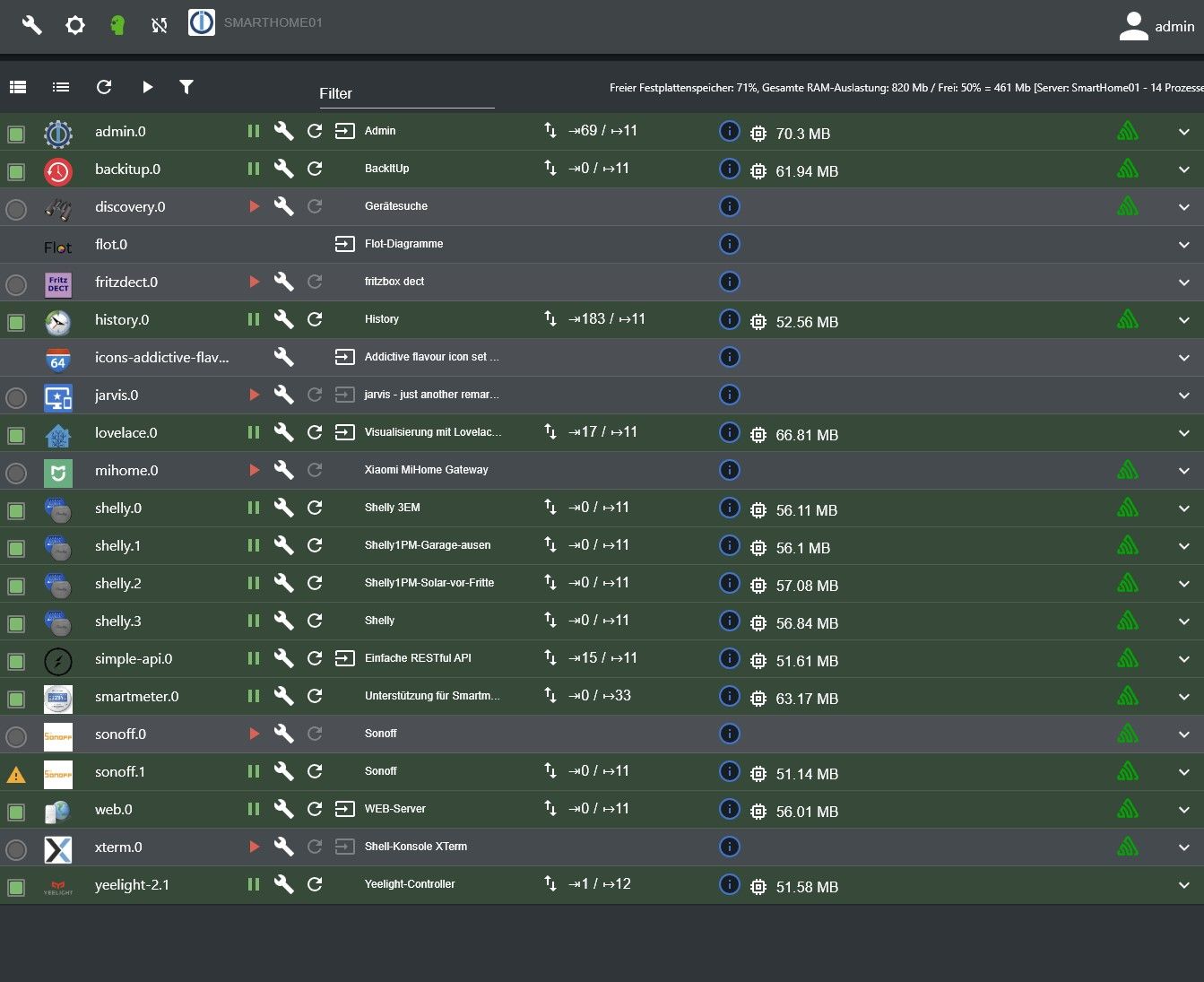
          und 13 aktive Instanzen (+scheduled) ist zu viel für 1GB RAM

          kein Support per PN! - Fragen im Forum stellen - es gibt fast nichts, was nicht auch für andere interessant ist.

          Benutzt das Voting rechts unten im Beitrag wenn er euch geholfen hat.

          der Installationsfixer: curl -fsL https://iobroker.net/fix.sh | bash -

          1 Antwort Letzte Antwort
          0
          • Thomas BraunT Thomas Braun

            @paddy89 sagte in Probleme mit Repositories und RAM Auslastung:

            Habe nun beide Ausgaben ergänzt oben.
            Hier stehen die repos. nun drin.

            Immer noch nicht vollständig.

            P Offline
            P Offline
            paddy89
            schrieb am zuletzt editiert von
            #11

            @thomas-braun was fehlt denn? Oder wie bekomme ich die ganze Ausgabe?

            HomoranH Thomas BraunT 2 Antworten Letzte Antwort
            0
            • P paddy89

              @thomas-braun was fehlt denn? Oder wie bekomme ich die ganze Ausgabe?

              HomoranH Nicht stören
              HomoranH Nicht stören
              Homoran
              Global Moderator Administrators
              schrieb am zuletzt editiert von
              #12

              @paddy89 sagte in Probleme mit Repositories und RAM Auslastung:

              Oder wie bekomme ich die ganze Ausgabe?

              warten!
              bei einem Pi3 mit 1GB dauert alles länger

              kein Support per PN! - Fragen im Forum stellen - es gibt fast nichts, was nicht auch für andere interessant ist.

              Benutzt das Voting rechts unten im Beitrag wenn er euch geholfen hat.

              der Installationsfixer: curl -fsL https://iobroker.net/fix.sh | bash -

              1 Antwort Letzte Antwort
              0
              • P paddy89

                @thomas-braun was fehlt denn? Oder wie bekomme ich die ganze Ausgabe?

                Thomas BraunT Online
                Thomas BraunT Online
                Thomas Braun
                Most Active
                schrieb am zuletzt editiert von
                #13

                @paddy89 sagte in Probleme mit Repositories und RAM Auslastung:

                Oder wie bekomme ich die ganze Ausgabe?

                Die komplette Ausgabe von der ersten bis zur letzten Kopiermarke kopieren?

                Linux-Werkzeugkasten:
                https://forum.iobroker.net/topic/42952/der-kleine-iobroker-linux-werkzeugkasten
                NodeJS Fixer Skript:
                https://forum.iobroker.net/topic/68035/iob-node-fix-skript
                iob_diag: curl -sLf -o diag.sh https://iobroker.net/diag.sh && bash diag.sh

                P 1 Antwort Letzte Antwort
                0
                • Thomas BraunT Thomas Braun

                  @paddy89 sagte in Probleme mit Repositories und RAM Auslastung:

                  Oder wie bekomme ich die ganze Ausgabe?

                  Die komplette Ausgabe von der ersten bis zur letzten Kopiermarke kopieren?

                  P Offline
                  P Offline
                  paddy89
                  schrieb am zuletzt editiert von
                  #14

                  @thomas-braun habs per Putty gemacht. Der Springt irgendwann in der Ansicht um bzw. cleart den Inhalt und zeigt nur noch die Zusammenfassung. Ich schaue nochmal.

                  Thomas BraunT 1 Antwort Letzte Antwort
                  0
                  • P paddy89

                    @thomas-braun habs per Putty gemacht. Der Springt irgendwann in der Ansicht um bzw. cleart den Inhalt und zeigt nur noch die Zusammenfassung. Ich schaue nochmal.

                    Thomas BraunT Online
                    Thomas BraunT Online
                    Thomas Braun
                    Most Active
                    schrieb am zuletzt editiert von
                    #15

                    @paddy89 sagte in Probleme mit Repositories und RAM Auslastung:

                    Der Springt irgendwann in der Ansicht um

                    Das tut 'der' aber nur, wenn eine Taste gedrückt wurde.

                    Von dem angeschossenen Dateisystem abgesehen ist da auch mal wieder akuter Update-Stau zu sehen...

                    iob stop
                    iob fix
                    iob nodejs-update
                    sudo reboot
                    iob update
                    iob upgrade all
                    iob stop
                    iob upgrade self
                    iob start
                    

                    Linux-Werkzeugkasten:
                    https://forum.iobroker.net/topic/42952/der-kleine-iobroker-linux-werkzeugkasten
                    NodeJS Fixer Skript:
                    https://forum.iobroker.net/topic/68035/iob-node-fix-skript
                    iob_diag: curl -sLf -o diag.sh https://iobroker.net/diag.sh && bash diag.sh

                    P 1 Antwort Letzte Antwort
                    0
                    • Thomas BraunT Thomas Braun

                      @paddy89 sagte in Probleme mit Repositories und RAM Auslastung:

                      Der Springt irgendwann in der Ansicht um

                      Das tut 'der' aber nur, wenn eine Taste gedrückt wurde.

                      Von dem angeschossenen Dateisystem abgesehen ist da auch mal wieder akuter Update-Stau zu sehen...

                      iob stop
                      iob fix
                      iob nodejs-update
                      sudo reboot
                      iob update
                      iob upgrade all
                      iob stop
                      iob upgrade self
                      iob start
                      
                      P Offline
                      P Offline
                      paddy89
                      schrieb am zuletzt editiert von paddy89
                      #16

                      @thomas-braun nein, auch ohne Tastendruck macht er das. Hab das ganze nun in eine Datei geschrieben.
                      Hier der Inhalt - Ist das nun alles?

                      *** iob diag is starting up, please wait ***
                      
                      *** ioBroker Diagnosis ***
                      
                      Please stretch the window of your terminal programm (puTTY) as wide as possible or switch to full screen
                      
                      The following checks may give hints to potential malconfigurations or errors, please post them in our forum:
                      
                      https://forum.iobroker.net
                      
                      Just copy and paste the Summary Page, including the ``` characters at start and end.
                      It helps us to help you!
                      
                      Press any key to continue
                      
                      ======== Start marking the full check here =========
                      
                      
                      Skript v.2023-10-10
                      
                      *** BASE SYSTEM ***
                        Static hostname: SmartHome01
                              Icon name: computer
                       Operating System: Raspbian GNU/Linux 11 (bullseye)
                                 Kernel: Linux 5.15.76-v7+
                           Architecture: arm
                      
                      Model		: Raspberry Pi 3 Model B Plus Rev 1.3
                      Docker          : false
                      Virtualization  : none
                      Kernel          : armv7l
                      Userland        : armhf
                      
                      Systemuptime and Load:
                      12:05:07 up 20 days, 22:53,  1 user,  load average: 0.36, 0.17, 0.23
                      CPU threads: 4
                      
                      
                      *** RASPBERRY THROTTLING ***
                      Current issues:
                      No throttling issues detected.
                      
                      Previously detected issues:
                      No throttling issues detected.
                      
                      *** Time and Time Zones ***
                                    Local time: Tue 2024-02-13 12:05:07 CET
                                Universal time: Tue 2024-02-13 11:05:07 UTC
                                      RTC time: n/a
                                     Time zone: Europe/Berlin (CET, +0100)
                      System clock synchronized: yes
                                   NTP service: active
                               RTC in local TZ: no
                      
                      *** User and Groups ***
                      pi
                      /home/pi
                      pi adm dialout cdrom sudo audio video plugdev games users input render netdev gpio i2c spi iobroker
                      
                      *** X-Server-Setup ***
                      X-Server: 	false
                      Desktop: 	
                      Terminal: 	tty
                      Boot Target: 	multi-user.target
                      
                      *** MEMORY ***
                                    total        used        free      shared  buff/cache   available
                      Mem:            922M        489M         90M        0.0K        341M        401M
                      Swap:            99M         63M         36M
                      Total:          1.0G        552M        127M
                      
                               922 M total memory
                               489 M used memory
                               266 M active memory
                               487 M inactive memory
                                90 M free memory
                                45 M buffer memory
                               296 M swap cache
                                99 M total swap
                                63 M used swap
                                36 M free swap
                      
                      Raspberry only:
                      oom events: 0
                      lifetime oom required: 0 Mbytes
                      total time in oom handler: 0 ms
                      max time spent in oom handler: 0 ms
                      
                      *** FAILED SERVICES ***
                      
                       UNIT                          LOAD   ACTIVE SUB    DESCRIPTION
                      * systemd-journal-flush.service loaded failed failed Flush Journal to Persistent Storage
                      
                      LOAD   = Reflects whether the unit definition was properly loaded.
                      ACTIVE = The high-level unit activation state, i.e. generalization of SUB.
                      SUB    = The low-level unit activation state, values depend on unit type.
                      1 loaded units listed.
                      
                      *** FILESYSTEM ***
                      Filesystem     Type      Size  Used Avail Use% Mounted on
                      /dev/root      ext4       14G  4.1G  9.4G  31% /
                      devtmpfs       devtmpfs  333M     0  333M   0% /dev
                      tmpfs          tmpfs     462M     0  462M   0% /dev/shm
                      tmpfs          tmpfs     185M  996K  184M   1% /run
                      tmpfs          tmpfs     5.0M  4.0K  5.0M   1% /run/lock
                      /dev/mmcblk0p1 vfat      255M   50M  206M  20% /boot
                      tmpfs          tmpfs      93M     0   93M   0% /run/user/1000
                      
                      Messages concerning ext4 filesystem in dmesg:
                      [Tue Jan 23 13:11:56 2024] Kernel command line: coherent_pool=1M 8250.nr_uarts=1 snd_bcm2835.enable_compat_alsa=0 snd_bcm2835.enable_hdmi=1 video=Composite-1:720x480@60i vc_mem.mem_base=0x3ec00000 vc_mem.mem_size=0x40000000  console=tty1 root=PARTUUID=92f8759a-02 rootfstype=ext4 fsck.repair=yes rootwait
                      [Tue Jan 23 13:11:59 2024] EXT4-fs (mmcblk0p2): INFO: recovery required on readonly filesystem
                      [Tue Jan 23 13:11:59 2024] EXT4-fs (mmcblk0p2): write access will be enabled during recovery
                      [Tue Jan 23 13:11:59 2024] EXT4-fs (mmcblk0p2): orphan cleanup on readonly fs
                      [Tue Jan 23 13:11:59 2024] EXT4-fs (mmcblk0p2): 7 orphan inodes deleted
                      [Tue Jan 23 13:11:59 2024] EXT4-fs (mmcblk0p2): recovery complete
                      [Tue Jan 23 13:11:59 2024] EXT4-fs (mmcblk0p2): mounted filesystem with ordered data mode. Opts: (null). Quota mode: none.
                      [Tue Jan 23 13:11:59 2024] VFS: Mounted root (ext4 filesystem) readonly on device 179:2.
                      [Tue Jan 23 13:12:03 2024] EXT4-fs (mmcblk0p2): re-mounted. Opts: (null). Quota mode: none.
                      
                      Show mounted filesystems \(real ones only\):
                      TARGET  SOURCE         FSTYPE OPTIONS
                      /       /dev/mmcblk0p2 ext4   rw,noatime
                      `-/boot /dev/mmcblk0p1 vfat   rw,relatime,fmask=0022,dmask=0022,codepage=437,iocharset=ascii,shortname=mixed,errors=remount-ro
                      
                      Files in neuralgic directories:
                      
                      /var:
                      1.7G	/var/
                      987M	/var/log
                      985M	/var/log/journal/ec16586e65944846a75af4f859fe7f90
                      985M	/var/log/journal
                      345M	/var/cache
                      
                      Archived and active journals take up 984.1M in the file system.
                      
                      /opt/iobroker/backups:
                      55M	/opt/iobroker/backups/
                      24K	/opt/iobroker/backups/0
                      
                      /opt/iobroker/iobroker-data:
                      200M	/opt/iobroker/iobroker-data/
                      141M	/opt/iobroker/iobroker-data/history
                      48M	/opt/iobroker/iobroker-data/files
                      13M	/opt/iobroker/iobroker-data/files/admin.admin/custom/static/js
                      13M	/opt/iobroker/iobroker-data/files/admin.admin/custom/static
                      
                      The five largest files in iobroker-data are:
                      6.3M	/opt/iobroker/iobroker-data/files/admin.admin/custom/static/js/vendors-node_modules_iobroker_adapter-react-v5_assets_devices_parseNames_js-node_modules_iobr-99c23e.847b8ad9.chunk.js.map
                      5.4M	/opt/iobroker/iobroker-data/objects.jsonl
                      4.4M	/opt/iobroker/iobroker-data/files/jarvis/js/vendor.3ed67ef3.js
                      2.8M	/opt/iobroker/iobroker-data/files/web.admin/static/js/2.20ad3cfd.chunk.js.map
                      2.8M	/opt/iobroker/iobroker-data/files/admin.admin/custom/static/js/vendors-node_modules_iobroker_adapter-react-v5_assets_devices_parseNames_js-node_modules_iobr-99c23e.847b8ad9.chunk.js
                      
                      USB-Devices by-id:
                      USB-Sticks -  Avoid direct links to /dev/* in your adapter setups, please always prefer the links 'by-id':
                      
                      
                      *** NodeJS-Installation ***
                      
                      	
                      /usr/bin/node 		v16.18.1
                      /usr/bin/npm 		8.19.2
                      /usr/bin/npx 		8.19.2
                      /usr/bin/corepack 	0.14.1
                      *** nodejs is NOT correctly installed ***
                      
                      nodejs:
                       Installed: 16.18.1-deb-1nodesource1
                       Candidate: 16.20.2-deb-1nodesource1
                       Version table:
                          16.20.2-deb-1nodesource1 500
                             500 https://deb.nodesource.com/node_16.x bullseye/main armhf Packages
                      *** 16.18.1-deb-1nodesource1 100
                             100 /var/lib/dpkg/status
                          12.22.12~dfsg-1~deb11u4 500
                             500 http://raspbian.raspberrypi.org/raspbian bullseye/main armhf Packages
                      
                      Temp directories causing npm8 problem: 0
                      No problems detected
                      
                      Errors in npm tree:
                      
                      *** ioBroker-Installation ***
                      
                      ioBroker Status
                      iobroker is running on this host.
                      
                      
                      Objects type: jsonl
                      States  type: jsonl
                      
                      Core adapters versions
                      js-controller: 	4.0.23
                      admin: 		6.2.23
                      javascript: 	"javascript" not found
                      
                      Adapters from github: 	0
                      
                      Adapter State
                      + system.adapter.admin.0                  : admin                 : SmartHome01                              -  enabled, port: 8081, bind: 0.0.0.0, run as: admin
                      + system.adapter.backitup.0               : backitup              : SmartHome01                              -  enabled
                       system.adapter.discovery.0              : discovery             : SmartHome01                              - disabled
                       system.adapter.flot.0                   : flot                  : SmartHome01                              -  enabled
                       system.adapter.fritzdect.0              : fritzdect             : SmartHome01                              - disabled
                      + system.adapter.history.0                : history               : SmartHome01                              -  enabled
                       system.adapter.icons-addictive-flavour-png.0: icons-addictive-flavour-png: SmartHome01                              - disabled
                       system.adapter.jarvis.0                 : jarvis                : SmartHome01                              - disabled
                      + system.adapter.lovelace.0               : lovelace              : SmartHome01                              -  enabled, port: 8091, bind: 0.0.0.0, run as: admin
                       system.adapter.mihome.0                 : mihome                : SmartHome01                              - disabled, port: 9898, bind: 0.0.0.0
                      + system.adapter.shelly.0                 : shelly                : SmartHome01                              -  enabled, port: 1882, bind: 0.0.0.0
                      + system.adapter.shelly.1                 : shelly                : SmartHome01                              -  enabled, port: 1882, bind: 0.0.0.0
                      + system.adapter.shelly.2                 : shelly                : SmartHome01                              -  enabled, port: 1882, bind: 0.0.0.0
                      + system.adapter.shelly.3                 : shelly                : SmartHome01                              -  enabled, port: 1882, bind: 0.0.0.0
                      + system.adapter.simple-api.0             : simple-api            : SmartHome01                              -  enabled, port: 8087, bind: 0.0.0.0, run as: admin
                      + system.adapter.smartmeter.0             : smartmeter            : SmartHome01                              -  enabled
                       system.adapter.sonoff.0                 : sonoff                : SmartHome01                              - disabled, port: 1883, bind: 0.0.0.0
                       system.adapter.sonoff.1                 : sonoff                : SmartHome01                              - disabled, port: 1884, bind: 0.0.0.0
                      + system.adapter.web.0                    : web                   : SmartHome01                              -  enabled, port: 8082, bind: 0.0.0.0, run as: admin
                      + system.adapter.xterm.0                  : xterm                 : SmartHome01                              -  enabled, port: 8099, bind: 0.0.0.0
                      + system.adapter.yeelight-2.1             : yeelight-2            : SmartHome01                              -  enabled
                      
                      + instance is alive
                      
                      Enabled adapters with bindings
                      + system.adapter.admin.0                  : admin                 : SmartHome01                              -  enabled, port: 8081, bind: 0.0.0.0, run as: admin
                      + system.adapter.lovelace.0               : lovelace              : SmartHome01                              -  enabled, port: 8091, bind: 0.0.0.0, run as: admin
                      + system.adapter.shelly.0                 : shelly                : SmartHome01                              -  enabled, port: 1882, bind: 0.0.0.0
                      + system.adapter.shelly.1                 : shelly                : SmartHome01                              -  enabled, port: 1882, bind: 0.0.0.0
                      + system.adapter.shelly.2                 : shelly                : SmartHome01                              -  enabled, port: 1882, bind: 0.0.0.0
                      + system.adapter.shelly.3                 : shelly                : SmartHome01                              -  enabled, port: 1882, bind: 0.0.0.0
                      + system.adapter.simple-api.0             : simple-api            : SmartHome01                              -  enabled, port: 8087, bind: 0.0.0.0, run as: admin
                      + system.adapter.web.0                    : web                   : SmartHome01                              -  enabled, port: 8082, bind: 0.0.0.0, run as: admin
                      + system.adapter.xterm.0                  : xterm                 : SmartHome01                              -  enabled, port: 8099, bind: 0.0.0.0
                      
                      ioBroker-Repositories
                      
                      Installed ioBroker-Instances
                      
                      Objects and States
                      Please stand by - This may take a while
                      Objects: 	2288
                      States: 	1780
                      
                      *** OS-Repositories and Updates ***
                      Hit:1 http://archive.raspberrypi.org/debian bullseye InRelease
                      Hit:2 http://raspbian.raspberrypi.org/raspbian bullseye InRelease
                      Hit:3 https://deb.nodesource.com/node_16.x bullseye InRelease
                      Reading package lists...
                      Pending Updates: 148
                      
                      *** Listening Ports ***
                      Active Internet connections (only servers)
                      Proto Recv-Q Send-Q Local Address           Foreign Address         State       User       Inode      PID/Program name    
                      tcp        0      0 127.0.0.1:3306          0.0.0.0:*               LISTEN      110        12601      541/mariadbd        
                      tcp        0      0 0.0.0.0:22              0.0.0.0:*               LISTEN      0          13561      509/sshd: /usr/sbin 
                      tcp        0      0 127.0.0.1:9001          0.0.0.0:*               LISTEN      1001       12989      466/iobroker.js-con 
                      tcp        0      0 127.0.0.1:9000          0.0.0.0:*               LISTEN      1001       12996      466/iobroker.js-con 
                      tcp6       0      0 :::8091                 :::*                    LISTEN      1001       30939409   17629/io.lovelace.0 
                      tcp6       0      0 :::8087                 :::*                    LISTEN      1001       30938618   17663/io.simple-api 
                      tcp6       0      0 :::8082                 :::*                    LISTEN      1001       30939402   17685/io.web.0      
                      tcp6       0      0 :::8081                 :::*                    LISTEN      1001       30939311   17609/io.admin.0    
                      tcp6       0      0 :::8099                 :::*                    LISTEN      1001       30943767   18046/io.xterm.0    
                      tcp6       0      0 :::22                   :::*                    LISTEN      0          13563      509/sshd: /usr/sbin 
                      udp        0      0 0.0.0.0:43569           0.0.0.0:*                           108        12519      360/avahi-daemon: r 
                      udp        0      0 0.0.0.0:5683            0.0.0.0:*                           1001       30938656   17644/io.shelly.2   
                      udp        0      0 0.0.0.0:5683            0.0.0.0:*                           1001       30936656   17643/io.shelly.1   
                      udp        0      0 0.0.0.0:5683            0.0.0.0:*                           1001       30939406   17636/io.shelly.0   
                      udp        0      0 0.0.0.0:5683            0.0.0.0:*                           1001       30938654   17657/io.shelly.3   
                      udp        0      0 0.0.0.0:68              0.0.0.0:*                           0          12986      746/dhcpcd          
                      udp        0      0 0.0.0.0:5353            0.0.0.0:*                           108        12517      360/avahi-daemon: r 
                      udp6       0      0 :::36368                :::*                                108        12520      360/avahi-daemon: r 
                      udp6       0      0 :::5353                 :::*                                108        12518      360/avahi-daemon: r 
                      
                      *** Log File - Last 25 Lines ***
                      
                      2024-02-13 12:04:51.055  - info: smartmeter.0 (17669) Received 14 values, 7 updated
                      2024-02-13 12:04:57.087  - info: smartmeter.0 (17669) Received 14 values, 8 updated
                      2024-02-13 12:05:03.061  - info: smartmeter.0 (17669) Received 14 values, 7 updated
                      2024-02-13 12:05:09.082  - info: smartmeter.0 (17669) Received 14 values, 8 updated
                      2024-02-13 12:05:15.064  - info: smartmeter.0 (17669) Received 14 values, 7 updated
                      2024-02-13 12:05:21.053  - info: smartmeter.0 (17669) Received 14 values, 6 updated
                      2024-02-13 12:05:27.081  - info: smartmeter.0 (17669) Received 14 values, 8 updated
                      2024-02-13 12:05:33.087  - info: smartmeter.0 (17669) Received 14 values, 8 updated
                      2024-02-13 12:05:39.124  - info: smartmeter.0 (17669) Received 14 values, 8 updated
                      2024-02-13 12:05:45.076  - info: smartmeter.0 (17669) Received 14 values, 7 updated
                      2024-02-13 12:05:51.083  - info: smartmeter.0 (17669) Received 14 values, 8 updated
                      2024-02-13 12:05:57.108  - info: smartmeter.0 (17669) Received 14 values, 8 updated
                      2024-02-13 12:06:01.164  - error: history.0 (17608) Cannot store file /home/Logs/20240213/history.smartmeter.0.1-0~2_8_0__255.value.json: Error: EACCES: permission denied, mkdir '/home/Logs/20240213'
                      2024-02-13 12:06:01.167  - error: history.0 (17608) Cannot store file /home/Logs/20240213/history.smartmeter.0.1-0~16_7_0__255.value.json: Error: EACCES: permission denied, mkdir '/home/Logs/20240213'
                      2024-02-13 12:06:03.080  - info: smartmeter.0 (17669) Received 14 values, 8 updated
                      2024-02-13 12:06:09.153  - info: smartmeter.0 (17669) Received 14 values, 8 updated
                      2024-02-13 12:06:15.078  - info: smartmeter.0 (17669) Received 14 values, 7 updated
                      2024-02-13 12:06:21.080  - info: smartmeter.0 (17669) Received 14 values, 8 updated
                      2024-02-13 12:06:27.060  - info: smartmeter.0 (17669) Received 14 values, 7 updated
                      2024-02-13 12:06:33.073  - info: smartmeter.0 (17669) Received 14 values, 8 updated
                      2024-02-13 12:06:39.089  - info: smartmeter.0 (17669) Received 14 values, 8 updated
                      2024-02-13 12:06:45.070  - info: smartmeter.0 (17669) Received 14 values, 8 updated
                      2024-02-13 12:06:51.070  - info: smartmeter.0 (17669) Received 14 values, 8 updated
                      2024-02-13 12:06:57.083  - info: smartmeter.0 (17669) Received 14 values, 8 updated
                      2024-02-13 12:07:03.071  - info: smartmeter.0 (17669) Received 14 values, 7 updated


                      ============ Mark until here for C&P =============
                      
                      iob diag has finished.
                      
                      
                      Press any key for a summary
                      Copy text starting here:
                      
                      
                      ======================= SUMMARY =======================
                         		v.2023-10-10
                      
                      
                        Static hostname: SmartHome01
                              Icon name: computer
                       Operating System: Raspbian GNU/Linux 11 (bullseye)
                                 Kernel: Linux 5.15.76-v7+
                           Architecture: arm
                      
                      Installation: 		native
                      Kernel: 		armv7l
                      Userland: 		armhf
                      Timezone: 		Europe/Berlin (CET, +0100)
                      User-ID: 		1000
                      X-Server: 		false
                      Boot Target: 		multi-user.target
                      
                      Pending OS-Updates: 	148
                      Pending iob updates: 	0
                      
                      Nodejs-Installation: 	 	
                         		/usr/bin/node 		v16.18.1
                         		/usr/bin/npm 		8.19.2
                         		/usr/bin/npx 		8.19.2
                         		/usr/bin/corepack 	0.14.1
                      
                      Recommended versions are nodejs 16.20.2 and npm 8.19.4
                      *** nodejs is NOT correctly installed ***
                      Wrong installation path detected. This needs to be fixed.
                      
                      Please check
                      https://forum.iobroker.net/topic/35090/howto-nodejs-installation-und-upgrades-unter-debian
                      for more information on how to fix these errors.
                      
                      MEMORY: 
                                    total        used        free      shared  buff/cache   available
                      Mem:            922M        494M         85M        0.0K        342M        397M
                      Swap:            99M         63M         36M
                      Total:          1.0G        557M        121M
                      
                      Active iob-Instances: 	14
                      
                      ioBroker Core: 		js-controller 		4.0.23
                         		admin 			6.2.23
                      
                      ioBroker Status: 	iobroker is running on this host.
                      
                      
                      Objects type: jsonl
                      States  type: jsonl
                      
                      Status admin and web instance:
                      + system.adapter.admin.0                  : admin                 : SmartHome01                              -  enabled, port: 8081, bind: 0.0.0.0, run as: admin
                      + system.adapter.web.0                    : web                   : SmartHome01                              -  enabled, port: 8082, bind: 0.0.0.0, run as: admin
                      
                      Objects: 		2288
                      States: 		1780
                      
                      Size of iob-Database:
                      
                      5.4M	/opt/iobroker/iobroker-data/objects.jsonl
                      1.6M	/opt/iobroker/iobroker-data/states.jsonl


                      =================== END OF SUMMARY ====================
                      
                      
                      === Mark text until here for copying ===


                      Ja das kommt hin. Lange keine Zeit und auch keine Lust drauf gehabt. Nun wollte ich mich mal wieder mit dem Teil beschäftigen.
                      Macht es denn noch Sinn auf dem weiter aufzubauen, wenn da Fehler sind?
                      Updates führe ich mal aus. Danke.

                      Ein Pi ist für mich das richtige, aufgrund des Verbrauchs. Ich habe zwar auch mini PCs hier aber dauerhaft unter 15w bekomme ich die einfach nicht. Was neues kaufen, kommt dafür auch nicht in Frage. Also muss er noch was halten :D

                      Samson71S Thomas BraunT HomoranH 3 Antworten Letzte Antwort
                      0
                      • P paddy89

                        @thomas-braun nein, auch ohne Tastendruck macht er das. Hab das ganze nun in eine Datei geschrieben.
                        Hier der Inhalt - Ist das nun alles?

                        *** iob diag is starting up, please wait ***
                        
                        *** ioBroker Diagnosis ***
                        
                        Please stretch the window of your terminal programm (puTTY) as wide as possible or switch to full screen
                        
                        The following checks may give hints to potential malconfigurations or errors, please post them in our forum:
                        
                        https://forum.iobroker.net
                        
                        Just copy and paste the Summary Page, including the ``` characters at start and end.
                        It helps us to help you!
                        
                        Press any key to continue
                        
                        ======== Start marking the full check here =========
                        
                        
                        Skript v.2023-10-10
                        
                        *** BASE SYSTEM ***
                          Static hostname: SmartHome01
                                Icon name: computer
                         Operating System: Raspbian GNU/Linux 11 (bullseye)
                                   Kernel: Linux 5.15.76-v7+
                             Architecture: arm
                        
                        Model		: Raspberry Pi 3 Model B Plus Rev 1.3
                        Docker          : false
                        Virtualization  : none
                        Kernel          : armv7l
                        Userland        : armhf
                        
                        Systemuptime and Load:
                        12:05:07 up 20 days, 22:53,  1 user,  load average: 0.36, 0.17, 0.23
                        CPU threads: 4
                        
                        
                        *** RASPBERRY THROTTLING ***
                        Current issues:
                        No throttling issues detected.
                        
                        Previously detected issues:
                        No throttling issues detected.
                        
                        *** Time and Time Zones ***
                                      Local time: Tue 2024-02-13 12:05:07 CET
                                  Universal time: Tue 2024-02-13 11:05:07 UTC
                                        RTC time: n/a
                                       Time zone: Europe/Berlin (CET, +0100)
                        System clock synchronized: yes
                                     NTP service: active
                                 RTC in local TZ: no
                        
                        *** User and Groups ***
                        pi
                        /home/pi
                        pi adm dialout cdrom sudo audio video plugdev games users input render netdev gpio i2c spi iobroker
                        
                        *** X-Server-Setup ***
                        X-Server: 	false
                        Desktop: 	
                        Terminal: 	tty
                        Boot Target: 	multi-user.target
                        
                        *** MEMORY ***
                                      total        used        free      shared  buff/cache   available
                        Mem:            922M        489M         90M        0.0K        341M        401M
                        Swap:            99M         63M         36M
                        Total:          1.0G        552M        127M
                        
                                 922 M total memory
                                 489 M used memory
                                 266 M active memory
                                 487 M inactive memory
                                  90 M free memory
                                  45 M buffer memory
                                 296 M swap cache
                                  99 M total swap
                                  63 M used swap
                                  36 M free swap
                        
                        Raspberry only:
                        oom events: 0
                        lifetime oom required: 0 Mbytes
                        total time in oom handler: 0 ms
                        max time spent in oom handler: 0 ms
                        
                        *** FAILED SERVICES ***
                        
                         UNIT                          LOAD   ACTIVE SUB    DESCRIPTION
                        * systemd-journal-flush.service loaded failed failed Flush Journal to Persistent Storage
                        
                        LOAD   = Reflects whether the unit definition was properly loaded.
                        ACTIVE = The high-level unit activation state, i.e. generalization of SUB.
                        SUB    = The low-level unit activation state, values depend on unit type.
                        1 loaded units listed.
                        
                        *** FILESYSTEM ***
                        Filesystem     Type      Size  Used Avail Use% Mounted on
                        /dev/root      ext4       14G  4.1G  9.4G  31% /
                        devtmpfs       devtmpfs  333M     0  333M   0% /dev
                        tmpfs          tmpfs     462M     0  462M   0% /dev/shm
                        tmpfs          tmpfs     185M  996K  184M   1% /run
                        tmpfs          tmpfs     5.0M  4.0K  5.0M   1% /run/lock
                        /dev/mmcblk0p1 vfat      255M   50M  206M  20% /boot
                        tmpfs          tmpfs      93M     0   93M   0% /run/user/1000
                        
                        Messages concerning ext4 filesystem in dmesg:
                        [Tue Jan 23 13:11:56 2024] Kernel command line: coherent_pool=1M 8250.nr_uarts=1 snd_bcm2835.enable_compat_alsa=0 snd_bcm2835.enable_hdmi=1 video=Composite-1:720x480@60i vc_mem.mem_base=0x3ec00000 vc_mem.mem_size=0x40000000  console=tty1 root=PARTUUID=92f8759a-02 rootfstype=ext4 fsck.repair=yes rootwait
                        [Tue Jan 23 13:11:59 2024] EXT4-fs (mmcblk0p2): INFO: recovery required on readonly filesystem
                        [Tue Jan 23 13:11:59 2024] EXT4-fs (mmcblk0p2): write access will be enabled during recovery
                        [Tue Jan 23 13:11:59 2024] EXT4-fs (mmcblk0p2): orphan cleanup on readonly fs
                        [Tue Jan 23 13:11:59 2024] EXT4-fs (mmcblk0p2): 7 orphan inodes deleted
                        [Tue Jan 23 13:11:59 2024] EXT4-fs (mmcblk0p2): recovery complete
                        [Tue Jan 23 13:11:59 2024] EXT4-fs (mmcblk0p2): mounted filesystem with ordered data mode. Opts: (null). Quota mode: none.
                        [Tue Jan 23 13:11:59 2024] VFS: Mounted root (ext4 filesystem) readonly on device 179:2.
                        [Tue Jan 23 13:12:03 2024] EXT4-fs (mmcblk0p2): re-mounted. Opts: (null). Quota mode: none.
                        
                        Show mounted filesystems \(real ones only\):
                        TARGET  SOURCE         FSTYPE OPTIONS
                        /       /dev/mmcblk0p2 ext4   rw,noatime
                        `-/boot /dev/mmcblk0p1 vfat   rw,relatime,fmask=0022,dmask=0022,codepage=437,iocharset=ascii,shortname=mixed,errors=remount-ro
                        
                        Files in neuralgic directories:
                        
                        /var:
                        1.7G	/var/
                        987M	/var/log
                        985M	/var/log/journal/ec16586e65944846a75af4f859fe7f90
                        985M	/var/log/journal
                        345M	/var/cache
                        
                        Archived and active journals take up 984.1M in the file system.
                        
                        /opt/iobroker/backups:
                        55M	/opt/iobroker/backups/
                        24K	/opt/iobroker/backups/0
                        
                        /opt/iobroker/iobroker-data:
                        200M	/opt/iobroker/iobroker-data/
                        141M	/opt/iobroker/iobroker-data/history
                        48M	/opt/iobroker/iobroker-data/files
                        13M	/opt/iobroker/iobroker-data/files/admin.admin/custom/static/js
                        13M	/opt/iobroker/iobroker-data/files/admin.admin/custom/static
                        
                        The five largest files in iobroker-data are:
                        6.3M	/opt/iobroker/iobroker-data/files/admin.admin/custom/static/js/vendors-node_modules_iobroker_adapter-react-v5_assets_devices_parseNames_js-node_modules_iobr-99c23e.847b8ad9.chunk.js.map
                        5.4M	/opt/iobroker/iobroker-data/objects.jsonl
                        4.4M	/opt/iobroker/iobroker-data/files/jarvis/js/vendor.3ed67ef3.js
                        2.8M	/opt/iobroker/iobroker-data/files/web.admin/static/js/2.20ad3cfd.chunk.js.map
                        2.8M	/opt/iobroker/iobroker-data/files/admin.admin/custom/static/js/vendors-node_modules_iobroker_adapter-react-v5_assets_devices_parseNames_js-node_modules_iobr-99c23e.847b8ad9.chunk.js
                        
                        USB-Devices by-id:
                        USB-Sticks -  Avoid direct links to /dev/* in your adapter setups, please always prefer the links 'by-id':
                        
                        
                        *** NodeJS-Installation ***
                        
                        	
                        /usr/bin/node 		v16.18.1
                        /usr/bin/npm 		8.19.2
                        /usr/bin/npx 		8.19.2
                        /usr/bin/corepack 	0.14.1
                        *** nodejs is NOT correctly installed ***
                        
                        nodejs:
                         Installed: 16.18.1-deb-1nodesource1
                         Candidate: 16.20.2-deb-1nodesource1
                         Version table:
                            16.20.2-deb-1nodesource1 500
                               500 https://deb.nodesource.com/node_16.x bullseye/main armhf Packages
                        *** 16.18.1-deb-1nodesource1 100
                               100 /var/lib/dpkg/status
                            12.22.12~dfsg-1~deb11u4 500
                               500 http://raspbian.raspberrypi.org/raspbian bullseye/main armhf Packages
                        
                        Temp directories causing npm8 problem: 0
                        No problems detected
                        
                        Errors in npm tree:
                        
                        *** ioBroker-Installation ***
                        
                        ioBroker Status
                        iobroker is running on this host.
                        
                        
                        Objects type: jsonl
                        States  type: jsonl
                        
                        Core adapters versions
                        js-controller: 	4.0.23
                        admin: 		6.2.23
                        javascript: 	"javascript" not found
                        
                        Adapters from github: 	0
                        
                        Adapter State
                        + system.adapter.admin.0                  : admin                 : SmartHome01                              -  enabled, port: 8081, bind: 0.0.0.0, run as: admin
                        + system.adapter.backitup.0               : backitup              : SmartHome01                              -  enabled
                         system.adapter.discovery.0              : discovery             : SmartHome01                              - disabled
                         system.adapter.flot.0                   : flot                  : SmartHome01                              -  enabled
                         system.adapter.fritzdect.0              : fritzdect             : SmartHome01                              - disabled
                        + system.adapter.history.0                : history               : SmartHome01                              -  enabled
                         system.adapter.icons-addictive-flavour-png.0: icons-addictive-flavour-png: SmartHome01                              - disabled
                         system.adapter.jarvis.0                 : jarvis                : SmartHome01                              - disabled
                        + system.adapter.lovelace.0               : lovelace              : SmartHome01                              -  enabled, port: 8091, bind: 0.0.0.0, run as: admin
                         system.adapter.mihome.0                 : mihome                : SmartHome01                              - disabled, port: 9898, bind: 0.0.0.0
                        + system.adapter.shelly.0                 : shelly                : SmartHome01                              -  enabled, port: 1882, bind: 0.0.0.0
                        + system.adapter.shelly.1                 : shelly                : SmartHome01                              -  enabled, port: 1882, bind: 0.0.0.0
                        + system.adapter.shelly.2                 : shelly                : SmartHome01                              -  enabled, port: 1882, bind: 0.0.0.0
                        + system.adapter.shelly.3                 : shelly                : SmartHome01                              -  enabled, port: 1882, bind: 0.0.0.0
                        + system.adapter.simple-api.0             : simple-api            : SmartHome01                              -  enabled, port: 8087, bind: 0.0.0.0, run as: admin
                        + system.adapter.smartmeter.0             : smartmeter            : SmartHome01                              -  enabled
                         system.adapter.sonoff.0                 : sonoff                : SmartHome01                              - disabled, port: 1883, bind: 0.0.0.0
                         system.adapter.sonoff.1                 : sonoff                : SmartHome01                              - disabled, port: 1884, bind: 0.0.0.0
                        + system.adapter.web.0                    : web                   : SmartHome01                              -  enabled, port: 8082, bind: 0.0.0.0, run as: admin
                        + system.adapter.xterm.0                  : xterm                 : SmartHome01                              -  enabled, port: 8099, bind: 0.0.0.0
                        + system.adapter.yeelight-2.1             : yeelight-2            : SmartHome01                              -  enabled
                        
                        + instance is alive
                        
                        Enabled adapters with bindings
                        + system.adapter.admin.0                  : admin                 : SmartHome01                              -  enabled, port: 8081, bind: 0.0.0.0, run as: admin
                        + system.adapter.lovelace.0               : lovelace              : SmartHome01                              -  enabled, port: 8091, bind: 0.0.0.0, run as: admin
                        + system.adapter.shelly.0                 : shelly                : SmartHome01                              -  enabled, port: 1882, bind: 0.0.0.0
                        + system.adapter.shelly.1                 : shelly                : SmartHome01                              -  enabled, port: 1882, bind: 0.0.0.0
                        + system.adapter.shelly.2                 : shelly                : SmartHome01                              -  enabled, port: 1882, bind: 0.0.0.0
                        + system.adapter.shelly.3                 : shelly                : SmartHome01                              -  enabled, port: 1882, bind: 0.0.0.0
                        + system.adapter.simple-api.0             : simple-api            : SmartHome01                              -  enabled, port: 8087, bind: 0.0.0.0, run as: admin
                        + system.adapter.web.0                    : web                   : SmartHome01                              -  enabled, port: 8082, bind: 0.0.0.0, run as: admin
                        + system.adapter.xterm.0                  : xterm                 : SmartHome01                              -  enabled, port: 8099, bind: 0.0.0.0
                        
                        ioBroker-Repositories
                        
                        Installed ioBroker-Instances
                        
                        Objects and States
                        Please stand by - This may take a while
                        Objects: 	2288
                        States: 	1780
                        
                        *** OS-Repositories and Updates ***
                        Hit:1 http://archive.raspberrypi.org/debian bullseye InRelease
                        Hit:2 http://raspbian.raspberrypi.org/raspbian bullseye InRelease
                        Hit:3 https://deb.nodesource.com/node_16.x bullseye InRelease
                        Reading package lists...
                        Pending Updates: 148
                        
                        *** Listening Ports ***
                        Active Internet connections (only servers)
                        Proto Recv-Q Send-Q Local Address           Foreign Address         State       User       Inode      PID/Program name    
                        tcp        0      0 127.0.0.1:3306          0.0.0.0:*               LISTEN      110        12601      541/mariadbd        
                        tcp        0      0 0.0.0.0:22              0.0.0.0:*               LISTEN      0          13561      509/sshd: /usr/sbin 
                        tcp        0      0 127.0.0.1:9001          0.0.0.0:*               LISTEN      1001       12989      466/iobroker.js-con 
                        tcp        0      0 127.0.0.1:9000          0.0.0.0:*               LISTEN      1001       12996      466/iobroker.js-con 
                        tcp6       0      0 :::8091                 :::*                    LISTEN      1001       30939409   17629/io.lovelace.0 
                        tcp6       0      0 :::8087                 :::*                    LISTEN      1001       30938618   17663/io.simple-api 
                        tcp6       0      0 :::8082                 :::*                    LISTEN      1001       30939402   17685/io.web.0      
                        tcp6       0      0 :::8081                 :::*                    LISTEN      1001       30939311   17609/io.admin.0    
                        tcp6       0      0 :::8099                 :::*                    LISTEN      1001       30943767   18046/io.xterm.0    
                        tcp6       0      0 :::22                   :::*                    LISTEN      0          13563      509/sshd: /usr/sbin 
                        udp        0      0 0.0.0.0:43569           0.0.0.0:*                           108        12519      360/avahi-daemon: r 
                        udp        0      0 0.0.0.0:5683            0.0.0.0:*                           1001       30938656   17644/io.shelly.2   
                        udp        0      0 0.0.0.0:5683            0.0.0.0:*                           1001       30936656   17643/io.shelly.1   
                        udp        0      0 0.0.0.0:5683            0.0.0.0:*                           1001       30939406   17636/io.shelly.0   
                        udp        0      0 0.0.0.0:5683            0.0.0.0:*                           1001       30938654   17657/io.shelly.3   
                        udp        0      0 0.0.0.0:68              0.0.0.0:*                           0          12986      746/dhcpcd          
                        udp        0      0 0.0.0.0:5353            0.0.0.0:*                           108        12517      360/avahi-daemon: r 
                        udp6       0      0 :::36368                :::*                                108        12520      360/avahi-daemon: r 
                        udp6       0      0 :::5353                 :::*                                108        12518      360/avahi-daemon: r 
                        
                        *** Log File - Last 25 Lines ***
                        
                        2024-02-13 12:04:51.055  - info: smartmeter.0 (17669) Received 14 values, 7 updated
                        2024-02-13 12:04:57.087  - info: smartmeter.0 (17669) Received 14 values, 8 updated
                        2024-02-13 12:05:03.061  - info: smartmeter.0 (17669) Received 14 values, 7 updated
                        2024-02-13 12:05:09.082  - info: smartmeter.0 (17669) Received 14 values, 8 updated
                        2024-02-13 12:05:15.064  - info: smartmeter.0 (17669) Received 14 values, 7 updated
                        2024-02-13 12:05:21.053  - info: smartmeter.0 (17669) Received 14 values, 6 updated
                        2024-02-13 12:05:27.081  - info: smartmeter.0 (17669) Received 14 values, 8 updated
                        2024-02-13 12:05:33.087  - info: smartmeter.0 (17669) Received 14 values, 8 updated
                        2024-02-13 12:05:39.124  - info: smartmeter.0 (17669) Received 14 values, 8 updated
                        2024-02-13 12:05:45.076  - info: smartmeter.0 (17669) Received 14 values, 7 updated
                        2024-02-13 12:05:51.083  - info: smartmeter.0 (17669) Received 14 values, 8 updated
                        2024-02-13 12:05:57.108  - info: smartmeter.0 (17669) Received 14 values, 8 updated
                        2024-02-13 12:06:01.164  - error: history.0 (17608) Cannot store file /home/Logs/20240213/history.smartmeter.0.1-0~2_8_0__255.value.json: Error: EACCES: permission denied, mkdir '/home/Logs/20240213'
                        2024-02-13 12:06:01.167  - error: history.0 (17608) Cannot store file /home/Logs/20240213/history.smartmeter.0.1-0~16_7_0__255.value.json: Error: EACCES: permission denied, mkdir '/home/Logs/20240213'
                        2024-02-13 12:06:03.080  - info: smartmeter.0 (17669) Received 14 values, 8 updated
                        2024-02-13 12:06:09.153  - info: smartmeter.0 (17669) Received 14 values, 8 updated
                        2024-02-13 12:06:15.078  - info: smartmeter.0 (17669) Received 14 values, 7 updated
                        2024-02-13 12:06:21.080  - info: smartmeter.0 (17669) Received 14 values, 8 updated
                        2024-02-13 12:06:27.060  - info: smartmeter.0 (17669) Received 14 values, 7 updated
                        2024-02-13 12:06:33.073  - info: smartmeter.0 (17669) Received 14 values, 8 updated
                        2024-02-13 12:06:39.089  - info: smartmeter.0 (17669) Received 14 values, 8 updated
                        2024-02-13 12:06:45.070  - info: smartmeter.0 (17669) Received 14 values, 8 updated
                        2024-02-13 12:06:51.070  - info: smartmeter.0 (17669) Received 14 values, 8 updated
                        2024-02-13 12:06:57.083  - info: smartmeter.0 (17669) Received 14 values, 8 updated
                        2024-02-13 12:07:03.071  - info: smartmeter.0 (17669) Received 14 values, 7 updated


                        ============ Mark until here for C&P =============
                        
                        iob diag has finished.
                        
                        
                        Press any key for a summary
                        Copy text starting here:
                        
                        
                        ======================= SUMMARY =======================
                           		v.2023-10-10
                        
                        
                          Static hostname: SmartHome01
                                Icon name: computer
                         Operating System: Raspbian GNU/Linux 11 (bullseye)
                                   Kernel: Linux 5.15.76-v7+
                             Architecture: arm
                        
                        Installation: 		native
                        Kernel: 		armv7l
                        Userland: 		armhf
                        Timezone: 		Europe/Berlin (CET, +0100)
                        User-ID: 		1000
                        X-Server: 		false
                        Boot Target: 		multi-user.target
                        
                        Pending OS-Updates: 	148
                        Pending iob updates: 	0
                        
                        Nodejs-Installation: 	 	
                           		/usr/bin/node 		v16.18.1
                           		/usr/bin/npm 		8.19.2
                           		/usr/bin/npx 		8.19.2
                           		/usr/bin/corepack 	0.14.1
                        
                        Recommended versions are nodejs 16.20.2 and npm 8.19.4
                        *** nodejs is NOT correctly installed ***
                        Wrong installation path detected. This needs to be fixed.
                        
                        Please check
                        https://forum.iobroker.net/topic/35090/howto-nodejs-installation-und-upgrades-unter-debian
                        for more information on how to fix these errors.
                        
                        MEMORY: 
                                      total        used        free      shared  buff/cache   available
                        Mem:            922M        494M         85M        0.0K        342M        397M
                        Swap:            99M         63M         36M
                        Total:          1.0G        557M        121M
                        
                        Active iob-Instances: 	14
                        
                        ioBroker Core: 		js-controller 		4.0.23
                           		admin 			6.2.23
                        
                        ioBroker Status: 	iobroker is running on this host.
                        
                        
                        Objects type: jsonl
                        States  type: jsonl
                        
                        Status admin and web instance:
                        + system.adapter.admin.0                  : admin                 : SmartHome01                              -  enabled, port: 8081, bind: 0.0.0.0, run as: admin
                        + system.adapter.web.0                    : web                   : SmartHome01                              -  enabled, port: 8082, bind: 0.0.0.0, run as: admin
                        
                        Objects: 		2288
                        States: 		1780
                        
                        Size of iob-Database:
                        
                        5.4M	/opt/iobroker/iobroker-data/objects.jsonl
                        1.6M	/opt/iobroker/iobroker-data/states.jsonl


                        =================== END OF SUMMARY ====================
                        
                        
                        === Mark text until here for copying ===


                        Ja das kommt hin. Lange keine Zeit und auch keine Lust drauf gehabt. Nun wollte ich mich mal wieder mit dem Teil beschäftigen.
                        Macht es denn noch Sinn auf dem weiter aufzubauen, wenn da Fehler sind?
                        Updates führe ich mal aus. Danke.

                        Ein Pi ist für mich das richtige, aufgrund des Verbrauchs. Ich habe zwar auch mini PCs hier aber dauerhaft unter 15w bekomme ich die einfach nicht. Was neues kaufen, kommt dafür auch nicht in Frage. Also muss er noch was halten :D

                        Samson71S Offline
                        Samson71S Offline
                        Samson71
                        Global Moderator
                        schrieb am zuletzt editiert von Samson71
                        #17

                        @paddy89 sagte in Probleme mit Repositories und RAM Auslastung:

                        Was neues kaufen, kommt dafür auch nicht in Frage. Also muss er noch was halten :D

                        Wie Du meinst, aber dann wird man Dir nicht wirklich helfen können, bzw. stellt sich die Frage nach der Sinnhaftigkeit, denn

                        @homoran sagte in Probleme mit Repositories und RAM Auslastung:

                        und 13 aktive Instanzen (+scheduled) ist zu viel für 1GB RAM

                        das gepaart mit der hier seit neuestem zum Volkssport mutierenden Einstellung

                        @paddy89 sagte in Probleme mit Repositories und RAM Auslastung:

                        Lange keine Zeit und auch keine Lust drauf gehabt.

                        verneint eigentlich schon die Frage

                        @paddy89 sagte in Probleme mit Repositories und RAM Auslastung:

                        Macht es denn noch Sinn auf dem weiter aufzubauen, wenn da Fehler sind?

                        Markus

                        Bitte beachten:
                        Hinweise für gute Forenbeiträge
                        Maßnahmen zum Schutz des Forums

                        1 Antwort Letzte Antwort
                        2
                        • P paddy89

                          @thomas-braun nein, auch ohne Tastendruck macht er das. Hab das ganze nun in eine Datei geschrieben.
                          Hier der Inhalt - Ist das nun alles?

                          *** iob diag is starting up, please wait ***
                          
                          *** ioBroker Diagnosis ***
                          
                          Please stretch the window of your terminal programm (puTTY) as wide as possible or switch to full screen
                          
                          The following checks may give hints to potential malconfigurations or errors, please post them in our forum:
                          
                          https://forum.iobroker.net
                          
                          Just copy and paste the Summary Page, including the ``` characters at start and end.
                          It helps us to help you!
                          
                          Press any key to continue
                          
                          ======== Start marking the full check here =========
                          
                          
                          Skript v.2023-10-10
                          
                          *** BASE SYSTEM ***
                            Static hostname: SmartHome01
                                  Icon name: computer
                           Operating System: Raspbian GNU/Linux 11 (bullseye)
                                     Kernel: Linux 5.15.76-v7+
                               Architecture: arm
                          
                          Model		: Raspberry Pi 3 Model B Plus Rev 1.3
                          Docker          : false
                          Virtualization  : none
                          Kernel          : armv7l
                          Userland        : armhf
                          
                          Systemuptime and Load:
                          12:05:07 up 20 days, 22:53,  1 user,  load average: 0.36, 0.17, 0.23
                          CPU threads: 4
                          
                          
                          *** RASPBERRY THROTTLING ***
                          Current issues:
                          No throttling issues detected.
                          
                          Previously detected issues:
                          No throttling issues detected.
                          
                          *** Time and Time Zones ***
                                        Local time: Tue 2024-02-13 12:05:07 CET
                                    Universal time: Tue 2024-02-13 11:05:07 UTC
                                          RTC time: n/a
                                         Time zone: Europe/Berlin (CET, +0100)
                          System clock synchronized: yes
                                       NTP service: active
                                   RTC in local TZ: no
                          
                          *** User and Groups ***
                          pi
                          /home/pi
                          pi adm dialout cdrom sudo audio video plugdev games users input render netdev gpio i2c spi iobroker
                          
                          *** X-Server-Setup ***
                          X-Server: 	false
                          Desktop: 	
                          Terminal: 	tty
                          Boot Target: 	multi-user.target
                          
                          *** MEMORY ***
                                        total        used        free      shared  buff/cache   available
                          Mem:            922M        489M         90M        0.0K        341M        401M
                          Swap:            99M         63M         36M
                          Total:          1.0G        552M        127M
                          
                                   922 M total memory
                                   489 M used memory
                                   266 M active memory
                                   487 M inactive memory
                                    90 M free memory
                                    45 M buffer memory
                                   296 M swap cache
                                    99 M total swap
                                    63 M used swap
                                    36 M free swap
                          
                          Raspberry only:
                          oom events: 0
                          lifetime oom required: 0 Mbytes
                          total time in oom handler: 0 ms
                          max time spent in oom handler: 0 ms
                          
                          *** FAILED SERVICES ***
                          
                           UNIT                          LOAD   ACTIVE SUB    DESCRIPTION
                          * systemd-journal-flush.service loaded failed failed Flush Journal to Persistent Storage
                          
                          LOAD   = Reflects whether the unit definition was properly loaded.
                          ACTIVE = The high-level unit activation state, i.e. generalization of SUB.
                          SUB    = The low-level unit activation state, values depend on unit type.
                          1 loaded units listed.
                          
                          *** FILESYSTEM ***
                          Filesystem     Type      Size  Used Avail Use% Mounted on
                          /dev/root      ext4       14G  4.1G  9.4G  31% /
                          devtmpfs       devtmpfs  333M     0  333M   0% /dev
                          tmpfs          tmpfs     462M     0  462M   0% /dev/shm
                          tmpfs          tmpfs     185M  996K  184M   1% /run
                          tmpfs          tmpfs     5.0M  4.0K  5.0M   1% /run/lock
                          /dev/mmcblk0p1 vfat      255M   50M  206M  20% /boot
                          tmpfs          tmpfs      93M     0   93M   0% /run/user/1000
                          
                          Messages concerning ext4 filesystem in dmesg:
                          [Tue Jan 23 13:11:56 2024] Kernel command line: coherent_pool=1M 8250.nr_uarts=1 snd_bcm2835.enable_compat_alsa=0 snd_bcm2835.enable_hdmi=1 video=Composite-1:720x480@60i vc_mem.mem_base=0x3ec00000 vc_mem.mem_size=0x40000000  console=tty1 root=PARTUUID=92f8759a-02 rootfstype=ext4 fsck.repair=yes rootwait
                          [Tue Jan 23 13:11:59 2024] EXT4-fs (mmcblk0p2): INFO: recovery required on readonly filesystem
                          [Tue Jan 23 13:11:59 2024] EXT4-fs (mmcblk0p2): write access will be enabled during recovery
                          [Tue Jan 23 13:11:59 2024] EXT4-fs (mmcblk0p2): orphan cleanup on readonly fs
                          [Tue Jan 23 13:11:59 2024] EXT4-fs (mmcblk0p2): 7 orphan inodes deleted
                          [Tue Jan 23 13:11:59 2024] EXT4-fs (mmcblk0p2): recovery complete
                          [Tue Jan 23 13:11:59 2024] EXT4-fs (mmcblk0p2): mounted filesystem with ordered data mode. Opts: (null). Quota mode: none.
                          [Tue Jan 23 13:11:59 2024] VFS: Mounted root (ext4 filesystem) readonly on device 179:2.
                          [Tue Jan 23 13:12:03 2024] EXT4-fs (mmcblk0p2): re-mounted. Opts: (null). Quota mode: none.
                          
                          Show mounted filesystems \(real ones only\):
                          TARGET  SOURCE         FSTYPE OPTIONS
                          /       /dev/mmcblk0p2 ext4   rw,noatime
                          `-/boot /dev/mmcblk0p1 vfat   rw,relatime,fmask=0022,dmask=0022,codepage=437,iocharset=ascii,shortname=mixed,errors=remount-ro
                          
                          Files in neuralgic directories:
                          
                          /var:
                          1.7G	/var/
                          987M	/var/log
                          985M	/var/log/journal/ec16586e65944846a75af4f859fe7f90
                          985M	/var/log/journal
                          345M	/var/cache
                          
                          Archived and active journals take up 984.1M in the file system.
                          
                          /opt/iobroker/backups:
                          55M	/opt/iobroker/backups/
                          24K	/opt/iobroker/backups/0
                          
                          /opt/iobroker/iobroker-data:
                          200M	/opt/iobroker/iobroker-data/
                          141M	/opt/iobroker/iobroker-data/history
                          48M	/opt/iobroker/iobroker-data/files
                          13M	/opt/iobroker/iobroker-data/files/admin.admin/custom/static/js
                          13M	/opt/iobroker/iobroker-data/files/admin.admin/custom/static
                          
                          The five largest files in iobroker-data are:
                          6.3M	/opt/iobroker/iobroker-data/files/admin.admin/custom/static/js/vendors-node_modules_iobroker_adapter-react-v5_assets_devices_parseNames_js-node_modules_iobr-99c23e.847b8ad9.chunk.js.map
                          5.4M	/opt/iobroker/iobroker-data/objects.jsonl
                          4.4M	/opt/iobroker/iobroker-data/files/jarvis/js/vendor.3ed67ef3.js
                          2.8M	/opt/iobroker/iobroker-data/files/web.admin/static/js/2.20ad3cfd.chunk.js.map
                          2.8M	/opt/iobroker/iobroker-data/files/admin.admin/custom/static/js/vendors-node_modules_iobroker_adapter-react-v5_assets_devices_parseNames_js-node_modules_iobr-99c23e.847b8ad9.chunk.js
                          
                          USB-Devices by-id:
                          USB-Sticks -  Avoid direct links to /dev/* in your adapter setups, please always prefer the links 'by-id':
                          
                          
                          *** NodeJS-Installation ***
                          
                          	
                          /usr/bin/node 		v16.18.1
                          /usr/bin/npm 		8.19.2
                          /usr/bin/npx 		8.19.2
                          /usr/bin/corepack 	0.14.1
                          *** nodejs is NOT correctly installed ***
                          
                          nodejs:
                           Installed: 16.18.1-deb-1nodesource1
                           Candidate: 16.20.2-deb-1nodesource1
                           Version table:
                              16.20.2-deb-1nodesource1 500
                                 500 https://deb.nodesource.com/node_16.x bullseye/main armhf Packages
                          *** 16.18.1-deb-1nodesource1 100
                                 100 /var/lib/dpkg/status
                              12.22.12~dfsg-1~deb11u4 500
                                 500 http://raspbian.raspberrypi.org/raspbian bullseye/main armhf Packages
                          
                          Temp directories causing npm8 problem: 0
                          No problems detected
                          
                          Errors in npm tree:
                          
                          *** ioBroker-Installation ***
                          
                          ioBroker Status
                          iobroker is running on this host.
                          
                          
                          Objects type: jsonl
                          States  type: jsonl
                          
                          Core adapters versions
                          js-controller: 	4.0.23
                          admin: 		6.2.23
                          javascript: 	"javascript" not found
                          
                          Adapters from github: 	0
                          
                          Adapter State
                          + system.adapter.admin.0                  : admin                 : SmartHome01                              -  enabled, port: 8081, bind: 0.0.0.0, run as: admin
                          + system.adapter.backitup.0               : backitup              : SmartHome01                              -  enabled
                           system.adapter.discovery.0              : discovery             : SmartHome01                              - disabled
                           system.adapter.flot.0                   : flot                  : SmartHome01                              -  enabled
                           system.adapter.fritzdect.0              : fritzdect             : SmartHome01                              - disabled
                          + system.adapter.history.0                : history               : SmartHome01                              -  enabled
                           system.adapter.icons-addictive-flavour-png.0: icons-addictive-flavour-png: SmartHome01                              - disabled
                           system.adapter.jarvis.0                 : jarvis                : SmartHome01                              - disabled
                          + system.adapter.lovelace.0               : lovelace              : SmartHome01                              -  enabled, port: 8091, bind: 0.0.0.0, run as: admin
                           system.adapter.mihome.0                 : mihome                : SmartHome01                              - disabled, port: 9898, bind: 0.0.0.0
                          + system.adapter.shelly.0                 : shelly                : SmartHome01                              -  enabled, port: 1882, bind: 0.0.0.0
                          + system.adapter.shelly.1                 : shelly                : SmartHome01                              -  enabled, port: 1882, bind: 0.0.0.0
                          + system.adapter.shelly.2                 : shelly                : SmartHome01                              -  enabled, port: 1882, bind: 0.0.0.0
                          + system.adapter.shelly.3                 : shelly                : SmartHome01                              -  enabled, port: 1882, bind: 0.0.0.0
                          + system.adapter.simple-api.0             : simple-api            : SmartHome01                              -  enabled, port: 8087, bind: 0.0.0.0, run as: admin
                          + system.adapter.smartmeter.0             : smartmeter            : SmartHome01                              -  enabled
                           system.adapter.sonoff.0                 : sonoff                : SmartHome01                              - disabled, port: 1883, bind: 0.0.0.0
                           system.adapter.sonoff.1                 : sonoff                : SmartHome01                              - disabled, port: 1884, bind: 0.0.0.0
                          + system.adapter.web.0                    : web                   : SmartHome01                              -  enabled, port: 8082, bind: 0.0.0.0, run as: admin
                          + system.adapter.xterm.0                  : xterm                 : SmartHome01                              -  enabled, port: 8099, bind: 0.0.0.0
                          + system.adapter.yeelight-2.1             : yeelight-2            : SmartHome01                              -  enabled
                          
                          + instance is alive
                          
                          Enabled adapters with bindings
                          + system.adapter.admin.0                  : admin                 : SmartHome01                              -  enabled, port: 8081, bind: 0.0.0.0, run as: admin
                          + system.adapter.lovelace.0               : lovelace              : SmartHome01                              -  enabled, port: 8091, bind: 0.0.0.0, run as: admin
                          + system.adapter.shelly.0                 : shelly                : SmartHome01                              -  enabled, port: 1882, bind: 0.0.0.0
                          + system.adapter.shelly.1                 : shelly                : SmartHome01                              -  enabled, port: 1882, bind: 0.0.0.0
                          + system.adapter.shelly.2                 : shelly                : SmartHome01                              -  enabled, port: 1882, bind: 0.0.0.0
                          + system.adapter.shelly.3                 : shelly                : SmartHome01                              -  enabled, port: 1882, bind: 0.0.0.0
                          + system.adapter.simple-api.0             : simple-api            : SmartHome01                              -  enabled, port: 8087, bind: 0.0.0.0, run as: admin
                          + system.adapter.web.0                    : web                   : SmartHome01                              -  enabled, port: 8082, bind: 0.0.0.0, run as: admin
                          + system.adapter.xterm.0                  : xterm                 : SmartHome01                              -  enabled, port: 8099, bind: 0.0.0.0
                          
                          ioBroker-Repositories
                          
                          Installed ioBroker-Instances
                          
                          Objects and States
                          Please stand by - This may take a while
                          Objects: 	2288
                          States: 	1780
                          
                          *** OS-Repositories and Updates ***
                          Hit:1 http://archive.raspberrypi.org/debian bullseye InRelease
                          Hit:2 http://raspbian.raspberrypi.org/raspbian bullseye InRelease
                          Hit:3 https://deb.nodesource.com/node_16.x bullseye InRelease
                          Reading package lists...
                          Pending Updates: 148
                          
                          *** Listening Ports ***
                          Active Internet connections (only servers)
                          Proto Recv-Q Send-Q Local Address           Foreign Address         State       User       Inode      PID/Program name    
                          tcp        0      0 127.0.0.1:3306          0.0.0.0:*               LISTEN      110        12601      541/mariadbd        
                          tcp        0      0 0.0.0.0:22              0.0.0.0:*               LISTEN      0          13561      509/sshd: /usr/sbin 
                          tcp        0      0 127.0.0.1:9001          0.0.0.0:*               LISTEN      1001       12989      466/iobroker.js-con 
                          tcp        0      0 127.0.0.1:9000          0.0.0.0:*               LISTEN      1001       12996      466/iobroker.js-con 
                          tcp6       0      0 :::8091                 :::*                    LISTEN      1001       30939409   17629/io.lovelace.0 
                          tcp6       0      0 :::8087                 :::*                    LISTEN      1001       30938618   17663/io.simple-api 
                          tcp6       0      0 :::8082                 :::*                    LISTEN      1001       30939402   17685/io.web.0      
                          tcp6       0      0 :::8081                 :::*                    LISTEN      1001       30939311   17609/io.admin.0    
                          tcp6       0      0 :::8099                 :::*                    LISTEN      1001       30943767   18046/io.xterm.0    
                          tcp6       0      0 :::22                   :::*                    LISTEN      0          13563      509/sshd: /usr/sbin 
                          udp        0      0 0.0.0.0:43569           0.0.0.0:*                           108        12519      360/avahi-daemon: r 
                          udp        0      0 0.0.0.0:5683            0.0.0.0:*                           1001       30938656   17644/io.shelly.2   
                          udp        0      0 0.0.0.0:5683            0.0.0.0:*                           1001       30936656   17643/io.shelly.1   
                          udp        0      0 0.0.0.0:5683            0.0.0.0:*                           1001       30939406   17636/io.shelly.0   
                          udp        0      0 0.0.0.0:5683            0.0.0.0:*                           1001       30938654   17657/io.shelly.3   
                          udp        0      0 0.0.0.0:68              0.0.0.0:*                           0          12986      746/dhcpcd          
                          udp        0      0 0.0.0.0:5353            0.0.0.0:*                           108        12517      360/avahi-daemon: r 
                          udp6       0      0 :::36368                :::*                                108        12520      360/avahi-daemon: r 
                          udp6       0      0 :::5353                 :::*                                108        12518      360/avahi-daemon: r 
                          
                          *** Log File - Last 25 Lines ***
                          
                          2024-02-13 12:04:51.055  - info: smartmeter.0 (17669) Received 14 values, 7 updated
                          2024-02-13 12:04:57.087  - info: smartmeter.0 (17669) Received 14 values, 8 updated
                          2024-02-13 12:05:03.061  - info: smartmeter.0 (17669) Received 14 values, 7 updated
                          2024-02-13 12:05:09.082  - info: smartmeter.0 (17669) Received 14 values, 8 updated
                          2024-02-13 12:05:15.064  - info: smartmeter.0 (17669) Received 14 values, 7 updated
                          2024-02-13 12:05:21.053  - info: smartmeter.0 (17669) Received 14 values, 6 updated
                          2024-02-13 12:05:27.081  - info: smartmeter.0 (17669) Received 14 values, 8 updated
                          2024-02-13 12:05:33.087  - info: smartmeter.0 (17669) Received 14 values, 8 updated
                          2024-02-13 12:05:39.124  - info: smartmeter.0 (17669) Received 14 values, 8 updated
                          2024-02-13 12:05:45.076  - info: smartmeter.0 (17669) Received 14 values, 7 updated
                          2024-02-13 12:05:51.083  - info: smartmeter.0 (17669) Received 14 values, 8 updated
                          2024-02-13 12:05:57.108  - info: smartmeter.0 (17669) Received 14 values, 8 updated
                          2024-02-13 12:06:01.164  - error: history.0 (17608) Cannot store file /home/Logs/20240213/history.smartmeter.0.1-0~2_8_0__255.value.json: Error: EACCES: permission denied, mkdir '/home/Logs/20240213'
                          2024-02-13 12:06:01.167  - error: history.0 (17608) Cannot store file /home/Logs/20240213/history.smartmeter.0.1-0~16_7_0__255.value.json: Error: EACCES: permission denied, mkdir '/home/Logs/20240213'
                          2024-02-13 12:06:03.080  - info: smartmeter.0 (17669) Received 14 values, 8 updated
                          2024-02-13 12:06:09.153  - info: smartmeter.0 (17669) Received 14 values, 8 updated
                          2024-02-13 12:06:15.078  - info: smartmeter.0 (17669) Received 14 values, 7 updated
                          2024-02-13 12:06:21.080  - info: smartmeter.0 (17669) Received 14 values, 8 updated
                          2024-02-13 12:06:27.060  - info: smartmeter.0 (17669) Received 14 values, 7 updated
                          2024-02-13 12:06:33.073  - info: smartmeter.0 (17669) Received 14 values, 8 updated
                          2024-02-13 12:06:39.089  - info: smartmeter.0 (17669) Received 14 values, 8 updated
                          2024-02-13 12:06:45.070  - info: smartmeter.0 (17669) Received 14 values, 8 updated
                          2024-02-13 12:06:51.070  - info: smartmeter.0 (17669) Received 14 values, 8 updated
                          2024-02-13 12:06:57.083  - info: smartmeter.0 (17669) Received 14 values, 8 updated
                          2024-02-13 12:07:03.071  - info: smartmeter.0 (17669) Received 14 values, 7 updated


                          ============ Mark until here for C&P =============
                          
                          iob diag has finished.
                          
                          
                          Press any key for a summary
                          Copy text starting here:
                          
                          
                          ======================= SUMMARY =======================
                             		v.2023-10-10
                          
                          
                            Static hostname: SmartHome01
                                  Icon name: computer
                           Operating System: Raspbian GNU/Linux 11 (bullseye)
                                     Kernel: Linux 5.15.76-v7+
                               Architecture: arm
                          
                          Installation: 		native
                          Kernel: 		armv7l
                          Userland: 		armhf
                          Timezone: 		Europe/Berlin (CET, +0100)
                          User-ID: 		1000
                          X-Server: 		false
                          Boot Target: 		multi-user.target
                          
                          Pending OS-Updates: 	148
                          Pending iob updates: 	0
                          
                          Nodejs-Installation: 	 	
                             		/usr/bin/node 		v16.18.1
                             		/usr/bin/npm 		8.19.2
                             		/usr/bin/npx 		8.19.2
                             		/usr/bin/corepack 	0.14.1
                          
                          Recommended versions are nodejs 16.20.2 and npm 8.19.4
                          *** nodejs is NOT correctly installed ***
                          Wrong installation path detected. This needs to be fixed.
                          
                          Please check
                          https://forum.iobroker.net/topic/35090/howto-nodejs-installation-und-upgrades-unter-debian
                          for more information on how to fix these errors.
                          
                          MEMORY: 
                                        total        used        free      shared  buff/cache   available
                          Mem:            922M        494M         85M        0.0K        342M        397M
                          Swap:            99M         63M         36M
                          Total:          1.0G        557M        121M
                          
                          Active iob-Instances: 	14
                          
                          ioBroker Core: 		js-controller 		4.0.23
                             		admin 			6.2.23
                          
                          ioBroker Status: 	iobroker is running on this host.
                          
                          
                          Objects type: jsonl
                          States  type: jsonl
                          
                          Status admin and web instance:
                          + system.adapter.admin.0                  : admin                 : SmartHome01                              -  enabled, port: 8081, bind: 0.0.0.0, run as: admin
                          + system.adapter.web.0                    : web                   : SmartHome01                              -  enabled, port: 8082, bind: 0.0.0.0, run as: admin
                          
                          Objects: 		2288
                          States: 		1780
                          
                          Size of iob-Database:
                          
                          5.4M	/opt/iobroker/iobroker-data/objects.jsonl
                          1.6M	/opt/iobroker/iobroker-data/states.jsonl


                          =================== END OF SUMMARY ====================
                          
                          
                          === Mark text until here for copying ===


                          Ja das kommt hin. Lange keine Zeit und auch keine Lust drauf gehabt. Nun wollte ich mich mal wieder mit dem Teil beschäftigen.
                          Macht es denn noch Sinn auf dem weiter aufzubauen, wenn da Fehler sind?
                          Updates führe ich mal aus. Danke.

                          Ein Pi ist für mich das richtige, aufgrund des Verbrauchs. Ich habe zwar auch mini PCs hier aber dauerhaft unter 15w bekomme ich die einfach nicht. Was neues kaufen, kommt dafür auch nicht in Frage. Also muss er noch was halten :D

                          Thomas BraunT Online
                          Thomas BraunT Online
                          Thomas Braun
                          Most Active
                          schrieb am zuletzt editiert von
                          #18

                          @paddy89 sagte in Probleme mit Repositories und RAM Auslastung:

                          auch keine Lust drauf gehabt.

                          Ich hab auch keine Lust.

                          Linux-Werkzeugkasten:
                          https://forum.iobroker.net/topic/42952/der-kleine-iobroker-linux-werkzeugkasten
                          NodeJS Fixer Skript:
                          https://forum.iobroker.net/topic/68035/iob-node-fix-skript
                          iob_diag: curl -sLf -o diag.sh https://iobroker.net/diag.sh && bash diag.sh

                          1 Antwort Letzte Antwort
                          0
                          • P paddy89

                            @thomas-braun nein, auch ohne Tastendruck macht er das. Hab das ganze nun in eine Datei geschrieben.
                            Hier der Inhalt - Ist das nun alles?

                            *** iob diag is starting up, please wait ***
                            
                            *** ioBroker Diagnosis ***
                            
                            Please stretch the window of your terminal programm (puTTY) as wide as possible or switch to full screen
                            
                            The following checks may give hints to potential malconfigurations or errors, please post them in our forum:
                            
                            https://forum.iobroker.net
                            
                            Just copy and paste the Summary Page, including the ``` characters at start and end.
                            It helps us to help you!
                            
                            Press any key to continue
                            
                            ======== Start marking the full check here =========
                            
                            
                            Skript v.2023-10-10
                            
                            *** BASE SYSTEM ***
                              Static hostname: SmartHome01
                                    Icon name: computer
                             Operating System: Raspbian GNU/Linux 11 (bullseye)
                                       Kernel: Linux 5.15.76-v7+
                                 Architecture: arm
                            
                            Model		: Raspberry Pi 3 Model B Plus Rev 1.3
                            Docker          : false
                            Virtualization  : none
                            Kernel          : armv7l
                            Userland        : armhf
                            
                            Systemuptime and Load:
                            12:05:07 up 20 days, 22:53,  1 user,  load average: 0.36, 0.17, 0.23
                            CPU threads: 4
                            
                            
                            *** RASPBERRY THROTTLING ***
                            Current issues:
                            No throttling issues detected.
                            
                            Previously detected issues:
                            No throttling issues detected.
                            
                            *** Time and Time Zones ***
                                          Local time: Tue 2024-02-13 12:05:07 CET
                                      Universal time: Tue 2024-02-13 11:05:07 UTC
                                            RTC time: n/a
                                           Time zone: Europe/Berlin (CET, +0100)
                            System clock synchronized: yes
                                         NTP service: active
                                     RTC in local TZ: no
                            
                            *** User and Groups ***
                            pi
                            /home/pi
                            pi adm dialout cdrom sudo audio video plugdev games users input render netdev gpio i2c spi iobroker
                            
                            *** X-Server-Setup ***
                            X-Server: 	false
                            Desktop: 	
                            Terminal: 	tty
                            Boot Target: 	multi-user.target
                            
                            *** MEMORY ***
                                          total        used        free      shared  buff/cache   available
                            Mem:            922M        489M         90M        0.0K        341M        401M
                            Swap:            99M         63M         36M
                            Total:          1.0G        552M        127M
                            
                                     922 M total memory
                                     489 M used memory
                                     266 M active memory
                                     487 M inactive memory
                                      90 M free memory
                                      45 M buffer memory
                                     296 M swap cache
                                      99 M total swap
                                      63 M used swap
                                      36 M free swap
                            
                            Raspberry only:
                            oom events: 0
                            lifetime oom required: 0 Mbytes
                            total time in oom handler: 0 ms
                            max time spent in oom handler: 0 ms
                            
                            *** FAILED SERVICES ***
                            
                             UNIT                          LOAD   ACTIVE SUB    DESCRIPTION
                            * systemd-journal-flush.service loaded failed failed Flush Journal to Persistent Storage
                            
                            LOAD   = Reflects whether the unit definition was properly loaded.
                            ACTIVE = The high-level unit activation state, i.e. generalization of SUB.
                            SUB    = The low-level unit activation state, values depend on unit type.
                            1 loaded units listed.
                            
                            *** FILESYSTEM ***
                            Filesystem     Type      Size  Used Avail Use% Mounted on
                            /dev/root      ext4       14G  4.1G  9.4G  31% /
                            devtmpfs       devtmpfs  333M     0  333M   0% /dev
                            tmpfs          tmpfs     462M     0  462M   0% /dev/shm
                            tmpfs          tmpfs     185M  996K  184M   1% /run
                            tmpfs          tmpfs     5.0M  4.0K  5.0M   1% /run/lock
                            /dev/mmcblk0p1 vfat      255M   50M  206M  20% /boot
                            tmpfs          tmpfs      93M     0   93M   0% /run/user/1000
                            
                            Messages concerning ext4 filesystem in dmesg:
                            [Tue Jan 23 13:11:56 2024] Kernel command line: coherent_pool=1M 8250.nr_uarts=1 snd_bcm2835.enable_compat_alsa=0 snd_bcm2835.enable_hdmi=1 video=Composite-1:720x480@60i vc_mem.mem_base=0x3ec00000 vc_mem.mem_size=0x40000000  console=tty1 root=PARTUUID=92f8759a-02 rootfstype=ext4 fsck.repair=yes rootwait
                            [Tue Jan 23 13:11:59 2024] EXT4-fs (mmcblk0p2): INFO: recovery required on readonly filesystem
                            [Tue Jan 23 13:11:59 2024] EXT4-fs (mmcblk0p2): write access will be enabled during recovery
                            [Tue Jan 23 13:11:59 2024] EXT4-fs (mmcblk0p2): orphan cleanup on readonly fs
                            [Tue Jan 23 13:11:59 2024] EXT4-fs (mmcblk0p2): 7 orphan inodes deleted
                            [Tue Jan 23 13:11:59 2024] EXT4-fs (mmcblk0p2): recovery complete
                            [Tue Jan 23 13:11:59 2024] EXT4-fs (mmcblk0p2): mounted filesystem with ordered data mode. Opts: (null). Quota mode: none.
                            [Tue Jan 23 13:11:59 2024] VFS: Mounted root (ext4 filesystem) readonly on device 179:2.
                            [Tue Jan 23 13:12:03 2024] EXT4-fs (mmcblk0p2): re-mounted. Opts: (null). Quota mode: none.
                            
                            Show mounted filesystems \(real ones only\):
                            TARGET  SOURCE         FSTYPE OPTIONS
                            /       /dev/mmcblk0p2 ext4   rw,noatime
                            `-/boot /dev/mmcblk0p1 vfat   rw,relatime,fmask=0022,dmask=0022,codepage=437,iocharset=ascii,shortname=mixed,errors=remount-ro
                            
                            Files in neuralgic directories:
                            
                            /var:
                            1.7G	/var/
                            987M	/var/log
                            985M	/var/log/journal/ec16586e65944846a75af4f859fe7f90
                            985M	/var/log/journal
                            345M	/var/cache
                            
                            Archived and active journals take up 984.1M in the file system.
                            
                            /opt/iobroker/backups:
                            55M	/opt/iobroker/backups/
                            24K	/opt/iobroker/backups/0
                            
                            /opt/iobroker/iobroker-data:
                            200M	/opt/iobroker/iobroker-data/
                            141M	/opt/iobroker/iobroker-data/history
                            48M	/opt/iobroker/iobroker-data/files
                            13M	/opt/iobroker/iobroker-data/files/admin.admin/custom/static/js
                            13M	/opt/iobroker/iobroker-data/files/admin.admin/custom/static
                            
                            The five largest files in iobroker-data are:
                            6.3M	/opt/iobroker/iobroker-data/files/admin.admin/custom/static/js/vendors-node_modules_iobroker_adapter-react-v5_assets_devices_parseNames_js-node_modules_iobr-99c23e.847b8ad9.chunk.js.map
                            5.4M	/opt/iobroker/iobroker-data/objects.jsonl
                            4.4M	/opt/iobroker/iobroker-data/files/jarvis/js/vendor.3ed67ef3.js
                            2.8M	/opt/iobroker/iobroker-data/files/web.admin/static/js/2.20ad3cfd.chunk.js.map
                            2.8M	/opt/iobroker/iobroker-data/files/admin.admin/custom/static/js/vendors-node_modules_iobroker_adapter-react-v5_assets_devices_parseNames_js-node_modules_iobr-99c23e.847b8ad9.chunk.js
                            
                            USB-Devices by-id:
                            USB-Sticks -  Avoid direct links to /dev/* in your adapter setups, please always prefer the links 'by-id':
                            
                            
                            *** NodeJS-Installation ***
                            
                            	
                            /usr/bin/node 		v16.18.1
                            /usr/bin/npm 		8.19.2
                            /usr/bin/npx 		8.19.2
                            /usr/bin/corepack 	0.14.1
                            *** nodejs is NOT correctly installed ***
                            
                            nodejs:
                             Installed: 16.18.1-deb-1nodesource1
                             Candidate: 16.20.2-deb-1nodesource1
                             Version table:
                                16.20.2-deb-1nodesource1 500
                                   500 https://deb.nodesource.com/node_16.x bullseye/main armhf Packages
                            *** 16.18.1-deb-1nodesource1 100
                                   100 /var/lib/dpkg/status
                                12.22.12~dfsg-1~deb11u4 500
                                   500 http://raspbian.raspberrypi.org/raspbian bullseye/main armhf Packages
                            
                            Temp directories causing npm8 problem: 0
                            No problems detected
                            
                            Errors in npm tree:
                            
                            *** ioBroker-Installation ***
                            
                            ioBroker Status
                            iobroker is running on this host.
                            
                            
                            Objects type: jsonl
                            States  type: jsonl
                            
                            Core adapters versions
                            js-controller: 	4.0.23
                            admin: 		6.2.23
                            javascript: 	"javascript" not found
                            
                            Adapters from github: 	0
                            
                            Adapter State
                            + system.adapter.admin.0                  : admin                 : SmartHome01                              -  enabled, port: 8081, bind: 0.0.0.0, run as: admin
                            + system.adapter.backitup.0               : backitup              : SmartHome01                              -  enabled
                             system.adapter.discovery.0              : discovery             : SmartHome01                              - disabled
                             system.adapter.flot.0                   : flot                  : SmartHome01                              -  enabled
                             system.adapter.fritzdect.0              : fritzdect             : SmartHome01                              - disabled
                            + system.adapter.history.0                : history               : SmartHome01                              -  enabled
                             system.adapter.icons-addictive-flavour-png.0: icons-addictive-flavour-png: SmartHome01                              - disabled
                             system.adapter.jarvis.0                 : jarvis                : SmartHome01                              - disabled
                            + system.adapter.lovelace.0               : lovelace              : SmartHome01                              -  enabled, port: 8091, bind: 0.0.0.0, run as: admin
                             system.adapter.mihome.0                 : mihome                : SmartHome01                              - disabled, port: 9898, bind: 0.0.0.0
                            + system.adapter.shelly.0                 : shelly                : SmartHome01                              -  enabled, port: 1882, bind: 0.0.0.0
                            + system.adapter.shelly.1                 : shelly                : SmartHome01                              -  enabled, port: 1882, bind: 0.0.0.0
                            + system.adapter.shelly.2                 : shelly                : SmartHome01                              -  enabled, port: 1882, bind: 0.0.0.0
                            + system.adapter.shelly.3                 : shelly                : SmartHome01                              -  enabled, port: 1882, bind: 0.0.0.0
                            + system.adapter.simple-api.0             : simple-api            : SmartHome01                              -  enabled, port: 8087, bind: 0.0.0.0, run as: admin
                            + system.adapter.smartmeter.0             : smartmeter            : SmartHome01                              -  enabled
                             system.adapter.sonoff.0                 : sonoff                : SmartHome01                              - disabled, port: 1883, bind: 0.0.0.0
                             system.adapter.sonoff.1                 : sonoff                : SmartHome01                              - disabled, port: 1884, bind: 0.0.0.0
                            + system.adapter.web.0                    : web                   : SmartHome01                              -  enabled, port: 8082, bind: 0.0.0.0, run as: admin
                            + system.adapter.xterm.0                  : xterm                 : SmartHome01                              -  enabled, port: 8099, bind: 0.0.0.0
                            + system.adapter.yeelight-2.1             : yeelight-2            : SmartHome01                              -  enabled
                            
                            + instance is alive
                            
                            Enabled adapters with bindings
                            + system.adapter.admin.0                  : admin                 : SmartHome01                              -  enabled, port: 8081, bind: 0.0.0.0, run as: admin
                            + system.adapter.lovelace.0               : lovelace              : SmartHome01                              -  enabled, port: 8091, bind: 0.0.0.0, run as: admin
                            + system.adapter.shelly.0                 : shelly                : SmartHome01                              -  enabled, port: 1882, bind: 0.0.0.0
                            + system.adapter.shelly.1                 : shelly                : SmartHome01                              -  enabled, port: 1882, bind: 0.0.0.0
                            + system.adapter.shelly.2                 : shelly                : SmartHome01                              -  enabled, port: 1882, bind: 0.0.0.0
                            + system.adapter.shelly.3                 : shelly                : SmartHome01                              -  enabled, port: 1882, bind: 0.0.0.0
                            + system.adapter.simple-api.0             : simple-api            : SmartHome01                              -  enabled, port: 8087, bind: 0.0.0.0, run as: admin
                            + system.adapter.web.0                    : web                   : SmartHome01                              -  enabled, port: 8082, bind: 0.0.0.0, run as: admin
                            + system.adapter.xterm.0                  : xterm                 : SmartHome01                              -  enabled, port: 8099, bind: 0.0.0.0
                            
                            ioBroker-Repositories
                            
                            Installed ioBroker-Instances
                            
                            Objects and States
                            Please stand by - This may take a while
                            Objects: 	2288
                            States: 	1780
                            
                            *** OS-Repositories and Updates ***
                            Hit:1 http://archive.raspberrypi.org/debian bullseye InRelease
                            Hit:2 http://raspbian.raspberrypi.org/raspbian bullseye InRelease
                            Hit:3 https://deb.nodesource.com/node_16.x bullseye InRelease
                            Reading package lists...
                            Pending Updates: 148
                            
                            *** Listening Ports ***
                            Active Internet connections (only servers)
                            Proto Recv-Q Send-Q Local Address           Foreign Address         State       User       Inode      PID/Program name    
                            tcp        0      0 127.0.0.1:3306          0.0.0.0:*               LISTEN      110        12601      541/mariadbd        
                            tcp        0      0 0.0.0.0:22              0.0.0.0:*               LISTEN      0          13561      509/sshd: /usr/sbin 
                            tcp        0      0 127.0.0.1:9001          0.0.0.0:*               LISTEN      1001       12989      466/iobroker.js-con 
                            tcp        0      0 127.0.0.1:9000          0.0.0.0:*               LISTEN      1001       12996      466/iobroker.js-con 
                            tcp6       0      0 :::8091                 :::*                    LISTEN      1001       30939409   17629/io.lovelace.0 
                            tcp6       0      0 :::8087                 :::*                    LISTEN      1001       30938618   17663/io.simple-api 
                            tcp6       0      0 :::8082                 :::*                    LISTEN      1001       30939402   17685/io.web.0      
                            tcp6       0      0 :::8081                 :::*                    LISTEN      1001       30939311   17609/io.admin.0    
                            tcp6       0      0 :::8099                 :::*                    LISTEN      1001       30943767   18046/io.xterm.0    
                            tcp6       0      0 :::22                   :::*                    LISTEN      0          13563      509/sshd: /usr/sbin 
                            udp        0      0 0.0.0.0:43569           0.0.0.0:*                           108        12519      360/avahi-daemon: r 
                            udp        0      0 0.0.0.0:5683            0.0.0.0:*                           1001       30938656   17644/io.shelly.2   
                            udp        0      0 0.0.0.0:5683            0.0.0.0:*                           1001       30936656   17643/io.shelly.1   
                            udp        0      0 0.0.0.0:5683            0.0.0.0:*                           1001       30939406   17636/io.shelly.0   
                            udp        0      0 0.0.0.0:5683            0.0.0.0:*                           1001       30938654   17657/io.shelly.3   
                            udp        0      0 0.0.0.0:68              0.0.0.0:*                           0          12986      746/dhcpcd          
                            udp        0      0 0.0.0.0:5353            0.0.0.0:*                           108        12517      360/avahi-daemon: r 
                            udp6       0      0 :::36368                :::*                                108        12520      360/avahi-daemon: r 
                            udp6       0      0 :::5353                 :::*                                108        12518      360/avahi-daemon: r 
                            
                            *** Log File - Last 25 Lines ***
                            
                            2024-02-13 12:04:51.055  - info: smartmeter.0 (17669) Received 14 values, 7 updated
                            2024-02-13 12:04:57.087  - info: smartmeter.0 (17669) Received 14 values, 8 updated
                            2024-02-13 12:05:03.061  - info: smartmeter.0 (17669) Received 14 values, 7 updated
                            2024-02-13 12:05:09.082  - info: smartmeter.0 (17669) Received 14 values, 8 updated
                            2024-02-13 12:05:15.064  - info: smartmeter.0 (17669) Received 14 values, 7 updated
                            2024-02-13 12:05:21.053  - info: smartmeter.0 (17669) Received 14 values, 6 updated
                            2024-02-13 12:05:27.081  - info: smartmeter.0 (17669) Received 14 values, 8 updated
                            2024-02-13 12:05:33.087  - info: smartmeter.0 (17669) Received 14 values, 8 updated
                            2024-02-13 12:05:39.124  - info: smartmeter.0 (17669) Received 14 values, 8 updated
                            2024-02-13 12:05:45.076  - info: smartmeter.0 (17669) Received 14 values, 7 updated
                            2024-02-13 12:05:51.083  - info: smartmeter.0 (17669) Received 14 values, 8 updated
                            2024-02-13 12:05:57.108  - info: smartmeter.0 (17669) Received 14 values, 8 updated
                            2024-02-13 12:06:01.164  - error: history.0 (17608) Cannot store file /home/Logs/20240213/history.smartmeter.0.1-0~2_8_0__255.value.json: Error: EACCES: permission denied, mkdir '/home/Logs/20240213'
                            2024-02-13 12:06:01.167  - error: history.0 (17608) Cannot store file /home/Logs/20240213/history.smartmeter.0.1-0~16_7_0__255.value.json: Error: EACCES: permission denied, mkdir '/home/Logs/20240213'
                            2024-02-13 12:06:03.080  - info: smartmeter.0 (17669) Received 14 values, 8 updated
                            2024-02-13 12:06:09.153  - info: smartmeter.0 (17669) Received 14 values, 8 updated
                            2024-02-13 12:06:15.078  - info: smartmeter.0 (17669) Received 14 values, 7 updated
                            2024-02-13 12:06:21.080  - info: smartmeter.0 (17669) Received 14 values, 8 updated
                            2024-02-13 12:06:27.060  - info: smartmeter.0 (17669) Received 14 values, 7 updated
                            2024-02-13 12:06:33.073  - info: smartmeter.0 (17669) Received 14 values, 8 updated
                            2024-02-13 12:06:39.089  - info: smartmeter.0 (17669) Received 14 values, 8 updated
                            2024-02-13 12:06:45.070  - info: smartmeter.0 (17669) Received 14 values, 8 updated
                            2024-02-13 12:06:51.070  - info: smartmeter.0 (17669) Received 14 values, 8 updated
                            2024-02-13 12:06:57.083  - info: smartmeter.0 (17669) Received 14 values, 8 updated
                            2024-02-13 12:07:03.071  - info: smartmeter.0 (17669) Received 14 values, 7 updated


                            ============ Mark until here for C&P =============
                            
                            iob diag has finished.
                            
                            
                            Press any key for a summary
                            Copy text starting here:
                            
                            
                            ======================= SUMMARY =======================
                               		v.2023-10-10
                            
                            
                              Static hostname: SmartHome01
                                    Icon name: computer
                             Operating System: Raspbian GNU/Linux 11 (bullseye)
                                       Kernel: Linux 5.15.76-v7+
                                 Architecture: arm
                            
                            Installation: 		native
                            Kernel: 		armv7l
                            Userland: 		armhf
                            Timezone: 		Europe/Berlin (CET, +0100)
                            User-ID: 		1000
                            X-Server: 		false
                            Boot Target: 		multi-user.target
                            
                            Pending OS-Updates: 	148
                            Pending iob updates: 	0
                            
                            Nodejs-Installation: 	 	
                               		/usr/bin/node 		v16.18.1
                               		/usr/bin/npm 		8.19.2
                               		/usr/bin/npx 		8.19.2
                               		/usr/bin/corepack 	0.14.1
                            
                            Recommended versions are nodejs 16.20.2 and npm 8.19.4
                            *** nodejs is NOT correctly installed ***
                            Wrong installation path detected. This needs to be fixed.
                            
                            Please check
                            https://forum.iobroker.net/topic/35090/howto-nodejs-installation-und-upgrades-unter-debian
                            for more information on how to fix these errors.
                            
                            MEMORY: 
                                          total        used        free      shared  buff/cache   available
                            Mem:            922M        494M         85M        0.0K        342M        397M
                            Swap:            99M         63M         36M
                            Total:          1.0G        557M        121M
                            
                            Active iob-Instances: 	14
                            
                            ioBroker Core: 		js-controller 		4.0.23
                               		admin 			6.2.23
                            
                            ioBroker Status: 	iobroker is running on this host.
                            
                            
                            Objects type: jsonl
                            States  type: jsonl
                            
                            Status admin and web instance:
                            + system.adapter.admin.0                  : admin                 : SmartHome01                              -  enabled, port: 8081, bind: 0.0.0.0, run as: admin
                            + system.adapter.web.0                    : web                   : SmartHome01                              -  enabled, port: 8082, bind: 0.0.0.0, run as: admin
                            
                            Objects: 		2288
                            States: 		1780
                            
                            Size of iob-Database:
                            
                            5.4M	/opt/iobroker/iobroker-data/objects.jsonl
                            1.6M	/opt/iobroker/iobroker-data/states.jsonl


                            =================== END OF SUMMARY ====================
                            
                            
                            === Mark text until here for copying ===


                            Ja das kommt hin. Lange keine Zeit und auch keine Lust drauf gehabt. Nun wollte ich mich mal wieder mit dem Teil beschäftigen.
                            Macht es denn noch Sinn auf dem weiter aufzubauen, wenn da Fehler sind?
                            Updates führe ich mal aus. Danke.

                            Ein Pi ist für mich das richtige, aufgrund des Verbrauchs. Ich habe zwar auch mini PCs hier aber dauerhaft unter 15w bekomme ich die einfach nicht. Was neues kaufen, kommt dafür auch nicht in Frage. Also muss er noch was halten :D

                            HomoranH Nicht stören
                            HomoranH Nicht stören
                            Homoran
                            Global Moderator Administrators
                            schrieb am zuletzt editiert von
                            #19

                            @paddy89 sagte in Probleme mit Repositories und RAM Auslastung:

                            Ein Pi ist für mich das richtige,.

                            aber nicht ein pi3 mit 1GB RAM!

                            wenn die Familie größer wird reicht ein Zweisitzer Cabrio auch nicht mehr für den Familienausflug.

                            @paddy89 sagte in Probleme mit Repositories und RAM Auslastung:

                            aufgrund des Verbrauchs. Ich habe zwar auch mini PCs hier aber dauerhaft unter 15w bekomme ich die einfach nicht.

                            dann sind das die falschen.
                            Es gibt reichlich Alternativen die dauerhaft (deutlich) unter 10W verbrauchen.

                            kein Support per PN! - Fragen im Forum stellen - es gibt fast nichts, was nicht auch für andere interessant ist.

                            Benutzt das Voting rechts unten im Beitrag wenn er euch geholfen hat.

                            der Installationsfixer: curl -fsL https://iobroker.net/fix.sh | bash -

                            P 1 Antwort Letzte Antwort
                            0
                            • P Offline
                              P Offline
                              paddy89
                              schrieb am zuletzt editiert von
                              #20

                              @thomas-braun schade was hier so los ist und das man direkt in einen Topf geworfen wird.
                              Drum hab ich extra in der Rubrik Anfänger aufgemacht.

                              Scheinbar wurde meine Aussage auch falsch interpretiert.
                              Aufgrund von vielen anderen Projekten, ist dieses einfach in Vergessenheit geraten bzw. in der Prioritätenliste, weit nach unten gerutscht. Nun möchte ich mich eben wieder damit beschäftigen.

                              Ich bin für eure Anmerkungen dankbar. Wenn das wirklich zuviel ist, muss ich schauen worauf ich verzichten kann bzw. wo man einschränken kann.
                              Eine willkommene Hilfe wäre doch, zu sagen, dies und jenes kann angepasst werden, hier kann drauf verzichtet werden... statt direkt zu sagen, neue Hardware muss her. Muss ich eben meine Ansprüche runterschrauben.

                              Ich habe nun begonnen den Raspi upzudaten.
                              Bei iob update erhalte ich einen Fehler:

                              pi@SmartHome01:~ $ iob update
                              Error: Object "system.repositories" not found


                              PS:
                              ok ich konnte es mit

                              iob setup first
                              

                              lösen

                              Leider bekomm ich nun diesen Fehler

                              pi@SmartHome01:~ $ iob upgrade self
                              Installation broken or unknown objects type: jsonl configured.


                              Bin die schritte auch nochmal durchgegangen. Dann bekomme ich die Meldung schon bei iob update.
                              Updaten macht doch Spass :(

                              ? HomoranH 3 Antworten Letzte Antwort
                              0
                              • P paddy89

                                @thomas-braun schade was hier so los ist und das man direkt in einen Topf geworfen wird.
                                Drum hab ich extra in der Rubrik Anfänger aufgemacht.

                                Scheinbar wurde meine Aussage auch falsch interpretiert.
                                Aufgrund von vielen anderen Projekten, ist dieses einfach in Vergessenheit geraten bzw. in der Prioritätenliste, weit nach unten gerutscht. Nun möchte ich mich eben wieder damit beschäftigen.

                                Ich bin für eure Anmerkungen dankbar. Wenn das wirklich zuviel ist, muss ich schauen worauf ich verzichten kann bzw. wo man einschränken kann.
                                Eine willkommene Hilfe wäre doch, zu sagen, dies und jenes kann angepasst werden, hier kann drauf verzichtet werden... statt direkt zu sagen, neue Hardware muss her. Muss ich eben meine Ansprüche runterschrauben.

                                Ich habe nun begonnen den Raspi upzudaten.
                                Bei iob update erhalte ich einen Fehler:

                                pi@SmartHome01:~ $ iob update
                                Error: Object "system.repositories" not found


                                PS:
                                ok ich konnte es mit

                                iob setup first
                                

                                lösen

                                Leider bekomm ich nun diesen Fehler

                                pi@SmartHome01:~ $ iob upgrade self
                                Installation broken or unknown objects type: jsonl configured.


                                Bin die schritte auch nochmal durchgegangen. Dann bekomme ich die Meldung schon bei iob update.
                                Updaten macht doch Spass :(

                                ? Offline
                                ? Offline
                                Ein ehemaliger Benutzer
                                schrieb am zuletzt editiert von
                                #21

                                @paddy89

                                Erstmal neue Hardware (mindestens ein Pi4 ), dann neue SD-Karte und aktuelles System installieren, dann Backup einspielen, und fertig ist der iobroker.
                                Jahrelang nix dran zu machen, endet meistens so, sorry,.. es wird nicht umsonst darauf hingewiesen, sein System aktuell zu halten.
                                Aber fuer deine Ansprueche ist der Pi3 einfach zu klein und schon gar nicht mehr Zeitgemaess.

                                1 Antwort Letzte Antwort
                                0
                                • P paddy89

                                  @thomas-braun schade was hier so los ist und das man direkt in einen Topf geworfen wird.
                                  Drum hab ich extra in der Rubrik Anfänger aufgemacht.

                                  Scheinbar wurde meine Aussage auch falsch interpretiert.
                                  Aufgrund von vielen anderen Projekten, ist dieses einfach in Vergessenheit geraten bzw. in der Prioritätenliste, weit nach unten gerutscht. Nun möchte ich mich eben wieder damit beschäftigen.

                                  Ich bin für eure Anmerkungen dankbar. Wenn das wirklich zuviel ist, muss ich schauen worauf ich verzichten kann bzw. wo man einschränken kann.
                                  Eine willkommene Hilfe wäre doch, zu sagen, dies und jenes kann angepasst werden, hier kann drauf verzichtet werden... statt direkt zu sagen, neue Hardware muss her. Muss ich eben meine Ansprüche runterschrauben.

                                  Ich habe nun begonnen den Raspi upzudaten.
                                  Bei iob update erhalte ich einen Fehler:

                                  pi@SmartHome01:~ $ iob update
                                  Error: Object "system.repositories" not found


                                  PS:
                                  ok ich konnte es mit

                                  iob setup first
                                  

                                  lösen

                                  Leider bekomm ich nun diesen Fehler

                                  pi@SmartHome01:~ $ iob upgrade self
                                  Installation broken or unknown objects type: jsonl configured.


                                  Bin die schritte auch nochmal durchgegangen. Dann bekomme ich die Meldung schon bei iob update.
                                  Updaten macht doch Spass :(

                                  HomoranH Nicht stören
                                  HomoranH Nicht stören
                                  Homoran
                                  Global Moderator Administrators
                                  schrieb am zuletzt editiert von
                                  #22

                                  @paddy89 sagte in Probleme mit Repositories und RAM Auslastung:

                                  Updaten macht doch Spass

                                  wenn die Basis (Filesystem) defekt ist, nie gepflegt wurde und der RAM nicht reicht, ist das eigentlich nicht verwunderlich

                                  kein Support per PN! - Fragen im Forum stellen - es gibt fast nichts, was nicht auch für andere interessant ist.

                                  Benutzt das Voting rechts unten im Beitrag wenn er euch geholfen hat.

                                  der Installationsfixer: curl -fsL https://iobroker.net/fix.sh | bash -

                                  P 1 Antwort Letzte Antwort
                                  0
                                  • P paddy89

                                    @thomas-braun schade was hier so los ist und das man direkt in einen Topf geworfen wird.
                                    Drum hab ich extra in der Rubrik Anfänger aufgemacht.

                                    Scheinbar wurde meine Aussage auch falsch interpretiert.
                                    Aufgrund von vielen anderen Projekten, ist dieses einfach in Vergessenheit geraten bzw. in der Prioritätenliste, weit nach unten gerutscht. Nun möchte ich mich eben wieder damit beschäftigen.

                                    Ich bin für eure Anmerkungen dankbar. Wenn das wirklich zuviel ist, muss ich schauen worauf ich verzichten kann bzw. wo man einschränken kann.
                                    Eine willkommene Hilfe wäre doch, zu sagen, dies und jenes kann angepasst werden, hier kann drauf verzichtet werden... statt direkt zu sagen, neue Hardware muss her. Muss ich eben meine Ansprüche runterschrauben.

                                    Ich habe nun begonnen den Raspi upzudaten.
                                    Bei iob update erhalte ich einen Fehler:

                                    pi@SmartHome01:~ $ iob update
                                    Error: Object "system.repositories" not found


                                    PS:
                                    ok ich konnte es mit

                                    iob setup first
                                    

                                    lösen

                                    Leider bekomm ich nun diesen Fehler

                                    pi@SmartHome01:~ $ iob upgrade self
                                    Installation broken or unknown objects type: jsonl configured.


                                    Bin die schritte auch nochmal durchgegangen. Dann bekomme ich die Meldung schon bei iob update.
                                    Updaten macht doch Spass :(

                                    HomoranH Nicht stören
                                    HomoranH Nicht stören
                                    Homoran
                                    Global Moderator Administrators
                                    schrieb am zuletzt editiert von
                                    #23

                                    @paddy89 sagte in Probleme mit Repositories und RAM Auslastung:

                                    Muss ich eben meine Ansprüche runterschrauben.

                                    das wäre auch eine vorübergehende Möglichkeit. Nur war davon deinerseits bisher nichts zu erkennen.
                                    im Gegenteil. es klang eher so, dass du die bisherige Auslastung sogar noch für nicht übermäßig ansiehst.

                                    @paddy89 sagte in Probleme mit Repositories und RAM Auslastung:

                                    schade was hier so los ist und das man direkt in einen Topf geworfen wird.
                                    Drum hab ich extra in der Rubrik Anfänger aufgemacht.

                                    wo liegt denn da dein Problem?
                                    Wer oder was ist denn hier nicht anfängerfreundlich?

                                    Wir haben dir bisher objektiv anhand des iob diag die Schwachpunkte deiner Installation aufgezeigt.

                                    Eine neu Hardware bei gleicher Ausstattung wäre eine Möglichkeit,

                                    @paddy89 sagte in Probleme mit Repositories und RAM Auslastung:

                                    meine Ansprüche runterschrauben.

                                    wäre auch eine, wobei sich hier die Frage stellt, wie weit du runtergehen würdest, und ob dafür 1GB RAM reicht

                                    kein Support per PN! - Fragen im Forum stellen - es gibt fast nichts, was nicht auch für andere interessant ist.

                                    Benutzt das Voting rechts unten im Beitrag wenn er euch geholfen hat.

                                    der Installationsfixer: curl -fsL https://iobroker.net/fix.sh | bash -

                                    1 Antwort Letzte Antwort
                                    0
                                    • HomoranH Homoran

                                      @paddy89 sagte in Probleme mit Repositories und RAM Auslastung:

                                      Updaten macht doch Spass

                                      wenn die Basis (Filesystem) defekt ist, nie gepflegt wurde und der RAM nicht reicht, ist das eigentlich nicht verwunderlich

                                      P Offline
                                      P Offline
                                      paddy89
                                      schrieb am zuletzt editiert von
                                      #24

                                      @homoran schade. Sowas ist immer schnell gesagt. Die Hardware ist ausreichend für meine Zwecke, da wird nichts neues angeschafft. Wäre völlig unnötig und übertrieben. Werden eben Instanzen abgeschaltet und gut ist. Es wurde ja bereits schon erwähnt das 1-2Shellys reichen sollten. Und dennoch lief er bis dahin absolut fehlerfrei und ohne Probleme. Bisher wurde aber auch nicht nach meinen Anforderungen gefragt, bitte dann nicht sagen, davon wäre nichts zu erkennen.
                                      Wieso muss es denn immer neu sein? Zeitgemäß ist einfach mal relativ. Ich komme selber aus der IT. Es gibt genug Bereiche wo neuer nichts bringt.
                                      Ich gehe ganz nach dem Moto, solang die Kiste läuft und die Auslastung passt, reicht es eben auch.
                                      Es ist sehr schade, das da so drauf rumgeritten wird. Das ist keine Hilfe.

                                      Aber lassen wir das mal ausen vor. Wäre super, wenn wir uns dem Problem wieder widmen könnten (nein nicht die Hardware :), auser wenns die Karte sein soll, die war aber auch neu. )
                                      Wenn die Kiste wieder rennt, werden die Instanzen optimiert und dann reicht der RAM auch wieder.
                                      Wenn ich dann mit der Zeit doch mehr will, wird nach einer anderen Lösung geschaut. Dafür passen aber absolut die Preise aktuell nicht. Solang begnüge ich mich mit dem was eben geht.

                                      Habt ihr Vorschläge bzgl. des Fehler?

                                      HomoranH Meister MopperM 3 Antworten Letzte Antwort
                                      0
                                      • P paddy89

                                        @homoran schade. Sowas ist immer schnell gesagt. Die Hardware ist ausreichend für meine Zwecke, da wird nichts neues angeschafft. Wäre völlig unnötig und übertrieben. Werden eben Instanzen abgeschaltet und gut ist. Es wurde ja bereits schon erwähnt das 1-2Shellys reichen sollten. Und dennoch lief er bis dahin absolut fehlerfrei und ohne Probleme. Bisher wurde aber auch nicht nach meinen Anforderungen gefragt, bitte dann nicht sagen, davon wäre nichts zu erkennen.
                                        Wieso muss es denn immer neu sein? Zeitgemäß ist einfach mal relativ. Ich komme selber aus der IT. Es gibt genug Bereiche wo neuer nichts bringt.
                                        Ich gehe ganz nach dem Moto, solang die Kiste läuft und die Auslastung passt, reicht es eben auch.
                                        Es ist sehr schade, das da so drauf rumgeritten wird. Das ist keine Hilfe.

                                        Aber lassen wir das mal ausen vor. Wäre super, wenn wir uns dem Problem wieder widmen könnten (nein nicht die Hardware :), auser wenns die Karte sein soll, die war aber auch neu. )
                                        Wenn die Kiste wieder rennt, werden die Instanzen optimiert und dann reicht der RAM auch wieder.
                                        Wenn ich dann mit der Zeit doch mehr will, wird nach einer anderen Lösung geschaut. Dafür passen aber absolut die Preise aktuell nicht. Solang begnüge ich mich mit dem was eben geht.

                                        Habt ihr Vorschläge bzgl. des Fehler?

                                        HomoranH Nicht stören
                                        HomoranH Nicht stören
                                        Homoran
                                        Global Moderator Administrators
                                        schrieb am zuletzt editiert von
                                        #25

                                        @paddy89 ich habe den Eindruck hier wird einiges durcheinander gewirbelt.
                                        du scheinst Läuse und Flöhe zu haben

                                        daher jetzt bitte Schritt für Schritt bei e7nem Thema bleiben

                                        @paddy89 sagte in Probleme mit Repositories und RAM Auslastung:

                                        lief er bis dahin absolut fehlerfrei und ohne Probleme.

                                        und jetzt ist dein Dateisystem geschrottet.

                                        @paddy89 sagte in Probleme mit Repositories und RAM Auslastung:

                                        Habt ihr Vorschläge bzgl. des Fehler?

                                        da niemand weiss wo das System defekt ist und wo noch weitere Zeitbomben ticken eher nicht.

                                        @paddy89 sagte in Probleme mit Repositories und RAM Auslastung:

                                        7 orphan inodes deleted

                                        bedeutet, dass jetzt 7 Dateifragmente gefunden wurde, die nicht wiederhergestellt werden konten, weil nicht erkennbar war wo sie hingehören

                                        kein Support per PN! - Fragen im Forum stellen - es gibt fast nichts, was nicht auch für andere interessant ist.

                                        Benutzt das Voting rechts unten im Beitrag wenn er euch geholfen hat.

                                        der Installationsfixer: curl -fsL https://iobroker.net/fix.sh | bash -

                                        P 1 Antwort Letzte Antwort
                                        0
                                        • HomoranH Homoran

                                          @paddy89 ich habe den Eindruck hier wird einiges durcheinander gewirbelt.
                                          du scheinst Läuse und Flöhe zu haben

                                          daher jetzt bitte Schritt für Schritt bei e7nem Thema bleiben

                                          @paddy89 sagte in Probleme mit Repositories und RAM Auslastung:

                                          lief er bis dahin absolut fehlerfrei und ohne Probleme.

                                          und jetzt ist dein Dateisystem geschrottet.

                                          @paddy89 sagte in Probleme mit Repositories und RAM Auslastung:

                                          Habt ihr Vorschläge bzgl. des Fehler?

                                          da niemand weiss wo das System defekt ist und wo noch weitere Zeitbomben ticken eher nicht.

                                          @paddy89 sagte in Probleme mit Repositories und RAM Auslastung:

                                          7 orphan inodes deleted

                                          bedeutet, dass jetzt 7 Dateifragmente gefunden wurde, die nicht wiederhergestellt werden konten, weil nicht erkennbar war wo sie hingehören

                                          P Offline
                                          P Offline
                                          paddy89
                                          schrieb am zuletzt editiert von paddy89
                                          #26

                                          @paddy89 sagte in Probleme mit Repositories und RAM Auslastung:

                                          lief er bis dahin absolut fehlerfrei und ohne Probleme.

                                          und jetzt ist dein Dateisystem geschrottet.

                                          Genau. Er lief jetzt schon wieder seit Tagen. Heute Früh noch den TrayMaster installiert. Alles geklappt.
                                          In der Admin Gui die Meldung wegen der Auslastung gehabt. Verständlich.
                                          Wollte mir dann JavaScript als Adapter installieren.
                                          Aufgrund der Problematik mit den Repositories habe ich dann den Thread hier aufgemacht.
                                          Habe das Log erstellt wo ihr dann den Fehler endeckt habt.
                                          Danach wollte ich dann wie angegeben die Updates durchführen.
                                          Dabei kam es dann zu dem Fehler

                                          pi@SmartHome01:~ $ iobroker update -i
                                          Installation broken or unknown objects type: jsonl configured.


                                          @paddy89 sagte in Probleme mit Repositories und RAM Auslastung:

                                          Habt ihr Vorschläge bzgl. des Fehler?

                                          da niemand weiss wo das System defekt ist und wo noch weitere Zeitbomben ticken eher nicht.

                                          @paddy89 sagte in Probleme mit Repositories und RAM Auslastung:

                                          7 orphan inodes deleted

                                          bedeutet, dass jetzt 7 Dateifragmente gefunden wurde, die nicht wiederhergestellt werden konten, weil nicht erkennbar war wo sie hingehören

                                          Meinst du, es liegt an der SD Karte oder am Dateisystem?
                                          Ich würde gerne auch auf einen USB Stick umschwenken statt SD Karte. Meine Versuche dazu sind aber alle gescheitert.
                                          Habe es nicht hinbekommen, von USB zu booten. Aktiviert ist es.

                                          HomoranH 1 Antwort Letzte Antwort
                                          0
                                          Antworten
                                          • In einem neuen Thema antworten
                                          Anmelden zum Antworten
                                          • Älteste zuerst
                                          • Neuste zuerst
                                          • Meiste Stimmen


                                          Support us

                                          ioBroker
                                          Community Adapters
                                          Donate

                                          315

                                          Online

                                          32.7k

                                          Benutzer

                                          82.4k

                                          Themen

                                          1.3m

                                          Beiträge
                                          Community
                                          Impressum | Datenschutz-Bestimmungen | Nutzungsbedingungen | Einwilligungseinstellungen
                                          ioBroker Community 2014-2025
                                          logo
                                          • Anmelden

                                          • Du hast noch kein Konto? Registrieren

                                          • Anmelden oder registrieren, um zu suchen
                                          • Erster Beitrag
                                            Letzter Beitrag
                                          0
                                          • Home
                                          • Aktuell
                                          • Tags
                                          • Ungelesen 0
                                          • Kategorien
                                          • Unreplied
                                          • Beliebt
                                          • GitHub
                                          • Docu
                                          • Hilfe

