Skip to content
  • Home
  • Aktuell
  • Tags
  • 0 Ungelesen 0
  • Kategorien
  • Unreplied
  • Beliebt
  • GitHub
  • Docu
  • Hilfe
Skins
  • Light
  • Brite
  • Cerulean
  • Cosmo
  • Flatly
  • Journal
  • Litera
  • Lumen
  • Lux
  • Materia
  • Minty
  • Morph
  • Pulse
  • Sandstone
  • Simplex
  • Sketchy
  • Spacelab
  • United
  • Yeti
  • Zephyr
  • Dark
  • Cyborg
  • Darkly
  • Quartz
  • Slate
  • Solar
  • Superhero
  • Vapor

  • Standard: (Kein Skin)
  • Kein Skin
Einklappen
ioBroker Logo

Community Forum

donate donate
  1. ioBroker Community Home
  2. Deutsch
  3. Visualisierung
  4. Vis2 ab 09.01.2024 im stable

NEWS

  • UPDATE 31.10.: Amazon Alexa - ioBroker Skill läuft aus ?
    apollon77A
    apollon77
    48
    3
    8.7k

  • Monatsrückblick – September 2025
    BluefoxB
    Bluefox
    13
    1
    2.2k

  • Neues Video "KI im Smart Home" - ioBroker plus n8n
    BluefoxB
    Bluefox
    16
    1
    3.1k

Vis2 ab 09.01.2024 im stable

Geplant Angeheftet Gesperrt Verschoben Visualisierung
422 Beiträge 79 Kommentatoren 123.0k Aufrufe 85 Watching
  • Älteste zuerst
  • Neuste zuerst
  • Meiste Stimmen
Antworten
  • In einem neuen Thema antworten
Anmelden zum Antworten
Dieses Thema wurde gelöscht. Nur Nutzer mit entsprechenden Rechten können es sehen.
  • SantosS Offline
    SantosS Offline
    Santos
    schrieb am zuletzt editiert von
    #177

    So, jetzt fertig.

    Skript v.2023-10-10
    
    *** BASE SYSTEM ***
      Static hostname: raspberrypi
            Icon name: computer
     Operating System: Raspbian GNU/Linux 10 (buster)
               Kernel: Linux 5.10.103-v7l+
         Architecture: arm
    
    Model           : Raspberry Pi 4 Model B Rev 1.4
    Docker          : false
    Virtualization  : none
    Kernel          : armv7l
    Userland        : armhf
    
    Systemuptime and Load:
    22:11:07 up 46 days,  1:35,  2 users,  load average: 1.61, 3.09, 2.87
    CPU threads: 4
    
    
    *** RASPBERRY THROTTLING ***
    Current issues:
    No throttling issues detected.
    
    Previously detected issues:
    No throttling issues detected.
    
    This system needs to be REBOOTED!
    
    
    *** Time and Time Zones ***
                  Local time: Fri 2024-02-02 22:11:07 CET
              Universal time: Fri 2024-02-02 21:11:07 UTC
                    RTC time: n/a
                   Time zone: Europe/Berlin (CET, +0100)
    System clock synchronized: yes
                 NTP service: active
             RTC in local TZ: no
    
    *** User and Groups ***
    pi
    /home/pi
    pi adm dialout cdrom sudo audio video plugdev games users input netdev lpadmin g                                                                                                                                                             pio i2c spi iobroker
    
    *** X-Server-Setup ***
    X-Server:       false
    Desktop:
    Terminal:       tty
    Boot Target:    multi-user.target
    
    *** MEMORY ***
                 total        used        free      shared  buff/cache   available
    Mem:           7.9G        1.2G        3.2G        395M        3.5G        6.3G
    Swap:           99M          0B         99M
    Total:         8.0G        1.2G        3.3G
    
            7898 M total memory
            1200 M used memory
            1004 M active memory
            3455 M inactive memory
            3189 M free memory
             262 M buffer memory
            3246 M swap cache
              99 M total swap
               0 M used swap
              99 M free swap
    
    Raspberry only:
    oom events: 0
    lifetime oom required: 0 Mbytes
    total time in oom handler: 0 ms
    max time spent in oom handler: 0 ms
    
    *** FAILED SERVICES ***
    
    0 loaded units listed. Pass --all to see loaded but inactive units, too.
    To show all installed unit files use 'systemctl list-unit-files'.
    
    *** FILESYSTEM ***
    Filesystem     Type      Size  Used Avail Use% Mounted on
    /dev/root      ext4       59G  8.3G   48G  15% /
    devtmpfs       devtmpfs  3.7G     0  3.7G   0% /dev
    tmpfs          tmpfs     3.9G     0  3.9G   0% /dev/shm
    tmpfs          tmpfs     3.9G  396M  3.5G  11% /run
    tmpfs          tmpfs     5.0M  4.0K  5.0M   1% /run/lock
    tmpfs          tmpfs     3.9G     0  3.9G   0% /sys/fs/cgroup
    /dev/mmcblk0p1 vfat      253M   49M  204M  20% /boot
    tmpfs          tmpfs     790M     0  790M   0% /run/user/1000
    
    Messages concerning ext4 filesystem in dmesg:
    [Mon Dec 18 20:35:49 2023] Kernel command line: coherent_pool=1M 8250.nr_uarts=0                                                                                                                                                              snd_bcm2835.enable_compat_alsa=0 snd_bcm2835.enable_hdmi=1  smsc95xx.macaddr=DC                                                                                                                                                             :A6:32:E2:25:2C vc_mem.mem_base=0x3ec00000 vc_mem.mem_size=0x40000000  console=t                                                                                                                                                             tyS0,115200 console=tty1 root=PARTUUID=848b4126-02 rootfstype=ext4 elevator=dead                                                                                                                                                             line fsck.repair=yes rootwait
    [Mon Dec 18 20:35:50 2023] EXT4-fs (mmcblk0p2): mounted filesystem with ordered                                                                                                                                                              data mode. Opts: (null)
    [Mon Dec 18 20:35:50 2023] VFS: Mounted root (ext4 filesystem) readonly on devic                                                                                                                                                             e 179:2.
    [Mon Dec 18 20:35:52 2023] EXT4-fs (mmcblk0p2): re-mounted. Opts: (null)
    
    Show mounted filesystems \(real ones only\):
    TARGET        SOURCE         FSTYPE OPTIONS
    /             /dev/mmcblk0p2 ext4   rw,noatime
    |-/sys/fs/bpf none           bpf    rw,nosuid,nodev,noexec,relatime,mode=700
    `-/boot       /dev/mmcblk0p1 vfat   rw,relatime,fmask=0022,dmask=0022,codepage=4                                                                                                                                                             37,iocharset=ascii,shortname=mixed,errors=remount-ro
    
    Files in neuralgic directories:
    
    /var:
    516M    /var/
    193M    /var/cache
    182M    /var/cache/apt
    125M    /var/lib
    122M    /var/cache/apt/archives
    
    Archived and active journals take up 394.7M in the file system.
    
    /opt/iobroker/backups:
    17M     /opt/iobroker/backups/
    
    /opt/iobroker/iobroker-data:
    1.1G    /opt/iobroker/iobroker-data/
    540M    /opt/iobroker/iobroker-data/files
    385M    /opt/iobroker/iobroker-data/history
    138M    /opt/iobroker/iobroker-data/files/vis-2
    124M    /opt/iobroker/iobroker-data/backup-objects
    
    The five largest files in iobroker-data are:
    33M     /opt/iobroker/iobroker-data/files/iot.admin/static/js/main.1797d034.js.m                                                                                                                                                             ap
    22M     /opt/iobroker/iobroker-data/files/web.admin/static/js/main.c05ba1d3.js.m                                                                                                                                                             ap
    22M     /opt/iobroker/iobroker-data/files/modbus.admin/static/js/main.578d79d9.j                                                                                                                                                             s.map
    19M     /opt/iobroker/iobroker-data/files/text2command.admin/static/js/main.02fc                                                                                                                                                             3820.js.map
    18M     /opt/iobroker/iobroker-data/files/vis-2/static/js/main.e642d05b.js.map
    
    USB-Devices by-id:
    USB-Sticks -  Avoid direct links to /dev/* in your adapter setups, please always                                                                                                                                                              prefer the links 'by-id':
    
    /dev/serial/by-id/usb-1a86_USB_Serial-if00-port0
    
    *** NodeJS-Installation ***
    
    /usr/bin/nodejs         v18.19.0
    /usr/bin/node           v18.19.0
    /usr/bin/npm            10.2.3
    /usr/bin/npx            10.2.3
    /usr/bin/corepack       0.22.0
    
    
    nodejs:
     Installed: 18.19.0-1nodesource1
     Candidate: 18.19.0-1nodesource1
     Version table:
    *** 18.19.0-1nodesource1 1001
           500 https://deb.nodesource.com/node_18.x nodistro/main armhf Packages
           100 /var/lib/dpkg/status
        18.18.2-1nodesource1 1001
           500 https://deb.nodesource.com/node_18.x nodistro/main armhf Packages
        18.18.1-1nodesource1 1001
           500 https://deb.nodesource.com/node_18.x nodistro/main armhf Packages
        18.18.0-1nodesource1 1001
           500 https://deb.nodesource.com/node_18.x nodistro/main armhf Packages
        18.17.1-1nodesource1 1001
           500 https://deb.nodesource.com/node_18.x nodistro/main armhf Packages
        18.17.0-1nodesource1 1001
           500 https://deb.nodesource.com/node_18.x nodistro/main armhf Packages
        18.16.1-1nodesource1 1001
           500 https://deb.nodesource.com/node_18.x nodistro/main armhf Packages
        18.16.0-1nodesource1 1001
           500 https://deb.nodesource.com/node_18.x nodistro/main armhf Packages
        18.15.0-1nodesource1 1001
           500 https://deb.nodesource.com/node_18.x nodistro/main armhf Packages
        18.14.2-1nodesource1 1001
           500 https://deb.nodesource.com/node_18.x nodistro/main armhf Packages
        18.14.1-1nodesource1 1001
           500 https://deb.nodesource.com/node_18.x nodistro/main armhf Packages
        18.14.0-1nodesource1 1001
           500 https://deb.nodesource.com/node_18.x nodistro/main armhf Packages
        18.13.0-1nodesource1 1001
           500 https://deb.nodesource.com/node_18.x nodistro/main armhf Packages
        18.12.0-1nodesource1 1001
           500 https://deb.nodesource.com/node_18.x nodistro/main armhf Packages
        18.11.0-1nodesource1 1001
           500 https://deb.nodesource.com/node_18.x nodistro/main armhf Packages
        18.10.0-1nodesource1 1001
           500 https://deb.nodesource.com/node_18.x nodistro/main armhf Packages
        18.9.1-1nodesource1 1001
           500 https://deb.nodesource.com/node_18.x nodistro/main armhf Packages
        18.9.0-1nodesource1 1001
           500 https://deb.nodesource.com/node_18.x nodistro/main armhf Packages
        18.8.0-1nodesource1 1001
           500 https://deb.nodesource.com/node_18.x nodistro/main armhf Packages
        18.7.0-1nodesource1 1001
           500 https://deb.nodesource.com/node_18.x nodistro/main armhf Packages
        18.6.0-1nodesource1 1001
           500 https://deb.nodesource.com/node_18.x nodistro/main armhf Packages
        18.5.0-1nodesource1 1001
           500 https://deb.nodesource.com/node_18.x nodistro/main armhf Packages
        18.4.0-1nodesource1 1001
           500 https://deb.nodesource.com/node_18.x nodistro/main armhf Packages
        18.3.0-1nodesource1 1001
           500 https://deb.nodesource.com/node_18.x nodistro/main armhf Packages
        18.2.0-1nodesource1 1001
           500 https://deb.nodesource.com/node_18.x nodistro/main armhf Packages
        18.1.0-1nodesource1 1001
           500 https://deb.nodesource.com/node_18.x nodistro/main armhf Packages
        18.0.0-1nodesource1 1001
           500 https://deb.nodesource.com/node_18.x nodistro/main armhf Packages
        10.24.0~dfsg-1~deb10u3 500
           500 http://raspbian.raspberrypi.org/raspbian buster/main armhf Packages
    
    Temp directories causing npm8 problem: 0
    No problems detected
    
    Errors in npm tree:
    
    *** ioBroker-Installation ***
    
    ioBroker Status
    iobroker is running on this host.
    
    
    Objects type: jsonl
    States  type: jsonl
    
    Core adapters versions
    js-controller:  5.0.17
    admin:          6.13.15
    javascript:     7.1.6
    
    Adapters from github:   0
    
    Adapter State
    + system.adapter.admin.0                  : admin                 : raspberrypi                                                                                                                                                                                           -  enabled, port: 8081, bind: 0.0.0.0, run as: admi                                                                                                                                                             n
    + system.adapter.alexa2.0                 : alexa2                : raspberrypi                                                                                                                                                                                           -  enabled
    + system.adapter.backitup.0               : backitup              : raspberrypi                                                                                                                                                                                           -  enabled
     system.adapter.daswetter.0              : daswetter             : raspberrypi                                                                                                                                                                                           -  enabled
    + system.adapter.discovery.0              : discovery             : raspberrypi                                                                                                                                                                                           -  enabled
    + system.adapter.fronius.0                : fronius               : raspberrypi                                                                                                                                                                                           -  enabled
     system.adapter.fullybrowser.0           : fullybrowser          : raspberrypi                                                                                                                                                                                           - disabled
    + system.adapter.history.0                : history               : raspberrypi                                                                                                                                                                                           -  enabled
    + system.adapter.info.0                   : info                  : raspberrypi                                                                                                                                                                                           -  enabled
    + system.adapter.iot.0                    : iot                   : raspberrypi                                                                                                                                                                                           -  enabled
    + system.adapter.jarvis.0                 : jarvis                : raspberrypi                                                                                                                                                                                           -  enabled
    + system.adapter.javascript.0             : javascript            : raspberrypi                                                                                                                                                                                           -  enabled
    + system.adapter.mihome.0                 : mihome                : raspberrypi                                                                                                                                                                                           -  enabled, port: 9898, bind: 192.168.1.32
    + system.adapter.mqtt.0                   : mqtt                  : raspberrypi                                                                                                                                                                                           -  enabled, port: 1884, bind: 0.0.0.0
    + system.adapter.pushover.0               : pushover              : raspberrypi                                                                                                                                                                                           -  enabled
     system.adapter.pvforecast.0             : pvforecast            : raspberrypi                                                                                                                                                                                           - disabled
    + system.adapter.sonoff.0                 : sonoff                : raspberrypi                                                                                                                                                                                           -  enabled, port: 1883, bind: 0.0.0.0
    + system.adapter.telegram.0               : telegram              : raspberrypi                                                                                                                                                                                           -  enabled, port: 8443, bind: 0.0.0.0
    + system.adapter.telegram.1               : telegram              : raspberrypi                                                                                                                                                                                           -  enabled, port: 8443, bind: 0.0.0.0
    + system.adapter.web.0                    : web                   : raspberrypi                                                                                                                                                                                           -  enabled, port: 8082, bind: 0.0.0.0, run as: admi                                                                                                                                                             n
    + system.adapter.zigbee.0                 : zigbee                : raspberrypi                                                                                                                                                                                           -  enabled, port: /dev/ttyUSB0
    
    + instance is alive
    
    Enabled adapters with bindings
    + system.adapter.admin.0                  : admin                 : raspberrypi                                                                                                                                                                                           -  enabled, port: 8081, bind: 0.0.0.0, run as: admi                                                                                                                                                             n
    + system.adapter.mihome.0                 : mihome                : raspberrypi                                                                                                                                                                                           -  enabled, port: 9898, bind: 192.168.1.32
    + system.adapter.mqtt.0                   : mqtt                  : raspberrypi                                                                                                                                                                                           -  enabled, port: 1884, bind: 0.0.0.0
    + system.adapter.sonoff.0                 : sonoff                : raspberrypi                                                                                                                                                                                           -  enabled, port: 1883, bind: 0.0.0.0
    + system.adapter.telegram.0               : telegram              : raspberrypi                                                                                                                                                                                           -  enabled, port: 8443, bind: 0.0.0.0
    + system.adapter.telegram.1               : telegram              : raspberrypi                                                                                                                                                                                           -  enabled, port: 8443, bind: 0.0.0.0
    + system.adapter.web.0                    : web                   : raspberrypi                                                                                                                                                                                           -  enabled, port: 8082, bind: 0.0.0.0, run as: admi                                                                                                                                                             n
    + system.adapter.zigbee.0                 : zigbee                : raspberrypi                                                                                                                                                                                           -  enabled, port: /dev/ttyUSB0
    
    ioBroker-Repositories
    stable        : http://download.iobroker.net/sources-dist.json
    beta          : http://download.iobroker.net/sources-dist-latest.json
    
    Active repo(s): stable
    
    Installed ioBroker-Instances
    Used repository: stable
    Adapter    "admin"        : 6.13.15  , installed 6.13.15
    Adapter    "alexa2"       : 3.26.4   , installed 3.26.4
    Adapter    "backitup"     : 2.9.8    , installed 2.9.8
    Adapter    "daswetter"    : 3.1.13   , installed 3.1.13
    Adapter    "discovery"    : 4.2.0    , installed 4.2.0
    Adapter    "fronius"      : 2.0.2    , installed 2.0.2
    Adapter    "fronius-solarweb": 0.0.3 , installed 0.0.3
    Adapter    "fullybrowser" : 3.0.9    , installed 2.1.2  [Updatable]
    Adapter    "history"      : 3.0.1    , installed 3.0.1
    Adapter    "ical"         : 1.13.3   , installed 1.13.3
    Adapter    "icons-material-svg": 0.1.0, installed 0.1.0
    Adapter    "icons-mfd-png": 1.2.1    , installed 1.2.1
    Adapter    "info"         : 2.0.0    , installed 2.0.0
    Adapter    "iot"          : 2.0.11   , installed 2.0.11
    Adapter    "jarvis"       : 3.1.8    , installed 3.1.8
    Adapter    "javascript"   : 7.1.6    , installed 7.1.6
    Controller "js-controller": 5.0.17   , installed 5.0.17
    Adapter    "mihome"       : 1.4.0    , installed 1.4.0
    Adapter    "modbus"       : 6.1.0    , installed 6.1.0
    Adapter    "mqtt"         : 5.1.0    , installed 5.1.0
    Adapter    "pushover"     : 3.0.6    , installed 3.0.6
    Adapter    "pvforecast"   : 2.9.1    , installed 2.9.1
    Adapter    "reolink"      : 1.0.3    , installed 1.0.3
    Adapter    "scenes"       : 2.3.9    , installed 2.3.9
    Adapter    "schoolfree"   : 1.1.3    , installed 1.1.3
    Adapter    "shuttercontrol": 1.6.3   , installed 1.6.3
    Adapter    "simple-api"   : 2.7.2    , installed 2.7.2
    Adapter    "smartmeter"   : 3.4.0    , installed 3.4.0
    Adapter    "socketio"     : 6.6.0    , installed 6.6.0
    Adapter    "sonoff"       : 3.0.3    , installed 3.0.3
    Adapter    "telegram"     : 3.0.1    , installed 3.0.1
    Adapter    "text2command" : 3.0.3    , installed 3.0.3
    Adapter    "vis"          : 1.5.4    , installed 1.5.4
    Adapter    "vis-2"        : 2.9.11   , installed 2.9.11
    Adapter    "vis-colorpicker": 2.0.3  , installed 2.0.3
    Adapter    "vis-fancyswitch": 1.1.0  , installed 1.1.0
    Adapter    "vis-hqwidgets": 1.4.0    , installed 1.4.0
    Adapter    "vis-jqui-mfd" : 1.0.12   , installed 1.0.12
    Adapter    "vis-justgage" : 2.1.0    , installed 2.1.0
    Adapter    "vis-metro"    : 1.2.0    , installed 1.2.0
    Adapter    "vis-rgraph"   : 0.0.2    , installed 0.0.2
    Adapter    "web"          : 6.2.3    , installed 6.2.3
    Adapter    "webuntis"     : 0.3.4    , installed 0.3.4
    Adapter    "whatsapp-cmb" : 0.2.3    , installed 0.2.3
    Adapter    "worx"         : 2.3.4    , installed 2.3.4
    Adapter    "ws"           : 2.5.10   , installed 2.5.10
    Adapter    "zigbee"       : 1.10.1   , installed 1.8.24 [Updatable]
    
    Objects and States
    Please stand by - This may take a while
    Objects:        7581
    States:         9658
    
    *** OS-Repositories and Updates ***
    Hit:1 http://archive.raspberrypi.org/debian buster InRelease
    Hit:2 http://raspbian.raspberrypi.org/raspbian buster InRelease
    Hit:3 https://deb.nodesource.com/node_18.x nodistro InRelease
    Get:4 https://pkgs.tailscale.com/stable/raspbian buster InRelease
    Fetched 6564 B in 3s (2131 B/s)
    Reading package lists...
    Pending Updates: 0
    
    *** Listening Ports ***
    Active Internet connections (only servers)
    Proto Recv-Q Send-Q Local Address           Foreign Address         State       User       Inode      PID/Program name
    tcp        0      0 0.0.0.0:8400            0.0.0.0:*               LISTEN      1001       54931202   14511/io.jarvis.0
    tcp        0      0 0.0.0.0:53              0.0.0.0:*               LISTEN      0          16284      522/dnsmasq
    tcp        0      0 0.0.0.0:22              0.0.0.0:*               LISTEN      0          54988018   27703/sshd
    tcp        0      0 127.0.0.1:631           0.0.0.0:*               LISTEN      0          54986327   27773/cupsd
    tcp        0      0 0.0.0.0:1883            0.0.0.0:*               LISTEN      1001       54928185   14328/io.sonoff.0
    tcp        0      0 0.0.0.0:1884            0.0.0.0:*               LISTEN      1001       54928156   14270/io.mqtt.0
    tcp        0      0 127.0.0.1:9000          0.0.0.0:*               LISTEN      1001       54927526   13964/iobroker.js-c
    tcp        0      0 127.0.0.1:9001          0.0.0.0:*               LISTEN      1001       54923960   13964/iobroker.js-c
    tcp        0      0 0.0.0.0:5900            0.0.0.0:*               LISTEN      0          16961      510/vncserver-x11-c
    tcp6       0      0 :::8081                 :::*                    LISTEN      1001       54926940   13982/io.admin.0
    tcp6       0      0 :::8082                 :::*                    LISTEN      1001       54931003   14478/io.web.0
    tcp6       0      0 :::53                   :::*                    LISTEN      0          16286      522/dnsmasq
    tcp6       0      0 :::22                   :::*                    LISTEN      0          54988020   27703/sshd
    tcp6       0      0 ::1:631                 :::*                    LISTEN      0          54986326   27773/cupsd
    tcp6       0      0 :::5900                 :::*                    LISTEN      0          16960      510/vncserver-x11-c
    udp        0      0 0.0.0.0:46015           0.0.0.0:*                           108        54987139   27929/avahi-daemon:
    udp        0      0 0.0.0.0:53              0.0.0.0:*                           0          16283      522/dnsmasq
    udp        0      0 0.0.0.0:68              0.0.0.0:*                           0          18815      457/dhcpcd
    udp        0      0 0.0.0.0:631             0.0.0.0:*                           0          54989164   27832/cups-browsed
    udp        0      0 0.0.0.0:41641           0.0.0.0:*                           0          54983888   27133/tailscaled
    udp        0      0 0.0.0.0:9898            0.0.0.0:*                           1001       54929576   14216/io.mihome.0
    udp        0      0 0.0.0.0:5353            0.0.0.0:*                           108        54987137   27929/avahi-daemon:
    udp6       0      0 :::55206                :::*                                108        54987140   27929/avahi-daemon:
    udp6       0      0 :::546                  :::*                                0          21396      457/dhcpcd
    udp6       0      0 :::53                   :::*                                0          16285      522/dnsmasq
    udp6       0      0 :::41641                :::*                                0          54983879   27133/tailscaled
    udp6       0      0 :::5353                 :::*                                108        54987138   27929/avahi-daemon:
    
    *** Log File - Last 25 Lines ***
    
    2024-02-02 21:53:50.068  - info: info.0 (14419) State value to set for "info.0.sysinfo.cpu.info.cache-l3" has to be type "number" but received type "string"
    2024-02-02 21:53:50.789  - info: discovery.0 (14593) Plugin sentry Sentry Plugin disabled for this process because sending of statistic data is disabled for the system
    2024-02-02 21:53:51.458  - info: discovery.0 (14593) starting. Version 4.2.0 in /opt/iobroker/node_modules/iobroker.discovery, node: v17.6.0, js-controller: 5.0.17
    2024-02-02 21:53:51.556  - info: info.0 (14419) cpu Temp res = {"main":62.809,"cores":[],"max":62.809,"socket":[],"chipset":null}
    2024-02-02 21:53:54.555  - info: fronius.0 (14661) starting. Version 2.0.2 in /opt/iobroker/node_modules/iobroker.fronius, node: v17.6.0, js-controller: 5.0.17
    2024-02-02 21:54:14.769  - info: daswetter.0 (14563) Terminated (ADAPTER_REQUESTED_TERMINATION): All data handled, adapter stopped until next scheduled moment
    2024-02-02 21:54:15.297  - info: daswetter.0 (14563) cleaned everything up...
    2024-02-02 21:54:15.410  - info: host.raspberrypi instance system.adapter.daswetter.0 terminated with code 11 (ADAPTER_REQUESTED_TERMINATION)
    2024-02-02 21:54:30.220  - info: alexa2.0 (14146) Unknown Device, but enabling commands, Try it and report back if commands work.
    2024-02-02 21:54:30.222  - info: alexa2.0 (14146) Report to developer as GitHub issue with details for device. Please grab full next line pot. from logfile on disk if cutted
    2024-02-02 21:54:30.223  - info: alexa2.0 (14146)     Device-type:A1CFVS523BQYZ7 - Oleg's Mi Watch (Mi Watch) (SLEEP,SUPPORTS_LOCALE_SWITCH,TIMERS_AND_ALARMS,DEEZER,VOLUME_SETTING,KINDLE_BOOKS,SET_LOCALE,AMAZON_MUSIC,SIRIUSXM,REMINDERS,DEREGISTER_DEVICE,CHANGE_NAME,AUDIBLE,I_HEART_RADIO,SUPPORTS_LOCALE,ADAPTIVE_LISTENING,TIDAL,ASCENDING_ALARM_VOLUME,DIALOG_INTERFACE_VERSION,PERSISTENT_CONNECTION,MICROPHONE,SPEECH_RECOGNIZER_USS,SOUND_SETTINGS,SUPPORTS_CONNECTED_HOME_CLOUD_ONLY,CUSTOM_ALARM_TONE,TOUCH_INITIATED,DREAM_TRAINING,TIMERS_ALARMS_NOTIFICATIONS_VOLUME,TUNE_IN,MUSIC_SKILL,MULTI_WAKEWORDS_SUPPORTED,GOLDFISH,SET_TIME_ZONE,APPLE_MUSIC,EARCONS,AUDIO_PLAYER)
    2024-02-02 21:54:37.499  - info: alexa2.0 (14146) Using cached smart home devices list from Fri Feb 02 2024 21:47:06 GMT+0100 (Mitteleuropäische Normalzeit)
    2024-02-02 21:54:38.446  - info: alexa2.0 (14146) No smart home devices to query
    2024-02-02 21:54:39.378  - info: alexa2.0 (14146) Subscribing to states...
    2024-02-02 21:54:39.387  - info: alexa2.0 (14146) Deleting the following states: ["Smart-Home-Devices.54d4a433-7a90-481c-b72b-57b2afa41876","Smart-Home-Devices.54d4a433-7a90-481c-b72b-57b2afa41876.#enabled","Smart-Home-Devices.54d4a433-7a90-481c-b72b-57b2afa41876.#delete"]
    2024-02-02 21:54:41.421  - info: alexa2.0 (14146) Alexa-Push-Connection (macDms = true) established. Disable Polling
    2024-02-02 21:54:54.670  - info: alexa2.0 (14146) Initialization Done ...
    2024-02-02 22:00:00.256  - info: host.raspberrypi instance system.adapter.daswetter.0 started with pid 19160
    2024-02-02 22:00:02.752  - info: daswetter.0 (19160) Plugin sentry Sentry Plugin disabled for this process because sending of statistic data is disabled for the system
    2024-02-02 22:00:02.879  - info: daswetter.0 (19160) starting. Version 3.1.13 in /opt/iobroker/node_modules/iobroker.daswetter, node: v17.6.0, js-controller: 5.0.17
    2024-02-02 22:00:10.894  - info: daswetter.0 (19160) Terminated (ADAPTER_REQUESTED_TERMINATION): All data handled, adapter stopped until next scheduled moment
    2024-02-02 22:00:11.408  - info: daswetter.0 (19160) cleaned everything up...
    2024-02-02 22:00:11.427  - info: host.raspberrypi instance system.adapter.daswetter.0 terminated with code 11 (ADAPTER_REQUESTED_TERMINATION)
    2024-02-02 22:06:39.130  - info: sonoff.0 (14328) Client [Sonoff-Touch1-Tim] connection closed: closed
    2024-02-02 22:06:39.528  - info: sonoff.0 (14328) Client [Sonoff-Touch1-Tim] connected with secret 1706907999526_2818


    Thomas BraunT 1 Antwort Letzte Antwort
    0
    • SantosS Santos

      So, jetzt fertig.

      Skript v.2023-10-10
      
      *** BASE SYSTEM ***
        Static hostname: raspberrypi
              Icon name: computer
       Operating System: Raspbian GNU/Linux 10 (buster)
                 Kernel: Linux 5.10.103-v7l+
           Architecture: arm
      
      Model           : Raspberry Pi 4 Model B Rev 1.4
      Docker          : false
      Virtualization  : none
      Kernel          : armv7l
      Userland        : armhf
      
      Systemuptime and Load:
      22:11:07 up 46 days,  1:35,  2 users,  load average: 1.61, 3.09, 2.87
      CPU threads: 4
      
      
      *** RASPBERRY THROTTLING ***
      Current issues:
      No throttling issues detected.
      
      Previously detected issues:
      No throttling issues detected.
      
      This system needs to be REBOOTED!
      
      
      *** Time and Time Zones ***
                    Local time: Fri 2024-02-02 22:11:07 CET
                Universal time: Fri 2024-02-02 21:11:07 UTC
                      RTC time: n/a
                     Time zone: Europe/Berlin (CET, +0100)
      System clock synchronized: yes
                   NTP service: active
               RTC in local TZ: no
      
      *** User and Groups ***
      pi
      /home/pi
      pi adm dialout cdrom sudo audio video plugdev games users input netdev lpadmin g                                                                                                                                                             pio i2c spi iobroker
      
      *** X-Server-Setup ***
      X-Server:       false
      Desktop:
      Terminal:       tty
      Boot Target:    multi-user.target
      
      *** MEMORY ***
                   total        used        free      shared  buff/cache   available
      Mem:           7.9G        1.2G        3.2G        395M        3.5G        6.3G
      Swap:           99M          0B         99M
      Total:         8.0G        1.2G        3.3G
      
              7898 M total memory
              1200 M used memory
              1004 M active memory
              3455 M inactive memory
              3189 M free memory
               262 M buffer memory
              3246 M swap cache
                99 M total swap
                 0 M used swap
                99 M free swap
      
      Raspberry only:
      oom events: 0
      lifetime oom required: 0 Mbytes
      total time in oom handler: 0 ms
      max time spent in oom handler: 0 ms
      
      *** FAILED SERVICES ***
      
      0 loaded units listed. Pass --all to see loaded but inactive units, too.
      To show all installed unit files use 'systemctl list-unit-files'.
      
      *** FILESYSTEM ***
      Filesystem     Type      Size  Used Avail Use% Mounted on
      /dev/root      ext4       59G  8.3G   48G  15% /
      devtmpfs       devtmpfs  3.7G     0  3.7G   0% /dev
      tmpfs          tmpfs     3.9G     0  3.9G   0% /dev/shm
      tmpfs          tmpfs     3.9G  396M  3.5G  11% /run
      tmpfs          tmpfs     5.0M  4.0K  5.0M   1% /run/lock
      tmpfs          tmpfs     3.9G     0  3.9G   0% /sys/fs/cgroup
      /dev/mmcblk0p1 vfat      253M   49M  204M  20% /boot
      tmpfs          tmpfs     790M     0  790M   0% /run/user/1000
      
      Messages concerning ext4 filesystem in dmesg:
      [Mon Dec 18 20:35:49 2023] Kernel command line: coherent_pool=1M 8250.nr_uarts=0                                                                                                                                                              snd_bcm2835.enable_compat_alsa=0 snd_bcm2835.enable_hdmi=1  smsc95xx.macaddr=DC                                                                                                                                                             :A6:32:E2:25:2C vc_mem.mem_base=0x3ec00000 vc_mem.mem_size=0x40000000  console=t                                                                                                                                                             tyS0,115200 console=tty1 root=PARTUUID=848b4126-02 rootfstype=ext4 elevator=dead                                                                                                                                                             line fsck.repair=yes rootwait
      [Mon Dec 18 20:35:50 2023] EXT4-fs (mmcblk0p2): mounted filesystem with ordered                                                                                                                                                              data mode. Opts: (null)
      [Mon Dec 18 20:35:50 2023] VFS: Mounted root (ext4 filesystem) readonly on devic                                                                                                                                                             e 179:2.
      [Mon Dec 18 20:35:52 2023] EXT4-fs (mmcblk0p2): re-mounted. Opts: (null)
      
      Show mounted filesystems \(real ones only\):
      TARGET        SOURCE         FSTYPE OPTIONS
      /             /dev/mmcblk0p2 ext4   rw,noatime
      |-/sys/fs/bpf none           bpf    rw,nosuid,nodev,noexec,relatime,mode=700
      `-/boot       /dev/mmcblk0p1 vfat   rw,relatime,fmask=0022,dmask=0022,codepage=4                                                                                                                                                             37,iocharset=ascii,shortname=mixed,errors=remount-ro
      
      Files in neuralgic directories:
      
      /var:
      516M    /var/
      193M    /var/cache
      182M    /var/cache/apt
      125M    /var/lib
      122M    /var/cache/apt/archives
      
      Archived and active journals take up 394.7M in the file system.
      
      /opt/iobroker/backups:
      17M     /opt/iobroker/backups/
      
      /opt/iobroker/iobroker-data:
      1.1G    /opt/iobroker/iobroker-data/
      540M    /opt/iobroker/iobroker-data/files
      385M    /opt/iobroker/iobroker-data/history
      138M    /opt/iobroker/iobroker-data/files/vis-2
      124M    /opt/iobroker/iobroker-data/backup-objects
      
      The five largest files in iobroker-data are:
      33M     /opt/iobroker/iobroker-data/files/iot.admin/static/js/main.1797d034.js.m                                                                                                                                                             ap
      22M     /opt/iobroker/iobroker-data/files/web.admin/static/js/main.c05ba1d3.js.m                                                                                                                                                             ap
      22M     /opt/iobroker/iobroker-data/files/modbus.admin/static/js/main.578d79d9.j                                                                                                                                                             s.map
      19M     /opt/iobroker/iobroker-data/files/text2command.admin/static/js/main.02fc                                                                                                                                                             3820.js.map
      18M     /opt/iobroker/iobroker-data/files/vis-2/static/js/main.e642d05b.js.map
      
      USB-Devices by-id:
      USB-Sticks -  Avoid direct links to /dev/* in your adapter setups, please always                                                                                                                                                              prefer the links 'by-id':
      
      /dev/serial/by-id/usb-1a86_USB_Serial-if00-port0
      
      *** NodeJS-Installation ***
      
      /usr/bin/nodejs         v18.19.0
      /usr/bin/node           v18.19.0
      /usr/bin/npm            10.2.3
      /usr/bin/npx            10.2.3
      /usr/bin/corepack       0.22.0
      
      
      nodejs:
       Installed: 18.19.0-1nodesource1
       Candidate: 18.19.0-1nodesource1
       Version table:
      *** 18.19.0-1nodesource1 1001
             500 https://deb.nodesource.com/node_18.x nodistro/main armhf Packages
             100 /var/lib/dpkg/status
          18.18.2-1nodesource1 1001
             500 https://deb.nodesource.com/node_18.x nodistro/main armhf Packages
          18.18.1-1nodesource1 1001
             500 https://deb.nodesource.com/node_18.x nodistro/main armhf Packages
          18.18.0-1nodesource1 1001
             500 https://deb.nodesource.com/node_18.x nodistro/main armhf Packages
          18.17.1-1nodesource1 1001
             500 https://deb.nodesource.com/node_18.x nodistro/main armhf Packages
          18.17.0-1nodesource1 1001
             500 https://deb.nodesource.com/node_18.x nodistro/main armhf Packages
          18.16.1-1nodesource1 1001
             500 https://deb.nodesource.com/node_18.x nodistro/main armhf Packages
          18.16.0-1nodesource1 1001
             500 https://deb.nodesource.com/node_18.x nodistro/main armhf Packages
          18.15.0-1nodesource1 1001
             500 https://deb.nodesource.com/node_18.x nodistro/main armhf Packages
          18.14.2-1nodesource1 1001
             500 https://deb.nodesource.com/node_18.x nodistro/main armhf Packages
          18.14.1-1nodesource1 1001
             500 https://deb.nodesource.com/node_18.x nodistro/main armhf Packages
          18.14.0-1nodesource1 1001
             500 https://deb.nodesource.com/node_18.x nodistro/main armhf Packages
          18.13.0-1nodesource1 1001
             500 https://deb.nodesource.com/node_18.x nodistro/main armhf Packages
          18.12.0-1nodesource1 1001
             500 https://deb.nodesource.com/node_18.x nodistro/main armhf Packages
          18.11.0-1nodesource1 1001
             500 https://deb.nodesource.com/node_18.x nodistro/main armhf Packages
          18.10.0-1nodesource1 1001
             500 https://deb.nodesource.com/node_18.x nodistro/main armhf Packages
          18.9.1-1nodesource1 1001
             500 https://deb.nodesource.com/node_18.x nodistro/main armhf Packages
          18.9.0-1nodesource1 1001
             500 https://deb.nodesource.com/node_18.x nodistro/main armhf Packages
          18.8.0-1nodesource1 1001
             500 https://deb.nodesource.com/node_18.x nodistro/main armhf Packages
          18.7.0-1nodesource1 1001
             500 https://deb.nodesource.com/node_18.x nodistro/main armhf Packages
          18.6.0-1nodesource1 1001
             500 https://deb.nodesource.com/node_18.x nodistro/main armhf Packages
          18.5.0-1nodesource1 1001
             500 https://deb.nodesource.com/node_18.x nodistro/main armhf Packages
          18.4.0-1nodesource1 1001
             500 https://deb.nodesource.com/node_18.x nodistro/main armhf Packages
          18.3.0-1nodesource1 1001
             500 https://deb.nodesource.com/node_18.x nodistro/main armhf Packages
          18.2.0-1nodesource1 1001
             500 https://deb.nodesource.com/node_18.x nodistro/main armhf Packages
          18.1.0-1nodesource1 1001
             500 https://deb.nodesource.com/node_18.x nodistro/main armhf Packages
          18.0.0-1nodesource1 1001
             500 https://deb.nodesource.com/node_18.x nodistro/main armhf Packages
          10.24.0~dfsg-1~deb10u3 500
             500 http://raspbian.raspberrypi.org/raspbian buster/main armhf Packages
      
      Temp directories causing npm8 problem: 0
      No problems detected
      
      Errors in npm tree:
      
      *** ioBroker-Installation ***
      
      ioBroker Status
      iobroker is running on this host.
      
      
      Objects type: jsonl
      States  type: jsonl
      
      Core adapters versions
      js-controller:  5.0.17
      admin:          6.13.15
      javascript:     7.1.6
      
      Adapters from github:   0
      
      Adapter State
      + system.adapter.admin.0                  : admin                 : raspberrypi                                                                                                                                                                                           -  enabled, port: 8081, bind: 0.0.0.0, run as: admi                                                                                                                                                             n
      + system.adapter.alexa2.0                 : alexa2                : raspberrypi                                                                                                                                                                                           -  enabled
      + system.adapter.backitup.0               : backitup              : raspberrypi                                                                                                                                                                                           -  enabled
       system.adapter.daswetter.0              : daswetter             : raspberrypi                                                                                                                                                                                           -  enabled
      + system.adapter.discovery.0              : discovery             : raspberrypi                                                                                                                                                                                           -  enabled
      + system.adapter.fronius.0                : fronius               : raspberrypi                                                                                                                                                                                           -  enabled
       system.adapter.fullybrowser.0           : fullybrowser          : raspberrypi                                                                                                                                                                                           - disabled
      + system.adapter.history.0                : history               : raspberrypi                                                                                                                                                                                           -  enabled
      + system.adapter.info.0                   : info                  : raspberrypi                                                                                                                                                                                           -  enabled
      + system.adapter.iot.0                    : iot                   : raspberrypi                                                                                                                                                                                           -  enabled
      + system.adapter.jarvis.0                 : jarvis                : raspberrypi                                                                                                                                                                                           -  enabled
      + system.adapter.javascript.0             : javascript            : raspberrypi                                                                                                                                                                                           -  enabled
      + system.adapter.mihome.0                 : mihome                : raspberrypi                                                                                                                                                                                           -  enabled, port: 9898, bind: 192.168.1.32
      + system.adapter.mqtt.0                   : mqtt                  : raspberrypi                                                                                                                                                                                           -  enabled, port: 1884, bind: 0.0.0.0
      + system.adapter.pushover.0               : pushover              : raspberrypi                                                                                                                                                                                           -  enabled
       system.adapter.pvforecast.0             : pvforecast            : raspberrypi                                                                                                                                                                                           - disabled
      + system.adapter.sonoff.0                 : sonoff                : raspberrypi                                                                                                                                                                                           -  enabled, port: 1883, bind: 0.0.0.0
      + system.adapter.telegram.0               : telegram              : raspberrypi                                                                                                                                                                                           -  enabled, port: 8443, bind: 0.0.0.0
      + system.adapter.telegram.1               : telegram              : raspberrypi                                                                                                                                                                                           -  enabled, port: 8443, bind: 0.0.0.0
      + system.adapter.web.0                    : web                   : raspberrypi                                                                                                                                                                                           -  enabled, port: 8082, bind: 0.0.0.0, run as: admi                                                                                                                                                             n
      + system.adapter.zigbee.0                 : zigbee                : raspberrypi                                                                                                                                                                                           -  enabled, port: /dev/ttyUSB0
      
      + instance is alive
      
      Enabled adapters with bindings
      + system.adapter.admin.0                  : admin                 : raspberrypi                                                                                                                                                                                           -  enabled, port: 8081, bind: 0.0.0.0, run as: admi                                                                                                                                                             n
      + system.adapter.mihome.0                 : mihome                : raspberrypi                                                                                                                                                                                           -  enabled, port: 9898, bind: 192.168.1.32
      + system.adapter.mqtt.0                   : mqtt                  : raspberrypi                                                                                                                                                                                           -  enabled, port: 1884, bind: 0.0.0.0
      + system.adapter.sonoff.0                 : sonoff                : raspberrypi                                                                                                                                                                                           -  enabled, port: 1883, bind: 0.0.0.0
      + system.adapter.telegram.0               : telegram              : raspberrypi                                                                                                                                                                                           -  enabled, port: 8443, bind: 0.0.0.0
      + system.adapter.telegram.1               : telegram              : raspberrypi                                                                                                                                                                                           -  enabled, port: 8443, bind: 0.0.0.0
      + system.adapter.web.0                    : web                   : raspberrypi                                                                                                                                                                                           -  enabled, port: 8082, bind: 0.0.0.0, run as: admi                                                                                                                                                             n
      + system.adapter.zigbee.0                 : zigbee                : raspberrypi                                                                                                                                                                                           -  enabled, port: /dev/ttyUSB0
      
      ioBroker-Repositories
      stable        : http://download.iobroker.net/sources-dist.json
      beta          : http://download.iobroker.net/sources-dist-latest.json
      
      Active repo(s): stable
      
      Installed ioBroker-Instances
      Used repository: stable
      Adapter    "admin"        : 6.13.15  , installed 6.13.15
      Adapter    "alexa2"       : 3.26.4   , installed 3.26.4
      Adapter    "backitup"     : 2.9.8    , installed 2.9.8
      Adapter    "daswetter"    : 3.1.13   , installed 3.1.13
      Adapter    "discovery"    : 4.2.0    , installed 4.2.0
      Adapter    "fronius"      : 2.0.2    , installed 2.0.2
      Adapter    "fronius-solarweb": 0.0.3 , installed 0.0.3
      Adapter    "fullybrowser" : 3.0.9    , installed 2.1.2  [Updatable]
      Adapter    "history"      : 3.0.1    , installed 3.0.1
      Adapter    "ical"         : 1.13.3   , installed 1.13.3
      Adapter    "icons-material-svg": 0.1.0, installed 0.1.0
      Adapter    "icons-mfd-png": 1.2.1    , installed 1.2.1
      Adapter    "info"         : 2.0.0    , installed 2.0.0
      Adapter    "iot"          : 2.0.11   , installed 2.0.11
      Adapter    "jarvis"       : 3.1.8    , installed 3.1.8
      Adapter    "javascript"   : 7.1.6    , installed 7.1.6
      Controller "js-controller": 5.0.17   , installed 5.0.17
      Adapter    "mihome"       : 1.4.0    , installed 1.4.0
      Adapter    "modbus"       : 6.1.0    , installed 6.1.0
      Adapter    "mqtt"         : 5.1.0    , installed 5.1.0
      Adapter    "pushover"     : 3.0.6    , installed 3.0.6
      Adapter    "pvforecast"   : 2.9.1    , installed 2.9.1
      Adapter    "reolink"      : 1.0.3    , installed 1.0.3
      Adapter    "scenes"       : 2.3.9    , installed 2.3.9
      Adapter    "schoolfree"   : 1.1.3    , installed 1.1.3
      Adapter    "shuttercontrol": 1.6.3   , installed 1.6.3
      Adapter    "simple-api"   : 2.7.2    , installed 2.7.2
      Adapter    "smartmeter"   : 3.4.0    , installed 3.4.0
      Adapter    "socketio"     : 6.6.0    , installed 6.6.0
      Adapter    "sonoff"       : 3.0.3    , installed 3.0.3
      Adapter    "telegram"     : 3.0.1    , installed 3.0.1
      Adapter    "text2command" : 3.0.3    , installed 3.0.3
      Adapter    "vis"          : 1.5.4    , installed 1.5.4
      Adapter    "vis-2"        : 2.9.11   , installed 2.9.11
      Adapter    "vis-colorpicker": 2.0.3  , installed 2.0.3
      Adapter    "vis-fancyswitch": 1.1.0  , installed 1.1.0
      Adapter    "vis-hqwidgets": 1.4.0    , installed 1.4.0
      Adapter    "vis-jqui-mfd" : 1.0.12   , installed 1.0.12
      Adapter    "vis-justgage" : 2.1.0    , installed 2.1.0
      Adapter    "vis-metro"    : 1.2.0    , installed 1.2.0
      Adapter    "vis-rgraph"   : 0.0.2    , installed 0.0.2
      Adapter    "web"          : 6.2.3    , installed 6.2.3
      Adapter    "webuntis"     : 0.3.4    , installed 0.3.4
      Adapter    "whatsapp-cmb" : 0.2.3    , installed 0.2.3
      Adapter    "worx"         : 2.3.4    , installed 2.3.4
      Adapter    "ws"           : 2.5.10   , installed 2.5.10
      Adapter    "zigbee"       : 1.10.1   , installed 1.8.24 [Updatable]
      
      Objects and States
      Please stand by - This may take a while
      Objects:        7581
      States:         9658
      
      *** OS-Repositories and Updates ***
      Hit:1 http://archive.raspberrypi.org/debian buster InRelease
      Hit:2 http://raspbian.raspberrypi.org/raspbian buster InRelease
      Hit:3 https://deb.nodesource.com/node_18.x nodistro InRelease
      Get:4 https://pkgs.tailscale.com/stable/raspbian buster InRelease
      Fetched 6564 B in 3s (2131 B/s)
      Reading package lists...
      Pending Updates: 0
      
      *** Listening Ports ***
      Active Internet connections (only servers)
      Proto Recv-Q Send-Q Local Address           Foreign Address         State       User       Inode      PID/Program name
      tcp        0      0 0.0.0.0:8400            0.0.0.0:*               LISTEN      1001       54931202   14511/io.jarvis.0
      tcp        0      0 0.0.0.0:53              0.0.0.0:*               LISTEN      0          16284      522/dnsmasq
      tcp        0      0 0.0.0.0:22              0.0.0.0:*               LISTEN      0          54988018   27703/sshd
      tcp        0      0 127.0.0.1:631           0.0.0.0:*               LISTEN      0          54986327   27773/cupsd
      tcp        0      0 0.0.0.0:1883            0.0.0.0:*               LISTEN      1001       54928185   14328/io.sonoff.0
      tcp        0      0 0.0.0.0:1884            0.0.0.0:*               LISTEN      1001       54928156   14270/io.mqtt.0
      tcp        0      0 127.0.0.1:9000          0.0.0.0:*               LISTEN      1001       54927526   13964/iobroker.js-c
      tcp        0      0 127.0.0.1:9001          0.0.0.0:*               LISTEN      1001       54923960   13964/iobroker.js-c
      tcp        0      0 0.0.0.0:5900            0.0.0.0:*               LISTEN      0          16961      510/vncserver-x11-c
      tcp6       0      0 :::8081                 :::*                    LISTEN      1001       54926940   13982/io.admin.0
      tcp6       0      0 :::8082                 :::*                    LISTEN      1001       54931003   14478/io.web.0
      tcp6       0      0 :::53                   :::*                    LISTEN      0          16286      522/dnsmasq
      tcp6       0      0 :::22                   :::*                    LISTEN      0          54988020   27703/sshd
      tcp6       0      0 ::1:631                 :::*                    LISTEN      0          54986326   27773/cupsd
      tcp6       0      0 :::5900                 :::*                    LISTEN      0          16960      510/vncserver-x11-c
      udp        0      0 0.0.0.0:46015           0.0.0.0:*                           108        54987139   27929/avahi-daemon:
      udp        0      0 0.0.0.0:53              0.0.0.0:*                           0          16283      522/dnsmasq
      udp        0      0 0.0.0.0:68              0.0.0.0:*                           0          18815      457/dhcpcd
      udp        0      0 0.0.0.0:631             0.0.0.0:*                           0          54989164   27832/cups-browsed
      udp        0      0 0.0.0.0:41641           0.0.0.0:*                           0          54983888   27133/tailscaled
      udp        0      0 0.0.0.0:9898            0.0.0.0:*                           1001       54929576   14216/io.mihome.0
      udp        0      0 0.0.0.0:5353            0.0.0.0:*                           108        54987137   27929/avahi-daemon:
      udp6       0      0 :::55206                :::*                                108        54987140   27929/avahi-daemon:
      udp6       0      0 :::546                  :::*                                0          21396      457/dhcpcd
      udp6       0      0 :::53                   :::*                                0          16285      522/dnsmasq
      udp6       0      0 :::41641                :::*                                0          54983879   27133/tailscaled
      udp6       0      0 :::5353                 :::*                                108        54987138   27929/avahi-daemon:
      
      *** Log File - Last 25 Lines ***
      
      2024-02-02 21:53:50.068  - info: info.0 (14419) State value to set for "info.0.sysinfo.cpu.info.cache-l3" has to be type "number" but received type "string"
      2024-02-02 21:53:50.789  - info: discovery.0 (14593) Plugin sentry Sentry Plugin disabled for this process because sending of statistic data is disabled for the system
      2024-02-02 21:53:51.458  - info: discovery.0 (14593) starting. Version 4.2.0 in /opt/iobroker/node_modules/iobroker.discovery, node: v17.6.0, js-controller: 5.0.17
      2024-02-02 21:53:51.556  - info: info.0 (14419) cpu Temp res = {"main":62.809,"cores":[],"max":62.809,"socket":[],"chipset":null}
      2024-02-02 21:53:54.555  - info: fronius.0 (14661) starting. Version 2.0.2 in /opt/iobroker/node_modules/iobroker.fronius, node: v17.6.0, js-controller: 5.0.17
      2024-02-02 21:54:14.769  - info: daswetter.0 (14563) Terminated (ADAPTER_REQUESTED_TERMINATION): All data handled, adapter stopped until next scheduled moment
      2024-02-02 21:54:15.297  - info: daswetter.0 (14563) cleaned everything up...
      2024-02-02 21:54:15.410  - info: host.raspberrypi instance system.adapter.daswetter.0 terminated with code 11 (ADAPTER_REQUESTED_TERMINATION)
      2024-02-02 21:54:30.220  - info: alexa2.0 (14146) Unknown Device, but enabling commands, Try it and report back if commands work.
      2024-02-02 21:54:30.222  - info: alexa2.0 (14146) Report to developer as GitHub issue with details for device. Please grab full next line pot. from logfile on disk if cutted
      2024-02-02 21:54:30.223  - info: alexa2.0 (14146)     Device-type:A1CFVS523BQYZ7 - Oleg's Mi Watch (Mi Watch) (SLEEP,SUPPORTS_LOCALE_SWITCH,TIMERS_AND_ALARMS,DEEZER,VOLUME_SETTING,KINDLE_BOOKS,SET_LOCALE,AMAZON_MUSIC,SIRIUSXM,REMINDERS,DEREGISTER_DEVICE,CHANGE_NAME,AUDIBLE,I_HEART_RADIO,SUPPORTS_LOCALE,ADAPTIVE_LISTENING,TIDAL,ASCENDING_ALARM_VOLUME,DIALOG_INTERFACE_VERSION,PERSISTENT_CONNECTION,MICROPHONE,SPEECH_RECOGNIZER_USS,SOUND_SETTINGS,SUPPORTS_CONNECTED_HOME_CLOUD_ONLY,CUSTOM_ALARM_TONE,TOUCH_INITIATED,DREAM_TRAINING,TIMERS_ALARMS_NOTIFICATIONS_VOLUME,TUNE_IN,MUSIC_SKILL,MULTI_WAKEWORDS_SUPPORTED,GOLDFISH,SET_TIME_ZONE,APPLE_MUSIC,EARCONS,AUDIO_PLAYER)
      2024-02-02 21:54:37.499  - info: alexa2.0 (14146) Using cached smart home devices list from Fri Feb 02 2024 21:47:06 GMT+0100 (Mitteleuropäische Normalzeit)
      2024-02-02 21:54:38.446  - info: alexa2.0 (14146) No smart home devices to query
      2024-02-02 21:54:39.378  - info: alexa2.0 (14146) Subscribing to states...
      2024-02-02 21:54:39.387  - info: alexa2.0 (14146) Deleting the following states: ["Smart-Home-Devices.54d4a433-7a90-481c-b72b-57b2afa41876","Smart-Home-Devices.54d4a433-7a90-481c-b72b-57b2afa41876.#enabled","Smart-Home-Devices.54d4a433-7a90-481c-b72b-57b2afa41876.#delete"]
      2024-02-02 21:54:41.421  - info: alexa2.0 (14146) Alexa-Push-Connection (macDms = true) established. Disable Polling
      2024-02-02 21:54:54.670  - info: alexa2.0 (14146) Initialization Done ...
      2024-02-02 22:00:00.256  - info: host.raspberrypi instance system.adapter.daswetter.0 started with pid 19160
      2024-02-02 22:00:02.752  - info: daswetter.0 (19160) Plugin sentry Sentry Plugin disabled for this process because sending of statistic data is disabled for the system
      2024-02-02 22:00:02.879  - info: daswetter.0 (19160) starting. Version 3.1.13 in /opt/iobroker/node_modules/iobroker.daswetter, node: v17.6.0, js-controller: 5.0.17
      2024-02-02 22:00:10.894  - info: daswetter.0 (19160) Terminated (ADAPTER_REQUESTED_TERMINATION): All data handled, adapter stopped until next scheduled moment
      2024-02-02 22:00:11.408  - info: daswetter.0 (19160) cleaned everything up...
      2024-02-02 22:00:11.427  - info: host.raspberrypi instance system.adapter.daswetter.0 terminated with code 11 (ADAPTER_REQUESTED_TERMINATION)
      2024-02-02 22:06:39.130  - info: sonoff.0 (14328) Client [Sonoff-Touch1-Tim] connection closed: closed
      2024-02-02 22:06:39.528  - info: sonoff.0 (14328) Client [Sonoff-Touch1-Tim] connected with secret 1706907999526_2818



      Thomas BraunT Online
      Thomas BraunT Online
      Thomas Braun
      Most Active
      schrieb am zuletzt editiert von
      #178

      @santos sagte in Vis2 ab morgen im stable:

      vncserver-x11-c

      Was macht der da?

      Schalt den (vermutlich in raspi-config) aus.

      Den fully und zigbee auch noch updaten.

      Linux-Werkzeugkasten:
      https://forum.iobroker.net/topic/42952/der-kleine-iobroker-linux-werkzeugkasten
      NodeJS Fixer Skript:
      https://forum.iobroker.net/topic/68035/iob-node-fix-skript
      iob_diag: curl -sLf -o diag.sh https://iobroker.net/diag.sh && bash diag.sh

      SantosS 1 Antwort Letzte Antwort
      1
      • Thomas BraunT Thomas Braun

        @santos sagte in Vis2 ab morgen im stable:

        vncserver-x11-c

        Was macht der da?

        Schalt den (vermutlich in raspi-config) aus.

        Den fully und zigbee auch noch updaten.

        SantosS Offline
        SantosS Offline
        Santos
        schrieb am zuletzt editiert von
        #179

        @thomas-braun sagte in Vis2 ab morgen im stable:

        @santos sagte in Vis2 ab morgen im stable:

        vncserver-x11-c

        Was macht der da?

        Schalt den (vermutlich in raspi-config) aus.

        Den fully und zigbee auch noch updaten.

        Den vncserver habe ich am Anfang noch genutzt, war einfach zu bedienen.

        Jetzt funzt alles wieder und die VIS-2 wurde installiert. Die nächsten Tage schnuppere ich mich dann rein.
        Vielen Dank für die schnelle, vor allem professionelle Hilfe!

        1 Antwort Letzte Antwort
        0
        • M Offline
          M Offline
          MasterXY
          schrieb am zuletzt editiert von
          #180

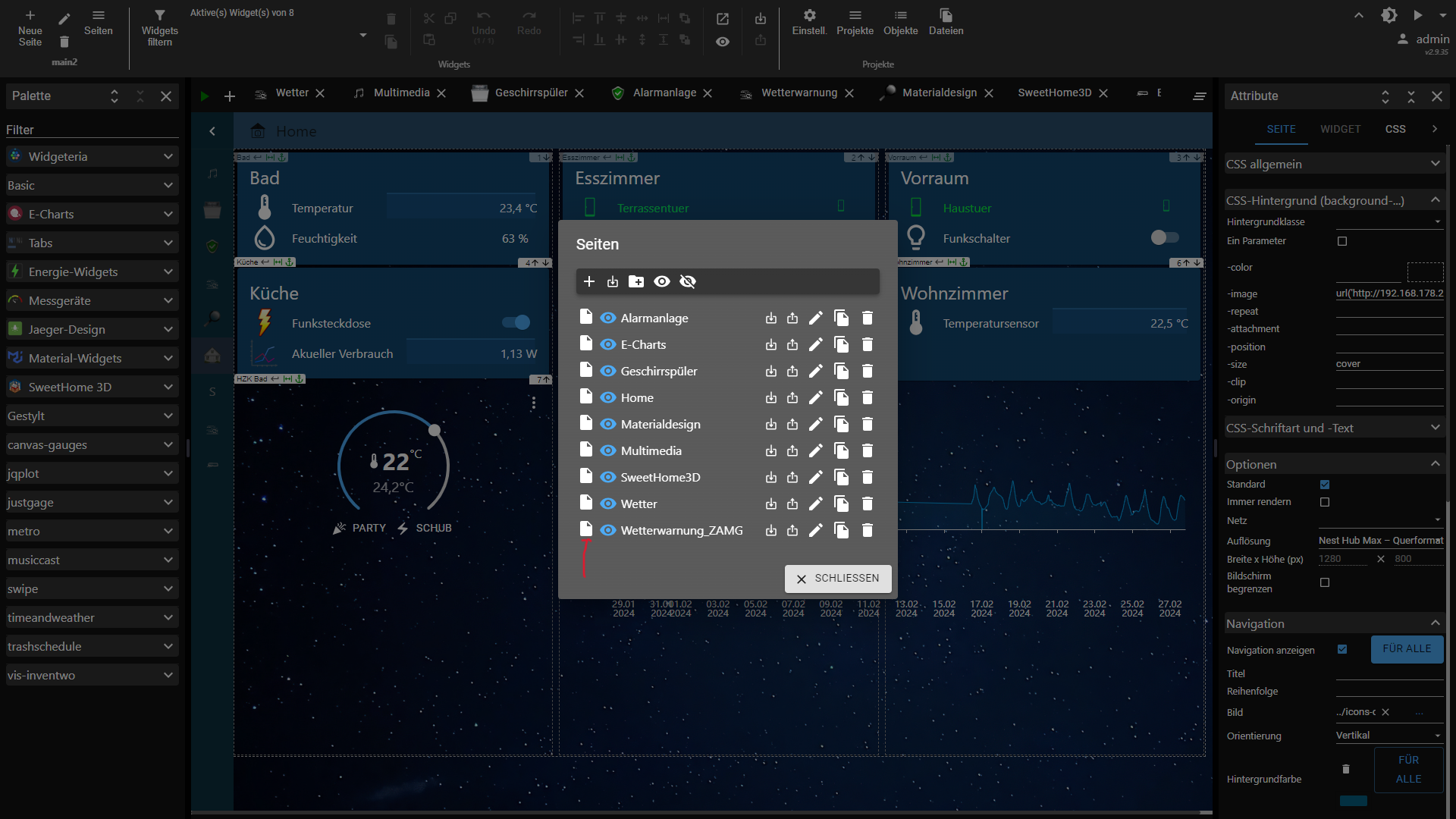
          Hallo zusammen,

          Ich bin gerade mit der Responsive Funktion der Vis 2 am experimentieren.

          Leider gibt es wenig Infos darüber.
          Hat einer von euch einen Link mit Infos oder ein Beispielprojekt wie man die Responsive Funktionen der Vis 2 richtig verwendet?

          Ich vermute mal die Slider in den Seiteneigenschaften repräsentieren die Breite in Pixel. Ich möchte gerne dieses Raster unterteilen bzw. zwei Spalten für manche Widgets verwenden. Damit dieses gelingt habe ich neue Seiten mit immer kleiner werdenden Spaltenbreiten angelegt und bei dem größeren Raster das View in Widget verwendet. Am Ende sind das aber sehr viele Seiten was denke ich mal so nicht gedacht ist.

          Der Sinn hinter diesem a5afb011-fe0e-4eae-8f03-6a9dbb89d3cc-image.png Button verstehe ich auch nicht so richtig. Der begrenzt nur die Breite auf 50% und der restliche Spaltenplatz ist dann einfach leer. Ich hätte erwartet, dass man dann wenigstens ein zweites halbes Widget daneben setzen kann.

          1 Antwort Letzte Antwort
          0
          • AgrippinenserA Offline
            AgrippinenserA Offline
            Agrippinenser
            schrieb am zuletzt editiert von Agrippinenser
            #181

            ich vermisse seit heute das Widget "tplEnergy2Consumption".

            Unter "Energie-Widgets" sind nur noch die beiden "Verteilung" und "Intervallwähler" zu sehen.

            2c025766-c0ce-4347-9955-3bf83835f938-image.png

            Korrektur: zu früh gepostet. Issue #195

            Grüße vom Rhein @Colonia Claudia Ara Agrippinensium

            M 1 Antwort Letzte Antwort
            0
            • AgrippinenserA Agrippinenser

              ich vermisse seit heute das Widget "tplEnergy2Consumption".

              Unter "Energie-Widgets" sind nur noch die beiden "Verteilung" und "Intervallwähler" zu sehen.

              2c025766-c0ce-4347-9955-3bf83835f938-image.png

              Korrektur: zu früh gepostet. Issue #195

              M Offline
              M Offline
              Micha 3
              schrieb am zuletzt editiert von Micha 3
              #182

              @agrippinenser schon mal probiert iob u vis-2
              zumindest sind bei mir dann die Widget Anzeigefehler weg. Issues #318
              Keine Ahnung warum ich das nach jedem Update machen muss. Achso, die CSS Daten sind dann leider auch weg. Also vorher sichern falls vorhanden.

              AgrippinenserA 1 Antwort Letzte Antwort
              0
              • K Offline
                K Offline
                kafibo
                schrieb am zuletzt editiert von
                #183

                Hallo,

                bei mir werden keine Signalbilder mehr angezeigt. Ich meine das ist seit Version 2.9.25 oder 2.9.26 der Fall. Bin mir aber nicht genau sicher. Hat noch jemand das Problem ?

                JS-Controller 5.0.19
                nodejs 18.19.0
                npm 10.2.3
                Admin 6.13.16
                Web 6.2.3

                FeuersturmF 1 Antwort Letzte Antwort
                0
                • K kafibo

                  Hallo,

                  bei mir werden keine Signalbilder mehr angezeigt. Ich meine das ist seit Version 2.9.25 oder 2.9.26 der Fall. Bin mir aber nicht genau sicher. Hat noch jemand das Problem ?

                  JS-Controller 5.0.19
                  nodejs 18.19.0
                  npm 10.2.3
                  Admin 6.13.16
                  Web 6.2.3

                  FeuersturmF Online
                  FeuersturmF Online
                  Feuersturm
                  schrieb am zuletzt editiert von
                  #184

                  @kafibo Hi, führ doch bitte Mal ein downgrade auf eine frühere vis-2 Version durch und schaue wo es noch geht. Dann am besten ein issue einstellen, damit foxriver es sich anschauen kann.
                  Es gab in den letzten Wochen Änderungen, wenn man in den geschlossenen issues nach Signalbild sucht.

                  K 1 Antwort Letzte Antwort
                  0
                  • FeuersturmF Feuersturm

                    @kafibo Hi, führ doch bitte Mal ein downgrade auf eine frühere vis-2 Version durch und schaue wo es noch geht. Dann am besten ein issue einstellen, damit foxriver es sich anschauen kann.
                    Es gab in den letzten Wochen Änderungen, wenn man in den geschlossenen issues nach Signalbild sucht.

                    K Offline
                    K Offline
                    kafibo
                    schrieb am zuletzt editiert von
                    #185

                    @feuersturm

                    So ich habe jetzt mal ein bischen getestet. Bin bis 2.9.24 zurück und da war das Problem auch noch, noch weiter wollte ich nicht zurück da gab es das Problem das alles (vor allem die Navigation) ganz langsam war.
                    Ich habe dann mehrere Standard-Widgets ausprobiert und festgestellt, dass die Signalbilder nicht mehr bei allen Widgets funktioniert. Darunter auch das normale HTML-Widget !!!
                    Dieses habe ich z.B. bei den Homematicgeräten die bei Batterie nur true und false kennen und nicht die Batteriespannung wie die HMIP-Geräte anzeigen. Dort verwende ich das HTML-Widget und lasse mir für true und false halt Signalbilder anzeigen, welche nicht mehr angezeigt werden. In früheren Verdsionen konnte man bei allen Standard - Widgets Signalbilder anzeigen lassen. Warum geht das jetzt nicht mehr.

                    Bin jetzt wieder auf 2.9.28 und dort funktionieren halt die Signalbilder nicht bei allen Widgets !

                    FeuersturmF 1 Antwort Letzte Antwort
                    0
                    • M Micha 3

                      @agrippinenser schon mal probiert iob u vis-2
                      zumindest sind bei mir dann die Widget Anzeigefehler weg. Issues #318
                      Keine Ahnung warum ich das nach jedem Update machen muss. Achso, die CSS Daten sind dann leider auch weg. Also vorher sichern falls vorhanden.

                      AgrippinenserA Offline
                      AgrippinenserA Offline
                      Agrippinenser
                      schrieb am zuletzt editiert von
                      #186

                      @micha-3 sagte in Vis2 ab morgen im stable:

                      iob u vis-2

                      bis Dato klappte das ohne Zusatz einwandfrei. Ich habe aber iob u vis-2gerade mal ausprobiert, leider erfolglos ;-)

                      Grüße vom Rhein @Colonia Claudia Ara Agrippinensium

                      1 Antwort Letzte Antwort
                      0
                      • K kafibo

                        @feuersturm

                        So ich habe jetzt mal ein bischen getestet. Bin bis 2.9.24 zurück und da war das Problem auch noch, noch weiter wollte ich nicht zurück da gab es das Problem das alles (vor allem die Navigation) ganz langsam war.
                        Ich habe dann mehrere Standard-Widgets ausprobiert und festgestellt, dass die Signalbilder nicht mehr bei allen Widgets funktioniert. Darunter auch das normale HTML-Widget !!!
                        Dieses habe ich z.B. bei den Homematicgeräten die bei Batterie nur true und false kennen und nicht die Batteriespannung wie die HMIP-Geräte anzeigen. Dort verwende ich das HTML-Widget und lasse mir für true und false halt Signalbilder anzeigen, welche nicht mehr angezeigt werden. In früheren Verdsionen konnte man bei allen Standard - Widgets Signalbilder anzeigen lassen. Warum geht das jetzt nicht mehr.

                        Bin jetzt wieder auf 2.9.28 und dort funktionieren halt die Signalbilder nicht bei allen Widgets !

                        FeuersturmF Online
                        FeuersturmF Online
                        Feuersturm
                        schrieb am zuletzt editiert von
                        #187

                        @kafibo Dann erstelle bitte einmal hier https://github.com/ioBroker/ioBroker.vis-2/issues ein entsprechendes issue. Am besten mit einem Export von einem betroffenem Widget. Schau auch parallel mal in der Konsole, wenn die Bedingung für das Signalbild auf true geht, ob es Fehler in der Konsole (F12) gibt.

                        1 Antwort Letzte Antwort
                        0
                        • R Offline
                          R Offline
                          Ritter
                          schrieb am zuletzt editiert von
                          #188

                          Hallo,

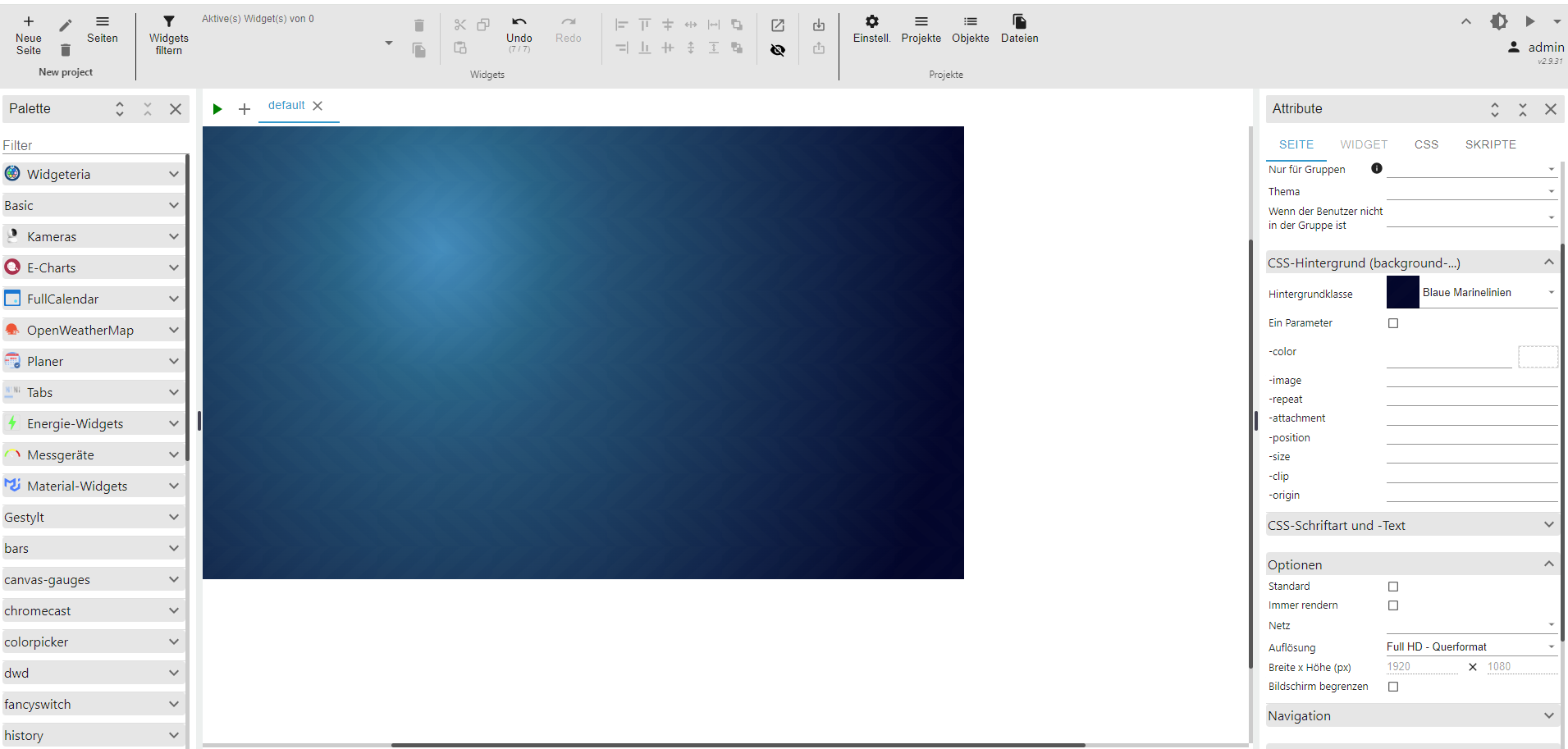
                          bei der Einstellung Full HD Querformat wird der Hintergrund im Editor nicht ganz ausgefüllt. Bei der normalen Seite (nicht im Editor) ist der Hintergrund dann aber komplett. Kann man da noch etwas einstellen?

                          Screenshot 2024-02-15 212711.png

                          HomoranH M 2 Antworten Letzte Antwort
                          0
                          • R Ritter

                            Hallo,

                            bei der Einstellung Full HD Querformat wird der Hintergrund im Editor nicht ganz ausgefüllt. Bei der normalen Seite (nicht im Editor) ist der Hintergrund dann aber komplett. Kann man da noch etwas einstellen?

                            Screenshot 2024-02-15 212711.png

                            HomoranH Nicht stören
                            HomoranH Nicht stören
                            Homoran
                            Global Moderator Administrators
                            schrieb am zuletzt editiert von
                            #189

                            @ritter welche Auflösung hat dein Monitor?

                            kein Support per PN! - Fragen im Forum stellen - es gibt fast nichts, was nicht auch für andere interessant ist.

                            Benutzt das Voting rechts unten im Beitrag wenn er euch geholfen hat.

                            der Installationsfixer: curl -fsL https://iobroker.net/fix.sh | bash -

                            R 1 Antwort Letzte Antwort
                            0
                            • HomoranH Homoran

                              @ritter welche Auflösung hat dein Monitor?

                              R Offline
                              R Offline
                              Ritter
                              schrieb am zuletzt editiert von
                              #190

                              @homoran 1920x1080 auch das Notebook

                              HomoranH 1 Antwort Letzte Antwort
                              0
                              • R Ritter

                                @homoran 1920x1080 auch das Notebook

                                HomoranH Nicht stören
                                HomoranH Nicht stören
                                Homoran
                                Global Moderator Administrators
                                schrieb am zuletzt editiert von
                                #191

                                @ritter sagte in Vis2 ab morgen im stable:

                                @homoran 1920x1080 auch das Notebook

                                Danke!
                                hatte befürchtet 4k

                                kein Support per PN! - Fragen im Forum stellen - es gibt fast nichts, was nicht auch für andere interessant ist.

                                Benutzt das Voting rechts unten im Beitrag wenn er euch geholfen hat.

                                der Installationsfixer: curl -fsL https://iobroker.net/fix.sh | bash -

                                1 Antwort Letzte Antwort
                                0
                                • R Offline
                                  R Offline
                                  Ritter
                                  schrieb am zuletzt editiert von
                                  #192

                                  Bis HD Landschaft scheint es noch richtig zu funktionieren.

                                  1 Antwort Letzte Antwort
                                  0
                                  • N Offline
                                    N Offline
                                    NoVinoPhobie
                                    schrieb am zuletzt editiert von
                                    #193

                                    hab das auch. Ich hab den 1920x1080 im Hochformat hängen. Der Hintergrund hört mitten drin auf. Hab ihn jetzt erstmal einfarbig bis das funktioniert.

                                    1 Antwort Letzte Antwort
                                    0
                                    • R Ritter

                                      Hallo,

                                      bei der Einstellung Full HD Querformat wird der Hintergrund im Editor nicht ganz ausgefüllt. Bei der normalen Seite (nicht im Editor) ist der Hintergrund dann aber komplett. Kann man da noch etwas einstellen?

                                      Screenshot 2024-02-15 212711.png

                                      M Offline
                                      M Offline
                                      Marsx79
                                      schrieb am zuletzt editiert von
                                      #194

                                      @ritter

                                      Bei mir besteht das Problem auch. Stört mich schon seit längerem. Hat schon jemand ein Issue aufgemacht oder ließt der Entwickler mit?

                                      FeuersturmF 1 Antwort Letzte Antwort
                                      0
                                      • M Marsx79

                                        @ritter

                                        Bei mir besteht das Problem auch. Stört mich schon seit längerem. Hat schon jemand ein Issue aufgemacht oder ließt der Entwickler mit?

                                        FeuersturmF Online
                                        FeuersturmF Online
                                        Feuersturm
                                        schrieb am zuletzt editiert von
                                        #195

                                        @marsx79 Bitte immer ein issue erstellen, nur so kann das Problem analysiert und gefixt werden.

                                        sigi234S 1 Antwort Letzte Antwort
                                        0
                                        • FeuersturmF Feuersturm

                                          @marsx79 Bitte immer ein issue erstellen, nur so kann das Problem analysiert und gefixt werden.

                                          sigi234S Online
                                          sigi234S Online
                                          sigi234
                                          Forum Testing Most Active
                                          schrieb am zuletzt editiert von
                                          #196

                                          @feuersturm

                                          Hallo,

                                          kannst du die Seiten auch nicht verschieben?

                                          Screenshot (583).png

                                          Bitte benutzt das Voting rechts unten im Beitrag wenn er euch geholfen hat.
                                          Immer Daten sichern!

                                          foxriver76F S 2 Antworten Letzte Antwort
                                          0
                                          Antworten
                                          • In einem neuen Thema antworten
                                          Anmelden zum Antworten
                                          • Älteste zuerst
                                          • Neuste zuerst
                                          • Meiste Stimmen


                                          Support us

                                          ioBroker
                                          Community Adapters
                                          Donate

                                          493

                                          Online

                                          32.4k

                                          Benutzer

                                          81.5k

                                          Themen

                                          1.3m

                                          Beiträge
                                          Community
                                          Impressum | Datenschutz-Bestimmungen | Nutzungsbedingungen | Einwilligungseinstellungen
                                          ioBroker Community 2014-2025
                                          logo
                                          • Anmelden

                                          • Du hast noch kein Konto? Registrieren

                                          • Anmelden oder registrieren, um zu suchen
                                          • Erster Beitrag
                                            Letzter Beitrag
                                          0
                                          • Home
                                          • Aktuell
                                          • Tags
                                          • Ungelesen 0
                                          • Kategorien
                                          • Unreplied
                                          • Beliebt
                                          • GitHub
                                          • Docu
                                          • Hilfe