




kein iobroker-Backup mit Backitup
-
@thomas-braun sagte in kein iobroker-Backup mit Backitup:
Wie hast du das Ding denn aufgesetzt?
lxc auf Proxmox erstellt,
apt update && apt upgrade -y && apt autoremove -y
apt install curl
backup
apt-get install sudo
curl -sLf https://iobroker.net/install.sh | bash -
apt install iputils-ping --reinstall
dpkg-reconfigure tzdata... und dann die Sicherung von der damaligen pi-Installation per Backitup eingelesen.
@thomas-braun sagte in kein iobroker-Backup mit Backitup:
Da starten ja diverse services nicht.
Du meinst die .vis-xxx Sachen?
-
@thomas-braun sagte in kein iobroker-Backup mit Backitup:
Wie hast du das Ding denn aufgesetzt?
lxc auf Proxmox erstellt,
apt update && apt upgrade -y && apt autoremove -y
apt install curl
backup
apt-get install sudo
curl -sLf https://iobroker.net/install.sh | bash -
apt install iputils-ping --reinstall
dpkg-reconfigure tzdata... und dann die Sicherung von der damaligen pi-Installation per Backitup eingelesen.
@thomas-braun sagte in kein iobroker-Backup mit Backitup:
Da starten ja diverse services nicht.
Du meinst die .vis-xxx Sachen?
Nein. Ich meine den ganzen Kram:
*** FAILED SERVICES *** UNIT LOAD ACTIVE SUB DESCRIPTION * nftables.service loaded failed failed nftables * systemd-hostnamed.service loaded failed failed Hostname Service * systemd-logind.service loaded failed failed User Login Management * systemd-networkd.service loaded failed failed Network Configuration * systemd-sysctl.service loaded failed failed Apply Kernel Variables * systemd-sysusers.service loaded failed failed Create System Users * systemd-timedated.service loaded failed failed Time & Date Service * systemd-tmpfiles-clean.service loaded failed failed Cleanup of Temporary Directories * systemd-tmpfiles-setup-dev.service loaded failed failed Create Static Device Nodes in /dev * systemd-tmpfiles-setup.service loaded failed failed Create Volatile Files and Directories * systemd-networkd.socket loaded failed failed Network Service Netlink Socket -
@thomas-braun sagte in kein iobroker-Backup mit Backitup:
Wie hast du das Ding denn aufgesetzt?
lxc auf Proxmox erstellt,
apt update && apt upgrade -y && apt autoremove -y
apt install curl
backup
apt-get install sudo
curl -sLf https://iobroker.net/install.sh | bash -
apt install iputils-ping --reinstall
dpkg-reconfigure tzdata... und dann die Sicherung von der damaligen pi-Installation per Backitup eingelesen.
@thomas-braun sagte in kein iobroker-Backup mit Backitup:
Da starten ja diverse services nicht.
Du meinst die .vis-xxx Sachen?
@hausbaer sagte in kein iobroker-Backup mit Backitup:
apt update && apt upgrade -y && apt autoremove -y
Das ist meiner Meinung nach eine schwindelige Anleitung.
- Erstmal funktionieren diese Befehle nur als root (das ist no go!)
und wenn da ein neuer Kernel mitkommt, ziehst du dir den Kernel unterm A... weg. - Das
sudo apt autoremoveführe ich immer nur nach einem reboot aus.
- Erstmal funktionieren diese Befehle nur als root (das ist no go!)
-
Nein. Ich meine den ganzen Kram:
*** FAILED SERVICES *** UNIT LOAD ACTIVE SUB DESCRIPTION * nftables.service loaded failed failed nftables * systemd-hostnamed.service loaded failed failed Hostname Service * systemd-logind.service loaded failed failed User Login Management * systemd-networkd.service loaded failed failed Network Configuration * systemd-sysctl.service loaded failed failed Apply Kernel Variables * systemd-sysusers.service loaded failed failed Create System Users * systemd-timedated.service loaded failed failed Time & Date Service * systemd-tmpfiles-clean.service loaded failed failed Cleanup of Temporary Directories * systemd-tmpfiles-setup-dev.service loaded failed failed Create Static Device Nodes in /dev * systemd-tmpfiles-setup.service loaded failed failed Create Volatile Files and Directories * systemd-networkd.socket loaded failed failed Network Service Netlink Socket@thomas-braun Und wie krieg ich den ganzen Kram jetzt gebacken?

-
@hausbaer sagte in kein iobroker-Backup mit Backitup:
apt update && apt upgrade -y && apt autoremove -y
Das ist meiner Meinung nach eine schwindelige Anleitung.
- Erstmal funktionieren diese Befehle nur als root (das ist no go!)
und wenn da ein neuer Kernel mitkommt, ziehst du dir den Kernel unterm A... weg. - Das
sudo apt autoremoveführe ich immer nur nach einem reboot aus.
@meister-mopper sagte in kein iobroker-Backup mit Backitup:
@hausbaer sagte in kein iobroker-Backup mit Backitup:
apt update && apt upgrade -y && apt autoremove -y
Das ist meiner Meinung nach eine schwindelige Anleitung.
- Erstmal funktionieren diese Befehle nur als root (das ist no go!)
und wenn da ein neuer Kernel mitkommt, ziehst du dir den Kernel unterm A... weg.
Versteh ich nicht ganz. Bis auf das apt autoremove -y ist das doch
hier https://www.iobroker.net/#de/documentation/install/proxmox.md so beschrieben. - Erstmal funktionieren diese Befehle nur als root (das ist no go!)
-
@meister-mopper sagte in kein iobroker-Backup mit Backitup:
@hausbaer sagte in kein iobroker-Backup mit Backitup:
apt update && apt upgrade -y && apt autoremove -y
Das ist meiner Meinung nach eine schwindelige Anleitung.
- Erstmal funktionieren diese Befehle nur als root (das ist no go!)
und wenn da ein neuer Kernel mitkommt, ziehst du dir den Kernel unterm A... weg.
Versteh ich nicht ganz. Bis auf das apt autoremove -y ist das doch
hier https://www.iobroker.net/#de/documentation/install/proxmox.md so beschrieben.@hausbaer sagte in kein iobroker-Backup mit Backitup:
Versteh ich nicht ganz. Bis auf das apt autoremove -y ist das doch
hierJa, das passiert beim ersten Einrichten. Da steht aber auch, dass ein User einzurichten ist, und ab dann mit diesem gearbeitet wird.
apt autoremovegeht aus dem genannten Grund nicht, steht ja auch aus gutem Grund nicht da! - Erstmal funktionieren diese Befehle nur als root (das ist no go!)
-
@thomas-braun Und wie krieg ich den ganzen Kram jetzt gebacken?
@hausbaer sagte in kein iobroker-Backup mit Backitup:
@thomas-braun Und wie krieg ich den ganzen Kram jetzt gebacken?
Keine Ahnung. Mit LXC geb ich mich eigentlich auch nicht ab.
-
@thomas-braun Und wie krieg ich den ganzen Kram jetzt gebacken?
@hausbaer sagte in kein iobroker-Backup mit Backitup:
Und wie krieg ich den ganzen Kram jetzt gebacken?
Die Anleitung von @crunchip ist schon die richtige.
Wieso will eigentlich kein Mensch mehr suchen, richtige Lösungen werden glaube ich immer seltener (ich werde auch schon müde
 ).
). -
Nein. Ich meine den ganzen Kram:
*** FAILED SERVICES *** UNIT LOAD ACTIVE SUB DESCRIPTION * nftables.service loaded failed failed nftables * systemd-hostnamed.service loaded failed failed Hostname Service * systemd-logind.service loaded failed failed User Login Management * systemd-networkd.service loaded failed failed Network Configuration * systemd-sysctl.service loaded failed failed Apply Kernel Variables * systemd-sysusers.service loaded failed failed Create System Users * systemd-timedated.service loaded failed failed Time & Date Service * systemd-tmpfiles-clean.service loaded failed failed Cleanup of Temporary Directories * systemd-tmpfiles-setup-dev.service loaded failed failed Create Static Device Nodes in /dev * systemd-tmpfiles-setup.service loaded failed failed Create Volatile Files and Directories * systemd-networkd.socket loaded failed failed Network Service Netlink Socket@thomas-braun sagte in kein iobroker-Backup mit Backitup:
Nein. Ich meine den ganzen Kram:
*** FAILED SERVICES ***

  UNIT                               LOAD   ACTIVE SUB    DESCRIPTION
* nftables.service                   loaded failed failed nftables
* systemd-hostnamed.service          loaded failed failed Hostname Service
* systemd-logind.service             loaded failed failed User Login Management
* systemd-networkd.service           loaded failed failed Network Configuration
* systemd-sysctl.service             loaded failed failed Apply Kernel Variables
* systemd-sysusers.service           loaded failed failed Create System Users
* systemd-timedated.service          loaded failed failed Time & Date Service
* systemd-tmpfiles-clean.service     loaded failed failed Cleanup of Temporary Directories
* systemd-tmpfiles-setup-dev.service loaded failed failed Create Static Device Nodes in /dev
* systemd-tmpfiles-setup.service     loaded failed failed Create Volatile Files and Directories
* systemd-networkd.socket            loaded failed failed Network Service Netlink Socket
Ich hab grad mal nen iob-Server neu aufgesetzt. Nach der Anleitung hier
https://www.iobroker.net/#de/documentation/install/proxmox.mdErgebnis:
Die gleichen "Fehler"Skript v.2023-10-10 *** BASE SYSTEM *** Failed to query system properties: Connection timed out model name : AMD Ryzen 5 5600H with Radeon Graphics Docker : false Virtualization : lxc Kernel : x86_64 Userland : amd64 Systemuptime and Load: 19:26:23 up 25 min, 0 user, load average: 1.42, 1.53, 1.29 CPU threads: 2 *** Time and Time Zones *** Failed to query server: Connection timed out *** User and Groups *** helmut /home/helmut helmut sudo users *** X-Server-Setup *** X-Server: false Desktop: Terminal: Boot Target: graphical.target *** MEMORY *** total used free shared buff/cache available Mem: 8.6G 357M 5.0G 77K 3.3G 8.2G Swap: 536M 0B 536M Total: 9.1G 357M 5.5G 8192 M total memory 340 M used memory 239 M active memory 3052 M inactive memory 4720 M free memory 0 M buffer memory 3130 M swap cache 512 M total swap 0 M used swap 512 M free swap *** FAILED SERVICES *** UNIT LOAD ACTIVE SUB DESCRIPTION * networking.service loaded failed failed Raise network interfaces * nftables.service loaded failed failed nftables * systemd-hostnamed.service loaded failed failed Hostname Service * systemd-logind.service loaded failed failed User Login Management * systemd-networkd.service loaded failed failed Network Configuration * systemd-sysctl.service loaded failed failed Apply Kernel Variables * systemd-sysusers.service loaded failed failed Create System Users * systemd-timedated.service loaded failed failed Time & Date Service * systemd-tmpfiles-clean.service loaded failed failed Cleanup of Temporary Directories * systemd-tmpfiles-setup-dev.service loaded failed failed Create Static Device Nodes in /dev * systemd-tmpfiles-setup.service loaded failed failed Create Volatile Files and Directories * systemd-networkd.socket loaded failed failed Network Service Netlink Socket LOAD = Reflects whether the unit definition was properly loaded. ACTIVE = The high-level unit activation state, i.e. generalization of SUB. SUB = The low-level unit activation state, values depend on unit type. 12 loaded units listed. *** FILESYSTEM *** Filesystem Type Size Used Avail Use% Mounted on /dev/loop1 ext4 12G 2.0G 9.2G 18% / none tmpfs 492K 4.0K 488K 1% /dev tmpfs tmpfs 15G 0 15G 0% /dev/shm tmpfs tmpfs 5.9G 72K 5.9G 1% /run tmpfs tmpfs 5.0M 0 5.0M 0% /run/lock Messages concerning ext4 filesystem in dmesg: [Mon Jan 29 18:38:56 2024] EXT4-fs (dm-1): mounted filesystem 00f6a6d1-3114-4076-a271-1888ec86d71e ro with ordered data mode. Quota mode: none. [Mon Jan 29 18:38:56 2024] EXT4-fs (dm-1): re-mounted 00f6a6d1-3114-4076-a271-1888ec86d71e r/w. Quota mode: none. [Mon Jan 29 18:38:58 2024] EXT4-fs (sda1): mounted filesystem 77f8d533-299f-4623-b58f-dd04c3b7ca37 r/w with ordered data mode. Quota mode: none. [Mon Jan 29 18:39:06 2024] EXT4-fs (dm-6): mounted filesystem af4ca989-a3ad-47ba-9531-70d67e3b340e r/w with ordered data mode. Quota mode: none. [Mon Jan 29 18:39:08 2024] EXT4-fs (dm-7): mounted filesystem 83957904-47b6-4cdc-a603-8c1ca3192aa7 r/w with ordered data mode. Quota mode: none. [Mon Jan 29 18:39:10 2024] EXT4-fs (loop0): mounted filesystem ba3a3211-6e2e-453e-ab2d-87a60fa02e8f r/w with ordered data mode. Quota mode: none. [Mon Jan 29 18:44:36 2024] EXT4-fs (loop1): mounted filesystem 906f7bce-d75c-41ef-b4f9-1e99bf576c90 r/w with ordered data mode. Quota mode: none. [Mon Jan 29 18:44:57 2024] EXT4-fs (loop1): unmounting filesystem 906f7bce-d75c-41ef-b4f9-1e99bf576c90. [Mon Jan 29 18:45:07 2024] EXT4-fs (loop1): mounted filesystem 906f7bce-d75c-41ef-b4f9-1e99bf576c90 r/w with ordered data mode. Quota mode: none. [Mon Jan 29 19:01:06 2024] EXT4-fs (loop1): unmounting filesystem 906f7bce-d75c-41ef-b4f9-1e99bf576c90. [Mon Jan 29 19:01:07 2024] EXT4-fs (loop1): mounted filesystem 906f7bce-d75c-41ef-b4f9-1e99bf576c90 r/w with ordered data mode. Quota mode: none. Show mounted filesystems \(real ones only\): TARGET SOURCE FSTYPE OPTIONS / /dev/loop1 ext4 rw,relatime Files in neuralgic directories: /var: 417M /var/ 247M /var/cache 243M /var/cache/apt 168M /var/cache/apt/archives 145M /var/lib Hint: You are currently not seeing messages from other users and the system. Users in the 'systemd-journal' group can see all messages. Pass -q to turn off this notice. Archived and active journals take up 8.0M in the file system. /opt/iobroker/backups: 4.0K /opt/iobroker/backups/ /opt/iobroker/iobroker-data: 15M /opt/iobroker/iobroker-data/files 15M /opt/iobroker/iobroker-data/ 13M /opt/iobroker/iobroker-data/files/admin.admin/custom/static/js 13M /opt/iobroker/iobroker-data/files/admin.admin/custom/static 13M /opt/iobroker/iobroker-data/files/admin.admin/custom The five largest files in iobroker-data are: 6.3M /opt/iobroker/iobroker-data/files/admin.admin/custom/static/js/vendors-node_modules_iobroker_adapter-react-v5_assets_devices_parseNames_js-node_modules_iobr-99c23e.847b8ad9.chunk.js.map 2.8M /opt/iobroker/iobroker-data/files/admin.admin/custom/static/js/vendors-node_modules_iobroker_adapter-react-v5_assets_devices_parseNames_js-node_modules_iobr-99c23e.847b8ad9.chunk.js 1.6M /opt/iobroker/iobroker-data/files/admin.admin/custom/static/js/vendors-node_modules_mui_material_Accordion_index_js-node_modules_mui_material_AccordionDetai-57e02d.0886b730.chunk.js.map 652K /opt/iobroker/iobroker-data/files/admin.admin/custom/static/js/vendors-node_modules_mui_material_index_js.40e01f69.chunk.js.map 384K /opt/iobroker/iobroker-data/files/admin.admin/custom/static/js/vendors-node_modules_mui_material_Accordion_index_js-node_modules_mui_material_AccordionDetai-57e02d.0886b730.chunk.js USB-Devices by-id: USB-Sticks - Avoid direct links to /dev/* in your adapter setups, please always prefer the links 'by-id': find: '/dev/serial/by-id/': No such file or directory *** NodeJS-Installation *** /usr/bin/nodejs v18.19.0 /usr/bin/node v18.19.0 /usr/bin/npm 10.2.3 /usr/bin/npx 10.2.3 /usr/bin/corepack 0.22.0 nodejs: Installed: 18.19.0-1nodesource1 Candidate: 18.19.0-1nodesource1 Version table: 18.19.0+dfsg-6~deb12u1 500 500 http://security.debian.org bookworm-security/main amd64 Packages *** 18.19.0-1nodesource1 1001 500 https://deb.nodesource.com/node_18.x nodistro/main amd64 Packages 100 /var/lib/dpkg/status 18.18.2-1nodesource1 1001 500 https://deb.nodesource.com/node_18.x nodistro/main amd64 Packages 18.18.1-1nodesource1 1001 500 https://deb.nodesource.com/node_18.x nodistro/main amd64 Packages 18.18.0-1nodesource1 1001 500 https://deb.nodesource.com/node_18.x nodistro/main amd64 Packages 18.17.1-1nodesource1 1001 500 https://deb.nodesource.com/node_18.x nodistro/main amd64 Packages 18.17.0-1nodesource1 1001 500 https://deb.nodesource.com/node_18.x nodistro/main amd64 Packages 18.16.1-1nodesource1 1001 500 https://deb.nodesource.com/node_18.x nodistro/main amd64 Packages 18.16.0-1nodesource1 1001 500 https://deb.nodesource.com/node_18.x nodistro/main amd64 Packages 18.15.0-1nodesource1 1001 500 https://deb.nodesource.com/node_18.x nodistro/main amd64 Packages 18.14.2-1nodesource1 1001 500 https://deb.nodesource.com/node_18.x nodistro/main amd64 Packages 18.14.1-1nodesource1 1001 500 https://deb.nodesource.com/node_18.x nodistro/main amd64 Packages 18.14.0-1nodesource1 1001 500 https://deb.nodesource.com/node_18.x nodistro/main amd64 Packages 18.13.0+dfsg1-1 500 500 http://deb.debian.org/debian bookworm/main amd64 Packages 18.13.0-1nodesource1 1001 500 https://deb.nodesource.com/node_18.x nodistro/main amd64 Packages 18.12.0-1nodesource1 1001 500 https://deb.nodesource.com/node_18.x nodistro/main amd64 Packages 18.11.0-1nodesource1 1001 500 https://deb.nodesource.com/node_18.x nodistro/main amd64 Packages 18.10.0-1nodesource1 1001 500 https://deb.nodesource.com/node_18.x nodistro/main amd64 Packages 18.9.1-1nodesource1 1001 500 https://deb.nodesource.com/node_18.x nodistro/main amd64 Packages 18.9.0-1nodesource1 1001 500 https://deb.nodesource.com/node_18.x nodistro/main amd64 Packages 18.8.0-1nodesource1 1001 500 https://deb.nodesource.com/node_18.x nodistro/main amd64 Packages 18.7.0-1nodesource1 1001 500 https://deb.nodesource.com/node_18.x nodistro/main amd64 Packages 18.6.0-1nodesource1 1001 500 https://deb.nodesource.com/node_18.x nodistro/main amd64 Packages 18.5.0-1nodesource1 1001 500 https://deb.nodesource.com/node_18.x nodistro/main amd64 Packages 18.4.0-1nodesource1 1001 500 https://deb.nodesource.com/node_18.x nodistro/main amd64 Packages 18.3.0-1nodesource1 1001 500 https://deb.nodesource.com/node_18.x nodistro/main amd64 Packages 18.2.0-1nodesource1 1001 500 https://deb.nodesource.com/node_18.x nodistro/main amd64 Packages 18.1.0-1nodesource1 1001 500 https://deb.nodesource.com/node_18.x nodistro/main amd64 Packages 18.0.0-1nodesource1 1001 500 https://deb.nodesource.com/node_18.x nodistro/main amd64 Packages Temp directories causing npm8 problem: 0 No problems detected Errors in npm tree: *** ioBroker-Installation *** ioBroker Status iobroker is running on this host. Objects type: jsonl States type: jsonl Core adapters versions js-controller: 5.0.17 admin: 6.12.0 javascript: "javascript" not found Adapters from github: 0 Adapter State + system.adapter.admin.0 : admin : iobroker-test - enabled, port: 8081, bind: 0.0.0.0, run as: admin + system.adapter.backitup.0 : backitup : iobroker-test - enabled + system.adapter.discovery.0 : discovery : iobroker-test - enabled + instance is alive Enabled adapters with bindings + system.adapter.admin.0 : admin : iobroker-test - enabled, port: 8081, bind: 0.0.0.0, run as: admin ioBroker-Repositories stable : http://download.iobroker.net/sources-dist.json beta : http://download.iobroker.net/sources-dist-latest.json Active repo(s): stable Installed ioBroker-Instances Used repository: stable Adapter "admin" : 6.12.0 , installed 6.12.0 Adapter "backitup" : 2.9.8 , installed 2.9.8 Adapter "discovery" : 4.2.0 , installed 4.2.0 Controller "js-controller": 5.0.17 , installed 5.0.17 Objects and States Please stand by - This may take a while Objects: 142 States: 105 *** OS-Repositories and Updates *** Hit:1 http://deb.debian.org/debian bookworm InRelease Hit:2 http://security.debian.org bookworm-security InRelease Hit:3 http://deb.debian.org/debian bookworm-updates InRelease Hit:4 https://deb.nodesource.com/node_18.x nodistro InRelease Reading package lists... Pending Updates: 0 *** Listening Ports *** Active Internet connections (only servers) Proto Recv-Q Send-Q Local Address Foreign Address State User Inode PID/Program name tcp 0 0 127.0.0.1:25 0.0.0.0:* LISTEN 0 291741 327/master tcp 0 0 127.0.0.1:9000 0.0.0.0:* LISTEN 1001 508272 11354/iobroker.js-c tcp 0 0 127.0.0.1:9001 0.0.0.0:* LISTEN 1001 508265 11354/iobroker.js-c tcp 0 0 0.0.0.0:111 0.0.0.0:* LISTEN 0 474036 1/init tcp6 0 0 :::8081 :::* LISTEN 1001 507772 11372/io.admin.0 tcp6 0 0 ::1:25 :::* LISTEN 0 291742 327/master tcp6 0 0 :::22 :::* LISTEN 0 247375 1/init tcp6 0 0 :::111 :::* LISTEN 0 474040 1/init udp 0 0 0.0.0.0:111 0.0.0.0:* 0 474038 1/init udp6 0 0 :::111 :::* 0 474042 1/init *** Log File - Last 25 Lines *** 2024-01-29 19:23:40.582 - info: host.iobroker-test connected to Objects and States 2024-01-29 19:23:40.588 - info: host.iobroker-test added notifications configuration of host 2024-01-29 19:23:40.725 - info: host.iobroker-test Delete state "system.host.iobroker-test.versions.nodeCurrent" 2024-01-29 19:23:40.726 - info: host.iobroker-test 3 instances found 2024-01-29 19:23:40.728 - info: host.iobroker-test starting 3 instances 2024-01-29 19:23:40.732 - info: host.iobroker-test Delete state "system.host.iobroker-test.versions.nodeNewest" 2024-01-29 19:23:40.738 - info: host.iobroker-test Delete state "system.host.iobroker-test.versions.nodeNewestNext" 2024-01-29 19:23:40.740 - info: host.iobroker-test Delete state "system.host.iobroker-test.versions.npmCurrent" 2024-01-29 19:23:40.743 - info: host.iobroker-test instance system.adapter.admin.0 started with pid 11372 2024-01-29 19:23:40.745 - info: host.iobroker-test Delete state "system.host.iobroker-test.versions.npmNewest" 2024-01-29 19:23:40.746 - info: host.iobroker-test Delete state "system.host.iobroker-test.versions.npmNewestNext" 2024-01-29 19:23:40.789 - info: host.iobroker-test Some obsolete host states deleted. 2024-01-29 19:23:41.248 - info: admin.0 (11372) starting. Version 6.12.0 in /opt/iobroker/node_modules/iobroker.admin, node: v18.19.0, js-controller: 5.0.17 2024-01-29 19:23:41.256 - info: admin.0 (11372) requesting all objects 2024-01-29 19:23:41.290 - info: admin.0 (11372) received all objects 2024-01-29 19:23:41.295 - warn: admin.0 (11372) Repository cannot be read: Active repo - stable 2024-01-29 19:23:41.295 - warn: admin.0 (11372) Active repository "stable" cannot be read 2024-01-29 19:23:41.356 - info: admin.0 (11372) socket.io server listening on port 8081 2024-01-29 19:23:41.357 - info: admin.0 (11372) http server listening on port 8081 2024-01-29 19:23:41.357 - info: admin.0 (11372) Use link "http://127.0.0.1:8081" to configure. 2024-01-29 19:23:44.738 - info: host.iobroker-test instance system.adapter.discovery.0 started with pid 11399 2024-01-29 19:23:45.149 - info: discovery.0 (11399) starting. Version 4.2.0 in /opt/iobroker/node_modules/iobroker.discovery, node: v18.19.0, js-controller: 5.0.17 2024-01-29 19:23:48.736 - info: host.iobroker-test instance system.adapter.backitup.0 started with pid 11414 2024-01-29 19:23:49.176 - info: backitup.0 (11414) starting. Version 2.9.8 in /opt/iobroker/node_modules/iobroker.backitup, node: v18.19.0, js-controller: 5.0.17 2024-01-29 19:23:49.190 - info: backitup.0 (11414) [iobroker] backup will be activated at 02:48 every 1 day(s) -
@thomas-braun sagte in kein iobroker-Backup mit Backitup:
Nein. Ich meine den ganzen Kram:
*** FAILED SERVICES ***

  UNIT                               LOAD   ACTIVE SUB    DESCRIPTION
* nftables.service                   loaded failed failed nftables
* systemd-hostnamed.service          loaded failed failed Hostname Service
* systemd-logind.service             loaded failed failed User Login Management
* systemd-networkd.service           loaded failed failed Network Configuration
* systemd-sysctl.service             loaded failed failed Apply Kernel Variables
* systemd-sysusers.service           loaded failed failed Create System Users
* systemd-timedated.service          loaded failed failed Time & Date Service
* systemd-tmpfiles-clean.service     loaded failed failed Cleanup of Temporary Directories
* systemd-tmpfiles-setup-dev.service loaded failed failed Create Static Device Nodes in /dev
* systemd-tmpfiles-setup.service     loaded failed failed Create Volatile Files and Directories
* systemd-networkd.socket            loaded failed failed Network Service Netlink Socket
Ich hab grad mal nen iob-Server neu aufgesetzt. Nach der Anleitung hier
https://www.iobroker.net/#de/documentation/install/proxmox.mdErgebnis:
Die gleichen "Fehler"Skript v.2023-10-10 *** BASE SYSTEM *** Failed to query system properties: Connection timed out model name : AMD Ryzen 5 5600H with Radeon Graphics Docker : false Virtualization : lxc Kernel : x86_64 Userland : amd64 Systemuptime and Load: 19:26:23 up 25 min, 0 user, load average: 1.42, 1.53, 1.29 CPU threads: 2 *** Time and Time Zones *** Failed to query server: Connection timed out *** User and Groups *** helmut /home/helmut helmut sudo users *** X-Server-Setup *** X-Server: false Desktop: Terminal: Boot Target: graphical.target *** MEMORY *** total used free shared buff/cache available Mem: 8.6G 357M 5.0G 77K 3.3G 8.2G Swap: 536M 0B 536M Total: 9.1G 357M 5.5G 8192 M total memory 340 M used memory 239 M active memory 3052 M inactive memory 4720 M free memory 0 M buffer memory 3130 M swap cache 512 M total swap 0 M used swap 512 M free swap *** FAILED SERVICES *** UNIT LOAD ACTIVE SUB DESCRIPTION * networking.service loaded failed failed Raise network interfaces * nftables.service loaded failed failed nftables * systemd-hostnamed.service loaded failed failed Hostname Service * systemd-logind.service loaded failed failed User Login Management * systemd-networkd.service loaded failed failed Network Configuration * systemd-sysctl.service loaded failed failed Apply Kernel Variables * systemd-sysusers.service loaded failed failed Create System Users * systemd-timedated.service loaded failed failed Time & Date Service * systemd-tmpfiles-clean.service loaded failed failed Cleanup of Temporary Directories * systemd-tmpfiles-setup-dev.service loaded failed failed Create Static Device Nodes in /dev * systemd-tmpfiles-setup.service loaded failed failed Create Volatile Files and Directories * systemd-networkd.socket loaded failed failed Network Service Netlink Socket LOAD = Reflects whether the unit definition was properly loaded. ACTIVE = The high-level unit activation state, i.e. generalization of SUB. SUB = The low-level unit activation state, values depend on unit type. 12 loaded units listed. *** FILESYSTEM *** Filesystem Type Size Used Avail Use% Mounted on /dev/loop1 ext4 12G 2.0G 9.2G 18% / none tmpfs 492K 4.0K 488K 1% /dev tmpfs tmpfs 15G 0 15G 0% /dev/shm tmpfs tmpfs 5.9G 72K 5.9G 1% /run tmpfs tmpfs 5.0M 0 5.0M 0% /run/lock Messages concerning ext4 filesystem in dmesg: [Mon Jan 29 18:38:56 2024] EXT4-fs (dm-1): mounted filesystem 00f6a6d1-3114-4076-a271-1888ec86d71e ro with ordered data mode. Quota mode: none. [Mon Jan 29 18:38:56 2024] EXT4-fs (dm-1): re-mounted 00f6a6d1-3114-4076-a271-1888ec86d71e r/w. Quota mode: none. [Mon Jan 29 18:38:58 2024] EXT4-fs (sda1): mounted filesystem 77f8d533-299f-4623-b58f-dd04c3b7ca37 r/w with ordered data mode. Quota mode: none. [Mon Jan 29 18:39:06 2024] EXT4-fs (dm-6): mounted filesystem af4ca989-a3ad-47ba-9531-70d67e3b340e r/w with ordered data mode. Quota mode: none. [Mon Jan 29 18:39:08 2024] EXT4-fs (dm-7): mounted filesystem 83957904-47b6-4cdc-a603-8c1ca3192aa7 r/w with ordered data mode. Quota mode: none. [Mon Jan 29 18:39:10 2024] EXT4-fs (loop0): mounted filesystem ba3a3211-6e2e-453e-ab2d-87a60fa02e8f r/w with ordered data mode. Quota mode: none. [Mon Jan 29 18:44:36 2024] EXT4-fs (loop1): mounted filesystem 906f7bce-d75c-41ef-b4f9-1e99bf576c90 r/w with ordered data mode. Quota mode: none. [Mon Jan 29 18:44:57 2024] EXT4-fs (loop1): unmounting filesystem 906f7bce-d75c-41ef-b4f9-1e99bf576c90. [Mon Jan 29 18:45:07 2024] EXT4-fs (loop1): mounted filesystem 906f7bce-d75c-41ef-b4f9-1e99bf576c90 r/w with ordered data mode. Quota mode: none. [Mon Jan 29 19:01:06 2024] EXT4-fs (loop1): unmounting filesystem 906f7bce-d75c-41ef-b4f9-1e99bf576c90. [Mon Jan 29 19:01:07 2024] EXT4-fs (loop1): mounted filesystem 906f7bce-d75c-41ef-b4f9-1e99bf576c90 r/w with ordered data mode. Quota mode: none. Show mounted filesystems \(real ones only\): TARGET SOURCE FSTYPE OPTIONS / /dev/loop1 ext4 rw,relatime Files in neuralgic directories: /var: 417M /var/ 247M /var/cache 243M /var/cache/apt 168M /var/cache/apt/archives 145M /var/lib Hint: You are currently not seeing messages from other users and the system. Users in the 'systemd-journal' group can see all messages. Pass -q to turn off this notice. Archived and active journals take up 8.0M in the file system. /opt/iobroker/backups: 4.0K /opt/iobroker/backups/ /opt/iobroker/iobroker-data: 15M /opt/iobroker/iobroker-data/files 15M /opt/iobroker/iobroker-data/ 13M /opt/iobroker/iobroker-data/files/admin.admin/custom/static/js 13M /opt/iobroker/iobroker-data/files/admin.admin/custom/static 13M /opt/iobroker/iobroker-data/files/admin.admin/custom The five largest files in iobroker-data are: 6.3M /opt/iobroker/iobroker-data/files/admin.admin/custom/static/js/vendors-node_modules_iobroker_adapter-react-v5_assets_devices_parseNames_js-node_modules_iobr-99c23e.847b8ad9.chunk.js.map 2.8M /opt/iobroker/iobroker-data/files/admin.admin/custom/static/js/vendors-node_modules_iobroker_adapter-react-v5_assets_devices_parseNames_js-node_modules_iobr-99c23e.847b8ad9.chunk.js 1.6M /opt/iobroker/iobroker-data/files/admin.admin/custom/static/js/vendors-node_modules_mui_material_Accordion_index_js-node_modules_mui_material_AccordionDetai-57e02d.0886b730.chunk.js.map 652K /opt/iobroker/iobroker-data/files/admin.admin/custom/static/js/vendors-node_modules_mui_material_index_js.40e01f69.chunk.js.map 384K /opt/iobroker/iobroker-data/files/admin.admin/custom/static/js/vendors-node_modules_mui_material_Accordion_index_js-node_modules_mui_material_AccordionDetai-57e02d.0886b730.chunk.js USB-Devices by-id: USB-Sticks - Avoid direct links to /dev/* in your adapter setups, please always prefer the links 'by-id': find: '/dev/serial/by-id/': No such file or directory *** NodeJS-Installation *** /usr/bin/nodejs v18.19.0 /usr/bin/node v18.19.0 /usr/bin/npm 10.2.3 /usr/bin/npx 10.2.3 /usr/bin/corepack 0.22.0 nodejs: Installed: 18.19.0-1nodesource1 Candidate: 18.19.0-1nodesource1 Version table: 18.19.0+dfsg-6~deb12u1 500 500 http://security.debian.org bookworm-security/main amd64 Packages *** 18.19.0-1nodesource1 1001 500 https://deb.nodesource.com/node_18.x nodistro/main amd64 Packages 100 /var/lib/dpkg/status 18.18.2-1nodesource1 1001 500 https://deb.nodesource.com/node_18.x nodistro/main amd64 Packages 18.18.1-1nodesource1 1001 500 https://deb.nodesource.com/node_18.x nodistro/main amd64 Packages 18.18.0-1nodesource1 1001 500 https://deb.nodesource.com/node_18.x nodistro/main amd64 Packages 18.17.1-1nodesource1 1001 500 https://deb.nodesource.com/node_18.x nodistro/main amd64 Packages 18.17.0-1nodesource1 1001 500 https://deb.nodesource.com/node_18.x nodistro/main amd64 Packages 18.16.1-1nodesource1 1001 500 https://deb.nodesource.com/node_18.x nodistro/main amd64 Packages 18.16.0-1nodesource1 1001 500 https://deb.nodesource.com/node_18.x nodistro/main amd64 Packages 18.15.0-1nodesource1 1001 500 https://deb.nodesource.com/node_18.x nodistro/main amd64 Packages 18.14.2-1nodesource1 1001 500 https://deb.nodesource.com/node_18.x nodistro/main amd64 Packages 18.14.1-1nodesource1 1001 500 https://deb.nodesource.com/node_18.x nodistro/main amd64 Packages 18.14.0-1nodesource1 1001 500 https://deb.nodesource.com/node_18.x nodistro/main amd64 Packages 18.13.0+dfsg1-1 500 500 http://deb.debian.org/debian bookworm/main amd64 Packages 18.13.0-1nodesource1 1001 500 https://deb.nodesource.com/node_18.x nodistro/main amd64 Packages 18.12.0-1nodesource1 1001 500 https://deb.nodesource.com/node_18.x nodistro/main amd64 Packages 18.11.0-1nodesource1 1001 500 https://deb.nodesource.com/node_18.x nodistro/main amd64 Packages 18.10.0-1nodesource1 1001 500 https://deb.nodesource.com/node_18.x nodistro/main amd64 Packages 18.9.1-1nodesource1 1001 500 https://deb.nodesource.com/node_18.x nodistro/main amd64 Packages 18.9.0-1nodesource1 1001 500 https://deb.nodesource.com/node_18.x nodistro/main amd64 Packages 18.8.0-1nodesource1 1001 500 https://deb.nodesource.com/node_18.x nodistro/main amd64 Packages 18.7.0-1nodesource1 1001 500 https://deb.nodesource.com/node_18.x nodistro/main amd64 Packages 18.6.0-1nodesource1 1001 500 https://deb.nodesource.com/node_18.x nodistro/main amd64 Packages 18.5.0-1nodesource1 1001 500 https://deb.nodesource.com/node_18.x nodistro/main amd64 Packages 18.4.0-1nodesource1 1001 500 https://deb.nodesource.com/node_18.x nodistro/main amd64 Packages 18.3.0-1nodesource1 1001 500 https://deb.nodesource.com/node_18.x nodistro/main amd64 Packages 18.2.0-1nodesource1 1001 500 https://deb.nodesource.com/node_18.x nodistro/main amd64 Packages 18.1.0-1nodesource1 1001 500 https://deb.nodesource.com/node_18.x nodistro/main amd64 Packages 18.0.0-1nodesource1 1001 500 https://deb.nodesource.com/node_18.x nodistro/main amd64 Packages Temp directories causing npm8 problem: 0 No problems detected Errors in npm tree: *** ioBroker-Installation *** ioBroker Status iobroker is running on this host. Objects type: jsonl States type: jsonl Core adapters versions js-controller: 5.0.17 admin: 6.12.0 javascript: "javascript" not found Adapters from github: 0 Adapter State + system.adapter.admin.0 : admin : iobroker-test - enabled, port: 8081, bind: 0.0.0.0, run as: admin + system.adapter.backitup.0 : backitup : iobroker-test - enabled + system.adapter.discovery.0 : discovery : iobroker-test - enabled + instance is alive Enabled adapters with bindings + system.adapter.admin.0 : admin : iobroker-test - enabled, port: 8081, bind: 0.0.0.0, run as: admin ioBroker-Repositories stable : http://download.iobroker.net/sources-dist.json beta : http://download.iobroker.net/sources-dist-latest.json Active repo(s): stable Installed ioBroker-Instances Used repository: stable Adapter "admin" : 6.12.0 , installed 6.12.0 Adapter "backitup" : 2.9.8 , installed 2.9.8 Adapter "discovery" : 4.2.0 , installed 4.2.0 Controller "js-controller": 5.0.17 , installed 5.0.17 Objects and States Please stand by - This may take a while Objects: 142 States: 105 *** OS-Repositories and Updates *** Hit:1 http://deb.debian.org/debian bookworm InRelease Hit:2 http://security.debian.org bookworm-security InRelease Hit:3 http://deb.debian.org/debian bookworm-updates InRelease Hit:4 https://deb.nodesource.com/node_18.x nodistro InRelease Reading package lists... Pending Updates: 0 *** Listening Ports *** Active Internet connections (only servers) Proto Recv-Q Send-Q Local Address Foreign Address State User Inode PID/Program name tcp 0 0 127.0.0.1:25 0.0.0.0:* LISTEN 0 291741 327/master tcp 0 0 127.0.0.1:9000 0.0.0.0:* LISTEN 1001 508272 11354/iobroker.js-c tcp 0 0 127.0.0.1:9001 0.0.0.0:* LISTEN 1001 508265 11354/iobroker.js-c tcp 0 0 0.0.0.0:111 0.0.0.0:* LISTEN 0 474036 1/init tcp6 0 0 :::8081 :::* LISTEN 1001 507772 11372/io.admin.0 tcp6 0 0 ::1:25 :::* LISTEN 0 291742 327/master tcp6 0 0 :::22 :::* LISTEN 0 247375 1/init tcp6 0 0 :::111 :::* LISTEN 0 474040 1/init udp 0 0 0.0.0.0:111 0.0.0.0:* 0 474038 1/init udp6 0 0 :::111 :::* 0 474042 1/init *** Log File - Last 25 Lines *** 2024-01-29 19:23:40.582 - info: host.iobroker-test connected to Objects and States 2024-01-29 19:23:40.588 - info: host.iobroker-test added notifications configuration of host 2024-01-29 19:23:40.725 - info: host.iobroker-test Delete state "system.host.iobroker-test.versions.nodeCurrent" 2024-01-29 19:23:40.726 - info: host.iobroker-test 3 instances found 2024-01-29 19:23:40.728 - info: host.iobroker-test starting 3 instances 2024-01-29 19:23:40.732 - info: host.iobroker-test Delete state "system.host.iobroker-test.versions.nodeNewest" 2024-01-29 19:23:40.738 - info: host.iobroker-test Delete state "system.host.iobroker-test.versions.nodeNewestNext" 2024-01-29 19:23:40.740 - info: host.iobroker-test Delete state "system.host.iobroker-test.versions.npmCurrent" 2024-01-29 19:23:40.743 - info: host.iobroker-test instance system.adapter.admin.0 started with pid 11372 2024-01-29 19:23:40.745 - info: host.iobroker-test Delete state "system.host.iobroker-test.versions.npmNewest" 2024-01-29 19:23:40.746 - info: host.iobroker-test Delete state "system.host.iobroker-test.versions.npmNewestNext" 2024-01-29 19:23:40.789 - info: host.iobroker-test Some obsolete host states deleted. 2024-01-29 19:23:41.248 - info: admin.0 (11372) starting. Version 6.12.0 in /opt/iobroker/node_modules/iobroker.admin, node: v18.19.0, js-controller: 5.0.17 2024-01-29 19:23:41.256 - info: admin.0 (11372) requesting all objects 2024-01-29 19:23:41.290 - info: admin.0 (11372) received all objects 2024-01-29 19:23:41.295 - warn: admin.0 (11372) Repository cannot be read: Active repo - stable 2024-01-29 19:23:41.295 - warn: admin.0 (11372) Active repository "stable" cannot be read 2024-01-29 19:23:41.356 - info: admin.0 (11372) socket.io server listening on port 8081 2024-01-29 19:23:41.357 - info: admin.0 (11372) http server listening on port 8081 2024-01-29 19:23:41.357 - info: admin.0 (11372) Use link "http://127.0.0.1:8081" to configure. 2024-01-29 19:23:44.738 - info: host.iobroker-test instance system.adapter.discovery.0 started with pid 11399 2024-01-29 19:23:45.149 - info: discovery.0 (11399) starting. Version 4.2.0 in /opt/iobroker/node_modules/iobroker.discovery, node: v18.19.0, js-controller: 5.0.17 2024-01-29 19:23:48.736 - info: host.iobroker-test instance system.adapter.backitup.0 started with pid 11414 2024-01-29 19:23:49.176 - info: backitup.0 (11414) starting. Version 2.9.8 in /opt/iobroker/node_modules/iobroker.backitup, node: v18.19.0, js-controller: 5.0.17 2024-01-29 19:23:49.190 - info: backitup.0 (11414) [iobroker] backup will be activated at 02:48 every 1 day(s)@hausbaer sagte in kein iobroker-Backup mit Backitup:
Nach der Anleitung hier
Scheinbar nicht ganz nach der Anleitung😉
@hausbaer sagte in kein iobroker-Backup mit Backitup:
Failed to query server: Connection timed out
@hausbaer sagte in kein iobroker-Backup mit Backitup:
Repository cannot be read
-
@meister-mopper sagte in kein iobroker-Backup mit Backitup:
@hausbaer sagte in kein iobroker-Backup mit Backitup:
Und wie krieg ich den ganzen Kram jetzt gebacken?
Die Anleitung von @crunchip ist schon die richtige.
Sorry, aber welche Anleitung meinst du?
diese hier? https://forum.iobroker.net/topic/71478/plötzliche-probleme-durch-nodejs-dfsg-version-npm-fehlt
Wieso will eigentlich kein Mensch mehr suchen, richtige Lösungen werden glaube ich immer seltener (ich werde auch schon müde
).Das kann ich so leider nicht stehen lassen. Nach welchen Punkten soll ich suchen, wenn mir nicht klar ist, nach was? Wo liegt der Fehler, was ist mein Problem?
-
@meister-mopper sagte in kein iobroker-Backup mit Backitup:
@hausbaer sagte in kein iobroker-Backup mit Backitup:
Und wie krieg ich den ganzen Kram jetzt gebacken?
Die Anleitung von @crunchip ist schon die richtige.
Sorry, aber welche Anleitung meinst du?
diese hier? https://forum.iobroker.net/topic/71478/plötzliche-probleme-durch-nodejs-dfsg-version-npm-fehlt
Wieso will eigentlich kein Mensch mehr suchen, richtige Lösungen werden glaube ich immer seltener (ich werde auch schon müde
).Das kann ich so leider nicht stehen lassen. Nach welchen Punkten soll ich suchen, wenn mir nicht klar ist, nach was? Wo liegt der Fehler, was ist mein Problem?
-
@meister-mopper sagte in kein iobroker-Backup mit Backitup:
@hausbaer sagte in kein iobroker-Backup mit Backitup:
Und wie krieg ich den ganzen Kram jetzt gebacken?
Die Anleitung von @crunchip ist schon die richtige.
Sorry, aber welche Anleitung meinst du?
diese hier? https://forum.iobroker.net/topic/71478/plötzliche-probleme-durch-nodejs-dfsg-version-npm-fehlt
Wieso will eigentlich kein Mensch mehr suchen, richtige Lösungen werden glaube ich immer seltener (ich werde auch schon müde
).Das kann ich so leider nicht stehen lassen. Nach welchen Punkten soll ich suchen, wenn mir nicht klar ist, nach was? Wo liegt der Fehler, was ist mein Problem?
Hier liegt schonmal das erste Problem.
2024-01-29 14:40:34.222 error [iobroker/iobroker] FATAL ERROR: Reached heap limit Allocation failed - JavaScript heap out of memoryBitte führe das Backup auf der CLI aus und poste hier die Ausgabe.
iob backup -
@Hausbaer
Mit welchem Template hast Du den LXC aufgesetzt? -
Hier liegt schonmal das erste Problem.
2024-01-29 14:40:34.222 error [iobroker/iobroker] FATAL ERROR: Reached heap limit Allocation failed - JavaScript heap out of memoryBitte führe das Backup auf der CLI aus und poste hier die Ausgabe.
iob backup@simatec
HIer die Ausgabe:helmut@iobroker:~$ iob backup host.iobroker 34560 states saved host.iobroker 41492 objects saved <--- Last few GCs ---> [58582:0x5c3f870] 62679 ms: Mark-sweep (reduce) 2047.4 (2081.8) -> 2046.4 (2081.8) MB, 620.5 / 0.0 ms (+ 194.7 ms in 38 steps since start of marking, biggest step 27.1 ms, walltime since start of marking 1055 ms) (average mu = 0.497, current mu = 0.50[58582:0x5c3f870] 64210 ms: Mark-sweep (reduce) 2047.5 (2081.9) -> 2046.8 (2082.1) MB, 851.5 / 0.0 ms (+ 42.6 ms in 8 steps since start of marking, biggest step 26.7 ms, walltime since start of marking 991 ms) (average mu = 0.458, current mu = 0.416) <--- JS stacktrace ---> FATAL ERROR: Reached heap limit Allocation failed - JavaScript heap out of memory 1: 0xb95b60 node::Abort() [node] 2: 0xa9a7f8 [node] 3: 0xd6f2f0 v8::Utils::ReportOOMFailure(v8::internal::Isolate*, char const*, bool) [node] 4: 0xd6f697 v8::internal::V8::FatalProcessOutOfMemory(v8::internal::Isolate*, char const*, bool) [node] 5: 0xf4cba5 [node] 6: 0xf5f08d v8::internal::Heap::CollectGarbage(v8::internal::AllocationSpace, v8::internal::GarbageCollectionReason, v8::GCCallbackFlags) [node] 7: 0xf3978e v8::internal::HeapAllocator::AllocateRawWithLightRetrySlowPath(int, v8::internal::AllocationType, v8::internal::AllocationOrigin, v8::internal::AllocationAlignment) [node] 8: 0xf3ab57 v8::internal::HeapAllocator::AllocateRawWithRetryOrFailSlowPath(int, v8::internal::AllocationType, v8::internal::AllocationOrigin, v8::internal::AllocationAlignment) [node] 9: 0xf1b0a0 v8::internal::Factory::AllocateRaw(int, v8::internal::AllocationType, v8::internal::AllocationAlignment) [node] 10: 0xf12b14 v8::internal::FactoryBase<v8::internal::Factory>::AllocateRawWithImmortalMap(int, v8::internal::AllocationType, v8::internal::Map, v8::internal::AllocationAlignment) [node] 11: 0xf14dc8 v8::internal::FactoryBase<v8::internal::Factory>::NewRawOneByteString(int, v8::internal::AllocationType) [node] 12: 0xf1e38d v8::internal::Factory::NewStringFromUtf8(v8::base::Vector<char const> const&, v8::internal::AllocationType) [node] 13: 0xd7e3a3 v8::String::NewFromUtf8(v8::Isolate*, char const*, v8::NewStringType, int) [node] 14: 0xc81e39 node::StringBytes::Encode(v8::Isolate*, char const*, unsigned long, node::encoding, v8::Local<v8::Value>*) [node] 15: 0xb6870d [node] 16: 0x169372f [node] /usr/bin/iob: line 12: 58580 Aborted sudo -H -u iobroker node /opt/iobroker/node_modules/iobroker.js-controller/iobroker.js "$@" helmut@iobroker:~$ -
@Hausbaer
Mit welchem Template hast Du den LXC aufgesetzt? -
-
@martinp sagte in kein iobroker-Backup mit Backitup:
groups iobroker
helmut@iobroker:~$ groups helmut helmut : helmut sudo users iobroker helmut@iobroker:~$ groups iobroker iobroker : iobroker tty dialout audio video helmut@iobroker:~$@hausbaer Schade, ich habe auch einen LXC-Container mit Debian für iobroker. Der ist aber mit Debian 11 aufgesetzt worden, und dann irgendwann auf Debian 12 hochgezogen ...
Der "iobroker" User und "martin" sehen bei mir jedenfalls auch so aus ...
Bin etwas Ratlos ...
Hier noch die Proxmox Optionen meines Containers
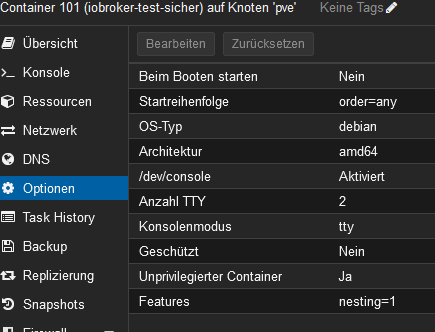
Intel(R) Celeron(R) CPU N3000 @1.04GHz 8G RAM 480G SSD * Virtualization : unprivileged lxc container on Proxmox * 6 GByte RAM für den iobroker Container * Remote-Access über Wireguard meiner Fritzbox
-
@hausbaer Schade, ich habe auch einen LXC-Container mit Debian für iobroker. Der ist aber mit Debian 11 aufgesetzt worden, und dann irgendwann auf Debian 12 hochgezogen ...
Der "iobroker" User und "martin" sehen bei mir jedenfalls auch so aus ...
Bin etwas Ratlos ...
Hier noch die Proxmox Optionen meines Containers







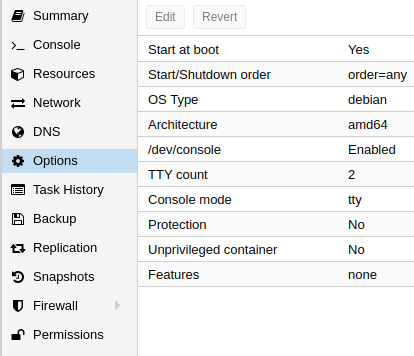

Hey! Du scheinst an dieser Unterhaltung interessiert zu sein, hast aber noch kein Konto.
Hast du es satt, bei jedem Besuch durch die gleichen Beiträge zu scrollen? Wenn du dich für ein Konto anmeldest, kommst du immer genau dorthin zurück, wo du zuvor warst, und kannst dich über neue Antworten benachrichtigen lassen (entweder per E-Mail oder Push-Benachrichtigung). Du kannst auch Lesezeichen speichern und Beiträge positiv bewerten, um anderen Community-Mitgliedern deine Wertschätzung zu zeigen.
Mit deinem Input könnte dieser Beitrag noch besser werden 💗
Registrieren Anmelden364
Online33.0k
Benutzende83.7k
Themen1.3m
Beiträge