Skip to content
  • Home
  • Aktuell
  • Tags
  • 0 Ungelesen 0
  • Kategorien
  • Unreplied
  • Beliebt
  • GitHub
  • Docu
  • Hilfe
Skins
  • Light
  • Brite
  • Cerulean
  • Cosmo
  • Flatly
  • Journal
  • Litera
  • Lumen
  • Lux
  • Materia
  • Minty
  • Morph
  • Pulse
  • Sandstone
  • Simplex
  • Sketchy
  • Spacelab
  • United
  • Yeti
  • Zephyr
  • Dark
  • Cyborg
  • Darkly
  • Quartz
  • Slate
  • Solar
  • Superhero
  • Vapor

  • Standard: (Kein Skin)
  • Kein Skin
Einklappen
ioBroker Logo

Community Forum

donate donate
  1. ioBroker Community Home
  2. Deutsch
  3. ioBroker Allgemein
  4. Backup Größe ioBroker
NEWS

  • Neuer Blogbeitrag: Monatsrückblick - Dezember 2025 🎄
    BluefoxB
    Bluefox
    11
    1
    508

  • Weihnachtsangebot 2025! 🎄
    BluefoxB
    Bluefox
    24
    1
    1.7k

  • UPDATE 31.10.: Amazon Alexa - ioBroker Skill läuft aus ?
    apollon77A
    apollon77
    48
    3
    9.6k

Backup Größe ioBroker

Geplant Angeheftet Gesperrt Verschoben ioBroker Allgemein
115 Beiträge 6 Kommentatoren 12.1k Aufrufe 4 Watching
  • Älteste zuerst
  • Neuste zuerst
  • Meiste Stimmen
Antworten
  • In einem neuen Thema antworten
Anmelden zum Antworten
Dieses Thema wurde gelöscht. Nur Nutzer mit entsprechenden Rechten können es sehen.
  • Marc BergM Marc Berg

    @iced112 sagte in Backup Größe ioBroker:

    Kann das evtl mit den Projekten in der VIS zusammen hängen?

    Kann schon sein, wenn da viele Images drin liegen. Ich bin eher der Daten-Mensch als ein Visualisierungs-Typ. Das kann schon einen Unterschied machen.

    I Offline
    I Offline
    IceD112
    schrieb am zuletzt editiert von
    #63

    @marc-berg
    Hab schon drei aufwendige Visualisierungen gebaut. Denke, dann kommt das daher...

    Marc BergM 1 Antwort Letzte Antwort
    0
    • HomoranH Homoran

      @iced112 sagte in Backup Größe ioBroker:

      Nicht dass ich wüsste.

      was????

      I Offline
      I Offline
      IceD112
      schrieb am zuletzt editiert von
      #64

      @homoran dass ich da 4K Bilder drin habe :-)

      1 Antwort Letzte Antwort
      0
      • I IceD112

        @marc-berg
        Hab schon drei aufwendige Visualisierungen gebaut. Denke, dann kommt das daher...

        Marc BergM Offline
        Marc BergM Offline
        Marc Berg
        Most Active
        schrieb am zuletzt editiert von
        #65

        @iced112 sagte in Backup Größe ioBroker:

        Hab schon drei aufwendige Visualisierungen gebaut. Denke, dann kommt das daher...

        Ja, das wird schon passen. Das heißt doch jetzt aber, du hast ein funktionierendes Backup, oder?

        NUC10I3+Ubuntu+Docker+ioBroker+influxDB2+Node Red+EMQX+Grafana

        Pi-hole, Traefik, Checkmk, Conbee II+Zigbee2MQTT, ESPSomfy-RTS, LoRaWAN, Arduino, KiCad

        Benutzt das Voting im Beitrag, wenn er euch geholfen hat.

        HomoranH I 2 Antworten Letzte Antwort
        0
        • Marc BergM Marc Berg

          @iced112 sagte in Backup Größe ioBroker:

          Hab schon drei aufwendige Visualisierungen gebaut. Denke, dann kommt das daher...

          Ja, das wird schon passen. Das heißt doch jetzt aber, du hast ein funktionierendes Backup, oder?

          HomoranH Nicht stören
          HomoranH Nicht stören
          Homoran
          Global Moderator Administrators
          schrieb am zuletzt editiert von
          #66

          @marc-berg sagte in Backup Größe ioBroker:

          Ja, das wird schon passen.

          wissen ist aber besser!

          @IceD112
          mach das mal mit ncdu

          kein Support per PN! - Fragen im Forum stellen - es gibt fast nichts, was nicht auch für andere interessant ist.

          Benutzt das Voting rechts unten im Beitrag wenn er euch geholfen hat.

          der Installationsfixer: curl -fsL https://iobroker.net/fix.sh | bash -

          I 1 Antwort Letzte Antwort
          0
          • Marc BergM Marc Berg

            @iced112 sagte in Backup Größe ioBroker:

            Hab schon drei aufwendige Visualisierungen gebaut. Denke, dann kommt das daher...

            Ja, das wird schon passen. Das heißt doch jetzt aber, du hast ein funktionierendes Backup, oder?

            I Offline
            I Offline
            IceD112
            schrieb am zuletzt editiert von
            #67

            @marc-berg
            Na, ich will den Tag noch nicht vor dem Abend loben.

            Ich hab die Wiederherstellung eben gestartet. Ein Endergebnis hab ich aber nich nicht

            Marc BergM 1 Antwort Letzte Antwort
            0
            • HomoranH Homoran

              @marc-berg sagte in Backup Größe ioBroker:

              Ja, das wird schon passen.

              wissen ist aber besser!

              @IceD112
              mach das mal mit ncdu

              I Offline
              I Offline
              IceD112
              schrieb am zuletzt editiert von IceD112
              #68

              @homoran Gib mir bisschen... Hab den alten Pi gerade nicht angeschlossen und die Wiederherstellung vom neuen "Läuft"

              Muss jetzt kurz noch die Kinder weg fahren:anguished:
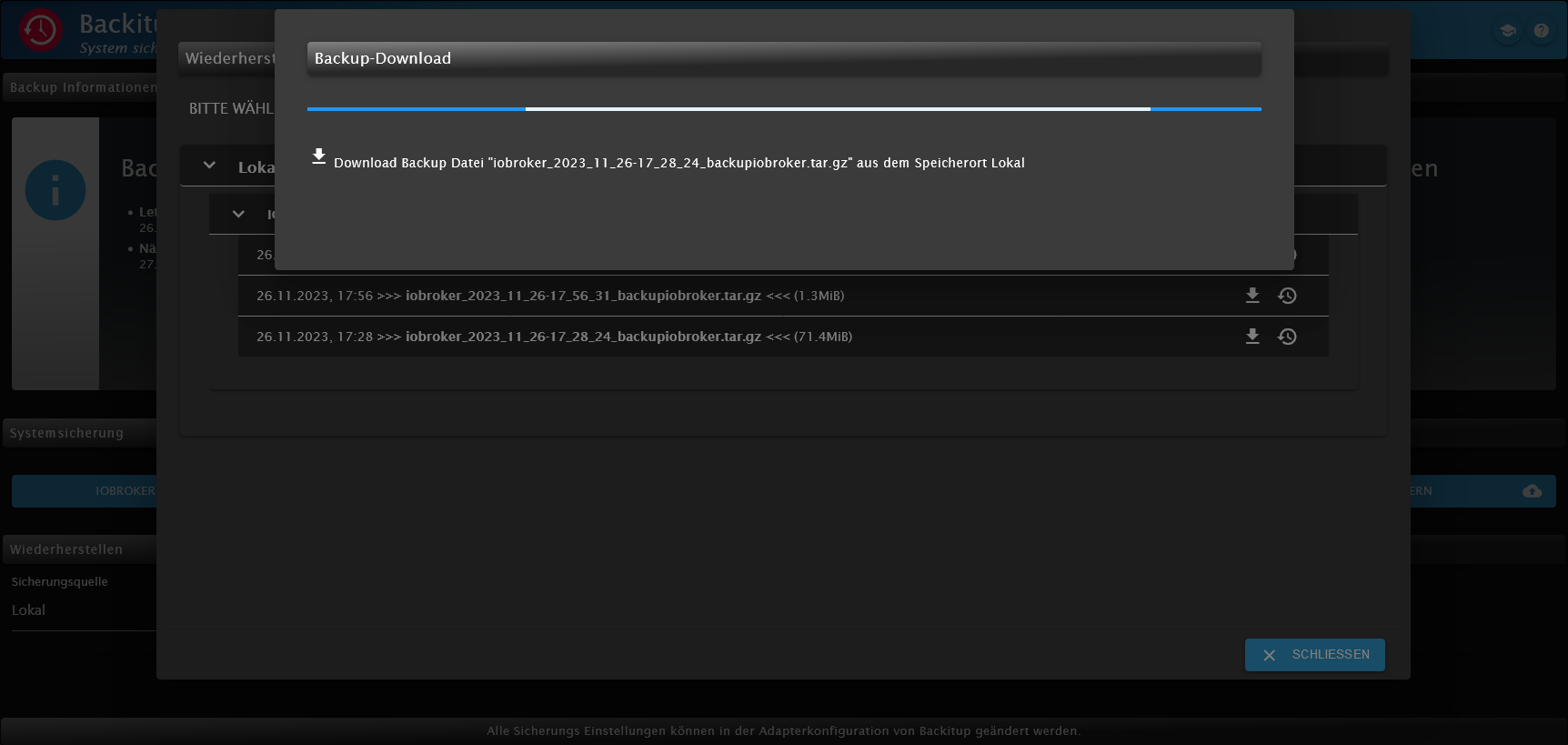
              Screenshot 2023-11-26 at 18-16-58 backitup-0 - ioBroker.png

              1 Antwort Letzte Antwort
              0
              • I IceD112

                @marc-berg
                Na, ich will den Tag noch nicht vor dem Abend loben.

                Ich hab die Wiederherstellung eben gestartet. Ein Endergebnis hab ich aber nich nicht

                Marc BergM Offline
                Marc BergM Offline
                Marc Berg
                Most Active
                schrieb am zuletzt editiert von Marc Berg
                #69

                @iced112 sagte in Backup Größe ioBroker:

                Ich hab die Wiederherstellung eben gestartet. Ein Endergebnis hab ich aber nich nicht

                Dass vorher die VIS installiert sein muss, weißt du!?

                NUC10I3+Ubuntu+Docker+ioBroker+influxDB2+Node Red+EMQX+Grafana

                Pi-hole, Traefik, Checkmk, Conbee II+Zigbee2MQTT, ESPSomfy-RTS, LoRaWAN, Arduino, KiCad

                Benutzt das Voting im Beitrag, wenn er euch geholfen hat.

                I 1 Antwort Letzte Antwort
                0
                • Marc BergM Marc Berg

                  @iced112 sagte in Backup Größe ioBroker:

                  Ich hab die Wiederherstellung eben gestartet. Ein Endergebnis hab ich aber nich nicht

                  Dass vorher die VIS installiert sein muss, weißt du!?

                  I Offline
                  I Offline
                  IceD112
                  schrieb am zuletzt editiert von IceD112
                  #70

                  @marc-berg

                  ne,

                  also den VIS Adapter vor dem Wiederherstellen installieren?

                  Kam grade zurück und die Wiederherstellung läut noch... ich glaub mit dem Backup tut sich nichts. Ich versuch noch ein anderes

                  Marc BergM 1 Antwort Letzte Antwort
                  0
                  • I IceD112

                    @marc-berg

                    ne,

                    also den VIS Adapter vor dem Wiederherstellen installieren?

                    Kam grade zurück und die Wiederherstellung läut noch... ich glaub mit dem Backup tut sich nichts. Ich versuch noch ein anderes

                    Marc BergM Offline
                    Marc BergM Offline
                    Marc Berg
                    Most Active
                    schrieb am zuletzt editiert von Marc Berg
                    #71

                    @iced112 sagte in Backup Größe ioBroker:

                    also den VIS Adapter vor dem Wiederherstellen installieren?

                    Ja, ist besser, da VIS sonst nicht läuft. Alternativ VIS down- und dann wieder upgraden, musst du mal suchen, gibt es etliche Threads zu.

                    Kam grade zurück und die Wiederherstellung läut noch... ich glaub mit dem Backup tut sich nichts. Ich versuch noch ein anderes

                    Das kann schon mal ein wenig dauern. Passen denn die js-controller Versionen von Quelle und Ziel zusammen?

                    NUC10I3+Ubuntu+Docker+ioBroker+influxDB2+Node Red+EMQX+Grafana

                    Pi-hole, Traefik, Checkmk, Conbee II+Zigbee2MQTT, ESPSomfy-RTS, LoRaWAN, Arduino, KiCad

                    Benutzt das Voting im Beitrag, wenn er euch geholfen hat.

                    I 1 Antwort Letzte Antwort
                    0
                    • I Offline
                      I Offline
                      IceD112
                      schrieb am zuletzt editiert von
                      #72

                      @iced112 said in Backup Größe ioBroker:

                      Kam grade zurück und die Wiederherstellung läut noch... ich glaub mit dem Backup tut sich nichts. Ich versuch noch ein anderes

                      Ich Idiot hab nicht die Wiederherstellung gestartet sondern einen Download:man-facepalming:

                      Nu, läuft die Wiederherstellung.

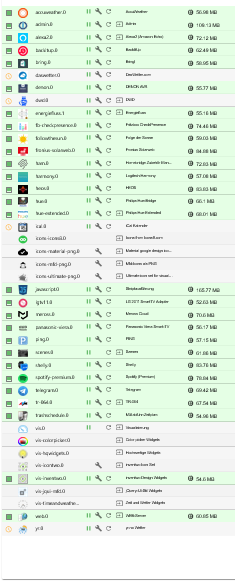
                      VIS Adapter hab ich vorher installiert und den Lizenzschlüssel eingetragen

                      Der Vorgang ist beendet aber nu öffnet sich der iob nicht mehr.

                      1 Antwort Letzte Antwort
                      0
                      • I Offline
                        I Offline
                        IceD112
                        schrieb am zuletzt editiert von
                        #73
                        ======== Start marking the full check here =========
                        
                        Skript v.2023-10-10
                        
                        *** BASE SYSTEM ***
                           Static hostname: ioBroker
                                 Icon name: computer
                          Operating System: Debian GNU/Linux 11 (bullseye)
                                    Kernel: Linux 6.1.21-v8+
                              Architecture: arm64
                        
                        Model           : Raspberry Pi 4 Model B Rev 1.5
                        Docker          : false
                        Virtualization  : none
                        Kernel          : aarch64
                        Userland        : arm64
                        
                        Systemuptime and Load:
                         20:03:49 up  2:09,  3 users,  load average: 0.90, 0.59, 0.37
                        CPU threads: 4
                        
                        
                        *** RASPBERRY THROTTLING ***
                        Current issues:
                        No throttling issues detected.
                        
                        Previously detected issues:
                        No throttling issues detected.
                        
                        *** Time and Time Zones ***
                                       Local time: Sun 2023-11-26 20:03:49 CET
                                   Universal time: Sun 2023-11-26 19:03:49 UTC
                                         RTC time: n/a
                                        Time zone: Europe/Berlin (CET, +0100)
                        System clock synchronized: yes
                                      NTP service: active
                                  RTC in local TZ: no
                        
                        *** User and Groups ***
                        pi
                        /home/pi
                        pi adm dialout cdrom sudo audio video plugdev games users input render netdev lpadmin gpio i2c spi iobroker
                        
                        *** X-Server-Setup ***
                        X-Server:       true
                        Desktop:
                        Terminal:       tty
                        Boot Target:    graphical.target
                        
                        *** MEMORY ***
                                       total        used        free      shared  buff/cache   available
                        Mem:            7.8G        709M        5.8G         35M        1.3G        6.9G
                        Swap:            99M          0B         99M
                        Total:          7.9G        709M        5.9G
                        
                                 7812 M total memory
                                  709 M used memory
                                  880 M active memory
                                  894 M inactive memory
                                 5840 M free memory
                                   48 M buffer memory
                                 1212 M swap cache
                                   99 M total swap
                                    0 M used swap
                                   99 M free swap
                        
                        Raspberry only:
                        oom events: 0
                        lifetime oom required: 0 Mbytes
                        total time in oom handler: 0 ms
                        max time spent in oom handler: 0 ms
                        
                        *** FAILED SERVICES ***
                        
                          UNIT LOAD ACTIVE SUB DESCRIPTION
                        0 loaded units listed.
                        
                        *** FILESYSTEM ***
                        Filesystem     Type      Size  Used Avail Use% Mounted on
                        /dev/root      ext4       59G  4.7G   52G   9% /
                        devtmpfs       devtmpfs  3.6G     0  3.6G   0% /dev
                        tmpfs          tmpfs     3.9G     0  3.9G   0% /dev/shm
                        tmpfs          tmpfs     1.6G  1.2M  1.6G   1% /run
                        tmpfs          tmpfs     5.0M  4.0K  5.0M   1% /run/lock
                        /dev/mmcblk0p1 vfat      255M   31M  225M  13% /boot
                        tmpfs          tmpfs     782M   20K  782M   1% /run/user/1000
                        
                        Messages concerning ext4 filesystem in dmesg:
                        [Sun Nov 26 17:54:44 2023] Kernel command line: coherent_pool=1M 8250.nr_uarts=0 snd_bcm2835.enable_headphones=0 snd_bcm2835.enable_headphones=1 snd_bcm2835.enable_hdmi=1 snd_bcm2835.enable_hdmi=0  smsc95xx.macaddr=D8:3A:DD:46:90:AF vc_mem.mem_base=0x3ec00000 vc_mem.mem_size=0x40000000  console=ttyS0,115200 console=tty1 root=PARTUUID=49bd46ba-02 rootfstype=ext4 fsck.repair=yes rootwait quiet splash plymouth.ignore-serial-consoles
                        [Sun Nov 26 17:54:45 2023] EXT4-fs (mmcblk0p2): INFO: recovery required on readonly filesystem
                        [Sun Nov 26 17:54:45 2023] EXT4-fs (mmcblk0p2): write access will be enabled during recovery
                        [Sun Nov 26 17:54:46 2023] EXT4-fs (mmcblk0p2): recovery complete
                        [Sun Nov 26 17:54:46 2023] EXT4-fs (mmcblk0p2): mounted filesystem with ordered data mode. Quota mode: none.
                        [Sun Nov 26 17:54:46 2023] VFS: Mounted root (ext4 filesystem) readonly on device 179:2.
                        [Sun Nov 26 17:54:48 2023] EXT4-fs (mmcblk0p2): re-mounted. Quota mode: none.
                        
                        Show mounted filesystems \(real ones only\):
                        TARGET  SOURCE         FSTYPE OPTIONS
                        /       /dev/mmcblk0p2 ext4   rw,noatime,commit=600
                        `-/boot /dev/mmcblk0p1 vfat   rw,relatime,fmask=0022,dmask=0022,codepage=437,iocharset=ascii,shortname=mixed,errors=remount-ro
                        
                        Files in neuralgic directories:
                        
                        /var:
                        517M    /var/
                        177M    /var/lib
                        167M    /var/cache
                        155M    /var/cache/apt
                        123M    /var/lib/apt/lists
                        
                        Archived and active journals take up 72.0M in the file system.
                        
                        /opt/iobroker/backups:
                        146M    /opt/iobroker/backups/
                        
                        /opt/iobroker/iobroker-data:
                        195M    /opt/iobroker/iobroker-data/
                        152M    /opt/iobroker/iobroker-data/files
                        74M     /opt/iobroker/iobroker-data/files/vis.0
                        30M     /opt/iobroker/iobroker-data/files/web.admin/static
                        30M     /opt/iobroker/iobroker-data/files/web.admin
                        
                        The five largest files in iobroker-data are:
                        27M     /opt/iobroker/iobroker-data/objects.jsonl
                        21M     /opt/iobroker/iobroker-data/files/web.admin/static/js/main.aaea95f8.js.map
                        17M     /opt/iobroker/iobroker-data/states.jsonl
                        8.3M    /opt/iobroker/iobroker-data/files/web.admin/static/js/main.aaea95f8.js
                        6.3M    /opt/iobroker/iobroker-data/files/admin.admin/custom/static/js/vendors-node_modules_iobroker_adapter-react-v5_assets_devices_parseNames_js-node_modules_iobr-99c23e.847b8ad9.chunk.js.map
                        
                        USB-Devices by-id:
                        USB-Sticks -  Avoid direct links to /dev/* in your adapter setups, please always prefer the links 'by-id':
                        
                        find: '/dev/serial/by-id/': No such file or directory
                        
                        *** NodeJS-Installation ***
                        
                        /usr/bin/nodejs         v18.18.2
                        /usr/bin/node           v18.18.2
                        /usr/bin/npm            9.8.1
                        /usr/bin/npx            9.8.1
                        /usr/bin/corepack       0.19.0
                        
                        
                        nodejs:
                          Installed: 18.18.2-1nodesource1
                          Candidate: 18.18.2-1nodesource1
                          Version table:
                         *** 18.18.2-1nodesource1 500
                                500 https://deb.nodesource.com/node_18.x nodistro/main arm64 Packages
                                100 /var/lib/dpkg/status
                             18.18.1-1nodesource1 500
                                500 https://deb.nodesource.com/node_18.x nodistro/main arm64 Packages
                             18.18.0-1nodesource1 500
                                500 https://deb.nodesource.com/node_18.x nodistro/main arm64 Packages
                             18.17.1-1nodesource1 500
                                500 https://deb.nodesource.com/node_18.x nodistro/main arm64 Packages
                             18.17.0-1nodesource1 500
                                500 https://deb.nodesource.com/node_18.x nodistro/main arm64 Packages
                             18.16.1-1nodesource1 500
                                500 https://deb.nodesource.com/node_18.x nodistro/main arm64 Packages
                             18.16.0-1nodesource1 500
                                500 https://deb.nodesource.com/node_18.x nodistro/main arm64 Packages
                             18.15.0-1nodesource1 500
                                500 https://deb.nodesource.com/node_18.x nodistro/main arm64 Packages
                             18.14.2-1nodesource1 500
                                500 https://deb.nodesource.com/node_18.x nodistro/main arm64 Packages
                             18.14.1-1nodesource1 500
                                500 https://deb.nodesource.com/node_18.x nodistro/main arm64 Packages
                             18.14.0-1nodesource1 500
                                500 https://deb.nodesource.com/node_18.x nodistro/main arm64 Packages
                             18.13.0-1nodesource1 500
                                500 https://deb.nodesource.com/node_18.x nodistro/main arm64 Packages
                             18.12.0-1nodesource1 500
                                500 https://deb.nodesource.com/node_18.x nodistro/main arm64 Packages
                             18.11.0-1nodesource1 500
                                500 https://deb.nodesource.com/node_18.x nodistro/main arm64 Packages
                             18.10.0-1nodesource1 500
                                500 https://deb.nodesource.com/node_18.x nodistro/main arm64 Packages
                             18.9.1-1nodesource1 500
                                500 https://deb.nodesource.com/node_18.x nodistro/main arm64 Packages
                             18.9.0-1nodesource1 500
                                500 https://deb.nodesource.com/node_18.x nodistro/main arm64 Packages
                             18.8.0-1nodesource1 500
                                500 https://deb.nodesource.com/node_18.x nodistro/main arm64 Packages
                             18.7.0-1nodesource1 500
                                500 https://deb.nodesource.com/node_18.x nodistro/main arm64 Packages
                             18.6.0-1nodesource1 500
                                500 https://deb.nodesource.com/node_18.x nodistro/main arm64 Packages
                             18.5.0-1nodesource1 500
                                500 https://deb.nodesource.com/node_18.x nodistro/main arm64 Packages
                             18.4.0-1nodesource1 500
                                500 https://deb.nodesource.com/node_18.x nodistro/main arm64 Packages
                             18.3.0-1nodesource1 500
                                500 https://deb.nodesource.com/node_18.x nodistro/main arm64 Packages
                             18.2.0-1nodesource1 500
                                500 https://deb.nodesource.com/node_18.x nodistro/main arm64 Packages
                             18.1.0-1nodesource1 500
                                500 https://deb.nodesource.com/node_18.x nodistro/main arm64 Packages
                             18.0.0-1nodesource1 500
                                500 https://deb.nodesource.com/node_18.x nodistro/main arm64 Packages
                             12.22.12~dfsg-1~deb11u4 500
                                500 http://deb.debian.org/debian bullseye/main arm64 Packages
                                500 http://security.debian.org/debian-security bullseye-security/main arm64 Packages
                        
                        Temp directories causing npm8 problem: 0
                        No problems detected
                        
                        Errors in npm tree:
                        
                        *** ioBroker-Installation ***
                        
                        ioBroker Status
                        iobroker is running on this host.
                        
                        
                        Objects type: jsonl
                        States  type: jsonl
                        
                        Core adapters versions
                        js-controller:  5.0.16
                        admin:          "admin" not found
                        javascript:     "javascript" not found
                        
                        Adapters from github:   0
                        
                        Adapter State
                          system.adapter.accuweather.0            : accuweather           : ioBroker                                 - disabled
                          system.adapter.admin.0                  : admin                 : ioBroker                                 -  enabled, port: 8081, bind: 0.0.0.0, run as: admin
                          system.adapter.alexa2.0                 : alexa2                : ioBroker                                 - disabled
                          system.adapter.backitup.0               : backitup              : ioBroker                                 -  enabled
                          system.adapter.bring.0                  : bring                 : ioBroker                                 - disabled
                          system.adapter.daswetter.0              : daswetter             : ioBroker                                 - disabled
                          system.adapter.denon.0                  : denon                 : ioBroker                                 - disabled
                          system.adapter.dwd.0                    : dwd                   : ioBroker                                 - disabled
                          system.adapter.energiefluss.1           : energiefluss          : ioBroker                                 - disabled
                          system.adapter.fb-checkpresence.0       : fb-checkpresence      : ioBroker                                 - disabled
                          system.adapter.followthesun.0           : followthesun          : ioBroker                                 - disabled
                          system.adapter.fronius-solarweb.0       : fronius-solarweb      : ioBroker                                 - disabled
                          system.adapter.ham.0                    : ham                   : ioBroker                                 - disabled
                          system.adapter.harmony.0                : harmony               : ioBroker                                 - disabled
                          system.adapter.heos.0                   : heos                  : ioBroker                                 - disabled
                          system.adapter.hue-extended.0           : hue-extended          : ioBroker                                 - disabled
                          system.adapter.hue.0                    : hue                   : ioBroker                                 - disabled, port: 443
                          system.adapter.ical.0                   : ical                  : ioBroker                                 - disabled
                          system.adapter.icons-icons8.0           : icons-icons8          : ioBroker                                 - disabled
                          system.adapter.icons-material-png.0     : icons-material-png    : ioBroker                                 - disabled
                          system.adapter.icons-mfd-png.0          : icons-mfd-png         : ioBroker                                 - disabled
                          system.adapter.icons-ultimate-png.0     : icons-ultimate-png    : ioBroker                                 - disabled
                          system.adapter.javascript.0             : javascript            : ioBroker                                 - disabled
                          system.adapter.lgtv11.0                 : lgtv11                : ioBroker                                 - disabled, port: 8080
                          system.adapter.meross.0                 : meross                : ioBroker                                 - disabled
                          system.adapter.panasonic-viera.0        : panasonic-viera       : ioBroker                                 - disabled
                          system.adapter.ping.0                   : ping                  : ioBroker                                 - disabled
                          system.adapter.scenes.0                 : scenes                : ioBroker                                 - disabled
                          system.adapter.shelly.0                 : shelly                : ioBroker                                 - disabled, port: 1882, bind: 0.0.0.0
                          system.adapter.spotify-premium.0        : spotify-premium       : ioBroker                                 - disabled
                          system.adapter.telegram.0               : telegram              : ioBroker                                 - disabled, port: 8443, bind: 0.0.0.0
                          system.adapter.tr-064.0                 : tr-064                : ioBroker                                 - disabled
                          system.adapter.trashschedule.0          : trashschedule         : ioBroker                                 - disabled
                          system.adapter.vis-colorpicker.0        : vis-colorpicker       : ioBroker                                 - disabled
                          system.adapter.vis-hqwidgets.0          : vis-hqwidgets         : ioBroker                                 - disabled
                          system.adapter.vis-icontwo.0            : vis-icontwo           : ioBroker                                 - disabled
                          system.adapter.vis-inventwo.0           : vis-inventwo          : ioBroker                                 - disabled
                          system.adapter.vis-jqui-mfd.0           : vis-jqui-mfd          : ioBroker                                 - disabled
                          system.adapter.vis-timeandweather.0     : vis-timeandweather    : ioBroker                                 - disabled
                          system.adapter.vis.0                    : vis                   : ioBroker                                 - disabled
                          system.adapter.web.0                    : web                   : ioBroker                                 - disabled, port: 8082, bind: 0.0.0.0, run as: admin
                          system.adapter.yr.0                     : yr                    : ioBroker                                 - disabled
                        
                        + instance is alive
                        
                        Enabled adapters with bindings
                          system.adapter.admin.0                  : admin                 : ioBroker                                 -  enabled, port: 8081, bind: 0.0.0.0, run as: admin
                        
                        ioBroker-Repositories
                        stable        : http://download.iobroker.net/sources-dist.json
                        beta          : http://download.iobroker.net/sources-dist-latest.json
                        
                        Active repo(s): beta
                        
                        Installed ioBroker-Instances
                        Used repository: beta
                        Adapter    "icons-material-png": 0.1.0, installed 0.1.0
                        Adapter    "icons-mfd-png": 1.1.0    , installed 1.1.0
                        Adapter    "icons-ultimate-png": 1.0.1, installed 1.0.1
                        Controller "js-controller": 5.0.16   , installed 5.0.16
                        
                        Objects and States
                        Please stand by - This may take a while
                        Objects:        34776
                        States:         28751
                        
                        *** OS-Repositories and Updates ***
                        Hit:1 http://deb.debian.org/debian bullseye InRelease
                        Hit:2 http://deb.debian.org/debian bullseye-updates InRelease
                        Hit:3 http://security.debian.org/debian-security bullseye-security InRelease
                        Hit:4 http://archive.raspberrypi.org/debian bullseye InRelease
                        Hit:5 https://deb.nodesource.com/node_18.x nodistro InRelease
                        Reading package lists...
                        Pending Updates: 0
                        
                        *** Listening Ports ***
                        Active Internet connections (only servers)
                        Proto Recv-Q Send-Q Local Address           Foreign Address         State       User       Inode      PID/Program name
                        tcp        0      0 127.0.0.1:9001          0.0.0.0:*               LISTEN      1001       27429      4772/iobroker.js-co
                        tcp        0      0 127.0.0.1:9000          0.0.0.0:*               LISTEN      1001       26219      4772/iobroker.js-co
                        tcp        0      0 127.0.0.1:631           0.0.0.0:*               LISTEN      0          13720      517/cupsd
                        tcp        0      0 0.0.0.0:22              0.0.0.0:*               LISTEN      0          13659      556/sshd: /usr/sbin
                        tcp6       0      0 ::1:631                 :::*                    LISTEN      0          13719      517/cupsd
                        tcp6       0      0 :::22                   :::*                    LISTEN      0          13661      556/sshd: /usr/sbin
                        udp        0      0 0.0.0.0:68              0.0.0.0:*                           0          15633      477/dhcpcd
                        udp        0      0 0.0.0.0:33021           0.0.0.0:*                           108        11761      398/avahi-daemon: r
                        udp        0      0 0.0.0.0:631             0.0.0.0:*                           0          11870      590/cups-browsed
                        udp        0      0 0.0.0.0:5353            0.0.0.0:*                           108        11759      398/avahi-daemon: r
                        udp6       0      0 :::52181                :::*                                108        11762      398/avahi-daemon: r
                        udp6       0      0 :::546                  :::*                                0          15713      477/dhcpcd
                        udp6       0      0 :::5353                 :::*                                108        11760      398/avahi-daemon: r
                        
                        *** Log File - Last 25 Lines ***
                        
                        2023-11-26 20:03:32.511  - info: host.ioBroker iobroker npm-install: upload [19] icons-ultimate-png /opt/iobroker/node_modules/iobroker.icons-ultimate-png/www/982.png 982.png image/png
                        2023-11-26 20:03:32.524  - info: host.ioBroker iobroker npm-install: upload [18] icons-ultimate-png /opt/iobroker/node_modules/iobroker.icons-ultimate-png/www/983.png 983.png image/png
                        2023-11-26 20:03:32.539  - info: host.ioBroker iobroker npm-install: upload [17] icons-ultimate-png /opt/iobroker/node_modules/iobroker.icons-ultimate-png/www/984.png 984.png image/png
                        2023-11-26 20:03:32.553  - info: host.ioBroker iobroker npm-install: upload [16] icons-ultimate-png /opt/iobroker/node_modules/iobroker.icons-ultimate-png/www/985.png 985.png image/png
                        2023-11-26 20:03:32.566  - info: host.ioBroker iobroker npm-install: upload [15] icons-ultimate-png /opt/iobroker/node_modules/iobroker.icons-ultimate-png/www/986.png 986.png image/png
                        2023-11-26 20:03:32.579  - info: host.ioBroker iobroker npm-install: upload [14] icons-ultimate-png /opt/iobroker/node_modules/iobroker.icons-ultimate-png/www/987.png 987.png image/png
                        2023-11-26 20:03:32.592  - info: host.ioBroker iobroker npm-install: upload [13] icons-ultimate-png /opt/iobroker/node_modules/iobroker.icons-ultimate-png/www/988.png 988.png image/png
                        2023-11-26 20:03:32.605  - info: host.ioBroker iobroker npm-install: upload [12] icons-ultimate-png /opt/iobroker/node_modules/iobroker.icons-ultimate-png/www/989.png 989.png image/png
                        2023-11-26 20:03:32.618  - info: host.ioBroker iobroker npm-install: upload [11] icons-ultimate-png /opt/iobroker/node_modules/iobroker.icons-ultimate-png/www/99.png 99.png image/png
                        2023-11-26 20:03:32.631  - info: host.ioBroker iobroker npm-install: upload [10] icons-ultimate-png /opt/iobroker/node_modules/iobroker.icons-ultimate-png/www/990.png 990.png image/png
                        2023-11-26 20:03:32.645  - info: host.ioBroker iobroker npm-install: upload [9] icons-ultimate-png /opt/iobroker/node_modules/iobroker.icons-ultimate-png/www/991.png 991.png image/png
                        2023-11-26 20:03:32.658  - info: host.ioBroker iobroker npm-install: upload [8] icons-ultimate-png /opt/iobroker/node_modules/iobroker.icons-ultimate-png/www/992.png 992.png image/png
                        2023-11-26 20:03:32.671  - info: host.ioBroker iobroker npm-install: upload [7] icons-ultimate-png /opt/iobroker/node_modules/iobroker.icons-ultimate-png/www/993.png 993.png image/png
                        2023-11-26 20:03:32.684  - info: host.ioBroker iobroker npm-install: upload [6] icons-ultimate-png /opt/iobroker/node_modules/iobroker.icons-ultimate-png/www/994.png 994.png image/png
                        2023-11-26 20:03:32.697  - info: host.ioBroker iobroker npm-install: upload [5] icons-ultimate-png /opt/iobroker/node_modules/iobroker.icons-ultimate-png/www/995.png 995.png image/png
                        2023-11-26 20:03:32.710  - info: host.ioBroker iobroker npm-install: upload [4] icons-ultimate-png /opt/iobroker/node_modules/iobroker.icons-ultimate-png/www/996.png 996.png image/png
                        2023-11-26 20:03:32.723  - info: host.ioBroker iobroker npm-install: upload [3] icons-ultimate-png /opt/iobroker/node_modules/iobroker.icons-ultimate-png/www/997.png 997.png image/png
                        2023-11-26 20:03:32.736  - info: host.ioBroker iobroker npm-install: upload [2] icons-ultimate-png /opt/iobroker/node_modules/iobroker.icons-ultimate-png/www/998.png 998.png image/png
                        2023-11-26 20:03:32.749  - info: host.ioBroker iobroker npm-install: upload [1] icons-ultimate-png /opt/iobroker/node_modules/iobroker.icons-ultimate-png/www/999.png 999.png image/png
                        2023-11-26 20:03:32.762  - info: host.ioBroker iobroker npm-install: upload [0] icons-ultimate-png /opt/iobroker/node_modules/iobroker.icons-ultimate-png/www/index.html index.html text/html
                        2023-11-26 20:03:32.962  - info: host.ioBroker iobroker npm-install: host.ioBroker object system.adapter.icons-ultimate-png created/updated
                        2023-11-26 20:03:34.178  - info: host.ioBroker iobroker npm-install: exit 0
                        2023-11-26 20:03:35.179  - warn: host.ioBroker startInstance cannot find adapter "vis-icontwo@0.97.3". Try to install it... 1 attempt
                        2023-11-26 20:03:35.179  - info: host.ioBroker iobroker install vis-icontwo@0.97.3 using installedFrom
                        2023-11-26 20:03:40.041  - info: host.ioBroker iobroker npm-install: NPM version: 9.8.1Installing iobroker.vis-icontwo@0.97.3... (System call)
                        
                        ============ Mark until here for C&P =============
                        
                        iob diag has finished.
                        
                        
                        Press any key for a summary
                        1 Antwort Letzte Antwort
                        0
                        • Marc BergM Marc Berg

                          @iced112 sagte in Backup Größe ioBroker:

                          also den VIS Adapter vor dem Wiederherstellen installieren?

                          Ja, ist besser, da VIS sonst nicht läuft. Alternativ VIS down- und dann wieder upgraden, musst du mal suchen, gibt es etliche Threads zu.

                          Kam grade zurück und die Wiederherstellung läut noch... ich glaub mit dem Backup tut sich nichts. Ich versuch noch ein anderes

                          Das kann schon mal ein wenig dauern. Passen denn die js-controller Versionen von Quelle und Ziel zusammen?

                          I Offline
                          I Offline
                          IceD112
                          schrieb am zuletzt editiert von
                          #74

                          @marc-berg said in Backup Größe ioBroker:

                          Das kann schon mal ein wenig dauern. Passen denn die js-controller Versionen von Quelle und Ziel zusammen?

                          die sollten passen

                          auf alt 5.0.16
                          auf neu 5.0.16

                          laut diag

                          Marc BergM 1 Antwort Letzte Antwort
                          0
                          • I IceD112

                            @marc-berg said in Backup Größe ioBroker:

                            Das kann schon mal ein wenig dauern. Passen denn die js-controller Versionen von Quelle und Ziel zusammen?

                            die sollten passen

                            auf alt 5.0.16
                            auf neu 5.0.16

                            laut diag

                            Marc BergM Offline
                            Marc BergM Offline
                            Marc Berg
                            Most Active
                            schrieb am zuletzt editiert von
                            #75

                            @iced112

                            Admin Adapter läuft nicht, wie ich das sehe.

                            iob start admin
                            

                            Logs?

                            NUC10I3+Ubuntu+Docker+ioBroker+influxDB2+Node Red+EMQX+Grafana

                            Pi-hole, Traefik, Checkmk, Conbee II+Zigbee2MQTT, ESPSomfy-RTS, LoRaWAN, Arduino, KiCad

                            Benutzt das Voting im Beitrag, wenn er euch geholfen hat.

                            I 1 Antwort Letzte Antwort
                            0
                            • Marc BergM Marc Berg

                              @iced112

                              Admin Adapter läuft nicht, wie ich das sehe.

                              iob start admin
                              

                              Logs?

                              I Offline
                              I Offline
                              IceD112
                              schrieb am zuletzt editiert von IceD112
                              #76

                              @marc-berg
                              ne, doch der läuft doch, aber

                              iob start admin
                              

                              hat jetzt auch keine abhilfe geschaffen

                              Vielleicht ist die Wiederherstellung schiefgelaufen?

                              HomoranH 1 Antwort Letzte Antwort
                              0
                              • I Offline
                                I Offline
                                IceD112
                                schrieb am zuletzt editiert von
                                #77

                                kann ich die die auch mit nem Befehl über ssh nochmal neu versuchen?

                                1 Antwort Letzte Antwort
                                0
                                • Marc BergM Offline
                                  Marc BergM Offline
                                  Marc Berg
                                  Most Active
                                  schrieb am zuletzt editiert von
                                  #78

                                  @iced112 sagte in Backup Größe ioBroker:

                                  kann ich die die auch mit nem Befehl über ssh nochmal neu versuchen?

                                  verstehe ich jetzt nicht, muss mich aber jetzt auch erstmal ausklinken.

                                  NUC10I3+Ubuntu+Docker+ioBroker+influxDB2+Node Red+EMQX+Grafana

                                  Pi-hole, Traefik, Checkmk, Conbee II+Zigbee2MQTT, ESPSomfy-RTS, LoRaWAN, Arduino, KiCad

                                  Benutzt das Voting im Beitrag, wenn er euch geholfen hat.

                                  1 Antwort Letzte Antwort
                                  0
                                  • I IceD112

                                    @marc-berg
                                    ne, doch der läuft doch, aber

                                    iob start admin
                                    

                                    hat jetzt auch keine abhilfe geschaffen

                                    Vielleicht ist die Wiederherstellung schiefgelaufen?

                                    HomoranH Nicht stören
                                    HomoranH Nicht stören
                                    Homoran
                                    Global Moderator Administrators
                                    schrieb am zuletzt editiert von
                                    #79

                                    @iced112 sagte in Backup Größe ioBroker:

                                    doch der läuft doch, aber

                                    laut diag aber nicht.
                                    Hast du da was zusammengeschnitten?
                                    Adapter und Instanzen sind irgendwie komisch, auch die {1} immer wieder

                                    kein Support per PN! - Fragen im Forum stellen - es gibt fast nichts, was nicht auch für andere interessant ist.

                                    Benutzt das Voting rechts unten im Beitrag wenn er euch geholfen hat.

                                    der Installationsfixer: curl -fsL https://iobroker.net/fix.sh | bash -

                                    1 Antwort Letzte Antwort
                                    0
                                    • I Offline
                                      I Offline
                                      IceD112
                                      schrieb am zuletzt editiert von
                                      #80

                                      @homoran
                                      @Homoran

                                      hab jetzt mal über ssh einen restore gemacht

                                      sudo iobroker restore 0
                                      sudo iobroker start all
                                      sudo iobroker start
                                      sudo iobroker upload all
                                      

                                      In der Konsole hat man gesehen, dass er sämtliche Instanzen und auch die VIS projekte aus dem Backup rein gespielt hat. Ich komm jetzt auch wieder auf den Admin aber die ganzem instanzen fehlen. Sieht eigentlich wie eine Neuinstallation aus:grimacing:

                                      HomoranH DJMarc75D 2 Antworten Letzte Antwort
                                      0
                                      • I IceD112

                                        @homoran
                                        @Homoran

                                        hab jetzt mal über ssh einen restore gemacht

                                        sudo iobroker restore 0
                                        sudo iobroker start all
                                        sudo iobroker start
                                        sudo iobroker upload all
                                        

                                        In der Konsole hat man gesehen, dass er sämtliche Instanzen und auch die VIS projekte aus dem Backup rein gespielt hat. Ich komm jetzt auch wieder auf den Admin aber die ganzem instanzen fehlen. Sieht eigentlich wie eine Neuinstallation aus:grimacing:

                                        HomoranH Nicht stören
                                        HomoranH Nicht stören
                                        Homoran
                                        Global Moderator Administrators
                                        schrieb am zuletzt editiert von Homoran
                                        #81

                                        @iced112 entweder nochmal iob diag oder iob list instances und iob list adapters

                                        dass ein restore aber bis zu 1h dauern kann weisst du?

                                        kein Support per PN! - Fragen im Forum stellen - es gibt fast nichts, was nicht auch für andere interessant ist.

                                        Benutzt das Voting rechts unten im Beitrag wenn er euch geholfen hat.

                                        der Installationsfixer: curl -fsL https://iobroker.net/fix.sh | bash -

                                        1 Antwort Letzte Antwort
                                        0
                                        • I IceD112

                                          @homoran
                                          @Homoran

                                          hab jetzt mal über ssh einen restore gemacht

                                          sudo iobroker restore 0
                                          sudo iobroker start all
                                          sudo iobroker start
                                          sudo iobroker upload all
                                          

                                          In der Konsole hat man gesehen, dass er sämtliche Instanzen und auch die VIS projekte aus dem Backup rein gespielt hat. Ich komm jetzt auch wieder auf den Admin aber die ganzem instanzen fehlen. Sieht eigentlich wie eine Neuinstallation aus:grimacing:

                                          DJMarc75D Offline
                                          DJMarc75D Offline
                                          DJMarc75
                                          schrieb am zuletzt editiert von DJMarc75
                                          #82

                                          @iced112 sagte in Backup Größe ioBroker:

                                          sudo iobroker restore 0

                                          wo hast Du denn diese Befehle her ???

                                          iobroker wird NIE mit sudo angefasst !!

                                          Lehrling seit 1975 !!!
                                          Beitrag geholfen ? dann gerne ein upvote rechts unten im Beitrag klicken ;)
                                          https://forum.iobroker.net/topic/51555/hinweise-f%C3%BCr-gute-forenbeitr%C3%A4ge

                                          I 1 Antwort Letzte Antwort
                                          0
                                          Antworten
                                          • In einem neuen Thema antworten
                                          Anmelden zum Antworten
                                          • Älteste zuerst
                                          • Neuste zuerst
                                          • Meiste Stimmen


                                          Support us

                                          ioBroker
                                          Community Adapters
                                          Donate
                                          FAQ Cloud / IOT
                                          HowTo: Node.js-Update
                                          HowTo: Backup/Restore
                                          Downloads
                                          BLOG

                                          749

                                          Online

                                          32.5k

                                          Benutzer

                                          81.8k

                                          Themen

                                          1.3m

                                          Beiträge
                                          Community
                                          Impressum | Datenschutz-Bestimmungen | Nutzungsbedingungen | Einwilligungseinstellungen
                                          ioBroker Community 2014-2025
                                          logo
                                          • Anmelden

                                          • Du hast noch kein Konto? Registrieren

                                          • Anmelden oder registrieren, um zu suchen
                                          • Erster Beitrag
                                            Letzter Beitrag
                                          0
                                          • Home
                                          • Aktuell
                                          • Tags
                                          • Ungelesen 0
                                          • Kategorien
                                          • Unreplied
                                          • Beliebt
                                          • GitHub
                                          • Docu
                                          • Hilfe