



Skip to content
  • Home
  • Aktuell
  • Tags
  • 0 Ungelesen 0
  • Kategorien
  • Unreplied
  • Beliebt
  • GitHub
  • Docu
  • Hilfe
Skins
  • Light
  • Brite
  • Cerulean
  • Cosmo
  • Flatly
  • Journal
  • Litera
  • Lumen
  • Lux
  • Materia
  • Minty
  • Morph
  • Pulse
  • Sandstone
  • Simplex
  • Sketchy
  • Spacelab
  • United
  • Yeti
  • Zephyr
  • Dark
  • Cyborg
  • Darkly
  • Quartz
  • Slate
  • Solar
  • Superhero
  • Vapor

  • Standard: (Kein Skin)
  • Kein Skin
Einklappen
ioBroker Logo

Community Forum

donate donate
  1. ioBroker Community Home
  2. Deutsch
  3. ioBroker Allgemein
  4. Zigbee Adapter startet nicht mehr

NEWS

  • Weihnachtsangebot 2025! 🎄
    BluefoxB
    Bluefox
    22
    1
    985

  • UPDATE 31.10.: Amazon Alexa - ioBroker Skill läuft aus ?
    apollon77A
    apollon77
    48
    3
    9.1k

  • Monatsrückblick – September 2025
    BluefoxB
    Bluefox
    14
    1
    2.4k

Zigbee Adapter startet nicht mehr

Geplant Angeheftet Gesperrt Verschoben ioBroker Allgemein
51 Beiträge 6 Kommentatoren 4.9k Aufrufe 6 Watching
  • Älteste zuerst
  • Neuste zuerst
  • Meiste Stimmen
Antworten
  • In einem neuen Thema antworten
Anmelden zum Antworten
Dieses Thema wurde gelöscht. Nur Nutzer mit entsprechenden Rechten können es sehen.
  • J Jaksa

    @anselra

    Naja jetzt sieht es so aus als wäre das Gerät bereits in Benutzung durch was auch immer. Das war vorhin noch nicht der Fall.

    Versuch nochmal den Stick aus und wieder einzustecken bzw. die ganze Kiste einmal neu zu starten wenn ersteres nicht hilft.

    A Offline
    A Offline
    anselra
    schrieb am zuletzt editiert von
    #20

    @jaksa

    Neustart erfolgt, leider immer noch nicht grün

    zigbee.0
    2023-10-21 20:47:46.819	error	Error herdsman start
    
    zigbee.0
    2023-10-21 20:47:46.819	error	Failed to start Zigbee
    
    zigbee.0
    2023-10-21 20:47:46.817	error	Starting zigbee-herdsman problem : "Error while opening serialport 'Error: Error: Device or resource busy, cannot open /dev/serial/by-id/usb-Texas_Instruments_XDS110__03.00.00.15__Embed_with_CMSIS-DAP_L1100GZZ-if00'"
    
    zigbee.0
    2023-10-21 20:47:46.274	info	Installed Version: ioBroker/ioBroker.zigbee#e233808d509f6fc4ddb3176d79633f4492146a83
    
    zigbee.0
    2023-10-21 20:47:46.220	debug	Starting zigbee-herdsman...
    
    zigbee.0
    2023-10-21 20:47:39.042	info	Starting Zigbee npm ...
    
    zigbee.0
    2023-10-21 20:47:39.041	info	Try to reconnect. 1 attempts left
    
    zigbee.0
    2023-10-21 20:47:29.038	error	Error herdsman start
    
    zigbee.0
    2023-10-21 20:47:29.037	error	Failed to start Zigbee
    
    zigbee.0
    2023-10-21 20:47:29.035	error	Starting zigbee-herdsman problem : "Error while opening serialport 'Error: Error: Device or resource busy, cannot open /dev/serial/by-id/usb-Texas_Instruments_XDS110__03.00.00.15__Embed_with_CMSIS-DAP_L1100GZZ-if00'"
    
    zigbee.0
    2023-10-21 20:47:28.177	info	Installed Version: ioBroker/ioBroker.zigbee#e233808d509f6fc4ddb3176d79633f4492146a83
    
    zigbee.0
    2023-10-21 20:47:27.582	debug	Starting zigbee-herdsman...
    
    zigbee.0
    2023-10-21 20:47:27.317	debug	Backup /opt/iobroker/iobroker-data/zigbee_0/backup_2023_10_21-20_47_27.tar.gz success
    
    zigbee.0
    2023-10-21 20:47:27.253	info	Starting Zigbee npm ...
    
    zigbee.0
    2023-10-21 20:47:27.239	info	delete old Backup files. keep only last 10
    
    zigbee.0
    2023-10-21 20:47:27.126	debug	Using zigbee-herdsman with settings: {"network":{"panID":6754,"channelList":[11],"networkKey":[1,3,5,7,9,11,13,15,0,2,4,6,8,10,12,13],"extenedPanID":[221,221,221,221,221,221,221,221]},"databasePath":"/opt/iobroker/iobroker-data/zigbee_0/shepherd.db","backupPath":"/opt/iobroker/iobroker-data/zigbee_0/nvbackup.json","serialPort":{"baudRate":115200,"rtscts":false,"path":"/dev/serial/by-id/usb-Texas_Instruments_XDS110__03.00.00.15__Embed_with_CMSIS-DAP_L1100GZZ-if00","adapter":"zstack"},"adapter":{"forceStartWithInconsistentAdapterConfiguration":false}}
    
    zigbee.0
    2023-10-21 20:47:26.997	info	starting. Version 1.8.24 (non-npm: ioBroker/ioBroker.zigbee#e233808d509f6fc4ddb3176d79633f4492146a83) in /opt/iobroker/node_modules/iobroker.zigbee, node: v18.18.2, js-controller: 5.0.12
    

    BETRIEBSSYSTEM: LINUX
    ARCHITEKTUR: ARM
    CPUS: 4
    GESCHWINDIGKEIT: 1500 MHZ
    MODELL: ARMV7 PROCESSOR REV 3 (V7L)
    RAM: 3.7 GB

    1 Antwort Letzte Antwort
    0
    • Thomas BraunT Thomas Braun

      @1topf sagte in Zigbee Adapter startet nicht mehr:

      Wieso bringt es den denn 2mal? Der sollte dort nur 1mal auftauchen, da er ja auch nur 1mal drin steckt.

      Der Stick hat zwei Interfaces.

      lsof /dev/ttyACM0
      

      sagt? (lsof muss ggf. noch installiert werden)

      A Offline
      A Offline
      anselra
      schrieb am zuletzt editiert von
      #21

      @thomas-braun

      es handelt sich um das dev Board CC26X2R1

      BETRIEBSSYSTEM: LINUX
      ARCHITEKTUR: ARM
      CPUS: 4
      GESCHWINDIGKEIT: 1500 MHZ
      MODELL: ARMV7 PROCESSOR REV 3 (V7L)
      RAM: 3.7 GB

      Thomas BraunT 1 Antwort Letzte Antwort
      0
      • A anselra
        Systemdata Bitte Ausfüllen
        Hardwaresystem: Pi4
        Arbeitsspeicher: 4GB
        Festplattenart: SSD
        Betriebssystem: Raspberry PI OS Lite 32 Bookworm
        Node-Version: v18.18.2
        Nodejs-Version: v18.18.2
        NPM-Version: 9.8.1
        Image genutzt: Nein
        ``zigbee.0
        2023-10-21 18:36:14.689	error	Error herdsman start
        
        zigbee.0
        2023-10-21 18:36:14.689	error	Failed to start Zigbee
        
        zigbee.0
        2023-10-21 18:36:14.688	error	Starting zigbee-herdsman problem : "Error while opening serialport 'Error: Error Resource temporarily unavailable Cannot lock port'"
        
        zigbee.0
        2023-10-21 18:36:14.382	info	Installed Version: ioBroker/ioBroker.zigbee#e233808d509f6fc4ddb3176d79633f4492146a83
        
        zigbee.0
        2023-10-21 18:36:14.341	debug	Starting zigbee-herdsman...
        
        zigbee.0
        2023-10-21 18:36:14.331	info	Starting Zigbee npm ...
        
        zigbee.0
        2023-10-21 18:36:14.329	info	Try to reconnect. 1 attempts left
        
        zigbee.0
        2023-10-21 18:36:04.327	error	Error herdsman start
        
        zigbee.0
        2023-10-21 18:36:04.326	error	Failed to start Zigbee
        
        zigbee.0
        2023-10-21 18:36:04.326	error	Starting zigbee-herdsman problem : "Failed to connect to the adapter (Error: SRSP - SYS - ping after 6000ms)"
        
        zigbee.0
        2023-10-21 18:35:44.357	debug	Backup /opt/iobroker/iobroker-data/zigbee_0/backup_2023_10_21-18_35_43.tar.gz success
        
        zigbee.0
        2023-10-21 18:35:43.926	info	Installed Version: ioBroker/ioBroker.zigbee#e233808d509f6fc4ddb3176d79633f4492146a83
        
        zigbee.0
        2023-10-21 18:35:43.625	debug	Starting zigbee-herdsman...
        
        zigbee.0
        2023-10-21 18:35:43.576	info	Starting Zigbee npm ...
        
        zigbee.0
        2023-10-21 18:35:43.463	debug	Using zigbee-herdsman with settings: {"network":{"panID":6754,"channelList":[11],"networkKey":[1,3,5,7,9,11,13,15,0,2,4,6,8,10,12,13],"extenedPanID":[221,221,221,221,221,221,221,221]},"databasePath":"/opt/iobroker/iobroker-data/zigbee_0/shepherd.db","backupPath":"/opt/iobroker/iobroker-data/zigbee_0/nvbackup.json","serialPort":{"baudRate":115200,"rtscts":false,"path":"/dev/serial/by-id/usb-Texas_Instruments_XDS110__03.00.00.15__Embed_with_CMSIS-DAP_L1100GZZ-if03","adapter":"zstack"},"adapter":{"forceStartWithInconsistentAdapterConfiguration":false}}
        
        zigbee.0
        2023-10-21 18:35:43.393	info	starting. Version 1.8.24 (non-npm: ioBroker/ioBroker.zigbee#e233808d509f6fc4ddb3176d79633f4492146a83) in /opt/iobroker/node_modules/iobroker.zigbee, node: v18.18.2, js-controller: 5.0.12
        
        zigbee.0
        2023-10-21 18:35:43.067	info	Plugin sentry Sentry Plugin disabled for this process because sending of statistic data is disabled for the system
        
        zigbee.0
        2023-10-21 18:35:43.058	debug	Plugin sentry Initialize Plugin (enabled=true)
        
        zigbee.0
        2023-10-21 18:35:42.465	debug	States connected to redis: 127.0.0.1:9000
        
        zigbee.0
        2023-10-21 18:35:42.235	debug	States create User PubSub Client
        
        zigbee.0
        2023-10-21 18:35:42.234	debug	States create System PubSub Client
        
        zigbee.0
        2023-10-21 18:35:42.064	debug	Redis States: Use Redis connection: 127.0.0.1:9000
        
        zigbee.0
        2023-10-21 18:35:41.875	debug	Objects connected to redis: 127.0.0.1:9001
        
        zigbee.0
        2023-10-21 18:35:41.867	debug	Objects client initialize lua scripts
        
        zigbee.0
        2023-10-21 18:35:41.571	debug	Objects create User PubSub Client
        
        zigbee.0
        2023-10-21 18:35:41.570	debug	Objects create System PubSub Client
        
        zigbee.0
        2023-10-21 18:35:41.567	debug	Objects client ready ... initialize now
        
        zigbee.0
        2023-10-21 18:35:41.421	debug	Redis Objects: Use Redis connection: 127.0.0.1:9001`
        code_text
        

        Hallo zusammen, leider bin ich in der Suche nicht fündig geworden. Ich habe das System neu aufgesetzt und zurück gesichert, leider wird mein Zigbee Adapter nicht mehr grün. Hoffe ich habe alle Angaben gemacht und jemand hat einen Tipp für mich.

        Gruß Ralf

        ? Offline
        ? Offline
        Ein ehemaliger Benutzer
        schrieb am zuletzt editiert von
        #22

        @anselra sagte in Zigbee Adapter startet nicht mehr:

        Raspberry PI OS Lite 32

        Moin,

        hat jetzt nichts mit dem eigentlichen Problem zu tun, aber wieso das 32 Bit, warum nicht 64 Bit?

        VG
        Bernd

        A 1 Antwort Letzte Antwort
        0
        • ? Ein ehemaliger Benutzer

          @anselra sagte in Zigbee Adapter startet nicht mehr:

          Raspberry PI OS Lite 32

          Moin,

          hat jetzt nichts mit dem eigentlichen Problem zu tun, aber wieso das 32 Bit, warum nicht 64 Bit?

          VG
          Bernd

          A Offline
          A Offline
          anselra
          schrieb am zuletzt editiert von
          #23

          @dp20eic

          meinte mich zu erinnern, dass pivccu probleme mit 64Bit hatte

          BETRIEBSSYSTEM: LINUX
          ARCHITEKTUR: ARM
          CPUS: 4
          GESCHWINDIGKEIT: 1500 MHZ
          MODELL: ARMV7 PROCESSOR REV 3 (V7L)
          RAM: 3.7 GB

          1 Antwort Letzte Antwort
          0
          • A anselra

            @thomas-braun

            es handelt sich um das dev Board CC26X2R1

            Thomas BraunT Online
            Thomas BraunT Online
            Thomas Braun
            Most Active
            schrieb am zuletzt editiert von
            #24

            @anselra sagte in Zigbee Adapter startet nicht mehr:

            es handelt sich um das dev Board CC26X2R1

            Joh, un?

            Linux-Werkzeugkasten:
            https://forum.iobroker.net/topic/42952/der-kleine-iobroker-linux-werkzeugkasten
            NodeJS Fixer Skript:
            https://forum.iobroker.net/topic/68035/iob-node-fix-skript
            iob_diag: curl -sLf -o diag.sh https://iobroker.net/diag.sh && bash diag.sh

            A 1 Antwort Letzte Antwort
            0
            • Thomas BraunT Thomas Braun

              @anselra sagte in Zigbee Adapter startet nicht mehr:

              es handelt sich um das dev Board CC26X2R1

              Joh, un?

              A Offline
              A Offline
              anselra
              schrieb am zuletzt editiert von
              #25

              @thomas-braun

              war nur als Zusatz Info gedacht bezüglich deiner Antwort an 1topf

              BETRIEBSSYSTEM: LINUX
              ARCHITEKTUR: ARM
              CPUS: 4
              GESCHWINDIGKEIT: 1500 MHZ
              MODELL: ARMV7 PROCESSOR REV 3 (V7L)
              RAM: 3.7 GB

              Thomas BraunT 1 Antwort Letzte Antwort
              0
              • A anselra

                @thomas-braun

                war nur als Zusatz Info gedacht bezüglich deiner Antwort an 1topf

                Thomas BraunT Online
                Thomas BraunT Online
                Thomas Braun
                Most Active
                schrieb am zuletzt editiert von
                #26

                @anselra

                lsof /dev/ttyACM0
                

                Linux-Werkzeugkasten:
                https://forum.iobroker.net/topic/42952/der-kleine-iobroker-linux-werkzeugkasten
                NodeJS Fixer Skript:
                https://forum.iobroker.net/topic/68035/iob-node-fix-skript
                iob_diag: curl -sLf -o diag.sh https://iobroker.net/diag.sh && bash diag.sh

                A 1 Antwort Letzte Antwort
                0
                • Thomas BraunT Thomas Braun

                  @anselra

                  lsof /dev/ttyACM0
                  
                  A Offline
                  A Offline
                  anselra
                  schrieb am zuletzt editiert von anselra
                  #27

                  @thomas-braun

                  ist installiert, in der Ausgabe kommt aber nichts

                  BETRIEBSSYSTEM: LINUX
                  ARCHITEKTUR: ARM
                  CPUS: 4
                  GESCHWINDIGKEIT: 1500 MHZ
                  MODELL: ARMV7 PROCESSOR REV 3 (V7L)
                  RAM: 3.7 GB

                  A 1 Antwort Letzte Antwort
                  0
                  • A anselra

                    @thomas-braun

                    ist installiert, in der Ausgabe kommt aber nichts

                    A Offline
                    A Offline
                    anselra
                    schrieb am zuletzt editiert von
                    #28

                    kurze Info,

                    Ich habe es mit Bookworm lite und:

                    pi@iobroker:~ $ apt policy udev
                    udev:
                      Installed: 252.17-1~deb12u1
                      Candidate: 252.17-1~deb12u1
                      Version table:
                     *** 252.17-1~deb12u1 500
                            500 http://deb.debian.org/debian bookworm/main arm64 Packages
                            100 /var/lib/dpkg/status
                    

                    nicht zum laufen gebracht.

                    Bin zurück auf Bullseye lite und mit der https://forum.iobroker.net/topic/65017/zigbee-conbee2-funktioniert-nach-update-nicht-mehr-udev läuft jetzt wieder alles.
                    Nicht ganz das gewünschte Ergebnis.

                    BETRIEBSSYSTEM: LINUX
                    ARCHITEKTUR: ARM
                    CPUS: 4
                    GESCHWINDIGKEIT: 1500 MHZ
                    MODELL: ARMV7 PROCESSOR REV 3 (V7L)
                    RAM: 3.7 GB

                    Thomas BraunT Meister MopperM 3 Antworten Letzte Antwort
                    0
                    • A anselra

                      kurze Info,

                      Ich habe es mit Bookworm lite und:

                      pi@iobroker:~ $ apt policy udev
                      udev:
                        Installed: 252.17-1~deb12u1
                        Candidate: 252.17-1~deb12u1
                        Version table:
                       *** 252.17-1~deb12u1 500
                              500 http://deb.debian.org/debian bookworm/main arm64 Packages
                              100 /var/lib/dpkg/status
                      

                      nicht zum laufen gebracht.

                      Bin zurück auf Bullseye lite und mit der https://forum.iobroker.net/topic/65017/zigbee-conbee2-funktioniert-nach-update-nicht-mehr-udev läuft jetzt wieder alles.
                      Nicht ganz das gewünschte Ergebnis.

                      Thomas BraunT Online
                      Thomas BraunT Online
                      Thomas Braun
                      Most Active
                      schrieb am zuletzt editiert von
                      #29

                      @anselra sagte in Zigbee Adapter startet nicht mehr:

                      Ich habe es mit Bookworm lite un

                      Das hat aber dann NICHTS mit udev zu tun, die Bookworm-Version dort hat den Fehler nicht.

                      Linux-Werkzeugkasten:
                      https://forum.iobroker.net/topic/42952/der-kleine-iobroker-linux-werkzeugkasten
                      NodeJS Fixer Skript:
                      https://forum.iobroker.net/topic/68035/iob-node-fix-skript
                      iob_diag: curl -sLf -o diag.sh https://iobroker.net/diag.sh && bash diag.sh

                      A 1 Antwort Letzte Antwort
                      0
                      • Thomas BraunT Thomas Braun

                        @anselra sagte in Zigbee Adapter startet nicht mehr:

                        Ich habe es mit Bookworm lite un

                        Das hat aber dann NICHTS mit udev zu tun, die Bookworm-Version dort hat den Fehler nicht.

                        A Offline
                        A Offline
                        anselra
                        schrieb am zuletzt editiert von
                        #30

                        @thomas-braun

                        mag sein ich hatte aber keinen anderen Ansatz als es so zu Lösen.
                        Falls du einen anderen Lösungsansatz hast gerne her damit habe das System auf einer anderen platte installiert und somit noch vorhanden

                        BETRIEBSSYSTEM: LINUX
                        ARCHITEKTUR: ARM
                        CPUS: 4
                        GESCHWINDIGKEIT: 1500 MHZ
                        MODELL: ARMV7 PROCESSOR REV 3 (V7L)
                        RAM: 3.7 GB

                        Thomas BraunT 1 Antwort Letzte Antwort
                        0
                        • A anselra

                          @thomas-braun

                          mag sein ich hatte aber keinen anderen Ansatz als es so zu Lösen.
                          Falls du einen anderen Lösungsansatz hast gerne her damit habe das System auf einer anderen platte installiert und somit noch vorhanden

                          Thomas BraunT Online
                          Thomas BraunT Online
                          Thomas Braun
                          Most Active
                          schrieb am zuletzt editiert von
                          #31

                          @anselra sagte in Zigbee Adapter startet nicht mehr:

                          Falls du einen anderen Lösungsansatz hast

                          Ohne Meldungen aus dem System natürlich nicht.

                          Linux-Werkzeugkasten:
                          https://forum.iobroker.net/topic/42952/der-kleine-iobroker-linux-werkzeugkasten
                          NodeJS Fixer Skript:
                          https://forum.iobroker.net/topic/68035/iob-node-fix-skript
                          iob_diag: curl -sLf -o diag.sh https://iobroker.net/diag.sh && bash diag.sh

                          A 1 Antwort Letzte Antwort
                          0
                          • Thomas BraunT Thomas Braun

                            @anselra sagte in Zigbee Adapter startet nicht mehr:

                            Falls du einen anderen Lösungsansatz hast

                            Ohne Meldungen aus dem System natürlich nicht.

                            A Offline
                            A Offline
                            anselra
                            schrieb am zuletzt editiert von
                            #32

                            @thomas-braun

                            waren noch welche offen die ich nicht bereitgestellt habe?

                            BETRIEBSSYSTEM: LINUX
                            ARCHITEKTUR: ARM
                            CPUS: 4
                            GESCHWINDIGKEIT: 1500 MHZ
                            MODELL: ARMV7 PROCESSOR REV 3 (V7L)
                            RAM: 3.7 GB

                            1 Antwort Letzte Antwort
                            0
                            • A anselra

                              kurze Info,

                              Ich habe es mit Bookworm lite und:

                              pi@iobroker:~ $ apt policy udev
                              udev:
                                Installed: 252.17-1~deb12u1
                                Candidate: 252.17-1~deb12u1
                                Version table:
                               *** 252.17-1~deb12u1 500
                                      500 http://deb.debian.org/debian bookworm/main arm64 Packages
                                      100 /var/lib/dpkg/status
                              

                              nicht zum laufen gebracht.

                              Bin zurück auf Bullseye lite und mit der https://forum.iobroker.net/topic/65017/zigbee-conbee2-funktioniert-nach-update-nicht-mehr-udev läuft jetzt wieder alles.
                              Nicht ganz das gewünschte Ergebnis.

                              Thomas BraunT Online
                              Thomas BraunT Online
                              Thomas Braun
                              Most Active
                              schrieb am zuletzt editiert von
                              #33

                              @anselra sagte in Zigbee Adapter startet nicht mehr:

                              nicht zum laufen gebracht.

                              ist halt keine Aussage mit der man irgendwas anfangen könnte.

                              Linux-Werkzeugkasten:
                              https://forum.iobroker.net/topic/42952/der-kleine-iobroker-linux-werkzeugkasten
                              NodeJS Fixer Skript:
                              https://forum.iobroker.net/topic/68035/iob-node-fix-skript
                              iob_diag: curl -sLf -o diag.sh https://iobroker.net/diag.sh && bash diag.sh

                              A 1 Antwort Letzte Antwort
                              0
                              • Thomas BraunT Thomas Braun

                                @anselra sagte in Zigbee Adapter startet nicht mehr:

                                nicht zum laufen gebracht.

                                ist halt keine Aussage mit der man irgendwas anfangen könnte.

                                A Offline
                                A Offline
                                anselra
                                schrieb am zuletzt editiert von anselra
                                #34

                                @thomas-braun

                                könntest du konkret werden? du hast davon gesprochen das es ohne Meldungen schwer ist, was vollkommen richtig ist! Allerdings hast du auch keine angefragt die ich nicht zurück gemeldet habe.
                                Was genau ist jetzt dein Thema?

                                BETRIEBSSYSTEM: LINUX
                                ARCHITEKTUR: ARM
                                CPUS: 4
                                GESCHWINDIGKEIT: 1500 MHZ
                                MODELL: ARMV7 PROCESSOR REV 3 (V7L)
                                RAM: 3.7 GB

                                Thomas BraunT 1 Antwort Letzte Antwort
                                0
                                • A anselra

                                  @thomas-braun

                                  könntest du konkret werden? du hast davon gesprochen das es ohne Meldungen schwer ist, was vollkommen richtig ist! Allerdings hast du auch keine angefragt die ich nicht zurück gemeldet habe.
                                  Was genau ist jetzt dein Thema?

                                  Thomas BraunT Online
                                  Thomas BraunT Online
                                  Thomas Braun
                                  Most Active
                                  schrieb am zuletzt editiert von
                                  #35

                                  @anselra

                                  Gib mal die vollständige Ausgabe von

                                  iob diag
                                  

                                  zum Besten.

                                  Linux-Werkzeugkasten:
                                  https://forum.iobroker.net/topic/42952/der-kleine-iobroker-linux-werkzeugkasten
                                  NodeJS Fixer Skript:
                                  https://forum.iobroker.net/topic/68035/iob-node-fix-skript
                                  iob_diag: curl -sLf -o diag.sh https://iobroker.net/diag.sh && bash diag.sh

                                  A 1 Antwort Letzte Antwort
                                  0
                                  • Thomas BraunT Thomas Braun

                                    @anselra

                                    Gib mal die vollständige Ausgabe von

                                    iob diag
                                    

                                    zum Besten.

                                    A Offline
                                    A Offline
                                    anselra
                                    schrieb am zuletzt editiert von
                                    #36

                                    @thomas-braun

                                    das hat folgendes ausgespuckt

                                    ======== Start marking the full check here =========
                                    
                                    Skript v.2023-10-10
                                    
                                    *** BASE SYSTEM ***
                                     Static hostname: iobroker
                                           Icon name: computer
                                    Operating System: Debian GNU/Linux 12 (bookworm)
                                              Kernel: Linux 6.1.0-rpi4-rpi-v8
                                        Architecture: arm64
                                    
                                    Model           : Raspberry Pi 4 Model B Rev 1.2
                                    Docker          : false
                                    Virtualization  : none
                                    Kernel          : aarch64
                                    Userland        : arm64
                                    
                                    Systemuptime and Load:
                                     16:21:03 up 2 min,  2 users,  load average: 0.62, 0.35, 0.14
                                    CPU threads: 4
                                    
                                    
                                    *** RASPBERRY THROTTLING ***
                                    Current issues:
                                    No throttling issues detected.
                                    
                                    Previously detected issues:
                                    No throttling issues detected.
                                    
                                    *** Time and Time Zones ***
                                                   Local time: Sat 2023-10-28 16:21:04 CEST
                                               Universal time: Sat 2023-10-28 14:21:04 UTC
                                                     RTC time: n/a
                                                    Time zone: Europe/Berlin (CEST, +0200)
                                    System clock synchronized: yes
                                                  NTP service: active
                                              RTC in local TZ: no
                                    
                                    *** User and Groups ***
                                    pi
                                    /home/pi
                                    pi adm dialout cdrom sudo audio video plugdev games users input render netdev gpio i2c spi iobroker
                                    
                                    *** X-Server-Setup ***
                                    X-Server:       false
                                    Desktop:
                                    Terminal:       tty
                                    Boot Target:    multi-user.target
                                    
                                    *** MEMORY ***
                                                   total        used        free      shared  buff/cache   available
                                    Mem:            4.0G        544M        3.3G        1.2M        254M        3.4G
                                    Swap:           104M          0B        104M
                                    Total:          4.1G        544M        3.4G
                                    
                                             3793 M total memory
                                              519 M used memory
                                              521 M active memory
                                               79 M inactive memory
                                             3101 M free memory
                                               21 M buffer memory
                                              221 M swap cache
                                               99 M total swap
                                                0 M used swap
                                               99 M free swap
                                    
                                    Raspberry only:
                                    oom events: 0
                                    lifetime oom required: 0 Mbytes
                                    total time in oom handler: 0 ms
                                    max time spent in oom handler: 0 ms
                                    
                                    *** FAILED SERVICES ***
                                    
                                      UNIT LOAD ACTIVE SUB DESCRIPTION
                                    0 loaded units listed.
                                    
                                    *** FILESYSTEM ***
                                    Filesystem     Type      Size  Used Avail Use% Mounted on
                                    udev           devtmpfs  1.6G     0  1.6G   0% /dev
                                    tmpfs          tmpfs     380M  1.2M  379M   1% /run
                                    /dev/mmcblk0p2 ext4       57G  2.8G   52G   6% /
                                    tmpfs          tmpfs     1.9G     0  1.9G   0% /dev/shm
                                    tmpfs          tmpfs     5.0M   16K  5.0M   1% /run/lock
                                    /dev/mmcblk0p1 vfat      510M   61M  450M  12% /boot/firmware
                                    tmpfs          tmpfs     380M     0  380M   0% /run/user/1000
                                    
                                    Messages concerning ext4 filesystem in dmesg:
                                    [Sat Oct 28 16:18:39 2023] Kernel command line: coherent_pool=1M 8250.nr_uarts=0 snd_bcm2835.enable_headphones=0 snd_bcm2835.enable_headphones=1 snd_bcm2835.enable_hdmi=1 snd_bcm2835.enable_hdmi=0  smsc95xx.macaddr=DC:A6:32:8D:C3:A3 vc_mem.mem_base=0x3ec00000 vc_mem.mem_size=0x40000000  console=ttyS0,115200 console=tty1 root=PARTUUID=5aa7add2-02 rootfstype=ext4 fsck.repair=yes rootwait
                                    [Sat Oct 28 16:18:42 2023] EXT4-fs (mmcblk0p2): mounted filesystem with ordered data mode. Quota mode: none.
                                    [Sat Oct 28 16:18:44 2023] EXT4-fs (mmcblk0p2): re-mounted. Quota mode: none.
                                    
                                    Show mounted filesystems \(real ones only\):
                                    TARGET           SOURCE         FSTYPE OPTIONS
                                    /                /dev/mmcblk0p2 ext4   rw,noatime
                                    `-/boot/firmware /dev/mmcblk0p1 vfat   rw,relatime,fmask=0022,dmask=0022,codepage=437,iocharset=ascii,shortname=mixed,errors=remount-ro
                                    
                                    Files in neuralgic directories:
                                    
                                    /var:
                                    510M    /var/
                                    202M    /var/cache
                                    196M    /var/cache/apt
                                    159M    /var/lib
                                    130M    /var/lib/apt/lists
                                    
                                    Archived and active journals take up 48.0M in the file system.
                                    
                                    /opt/iobroker/backups:
                                    4.0K    /opt/iobroker/backups/
                                    
                                    /opt/iobroker/iobroker-data:
                                    26M     /opt/iobroker/iobroker-data/
                                    22M     /opt/iobroker/iobroker-data/files
                                    13M     /opt/iobroker/iobroker-data/files/admin.admin/custom/static/js
                                    13M     /opt/iobroker/iobroker-data/files/admin.admin/custom/static
                                    13M     /opt/iobroker/iobroker-data/files/admin.admin/custom
                                    
                                    The five largest files in iobroker-data are:
                                    6.3M    /opt/iobroker/iobroker-data/files/admin.admin/custom/static/js/vendors-node_modules_iobroker_adapter-react-v5_assets_devices_parseNames_js-node_modules_iobr-99c23e.847b8ad9.chunk.js.map
                                    3.8M    /opt/iobroker/iobroker-data/objects.jsonl
                                    2.8M    /opt/iobroker/iobroker-data/files/admin.admin/custom/static/js/vendors-node_modules_iobroker_adapter-react-v5_assets_devices_parseNames_js-node_modules_iobr-99c23e.847b8ad9.chunk.js
                                    1.6M    /opt/iobroker/iobroker-data/files/admin.admin/custom/static/js/vendors-node_modules_mui_material_Accordion_index_js-node_modules_mui_material_AccordionDetai-57e02d.0886b730.chunk.js.map
                                    652K    /opt/iobroker/iobroker-data/files/admin.admin/custom/static/js/vendors-node_modules_mui_material_index_js.40e01f69.chunk.js.map
                                    
                                    USB-Devices by-id:
                                    USB-Sticks -  Avoid direct links to /dev/* in your adapter setups, please always prefer the links 'by-id':
                                    
                                    /dev/serial/by-id/usb-Texas_Instruments_XDS110__03.00.00.15__Embed_with_CMSIS-DAP_L1100GZZ-if03
                                    /dev/serial/by-id/usb-Texas_Instruments_XDS110__03.00.00.15__Embed_with_CMSIS-DAP_L1100GZZ-if00
                                    
                                    *** NodeJS-Installation ***
                                    
                                    /usr/bin/nodejs         v18.18.2
                                    /usr/bin/node           v18.18.2
                                    /usr/bin/npm            9.8.1
                                    /usr/bin/npx            9.8.1
                                    /usr/bin/corepack       0.19.0
                                    
                                    
                                    nodejs:
                                      Installed: 18.18.2-1nodesource1
                                      Candidate: 18.18.2-1nodesource1
                                      Version table:
                                     *** 18.18.2-1nodesource1 500
                                            500 https://deb.nodesource.com/node_18.x nodistro/main arm64 Packages
                                            100 /var/lib/dpkg/status
                                         18.18.1-1nodesource1 500
                                            500 https://deb.nodesource.com/node_18.x nodistro/main arm64 Packages
                                         18.18.0-1nodesource1 500
                                            500 https://deb.nodesource.com/node_18.x nodistro/main arm64 Packages
                                         18.17.1-1nodesource1 500
                                            500 https://deb.nodesource.com/node_18.x nodistro/main arm64 Packages
                                         18.17.0-1nodesource1 500
                                            500 https://deb.nodesource.com/node_18.x nodistro/main arm64 Packages
                                         18.16.1-1nodesource1 500
                                            500 https://deb.nodesource.com/node_18.x nodistro/main arm64 Packages
                                         18.16.0-1nodesource1 500
                                            500 https://deb.nodesource.com/node_18.x nodistro/main arm64 Packages
                                         18.15.0-1nodesource1 500
                                            500 https://deb.nodesource.com/node_18.x nodistro/main arm64 Packages
                                         18.14.2-1nodesource1 500
                                            500 https://deb.nodesource.com/node_18.x nodistro/main arm64 Packages
                                         18.14.1-1nodesource1 500
                                            500 https://deb.nodesource.com/node_18.x nodistro/main arm64 Packages
                                         18.14.0-1nodesource1 500
                                            500 https://deb.nodesource.com/node_18.x nodistro/main arm64 Packages
                                         18.13.0+dfsg1-1 500
                                            500 http://deb.debian.org/debian bookworm/main arm64 Packages
                                         18.13.0-1nodesource1 500
                                            500 https://deb.nodesource.com/node_18.x nodistro/main arm64 Packages
                                         18.12.0-1nodesource1 500
                                            500 https://deb.nodesource.com/node_18.x nodistro/main arm64 Packages
                                         18.11.0-1nodesource1 500
                                            500 https://deb.nodesource.com/node_18.x nodistro/main arm64 Packages
                                         18.10.0-1nodesource1 500
                                            500 https://deb.nodesource.com/node_18.x nodistro/main arm64 Packages
                                         18.9.1-1nodesource1 500
                                            500 https://deb.nodesource.com/node_18.x nodistro/main arm64 Packages
                                         18.9.0-1nodesource1 500
                                            500 https://deb.nodesource.com/node_18.x nodistro/main arm64 Packages
                                         18.8.0-1nodesource1 500
                                            500 https://deb.nodesource.com/node_18.x nodistro/main arm64 Packages
                                         18.7.0-1nodesource1 500
                                            500 https://deb.nodesource.com/node_18.x nodistro/main arm64 Packages
                                         18.6.0-1nodesource1 500
                                            500 https://deb.nodesource.com/node_18.x nodistro/main arm64 Packages
                                         18.5.0-1nodesource1 500
                                            500 https://deb.nodesource.com/node_18.x nodistro/main arm64 Packages
                                         18.4.0-1nodesource1 500
                                            500 https://deb.nodesource.com/node_18.x nodistro/main arm64 Packages
                                         18.3.0-1nodesource1 500
                                            500 https://deb.nodesource.com/node_18.x nodistro/main arm64 Packages
                                         18.2.0-1nodesource1 500
                                            500 https://deb.nodesource.com/node_18.x nodistro/main arm64 Packages
                                         18.1.0-1nodesource1 500
                                            500 https://deb.nodesource.com/node_18.x nodistro/main arm64 Packages
                                         18.0.0-1nodesource1 500
                                            500 https://deb.nodesource.com/node_18.x nodistro/main arm64 Packages
                                    
                                    Temp directories causing npm8 problem: 0
                                    No problems detected
                                    
                                    Errors in npm tree:
                                    
                                    *** ioBroker-Installation ***
                                    
                                    ioBroker Status
                                    iobroker is running on this host.
                                    
                                    
                                    Objects type: jsonl
                                    States  type: jsonl
                                    
                                    Core adapters versions
                                    js-controller:  5.0.12
                                    admin:          6.10.1
                                    javascript:     "javascript" not found
                                    
                                    Adapters from github:   0
                                    
                                    Adapter State
                                    + system.adapter.admin.0                  : admin                 : iobroker                                 -  enabled, port: 8081, bind: 0.0.0.0, run as: admin
                                    + system.adapter.backitup.0               : backitup              : iobroker                                 -  enabled
                                    + system.adapter.discovery.0              : discovery             : iobroker                                 -  enabled
                                    + system.adapter.zigbee.0                 : zigbee                : iobroker                                 -  enabled, port: /dev/serial/by-id/usb-Texas_Instruments_XDS110__03.00.00.15__Embed_with_CMSIS-DAP_L1100GZZ-if00
                                    
                                    + instance is alive
                                    
                                    Enabled adapters with bindings
                                    + system.adapter.admin.0                  : admin                 : iobroker                                 -  enabled, port: 8081, bind: 0.0.0.0, run as: admin
                                    + system.adapter.zigbee.0                 : zigbee                : iobroker                                 -  enabled, port: /dev/serial/by-id/usb-Texas_Instruments_XDS110__03.00.00.15__Embed_with_CMSIS-DAP_L1100GZZ-if00
                                    
                                    ioBroker-Repositories
                                    stable        : http://download.iobroker.net/sources-dist.json
                                    beta          : http://download.iobroker.net/sources-dist-latest.json
                                    
                                    Active repo(s): stable
                                    
                                    Installed ioBroker-Instances
                                    Used repository: stable
                                    Adapter    "admin"        : 6.12.0   , installed 6.10.1 [Updatable]
                                    Adapter    "backitup"     : 2.8.1    , installed 2.8.1
                                    Adapter    "discovery"    : 3.1.0    , installed 3.1.0
                                    Controller "js-controller": 5.0.12   , installed 5.0.12
                                    Adapter    "zigbee"       : 1.8.23   , installed 1.8.23
                                    
                                    Objects and States
                                    Please stand by - This may take a while
                                    Objects:        172
                                    States:         126
                                    
                                    *** OS-Repositories and Updates ***
                                    Hit:1 http://deb.debian.org/debian bookworm InRelease
                                    Hit:2 http://deb.debian.org/debian-security bookworm-security InRelease
                                    Hit:3 http://archive.raspberrypi.com/debian bookworm InRelease
                                    Hit:4 http://deb.debian.org/debian bookworm-updates InRelease
                                    Hit:5 https://deb.nodesource.com/node_18.x nodistro InRelease
                                    Reading package lists...
                                    Pending Updates: 11
                                    
                                    *** Listening Ports ***
                                    Active Internet connections (only servers)
                                    Proto Recv-Q Send-Q Local Address           Foreign Address         State       User       Inode      PID/Program name
                                    tcp        0      0 0.0.0.0:22              0.0.0.0:*               LISTEN      0          15611      689/sshd: /usr/sbin
                                    tcp        0      0 127.0.0.1:9000          0.0.0.0:*               LISTEN      1001       16481      681/iobroker.js-con
                                    tcp        0      0 127.0.0.1:9001          0.0.0.0:*               LISTEN      1001       16474      681/iobroker.js-con
                                    tcp6       0      0 :::22                   :::*                    LISTEN      0          15622      689/sshd: /usr/sbin
                                    tcp6       0      0 :::8081                 :::*                    LISTEN      1001       15687      725/io.admin.0
                                    udp        0      0 0.0.0.0:46103           0.0.0.0:*                           104        14563      535/avahi-daemon: r
                                    udp        0      0 0.0.0.0:5353            0.0.0.0:*                           104        14561      535/avahi-daemon: r
                                    udp6       0      0 :::39506                :::*                                104        14564      535/avahi-daemon: r
                                    udp6       0      0 :::5353                 :::*                                104        14562      535/avahi-daemon: r
                                    
                                    *** Log File - Last 25 Lines ***
                                    
                                    2023-10-28 16:19:21.027  - info: admin.0 (725) <== Disconnect system.user.admin from ::ffff:192.168.0.134 admin
                                    2023-10-28 16:19:21.218  - info: admin.0 (725) ==> Connected system.user.admin from ::ffff:192.168.0.134
                                    2023-10-28 16:19:21.223  - info: admin.0 (725) <== Disconnect system.user.admin from ::ffff:192.168.0.134 admin
                                    2023-10-28 16:19:22.932  - info: admin.0 (725) ==> Connected system.user.admin from ::ffff:192.168.0.134
                                    2023-10-28 16:20:03.442  - info: admin.0 (725) <== Disconnect system.user.admin from ::ffff:192.168.0.134 admin
                                    2023-10-28 16:20:04.701  - info: admin.0 (725) ==> Connected system.user.admin from ::ffff:192.168.0.134
                                    2023-10-28 16:20:11.292  - info: admin.0 (725) ==> Connected system.user.admin from ::ffff:192.168.0.134
                                    2023-10-28 16:20:11.566  - error: zigbee.0 (788) getGroups: caught error: TypeError: Cannot read properties of undefined (reading 'getGroups')
                                    2023-10-28 16:20:11.844  - info: zigbee.0 (788) List of port: [{"path":"/dev/ttyACM0","manufacturer":"Texas Instruments","serialNumber":"L1100GZZ","pnpId":"usb-Texas_Instruments_XDS110__03.00.00.15__Embed_with_CMSIS-DAP_L1100GZZ-if00","vendorId":"0451","productId":"bef3"},{"path":"/dev/ttyACM1","manufacturer":"Texas Instruments","serialNumber":"L1100GZZ","pnpId":"usb-Texas_Instruments_XDS110__03.00.00.15__Embed_with_CMSIS-DAP_L1100GZZ-if03","vendorId":"0451","productId":"bef3"}]
                                    2023-10-28 16:20:34.566  - info: admin.0 (725) <== Disconnect system.user.admin from ::ffff:192.168.0.134
                                    2023-10-28 16:20:37.443  - info: admin.0 (725) ==> Connected system.user.admin from ::ffff:192.168.0.134
                                    2023-10-28 16:20:37.549  - error: zigbee.0 (788) getGroups: caught error: TypeError: Cannot read properties of undefined (reading 'getGroups')
                                    2023-10-28 16:20:37.820  - info: zigbee.0 (788) List of port: [{"path":"/dev/ttyACM0","manufacturer":"Texas Instruments","serialNumber":"L1100GZZ","pnpId":"usb-Texas_Instruments_XDS110__03.00.00.15__Embed_with_CMSIS-DAP_L1100GZZ-if00","vendorId":"0451","productId":"bef3"},{"path":"/dev/ttyACM1","manufacturer":"Texas Instruments","serialNumber":"L1100GZZ","pnpId":"usb-Texas_Instruments_XDS110__03.00.00.15__Embed_with_CMSIS-DAP_L1100GZZ-if03","vendorId":"0451","productId":"bef3"}]
                                    
                                    ============ Mark until here for C&P =============
                                    
                                    iob diag has finished.


                                    BETRIEBSSYSTEM: LINUX
                                    ARCHITEKTUR: ARM
                                    CPUS: 4
                                    GESCHWINDIGKEIT: 1500 MHZ
                                    MODELL: ARMV7 PROCESSOR REV 3 (V7L)
                                    RAM: 3.7 GB

                                    Thomas BraunT 1 Antwort Letzte Antwort
                                    0
                                    • A anselra

                                      @thomas-braun

                                      das hat folgendes ausgespuckt

                                      ======== Start marking the full check here =========
                                      
                                      Skript v.2023-10-10
                                      
                                      *** BASE SYSTEM ***
                                       Static hostname: iobroker
                                             Icon name: computer
                                      Operating System: Debian GNU/Linux 12 (bookworm)
                                                Kernel: Linux 6.1.0-rpi4-rpi-v8
                                          Architecture: arm64
                                      
                                      Model           : Raspberry Pi 4 Model B Rev 1.2
                                      Docker          : false
                                      Virtualization  : none
                                      Kernel          : aarch64
                                      Userland        : arm64
                                      
                                      Systemuptime and Load:
                                       16:21:03 up 2 min,  2 users,  load average: 0.62, 0.35, 0.14
                                      CPU threads: 4
                                      
                                      
                                      *** RASPBERRY THROTTLING ***
                                      Current issues:
                                      No throttling issues detected.
                                      
                                      Previously detected issues:
                                      No throttling issues detected.
                                      
                                      *** Time and Time Zones ***
                                                     Local time: Sat 2023-10-28 16:21:04 CEST
                                                 Universal time: Sat 2023-10-28 14:21:04 UTC
                                                       RTC time: n/a
                                                      Time zone: Europe/Berlin (CEST, +0200)
                                      System clock synchronized: yes
                                                    NTP service: active
                                                RTC in local TZ: no
                                      
                                      *** User and Groups ***
                                      pi
                                      /home/pi
                                      pi adm dialout cdrom sudo audio video plugdev games users input render netdev gpio i2c spi iobroker
                                      
                                      *** X-Server-Setup ***
                                      X-Server:       false
                                      Desktop:
                                      Terminal:       tty
                                      Boot Target:    multi-user.target
                                      
                                      *** MEMORY ***
                                                     total        used        free      shared  buff/cache   available
                                      Mem:            4.0G        544M        3.3G        1.2M        254M        3.4G
                                      Swap:           104M          0B        104M
                                      Total:          4.1G        544M        3.4G
                                      
                                               3793 M total memory
                                                519 M used memory
                                                521 M active memory
                                                 79 M inactive memory
                                               3101 M free memory
                                                 21 M buffer memory
                                                221 M swap cache
                                                 99 M total swap
                                                  0 M used swap
                                                 99 M free swap
                                      
                                      Raspberry only:
                                      oom events: 0
                                      lifetime oom required: 0 Mbytes
                                      total time in oom handler: 0 ms
                                      max time spent in oom handler: 0 ms
                                      
                                      *** FAILED SERVICES ***
                                      
                                        UNIT LOAD ACTIVE SUB DESCRIPTION
                                      0 loaded units listed.
                                      
                                      *** FILESYSTEM ***
                                      Filesystem     Type      Size  Used Avail Use% Mounted on
                                      udev           devtmpfs  1.6G     0  1.6G   0% /dev
                                      tmpfs          tmpfs     380M  1.2M  379M   1% /run
                                      /dev/mmcblk0p2 ext4       57G  2.8G   52G   6% /
                                      tmpfs          tmpfs     1.9G     0  1.9G   0% /dev/shm
                                      tmpfs          tmpfs     5.0M   16K  5.0M   1% /run/lock
                                      /dev/mmcblk0p1 vfat      510M   61M  450M  12% /boot/firmware
                                      tmpfs          tmpfs     380M     0  380M   0% /run/user/1000
                                      
                                      Messages concerning ext4 filesystem in dmesg:
                                      [Sat Oct 28 16:18:39 2023] Kernel command line: coherent_pool=1M 8250.nr_uarts=0 snd_bcm2835.enable_headphones=0 snd_bcm2835.enable_headphones=1 snd_bcm2835.enable_hdmi=1 snd_bcm2835.enable_hdmi=0  smsc95xx.macaddr=DC:A6:32:8D:C3:A3 vc_mem.mem_base=0x3ec00000 vc_mem.mem_size=0x40000000  console=ttyS0,115200 console=tty1 root=PARTUUID=5aa7add2-02 rootfstype=ext4 fsck.repair=yes rootwait
                                      [Sat Oct 28 16:18:42 2023] EXT4-fs (mmcblk0p2): mounted filesystem with ordered data mode. Quota mode: none.
                                      [Sat Oct 28 16:18:44 2023] EXT4-fs (mmcblk0p2): re-mounted. Quota mode: none.
                                      
                                      Show mounted filesystems \(real ones only\):
                                      TARGET           SOURCE         FSTYPE OPTIONS
                                      /                /dev/mmcblk0p2 ext4   rw,noatime
                                      `-/boot/firmware /dev/mmcblk0p1 vfat   rw,relatime,fmask=0022,dmask=0022,codepage=437,iocharset=ascii,shortname=mixed,errors=remount-ro
                                      
                                      Files in neuralgic directories:
                                      
                                      /var:
                                      510M    /var/
                                      202M    /var/cache
                                      196M    /var/cache/apt
                                      159M    /var/lib
                                      130M    /var/lib/apt/lists
                                      
                                      Archived and active journals take up 48.0M in the file system.
                                      
                                      /opt/iobroker/backups:
                                      4.0K    /opt/iobroker/backups/
                                      
                                      /opt/iobroker/iobroker-data:
                                      26M     /opt/iobroker/iobroker-data/
                                      22M     /opt/iobroker/iobroker-data/files
                                      13M     /opt/iobroker/iobroker-data/files/admin.admin/custom/static/js
                                      13M     /opt/iobroker/iobroker-data/files/admin.admin/custom/static
                                      13M     /opt/iobroker/iobroker-data/files/admin.admin/custom
                                      
                                      The five largest files in iobroker-data are:
                                      6.3M    /opt/iobroker/iobroker-data/files/admin.admin/custom/static/js/vendors-node_modules_iobroker_adapter-react-v5_assets_devices_parseNames_js-node_modules_iobr-99c23e.847b8ad9.chunk.js.map
                                      3.8M    /opt/iobroker/iobroker-data/objects.jsonl
                                      2.8M    /opt/iobroker/iobroker-data/files/admin.admin/custom/static/js/vendors-node_modules_iobroker_adapter-react-v5_assets_devices_parseNames_js-node_modules_iobr-99c23e.847b8ad9.chunk.js
                                      1.6M    /opt/iobroker/iobroker-data/files/admin.admin/custom/static/js/vendors-node_modules_mui_material_Accordion_index_js-node_modules_mui_material_AccordionDetai-57e02d.0886b730.chunk.js.map
                                      652K    /opt/iobroker/iobroker-data/files/admin.admin/custom/static/js/vendors-node_modules_mui_material_index_js.40e01f69.chunk.js.map
                                      
                                      USB-Devices by-id:
                                      USB-Sticks -  Avoid direct links to /dev/* in your adapter setups, please always prefer the links 'by-id':
                                      
                                      /dev/serial/by-id/usb-Texas_Instruments_XDS110__03.00.00.15__Embed_with_CMSIS-DAP_L1100GZZ-if03
                                      /dev/serial/by-id/usb-Texas_Instruments_XDS110__03.00.00.15__Embed_with_CMSIS-DAP_L1100GZZ-if00
                                      
                                      *** NodeJS-Installation ***
                                      
                                      /usr/bin/nodejs         v18.18.2
                                      /usr/bin/node           v18.18.2
                                      /usr/bin/npm            9.8.1
                                      /usr/bin/npx            9.8.1
                                      /usr/bin/corepack       0.19.0
                                      
                                      
                                      nodejs:
                                        Installed: 18.18.2-1nodesource1
                                        Candidate: 18.18.2-1nodesource1
                                        Version table:
                                       *** 18.18.2-1nodesource1 500
                                              500 https://deb.nodesource.com/node_18.x nodistro/main arm64 Packages
                                              100 /var/lib/dpkg/status
                                           18.18.1-1nodesource1 500
                                              500 https://deb.nodesource.com/node_18.x nodistro/main arm64 Packages
                                           18.18.0-1nodesource1 500
                                              500 https://deb.nodesource.com/node_18.x nodistro/main arm64 Packages
                                           18.17.1-1nodesource1 500
                                              500 https://deb.nodesource.com/node_18.x nodistro/main arm64 Packages
                                           18.17.0-1nodesource1 500
                                              500 https://deb.nodesource.com/node_18.x nodistro/main arm64 Packages
                                           18.16.1-1nodesource1 500
                                              500 https://deb.nodesource.com/node_18.x nodistro/main arm64 Packages
                                           18.16.0-1nodesource1 500
                                              500 https://deb.nodesource.com/node_18.x nodistro/main arm64 Packages
                                           18.15.0-1nodesource1 500
                                              500 https://deb.nodesource.com/node_18.x nodistro/main arm64 Packages
                                           18.14.2-1nodesource1 500
                                              500 https://deb.nodesource.com/node_18.x nodistro/main arm64 Packages
                                           18.14.1-1nodesource1 500
                                              500 https://deb.nodesource.com/node_18.x nodistro/main arm64 Packages
                                           18.14.0-1nodesource1 500
                                              500 https://deb.nodesource.com/node_18.x nodistro/main arm64 Packages
                                           18.13.0+dfsg1-1 500
                                              500 http://deb.debian.org/debian bookworm/main arm64 Packages
                                           18.13.0-1nodesource1 500
                                              500 https://deb.nodesource.com/node_18.x nodistro/main arm64 Packages
                                           18.12.0-1nodesource1 500
                                              500 https://deb.nodesource.com/node_18.x nodistro/main arm64 Packages
                                           18.11.0-1nodesource1 500
                                              500 https://deb.nodesource.com/node_18.x nodistro/main arm64 Packages
                                           18.10.0-1nodesource1 500
                                              500 https://deb.nodesource.com/node_18.x nodistro/main arm64 Packages
                                           18.9.1-1nodesource1 500
                                              500 https://deb.nodesource.com/node_18.x nodistro/main arm64 Packages
                                           18.9.0-1nodesource1 500
                                              500 https://deb.nodesource.com/node_18.x nodistro/main arm64 Packages
                                           18.8.0-1nodesource1 500
                                              500 https://deb.nodesource.com/node_18.x nodistro/main arm64 Packages
                                           18.7.0-1nodesource1 500
                                              500 https://deb.nodesource.com/node_18.x nodistro/main arm64 Packages
                                           18.6.0-1nodesource1 500
                                              500 https://deb.nodesource.com/node_18.x nodistro/main arm64 Packages
                                           18.5.0-1nodesource1 500
                                              500 https://deb.nodesource.com/node_18.x nodistro/main arm64 Packages
                                           18.4.0-1nodesource1 500
                                              500 https://deb.nodesource.com/node_18.x nodistro/main arm64 Packages
                                           18.3.0-1nodesource1 500
                                              500 https://deb.nodesource.com/node_18.x nodistro/main arm64 Packages
                                           18.2.0-1nodesource1 500
                                              500 https://deb.nodesource.com/node_18.x nodistro/main arm64 Packages
                                           18.1.0-1nodesource1 500
                                              500 https://deb.nodesource.com/node_18.x nodistro/main arm64 Packages
                                           18.0.0-1nodesource1 500
                                              500 https://deb.nodesource.com/node_18.x nodistro/main arm64 Packages
                                      
                                      Temp directories causing npm8 problem: 0
                                      No problems detected
                                      
                                      Errors in npm tree:
                                      
                                      *** ioBroker-Installation ***
                                      
                                      ioBroker Status
                                      iobroker is running on this host.
                                      
                                      
                                      Objects type: jsonl
                                      States  type: jsonl
                                      
                                      Core adapters versions
                                      js-controller:  5.0.12
                                      admin:          6.10.1
                                      javascript:     "javascript" not found
                                      
                                      Adapters from github:   0
                                      
                                      Adapter State
                                      + system.adapter.admin.0                  : admin                 : iobroker                                 -  enabled, port: 8081, bind: 0.0.0.0, run as: admin
                                      + system.adapter.backitup.0               : backitup              : iobroker                                 -  enabled
                                      + system.adapter.discovery.0              : discovery             : iobroker                                 -  enabled
                                      + system.adapter.zigbee.0                 : zigbee                : iobroker                                 -  enabled, port: /dev/serial/by-id/usb-Texas_Instruments_XDS110__03.00.00.15__Embed_with_CMSIS-DAP_L1100GZZ-if00
                                      
                                      + instance is alive
                                      
                                      Enabled adapters with bindings
                                      + system.adapter.admin.0                  : admin                 : iobroker                                 -  enabled, port: 8081, bind: 0.0.0.0, run as: admin
                                      + system.adapter.zigbee.0                 : zigbee                : iobroker                                 -  enabled, port: /dev/serial/by-id/usb-Texas_Instruments_XDS110__03.00.00.15__Embed_with_CMSIS-DAP_L1100GZZ-if00
                                      
                                      ioBroker-Repositories
                                      stable        : http://download.iobroker.net/sources-dist.json
                                      beta          : http://download.iobroker.net/sources-dist-latest.json
                                      
                                      Active repo(s): stable
                                      
                                      Installed ioBroker-Instances
                                      Used repository: stable
                                      Adapter    "admin"        : 6.12.0   , installed 6.10.1 [Updatable]
                                      Adapter    "backitup"     : 2.8.1    , installed 2.8.1
                                      Adapter    "discovery"    : 3.1.0    , installed 3.1.0
                                      Controller "js-controller": 5.0.12   , installed 5.0.12
                                      Adapter    "zigbee"       : 1.8.23   , installed 1.8.23
                                      
                                      Objects and States
                                      Please stand by - This may take a while
                                      Objects:        172
                                      States:         126
                                      
                                      *** OS-Repositories and Updates ***
                                      Hit:1 http://deb.debian.org/debian bookworm InRelease
                                      Hit:2 http://deb.debian.org/debian-security bookworm-security InRelease
                                      Hit:3 http://archive.raspberrypi.com/debian bookworm InRelease
                                      Hit:4 http://deb.debian.org/debian bookworm-updates InRelease
                                      Hit:5 https://deb.nodesource.com/node_18.x nodistro InRelease
                                      Reading package lists...
                                      Pending Updates: 11
                                      
                                      *** Listening Ports ***
                                      Active Internet connections (only servers)
                                      Proto Recv-Q Send-Q Local Address           Foreign Address         State       User       Inode      PID/Program name
                                      tcp        0      0 0.0.0.0:22              0.0.0.0:*               LISTEN      0          15611      689/sshd: /usr/sbin
                                      tcp        0      0 127.0.0.1:9000          0.0.0.0:*               LISTEN      1001       16481      681/iobroker.js-con
                                      tcp        0      0 127.0.0.1:9001          0.0.0.0:*               LISTEN      1001       16474      681/iobroker.js-con
                                      tcp6       0      0 :::22                   :::*                    LISTEN      0          15622      689/sshd: /usr/sbin
                                      tcp6       0      0 :::8081                 :::*                    LISTEN      1001       15687      725/io.admin.0
                                      udp        0      0 0.0.0.0:46103           0.0.0.0:*                           104        14563      535/avahi-daemon: r
                                      udp        0      0 0.0.0.0:5353            0.0.0.0:*                           104        14561      535/avahi-daemon: r
                                      udp6       0      0 :::39506                :::*                                104        14564      535/avahi-daemon: r
                                      udp6       0      0 :::5353                 :::*                                104        14562      535/avahi-daemon: r
                                      
                                      *** Log File - Last 25 Lines ***
                                      
                                      2023-10-28 16:19:21.027  - info: admin.0 (725) <== Disconnect system.user.admin from ::ffff:192.168.0.134 admin
                                      2023-10-28 16:19:21.218  - info: admin.0 (725) ==> Connected system.user.admin from ::ffff:192.168.0.134
                                      2023-10-28 16:19:21.223  - info: admin.0 (725) <== Disconnect system.user.admin from ::ffff:192.168.0.134 admin
                                      2023-10-28 16:19:22.932  - info: admin.0 (725) ==> Connected system.user.admin from ::ffff:192.168.0.134
                                      2023-10-28 16:20:03.442  - info: admin.0 (725) <== Disconnect system.user.admin from ::ffff:192.168.0.134 admin
                                      2023-10-28 16:20:04.701  - info: admin.0 (725) ==> Connected system.user.admin from ::ffff:192.168.0.134
                                      2023-10-28 16:20:11.292  - info: admin.0 (725) ==> Connected system.user.admin from ::ffff:192.168.0.134
                                      2023-10-28 16:20:11.566  - error: zigbee.0 (788) getGroups: caught error: TypeError: Cannot read properties of undefined (reading 'getGroups')
                                      2023-10-28 16:20:11.844  - info: zigbee.0 (788) List of port: [{"path":"/dev/ttyACM0","manufacturer":"Texas Instruments","serialNumber":"L1100GZZ","pnpId":"usb-Texas_Instruments_XDS110__03.00.00.15__Embed_with_CMSIS-DAP_L1100GZZ-if00","vendorId":"0451","productId":"bef3"},{"path":"/dev/ttyACM1","manufacturer":"Texas Instruments","serialNumber":"L1100GZZ","pnpId":"usb-Texas_Instruments_XDS110__03.00.00.15__Embed_with_CMSIS-DAP_L1100GZZ-if03","vendorId":"0451","productId":"bef3"}]
                                      2023-10-28 16:20:34.566  - info: admin.0 (725) <== Disconnect system.user.admin from ::ffff:192.168.0.134
                                      2023-10-28 16:20:37.443  - info: admin.0 (725) ==> Connected system.user.admin from ::ffff:192.168.0.134
                                      2023-10-28 16:20:37.549  - error: zigbee.0 (788) getGroups: caught error: TypeError: Cannot read properties of undefined (reading 'getGroups')
                                      2023-10-28 16:20:37.820  - info: zigbee.0 (788) List of port: [{"path":"/dev/ttyACM0","manufacturer":"Texas Instruments","serialNumber":"L1100GZZ","pnpId":"usb-Texas_Instruments_XDS110__03.00.00.15__Embed_with_CMSIS-DAP_L1100GZZ-if00","vendorId":"0451","productId":"bef3"},{"path":"/dev/ttyACM1","manufacturer":"Texas Instruments","serialNumber":"L1100GZZ","pnpId":"usb-Texas_Instruments_XDS110__03.00.00.15__Embed_with_CMSIS-DAP_L1100GZZ-if03","vendorId":"0451","productId":"bef3"}]
                                      
                                      ============ Mark until here for C&P =============
                                      
                                      iob diag has finished.
                                      
                                      
                                      Thomas BraunT Online
                                      Thomas BraunT Online
                                      Thomas Braun
                                      Most Active
                                      schrieb am zuletzt editiert von
                                      #37

                                      @anselra sagte in Zigbee Adapter startet nicht mehr:

                                      Pending Updates: 11

                                      Zieh die mal rein.

                                      Und dann zeig nochmal einen kompletten Kaltstart des zigbee-Adapters.
                                      Und die Einstellungen des Adapters.

                                      Linux-Werkzeugkasten:
                                      https://forum.iobroker.net/topic/42952/der-kleine-iobroker-linux-werkzeugkasten
                                      NodeJS Fixer Skript:
                                      https://forum.iobroker.net/topic/68035/iob-node-fix-skript
                                      iob_diag: curl -sLf -o diag.sh https://iobroker.net/diag.sh && bash diag.sh

                                      A 1 Antwort Letzte Antwort
                                      0
                                      • Thomas BraunT Thomas Braun

                                        @anselra sagte in Zigbee Adapter startet nicht mehr:

                                        Pending Updates: 11

                                        Zieh die mal rein.

                                        Und dann zeig nochmal einen kompletten Kaltstart des zigbee-Adapters.
                                        Und die Einstellungen des Adapters.

                                        A Offline
                                        A Offline
                                        anselra
                                        schrieb am zuletzt editiert von anselra
                                        #38

                                        @thomas-braun

                                        Skript v.2023-10-10
                                        
                                        *** BASE SYSTEM ***
                                         Static hostname: iobroker
                                               Icon name: computer
                                        Operating System: Debian GNU/Linux 12 (bookworm)
                                                  Kernel: Linux 6.1.0-rpi4-rpi-v8
                                            Architecture: arm64
                                        
                                        Model           : Raspberry Pi 4 Model B Rev 1.2
                                        Docker          : false
                                        Virtualization  : none
                                        Kernel          : aarch64
                                        Userland        : arm64
                                        
                                        Systemuptime and Load:
                                         16:40:33 up 2 min,  2 users,  load average: 0.26, 0.22, 0.09
                                        CPU threads: 4
                                        
                                        
                                        *** RASPBERRY THROTTLING ***
                                        Current issues:
                                        No throttling issues detected.
                                        
                                        Previously detected issues:
                                        No throttling issues detected.
                                        
                                        *** Time and Time Zones ***
                                                       Local time: Sat 2023-10-28 16:40:33 CEST
                                                   Universal time: Sat 2023-10-28 14:40:33 UTC
                                                         RTC time: n/a
                                                        Time zone: Europe/Berlin (CEST, +0200)
                                        System clock synchronized: yes
                                                      NTP service: active
                                                  RTC in local TZ: no
                                        
                                        *** User and Groups ***
                                        pi
                                        /home/pi
                                        pi adm dialout cdrom sudo audio video plugdev games users input render netdev gpio i2c spi iobroker
                                        
                                        *** X-Server-Setup ***
                                        X-Server:       false
                                        Desktop:
                                        Terminal:       tty
                                        Boot Target:    multi-user.target
                                        
                                        *** MEMORY ***
                                                       total        used        free      shared  buff/cache   available
                                        Mem:            4.0G        498M        3.3G        1.2M        242M        3.5G
                                        Swap:           104M          0B        104M
                                        Total:          4.1G        498M        3.4G
                                        
                                                 3793 M total memory
                                                  476 M used memory
                                                  475 M active memory
                                                   68 M inactive memory
                                                 3155 M free memory
                                                   21 M buffer memory
                                                  209 M swap cache
                                                   99 M total swap
                                                    0 M used swap
                                                   99 M free swap
                                        
                                        Raspberry only:
                                        oom events: 0
                                        lifetime oom required: 0 Mbytes
                                        total time in oom handler: 0 ms
                                        max time spent in oom handler: 0 ms
                                        
                                        *** FAILED SERVICES ***
                                        
                                          UNIT LOAD ACTIVE SUB DESCRIPTION
                                        0 loaded units listed.
                                        
                                        *** FILESYSTEM ***
                                        Filesystem     Type      Size  Used Avail Use% Mounted on
                                        udev           devtmpfs  1.6G     0  1.6G   0% /dev
                                        tmpfs          tmpfs     380M  1.2M  379M   1% /run
                                        /dev/mmcblk0p2 ext4       57G  2.8G   52G   6% /
                                        tmpfs          tmpfs     1.9G     0  1.9G   0% /dev/shm
                                        tmpfs          tmpfs     5.0M   16K  5.0M   1% /run/lock
                                        /dev/mmcblk0p1 vfat      510M   61M  450M  12% /boot/firmware
                                        tmpfs          tmpfs     380M     0  380M   0% /run/user/1000
                                        
                                        Messages concerning ext4 filesystem in dmesg:
                                        [Sat Oct 28 16:38:27 2023] Kernel command line: coherent_pool=1M 8250.nr_uarts=0 snd_bcm2835.enable_headphones=0 snd_bcm2835.enable_headphones=1 snd_bcm2835.enable_hdmi=1 snd_bcm2835.enable_hdmi=0  smsc95xx.macaddr=DC:A6:32:8D:C3:A3 vc_mem.mem_base=0x3ec00000 vc_mem.mem_size=0x40000000  console=ttyS0,115200 console=tty1 root=PARTUUID=5aa7add2-02 rootfstype=ext4 fsck.repair=yes rootwait
                                        [Sat Oct 28 16:38:30 2023] EXT4-fs (mmcblk0p2): mounted filesystem with ordered data mode. Quota mode: none.
                                        [Sat Oct 28 16:38:32 2023] EXT4-fs (mmcblk0p2): re-mounted. Quota mode: none.
                                        
                                        Show mounted filesystems \(real ones only\):
                                        TARGET           SOURCE         FSTYPE OPTIONS
                                        /                /dev/mmcblk0p2 ext4   rw,noatime
                                        `-/boot/firmware /dev/mmcblk0p1 vfat   rw,relatime,fmask=0022,dmask=0022,codepage=437,iocharset=ascii,shortname=mixed,errors=remount-ro
                                        
                                        Files in neuralgic directories:
                                        
                                        /var:
                                        533M    /var/
                                        209M    /var/cache
                                        203M    /var/cache/apt
                                        159M    /var/lib
                                        130M    /var/lib/apt/lists
                                        
                                        Archived and active journals take up 64.0M in the file system.
                                        
                                        /opt/iobroker/backups:
                                        4.0K    /opt/iobroker/backups/
                                        
                                        /opt/iobroker/iobroker-data:
                                        30M     /opt/iobroker/iobroker-data/
                                        22M     /opt/iobroker/iobroker-data/files
                                        13M     /opt/iobroker/iobroker-data/files/admin.admin/custom/static/js
                                        13M     /opt/iobroker/iobroker-data/files/admin.admin/custom/static
                                        13M     /opt/iobroker/iobroker-data/files/admin.admin/custom
                                        
                                        The five largest files in iobroker-data are:
                                        7.6M    /opt/iobroker/iobroker-data/objects.jsonl
                                        6.3M    /opt/iobroker/iobroker-data/files/admin.admin/custom/static/js/vendors-node_modules_iobroker_adapter-react-v5_assets_devices_parseNames_js-node_modules_iobr-99c23e.847b8ad9.chunk.js.map
                                        2.8M    /opt/iobroker/iobroker-data/files/admin.admin/custom/static/js/vendors-node_modules_iobroker_adapter-react-v5_assets_devices_parseNames_js-node_modules_iobr-99c23e.847b8ad9.chunk.js
                                        1.6M    /opt/iobroker/iobroker-data/files/admin.admin/custom/static/js/vendors-node_modules_mui_material_Accordion_index_js-node_modules_mui_material_AccordionDetai-57e02d.0886b730.chunk.js.map
                                        652K    /opt/iobroker/iobroker-data/files/admin.admin/custom/static/js/vendors-node_modules_mui_material_index_js.40e01f69.chunk.js.map
                                        
                                        USB-Devices by-id:
                                        USB-Sticks -  Avoid direct links to /dev/* in your adapter setups, please always prefer the links 'by-id':
                                        
                                        /dev/serial/by-id/usb-Texas_Instruments_XDS110__03.00.00.15__Embed_with_CMSIS-DAP_L1100GZZ-if03
                                        /dev/serial/by-id/usb-Texas_Instruments_XDS110__03.00.00.15__Embed_with_CMSIS-DAP_L1100GZZ-if00
                                        
                                        *** NodeJS-Installation ***
                                        
                                        /usr/bin/nodejs         v18.18.2
                                        /usr/bin/node           v18.18.2
                                        /usr/bin/npm            9.8.1
                                        /usr/bin/npx            9.8.1
                                        /usr/bin/corepack       0.19.0
                                        
                                        
                                        nodejs:
                                          Installed: 18.18.2-1nodesource1
                                          Candidate: 18.18.2-1nodesource1
                                          Version table:
                                         *** 18.18.2-1nodesource1 500
                                                500 https://deb.nodesource.com/node_18.x nodistro/main arm64 Packages
                                                100 /var/lib/dpkg/status
                                             18.18.1-1nodesource1 500
                                                500 https://deb.nodesource.com/node_18.x nodistro/main arm64 Packages
                                             18.18.0-1nodesource1 500
                                                500 https://deb.nodesource.com/node_18.x nodistro/main arm64 Packages
                                             18.17.1-1nodesource1 500
                                                500 https://deb.nodesource.com/node_18.x nodistro/main arm64 Packages
                                             18.17.0-1nodesource1 500
                                                500 https://deb.nodesource.com/node_18.x nodistro/main arm64 Packages
                                             18.16.1-1nodesource1 500
                                                500 https://deb.nodesource.com/node_18.x nodistro/main arm64 Packages
                                             18.16.0-1nodesource1 500
                                                500 https://deb.nodesource.com/node_18.x nodistro/main arm64 Packages
                                             18.15.0-1nodesource1 500
                                                500 https://deb.nodesource.com/node_18.x nodistro/main arm64 Packages
                                             18.14.2-1nodesource1 500
                                                500 https://deb.nodesource.com/node_18.x nodistro/main arm64 Packages
                                             18.14.1-1nodesource1 500
                                                500 https://deb.nodesource.com/node_18.x nodistro/main arm64 Packages
                                             18.14.0-1nodesource1 500
                                                500 https://deb.nodesource.com/node_18.x nodistro/main arm64 Packages
                                             18.13.0+dfsg1-1 500
                                                500 http://deb.debian.org/debian bookworm/main arm64 Packages
                                             18.13.0-1nodesource1 500
                                                500 https://deb.nodesource.com/node_18.x nodistro/main arm64 Packages
                                             18.12.0-1nodesource1 500
                                                500 https://deb.nodesource.com/node_18.x nodistro/main arm64 Packages
                                             18.11.0-1nodesource1 500
                                                500 https://deb.nodesource.com/node_18.x nodistro/main arm64 Packages
                                             18.10.0-1nodesource1 500
                                                500 https://deb.nodesource.com/node_18.x nodistro/main arm64 Packages
                                             18.9.1-1nodesource1 500
                                                500 https://deb.nodesource.com/node_18.x nodistro/main arm64 Packages
                                             18.9.0-1nodesource1 500
                                                500 https://deb.nodesource.com/node_18.x nodistro/main arm64 Packages
                                             18.8.0-1nodesource1 500
                                                500 https://deb.nodesource.com/node_18.x nodistro/main arm64 Packages
                                             18.7.0-1nodesource1 500
                                                500 https://deb.nodesource.com/node_18.x nodistro/main arm64 Packages
                                             18.6.0-1nodesource1 500
                                                500 https://deb.nodesource.com/node_18.x nodistro/main arm64 Packages
                                             18.5.0-1nodesource1 500
                                                500 https://deb.nodesource.com/node_18.x nodistro/main arm64 Packages
                                             18.4.0-1nodesource1 500
                                                500 https://deb.nodesource.com/node_18.x nodistro/main arm64 Packages
                                             18.3.0-1nodesource1 500
                                                500 https://deb.nodesource.com/node_18.x nodistro/main arm64 Packages
                                             18.2.0-1nodesource1 500
                                                500 https://deb.nodesource.com/node_18.x nodistro/main arm64 Packages
                                             18.1.0-1nodesource1 500
                                                500 https://deb.nodesource.com/node_18.x nodistro/main arm64 Packages
                                             18.0.0-1nodesource1 500
                                                500 https://deb.nodesource.com/node_18.x nodistro/main arm64 Packages
                                        
                                        Temp directories causing npm8 problem: 0
                                        No problems detected
                                        
                                        Errors in npm tree:
                                        
                                        *** ioBroker-Installation ***
                                        
                                        ioBroker Status
                                        iobroker is running on this host.
                                        
                                        
                                        Objects type: jsonl
                                        States  type: jsonl
                                        
                                        Core adapters versions
                                        js-controller:  5.0.12
                                        admin:          6.10.1
                                        javascript:     "javascript" not found
                                        
                                        Adapters from github:   0
                                        
                                        Adapter State
                                        + system.adapter.admin.0                  : admin                 : iobroker                                 -  enabled, port: 8081, bind: 0.0.0.0, run as: admin
                                        + system.adapter.backitup.0               : backitup              : iobroker                                 -  enabled
                                        + system.adapter.discovery.0              : discovery             : iobroker                                 -  enabled
                                        + system.adapter.zigbee.0                 : zigbee                : iobroker                                 -  enabled, port: /dev/serial/by-id/usb-Texas_Instruments_XDS110__03.00.00.15__Embed_with_CMSIS-DAP_L1100GZZ-if00
                                        
                                        + instance is alive
                                        
                                        Enabled adapters with bindings
                                        + system.adapter.admin.0                  : admin                 : iobroker                                 -  enabled, port: 8081, bind: 0.0.0.0, run as: admin
                                        + system.adapter.zigbee.0                 : zigbee                : iobroker                                 -  enabled, port: /dev/serial/by-id/usb-Texas_Instruments_XDS110__03.00.00.15__Embed_with_CMSIS-DAP_L1100GZZ-if00
                                        
                                        ioBroker-Repositories
                                        stable        : http://download.iobroker.net/sources-dist.json
                                        beta          : http://download.iobroker.net/sources-dist-latest.json
                                        
                                        Active repo(s): stable
                                        
                                        Installed ioBroker-Instances
                                        Used repository: stable
                                        Adapter    "admin"        : 6.12.0   , installed 6.10.1 [Updatable]
                                        Adapter    "backitup"     : 2.8.1    , installed 2.8.1
                                        Adapter    "discovery"    : 3.1.0    , installed 3.1.0
                                        Controller "js-controller": 5.0.12   , installed 5.0.12
                                        Adapter    "zigbee"       : 1.8.23   , installed 1.8.23
                                        
                                        Objects and States
                                        Please stand by - This may take a while
                                        Objects:        172
                                        States:         126
                                        
                                        *** OS-Repositories and Updates ***
                                        Hit:1 http://deb.debian.org/debian bookworm InRelease
                                        Hit:2 http://deb.debian.org/debian-security bookworm-security InRelease
                                        Hit:3 http://archive.raspberrypi.com/debian bookworm InRelease
                                        Hit:4 http://deb.debian.org/debian bookworm-updates InRelease
                                        Hit:5 https://deb.nodesource.com/node_18.x nodistro InRelease
                                        Reading package lists...
                                        Pending Updates: 0
                                        
                                        *** Listening Ports ***
                                        Active Internet connections (only servers)
                                        Proto Recv-Q Send-Q Local Address           Foreign Address         State       User       Inode      PID/Program name
                                        tcp        0      0 0.0.0.0:22              0.0.0.0:*               LISTEN      0          14691      689/sshd: /usr/sbin
                                        tcp        0      0 127.0.0.1:9001          0.0.0.0:*               LISTEN      1001       14751      680/iobroker.js-con
                                        tcp        0      0 127.0.0.1:9000          0.0.0.0:*               LISTEN      1001       14758      680/iobroker.js-con
                                        tcp6       0      0 :::22                   :::*                    LISTEN      0          14693      689/sshd: /usr/sbin
                                        tcp6       0      0 :::8081                 :::*                    LISTEN      1001       16541      724/io.admin.0
                                        udp        0      0 0.0.0.0:36003           0.0.0.0:*                           104        14643      535/avahi-daemon: r
                                        udp        0      0 0.0.0.0:5353            0.0.0.0:*                           104        14641      535/avahi-daemon: r
                                        udp6       0      0 :::5353                 :::*                                104        14642      535/avahi-daemon: r
                                        udp6       0      0 :::55452                :::*                                104        14644      535/avahi-daemon: r
                                        
                                        *** Log File - Last 25 Lines ***
                                        
                                        2023-10-28 16:38:08.012  - info: admin.0 (724) ==> Connected system.user.admin from ::ffff:192.168.0.134
                                        2023-10-28 16:38:09.611  - info: host.iobroker instance system.adapter.discovery.0 started with pid 806
                                        2023-10-28 16:38:12.001  - info: zigbee.0 (787) starting. Version 1.8.23 in /opt/iobroker/node_modules/iobroker.zigbee, node: v18.18.2, js-controller: 5.0.12
                                        2023-10-28 16:38:12.162  - info: zigbee.0 (787) Starting Zigbee  npm ...
                                        2023-10-28 16:38:12.245  - info: discovery.0 (806) starting. Version 3.1.0 in /opt/iobroker/node_modules/iobroker.discovery, node: v18.18.2, js-controller: 5.0.12
                                        2023-10-28 16:38:12.668  - info: zigbee.0 (787) Installed Version: iobroker.zigbee@1.8.23
                                        2023-10-28 16:38:13.276  - error: zigbee.0 (787) Starting zigbee-herdsman problem : "Error while opening serialport 'Error: Error: Device or resource busy, cannot open /dev/serial/by-id/usb-Texas_Instruments_XDS110__03.00.00.15__Embed_with_CMSIS-DAP_L1100GZZ-if00'"
                                        2023-10-28 16:38:13.277  - error: zigbee.0 (787) Failed to start Zigbee
                                        2023-10-28 16:38:13.278  - error: zigbee.0 (787) Error herdsman start
                                        2023-10-28 16:38:13.621  - info: host.iobroker instance system.adapter.backitup.0 started with pid 830
                                        2023-10-28 16:38:15.999  - info: backitup.0 (830) starting. Version 2.8.1 in /opt/iobroker/node_modules/iobroker.backitup, node: v18.18.2, js-controller: 5.0.12
                                        2023-10-28 16:38:16.097  - info: backitup.0 (830) [iobroker] backup will be activated at 02:40 every 1 day(s)
                                        2023-10-28 16:38:23.282  - info: zigbee.0 (787) Try to reconnect. 1 attempts left
                                        2023-10-28 16:38:23.284  - info: zigbee.0 (787) Starting Zigbee  npm ...
                                        2023-10-28 16:38:23.334  - info: zigbee.0 (787) Installed Version: iobroker.zigbee@1.8.23
                                        2023-10-28 16:38:23.667  - error: zigbee.0 (787) Starting zigbee-herdsman problem : "Error while opening serialport 'Error: Error: Device or resource busy, cannot open /dev/serial/by-id/usb-Texas_Instruments_XDS110__03.00.00.15__Embed_with_CMSIS-DAP_L1100GZZ-if00'"
                                        2023-10-28 16:38:23.668  - error: zigbee.0 (787) Failed to start Zigbee
                                        2023-10-28 16:38:23.670  - error: zigbee.0 (787) Error herdsman start
                                        2023-10-28 16:39:09.804  - info: admin.0 (724) <== Disconnect system.user.admin from ::ffff:192.168.0.134
                                        2023-10-28 16:39:09.820  - info: admin.0 (724) ==> Connected system.user.admin from ::ffff:192.168.0.134
                                        2023-10-28 16:39:09.826  - info: admin.0 (724) <== Disconnect system.user.admin from ::ffff:192.168.0.134 admin
                                        2023-10-28 16:39:09.879  - info: admin.0 (724) ==> Connected system.user.admin from ::ffff:192.168.0.134
                                        2023-10-28 16:39:11.223  - info: admin.0 (724) <== Disconnect system.user.admin from ::ffff:192.168.0.134 admin
                                        2023-10-28 16:39:11.359  - info: admin.0 (724) ==> Connected system.user.admin from ::ffff:192.168.0.134
                                        2023-10-28 16:39:18.894  - info: admin.0 (724) <== Disconnect system.user.admin from ::ffff:192.168.0.134


                                        Update ist durch und nach Reboot folgende Zigbee Meldungen

                                        zigbee.0
                                        2023-10-28 16:38:23.670	error	Error herdsman start
                                        
                                        zigbee.0
                                        2023-10-28 16:38:23.668	error	Failed to start Zigbee
                                        
                                        zigbee.0
                                        2023-10-28 16:38:23.667	error	Starting zigbee-herdsman problem : "Error while opening serialport 'Error: Error: Device or resource busy, cannot open /dev/serial/by-id/usb-Texas_Instruments_XDS110__03.00.00.15__Embed_with_CMSIS-DAP_L1100GZZ-if00'"
                                        
                                        zigbee.0
                                        2023-10-28 16:38:23.334	info	Installed Version: iobroker.zigbee@1.8.23
                                        
                                        zigbee.0
                                        2023-10-28 16:38:23.284	info	Starting Zigbee npm ...
                                        
                                        zigbee.0
                                        2023-10-28 16:38:23.282	info	Try to reconnect. 1 attempts left
                                        
                                        zigbee.0
                                        2023-10-28 16:38:13.278	error	Error herdsman start
                                        
                                        zigbee.0
                                        2023-10-28 16:38:13.277	error	Failed to start Zigbee
                                        
                                        zigbee.0
                                        2023-10-28 16:38:13.276	error	Starting zigbee-herdsman problem : "Error while opening serialport 'Error: Error: Device or resource busy, cannot open /dev/serial/by-id/usb-Texas_Instruments_XDS110__03.00.00.15__Embed_with_CMSIS-DAP_L1100GZZ-if00'"
                                        
                                        zigbee.0
                                        2023-10-28 16:38:12.668	info	Installed Version: iobroker.zigbee@1.8.23
                                        
                                        zigbee.0
                                        2023-10-28 16:38:12.162	info	Starting Zigbee npm ...
                                        
                                        zigbee.0
                                        2023-10-28 16:38:12.001	info	starting. Version 1.8.23 in /opt/iobroker/node_modules/iobroker.zigbee, node: v18.18.2, js-controller: 5.0.12
                                        
                                        zigbee.0
                                        2023-10-28 16:37:47.901	warn	Failed to stop zigbee during startup
                                        
                                        zigbee.0
                                        2023-10-28 16:37:41.769	info	Zigbee: disabling joining new devices.
                                        
                                        zigbee.0
                                        2023-10-28 16:37:41.763	info	cleaned everything up.
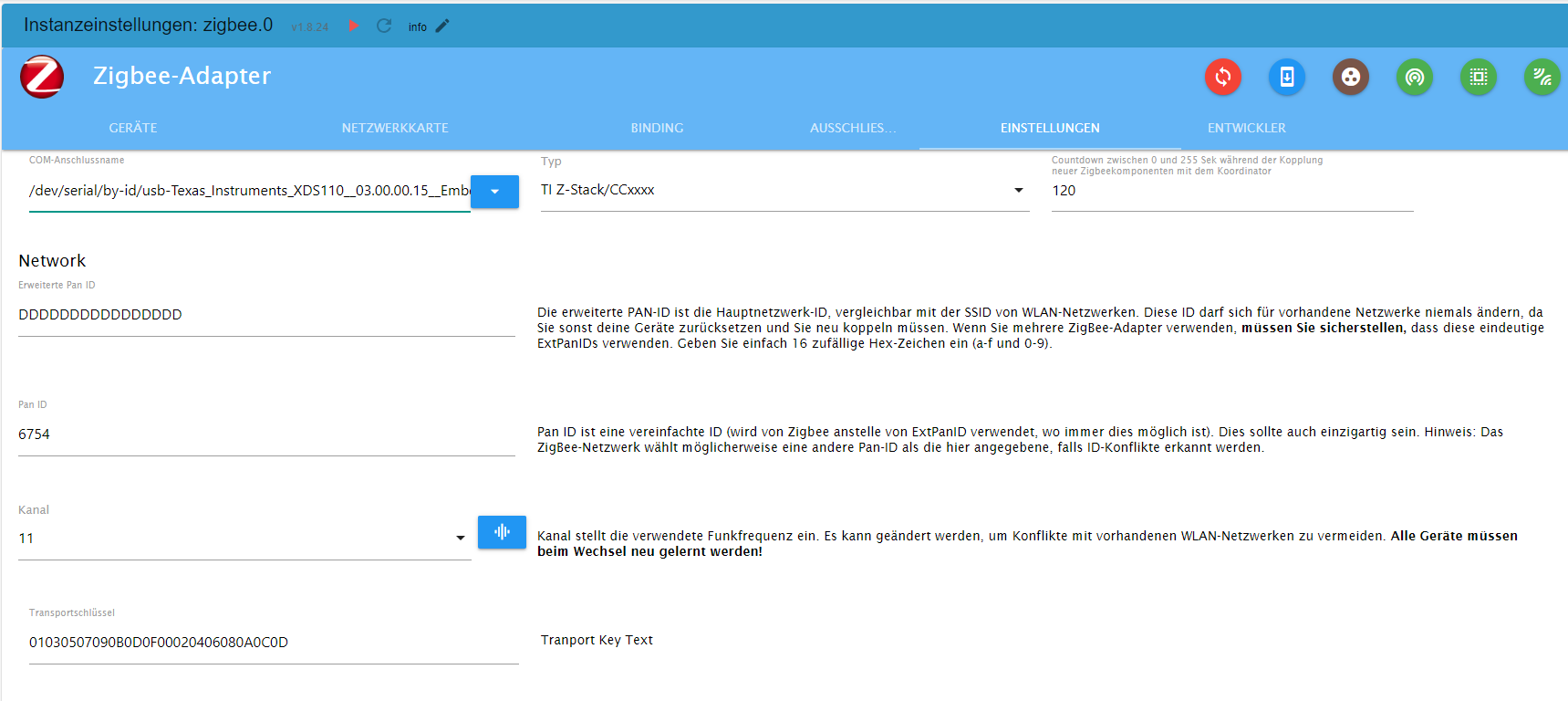
                                        

                                        d42cba24-c97f-4e14-ab31-5c2b379deb2d-image.png

                                        und noch die Einstellungen

                                        BETRIEBSSYSTEM: LINUX
                                        ARCHITEKTUR: ARM
                                        CPUS: 4
                                        GESCHWINDIGKEIT: 1500 MHZ
                                        MODELL: ARMV7 PROCESSOR REV 3 (V7L)
                                        RAM: 3.7 GB

                                        Thomas BraunT 1 Antwort Letzte Antwort
                                        0
                                        • A anselra

                                          kurze Info,

                                          Ich habe es mit Bookworm lite und:

                                          pi@iobroker:~ $ apt policy udev
                                          udev:
                                            Installed: 252.17-1~deb12u1
                                            Candidate: 252.17-1~deb12u1
                                            Version table:
                                           *** 252.17-1~deb12u1 500
                                                  500 http://deb.debian.org/debian bookworm/main arm64 Packages
                                                  100 /var/lib/dpkg/status
                                          

                                          nicht zum laufen gebracht.

                                          Bin zurück auf Bullseye lite und mit der https://forum.iobroker.net/topic/65017/zigbee-conbee2-funktioniert-nach-update-nicht-mehr-udev läuft jetzt wieder alles.
                                          Nicht ganz das gewünschte Ergebnis.

                                          Meister MopperM Online
                                          Meister MopperM Online
                                          Meister Mopper
                                          schrieb am zuletzt editiert von
                                          #39

                                          @anselra sagte in Zigbee Adapter startet nicht mehr:

                                          Ich habe es mit Bookworm lite und:

                                          Ich hatte dasselbe Problem auch.

                                          thomas@rpizigbee:~ $ apt policy udev
                                          udev:
                                            Installiert:           252.17-1~deb12u1
                                            Installationskandidat: 252.17-1~deb12u1
                                            Versionstabelle:
                                           *** 252.17-1~deb12u1 500
                                                  500 http://deb.debian.org/debian bookworm/main arm64 Packages
                                                  100 /var/lib/dpkg/status
                                          

                                          So habe ich es gestern auch eingerichtet, und der Zigbee wurde partout nicht grün.

                                          Also habe ich direkt in der Konsole den entsprechenden Wert rauskopiert:

                                          thomas@rpizigbee:~ $ ls -lah /dev/serial/by-id
                                          insgesamt 0
                                          drwxr-xr-x 2 root root 100 27. Okt 17:56 .
                                          drwxr-xr-x 4 root root  80 27. Okt 17:56 ..
                                          lrwxrwxrwx 1 root root  13 27. Okt 17:56 usb-1a86_USB_Serial-if00-port0 -> ../../ttyUSB0
                                          lrwxrwxrwx 1 root root  13 27. Okt 17:56 usb-Texas_Instruments_XDS110__03.00.00.13__Embed_with_CMSIS-DAP_L1100MSJ-if00 -> ../../ttyACM0
                                          lrwxrwxrwx 1 root root  13 27. Okt 17:56 usb-Texas_Instruments_XDS110__03.00.00.13__Embed_with_CMSIS-DAP_L1100MSJ-if03 -> ../../ttyACM1
                                          

                                          , als

                                          /dev/serial/by-id/usb-Texas_Instruments_XDS110__03.00.00.13__Embed_with_CMSIS-DAP_L1100MSJ-if00

                                          in die Einstellungen der Instanz eingefügt, und die Verbindung ist geglückt.

                                          Ich war mir sicher, dass exakt diese Bezeichnung vorher auch drin stand, aber wie war das nochmal mit Teufel und Eichhörnchen. :man-shrugging:


                                          Proxmox und HA

                                          A 1 Antwort Letzte Antwort
                                          1
                                          Antworten
                                          • In einem neuen Thema antworten
                                          Anmelden zum Antworten
                                          • Älteste zuerst
                                          • Neuste zuerst
                                          • Meiste Stimmen


                                          Support us

                                          ioBroker
                                          Community Adapters
                                          Donate
                                          FAQ Cloud / IOT
                                          HowTo: Node.js-Update
                                          HowTo: Backup/Restore
                                          Downloads
                                          BLOG

                                          793

                                          Online

                                          32.5k

                                          Benutzer

                                          81.6k

                                          Themen

                                          1.3m

                                          Beiträge
                                          Community
                                          Impressum | Datenschutz-Bestimmungen | Nutzungsbedingungen | Einwilligungseinstellungen
                                          ioBroker Community 2014-2025
                                          logo
                                          • Anmelden

                                          • Du hast noch kein Konto? Registrieren

                                          • Anmelden oder registrieren, um zu suchen
                                          • Erster Beitrag
                                            Letzter Beitrag
                                          0
                                          • Home
                                          • Aktuell
                                          • Tags
                                          • Ungelesen 0
                                          • Kategorien
                                          • Unreplied
                                          • Beliebt
                                          • GitHub
                                          • Docu
                                          • Hilfe