Skip to content
  • Home
  • Aktuell
  • Tags
  • 0 Ungelesen 0
  • Kategorien
  • Unreplied
  • Beliebt
  • GitHub
  • Docu
  • Hilfe
Skins
  • Light
  • Brite
  • Cerulean
  • Cosmo
  • Flatly
  • Journal
  • Litera
  • Lumen
  • Lux
  • Materia
  • Minty
  • Morph
  • Pulse
  • Sandstone
  • Simplex
  • Sketchy
  • Spacelab
  • United
  • Yeti
  • Zephyr
  • Dark
  • Cyborg
  • Darkly
  • Quartz
  • Slate
  • Solar
  • Superhero
  • Vapor

  • Standard: (Kein Skin)
  • Kein Skin
Einklappen
ioBroker Logo

Community Forum

donate donate
  1. ioBroker Community Home
  2. Deutsch
  3. Tester
  4. TESTER gesucht / Backup auf Fritz.nas - node 18.18.0

NEWS

  • UPDATE 31.10.: Amazon Alexa - ioBroker Skill läuft aus ?
    apollon77A
    apollon77
    48
    3
    8.8k

  • Monatsrückblick – September 2025
    BluefoxB
    Bluefox
    13
    1
    2.2k

  • Neues Video "KI im Smart Home" - ioBroker plus n8n
    BluefoxB
    Bluefox
    16
    1
    3.3k

TESTER gesucht / Backup auf Fritz.nas - node 18.18.0

Geplant Angeheftet Gesperrt Verschoben Tester
204 Beiträge 10 Kommentatoren 29.4k Aufrufe 13 Watching
  • Älteste zuerst
  • Neuste zuerst
  • Meiste Stimmen
Antworten
  • In einem neuen Thema antworten
Anmelden zum Antworten
Dieses Thema wurde gelöscht. Nur Nutzer mit entsprechenden Rechten können es sehen.
  • Thomas BraunT Thomas Braun

    Es gibt vielleicht ein Problem mit der Konstellation

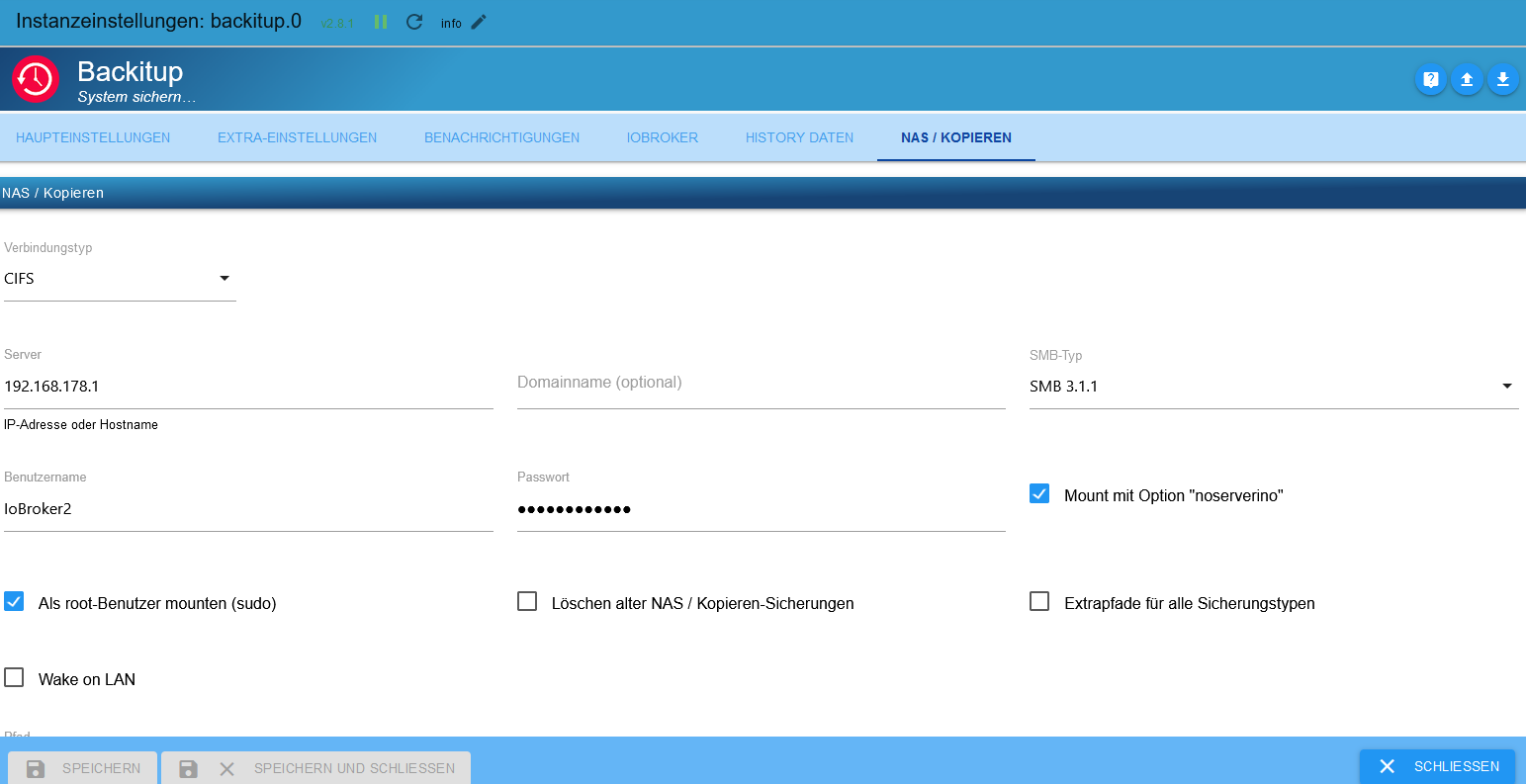
    • Backup auf ein per CIFS angebundenes fritz.nas
    • nodejs 18.18.0
    • evtl. RPi4 als iob-Host - könnte aber auch auf anderer Hardware auftreten

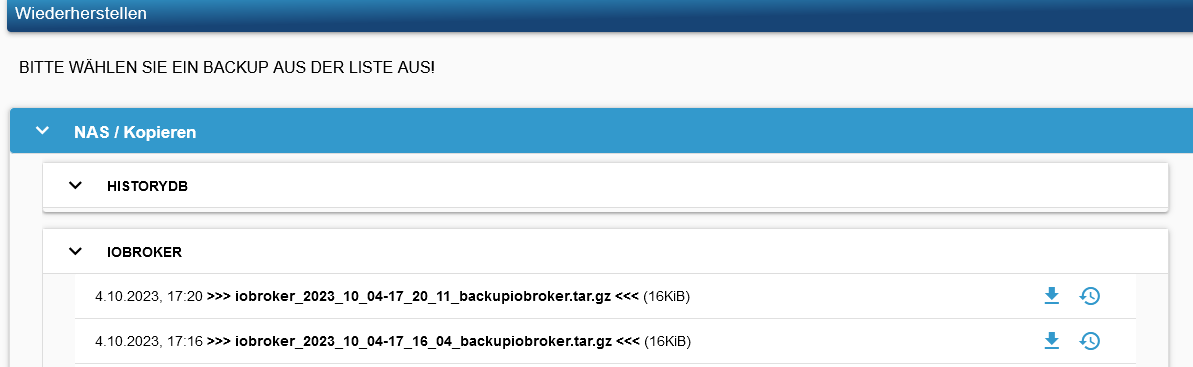
    Hier werden deutlich zu kleine Dateien geschrieben, ein Backup des iobrokers, das sonst immer knapp 6MB bei mir hatte landet mit 16KB in der Freigabe.

    Kann das vielleicht von Usern mit dieser Konstellation nachvollzogen werden?
    Schaut mal bitte nach den Dateigrößen auf dem Fritz.nas.

    Danke schön!

    @fastfoot ist da schon involviert, wir bräuchten aber noch ein paar Betroffene für weitere Tests.

    O SO Offline
    O SO Offline
    O S
    schrieb am zuletzt editiert von
    #18

    @thomas-braun

    Habe das gleiche Problem.

    Skript v.2023-06-20
    
    *** BASE SYSTEM ***
       Static hostname: iobroker6
             Icon name: computer
            Machine ID: 6cdd9ef1128b465193e49cc4ea80f5af
               Boot ID: 41b5da8e46ba4fd897de0fa6a4711922
      Operating System: Debian GNU/Linux 11 (bullseye)
                Kernel: Linux 6.1.21-v8+
          Architecture: arm64
    
    Model           : Raspberry Pi 4 Model B Rev 1.2
    Docker          : false
    Virtualization  : none
    Kernel          : aarch64
    Userland        : arm64
    
    Systemuptime and Load:
     17:43:34 up  3:51,  1 user,  load average: 0.84, 0.88, 0.88
    CPU threads: 4
    
    Raspberry only:
    throttled=0x0
    Other values than 0x0 hint to temperature/voltage problems
    temp=67.6'C
    volt=0.8438V
    
    *** Time and Time Zones ***
                   Local time: Tue 2023-10-03 17:43:34 CEST
               Universal time: Tue 2023-10-03 15:43:34 UTC
                     RTC time: n/a
                    Time zone: Europe/Berlin (CEST, +0200)
    System clock synchronized: yes
                  NTP service: active
              RTC in local TZ: no
    
    *** User and Groups ***
    pi
    /home/pi
    pi adm dialout cdrom sudo audio video plugdev games users input render netdev gpio i2c spi iobroker
    
    *** X-Server-Setup ***
    X-Server:       false
    Desktop:        
    Terminal:       tty
    Boot Target:    multi-user.target
    
    *** MEMORY ***
                   total        used        free      shared  buff/cache   available
    Mem:            3.8G        1.8G        1.6G        1.0M        419M        1.9G
    Swap:            99M          0B         99M
    Total:          3.9G        1.8G        1.7G
    
             3793 M total memory
             1803 M used memory
             1851 M active memory
              250 M inactive memory
             1570 M free memory
               54 M buffer memory
              364 M swap cache
               99 M total swap
                0 M used swap
               99 M free swap
    
    Raspberry only:
    oom events: 0
    lifetime oom required: 0 Mbytes
    total time in oom handler: 0 ms
    max time spent in oom handler: 0 ms
    
    *** FILESYSTEM ***
    Filesystem     Type      Size  Used Avail Use% Mounted on
    /dev/root      ext4       28G  3.2G   24G  12% /
    devtmpfs       devtmpfs  1.7G     0  1.7G   0% /dev
    tmpfs          tmpfs     1.9G     0  1.9G   0% /dev/shm
    tmpfs          tmpfs     759M  1.2M  758M   1% /run
    tmpfs          tmpfs     5.0M  4.0K  5.0M   1% /run/lock
    /dev/sdb1      vfat      255M   31M  225M  13% /boot
    tmpfs          tmpfs     380M     0  380M   0% /run/user/1000
    
    Messages concerning ext4 filesystem in dmesg:
    [Tue Oct  3 13:52:15 2023] Kernel command line: coherent_pool=1M 8250.nr_uarts=0 snd_bcm2835.enable_headphones=0 snd_bcm2835.enable_headphones=1 snd_bcm2835.enable_hdmi=1 snd_bcm2835.enable_hdmi=0  smsc95xx.macaddr=E4:5F:01:05:E5:E6 vc_mem.mem_base=0x3eb00000 vc_mem.mem_size=0x3ff00000  console=ttyS0,115200 console=tty1 root=PARTUUID=85bcf00a-02 rootfstype=ext4 fsck.repair=yes rootwait
    [Tue Oct  3 13:52:18 2023] EXT4-fs (sdb2): mounted filesystem with ordered data mode. Quota mode: none.
    [Tue Oct  3 13:52:18 2023] VFS: Mounted root (ext4 filesystem) readonly on device 8:18.
    [Tue Oct  3 13:52:20 2023] EXT4-fs (sdb2): re-mounted. Quota mode: none.
    
    Show mounted filesystems (real ones only):
    TARGET  SOURCE    FSTYPE OPTIONS
    /       /dev/sdb2 ext4   rw,noatime
    `-/boot /dev/sdb1 vfat   rw,relatime,fmask=0022,dmask=0022,codepage=437,iocharset=ascii,shortname=mixed,errors=remount-ro
    
    Files in neuralgic directories:
    
    /var:
    535M    /var/
    182M    /var/cache
    176M    /var/cache/apt
    147M    /var/lib
    122M    /var/lib/apt/lists
    
    Archived and active journals take up 104.0M in the file system.
    
    /opt/iobroker/backups:
    4.0K    /opt/iobroker/backups/
    
    /opt/iobroker/iobroker-data:
    196M    /opt/iobroker/iobroker-data/
    165M    /opt/iobroker/iobroker-data/files
    52M     /opt/iobroker/iobroker-data/files/javascript.admin
    34M     /opt/iobroker/iobroker-data/files/javascript.admin/static
    33M     /opt/iobroker/iobroker-data/files/javascript.admin/static/js
    
    The five largest files in iobroker-data are:
    25M     /opt/iobroker/iobroker-data/objects.jsonl
    21M     /opt/iobroker/iobroker-data/files/web.admin/static/js/main.e564fb87.js.map
    19M     /opt/iobroker/iobroker-data/files/iot.admin/static/js/main.2975a411.js.map
    8.3M    /opt/iobroker/iobroker-data/files/web.admin/static/js/main.e564fb87.js
    8.2M    /opt/iobroker/iobroker-data/files/iot.admin/static/js/main.2975a411.js
    
    *** NodeJS-Installation ***
    
    /usr/bin/nodejs         v18.17.1
    /usr/bin/node           v18.17.1
    /usr/bin/npm            9.6.7
    /usr/bin/npx            9.6.7
    
    
    nodejs:
      Installed: 18.17.1-deb-1nodesource1
      Candidate: 18.17.1-deb-1nodesource1
      Version table:
     *** 18.17.1-deb-1nodesource1 500
            500 https://deb.nodesource.com/node_18.x bullseye/main arm64 Packages
            100 /var/lib/dpkg/status
         12.22.12~dfsg-1~deb11u4 500
            500 http://security.debian.org/debian-security bullseye-security/main arm64 Packages
         12.22.12~dfsg-1~deb11u3 500
            500 http://deb.debian.org/debian bullseye/main arm64 Packages
    
    Temp directories causing npm8 problem: 0
    No problems detected
    
    Errors in npm tree: 0
    
    *** ioBroker-Installation ***
    
    ioBroker Status
    iobroker is running on this host.
    
    
    Objects type: jsonl
    States  type: jsonl
    
    No configuration change needed.
    
    
    Multihost discovery server: disabled
    Discovery authentication:   enabled
    Persistent activation:      disabled
    Objects:                    jsonl on 0.0.0.0
    States:                     jsonl on 0.0.0.0
    
    Core adapters versions
    js-controller:  5.0.12
    admin:          6.10.1
    javascript:     7.1.4
    
    Adapters from github:   0
    
    Adapter State
    + system.adapter.admin.0                  : admin                 : iobroker                                 -  enabled, port: 7777, bind: 0.0.0.0, run as: admin
    + system.adapter.alexa2.0                 : alexa2                : iobroker                                 -  enabled
    + system.adapter.backitup.0               : backitup              : iobroker                                 -  enabled
    + system.adapter.discovery.0              : discovery             : iobroker                                 -  enabled
      system.adapter.flot.0                   : flot                  : iobroker                                 -  enabled
    + system.adapter.fritzbox.0               : fritzbox              : iobroker                                 -  enabled
    + system.adapter.fritzdect.0              : fritzdect             : iobroker                                 -  enabled
    + system.adapter.history.0                : history               : iobroker                                 -  enabled
    + system.adapter.info.0                   : info                  : iobroker                                 -  enabled
    + system.adapter.iot.0                    : iot                   : iobroker                                 -  enabled
    + system.adapter.javascript.0             : javascript            : iobroker                                 -  enabled
      system.adapter.mobile.0                 : mobile                : iobroker                                 -  enabled
    + system.adapter.net-tools.0              : net-tools             : iobroker                                 -  enabled
    + system.adapter.octoprint.0              : octoprint             : iobroker                                 -  enabled
    + system.adapter.ping.0                   : ping                  : iobroker                                 -  enabled
    + system.adapter.shelly.0                 : shelly                : iobroker                                 -  enabled, port: 1882, bind: 0.0.0.0
    + system.adapter.sonoff.0                 : sonoff                : iobroker                                 -  enabled, port: 1884, bind: 0.0.0.0
    + system.adapter.tankerkoenig.0           : tankerkoenig          : iobroker                                 -  enabled
    + system.adapter.telegram.0               : telegram              : iobroker                                 -  enabled, port: 8443, bind: 0.0.0.0
    + system.adapter.tr-064.0                 : tr-064                : iobroker                                 -  enabled
      system.adapter.vis-canvas-gauges.0      : vis-canvas-gauges     : iobroker                                 -  enabled
      system.adapter.vis-fancyswitch.0        : vis-fancyswitch       : iobroker                                 -  enabled
      system.adapter.vis-hqwidgets.0          : vis-hqwidgets         : iobroker                                 -  enabled
      system.adapter.vis-justgage.0           : vis-justgage          : iobroker                                 -  enabled
      system.adapter.vis.0                    : vis                   : iobroker                                 -  enabled
    + system.adapter.web.0                    : web                   : iobroker                                 -  enabled, port: 8082, bind: 0.0.0.0, run as: admin
    + system.adapter.ws.0                     : ws                    : iobroker                                 -  enabled, port: 8085, bind: 0.0.0.0, run as: admin
    
    + instance is alive
    
    Enabled adapters with bindings
    + system.adapter.admin.0                  : admin                 : iobroker                                 -  enabled, port: 7777, bind: 0.0.0.0, run as: admin
    + system.adapter.shelly.0                 : shelly                : iobroker                                 -  enabled, port: 1882, bind: 0.0.0.0
    + system.adapter.sonoff.0                 : sonoff                : iobroker                                 -  enabled, port: 1884, bind: 0.0.0.0
    + system.adapter.telegram.0               : telegram              : iobroker                                 -  enabled, port: 8443, bind: 0.0.0.0
    + system.adapter.web.0                    : web                   : iobroker                                 -  enabled, port: 8082, bind: 0.0.0.0, run as: admin
    + system.adapter.ws.0                     : ws                    : iobroker                                 -  enabled, port: 8085, bind: 0.0.0.0, run as: admin
    
    ioBroker-Repositories
    Stable (default): http://download.iobroker.net/sources-dist.json
    Beta (latest) : http://download.iobroker.net/sources-dist-latest.json
    
    Active repo(s): Stable (default)
    
    Installed ioBroker-Instances
    Used repository: Stable (default)
    Adapter    "admin"        : 6.10.1   , installed 6.10.1
    Adapter    "alexa2"       : 3.25.2   , installed 3.25.2
    Adapter    "backitup"     : 2.8.1    , installed 2.8.1
    Adapter    "discovery"    : 3.1.0    , installed 3.1.0
    Adapter    "flot"         : 1.12.0   , installed 1.12.0
    Adapter    "fritzbox"     : 0.5.0    , installed 0.5.0
    Adapter    "fritzdect"    : 2.3.1    , installed 2.3.1
    Adapter    "history"      : 2.2.6    , installed 2.2.6
    Adapter    "info"         : 2.0.0    , installed 2.0.0
    Adapter    "iot"          : 1.14.5   , installed 1.14.5
    Adapter    "javascript"   : 7.1.4    , installed 7.1.4
    Controller "js-controller": 5.0.12   , installed 5.0.12
    Adapter    "mobile"       : 1.0.1    , installed 1.0.1
    Adapter    "net-tools"    : 0.2.0    , installed 0.2.0
    Adapter    "octoprint"    : 4.0.0    , installed 4.0.0
    Adapter    "ping"         : 1.6.2    , installed 1.6.2
    Adapter    "shelly"       : 6.4.1    , installed 6.4.1
    Adapter    "simple-api"   : 2.7.2    , installed 2.7.2
    Adapter    "socketio"     : 6.5.5    , installed 6.5.5
    Adapter    "sonoff"       : 2.5.3    , installed 2.5.3
    Adapter    "tankerkoenig" : 3.3.7    , installed 3.3.7
    Adapter    "telegram"     : 1.16.0   , installed 1.16.0
    Adapter    "tr-064"       : 4.2.18   , installed 4.2.18
    Adapter    "vis"          : 1.4.16   , installed 1.4.16
    Adapter    "vis-canvas-gauges": 1.0.1, installed 1.0.1
    Adapter    "vis-fancyswitch": 1.1.0  , installed 1.1.0
    Adapter    "vis-hqwidgets": 1.4.0    , installed 1.4.0
    Adapter    "vis-justgage" : 1.0.2    , installed 1.0.2
    Adapter    "web"          : 6.1.2    , installed 6.1.0  [Updatable]
    Adapter    "ws"           : 2.5.5    , installed 2.5.5
    
    Objects and States
    Please stand by - This may take a while
    Objects:        6978
    States:         12775
    
    *** OS-Repositories and Updates ***
    Hit:1 http://security.debian.org/debian-security bullseye-security InRelease
    Hit:2 http://deb.debian.org/debian bullseye InRelease
    Hit:3 http://deb.debian.org/debian bullseye-updates InRelease
    Hit:4 http://archive.raspberrypi.org/debian bullseye InRelease
    Hit:5 https://deb.nodesource.com/node_18.x bullseye InRelease
    Reading package lists...
    Pending Updates: 0
    
    *** Listening Ports ***
    Active Internet connections (only servers)
    Proto Recv-Q Send-Q Local Address           Foreign Address         State       User       Inode      PID/Program name    
    tcp        0      0 0.0.0.0:22              0.0.0.0:*               LISTEN      0          15401      544/sshd: /usr/sbin 
    tcp        0      0 0.0.0.0:9001            0.0.0.0:*               LISTEN      1001       14593      508/iobroker.js-con 
    tcp        0      0 0.0.0.0:9000            0.0.0.0:*               LISTEN      1001       15434      508/iobroker.js-con 
    tcp        0      0 0.0.0.0:1884            0.0.0.0:*               LISTEN      1001       15751      1171/io.sonoff.0    
    tcp6       0      0 :::22                   :::*                    LISTEN      0          15403      544/sshd: /usr/sbin 
    tcp6       0      0 :::8082                 :::*                    LISTEN      1001       300189     15081/io.web.0      
    tcp6       0      0 :::8085                 :::*                    LISTEN      1001       297932     15070/io.ws.0       
    tcp6       0      0 :::7777                 :::*                    LISTEN      1001       299942     15273/io.admin.0    
    udp        0      0 0.0.0.0:68              0.0.0.0:*                           0          12530      810/dhcpcd          
    udp        0      0 0.0.0.0:5353            0.0.0.0:*                           108        14543      399/avahi-daemon: r 
    udp        0      0 0.0.0.0:58602           0.0.0.0:*                           108        14545      399/avahi-daemon: r 
    udp        0      0 0.0.0.0:5683            0.0.0.0:*                           1001       13024      1148/io.shelly.0    
    udp6       0      0 :::546                  :::*                                0          15429      810/dhcpcd          
    udp6       0      0 :::5353                 :::*                                108        14544      399/avahi-daemon: r 
    udp6       0      0 :::42372                :::*                                108        14546      399/avahi-daemon: r 
    
    *** Log File - Last 25 Lines ***
    
    2023-10-03 16:48:52.372  - info: web.0 (15081) ==> Connected system.user.admin from ::ffff:192.168.178.203
    2023-10-03 16:48:53.170  - info: admin.0 (15273) ==> Connected system.user.admin from ::ffff:192.168.178.203
    2023-10-03 16:48:54.431  - info: admin.0 (15273) ==> Connected system.user.admin from ::ffff:192.168.178.203
    2023-10-03 16:49:00.673  - info: web.0 (15081) ==> Connected system.user.admin from ::ffff:192.168.178.203
    2023-10-03 16:51:14.699  - info: admin.0 (15273) <== Disconnect system.user.admin from ::ffff:192.168.178.203 
    2023-10-03 16:51:14.699  - info: web.0 (15081) <== Disconnect system.user.admin from ::ffff:192.168.178.203 vis.0
    2023-10-03 16:51:14.701  - info: admin.0 (15273) <== Disconnect system.user.admin from ::ffff:192.168.178.203 admin
    2023-10-03 16:51:14.701  - info: web.0 (15081) <== Disconnect system.user.admin from ::ffff:192.168.178.203 flot
    2023-10-03 17:29:27.500  - warn: octoprint.0 (1324) received 502 response from /api/version with content: "<html><body><h1>502 Bad Gateway</h1>\nThe server returned an invalid or incomplete response.\n</body></html>\n"
    2023-10-03 17:30:18.149  - info: web.0 (15081) ==> Connected system.user.admin from ::ffff:192.168.178.203
    2023-10-03 17:30:18.677  - info: web.0 (15081) <== Disconnect system.user.admin from ::ffff:192.168.178.203 flot
    2023-10-03 17:30:19.290  - info: web.0 (15081) ==> Connected system.user.admin from ::ffff:192.168.178.203
    2023-10-03 17:30:20.314  - info: web.0 (15081) ==> Connected system.user.admin from ::ffff:192.168.178.203
    2023-10-03 17:30:45.434  - info: admin.0 (15273) ==> Connected system.user.admin from ::ffff:192.168.178.203
    2023-10-03 17:30:46.614  - info: admin.0 (15273) ==> Connected system.user.admin from ::ffff:192.168.178.203
    2023-10-03 17:31:00.543  - info: admin.0 (15273) <== Disconnect system.user.admin from ::ffff:192.168.178.203 
    2023-10-03 17:40:42.148  - info: admin.0 (15273) <== Disconnect system.user.admin from ::ffff:192.168.178.203 admin
    2023-10-03 17:40:42.148  - info: web.0 (15081) <== Disconnect system.user.admin from ::ffff:192.168.178.203 flot
    2023-10-03 17:40:42.153  - info: web.0 (15081) <== Disconnect system.user.admin from ::ffff:192.168.178.203 vis.0
    2023-10-03 17:40:48.430  - info: admin.0 (15273) ==> Connected system.user.admin from ::ffff:192.168.178.203
    2023-10-03 17:40:49.815  - info: web.0 (15081) ==> Connected system.user.admin from ::ffff:192.168.178.203
    2023-10-03 17:40:58.838  - info: web.0 (15081) ==> Connected system.user.admin from ::ffff:192.168.178.203
    2023-10-03 17:42:44.448  - info: admin.0 (15273) <== Disconnect system.user.admin from ::ffff:192.168.178.203 admin
    2023-10-03 17:42:44.451  - info: web.0 (15081) <== Disconnect system.user.admin from ::ffff:192.168.178.203 vis.0
    2023-10-03 17:42:44.455  - info: web.0 (15081) <== Disconnect system.user.admin from ::ffff:192.168.178.203 flo
    
    ======================= SUMMARY =======================
                         v.2023-06-20
    
    
       Static hostname: iobroker
             Icon name: computer
            Machine ID: 6cdd9ef1128b465193e49cc4ea80f5af
               Boot ID: 41b5da8e46ba4fd897de0fa6a4711922
      Operating System: Debian GNU/Linux 11 (bullseye)
                Kernel: Linux 6.1.21-v8+
          Architecture: arm64
    
    Installation:           native
    Kernel:                 aarch64
    Userland:               arm64
    Timezone:               Europe/Berlin (CEST, +0200)
    User-ID:                1000
    X-Server:               false
    Boot Target:            multi-user.target
    
    Pending OS-Updates:     0
    Pending iob updates:    1
    
    Nodejs-Installation:    /usr/bin/nodejs         v18.17.1
                            /usr/bin/node           v18.17.1
                            /usr/bin/npm            9.6.7
                            /usr/bin/npx            9.6.7
    
    Recommended versions are nodejs 18.x.y and npm 9.x.y
    Your nodejs installation is correct
    
    MEMORY: 
                   total        used        free      shared  buff/cache   available
    Mem:            3.8G        1.8G        1.3G        1.0M        676M        1.9G
    Swap:            99M          0B         99M
    Total:          3.9G        1.8G        1.4G
    
    Active iob-Instances:   21
    Active repo(s): Stable (default)
    
    ioBroker Core:          js-controller           5.0.12
                            admin                   6.10.1
    
    ioBroker Status:        iobroker is running on this host.
    
    
    Objects type: jsonl
    States  type: jsonl
    
    Status admin and web instance:
    + system.adapter.admin.0                  : admin                 : iobroker                                 -  enabled, port: 7777, bind: 0.0.0.0, run as: admin
    + system.adapter.web.0                    : web                   : iobroker                                 -  enabled, port: 8082, bind: 0.0.0.0, run as: admin
    
    Objects:                6978
    States:                 12775
    
    Size of iob-Database:
    
    25M     /opt/iobroker/iobroker-data/objects.jsonl
    4.2M    /opt/iobroker/iobroker-data/states.jsonl
      
    Hoffentlich hilft das.
    Thomas BraunT 1 Antwort Letzte Antwort
    0
    • O SO O S

      @thomas-braun

      Habe das gleiche Problem.

      Skript v.2023-06-20
      
      *** BASE SYSTEM ***
         Static hostname: iobroker6
               Icon name: computer
              Machine ID: 6cdd9ef1128b465193e49cc4ea80f5af
                 Boot ID: 41b5da8e46ba4fd897de0fa6a4711922
        Operating System: Debian GNU/Linux 11 (bullseye)
                  Kernel: Linux 6.1.21-v8+
            Architecture: arm64
      
      Model           : Raspberry Pi 4 Model B Rev 1.2
      Docker          : false
      Virtualization  : none
      Kernel          : aarch64
      Userland        : arm64
      
      Systemuptime and Load:
       17:43:34 up  3:51,  1 user,  load average: 0.84, 0.88, 0.88
      CPU threads: 4
      
      Raspberry only:
      throttled=0x0
      Other values than 0x0 hint to temperature/voltage problems
      temp=67.6'C
      volt=0.8438V
      
      *** Time and Time Zones ***
                     Local time: Tue 2023-10-03 17:43:34 CEST
                 Universal time: Tue 2023-10-03 15:43:34 UTC
                       RTC time: n/a
                      Time zone: Europe/Berlin (CEST, +0200)
      System clock synchronized: yes
                    NTP service: active
                RTC in local TZ: no
      
      *** User and Groups ***
      pi
      /home/pi
      pi adm dialout cdrom sudo audio video plugdev games users input render netdev gpio i2c spi iobroker
      
      *** X-Server-Setup ***
      X-Server:       false
      Desktop:        
      Terminal:       tty
      Boot Target:    multi-user.target
      
      *** MEMORY ***
                     total        used        free      shared  buff/cache   available
      Mem:            3.8G        1.8G        1.6G        1.0M        419M        1.9G
      Swap:            99M          0B         99M
      Total:          3.9G        1.8G        1.7G
      
               3793 M total memory
               1803 M used memory
               1851 M active memory
                250 M inactive memory
               1570 M free memory
                 54 M buffer memory
                364 M swap cache
                 99 M total swap
                  0 M used swap
                 99 M free swap
      
      Raspberry only:
      oom events: 0
      lifetime oom required: 0 Mbytes
      total time in oom handler: 0 ms
      max time spent in oom handler: 0 ms
      
      *** FILESYSTEM ***
      Filesystem     Type      Size  Used Avail Use% Mounted on
      /dev/root      ext4       28G  3.2G   24G  12% /
      devtmpfs       devtmpfs  1.7G     0  1.7G   0% /dev
      tmpfs          tmpfs     1.9G     0  1.9G   0% /dev/shm
      tmpfs          tmpfs     759M  1.2M  758M   1% /run
      tmpfs          tmpfs     5.0M  4.0K  5.0M   1% /run/lock
      /dev/sdb1      vfat      255M   31M  225M  13% /boot
      tmpfs          tmpfs     380M     0  380M   0% /run/user/1000
      
      Messages concerning ext4 filesystem in dmesg:
      [Tue Oct  3 13:52:15 2023] Kernel command line: coherent_pool=1M 8250.nr_uarts=0 snd_bcm2835.enable_headphones=0 snd_bcm2835.enable_headphones=1 snd_bcm2835.enable_hdmi=1 snd_bcm2835.enable_hdmi=0  smsc95xx.macaddr=E4:5F:01:05:E5:E6 vc_mem.mem_base=0x3eb00000 vc_mem.mem_size=0x3ff00000  console=ttyS0,115200 console=tty1 root=PARTUUID=85bcf00a-02 rootfstype=ext4 fsck.repair=yes rootwait
      [Tue Oct  3 13:52:18 2023] EXT4-fs (sdb2): mounted filesystem with ordered data mode. Quota mode: none.
      [Tue Oct  3 13:52:18 2023] VFS: Mounted root (ext4 filesystem) readonly on device 8:18.
      [Tue Oct  3 13:52:20 2023] EXT4-fs (sdb2): re-mounted. Quota mode: none.
      
      Show mounted filesystems (real ones only):
      TARGET  SOURCE    FSTYPE OPTIONS
      /       /dev/sdb2 ext4   rw,noatime
      `-/boot /dev/sdb1 vfat   rw,relatime,fmask=0022,dmask=0022,codepage=437,iocharset=ascii,shortname=mixed,errors=remount-ro
      
      Files in neuralgic directories:
      
      /var:
      535M    /var/
      182M    /var/cache
      176M    /var/cache/apt
      147M    /var/lib
      122M    /var/lib/apt/lists
      
      Archived and active journals take up 104.0M in the file system.
      
      /opt/iobroker/backups:
      4.0K    /opt/iobroker/backups/
      
      /opt/iobroker/iobroker-data:
      196M    /opt/iobroker/iobroker-data/
      165M    /opt/iobroker/iobroker-data/files
      52M     /opt/iobroker/iobroker-data/files/javascript.admin
      34M     /opt/iobroker/iobroker-data/files/javascript.admin/static
      33M     /opt/iobroker/iobroker-data/files/javascript.admin/static/js
      
      The five largest files in iobroker-data are:
      25M     /opt/iobroker/iobroker-data/objects.jsonl
      21M     /opt/iobroker/iobroker-data/files/web.admin/static/js/main.e564fb87.js.map
      19M     /opt/iobroker/iobroker-data/files/iot.admin/static/js/main.2975a411.js.map
      8.3M    /opt/iobroker/iobroker-data/files/web.admin/static/js/main.e564fb87.js
      8.2M    /opt/iobroker/iobroker-data/files/iot.admin/static/js/main.2975a411.js
      
      *** NodeJS-Installation ***
      
      /usr/bin/nodejs         v18.17.1
      /usr/bin/node           v18.17.1
      /usr/bin/npm            9.6.7
      /usr/bin/npx            9.6.7
      
      
      nodejs:
        Installed: 18.17.1-deb-1nodesource1
        Candidate: 18.17.1-deb-1nodesource1
        Version table:
       *** 18.17.1-deb-1nodesource1 500
              500 https://deb.nodesource.com/node_18.x bullseye/main arm64 Packages
              100 /var/lib/dpkg/status
           12.22.12~dfsg-1~deb11u4 500
              500 http://security.debian.org/debian-security bullseye-security/main arm64 Packages
           12.22.12~dfsg-1~deb11u3 500
              500 http://deb.debian.org/debian bullseye/main arm64 Packages
      
      Temp directories causing npm8 problem: 0
      No problems detected
      
      Errors in npm tree: 0
      
      *** ioBroker-Installation ***
      
      ioBroker Status
      iobroker is running on this host.
      
      
      Objects type: jsonl
      States  type: jsonl
      
      No configuration change needed.
      
      
      Multihost discovery server: disabled
      Discovery authentication:   enabled
      Persistent activation:      disabled
      Objects:                    jsonl on 0.0.0.0
      States:                     jsonl on 0.0.0.0
      
      Core adapters versions
      js-controller:  5.0.12
      admin:          6.10.1
      javascript:     7.1.4
      
      Adapters from github:   0
      
      Adapter State
      + system.adapter.admin.0                  : admin                 : iobroker                                 -  enabled, port: 7777, bind: 0.0.0.0, run as: admin
      + system.adapter.alexa2.0                 : alexa2                : iobroker                                 -  enabled
      + system.adapter.backitup.0               : backitup              : iobroker                                 -  enabled
      + system.adapter.discovery.0              : discovery             : iobroker                                 -  enabled
        system.adapter.flot.0                   : flot                  : iobroker                                 -  enabled
      + system.adapter.fritzbox.0               : fritzbox              : iobroker                                 -  enabled
      + system.adapter.fritzdect.0              : fritzdect             : iobroker                                 -  enabled
      + system.adapter.history.0                : history               : iobroker                                 -  enabled
      + system.adapter.info.0                   : info                  : iobroker                                 -  enabled
      + system.adapter.iot.0                    : iot                   : iobroker                                 -  enabled
      + system.adapter.javascript.0             : javascript            : iobroker                                 -  enabled
        system.adapter.mobile.0                 : mobile                : iobroker                                 -  enabled
      + system.adapter.net-tools.0              : net-tools             : iobroker                                 -  enabled
      + system.adapter.octoprint.0              : octoprint             : iobroker                                 -  enabled
      + system.adapter.ping.0                   : ping                  : iobroker                                 -  enabled
      + system.adapter.shelly.0                 : shelly                : iobroker                                 -  enabled, port: 1882, bind: 0.0.0.0
      + system.adapter.sonoff.0                 : sonoff                : iobroker                                 -  enabled, port: 1884, bind: 0.0.0.0
      + system.adapter.tankerkoenig.0           : tankerkoenig          : iobroker                                 -  enabled
      + system.adapter.telegram.0               : telegram              : iobroker                                 -  enabled, port: 8443, bind: 0.0.0.0
      + system.adapter.tr-064.0                 : tr-064                : iobroker                                 -  enabled
        system.adapter.vis-canvas-gauges.0      : vis-canvas-gauges     : iobroker                                 -  enabled
        system.adapter.vis-fancyswitch.0        : vis-fancyswitch       : iobroker                                 -  enabled
        system.adapter.vis-hqwidgets.0          : vis-hqwidgets         : iobroker                                 -  enabled
        system.adapter.vis-justgage.0           : vis-justgage          : iobroker                                 -  enabled
        system.adapter.vis.0                    : vis                   : iobroker                                 -  enabled
      + system.adapter.web.0                    : web                   : iobroker                                 -  enabled, port: 8082, bind: 0.0.0.0, run as: admin
      + system.adapter.ws.0                     : ws                    : iobroker                                 -  enabled, port: 8085, bind: 0.0.0.0, run as: admin
      
      + instance is alive
      
      Enabled adapters with bindings
      + system.adapter.admin.0                  : admin                 : iobroker                                 -  enabled, port: 7777, bind: 0.0.0.0, run as: admin
      + system.adapter.shelly.0                 : shelly                : iobroker                                 -  enabled, port: 1882, bind: 0.0.0.0
      + system.adapter.sonoff.0                 : sonoff                : iobroker                                 -  enabled, port: 1884, bind: 0.0.0.0
      + system.adapter.telegram.0               : telegram              : iobroker                                 -  enabled, port: 8443, bind: 0.0.0.0
      + system.adapter.web.0                    : web                   : iobroker                                 -  enabled, port: 8082, bind: 0.0.0.0, run as: admin
      + system.adapter.ws.0                     : ws                    : iobroker                                 -  enabled, port: 8085, bind: 0.0.0.0, run as: admin
      
      ioBroker-Repositories
      Stable (default): http://download.iobroker.net/sources-dist.json
      Beta (latest) : http://download.iobroker.net/sources-dist-latest.json
      
      Active repo(s): Stable (default)
      
      Installed ioBroker-Instances
      Used repository: Stable (default)
      Adapter    "admin"        : 6.10.1   , installed 6.10.1
      Adapter    "alexa2"       : 3.25.2   , installed 3.25.2
      Adapter    "backitup"     : 2.8.1    , installed 2.8.1
      Adapter    "discovery"    : 3.1.0    , installed 3.1.0
      Adapter    "flot"         : 1.12.0   , installed 1.12.0
      Adapter    "fritzbox"     : 0.5.0    , installed 0.5.0
      Adapter    "fritzdect"    : 2.3.1    , installed 2.3.1
      Adapter    "history"      : 2.2.6    , installed 2.2.6
      Adapter    "info"         : 2.0.0    , installed 2.0.0
      Adapter    "iot"          : 1.14.5   , installed 1.14.5
      Adapter    "javascript"   : 7.1.4    , installed 7.1.4
      Controller "js-controller": 5.0.12   , installed 5.0.12
      Adapter    "mobile"       : 1.0.1    , installed 1.0.1
      Adapter    "net-tools"    : 0.2.0    , installed 0.2.0
      Adapter    "octoprint"    : 4.0.0    , installed 4.0.0
      Adapter    "ping"         : 1.6.2    , installed 1.6.2
      Adapter    "shelly"       : 6.4.1    , installed 6.4.1
      Adapter    "simple-api"   : 2.7.2    , installed 2.7.2
      Adapter    "socketio"     : 6.5.5    , installed 6.5.5
      Adapter    "sonoff"       : 2.5.3    , installed 2.5.3
      Adapter    "tankerkoenig" : 3.3.7    , installed 3.3.7
      Adapter    "telegram"     : 1.16.0   , installed 1.16.0
      Adapter    "tr-064"       : 4.2.18   , installed 4.2.18
      Adapter    "vis"          : 1.4.16   , installed 1.4.16
      Adapter    "vis-canvas-gauges": 1.0.1, installed 1.0.1
      Adapter    "vis-fancyswitch": 1.1.0  , installed 1.1.0
      Adapter    "vis-hqwidgets": 1.4.0    , installed 1.4.0
      Adapter    "vis-justgage" : 1.0.2    , installed 1.0.2
      Adapter    "web"          : 6.1.2    , installed 6.1.0  [Updatable]
      Adapter    "ws"           : 2.5.5    , installed 2.5.5
      
      Objects and States
      Please stand by - This may take a while
      Objects:        6978
      States:         12775
      
      *** OS-Repositories and Updates ***
      Hit:1 http://security.debian.org/debian-security bullseye-security InRelease
      Hit:2 http://deb.debian.org/debian bullseye InRelease
      Hit:3 http://deb.debian.org/debian bullseye-updates InRelease
      Hit:4 http://archive.raspberrypi.org/debian bullseye InRelease
      Hit:5 https://deb.nodesource.com/node_18.x bullseye InRelease
      Reading package lists...
      Pending Updates: 0
      
      *** Listening Ports ***
      Active Internet connections (only servers)
      Proto Recv-Q Send-Q Local Address           Foreign Address         State       User       Inode      PID/Program name    
      tcp        0      0 0.0.0.0:22              0.0.0.0:*               LISTEN      0          15401      544/sshd: /usr/sbin 
      tcp        0      0 0.0.0.0:9001            0.0.0.0:*               LISTEN      1001       14593      508/iobroker.js-con 
      tcp        0      0 0.0.0.0:9000            0.0.0.0:*               LISTEN      1001       15434      508/iobroker.js-con 
      tcp        0      0 0.0.0.0:1884            0.0.0.0:*               LISTEN      1001       15751      1171/io.sonoff.0    
      tcp6       0      0 :::22                   :::*                    LISTEN      0          15403      544/sshd: /usr/sbin 
      tcp6       0      0 :::8082                 :::*                    LISTEN      1001       300189     15081/io.web.0      
      tcp6       0      0 :::8085                 :::*                    LISTEN      1001       297932     15070/io.ws.0       
      tcp6       0      0 :::7777                 :::*                    LISTEN      1001       299942     15273/io.admin.0    
      udp        0      0 0.0.0.0:68              0.0.0.0:*                           0          12530      810/dhcpcd          
      udp        0      0 0.0.0.0:5353            0.0.0.0:*                           108        14543      399/avahi-daemon: r 
      udp        0      0 0.0.0.0:58602           0.0.0.0:*                           108        14545      399/avahi-daemon: r 
      udp        0      0 0.0.0.0:5683            0.0.0.0:*                           1001       13024      1148/io.shelly.0    
      udp6       0      0 :::546                  :::*                                0          15429      810/dhcpcd          
      udp6       0      0 :::5353                 :::*                                108        14544      399/avahi-daemon: r 
      udp6       0      0 :::42372                :::*                                108        14546      399/avahi-daemon: r 
      
      *** Log File - Last 25 Lines ***
      
      2023-10-03 16:48:52.372  - info: web.0 (15081) ==> Connected system.user.admin from ::ffff:192.168.178.203
      2023-10-03 16:48:53.170  - info: admin.0 (15273) ==> Connected system.user.admin from ::ffff:192.168.178.203
      2023-10-03 16:48:54.431  - info: admin.0 (15273) ==> Connected system.user.admin from ::ffff:192.168.178.203
      2023-10-03 16:49:00.673  - info: web.0 (15081) ==> Connected system.user.admin from ::ffff:192.168.178.203
      2023-10-03 16:51:14.699  - info: admin.0 (15273) <== Disconnect system.user.admin from ::ffff:192.168.178.203 
      2023-10-03 16:51:14.699  - info: web.0 (15081) <== Disconnect system.user.admin from ::ffff:192.168.178.203 vis.0
      2023-10-03 16:51:14.701  - info: admin.0 (15273) <== Disconnect system.user.admin from ::ffff:192.168.178.203 admin
      2023-10-03 16:51:14.701  - info: web.0 (15081) <== Disconnect system.user.admin from ::ffff:192.168.178.203 flot
      2023-10-03 17:29:27.500  - warn: octoprint.0 (1324) received 502 response from /api/version with content: "<html><body><h1>502 Bad Gateway</h1>\nThe server returned an invalid or incomplete response.\n</body></html>\n"
      2023-10-03 17:30:18.149  - info: web.0 (15081) ==> Connected system.user.admin from ::ffff:192.168.178.203
      2023-10-03 17:30:18.677  - info: web.0 (15081) <== Disconnect system.user.admin from ::ffff:192.168.178.203 flot
      2023-10-03 17:30:19.290  - info: web.0 (15081) ==> Connected system.user.admin from ::ffff:192.168.178.203
      2023-10-03 17:30:20.314  - info: web.0 (15081) ==> Connected system.user.admin from ::ffff:192.168.178.203
      2023-10-03 17:30:45.434  - info: admin.0 (15273) ==> Connected system.user.admin from ::ffff:192.168.178.203
      2023-10-03 17:30:46.614  - info: admin.0 (15273) ==> Connected system.user.admin from ::ffff:192.168.178.203
      2023-10-03 17:31:00.543  - info: admin.0 (15273) <== Disconnect system.user.admin from ::ffff:192.168.178.203 
      2023-10-03 17:40:42.148  - info: admin.0 (15273) <== Disconnect system.user.admin from ::ffff:192.168.178.203 admin
      2023-10-03 17:40:42.148  - info: web.0 (15081) <== Disconnect system.user.admin from ::ffff:192.168.178.203 flot
      2023-10-03 17:40:42.153  - info: web.0 (15081) <== Disconnect system.user.admin from ::ffff:192.168.178.203 vis.0
      2023-10-03 17:40:48.430  - info: admin.0 (15273) ==> Connected system.user.admin from ::ffff:192.168.178.203
      2023-10-03 17:40:49.815  - info: web.0 (15081) ==> Connected system.user.admin from ::ffff:192.168.178.203
      2023-10-03 17:40:58.838  - info: web.0 (15081) ==> Connected system.user.admin from ::ffff:192.168.178.203
      2023-10-03 17:42:44.448  - info: admin.0 (15273) <== Disconnect system.user.admin from ::ffff:192.168.178.203 admin
      2023-10-03 17:42:44.451  - info: web.0 (15081) <== Disconnect system.user.admin from ::ffff:192.168.178.203 vis.0
      2023-10-03 17:42:44.455  - info: web.0 (15081) <== Disconnect system.user.admin from ::ffff:192.168.178.203 flo
      
      ======================= SUMMARY =======================
                           v.2023-06-20
      
      
         Static hostname: iobroker
               Icon name: computer
              Machine ID: 6cdd9ef1128b465193e49cc4ea80f5af
                 Boot ID: 41b5da8e46ba4fd897de0fa6a4711922
        Operating System: Debian GNU/Linux 11 (bullseye)
                  Kernel: Linux 6.1.21-v8+
            Architecture: arm64
      
      Installation:           native
      Kernel:                 aarch64
      Userland:               arm64
      Timezone:               Europe/Berlin (CEST, +0200)
      User-ID:                1000
      X-Server:               false
      Boot Target:            multi-user.target
      
      Pending OS-Updates:     0
      Pending iob updates:    1
      
      Nodejs-Installation:    /usr/bin/nodejs         v18.17.1
                              /usr/bin/node           v18.17.1
                              /usr/bin/npm            9.6.7
                              /usr/bin/npx            9.6.7
      
      Recommended versions are nodejs 18.x.y and npm 9.x.y
      Your nodejs installation is correct
      
      MEMORY: 
                     total        used        free      shared  buff/cache   available
      Mem:            3.8G        1.8G        1.3G        1.0M        676M        1.9G
      Swap:            99M          0B         99M
      Total:          3.9G        1.8G        1.4G
      
      Active iob-Instances:   21
      Active repo(s): Stable (default)
      
      ioBroker Core:          js-controller           5.0.12
                              admin                   6.10.1
      
      ioBroker Status:        iobroker is running on this host.
      
      
      Objects type: jsonl
      States  type: jsonl
      
      Status admin and web instance:
      + system.adapter.admin.0                  : admin                 : iobroker                                 -  enabled, port: 7777, bind: 0.0.0.0, run as: admin
      + system.adapter.web.0                    : web                   : iobroker                                 -  enabled, port: 8082, bind: 0.0.0.0, run as: admin
      
      Objects:                6978
      States:                 12775
      
      Size of iob-Database:
      
      25M     /opt/iobroker/iobroker-data/objects.jsonl
      4.2M    /opt/iobroker/iobroker-data/states.jsonl
        
      Hoffentlich hilft das.
      Thomas BraunT Online
      Thomas BraunT Online
      Thomas Braun
      Most Active
      schrieb am zuletzt editiert von
      #19

      @o-s sagte in TESTER gesucht / Backup auf Fritz.nas - node 18.18.0:

      18.17.1

      Mit nodejs 18.17.1 bist du der erste. Bislang ist das nur bei 18.18.0 und nodejs@20 aufgefallen.

      Linux-Werkzeugkasten:
      https://forum.iobroker.net/topic/42952/der-kleine-iobroker-linux-werkzeugkasten
      NodeJS Fixer Skript:
      https://forum.iobroker.net/topic/68035/iob-node-fix-skript
      iob_diag: curl -sLf -o diag.sh https://iobroker.net/diag.sh && bash diag.sh

      1 Antwort Letzte Antwort
      0
      • O SO Offline
        O SO Offline
        O S
        schrieb am zuletzt editiert von
        #20

        @thomas-braun


        Copy text starting here:

        ======================= SUMMARY =======================
                             v.2023-06-20
        
        
           Static hostname: iobroker
                 Icon name: computer
                Machine ID: 6cdd9ef1128b465193e49cc4ea80f5af
                   Boot ID: 41b5da8e46ba4fd897de0fa6a4711922
          Operating System: Debian GNU/Linux 11 (bullseye)
                    Kernel: Linux 6.1.21-v8+
              Architecture: arm64
        
        Installation:           native
        Kernel:                 aarch64
        Userland:               arm64
        Timezone:               Europe/Berlin (CEST, +0200)
        User-ID:                1000
        X-Server:               false
        Boot Target:            multi-user.target
        
        Pending OS-Updates:     0
        Pending iob updates:    1
        
        Nodejs-Installation:    /usr/bin/nodejs         v18.18.0
                                /usr/bin/node           v18.18.0
                                /usr/bin/npm            9.8.1
                                /usr/bin/npx            9.8.1
        
        Recommended versions are nodejs 18.x.y and npm 9.x.y
        Your nodejs installation is correct
        
        MEMORY:
                       total        used        free      shared  buff/cache   available
        Mem:            3.8G        1.5G        1.3G        1.0M        949M        2.2G
        Swap:            99M          0B         99M
        Total:          3.9G        1.5G        1.4G
        
        Active iob-Instances:   21
        Active repo(s): Stable (default)
        
        ioBroker Core:          js-controller           5.0.12
                                admin                   6.10.1
        
        ioBroker Status:        iobroker is running on this host.
        
        
        Objects type: jsonl
        States  type: jsonl
        
        Status admin and web instance:
        + system.adapter.admin.0                  : admin                 : iobroker
        + system.adapter.web.0                    : web                   : iobroker
        
        Objects:                6978
        States:                 12775
        
        Size of iob-Database:
        
        27M     /opt/iobroker/iobroker-data/objects.jsonl
        2.6M    /opt/iobroker/iobroker-data/states.jsonl


        =================== END OF SUMMARY ====================
        
        [s=]
         ======== Start marking the full check here =========


        Skript v.2023-06-20

        *** BASE SYSTEM ***
        Static hostname: iobroker
        Icon name: computer
        Machine ID: 6cdd9ef1128b465193e49cc4ea80f5af
        Boot ID: 41b5da8e46ba4fd897de0fa6a4711922
        Operating System: Debian GNU/Linux 11 (bullseye)
        Kernel: Linux 6.1.21-v8+
        Architecture: arm64

        Model : Raspberry Pi 4 Model B Rev 1.2
        Docker : false
        Virtualization : none
        Kernel : aarch64
        Userland : arm64

        Systemuptime and Load:
        18:48:07 up 4:55, 1 user, load average: 1.04, 1.14, 1.28
        CPU threads: 4

        Raspberry only:
        throttled=0x0
        Other values than 0x0 hint to temperature/voltage problems
        temp=62.3'C
        volt=0.8438V

        *** Time and Time Zones ***
        Local time: Tue 2023-10-03 18:48:07 CEST
        Universal time: Tue 2023-10-03 16:48:07 UTC
        RTC time: n/a
        Time zone: Europe/Berlin (CEST, +0200)
        System clock synchronized: yes
        NTP service: active
        RTC in local TZ: no

        *** User and Groups ***
        pi
        /home/pi
        pi adm dialout cdrom sudo audio video plugdev games users input render netdev gpio i2c spi iobroker

        *** X-Server-Setup ***
        X-Server: false
        Desktop:
        Terminal: tty
        Boot Target: multi-user.target

        *** MEMORY ***
        total used free shared buff/cache available
        Mem: 3.8G 1.5G 1.4G 1.0M 948M 2.2G
        Swap: 99M 0B 99M
        Total: 3.9G 1.5G 1.5G

             3793 M total memory
             1492 M used memory
             1502 M active memory
              766 M inactive memory
             1352 M free memory
              118 M buffer memory
              830 M swap cache
               99 M total swap
                0 M used swap
               99 M free swap
        

        Raspberry only:
        oom events: 0
        lifetime oom required: 0 Mbytes
        total time in oom handler: 0 ms
        max time spent in oom handler: 0 ms

        *** FILESYSTEM ***
        Filesystem Type Size Used Avail Use% Mounted on
        /dev/root ext4 28G 3.2G 24G 12% /
        devtmpfs devtmpfs 1.7G 0 1.7G 0% /dev
        tmpfs tmpfs 1.9G 0 1.9G 0% /dev/shm
        tmpfs tmpfs 759M 1.2M 758M 1% /run
        tmpfs tmpfs 5.0M 4.0K 5.0M 1% /run/lock
        /dev/sdb1 vfat 255M 31M 225M 13% /boot
        //fritz.box/fritz.nas/intenso/iobroker cifs 961G 521G 441G 55% /opt/iobroker/backups
        tmpfs tmpfs 380M 0 380M 0% /run/user/1000

        Messages concerning ext4 filesystem in dmesg:
        [Tue Oct 3 13:52:15 2023] Kernel command line: coherent_pool=1M 8250.nr_uarts=0 snd_bcm2835.enable_headphones=0 snd_bcm2835.enable_headphones=1 snd_bcm2835.enable_hdmi=1 snd_bcm2835.enable_hdmi=0 smsc95xx.macaddr=E4:5F:01:05:E5:E6 vc_mem.mem_base=0x3eb00000 vc_mem.mem_size=0x3ff00000 console=ttyS0,115200 console=tty1 root=PARTUUID=85bcf00a-02 rootfstype=ext4 fsck.repair=yes rootwait
        [Tue Oct 3 13:52:18 2023] EXT4-fs (sdb2): mounted filesystem with ordered data mode. Quota mode: none.
        [Tue Oct 3 13:52:18 2023] VFS: Mounted root (ext4 filesystem) readonly on device 8:18.
        [Tue Oct 3 13:52:20 2023] EXT4-fs (sdb2): re-mounted. Quota mode: none.

        Show mounted filesystems (real ones only):
        TARGET SOURCE FSTYPE OPTIONS
        / /dev/sdb2 ext4 rw,noatime
        |-/boot /dev/sdb1 vfat rw,relatime,fmask=0022,dmask=0022,codepage=437,iocharset=ascii,shortname=mixed,errors=remount-ro
        `-/opt/iobroker/backups //fritz.box/fritz.nas/intenso/iobroker cifs rw,relatime,vers=3.1.1,cache=strict,username=IoBroker2,uid=1001,noforceuid,gid=1001,noforcegid,addr=192.168.178.1,file_mode=0777,dir_mode=0777,soft,nounix,mapposix,rsize=65536,wsize=65536,bsize=1048576,echo_interval=60,actimeo=1,closetimeo=5

        Files in neuralgic directories:

        /var:
        563M /var/
        209M /var/cache
        204M /var/cache/apt
        147M /var/lib
        123M /var/lib/apt

        Archived and active journals take up 104.0M in the file system.

        /opt/iobroker/backups:
        129M /opt/iobroker/backups/

        /opt/iobroker/iobroker-data:
        203M /opt/iobroker/iobroker-data/
        165M /opt/iobroker/iobroker-data/files
        52M /opt/iobroker/iobroker-data/files/javascript.admin
        34M /opt/iobroker/iobroker-data/files/javascript.admin/static
        33M /opt/iobroker/iobroker-data/files/javascript.admin/static/js

        The five largest files in iobroker-data are:
        27M /opt/iobroker/iobroker-data/objects.jsonl
        21M /opt/iobroker/iobroker-data/files/web.admin/static/js/main.e564fb87.js.map
        19M /opt/iobroker/iobroker-data/files/iot.admin/static/js/main.2975a411.js.map
        8.3M /opt/iobroker/iobroker-data/files/web.admin/static/js/main.e564fb87.js
        8.2M /opt/iobroker/iobroker-data/files/iot.admin/static/js/main.2975a411.js

        *** NodeJS-Installation ***

        /usr/bin/nodejs v18.18.0
        /usr/bin/node v18.18.0
        /usr/bin/npm 9.8.1
        /usr/bin/npx 9.8.1

        nodejs:
        Installed: 18.18.0-1nodesource1
        Candidate: 18.18.0-1nodesource1
        Version table:
        *** 18.18.0-1nodesource1 1001
        500 https://deb.nodesource.com/node_18.x nodistro/main arm64 Packages
        100 /var/lib/dpkg/status
        18.17.1-1nodesource1 1001
        500 https://deb.nodesource.com/node_18.x nodistro/main arm64 Packages
        18.17.0-1nodesource1 1001
        500 https://deb.nodesource.com/node_18.x nodistro/main arm64 Packages
        18.16.1-1nodesource1 1001
        500 https://deb.nodesource.com/node_18.x nodistro/main arm64 Packages
        18.16.0-1nodesource1 1001
        500 https://deb.nodesource.com/node_18.x nodistro/main arm64 Packages
        18.15.0-1nodesource1 1001
        500 https://deb.nodesource.com/node_18.x nodistro/main arm64 Packages
        18.14.2-1nodesource1 1001
        500 https://deb.nodesource.com/node_18.x nodistro/main arm64 Packages
        18.14.1-1nodesource1 1001
        500 https://deb.nodesource.com/node_18.x nodistro/main arm64 Packages
        18.14.0-1nodesource1 1001
        500 https://deb.nodesource.com/node_18.x nodistro/main arm64 Packages
        18.13.0-1nodesource1 1001
        500 https://deb.nodesource.com/node_18.x nodistro/main arm64 Packages
        18.12.0-1nodesource1 1001
        500 https://deb.nodesource.com/node_18.x nodistro/main arm64 Packages
        18.11.0-1nodesource1 1001
        500 https://deb.nodesource.com/node_18.x nodistro/main arm64 Packages
        18.10.0-1nodesource1 1001
        500 https://deb.nodesource.com/node_18.x nodistro/main arm64 Packages
        18.9.1-1nodesource1 1001
        500 https://deb.nodesource.com/node_18.x nodistro/main arm64 Packages
        18.9.0-1nodesource1 1001
        500 https://deb.nodesource.com/node_18.x nodistro/main arm64 Packages
        18.8.0-1nodesource1 1001
        500 https://deb.nodesource.com/node_18.x nodistro/main arm64 Packages
        18.7.0-1nodesource1 1001
        500 https://deb.nodesource.com/node_18.x nodistro/main arm64 Packages
        18.6.0-1nodesource1 1001
        500 https://deb.nodesource.com/node_18.x nodistro/main arm64 Packages
        18.5.0-1nodesource1 1001
        500 https://deb.nodesource.com/node_18.x nodistro/main arm64 Packages
        18.4.0-1nodesource1 1001
        500 https://deb.nodesource.com/node_18.x nodistro/main arm64 Packages
        18.3.0-1nodesource1 1001
        500 https://deb.nodesource.com/node_18.x nodistro/main arm64 Packages
        18.2.0-1nodesource1 1001
        500 https://deb.nodesource.com/node_18.x nodistro/main arm64 Packages
        18.1.0-1nodesource1 1001
        500 https://deb.nodesource.com/node_18.x nodistro/main arm64 Packages
        18.0.0-1nodesource1 1001
        500 https://deb.nodesource.com/node_18.x nodistro/main arm64 Packages
        12.22.12~dfsg-1~deb11u4 500
        500 http://security.debian.org/debian-security bullseye-security/main arm64 Packages
        12.22.12~dfsg-1~deb11u3 500
        500 http://deb.debian.org/debian bullseye/main arm64 Packages

        Temp directories causing npm8 problem: 0
        No problems detected

        Errors in npm tree: 0

        *** ioBroker-Installation ***

        ioBroker Status
        iobroker is running on this host.

        Objects type: jsonl
        States type: jsonl

        No configuration change needed.

        Multihost discovery server: disabled
        Discovery authentication: enabled
        Persistent activation: disabled
        Objects: jsonl on 0.0.0.0
        States: jsonl on 0.0.0.0

        Core adapters versions
        js-controller: 5.0.12
        admin: 6.10.1
        javascript: 7.1.4

        Adapters from github: 0

        Adapter State

        • system.adapter.admin.0 : admin : iobroker - enabled, port: 7777, bind: 0.0.0.0, run as: admin

        • system.adapter.alexa2.0 : alexa2 : iobroker - enabled

        • system.adapter.backitup.0 : backitup : iobroker - enabled

        • system.adapter.discovery.0 : discovery : iobroker - enabled
          system.adapter.flot.0 : flot : iobroker - enabled

        • system.adapter.fritzbox.0 : fritzbox : iobroker - enabled

        • system.adapter.fritzdect.0 : fritzdect : iobroker - enabled

        • system.adapter.history.0 : history : iobroker - enabled

        • system.adapter.info.0 : info : iobroker - enabled

        • system.adapter.iot.0 : iot : iobroker - enabled

        • system.adapter.javascript.0 : javascript : iobroker - enabled
          system.adapter.mobile.0 : mobile : iobroker - enabled

        • system.adapter.net-tools.0 : net-tools : iobroker - enabled

        • system.adapter.octoprint.0 : octoprint : iobroker - enabled

        • system.adapter.ping.0 : ping : iobroker - enabled

        • system.adapter.shelly.0 : shelly : iobroker - enabled, port: 1882, bind: 0.0.0.0

        • system.adapter.sonoff.0 : sonoff : iobroker - enabled, port: 1884, bind: 0.0.0.0

        • system.adapter.tankerkoenig.0 : tankerkoenig : iobroker - enabled

        • system.adapter.telegram.0 : telegram : iobroker - enabled, port: 8443, bind: 0.0.0.0

        • system.adapter.tr-064.0 : tr-064 : iobroker - enabled
          system.adapter.vis-canvas-gauges.0 : vis-canvas-gauges : iobroker - enabled
          system.adapter.vis-fancyswitch.0 : vis-fancyswitch : iobroker - enabled
          system.adapter.vis-hqwidgets.0 : vis-hqwidgets : iobroker - enabled
          system.adapter.vis-justgage.0 : vis-justgage : iobroker - enabled
          system.adapter.vis.0 : vis : iobroker - enabled

        • system.adapter.web.0 : web : iobroker - enabled, port: 8082, bind: 0.0.0.0, run as: admin

        • system.adapter.ws.0 : ws : iobroker - enabled, port: 8085, bind: 0.0.0.0, run as: admin

        • instance is alive

        Enabled adapters with bindings

        • system.adapter.admin.0 : admin : iobroker - enabled, port: 7777, bind: 0.0.0.0, run as: admin
        • system.adapter.shelly.0 : shelly : iobroker - enabled, port: 1882, bind: 0.0.0.0
        • system.adapter.sonoff.0 : sonoff : iobroker - enabled, port: 1884, bind: 0.0.0.0
        • system.adapter.telegram.0 : telegram : iobroker - enabled, port: 8443, bind: 0.0.0.0
        • system.adapter.web.0 : web : iobroker - enabled, port: 8082, bind: 0.0.0.0, run as: admin
        • system.adapter.ws.0 : ws : iobroker - enabled, port: 8085, bind: 0.0.0.0, run as: admin

        ioBroker-Repositories
        Stable (default): http://download.iobroker.net/sources-dist.json
        Beta (latest) : http://download.iobroker.net/sources-dist-latest.json

        Active repo(s): Stable (default)

        Installed ioBroker-Instances
        Used repository: Stable (default)
        Adapter "admin" : 6.10.1 , installed 6.10.1
        Adapter "alexa2" : 3.25.2 , installed 3.25.2
        Adapter "backitup" : 2.8.1 , installed 2.8.1
        Adapter "discovery" : 3.1.0 , installed 3.1.0
        Adapter "flot" : 1.12.0 , installed 1.12.0
        Adapter "fritzbox" : 0.5.0 , installed 0.5.0
        Adapter "fritzdect" : 2.3.1 , installed 2.3.1
        Adapter "history" : 2.2.6 , installed 2.2.6
        Adapter "info" : 2.0.0 , installed 2.0.0
        Adapter "iot" : 1.14.5 , installed 1.14.5
        Adapter "javascript" : 7.1.4 , installed 7.1.4
        Controller "js-controller": 5.0.12 , installed 5.0.12
        Adapter "mobile" : 1.0.1 , installed 1.0.1
        Adapter "net-tools" : 0.2.0 , installed 0.2.0
        Adapter "octoprint" : 4.0.0 , installed 4.0.0
        Adapter "ping" : 1.6.2 , installed 1.6.2
        Adapter "shelly" : 6.4.1 , installed 6.4.1
        Adapter "simple-api" : 2.7.2 , installed 2.7.2
        Adapter "socketio" : 6.5.5 , installed 6.5.5
        Adapter "sonoff" : 2.5.3 , installed 2.5.3
        Adapter "tankerkoenig" : 3.3.7 , installed 3.3.7
        Adapter "telegram" : 1.16.0 , installed 1.16.0
        Adapter "tr-064" : 4.2.18 , installed 4.2.18
        Adapter "vis" : 1.4.16 , installed 1.4.16
        Adapter "vis-canvas-gauges": 1.0.1, installed 1.0.1
        Adapter "vis-fancyswitch": 1.1.0 , installed 1.1.0
        Adapter "vis-hqwidgets": 1.4.0 , installed 1.4.0
        Adapter "vis-justgage" : 1.0.2 , installed 1.0.2
        Adapter "web" : 6.1.2 , installed 6.1.0 [Updatable]
        Adapter "ws" : 2.5.5 , installed 2.5.5

        Objects and States
        Please stand by - This may take a while
        Objects: 6978
        States: 12775

        *** OS-Repositories and Updates ***
        Hit:1 http://deb.debian.org/debian bullseye InRelease
        Hit:2 http://deb.debian.org/debian bullseye-updates InRelease
        Hit:3 http://security.debian.org/debian-security bullseye-security InRelease
        Hit:4 http://archive.raspberrypi.org/debian bullseye InRelease
        Hit:5 https://deb.nodesource.com/node_18.x nodistro InRelease
        Reading package lists...
        Pending Updates: 0

        *** Listening Ports ***
        Active Internet connections (only servers)
        Proto Recv-Q Send-Q Local Address Foreign Address State User Inode PID/Program name
        tcp 0 0 0.0.0.0:22 0.0.0.0:* LISTEN 0 15401 544/sshd: /usr/sbin
        tcp 0 0 0.0.0.0:9001 0.0.0.0:* LISTEN 1001 531479 28146/iobroker.js-c
        tcp 0 0 0.0.0.0:9000 0.0.0.0:* LISTEN 1001 531484 28146/iobroker.js-c
        tcp 0 0 0.0.0.0:1884 0.0.0.0:* LISTEN 1001 530826 28332/io.sonoff.0
        tcp6 0 0 :::22 :::* LISTEN 0 15403 544/sshd: /usr/sbin
        tcp6 0 0 :::8082 :::* LISTEN 1001 533936 28695/io.web.0
        tcp6 0 0 :::8085 :::* LISTEN 1001 534754 28728/io.ws.0
        tcp6 0 0 :::7777 :::* LISTEN 1001 531536 28172/io.admin.0
        udp 0 0 0.0.0.0:55170 0.0.0.0:* 1001 619670 28311/io.shelly.0
        udp 0 0 0.0.0.0:68 0.0.0.0:* 0 12530 810/dhcpcd
        udp 0 0 0.0.0.0:5353 0.0.0.0:* 108 14543 399/avahi-daemon: r
        udp 0 0 0.0.0.0:58602 0.0.0.0:* 108 14545 399/avahi-daemon: r
        udp 0 0 0.0.0.0:5683 0.0.0.0:* 1001 531837 28311/io.shelly.0
        udp6 0 0 :::546 :::* 0 15429 810/dhcpcd
        udp6 0 0 :::5353 :::* 108 14544 399/avahi-daemon: r
        udp6 0 0 :::42372 :::* 108 14546 399/avahi-daemon: r

        *** Log File - Last 25 Lines ***

        2023-10-03 18:12:13.047 - info: admin.0 (28172) ==> Connected system.user.admin from ::ffff:192.168.178.205
        2023-10-03 18:12:14.080 - info: net-tools.0 (28559) starting. Version 0.2.0 in /opt/iobroker/node_modules/iobroker.net-tools, node: v18.18.0, js-controller: 5.0.12
        2023-10-03 18:12:14.436 - info: net-tools.0 (28559) Scanning for open ports (20, 21, 22, 23, 25, 53, 80, 110, 119, 123, 143, 161, 162, 194, 443, 445, 3306, 3389, 5900, 6379, 8080, 8443, 9090, 9200, 9999) at localhost, please wait
        2023-10-03 18:12:15.808 - info: admin.0 (28172) ==> Connected system.user.admin from ::ffff:192.168.178.205
        2023-10-03 18:12:16.743 - info: net-tools.0 (28559) Port scan finished
        2023-10-03 18:12:21.610 - info: tankerkoenig.0 (28637) starting. Version 3.3.7 in /opt/iobroker/node_modules/iobroker.tankerkoenig, node: v18.18.0, js-controller: 5.0.12
        2023-10-03 18:12:21.704 - info: tankerkoenig.0 (28637) Adapter is already in daemon mode
        2023-10-03 18:12:21.706 - warn: tankerkoenig.0 (28637) Sync time was too short (5). New sync time is 10 min
        2023-10-03 18:12:21.708 - info: tankerkoenig.0 (28637) Sync time set to 10 minutes or 600000 ms
        2023-10-03 18:12:24.672 - info: vis.0 (28658) starting. Version 1.4.16 in /opt/iobroker/node_modules/iobroker.vis, node: v18.18.0, js-controller: 5.0.12
        2023-10-03 18:12:25.224 - info: vis.0 (28658) vis license is OK.
        2023-10-03 18:12:28.304 - info: vis.0 (28658) Terminated (NO_ERROR): Without reason
        2023-10-03 18:12:29.942 - info: web.0 (28695) starting. Version 6.1.0 in /opt/iobroker/node_modules/iobroker.web, node: v18.18.0, js-controller: 5.0.12
        2023-10-03 18:12:30.679 - info: web.0 (28695) socket.io server listening on port 8082
        2023-10-03 18:12:30.703 - info: web.0 (28695) http server listening on port 8082
        2023-10-03 18:12:32.633 - info: ws.0 (28728) starting. Version 2.5.5 in /opt/iobroker/node_modules/iobroker.ws, node: v18.18.0, js-controller: 5.0.12
        2023-10-03 18:12:32.745 - warn: ws.0 (28728) Information for Developer: Using the direct "Let's encrypt" module import is deprecated and will be removed in the next js-controller version, use @iobroker/webserver instead
        2023-10-03 18:12:32.772 - info: ws.0 (28728) socket.io server listening on port 8085
        2023-10-03 18:12:40.622 - info: info.0 (28749) starting. Version 2.0.0 in /opt/iobroker/node_modules/iobroker.info, node: v18.18.0, js-controller: 5.0.12
        2023-10-03 18:12:41.016 - info: info.0 (28749) Reading/updating systemdata.
        2023-10-03 18:12:45.286 - info: tankerkoenig.0 (28637) Start first request
        2023-10-03 18:12:45.312 - info: info.0 (28749) cpu Temp res = {"main":66.218,"cores":[],"max":66.218,"socket":[],"chipset":null}
        2023-10-03 18:16:19.824 - info: admin.0 (28172) ==> Connected system.user.admin from ::ffff:192.168.178.205
        2023-10-03 18:16:27.936 - info: admin.0 (28172) ==> Connected system.user.admin from ::ffff:192.168.178.205
        2023-10-03 18:29:49.271 - info: admin.0 (28172) ==> Connected system.user.admin from ::ffff:192.168.178.205

        Backitup bei node 18.17.1: 6,7 MB
        Backitup bei node 18.18.0: 16 KB

        O SO 1 Antwort Letzte Antwort
        0
        • O SO O S

          @thomas-braun


          Copy text starting here:

          ======================= SUMMARY =======================
                               v.2023-06-20
          
          
             Static hostname: iobroker
                   Icon name: computer
                  Machine ID: 6cdd9ef1128b465193e49cc4ea80f5af
                     Boot ID: 41b5da8e46ba4fd897de0fa6a4711922
            Operating System: Debian GNU/Linux 11 (bullseye)
                      Kernel: Linux 6.1.21-v8+
                Architecture: arm64
          
          Installation:           native
          Kernel:                 aarch64
          Userland:               arm64
          Timezone:               Europe/Berlin (CEST, +0200)
          User-ID:                1000
          X-Server:               false
          Boot Target:            multi-user.target
          
          Pending OS-Updates:     0
          Pending iob updates:    1
          
          Nodejs-Installation:    /usr/bin/nodejs         v18.18.0
                                  /usr/bin/node           v18.18.0
                                  /usr/bin/npm            9.8.1
                                  /usr/bin/npx            9.8.1
          
          Recommended versions are nodejs 18.x.y and npm 9.x.y
          Your nodejs installation is correct
          
          MEMORY:
                         total        used        free      shared  buff/cache   available
          Mem:            3.8G        1.5G        1.3G        1.0M        949M        2.2G
          Swap:            99M          0B         99M
          Total:          3.9G        1.5G        1.4G
          
          Active iob-Instances:   21
          Active repo(s): Stable (default)
          
          ioBroker Core:          js-controller           5.0.12
                                  admin                   6.10.1
          
          ioBroker Status:        iobroker is running on this host.
          
          
          Objects type: jsonl
          States  type: jsonl
          
          Status admin and web instance:
          + system.adapter.admin.0                  : admin                 : iobroker
          + system.adapter.web.0                    : web                   : iobroker
          
          Objects:                6978
          States:                 12775
          
          Size of iob-Database:
          
          27M     /opt/iobroker/iobroker-data/objects.jsonl
          2.6M    /opt/iobroker/iobroker-data/states.jsonl


          =================== END OF SUMMARY ====================
          
          [s=]
           ======== Start marking the full check here =========


          Skript v.2023-06-20

          *** BASE SYSTEM ***
          Static hostname: iobroker
          Icon name: computer
          Machine ID: 6cdd9ef1128b465193e49cc4ea80f5af
          Boot ID: 41b5da8e46ba4fd897de0fa6a4711922
          Operating System: Debian GNU/Linux 11 (bullseye)
          Kernel: Linux 6.1.21-v8+
          Architecture: arm64

          Model : Raspberry Pi 4 Model B Rev 1.2
          Docker : false
          Virtualization : none
          Kernel : aarch64
          Userland : arm64

          Systemuptime and Load:
          18:48:07 up 4:55, 1 user, load average: 1.04, 1.14, 1.28
          CPU threads: 4

          Raspberry only:
          throttled=0x0
          Other values than 0x0 hint to temperature/voltage problems
          temp=62.3'C
          volt=0.8438V

          *** Time and Time Zones ***
          Local time: Tue 2023-10-03 18:48:07 CEST
          Universal time: Tue 2023-10-03 16:48:07 UTC
          RTC time: n/a
          Time zone: Europe/Berlin (CEST, +0200)
          System clock synchronized: yes
          NTP service: active
          RTC in local TZ: no

          *** User and Groups ***
          pi
          /home/pi
          pi adm dialout cdrom sudo audio video plugdev games users input render netdev gpio i2c spi iobroker

          *** X-Server-Setup ***
          X-Server: false
          Desktop:
          Terminal: tty
          Boot Target: multi-user.target

          *** MEMORY ***
          total used free shared buff/cache available
          Mem: 3.8G 1.5G 1.4G 1.0M 948M 2.2G
          Swap: 99M 0B 99M
          Total: 3.9G 1.5G 1.5G

               3793 M total memory
               1492 M used memory
               1502 M active memory
                766 M inactive memory
               1352 M free memory
                118 M buffer memory
                830 M swap cache
                 99 M total swap
                  0 M used swap
                 99 M free swap
          

          Raspberry only:
          oom events: 0
          lifetime oom required: 0 Mbytes
          total time in oom handler: 0 ms
          max time spent in oom handler: 0 ms

          *** FILESYSTEM ***
          Filesystem Type Size Used Avail Use% Mounted on
          /dev/root ext4 28G 3.2G 24G 12% /
          devtmpfs devtmpfs 1.7G 0 1.7G 0% /dev
          tmpfs tmpfs 1.9G 0 1.9G 0% /dev/shm
          tmpfs tmpfs 759M 1.2M 758M 1% /run
          tmpfs tmpfs 5.0M 4.0K 5.0M 1% /run/lock
          /dev/sdb1 vfat 255M 31M 225M 13% /boot
          //fritz.box/fritz.nas/intenso/iobroker cifs 961G 521G 441G 55% /opt/iobroker/backups
          tmpfs tmpfs 380M 0 380M 0% /run/user/1000

          Messages concerning ext4 filesystem in dmesg:
          [Tue Oct 3 13:52:15 2023] Kernel command line: coherent_pool=1M 8250.nr_uarts=0 snd_bcm2835.enable_headphones=0 snd_bcm2835.enable_headphones=1 snd_bcm2835.enable_hdmi=1 snd_bcm2835.enable_hdmi=0 smsc95xx.macaddr=E4:5F:01:05:E5:E6 vc_mem.mem_base=0x3eb00000 vc_mem.mem_size=0x3ff00000 console=ttyS0,115200 console=tty1 root=PARTUUID=85bcf00a-02 rootfstype=ext4 fsck.repair=yes rootwait
          [Tue Oct 3 13:52:18 2023] EXT4-fs (sdb2): mounted filesystem with ordered data mode. Quota mode: none.
          [Tue Oct 3 13:52:18 2023] VFS: Mounted root (ext4 filesystem) readonly on device 8:18.
          [Tue Oct 3 13:52:20 2023] EXT4-fs (sdb2): re-mounted. Quota mode: none.

          Show mounted filesystems (real ones only):
          TARGET SOURCE FSTYPE OPTIONS
          / /dev/sdb2 ext4 rw,noatime
          |-/boot /dev/sdb1 vfat rw,relatime,fmask=0022,dmask=0022,codepage=437,iocharset=ascii,shortname=mixed,errors=remount-ro
          `-/opt/iobroker/backups //fritz.box/fritz.nas/intenso/iobroker cifs rw,relatime,vers=3.1.1,cache=strict,username=IoBroker2,uid=1001,noforceuid,gid=1001,noforcegid,addr=192.168.178.1,file_mode=0777,dir_mode=0777,soft,nounix,mapposix,rsize=65536,wsize=65536,bsize=1048576,echo_interval=60,actimeo=1,closetimeo=5

          Files in neuralgic directories:

          /var:
          563M /var/
          209M /var/cache
          204M /var/cache/apt
          147M /var/lib
          123M /var/lib/apt

          Archived and active journals take up 104.0M in the file system.

          /opt/iobroker/backups:
          129M /opt/iobroker/backups/

          /opt/iobroker/iobroker-data:
          203M /opt/iobroker/iobroker-data/
          165M /opt/iobroker/iobroker-data/files
          52M /opt/iobroker/iobroker-data/files/javascript.admin
          34M /opt/iobroker/iobroker-data/files/javascript.admin/static
          33M /opt/iobroker/iobroker-data/files/javascript.admin/static/js

          The five largest files in iobroker-data are:
          27M /opt/iobroker/iobroker-data/objects.jsonl
          21M /opt/iobroker/iobroker-data/files/web.admin/static/js/main.e564fb87.js.map
          19M /opt/iobroker/iobroker-data/files/iot.admin/static/js/main.2975a411.js.map
          8.3M /opt/iobroker/iobroker-data/files/web.admin/static/js/main.e564fb87.js
          8.2M /opt/iobroker/iobroker-data/files/iot.admin/static/js/main.2975a411.js

          *** NodeJS-Installation ***

          /usr/bin/nodejs v18.18.0
          /usr/bin/node v18.18.0
          /usr/bin/npm 9.8.1
          /usr/bin/npx 9.8.1

          nodejs:
          Installed: 18.18.0-1nodesource1
          Candidate: 18.18.0-1nodesource1
          Version table:
          *** 18.18.0-1nodesource1 1001
          500 https://deb.nodesource.com/node_18.x nodistro/main arm64 Packages
          100 /var/lib/dpkg/status
          18.17.1-1nodesource1 1001
          500 https://deb.nodesource.com/node_18.x nodistro/main arm64 Packages
          18.17.0-1nodesource1 1001
          500 https://deb.nodesource.com/node_18.x nodistro/main arm64 Packages
          18.16.1-1nodesource1 1001
          500 https://deb.nodesource.com/node_18.x nodistro/main arm64 Packages
          18.16.0-1nodesource1 1001
          500 https://deb.nodesource.com/node_18.x nodistro/main arm64 Packages
          18.15.0-1nodesource1 1001
          500 https://deb.nodesource.com/node_18.x nodistro/main arm64 Packages
          18.14.2-1nodesource1 1001
          500 https://deb.nodesource.com/node_18.x nodistro/main arm64 Packages
          18.14.1-1nodesource1 1001
          500 https://deb.nodesource.com/node_18.x nodistro/main arm64 Packages
          18.14.0-1nodesource1 1001
          500 https://deb.nodesource.com/node_18.x nodistro/main arm64 Packages
          18.13.0-1nodesource1 1001
          500 https://deb.nodesource.com/node_18.x nodistro/main arm64 Packages
          18.12.0-1nodesource1 1001
          500 https://deb.nodesource.com/node_18.x nodistro/main arm64 Packages
          18.11.0-1nodesource1 1001
          500 https://deb.nodesource.com/node_18.x nodistro/main arm64 Packages
          18.10.0-1nodesource1 1001
          500 https://deb.nodesource.com/node_18.x nodistro/main arm64 Packages
          18.9.1-1nodesource1 1001
          500 https://deb.nodesource.com/node_18.x nodistro/main arm64 Packages
          18.9.0-1nodesource1 1001
          500 https://deb.nodesource.com/node_18.x nodistro/main arm64 Packages
          18.8.0-1nodesource1 1001
          500 https://deb.nodesource.com/node_18.x nodistro/main arm64 Packages
          18.7.0-1nodesource1 1001
          500 https://deb.nodesource.com/node_18.x nodistro/main arm64 Packages
          18.6.0-1nodesource1 1001
          500 https://deb.nodesource.com/node_18.x nodistro/main arm64 Packages
          18.5.0-1nodesource1 1001
          500 https://deb.nodesource.com/node_18.x nodistro/main arm64 Packages
          18.4.0-1nodesource1 1001
          500 https://deb.nodesource.com/node_18.x nodistro/main arm64 Packages
          18.3.0-1nodesource1 1001
          500 https://deb.nodesource.com/node_18.x nodistro/main arm64 Packages
          18.2.0-1nodesource1 1001
          500 https://deb.nodesource.com/node_18.x nodistro/main arm64 Packages
          18.1.0-1nodesource1 1001
          500 https://deb.nodesource.com/node_18.x nodistro/main arm64 Packages
          18.0.0-1nodesource1 1001
          500 https://deb.nodesource.com/node_18.x nodistro/main arm64 Packages
          12.22.12~dfsg-1~deb11u4 500
          500 http://security.debian.org/debian-security bullseye-security/main arm64 Packages
          12.22.12~dfsg-1~deb11u3 500
          500 http://deb.debian.org/debian bullseye/main arm64 Packages

          Temp directories causing npm8 problem: 0
          No problems detected

          Errors in npm tree: 0

          *** ioBroker-Installation ***

          ioBroker Status
          iobroker is running on this host.

          Objects type: jsonl
          States type: jsonl

          No configuration change needed.

          Multihost discovery server: disabled
          Discovery authentication: enabled
          Persistent activation: disabled
          Objects: jsonl on 0.0.0.0
          States: jsonl on 0.0.0.0

          Core adapters versions
          js-controller: 5.0.12
          admin: 6.10.1
          javascript: 7.1.4

          Adapters from github: 0

          Adapter State

          • system.adapter.admin.0 : admin : iobroker - enabled, port: 7777, bind: 0.0.0.0, run as: admin

          • system.adapter.alexa2.0 : alexa2 : iobroker - enabled

          • system.adapter.backitup.0 : backitup : iobroker - enabled

          • system.adapter.discovery.0 : discovery : iobroker - enabled
            system.adapter.flot.0 : flot : iobroker - enabled

          • system.adapter.fritzbox.0 : fritzbox : iobroker - enabled

          • system.adapter.fritzdect.0 : fritzdect : iobroker - enabled

          • system.adapter.history.0 : history : iobroker - enabled

          • system.adapter.info.0 : info : iobroker - enabled

          • system.adapter.iot.0 : iot : iobroker - enabled

          • system.adapter.javascript.0 : javascript : iobroker - enabled
            system.adapter.mobile.0 : mobile : iobroker - enabled

          • system.adapter.net-tools.0 : net-tools : iobroker - enabled

          • system.adapter.octoprint.0 : octoprint : iobroker - enabled

          • system.adapter.ping.0 : ping : iobroker - enabled

          • system.adapter.shelly.0 : shelly : iobroker - enabled, port: 1882, bind: 0.0.0.0

          • system.adapter.sonoff.0 : sonoff : iobroker - enabled, port: 1884, bind: 0.0.0.0

          • system.adapter.tankerkoenig.0 : tankerkoenig : iobroker - enabled

          • system.adapter.telegram.0 : telegram : iobroker - enabled, port: 8443, bind: 0.0.0.0

          • system.adapter.tr-064.0 : tr-064 : iobroker - enabled
            system.adapter.vis-canvas-gauges.0 : vis-canvas-gauges : iobroker - enabled
            system.adapter.vis-fancyswitch.0 : vis-fancyswitch : iobroker - enabled
            system.adapter.vis-hqwidgets.0 : vis-hqwidgets : iobroker - enabled
            system.adapter.vis-justgage.0 : vis-justgage : iobroker - enabled
            system.adapter.vis.0 : vis : iobroker - enabled

          • system.adapter.web.0 : web : iobroker - enabled, port: 8082, bind: 0.0.0.0, run as: admin

          • system.adapter.ws.0 : ws : iobroker - enabled, port: 8085, bind: 0.0.0.0, run as: admin

          • instance is alive

          Enabled adapters with bindings

          • system.adapter.admin.0 : admin : iobroker - enabled, port: 7777, bind: 0.0.0.0, run as: admin
          • system.adapter.shelly.0 : shelly : iobroker - enabled, port: 1882, bind: 0.0.0.0
          • system.adapter.sonoff.0 : sonoff : iobroker - enabled, port: 1884, bind: 0.0.0.0
          • system.adapter.telegram.0 : telegram : iobroker - enabled, port: 8443, bind: 0.0.0.0
          • system.adapter.web.0 : web : iobroker - enabled, port: 8082, bind: 0.0.0.0, run as: admin
          • system.adapter.ws.0 : ws : iobroker - enabled, port: 8085, bind: 0.0.0.0, run as: admin

          ioBroker-Repositories
          Stable (default): http://download.iobroker.net/sources-dist.json
          Beta (latest) : http://download.iobroker.net/sources-dist-latest.json

          Active repo(s): Stable (default)

          Installed ioBroker-Instances
          Used repository: Stable (default)
          Adapter "admin" : 6.10.1 , installed 6.10.1
          Adapter "alexa2" : 3.25.2 , installed 3.25.2
          Adapter "backitup" : 2.8.1 , installed 2.8.1
          Adapter "discovery" : 3.1.0 , installed 3.1.0
          Adapter "flot" : 1.12.0 , installed 1.12.0
          Adapter "fritzbox" : 0.5.0 , installed 0.5.0
          Adapter "fritzdect" : 2.3.1 , installed 2.3.1
          Adapter "history" : 2.2.6 , installed 2.2.6
          Adapter "info" : 2.0.0 , installed 2.0.0
          Adapter "iot" : 1.14.5 , installed 1.14.5
          Adapter "javascript" : 7.1.4 , installed 7.1.4
          Controller "js-controller": 5.0.12 , installed 5.0.12
          Adapter "mobile" : 1.0.1 , installed 1.0.1
          Adapter "net-tools" : 0.2.0 , installed 0.2.0
          Adapter "octoprint" : 4.0.0 , installed 4.0.0
          Adapter "ping" : 1.6.2 , installed 1.6.2
          Adapter "shelly" : 6.4.1 , installed 6.4.1
          Adapter "simple-api" : 2.7.2 , installed 2.7.2
          Adapter "socketio" : 6.5.5 , installed 6.5.5
          Adapter "sonoff" : 2.5.3 , installed 2.5.3
          Adapter "tankerkoenig" : 3.3.7 , installed 3.3.7
          Adapter "telegram" : 1.16.0 , installed 1.16.0
          Adapter "tr-064" : 4.2.18 , installed 4.2.18
          Adapter "vis" : 1.4.16 , installed 1.4.16
          Adapter "vis-canvas-gauges": 1.0.1, installed 1.0.1
          Adapter "vis-fancyswitch": 1.1.0 , installed 1.1.0
          Adapter "vis-hqwidgets": 1.4.0 , installed 1.4.0
          Adapter "vis-justgage" : 1.0.2 , installed 1.0.2
          Adapter "web" : 6.1.2 , installed 6.1.0 [Updatable]
          Adapter "ws" : 2.5.5 , installed 2.5.5

          Objects and States
          Please stand by - This may take a while
          Objects: 6978
          States: 12775

          *** OS-Repositories and Updates ***
          Hit:1 http://deb.debian.org/debian bullseye InRelease
          Hit:2 http://deb.debian.org/debian bullseye-updates InRelease
          Hit:3 http://security.debian.org/debian-security bullseye-security InRelease
          Hit:4 http://archive.raspberrypi.org/debian bullseye InRelease
          Hit:5 https://deb.nodesource.com/node_18.x nodistro InRelease
          Reading package lists...
          Pending Updates: 0

          *** Listening Ports ***
          Active Internet connections (only servers)
          Proto Recv-Q Send-Q Local Address Foreign Address State User Inode PID/Program name
          tcp 0 0 0.0.0.0:22 0.0.0.0:* LISTEN 0 15401 544/sshd: /usr/sbin
          tcp 0 0 0.0.0.0:9001 0.0.0.0:* LISTEN 1001 531479 28146/iobroker.js-c
          tcp 0 0 0.0.0.0:9000 0.0.0.0:* LISTEN 1001 531484 28146/iobroker.js-c
          tcp 0 0 0.0.0.0:1884 0.0.0.0:* LISTEN 1001 530826 28332/io.sonoff.0
          tcp6 0 0 :::22 :::* LISTEN 0 15403 544/sshd: /usr/sbin
          tcp6 0 0 :::8082 :::* LISTEN 1001 533936 28695/io.web.0
          tcp6 0 0 :::8085 :::* LISTEN 1001 534754 28728/io.ws.0
          tcp6 0 0 :::7777 :::* LISTEN 1001 531536 28172/io.admin.0
          udp 0 0 0.0.0.0:55170 0.0.0.0:* 1001 619670 28311/io.shelly.0
          udp 0 0 0.0.0.0:68 0.0.0.0:* 0 12530 810/dhcpcd
          udp 0 0 0.0.0.0:5353 0.0.0.0:* 108 14543 399/avahi-daemon: r
          udp 0 0 0.0.0.0:58602 0.0.0.0:* 108 14545 399/avahi-daemon: r
          udp 0 0 0.0.0.0:5683 0.0.0.0:* 1001 531837 28311/io.shelly.0
          udp6 0 0 :::546 :::* 0 15429 810/dhcpcd
          udp6 0 0 :::5353 :::* 108 14544 399/avahi-daemon: r
          udp6 0 0 :::42372 :::* 108 14546 399/avahi-daemon: r

          *** Log File - Last 25 Lines ***

          2023-10-03 18:12:13.047 - info: admin.0 (28172) ==> Connected system.user.admin from ::ffff:192.168.178.205
          2023-10-03 18:12:14.080 - info: net-tools.0 (28559) starting. Version 0.2.0 in /opt/iobroker/node_modules/iobroker.net-tools, node: v18.18.0, js-controller: 5.0.12
          2023-10-03 18:12:14.436 - info: net-tools.0 (28559) Scanning for open ports (20, 21, 22, 23, 25, 53, 80, 110, 119, 123, 143, 161, 162, 194, 443, 445, 3306, 3389, 5900, 6379, 8080, 8443, 9090, 9200, 9999) at localhost, please wait
          2023-10-03 18:12:15.808 - info: admin.0 (28172) ==> Connected system.user.admin from ::ffff:192.168.178.205
          2023-10-03 18:12:16.743 - info: net-tools.0 (28559) Port scan finished
          2023-10-03 18:12:21.610 - info: tankerkoenig.0 (28637) starting. Version 3.3.7 in /opt/iobroker/node_modules/iobroker.tankerkoenig, node: v18.18.0, js-controller: 5.0.12
          2023-10-03 18:12:21.704 - info: tankerkoenig.0 (28637) Adapter is already in daemon mode
          2023-10-03 18:12:21.706 - warn: tankerkoenig.0 (28637) Sync time was too short (5). New sync time is 10 min
          2023-10-03 18:12:21.708 - info: tankerkoenig.0 (28637) Sync time set to 10 minutes or 600000 ms
          2023-10-03 18:12:24.672 - info: vis.0 (28658) starting. Version 1.4.16 in /opt/iobroker/node_modules/iobroker.vis, node: v18.18.0, js-controller: 5.0.12
          2023-10-03 18:12:25.224 - info: vis.0 (28658) vis license is OK.
          2023-10-03 18:12:28.304 - info: vis.0 (28658) Terminated (NO_ERROR): Without reason
          2023-10-03 18:12:29.942 - info: web.0 (28695) starting. Version 6.1.0 in /opt/iobroker/node_modules/iobroker.web, node: v18.18.0, js-controller: 5.0.12
          2023-10-03 18:12:30.679 - info: web.0 (28695) socket.io server listening on port 8082
          2023-10-03 18:12:30.703 - info: web.0 (28695) http server listening on port 8082
          2023-10-03 18:12:32.633 - info: ws.0 (28728) starting. Version 2.5.5 in /opt/iobroker/node_modules/iobroker.ws, node: v18.18.0, js-controller: 5.0.12
          2023-10-03 18:12:32.745 - warn: ws.0 (28728) Information for Developer: Using the direct "Let's encrypt" module import is deprecated and will be removed in the next js-controller version, use @iobroker/webserver instead
          2023-10-03 18:12:32.772 - info: ws.0 (28728) socket.io server listening on port 8085
          2023-10-03 18:12:40.622 - info: info.0 (28749) starting. Version 2.0.0 in /opt/iobroker/node_modules/iobroker.info, node: v18.18.0, js-controller: 5.0.12
          2023-10-03 18:12:41.016 - info: info.0 (28749) Reading/updating systemdata.
          2023-10-03 18:12:45.286 - info: tankerkoenig.0 (28637) Start first request
          2023-10-03 18:12:45.312 - info: info.0 (28749) cpu Temp res = {"main":66.218,"cores":[],"max":66.218,"socket":[],"chipset":null}
          2023-10-03 18:16:19.824 - info: admin.0 (28172) ==> Connected system.user.admin from ::ffff:192.168.178.205
          2023-10-03 18:16:27.936 - info: admin.0 (28172) ==> Connected system.user.admin from ::ffff:192.168.178.205
          2023-10-03 18:29:49.271 - info: admin.0 (28172) ==> Connected system.user.admin from ::ffff:192.168.178.205

          Backitup bei node 18.17.1: 6,7 MB
          Backitup bei node 18.18.0: 16 KB

          O SO Offline
          O SO Offline
          O S
          schrieb am zuletzt editiert von
          #21

          @o-s

          Besser habe ich es nicht gekonnt!
          Gruß Otto

          1 Antwort Letzte Antwort
          0
          • F Offline
            F Offline
            fastfoot
            schrieb am zuletzt editiert von
            #22

            ui, sind ja doch einige mit Fehlern. Ich bin gerade dabei ein Skript zu schreiben welches neben dem derzeitigen Verfahren(backitup/iobroker cli) auch eine evtl. Lösung anbieten soll. Diese Lösung ist zur Zeit noch nicht wirklich brauchbar da sie mehr Zeit benötigt, dient aber dazu zu prüfen ob der Fehler damit erstmal weg ist. Das Skript erstellt kein Backup sondern nutzt nur dessen Mechanismus, es werden auch keine Änderungen am System vorgenommen, man könnte es also auch in einer Produktivumgebung nutzen

            Ich hoffe es finden sich einige die Lust zum Testen haben, am Ende wird das hoffentlich gute Ergebnis als Grundlage für einen PR verwendet welcher dann das Problem im iobroker fixt.

            schonmal Danke im Voraus, stay tuned

            iobroker läuft unter Docker auf QNAP TS-451+
            SkriptRecovery: https://forum.iobroker.net/post/930558

            F 1 Antwort Letzte Antwort
            0
            • F fastfoot

              ui, sind ja doch einige mit Fehlern. Ich bin gerade dabei ein Skript zu schreiben welches neben dem derzeitigen Verfahren(backitup/iobroker cli) auch eine evtl. Lösung anbieten soll. Diese Lösung ist zur Zeit noch nicht wirklich brauchbar da sie mehr Zeit benötigt, dient aber dazu zu prüfen ob der Fehler damit erstmal weg ist. Das Skript erstellt kein Backup sondern nutzt nur dessen Mechanismus, es werden auch keine Änderungen am System vorgenommen, man könnte es also auch in einer Produktivumgebung nutzen

              Ich hoffe es finden sich einige die Lust zum Testen haben, am Ende wird das hoffentlich gute Ergebnis als Grundlage für einen PR verwendet welcher dann das Problem im iobroker fixt.

              schonmal Danke im Voraus, stay tuned

              F Offline
              F Offline
              fastfoot
              schrieb am zuletzt editiert von fastfoot
              #23

              hier das Skript für diejenigen die testen wollen

              • das Skript läuft nur auf Linux Systemen
              • das Skript ist für die cifs Verbindung zur Fritz Box konzipiert
                • für andere Systeme kann der mount-Befehl aus dem LOG des backitup Adapters gelesen werden
              • LXC Container benötigen für cifs den Privileged Mode
              • Docker Container benötigen Privileged Mode oder
                • cap_add:
                  • SYS_ADMIN
                  • DAC_READ_SEARCH

              Kleine Anleitung zur Erstellung und Aufruf

              • Das Skript muss in /opt/iobroker erstellt werden, wegen der Pfade
              • Der Name ist egal, z.B. cifs_test.js, die Endung .js ist wichtig
              • Die Einstellungen in den Zeilen 33-37 vornehmen
              • Aufruf von der Konsole in /opt/iobroker mit node cifs_test
              • umount und mount erfolgen im Skript

              "use strict";
              /**
               * Name:    cifs.js
               * Zweck:   Dient ausschliesslich dem Test von Fehlern im Zusammenhang mit
               *          cifs(smb) mit Fritz Box, Node >= 18.18.0 und BackitUp-Adapter
               *          bzw. iobroker-cli(iob backup)
               * Datum:   2023-10-08
               * Author:  @fastfoot
               * Forum:   https://forum.iobroker.net/post/1054910
               */
              
              const fs_extra_1 = require("fs-extra");
              const path_1 = require("path");
              const promisify_child_process_1 = require("promisify-child-process");
              const { pipeline } = require("node:stream/promises");
              const tar_1 = require("tar");
              const zlib = require("node:zlib");
              const os = require("os");
              const { exit } = require("process");
              const { createWriteStream } = require("fs");
              if (os.platform != "linux") {
                console.log("This script can only work under Linux OS, terminating now...");
                exit(1);
              }
              
              //
              //                                 fixe Einstellungen, möglichst nicht ändern
              //
              const tmpDir = "/opt/iobroker/node_modules"; // simuliert den tmp Ordner des Backitup-Adapters, NICHT ändern!
              const targetDir = "/opt/iobroker/backups"; // Standard Ordner für Backup Dateien, NICHT ändern!
              const fritzNasShare = "//fritz.box/fritz.nas"; // Standard Share der FritzBox, NICHT ändern!
              
              //
              //                                 Einstellungen
              //
              const fritzNasDir = "Backup"; // Individueller Ordner des Fritz!NAS
              const fritzPasswd = "iobrokertest"; // Passwort
              const fritzUser = "iobroker"; // User
              const fritzSMBVers = "3.1.1"; // gültige SMB Version ("1.0","2.0","3.0","3.0.2","3.1.1")oder ""
              const noserverinoOpt = true; // Verwendung noserverino Option true/false
              //
              //                                           Ab hier Finger weg!
              //
              const umountCmd = `sudo umount ${targetDir}`;
              const mountCmd = `sudo mount -t cifs -o username=${fritzUser},password=${fritzPasswd}${
                noserverinoOpt ? ",noserverino" : ""
              },rw,file_mode=0777,dir_mode=0777${
                fritzSMBVers ? ",vers=3.1.1" : ""
              } ${fritzNasShare}/${fritzNasDir} ${targetDir}`;
              
              test();
              
              async function test() {
                console.log("Copy output from below \n\n```");
                try {
                  const { stdout } = await promisify_child_process_1.exec(umountCmd);
                  console.log(`${targetDir} unmounted`);
                } catch (e) {
                  console.log("umount not possible");
                }
                try {
                  await promisify_child_process_1.exec(mountCmd);
                  console.log(`${fritzNasShare}/${fritzNasDir} mounted into ${targetDir}\n`);
                } catch (e) {
                  console.log("mount not possible: " + e + "\n");
                }
                try {
                  let res1 = await alternative2(`test_pipeline_compressed_tar.tar.gz`, true);
                  console.log(`file ${res1} done`);
                  await countFilesInTar(res1);
              
                  res1 = await alternative3(`test_pipeline_compressed_zlib.tar.gz`, false);
                  console.log(`file ${res1} done`);
                  await countFilesInTar(res1);
              
                  res1 = await alternative4(`test_pipeline_uncompressed.tar`, false);
                  console.log(`file ${res1} done`);
                  await countFilesInTar(res1);
              
              
                  const { stdout } = await promisify_child_process_1.exec(
                    `ls -lt ${targetDir}/test_*`
                  );
                  console.log(`listing of created files in ${targetDir}\n` + stdout);
                } catch (e) {
                  console.log(e);
                }
                console.error("```\n\nEnd of output to copy");
              }
              /*
              function standard(name, compression) {
                return new Promise((resolve, reject) => {
                  const f = fs_extra_1.createWriteStream(`${targetDir}/${name}`);
                  f.on("finish", () => {
                    resolve(path_1.normalize(name));
                  });
                  f.on("error", (e) => {
                    console.error("error! : " + e);
                    reject("Fehler im Stream");
                  });
                  try {
                    tar_1
                      .create({ gzip: compression, cwd: `${tmpDir}/` }, [
                        "iobroker.js-controller",
                      ])
                      .pipe(f);
                    console.log(`file ${name} created`);
                  } catch (e) {
                    console.error("error! : " + e);
                    reject(e);
                  }
                });
              }
              
              function alternative(name, compression = true) {
                return new Promise((resolve, reject) => {
                  try {
                    tar_1
                      .create(
                        {
                          //file: `${targetDir}/${name}`,
                          file: `${name}`,
                          gzip: compression,
                          cwd: `${tmpDir}/`,
                        },
                        ["iobroker.js-controller"]
                      )
                      .then(async () => {
                        await promisify_child_process_1.exec(`mv ${name} ${targetDir}`);
                        console.log(`file ${name} created`);
                        resolve(path_1.normalize(name));
                      });
                  } catch (e) {
                    console.error("error! : " + e);
                    reject(e);
                  }
                });
              }
              */
              function alternative2(name, compression = true) {
                return new Promise(async (resolve, reject) => {
                  try {
                    await pipeline(
                      tar_1.create(
                        {
                          gzip: compression,
                          cwd: `${tmpDir}/`,
                        },
                        ["iobroker.js-controller"]
                      ),
                      //zlib.createGzip(),
                      fs_extra_1.createWriteStream(`${targetDir}/${name}`),
                    );
                    console.log(`file ${name} created`);
                    resolve(name);
                  } catch (e) {
                    console.error("error! : " + e);
                    reject(e);
                  }
                });
              }
              
              function alternative3(name, compression = true) {
                return new Promise(async (resolve, reject) => {
                  try {
                    await pipeline(
                      tar_1.create(
                        {
                          gzip: compression,
                          cwd: `${tmpDir}/`,
                        },
                        ["iobroker.js-controller"]
                      ),
                      zlib.createGzip(),
                      fs_extra_1.createWriteStream(`${targetDir}/${name}`),
                    );
                    console.log(`file ${name} created`);
                    resolve(name);
                  } catch (e) {
                    console.error("error! : " + e);
                    reject(e);
                  }
                });
              }
              
              function alternative4(name, compression = true) {
                const { pipeline } = require("node:stream/promises");
              
                return new Promise(async (resolve, reject) => {
                  //const f = fs_extra_1.createWriteStream(`${targetDir}/${name}`);
                  //f.on("finish", () => {
                  //  resolve(path_1.normalize(name));
                  //});
                  //f.on("error", (e) => {
                  //  console.error("error! : " + e);
                  //  reject("Fehler im Stream");
                  //});
                  try {
                    await pipeline(
                      tar_1.create(
                        {
                          //file: `${targetDir}/${name}`,
                          //file: `${name}`,
                          gzip: compression,
                          cwd: `${tmpDir}/`,
                        },
                        ["iobroker.js-controller"]
                      ),
                      //zlib.createGzip(),
                      fs_extra_1.createWriteStream(`${targetDir}/${name}`),
                    );
                    console.log(`file ${name} created`);
                    resolve(name);
                  } catch (e) {
                    console.error("error! : " + e);
                    reject(e);
                  }
                });
              }
              
              async function countFilesInTar(name) {
                let { stdout } = await promisify_child_process_1.exec(
                  `tar -tf ${targetDir}/${name}|wc -l`
                );
                console.log(`number of files in ${name}: ${stdout}`);
              }
              

              Bei Fagen, fragen!

              iobroker läuft unter Docker auf QNAP TS-451+
              SkriptRecovery: https://forum.iobroker.net/post/930558

              R O SO 3 Antworten Letzte Antwort
              0
              • F fastfoot

                hier das Skript für diejenigen die testen wollen

                • das Skript läuft nur auf Linux Systemen
                • das Skript ist für die cifs Verbindung zur Fritz Box konzipiert
                  • für andere Systeme kann der mount-Befehl aus dem LOG des backitup Adapters gelesen werden
                • LXC Container benötigen für cifs den Privileged Mode
                • Docker Container benötigen Privileged Mode oder
                  • cap_add:
                    • SYS_ADMIN
                    • DAC_READ_SEARCH

                Kleine Anleitung zur Erstellung und Aufruf

                • Das Skript muss in /opt/iobroker erstellt werden, wegen der Pfade
                • Der Name ist egal, z.B. cifs_test.js, die Endung .js ist wichtig
                • Die Einstellungen in den Zeilen 33-37 vornehmen
                • Aufruf von der Konsole in /opt/iobroker mit node cifs_test
                • umount und mount erfolgen im Skript

                "use strict";
                /**
                 * Name:    cifs.js
                 * Zweck:   Dient ausschliesslich dem Test von Fehlern im Zusammenhang mit
                 *          cifs(smb) mit Fritz Box, Node >= 18.18.0 und BackitUp-Adapter
                 *          bzw. iobroker-cli(iob backup)
                 * Datum:   2023-10-08
                 * Author:  @fastfoot
                 * Forum:   https://forum.iobroker.net/post/1054910
                 */
                
                const fs_extra_1 = require("fs-extra");
                const path_1 = require("path");
                const promisify_child_process_1 = require("promisify-child-process");
                const { pipeline } = require("node:stream/promises");
                const tar_1 = require("tar");
                const zlib = require("node:zlib");
                const os = require("os");
                const { exit } = require("process");
                const { createWriteStream } = require("fs");
                if (os.platform != "linux") {
                  console.log("This script can only work under Linux OS, terminating now...");
                  exit(1);
                }
                
                //
                //                                 fixe Einstellungen, möglichst nicht ändern
                //
                const tmpDir = "/opt/iobroker/node_modules"; // simuliert den tmp Ordner des Backitup-Adapters, NICHT ändern!
                const targetDir = "/opt/iobroker/backups"; // Standard Ordner für Backup Dateien, NICHT ändern!
                const fritzNasShare = "//fritz.box/fritz.nas"; // Standard Share der FritzBox, NICHT ändern!
                
                //
                //                                 Einstellungen
                //
                const fritzNasDir = "Backup"; // Individueller Ordner des Fritz!NAS
                const fritzPasswd = "iobrokertest"; // Passwort
                const fritzUser = "iobroker"; // User
                const fritzSMBVers = "3.1.1"; // gültige SMB Version ("1.0","2.0","3.0","3.0.2","3.1.1")oder ""
                const noserverinoOpt = true; // Verwendung noserverino Option true/false
                //
                //                                           Ab hier Finger weg!
                //
                const umountCmd = `sudo umount ${targetDir}`;
                const mountCmd = `sudo mount -t cifs -o username=${fritzUser},password=${fritzPasswd}${
                  noserverinoOpt ? ",noserverino" : ""
                },rw,file_mode=0777,dir_mode=0777${
                  fritzSMBVers ? ",vers=3.1.1" : ""
                } ${fritzNasShare}/${fritzNasDir} ${targetDir}`;
                
                test();
                
                async function test() {
                  console.log("Copy output from below \n\n```");
                  try {
                    const { stdout } = await promisify_child_process_1.exec(umountCmd);
                    console.log(`${targetDir} unmounted`);
                  } catch (e) {
                    console.log("umount not possible");
                  }
                  try {
                    await promisify_child_process_1.exec(mountCmd);
                    console.log(`${fritzNasShare}/${fritzNasDir} mounted into ${targetDir}\n`);
                  } catch (e) {
                    console.log("mount not possible: " + e + "\n");
                  }
                  try {
                    let res1 = await alternative2(`test_pipeline_compressed_tar.tar.gz`, true);
                    console.log(`file ${res1} done`);
                    await countFilesInTar(res1);
                
                    res1 = await alternative3(`test_pipeline_compressed_zlib.tar.gz`, false);
                    console.log(`file ${res1} done`);
                    await countFilesInTar(res1);
                
                    res1 = await alternative4(`test_pipeline_uncompressed.tar`, false);
                    console.log(`file ${res1} done`);
                    await countFilesInTar(res1);
                
                
                    const { stdout } = await promisify_child_process_1.exec(
                      `ls -lt ${targetDir}/test_*`
                    );
                    console.log(`listing of created files in ${targetDir}\n` + stdout);
                  } catch (e) {
                    console.log(e);
                  }
                  console.error("```\n\nEnd of output to copy");
                }
                /*
                function standard(name, compression) {
                  return new Promise((resolve, reject) => {
                    const f = fs_extra_1.createWriteStream(`${targetDir}/${name}`);
                    f.on("finish", () => {
                      resolve(path_1.normalize(name));
                    });
                    f.on("error", (e) => {
                      console.error("error! : " + e);
                      reject("Fehler im Stream");
                    });
                    try {
                      tar_1
                        .create({ gzip: compression, cwd: `${tmpDir}/` }, [
                          "iobroker.js-controller",
                        ])
                        .pipe(f);
                      console.log(`file ${name} created`);
                    } catch (e) {
                      console.error("error! : " + e);
                      reject(e);
                    }
                  });
                }
                
                function alternative(name, compression = true) {
                  return new Promise((resolve, reject) => {
                    try {
                      tar_1
                        .create(
                          {
                            //file: `${targetDir}/${name}`,
                            file: `${name}`,
                            gzip: compression,
                            cwd: `${tmpDir}/`,
                          },
                          ["iobroker.js-controller"]
                        )
                        .then(async () => {
                          await promisify_child_process_1.exec(`mv ${name} ${targetDir}`);
                          console.log(`file ${name} created`);
                          resolve(path_1.normalize(name));
                        });
                    } catch (e) {
                      console.error("error! : " + e);
                      reject(e);
                    }
                  });
                }
                */
                function alternative2(name, compression = true) {
                  return new Promise(async (resolve, reject) => {
                    try {
                      await pipeline(
                        tar_1.create(
                          {
                            gzip: compression,
                            cwd: `${tmpDir}/`,
                          },
                          ["iobroker.js-controller"]
                        ),
                        //zlib.createGzip(),
                        fs_extra_1.createWriteStream(`${targetDir}/${name}`),
                      );
                      console.log(`file ${name} created`);
                      resolve(name);
                    } catch (e) {
                      console.error("error! : " + e);
                      reject(e);
                    }
                  });
                }
                
                function alternative3(name, compression = true) {
                  return new Promise(async (resolve, reject) => {
                    try {
                      await pipeline(
                        tar_1.create(
                          {
                            gzip: compression,
                            cwd: `${tmpDir}/`,
                          },
                          ["iobroker.js-controller"]
                        ),
                        zlib.createGzip(),
                        fs_extra_1.createWriteStream(`${targetDir}/${name}`),
                      );
                      console.log(`file ${name} created`);
                      resolve(name);
                    } catch (e) {
                      console.error("error! : " + e);
                      reject(e);
                    }
                  });
                }
                
                function alternative4(name, compression = true) {
                  const { pipeline } = require("node:stream/promises");
                
                  return new Promise(async (resolve, reject) => {
                    //const f = fs_extra_1.createWriteStream(`${targetDir}/${name}`);
                    //f.on("finish", () => {
                    //  resolve(path_1.normalize(name));
                    //});
                    //f.on("error", (e) => {
                    //  console.error("error! : " + e);
                    //  reject("Fehler im Stream");
                    //});
                    try {
                      await pipeline(
                        tar_1.create(
                          {
                            //file: `${targetDir}/${name}`,
                            //file: `${name}`,
                            gzip: compression,
                            cwd: `${tmpDir}/`,
                          },
                          ["iobroker.js-controller"]
                        ),
                        //zlib.createGzip(),
                        fs_extra_1.createWriteStream(`${targetDir}/${name}`),
                      );
                      console.log(`file ${name} created`);
                      resolve(name);
                    } catch (e) {
                      console.error("error! : " + e);
                      reject(e);
                    }
                  });
                }
                
                async function countFilesInTar(name) {
                  let { stdout } = await promisify_child_process_1.exec(
                    `tar -tf ${targetDir}/${name}|wc -l`
                  );
                  console.log(`number of files in ${name}: ${stdout}`);
                }
                

                Bei Fagen, fragen!

                R Offline
                R Offline
                Radi
                schrieb am zuletzt editiert von Radi
                #24

                @fastfoot sagte in TESTER gesucht / Backup auf Fritz.nas - node 18.18.0:

                node cifs_test

                Hier mal die Ausgabe deines Testscripts auf meinem System:

                /opt/iobroker/backups unmounted
                //192.168.69.254/fritz.nas/Volume/backup2 mounted into /opt/iobroker/backups
                
                file test_standard.tar.gz created
                file test_standard.tar.gz done
                number of files in test_standard.tar.gz: 0
                
                file test_nocompression.tar created
                file test_nocompression.tar done
                number of files in test_nocompression.tar: 5
                
                file test_alternative.tar.gz created
                file test_alternative.tar.gz done
                number of files in test_alternative.tar.gz: 0
                
                listing of created files in /opt/iobroker/backups
                -rwxrwxrwx 1 root root  16384  4. Okt 09:01 /opt/iobroker/backups/test_alternative.tar.gz
                -rwxrwxrwx 1 root root 251392  4. Okt 09:01 /opt/iobroker/backups/test_nocompression.tar
                -rwxrwxrwx 1 root root  16394  4. Okt 09:01 /opt/iobroker/backups/test_standard.tar.gz


                End of output to copy

                Ich hoffe, es hilft weiter, den Fehler einzugrenzen.

                Achtung, habe den Artikel noch mal bearbeitet.

                F 1 Antwort Letzte Antwort
                0
                • F fastfoot

                  hier das Skript für diejenigen die testen wollen

                  • das Skript läuft nur auf Linux Systemen
                  • das Skript ist für die cifs Verbindung zur Fritz Box konzipiert
                    • für andere Systeme kann der mount-Befehl aus dem LOG des backitup Adapters gelesen werden
                  • LXC Container benötigen für cifs den Privileged Mode
                  • Docker Container benötigen Privileged Mode oder
                    • cap_add:
                      • SYS_ADMIN
                      • DAC_READ_SEARCH

                  Kleine Anleitung zur Erstellung und Aufruf

                  • Das Skript muss in /opt/iobroker erstellt werden, wegen der Pfade
                  • Der Name ist egal, z.B. cifs_test.js, die Endung .js ist wichtig
                  • Die Einstellungen in den Zeilen 33-37 vornehmen
                  • Aufruf von der Konsole in /opt/iobroker mit node cifs_test
                  • umount und mount erfolgen im Skript

                  "use strict";
                  /**
                   * Name:    cifs.js
                   * Zweck:   Dient ausschliesslich dem Test von Fehlern im Zusammenhang mit
                   *          cifs(smb) mit Fritz Box, Node >= 18.18.0 und BackitUp-Adapter
                   *          bzw. iobroker-cli(iob backup)
                   * Datum:   2023-10-08
                   * Author:  @fastfoot
                   * Forum:   https://forum.iobroker.net/post/1054910
                   */
                  
                  const fs_extra_1 = require("fs-extra");
                  const path_1 = require("path");
                  const promisify_child_process_1 = require("promisify-child-process");
                  const { pipeline } = require("node:stream/promises");
                  const tar_1 = require("tar");
                  const zlib = require("node:zlib");
                  const os = require("os");
                  const { exit } = require("process");
                  const { createWriteStream } = require("fs");
                  if (os.platform != "linux") {
                    console.log("This script can only work under Linux OS, terminating now...");
                    exit(1);
                  }
                  
                  //
                  //                                 fixe Einstellungen, möglichst nicht ändern
                  //
                  const tmpDir = "/opt/iobroker/node_modules"; // simuliert den tmp Ordner des Backitup-Adapters, NICHT ändern!
                  const targetDir = "/opt/iobroker/backups"; // Standard Ordner für Backup Dateien, NICHT ändern!
                  const fritzNasShare = "//fritz.box/fritz.nas"; // Standard Share der FritzBox, NICHT ändern!
                  
                  //
                  //                                 Einstellungen
                  //
                  const fritzNasDir = "Backup"; // Individueller Ordner des Fritz!NAS
                  const fritzPasswd = "iobrokertest"; // Passwort
                  const fritzUser = "iobroker"; // User
                  const fritzSMBVers = "3.1.1"; // gültige SMB Version ("1.0","2.0","3.0","3.0.2","3.1.1")oder ""
                  const noserverinoOpt = true; // Verwendung noserverino Option true/false
                  //
                  //                                           Ab hier Finger weg!
                  //
                  const umountCmd = `sudo umount ${targetDir}`;
                  const mountCmd = `sudo mount -t cifs -o username=${fritzUser},password=${fritzPasswd}${
                    noserverinoOpt ? ",noserverino" : ""
                  },rw,file_mode=0777,dir_mode=0777${
                    fritzSMBVers ? ",vers=3.1.1" : ""
                  } ${fritzNasShare}/${fritzNasDir} ${targetDir}`;
                  
                  test();
                  
                  async function test() {
                    console.log("Copy output from below \n\n```");
                    try {
                      const { stdout } = await promisify_child_process_1.exec(umountCmd);
                      console.log(`${targetDir} unmounted`);
                    } catch (e) {
                      console.log("umount not possible");
                    }
                    try {
                      await promisify_child_process_1.exec(mountCmd);
                      console.log(`${fritzNasShare}/${fritzNasDir} mounted into ${targetDir}\n`);
                    } catch (e) {
                      console.log("mount not possible: " + e + "\n");
                    }
                    try {
                      let res1 = await alternative2(`test_pipeline_compressed_tar.tar.gz`, true);
                      console.log(`file ${res1} done`);
                      await countFilesInTar(res1);
                  
                      res1 = await alternative3(`test_pipeline_compressed_zlib.tar.gz`, false);
                      console.log(`file ${res1} done`);
                      await countFilesInTar(res1);
                  
                      res1 = await alternative4(`test_pipeline_uncompressed.tar`, false);
                      console.log(`file ${res1} done`);
                      await countFilesInTar(res1);
                  
                  
                      const { stdout } = await promisify_child_process_1.exec(
                        `ls -lt ${targetDir}/test_*`
                      );
                      console.log(`listing of created files in ${targetDir}\n` + stdout);
                    } catch (e) {
                      console.log(e);
                    }
                    console.error("```\n\nEnd of output to copy");
                  }
                  /*
                  function standard(name, compression) {
                    return new Promise((resolve, reject) => {
                      const f = fs_extra_1.createWriteStream(`${targetDir}/${name}`);
                      f.on("finish", () => {
                        resolve(path_1.normalize(name));
                      });
                      f.on("error", (e) => {
                        console.error("error! : " + e);
                        reject("Fehler im Stream");
                      });
                      try {
                        tar_1
                          .create({ gzip: compression, cwd: `${tmpDir}/` }, [
                            "iobroker.js-controller",
                          ])
                          .pipe(f);
                        console.log(`file ${name} created`);
                      } catch (e) {
                        console.error("error! : " + e);
                        reject(e);
                      }
                    });
                  }
                  
                  function alternative(name, compression = true) {
                    return new Promise((resolve, reject) => {
                      try {
                        tar_1
                          .create(
                            {
                              //file: `${targetDir}/${name}`,
                              file: `${name}`,
                              gzip: compression,
                              cwd: `${tmpDir}/`,
                            },
                            ["iobroker.js-controller"]
                          )
                          .then(async () => {
                            await promisify_child_process_1.exec(`mv ${name} ${targetDir}`);
                            console.log(`file ${name} created`);
                            resolve(path_1.normalize(name));
                          });
                      } catch (e) {
                        console.error("error! : " + e);
                        reject(e);
                      }
                    });
                  }
                  */
                  function alternative2(name, compression = true) {
                    return new Promise(async (resolve, reject) => {
                      try {
                        await pipeline(
                          tar_1.create(
                            {
                              gzip: compression,
                              cwd: `${tmpDir}/`,
                            },
                            ["iobroker.js-controller"]
                          ),
                          //zlib.createGzip(),
                          fs_extra_1.createWriteStream(`${targetDir}/${name}`),
                        );
                        console.log(`file ${name} created`);
                        resolve(name);
                      } catch (e) {
                        console.error("error! : " + e);
                        reject(e);
                      }
                    });
                  }
                  
                  function alternative3(name, compression = true) {
                    return new Promise(async (resolve, reject) => {
                      try {
                        await pipeline(
                          tar_1.create(
                            {
                              gzip: compression,
                              cwd: `${tmpDir}/`,
                            },
                            ["iobroker.js-controller"]
                          ),
                          zlib.createGzip(),
                          fs_extra_1.createWriteStream(`${targetDir}/${name}`),
                        );
                        console.log(`file ${name} created`);
                        resolve(name);
                      } catch (e) {
                        console.error("error! : " + e);
                        reject(e);
                      }
                    });
                  }
                  
                  function alternative4(name, compression = true) {
                    const { pipeline } = require("node:stream/promises");
                  
                    return new Promise(async (resolve, reject) => {
                      //const f = fs_extra_1.createWriteStream(`${targetDir}/${name}`);
                      //f.on("finish", () => {
                      //  resolve(path_1.normalize(name));
                      //});
                      //f.on("error", (e) => {
                      //  console.error("error! : " + e);
                      //  reject("Fehler im Stream");
                      //});
                      try {
                        await pipeline(
                          tar_1.create(
                            {
                              //file: `${targetDir}/${name}`,
                              //file: `${name}`,
                              gzip: compression,
                              cwd: `${tmpDir}/`,
                            },
                            ["iobroker.js-controller"]
                          ),
                          //zlib.createGzip(),
                          fs_extra_1.createWriteStream(`${targetDir}/${name}`),
                        );
                        console.log(`file ${name} created`);
                        resolve(name);
                      } catch (e) {
                        console.error("error! : " + e);
                        reject(e);
                      }
                    });
                  }
                  
                  async function countFilesInTar(name) {
                    let { stdout } = await promisify_child_process_1.exec(
                      `tar -tf ${targetDir}/${name}|wc -l`
                    );
                    console.log(`number of files in ${name}: ${stdout}`);
                  }
                  

                  Bei Fagen, fragen!

                  O SO Offline
                  O SO Offline
                  O S
                  schrieb am zuletzt editiert von
                  #25

                  @fastfoot
                  Hier meine Ausgabe deines Testscriptes:

                  umount not possible
                  mount not possible: Error: Command failed: sudo mount -t cifs -o username=iobroker,password=iobrokertest,noserverino,rw,file_mode=0777,dir_mode=0777,vers=3.1.1 //fritz.box/fritz.nas/Backup /opt/iobroker/backups
                  mount error(13): Permission denied
                  Refer to the mount.cifs(8) manual page (e.g. man mount.cifs) and kernel log messages (dmesg)

                  file test_standard.tar.gz created
                  file test_standard.tar.gz done
                  number of files in test_standard.tar.gz: 155

                  file test_nocompression.tar created
                  file test_nocompression.tar done
                  number of files in test_nocompression.tar: 155

                  file test_alternative.tar.gz created
                  file test_alternative.tar.gz done
                  number of files in test_alternative.tar.gz: 155

                  listing of created files in /opt/iobroker/backups
                  -rw-rw-r--+ 1 pi pi 10724080 Oct 4 12:50 /opt/iobroker/backups/test_alternative.tar.gz
                  -rw-rw-r--+ 1 pi pi 41432576 Oct 4 12:50 /opt/iobroker/backups/test_nocompression.tar
                  -rw-rw-r--+ 1 pi pi 10724080 Oct 4 12:50 /opt/iobroker/backups/test_standard.tar.gz

                  Gruß Otto

                  End of output to copy
                  1 Antwort Letzte Antwort
                  0
                  • F fastfoot

                    hier das Skript für diejenigen die testen wollen

                    • das Skript läuft nur auf Linux Systemen
                    • das Skript ist für die cifs Verbindung zur Fritz Box konzipiert
                      • für andere Systeme kann der mount-Befehl aus dem LOG des backitup Adapters gelesen werden
                    • LXC Container benötigen für cifs den Privileged Mode
                    • Docker Container benötigen Privileged Mode oder
                      • cap_add:
                        • SYS_ADMIN
                        • DAC_READ_SEARCH

                    Kleine Anleitung zur Erstellung und Aufruf

                    • Das Skript muss in /opt/iobroker erstellt werden, wegen der Pfade
                    • Der Name ist egal, z.B. cifs_test.js, die Endung .js ist wichtig
                    • Die Einstellungen in den Zeilen 33-37 vornehmen
                    • Aufruf von der Konsole in /opt/iobroker mit node cifs_test
                    • umount und mount erfolgen im Skript

                    "use strict";
                    /**
                     * Name:    cifs.js
                     * Zweck:   Dient ausschliesslich dem Test von Fehlern im Zusammenhang mit
                     *          cifs(smb) mit Fritz Box, Node >= 18.18.0 und BackitUp-Adapter
                     *          bzw. iobroker-cli(iob backup)
                     * Datum:   2023-10-08
                     * Author:  @fastfoot
                     * Forum:   https://forum.iobroker.net/post/1054910
                     */
                    
                    const fs_extra_1 = require("fs-extra");
                    const path_1 = require("path");
                    const promisify_child_process_1 = require("promisify-child-process");
                    const { pipeline } = require("node:stream/promises");
                    const tar_1 = require("tar");
                    const zlib = require("node:zlib");
                    const os = require("os");
                    const { exit } = require("process");
                    const { createWriteStream } = require("fs");
                    if (os.platform != "linux") {
                      console.log("This script can only work under Linux OS, terminating now...");
                      exit(1);
                    }
                    
                    //
                    //                                 fixe Einstellungen, möglichst nicht ändern
                    //
                    const tmpDir = "/opt/iobroker/node_modules"; // simuliert den tmp Ordner des Backitup-Adapters, NICHT ändern!
                    const targetDir = "/opt/iobroker/backups"; // Standard Ordner für Backup Dateien, NICHT ändern!
                    const fritzNasShare = "//fritz.box/fritz.nas"; // Standard Share der FritzBox, NICHT ändern!
                    
                    //
                    //                                 Einstellungen
                    //
                    const fritzNasDir = "Backup"; // Individueller Ordner des Fritz!NAS
                    const fritzPasswd = "iobrokertest"; // Passwort
                    const fritzUser = "iobroker"; // User
                    const fritzSMBVers = "3.1.1"; // gültige SMB Version ("1.0","2.0","3.0","3.0.2","3.1.1")oder ""
                    const noserverinoOpt = true; // Verwendung noserverino Option true/false
                    //
                    //                                           Ab hier Finger weg!
                    //
                    const umountCmd = `sudo umount ${targetDir}`;
                    const mountCmd = `sudo mount -t cifs -o username=${fritzUser},password=${fritzPasswd}${
                      noserverinoOpt ? ",noserverino" : ""
                    },rw,file_mode=0777,dir_mode=0777${
                      fritzSMBVers ? ",vers=3.1.1" : ""
                    } ${fritzNasShare}/${fritzNasDir} ${targetDir}`;
                    
                    test();
                    
                    async function test() {
                      console.log("Copy output from below \n\n```");
                      try {
                        const { stdout } = await promisify_child_process_1.exec(umountCmd);
                        console.log(`${targetDir} unmounted`);
                      } catch (e) {
                        console.log("umount not possible");
                      }
                      try {
                        await promisify_child_process_1.exec(mountCmd);
                        console.log(`${fritzNasShare}/${fritzNasDir} mounted into ${targetDir}\n`);
                      } catch (e) {
                        console.log("mount not possible: " + e + "\n");
                      }
                      try {
                        let res1 = await alternative2(`test_pipeline_compressed_tar.tar.gz`, true);
                        console.log(`file ${res1} done`);
                        await countFilesInTar(res1);
                    
                        res1 = await alternative3(`test_pipeline_compressed_zlib.tar.gz`, false);
                        console.log(`file ${res1} done`);
                        await countFilesInTar(res1);
                    
                        res1 = await alternative4(`test_pipeline_uncompressed.tar`, false);
                        console.log(`file ${res1} done`);
                        await countFilesInTar(res1);
                    
                    
                        const { stdout } = await promisify_child_process_1.exec(
                          `ls -lt ${targetDir}/test_*`
                        );
                        console.log(`listing of created files in ${targetDir}\n` + stdout);
                      } catch (e) {
                        console.log(e);
                      }
                      console.error("```\n\nEnd of output to copy");
                    }
                    /*
                    function standard(name, compression) {
                      return new Promise((resolve, reject) => {
                        const f = fs_extra_1.createWriteStream(`${targetDir}/${name}`);
                        f.on("finish", () => {
                          resolve(path_1.normalize(name));
                        });
                        f.on("error", (e) => {
                          console.error("error! : " + e);
                          reject("Fehler im Stream");
                        });
                        try {
                          tar_1
                            .create({ gzip: compression, cwd: `${tmpDir}/` }, [
                              "iobroker.js-controller",
                            ])
                            .pipe(f);
                          console.log(`file ${name} created`);
                        } catch (e) {
                          console.error("error! : " + e);
                          reject(e);
                        }
                      });
                    }
                    
                    function alternative(name, compression = true) {
                      return new Promise((resolve, reject) => {
                        try {
                          tar_1
                            .create(
                              {
                                //file: `${targetDir}/${name}`,
                                file: `${name}`,
                                gzip: compression,
                                cwd: `${tmpDir}/`,
                              },
                              ["iobroker.js-controller"]
                            )
                            .then(async () => {
                              await promisify_child_process_1.exec(`mv ${name} ${targetDir}`);
                              console.log(`file ${name} created`);
                              resolve(path_1.normalize(name));
                            });
                        } catch (e) {
                          console.error("error! : " + e);
                          reject(e);
                        }
                      });
                    }
                    */
                    function alternative2(name, compression = true) {
                      return new Promise(async (resolve, reject) => {
                        try {
                          await pipeline(
                            tar_1.create(
                              {
                                gzip: compression,
                                cwd: `${tmpDir}/`,
                              },
                              ["iobroker.js-controller"]
                            ),
                            //zlib.createGzip(),
                            fs_extra_1.createWriteStream(`${targetDir}/${name}`),
                          );
                          console.log(`file ${name} created`);
                          resolve(name);
                        } catch (e) {
                          console.error("error! : " + e);
                          reject(e);
                        }
                      });
                    }
                    
                    function alternative3(name, compression = true) {
                      return new Promise(async (resolve, reject) => {
                        try {
                          await pipeline(
                            tar_1.create(
                              {
                                gzip: compression,
                                cwd: `${tmpDir}/`,
                              },
                              ["iobroker.js-controller"]
                            ),
                            zlib.createGzip(),
                            fs_extra_1.createWriteStream(`${targetDir}/${name}`),
                          );
                          console.log(`file ${name} created`);
                          resolve(name);
                        } catch (e) {
                          console.error("error! : " + e);
                          reject(e);
                        }
                      });
                    }
                    
                    function alternative4(name, compression = true) {
                      const { pipeline } = require("node:stream/promises");
                    
                      return new Promise(async (resolve, reject) => {
                        //const f = fs_extra_1.createWriteStream(`${targetDir}/${name}`);
                        //f.on("finish", () => {
                        //  resolve(path_1.normalize(name));
                        //});
                        //f.on("error", (e) => {
                        //  console.error("error! : " + e);
                        //  reject("Fehler im Stream");
                        //});
                        try {
                          await pipeline(
                            tar_1.create(
                              {
                                //file: `${targetDir}/${name}`,
                                //file: `${name}`,
                                gzip: compression,
                                cwd: `${tmpDir}/`,
                              },
                              ["iobroker.js-controller"]
                            ),
                            //zlib.createGzip(),
                            fs_extra_1.createWriteStream(`${targetDir}/${name}`),
                          );
                          console.log(`file ${name} created`);
                          resolve(name);
                        } catch (e) {
                          console.error("error! : " + e);
                          reject(e);
                        }
                      });
                    }
                    
                    async function countFilesInTar(name) {
                      let { stdout } = await promisify_child_process_1.exec(
                        `tar -tf ${targetDir}/${name}|wc -l`
                      );
                      console.log(`number of files in ${name}: ${stdout}`);
                    }
                    

                    Bei Fagen, fragen!

                    O SO Offline
                    O SO Offline
                    O S
                    schrieb am zuletzt editiert von
                    #26

                    @fastfoot

                    hier die korrigierte Fassung:


                    umount not possible
                    //fritz.box/fritz.nas/intenso/iobroker mounted into /opt/iobroker/backups

                    file test_standard.tar.gz created
                    file test_standard.tar.gz done
                    number of files in test_standard.tar.gz: 155

                    file test_nocompression.tar created
                    file test_nocompression.tar done
                    number of files in test_nocompression.tar: 155

                    file test_alternative.tar.gz created
                    file test_alternative.tar.gz done
                    number of files in test_alternative.tar.gz: 155

                    listing of created files in /opt/iobroker/backups
                    -rwxrwxrwx 1 root root 10724083 Oct 4 13:36 /opt/iobroker/backups/test_alternative.tar.gz
                    -rwxrwxrwx 1 root root 41432576 Oct 4 13:35 /opt/iobroker/backups/test_nocompression.tar
                    -rwxrwxrwx 1 root root 10724083 Oct 4 13:35 /opt/iobroker/backups/test_standard.tar.gz

                    F 1 Antwort Letzte Antwort
                    0
                    • R Radi

                      @fastfoot sagte in TESTER gesucht / Backup auf Fritz.nas - node 18.18.0:

                      node cifs_test

                      Hier mal die Ausgabe deines Testscripts auf meinem System:

                      /opt/iobroker/backups unmounted
                      //192.168.69.254/fritz.nas/Volume/backup2 mounted into /opt/iobroker/backups
                      
                      file test_standard.tar.gz created
                      file test_standard.tar.gz done
                      number of files in test_standard.tar.gz: 0
                      
                      file test_nocompression.tar created
                      file test_nocompression.tar done
                      number of files in test_nocompression.tar: 5
                      
                      file test_alternative.tar.gz created
                      file test_alternative.tar.gz done
                      number of files in test_alternative.tar.gz: 0
                      
                      listing of created files in /opt/iobroker/backups
                      -rwxrwxrwx 1 root root  16384  4. Okt 09:01 /opt/iobroker/backups/test_alternative.tar.gz
                      -rwxrwxrwx 1 root root 251392  4. Okt 09:01 /opt/iobroker/backups/test_nocompression.tar
                      -rwxrwxrwx 1 root root  16394  4. Okt 09:01 /opt/iobroker/backups/test_standard.tar.gz


                      End of output to copy

                      Ich hoffe, es hilft weiter, den Fehler einzugrenzen.

                      Achtung, habe den Artikel noch mal bearbeitet.

                      F Offline
                      F Offline
                      fastfoot
                      schrieb am zuletzt editiert von
                      #27

                      @radi Das sieht mir sehr nach Schrott aus, ich denke da werden die falschen Parameter für das mounten benutzt. Bitte schau mal in deinen Backitup Adapter welche Settings du da benutzt, es geht um die SMB version und die noserverino Option, einzustellen im Skript in den Zeilen 36 + 37

                      const fritzSMBVers = "3.1.1"; // gültige SMB Version ("1.0","2.0","3.0","3.0.2","3.1.1")oder ""
                      const noserverinoOpt = true; // Verwendung noserverino Option true/false
                      

                      bitte abändern und nochmal laufen lassen

                      iobroker läuft unter Docker auf QNAP TS-451+
                      SkriptRecovery: https://forum.iobroker.net/post/930558

                      1 Antwort Letzte Antwort
                      0
                      • O SO O S

                        @fastfoot

                        hier die korrigierte Fassung:


                        umount not possible
                        //fritz.box/fritz.nas/intenso/iobroker mounted into /opt/iobroker/backups

                        file test_standard.tar.gz created
                        file test_standard.tar.gz done
                        number of files in test_standard.tar.gz: 155

                        file test_nocompression.tar created
                        file test_nocompression.tar done
                        number of files in test_nocompression.tar: 155

                        file test_alternative.tar.gz created
                        file test_alternative.tar.gz done
                        number of files in test_alternative.tar.gz: 155

                        listing of created files in /opt/iobroker/backups
                        -rwxrwxrwx 1 root root 10724083 Oct 4 13:36 /opt/iobroker/backups/test_alternative.tar.gz
                        -rwxrwxrwx 1 root root 41432576 Oct 4 13:35 /opt/iobroker/backups/test_nocompression.tar
                        -rwxrwxrwx 1 root root 10724083 Oct 4 13:35 /opt/iobroker/backups/test_standard.tar.gz

                        F Offline
                        F Offline
                        fastfoot
                        schrieb am zuletzt editiert von
                        #28

                        @o-s sagte in TESTER gesucht / Backup auf Fritz.nas - node 18.18.0:

                        hier die korrigierte Fassung:

                        Das sieht aber nicht nach irgendwelchen Problemen aus. Falls Du im Backitup Adapter Probleme hast dann passe dort mal die SMB - Version und die noserverino entsprechend den Einstellungen im Skript an und lasse nochmal ein Backup über den Adapter laufen

                        iobroker läuft unter Docker auf QNAP TS-451+
                        SkriptRecovery: https://forum.iobroker.net/post/930558

                        O SO Thomas BraunT 2 Antworten Letzte Antwort
                        0
                        • F fastfoot

                          @o-s sagte in TESTER gesucht / Backup auf Fritz.nas - node 18.18.0:

                          hier die korrigierte Fassung:

                          Das sieht aber nicht nach irgendwelchen Problemen aus. Falls Du im Backitup Adapter Probleme hast dann passe dort mal die SMB - Version und die noserverino entsprechend den Einstellungen im Skript an und lasse nochmal ein Backup über den Adapter laufen

                          O SO Offline
                          O SO Offline
                          O S
                          schrieb am zuletzt editiert von
                          #29

                          @fastfoot
                          05f44d2e-7fab-4a2b-b5da-833d9cc8c369-grafik.png

                          Bei diesen Einstellungen erhalte ich:

                          d550f5c9-5f0e-4538-b9d1-6800a7ce2830-grafik.png

                          F 1 Antwort Letzte Antwort
                          0
                          • F fastfoot

                            @o-s sagte in TESTER gesucht / Backup auf Fritz.nas - node 18.18.0:

                            hier die korrigierte Fassung:

                            Das sieht aber nicht nach irgendwelchen Problemen aus. Falls Du im Backitup Adapter Probleme hast dann passe dort mal die SMB - Version und die noserverino entsprechend den Einstellungen im Skript an und lasse nochmal ein Backup über den Adapter laufen

                            Thomas BraunT Online
                            Thomas BraunT Online
                            Thomas Braun
                            Most Active
                            schrieb am zuletzt editiert von Thomas Braun
                            #30

                            @fastfoot

                            umount not possible
                            //fritz.box/fritz.nas/Hitachi-HTS545012B9SA00-01/iobbackups/chet mounted into /opt/iobroker/backups
                            
                            file test_standard.tar.gz created
                            file test_standard.tar.gz done
                            number of files in test_standard.tar.gz: 0
                            
                            file test_nocompression.tar created
                            file test_nocompression.tar done
                            number of files in test_nocompression.tar: 0
                            
                            file test_alternative.tar.gz created
                            file test_alternative.tar.gz done
                            number of files in test_alternative.tar.gz: 0
                            
                            listing of created files in /opt/iobroker/backups
                            -rwxrwxrwx 1 root root  16384 Oct  4 17:32 /opt/iobroker/backups/test_alternative.tar.gz
                            -rwxrwxrwx 1 root root 251392 Oct  4 17:32 /opt/iobroker/backups/test_nocompression.tar
                            -rwxrwxrwx 1 root root  16384 Oct  4 17:32 /opt/iobroker/backups/test_standard.tar.gz


                            Von mir auch nochmal.

                            mount schaut so aus:

                            
                            //fritz.box/fritz.nas/Hitachi-HTS545012B9SA00-01/iobbackups/chet on /opt/iobroker/backups type cifs (rw,relatime,vers=3.1.1,cache=strict,username=iobroker,uid=0,noforceuid,gid=0,noforcegid,addr=2a02:0908:0391:30e0:1eed:6fff:fe57:f042,file_mode=0777,dir_mode=0777,soft,nounix,mapposix,rsize=65536,wsize=65536,bsize=1048576,echo_interval=60,actimeo=1,closetimeo=5)
                            

                            Linux-Werkzeugkasten:
                            https://forum.iobroker.net/topic/42952/der-kleine-iobroker-linux-werkzeugkasten
                            NodeJS Fixer Skript:
                            https://forum.iobroker.net/topic/68035/iob-node-fix-skript
                            iob_diag: curl -sLf -o diag.sh https://iobroker.net/diag.sh && bash diag.sh

                            F 1 Antwort Letzte Antwort
                            0
                            • O SO O S

                              @fastfoot
                              05f44d2e-7fab-4a2b-b5da-833d9cc8c369-grafik.png

                              Bei diesen Einstellungen erhalte ich:

                              d550f5c9-5f0e-4538-b9d1-6800a7ce2830-grafik.png

                              F Offline
                              F Offline
                              fastfoot
                              schrieb am zuletzt editiert von
                              #31

                              @o-s ok, 16KB im Fehlerfall ist das eigentlich erwartete Ergebnis. Was mich sehr wundert ist dass beim Skript alles funktioniert. Das Skript verwendet zum Erstellen der Testdateien die gleiche Methodik wie der Adapter und sollte deshalb auch einen Fehler zumindest bei der test_standard.tar.gz zeigen. Was mich dennoch wundert ist die geringe Anzahl an Files.

                              • Nutzt du als tmpDir = "/opt/iobroker/node_modules"; ?
                              • welche controller version iob -v ?
                              • welche Backitup Version?

                              Ich ändere später noch das Skript um mehr Infos zu bekommen

                              iobroker läuft unter Docker auf QNAP TS-451+
                              SkriptRecovery: https://forum.iobroker.net/post/930558

                              O SO 1 Antwort Letzte Antwort
                              0
                              • Thomas BraunT Thomas Braun

                                @fastfoot

                                umount not possible
                                //fritz.box/fritz.nas/Hitachi-HTS545012B9SA00-01/iobbackups/chet mounted into /opt/iobroker/backups
                                
                                file test_standard.tar.gz created
                                file test_standard.tar.gz done
                                number of files in test_standard.tar.gz: 0
                                
                                file test_nocompression.tar created
                                file test_nocompression.tar done
                                number of files in test_nocompression.tar: 0
                                
                                file test_alternative.tar.gz created
                                file test_alternative.tar.gz done
                                number of files in test_alternative.tar.gz: 0
                                
                                listing of created files in /opt/iobroker/backups
                                -rwxrwxrwx 1 root root  16384 Oct  4 17:32 /opt/iobroker/backups/test_alternative.tar.gz
                                -rwxrwxrwx 1 root root 251392 Oct  4 17:32 /opt/iobroker/backups/test_nocompression.tar
                                -rwxrwxrwx 1 root root  16384 Oct  4 17:32 /opt/iobroker/backups/test_standard.tar.gz


                                Von mir auch nochmal.

                                mount schaut so aus:

                                
                                //fritz.box/fritz.nas/Hitachi-HTS545012B9SA00-01/iobbackups/chet on /opt/iobroker/backups type cifs (rw,relatime,vers=3.1.1,cache=strict,username=iobroker,uid=0,noforceuid,gid=0,noforcegid,addr=2a02:0908:0391:30e0:1eed:6fff:fe57:f042,file_mode=0777,dir_mode=0777,soft,nounix,mapposix,rsize=65536,wsize=65536,bsize=1048576,echo_interval=60,actimeo=1,closetimeo=5)
                                
                                F Offline
                                F Offline
                                fastfoot
                                schrieb am zuletzt editiert von
                                #32

                                @thomas-braun ist das die gleiche Config mit der wir die Tage getestet hatten? Da hatte nämlich sowohl die alternative Methode als auch die unkomprimierte Version funktioniert. Die unkomprimierte Version ist zwar grösser aber ich denke mal dass sie auch korrupt ist(tar -tf backups/test_nocompression.tar).
                                Hier mein Output mit aktuellem js-controller

                                /opt/iobroker/backups unmounted
                                //fritz.box/fritz.nas/Backup mounted into /opt/iobroker/backups
                                
                                file test_standard.tar.gz created
                                file test_standard.tar.gz done
                                number of files in test_standard.tar.gz: 292
                                
                                file test_nocompression.tar created
                                file test_nocompression.tar done
                                number of files in test_nocompression.tar: 292
                                
                                file test_alternative.tar.gz created
                                file test_alternative.tar.gz done
                                number of files in test_alternative.tar.gz: 292
                                
                                listing of created files in /opt/iobroker/backups
                                -rwxrwxrwx 1 root root  7109435 Okt  4 18:02 /opt/iobroker/backups/test_alternative.tar.gz
                                -rwxrwxrwx 1 root root 42487808 Okt  4 18:02 /opt/iobroker/backups/test_nocompression.tar
                                -rwxrwxrwx 1 root root  7109456 Okt  4 18:02 /opt/iobroker/backups/test_standard.tar.gz


                                iobroker läuft unter Docker auf QNAP TS-451+
                                SkriptRecovery: https://forum.iobroker.net/post/930558

                                Thomas BraunT 2 Antworten Letzte Antwort
                                0
                                • F fastfoot

                                  @thomas-braun ist das die gleiche Config mit der wir die Tage getestet hatten? Da hatte nämlich sowohl die alternative Methode als auch die unkomprimierte Version funktioniert. Die unkomprimierte Version ist zwar grösser aber ich denke mal dass sie auch korrupt ist(tar -tf backups/test_nocompression.tar).
                                  Hier mein Output mit aktuellem js-controller

                                  /opt/iobroker/backups unmounted
                                  //fritz.box/fritz.nas/Backup mounted into /opt/iobroker/backups
                                  
                                  file test_standard.tar.gz created
                                  file test_standard.tar.gz done
                                  number of files in test_standard.tar.gz: 292
                                  
                                  file test_nocompression.tar created
                                  file test_nocompression.tar done
                                  number of files in test_nocompression.tar: 292
                                  
                                  file test_alternative.tar.gz created
                                  file test_alternative.tar.gz done
                                  number of files in test_alternative.tar.gz: 292
                                  
                                  listing of created files in /opt/iobroker/backups
                                  -rwxrwxrwx 1 root root  7109435 Okt  4 18:02 /opt/iobroker/backups/test_alternative.tar.gz
                                  -rwxrwxrwx 1 root root 42487808 Okt  4 18:02 /opt/iobroker/backups/test_nocompression.tar
                                  -rwxrwxrwx 1 root root  7109456 Okt  4 18:02 /opt/iobroker/backups/test_standard.tar.gz
                                  
                                  
                                  Thomas BraunT Online
                                  Thomas BraunT Online
                                  Thomas Braun
                                  Most Active
                                  schrieb am zuletzt editiert von
                                  #33

                                  @fastfoot sagte in TESTER gesucht / Backup auf Fritz.nas - node 18.18.0:

                                  ist das die gleiche Config mit der wir die Tage getestet hatten?

                                  Ja, im Grund schon. Ich mounte über die fstab allerdings mit smbcredentials statt user/pw, aber das sollte keinen Unterschied machen, die Freigabe landet ja im Mountpunkt.

                                  Linux-Werkzeugkasten:
                                  https://forum.iobroker.net/topic/42952/der-kleine-iobroker-linux-werkzeugkasten
                                  NodeJS Fixer Skript:
                                  https://forum.iobroker.net/topic/68035/iob-node-fix-skript
                                  iob_diag: curl -sLf -o diag.sh https://iobroker.net/diag.sh && bash diag.sh

                                  F 1 Antwort Letzte Antwort
                                  0
                                  • F fastfoot

                                    @o-s ok, 16KB im Fehlerfall ist das eigentlich erwartete Ergebnis. Was mich sehr wundert ist dass beim Skript alles funktioniert. Das Skript verwendet zum Erstellen der Testdateien die gleiche Methodik wie der Adapter und sollte deshalb auch einen Fehler zumindest bei der test_standard.tar.gz zeigen. Was mich dennoch wundert ist die geringe Anzahl an Files.

                                    • Nutzt du als tmpDir = "/opt/iobroker/node_modules"; ?
                                    • welche controller version iob -v ?
                                    • welche Backitup Version?

                                    Ich ändere später noch das Skript um mehr Infos zu bekommen

                                    O SO Offline
                                    O SO Offline
                                    O S
                                    schrieb am zuletzt editiert von
                                    #34

                                    @fastfoot

                                    Ich nutze opt/iobroker/node_modules
                                    Controller: 5.0.12
                                    Backitup: 2.8.1

                                    F 1 Antwort Letzte Antwort
                                    0
                                    • O SO O S

                                      @fastfoot

                                      Ich nutze opt/iobroker/node_modules
                                      Controller: 5.0.12
                                      Backitup: 2.8.1

                                      F Offline
                                      F Offline
                                      fastfoot
                                      schrieb am zuletzt editiert von
                                      #35

                                      @o-s sagte in TESTER gesucht / Backup auf Fritz.nas - node 18.18.0:

                                      @fastfoot

                                      Ich nutze opt/iobroker/node_modules
                                      Controller: 5.0.12
                                      Backitup: 2.8.1

                                      ja das passt, es gibt in der Beta eine 2.8.2 aber ich glaube nicht dass das einen Unterschied macht.

                                      Das macht mich erstmal etwas rarlos...

                                      iobroker läuft unter Docker auf QNAP TS-451+
                                      SkriptRecovery: https://forum.iobroker.net/post/930558

                                      1 Antwort Letzte Antwort
                                      0
                                      • F fastfoot

                                        @thomas-braun ist das die gleiche Config mit der wir die Tage getestet hatten? Da hatte nämlich sowohl die alternative Methode als auch die unkomprimierte Version funktioniert. Die unkomprimierte Version ist zwar grösser aber ich denke mal dass sie auch korrupt ist(tar -tf backups/test_nocompression.tar).
                                        Hier mein Output mit aktuellem js-controller

                                        /opt/iobroker/backups unmounted
                                        //fritz.box/fritz.nas/Backup mounted into /opt/iobroker/backups
                                        
                                        file test_standard.tar.gz created
                                        file test_standard.tar.gz done
                                        number of files in test_standard.tar.gz: 292
                                        
                                        file test_nocompression.tar created
                                        file test_nocompression.tar done
                                        number of files in test_nocompression.tar: 292
                                        
                                        file test_alternative.tar.gz created
                                        file test_alternative.tar.gz done
                                        number of files in test_alternative.tar.gz: 292
                                        
                                        listing of created files in /opt/iobroker/backups
                                        -rwxrwxrwx 1 root root  7109435 Okt  4 18:02 /opt/iobroker/backups/test_alternative.tar.gz
                                        -rwxrwxrwx 1 root root 42487808 Okt  4 18:02 /opt/iobroker/backups/test_nocompression.tar
                                        -rwxrwxrwx 1 root root  7109456 Okt  4 18:02 /opt/iobroker/backups/test_standard.tar.gz
                                        
                                        
                                        Thomas BraunT Online
                                        Thomas BraunT Online
                                        Thomas Braun
                                        Most Active
                                        schrieb am zuletzt editiert von
                                        #36

                                        @fastfoot
                                        Output des check-skripts, anschließen manuelles backup in das lokale FS.

                                        echad@chet:/opt/iobroker $ ls -lAh backups/
                                        total 280K
                                        -rwxrwxrwx 1 root root    0 Oct  4 18:16 01_FREIGABE_FRITZ_NAS
                                        -rwxrwxrwx 1 root root  16K Oct  4 18:17 test_alternative.tar.gz
                                        -rwxrwxrwx 1 root root 246K Oct  4 18:17 test_nocompression.tar
                                        -rwxrwxrwx 1 root root  16K Oct  4 18:17 test_standard.tar.gz
                                        echad@chet:/opt/iobroker $ sudo umount /opt/iobroker/backups
                                        echad@chet:/opt/iobroker $ iob backup
                                        host.chet 8105 states saved
                                        host.chet 9932 objects saved
                                        Backup created: /opt/iobroker/backups/2023_10_04-18_18_01_backupiobroker.tar.gz
                                        This backup can only be restored with js-controller version up from 4.1
                                        echad@chet:/opt/iobroker $ ls -lAh backups/
                                        total 5.8M
                                        -rw-rw-r--+ 1 iobroker iobroker 5.8M Oct  4 18:18 2023_10_04-18_18_01_backupiobroker.tar.gz
                                        

                                        Linux-Werkzeugkasten:
                                        https://forum.iobroker.net/topic/42952/der-kleine-iobroker-linux-werkzeugkasten
                                        NodeJS Fixer Skript:
                                        https://forum.iobroker.net/topic/68035/iob-node-fix-skript
                                        iob_diag: curl -sLf -o diag.sh https://iobroker.net/diag.sh && bash diag.sh

                                        simatecS 1 Antwort Letzte Antwort
                                        0
                                        • simatecS Offline
                                          simatecS Offline
                                          simatec
                                          Developer Most Active
                                          schrieb am zuletzt editiert von
                                          #37

                                          Wir können für den Anfang erstmal festhalten, dass es nicht an Backitup liegt und mir aktuell bekannt, nur in Verbindung mit der FRITZ!Box die Probleme auftreten.

                                          Wäre gut, wenn andere ohne Fritz NAS hier auch noch Ihre Ergebnisse teilen könnten. So können wir gezielt eingrenzen..

                                          @Thomas-Braun
                                          Hast du noch ne Idee, ob wir im Mount noch zusätzliche Parameter testen können?

                                          • Besuche meine Github Seite
                                          • Beitrag hat geholfen oder willst du mich unterstützen
                                          • HowTo Restore ioBroker
                                          Thomas BraunT F 2 Antworten Letzte Antwort
                                          0
                                          Antworten
                                          • In einem neuen Thema antworten
                                          Anmelden zum Antworten
                                          • Älteste zuerst
                                          • Neuste zuerst
                                          • Meiste Stimmen


                                          Support us

                                          ioBroker
                                          Community Adapters
                                          Donate

                                          451

                                          Online

                                          32.4k

                                          Benutzer

                                          81.5k

                                          Themen

                                          1.3m

                                          Beiträge
                                          Community
                                          Impressum | Datenschutz-Bestimmungen | Nutzungsbedingungen | Einwilligungseinstellungen
                                          ioBroker Community 2014-2025
                                          logo
                                          • Anmelden

                                          • Du hast noch kein Konto? Registrieren

                                          • Anmelden oder registrieren, um zu suchen
                                          • Erster Beitrag
                                            Letzter Beitrag
                                          0
                                          • Home
                                          • Aktuell
                                          • Tags
                                          • Ungelesen 0
                                          • Kategorien
                                          • Unreplied
                                          • Beliebt
                                          • GitHub
                                          • Docu
                                          • Hilfe