Skip to content
  • Home
  • Aktuell
  • Tags
  • 0 Ungelesen 0
  • Kategorien
  • Unreplied
  • Beliebt
  • GitHub
  • Docu
  • Hilfe
Skins
  • Light
  • Brite
  • Cerulean
  • Cosmo
  • Flatly
  • Journal
  • Litera
  • Lumen
  • Lux
  • Materia
  • Minty
  • Morph
  • Pulse
  • Sandstone
  • Simplex
  • Sketchy
  • Spacelab
  • United
  • Yeti
  • Zephyr
  • Dark
  • Cyborg
  • Darkly
  • Quartz
  • Slate
  • Solar
  • Superhero
  • Vapor

  • Standard: (Kein Skin)
  • Kein Skin
Einklappen
ioBroker Logo

Community Forum

donate donate
  1. ioBroker Community Home
  2. Deutsch
  3. Tester
  4. Test Adapter powerfox v0.0.2-x

NEWS

  • UPDATE 31.10.: Amazon Alexa - ioBroker Skill läuft aus ?
    apollon77A
    apollon77
    48
    3
    8.8k

  • Monatsrückblick – September 2025
    BluefoxB
    Bluefox
    13
    1
    2.2k

  • Neues Video "KI im Smart Home" - ioBroker plus n8n
    BluefoxB
    Bluefox
    16
    1
    3.2k

Test Adapter powerfox v0.0.2-x

Geplant Angeheftet Gesperrt Verschoben Tester
powerfoxenergy meterenergy monitorenergy
147 Beiträge 28 Kommentatoren 23.5k Aufrufe 23 Watching
  • Älteste zuerst
  • Neuste zuerst
  • Meiste Stimmen
Antworten
  • In einem neuen Thema antworten
Anmelden zum Antworten
Dieses Thema wurde gelöscht. Nur Nutzer mit entsprechenden Rechten können es sehen.
  • N nobbiman

    @blotto112
    Ich habe auch immer wieder das Problem, dass die Daten im ioBroker nicht aktualisiert werden - in der powerfox-App sind sie zu sehen. Heute habe ich wieder mal auf "timestamp" im Device geschaut und gesehen, dass die letzte Aktualisierung vom 16.7. war, das sind jetzt 5 Tage her. Im Log ist kein Fehler zu sehen!
    Deinstalliere ich den Adapter und installiere ihn neu, geht es wieder ein paar Tage - gefühlt 1x je Woche muss ich de- und neuinstallieren; ein Dauerzustand sieht anders aus!
    Hat jemand eine Idee, woran das liegt, bzw. was ich unternehmen könnte, um das Problem zu beseitigen?

    Meine Adapterversion ist die 0.0.12 und ich weiß schon, dass ich hier im Thread v0.0.2-x bin, der wird mir aber im ioBroker nicht angeboten, aber wo bekomme ich den denn her?

    J Offline
    J Offline
    JoergH
    schrieb am zuletzt editiert von
    #111

    @nobbiman
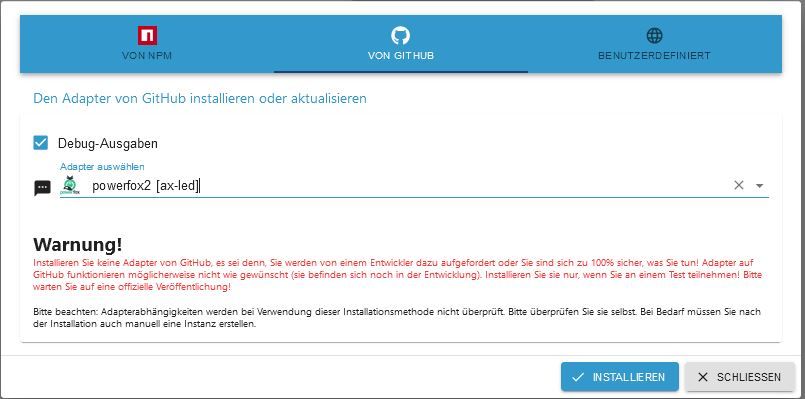
    Du musst oben auf den Kopf klicken, dann über die Katze von GitHub installieren, dann kriegst Du auch die neuste Version.

    N 1 Antwort Letzte Antwort
    0
    • J JoergH

      @nobbiman
      Du musst oben auf den Kopf klicken, dann über die Katze von GitHub installieren, dann kriegst Du auch die neuste Version.

      N Offline
      N Offline
      nobbiman
      schrieb am zuletzt editiert von
      #112

      @joergh Oh, noch nie gemacht, wieder etwas gelernt! Ist die Debug-Ausgabe zu installieren?

      J 1 Antwort Letzte Antwort
      0
      • N nobbiman

        @joergh Oh, noch nie gemacht, wieder etwas gelernt! Ist die Debug-Ausgabe zu installieren?

        J Offline
        J Offline
        JoergH
        schrieb am zuletzt editiert von
        #113

        @nobbiman sagte in Test Adapter powerfox v0.0.2-x:

        @joergh Oh, noch nie gemacht, wieder etwas gelernt! Ist die Debug-Ausgabe zu installieren?

        Was meinst Du damit? Die Debug Ausgabe kann man aktivieren in den Einstellungen der Instanz, wenn man den Expertenmodus auswählt.

        6d09b222-61a0-4384-934c-fe46a93f0b92-grafik.png

        N 1 Antwort Letzte Antwort
        0
        • J JoergH

          @nobbiman sagte in Test Adapter powerfox v0.0.2-x:

          @joergh Oh, noch nie gemacht, wieder etwas gelernt! Ist die Debug-Ausgabe zu installieren?

          Was meinst Du damit? Die Debug Ausgabe kann man aktivieren in den Einstellungen der Instanz, wenn man den Expertenmodus auswählt.

          6d09b222-61a0-4384-934c-fe46a93f0b92-grafik.png

          N Offline
          N Offline
          nobbiman
          schrieb am zuletzt editiert von nobbiman
          #114

          @joergh bei der Installation über die Katze erscheint die Checkbox "Debug-Ausgaben"
          powerfox-Adapterinstallation.JPG

          J 1 Antwort Letzte Antwort
          0
          • N nobbiman

            @joergh bei der Installation über die Katze erscheint die Checkbox "Debug-Ausgaben"
            powerfox-Adapterinstallation.JPG

            J Offline
            J Offline
            JoergH
            schrieb am zuletzt editiert von
            #115

            @nobbiman Achso. Da wird nichts installiert, sondern er zeigt Dir eine Debug Ausgabe während der Installation an.

            N 1 Antwort Letzte Antwort
            0
            • J JoergH

              @nobbiman Achso. Da wird nichts installiert, sondern er zeigt Dir eine Debug Ausgabe während der Installation an.

              N Offline
              N Offline
              nobbiman
              schrieb am zuletzt editiert von nobbiman
              #116

              @joergh OK und Danke

              1 Antwort Letzte Antwort
              0
              • bazidibavariaB bazidibavaria

                Hallo,

                ich habe einen Adapter erstellt um die powerfox-Api zu verarbeiten.
                Zurzeit werden nur die aktuellen Daten minütlich abgeholt (kann aber über den schedule-tab in der Instanz geändert werden).

                Hier der Link zum Github-Projekt:
                https://github.com/bazidibavaria/ioBroker.powerfox.git

                ioBroker.powerfox

                Changelog

                0.0.2-4 (2020-09-07)
                (bazidibavaria) split current power into power consumption and feed in

                0.0.2-3 (2020-09-07)
                (bazidibavaria) added support for HEAT/WATER Devices
                (bazidibavaria) update npm packages

                0.0.2-2 (2020-08-27)
                (bazidibavaria) changed log from error to info

                0.0.2-1 (2020-08-27)
                (bazidibavaria) added travis-ci

                0.0.2-0 (2020-08-27)
                (bazidibavaria) prerelease

                0.0.1 (2020-08-25)
                (bazidibavaria) initial commit

                Ich freue mich auf euer Feedback.

                LG bazidibavaria

                T Offline
                T Offline
                TurboSasch
                schrieb am zuletzt editiert von
                #117

                Hallo zusammen,

                ich habe heute auch den PowerFox Adapter installiert und bekomme im Log immer das angezeigt:

                powerfox2.0
                2023-08-14 19:12:01.904 info Terminated (NO_ERROR): Without reason

                powerfox2.0
                2023-08-14 19:12:00.901 info starting. Version 0.0.12 in /opt/iobroker/node_modules/iobroker.powerfox2, node: v16.20.1, js-controller: 4.0.24

                Was heißt das und was müsste gegebenfalls geändert werden?

                Grüße

                N 1 Antwort Letzte Antwort
                0
                • T TurboSasch

                  Hallo zusammen,

                  ich habe heute auch den PowerFox Adapter installiert und bekomme im Log immer das angezeigt:

                  powerfox2.0
                  2023-08-14 19:12:01.904 info Terminated (NO_ERROR): Without reason

                  powerfox2.0
                  2023-08-14 19:12:00.901 info starting. Version 0.0.12 in /opt/iobroker/node_modules/iobroker.powerfox2, node: v16.20.1, js-controller: 4.0.24

                  Was heißt das und was müsste gegebenfalls geändert werden?

                  Grüße

                  N Offline
                  N Offline
                  nobbiman
                  schrieb am zuletzt editiert von nobbiman
                  #118

                  @turbosasch Ist wie die Fehlermeldung schon sagt, "NO ERROR", also kein Fehler! Der Adapter startet halt für jede Abfrage neu und endet (terminated) danach mit dieser Meldung!

                  1 Antwort Letzte Antwort
                  0
                  • A AxLED

                    @hydraold
                    Hallo zusammen,

                    habe mich mal an der Überarbeitung des Adapters versucht: Adapter powerfox2

                    AxLED

                    A Online
                    A Online
                    ATARI
                    schrieb am zuletzt editiert von
                    #119

                    @axled Danke das Du den Adapter weiter pflegst.

                    Hallo zusammen.
                    Bei mir lief die akt. Version 0.0.12 auf einem TinkerBoard S und auf einer Synology DS im Docker ohne Probleme.
                    Nach dem Totalausfall vom TinkerBoard habe ich mir einen Raspberry Pi 4 zugelegt.
                    Auch hier lief der powerfox2 ohne Probleme.

                    Vor ein paar Tagen habe ich den ioBroker auf dem Raspberry Pi und im Docker auf den akt. Stand gebracht. (Admin, node.js, npm, js-controller…)

                    Nach dem Update des js-controller von v4.x auf v5.x läuft powerfox2 nicht mehr
                    auf dem Raspberry Pi, auf Synology im Docker aber weiterhin ohne Probleme.
                    Als Fehler erhalte ich:

                    
                    instance system.adapter.powerfox2.0 terminated with code 1 (JS_CONTROLLER_STOPPED)


                    Löschen, neuinstallieren, reboot, iobroker update && upgrade… blieb auf dem Pi erfolglos.

                    Hat jemand eine Idee?

                    Gruß
                    ATARI

                    Gruß
                    ATARI

                    Raspberry Pi 5B (ioB via pi OS_lite(64bit) | Synology NAS (ioB via Docker)
                    Fibaro Home Center 2 & Home Center 3 | Homematic IP | EMS-ESP32 Gateway
                    Aeotec Z-Wave

                    Thomas BraunT 1 Antwort Letzte Antwort
                    0
                    • A ATARI

                      @axled Danke das Du den Adapter weiter pflegst.

                      Hallo zusammen.
                      Bei mir lief die akt. Version 0.0.12 auf einem TinkerBoard S und auf einer Synology DS im Docker ohne Probleme.
                      Nach dem Totalausfall vom TinkerBoard habe ich mir einen Raspberry Pi 4 zugelegt.
                      Auch hier lief der powerfox2 ohne Probleme.

                      Vor ein paar Tagen habe ich den ioBroker auf dem Raspberry Pi und im Docker auf den akt. Stand gebracht. (Admin, node.js, npm, js-controller…)

                      Nach dem Update des js-controller von v4.x auf v5.x läuft powerfox2 nicht mehr
                      auf dem Raspberry Pi, auf Synology im Docker aber weiterhin ohne Probleme.
                      Als Fehler erhalte ich:

                      
                      instance system.adapter.powerfox2.0 terminated with code 1 (JS_CONTROLLER_STOPPED)


                      Löschen, neuinstallieren, reboot, iobroker update && upgrade… blieb auf dem Pi erfolglos.

                      Hat jemand eine Idee?

                      Gruß
                      ATARI

                      Thomas BraunT Online
                      Thomas BraunT Online
                      Thomas Braun
                      Most Active
                      schrieb am zuletzt editiert von
                      #120

                      @atari sagte in Test Adapter powerfox v0.0.2-x:

                      Hat jemand eine Idee?

                      Zeig mal die Langfassung von

                      iob diag
                      

                      Linux-Werkzeugkasten:
                      https://forum.iobroker.net/topic/42952/der-kleine-iobroker-linux-werkzeugkasten
                      NodeJS Fixer Skript:
                      https://forum.iobroker.net/topic/68035/iob-node-fix-skript
                      iob_diag: curl -sLf -o diag.sh https://iobroker.net/diag.sh && bash diag.sh

                      A 1 Antwort Letzte Antwort
                      0
                      • Thomas BraunT Thomas Braun

                        @atari sagte in Test Adapter powerfox v0.0.2-x:

                        Hat jemand eine Idee?

                        Zeig mal die Langfassung von

                        iob diag
                        
                        A Online
                        A Online
                        ATARI
                        schrieb am zuletzt editiert von
                        #121

                        @thomas-braun
                        mit Langfassung meinst Du die "Summary"?

                        Gruß
                        ATARI

                        Raspberry Pi 5B (ioB via pi OS_lite(64bit) | Synology NAS (ioB via Docker)
                        Fibaro Home Center 2 & Home Center 3 | Homematic IP | EMS-ESP32 Gateway
                        Aeotec Z-Wave

                        Thomas BraunT 1 Antwort Letzte Antwort
                        0
                        • A Online
                          A Online
                          ATARI
                          schrieb am zuletzt editiert von
                          #122
                          ======================= SUMMARY =======================
                                               v.2023-06-20
                          
                          
                             Static hostname: pi
                                   Icon name: computer
                                  Machine ID: xxxxxxxxxxxxxxxxxxxx
                                     Boot ID: xxxxxxxxxxxxxxxxxxxx
                            Operating System: Debian GNU/Linux 11 (bullseye)
                                      Kernel: Linux 6.1.21-v8+
                                Architecture: arm64
                          
                          Installation:           native
                          Kernel:                 aarch64
                          Userland:               arm64
                          Timezone:               Europe/Berlin (CEST, +0200)
                          User-ID:                1000
                          X-Server:               false
                          Boot Target:            multi-user.target
                          
                          Pending OS-Updates:     0
                          Pending iob updates:    0
                          
                          Nodejs-Installation:    /usr/bin/nodejs         v18.17.1
                                                  /usr/bin/node           v18.17.1
                                                  /usr/bin/npm            9.6.7
                                                  /usr/bin/npx            9.6.7
                          
                          Recommended versions are nodejs 18.x.y and npm 9.x.y
                          Your nodejs installation is correct
                          
                          MEMORY:
                                         total        used        free      shared  buff/cache   available
                          Mem:            7.8G        1.4G        5.7G        1.0M        640M        6.2G
                          Swap:            99M          0B         99M
                          Total:          7.9G        1.4G        5.8G
                          
                          Active iob-Instances:   18
                          Active repo(s): stable
                          
                          ioBroker Core:          js-controller           5.0.12
                                                  admin                   6.10.1
                          
                          ioBroker Status:        iobroker is running on this host.
                          
                          
                          Objects type: jsonl
                          States  type: jsonl
                          
                          Status admin and web instance:
                          + system.adapter.admin.0                  : admin                 : pi                                       -  enabled, port: 8081, bind: 0.0.0
                          + system.adapter.web.0                    : web                   : pi                                       -  enabled, port: 8082, bind: 0.0.0
                          
                          Objects:                6327
                          States:                 4833
                          
                          Size of iob-Database:
                          
                          22M     /opt/iobroker/iobroker-data/objects.jsonl
                          3.0M    /opt/iobroker/iobroker-data/states.jsonl


                          =================== END OF SUMMARY ====================
                          

                          Gruß
                          ATARI

                          Raspberry Pi 5B (ioB via pi OS_lite(64bit) | Synology NAS (ioB via Docker)
                          Fibaro Home Center 2 & Home Center 3 | Homematic IP | EMS-ESP32 Gateway
                          Aeotec Z-Wave

                          1 Antwort Letzte Antwort
                          0
                          • A ATARI

                            @thomas-braun
                            mit Langfassung meinst Du die "Summary"?

                            Thomas BraunT Online
                            Thomas BraunT Online
                            Thomas Braun
                            Most Active
                            schrieb am zuletzt editiert von
                            #123

                            @atari sagte in Test Adapter powerfox v0.0.2-x:

                            mit Langfassung meinst Du die "Summary"?

                            Nein, die Langfassung ist die Langfassung, 'Summary' ist die Zusammenfassung.

                            Linux-Werkzeugkasten:
                            https://forum.iobroker.net/topic/42952/der-kleine-iobroker-linux-werkzeugkasten
                            NodeJS Fixer Skript:
                            https://forum.iobroker.net/topic/68035/iob-node-fix-skript
                            iob_diag: curl -sLf -o diag.sh https://iobroker.net/diag.sh && bash diag.sh

                            1 Antwort Letzte Antwort
                            0
                            • A Online
                              A Online
                              ATARI
                              schrieb am zuletzt editiert von
                              #124
                              Skript v.2023-06-20
                              
                              *** BASE SYSTEM ***
                                 Static hostname: pi
                                       Icon name: computer
                                      Machine ID: xxxxxxxxxxxxxxxxxxxxxxxxxxxxxxxx
                                         Boot ID: xxxxxxxxxxxxxxxxxxxxxxxxxxxxxxxx
                                Operating System: Debian GNU/Linux 11 (bullseye)
                                          Kernel: Linux 6.1.21-v8+
                                    Architecture: arm64
                              
                              Model           : Raspberry Pi 4 Model B Rev 1.5
                              Docker          : false
                              Virtualization  : none
                              Kernel          : aarch64
                              Userland        : arm64
                              
                              Systemuptime and Load:
                               16:10:12 up  5:12,  1 user,  load average: 0.44, 0.82, 1.35
                              CPU threads: 4
                              
                              Raspberry only:
                              throttled=0x0
                              Other values than 0x0 hint to temperature/voltage problems
                              temp=40.9'C
                              volt=0.9360V
                              
                              *** Time and Time Zones ***
                                             Local time: Mon 2023-09-25 16:10:12 CEST
                                         Universal time: Mon 2023-09-25 14:10:12 UTC
                                               RTC time: n/a
                                              Time zone: Europe/Berlin (CEST, +0200)
                              System clock synchronized: yes
                                            NTP service: active
                                        RTC in local TZ: no
                              
                              *** User and Groups ***
                              admin
                              /home/admin
                              admin adm dialout cdrom sudo audio video plugdev games users input render netdev gpio i2c spi iobroker
                              
                              *** X-Server-Setup ***
                              X-Server:       false
                              Desktop:
                              Terminal:       tty
                              Boot Target:    multi-user.target
                              
                              *** MEMORY ***
                                             total        used        free      shared  buff/cache   available
                              Mem:            7.8G        1.4G        5.7G        1.0M        717M        6.3G
                              Swap:            99M          0B         99M
                              Total:          7.9G        1.4G        5.8G
                              
                                       7812 M total memory
                                       1394 M used memory
                                       1476 M active memory
                                        479 M inactive memory
                                       5700 M free memory
                                         76 M buffer memory
                                        641 M swap cache
                                         99 M total swap
                                          0 M used swap
                                         99 M free swap
                              
                              Raspberry only:
                              oom events: 0
                              lifetime oom required: 0 Mbytes
                              total time in oom handler: 0 ms
                              max time spent in oom handler: 0 ms
                              
                              *** FILESYSTEM ***
                              Filesystem     Type      Size  Used Avail Use% Mounted on
                              /dev/root      ext4       59G  3.2G   53G   6% /
                              devtmpfs       devtmpfs  3.6G     0  3.6G   0% /dev
                              tmpfs          tmpfs     3.9G     0  3.9G   0% /dev/shm
                              tmpfs          tmpfs     1.6G  1.1M  1.6G   1% /run
                              tmpfs          tmpfs     5.0M  4.0K  5.0M   1% /run/lock
                              /dev/mmcblk0p1 vfat      255M   31M  225M  13% /boot
                              tmpfs          tmpfs     782M     0  782M   0% /run/user/1000
                              
                              Messages concerning ext4 filesystem in dmesg:
                              [Mon Sep 25 10:58:06 2023] Kernel command line: coherent_pool=1M 8250.nr_uarts=0 snd_bcm2835.enable_headphones=0 snd_bcm2835.enable_headphones=1 snd_bcm2835.enable_hdmi=1 snd_bcm2835.enable_hdmi=0  smsc95xx.macaddr=D8:3A:DD:66:1B:1C vc_mem.mem_base=0x3ec00000 vc_mem.mem_size=0x40000000  console=ttyS0,115200 console=tty1 root=PARTUUID=b80df8ab-02 rootfstype=ext4 fsck.repair=yes rootwait
                              [Mon Sep 25 10:58:07 2023] EXT4-fs (mmcblk0p2): mounted filesystem with ordered data mode. Quota mode: none.
                              [Mon Sep 25 10:58:07 2023] VFS: Mounted root (ext4 filesystem) readonly on device 179:2.
                              [Mon Sep 25 10:58:09 2023] EXT4-fs (mmcblk0p2): re-mounted. Quota mode: none.
                              
                              Show mounted filesystems (real ones only):
                              TARGET  SOURCE         FSTYPE OPTIONS
                              /       /dev/mmcblk0p2 ext4   rw,noatime
                              `-/boot /dev/mmcblk0p1 vfat   rw,relatime,fmask=0022,dmask=0022,codepage=437,iocharset=ascii,shortname=mixed,errors=remount-ro
                              
                              Files in neuralgic directories:
                              
                              /var:
                              634M    /var/
                              207M    /var/log
                              193M    /var/log/journal/a8c446969d5b4d38975daa054bdd92b5
                              193M    /var/log/journal
                              180M    /var/cache
                              
                              Archived and active journals take up 192.0M in the file system.
                              
                              /opt/iobroker/backups:
                              38M     /opt/iobroker/backups/
                              
                              /opt/iobroker/iobroker-data:
                              242M    /opt/iobroker/iobroker-data/
                              113M    /opt/iobroker/iobroker-data/files
                              88M     /opt/iobroker/iobroker-data/backup-objects
                              52M     /opt/iobroker/iobroker-data/files/javascript.admin
                              34M     /opt/iobroker/iobroker-data/files/javascript.admin/static
                              
                              The five largest files in iobroker-data are:
                              27M     /opt/iobroker/iobroker-data/objects.jsonl
                              21M     /opt/iobroker/iobroker-data/files/web.admin/static/js/main.edf7552a.js.map
                              16M     /opt/iobroker/iobroker-data/states.jsonl
                              8.3M    /opt/iobroker/iobroker-data/files/web.admin/static/js/main.edf7552a.js
                              7.1M    /opt/iobroker/iobroker-data/files/javascript.admin/static/js/610.f22de4ab.chunk.js.map
                              
                              *** NodeJS-Installation ***
                              
                              /usr/bin/nodejs         v18.17.1
                              /usr/bin/node           v18.17.1
                              /usr/bin/npm            9.6.7
                              /usr/bin/npx            9.6.7
                              
                              
                              nodejs:
                                Installed: 18.17.1-deb-1nodesource1
                                Candidate: 18.17.1-deb-1nodesource1
                                Version table:
                               *** 18.17.1-deb-1nodesource1 500
                                      500 https://deb.nodesource.com/node_18.x bullseye/main arm64 Packages
                                      100 /var/lib/dpkg/status
                                   12.22.12~dfsg-1~deb11u4 500
                                      500 http://security.debian.org/debian-security bullseye-security/main arm64 Packages
                                   12.22.12~dfsg-1~deb11u3 500
                                      500 http://deb.debian.org/debian bullseye/main arm64 Packages
                              
                              Temp directories causing npm8 problem: 0
                              No problems detected
                              
                              npm ERR! code ELSPROBLEMS
                              npm ERR! missing: http@^0.0.1-security, required by iobroker.javascript@7.1.4
                              npm ERR! missing: modbus-serial@^8.0.13, required by iobroker.javascript@7.1.4
                              npm ERR! missing: serial@^0.0.9, required by iobroker.javascript@7.1.4
                              npm ERR! missing: usb@^2.10.0, required by iobroker.javascript@7.1.4
                              
                              npm ERR! A complete log of this run can be found in: /home/admin/.npm/_logs/2023-09-25T14_10_18_185Z-debug-0.log
                              Errors in npm tree: 0
                              
                              *** ioBroker-Installation ***
                              
                              ioBroker Status
                              iobroker is running on this host.
                              
                              
                              Objects type: jsonl
                              States  type: jsonl
                              
                              No configuration change needed.
                              
                              
                              Multihost discovery server: disabled
                              Discovery authentication:   enabled
                              Persistent activation:      disabled
                              Objects:                    jsonl on 127.0.0.1
                              States:                     jsonl on 127.0.0.1
                              
                              Core adapters versions
                              js-controller:  5.0.12
                              admin:          6.10.1
                              javascript:     7.1.4
                              
                              Adapters from github:   1
                              
                              Adapter State
                              + system.adapter.admin.0                  : admin                 : pi                                       -  enabled, port: 8081, bind: 0.0.0.0, run as: admin
                              + system.adapter.alexa2.0                 : alexa2                : pi                                       -  enabled
                              + system.adapter.backitup.0               : backitup              : pi                                       -  enabled
                              + system.adapter.discovery.0              : discovery             : pi                                       -  enabled
                              + system.adapter.email.0                  : email                 : pi                                       -  enabled
                              + system.adapter.fb-checkpresence.0       : fb-checkpresence      : pi                                       -  enabled
                                system.adapter.feiertage.0              : feiertage             : pi                                       -  enabled
                              + system.adapter.followthesun.0           : followthesun          : pi                                       -  enabled
                                system.adapter.homepilot.0              : homepilot             : pi                                       - disabled
                              + system.adapter.info.0                   : info                  : pi                                       -  enabled
                              + system.adapter.javascript.0             : javascript            : pi                                       -  enabled
                                system.adapter.netatmo-crawler.0        : netatmo-crawler       : pi                                       -  enabled
                              + system.adapter.netatmo.0                : netatmo               : pi                                       -  enabled
                                system.adapter.powerfox2.0              : powerfox2             : pi                                       -  enabled
                                system.adapter.schoolfree.0             : schoolfree            : pi                                       -  enabled
                              + system.adapter.shelly.0                 : shelly                : pi                                       -  enabled, port: 1882, bind: 0.0.0.0
                              + system.adapter.simple-api.0             : simple-api            : pi                                       -  enabled, port: 8087, bind: 0.0.0.0, run as: admin
                              + system.adapter.smartgarden.0            : smartgarden           : pi                                       -  enabled
                              + system.adapter.sonos.0                  : sonos                 : pi                                       -  enabled
                              + system.adapter.sony-bravia.0            : sony-bravia           : pi                                       -  enabled
                              + system.adapter.sony-bravia.1            : sony-bravia           : pi                                       -  enabled
                              + system.adapter.tr-064.0                 : tr-064                : pi                                       -  enabled
                              + system.adapter.web.0                    : web                   : pi                                       -  enabled, port: 8082, bind: 0.0.0.0, run as: admin
                              
                              + instance is alive
                              
                              Enabled adapters with bindings
                              + system.adapter.admin.0                  : admin                 : pi                                       -  enabled, port: 8081, bind: 0.0.0.0, run as: admin
                              + system.adapter.shelly.0                 : shelly                : pi                                       -  enabled, port: 1882, bind: 0.0.0.0
                              + system.adapter.simple-api.0             : simple-api            : pi                                       -  enabled, port: 8087, bind: 0.0.0.0, run as: admin
                              + system.adapter.web.0                    : web                   : pi                                       -  enabled, port: 8082, bind: 0.0.0.0, run as: admin
                              
                              ioBroker-Repositories
                              stable        : http://download.iobroker.net/sources-dist.json
                              beta          : http://download.iobroker.net/sources-dist-latest.json
                              
                              Active repo(s): stable
                              
                              Installed ioBroker-Instances
                              Used repository: stable
                              Adapter    "admin"        : 6.10.1   , installed 6.10.1
                              Adapter    "alexa2"       : 3.25.2   , installed 3.25.2
                              Adapter    "backitup"     : 2.8.1    , installed 2.8.1
                              Adapter    "discovery"    : 3.1.0    , installed 3.1.0
                              Adapter    "email"        : 1.2.0    , installed 1.2.0
                              Adapter    "fb-checkpresence": 1.2.2 , installed 1.2.2
                              Adapter    "feiertage"    : 1.1.4    , installed 1.1.4
                              Adapter    "followthesun" : 0.4.2    , installed 0.4.2
                              Adapter    "homepilot"    : 1.1.6    , installed 1.1.6
                              Adapter    "info"         : 1.9.26   , installed 1.9.26
                              Adapter    "javascript"   : 7.1.4    , installed 7.1.4
                              Controller "js-controller": 5.0.12   , installed 5.0.12
                              Adapter    "netatmo"      : 3.1.0    , installed 3.1.0
                              Adapter    "netatmo-crawler": 0.8.1  , installed 0.8.1
                              Adapter    "powerfox2"    : 0.0.12   , installed 0.0.12
                              Adapter    "schoolfree"   : 1.1.2    , installed 1.1.2
                              Adapter    "shelly"       : 6.4.1    , installed 6.4.1
                              Adapter    "simple-api"   : 2.7.2    , installed 2.7.2
                              Adapter    "smartgarden"  : 2.0.0    , installed 2.0.0
                              Adapter    "socketio"     : 6.5.5    , installed 6.5.5
                              Adapter    "sonos"        : 2.3.1    , installed 2.3.1
                              Adapter    "sony-bravia"  : 1.0.9    , installed 1.0.9
                              Adapter    "tr-064"       : 4.2.18   , installed 4.2.18
                              Adapter    "web"          : 6.1.2    , installed 6.1.2
                              Adapter    "ws"           : 2.5.5    , installed 2.5.5
                              
                              Objects and States
                              Please stand by - This may take a while
                              Objects:        6757
                              States:         5200
                              
                              *** OS-Repositories and Updates ***
                              Hit:1 http://security.debian.org/debian-security bullseye-security InRelease
                              Hit:2 http://deb.debian.org/debian bullseye InRelease
                              Hit:3 http://archive.raspberrypi.org/debian bullseye InRelease
                              Hit:4 http://deb.debian.org/debian bullseye-updates InRelease
                              Hit:5 https://deb.nodesource.com/node_18.x bullseye InRelease
                              Reading package lists...
                              Pending Updates: 0
                              
                              *** Listening Ports ***
                              Active Internet connections (only servers)
                              Proto Recv-Q Send-Q Local Address           Foreign Address         State       User       Inode      PID/Program name
                              tcp        0      0 127.0.0.1:9000          0.0.0.0:*               LISTEN      1001       143047     20981/iobroker.js-c
                              tcp        0      0 127.0.0.1:9001          0.0.0.0:*               LISTEN      1001       143040     20981/iobroker.js-c
                              tcp        0      0 0.0.0.0:22              0.0.0.0:*               LISTEN      0          13563      544/sshd: /usr/sbin
                              tcp6       0      0 :::8087                 :::*                    LISTEN      1001       145602     21318/io.simple-api
                              tcp6       0      0 :::8082                 :::*                    LISTEN      1001       147174     21470/io.web.0
                              tcp6       0      0 :::8081                 :::*                    LISTEN      1001       143101     21000/io.admin.0
                              tcp6       0      0 :::3500                 :::*                    LISTEN      1001       143148     21084/io.sonos.0
                              tcp6       0      0 :::22                   :::*                    LISTEN      0          13565      544/sshd: /usr/sbin
                              udp        0      0 192.168.0.101:5353      0.0.0.0:*                           1001       145461     21169/io.tr-064.0
                              udp        0      0 0.0.0.0:5353            0.0.0.0:*                           108        15368      394/avahi-daemon: r
                              udp        0      0 0.0.0.0:5683            0.0.0.0:*                           1001       144211     21065/io.shelly.0
                              udp        0      0 0.0.0.0:51391           0.0.0.0:*                           1001       155154     21065/io.shelly.0
                              udp        0      0 0.0.0.0:60589           0.0.0.0:*                           108        15370      394/avahi-daemon: r
                              udp        0      0 0.0.0.0:68              0.0.0.0:*                           0          11804      737/dhcpcd
                              udp6       0      0 :::546                  :::*                                0          12706      737/dhcpcd
                              udp6       0      0 :::5353                 :::*                                108        15369      394/avahi-daemon: r
                              udp6       0      0 :::51198                :::*                                108        15371      394/avahi-daemon: r
                              
                              *** Log File - Last 25 Lines ***
                              
                              2023-09-25 16:10:34.690  - info: javascript.0 (21042) script.js.common.Huawei.get_data: Triggering read of inverter 1 at address 37100 with length 114
                              2023-09-25 16:10:37.690  - info: javascript.0 (21042) script.js.common.Huawei.get_data: Triggering read of inverter 1 at address 32000 with length 116
                              2023-09-25 16:10:40.040  - info: host.pi instance system.adapter.powerfox2.0 started with pid 23068
                              2023-09-25 16:10:40.700  - info: javascript.0 (21042) script.js.common.Huawei.get_data: Triggering read of inverter 1 at address 37000 with length 68
                              2023-09-25 16:10:41.836  - error: host.pi instance system.adapter.powerfox2.0 terminated with code 1 (JS_CONTROLLER_STOPPED)
                              2023-09-25 16:10:43.701  - info: javascript.0 (21042) script.js.common.Huawei.get_data: Triggering read of inverter 1 at address 37700 with length 100
                              2023-09-25 16:10:46.701  - info: javascript.0 (21042) script.js.common.Huawei.get_data: Triggering read of inverter 1 at address 37800 with length 100
                              2023-09-25 16:10:49.701  - info: javascript.0 (21042) script.js.common.Huawei.get_data: Triggering read of inverter 1 at address 38200 with length 100
                              2023-09-25 16:10:50.043  - info: host.pi instance system.adapter.powerfox2.0 started with pid 23102
                              2023-09-25 16:10:51.201  - error: host.pi instance system.adapter.powerfox2.0 terminated with code 1 (JS_CONTROLLER_STOPPED)
                              2023-09-25 16:10:52.701  - info: javascript.0 (21042) script.js.common.Huawei.get_data: Triggering read of inverter 1 at address 38300 with length 100
                              2023-09-25 16:10:55.701  - info: javascript.0 (21042) script.js.common.Huawei.get_data: Triggering read of inverter 1 at address 38400 with length 100
                              2023-09-25 16:10:56.976  - info: javascript.0 (21042) script.js.common.Huawei.Sonnen_Azimuth: -131.5
                              2023-09-25 16:10:58.702  - info: javascript.0 (21042) script.js.common.Huawei.get_data: Triggering read of inverter 1 at address 35300 with length 40
                              2023-09-25 16:11:00.066  - info: host.pi instance system.adapter.powerfox2.0 started with pid 23135
                              2023-09-25 16:11:01.134  - error: host.pi instance system.adapter.powerfox2.0 terminated with code 1 (JS_CONTROLLER_STOPPED)
                              2023-09-25 16:11:01.702  - info: javascript.0 (21042) script.js.common.Huawei.get_data: Processing new data...
                              2023-09-25 16:11:01.710  - info: javascript.0 (21042) script.js.common.Huawei.get_data: Processing done!
                              2023-09-25 16:11:01.711  - info: javascript.0 (21042) script.js.common.Huawei.get_data: Triggering read of inverter 1 at address 30000 with length 81
                              2023-09-25 16:11:04.703  - info: javascript.0 (21042) script.js.common.Huawei.get_data: Triggering read of inverter 1 at address 37100 with length 114
                              2023-09-25 16:11:07.704  - info: javascript.0 (21042) script.js.common.Huawei.get_data: Triggering read of inverter 1 at address 32000 with length 116
                              2023-09-25 16:11:10.048  - info: host.pi instance system.adapter.powerfox2.0 started with pid 23556
                              2023-09-25 16:11:10.705  - info: javascript.0 (21042) script.js.common.Huawei.get_data: Triggering read of inverter 1 at address 37000 with length 68
                              2023-09-25 16:11:11.332  - error: host.pi instance system.adapter.powerfox2.0 terminated with code 1 (JS_CONTROLLER_STOPPED)
                              2023-09-25 16:11:13.705  - info: javascript.0 (21042) script.js.common.Huawei.get_data: Triggering read of inverter 1 at address 37700 with length 100


                              Gruß
                              ATARI

                              Raspberry Pi 5B (ioB via pi OS_lite(64bit) | Synology NAS (ioB via Docker)
                              Fibaro Home Center 2 & Home Center 3 | Homematic IP | EMS-ESP32 Gateway
                              Aeotec Z-Wave

                              Thomas BraunT 1 Antwort Letzte Antwort
                              0
                              • A ATARI
                                Skript v.2023-06-20
                                
                                *** BASE SYSTEM ***
                                   Static hostname: pi
                                         Icon name: computer
                                        Machine ID: xxxxxxxxxxxxxxxxxxxxxxxxxxxxxxxx
                                           Boot ID: xxxxxxxxxxxxxxxxxxxxxxxxxxxxxxxx
                                  Operating System: Debian GNU/Linux 11 (bullseye)
                                            Kernel: Linux 6.1.21-v8+
                                      Architecture: arm64
                                
                                Model           : Raspberry Pi 4 Model B Rev 1.5
                                Docker          : false
                                Virtualization  : none
                                Kernel          : aarch64
                                Userland        : arm64
                                
                                Systemuptime and Load:
                                 16:10:12 up  5:12,  1 user,  load average: 0.44, 0.82, 1.35
                                CPU threads: 4
                                
                                Raspberry only:
                                throttled=0x0
                                Other values than 0x0 hint to temperature/voltage problems
                                temp=40.9'C
                                volt=0.9360V
                                
                                *** Time and Time Zones ***
                                               Local time: Mon 2023-09-25 16:10:12 CEST
                                           Universal time: Mon 2023-09-25 14:10:12 UTC
                                                 RTC time: n/a
                                                Time zone: Europe/Berlin (CEST, +0200)
                                System clock synchronized: yes
                                              NTP service: active
                                          RTC in local TZ: no
                                
                                *** User and Groups ***
                                admin
                                /home/admin
                                admin adm dialout cdrom sudo audio video plugdev games users input render netdev gpio i2c spi iobroker
                                
                                *** X-Server-Setup ***
                                X-Server:       false
                                Desktop:
                                Terminal:       tty
                                Boot Target:    multi-user.target
                                
                                *** MEMORY ***
                                               total        used        free      shared  buff/cache   available
                                Mem:            7.8G        1.4G        5.7G        1.0M        717M        6.3G
                                Swap:            99M          0B         99M
                                Total:          7.9G        1.4G        5.8G
                                
                                         7812 M total memory
                                         1394 M used memory
                                         1476 M active memory
                                          479 M inactive memory
                                         5700 M free memory
                                           76 M buffer memory
                                          641 M swap cache
                                           99 M total swap
                                            0 M used swap
                                           99 M free swap
                                
                                Raspberry only:
                                oom events: 0
                                lifetime oom required: 0 Mbytes
                                total time in oom handler: 0 ms
                                max time spent in oom handler: 0 ms
                                
                                *** FILESYSTEM ***
                                Filesystem     Type      Size  Used Avail Use% Mounted on
                                /dev/root      ext4       59G  3.2G   53G   6% /
                                devtmpfs       devtmpfs  3.6G     0  3.6G   0% /dev
                                tmpfs          tmpfs     3.9G     0  3.9G   0% /dev/shm
                                tmpfs          tmpfs     1.6G  1.1M  1.6G   1% /run
                                tmpfs          tmpfs     5.0M  4.0K  5.0M   1% /run/lock
                                /dev/mmcblk0p1 vfat      255M   31M  225M  13% /boot
                                tmpfs          tmpfs     782M     0  782M   0% /run/user/1000
                                
                                Messages concerning ext4 filesystem in dmesg:
                                [Mon Sep 25 10:58:06 2023] Kernel command line: coherent_pool=1M 8250.nr_uarts=0 snd_bcm2835.enable_headphones=0 snd_bcm2835.enable_headphones=1 snd_bcm2835.enable_hdmi=1 snd_bcm2835.enable_hdmi=0  smsc95xx.macaddr=D8:3A:DD:66:1B:1C vc_mem.mem_base=0x3ec00000 vc_mem.mem_size=0x40000000  console=ttyS0,115200 console=tty1 root=PARTUUID=b80df8ab-02 rootfstype=ext4 fsck.repair=yes rootwait
                                [Mon Sep 25 10:58:07 2023] EXT4-fs (mmcblk0p2): mounted filesystem with ordered data mode. Quota mode: none.
                                [Mon Sep 25 10:58:07 2023] VFS: Mounted root (ext4 filesystem) readonly on device 179:2.
                                [Mon Sep 25 10:58:09 2023] EXT4-fs (mmcblk0p2): re-mounted. Quota mode: none.
                                
                                Show mounted filesystems (real ones only):
                                TARGET  SOURCE         FSTYPE OPTIONS
                                /       /dev/mmcblk0p2 ext4   rw,noatime
                                `-/boot /dev/mmcblk0p1 vfat   rw,relatime,fmask=0022,dmask=0022,codepage=437,iocharset=ascii,shortname=mixed,errors=remount-ro
                                
                                Files in neuralgic directories:
                                
                                /var:
                                634M    /var/
                                207M    /var/log
                                193M    /var/log/journal/a8c446969d5b4d38975daa054bdd92b5
                                193M    /var/log/journal
                                180M    /var/cache
                                
                                Archived and active journals take up 192.0M in the file system.
                                
                                /opt/iobroker/backups:
                                38M     /opt/iobroker/backups/
                                
                                /opt/iobroker/iobroker-data:
                                242M    /opt/iobroker/iobroker-data/
                                113M    /opt/iobroker/iobroker-data/files
                                88M     /opt/iobroker/iobroker-data/backup-objects
                                52M     /opt/iobroker/iobroker-data/files/javascript.admin
                                34M     /opt/iobroker/iobroker-data/files/javascript.admin/static
                                
                                The five largest files in iobroker-data are:
                                27M     /opt/iobroker/iobroker-data/objects.jsonl
                                21M     /opt/iobroker/iobroker-data/files/web.admin/static/js/main.edf7552a.js.map
                                16M     /opt/iobroker/iobroker-data/states.jsonl
                                8.3M    /opt/iobroker/iobroker-data/files/web.admin/static/js/main.edf7552a.js
                                7.1M    /opt/iobroker/iobroker-data/files/javascript.admin/static/js/610.f22de4ab.chunk.js.map
                                
                                *** NodeJS-Installation ***
                                
                                /usr/bin/nodejs         v18.17.1
                                /usr/bin/node           v18.17.1
                                /usr/bin/npm            9.6.7
                                /usr/bin/npx            9.6.7
                                
                                
                                nodejs:
                                  Installed: 18.17.1-deb-1nodesource1
                                  Candidate: 18.17.1-deb-1nodesource1
                                  Version table:
                                 *** 18.17.1-deb-1nodesource1 500
                                        500 https://deb.nodesource.com/node_18.x bullseye/main arm64 Packages
                                        100 /var/lib/dpkg/status
                                     12.22.12~dfsg-1~deb11u4 500
                                        500 http://security.debian.org/debian-security bullseye-security/main arm64 Packages
                                     12.22.12~dfsg-1~deb11u3 500
                                        500 http://deb.debian.org/debian bullseye/main arm64 Packages
                                
                                Temp directories causing npm8 problem: 0
                                No problems detected
                                
                                npm ERR! code ELSPROBLEMS
                                npm ERR! missing: http@^0.0.1-security, required by iobroker.javascript@7.1.4
                                npm ERR! missing: modbus-serial@^8.0.13, required by iobroker.javascript@7.1.4
                                npm ERR! missing: serial@^0.0.9, required by iobroker.javascript@7.1.4
                                npm ERR! missing: usb@^2.10.0, required by iobroker.javascript@7.1.4
                                
                                npm ERR! A complete log of this run can be found in: /home/admin/.npm/_logs/2023-09-25T14_10_18_185Z-debug-0.log
                                Errors in npm tree: 0
                                
                                *** ioBroker-Installation ***
                                
                                ioBroker Status
                                iobroker is running on this host.
                                
                                
                                Objects type: jsonl
                                States  type: jsonl
                                
                                No configuration change needed.
                                
                                
                                Multihost discovery server: disabled
                                Discovery authentication:   enabled
                                Persistent activation:      disabled
                                Objects:                    jsonl on 127.0.0.1
                                States:                     jsonl on 127.0.0.1
                                
                                Core adapters versions
                                js-controller:  5.0.12
                                admin:          6.10.1
                                javascript:     7.1.4
                                
                                Adapters from github:   1
                                
                                Adapter State
                                + system.adapter.admin.0                  : admin                 : pi                                       -  enabled, port: 8081, bind: 0.0.0.0, run as: admin
                                + system.adapter.alexa2.0                 : alexa2                : pi                                       -  enabled
                                + system.adapter.backitup.0               : backitup              : pi                                       -  enabled
                                + system.adapter.discovery.0              : discovery             : pi                                       -  enabled
                                + system.adapter.email.0                  : email                 : pi                                       -  enabled
                                + system.adapter.fb-checkpresence.0       : fb-checkpresence      : pi                                       -  enabled
                                  system.adapter.feiertage.0              : feiertage             : pi                                       -  enabled
                                + system.adapter.followthesun.0           : followthesun          : pi                                       -  enabled
                                  system.adapter.homepilot.0              : homepilot             : pi                                       - disabled
                                + system.adapter.info.0                   : info                  : pi                                       -  enabled
                                + system.adapter.javascript.0             : javascript            : pi                                       -  enabled
                                  system.adapter.netatmo-crawler.0        : netatmo-crawler       : pi                                       -  enabled
                                + system.adapter.netatmo.0                : netatmo               : pi                                       -  enabled
                                  system.adapter.powerfox2.0              : powerfox2             : pi                                       -  enabled
                                  system.adapter.schoolfree.0             : schoolfree            : pi                                       -  enabled
                                + system.adapter.shelly.0                 : shelly                : pi                                       -  enabled, port: 1882, bind: 0.0.0.0
                                + system.adapter.simple-api.0             : simple-api            : pi                                       -  enabled, port: 8087, bind: 0.0.0.0, run as: admin
                                + system.adapter.smartgarden.0            : smartgarden           : pi                                       -  enabled
                                + system.adapter.sonos.0                  : sonos                 : pi                                       -  enabled
                                + system.adapter.sony-bravia.0            : sony-bravia           : pi                                       -  enabled
                                + system.adapter.sony-bravia.1            : sony-bravia           : pi                                       -  enabled
                                + system.adapter.tr-064.0                 : tr-064                : pi                                       -  enabled
                                + system.adapter.web.0                    : web                   : pi                                       -  enabled, port: 8082, bind: 0.0.0.0, run as: admin
                                
                                + instance is alive
                                
                                Enabled adapters with bindings
                                + system.adapter.admin.0                  : admin                 : pi                                       -  enabled, port: 8081, bind: 0.0.0.0, run as: admin
                                + system.adapter.shelly.0                 : shelly                : pi                                       -  enabled, port: 1882, bind: 0.0.0.0
                                + system.adapter.simple-api.0             : simple-api            : pi                                       -  enabled, port: 8087, bind: 0.0.0.0, run as: admin
                                + system.adapter.web.0                    : web                   : pi                                       -  enabled, port: 8082, bind: 0.0.0.0, run as: admin
                                
                                ioBroker-Repositories
                                stable        : http://download.iobroker.net/sources-dist.json
                                beta          : http://download.iobroker.net/sources-dist-latest.json
                                
                                Active repo(s): stable
                                
                                Installed ioBroker-Instances
                                Used repository: stable
                                Adapter    "admin"        : 6.10.1   , installed 6.10.1
                                Adapter    "alexa2"       : 3.25.2   , installed 3.25.2
                                Adapter    "backitup"     : 2.8.1    , installed 2.8.1
                                Adapter    "discovery"    : 3.1.0    , installed 3.1.0
                                Adapter    "email"        : 1.2.0    , installed 1.2.0
                                Adapter    "fb-checkpresence": 1.2.2 , installed 1.2.2
                                Adapter    "feiertage"    : 1.1.4    , installed 1.1.4
                                Adapter    "followthesun" : 0.4.2    , installed 0.4.2
                                Adapter    "homepilot"    : 1.1.6    , installed 1.1.6
                                Adapter    "info"         : 1.9.26   , installed 1.9.26
                                Adapter    "javascript"   : 7.1.4    , installed 7.1.4
                                Controller "js-controller": 5.0.12   , installed 5.0.12
                                Adapter    "netatmo"      : 3.1.0    , installed 3.1.0
                                Adapter    "netatmo-crawler": 0.8.1  , installed 0.8.1
                                Adapter    "powerfox2"    : 0.0.12   , installed 0.0.12
                                Adapter    "schoolfree"   : 1.1.2    , installed 1.1.2
                                Adapter    "shelly"       : 6.4.1    , installed 6.4.1
                                Adapter    "simple-api"   : 2.7.2    , installed 2.7.2
                                Adapter    "smartgarden"  : 2.0.0    , installed 2.0.0
                                Adapter    "socketio"     : 6.5.5    , installed 6.5.5
                                Adapter    "sonos"        : 2.3.1    , installed 2.3.1
                                Adapter    "sony-bravia"  : 1.0.9    , installed 1.0.9
                                Adapter    "tr-064"       : 4.2.18   , installed 4.2.18
                                Adapter    "web"          : 6.1.2    , installed 6.1.2
                                Adapter    "ws"           : 2.5.5    , installed 2.5.5
                                
                                Objects and States
                                Please stand by - This may take a while
                                Objects:        6757
                                States:         5200
                                
                                *** OS-Repositories and Updates ***
                                Hit:1 http://security.debian.org/debian-security bullseye-security InRelease
                                Hit:2 http://deb.debian.org/debian bullseye InRelease
                                Hit:3 http://archive.raspberrypi.org/debian bullseye InRelease
                                Hit:4 http://deb.debian.org/debian bullseye-updates InRelease
                                Hit:5 https://deb.nodesource.com/node_18.x bullseye InRelease
                                Reading package lists...
                                Pending Updates: 0
                                
                                *** Listening Ports ***
                                Active Internet connections (only servers)
                                Proto Recv-Q Send-Q Local Address           Foreign Address         State       User       Inode      PID/Program name
                                tcp        0      0 127.0.0.1:9000          0.0.0.0:*               LISTEN      1001       143047     20981/iobroker.js-c
                                tcp        0      0 127.0.0.1:9001          0.0.0.0:*               LISTEN      1001       143040     20981/iobroker.js-c
                                tcp        0      0 0.0.0.0:22              0.0.0.0:*               LISTEN      0          13563      544/sshd: /usr/sbin
                                tcp6       0      0 :::8087                 :::*                    LISTEN      1001       145602     21318/io.simple-api
                                tcp6       0      0 :::8082                 :::*                    LISTEN      1001       147174     21470/io.web.0
                                tcp6       0      0 :::8081                 :::*                    LISTEN      1001       143101     21000/io.admin.0
                                tcp6       0      0 :::3500                 :::*                    LISTEN      1001       143148     21084/io.sonos.0
                                tcp6       0      0 :::22                   :::*                    LISTEN      0          13565      544/sshd: /usr/sbin
                                udp        0      0 192.168.0.101:5353      0.0.0.0:*                           1001       145461     21169/io.tr-064.0
                                udp        0      0 0.0.0.0:5353            0.0.0.0:*                           108        15368      394/avahi-daemon: r
                                udp        0      0 0.0.0.0:5683            0.0.0.0:*                           1001       144211     21065/io.shelly.0
                                udp        0      0 0.0.0.0:51391           0.0.0.0:*                           1001       155154     21065/io.shelly.0
                                udp        0      0 0.0.0.0:60589           0.0.0.0:*                           108        15370      394/avahi-daemon: r
                                udp        0      0 0.0.0.0:68              0.0.0.0:*                           0          11804      737/dhcpcd
                                udp6       0      0 :::546                  :::*                                0          12706      737/dhcpcd
                                udp6       0      0 :::5353                 :::*                                108        15369      394/avahi-daemon: r
                                udp6       0      0 :::51198                :::*                                108        15371      394/avahi-daemon: r
                                
                                *** Log File - Last 25 Lines ***
                                
                                2023-09-25 16:10:34.690  - info: javascript.0 (21042) script.js.common.Huawei.get_data: Triggering read of inverter 1 at address 37100 with length 114
                                2023-09-25 16:10:37.690  - info: javascript.0 (21042) script.js.common.Huawei.get_data: Triggering read of inverter 1 at address 32000 with length 116
                                2023-09-25 16:10:40.040  - info: host.pi instance system.adapter.powerfox2.0 started with pid 23068
                                2023-09-25 16:10:40.700  - info: javascript.0 (21042) script.js.common.Huawei.get_data: Triggering read of inverter 1 at address 37000 with length 68
                                2023-09-25 16:10:41.836  - error: host.pi instance system.adapter.powerfox2.0 terminated with code 1 (JS_CONTROLLER_STOPPED)
                                2023-09-25 16:10:43.701  - info: javascript.0 (21042) script.js.common.Huawei.get_data: Triggering read of inverter 1 at address 37700 with length 100
                                2023-09-25 16:10:46.701  - info: javascript.0 (21042) script.js.common.Huawei.get_data: Triggering read of inverter 1 at address 37800 with length 100
                                2023-09-25 16:10:49.701  - info: javascript.0 (21042) script.js.common.Huawei.get_data: Triggering read of inverter 1 at address 38200 with length 100
                                2023-09-25 16:10:50.043  - info: host.pi instance system.adapter.powerfox2.0 started with pid 23102
                                2023-09-25 16:10:51.201  - error: host.pi instance system.adapter.powerfox2.0 terminated with code 1 (JS_CONTROLLER_STOPPED)
                                2023-09-25 16:10:52.701  - info: javascript.0 (21042) script.js.common.Huawei.get_data: Triggering read of inverter 1 at address 38300 with length 100
                                2023-09-25 16:10:55.701  - info: javascript.0 (21042) script.js.common.Huawei.get_data: Triggering read of inverter 1 at address 38400 with length 100
                                2023-09-25 16:10:56.976  - info: javascript.0 (21042) script.js.common.Huawei.Sonnen_Azimuth: -131.5
                                2023-09-25 16:10:58.702  - info: javascript.0 (21042) script.js.common.Huawei.get_data: Triggering read of inverter 1 at address 35300 with length 40
                                2023-09-25 16:11:00.066  - info: host.pi instance system.adapter.powerfox2.0 started with pid 23135
                                2023-09-25 16:11:01.134  - error: host.pi instance system.adapter.powerfox2.0 terminated with code 1 (JS_CONTROLLER_STOPPED)
                                2023-09-25 16:11:01.702  - info: javascript.0 (21042) script.js.common.Huawei.get_data: Processing new data...
                                2023-09-25 16:11:01.710  - info: javascript.0 (21042) script.js.common.Huawei.get_data: Processing done!
                                2023-09-25 16:11:01.711  - info: javascript.0 (21042) script.js.common.Huawei.get_data: Triggering read of inverter 1 at address 30000 with length 81
                                2023-09-25 16:11:04.703  - info: javascript.0 (21042) script.js.common.Huawei.get_data: Triggering read of inverter 1 at address 37100 with length 114
                                2023-09-25 16:11:07.704  - info: javascript.0 (21042) script.js.common.Huawei.get_data: Triggering read of inverter 1 at address 32000 with length 116
                                2023-09-25 16:11:10.048  - info: host.pi instance system.adapter.powerfox2.0 started with pid 23556
                                2023-09-25 16:11:10.705  - info: javascript.0 (21042) script.js.common.Huawei.get_data: Triggering read of inverter 1 at address 37000 with length 68
                                2023-09-25 16:11:11.332  - error: host.pi instance system.adapter.powerfox2.0 terminated with code 1 (JS_CONTROLLER_STOPPED)
                                2023-09-25 16:11:13.705  - info: javascript.0 (21042) script.js.common.Huawei.get_data: Triggering read of inverter 1 at address 37700 with length 100
                                
                                
                                Thomas BraunT Online
                                Thomas BraunT Online
                                Thomas Braun
                                Most Active
                                schrieb am zuletzt editiert von
                                #125

                                @atari sagte in Test Adapter powerfox v0.0.2-x:

                                iobroker.javascript@7.1.4

                                Installier den nochmal:

                                iobroker upgrade iobroker.javascript@7.1.4
                                

                                Linux-Werkzeugkasten:
                                https://forum.iobroker.net/topic/42952/der-kleine-iobroker-linux-werkzeugkasten
                                NodeJS Fixer Skript:
                                https://forum.iobroker.net/topic/68035/iob-node-fix-skript
                                iob_diag: curl -sLf -o diag.sh https://iobroker.net/diag.sh && bash diag.sh

                                A 1 Antwort Letzte Antwort
                                0
                                • Thomas BraunT Thomas Braun

                                  @atari sagte in Test Adapter powerfox v0.0.2-x:

                                  iobroker.javascript@7.1.4

                                  Installier den nochmal:

                                  iobroker upgrade iobroker.javascript@7.1.4
                                  
                                  A Online
                                  A Online
                                  ATARI
                                  schrieb am zuletzt editiert von ATARI
                                  #126

                                  @thomas-braun
                                  JS Upgrade ändert nix.

                                  Der Adapter erkennt zwar meinen PowerFox als Gerät
                                  (somit ist die Anmeldung korrekt) aber es werden unter
                                  "/Objekte/powerfox2/0/devices" keine weiteren Datenpunkte
                                  angelegt.

                                  Gruß
                                  ATARI

                                  Raspberry Pi 5B (ioB via pi OS_lite(64bit) | Synology NAS (ioB via Docker)
                                  Fibaro Home Center 2 & Home Center 3 | Homematic IP | EMS-ESP32 Gateway
                                  Aeotec Z-Wave

                                  Thomas BraunT 1 Antwort Letzte Antwort
                                  0
                                  • A ATARI

                                    @thomas-braun
                                    JS Upgrade ändert nix.

                                    Der Adapter erkennt zwar meinen PowerFox als Gerät
                                    (somit ist die Anmeldung korrekt) aber es werden unter
                                    "/Objekte/powerfox2/0/devices" keine weiteren Datenpunkte
                                    angelegt.

                                    Thomas BraunT Online
                                    Thomas BraunT Online
                                    Thomas Braun
                                    Most Active
                                    schrieb am zuletzt editiert von
                                    #127

                                    @atari

                                    Sind die Fehlermeldungen nun weg?
                                    Hast du den

                                    iob fix
                                    

                                    mal ausgeführt?
                                    Du könntest auch den 'node fix' aus meiner Signatur ausführen, dann wärst du auch an der Stelle auf dem aktuellen Stand.

                                    Linux-Werkzeugkasten:
                                    https://forum.iobroker.net/topic/42952/der-kleine-iobroker-linux-werkzeugkasten
                                    NodeJS Fixer Skript:
                                    https://forum.iobroker.net/topic/68035/iob-node-fix-skript
                                    iob_diag: curl -sLf -o diag.sh https://iobroker.net/diag.sh && bash diag.sh

                                    A 3 Antworten Letzte Antwort
                                    0
                                    • Thomas BraunT Thomas Braun

                                      @atari

                                      Sind die Fehlermeldungen nun weg?
                                      Hast du den

                                      iob fix
                                      

                                      mal ausgeführt?
                                      Du könntest auch den 'node fix' aus meiner Signatur ausführen, dann wärst du auch an der Stelle auf dem aktuellen Stand.

                                      A Online
                                      A Online
                                      ATARI
                                      schrieb am zuletzt editiert von
                                      #128

                                      @thomas-braun
                                      Die Fehlermeldungen bzgl. JavaScript 'modbus-serial' etc. sind weg.

                                      iob fix
                                      

                                      "...schon rauf und runter..."
                                      iob stop
                                      iob update
                                      iob fix
                                      iob ubgrade self
                                      iob start

                                      sudo apt update && sudo apt upgrade...

                                      das Alles mit und ohne abschließendem sudo reboot,
                                      Host-Neustart, Adapter-Neustart, Adapter gelöscht, neuinstalliert,
                                      auch ältere Versionen, aus dem GitHub.... usw.

                                      Werde mal Dein 'node fix' testen.

                                      Gruß
                                      ATARI

                                      Raspberry Pi 5B (ioB via pi OS_lite(64bit) | Synology NAS (ioB via Docker)
                                      Fibaro Home Center 2 & Home Center 3 | Homematic IP | EMS-ESP32 Gateway
                                      Aeotec Z-Wave

                                      1 Antwort Letzte Antwort
                                      0
                                      • Thomas BraunT Thomas Braun

                                        @atari

                                        Sind die Fehlermeldungen nun weg?
                                        Hast du den

                                        iob fix
                                        

                                        mal ausgeführt?
                                        Du könntest auch den 'node fix' aus meiner Signatur ausführen, dann wärst du auch an der Stelle auf dem aktuellen Stand.

                                        A Online
                                        A Online
                                        ATARI
                                        schrieb am zuletzt editiert von ATARI
                                        #129

                                        @thomas-braun sagte in Test Adapter powerfox v0.0.2-x:

                                        Du könntest auch den 'node fix' aus meiner Signatur ausführen, dann wärst du auch an der Stelle auf dem aktuellen Stand.

                                        Nach Deinem 'node fix' ist Node.js und NPM sind jetzt 'top aktuell', leider ändert auch das nichts an dem Prob. mit powerfox2.

                                        Wie gesagt, mein powerfox Gerät wird erkannt und ist 'aktiviert'.
                                        Unter: '/Objekte/powerfox2/0/devices/' wird aber kein weiterer Datenpunkt erstellt.

                                        Bin nach dem 'Tod' meines TinkerBoards S bin ich bewusst, wegen besserem Support und höherer Kompatibiltät, auf Raspi umgestiegen...,
                                        und nun so'n scheiß...

                                        Gruß
                                        ATARI

                                        Raspberry Pi 5B (ioB via pi OS_lite(64bit) | Synology NAS (ioB via Docker)
                                        Fibaro Home Center 2 & Home Center 3 | Homematic IP | EMS-ESP32 Gateway
                                        Aeotec Z-Wave

                                        1 Antwort Letzte Antwort
                                        0
                                        • Thomas BraunT Thomas Braun

                                          @atari

                                          Sind die Fehlermeldungen nun weg?
                                          Hast du den

                                          iob fix
                                          

                                          mal ausgeführt?
                                          Du könntest auch den 'node fix' aus meiner Signatur ausführen, dann wärst du auch an der Stelle auf dem aktuellen Stand.

                                          A Online
                                          A Online
                                          ATARI
                                          schrieb am zuletzt editiert von ATARI
                                          #130

                                          @thomas-braun (nicht persönlich nehmen)

                                          Habe jetzt, nur zum Testen, das akt. Raspi OS (64bit lite) und akt. ioB auf einer anderen microSD installiert. (btw. erneut nach Deiner hervorgenden Installationsanleitung aus diesem Forum)

                                          Neues ioB mit:
                                          node.js v18.17.1
                                          npm v9.6.7
                                          js-controller v4.0.24

                                          -> powerfox2 funktioniert, auch nach admin update auf v6.10.x.

                                          Leider funktioniert nach einem Restore des letzten Backups, über BackItUp, ioBroker nicht mehr. Über ssh ist der Raspi weiterhin erreichbar, aber über :8081 nicht. Evtl. diff. zwischen js-controller.

                                          Gruß
                                          ATARI

                                          Raspberry Pi 5B (ioB via pi OS_lite(64bit) | Synology NAS (ioB via Docker)
                                          Fibaro Home Center 2 & Home Center 3 | Homematic IP | EMS-ESP32 Gateway
                                          Aeotec Z-Wave

                                          Thomas BraunT 1 Antwort Letzte Antwort
                                          0
                                          Antworten
                                          • In einem neuen Thema antworten
                                          Anmelden zum Antworten
                                          • Älteste zuerst
                                          • Neuste zuerst
                                          • Meiste Stimmen


                                          Support us

                                          ioBroker
                                          Community Adapters
                                          Donate

                                          625

                                          Online

                                          32.4k

                                          Benutzer

                                          81.5k

                                          Themen

                                          1.3m

                                          Beiträge
                                          Community
                                          Impressum | Datenschutz-Bestimmungen | Nutzungsbedingungen | Einwilligungseinstellungen
                                          ioBroker Community 2014-2025
                                          logo
                                          • Anmelden

                                          • Du hast noch kein Konto? Registrieren

                                          • Anmelden oder registrieren, um zu suchen
                                          • Erster Beitrag
                                            Letzter Beitrag
                                          0
                                          • Home
                                          • Aktuell
                                          • Tags
                                          • Ungelesen 0
                                          • Kategorien
                                          • Unreplied
                                          • Beliebt
                                          • GitHub
                                          • Docu
                                          • Hilfe