Skip to content
  • Home
  • Aktuell
  • Tags
  • 0 Ungelesen 0
  • Kategorien
  • Unreplied
  • Beliebt
  • GitHub
  • Docu
  • Hilfe
Skins
  • Light
  • Brite
  • Cerulean
  • Cosmo
  • Flatly
  • Journal
  • Litera
  • Lumen
  • Lux
  • Materia
  • Minty
  • Morph
  • Pulse
  • Sandstone
  • Simplex
  • Sketchy
  • Spacelab
  • United
  • Yeti
  • Zephyr
  • Dark
  • Cyborg
  • Darkly
  • Quartz
  • Slate
  • Solar
  • Superhero
  • Vapor

  • Standard: (Kein Skin)
  • Kein Skin
Einklappen
ioBroker Logo

Community Forum

donate donate
  1. ioBroker Community Home
  2. Deutsch
  3. ioBroker Allgemein
  4. Fehlermeldung vom Sourceanalytix Adapter

NEWS

  • Neuer Blogbeitrag: Monatsrückblick - Dezember 2025 🎄
    BluefoxB
    Bluefox
    11
    1
    475

  • Weihnachtsangebot 2025! 🎄
    BluefoxB
    Bluefox
    24
    1
    1.6k

  • UPDATE 31.10.: Amazon Alexa - ioBroker Skill läuft aus ?
    apollon77A
    apollon77
    48
    3
    9.5k

Fehlermeldung vom Sourceanalytix Adapter

Geplant Angeheftet Gesperrt Verschoben ioBroker Allgemein
38 Beiträge 7 Kommentatoren 2.6k Aufrufe 5 Watching
  • Älteste zuerst
  • Neuste zuerst
  • Meiste Stimmen
Antworten
  • In einem neuen Thema antworten
Anmelden zum Antworten
Dieses Thema wurde gelöscht. Nur Nutzer mit entsprechenden Rechten können es sehen.
  • LongbowL Longbow

    @homoran ??? Was möchte mir sagen?

    GlasfaserG Online
    GlasfaserG Online
    Glasfaser
    schrieb am zuletzt editiert von Glasfaser
    #15

    @longbow

    Sorry , mein Browser hin ..

    habe nur diese beiden gesehen , das scrollen wurde mir nicht angezeigt .

    4b39ce89-8ff3-4f91-826d-6d25e38c50d3-grafik.png

    Synology 918+ 16GB - ioBroker in Docker v9 , VISO auf Trekstor Primebook C13 13,3" , Hikvision Domkameras mit Surveillance Station .. CCU RaspberryMatic in Synology VM .. Zigbee CC2538+CC2592 .. Sonoff .. KNX .. Modbus ..

    1 Antwort Letzte Antwort
    0
    • LongbowL Longbow

      @homoran ??? Was möchte mir sagen?

      HomoranH Nicht stören
      HomoranH Nicht stören
      Homoran
      Global Moderator Administrators
      schrieb am zuletzt editiert von
      #16

      @longbow sagte in Fehlermeldung vom Sourceanalytix Adapter:

      @homoran ??? Was möchte mir sagen?

      dir nicht! war für @Glasfaser und die Entwickler für die weitere Ursachenforschung

      kein Support per PN! - Fragen im Forum stellen - es gibt fast nichts, was nicht auch für andere interessant ist.

      Benutzt das Voting rechts unten im Beitrag wenn er euch geholfen hat.

      der Installationsfixer: curl -fsL https://iobroker.net/fix.sh | bash -

      1 Antwort Letzte Antwort
      0
      • HomoranH Homoran

        @longbow sagte in Fehlermeldung vom Sourceanalytix Adapter:

        "type": "state",

        zur Fehlereingrenzung möge mir ein Wisseder unter die Arme greifen ob das "nur" aus common rausgerutscht ist, oder ein anderes type ist.

        crunchipC Abwesend
        crunchipC Abwesend
        crunchip
        Forum Testing Most Active
        schrieb am zuletzt editiert von
        #17

        @homoran sagte in Fehlermeldung vom Sourceanalytix Adapter:

        "type": "state",

        steht ausserhalb von common, ist doch so korrekt

        umgestiegen von Proxmox auf Unraid

        1 Antwort Letzte Antwort
        0
        • LongbowL Longbow

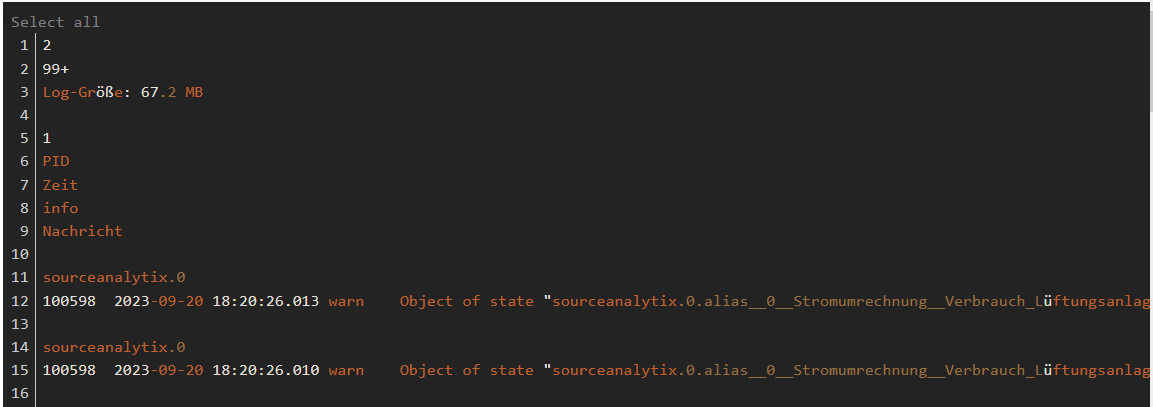
          Hallo

          bekomme ständig Fehlermeldung im Protokoll.
          Hab alles versucht, ich habe ne blockade im Kopf.....

          2
          99+
          Log-Größe: 67.2 MB
          
          1
          PID
          Zeit
          info
          Nachricht
          
          sourceanalytix.0
          100598	2023-09-20 18:20:26.013	warn	Object of state "sourceanalytix.0.alias__0__Stromumrechnung__Verbrauch_Lüftungsanlage.2023.readingCumulative" is missing the required property "common.type"
          
          sourceanalytix.0
          100598	2023-09-20 18:20:26.010	warn	Object of state "sourceanalytix.0.alias__0__Stromumrechnung__Verbrauch_Lüftungsanlage.cumulativeReading" is missing the required property "common.type"
          
          sourceanalytix.0
          100598	2023-09-20 18:20:25.602	warn	Object of state "sourceanalytix.0.alias__0__Stromumrechnung__Verbrauch_Fernsehr_Wohnzimmer.2023.readingCumulative" is missing the required property "common.type"
          
          sourceanalytix.0
          100598	2023-09-20 18:20:25.599	warn	Object of state "sourceanalytix.0.alias__0__Stromumrechnung__Verbrauch_Fernsehr_Wohnzimmer.2023.readingCumulative" is missing the required property "common.type"
          
          sourceanalytix.0
          100598	2023-09-20 18:20:25.598	warn	Object of state "sourceanalytix.0.alias__0__Stromumrechnung__Verbrauch_Fernsehr_Wohnzimmer.2023.readingCumulative" is missing the required property "common.type"
          
          sourceanalytix.0
          100598	2023-09-20 18:20:25.598	warn	Object of state "sourceanalytix.0.alias__0__Stromumrechnung__Verbrauch_Fernsehr_Wohnzimmer.2023.readingCumulative" is missing the required property "common.type"
          
          sourceanalytix.0
          100598	2023-09-20 18:20:25.596	warn	Object of state "sourceanalytix.0.alias__0__Stromumrechnung__Verbrauch_Fernsehr_Wohnzimmer.2023.readingCumulative" is missing the required property "common.type"
          
          sourceanalytix.0
          100598	2023-09-20 18:20:25.596	warn	Object of state "sourceanalytix.0.alias__0__Stromumrechnung__Verbrauch_Fernsehr_Wohnzimmer.2023.readingCumulative" is missing the required property "common.type"
          
          sourceanalytix.0
          100598	2023-09-20 18:20:25.595	warn	Object of state "sourceanalytix.0.alias__0__Stromumrechnung__Verbrauch_Fernsehr_Wohnzimmer.2023.readingCumulative" is missing the required property "common.type"
          
          sourceanalytix.0
          100598	2023-09-20 18:20:25.585	warn	Object of state "sourceanalytix.0.alias__0__Stromumrechnung__Verbrauch_Fernsehr_Wohnzimmer.cumulativeReading" is missing the required property "common.type"
          
          sourceanalytix.0
          100598	2023-09-20 18:20:25.585	warn	Object of state "sourceanalytix.0.alias__0__Stromumrechnung__Verbrauch_Fernsehr_Wohnzimmer.cumulativeReading" is missing the required property "common.type"
          
          sourceanalytix.0
          100598	2023-09-20 18:20:25.585	warn	Object of state "sourceanalytix.0.alias__0__Stromumrechnung__Verbrauch_Fernsehr_Wohnzimmer.cumulativeReading" is missing the required property "common.type"
          
          sourceanalytix.0
          100598	2023-09-20 18:20:25.585	warn	Object of state "sourceanalytix.0.alias__0__Stromumrechnung__Verbrauch_Fernsehr_Wohnzimmer.cumulativeReading" is missing the required property "common.type"
          
          sourceanalytix.0
          100598	2023-09-20 18:20:25.585	warn	Object of state "sourceanalytix.0.alias__0__Stromumrechnung__Verbrauch_Fernsehr_Wohnzimmer.cumulativeReading" is missing the required property "common.type"
          
          sourceanalytix.0
          100598	2023-09-20 18:20:25.584	warn	Object of state "sourceanalytix.0.alias__0__Stromumrechnung__Verbrauch_Fernsehr_Wohnzimmer.cumulativeReading" is missing the required property "common.type"
          
          sourceanalytix.0
          100598	2023-09-20 18:20:25.584	warn	Object of state "sourceanalytix.0.alias__0__Stromumrechnung__Verbrauch_Fernsehr_Wohnzimmer.cumulativeReading" is missing the required property "common.type"
          
          HomoranH Nicht stören
          HomoranH Nicht stören
          Homoran
          Global Moderator Administrators
          schrieb am zuletzt editiert von
          #18

          @Glasfaser

          is missing the required property "common.type"

          meckert doch den fehlenden common.type an.
          Dann ist das ein weiteres Attribut?
          und nicht falsch in der Struktur eingetragen?

          kein Support per PN! - Fragen im Forum stellen - es gibt fast nichts, was nicht auch für andere interessant ist.

          Benutzt das Voting rechts unten im Beitrag wenn er euch geholfen hat.

          der Installationsfixer: curl -fsL https://iobroker.net/fix.sh | bash -

          1 Antwort Letzte Antwort
          0
          • LongbowL Longbow

            @homoran gern, hier..

            {
              "common": {
                "name": "Verbrauch_Fernsehr_Wohnzimmer",
                "desc": "Manuell erzeugt",
                "def": 0,
                "alias": {
                  "id": "tuya.0.bf221dce937b3278c5ytv8.19",
                  "read": "val /1000"
                },
                "custom": {
                  "sourceanalytix.0": {
                    "enabled": true,
                    "selectedUnit": "Detect automatically",
                    "deviceResetLogicEnabled": true,
                    "threshold": 1,
                    "start_day": 0,
                    "start_week": 0,
                    "start_month": 0,
                    "start_quarter": 0,
                    "start_year": 0,
                    "alias": "Fernsehr_Wohnzimmer",
                    "selectedPrice": "Stromverbauch-Normal",
                    "valueAtDeviceReset": 0,
                    "valueAtDeviceInit": 0.009699999999999999,
                    "costs": true,
                    "consumption": true,
                    "basicRate": true,
                    "meter_values": true
                  }
                },
                "type": "number",
                "read": true,
                "write": true,
                "role": "state",
                "step": 1
              },
              "type": "state",
              "native": {},
              "_id": "alias.0.Stromumrechnung.Verbrauch_Fernsehr_Wohnzimmer",
              "from": "system.adapter.admin.0",
              "user": "system.user.admin",
              "ts": 1695231089493
            }
            
            GlasfaserG Online
            GlasfaserG Online
            Glasfaser
            schrieb am zuletzt editiert von Glasfaser
            #19

            @crunchip

            "selectedUnit": "Detect automatically",

            war da mal nicht was damit , denn ich sehe dort keine Unit im alias!?

            z.b :

            "unit":Wh",
            

            EDIT :

            so bei mir als alias ... gekürzt :

            {
              "type": "state",
              "common": {
                "name": "Energy",
                "type": "number",
                "role": "value.power.consumption",
                "write": false,
                "def": 0,
                "unit": "Wh",
                "alias": {
                  "id": "shelly.0.shellyplus2pm#5443b23dd660#1.Relay1.Energy"
                },
                "custom": {
                  "sourceanalytix.0": {
                    "enabled": true,
                    "selectedUnit": "Wh",
                    "deviceResetLogicEnabled": true,


            Synology 918+ 16GB - ioBroker in Docker v9 , VISO auf Trekstor Primebook C13 13,3" , Hikvision Domkameras mit Surveillance Station .. CCU RaspberryMatic in Synology VM .. Zigbee CC2538+CC2592 .. Sonoff .. KNX .. Modbus ..

            crunchipC 1 Antwort Letzte Antwort
            0
            • LongbowL Longbow

              @glasfaser

              sorry falschen Datenpunkt, baer bei dem ist es auch

              {
                "common": {
                  "name": "Verbrauch_Lüftungsanlage",
                  "desc": "Manuell erzeugt",
                  "role": "state",
                  "type": "number",
                  "read": true,
                  "write": true,
                  "def": 0,
                  "alias": {
                    "id": "tuya.0.bf81cce83efb4dd5b2fw5t.19",
                    "read": "val / 1000"
                  },
                  "custom": {
                    "sourceanalytix.0": {
                      "enabled": true,
                      "selectedUnit": "Detect automatically",
                      "deviceResetLogicEnabled": true,
                      "threshold": 1,
                      "start_day": 0,
                      "start_week": 0,
                      "start_month": 0,
                      "start_quarter": 0,
                      "start_year": 0,
                      "selectedPrice": "Stromverbauch-Normal"
                    }
                  }
                },
                "type": "state",
                "native": {},
                "_id": "alias.0.Stromumrechnung.Verbrauch_Lüftungsanlage",
                "from": "system.adapter.admin.0",
                "user": "system.user.admin",
                "ts": 1695227359861
              }
              
              paul53P Offline
              paul53P Offline
              paul53
              schrieb am zuletzt editiert von paul53
              #20

              @longbow sagte: sorry falschen Datenpunkt, baer bei dem ist es auch

              Das ist auch der falsche Datenpunkt. Die Warnung kommt zum DP "sourceanalytix.0.alias__0__Stromumrechnung__Verbrauch_Fernsehr_Wohnzimmer.cumulativeReading".

              Bitte verzichtet auf Chat-Nachrichten, denn die Handhabung ist grauenhaft !
              Produktiv: RPi 2 mit S.USV, HM-MOD-RPI und SLC-USB-Stick mit root fs

              1 Antwort Letzte Antwort
              0
              • GlasfaserG Glasfaser

                @crunchip

                "selectedUnit": "Detect automatically",

                war da mal nicht was damit , denn ich sehe dort keine Unit im alias!?

                z.b :

                "unit":Wh",
                

                EDIT :

                so bei mir als alias ... gekürzt :

                {
                  "type": "state",
                  "common": {
                    "name": "Energy",
                    "type": "number",
                    "role": "value.power.consumption",
                    "write": false,
                    "def": 0,
                    "unit": "Wh",
                    "alias": {
                      "id": "shelly.0.shellyplus2pm#5443b23dd660#1.Relay1.Energy"
                    },
                    "custom": {
                      "sourceanalytix.0": {
                        "enabled": true,
                        "selectedUnit": "Wh",
                        "deviceResetLogicEnabled": true,
                
                
                crunchipC Abwesend
                crunchipC Abwesend
                crunchip
                Forum Testing Most Active
                schrieb am zuletzt editiert von
                #21

                @glasfaser vllt ist etwas in der SA config falsch bzw nicht definiert und deshalb der Fehler.

                Bestenfalls nochmal die Einstellungen prüfen, DP's löschen und neu anlegen lassen
                Ps
                Unit Auswahl würd ich auch manuell einstellen anstatt auf Automatik stellen

                umgestiegen von Proxmox auf Unraid

                1 Antwort Letzte Antwort
                0
                • LongbowL Online
                  LongbowL Online
                  Longbow
                  schrieb am zuletzt editiert von Longbow
                  #22

                  Guten Morgen,

                  es hat mich seit gestern keine Ruhe gelassen, also heute, morgen früh raus aus dem Bett und mir mal die Datenpunkte, unter den Adapter mir geschaut und mit einer iobroker Version verglichen, die diese Meldungen nicht hat.

                  Sehe da, die Datenpunkte Monat/Tag etc., werden erstellt. Allerdings schaut man sich dann die Objektdaten an, fehlen da dann Rolle, Zustandstyp. Ändern man das nun, also gibt man bei Zustandstyp Zahl an und speichert, kommen keine Fehlermeldungen.

                  Also der Adapter erstellt diese in der Version, die ich installiert habe, wie im oben gepostet diese nicht, bei der Version V0.4.14 läuft alles spitze, bei V0.4.15.alpha.0 gibt es dieses Problem.

                  Bekommt man die V0.4.14. installiert? Wenn ja wie? Habe gerade keine Lust gefühlt für eine Datenpunktrechnung Gefühl 50 einzeln Punkte anzufassen.

                  crunchipC 2 Antworten Letzte Antwort
                  0
                  • LongbowL Longbow

                    Guten Morgen,

                    es hat mich seit gestern keine Ruhe gelassen, also heute, morgen früh raus aus dem Bett und mir mal die Datenpunkte, unter den Adapter mir geschaut und mit einer iobroker Version verglichen, die diese Meldungen nicht hat.

                    Sehe da, die Datenpunkte Monat/Tag etc., werden erstellt. Allerdings schaut man sich dann die Objektdaten an, fehlen da dann Rolle, Zustandstyp. Ändern man das nun, also gibt man bei Zustandstyp Zahl an und speichert, kommen keine Fehlermeldungen.

                    Also der Adapter erstellt diese in der Version, die ich installiert habe, wie im oben gepostet diese nicht, bei der Version V0.4.14 läuft alles spitze, bei V0.4.15.alpha.0 gibt es dieses Problem.

                    Bekommt man die V0.4.14. installiert? Wenn ja wie? Habe gerade keine Lust gefühlt für eine Datenpunktrechnung Gefühl 50 einzeln Punkte anzufassen.

                    crunchipC Abwesend
                    crunchipC Abwesend
                    crunchip
                    Forum Testing Most Active
                    schrieb am zuletzt editiert von
                    #23

                    @longbow sagte in Fehlermeldung vom Sourceanalytix Adapter:

                    Bekommt man die V0.4.14. installiert?

                    Per npm im richtigen Verzeichnis

                    cd /opt/iobroker
                    npm install iobroker.AdapterName@ver.si.on
                    

                    umgestiegen von Proxmox auf Unraid

                    LongbowL D 2 Antworten Letzte Antwort
                    0
                    • LongbowL Longbow

                      Guten Morgen,

                      es hat mich seit gestern keine Ruhe gelassen, also heute, morgen früh raus aus dem Bett und mir mal die Datenpunkte, unter den Adapter mir geschaut und mit einer iobroker Version verglichen, die diese Meldungen nicht hat.

                      Sehe da, die Datenpunkte Monat/Tag etc., werden erstellt. Allerdings schaut man sich dann die Objektdaten an, fehlen da dann Rolle, Zustandstyp. Ändern man das nun, also gibt man bei Zustandstyp Zahl an und speichert, kommen keine Fehlermeldungen.

                      Also der Adapter erstellt diese in der Version, die ich installiert habe, wie im oben gepostet diese nicht, bei der Version V0.4.14 läuft alles spitze, bei V0.4.15.alpha.0 gibt es dieses Problem.

                      Bekommt man die V0.4.14. installiert? Wenn ja wie? Habe gerade keine Lust gefühlt für eine Datenpunktrechnung Gefühl 50 einzeln Punkte anzufassen.

                      crunchipC Abwesend
                      crunchipC Abwesend
                      crunchip
                      Forum Testing Most Active
                      schrieb am zuletzt editiert von
                      #24

                      @longbow sagte in Fehlermeldung vom Sourceanalytix Adapter:

                      bei der Version V0.4.14 läuft alles spitze, bei V0.4.15.alpha.0 gibt es dieses Problem

                      Dann beschreib den Fehler auf Github im oben gezeigten issue

                      umgestiegen von Proxmox auf Unraid

                      LongbowL 1 Antwort Letzte Antwort
                      0
                      • crunchipC crunchip

                        @longbow sagte in Fehlermeldung vom Sourceanalytix Adapter:

                        Bekommt man die V0.4.14. installiert?

                        Per npm im richtigen Verzeichnis

                        cd /opt/iobroker
                        npm install iobroker.AdapterName@ver.si.on
                        
                        LongbowL Online
                        LongbowL Online
                        Longbow
                        schrieb am zuletzt editiert von
                        #25

                        @crunchip Danke, habe ihn gelöscht und damit neun installiert und es gibt mit der Version keine Probleme.

                        Es kann nur mit einem Update von dem Admin sein, da auch dem anderen ioborker das als der Unterschied zu der Version mit dem Adapter ist.

                        1 Antwort Letzte Antwort
                        0
                        • crunchipC crunchip

                          @longbow sagte in Fehlermeldung vom Sourceanalytix Adapter:

                          bei der Version V0.4.14 läuft alles spitze, bei V0.4.15.alpha.0 gibt es dieses Problem

                          Dann beschreib den Fehler auf Github im oben gezeigten issue

                          LongbowL Online
                          LongbowL Online
                          Longbow
                          schrieb am zuletzt editiert von Longbow
                          #26

                          @crunchip Ok, dann werde ich wohl meine erste Issuse schreiben

                          Ok, das könnte ein Moment dauern, was ich alles da angeben muss.. ist neu für mich.

                          1 Antwort Letzte Antwort
                          0
                          • crunchipC crunchip

                            @longbow sagte in Fehlermeldung vom Sourceanalytix Adapter:

                            Bekommt man die V0.4.14. installiert?

                            Per npm im richtigen Verzeichnis

                            cd /opt/iobroker
                            npm install iobroker.AdapterName@ver.si.on
                            
                            D Offline
                            D Offline
                            dos1973
                            schrieb am zuletzt editiert von
                            #27

                            @crunchip sagte in Fehlermeldung vom Sourceanalytix Adapter:

                            @longbow sagte in Fehlermeldung vom Sourceanalytix Adapter:

                            Bekommt man die V0.4.14. installiert?

                            Per npm im richtigen Verzeichnis

                            cd /opt/iobroker
                            npm install iobroker.AdapterName@ver.si.on
                            

                            Hi
                            ich habe auch den Fehler und möchte das downgrade durchführen... klappt aber nicht.

                            dos1973@pve-iobroker:/opt/iobroker$ npm install iobroker.sourceanalytix@V0.4.14
                            
                            npm ERR! code E404
                            npm ERR! 404 Not Found - GET https://registry.npmjs.org/sourceanalytix - Not found
                            npm ERR! 404 
                            npm ERR! 404  'sourceanalytix@V0.4.14' is not in this registry.
                            npm ERR! 404 
                            npm ERR! 404 Note that you can also install from a
                            npm ERR! 404 tarball, folder, http url, or git url.
                            
                            npm ERR! A complete log of this run can be found in: /home/iobroker/.npm/_logs/2024-01-02T14_20_34_552Z-debug-0.log
                            dos1973@pve-iobroker:/opt/iobroker$ npm install iobroker.sourceanalytix@V0.4.14
                            npm ERR! code ETARGET
                            npm ERR! notarget No matching version found for iobroker.sourceanalytix@V0.4.14.
                            npm ERR! notarget In most cases you or one of your dependencies are requesting
                            npm ERR! notarget a package version that doesn't exist.
                            

                            was mach ich falsch?

                            Thomas BraunT crunchipC 2 Antworten Letzte Antwort
                            0
                            • D dos1973

                              @crunchip sagte in Fehlermeldung vom Sourceanalytix Adapter:

                              @longbow sagte in Fehlermeldung vom Sourceanalytix Adapter:

                              Bekommt man die V0.4.14. installiert?

                              Per npm im richtigen Verzeichnis

                              cd /opt/iobroker
                              npm install iobroker.AdapterName@ver.si.on
                              

                              Hi
                              ich habe auch den Fehler und möchte das downgrade durchführen... klappt aber nicht.

                              dos1973@pve-iobroker:/opt/iobroker$ npm install iobroker.sourceanalytix@V0.4.14
                              
                              npm ERR! code E404
                              npm ERR! 404 Not Found - GET https://registry.npmjs.org/sourceanalytix - Not found
                              npm ERR! 404 
                              npm ERR! 404  'sourceanalytix@V0.4.14' is not in this registry.
                              npm ERR! 404 
                              npm ERR! 404 Note that you can also install from a
                              npm ERR! 404 tarball, folder, http url, or git url.
                              
                              npm ERR! A complete log of this run can be found in: /home/iobroker/.npm/_logs/2024-01-02T14_20_34_552Z-debug-0.log
                              dos1973@pve-iobroker:/opt/iobroker$ npm install iobroker.sourceanalytix@V0.4.14
                              npm ERR! code ETARGET
                              npm ERR! notarget No matching version found for iobroker.sourceanalytix@V0.4.14.
                              npm ERR! notarget In most cases you or one of your dependencies are requesting
                              npm ERR! notarget a package version that doesn't exist.
                              

                              was mach ich falsch?

                              Thomas BraunT Online
                              Thomas BraunT Online
                              Thomas Braun
                              Most Active
                              schrieb am zuletzt editiert von
                              #28

                              @dos1973 sagte in Fehlermeldung vom Sourceanalytix Adapter:

                              was mach ich falsch?

                              Lass die Finger von npm.

                              Mach es damit:

                              iobroker upgrade iobroker.sourceanalytix@0.4.14
                              

                              Linux-Werkzeugkasten:
                              https://forum.iobroker.net/topic/42952/der-kleine-iobroker-linux-werkzeugkasten
                              NodeJS Fixer Skript:
                              https://forum.iobroker.net/topic/68035/iob-node-fix-skript
                              iob_diag: curl -sLf -o diag.sh https://iobroker.net/diag.sh && bash diag.sh

                              D 1 Antwort Letzte Antwort
                              0
                              • D dos1973

                                @crunchip sagte in Fehlermeldung vom Sourceanalytix Adapter:

                                @longbow sagte in Fehlermeldung vom Sourceanalytix Adapter:

                                Bekommt man die V0.4.14. installiert?

                                Per npm im richtigen Verzeichnis

                                cd /opt/iobroker
                                npm install iobroker.AdapterName@ver.si.on
                                

                                Hi
                                ich habe auch den Fehler und möchte das downgrade durchführen... klappt aber nicht.

                                dos1973@pve-iobroker:/opt/iobroker$ npm install iobroker.sourceanalytix@V0.4.14
                                
                                npm ERR! code E404
                                npm ERR! 404 Not Found - GET https://registry.npmjs.org/sourceanalytix - Not found
                                npm ERR! 404 
                                npm ERR! 404  'sourceanalytix@V0.4.14' is not in this registry.
                                npm ERR! 404 
                                npm ERR! 404 Note that you can also install from a
                                npm ERR! 404 tarball, folder, http url, or git url.
                                
                                npm ERR! A complete log of this run can be found in: /home/iobroker/.npm/_logs/2024-01-02T14_20_34_552Z-debug-0.log
                                dos1973@pve-iobroker:/opt/iobroker$ npm install iobroker.sourceanalytix@V0.4.14
                                npm ERR! code ETARGET
                                npm ERR! notarget No matching version found for iobroker.sourceanalytix@V0.4.14.
                                npm ERR! notarget In most cases you or one of your dependencies are requesting
                                npm ERR! notarget a package version that doesn't exist.
                                

                                was mach ich falsch?

                                crunchipC Abwesend
                                crunchipC Abwesend
                                crunchip
                                Forum Testing Most Active
                                schrieb am zuletzt editiert von
                                #29

                                @dos1973 das V ist zu viel

                                umgestiegen von Proxmox auf Unraid

                                1 Antwort Letzte Antwort
                                1
                                • Thomas BraunT Thomas Braun

                                  @dos1973 sagte in Fehlermeldung vom Sourceanalytix Adapter:

                                  was mach ich falsch?

                                  Lass die Finger von npm.

                                  Mach es damit:

                                  iobroker upgrade iobroker.sourceanalytix@0.4.14
                                  
                                  D Offline
                                  D Offline
                                  dos1973
                                  schrieb am zuletzt editiert von dos1973
                                  #30

                                  @thomas-braun

                                  glaub mir ich hatte an dich gedacht... du hattes mal erwähnt " Finger weg von NPM"
                                  :-)

                                  klappt leider nicht mit dem Befehl

                                  dos1973@pve-iobroker:/opt/iobroker$ iobroker upgrade iobroker.sourceanalytix@0.4.14
                                  Adapter "sourceanalytix" is not in the repository and cannot be updated.
                                  dos1973@pve-iobroker:/opt/iobroker$ 
                                  

                                  ich habe ja bereits die 0.4.15-alpha installiert

                                  crunchipC Thomas BraunT 3 Antworten Letzte Antwort
                                  0
                                  • D dos1973

                                    @thomas-braun

                                    glaub mir ich hatte an dich gedacht... du hattes mal erwähnt " Finger weg von NPM"
                                    :-)

                                    klappt leider nicht mit dem Befehl

                                    dos1973@pve-iobroker:/opt/iobroker$ iobroker upgrade iobroker.sourceanalytix@0.4.14
                                    Adapter "sourceanalytix" is not in the repository and cannot be updated.
                                    dos1973@pve-iobroker:/opt/iobroker$ 
                                    

                                    ich habe ja bereits die 0.4.15-alpha installiert

                                    crunchipC Abwesend
                                    crunchipC Abwesend
                                    crunchip
                                    Forum Testing Most Active
                                    schrieb am zuletzt editiert von
                                    #31

                                    @dos1973 sagte in Fehlermeldung vom Sourceanalytix Adapter:

                                    ich habe ja bereits die 0.4.15-alpha installiert

                                    das wäre kein Problem, ein downgrade erfolgt ebenfalls wie @Thomas-Braun geschrieben, allerdings ist in dem Fall, das Problem

                                    @dos1973 sagte in Fehlermeldung vom Sourceanalytix Adapter:

                                    is not in the repository

                                    daher per npm wie oben geschrieben

                                    umgestiegen von Proxmox auf Unraid

                                    1 Antwort Letzte Antwort
                                    0
                                    • D dos1973

                                      @thomas-braun

                                      glaub mir ich hatte an dich gedacht... du hattes mal erwähnt " Finger weg von NPM"
                                      :-)

                                      klappt leider nicht mit dem Befehl

                                      dos1973@pve-iobroker:/opt/iobroker$ iobroker upgrade iobroker.sourceanalytix@0.4.14
                                      Adapter "sourceanalytix" is not in the repository and cannot be updated.
                                      dos1973@pve-iobroker:/opt/iobroker$ 
                                      

                                      ich habe ja bereits die 0.4.15-alpha installiert

                                      Thomas BraunT Online
                                      Thomas BraunT Online
                                      Thomas Braun
                                      Most Active
                                      schrieb am zuletzt editiert von
                                      #32

                                      @dos1973 sagte in Fehlermeldung vom Sourceanalytix Adapter:

                                      Adapter "sourceanalytix" is not in the repository and cannot be updated.

                                      Bist du auf 'stable' unterwegs? Denn den Adapter gibt es nur über das Beta-Repository.

                                      Linux-Werkzeugkasten:
                                      https://forum.iobroker.net/topic/42952/der-kleine-iobroker-linux-werkzeugkasten
                                      NodeJS Fixer Skript:
                                      https://forum.iobroker.net/topic/68035/iob-node-fix-skript
                                      iob_diag: curl -sLf -o diag.sh https://iobroker.net/diag.sh && bash diag.sh

                                      D 1 Antwort Letzte Antwort
                                      0
                                      • Thomas BraunT Thomas Braun

                                        @dos1973 sagte in Fehlermeldung vom Sourceanalytix Adapter:

                                        Adapter "sourceanalytix" is not in the repository and cannot be updated.

                                        Bist du auf 'stable' unterwegs? Denn den Adapter gibt es nur über das Beta-Repository.

                                        D Offline
                                        D Offline
                                        dos1973
                                        schrieb am zuletzt editiert von
                                        #33

                                        @thomas-braun
                                        ja bin im stable. also doch npm?

                                        Thomas BraunT 1 Antwort Letzte Antwort
                                        0
                                        • D dos1973

                                          @thomas-braun
                                          ja bin im stable. also doch npm?

                                          Thomas BraunT Online
                                          Thomas BraunT Online
                                          Thomas Braun
                                          Most Active
                                          schrieb am zuletzt editiert von
                                          #34

                                          @dos1973

                                          Oder kurz den Beta-Zweig aktivieren, downgrade, Beta wieder deaktivieren.

                                          Linux-Werkzeugkasten:
                                          https://forum.iobroker.net/topic/42952/der-kleine-iobroker-linux-werkzeugkasten
                                          NodeJS Fixer Skript:
                                          https://forum.iobroker.net/topic/68035/iob-node-fix-skript
                                          iob_diag: curl -sLf -o diag.sh https://iobroker.net/diag.sh && bash diag.sh

                                          1 Antwort Letzte Antwort
                                          1
                                          Antworten
                                          • In einem neuen Thema antworten
                                          Anmelden zum Antworten
                                          • Älteste zuerst
                                          • Neuste zuerst
                                          • Meiste Stimmen


                                          Support us

                                          ioBroker
                                          Community Adapters
                                          Donate
                                          FAQ Cloud / IOT
                                          HowTo: Node.js-Update
                                          HowTo: Backup/Restore
                                          Downloads
                                          BLOG

                                          703

                                          Online

                                          32.5k

                                          Benutzer

                                          81.8k

                                          Themen

                                          1.3m

                                          Beiträge
                                          Community
                                          Impressum | Datenschutz-Bestimmungen | Nutzungsbedingungen | Einwilligungseinstellungen
                                          ioBroker Community 2014-2025
                                          logo
                                          • Anmelden

                                          • Du hast noch kein Konto? Registrieren

                                          • Anmelden oder registrieren, um zu suchen
                                          • Erster Beitrag
                                            Letzter Beitrag
                                          0
                                          • Home
                                          • Aktuell
                                          • Tags
                                          • Ungelesen 0
                                          • Kategorien
                                          • Unreplied
                                          • Beliebt
                                          • GitHub
                                          • Docu
                                          • Hilfe