




Nach Update auf Admin 5.8 Startet Biobroker nicht mehr
-
@thomas-braun sagte in Nach Update auf Admin 5.8 Startet Biobroker nicht mehr:
sudo -H -u iobroker npm install iobroker.js-controller
Hat leider nicht funktioniert. :(
npm ERR! code EINTEGRITY npm ERR! errno EINTEGRITY npm ERR! Invalid response body while trying to fetch https://registry.npmjs.org/axios: sha512-Yo0ZHtGUETLceWLfKlyrsjupDWUNYtNUAkblaOQBxzdQZTmcGTLdq9AmNS+nNIjXagoIZBFCa4vQc2oSL2Rh5g== integrity checksum failed when using sha512: wanted sha512-Yo0ZHtGUETLceWLfKlyrsjupDWUNYtNUAkblaOQBxzdQZTmcGTLdq9AmNS+nNIjXagoIZBFCa4vQc2oSL2Rh5g== but got sha512-z4PhNX7vuL3xVChQ1m2AB9Yg5AULVxXcg/SpIdNs6c5H0NE8XYXysP+DGNKHfuwvY7kxvUdBeoGlODJ6+SfaPg==. (0 bytes)könntest du bitte den Threadtitel anpassen auf 6.8.0
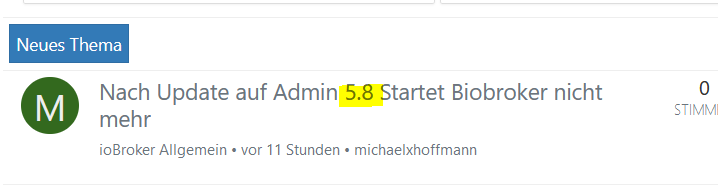
ich dachte das wäre ein alter Thread ;)
-
könntest du bitte den Threadtitel anpassen auf 6.8.0
ich dachte das wäre ein alter Thread ;)
@glasfaser :)) Wenn ich wüsste wie ich den Titel ändern kann würde ich's tun :))
-
@michaelxhoffmann sagte in Nach Update auf Admin 5.8 Startet Biobroker nicht mehr:
/usr/bin/npm 9.6.7
/usr/bin/npx 9.6.72023-08-29 10:04:09.925 - info: host.raspberrypi iobroker NPM version: 9.5.1
da passt was nicht .
mache mal :
sudo -H -u iobroker npm cache verify
sudo -H -u iobroker npm cache clean --force
sudo reboot
dann
cd /opt/iobroker sudo -H -u iobroker npm install iobroker.js-controller@glasfaser sagte in Nach Update auf Admin 5.8 Startet Biobroker nicht mehr:
sudo -H -u iobroker npm install iobroker.js-controller
Super Biobroker läuft wieder! Jetzt fehlt mir lediglich noch der Webadapter bzw. die Adminoberfläche. Die bekomme ich nämlich nicht angezeigt im Browser :(
Homematic CCU2 - Raspberry Pi 4 - IOS (siri) - Amazon Echo 3rd Gen.
-
@glasfaser sagte in Nach Update auf Admin 5.8 Startet Biobroker nicht mehr:
sudo -H -u iobroker npm install iobroker.js-controller
Super Biobroker läuft wieder! Jetzt fehlt mir lediglich noch der Webadapter bzw. die Adminoberfläche. Die bekomme ich nämlich nicht angezeigt im Browser :(
-
@thomas-braun ======== Start marking the full check here =========
Skript v.2023-04-16 *** BASE SYSTEM *** Model : Raspberry Pi 4 Model B Rev 1.2 Architecture : aarch64 Docker : false Virtualization : none Distributor ID: Debian Description: Debian GNU/Linux 11 (bullseye) Release: 11 Codename: bullseye PRETTY_NAME="Debian GNU/Linux 11 (bullseye)" NAME="Debian GNU/Linux" VERSION_ID="11" VERSION="11 (bullseye)" VERSION_CODENAME=bullseye ID=debian HOME_URL="https://www.debian.org/" SUPPORT_URL="https://www.debian.org/support" BUG_REPORT_URL="https://bugs.debian.org/" Systemuptime and Load: 22:38:25 up 14 min, 1 user, load average: 1.72, 1.76, 1.22 CPU threads: 4 Raspberry only: throttled=0x0 Other values than 0x0 hint to temperature/voltage problems temp=65.7'C volt=0.8625V *** Time and Time Zones *** Local time: Tue 2023-08-29 22:38:25 CEST Universal time: Tue 2023-08-29 20:38:25 UTC RTC time: n/a Time zone: Europe/Berlin (CEST, +0200) System clock synchronized: yes NTP service: active RTC in local TZ: no *** User and Groups *** pi /home/pi pi adm dialout cdrom sudo audio video plugdev games users input render netdev gpio i2c spi iobroker *** X-Server-Setup *** X-Server: false Desktop: Terminal: tty Boot Target: multi-user.target *** MEMORY *** total used free shared buff/cache available Mem: 3.8G 446M 2.1G 1.0M 1.2G 3.3G Swap: 99M 0B 99M Total: 3.9G 446M 2.2G 3794 M total memory 446 M used memory 545 M active memory 923 M inactive memory 2126 M free memory 124 M buffer memory 1096 M swap cache 99 M total swap 0 M used swap 99 M free swap Raspberry only: oom events: 0 lifetime oom required: 0 Mbytes total time in oom handler: 0 ms max time spent in oom handler: 0 ms *** FILESYSTEM *** Filesystem Type Size Used Avail Use% Mounted on /dev/root ext4 29G 4.6G 23G 17% / devtmpfs devtmpfs 1.7G 0 1.7G 0% /dev tmpfs tmpfs 1.9G 0 1.9G 0% /dev/shm tmpfs tmpfs 759M 1.1M 758M 1% /run tmpfs tmpfs 5.0M 4.0K 5.0M 1% /run/lock /dev/mmcblk0p1 vfat 255M 31M 225M 13% /boot tmpfs tmpfs 380M 0 380M 0% /run/user/1000 Messages concerning ext4 filesystem in dmesg: [Tue Aug 29 22:24:15 2023] Kernel command line: coherent_pool=1M 8250.nr_uarts=0 snd_bcm2835.enable_headphones=0 snd_bcm2835.enable_headphones=1 snd_bcm2835.enable_hdmi=1 snd_bcm2835.enable_hdmi=0 smsc95xx.macaddr=DC:A6:32:5A:BB:67 vc_mem.mem_base=0x3ec00000 vc_mem.mem_size=0x40000000 console=ttyS0,115200 console=tty1 root=PARTUUID=c7332932-02 rootfstype=ext4 fsck.repair=yes rootwait [Tue Aug 29 22:24:16 2023] EXT4-fs (mmcblk0p2): mounted filesystem with ordered data mode. Quota mode: none. [Tue Aug 29 22:24:16 2023] VFS: Mounted root (ext4 filesystem) readonly on device 179:2. [Tue Aug 29 22:24:18 2023] EXT4-fs (mmcblk0p2): re-mounted. Quota mode: none. Show mounted filesystems (real ones only): TARGET SOURCE FSTYPE OPTIONS / /dev/mmcblk0p2 ext4 rw,noatime `-/boot /dev/mmcblk0p1 vfat rw,relatime,fmask=0022,dmask=0022,codepage=437,iocharset=ascii,shortname=mixed,errors=remount-ro Files in neuralgic directories: /var: 1.5G /var/ 1.1G /var/log 993M /var/log/journal/d25d733f60db4f059662faf3a610222b 993M /var/log/journal 178M /var/cache Archived and active journals take up 992.2M in the file system. /opt/iobroker/backups: 209M /opt/iobroker/backups/ /opt/iobroker/iobroker-data: 614M /opt/iobroker/iobroker-data/ 494M /opt/iobroker/iobroker-data/files 100M /opt/iobroker/iobroker-data/backup-objects 88M /opt/iobroker/iobroker-data/files/echarts.admin 72M /opt/iobroker/iobroker-data/files/telegram.admin The five largest files in iobroker-data are: 41M /opt/iobroker/iobroker-data/files/material/static/js/main.c5478f66.js.map 23M /opt/iobroker/iobroker-data/files/echarts/static/js/main.eb0afecd.js.map 23M /opt/iobroker/iobroker-data/files/echarts.admin/static/js/main.7952f0f7.js.map 23M /opt/iobroker/iobroker-data/files/echarts.admin/chart/static/js/main.eb0afecd.js.map 19M /opt/iobroker/iobroker-data/files/iot.admin/static/js/main.2975a411.js.map *** NodeJS-Installation *** /usr/bin/nodejs v18.17.1 /usr/bin/node v18.17.1 /usr/bin/npm 9.6.7 /usr/bin/npx 9.6.7 nodejs: Installed: 18.17.1-deb-1nodesource1 Candidate: 18.17.1-deb-1nodesource1 Version table: *** 18.17.1-deb-1nodesource1 500 500 https://deb.nodesource.com/node_18.x bullseye/main arm64 Packages 100 /var/lib/dpkg/status 12.22.12~dfsg-1~deb11u4 500 500 http://security.debian.org/debian-security bullseye-security/main arm64 Packages 12.22.12~dfsg-1~deb11u3 500 500 http://deb.debian.org/debian bullseye/main arm64 Packages Temp directories causing npm8 problem: 0 No problems detected *** ioBroker-Installation *** ioBroker Status iobroker is running on this host. Objects type: jsonl States type: jsonl MULTIHOSTSERVICE/enabled: false Core adapters versions js-controller: 5.0.12 admin: "admin" not found javascript: "javascript" not found Adapters from github: 1 Adapter State system.adapter.admin.0 : admin : raspberrypi - enabled, port: 8081, bind: 0.0.0.0, run as: admin system.adapter.alarm.0 : alarm : raspberrypi - disabled system.adapter.alexa2.0 : alexa2 : raspberrypi - enabled system.adapter.backitup.0 : backitup : raspberrypi - enabled system.adapter.broadlink2.0 : broadlink2 : raspberrypi - enabled system.adapter.daswetter.0 : daswetter : raspberrypi - enabled system.adapter.discovery.0 : discovery : raspberrypi - enabled system.adapter.echarts.0 : echarts : raspberrypi - enabled system.adapter.flot.0 : flot : raspberrypi - disabled system.adapter.fritzbox.0 : fritzbox : raspberrypi - disabled system.adapter.fullybrowser.0 : fullybrowser : raspberrypi - disabled system.adapter.heatingcontrol.0 : heatingcontrol : raspberrypi - enabled system.adapter.hm-rega.0 : hm-rega : raspberrypi - enabled system.adapter.hm-rpc.0 : hm-rpc : raspberrypi - enabled, port: 18701 system.adapter.hm-rpc.1 : hm-rpc : raspberrypi - enabled, port: 12001 system.adapter.hm-rpc.2 : hm-rpc : raspberrypi - enabled, port: 12010 system.adapter.ical.0 : ical : raspberrypi - enabled system.adapter.icons-ultimate-png.0 : icons-ultimate-png : raspberrypi - disabled system.adapter.info.0 : info : raspberrypi - enabled system.adapter.iot.0 : iot : raspberrypi - enabled system.adapter.jarvis.0 : jarvis : raspberrypi - enabled system.adapter.javascript.0 : javascript : raspberrypi - enabled system.adapter.logparser.0 : logparser : raspberrypi - disabled system.adapter.lovelace.0 : lovelace : raspberrypi - disabled, port: 8091, bind: 0.0.0.0, run as: admin system.adapter.material.0 : material : raspberrypi - disabled system.adapter.milight-smart-light.0 : milight-smart-light : raspberrypi - enabled system.adapter.milight.0 : milight : raspberrypi - enabled, port: 5987 system.adapter.openweathermap.0 : openweathermap : raspberrypi - enabled system.adapter.parcel.0 : parcel : raspberrypi - disabled system.adapter.ping.0 : ping : raspberrypi - disabled system.adapter.pushover.0 : pushover : raspberrypi - enabled system.adapter.rpi2.0 : rpi2 : raspberrypi - enabled system.adapter.samsung.0 : samsung : raspberrypi - enabled system.adapter.scenes.0 : scenes : raspberrypi - enabled system.adapter.socketio.0 : socketio : raspberrypi - enabled, port: 8084, bind: 0.0.0.0, run as: admin system.adapter.sql.0 : sql : raspberrypi - enabled, port: 3307 system.adapter.sql.1 : sql : raspberrypi - enabled, port: 3306 system.adapter.tankerkoenig.0 : tankerkoenig : raspberrypi - enabled system.adapter.telegram.0 : telegram : raspberrypi - enabled, port: 8443, bind: 0.0.0.0 system.adapter.terminal.0 : terminal : raspberrypi - enabled, port: 8088, bind: 0.0.0.0, run as: admin system.adapter.tr-064.0 : tr-064 : raspberrypi - disabled system.adapter.trashschedule.0 : trashschedule : raspberrypi - enabled system.adapter.vis-canvas-gauges.0 : vis-canvas-gauges : raspberrypi - disabled system.adapter.vis-history.0 : vis-history : raspberrypi - disabled system.adapter.vis-hqwidgets.0 : vis-hqwidgets : raspberrypi - disabled system.adapter.vis-icontwo.0 : vis-icontwo : raspberrypi - disabled system.adapter.vis-inventwo.0 : vis-inventwo : raspberrypi - enabled system.adapter.vis-materialdesign.0 : vis-materialdesign : raspberrypi - disabled system.adapter.vis-metro.0 : vis-metro : raspberrypi - disabled system.adapter.vis-weather.0 : vis-weather : raspberrypi - disabled system.adapter.vis.0 : vis : raspberrypi - enabled system.adapter.weatherunderground.0 : weatherunderground : raspberrypi - enabled system.adapter.web.0 : web : raspberrypi - enabled, port: 8082, bind: 0.0.0.0, run as: admin system.adapter.whatsapp-cmb.0 : whatsapp-cmb : raspberrypi - disabled system.adapter.yahka.0 : yahka : raspberrypi - enabled system.adapter.zigbee.0 : zigbee : raspberrypi - enabled, port: /dev/ttyUSB0 + instance is alive Enabled adapters with bindings system.adapter.admin.0 : admin : raspberrypi - enabled, port: 8081, bind: 0.0.0.0, run as: admin system.adapter.hm-rpc.0 : hm-rpc : raspberrypi - enabled, port: 18701 system.adapter.hm-rpc.1 : hm-rpc : raspberrypi - enabled, port: 12001 system.adapter.hm-rpc.2 : hm-rpc : raspberrypi - enabled, port: 12010 system.adapter.milight.0 : milight : raspberrypi - enabled, port: 5987 system.adapter.socketio.0 : socketio : raspberrypi - enabled, port: 8084, bind: 0.0.0.0, run as: admin system.adapter.sql.0 : sql : raspberrypi - enabled, port: 3307 system.adapter.sql.1 : sql : raspberrypi - enabled, port: 3306 system.adapter.telegram.0 : telegram : raspberrypi - enabled, port: 8443, bind: 0.0.0.0 system.adapter.terminal.0 : terminal : raspberrypi - enabled, port: 8088, bind: 0.0.0.0, run as: admin system.adapter.web.0 : web : raspberrypi - enabled, port: 8082, bind: 0.0.0.0, run as: admin system.adapter.zigbee.0 : zigbee : raspberrypi - enabled, port: /dev/ttyUSB0 ioBroker-Repositories Stable (default): http://download.iobroker.net/sources-dist.json Beta (latest) : http://download.iobroker.net/sources-dist-latest.json latest 1 : http://iobroker.live/repo/sources-dist-latest.json default 1 : http://iobroker.live/repo/sources-dist.json Active repo(s): Stable (default) Installed ioBroker-Instances Used repository: Stable (default) Adapter "alarm" : 3.3.12 , installed 3.3.12 Adapter "flot" : 1.12.0 , installed 1.12.0 Adapter "fritzbox" : 0.2.1 , installed 0.5.0 Adapter "fullybrowser" : 2.1.2 , installed 2.1.2 Adapter "icons-ultimate-png": 1.0.1, installed 1.0.1 Controller "js-controller": 4.0.24 , installed 5.0.12 Adapter "logparser" : 2.2.0 , installed 2.2.0 Adapter "lovelace" : 3.0.1 , installed 3.0.1 Adapter "material" : 1.3.1 , installed 1.3.1 Adapter "parcel" : 0.0.27 , installed 0.0.27 Adapter "ping" : 1.6.2 , installed 1.6.2 Adapter "tr-064" : 4.2.18 , installed 4.2.18 Adapter "vis-canvas-gauges": 1.0.1, installed 1.0.1 Adapter "vis-history" : 1.0.0 , installed 1.0.0 Adapter "vis-hqwidgets": 1.4.0 , installed 1.4.0 Adapter "vis-icontwo" : 0.96.0 , installed 0.96.0 Adapter "whatsapp-cmb" : 0.2.3 , installed 0.2.3 Objects and States Please stand by - This may take a while Objects: 12920 States: 10849 *** OS-Repositories and Updates *** Hit:1 http://deb.debian.org/debian bullseye InRelease Hit:2 http://security.debian.org/debian-security bullseye-security InRelease Hit:3 http://archive.raspberrypi.org/debian bullseye InRelease Hit:4 http://deb.debian.org/debian bullseye-updates InRelease Get:5 https://deb.nodesource.com/node_18.x bullseye InRelease [4586 B] Fetched 4586 B in 2s (2521 B/s) Reading package lists... Pending Updates: 0 *** Listening Ports *** Active Internet connections (only servers) Proto Recv-Q Send-Q Local Address Foreign Address State User Inode PID/Program name tcp 0 0 127.0.0.1:9001 0.0.0.0:* LISTEN 1001 14906 1125/iobroker.js-co tcp 0 0 127.0.0.1:9000 0.0.0.0:* LISTEN 1001 16537 1125/iobroker.js-co tcp 0 0 0.0.0.0:22 0.0.0.0:* LISTEN 0 1545 550/sshd: /usr/sbin tcp6 0 0 :::22 :::* LISTEN 0 1547 550/sshd: /usr/sbin udp 0 0 0.0.0.0:43918 0.0.0.0:* 108 1471 398/avahi-daemon: r udp 0 0 0.0.0.0:5353 0.0.0.0:* 108 1469 398/avahi-daemon: r udp 0 0 0.0.0.0:68 0.0.0.0:* 0 14583 736/dhcpcd udp6 0 0 :::37280 :::* 108 1472 398/avahi-daemon: r udp6 0 0 :::546 :::* 0 1572 736/dhcpcd udp6 0 0 :::5353 :::* 108 1470 398/avahi-daemon: r *** Log File - Last 25 Lines *** 2023-08-29 22:39:35.403 - info: host.raspberrypi "system.adapter.vis.0" enabled 2023-08-29 22:39:35.407 - info: host.raspberrypi iobroker npm-install: Adapter "system.adapter.vis.0" restarted. 2023-08-29 22:39:35.636 - info: host.raspberrypi iobroker npm-install: host.raspberrypi object system.adapter.vis-metro created/updated 2023-08-29 22:39:36.765 - info: host.raspberrypi iobroker npm-install: exit 0 2023-08-29 22:39:37.766 - warn: host.raspberrypi startInstance cannot find adapter "vis-weather@2.5.6". Try to install it... 1 attempt 2023-08-29 22:39:37.767 - info: host.raspberrypi iobroker install vis-weather@2.5.6 using installedFrom 2023-08-29 22:39:42.728 - info: host.raspberrypi iobroker npm-install: NPM version: 9.6.7 2023-08-29 22:39:42.731 - info: host.raspberrypi iobroker npm-install: Installing iobroker.vis-weather@2.5.6... (System call) 2023-08-29 22:39:53.079 - info: host.raspberrypi iobroker npm-install: 2023-08-29 22:39:53.081 - info: host.raspberrypi iobroker npm-install: added 1 package in 10s 2023-08-29 22:39:53.083 - info: host.raspberrypi iobroker npm-install: 163 packages are looking for funding 2023-08-29 22:39:53.085 - info: host.raspberrypi iobroker npm-install: run `npm fund` for details 2023-08-29 22:39:53.137 - info: host.raspberrypi iobroker npm-install: host.raspberrypi install adapter vis-weather@2.5.6 2023-08-29 22:39:53.461 - info: host.raspberrypi iobroker npm-install: upload [3] vis-weather.admin /opt/iobroker/node_modules/iobroker.vis-weather/admin/index.html index.html text/html 2023-08-29 22:39:53.485 - info: host.raspberrypi iobroker npm-install: upload [2] vis-weather.admin /opt/iobroker/node_modules/iobroker.vis-weather/admin/index_m.html index_m.html text/html 2023-08-29 22:39:53.512 - info: host.raspberrypi iobroker npm-install: upload [1] vis-weather.admin /opt/iobroker/node_modules/iobroker.vis-weather/admin/vis-weather.png vis-weather.png image/png 2023-08-29 22:39:53.539 - info: host.raspberrypi iobroker npm-install: upload [0] vis-weather.admin /opt/iobroker/node_modules/iobroker.vis-weather/admin/words.js words.js application/javascript 2023-08-29 22:39:53.569 - info: host.raspberrypi iobroker npm-install: INFO: Directory "/opt/iobroker/node_modules/iobroker.vis-weather/www" was not found! Nothing was uploaded or deleted. 2023-08-29 22:39:53.657 - info: host.raspberrypi "system.adapter.vis.0" disabled 2023-08-29 22:39:53.674 - info: host.raspberrypi "system.adapter.vis.0" enabled 2023-08-29 22:39:53.677 - info: host.raspberrypi iobroker npm-install: Adapter "system.adapter.vis.0" restarted. 2023-08-29 22:39:54.003 - info: host.raspberrypi iobroker npm-install: host.raspberrypi object system.adapter.vis-weather created/updated 2023-08-29 22:39:55.125 - info: host.raspberrypi iobroker npm-install: exit 0 2023-08-29 22:39:56.125 - warn: host.raspberrypi startInstance cannot find adapter "admin@6.3.5". Try to install it... 1 attempt 2023-08-29 22:39:56.126 - info: host.raspberrypi iobroker install admin@6.3.5 using installedFrom============ Mark until here for C&P =============
verstehe ich das richtig dass die erforderlichen Instanzen web und Admin nicht gestartet wurden?
Homematic CCU2 - Raspberry Pi 4 - IOS (siri) - Amazon Echo 3rd Gen.
-
@thomas-braun ======== Start marking the full check here =========
Skript v.2023-04-16 *** BASE SYSTEM *** Model : Raspberry Pi 4 Model B Rev 1.2 Architecture : aarch64 Docker : false Virtualization : none Distributor ID: Debian Description: Debian GNU/Linux 11 (bullseye) Release: 11 Codename: bullseye PRETTY_NAME="Debian GNU/Linux 11 (bullseye)" NAME="Debian GNU/Linux" VERSION_ID="11" VERSION="11 (bullseye)" VERSION_CODENAME=bullseye ID=debian HOME_URL="https://www.debian.org/" SUPPORT_URL="https://www.debian.org/support" BUG_REPORT_URL="https://bugs.debian.org/" Systemuptime and Load: 22:38:25 up 14 min, 1 user, load average: 1.72, 1.76, 1.22 CPU threads: 4 Raspberry only: throttled=0x0 Other values than 0x0 hint to temperature/voltage problems temp=65.7'C volt=0.8625V *** Time and Time Zones *** Local time: Tue 2023-08-29 22:38:25 CEST Universal time: Tue 2023-08-29 20:38:25 UTC RTC time: n/a Time zone: Europe/Berlin (CEST, +0200) System clock synchronized: yes NTP service: active RTC in local TZ: no *** User and Groups *** pi /home/pi pi adm dialout cdrom sudo audio video plugdev games users input render netdev gpio i2c spi iobroker *** X-Server-Setup *** X-Server: false Desktop: Terminal: tty Boot Target: multi-user.target *** MEMORY *** total used free shared buff/cache available Mem: 3.8G 446M 2.1G 1.0M 1.2G 3.3G Swap: 99M 0B 99M Total: 3.9G 446M 2.2G 3794 M total memory 446 M used memory 545 M active memory 923 M inactive memory 2126 M free memory 124 M buffer memory 1096 M swap cache 99 M total swap 0 M used swap 99 M free swap Raspberry only: oom events: 0 lifetime oom required: 0 Mbytes total time in oom handler: 0 ms max time spent in oom handler: 0 ms *** FILESYSTEM *** Filesystem Type Size Used Avail Use% Mounted on /dev/root ext4 29G 4.6G 23G 17% / devtmpfs devtmpfs 1.7G 0 1.7G 0% /dev tmpfs tmpfs 1.9G 0 1.9G 0% /dev/shm tmpfs tmpfs 759M 1.1M 758M 1% /run tmpfs tmpfs 5.0M 4.0K 5.0M 1% /run/lock /dev/mmcblk0p1 vfat 255M 31M 225M 13% /boot tmpfs tmpfs 380M 0 380M 0% /run/user/1000 Messages concerning ext4 filesystem in dmesg: [Tue Aug 29 22:24:15 2023] Kernel command line: coherent_pool=1M 8250.nr_uarts=0 snd_bcm2835.enable_headphones=0 snd_bcm2835.enable_headphones=1 snd_bcm2835.enable_hdmi=1 snd_bcm2835.enable_hdmi=0 smsc95xx.macaddr=DC:A6:32:5A:BB:67 vc_mem.mem_base=0x3ec00000 vc_mem.mem_size=0x40000000 console=ttyS0,115200 console=tty1 root=PARTUUID=c7332932-02 rootfstype=ext4 fsck.repair=yes rootwait [Tue Aug 29 22:24:16 2023] EXT4-fs (mmcblk0p2): mounted filesystem with ordered data mode. Quota mode: none. [Tue Aug 29 22:24:16 2023] VFS: Mounted root (ext4 filesystem) readonly on device 179:2. [Tue Aug 29 22:24:18 2023] EXT4-fs (mmcblk0p2): re-mounted. Quota mode: none. Show mounted filesystems (real ones only): TARGET SOURCE FSTYPE OPTIONS / /dev/mmcblk0p2 ext4 rw,noatime `-/boot /dev/mmcblk0p1 vfat rw,relatime,fmask=0022,dmask=0022,codepage=437,iocharset=ascii,shortname=mixed,errors=remount-ro Files in neuralgic directories: /var: 1.5G /var/ 1.1G /var/log 993M /var/log/journal/d25d733f60db4f059662faf3a610222b 993M /var/log/journal 178M /var/cache Archived and active journals take up 992.2M in the file system. /opt/iobroker/backups: 209M /opt/iobroker/backups/ /opt/iobroker/iobroker-data: 614M /opt/iobroker/iobroker-data/ 494M /opt/iobroker/iobroker-data/files 100M /opt/iobroker/iobroker-data/backup-objects 88M /opt/iobroker/iobroker-data/files/echarts.admin 72M /opt/iobroker/iobroker-data/files/telegram.admin The five largest files in iobroker-data are: 41M /opt/iobroker/iobroker-data/files/material/static/js/main.c5478f66.js.map 23M /opt/iobroker/iobroker-data/files/echarts/static/js/main.eb0afecd.js.map 23M /opt/iobroker/iobroker-data/files/echarts.admin/static/js/main.7952f0f7.js.map 23M /opt/iobroker/iobroker-data/files/echarts.admin/chart/static/js/main.eb0afecd.js.map 19M /opt/iobroker/iobroker-data/files/iot.admin/static/js/main.2975a411.js.map *** NodeJS-Installation *** /usr/bin/nodejs v18.17.1 /usr/bin/node v18.17.1 /usr/bin/npm 9.6.7 /usr/bin/npx 9.6.7 nodejs: Installed: 18.17.1-deb-1nodesource1 Candidate: 18.17.1-deb-1nodesource1 Version table: *** 18.17.1-deb-1nodesource1 500 500 https://deb.nodesource.com/node_18.x bullseye/main arm64 Packages 100 /var/lib/dpkg/status 12.22.12~dfsg-1~deb11u4 500 500 http://security.debian.org/debian-security bullseye-security/main arm64 Packages 12.22.12~dfsg-1~deb11u3 500 500 http://deb.debian.org/debian bullseye/main arm64 Packages Temp directories causing npm8 problem: 0 No problems detected *** ioBroker-Installation *** ioBroker Status iobroker is running on this host. Objects type: jsonl States type: jsonl MULTIHOSTSERVICE/enabled: false Core adapters versions js-controller: 5.0.12 admin: "admin" not found javascript: "javascript" not found Adapters from github: 1 Adapter State system.adapter.admin.0 : admin : raspberrypi - enabled, port: 8081, bind: 0.0.0.0, run as: admin system.adapter.alarm.0 : alarm : raspberrypi - disabled system.adapter.alexa2.0 : alexa2 : raspberrypi - enabled system.adapter.backitup.0 : backitup : raspberrypi - enabled system.adapter.broadlink2.0 : broadlink2 : raspberrypi - enabled system.adapter.daswetter.0 : daswetter : raspberrypi - enabled system.adapter.discovery.0 : discovery : raspberrypi - enabled system.adapter.echarts.0 : echarts : raspberrypi - enabled system.adapter.flot.0 : flot : raspberrypi - disabled system.adapter.fritzbox.0 : fritzbox : raspberrypi - disabled system.adapter.fullybrowser.0 : fullybrowser : raspberrypi - disabled system.adapter.heatingcontrol.0 : heatingcontrol : raspberrypi - enabled system.adapter.hm-rega.0 : hm-rega : raspberrypi - enabled system.adapter.hm-rpc.0 : hm-rpc : raspberrypi - enabled, port: 18701 system.adapter.hm-rpc.1 : hm-rpc : raspberrypi - enabled, port: 12001 system.adapter.hm-rpc.2 : hm-rpc : raspberrypi - enabled, port: 12010 system.adapter.ical.0 : ical : raspberrypi - enabled system.adapter.icons-ultimate-png.0 : icons-ultimate-png : raspberrypi - disabled system.adapter.info.0 : info : raspberrypi - enabled system.adapter.iot.0 : iot : raspberrypi - enabled system.adapter.jarvis.0 : jarvis : raspberrypi - enabled system.adapter.javascript.0 : javascript : raspberrypi - enabled system.adapter.logparser.0 : logparser : raspberrypi - disabled system.adapter.lovelace.0 : lovelace : raspberrypi - disabled, port: 8091, bind: 0.0.0.0, run as: admin system.adapter.material.0 : material : raspberrypi - disabled system.adapter.milight-smart-light.0 : milight-smart-light : raspberrypi - enabled system.adapter.milight.0 : milight : raspberrypi - enabled, port: 5987 system.adapter.openweathermap.0 : openweathermap : raspberrypi - enabled system.adapter.parcel.0 : parcel : raspberrypi - disabled system.adapter.ping.0 : ping : raspberrypi - disabled system.adapter.pushover.0 : pushover : raspberrypi - enabled system.adapter.rpi2.0 : rpi2 : raspberrypi - enabled system.adapter.samsung.0 : samsung : raspberrypi - enabled system.adapter.scenes.0 : scenes : raspberrypi - enabled system.adapter.socketio.0 : socketio : raspberrypi - enabled, port: 8084, bind: 0.0.0.0, run as: admin system.adapter.sql.0 : sql : raspberrypi - enabled, port: 3307 system.adapter.sql.1 : sql : raspberrypi - enabled, port: 3306 system.adapter.tankerkoenig.0 : tankerkoenig : raspberrypi - enabled system.adapter.telegram.0 : telegram : raspberrypi - enabled, port: 8443, bind: 0.0.0.0 system.adapter.terminal.0 : terminal : raspberrypi - enabled, port: 8088, bind: 0.0.0.0, run as: admin system.adapter.tr-064.0 : tr-064 : raspberrypi - disabled system.adapter.trashschedule.0 : trashschedule : raspberrypi - enabled system.adapter.vis-canvas-gauges.0 : vis-canvas-gauges : raspberrypi - disabled system.adapter.vis-history.0 : vis-history : raspberrypi - disabled system.adapter.vis-hqwidgets.0 : vis-hqwidgets : raspberrypi - disabled system.adapter.vis-icontwo.0 : vis-icontwo : raspberrypi - disabled system.adapter.vis-inventwo.0 : vis-inventwo : raspberrypi - enabled system.adapter.vis-materialdesign.0 : vis-materialdesign : raspberrypi - disabled system.adapter.vis-metro.0 : vis-metro : raspberrypi - disabled system.adapter.vis-weather.0 : vis-weather : raspberrypi - disabled system.adapter.vis.0 : vis : raspberrypi - enabled system.adapter.weatherunderground.0 : weatherunderground : raspberrypi - enabled system.adapter.web.0 : web : raspberrypi - enabled, port: 8082, bind: 0.0.0.0, run as: admin system.adapter.whatsapp-cmb.0 : whatsapp-cmb : raspberrypi - disabled system.adapter.yahka.0 : yahka : raspberrypi - enabled system.adapter.zigbee.0 : zigbee : raspberrypi - enabled, port: /dev/ttyUSB0 + instance is alive Enabled adapters with bindings system.adapter.admin.0 : admin : raspberrypi - enabled, port: 8081, bind: 0.0.0.0, run as: admin system.adapter.hm-rpc.0 : hm-rpc : raspberrypi - enabled, port: 18701 system.adapter.hm-rpc.1 : hm-rpc : raspberrypi - enabled, port: 12001 system.adapter.hm-rpc.2 : hm-rpc : raspberrypi - enabled, port: 12010 system.adapter.milight.0 : milight : raspberrypi - enabled, port: 5987 system.adapter.socketio.0 : socketio : raspberrypi - enabled, port: 8084, bind: 0.0.0.0, run as: admin system.adapter.sql.0 : sql : raspberrypi - enabled, port: 3307 system.adapter.sql.1 : sql : raspberrypi - enabled, port: 3306 system.adapter.telegram.0 : telegram : raspberrypi - enabled, port: 8443, bind: 0.0.0.0 system.adapter.terminal.0 : terminal : raspberrypi - enabled, port: 8088, bind: 0.0.0.0, run as: admin system.adapter.web.0 : web : raspberrypi - enabled, port: 8082, bind: 0.0.0.0, run as: admin system.adapter.zigbee.0 : zigbee : raspberrypi - enabled, port: /dev/ttyUSB0 ioBroker-Repositories Stable (default): http://download.iobroker.net/sources-dist.json Beta (latest) : http://download.iobroker.net/sources-dist-latest.json latest 1 : http://iobroker.live/repo/sources-dist-latest.json default 1 : http://iobroker.live/repo/sources-dist.json Active repo(s): Stable (default) Installed ioBroker-Instances Used repository: Stable (default) Adapter "alarm" : 3.3.12 , installed 3.3.12 Adapter "flot" : 1.12.0 , installed 1.12.0 Adapter "fritzbox" : 0.2.1 , installed 0.5.0 Adapter "fullybrowser" : 2.1.2 , installed 2.1.2 Adapter "icons-ultimate-png": 1.0.1, installed 1.0.1 Controller "js-controller": 4.0.24 , installed 5.0.12 Adapter "logparser" : 2.2.0 , installed 2.2.0 Adapter "lovelace" : 3.0.1 , installed 3.0.1 Adapter "material" : 1.3.1 , installed 1.3.1 Adapter "parcel" : 0.0.27 , installed 0.0.27 Adapter "ping" : 1.6.2 , installed 1.6.2 Adapter "tr-064" : 4.2.18 , installed 4.2.18 Adapter "vis-canvas-gauges": 1.0.1, installed 1.0.1 Adapter "vis-history" : 1.0.0 , installed 1.0.0 Adapter "vis-hqwidgets": 1.4.0 , installed 1.4.0 Adapter "vis-icontwo" : 0.96.0 , installed 0.96.0 Adapter "whatsapp-cmb" : 0.2.3 , installed 0.2.3 Objects and States Please stand by - This may take a while Objects: 12920 States: 10849 *** OS-Repositories and Updates *** Hit:1 http://deb.debian.org/debian bullseye InRelease Hit:2 http://security.debian.org/debian-security bullseye-security InRelease Hit:3 http://archive.raspberrypi.org/debian bullseye InRelease Hit:4 http://deb.debian.org/debian bullseye-updates InRelease Get:5 https://deb.nodesource.com/node_18.x bullseye InRelease [4586 B] Fetched 4586 B in 2s (2521 B/s) Reading package lists... Pending Updates: 0 *** Listening Ports *** Active Internet connections (only servers) Proto Recv-Q Send-Q Local Address Foreign Address State User Inode PID/Program name tcp 0 0 127.0.0.1:9001 0.0.0.0:* LISTEN 1001 14906 1125/iobroker.js-co tcp 0 0 127.0.0.1:9000 0.0.0.0:* LISTEN 1001 16537 1125/iobroker.js-co tcp 0 0 0.0.0.0:22 0.0.0.0:* LISTEN 0 1545 550/sshd: /usr/sbin tcp6 0 0 :::22 :::* LISTEN 0 1547 550/sshd: /usr/sbin udp 0 0 0.0.0.0:43918 0.0.0.0:* 108 1471 398/avahi-daemon: r udp 0 0 0.0.0.0:5353 0.0.0.0:* 108 1469 398/avahi-daemon: r udp 0 0 0.0.0.0:68 0.0.0.0:* 0 14583 736/dhcpcd udp6 0 0 :::37280 :::* 108 1472 398/avahi-daemon: r udp6 0 0 :::546 :::* 0 1572 736/dhcpcd udp6 0 0 :::5353 :::* 108 1470 398/avahi-daemon: r *** Log File - Last 25 Lines *** 2023-08-29 22:39:35.403 - info: host.raspberrypi "system.adapter.vis.0" enabled 2023-08-29 22:39:35.407 - info: host.raspberrypi iobroker npm-install: Adapter "system.adapter.vis.0" restarted. 2023-08-29 22:39:35.636 - info: host.raspberrypi iobroker npm-install: host.raspberrypi object system.adapter.vis-metro created/updated 2023-08-29 22:39:36.765 - info: host.raspberrypi iobroker npm-install: exit 0 2023-08-29 22:39:37.766 - warn: host.raspberrypi startInstance cannot find adapter "vis-weather@2.5.6". Try to install it... 1 attempt 2023-08-29 22:39:37.767 - info: host.raspberrypi iobroker install vis-weather@2.5.6 using installedFrom 2023-08-29 22:39:42.728 - info: host.raspberrypi iobroker npm-install: NPM version: 9.6.7 2023-08-29 22:39:42.731 - info: host.raspberrypi iobroker npm-install: Installing iobroker.vis-weather@2.5.6... (System call) 2023-08-29 22:39:53.079 - info: host.raspberrypi iobroker npm-install: 2023-08-29 22:39:53.081 - info: host.raspberrypi iobroker npm-install: added 1 package in 10s 2023-08-29 22:39:53.083 - info: host.raspberrypi iobroker npm-install: 163 packages are looking for funding 2023-08-29 22:39:53.085 - info: host.raspberrypi iobroker npm-install: run `npm fund` for details 2023-08-29 22:39:53.137 - info: host.raspberrypi iobroker npm-install: host.raspberrypi install adapter vis-weather@2.5.6 2023-08-29 22:39:53.461 - info: host.raspberrypi iobroker npm-install: upload [3] vis-weather.admin /opt/iobroker/node_modules/iobroker.vis-weather/admin/index.html index.html text/html 2023-08-29 22:39:53.485 - info: host.raspberrypi iobroker npm-install: upload [2] vis-weather.admin /opt/iobroker/node_modules/iobroker.vis-weather/admin/index_m.html index_m.html text/html 2023-08-29 22:39:53.512 - info: host.raspberrypi iobroker npm-install: upload [1] vis-weather.admin /opt/iobroker/node_modules/iobroker.vis-weather/admin/vis-weather.png vis-weather.png image/png 2023-08-29 22:39:53.539 - info: host.raspberrypi iobroker npm-install: upload [0] vis-weather.admin /opt/iobroker/node_modules/iobroker.vis-weather/admin/words.js words.js application/javascript 2023-08-29 22:39:53.569 - info: host.raspberrypi iobroker npm-install: INFO: Directory "/opt/iobroker/node_modules/iobroker.vis-weather/www" was not found! Nothing was uploaded or deleted. 2023-08-29 22:39:53.657 - info: host.raspberrypi "system.adapter.vis.0" disabled 2023-08-29 22:39:53.674 - info: host.raspberrypi "system.adapter.vis.0" enabled 2023-08-29 22:39:53.677 - info: host.raspberrypi iobroker npm-install: Adapter "system.adapter.vis.0" restarted. 2023-08-29 22:39:54.003 - info: host.raspberrypi iobroker npm-install: host.raspberrypi object system.adapter.vis-weather created/updated 2023-08-29 22:39:55.125 - info: host.raspberrypi iobroker npm-install: exit 0 2023-08-29 22:39:56.125 - warn: host.raspberrypi startInstance cannot find adapter "admin@6.3.5". Try to install it... 1 attempt 2023-08-29 22:39:56.126 - info: host.raspberrypi iobroker install admin@6.3.5 using installedFrom============ Mark until here for C&P =============
verstehe ich das richtig dass die erforderlichen Instanzen web und Admin nicht gestartet wurden?
@michaelxhoffmann mittlerweile läuft die Vorschaltete des Brokers. Auf die Adminseite komme ich allerdings noch immer nicht :( Ich warte mal ab bis morgen früh, vielleicht braucht der Kollege einfach mehr Zeit :))
-
@thomas-braun ======== Start marking the full check here =========
Skript v.2023-04-16 *** BASE SYSTEM *** Model : Raspberry Pi 4 Model B Rev 1.2 Architecture : aarch64 Docker : false Virtualization : none Distributor ID: Debian Description: Debian GNU/Linux 11 (bullseye) Release: 11 Codename: bullseye PRETTY_NAME="Debian GNU/Linux 11 (bullseye)" NAME="Debian GNU/Linux" VERSION_ID="11" VERSION="11 (bullseye)" VERSION_CODENAME=bullseye ID=debian HOME_URL="https://www.debian.org/" SUPPORT_URL="https://www.debian.org/support" BUG_REPORT_URL="https://bugs.debian.org/" Systemuptime and Load: 22:38:25 up 14 min, 1 user, load average: 1.72, 1.76, 1.22 CPU threads: 4 Raspberry only: throttled=0x0 Other values than 0x0 hint to temperature/voltage problems temp=65.7'C volt=0.8625V *** Time and Time Zones *** Local time: Tue 2023-08-29 22:38:25 CEST Universal time: Tue 2023-08-29 20:38:25 UTC RTC time: n/a Time zone: Europe/Berlin (CEST, +0200) System clock synchronized: yes NTP service: active RTC in local TZ: no *** User and Groups *** pi /home/pi pi adm dialout cdrom sudo audio video plugdev games users input render netdev gpio i2c spi iobroker *** X-Server-Setup *** X-Server: false Desktop: Terminal: tty Boot Target: multi-user.target *** MEMORY *** total used free shared buff/cache available Mem: 3.8G 446M 2.1G 1.0M 1.2G 3.3G Swap: 99M 0B 99M Total: 3.9G 446M 2.2G 3794 M total memory 446 M used memory 545 M active memory 923 M inactive memory 2126 M free memory 124 M buffer memory 1096 M swap cache 99 M total swap 0 M used swap 99 M free swap Raspberry only: oom events: 0 lifetime oom required: 0 Mbytes total time in oom handler: 0 ms max time spent in oom handler: 0 ms *** FILESYSTEM *** Filesystem Type Size Used Avail Use% Mounted on /dev/root ext4 29G 4.6G 23G 17% / devtmpfs devtmpfs 1.7G 0 1.7G 0% /dev tmpfs tmpfs 1.9G 0 1.9G 0% /dev/shm tmpfs tmpfs 759M 1.1M 758M 1% /run tmpfs tmpfs 5.0M 4.0K 5.0M 1% /run/lock /dev/mmcblk0p1 vfat 255M 31M 225M 13% /boot tmpfs tmpfs 380M 0 380M 0% /run/user/1000 Messages concerning ext4 filesystem in dmesg: [Tue Aug 29 22:24:15 2023] Kernel command line: coherent_pool=1M 8250.nr_uarts=0 snd_bcm2835.enable_headphones=0 snd_bcm2835.enable_headphones=1 snd_bcm2835.enable_hdmi=1 snd_bcm2835.enable_hdmi=0 smsc95xx.macaddr=DC:A6:32:5A:BB:67 vc_mem.mem_base=0x3ec00000 vc_mem.mem_size=0x40000000 console=ttyS0,115200 console=tty1 root=PARTUUID=c7332932-02 rootfstype=ext4 fsck.repair=yes rootwait [Tue Aug 29 22:24:16 2023] EXT4-fs (mmcblk0p2): mounted filesystem with ordered data mode. Quota mode: none. [Tue Aug 29 22:24:16 2023] VFS: Mounted root (ext4 filesystem) readonly on device 179:2. [Tue Aug 29 22:24:18 2023] EXT4-fs (mmcblk0p2): re-mounted. Quota mode: none. Show mounted filesystems (real ones only): TARGET SOURCE FSTYPE OPTIONS / /dev/mmcblk0p2 ext4 rw,noatime `-/boot /dev/mmcblk0p1 vfat rw,relatime,fmask=0022,dmask=0022,codepage=437,iocharset=ascii,shortname=mixed,errors=remount-ro Files in neuralgic directories: /var: 1.5G /var/ 1.1G /var/log 993M /var/log/journal/d25d733f60db4f059662faf3a610222b 993M /var/log/journal 178M /var/cache Archived and active journals take up 992.2M in the file system. /opt/iobroker/backups: 209M /opt/iobroker/backups/ /opt/iobroker/iobroker-data: 614M /opt/iobroker/iobroker-data/ 494M /opt/iobroker/iobroker-data/files 100M /opt/iobroker/iobroker-data/backup-objects 88M /opt/iobroker/iobroker-data/files/echarts.admin 72M /opt/iobroker/iobroker-data/files/telegram.admin The five largest files in iobroker-data are: 41M /opt/iobroker/iobroker-data/files/material/static/js/main.c5478f66.js.map 23M /opt/iobroker/iobroker-data/files/echarts/static/js/main.eb0afecd.js.map 23M /opt/iobroker/iobroker-data/files/echarts.admin/static/js/main.7952f0f7.js.map 23M /opt/iobroker/iobroker-data/files/echarts.admin/chart/static/js/main.eb0afecd.js.map 19M /opt/iobroker/iobroker-data/files/iot.admin/static/js/main.2975a411.js.map *** NodeJS-Installation *** /usr/bin/nodejs v18.17.1 /usr/bin/node v18.17.1 /usr/bin/npm 9.6.7 /usr/bin/npx 9.6.7 nodejs: Installed: 18.17.1-deb-1nodesource1 Candidate: 18.17.1-deb-1nodesource1 Version table: *** 18.17.1-deb-1nodesource1 500 500 https://deb.nodesource.com/node_18.x bullseye/main arm64 Packages 100 /var/lib/dpkg/status 12.22.12~dfsg-1~deb11u4 500 500 http://security.debian.org/debian-security bullseye-security/main arm64 Packages 12.22.12~dfsg-1~deb11u3 500 500 http://deb.debian.org/debian bullseye/main arm64 Packages Temp directories causing npm8 problem: 0 No problems detected *** ioBroker-Installation *** ioBroker Status iobroker is running on this host. Objects type: jsonl States type: jsonl MULTIHOSTSERVICE/enabled: false Core adapters versions js-controller: 5.0.12 admin: "admin" not found javascript: "javascript" not found Adapters from github: 1 Adapter State system.adapter.admin.0 : admin : raspberrypi - enabled, port: 8081, bind: 0.0.0.0, run as: admin system.adapter.alarm.0 : alarm : raspberrypi - disabled system.adapter.alexa2.0 : alexa2 : raspberrypi - enabled system.adapter.backitup.0 : backitup : raspberrypi - enabled system.adapter.broadlink2.0 : broadlink2 : raspberrypi - enabled system.adapter.daswetter.0 : daswetter : raspberrypi - enabled system.adapter.discovery.0 : discovery : raspberrypi - enabled system.adapter.echarts.0 : echarts : raspberrypi - enabled system.adapter.flot.0 : flot : raspberrypi - disabled system.adapter.fritzbox.0 : fritzbox : raspberrypi - disabled system.adapter.fullybrowser.0 : fullybrowser : raspberrypi - disabled system.adapter.heatingcontrol.0 : heatingcontrol : raspberrypi - enabled system.adapter.hm-rega.0 : hm-rega : raspberrypi - enabled system.adapter.hm-rpc.0 : hm-rpc : raspberrypi - enabled, port: 18701 system.adapter.hm-rpc.1 : hm-rpc : raspberrypi - enabled, port: 12001 system.adapter.hm-rpc.2 : hm-rpc : raspberrypi - enabled, port: 12010 system.adapter.ical.0 : ical : raspberrypi - enabled system.adapter.icons-ultimate-png.0 : icons-ultimate-png : raspberrypi - disabled system.adapter.info.0 : info : raspberrypi - enabled system.adapter.iot.0 : iot : raspberrypi - enabled system.adapter.jarvis.0 : jarvis : raspberrypi - enabled system.adapter.javascript.0 : javascript : raspberrypi - enabled system.adapter.logparser.0 : logparser : raspberrypi - disabled system.adapter.lovelace.0 : lovelace : raspberrypi - disabled, port: 8091, bind: 0.0.0.0, run as: admin system.adapter.material.0 : material : raspberrypi - disabled system.adapter.milight-smart-light.0 : milight-smart-light : raspberrypi - enabled system.adapter.milight.0 : milight : raspberrypi - enabled, port: 5987 system.adapter.openweathermap.0 : openweathermap : raspberrypi - enabled system.adapter.parcel.0 : parcel : raspberrypi - disabled system.adapter.ping.0 : ping : raspberrypi - disabled system.adapter.pushover.0 : pushover : raspberrypi - enabled system.adapter.rpi2.0 : rpi2 : raspberrypi - enabled system.adapter.samsung.0 : samsung : raspberrypi - enabled system.adapter.scenes.0 : scenes : raspberrypi - enabled system.adapter.socketio.0 : socketio : raspberrypi - enabled, port: 8084, bind: 0.0.0.0, run as: admin system.adapter.sql.0 : sql : raspberrypi - enabled, port: 3307 system.adapter.sql.1 : sql : raspberrypi - enabled, port: 3306 system.adapter.tankerkoenig.0 : tankerkoenig : raspberrypi - enabled system.adapter.telegram.0 : telegram : raspberrypi - enabled, port: 8443, bind: 0.0.0.0 system.adapter.terminal.0 : terminal : raspberrypi - enabled, port: 8088, bind: 0.0.0.0, run as: admin system.adapter.tr-064.0 : tr-064 : raspberrypi - disabled system.adapter.trashschedule.0 : trashschedule : raspberrypi - enabled system.adapter.vis-canvas-gauges.0 : vis-canvas-gauges : raspberrypi - disabled system.adapter.vis-history.0 : vis-history : raspberrypi - disabled system.adapter.vis-hqwidgets.0 : vis-hqwidgets : raspberrypi - disabled system.adapter.vis-icontwo.0 : vis-icontwo : raspberrypi - disabled system.adapter.vis-inventwo.0 : vis-inventwo : raspberrypi - enabled system.adapter.vis-materialdesign.0 : vis-materialdesign : raspberrypi - disabled system.adapter.vis-metro.0 : vis-metro : raspberrypi - disabled system.adapter.vis-weather.0 : vis-weather : raspberrypi - disabled system.adapter.vis.0 : vis : raspberrypi - enabled system.adapter.weatherunderground.0 : weatherunderground : raspberrypi - enabled system.adapter.web.0 : web : raspberrypi - enabled, port: 8082, bind: 0.0.0.0, run as: admin system.adapter.whatsapp-cmb.0 : whatsapp-cmb : raspberrypi - disabled system.adapter.yahka.0 : yahka : raspberrypi - enabled system.adapter.zigbee.0 : zigbee : raspberrypi - enabled, port: /dev/ttyUSB0 + instance is alive Enabled adapters with bindings system.adapter.admin.0 : admin : raspberrypi - enabled, port: 8081, bind: 0.0.0.0, run as: admin system.adapter.hm-rpc.0 : hm-rpc : raspberrypi - enabled, port: 18701 system.adapter.hm-rpc.1 : hm-rpc : raspberrypi - enabled, port: 12001 system.adapter.hm-rpc.2 : hm-rpc : raspberrypi - enabled, port: 12010 system.adapter.milight.0 : milight : raspberrypi - enabled, port: 5987 system.adapter.socketio.0 : socketio : raspberrypi - enabled, port: 8084, bind: 0.0.0.0, run as: admin system.adapter.sql.0 : sql : raspberrypi - enabled, port: 3307 system.adapter.sql.1 : sql : raspberrypi - enabled, port: 3306 system.adapter.telegram.0 : telegram : raspberrypi - enabled, port: 8443, bind: 0.0.0.0 system.adapter.terminal.0 : terminal : raspberrypi - enabled, port: 8088, bind: 0.0.0.0, run as: admin system.adapter.web.0 : web : raspberrypi - enabled, port: 8082, bind: 0.0.0.0, run as: admin system.adapter.zigbee.0 : zigbee : raspberrypi - enabled, port: /dev/ttyUSB0 ioBroker-Repositories Stable (default): http://download.iobroker.net/sources-dist.json Beta (latest) : http://download.iobroker.net/sources-dist-latest.json latest 1 : http://iobroker.live/repo/sources-dist-latest.json default 1 : http://iobroker.live/repo/sources-dist.json Active repo(s): Stable (default) Installed ioBroker-Instances Used repository: Stable (default) Adapter "alarm" : 3.3.12 , installed 3.3.12 Adapter "flot" : 1.12.0 , installed 1.12.0 Adapter "fritzbox" : 0.2.1 , installed 0.5.0 Adapter "fullybrowser" : 2.1.2 , installed 2.1.2 Adapter "icons-ultimate-png": 1.0.1, installed 1.0.1 Controller "js-controller": 4.0.24 , installed 5.0.12 Adapter "logparser" : 2.2.0 , installed 2.2.0 Adapter "lovelace" : 3.0.1 , installed 3.0.1 Adapter "material" : 1.3.1 , installed 1.3.1 Adapter "parcel" : 0.0.27 , installed 0.0.27 Adapter "ping" : 1.6.2 , installed 1.6.2 Adapter "tr-064" : 4.2.18 , installed 4.2.18 Adapter "vis-canvas-gauges": 1.0.1, installed 1.0.1 Adapter "vis-history" : 1.0.0 , installed 1.0.0 Adapter "vis-hqwidgets": 1.4.0 , installed 1.4.0 Adapter "vis-icontwo" : 0.96.0 , installed 0.96.0 Adapter "whatsapp-cmb" : 0.2.3 , installed 0.2.3 Objects and States Please stand by - This may take a while Objects: 12920 States: 10849 *** OS-Repositories and Updates *** Hit:1 http://deb.debian.org/debian bullseye InRelease Hit:2 http://security.debian.org/debian-security bullseye-security InRelease Hit:3 http://archive.raspberrypi.org/debian bullseye InRelease Hit:4 http://deb.debian.org/debian bullseye-updates InRelease Get:5 https://deb.nodesource.com/node_18.x bullseye InRelease [4586 B] Fetched 4586 B in 2s (2521 B/s) Reading package lists... Pending Updates: 0 *** Listening Ports *** Active Internet connections (only servers) Proto Recv-Q Send-Q Local Address Foreign Address State User Inode PID/Program name tcp 0 0 127.0.0.1:9001 0.0.0.0:* LISTEN 1001 14906 1125/iobroker.js-co tcp 0 0 127.0.0.1:9000 0.0.0.0:* LISTEN 1001 16537 1125/iobroker.js-co tcp 0 0 0.0.0.0:22 0.0.0.0:* LISTEN 0 1545 550/sshd: /usr/sbin tcp6 0 0 :::22 :::* LISTEN 0 1547 550/sshd: /usr/sbin udp 0 0 0.0.0.0:43918 0.0.0.0:* 108 1471 398/avahi-daemon: r udp 0 0 0.0.0.0:5353 0.0.0.0:* 108 1469 398/avahi-daemon: r udp 0 0 0.0.0.0:68 0.0.0.0:* 0 14583 736/dhcpcd udp6 0 0 :::37280 :::* 108 1472 398/avahi-daemon: r udp6 0 0 :::546 :::* 0 1572 736/dhcpcd udp6 0 0 :::5353 :::* 108 1470 398/avahi-daemon: r *** Log File - Last 25 Lines *** 2023-08-29 22:39:35.403 - info: host.raspberrypi "system.adapter.vis.0" enabled 2023-08-29 22:39:35.407 - info: host.raspberrypi iobroker npm-install: Adapter "system.adapter.vis.0" restarted. 2023-08-29 22:39:35.636 - info: host.raspberrypi iobroker npm-install: host.raspberrypi object system.adapter.vis-metro created/updated 2023-08-29 22:39:36.765 - info: host.raspberrypi iobroker npm-install: exit 0 2023-08-29 22:39:37.766 - warn: host.raspberrypi startInstance cannot find adapter "vis-weather@2.5.6". Try to install it... 1 attempt 2023-08-29 22:39:37.767 - info: host.raspberrypi iobroker install vis-weather@2.5.6 using installedFrom 2023-08-29 22:39:42.728 - info: host.raspberrypi iobroker npm-install: NPM version: 9.6.7 2023-08-29 22:39:42.731 - info: host.raspberrypi iobroker npm-install: Installing iobroker.vis-weather@2.5.6... (System call) 2023-08-29 22:39:53.079 - info: host.raspberrypi iobroker npm-install: 2023-08-29 22:39:53.081 - info: host.raspberrypi iobroker npm-install: added 1 package in 10s 2023-08-29 22:39:53.083 - info: host.raspberrypi iobroker npm-install: 163 packages are looking for funding 2023-08-29 22:39:53.085 - info: host.raspberrypi iobroker npm-install: run `npm fund` for details 2023-08-29 22:39:53.137 - info: host.raspberrypi iobroker npm-install: host.raspberrypi install adapter vis-weather@2.5.6 2023-08-29 22:39:53.461 - info: host.raspberrypi iobroker npm-install: upload [3] vis-weather.admin /opt/iobroker/node_modules/iobroker.vis-weather/admin/index.html index.html text/html 2023-08-29 22:39:53.485 - info: host.raspberrypi iobroker npm-install: upload [2] vis-weather.admin /opt/iobroker/node_modules/iobroker.vis-weather/admin/index_m.html index_m.html text/html 2023-08-29 22:39:53.512 - info: host.raspberrypi iobroker npm-install: upload [1] vis-weather.admin /opt/iobroker/node_modules/iobroker.vis-weather/admin/vis-weather.png vis-weather.png image/png 2023-08-29 22:39:53.539 - info: host.raspberrypi iobroker npm-install: upload [0] vis-weather.admin /opt/iobroker/node_modules/iobroker.vis-weather/admin/words.js words.js application/javascript 2023-08-29 22:39:53.569 - info: host.raspberrypi iobroker npm-install: INFO: Directory "/opt/iobroker/node_modules/iobroker.vis-weather/www" was not found! Nothing was uploaded or deleted. 2023-08-29 22:39:53.657 - info: host.raspberrypi "system.adapter.vis.0" disabled 2023-08-29 22:39:53.674 - info: host.raspberrypi "system.adapter.vis.0" enabled 2023-08-29 22:39:53.677 - info: host.raspberrypi iobroker npm-install: Adapter "system.adapter.vis.0" restarted. 2023-08-29 22:39:54.003 - info: host.raspberrypi iobroker npm-install: host.raspberrypi object system.adapter.vis-weather created/updated 2023-08-29 22:39:55.125 - info: host.raspberrypi iobroker npm-install: exit 0 2023-08-29 22:39:56.125 - warn: host.raspberrypi startInstance cannot find adapter "admin@6.3.5". Try to install it... 1 attempt 2023-08-29 22:39:56.126 - info: host.raspberrypi iobroker install admin@6.3.5 using installedFrom============ Mark until here for C&P =============
verstehe ich das richtig dass die erforderlichen Instanzen web und Admin nicht gestartet wurden?
@michaelxhoffmann sagte in Nach Update auf Admin 5.8 Startet Biobroker nicht mehr:
verstehe ich das richtig dass die erforderlichen Instanzen web und Admin nicht gestartet wurden?
Richtig.
iob start admin iob start web -
@glasfaser sagte in Nach Update auf Admin 5.8 Startet Biobroker nicht mehr:
sudo -H -u iobroker npm install iobroker.js-controller
Super Biobroker läuft wieder! Jetzt fehlt mir lediglich noch der Webadapter bzw. die Adminoberfläche. Die bekomme ich nämlich nicht angezeigt im Browser :(
@michaelxhoffmann sagte in Nach Update auf Admin 5.8 Startet Biobroker nicht mehr:
Super Biobroker
Moin,
ist mir schon von Anfang an aufgefallen,
ioBrokerist biologisch wertvoll und heißt ab jetztBiobroker.Sorry konnte nicht anders :)
VG
BerndP.S.: @michaelxhoffmann den Titel, kannst Du anpassen, indem Du im ersten Post, einfach auf den Titel klickst und änderst.
-
@michaelxhoffmann sagte in Nach Update auf Admin 5.8 Startet Biobroker nicht mehr:
Super Biobroker
Moin,
ist mir schon von Anfang an aufgefallen,
ioBrokerist biologisch wertvoll und heißt ab jetztBiobroker.Sorry konnte nicht anders :)
VG
BerndP.S.: @michaelxhoffmann den Titel, kannst Du anpassen, indem Du im ersten Post, einfach auf den Titel klickst und änderst.
@dp20 Na klar alles Biologisch :) Aber ich komme an den Startartikel gar nicht mehr ran. Ich komme nicht auf die erste threadseite :) um den Titel zu ändern.
-
Ich danke Euch allen! Mein BIOBROKER ;) läuft wieder. Der Adminadapter ist wieder auf 6.3.5. Dabei werde ich es erst mal belassen. Vielleicht komme ich ja noch eine Zeit ohne 6.8 aus ;)
-
@michaelxhoffmann sagte in Nach Update auf Admin 5.8 Startet Biobroker nicht mehr:
@dp20 Na klar alles Biologisch
Moin,
zuerst einmal
dp20eicnicht nurdp20:)Dann, hä
@michaelxhoffmann sagte in Nach Update auf Admin 5.8 Startet Biobroker nicht mehr:
Aber ich komme an den Startartikel gar nicht mehr ran. Ich komme nicht auf die erste threadseite um den Titel zu ändern
Du klickst einfach, hier
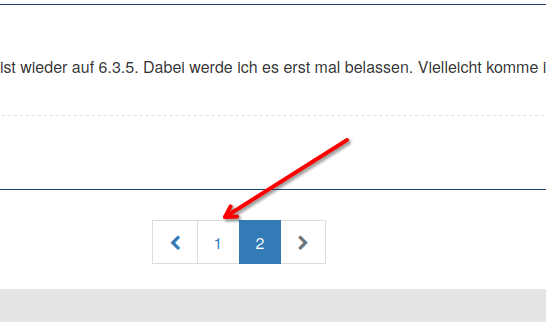
oder

Und freut mich, dass es wieder läuft.VG
Bernd -
@michaelxhoffmann sagte in Nach Update auf Admin 5.8 Startet Biobroker nicht mehr:
@dp20 Na klar alles Biologisch
Moin,
zuerst einmal
dp20eicnicht nurdp20:)Dann, hä
@michaelxhoffmann sagte in Nach Update auf Admin 5.8 Startet Biobroker nicht mehr:
Aber ich komme an den Startartikel gar nicht mehr ran. Ich komme nicht auf die erste threadseite um den Titel zu ändern
Du klickst einfach, hier
oder
Und freut mich, dass es wieder läuft.VG
Bernd@dp20eic LOL zu früh gefreut der web.0 Adapter läuft nicht. Er ist mit Gerät/Dienst verbunden aber nicht mit dem Host und ohne Lebenszeichen. Ergo meine Visualisierung wird nicht angezeigt. Instanz neu gestartet habe ich schon...Alles andere läuft wieder nur dieser eine Schei... Instanz will nicht so wie ich will Und wie ich gerade feststelle läuft die Socket.io Instanz ebenfalls nicht korrekt.
Homematic CCU2 - Raspberry Pi 4 - IOS (siri) - Amazon Echo 3rd Gen.
-
@dp20eic LOL zu früh gefreut der web.0 Adapter läuft nicht. Er ist mit Gerät/Dienst verbunden aber nicht mit dem Host und ohne Lebenszeichen. Ergo meine Visualisierung wird nicht angezeigt. Instanz neu gestartet habe ich schon...Alles andere läuft wieder nur dieser eine Schei... Instanz will nicht so wie ich will Und wie ich gerade feststelle läuft die Socket.io Instanz ebenfalls nicht korrekt.
@michaelxhoffmann zeig mal die Einstellung in der web Instanz
-
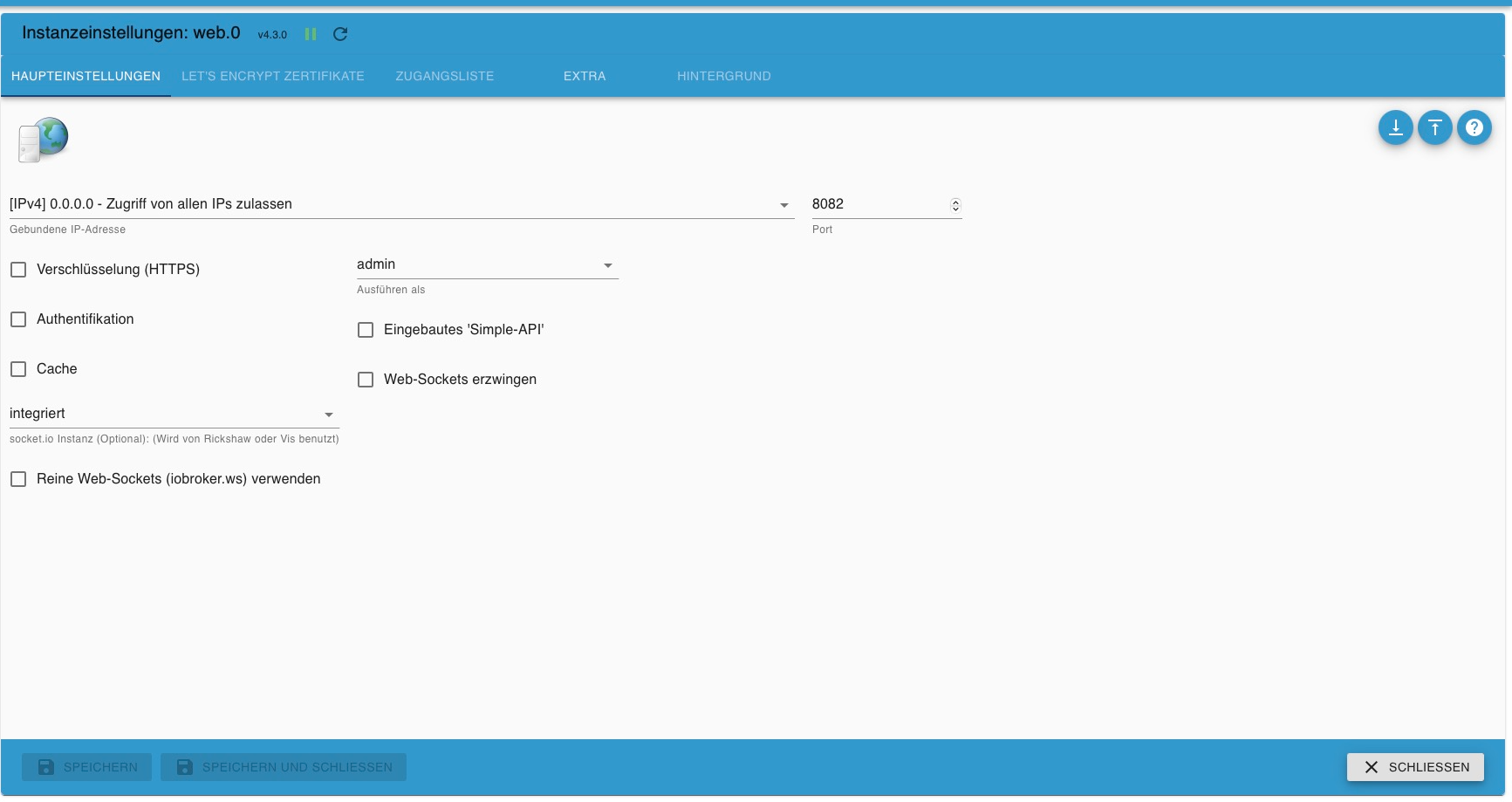
@michaelxhoffmann zeig mal die Einstellung in der web Instanz
@crunchip web.0 bildschirm.pdf
Hoffe das funktioniert
Homematic CCU2 - Raspberry Pi 4 - IOS (siri) - Amazon Echo 3rd Gen.
-
@crunchip web.0 bildschirm.pdf
Hoffe das funktioniert
@michaelxhoffmann mach nen screen und hier direkt einfügen
-
@michaelxhoffmann mach nen screen und hier direkt einfügen
Homematic CCU2 - Raspberry Pi 4 - IOS (siri) - Amazon Echo 3rd Gen.
-
@michaelxhoffmann passt eigentlich
@michaelxhoffmann sagte in Nach Update auf Admin 5.8 Startet Biobroker nicht mehr:
wie ich gerade feststelle läuft die Socket.io Instanz ebenfalls nicht korrekt
socketio ist da gar nicht ausgewählt, was heisst nicht korrekt
-
@michaelxhoffmann OK Jetzt wird's noch schlimmer :( IOBroker Weboberfläche öffnet nicht
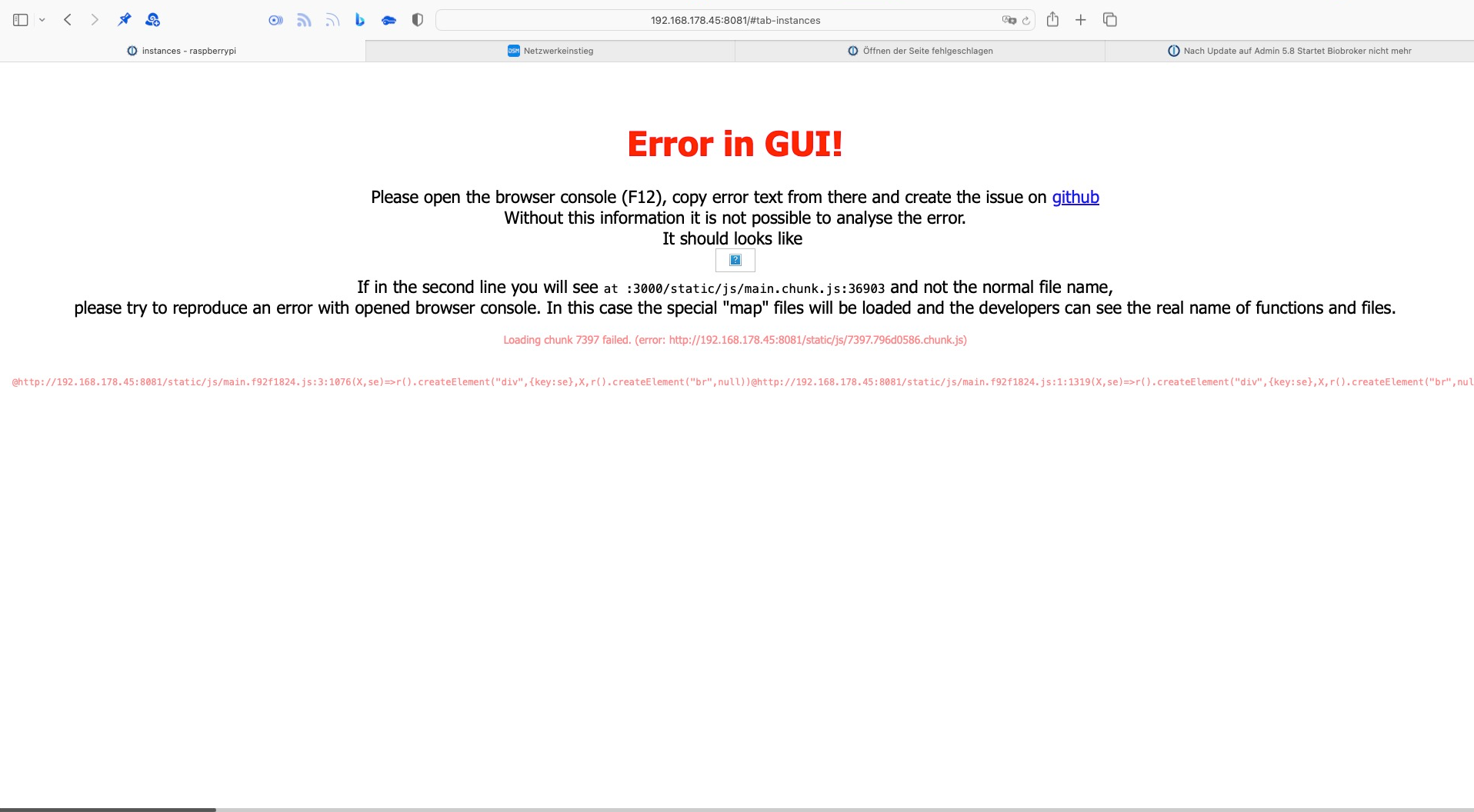
Homematic CCU2 - Raspberry Pi 4 - IOS (siri) - Amazon Echo 3rd Gen.
-
@michaelxhoffmann OK Jetzt wird's noch schlimmer :( IOBroker Weboberfläche öffnet nicht
@michaelxhoffmann mach mal ein browser refresh(F5)
-
@michaelxhoffmann mach mal ein browser refresh(F5)



Hey! Du scheinst an dieser Unterhaltung interessiert zu sein, hast aber noch kein Konto.
Hast du es satt, bei jedem Besuch durch die gleichen Beiträge zu scrollen? Wenn du dich für ein Konto anmeldest, kommst du immer genau dorthin zurück, wo du zuvor warst, und kannst dich über neue Antworten benachrichtigen lassen (entweder per E-Mail oder Push-Benachrichtigung). Du kannst auch Lesezeichen speichern und Beiträge positiv bewerten, um anderen Community-Mitgliedern deine Wertschätzung zu zeigen.
Mit deinem Input könnte dieser Beitrag noch besser werden 💗
Registrieren Anmelden436
Online33.0k
Benutzer83.5k
Themen1.3m
Beiträge