




Update des admin Moduls auf 6.8.0 schlug fehl.
-
OK. Neues Betriebssystem wie beschrieben aufgesetzt.
iobroker drauf installiert
restore des Backups mit --force (weil er sonst wegen der Versionsunterschiede meckert)Seltsam: Ich musste trotz Backup wieder Master/Slave einstellen
Zunächst hat der Restore die Adapter Admin, BackitUp, Geräter verwalten und History zurück auf eine alte Version gesetzt.
Wahrscheinlich, damit er die Backupdaten auch korrekt wieder zurück spielen konnte.Dann:
Admin ließ sich diesmal updaten.Aber
Viele Adapter wurden nicht installiert.
Und wenn ich jetzt BackitUp, Geräte verwalten und History auf den aktuellen Stand bringen will, bekomme ich den Error 25.Auch wenn ich die fehlenden Adapter wieder nachinstallieren will, kommt dieser Fehler:
für ble:
$ iobroker url iobroker.ble --host ioBroker1 --debug
install iobroker.ble
NPM version: 9.6.7
Installing iobroker.ble... (System call)
npm ERR! code ENOTEMPTY
npm ERR! syscall renamenpm ERR! path /opt/iobroker/node_modules/bcrypt
npm ERR! dest /opt/iobroker/node_modules/.bcrypt-8Ovo54hd
npm ERR! ENOTEMPTY: directory not empty, rename '/opt/iobroker/node_modules/bcrypt' -> '/opt/iobroker/node_modules/.bcrypt-8Ovo54hd'
npm ERR! A complete log of this run can be found in: /home/iobroker/.npm/_logs/2023-08-26T11_26_01_625Z-debug-0.log
host.ioBroker1 Cannot install iobroker.ble: 217
ERROR: Process exited with code 25
Oder aber für History:
$ iobroker upgrade history@2.2.4 --debug
Update history from @1.11.1 to @2.2.4
NPM version: 9.6.7
Installing iobroker.history@2.2.4... (System call)
npm ERR! code ENOTEMPTY
npm ERR! syscall renamenpm ERR! path /opt/iobroker/node_modules/bcryptnpm ERR! dest /opt/iobroker/node_modules/.bcrypt-8Ovo54hdnpm ERR! errno -39
npm ERR! ENOTEMPTY: directory not empty, rename '/opt/iobroker/node_modules/bcrypt' -> '/opt/iobroker/node_modules/.bcrypt-8Ovo54hd'
npm ERR! A complete log of this run can be found in: /home/iobroker/.npm/_logs/2023-08-26T11_34_06_271Z-debug-0.log
host.ioBroker1 Cannot install iobroker.history@2.2.4: 217
ERROR: Process exited with code 25
Wie muss ich denn dieser Fehler interpretieren?
Allerdings ein
iob fixhat wohl geholfen
Und nach dem Update von 2 Adaptern, füllte sich plötzlich auch die Liste der installierten Adapter Stück für Stück.
DAS ist ein Verhalten, das ich ganz merkwürdig finde.
Oder sind im Hintergrund noch Bereinigungen am Laufen?@arnulf sagte in Update des admin Moduls auf 6.8.0 schlug fehl.:
DAS ist ein Verhalten, das ich ganz merkwürdig finde.
Das ist das ganz normale Verhalten. Ein Backup hat nur die Baupläne an Bord, die Adapter werden nach diesen Plänen neu aufgebaut. Dauert halt.
-
======== Start marking the full check here =========
Skript v.2023-04-16

*** BASE SYSTEM ***
Model           : Raspberry Pi 3 Model B Rev 1.2
Architecture    : armv7l
Docker          : false
Virtualization  : none
Distributor ID: Raspbian
Description:    Raspbian GNU/Linux 11 (bullseye)
Release:        11
Codename:       bullseye

PRETTY_NAME="Raspbian GNU/Linux 11 (bullseye)"
NAME="Raspbian GNU/Linux"
VERSION_ID="11"
VERSION="11 (bullseye)"
VERSION_CODENAME=bullseye
ID=raspbian
ID_LIKE=debian
HOME_URL="http://www.raspbian.org/"
SUPPORT_URL="http://www.raspbian.org/RaspbianForums"
BUG_REPORT_URL="http://www.raspbian.org/RaspbianBugs"

Systemuptime and Load:
 13:59:20 up  1:09,  3 users,  load average: 1.25, 2.47, 2.67
CPU threads: 4

Raspberry only:
throttled=0x70000
Other values than 0x0 hint to temperature/voltage problems
temp=64.5'C
volt=1.3000V

*** Time and Time Zones ***
               Local time: Sat 2023-08-26 13:59:21 CEST
           Universal time: Sat 2023-08-26 11:59:21 UTC
                 RTC time: n/a
                Time zone: Europe/Berlin (CEST, +0200)
System clock synchronized: yes
              NTP service: active
          RTC in local TZ: no

*** User and Groups ***
pi
/home/pi
pi adm dialout cdrom sudo audio video plugdev games users input render netdev lpadmin gpio i2c spi iobroker

*** X-Server-Setup ***
X-Server:       true
Desktop:
Terminal:       tty
Boot Target:    multi-user.target

*** MEMORY ***
               total        used        free      shared  buff/cache   available
Mem:            921M        617M         59M         15M        245M        234M
Swap:            99M         99M        0.0K
Total:          1.0G        717M         59M

          921 M total memory
          617 M used memory
          198 M active memory
          507 M inactive memory
           59 M free memory
           18 M buffer memory
          226 M swap cache
           99 M total swap
           99 M used swap
            0 M free swap

Raspberry only:
oom events: 0
lifetime oom required: 0 Mbytes
total time in oom handler: 0 ms
max time spent in oom handler: 0 ms

*** FILESYSTEM ***
Filesystem     Type      Size  Used Avail Use% Mounted on
/dev/root      ext4       29G  4.8G   24G  17% /
devtmpfs       devtmpfs  333M     0  333M   0% /dev
tmpfs          tmpfs     461M   12M  450M   3% /dev/shm
tmpfs          tmpfs     185M  1.1M  184M   1% /run
tmpfs          tmpfs     5.0M  4.0K  5.0M   1% /run/lock
/dev/mmcblk0p1 vfat      255M   61M  195M  24% /boot
tmpfs          tmpfs      93M   20K   93M   1% /run/user/1000

Messages concerning ext4 filesystem in dmesg:
[Sat Aug 26 12:49:31 2023] Kernel command line: coherent_pool=1M 8250.nr_uarts=0 snd_bcm2835.enable_headphones=0 snd_bcm2835.enable_headphones=1 snd_bcm2835.enable_hdmi=1 snd_bcm2835.enable_hdmi=0 video=HDMI-A-1:1920x1080M@60 vc_mem.mem_base=0x3ec00000 vc_mem.mem_size=0x40000000  console=ttyS0,115200 console=tty1 root=PARTUUID=c1dab352-02 rootfstype=ext4 fsck.repair=yes rootwait quiet splash plymouth.ignore-serial-consoles
[Sat Aug 26 12:49:34 2023] EXT4-fs (mmcblk0p2): INFO: recovery required on readonly filesystem
[Sat Aug 26 12:49:34 2023] EXT4-fs (mmcblk0p2): write access will be enabled during recovery
[Sat Aug 26 12:49:37 2023] EXT4-fs (mmcblk0p2): orphan cleanup on readonly fs
[Sat Aug 26 12:49:37 2023] EXT4-fs (mmcblk0p2): 4 orphan inodes deleted
[Sat Aug 26 12:49:37 2023] EXT4-fs (mmcblk0p2): recovery complete
[Sat Aug 26 12:49:37 2023] EXT4-fs (mmcblk0p2): mounted filesystem with ordered data mode. Quota mode: none.
[Sat Aug 26 12:49:37 2023] VFS: Mounted root (ext4 filesystem) readonly on device 179:2.
[Sat Aug 26 12:49:40 2023] EXT4-fs (mmcblk0p2): re-mounted. Quota mode: none.

Show mounted filesystems (real ones only):
TARGET  SOURCE         FSTYPE OPTIONS
/       /dev/mmcblk0p2 ext4   rw,noatime
`-/boot /dev/mmcblk0p1 vfat   rw,relatime,fmask=0022,dmask=0022,codepage=437,iocharset=ascii,shortname=mixed,errors=remount-ro

Files in neuralgic directories:

/var:
725M    /var/
354M    /var/cache
342M    /var/cache/apt
278M    /var/cache/apt/archives
148M    /var/log

Archived and active journals take up 144.0M in the file system.

/opt/iobroker/backups:
9.9M    /opt/iobroker/backups/

/opt/iobroker/iobroker-data:
101M    /opt/iobroker/iobroker-data/
85M     /opt/iobroker/iobroker-data/files
45M     /opt/iobroker/iobroker-data/files/devices.admin/static
45M     /opt/iobroker/iobroker-data/files/devices.admin
44M     /opt/iobroker/iobroker-data/files/devices.admin/static/js

The five largest files in iobroker-data are:
35M     /opt/iobroker/iobroker-data/files/devices.admin/static/js/main.24f2bb56.js.map
9.1M    /opt/iobroker/iobroker-data/objects.jsonl
8.6M    /opt/iobroker/iobroker-data/files/devices.admin/static/js/main.24f2bb56.js
6.8M    /opt/iobroker/iobroker-data/states.jsonl
6.3M    /opt/iobroker/iobroker-data/files/admin.admin/custom/static/js/vendors-node_modules_iobroker_adapter-react-v5_assets_devices_parseNames_js-node_modules_iobr-99c23e.847b8ad9.chunk.js.map

*** NodeJS-Installation ***

/usr/bin/nodejs         v18.17.1
/usr/bin/node           v18.17.1
/usr/bin/npm            9.6.7
/usr/bin/npx            9.6.7


nodejs:
  Installed: 18.17.1-deb-1nodesource1
  Candidate: 18.17.1-deb-1nodesource1
  Version table:
 *** 18.17.1-deb-1nodesource1 500
        500 https://deb.nodesource.com/node_18.x bullseye/main armhf Packages
        100 /var/lib/dpkg/status
     12.22.12~dfsg-1~deb11u4 500
        500 http://raspbian.raspberrypi.org/raspbian bullseye/main armhf Packages

Temp directories causing npm8 problem: 0
No problems detected

*** ioBroker-Installation ***

ioBroker Status
iobroker is running on this host.


Objects type: jsonl
States  type: jsonl

MULTIHOSTSERVICE/enabled: false

Core adapters versions
js-controller:  4.0.24
admin:          6.8.0
javascript:     "javascript" not found

Adapters from github:   1

Adapter State
+ system.adapter.admin.0                  : admin                 : ioBroker1                                -  enabled, port: 8081, bind: 0.0.0.0, run as: admin
+ system.adapter.admin.1                  : admin                 : ioBroker2                                -  enabled, port: 8081, bind: 0.0.0.0, run as: admin
+ system.adapter.alexa2.0                 : alexa2                : ioBroker2                                -  enabled
  system.adapter.backitup.0               : backitup              : ioBroker1                                -  enabled
+ system.adapter.ble.0                    : ble                   : ioBroker1                                -  enabled
+ system.adapter.broadlink2.0             : broadlink2            : ioBroker2                                -  enabled
+ system.adapter.deconz.0                 : deconz                : ioBroker1                                -  enabled, port: 80
  system.adapter.devices.0                : devices               : ioBroker1                                - disabled
+ system.adapter.discovery.0              : discovery             : ioBroker2                                -  enabled
  system.adapter.fullybrowser.0           : fullybrowser          : ioBroker1                                - disabled
  system.adapter.history.0                : history               : ioBroker1                                - disabled
  system.adapter.icons-mfd-png.0          : icons-mfd-png         : ioBroker2                                - disabled
  system.adapter.icons-mfd-svg.0          : icons-mfd-svg         : ioBroker2                                - disabled
+ system.adapter.info.0                   : info                  : ioBroker1                                -  enabled
  system.adapter.mqtt.0                   : mqtt                  : ioBroker1                                -  enabled, port: 1883, bind: 0.0.0.0
  system.adapter.node-red.0               : node-red              : ioBroker1                                -  enabled, port: 1880, bind: 0.0.0.0
+ system.adapter.sonoff.0                 : sonoff                : ioBroker1                                -  enabled, port: 1884, bind: 0.0.0.0
  system.adapter.tr-064.0                 : tr-064                : ioBroker1                                - disabled
  system.adapter.vis-hqwidgets.0          : vis-hqwidgets         : ioBroker1                                - disabled
  system.adapter.vis.0                    : vis                   : ioBroker1                                - disabled
  system.adapter.web.0                    : web                   : ioBroker1                                - disabled, port: 8082, bind: 0.0.0.0, run as: admin

+ instance is alive

Enabled adapters with bindings
+ system.adapter.admin.0                  : admin                 : ioBroker1                                -  enabled, port: 8081, bind: 0.0.0.0, run as: admin
+ system.adapter.admin.1                  : admin                 : ioBroker2                                -  enabled, port: 8081, bind: 0.0.0.0, run as: admin
+ system.adapter.deconz.0                 : deconz                : ioBroker1                                -  enabled, port: 80
  system.adapter.mqtt.0                   : mqtt                  : ioBroker1                                -  enabled, port: 1883, bind: 0.0.0.0
  system.adapter.node-red.0               : node-red              : ioBroker1                                -  enabled, port: 1880, bind: 0.0.0.0
+ system.adapter.sonoff.0                 : sonoff                : ioBroker1                                -  enabled, port: 1884, bind: 0.0.0.0

ioBroker-Repositories
stable        : http://download.iobroker.net/sources-dist.json
beta          : http://download.iobroker.net/sources-dist-latest.json

Active repo(s): stable

Installed ioBroker-Instances
Used repository: stable
Adapter    "admin"        : 6.8.0    , installed 6.8.0
Adapter    "backitup"     : 2.6.23   , installed 2.4.6  [Updatable]
Adapter    "ble"          : 0.13.4   , installed 0.11.0 [Updatable]
Adapter    "deconz"       : 1.3.21   , installed 1.3.21
Adapter    "devices"      : 1.1.5    , installed 1.0.10 [Updatable]
Adapter    "fullybrowser" : 2.1.2    , installed 2.1.2
Adapter    "history"      : 2.2.4    , installed 1.11.1 [Updatable]
Adapter    "info"         : 1.9.26   , installed 1.9.26
Controller "js-controller": 4.0.24   , installed 4.0.24
Adapter    "simple-api"   : 2.7.2    , installed 2.7.2
Adapter    "socketio"     : 4.2.0    , installed 4.2.0
Adapter    "sonoff"       : 2.5.3    , installed 2.5.1  [Updatable]
Adapter    "tr-064"       : 4.2.18   , installed 4.2.16 [Updatable]
Adapter    "vis-hqwidgets": 1.4.0    , installed 1.2.0  [Updatable]
Adapter    "web"          : 4.3.0    , installed 4.3.0
Adapter    "ws"           : 1.3.0    , installed 1.3.0

Objects and States
Please stand by - This may take a while
Objects:        6085
States:         32162

*** OS-Repositories and Updates ***
Hit:1 http://raspbian.raspberrypi.org/raspbian bullseye InRelease
Hit:2 http://archive.raspberrypi.org/debian bullseye InRelease
Hit:3 https://deb.nodesource.com/node_18.x bullseye InRelease
Reading package lists...
Pending Updates: 0

*** Listening Ports ***
Active Internet connections (only servers)
Proto Recv-Q Send-Q Local Address           Foreign Address         State       User       Inode      PID/Program name
tcp        0      0 0.0.0.0:1884            0.0.0.0:*               LISTEN      1001       39948      7343/io.sonoff.0
tcp        0      0 0.0.0.0:9000            0.0.0.0:*               LISTEN      1001       38016      6860/iobroker.js-co
tcp        0      0 0.0.0.0:9001            0.0.0.0:*               LISTEN      1001       34810      6860/iobroker.js-co
tcp        0      0 127.0.0.1:631           0.0.0.0:*               LISTEN      0          14404      567/cupsd
tcp        0      0 0.0.0.0:22              0.0.0.0:*               LISTEN      0          24808      3426/sshd: /usr/sbi
tcp6       0      0 :::8081                 :::*                    LISTEN      1001       38080      6888/io.admin.0
tcp6       0      0 :::22                   :::*                    LISTEN      0          24810      3426/sshd: /usr/sbi
tcp6       0      0 ::1:631                 :::*                    LISTEN      0          14403      567/cupsd
udp        0      0 0.0.0.0:68              0.0.0.0:*                           0          12261      514/dhcpcd
udp        0      0 0.0.0.0:631             0.0.0.0:*                           0          15416      734/cups-browsed
udp        0      0 224.0.0.251:5353        0.0.0.0:*                           1000       19064      1829/chromium-brows
udp        0      0 224.0.0.251:5353        0.0.0.0:*                           1000       19062      1829/chromium-brows
udp        0      0 0.0.0.0:5353            0.0.0.0:*                           108        11159      423/avahi-daemon: r
udp        0      0 0.0.0.0:1900            0.0.0.0:*                           1001       41140      8067/io.deconz.0
udp        0      0 0.0.0.0:1900            0.0.0.0:*                           1001       41137      8067/io.deconz.0
udp        0      0 0.0.0.0:1900            0.0.0.0:*                           1001       41133      8067/io.deconz.0
udp        0      0 0.0.0.0:1900            0.0.0.0:*                           1001       41130      8067/io.deconz.0
udp        0      0 0.0.0.0:53152           0.0.0.0:*                           108        11161      423/avahi-daemon: r
udp6       0      0 :::546                  :::*                                0          739        514/dhcpcd
udp6       0      0 :::5353                 :::*                                108        11160      423/avahi-daemon: r
udp6       0      0 :::1900                 :::*                                1001       41142      8067/io.deconz.0
udp6       0      0 :::1900                 :::*                                1001       41141      8067/io.deconz.0
udp6       0      0 :::1900                 :::*                                1001       41139      8067/io.deconz.0
udp6       0      0 :::1900                 :::*                                1001       41138      8067/io.deconz.0
udp6       0      0 :::1900                 :::*                                1001       41135      8067/io.deconz.0
udp6       0      0 :::1900                 :::*                                1001       41134      8067/io.deconz.0
udp6       0      0 :::1900                 :::*                                1001       41132      8067/io.deconz.0
udp6       0      0 :::1900                 :::*                                1001       41131      8067/io.deconz.0
udp6       0      0 :::46502                :::*                                108        11162      423/avahi-daemon: r

*** Log File - Last 25 Lines ***

2023-08-26 13:58:18.048  - info: host.ioBroker1 iobroker upload [13] info.admin /opt/iobroker/node_modules/iobroker.info/admin/lib/js/forum.js lib/js/forum.js application/javascript
2023-08-26 13:58:18.067  - info: host.ioBroker1 iobroker upload [12] info.admin /opt/iobroker/node_modules/iobroker.info/admin/lib/js/githubData.js lib/js/githubData.js application/javascript
2023-08-26 13:58:18.088  - info: host.ioBroker1 iobroker upload [11] info.admin /opt/iobroker/node_modules/iobroker.info/admin/lib/js/helper.js lib/js/helper.js application/javascript
2023-08-26 13:58:18.107  - info: host.ioBroker1 iobroker upload [10] info.admin /opt/iobroker/node_modules/iobroker.info/admin/lib/js/hostInfo.js lib/js/hostInfo.js application/javascript
2023-08-26 13:58:18.130  - info: host.ioBroker1 iobroker upload [9] info.admin /opt/iobroker/node_modules/iobroker.info/admin/lib/js/info.js lib/js/info.js application/javascript
2023-08-26 13:58:18.148  - info: host.ioBroker1 iobroker upload [8] info.admin /opt/iobroker/node_modules/iobroker.info/admin/lib/js/news.js lib/js/news.js application/javascript
2023-08-26 13:58:18.168  - info: host.ioBroker1 iobroker upload [7] info.admin /opt/iobroker/node_modules/iobroker.info/admin/lib/js/popupnews.js lib/js/popupnews.js application/javascript
2023-08-26 13:58:18.218  - info: host.ioBroker1 iobroker upload [6] info.admin /opt/iobroker/node_modules/iobroker.info/admin/lib/js/searchGithub.js lib/js/searchGithub.js application/javascript
2023-08-26 13:58:18.240  - info: host.ioBroker1 iobroker upload [5] info.admin /opt/iobroker/node_modules/iobroker.info/admin/lib/js/showdown.min.js lib/js/showdown.min.js application/javascript
2023-08-26 13:58:18.260  - info: host.ioBroker1 iobroker upload [4] info.admin /opt/iobroker/node_modules/iobroker.info/admin/lib/js/simplemde.min.js lib/js/simplemde.min.js application/javascript
2023-08-26 13:58:18.288  - info: host.ioBroker1 iobroker upload [3] info.admin /opt/iobroker/node_modules/iobroker.info/admin/lib/js/systemInformation.js lib/js/systemInformation.js application/javascript
2023-08-26 13:58:18.306  - info: host.ioBroker1 iobroker upload [2] info.admin /opt/iobroker/node_modules/iobroker.info/admin/lib/js/updateAdapter.js lib/js/updateAdapter.js application/javascript
2023-08-26 13:58:18.326  - info: host.ioBroker1 iobroker upload [1] info.admin /opt/iobroker/node_modules/iobroker.info/admin/tab_m.html tab_m.html text/html
2023-08-26 13:58:18.376  - info: host.ioBroker1 iobroker upload [0] info.admin /opt/iobroker/node_modules/iobroker.info/admin/words.js words.js application/javascript
2023-08-26 13:58:19.519  - info: host.ioBroker1 iobroker exit 0
2023-08-26 13:58:26.111  - info: info.0 (8942) Plugin sentry Sentry Plugin disabled for this process because sending of statistic data is disabled for the system
2023-08-26 13:58:27.220  - info: info.0 (8942) starting. Version 1.9.26 in /opt/iobroker/node_modules/iobroker.info, node: v18.17.1, js-controller: 4.0.24
2023-08-26 13:58:27.626  - info: info.0 (8942) Reading/updating systemdata.
2023-08-26 13:58:28.822  - info: info.0 (8942) State value to set for "info.0.sysinfo.cpu.info.speed" has to be type "string" but received type "number"
2023-08-26 13:58:28.970  - info: info.0 (8942) State value to set for "info.0.sysinfo.cpu.info.cache-l1d" has to be type "number" but received type "string"
2023-08-26 13:58:29.030  - info: info.0 (8942) State value to set for "info.0.sysinfo.cpu.info.cache-l1i" has to be type "number" but received type "string"
2023-08-26 13:58:29.095  - info: info.0 (8942) State value to set for "info.0.sysinfo.cpu.info.cache-l2" has to be type "number" but received type "string"
2023-08-26 13:58:29.155  - info: info.0 (8942) State value to set for "info.0.sysinfo.cpu.info.cache-l3" has to be type "number" but received type "string"
2023-08-26 13:58:29.492  - info: info.0 (8942) cpu Temp res = {"main":66.604,"cores":[],"max":66.604,"socket":[],"chipset":null}
2023-08-26 13:58:44.477  - info: info.0 (8942) State value to set for "info.0.sysinfo.disks.diskLayout.dev0.size" has to be type "string" but received type "number"
============ Mark until here for C&P =============
iob diag has finished.
Press any key for a summary
-
======== Start marking the full check here =========
Skript v.2023-04-16

*** BASE SYSTEM ***
Model           : Raspberry Pi 3 Model B Rev 1.2
Architecture    : armv7l
Docker          : false
Virtualization  : none
Distributor ID: Raspbian
Description:    Raspbian GNU/Linux 11 (bullseye)
Release:        11
Codename:       bullseye

PRETTY_NAME="Raspbian GNU/Linux 11 (bullseye)"
NAME="Raspbian GNU/Linux"
VERSION_ID="11"
VERSION="11 (bullseye)"
VERSION_CODENAME=bullseye
ID=raspbian
ID_LIKE=debian
HOME_URL="http://www.raspbian.org/"
SUPPORT_URL="http://www.raspbian.org/RaspbianForums"
BUG_REPORT_URL="http://www.raspbian.org/RaspbianBugs"

Systemuptime and Load:
 13:59:20 up  1:09,  3 users,  load average: 1.25, 2.47, 2.67
CPU threads: 4

Raspberry only:
throttled=0x70000
Other values than 0x0 hint to temperature/voltage problems
temp=64.5'C
volt=1.3000V

*** Time and Time Zones ***
               Local time: Sat 2023-08-26 13:59:21 CEST
           Universal time: Sat 2023-08-26 11:59:21 UTC
                 RTC time: n/a
                Time zone: Europe/Berlin (CEST, +0200)
System clock synchronized: yes
              NTP service: active
          RTC in local TZ: no

*** User and Groups ***
pi
/home/pi
pi adm dialout cdrom sudo audio video plugdev games users input render netdev lpadmin gpio i2c spi iobroker

*** X-Server-Setup ***
X-Server:       true
Desktop:
Terminal:       tty
Boot Target:    multi-user.target

*** MEMORY ***
               total        used        free      shared  buff/cache   available
Mem:            921M        617M         59M         15M        245M        234M
Swap:            99M         99M        0.0K
Total:          1.0G        717M         59M

          921 M total memory
          617 M used memory
          198 M active memory
          507 M inactive memory
           59 M free memory
           18 M buffer memory
          226 M swap cache
           99 M total swap
           99 M used swap
            0 M free swap

Raspberry only:
oom events: 0
lifetime oom required: 0 Mbytes
total time in oom handler: 0 ms
max time spent in oom handler: 0 ms

*** FILESYSTEM ***
Filesystem     Type      Size  Used Avail Use% Mounted on
/dev/root      ext4       29G  4.8G   24G  17% /
devtmpfs       devtmpfs  333M     0  333M   0% /dev
tmpfs          tmpfs     461M   12M  450M   3% /dev/shm
tmpfs          tmpfs     185M  1.1M  184M   1% /run
tmpfs          tmpfs     5.0M  4.0K  5.0M   1% /run/lock
/dev/mmcblk0p1 vfat      255M   61M  195M  24% /boot
tmpfs          tmpfs      93M   20K   93M   1% /run/user/1000

Messages concerning ext4 filesystem in dmesg:
[Sat Aug 26 12:49:31 2023] Kernel command line: coherent_pool=1M 8250.nr_uarts=0 snd_bcm2835.enable_headphones=0 snd_bcm2835.enable_headphones=1 snd_bcm2835.enable_hdmi=1 snd_bcm2835.enable_hdmi=0 video=HDMI-A-1:1920x1080M@60 vc_mem.mem_base=0x3ec00000 vc_mem.mem_size=0x40000000  console=ttyS0,115200 console=tty1 root=PARTUUID=c1dab352-02 rootfstype=ext4 fsck.repair=yes rootwait quiet splash plymouth.ignore-serial-consoles
[Sat Aug 26 12:49:34 2023] EXT4-fs (mmcblk0p2): INFO: recovery required on readonly filesystem
[Sat Aug 26 12:49:34 2023] EXT4-fs (mmcblk0p2): write access will be enabled during recovery
[Sat Aug 26 12:49:37 2023] EXT4-fs (mmcblk0p2): orphan cleanup on readonly fs
[Sat Aug 26 12:49:37 2023] EXT4-fs (mmcblk0p2): 4 orphan inodes deleted
[Sat Aug 26 12:49:37 2023] EXT4-fs (mmcblk0p2): recovery complete
[Sat Aug 26 12:49:37 2023] EXT4-fs (mmcblk0p2): mounted filesystem with ordered data mode. Quota mode: none.
[Sat Aug 26 12:49:37 2023] VFS: Mounted root (ext4 filesystem) readonly on device 179:2.
[Sat Aug 26 12:49:40 2023] EXT4-fs (mmcblk0p2): re-mounted. Quota mode: none.

Show mounted filesystems (real ones only):
TARGET  SOURCE         FSTYPE OPTIONS
/       /dev/mmcblk0p2 ext4   rw,noatime
`-/boot /dev/mmcblk0p1 vfat   rw,relatime,fmask=0022,dmask=0022,codepage=437,iocharset=ascii,shortname=mixed,errors=remount-ro

Files in neuralgic directories:

/var:
725M    /var/
354M    /var/cache
342M    /var/cache/apt
278M    /var/cache/apt/archives
148M    /var/log

Archived and active journals take up 144.0M in the file system.

/opt/iobroker/backups:
9.9M    /opt/iobroker/backups/

/opt/iobroker/iobroker-data:
101M    /opt/iobroker/iobroker-data/
85M     /opt/iobroker/iobroker-data/files
45M     /opt/iobroker/iobroker-data/files/devices.admin/static
45M     /opt/iobroker/iobroker-data/files/devices.admin
44M     /opt/iobroker/iobroker-data/files/devices.admin/static/js

The five largest files in iobroker-data are:
35M     /opt/iobroker/iobroker-data/files/devices.admin/static/js/main.24f2bb56.js.map
9.1M    /opt/iobroker/iobroker-data/objects.jsonl
8.6M    /opt/iobroker/iobroker-data/files/devices.admin/static/js/main.24f2bb56.js
6.8M    /opt/iobroker/iobroker-data/states.jsonl
6.3M    /opt/iobroker/iobroker-data/files/admin.admin/custom/static/js/vendors-node_modules_iobroker_adapter-react-v5_assets_devices_parseNames_js-node_modules_iobr-99c23e.847b8ad9.chunk.js.map

*** NodeJS-Installation ***

/usr/bin/nodejs         v18.17.1
/usr/bin/node           v18.17.1
/usr/bin/npm            9.6.7
/usr/bin/npx            9.6.7


nodejs:
  Installed: 18.17.1-deb-1nodesource1
  Candidate: 18.17.1-deb-1nodesource1
  Version table:
 *** 18.17.1-deb-1nodesource1 500
        500 https://deb.nodesource.com/node_18.x bullseye/main armhf Packages
        100 /var/lib/dpkg/status
     12.22.12~dfsg-1~deb11u4 500
        500 http://raspbian.raspberrypi.org/raspbian bullseye/main armhf Packages

Temp directories causing npm8 problem: 0
No problems detected

*** ioBroker-Installation ***

ioBroker Status
iobroker is running on this host.


Objects type: jsonl
States  type: jsonl

MULTIHOSTSERVICE/enabled: false

Core adapters versions
js-controller:  4.0.24
admin:          6.8.0
javascript:     "javascript" not found

Adapters from github:   1

Adapter State
+ system.adapter.admin.0                  : admin                 : ioBroker1                                -  enabled, port: 8081, bind: 0.0.0.0, run as: admin
+ system.adapter.admin.1                  : admin                 : ioBroker2                                -  enabled, port: 8081, bind: 0.0.0.0, run as: admin
+ system.adapter.alexa2.0                 : alexa2                : ioBroker2                                -  enabled
  system.adapter.backitup.0               : backitup              : ioBroker1                                -  enabled
+ system.adapter.ble.0                    : ble                   : ioBroker1                                -  enabled
+ system.adapter.broadlink2.0             : broadlink2            : ioBroker2                                -  enabled
+ system.adapter.deconz.0                 : deconz                : ioBroker1                                -  enabled, port: 80
  system.adapter.devices.0                : devices               : ioBroker1                                - disabled
+ system.adapter.discovery.0              : discovery             : ioBroker2                                -  enabled
  system.adapter.fullybrowser.0           : fullybrowser          : ioBroker1                                - disabled
  system.adapter.history.0                : history               : ioBroker1                                - disabled
  system.adapter.icons-mfd-png.0          : icons-mfd-png         : ioBroker2                                - disabled
  system.adapter.icons-mfd-svg.0          : icons-mfd-svg         : ioBroker2                                - disabled
+ system.adapter.info.0                   : info                  : ioBroker1                                -  enabled
  system.adapter.mqtt.0                   : mqtt                  : ioBroker1                                -  enabled, port: 1883, bind: 0.0.0.0
  system.adapter.node-red.0               : node-red              : ioBroker1                                -  enabled, port: 1880, bind: 0.0.0.0
+ system.adapter.sonoff.0                 : sonoff                : ioBroker1                                -  enabled, port: 1884, bind: 0.0.0.0
  system.adapter.tr-064.0                 : tr-064                : ioBroker1                                - disabled
  system.adapter.vis-hqwidgets.0          : vis-hqwidgets         : ioBroker1                                - disabled
  system.adapter.vis.0                    : vis                   : ioBroker1                                - disabled
  system.adapter.web.0                    : web                   : ioBroker1                                - disabled, port: 8082, bind: 0.0.0.0, run as: admin

+ instance is alive

Enabled adapters with bindings
+ system.adapter.admin.0                  : admin                 : ioBroker1                                -  enabled, port: 8081, bind: 0.0.0.0, run as: admin
+ system.adapter.admin.1                  : admin                 : ioBroker2                                -  enabled, port: 8081, bind: 0.0.0.0, run as: admin
+ system.adapter.deconz.0                 : deconz                : ioBroker1                                -  enabled, port: 80
  system.adapter.mqtt.0                   : mqtt                  : ioBroker1                                -  enabled, port: 1883, bind: 0.0.0.0
  system.adapter.node-red.0               : node-red              : ioBroker1                                -  enabled, port: 1880, bind: 0.0.0.0
+ system.adapter.sonoff.0                 : sonoff                : ioBroker1                                -  enabled, port: 1884, bind: 0.0.0.0

ioBroker-Repositories
stable        : http://download.iobroker.net/sources-dist.json
beta          : http://download.iobroker.net/sources-dist-latest.json

Active repo(s): stable

Installed ioBroker-Instances
Used repository: stable
Adapter    "admin"        : 6.8.0    , installed 6.8.0
Adapter    "backitup"     : 2.6.23   , installed 2.4.6  [Updatable]
Adapter    "ble"          : 0.13.4   , installed 0.11.0 [Updatable]
Adapter    "deconz"       : 1.3.21   , installed 1.3.21
Adapter    "devices"      : 1.1.5    , installed 1.0.10 [Updatable]
Adapter    "fullybrowser" : 2.1.2    , installed 2.1.2
Adapter    "history"      : 2.2.4    , installed 1.11.1 [Updatable]
Adapter    "info"         : 1.9.26   , installed 1.9.26
Controller "js-controller": 4.0.24   , installed 4.0.24
Adapter    "simple-api"   : 2.7.2    , installed 2.7.2
Adapter    "socketio"     : 4.2.0    , installed 4.2.0
Adapter    "sonoff"       : 2.5.3    , installed 2.5.1  [Updatable]
Adapter    "tr-064"       : 4.2.18   , installed 4.2.16 [Updatable]
Adapter    "vis-hqwidgets": 1.4.0    , installed 1.2.0  [Updatable]
Adapter    "web"          : 4.3.0    , installed 4.3.0
Adapter    "ws"           : 1.3.0    , installed 1.3.0

Objects and States
Please stand by - This may take a while
Objects:        6085
States:         32162

*** OS-Repositories and Updates ***
Hit:1 http://raspbian.raspberrypi.org/raspbian bullseye InRelease
Hit:2 http://archive.raspberrypi.org/debian bullseye InRelease
Hit:3 https://deb.nodesource.com/node_18.x bullseye InRelease
Reading package lists...
Pending Updates: 0

*** Listening Ports ***
Active Internet connections (only servers)
Proto Recv-Q Send-Q Local Address           Foreign Address         State       User       Inode      PID/Program name
tcp        0      0 0.0.0.0:1884            0.0.0.0:*               LISTEN      1001       39948      7343/io.sonoff.0
tcp        0      0 0.0.0.0:9000            0.0.0.0:*               LISTEN      1001       38016      6860/iobroker.js-co
tcp        0      0 0.0.0.0:9001            0.0.0.0:*               LISTEN      1001       34810      6860/iobroker.js-co
tcp        0      0 127.0.0.1:631           0.0.0.0:*               LISTEN      0          14404      567/cupsd
tcp        0      0 0.0.0.0:22              0.0.0.0:*               LISTEN      0          24808      3426/sshd: /usr/sbi
tcp6       0      0 :::8081                 :::*                    LISTEN      1001       38080      6888/io.admin.0
tcp6       0      0 :::22                   :::*                    LISTEN      0          24810      3426/sshd: /usr/sbi
tcp6       0      0 ::1:631                 :::*                    LISTEN      0          14403      567/cupsd
udp        0      0 0.0.0.0:68              0.0.0.0:*                           0          12261      514/dhcpcd
udp        0      0 0.0.0.0:631             0.0.0.0:*                           0          15416      734/cups-browsed
udp        0      0 224.0.0.251:5353        0.0.0.0:*                           1000       19064      1829/chromium-brows
udp        0      0 224.0.0.251:5353        0.0.0.0:*                           1000       19062      1829/chromium-brows
udp        0      0 0.0.0.0:5353            0.0.0.0:*                           108        11159      423/avahi-daemon: r
udp        0      0 0.0.0.0:1900            0.0.0.0:*                           1001       41140      8067/io.deconz.0
udp        0      0 0.0.0.0:1900            0.0.0.0:*                           1001       41137      8067/io.deconz.0
udp        0      0 0.0.0.0:1900            0.0.0.0:*                           1001       41133      8067/io.deconz.0
udp        0      0 0.0.0.0:1900            0.0.0.0:*                           1001       41130      8067/io.deconz.0
udp        0      0 0.0.0.0:53152           0.0.0.0:*                           108        11161      423/avahi-daemon: r
udp6       0      0 :::546                  :::*                                0          739        514/dhcpcd
udp6       0      0 :::5353                 :::*                                108        11160      423/avahi-daemon: r
udp6       0      0 :::1900                 :::*                                1001       41142      8067/io.deconz.0
udp6       0      0 :::1900                 :::*                                1001       41141      8067/io.deconz.0
udp6       0      0 :::1900                 :::*                                1001       41139      8067/io.deconz.0
udp6       0      0 :::1900                 :::*                                1001       41138      8067/io.deconz.0
udp6       0      0 :::1900                 :::*                                1001       41135      8067/io.deconz.0
udp6       0      0 :::1900                 :::*                                1001       41134      8067/io.deconz.0
udp6       0      0 :::1900                 :::*                                1001       41132      8067/io.deconz.0
udp6       0      0 :::1900                 :::*                                1001       41131      8067/io.deconz.0
udp6       0      0 :::46502                :::*                                108        11162      423/avahi-daemon: r

*** Log File - Last 25 Lines ***

2023-08-26 13:58:18.048  - info: host.ioBroker1 iobroker upload [13] info.admin /opt/iobroker/node_modules/iobroker.info/admin/lib/js/forum.js lib/js/forum.js application/javascript
2023-08-26 13:58:18.067  - info: host.ioBroker1 iobroker upload [12] info.admin /opt/iobroker/node_modules/iobroker.info/admin/lib/js/githubData.js lib/js/githubData.js application/javascript
2023-08-26 13:58:18.088  - info: host.ioBroker1 iobroker upload [11] info.admin /opt/iobroker/node_modules/iobroker.info/admin/lib/js/helper.js lib/js/helper.js application/javascript
2023-08-26 13:58:18.107  - info: host.ioBroker1 iobroker upload [10] info.admin /opt/iobroker/node_modules/iobroker.info/admin/lib/js/hostInfo.js lib/js/hostInfo.js application/javascript
2023-08-26 13:58:18.130  - info: host.ioBroker1 iobroker upload [9] info.admin /opt/iobroker/node_modules/iobroker.info/admin/lib/js/info.js lib/js/info.js application/javascript
2023-08-26 13:58:18.148  - info: host.ioBroker1 iobroker upload [8] info.admin /opt/iobroker/node_modules/iobroker.info/admin/lib/js/news.js lib/js/news.js application/javascript
2023-08-26 13:58:18.168  - info: host.ioBroker1 iobroker upload [7] info.admin /opt/iobroker/node_modules/iobroker.info/admin/lib/js/popupnews.js lib/js/popupnews.js application/javascript
2023-08-26 13:58:18.218  - info: host.ioBroker1 iobroker upload [6] info.admin /opt/iobroker/node_modules/iobroker.info/admin/lib/js/searchGithub.js lib/js/searchGithub.js application/javascript
2023-08-26 13:58:18.240  - info: host.ioBroker1 iobroker upload [5] info.admin /opt/iobroker/node_modules/iobroker.info/admin/lib/js/showdown.min.js lib/js/showdown.min.js application/javascript
2023-08-26 13:58:18.260  - info: host.ioBroker1 iobroker upload [4] info.admin /opt/iobroker/node_modules/iobroker.info/admin/lib/js/simplemde.min.js lib/js/simplemde.min.js application/javascript
2023-08-26 13:58:18.288  - info: host.ioBroker1 iobroker upload [3] info.admin /opt/iobroker/node_modules/iobroker.info/admin/lib/js/systemInformation.js lib/js/systemInformation.js application/javascript
2023-08-26 13:58:18.306  - info: host.ioBroker1 iobroker upload [2] info.admin /opt/iobroker/node_modules/iobroker.info/admin/lib/js/updateAdapter.js lib/js/updateAdapter.js application/javascript
2023-08-26 13:58:18.326  - info: host.ioBroker1 iobroker upload [1] info.admin /opt/iobroker/node_modules/iobroker.info/admin/tab_m.html tab_m.html text/html
2023-08-26 13:58:18.376  - info: host.ioBroker1 iobroker upload [0] info.admin /opt/iobroker/node_modules/iobroker.info/admin/words.js words.js application/javascript
2023-08-26 13:58:19.519  - info: host.ioBroker1 iobroker exit 0
2023-08-26 13:58:26.111  - info: info.0 (8942) Plugin sentry Sentry Plugin disabled for this process because sending of statistic data is disabled for the system
2023-08-26 13:58:27.220  - info: info.0 (8942) starting. Version 1.9.26 in /opt/iobroker/node_modules/iobroker.info, node: v18.17.1, js-controller: 4.0.24
2023-08-26 13:58:27.626  - info: info.0 (8942) Reading/updating systemdata.
2023-08-26 13:58:28.822  - info: info.0 (8942) State value to set for "info.0.sysinfo.cpu.info.speed" has to be type "string" but received type "number"
2023-08-26 13:58:28.970  - info: info.0 (8942) State value to set for "info.0.sysinfo.cpu.info.cache-l1d" has to be type "number" but received type "string"
2023-08-26 13:58:29.030  - info: info.0 (8942) State value to set for "info.0.sysinfo.cpu.info.cache-l1i" has to be type "number" but received type "string"
2023-08-26 13:58:29.095  - info: info.0 (8942) State value to set for "info.0.sysinfo.cpu.info.cache-l2" has to be type "number" but received type "string"
2023-08-26 13:58:29.155  - info: info.0 (8942) State value to set for "info.0.sysinfo.cpu.info.cache-l3" has to be type "number" but received type "string"
2023-08-26 13:58:29.492  - info: info.0 (8942) cpu Temp res = {"main":66.604,"cores":[],"max":66.604,"socket":[],"chipset":null}
2023-08-26 13:58:44.477  - info: info.0 (8942) State value to set for "info.0.sysinfo.disks.diskLayout.dev0.size" has to be type "string" but received type "number"
============ Mark until here for C&P =============
iob diag has finished.
Press any key for a summary
-
======== Start marking the full check here =========
Skript v.2023-04-16

*** BASE SYSTEM ***
Model           : Raspberry Pi 3 Model B Rev 1.2
Architecture    : armv7l
Docker          : false
Virtualization  : none
Distributor ID: Raspbian
Description:    Raspbian GNU/Linux 11 (bullseye)
Release:        11
Codename:       bullseye

PRETTY_NAME="Raspbian GNU/Linux 11 (bullseye)"
NAME="Raspbian GNU/Linux"
VERSION_ID="11"
VERSION="11 (bullseye)"
VERSION_CODENAME=bullseye
ID=raspbian
ID_LIKE=debian
HOME_URL="http://www.raspbian.org/"
SUPPORT_URL="http://www.raspbian.org/RaspbianForums"
BUG_REPORT_URL="http://www.raspbian.org/RaspbianBugs"

Systemuptime and Load:
 13:59:20 up  1:09,  3 users,  load average: 1.25, 2.47, 2.67
CPU threads: 4

Raspberry only:
throttled=0x70000
Other values than 0x0 hint to temperature/voltage problems
temp=64.5'C
volt=1.3000V

*** Time and Time Zones ***
               Local time: Sat 2023-08-26 13:59:21 CEST
           Universal time: Sat 2023-08-26 11:59:21 UTC
                 RTC time: n/a
                Time zone: Europe/Berlin (CEST, +0200)
System clock synchronized: yes
              NTP service: active
          RTC in local TZ: no

*** User and Groups ***
pi
/home/pi
pi adm dialout cdrom sudo audio video plugdev games users input render netdev lpadmin gpio i2c spi iobroker

*** X-Server-Setup ***
X-Server:       true
Desktop:
Terminal:       tty
Boot Target:    multi-user.target

*** MEMORY ***
               total        used        free      shared  buff/cache   available
Mem:            921M        617M         59M         15M        245M        234M
Swap:            99M         99M        0.0K
Total:          1.0G        717M         59M

          921 M total memory
          617 M used memory
          198 M active memory
          507 M inactive memory
           59 M free memory
           18 M buffer memory
          226 M swap cache
           99 M total swap
           99 M used swap
            0 M free swap

Raspberry only:
oom events: 0
lifetime oom required: 0 Mbytes
total time in oom handler: 0 ms
max time spent in oom handler: 0 ms

*** FILESYSTEM ***
Filesystem     Type      Size  Used Avail Use% Mounted on
/dev/root      ext4       29G  4.8G   24G  17% /
devtmpfs       devtmpfs  333M     0  333M   0% /dev
tmpfs          tmpfs     461M   12M  450M   3% /dev/shm
tmpfs          tmpfs     185M  1.1M  184M   1% /run
tmpfs          tmpfs     5.0M  4.0K  5.0M   1% /run/lock
/dev/mmcblk0p1 vfat      255M   61M  195M  24% /boot
tmpfs          tmpfs      93M   20K   93M   1% /run/user/1000

Messages concerning ext4 filesystem in dmesg:
[Sat Aug 26 12:49:31 2023] Kernel command line: coherent_pool=1M 8250.nr_uarts=0 snd_bcm2835.enable_headphones=0 snd_bcm2835.enable_headphones=1 snd_bcm2835.enable_hdmi=1 snd_bcm2835.enable_hdmi=0 video=HDMI-A-1:1920x1080M@60 vc_mem.mem_base=0x3ec00000 vc_mem.mem_size=0x40000000  console=ttyS0,115200 console=tty1 root=PARTUUID=c1dab352-02 rootfstype=ext4 fsck.repair=yes rootwait quiet splash plymouth.ignore-serial-consoles
[Sat Aug 26 12:49:34 2023] EXT4-fs (mmcblk0p2): INFO: recovery required on readonly filesystem
[Sat Aug 26 12:49:34 2023] EXT4-fs (mmcblk0p2): write access will be enabled during recovery
[Sat Aug 26 12:49:37 2023] EXT4-fs (mmcblk0p2): orphan cleanup on readonly fs
[Sat Aug 26 12:49:37 2023] EXT4-fs (mmcblk0p2): 4 orphan inodes deleted
[Sat Aug 26 12:49:37 2023] EXT4-fs (mmcblk0p2): recovery complete
[Sat Aug 26 12:49:37 2023] EXT4-fs (mmcblk0p2): mounted filesystem with ordered data mode. Quota mode: none.
[Sat Aug 26 12:49:37 2023] VFS: Mounted root (ext4 filesystem) readonly on device 179:2.
[Sat Aug 26 12:49:40 2023] EXT4-fs (mmcblk0p2): re-mounted. Quota mode: none.

Show mounted filesystems (real ones only):
TARGET  SOURCE         FSTYPE OPTIONS
/       /dev/mmcblk0p2 ext4   rw,noatime
`-/boot /dev/mmcblk0p1 vfat   rw,relatime,fmask=0022,dmask=0022,codepage=437,iocharset=ascii,shortname=mixed,errors=remount-ro

Files in neuralgic directories:

/var:
725M    /var/
354M    /var/cache
342M    /var/cache/apt
278M    /var/cache/apt/archives
148M    /var/log

Archived and active journals take up 144.0M in the file system.

/opt/iobroker/backups:
9.9M    /opt/iobroker/backups/

/opt/iobroker/iobroker-data:
101M    /opt/iobroker/iobroker-data/
85M     /opt/iobroker/iobroker-data/files
45M     /opt/iobroker/iobroker-data/files/devices.admin/static
45M     /opt/iobroker/iobroker-data/files/devices.admin
44M     /opt/iobroker/iobroker-data/files/devices.admin/static/js

The five largest files in iobroker-data are:
35M     /opt/iobroker/iobroker-data/files/devices.admin/static/js/main.24f2bb56.js.map
9.1M    /opt/iobroker/iobroker-data/objects.jsonl
8.6M    /opt/iobroker/iobroker-data/files/devices.admin/static/js/main.24f2bb56.js
6.8M    /opt/iobroker/iobroker-data/states.jsonl
6.3M    /opt/iobroker/iobroker-data/files/admin.admin/custom/static/js/vendors-node_modules_iobroker_adapter-react-v5_assets_devices_parseNames_js-node_modules_iobr-99c23e.847b8ad9.chunk.js.map

*** NodeJS-Installation ***

/usr/bin/nodejs         v18.17.1
/usr/bin/node           v18.17.1
/usr/bin/npm            9.6.7
/usr/bin/npx            9.6.7


nodejs:
  Installed: 18.17.1-deb-1nodesource1
  Candidate: 18.17.1-deb-1nodesource1
  Version table:
 *** 18.17.1-deb-1nodesource1 500
        500 https://deb.nodesource.com/node_18.x bullseye/main armhf Packages
        100 /var/lib/dpkg/status
     12.22.12~dfsg-1~deb11u4 500
        500 http://raspbian.raspberrypi.org/raspbian bullseye/main armhf Packages

Temp directories causing npm8 problem: 0
No problems detected

*** ioBroker-Installation ***

ioBroker Status
iobroker is running on this host.


Objects type: jsonl
States  type: jsonl

MULTIHOSTSERVICE/enabled: false

Core adapters versions
js-controller:  4.0.24
admin:          6.8.0
javascript:     "javascript" not found

Adapters from github:   1

Adapter State
+ system.adapter.admin.0                  : admin                 : ioBroker1                                -  enabled, port: 8081, bind: 0.0.0.0, run as: admin
+ system.adapter.admin.1                  : admin                 : ioBroker2                                -  enabled, port: 8081, bind: 0.0.0.0, run as: admin
+ system.adapter.alexa2.0                 : alexa2                : ioBroker2                                -  enabled
  system.adapter.backitup.0               : backitup              : ioBroker1                                -  enabled
+ system.adapter.ble.0                    : ble                   : ioBroker1                                -  enabled
+ system.adapter.broadlink2.0             : broadlink2            : ioBroker2                                -  enabled
+ system.adapter.deconz.0                 : deconz                : ioBroker1                                -  enabled, port: 80
  system.adapter.devices.0                : devices               : ioBroker1                                - disabled
+ system.adapter.discovery.0              : discovery             : ioBroker2                                -  enabled
  system.adapter.fullybrowser.0           : fullybrowser          : ioBroker1                                - disabled
  system.adapter.history.0                : history               : ioBroker1                                - disabled
  system.adapter.icons-mfd-png.0          : icons-mfd-png         : ioBroker2                                - disabled
  system.adapter.icons-mfd-svg.0          : icons-mfd-svg         : ioBroker2                                - disabled
+ system.adapter.info.0                   : info                  : ioBroker1                                -  enabled
  system.adapter.mqtt.0                   : mqtt                  : ioBroker1                                -  enabled, port: 1883, bind: 0.0.0.0
  system.adapter.node-red.0               : node-red              : ioBroker1                                -  enabled, port: 1880, bind: 0.0.0.0
+ system.adapter.sonoff.0                 : sonoff                : ioBroker1                                -  enabled, port: 1884, bind: 0.0.0.0
  system.adapter.tr-064.0                 : tr-064                : ioBroker1                                - disabled
  system.adapter.vis-hqwidgets.0          : vis-hqwidgets         : ioBroker1                                - disabled
  system.adapter.vis.0                    : vis                   : ioBroker1                                - disabled
  system.adapter.web.0                    : web                   : ioBroker1                                - disabled, port: 8082, bind: 0.0.0.0, run as: admin

+ instance is alive

Enabled adapters with bindings
+ system.adapter.admin.0                  : admin                 : ioBroker1                                -  enabled, port: 8081, bind: 0.0.0.0, run as: admin
+ system.adapter.admin.1                  : admin                 : ioBroker2                                -  enabled, port: 8081, bind: 0.0.0.0, run as: admin
+ system.adapter.deconz.0                 : deconz                : ioBroker1                                -  enabled, port: 80
  system.adapter.mqtt.0                   : mqtt                  : ioBroker1                                -  enabled, port: 1883, bind: 0.0.0.0
  system.adapter.node-red.0               : node-red              : ioBroker1                                -  enabled, port: 1880, bind: 0.0.0.0
+ system.adapter.sonoff.0                 : sonoff                : ioBroker1                                -  enabled, port: 1884, bind: 0.0.0.0

ioBroker-Repositories
stable        : http://download.iobroker.net/sources-dist.json
beta          : http://download.iobroker.net/sources-dist-latest.json

Active repo(s): stable

Installed ioBroker-Instances
Used repository: stable
Adapter    "admin"        : 6.8.0    , installed 6.8.0
Adapter    "backitup"     : 2.6.23   , installed 2.4.6  [Updatable]
Adapter    "ble"          : 0.13.4   , installed 0.11.0 [Updatable]
Adapter    "deconz"       : 1.3.21   , installed 1.3.21
Adapter    "devices"      : 1.1.5    , installed 1.0.10 [Updatable]
Adapter    "fullybrowser" : 2.1.2    , installed 2.1.2
Adapter    "history"      : 2.2.4    , installed 1.11.1 [Updatable]
Adapter    "info"         : 1.9.26   , installed 1.9.26
Controller "js-controller": 4.0.24   , installed 4.0.24
Adapter    "simple-api"   : 2.7.2    , installed 2.7.2
Adapter    "socketio"     : 4.2.0    , installed 4.2.0
Adapter    "sonoff"       : 2.5.3    , installed 2.5.1  [Updatable]
Adapter    "tr-064"       : 4.2.18   , installed 4.2.16 [Updatable]
Adapter    "vis-hqwidgets": 1.4.0    , installed 1.2.0  [Updatable]
Adapter    "web"          : 4.3.0    , installed 4.3.0
Adapter    "ws"           : 1.3.0    , installed 1.3.0

Objects and States
Please stand by - This may take a while
Objects:        6085
States:         32162

*** OS-Repositories and Updates ***
Hit:1 http://raspbian.raspberrypi.org/raspbian bullseye InRelease
Hit:2 http://archive.raspberrypi.org/debian bullseye InRelease
Hit:3 https://deb.nodesource.com/node_18.x bullseye InRelease
Reading package lists...
Pending Updates: 0

*** Listening Ports ***
Active Internet connections (only servers)
Proto Recv-Q Send-Q Local Address           Foreign Address         State       User       Inode      PID/Program name
tcp        0      0 0.0.0.0:1884            0.0.0.0:*               LISTEN      1001       39948      7343/io.sonoff.0
tcp        0      0 0.0.0.0:9000            0.0.0.0:*               LISTEN      1001       38016      6860/iobroker.js-co
tcp        0      0 0.0.0.0:9001            0.0.0.0:*               LISTEN      1001       34810      6860/iobroker.js-co
tcp        0      0 127.0.0.1:631           0.0.0.0:*               LISTEN      0          14404      567/cupsd
tcp        0      0 0.0.0.0:22              0.0.0.0:*               LISTEN      0          24808      3426/sshd: /usr/sbi
tcp6       0      0 :::8081                 :::*                    LISTEN      1001       38080      6888/io.admin.0
tcp6       0      0 :::22                   :::*                    LISTEN      0          24810      3426/sshd: /usr/sbi
tcp6       0      0 ::1:631                 :::*                    LISTEN      0          14403      567/cupsd
udp        0      0 0.0.0.0:68              0.0.0.0:*                           0          12261      514/dhcpcd
udp        0      0 0.0.0.0:631             0.0.0.0:*                           0          15416      734/cups-browsed
udp        0      0 224.0.0.251:5353        0.0.0.0:*                           1000       19064      1829/chromium-brows
udp        0      0 224.0.0.251:5353        0.0.0.0:*                           1000       19062      1829/chromium-brows
udp        0      0 0.0.0.0:5353            0.0.0.0:*                           108        11159      423/avahi-daemon: r
udp        0      0 0.0.0.0:1900            0.0.0.0:*                           1001       41140      8067/io.deconz.0
udp        0      0 0.0.0.0:1900            0.0.0.0:*                           1001       41137      8067/io.deconz.0
udp        0      0 0.0.0.0:1900            0.0.0.0:*                           1001       41133      8067/io.deconz.0
udp        0      0 0.0.0.0:1900            0.0.0.0:*                           1001       41130      8067/io.deconz.0
udp        0      0 0.0.0.0:53152           0.0.0.0:*                           108        11161      423/avahi-daemon: r
udp6       0      0 :::546                  :::*                                0          739        514/dhcpcd
udp6       0      0 :::5353                 :::*                                108        11160      423/avahi-daemon: r
udp6       0      0 :::1900                 :::*                                1001       41142      8067/io.deconz.0
udp6       0      0 :::1900                 :::*                                1001       41141      8067/io.deconz.0
udp6       0      0 :::1900                 :::*                                1001       41139      8067/io.deconz.0
udp6       0      0 :::1900                 :::*                                1001       41138      8067/io.deconz.0
udp6       0      0 :::1900                 :::*                                1001       41135      8067/io.deconz.0
udp6       0      0 :::1900                 :::*                                1001       41134      8067/io.deconz.0
udp6       0      0 :::1900                 :::*                                1001       41132      8067/io.deconz.0
udp6       0      0 :::1900                 :::*                                1001       41131      8067/io.deconz.0
udp6       0      0 :::46502                :::*                                108        11162      423/avahi-daemon: r

*** Log File - Last 25 Lines ***

2023-08-26 13:58:18.048  - info: host.ioBroker1 iobroker upload [13] info.admin /opt/iobroker/node_modules/iobroker.info/admin/lib/js/forum.js lib/js/forum.js application/javascript
2023-08-26 13:58:18.067  - info: host.ioBroker1 iobroker upload [12] info.admin /opt/iobroker/node_modules/iobroker.info/admin/lib/js/githubData.js lib/js/githubData.js application/javascript
2023-08-26 13:58:18.088  - info: host.ioBroker1 iobroker upload [11] info.admin /opt/iobroker/node_modules/iobroker.info/admin/lib/js/helper.js lib/js/helper.js application/javascript
2023-08-26 13:58:18.107  - info: host.ioBroker1 iobroker upload [10] info.admin /opt/iobroker/node_modules/iobroker.info/admin/lib/js/hostInfo.js lib/js/hostInfo.js application/javascript
2023-08-26 13:58:18.130  - info: host.ioBroker1 iobroker upload [9] info.admin /opt/iobroker/node_modules/iobroker.info/admin/lib/js/info.js lib/js/info.js application/javascript
2023-08-26 13:58:18.148  - info: host.ioBroker1 iobroker upload [8] info.admin /opt/iobroker/node_modules/iobroker.info/admin/lib/js/news.js lib/js/news.js application/javascript
2023-08-26 13:58:18.168  - info: host.ioBroker1 iobroker upload [7] info.admin /opt/iobroker/node_modules/iobroker.info/admin/lib/js/popupnews.js lib/js/popupnews.js application/javascript
2023-08-26 13:58:18.218  - info: host.ioBroker1 iobroker upload [6] info.admin /opt/iobroker/node_modules/iobroker.info/admin/lib/js/searchGithub.js lib/js/searchGithub.js application/javascript
2023-08-26 13:58:18.240  - info: host.ioBroker1 iobroker upload [5] info.admin /opt/iobroker/node_modules/iobroker.info/admin/lib/js/showdown.min.js lib/js/showdown.min.js application/javascript
2023-08-26 13:58:18.260  - info: host.ioBroker1 iobroker upload [4] info.admin /opt/iobroker/node_modules/iobroker.info/admin/lib/js/simplemde.min.js lib/js/simplemde.min.js application/javascript
2023-08-26 13:58:18.288  - info: host.ioBroker1 iobroker upload [3] info.admin /opt/iobroker/node_modules/iobroker.info/admin/lib/js/systemInformation.js lib/js/systemInformation.js application/javascript
2023-08-26 13:58:18.306  - info: host.ioBroker1 iobroker upload [2] info.admin /opt/iobroker/node_modules/iobroker.info/admin/lib/js/updateAdapter.js lib/js/updateAdapter.js application/javascript
2023-08-26 13:58:18.326  - info: host.ioBroker1 iobroker upload [1] info.admin /opt/iobroker/node_modules/iobroker.info/admin/tab_m.html tab_m.html text/html
2023-08-26 13:58:18.376  - info: host.ioBroker1 iobroker upload [0] info.admin /opt/iobroker/node_modules/iobroker.info/admin/words.js words.js application/javascript
2023-08-26 13:58:19.519  - info: host.ioBroker1 iobroker exit 0
2023-08-26 13:58:26.111  - info: info.0 (8942) Plugin sentry Sentry Plugin disabled for this process because sending of statistic data is disabled for the system
2023-08-26 13:58:27.220  - info: info.0 (8942) starting. Version 1.9.26 in /opt/iobroker/node_modules/iobroker.info, node: v18.17.1, js-controller: 4.0.24
2023-08-26 13:58:27.626  - info: info.0 (8942) Reading/updating systemdata.
2023-08-26 13:58:28.822  - info: info.0 (8942) State value to set for "info.0.sysinfo.cpu.info.speed" has to be type "string" but received type "number"
2023-08-26 13:58:28.970  - info: info.0 (8942) State value to set for "info.0.sysinfo.cpu.info.cache-l1d" has to be type "number" but received type "string"
2023-08-26 13:58:29.030  - info: info.0 (8942) State value to set for "info.0.sysinfo.cpu.info.cache-l1i" has to be type "number" but received type "string"
2023-08-26 13:58:29.095  - info: info.0 (8942) State value to set for "info.0.sysinfo.cpu.info.cache-l2" has to be type "number" but received type "string"
2023-08-26 13:58:29.155  - info: info.0 (8942) State value to set for "info.0.sysinfo.cpu.info.cache-l3" has to be type "number" but received type "string"
2023-08-26 13:58:29.492  - info: info.0 (8942) cpu Temp res = {"main":66.604,"cores":[],"max":66.604,"socket":[],"chipset":null}
2023-08-26 13:58:44.477  - info: info.0 (8942) State value to set for "info.0.sysinfo.disks.diskLayout.dev0.size" has to be type "string" but received type "number"
============ Mark until here for C&P =============
iob diag has finished.
Press any key for a summary
Warum kein 32bit?
Warum keinen individuellen User?
Warum bremst die Kiste?
Warum ist das Dateisystem schon Reparatur bedürftig?
Warum mit Desktop?Weiter les ich das jetzt nicht mehr.
Mach eine 64bit-Installation wie vorgesehen:https://forum.iobroker.net/topic/51869/installation-auf-raspi-einfacher-geht-s-nicht
-
Warum kein 32bit?
Warum keinen individuellen User?
Warum bremst die Kiste?
Warum ist das Dateisystem schon Reparatur bedürftig?
Warum mit Desktop?Weiter les ich das jetzt nicht mehr.
Mach eine 64bit-Installation wie vorgesehen:https://forum.iobroker.net/topic/51869/installation-auf-raspi-einfacher-geht-s-nicht
@thomas-braun
weil 32 Bit bei der Installation vorgegeben war.
Auch der Desktop (habe ihn bereits deaktiviertKeine Ahnung, warum Filesystem schon wieder kaputt
Wenn du mir nur einen Namen des OS nennst, nehme ich den für die Suchmaschine und suche mir ein Image.
Ich bin da hin gegangen:
https://www.raspberrypi.com/software/Habe den Installer installiert und da gab es nicht wirklich viel Auswahlmöglichkeiten
Und von Bullseye eben nur die 32Bit-VersionWenn du mehr weißt, dann solltest du es dazu schreiben
Und den ioBroker habe ich per curl-Kommandozeile laut der ioBroker-Homepage installiert
curl -sLf https://iobroker.net/install.sh | bash -
Mehr weiß ich nicht
-
@thomas-braun
weil 32 Bit bei der Installation vorgegeben war.
Auch der Desktop (habe ihn bereits deaktiviertKeine Ahnung, warum Filesystem schon wieder kaputt
Wenn du mir nur einen Namen des OS nennst, nehme ich den für die Suchmaschine und suche mir ein Image.
Ich bin da hin gegangen:
https://www.raspberrypi.com/software/Habe den Installer installiert und da gab es nicht wirklich viel Auswahlmöglichkeiten
Und von Bullseye eben nur die 32Bit-VersionWenn du mehr weißt, dann solltest du es dazu schreiben
Und den ioBroker habe ich per curl-Kommandozeile laut der ioBroker-Homepage installiert
curl -sLf https://iobroker.net/install.sh | bash -
Mehr weiß ich nicht
@arnulf sagte in Update des admin Moduls auf 6.8.0 schlug fehl.:
Habe den Installer installiert und da gab es nicht wirklich viel Auswahlmöglichkeiten
Und von Bullseye eben nur die 32Bit-Version
Wenn du mehr weißt, dann solltest du es dazu schreibenWarum nicht mal selber Initiative ergreifen ?
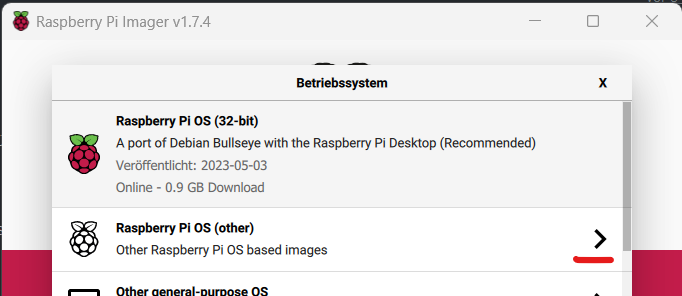
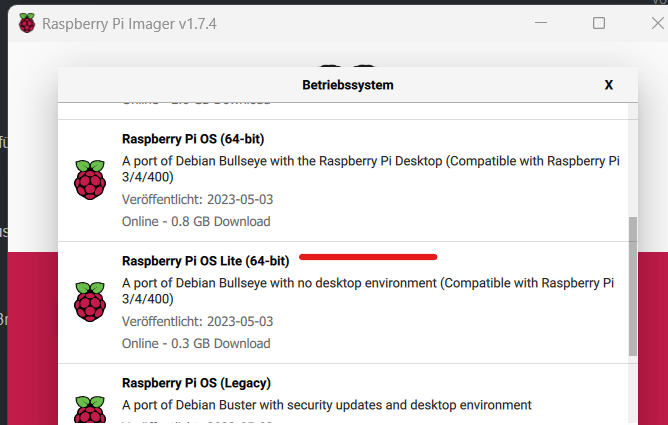
-
@thomas-braun
weil 32 Bit bei der Installation vorgegeben war.
Auch der Desktop (habe ihn bereits deaktiviertKeine Ahnung, warum Filesystem schon wieder kaputt
Wenn du mir nur einen Namen des OS nennst, nehme ich den für die Suchmaschine und suche mir ein Image.
Ich bin da hin gegangen:
https://www.raspberrypi.com/software/Habe den Installer installiert und da gab es nicht wirklich viel Auswahlmöglichkeiten
Und von Bullseye eben nur die 32Bit-VersionWenn du mehr weißt, dann solltest du es dazu schreiben
Und den ioBroker habe ich per curl-Kommandozeile laut der ioBroker-Homepage installiert
curl -sLf https://iobroker.net/install.sh | bash -
Mehr weiß ich nicht
@arnulf sagte in Update des admin Moduls auf 6.8.0 schlug fehl.:
Wenn du mehr weißt, dann solltest du es dazu schreiben
Ich hab zu den Thema schon so viel geschrieben, das wiederhole ich nicht ständig.
https://forum.iobroker.net/topic/51869/installation-auf-raspi-einfacher-geht-s-nicht
-
@thomas-braun
weil 32 Bit bei der Installation vorgegeben war.
Auch der Desktop (habe ihn bereits deaktiviertKeine Ahnung, warum Filesystem schon wieder kaputt
Wenn du mir nur einen Namen des OS nennst, nehme ich den für die Suchmaschine und suche mir ein Image.
Ich bin da hin gegangen:
https://www.raspberrypi.com/software/Habe den Installer installiert und da gab es nicht wirklich viel Auswahlmöglichkeiten
Und von Bullseye eben nur die 32Bit-VersionWenn du mehr weißt, dann solltest du es dazu schreiben
Und den ioBroker habe ich per curl-Kommandozeile laut der ioBroker-Homepage installiert
curl -sLf https://iobroker.net/install.sh | bash -
Mehr weiß ich nicht
@arnulf sagte in Update des admin Moduls auf 6.8.0 schlug fehl.:
@thomas-braun
Keine Ahnung, warum Filesystem schon wieder kaputtHast Du vielleicht voller Ungeduld weil es nicht ging oder etwas hing den Neustart beschleunigt und einfach den Strom abgezogen anstatt sauber neu zu starten? Beim Raspi versemmelt man sich so sehr schnell das Dateisystem und unter Umständen auch gleich die SD-Karte, so dass nicht nur eine Neuinstallation Sinn macht, sondern gleich eine neue SD-Karte nötig ist.
Gruss, Jürgen
-
Nach vielen Versuchen musste ich dann doch einen etwas anderen Weg gehen:
Die Installation von Bullseye ging zwar, aber es lies sich leider das RaspBEE-Modul ums Verrecken nicht ansprechen.
Nachdem ich dann das SD-Image von der Deconz-Seite verwendet habe, läuft Deconz wieder.
Allerdings ist es noch das Buster-Image.Bei meinem ioBroker läuft jetzt wieder eine ganze Menge.
Allerdings bekomme ich, beim Versuch bestimmte Adapter zu konfigurieren, einen Fehler angezeigt:File index_m.html not found
(also die Seite, die aufgehen sollte, wenn man in der Instanzenliste auf den Schraubenschlüssel klickt)
Leider findet man unter dem Suchstring "File index_m.html not found" im Forum nicht wirklich was.
Der Adapter erscheint in der Instantzenliste als grün. Aber trotzdem scheint er nicht zu funktionieren.
Zumindest bei meinen Tests.Ich wollte bei der Konfiguration nachschauen und bekomme eine nicht gefundene Webseite als Ergebnis.
Problem bei:
alexa2
broadlink
visAndere Adapter, wie zum Beispiel sonoff, scheinen beim Restore korrekt wiederhergestellt worden zu sein.
Hat jemand eine Idee, wo ich nachschauen könnte?
Ein Versuch, die gleiche Version noch einmal drüber zu installieren, hat nichts gebracht. Da bekomme ich den Error 25
4954 timing reify:rollback:retireShallow Completed in 586ms
4955 timing command:install Completed in 86679ms
4956 verbose stack Error: ENOTEMPTY: directory not empty, rename '/opt/iobroker/node_modules/accepts' -> '/opt/iobroker/node_modules/.accepts-rBwU1CL
7'
4957 verbose cwd /opt/iobroker
4958 verbose Linux 4.14.79-v7+
4959 verbose node v16.20.2
4960 verbose npm  v8.19.4
4961 error code ENOTEMPTY
4962 error syscall rename
4963 error path /opt/iobroker/node_modules/accepts
4964 error dest /opt/iobroker/node_modules/.accepts-rBwU1CL7
4965 error errno -39
4966 error ENOTEMPTY: directory not empty, rename '/opt/iobroker/node_modules/accepts' -> '/opt/iobroker/node_modules/.accepts-rBwU1CL7'
4967 verbose exit -39
4968 timing npm Completed in 87514ms
4969 verbose unfinished npm timer reify 1693299670065
4970 verbose unfinished npm timer reify:retireShallow 1693299754820
4971 verbose code -39
4972 error A complete log of this run can be found in:
4972 error     /home/iobroker/.npm/_logs/2023-08-29T09_01_09_229Z-debug-0.log
Ja, ich hatte er Restore gemacht.
Und ja, ich habe lange gewartet, bis ich nachgeschaut habe (bestimmt 2-3 Stunden)Zu sagen ist, dass Alexa2 auf dem Slave installiert ist/war.
Der Restore lief auf dem MasterEin iob fix habe ich versucht.
Dieser läuft beim Master auch komplett durch.
Beim Slave kommt nach dem Command "iob fix" sofort wieder der promptpi@ioBroker2:/home/iobroker/.npm/_logs $ iob fix pi@ioBroker2:/home/iobroker/.npm/_logs $ -
Nach vielen Versuchen musste ich dann doch einen etwas anderen Weg gehen:
Die Installation von Bullseye ging zwar, aber es lies sich leider das RaspBEE-Modul ums Verrecken nicht ansprechen.
Nachdem ich dann das SD-Image von der Deconz-Seite verwendet habe, läuft Deconz wieder.
Allerdings ist es noch das Buster-Image.Bei meinem ioBroker läuft jetzt wieder eine ganze Menge.
Allerdings bekomme ich, beim Versuch bestimmte Adapter zu konfigurieren, einen Fehler angezeigt:File index_m.html not found
(also die Seite, die aufgehen sollte, wenn man in der Instanzenliste auf den Schraubenschlüssel klickt)
Leider findet man unter dem Suchstring "File index_m.html not found" im Forum nicht wirklich was.
Der Adapter erscheint in der Instantzenliste als grün. Aber trotzdem scheint er nicht zu funktionieren.
Zumindest bei meinen Tests.Ich wollte bei der Konfiguration nachschauen und bekomme eine nicht gefundene Webseite als Ergebnis.
Problem bei:
alexa2
broadlink
visAndere Adapter, wie zum Beispiel sonoff, scheinen beim Restore korrekt wiederhergestellt worden zu sein.
Hat jemand eine Idee, wo ich nachschauen könnte?
Ein Versuch, die gleiche Version noch einmal drüber zu installieren, hat nichts gebracht. Da bekomme ich den Error 25
4954 timing reify:rollback:retireShallow Completed in 586ms
4955 timing command:install Completed in 86679ms
4956 verbose stack Error: ENOTEMPTY: directory not empty, rename '/opt/iobroker/node_modules/accepts' -> '/opt/iobroker/node_modules/.accepts-rBwU1CL
7'
4957 verbose cwd /opt/iobroker
4958 verbose Linux 4.14.79-v7+
4959 verbose node v16.20.2
4960 verbose npm  v8.19.4
4961 error code ENOTEMPTY
4962 error syscall rename
4963 error path /opt/iobroker/node_modules/accepts
4964 error dest /opt/iobroker/node_modules/.accepts-rBwU1CL7
4965 error errno -39
4966 error ENOTEMPTY: directory not empty, rename '/opt/iobroker/node_modules/accepts' -> '/opt/iobroker/node_modules/.accepts-rBwU1CL7'
4967 verbose exit -39
4968 timing npm Completed in 87514ms
4969 verbose unfinished npm timer reify 1693299670065
4970 verbose unfinished npm timer reify:retireShallow 1693299754820
4971 verbose code -39
4972 error A complete log of this run can be found in:
4972 error     /home/iobroker/.npm/_logs/2023-08-29T09_01_09_229Z-debug-0.log
Ja, ich hatte er Restore gemacht.
Und ja, ich habe lange gewartet, bis ich nachgeschaut habe (bestimmt 2-3 Stunden)Zu sagen ist, dass Alexa2 auf dem Slave installiert ist/war.
Der Restore lief auf dem MasterEin iob fix habe ich versucht.
Dieser läuft beim Master auch komplett durch.
Beim Slave kommt nach dem Command "iob fix" sofort wieder der promptpi@ioBroker2:/home/iobroker/.npm/_logs $ iob fix pi@ioBroker2:/home/iobroker/.npm/_logs $@arnulf sagte in Update des admin Moduls auf 6.8.0 schlug fehl.:
Leider findet man unter dem Suchstring "File index_m.html not found" im Forum nicht wirklich was.
bist du mobil unterwegs?
lass mal das _m weg dann findest du gefühlt 1000 Threads -
@arnulf sagte in Update des admin Moduls auf 6.8.0 schlug fehl.:
@thomas-braun
Keine Ahnung, warum Filesystem schon wieder kaputtHast Du vielleicht voller Ungeduld weil es nicht ging oder etwas hing den Neustart beschleunigt und einfach den Strom abgezogen anstatt sauber neu zu starten? Beim Raspi versemmelt man sich so sehr schnell das Dateisystem und unter Umständen auch gleich die SD-Karte, so dass nicht nur eine Neuinstallation Sinn macht, sondern gleich eine neue SD-Karte nötig ist.
Gruss, Jürgen
@wildbill mittlerweile habe ich bestimmt 2x eine neue SD-Karte neu geschrieben.
Davor war ich wohl 1x zu schnell. ich wusste nicht, dass nach dem Restore noch eine Menge im Hintergrund läuft.
(Wäre gut, wenn der Restore dazu eine Info heraus geben würde)Danach noch einmal.
Jetzt nach 2 weiteren Versuchen (und dem Buster-Image) geht schon etwas mehr. Aber noch nicht alles
-
@arnulf sagte in Update des admin Moduls auf 6.8.0 schlug fehl.:
Leider findet man unter dem Suchstring "File index_m.html not found" im Forum nicht wirklich was.
bist du mobil unterwegs?
lass mal das _m weg dann findest du gefühlt 1000 Threads -
Nach vielen Versuchen musste ich dann doch einen etwas anderen Weg gehen:
Die Installation von Bullseye ging zwar, aber es lies sich leider das RaspBEE-Modul ums Verrecken nicht ansprechen.
Nachdem ich dann das SD-Image von der Deconz-Seite verwendet habe, läuft Deconz wieder.
Allerdings ist es noch das Buster-Image.Bei meinem ioBroker läuft jetzt wieder eine ganze Menge.
Allerdings bekomme ich, beim Versuch bestimmte Adapter zu konfigurieren, einen Fehler angezeigt:File index_m.html not found
(also die Seite, die aufgehen sollte, wenn man in der Instanzenliste auf den Schraubenschlüssel klickt)
Leider findet man unter dem Suchstring "File index_m.html not found" im Forum nicht wirklich was.
Der Adapter erscheint in der Instantzenliste als grün. Aber trotzdem scheint er nicht zu funktionieren.
Zumindest bei meinen Tests.Ich wollte bei der Konfiguration nachschauen und bekomme eine nicht gefundene Webseite als Ergebnis.
Problem bei:
alexa2
broadlink
visAndere Adapter, wie zum Beispiel sonoff, scheinen beim Restore korrekt wiederhergestellt worden zu sein.
Hat jemand eine Idee, wo ich nachschauen könnte?
Ein Versuch, die gleiche Version noch einmal drüber zu installieren, hat nichts gebracht. Da bekomme ich den Error 25
4954 timing reify:rollback:retireShallow Completed in 586ms
4955 timing command:install Completed in 86679ms
4956 verbose stack Error: ENOTEMPTY: directory not empty, rename '/opt/iobroker/node_modules/accepts' -> '/opt/iobroker/node_modules/.accepts-rBwU1CL
7'
4957 verbose cwd /opt/iobroker
4958 verbose Linux 4.14.79-v7+
4959 verbose node v16.20.2
4960 verbose npm  v8.19.4
4961 error code ENOTEMPTY
4962 error syscall rename
4963 error path /opt/iobroker/node_modules/accepts
4964 error dest /opt/iobroker/node_modules/.accepts-rBwU1CL7
4965 error errno -39
4966 error ENOTEMPTY: directory not empty, rename '/opt/iobroker/node_modules/accepts' -> '/opt/iobroker/node_modules/.accepts-rBwU1CL7'
4967 verbose exit -39
4968 timing npm Completed in 87514ms
4969 verbose unfinished npm timer reify 1693299670065
4970 verbose unfinished npm timer reify:retireShallow 1693299754820
4971 verbose code -39
4972 error A complete log of this run can be found in:
4972 error     /home/iobroker/.npm/_logs/2023-08-29T09_01_09_229Z-debug-0.log
Ja, ich hatte er Restore gemacht.
Und ja, ich habe lange gewartet, bis ich nachgeschaut habe (bestimmt 2-3 Stunden)Zu sagen ist, dass Alexa2 auf dem Slave installiert ist/war.
Der Restore lief auf dem MasterEin iob fix habe ich versucht.
Dieser läuft beim Master auch komplett durch.
Beim Slave kommt nach dem Command "iob fix" sofort wieder der promptpi@ioBroker2:/home/iobroker/.npm/_logs $ iob fix pi@ioBroker2:/home/iobroker/.npm/_logs $und du hast jetzt
@arnulf sagte in Update des admin Moduls auf 6.8.0 schlug fehl.:
das SD-Image von der Deconz-Seite verwendet
??
was ist denn jetzt deine vollständige Basis?
@arnulf sagte in Update des admin Moduls auf 6.8.0 schlug fehl.:
Allerdings bekomme ich, beim Versuch bestimmte Adapter zu konfigurieren, einen Fehler angezeigt:
welche?
-
@wildbill mittlerweile habe ich bestimmt 2x eine neue SD-Karte neu geschrieben.
Davor war ich wohl 1x zu schnell. ich wusste nicht, dass nach dem Restore noch eine Menge im Hintergrund läuft.
(Wäre gut, wenn der Restore dazu eine Info heraus geben würde)Danach noch einmal.
Jetzt nach 2 weiteren Versuchen (und dem Buster-Image) geht schon etwas mehr. Aber noch nicht alles
@arnulf sagte in Update des admin Moduls auf 6.8.0 schlug fehl.:
ich wusste nicht, dass nach dem Restore noch eine Menge im Hintergrund läuft.
was bei einem Raspi schon mal 1h dauern kann.
@arnulf sagte in Update des admin Moduls auf 6.8.0 schlug fehl.:
Wäre gut, wenn der Restore dazu eine Info heraus geben würde
der Restore ist ja fertig.
Anschließend baut der js-controller alles neu. Sieht man auch im log -
und du hast jetzt
@arnulf sagte in Update des admin Moduls auf 6.8.0 schlug fehl.:
das SD-Image von der Deconz-Seite verwendet
??
was ist denn jetzt deine vollständige Basis?
@arnulf sagte in Update des admin Moduls auf 6.8.0 schlug fehl.:
Allerdings bekomme ich, beim Versuch bestimmte Adapter zu konfigurieren, einen Fehler angezeigt:
welche?
@homoran sagte in Update des admin Moduls auf 6.8.0 schlug fehl.:
und du hast jetzt
@arnulf sagte in Update des admin Moduls auf 6.8.0 schlug fehl.:
das SD-Image von der Deconz-Seite verwendet
??
was ist denn jetzt deine vollständige Basis?
@arnulf sagte in Update des admin Moduls auf 6.8.0 schlug fehl.:
Allerdings bekomme ich, beim Versuch bestimmte Adapter zu konfigurieren, einen Fehler angezeigt:
welche?
Ja, Das offizielle Image von der Deconz-.Seite verwendet. Ohne grafischem Frontend.
Das ist (laut deren Seite) noch BusterDarauf habe ich dann iobroker installiert miz
curl -sLf https://iobroker.net/install.sh | bash -
Dann ein Restore gestartet (auf dem Master)
Danach Master und Slave wieder zusammen gebracht.
Allerdings nach der ersten Methode von dieser Seitehttps://www.iobroker.net/docu/index-24.htm?page_id=3068&lang=de
Denn die verkürzte Version klappte nicht, weil die Datenbank nicht rkannt wurde
Lief soweit ohne erkennbare Fehler durch
Die Fehlermeldung bei der Neuinstallation der neusten Alexa2-Version ist:
$ iobroker upgrade alexa2@3.24.1 --debug Update alexa2 from @3.24.1 to @3.24.1 Installing iobroker.alexa2@3.24.1... (System call) npm ERR! code ENOTEMPTY npm ERR! A complete log of this run can be found in:npm ERR! /home/iobroker/.npm/_logs/2023-08-29T09_25_58_379Z-debug-0.log host.ioBroker2 Cannot install iobroker.alexa2@3.24.1: 217 ERROR: Process exited with code 25 -
@arnulf sagte in Update des admin Moduls auf 6.8.0 schlug fehl.:
ich wusste nicht, dass nach dem Restore noch eine Menge im Hintergrund läuft.
was bei einem Raspi schon mal 1h dauern kann.
@arnulf sagte in Update des admin Moduls auf 6.8.0 schlug fehl.:
Wäre gut, wenn der Restore dazu eine Info heraus geben würde
der Restore ist ja fertig.
Anschließend baut der js-controller alles neu. Sieht man auch im log -
@homoran sagte in Update des admin Moduls auf 6.8.0 schlug fehl.:
und du hast jetzt
@arnulf sagte in Update des admin Moduls auf 6.8.0 schlug fehl.:
das SD-Image von der Deconz-Seite verwendet
??
was ist denn jetzt deine vollständige Basis?
@arnulf sagte in Update des admin Moduls auf 6.8.0 schlug fehl.:
Allerdings bekomme ich, beim Versuch bestimmte Adapter zu konfigurieren, einen Fehler angezeigt:
welche?
Ja, Das offizielle Image von der Deconz-.Seite verwendet. Ohne grafischem Frontend.
Das ist (laut deren Seite) noch BusterDarauf habe ich dann iobroker installiert miz
curl -sLf https://iobroker.net/install.sh | bash -
Dann ein Restore gestartet (auf dem Master)
Danach Master und Slave wieder zusammen gebracht.
Allerdings nach der ersten Methode von dieser Seitehttps://www.iobroker.net/docu/index-24.htm?page_id=3068&lang=de
Denn die verkürzte Version klappte nicht, weil die Datenbank nicht rkannt wurde
Lief soweit ohne erkennbare Fehler durch
Die Fehlermeldung bei der Neuinstallation der neusten Alexa2-Version ist:
$ iobroker upgrade alexa2@3.24.1 --debug Update alexa2 from @3.24.1 to @3.24.1 Installing iobroker.alexa2@3.24.1... (System call) npm ERR! code ENOTEMPTY npm ERR! A complete log of this run can be found in:npm ERR! /home/iobroker/.npm/_logs/2023-08-29T09_25_58_379Z-debug-0.log host.ioBroker2 Cannot install iobroker.alexa2@3.24.1: 217 ERROR: Process exited with code 25@arnulf sagte in Update des admin Moduls auf 6.8.0 schlug fehl.:
noch Buster
warum installiert man sowas?
daher wohl auch@arnulf sagte in Update des admin Moduls auf 6.8.0 schlug fehl.:
ERROR: Process exited with code 25
installier ein aktuelles OS und danach dein deConz manuell
-
@arnulf sagte in Update des admin Moduls auf 6.8.0 schlug fehl.:
noch Buster
warum installiert man sowas?
daher wohl auch@arnulf sagte in Update des admin Moduls auf 6.8.0 schlug fehl.:
ERROR: Process exited with code 25
installier ein aktuelles OS und danach dein deConz manuell
@crunchip sagte in Update des admin Moduls auf 6.8.0 schlug fehl.:
@arnulf sagte in Update des admin Moduls auf 6.8.0 schlug fehl.:
noch Buster
warum installiert man sowas?
daher wohl auch@arnulf sagte in Update des admin Moduls auf 6.8.0 schlug fehl.:
ERROR: Process exited with code 25
auch das hatte ich scvhon geschrieben
Buster, weil sonst der RaspBEE nicht ansprechbar war. Und das Deconz-Image gibt es nur als Buster-Image
-
@arnulf sagte in Update des admin Moduls auf 6.8.0 schlug fehl.:
noch Buster
warum installiert man sowas?
daher wohl auch@arnulf sagte in Update des admin Moduls auf 6.8.0 schlug fehl.:
ERROR: Process exited with code 25
installier ein aktuelles OS und danach dein deConz manuell
@crunchip sagte in Update des admin Moduls auf 6.8.0 schlug fehl.:
@arnulf sagte in Update des admin Moduls auf 6.8.0 schlug fehl.:
noch Buster
warum installiert man sowas?
daher wohl auch@arnulf sagte in Update des admin Moduls auf 6.8.0 schlug fehl.:
ERROR: Process exited with code 25
installier ein aktuelles OS und danach dein deConz manuell
Das manuelle Installieren habe ich ja auch schon gemacht.
Ergebnis: Dekonz lief nicht -
@crunchip sagte in Update des admin Moduls auf 6.8.0 schlug fehl.:
@arnulf sagte in Update des admin Moduls auf 6.8.0 schlug fehl.:
noch Buster
warum installiert man sowas?
daher wohl auch@arnulf sagte in Update des admin Moduls auf 6.8.0 schlug fehl.:
ERROR: Process exited with code 25
installier ein aktuelles OS und danach dein deConz manuell
Das manuelle Installieren habe ich ja auch schon gemacht.
Ergebnis: Dekonz lief nicht



Hey! Du scheinst an dieser Unterhaltung interessiert zu sein, hast aber noch kein Konto.
Hast du es satt, bei jedem Besuch durch die gleichen Beiträge zu scrollen? Wenn du dich für ein Konto anmeldest, kommst du immer genau dorthin zurück, wo du zuvor warst, und kannst dich über neue Antworten benachrichtigen lassen (entweder per E-Mail oder Push-Benachrichtigung). Du kannst auch Lesezeichen speichern und Beiträge positiv bewerten, um anderen Community-Mitgliedern deine Wertschätzung zu zeigen.
Mit deinem Input könnte dieser Beitrag noch besser werden 💗
Registrieren Anmelden405
Online33.0k
Benutzer83.5k
Themen1.3m
Beiträge