Skip to content
  • Home
  • Aktuell
  • Tags
  • 0 Ungelesen 0
  • Kategorien
  • Unreplied
  • Beliebt
  • GitHub
  • Docu
  • Hilfe
Skins
  • Light
  • Brite
  • Cerulean
  • Cosmo
  • Flatly
  • Journal
  • Litera
  • Lumen
  • Lux
  • Materia
  • Minty
  • Morph
  • Pulse
  • Sandstone
  • Simplex
  • Sketchy
  • Spacelab
  • United
  • Yeti
  • Zephyr
  • Dark
  • Cyborg
  • Darkly
  • Quartz
  • Slate
  • Solar
  • Superhero
  • Vapor

  • Standard: (Kein Skin)
  • Kein Skin
Einklappen
ioBroker Logo

Community Forum

donate donate
  1. ioBroker Community Home
  2. Deutsch
  3. Einsteigerfragen
  4. Einbindung von Geräten
  5. Iob neu auf Synology VM - Datenpunkte leer
NEWS

  • UPDATE 31.10.: Amazon Alexa - ioBroker Skill läuft aus ?
    apollon77A
    apollon77
    48
    3
    8.8k

  • Monatsrückblick – September 2025
    BluefoxB
    Bluefox
    13
    1
    2.2k

  • Neues Video "KI im Smart Home" - ioBroker plus n8n
    BluefoxB
    Bluefox
    16
    1
    3.4k

Iob neu auf Synology VM - Datenpunkte leer

Geplant Angeheftet Gesperrt Verschoben Einbindung von Geräten
57 Beiträge 6 Kommentatoren 4.6k Aufrufe 4 Watching
  • Älteste zuerst
  • Neuste zuerst
  • Meiste Stimmen
Antworten
  • In einem neuen Thema antworten
Anmelden zum Antworten
Dieses Thema wurde gelöscht. Nur Nutzer mit entsprechenden Rechten können es sehen.
  • HomoranH Homoran

    @njdfg sagte in Iob neu auf Synology VM - Datenpunkte leer:

    Von meinem Rechner aus ist der Iobroker anpingbar.

    ist nicht der Punkt!
    kann die CCU den ioBroker erreichen?

    @njdfg sagte in Iob neu auf Synology VM - Datenpunkte leer:

    Sicherheitseinstellungen sind m.E. ok.

    nein!

    wenn da nicht noch mehr abgeschnitten ist, fehlt der Haken bei Umleitung....
    oder hast du https aktiv?

    N Offline
    N Offline
    Njdfg
    schrieb am zuletzt editiert von
    #17

    @homoran

    Wie kann ich das aus der CCu testen ob der iob erreichbar ist. Es wird doch die Datenstruktur eingelesen also muss die CCU doch erreichbar sein - oder?

    paul53P 1 Antwort Letzte Antwort
    0
    • N Njdfg

      @homoran

      Wie kann ich das aus der CCu testen ob der iob erreichbar ist. Es wird doch die Datenstruktur eingelesen also muss die CCU doch erreichbar sein - oder?

      paul53P Offline
      paul53P Offline
      paul53
      schrieb am zuletzt editiert von paul53
      #18

      @njdfg sagte: Es wird doch die Datenstruktur eingelesen also muss die CCU doch erreichbar sein - oder?

      Die gezeigte Datenstruktur wird vom Adapter "hm-rega" erzeugt. "hm-rpc" erhält offenbar keine Antworten von der CCU. Wie sehen die Firewall-Einstellungen in der CCU aus?

      Bitte verzichtet auf Chat-Nachrichten, denn die Handhabung ist grauenhaft !
      Produktiv: RPi 2 mit S.USV, HM-MOD-RPI und SLC-USB-Stick mit root fs

      N 1 Antwort Letzte Antwort
      0
      • paul53P paul53

        @njdfg sagte: Es wird doch die Datenstruktur eingelesen also muss die CCU doch erreichbar sein - oder?

        Die gezeigte Datenstruktur wird vom Adapter "hm-rega" erzeugt. "hm-rpc" erhält offenbar keine Antworten von der CCU. Wie sehen die Firewall-Einstellungen in der CCU aus?

        N Offline
        N Offline
        Njdfg
        schrieb am zuletzt editiert von
        #19

        @paul53

        Freigaben_HM.jpg

        die Synology hat die 192.168.123.51 und 53
        der Iob in der VM hat 192.168.123.95
        der Raspi in der VM hat 192.168.123.200

        bahnuhrB 1 Antwort Letzte Antwort
        0
        • N Njdfg

          @paul53

          Freigaben_HM.jpg

          die Synology hat die 192.168.123.51 und 53
          der Iob in der VM hat 192.168.123.95
          der Raspi in der VM hat 192.168.123.200

          bahnuhrB Offline
          bahnuhrB Offline
          bahnuhr
          Forum Testing Most Active
          schrieb am zuletzt editiert von bahnuhr
          #20

          @njdfg sagte in Iob neu auf Synology VM - Datenpunkte leer:

          @paul53

          Freigaben_HM.jpg

          die Synology hat die 192.168.123.51 und 53
          der Iob in der VM hat 192.168.123.95
          der Raspi in der VM hat 192.168.123.200

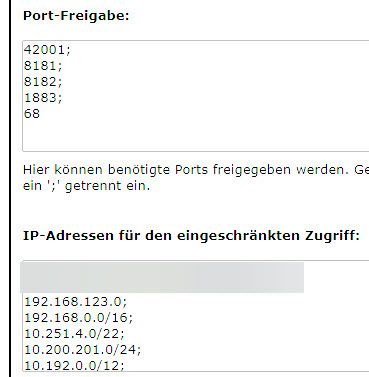
          und wo ist der obere Teil?
          Die Port Freigaben stimmen nicht.
          Und die IP unten sehen auch falsch aus.

          Liest denn hier keiner die Doku von hm-rega und hm-rpc !
          Offensichtlich nicht.


          Wenn ich helfen konnte, dann Daumen hoch (Pfeil nach oben)!
          Danke.
          gute Forenbeiträge: https://forum.iobroker.net/topic/51555/hinweise-f%C3%BCr-gute-forenbeitr%C3%A4ge
          ScreenToGif :https://www.screentogif.com/downloads.html

          N 1 Antwort Letzte Antwort
          0
          • bahnuhrB bahnuhr

            @njdfg sagte in Iob neu auf Synology VM - Datenpunkte leer:

            @paul53

            Freigaben_HM.jpg

            die Synology hat die 192.168.123.51 und 53
            der Iob in der VM hat 192.168.123.95
            der Raspi in der VM hat 192.168.123.200

            und wo ist der obere Teil?
            Die Port Freigaben stimmen nicht.
            Und die IP unten sehen auch falsch aus.

            Liest denn hier keiner die Doku von hm-rega und hm-rpc !
            Offensichtlich nicht.

            N Offline
            N Offline
            Njdfg
            schrieb am zuletzt editiert von
            #21

            @bahnuhr

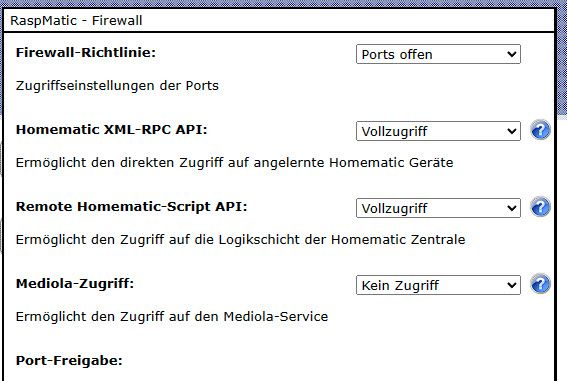
            Hier ist der obere Teil...
            FirewallOben.jpg

            Mit diesen Einstellungen lief die HM und der IOB (auf dem Tinkerboard) ohne Probleme....
            Vielleicht fallen jetzt erst durch den Umzug auf die VM die "Fehler?" auf...

            HomoranH bahnuhrB 2 Antworten Letzte Antwort
            0
            • N Njdfg

              @bahnuhr

              Hier ist der obere Teil...
              FirewallOben.jpg

              Mit diesen Einstellungen lief die HM und der IOB (auf dem Tinkerboard) ohne Probleme....
              Vielleicht fallen jetzt erst durch den Umzug auf die VM die "Fehler?" auf...

              HomoranH Offline
              HomoranH Offline
              Homoran
              Global Moderator Administrators
              schrieb am zuletzt editiert von
              #22

              @njdfg sagte in Iob neu auf Synology VM - Datenpunkte leer:

              Mit diesen Einstellungen lief die HM und der IOB (auf dem Tinkerboard) ohne Probleme....

              ist auch alles offen.
              dann müsste es die Callback Adresse richten.
              was hast du denn da jetzt eingetragen?

              @njdfg sagte in Iob neu auf Synology VM - Datenpunkte leer:

              Wie kann ich das aus der CCu testen ob der iob erreichbar ist.

              sieh im syslog der ccu nach

              kein Support per PN! - Fragen im Forum stellen - es gibt fast nichts, was nicht auch für andere interessant ist.

              Benutzt das Voting rechts unten im Beitrag wenn er euch geholfen hat.

              der Installationsfixer: curl -fsL https://iobroker.net/fix.sh | bash -

              N 1 Antwort Letzte Antwort
              0
              • N Njdfg

                @bahnuhr

                Hier ist der obere Teil...
                FirewallOben.jpg

                Mit diesen Einstellungen lief die HM und der IOB (auf dem Tinkerboard) ohne Probleme....
                Vielleicht fallen jetzt erst durch den Umzug auf die VM die "Fehler?" auf...

                bahnuhrB Offline
                bahnuhrB Offline
                bahnuhr
                Forum Testing Most Active
                schrieb am zuletzt editiert von
                #23

                @njdfg
                Da du die ports offen hast (macht man eigentlich nicht) und vollzugriff (macht man eigentlich auch nicht) sollte es eigentlich gehen.

                Was ich bisher (auch geschuldet deiner schlechten Screenshots) nicht gesehen habe ist die 2. Seite von hm-rpc.
                Was steht da als callback.

                @njdfg sagte in Iob neu auf Synology VM - Datenpunkte leer:

                der Raspi in der VM hat 192.168.123.200

                Und was ist das ?
                ist das die ccu ?


                Wenn ich helfen konnte, dann Daumen hoch (Pfeil nach oben)!
                Danke.
                gute Forenbeiträge: https://forum.iobroker.net/topic/51555/hinweise-f%C3%BCr-gute-forenbeitr%C3%A4ge
                ScreenToGif :https://www.screentogif.com/downloads.html

                N 1 Antwort Letzte Antwort
                0
                • N Njdfg

                  Hallo zusammen,
                  vielleicht hat jemand einen Tipp zur Lösung für mich.... :face_with_head_bandage:

                  Vorgehensweise:
                  Auf meiner Synology (920+) habe ich eine VM mit Ubuntu Server (22.04.2) installiert und darunter den IOB installiert.
                  In einer zweiten VM läuft seit längerem Homematic (Raspi-Matic) - (die mit dem IOB auf dem vorherigen Asus Tinkerboard einwandfrei funktionierte).

                  Die Installationen der verschiedensten Apdater klappte ohne Probleme:
                  Hier ein kleiner Auszug:
                  Auzug_Instanzen.jpg
                  Die Versionen (NPM, Node.js) sind dem neusten Stand:
                  System_Info.jpg

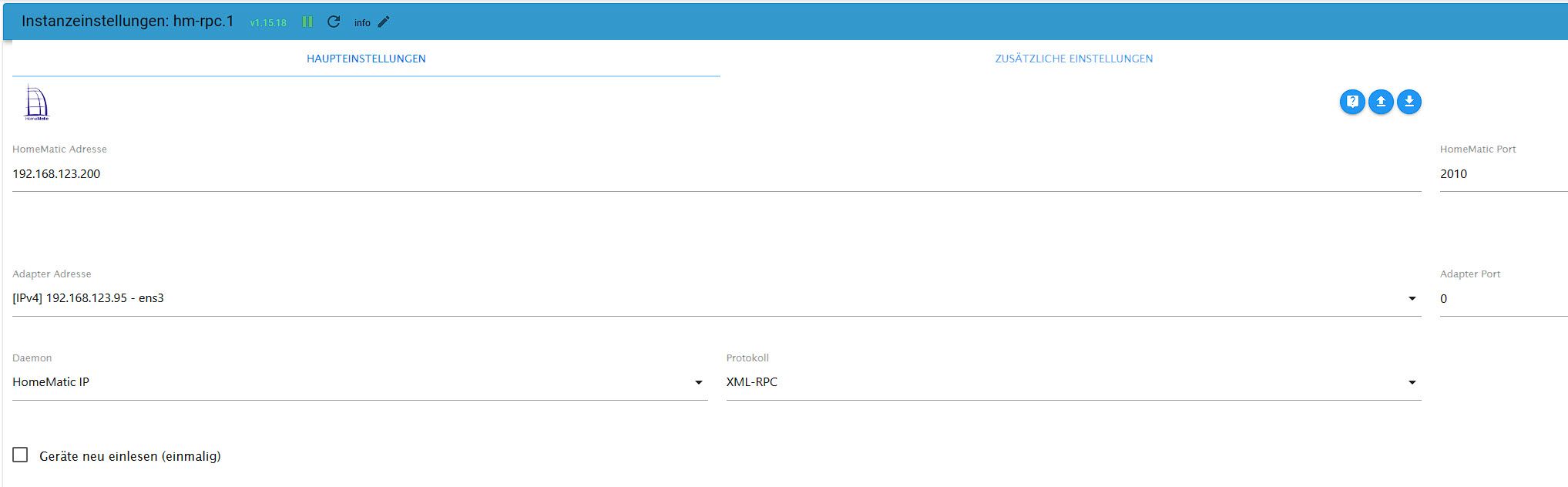
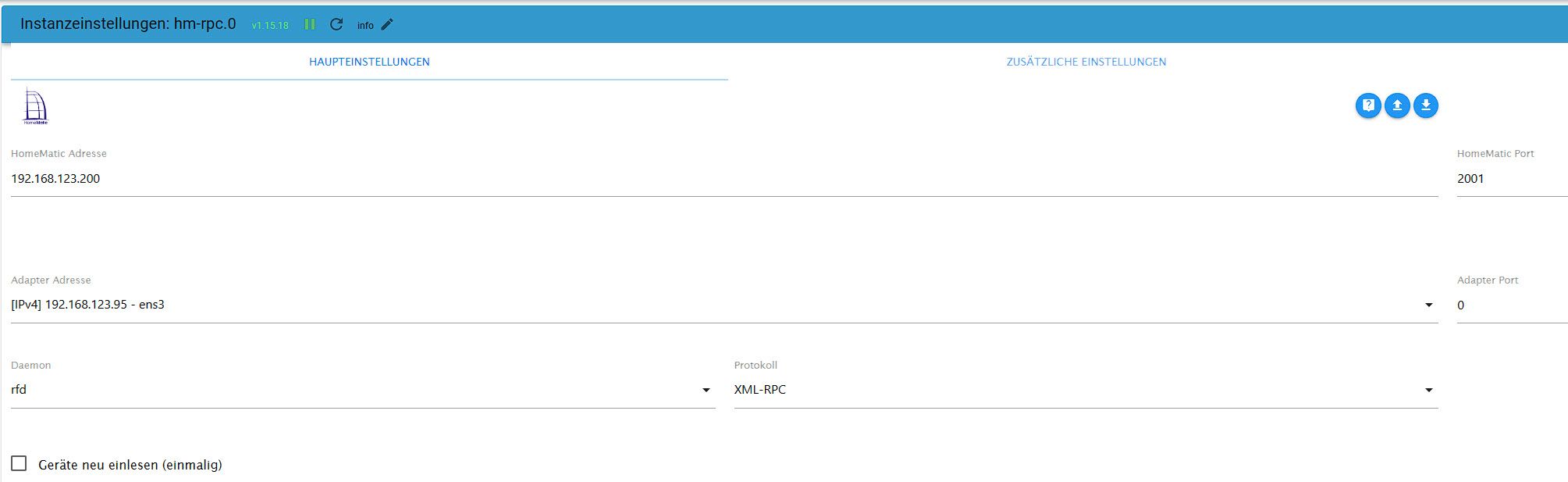
                  Die Homematic - Instanzen (hm-rpc.0 (rfd) / hm-rpc.1 (hm-ip) laufen mit den Standardeinstellungen:
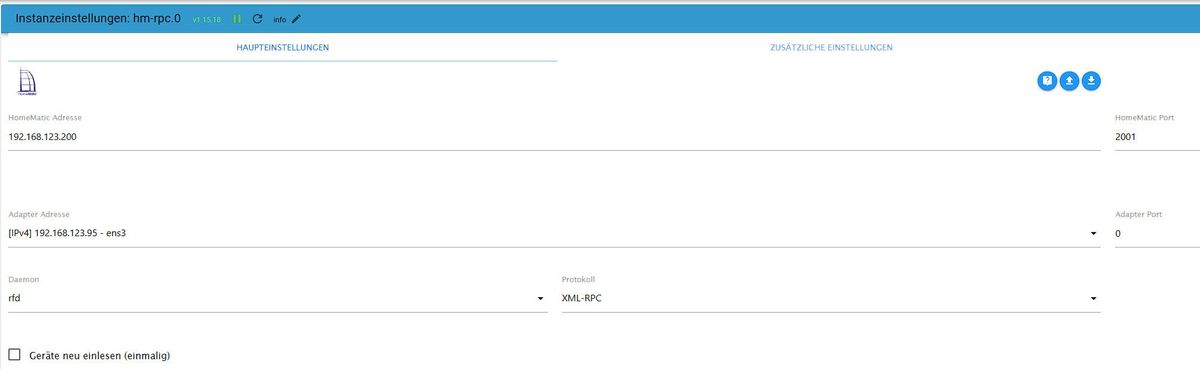
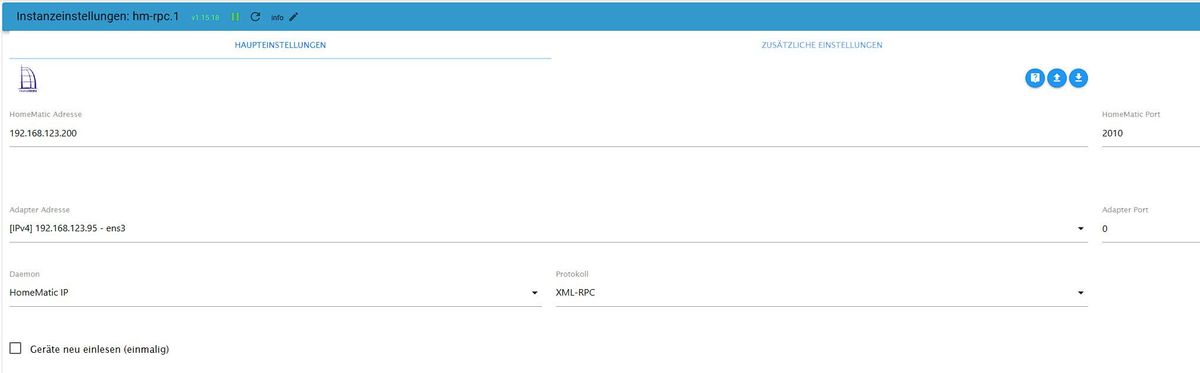
                  RPC0.jpg

                  RPC1.jpg

                  Die Auth.. bei den Sicherheitseinstellungen in der Homematic ist NICHT aktiv:

                  Auth.jpg

                  In der HM sind die Freigaben und Ports denke ich gesetzt (hat sich ja gegenüber dem Tinkerboard nicht geändert außer das es jetzt über die VM läuft).

                  Das Problem ist folgendes:
                  Wenn ich die Geräte einlesen lasse, wird der kpl. Baum (Homematicgeräte) meines Erachtens richtig eingelesen (also besteht ja eine Verbindung), die Datenpunkte meistes ab Ordner 1 bleiben alle leer.

                  keine_Datenpunkte.jpg

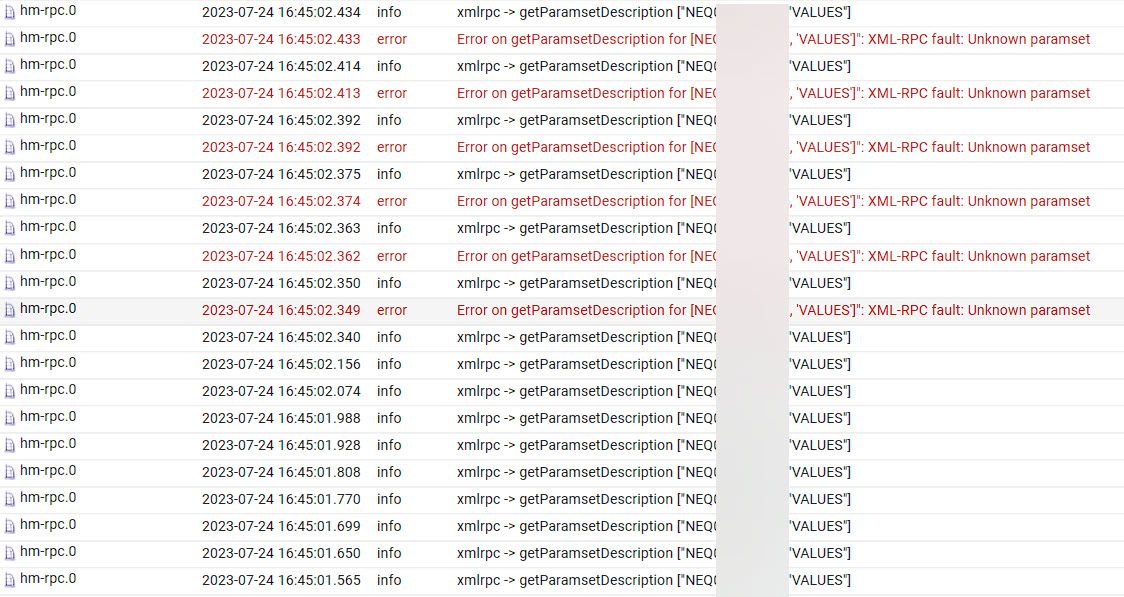
                  Hier ein Auszug aus dem Log-File:
                  Log_1.jpg

                  Log2.jpg

                  Kennt jemand das "Problem" und hat einen Tipp zur Lösung?

                  Danke und Gruß
                  Frank

                  HomoranH Offline
                  HomoranH Offline
                  Homoran
                  Global Moderator Administrators
                  schrieb am zuletzt editiert von
                  #24

                  @njdfg sagte in Iob neu auf Synology VM - Datenpunkte leer:

                  Auf meiner Synology (920+) habe ich eine VM mit Ubuntu Server (22.04.2) installiert

                  das kleingedruckte :grin:

                  was heisst das bitte genau?

                  kein Support per PN! - Fragen im Forum stellen - es gibt fast nichts, was nicht auch für andere interessant ist.

                  Benutzt das Voting rechts unten im Beitrag wenn er euch geholfen hat.

                  der Installationsfixer: curl -fsL https://iobroker.net/fix.sh | bash -

                  N 1 Antwort Letzte Antwort
                  0
                  • bahnuhrB bahnuhr

                    @njdfg
                    Da du die ports offen hast (macht man eigentlich nicht) und vollzugriff (macht man eigentlich auch nicht) sollte es eigentlich gehen.

                    Was ich bisher (auch geschuldet deiner schlechten Screenshots) nicht gesehen habe ist die 2. Seite von hm-rpc.
                    Was steht da als callback.

                    @njdfg sagte in Iob neu auf Synology VM - Datenpunkte leer:

                    der Raspi in der VM hat 192.168.123.200

                    Und was ist das ?
                    ist das die ccu ?

                    N Offline
                    N Offline
                    Njdfg
                    schrieb am zuletzt editiert von
                    #25

                    @bahnuhr
                    Ja, die CCU3 (Raspi-Matic von Jens Maus)

                    Port offen und Vollzugriff ja zum Testen Fehlersuche.

                    In der HMRPC Doku steht das Port 2001 für die HM Rpd genutzt wird, der ist ja Standard...

                    Dort habe ich eben auf Hinweis von User Homoran die Iobroker Ip eingetragen, hat aber nicht geholfen.
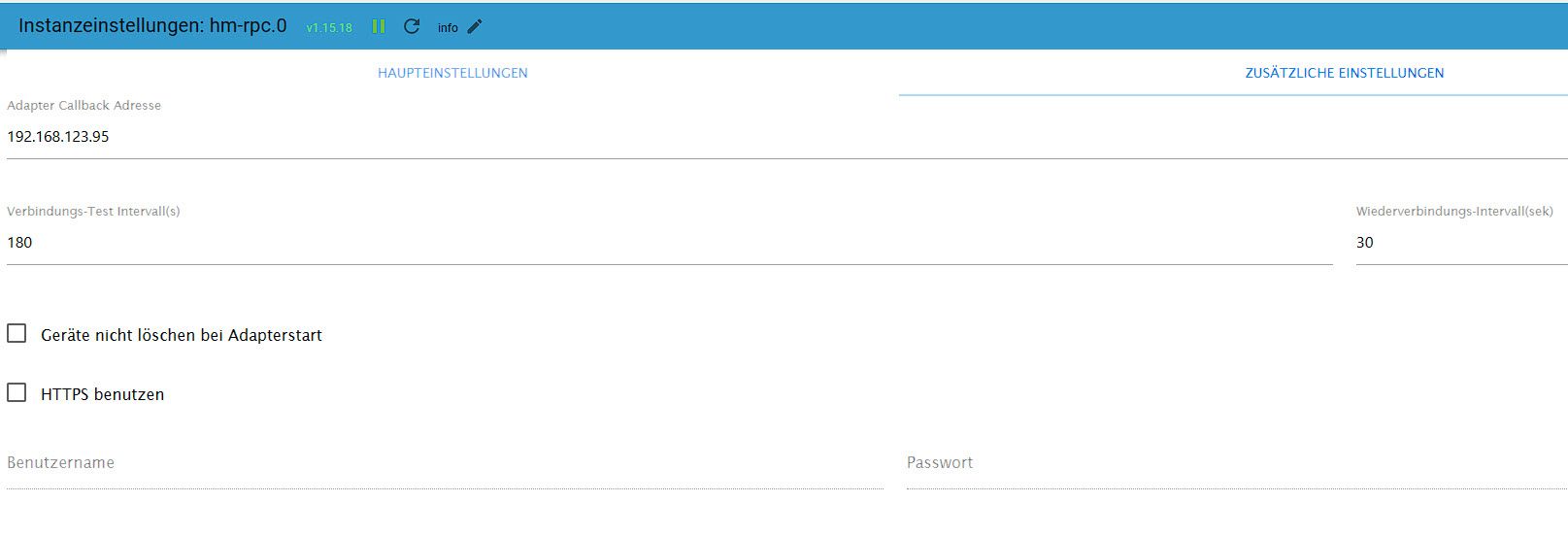
                    CallbackRP0.jpg

                    bahnuhrB HomoranH 2 Antworten Letzte Antwort
                    0
                    • N Njdfg

                      @bahnuhr
                      Ja, die CCU3 (Raspi-Matic von Jens Maus)

                      Port offen und Vollzugriff ja zum Testen Fehlersuche.

                      In der HMRPC Doku steht das Port 2001 für die HM Rpd genutzt wird, der ist ja Standard...

                      Dort habe ich eben auf Hinweis von User Homoran die Iobroker Ip eingetragen, hat aber nicht geholfen.

                      CallbackRP0.jpg

                      bahnuhrB Offline
                      bahnuhrB Offline
                      bahnuhr
                      Forum Testing Most Active
                      schrieb am zuletzt editiert von
                      #26

                      @njdfg

                      Dann weiß ich auch nicht weiter.


                      Wenn ich helfen konnte, dann Daumen hoch (Pfeil nach oben)!
                      Danke.
                      gute Forenbeiträge: https://forum.iobroker.net/topic/51555/hinweise-f%C3%BCr-gute-forenbeitr%C3%A4ge
                      ScreenToGif :https://www.screentogif.com/downloads.html

                      1 Antwort Letzte Antwort
                      0
                      • HomoranH Homoran

                        @njdfg sagte in Iob neu auf Synology VM - Datenpunkte leer:

                        Auf meiner Synology (920+) habe ich eine VM mit Ubuntu Server (22.04.2) installiert

                        das kleingedruckte :grin:

                        was heisst das bitte genau?

                        N Offline
                        N Offline
                        Njdfg
                        schrieb am zuletzt editiert von
                        #27

                        @homoran
                        Eine Linux VM erstellt und mit dem Image Ubuntu-Server die Installation ausgeführt.

                        HomoranH 1 Antwort Letzte Antwort
                        0
                        • N Njdfg

                          @bahnuhr
                          Ja, die CCU3 (Raspi-Matic von Jens Maus)

                          Port offen und Vollzugriff ja zum Testen Fehlersuche.

                          In der HMRPC Doku steht das Port 2001 für die HM Rpd genutzt wird, der ist ja Standard...

                          Dort habe ich eben auf Hinweis von User Homoran die Iobroker Ip eingetragen, hat aber nicht geholfen.

                          CallbackRP0.jpg

                          HomoranH Offline
                          HomoranH Offline
                          Homoran
                          Global Moderator Administrators
                          schrieb am zuletzt editiert von
                          #28

                          @njdfg sagte in Iob neu auf Synology VM - Datenpunkte leer:

                          hat aber nicht geholfen.

                          dann bitte Neustart und log davon in code-tags

                          kein Support per PN! - Fragen im Forum stellen - es gibt fast nichts, was nicht auch für andere interessant ist.

                          Benutzt das Voting rechts unten im Beitrag wenn er euch geholfen hat.

                          der Installationsfixer: curl -fsL https://iobroker.net/fix.sh | bash -

                          1 Antwort Letzte Antwort
                          0
                          • N Njdfg

                            @homoran
                            Eine Linux VM erstellt und mit dem Image Ubuntu-Server die Installation ausgeführt.

                            HomoranH Offline
                            HomoranH Offline
                            Homoran
                            Global Moderator Administrators
                            schrieb am zuletzt editiert von
                            #29

                            @njdfg sagte in Iob neu auf Synology VM - Datenpunkte leer:

                            Eine Linux VM erstellt

                            einfach so?
                            im root-Verzeichnis der Syno?
                            wohl eher nicht!

                            was gibt iob diag aus?
                            bitte in code-tags posten!

                            kein Support per PN! - Fragen im Forum stellen - es gibt fast nichts, was nicht auch für andere interessant ist.

                            Benutzt das Voting rechts unten im Beitrag wenn er euch geholfen hat.

                            der Installationsfixer: curl -fsL https://iobroker.net/fix.sh | bash -

                            1 Antwort Letzte Antwort
                            0
                            • HomoranH Homoran

                              @njdfg sagte in Iob neu auf Synology VM - Datenpunkte leer:

                              Mit diesen Einstellungen lief die HM und der IOB (auf dem Tinkerboard) ohne Probleme....

                              ist auch alles offen.
                              dann müsste es die Callback Adresse richten.
                              was hast du denn da jetzt eingetragen?

                              @njdfg sagte in Iob neu auf Synology VM - Datenpunkte leer:

                              Wie kann ich das aus der CCu testen ob der iob erreichbar ist.

                              sieh im syslog der ccu nach

                              N Offline
                              N Offline
                              Njdfg
                              schrieb am zuletzt editiert von
                              #30

                              @homoran

                              Hier sind mehrere Fehlermeldungen im Syslog, hat das damit evtl. zu tun?

                              2023-07-24 17:52:23,817 io.vertx.core.impl.ContextImpl ERROR [vert.x-worker-thread-6] Unhandled exception 
                              de.eq3.cbcs.legacy.communication.rpc.RpcIOException: java.net.ConnectException: Connection refused (Connection refused)
                              	at de.eq3.cbcs.legacy.communication.rpc.internal.transport.http.HttpTransport.sendRequest(HttpTransport.java:110) ~[HMIPServer.jar:?]
                              	at de.eq3.cbcs.legacy.communication.rpc.internal.rpc.RpcClient.sendRequest(RpcClient.java:94) ~[HMIPServer.jar:?]
                              	at de.eq3.cbcs.legacy.communication.rpc.internal.rpc.RpcClient.invoke(RpcClient.java:82) ~[HMIPServer.jar:?]
                              	at com.sun.proxy.$Proxy40.event(Unknown Source) ~[?:?]
                              	at de.eq3.ccu.virtualdevice.service.internal.rega.vertx.RegaClientWorker.handleEvent(RegaClientWorker.java:73) ~[HMIPServer.jar:?]
                              	at de.eq3.ccu.virtualdevice.service.internal.rega.vertx.RegaClientWorker.access$000(RegaClientWorker.java:13) ~[HMIPServer.jar:?]
                              	at de.eq3.ccu.virtualdevice.service.internal.rega.vertx.RegaClientWorker$1.handle(RegaClientWorker.java:35) ~[HMIPServer.jar:?]
                              	at de.eq3.ccu.virtualdevice.service.internal.rega.vertx.RegaClientWorker$1.handle(RegaClientWorker.java:26) ~[HMIPServer.jar:?]
                              	at io.vertx.core.impl.AbstractContext.dispatch(AbstractContext.java:100) ~[HMIPServer.jar:?]
                              	at io.vertx.core.impl.WorkerContext.lambda$emit$0(WorkerContext.java:59) ~[HMIPServer.jar:?]
                              	at io.vertx.core.impl.WorkerContext.lambda$execute$2(WorkerContext.java:104) ~[HMIPServer.jar:?]
                              	at io.vertx.core.impl.TaskQueue.run(TaskQueue.java:76) ~[HMIPServer.jar:?]
                              	at java.util.concurrent.ThreadPoolExecutor.runWorker(ThreadPoolExecutor.java:1149) ~[?:1.8.0_372]
                              	at java.util.concurrent.ThreadPoolExecutor$Worker.run(ThreadPoolExecutor.java:624) ~[?:1.8.0_372]
                              	at io.netty.util.concurrent.FastThreadLocalRunnable.run(FastThreadLocalRunnable.java:30) ~[HMIPServer.jar:?]
                              	at java.lang.Thread.run(Thread.java:750) ~[?:1.8.0_372]
                              Caused by: java.net.ConnectException: Connection refused (Connection refused)
                              	at java.net.PlainSocketImpl.socketConnect(Native Method) ~[?:1.8.0_372]
                              	at java.net.AbstractPlainSocketImpl.doConnect(AbstractPlainSocketImpl.java:350) ~[?:1.8.0_372]
                              	at java.net.AbstractPlainSocketImpl.connectToAddress(AbstractPlainSocketImpl.java:206) ~[?:1.8.0_372]
                              	at java.net.AbstractPlainSocketImpl.connect(AbstractPlainSocketImpl.java:188) ~[?:1.8.0_372]
                              	at java.net.SocksSocketImpl.connect(SocksSocketImpl.java:392) ~[?:1.8.0_372]
                              	at java.net.Socket.connect(Socket.java:613) ~[?:1.8.0_372]
                              	at org.apache.http.conn.scheme.PlainSocketFactory.connectSocket(PlainSocketFactory.java:120) ~[HMIPServer.jar:?]
                              	at org.apache.http.impl.conn.DefaultClientConnectionOperator.openConnection(DefaultClientConnectionOperator.java:179) ~[HMIPServer.jar:?]
                              	at org.apache.http.impl.conn.AbstractPoolEntry.open(AbstractPoolEntry.java:144) ~[HMIPServer.jar:?]
                              	at org.apache.http.impl.conn.AbstractPooledConnAdapter.open(AbstractPooledConnAdapter.java:134) ~[HMIPServer.jar:?]
                              	at org.apache.http.impl.client.DefaultRequestDirector.tryConnect(DefaultRequestDirector.java:612) ~[HMIPServer.jar:?]
                              	at org.apache.http.impl.client.DefaultRequestDirector.execute(DefaultRequestDirector.java:447) ~[HMIPServer.jar:?]
                              	at org.apache.http.impl.client.AbstractHttpClient.doExecute(AbstractHttpClient.java:884) ~[HMIPServer.jar:?]
                              	at org.apache.http.impl.client.CloseableHttpClient.execute(CloseableHttpClient.java:82) ~[HMIPServer.jar:?]
                              	at org.apache.http.impl.client.CloseableHttpClient.execute(CloseableHttpClient.java:107) ~[HMIPServer.jar:?]
                              	at org.apache.http.impl.client.CloseableHttpClient.execute(CloseableHttpClient.java:55) ~[HMIPServer.jar:?]
                              	at de.eq3.cbcs.legacy.communication.rpc.internal.transport.http.HttpTransport.sendRequest(HttpTransport.java:106) ~[HMIPServer.jar:?]
                              	... 15 more
                              
                              
                              HomoranH F 2 Antworten Letzte Antwort
                              0
                              • N Njdfg

                                @homoran

                                Hier sind mehrere Fehlermeldungen im Syslog, hat das damit evtl. zu tun?

                                2023-07-24 17:52:23,817 io.vertx.core.impl.ContextImpl ERROR [vert.x-worker-thread-6] Unhandled exception 
                                de.eq3.cbcs.legacy.communication.rpc.RpcIOException: java.net.ConnectException: Connection refused (Connection refused)
                                	at de.eq3.cbcs.legacy.communication.rpc.internal.transport.http.HttpTransport.sendRequest(HttpTransport.java:110) ~[HMIPServer.jar:?]
                                	at de.eq3.cbcs.legacy.communication.rpc.internal.rpc.RpcClient.sendRequest(RpcClient.java:94) ~[HMIPServer.jar:?]
                                	at de.eq3.cbcs.legacy.communication.rpc.internal.rpc.RpcClient.invoke(RpcClient.java:82) ~[HMIPServer.jar:?]
                                	at com.sun.proxy.$Proxy40.event(Unknown Source) ~[?:?]
                                	at de.eq3.ccu.virtualdevice.service.internal.rega.vertx.RegaClientWorker.handleEvent(RegaClientWorker.java:73) ~[HMIPServer.jar:?]
                                	at de.eq3.ccu.virtualdevice.service.internal.rega.vertx.RegaClientWorker.access$000(RegaClientWorker.java:13) ~[HMIPServer.jar:?]
                                	at de.eq3.ccu.virtualdevice.service.internal.rega.vertx.RegaClientWorker$1.handle(RegaClientWorker.java:35) ~[HMIPServer.jar:?]
                                	at de.eq3.ccu.virtualdevice.service.internal.rega.vertx.RegaClientWorker$1.handle(RegaClientWorker.java:26) ~[HMIPServer.jar:?]
                                	at io.vertx.core.impl.AbstractContext.dispatch(AbstractContext.java:100) ~[HMIPServer.jar:?]
                                	at io.vertx.core.impl.WorkerContext.lambda$emit$0(WorkerContext.java:59) ~[HMIPServer.jar:?]
                                	at io.vertx.core.impl.WorkerContext.lambda$execute$2(WorkerContext.java:104) ~[HMIPServer.jar:?]
                                	at io.vertx.core.impl.TaskQueue.run(TaskQueue.java:76) ~[HMIPServer.jar:?]
                                	at java.util.concurrent.ThreadPoolExecutor.runWorker(ThreadPoolExecutor.java:1149) ~[?:1.8.0_372]
                                	at java.util.concurrent.ThreadPoolExecutor$Worker.run(ThreadPoolExecutor.java:624) ~[?:1.8.0_372]
                                	at io.netty.util.concurrent.FastThreadLocalRunnable.run(FastThreadLocalRunnable.java:30) ~[HMIPServer.jar:?]
                                	at java.lang.Thread.run(Thread.java:750) ~[?:1.8.0_372]
                                Caused by: java.net.ConnectException: Connection refused (Connection refused)
                                	at java.net.PlainSocketImpl.socketConnect(Native Method) ~[?:1.8.0_372]
                                	at java.net.AbstractPlainSocketImpl.doConnect(AbstractPlainSocketImpl.java:350) ~[?:1.8.0_372]
                                	at java.net.AbstractPlainSocketImpl.connectToAddress(AbstractPlainSocketImpl.java:206) ~[?:1.8.0_372]
                                	at java.net.AbstractPlainSocketImpl.connect(AbstractPlainSocketImpl.java:188) ~[?:1.8.0_372]
                                	at java.net.SocksSocketImpl.connect(SocksSocketImpl.java:392) ~[?:1.8.0_372]
                                	at java.net.Socket.connect(Socket.java:613) ~[?:1.8.0_372]
                                	at org.apache.http.conn.scheme.PlainSocketFactory.connectSocket(PlainSocketFactory.java:120) ~[HMIPServer.jar:?]
                                	at org.apache.http.impl.conn.DefaultClientConnectionOperator.openConnection(DefaultClientConnectionOperator.java:179) ~[HMIPServer.jar:?]
                                	at org.apache.http.impl.conn.AbstractPoolEntry.open(AbstractPoolEntry.java:144) ~[HMIPServer.jar:?]
                                	at org.apache.http.impl.conn.AbstractPooledConnAdapter.open(AbstractPooledConnAdapter.java:134) ~[HMIPServer.jar:?]
                                	at org.apache.http.impl.client.DefaultRequestDirector.tryConnect(DefaultRequestDirector.java:612) ~[HMIPServer.jar:?]
                                	at org.apache.http.impl.client.DefaultRequestDirector.execute(DefaultRequestDirector.java:447) ~[HMIPServer.jar:?]
                                	at org.apache.http.impl.client.AbstractHttpClient.doExecute(AbstractHttpClient.java:884) ~[HMIPServer.jar:?]
                                	at org.apache.http.impl.client.CloseableHttpClient.execute(CloseableHttpClient.java:82) ~[HMIPServer.jar:?]
                                	at org.apache.http.impl.client.CloseableHttpClient.execute(CloseableHttpClient.java:107) ~[HMIPServer.jar:?]
                                	at org.apache.http.impl.client.CloseableHttpClient.execute(CloseableHttpClient.java:55) ~[HMIPServer.jar:?]
                                	at de.eq3.cbcs.legacy.communication.rpc.internal.transport.http.HttpTransport.sendRequest(HttpTransport.java:106) ~[HMIPServer.jar:?]
                                	... 15 more
                                
                                
                                HomoranH Offline
                                HomoranH Offline
                                Homoran
                                Global Moderator Administrators
                                schrieb am zuletzt editiert von
                                #31

                                @njdfg hab da keine Ahnung von.

                                hab zwar so etwas inder Art erwartet

                                @njdfg sagte in Iob neu auf Synology VM - Datenpunkte leer:

                                RpcClient.sendRequest

                                aber nicht als error aus den Tiefen von Java, sondern mehr in Klartext mit IP und Hostnamen

                                kein Support per PN! - Fragen im Forum stellen - es gibt fast nichts, was nicht auch für andere interessant ist.

                                Benutzt das Voting rechts unten im Beitrag wenn er euch geholfen hat.

                                der Installationsfixer: curl -fsL https://iobroker.net/fix.sh | bash -

                                N 1 Antwort Letzte Antwort
                                0
                                • N Njdfg

                                  @homoran

                                  Hier sind mehrere Fehlermeldungen im Syslog, hat das damit evtl. zu tun?

                                  2023-07-24 17:52:23,817 io.vertx.core.impl.ContextImpl ERROR [vert.x-worker-thread-6] Unhandled exception 
                                  de.eq3.cbcs.legacy.communication.rpc.RpcIOException: java.net.ConnectException: Connection refused (Connection refused)
                                  	at de.eq3.cbcs.legacy.communication.rpc.internal.transport.http.HttpTransport.sendRequest(HttpTransport.java:110) ~[HMIPServer.jar:?]
                                  	at de.eq3.cbcs.legacy.communication.rpc.internal.rpc.RpcClient.sendRequest(RpcClient.java:94) ~[HMIPServer.jar:?]
                                  	at de.eq3.cbcs.legacy.communication.rpc.internal.rpc.RpcClient.invoke(RpcClient.java:82) ~[HMIPServer.jar:?]
                                  	at com.sun.proxy.$Proxy40.event(Unknown Source) ~[?:?]
                                  	at de.eq3.ccu.virtualdevice.service.internal.rega.vertx.RegaClientWorker.handleEvent(RegaClientWorker.java:73) ~[HMIPServer.jar:?]
                                  	at de.eq3.ccu.virtualdevice.service.internal.rega.vertx.RegaClientWorker.access$000(RegaClientWorker.java:13) ~[HMIPServer.jar:?]
                                  	at de.eq3.ccu.virtualdevice.service.internal.rega.vertx.RegaClientWorker$1.handle(RegaClientWorker.java:35) ~[HMIPServer.jar:?]
                                  	at de.eq3.ccu.virtualdevice.service.internal.rega.vertx.RegaClientWorker$1.handle(RegaClientWorker.java:26) ~[HMIPServer.jar:?]
                                  	at io.vertx.core.impl.AbstractContext.dispatch(AbstractContext.java:100) ~[HMIPServer.jar:?]
                                  	at io.vertx.core.impl.WorkerContext.lambda$emit$0(WorkerContext.java:59) ~[HMIPServer.jar:?]
                                  	at io.vertx.core.impl.WorkerContext.lambda$execute$2(WorkerContext.java:104) ~[HMIPServer.jar:?]
                                  	at io.vertx.core.impl.TaskQueue.run(TaskQueue.java:76) ~[HMIPServer.jar:?]
                                  	at java.util.concurrent.ThreadPoolExecutor.runWorker(ThreadPoolExecutor.java:1149) ~[?:1.8.0_372]
                                  	at java.util.concurrent.ThreadPoolExecutor$Worker.run(ThreadPoolExecutor.java:624) ~[?:1.8.0_372]
                                  	at io.netty.util.concurrent.FastThreadLocalRunnable.run(FastThreadLocalRunnable.java:30) ~[HMIPServer.jar:?]
                                  	at java.lang.Thread.run(Thread.java:750) ~[?:1.8.0_372]
                                  Caused by: java.net.ConnectException: Connection refused (Connection refused)
                                  	at java.net.PlainSocketImpl.socketConnect(Native Method) ~[?:1.8.0_372]
                                  	at java.net.AbstractPlainSocketImpl.doConnect(AbstractPlainSocketImpl.java:350) ~[?:1.8.0_372]
                                  	at java.net.AbstractPlainSocketImpl.connectToAddress(AbstractPlainSocketImpl.java:206) ~[?:1.8.0_372]
                                  	at java.net.AbstractPlainSocketImpl.connect(AbstractPlainSocketImpl.java:188) ~[?:1.8.0_372]
                                  	at java.net.SocksSocketImpl.connect(SocksSocketImpl.java:392) ~[?:1.8.0_372]
                                  	at java.net.Socket.connect(Socket.java:613) ~[?:1.8.0_372]
                                  	at org.apache.http.conn.scheme.PlainSocketFactory.connectSocket(PlainSocketFactory.java:120) ~[HMIPServer.jar:?]
                                  	at org.apache.http.impl.conn.DefaultClientConnectionOperator.openConnection(DefaultClientConnectionOperator.java:179) ~[HMIPServer.jar:?]
                                  	at org.apache.http.impl.conn.AbstractPoolEntry.open(AbstractPoolEntry.java:144) ~[HMIPServer.jar:?]
                                  	at org.apache.http.impl.conn.AbstractPooledConnAdapter.open(AbstractPooledConnAdapter.java:134) ~[HMIPServer.jar:?]
                                  	at org.apache.http.impl.client.DefaultRequestDirector.tryConnect(DefaultRequestDirector.java:612) ~[HMIPServer.jar:?]
                                  	at org.apache.http.impl.client.DefaultRequestDirector.execute(DefaultRequestDirector.java:447) ~[HMIPServer.jar:?]
                                  	at org.apache.http.impl.client.AbstractHttpClient.doExecute(AbstractHttpClient.java:884) ~[HMIPServer.jar:?]
                                  	at org.apache.http.impl.client.CloseableHttpClient.execute(CloseableHttpClient.java:82) ~[HMIPServer.jar:?]
                                  	at org.apache.http.impl.client.CloseableHttpClient.execute(CloseableHttpClient.java:107) ~[HMIPServer.jar:?]
                                  	at org.apache.http.impl.client.CloseableHttpClient.execute(CloseableHttpClient.java:55) ~[HMIPServer.jar:?]
                                  	at de.eq3.cbcs.legacy.communication.rpc.internal.transport.http.HttpTransport.sendRequest(HttpTransport.java:106) ~[HMIPServer.jar:?]
                                  	... 15 more
                                  
                                  
                                  F Offline
                                  F Offline
                                  fastfoot
                                  schrieb am zuletzt editiert von fastfoot
                                  #32

                                  @njdfg es gibt da gerade ein issue mit hm-rpc, mW aber mit Node20. Dennoch könntest du mal probieren Sentry in der GUI abzuschalten, in den Instanzen beim Adapter das grüne Dreieck klicken, wird dann grau und der Adapter startet neu. Ist ja nur ein Klick und einen Versuch wert

                                  Edit: dazu muss in den Expertenmodus gewechselt werden, sonst sieht man das Dreieck gar nicht

                                  iobroker läuft unter Docker auf QNAP TS-451+
                                  SkriptRecovery: https://forum.iobroker.net/post/930558

                                  N 1 Antwort Letzte Antwort
                                  1
                                  • HomoranH Homoran

                                    @njdfg hab da keine Ahnung von.

                                    hab zwar so etwas inder Art erwartet

                                    @njdfg sagte in Iob neu auf Synology VM - Datenpunkte leer:

                                    RpcClient.sendRequest

                                    aber nicht als error aus den Tiefen von Java, sondern mehr in Klartext mit IP und Hostnamen

                                    N Offline
                                    N Offline
                                    Njdfg
                                    schrieb am zuletzt editiert von
                                    #33

                                    @homoran

                                    Hier das iob diag Ergebnis:

                                    ======== Start marking the full check here =========
                                    
                                    Skript v.2023-04-16
                                    
                                    *** BASE SYSTEM ***
                                    Architecture    : x86_64
                                    Docker          : false
                                    Virtualization  : microsoft
                                    Distributor ID: Ubuntu
                                    Description:    Ubuntu 22.04.2 LTS
                                    Release:        22.04
                                    Codename:       jammy
                                    
                                    PRETTY_NAME="Ubuntu 22.04.2 LTS"
                                    NAME="Ubuntu"
                                    VERSION_ID="22.04"
                                    VERSION="22.04.2 LTS (Jammy Jellyfish)"
                                    VERSION_CODENAME=jammy
                                    ID=ubuntu
                                    ID_LIKE=debian
                                    HOME_URL="https://www.ubuntu.com/"
                                    SUPPORT_URL="https://help.ubuntu.com/"
                                    BUG_REPORT_URL="https://bugs.launchpad.net/ubuntu/"
                                    PRIVACY_POLICY_URL="https://www.ubuntu.com/legal/terms-and-policies/privacy-policy"
                                    UBUNTU_CODENAME=jammy
                                    
                                    Systemuptime and Load:
                                     18:11:52 up  3:57,  2 users,  load average: 0.02, 0.12, 0.17
                                    CPU threads: 2
                                    
                                    
                                    *** Time and Time Zones ***
                                                   Local time: Mon 2023-07-24 18:11:52 CEST
                                               Universal time: Mon 2023-07-24 16:11:52 UTC
                                                     RTC time: Mon 2023-07-24 16:11:52
                                                    Time zone: Europe/Berlin (CEST, +0200)
                                    System clock synchronized: yes
                                                  NTP service: active
                                              RTC in local TZ: no
                                    
                                    *** User and Groups ***
                                    root
                                    /root
                                    root
                                    
                                    *** X-Server-Setup ***
                                    X-Server:       false
                                    Desktop:
                                    Terminal:       tty
                                    Boot Target:    graphical.target
                                    
                                    *** MEMORY ***
                                                   total        used        free      shared  buff/cache   available
                                    Mem:            5.9G        2.3G        3.1G        1.0M        540M        3.4G
                                    Swap:           2.0G          0B        2.0G
                                    Total:          8.0G        2.3G        5.2G
                                    
                                             5921 M total memory
                                             2264 M used memory
                                              197 M active memory
                                             2315 M inactive memory
                                             3116 M free memory
                                               58 M buffer memory
                                              481 M swap cache
                                             2047 M total swap
                                                0 M used swap
                                             2047 M free swap
                                    
                                    *** FILESYSTEM ***
                                    Filesystem                        Type   Size  Used Avail Use% Mounted on
                                    tmpfs                             tmpfs  593M  1.1M  592M   1% /run
                                    /dev/mapper/ubuntu--vg-ubuntu--lv ext4    12G  7.2G  3.5G  68% /
                                    tmpfs                             tmpfs  2.9G     0  2.9G   0% /dev/shm
                                    tmpfs                             tmpfs  5.0M     0  5.0M   0% /run/lock
                                    /dev/sda2                         ext4   2.0G  130M  1.7G   8% /boot
                                    tmpfs                             tmpfs  593M  4.0K  593M   1% /run/user/0
                                    
                                    Messages concerning ext4 filesystem in dmesg:
                                    [Mon Jul 24 14:14:37 2023] EXT4-fs (dm-0): mounted filesystem with ordered data mode. Opts: (null). Quota mode: none.
                                    [Mon Jul 24 14:14:38 2023] EXT4-fs (dm-0): re-mounted. Opts: (null). Quota mode: none.
                                    [Mon Jul 24 14:14:40 2023] EXT4-fs (sda2): mounted filesystem with ordered data mode. Opts: (null). Quota mode: none.
                                    
                                    Show mounted filesystems (real ones only):
                                    TARGET              SOURCE                            FSTYPE   OPTIONS
                                    /                   /dev/mapper/ubuntu--vg-ubuntu--lv ext4     rw,relatime
                                    |-/snap/core20/1974 /dev/loop1                        squashfs ro,nodev,relatime,errors=continue
                                    |-/snap/core20/1822 /dev/loop2                        squashfs ro,nodev,relatime,errors=continue
                                    |-/snap/lxd/24322   /dev/loop0                        squashfs ro,nodev,relatime,errors=continue
                                    |-/snap/snapd/18357 /dev/loop3                        squashfs ro,nodev,relatime,errors=continue
                                    |-/snap/snapd/19457 /dev/loop4                        squashfs ro,nodev,relatime,errors=continue
                                    `-/boot             /dev/sda2                         ext4     rw,relatime
                                    
                                    Files in neuralgic directories:
                                    
                                    /var:
                                    889M    /var/
                                    539M    /var/lib
                                    343M    /var/lib/snapd
                                    342M    /var/lib/snapd/snaps
                                    249M    /var/cache
                                    
                                    Archived and active journals take up 88.0M in the file system.
                                    
                                    /opt/iobroker/backups:
                                    48M     /opt/iobroker/backups/
                                    
                                    /opt/iobroker/iobroker-data:
                                    325M    /opt/iobroker/iobroker-data/
                                    221M    /opt/iobroker/iobroker-data/files
                                    78M     /opt/iobroker/iobroker-data/backup-objects
                                    51M     /opt/iobroker/iobroker-data/files/javascript.admin
                                    43M     /opt/iobroker/iobroker-data/files/iot.admin
                                    
                                    The five largest files in iobroker-data are:
                                    33M     /opt/iobroker/iobroker-data/files/iot.admin/static/js/main.1797d034.js.map
                                    20M     /opt/iobroker/iobroker-data/files/web.admin/static/js/main.becd2d7c.js.map
                                    18M     /opt/iobroker/iobroker-data/files/text2command.admin/static/js/main.274a4d8d.js.map
                                    16M     /opt/iobroker/iobroker-data/objects.jsonl
                                    12M     /opt/iobroker/iobroker-data/states.jsonl
                                    
                                    *** NodeJS-Installation ***
                                    
                                    /usr/bin/nodejs         v18.17.0
                                    /usr/bin/node           v18.17.0
                                    /usr/bin/npm            9.6.7
                                    /usr/bin/npx            9.6.7
                                    
                                    
                                    nodejs:
                                      Installed: 18.17.0-deb-1nodesource1
                                      Candidate: 18.17.0-deb-1nodesource1
                                      Version table:
                                     *** 18.17.0-deb-1nodesource1 500
                                            500 https://deb.nodesource.com/node_18.x jammy/main amd64 Packages
                                            100 /var/lib/dpkg/status
                                         12.22.9~dfsg-1ubuntu3 500
                                            500 http://de.archive.ubuntu.com/ubuntu jammy/universe amd64 Packages
                                    
                                    Temp directories causing npm8 problem: 0
                                    No problems detected
                                    
                                    *** ioBroker-Installation ***
                                    
                                    ioBroker Status
                                    iobroker is running on this host.
                                    
                                    
                                    Objects type: jsonl
                                    States  type: jsonl
                                    
                                    MULTIHOSTSERVICE/enabled: false
                                    
                                    Core adapters versions
                                    js-controller:  5.0.8
                                    admin:          6.6.1
                                    javascript:     7.1.1
                                    
                                    Adapters from github:   0
                                    
                                    Adapter State
                                    + system.adapter.admin.0                  : admin                 : ubunto-iobroker                          -  enabled, port: 8081, bind: 0.0.0.0, run as: admin
                                    + system.adapter.alexa2.0                 : alexa2                : ubunto-iobroker                          -  enabled
                                    + system.adapter.awtrix-light.0           : awtrix-light          : ubunto-iobroker                          -  enabled
                                    + system.adapter.backitup.0               : backitup              : ubunto-iobroker                          -  enabled
                                    + system.adapter.bring.0                  : bring                 : ubunto-iobroker                          -  enabled
                                    + system.adapter.cloud.0                  : cloud                 : ubunto-iobroker                          -  enabled
                                    + system.adapter.discovery.0              : discovery             : ubunto-iobroker                          -  enabled
                                      system.adapter.dwd.0                    : dwd                   : ubunto-iobroker                          -  enabled
                                    + system.adapter.fritzbox.0               : fritzbox              : ubunto-iobroker                          -  enabled
                                    + system.adapter.fullybrowser.0           : fullybrowser          : ubunto-iobroker                          -  enabled
                                    + system.adapter.harmony.0                : harmony               : ubunto-iobroker                          -  enabled
                                    + system.adapter.hm-rega.0                : hm-rega               : ubunto-iobroker                          -  enabled
                                    + system.adapter.hm-rpc.0                 : hm-rpc                : ubunto-iobroker                          -  enabled, port: 0
                                    + system.adapter.hm-rpc.1                 : hm-rpc                : ubunto-iobroker                          -  enabled, port: 0
                                    + system.adapter.homeconnect.0            : homeconnect           : ubunto-iobroker                          -  enabled
                                    + system.adapter.hyperion_ng.0            : hyperion_ng           : ubunto-iobroker                          -  enabled
                                      system.adapter.ical.0                   : ical                  : ubunto-iobroker                          -  enabled
                                      system.adapter.icons-icons8.0           : icons-icons8          : ubunto-iobroker                          -  enabled
                                    + system.adapter.info.0                   : info                  : ubunto-iobroker                          -  enabled
                                    + system.adapter.iot.0                    : iot                   : ubunto-iobroker                          -  enabled
                                    + system.adapter.javascript.0             : javascript            : ubunto-iobroker                          -  enabled
                                    + system.adapter.lgtv.0                   : lgtv                  : ubunto-iobroker                          -  enabled
                                      system.adapter.luftdaten.0              : luftdaten             : ubunto-iobroker                          -  enabled
                                    + system.adapter.mihome-vacuum.0          : mihome-vacuum         : ubunto-iobroker                          -  enabled, port: 54321
                                    + system.adapter.nanoleaf-lightpanels.0   : nanoleaf-lightpanels  : ubunto-iobroker                          -  enabled, port: 16021
                                    + system.adapter.pollenflug.0             : pollenflug            : ubunto-iobroker                          -  enabled
                                    + system.adapter.sonoff.0                 : sonoff                : ubunto-iobroker                          -  enabled, port: 1883, bind: 192.168.123.95
                                    + system.adapter.tankerkoenig.0           : tankerkoenig          : ubunto-iobroker                          -  enabled
                                    + system.adapter.telegram.0               : telegram              : ubunto-iobroker                          -  enabled, port: 8443, bind: 0.0.0.0
                                    + system.adapter.text2command.0           : text2command          : ubunto-iobroker                          -  enabled
                                    + system.adapter.tr-064.0                 : tr-064                : ubunto-iobroker                          -  enabled
                                    + system.adapter.trashschedule.0          : trashschedule         : ubunto-iobroker                          -  enabled
                                      system.adapter.vis-fancyswitch.0        : vis-fancyswitch       : ubunto-iobroker                          -  enabled
                                      system.adapter.vis-hqwidgets.0          : vis-hqwidgets         : ubunto-iobroker                          -  enabled
                                      system.adapter.vis-metro.0              : vis-metro             : ubunto-iobroker                          -  enabled
                                      system.adapter.vis.0                    : vis                   : ubunto-iobroker                          - disabled
                                    + system.adapter.web.0                    : web                   : ubunto-iobroker                          -  enabled, port: 8082, bind: 192.168.123.95, run as: admin
                                    + system.adapter.worx.0                   : worx                  : ubunto-iobroker                          -  enabled
                                    
                                    + instance is alive
                                    
                                    Enabled adapters with bindings
                                    + system.adapter.admin.0                  : admin                 : ubunto-iobroker                          -  enabled, port: 8081, bind: 0.0.0.0, run as: admin
                                    + system.adapter.hm-rpc.0                 : hm-rpc                : ubunto-iobroker                          -  enabled, port: 0
                                    + system.adapter.hm-rpc.1                 : hm-rpc                : ubunto-iobroker                          -  enabled, port: 0
                                    + system.adapter.mihome-vacuum.0          : mihome-vacuum         : ubunto-iobroker                          -  enabled, port: 54321
                                    + system.adapter.nanoleaf-lightpanels.0   : nanoleaf-lightpanels  : ubunto-iobroker                          -  enabled, port: 16021
                                    + system.adapter.sonoff.0                 : sonoff                : ubunto-iobroker                          -  enabled, port: 1883, bind: 192.168.123.95
                                    + system.adapter.telegram.0               : telegram              : ubunto-iobroker                          -  enabled, port: 8443, bind: 0.0.0.0
                                    + system.adapter.web.0                    : web                   : ubunto-iobroker                          -  enabled, port: 8082, bind: 192.168.123.95, run as: admin
                                    
                                    ioBroker-Repositories
                                    stable        : http://download.iobroker.net/sources-dist.json
                                    beta          : http://download.iobroker.net/sources-dist-latest.json
                                    
                                    Active repo(s): beta
                                    
                                    Installed ioBroker-Instances
                                    Used repository: beta
                                    Adapter    "admin"        : 6.6.1    , installed 6.6.1
                                    Adapter    "alexa2"       : 3.23.2   , installed 3.23.2
                                    Adapter    "awtrix-light" : 0.5.1    , installed 0.5.1
                                    Adapter    "backitup"     : 2.6.23   , installed 2.6.23
                                    Adapter    "bring"        : 1.8.1    , installed 1.8.1
                                    Adapter    "cloud"        : 4.4.1    , installed 4.4.1
                                    Adapter    "discovery"    : 3.2.0    , installed 3.2.0
                                    Adapter    "dwd"          : 2.8.5    , installed 2.8.5
                                    Adapter    "fritzbox"     : 0.5.0    , installed 0.5.0
                                    Adapter    "fullybrowser" : 2.1.2    , installed 2.1.2
                                    Adapter    "harmony"      : 1.2.2    , installed 1.2.2
                                    Adapter    "hm-rega"      : 3.0.46   , installed 3.0.46
                                    Adapter    "hm-rpc"       : 1.15.18  , installed 1.15.18
                                    Adapter    "homeconnect"  : 1.1.1    , installed 1.1.1
                                    Adapter    "hyperion_ng"  : 0.1.23   , installed 0.1.23
                                    Adapter    "ical"         : 1.13.3   , installed 1.13.3
                                    Adapter    "icons-icons8" : 0.0.1    , installed 0.0.1
                                    Adapter    "info"         : 1.9.26   , installed 1.9.26
                                    Adapter    "iot"          : 2.0.11   , installed 2.0.11
                                    Adapter    "javascript"   : 7.1.1    , installed 7.1.1
                                    Controller "js-controller": 5.0.8    , installed 5.0.8
                                    Adapter    "lgtv"         : 1.1.12   , installed 1.1.12
                                    Adapter    "luftdaten"    : 3.0.0    , installed 3.0.0
                                    Adapter    "mihome-vacuum": 3.11.0   , installed 3.11.0
                                    Adapter    "nanoleaf-lightpanels": 1.4.0, installed 1.4.0
                                    Adapter    "pollenflug"   : 1.0.6    , installed 1.0.6
                                    Adapter    "simple-api"   : 2.7.2    , installed 2.7.2
                                    Adapter    "socketio"     : 6.4.0    , installed 6.4.0
                                    Adapter    "sonoff"       : 2.5.7    , installed 2.5.7
                                    Adapter    "tankerkoenig" : 3.3.7    , installed 3.3.7
                                    Adapter    "telegram"     : 1.16.0   , installed 1.16.0
                                    Adapter    "text2command" : 3.0.2    , installed 3.0.2
                                    Adapter    "tr-064"       : 4.2.18   , installed 4.2.18
                                    Adapter    "trashschedule": 2.2.0    , installed 2.2.0
                                    Adapter    "vis"          : 1.4.16   , installed 1.4.16
                                    Adapter    "vis-fancyswitch": 1.1.0  , installed 1.1.0
                                    Adapter    "vis-hqwidgets": 1.4.0    , installed 1.4.0
                                    Adapter    "vis-metro"    : 1.2.0    , installed 1.2.0
                                    Adapter    "web"          : 5.5.3    , installed 5.5.3
                                    Adapter    "worx"         : 2.3.2    , installed 2.3.2
                                    Adapter    "ws"           : 2.4.0    , installed 2.4.0
                                    
                                    Objects and States
                                    Please stand by - This may take a while
                                    Objects:        13450
                                    States:         10882
                                    
                                    *** OS-Repositories and Updates ***
                                    Hit:1 http://de.archive.ubuntu.com/ubuntu jammy InRelease
                                    Hit:2 http://de.archive.ubuntu.com/ubuntu jammy-updates InRelease
                                    Hit:3 https://deb.nodesource.com/node_18.x jammy InRelease
                                    Hit:4 http://de.archive.ubuntu.com/ubuntu jammy-backports InRelease
                                    Hit:5 http://de.archive.ubuntu.com/ubuntu jammy-security InRelease
                                    Reading package lists...
                                    Pending Updates: 0
                                    
                                    *** Listening Ports ***
                                    Active Internet connections (only servers)
                                    Proto Recv-Q Send-Q Local Address           Foreign Address         State       User       Inode      PID/Program name
                                    tcp        0      0 0.0.0.0:111             0.0.0.0:*               LISTEN      0          18881      1/init
                                    tcp        0      0 0.0.0.0:22              0.0.0.0:*               LISTEN      0          20227      742/sshd: /usr/sbin
                                    tcp        0      0 192.168.123.95:8082     0.0.0.0:*               LISTEN      1001       24742      1337/io.web.0
                                    tcp        0      0 127.0.0.1:9000          0.0.0.0:*               LISTEN      1001       20365      691/iobroker.js-con
                                    tcp        0      0 127.0.0.1:9001          0.0.0.0:*               LISTEN      1001       22003      691/iobroker.js-con
                                    tcp        0      0 127.0.0.53:53           0.0.0.0:*               LISTEN      102        19941      672/systemd-resolve
                                    tcp        0      0 192.168.123.95:2010     0.0.0.0:*               LISTEN      1001       63257      3242/io.hm-rpc.1
                                    tcp        0      0 192.168.123.95:2001     0.0.0.0:*               LISTEN      1001       66456      3374/io.hm-rpc.0
                                    tcp        0      0 192.168.123.95:1883     0.0.0.0:*               LISTEN      1001       22975      1063/io.sonoff.0
                                    tcp6       0      0 :::61991                :::*                    LISTEN      1001       24041      1185/io.harmony.0
                                    tcp6       0      0 :::111                  :::*                    LISTEN      0          18883      1/init
                                    tcp6       0      0 :::22                   :::*                    LISTEN      0          20247      742/sshd: /usr/sbin
                                    tcp6       0      0 :::8081                 :::*                    LISTEN      1001       22663      921/io.admin.0
                                    udp        0      0 127.0.0.53:53           0.0.0.0:*                           102        19940      672/systemd-resolve
                                    udp        0      0 192.168.123.95:68       0.0.0.0:*                           101        19921      670/systemd-network
                                    udp        0      0 0.0.0.0:111             0.0.0.0:*                           0          18882      1/init
                                    udp        0      0 0.0.0.0:53421           0.0.0.0:*                           1001       23676      1046/io.mihome-vacu
                                    udp        0      0 0.0.0.0:61991           0.0.0.0:*                           1001       24042      1185/io.harmony.0
                                    udp        0      0 0.0.0.0:1900            0.0.0.0:*                           1001       26482      1951/io.nanoleaf-li
                                    udp6       0      0 :::111                  :::*                                0          18884      1/init
                                    udp6       0      0 fe80::11:32ff:fe2f::546 :::*                                101        19976      670/systemd-network
                                    
                                    *** Log File - Last 25 Lines ***
                                    
                                    2023-07-24 18:00:34.089  - info: hm-rega.0 (1108) renamed hm-rpc.0.BidCoS-RF.50.PRESS_SHORT to "BidCoS-RF:50.PRESS_SHORT"
                                    2023-07-24 18:00:36.121  - warn: fullybrowser.0 (1393) updateDeviceERROR 192.168.123.74
                                    2023-07-24 18:01:36.945  - warn: fullybrowser.0 (1393) updateDeviceERROR 192.168.123.74
                                    2023-07-24 18:02:37.770  - warn: fullybrowser.0 (1393) updateDeviceERROR 192.168.123.74
                                    2023-07-24 18:02:50.611  - info: worx.0 (1200) Refresh token for MQTT-Connection
                                    2023-07-24 18:02:50.612  - info: worx.0 (1200) Disconnected
                                    2023-07-24 18:02:51.013  - info: worx.0 (1200) MQTT connected to: iot.eu-west-1.worxlandroid.com
                                    2023-07-24 18:03:38.598  - warn: fullybrowser.0 (1393) updateDeviceERROR 192.168.123.74
                                    2023-07-24 18:04:39.424  - warn: fullybrowser.0 (1393) updateDeviceERROR 192.168.123.74
                                    2023-07-24 18:05:00.034  - info: host.ubunto-iobroker instance system.adapter.dwd.0 started with pid 3392
                                    2023-07-24 18:05:01.878  - info: dwd.0 (3392) starting. Version 2.8.5 in /opt/iobroker/node_modules/iobroker.dwd, node: v18.17.0, js-controller: 5.0.8
                                    2023-07-24 18:05:04.397  - info: dwd.0 (3392) Terminated (ADAPTER_REQUESTED_TERMINATION): Without reason
                                    2023-07-24 18:05:04.929  - info: host.ubunto-iobroker instance system.adapter.dwd.0 terminated with code 11 (ADAPTER_REQUESTED_TERMINATION)
                                    2023-07-24 18:05:40.050  - warn: fullybrowser.0 (1393) updateDeviceERROR 192.168.123.74
                                    2023-07-24 18:06:40.464  - warn: fullybrowser.0 (1393) updateDeviceERROR 192.168.123.74
                                    2023-07-24 18:07:40.775  - warn: fullybrowser.0 (1393) updateDeviceERROR 192.168.123.74
                                    2023-07-24 18:08:41.603  - warn: fullybrowser.0 (1393) updateDeviceERROR 192.168.123.74
                                    2023-07-24 18:09:42.428  - warn: fullybrowser.0 (1393) updateDeviceERROR 192.168.123.74
                                    2023-07-24 18:10:00.036  - info: host.ubunto-iobroker instance system.adapter.dwd.0 started with pid 3410
                                    2023-07-24 18:10:01.850  - info: dwd.0 (3410) starting. Version 2.8.5 in /opt/iobroker/node_modules/iobroker.dwd, node: v18.17.0, js-controller: 5.0.8
                                    2023-07-24 18:10:06.336  - info: dwd.0 (3410) Terminated (ADAPTER_REQUESTED_TERMINATION): Without reason
                                    2023-07-24 18:10:06.869  - info: host.ubunto-iobroker instance system.adapter.dwd.0 terminated with code 11 (ADAPTER_REQUESTED_TERMINATION)
                                    2023-07-24 18:10:43.257  - warn: fullybrowser.0 (1393) updateDeviceERROR 192.168.123.74
                                    2023-07-24 18:11:44.095  - warn: fullybrowser.0 (1393) updateDeviceERROR 192.168.123.74
                                    2023-07-24 18:12:44.908  - warn: fullybrowser.0 (1393) updateDeviceERROR 192.168.123.74
                                    
                                    ~~~~strikethrough text~~~~
                                    ============ Mark until here for C&P =============
                                    
                                    iob diag has finished.
                                    
                                    
                                    Press any key for a summary
                                    
                                    
                                    bahnuhrB HomoranH 2 Antworten Letzte Antwort
                                    0
                                    • N Njdfg

                                      @homoran

                                      Hier das iob diag Ergebnis:

                                      ======== Start marking the full check here =========
                                      
                                      Skript v.2023-04-16
                                      
                                      *** BASE SYSTEM ***
                                      Architecture    : x86_64
                                      Docker          : false
                                      Virtualization  : microsoft
                                      Distributor ID: Ubuntu
                                      Description:    Ubuntu 22.04.2 LTS
                                      Release:        22.04
                                      Codename:       jammy
                                      
                                      PRETTY_NAME="Ubuntu 22.04.2 LTS"
                                      NAME="Ubuntu"
                                      VERSION_ID="22.04"
                                      VERSION="22.04.2 LTS (Jammy Jellyfish)"
                                      VERSION_CODENAME=jammy
                                      ID=ubuntu
                                      ID_LIKE=debian
                                      HOME_URL="https://www.ubuntu.com/"
                                      SUPPORT_URL="https://help.ubuntu.com/"
                                      BUG_REPORT_URL="https://bugs.launchpad.net/ubuntu/"
                                      PRIVACY_POLICY_URL="https://www.ubuntu.com/legal/terms-and-policies/privacy-policy"
                                      UBUNTU_CODENAME=jammy
                                      
                                      Systemuptime and Load:
                                       18:11:52 up  3:57,  2 users,  load average: 0.02, 0.12, 0.17
                                      CPU threads: 2
                                      
                                      
                                      *** Time and Time Zones ***
                                                     Local time: Mon 2023-07-24 18:11:52 CEST
                                                 Universal time: Mon 2023-07-24 16:11:52 UTC
                                                       RTC time: Mon 2023-07-24 16:11:52
                                                      Time zone: Europe/Berlin (CEST, +0200)
                                      System clock synchronized: yes
                                                    NTP service: active
                                                RTC in local TZ: no
                                      
                                      *** User and Groups ***
                                      root
                                      /root
                                      root
                                      
                                      *** X-Server-Setup ***
                                      X-Server:       false
                                      Desktop:
                                      Terminal:       tty
                                      Boot Target:    graphical.target
                                      
                                      *** MEMORY ***
                                                     total        used        free      shared  buff/cache   available
                                      Mem:            5.9G        2.3G        3.1G        1.0M        540M        3.4G
                                      Swap:           2.0G          0B        2.0G
                                      Total:          8.0G        2.3G        5.2G
                                      
                                               5921 M total memory
                                               2264 M used memory
                                                197 M active memory
                                               2315 M inactive memory
                                               3116 M free memory
                                                 58 M buffer memory
                                                481 M swap cache
                                               2047 M total swap
                                                  0 M used swap
                                               2047 M free swap
                                      
                                      *** FILESYSTEM ***
                                      Filesystem                        Type   Size  Used Avail Use% Mounted on
                                      tmpfs                             tmpfs  593M  1.1M  592M   1% /run
                                      /dev/mapper/ubuntu--vg-ubuntu--lv ext4    12G  7.2G  3.5G  68% /
                                      tmpfs                             tmpfs  2.9G     0  2.9G   0% /dev/shm
                                      tmpfs                             tmpfs  5.0M     0  5.0M   0% /run/lock
                                      /dev/sda2                         ext4   2.0G  130M  1.7G   8% /boot
                                      tmpfs                             tmpfs  593M  4.0K  593M   1% /run/user/0
                                      
                                      Messages concerning ext4 filesystem in dmesg:
                                      [Mon Jul 24 14:14:37 2023] EXT4-fs (dm-0): mounted filesystem with ordered data mode. Opts: (null). Quota mode: none.
                                      [Mon Jul 24 14:14:38 2023] EXT4-fs (dm-0): re-mounted. Opts: (null). Quota mode: none.
                                      [Mon Jul 24 14:14:40 2023] EXT4-fs (sda2): mounted filesystem with ordered data mode. Opts: (null). Quota mode: none.
                                      
                                      Show mounted filesystems (real ones only):
                                      TARGET              SOURCE                            FSTYPE   OPTIONS
                                      /                   /dev/mapper/ubuntu--vg-ubuntu--lv ext4     rw,relatime
                                      |-/snap/core20/1974 /dev/loop1                        squashfs ro,nodev,relatime,errors=continue
                                      |-/snap/core20/1822 /dev/loop2                        squashfs ro,nodev,relatime,errors=continue
                                      |-/snap/lxd/24322   /dev/loop0                        squashfs ro,nodev,relatime,errors=continue
                                      |-/snap/snapd/18357 /dev/loop3                        squashfs ro,nodev,relatime,errors=continue
                                      |-/snap/snapd/19457 /dev/loop4                        squashfs ro,nodev,relatime,errors=continue
                                      `-/boot             /dev/sda2                         ext4     rw,relatime
                                      
                                      Files in neuralgic directories:
                                      
                                      /var:
                                      889M    /var/
                                      539M    /var/lib
                                      343M    /var/lib/snapd
                                      342M    /var/lib/snapd/snaps
                                      249M    /var/cache
                                      
                                      Archived and active journals take up 88.0M in the file system.
                                      
                                      /opt/iobroker/backups:
                                      48M     /opt/iobroker/backups/
                                      
                                      /opt/iobroker/iobroker-data:
                                      325M    /opt/iobroker/iobroker-data/
                                      221M    /opt/iobroker/iobroker-data/files
                                      78M     /opt/iobroker/iobroker-data/backup-objects
                                      51M     /opt/iobroker/iobroker-data/files/javascript.admin
                                      43M     /opt/iobroker/iobroker-data/files/iot.admin
                                      
                                      The five largest files in iobroker-data are:
                                      33M     /opt/iobroker/iobroker-data/files/iot.admin/static/js/main.1797d034.js.map
                                      20M     /opt/iobroker/iobroker-data/files/web.admin/static/js/main.becd2d7c.js.map
                                      18M     /opt/iobroker/iobroker-data/files/text2command.admin/static/js/main.274a4d8d.js.map
                                      16M     /opt/iobroker/iobroker-data/objects.jsonl
                                      12M     /opt/iobroker/iobroker-data/states.jsonl
                                      
                                      *** NodeJS-Installation ***
                                      
                                      /usr/bin/nodejs         v18.17.0
                                      /usr/bin/node           v18.17.0
                                      /usr/bin/npm            9.6.7
                                      /usr/bin/npx            9.6.7
                                      
                                      
                                      nodejs:
                                        Installed: 18.17.0-deb-1nodesource1
                                        Candidate: 18.17.0-deb-1nodesource1
                                        Version table:
                                       *** 18.17.0-deb-1nodesource1 500
                                              500 https://deb.nodesource.com/node_18.x jammy/main amd64 Packages
                                              100 /var/lib/dpkg/status
                                           12.22.9~dfsg-1ubuntu3 500
                                              500 http://de.archive.ubuntu.com/ubuntu jammy/universe amd64 Packages
                                      
                                      Temp directories causing npm8 problem: 0
                                      No problems detected
                                      
                                      *** ioBroker-Installation ***
                                      
                                      ioBroker Status
                                      iobroker is running on this host.
                                      
                                      
                                      Objects type: jsonl
                                      States  type: jsonl
                                      
                                      MULTIHOSTSERVICE/enabled: false
                                      
                                      Core adapters versions
                                      js-controller:  5.0.8
                                      admin:          6.6.1
                                      javascript:     7.1.1
                                      
                                      Adapters from github:   0
                                      
                                      Adapter State
                                      + system.adapter.admin.0                  : admin                 : ubunto-iobroker                          -  enabled, port: 8081, bind: 0.0.0.0, run as: admin
                                      + system.adapter.alexa2.0                 : alexa2                : ubunto-iobroker                          -  enabled
                                      + system.adapter.awtrix-light.0           : awtrix-light          : ubunto-iobroker                          -  enabled
                                      + system.adapter.backitup.0               : backitup              : ubunto-iobroker                          -  enabled
                                      + system.adapter.bring.0                  : bring                 : ubunto-iobroker                          -  enabled
                                      + system.adapter.cloud.0                  : cloud                 : ubunto-iobroker                          -  enabled
                                      + system.adapter.discovery.0              : discovery             : ubunto-iobroker                          -  enabled
                                        system.adapter.dwd.0                    : dwd                   : ubunto-iobroker                          -  enabled
                                      + system.adapter.fritzbox.0               : fritzbox              : ubunto-iobroker                          -  enabled
                                      + system.adapter.fullybrowser.0           : fullybrowser          : ubunto-iobroker                          -  enabled
                                      + system.adapter.harmony.0                : harmony               : ubunto-iobroker                          -  enabled
                                      + system.adapter.hm-rega.0                : hm-rega               : ubunto-iobroker                          -  enabled
                                      + system.adapter.hm-rpc.0                 : hm-rpc                : ubunto-iobroker                          -  enabled, port: 0
                                      + system.adapter.hm-rpc.1                 : hm-rpc                : ubunto-iobroker                          -  enabled, port: 0
                                      + system.adapter.homeconnect.0            : homeconnect           : ubunto-iobroker                          -  enabled
                                      + system.adapter.hyperion_ng.0            : hyperion_ng           : ubunto-iobroker                          -  enabled
                                        system.adapter.ical.0                   : ical                  : ubunto-iobroker                          -  enabled
                                        system.adapter.icons-icons8.0           : icons-icons8          : ubunto-iobroker                          -  enabled
                                      + system.adapter.info.0                   : info                  : ubunto-iobroker                          -  enabled
                                      + system.adapter.iot.0                    : iot                   : ubunto-iobroker                          -  enabled
                                      + system.adapter.javascript.0             : javascript            : ubunto-iobroker                          -  enabled
                                      + system.adapter.lgtv.0                   : lgtv                  : ubunto-iobroker                          -  enabled
                                        system.adapter.luftdaten.0              : luftdaten             : ubunto-iobroker                          -  enabled
                                      + system.adapter.mihome-vacuum.0          : mihome-vacuum         : ubunto-iobroker                          -  enabled, port: 54321
                                      + system.adapter.nanoleaf-lightpanels.0   : nanoleaf-lightpanels  : ubunto-iobroker                          -  enabled, port: 16021
                                      + system.adapter.pollenflug.0             : pollenflug            : ubunto-iobroker                          -  enabled
                                      + system.adapter.sonoff.0                 : sonoff                : ubunto-iobroker                          -  enabled, port: 1883, bind: 192.168.123.95
                                      + system.adapter.tankerkoenig.0           : tankerkoenig          : ubunto-iobroker                          -  enabled
                                      + system.adapter.telegram.0               : telegram              : ubunto-iobroker                          -  enabled, port: 8443, bind: 0.0.0.0
                                      + system.adapter.text2command.0           : text2command          : ubunto-iobroker                          -  enabled
                                      + system.adapter.tr-064.0                 : tr-064                : ubunto-iobroker                          -  enabled
                                      + system.adapter.trashschedule.0          : trashschedule         : ubunto-iobroker                          -  enabled
                                        system.adapter.vis-fancyswitch.0        : vis-fancyswitch       : ubunto-iobroker                          -  enabled
                                        system.adapter.vis-hqwidgets.0          : vis-hqwidgets         : ubunto-iobroker                          -  enabled
                                        system.adapter.vis-metro.0              : vis-metro             : ubunto-iobroker                          -  enabled
                                        system.adapter.vis.0                    : vis                   : ubunto-iobroker                          - disabled
                                      + system.adapter.web.0                    : web                   : ubunto-iobroker                          -  enabled, port: 8082, bind: 192.168.123.95, run as: admin
                                      + system.adapter.worx.0                   : worx                  : ubunto-iobroker                          -  enabled
                                      
                                      + instance is alive
                                      
                                      Enabled adapters with bindings
                                      + system.adapter.admin.0                  : admin                 : ubunto-iobroker                          -  enabled, port: 8081, bind: 0.0.0.0, run as: admin
                                      + system.adapter.hm-rpc.0                 : hm-rpc                : ubunto-iobroker                          -  enabled, port: 0
                                      + system.adapter.hm-rpc.1                 : hm-rpc                : ubunto-iobroker                          -  enabled, port: 0
                                      + system.adapter.mihome-vacuum.0          : mihome-vacuum         : ubunto-iobroker                          -  enabled, port: 54321
                                      + system.adapter.nanoleaf-lightpanels.0   : nanoleaf-lightpanels  : ubunto-iobroker                          -  enabled, port: 16021
                                      + system.adapter.sonoff.0                 : sonoff                : ubunto-iobroker                          -  enabled, port: 1883, bind: 192.168.123.95
                                      + system.adapter.telegram.0               : telegram              : ubunto-iobroker                          -  enabled, port: 8443, bind: 0.0.0.0
                                      + system.adapter.web.0                    : web                   : ubunto-iobroker                          -  enabled, port: 8082, bind: 192.168.123.95, run as: admin
                                      
                                      ioBroker-Repositories
                                      stable        : http://download.iobroker.net/sources-dist.json
                                      beta          : http://download.iobroker.net/sources-dist-latest.json
                                      
                                      Active repo(s): beta
                                      
                                      Installed ioBroker-Instances
                                      Used repository: beta
                                      Adapter    "admin"        : 6.6.1    , installed 6.6.1
                                      Adapter    "alexa2"       : 3.23.2   , installed 3.23.2
                                      Adapter    "awtrix-light" : 0.5.1    , installed 0.5.1
                                      Adapter    "backitup"     : 2.6.23   , installed 2.6.23
                                      Adapter    "bring"        : 1.8.1    , installed 1.8.1
                                      Adapter    "cloud"        : 4.4.1    , installed 4.4.1
                                      Adapter    "discovery"    : 3.2.0    , installed 3.2.0
                                      Adapter    "dwd"          : 2.8.5    , installed 2.8.5
                                      Adapter    "fritzbox"     : 0.5.0    , installed 0.5.0
                                      Adapter    "fullybrowser" : 2.1.2    , installed 2.1.2
                                      Adapter    "harmony"      : 1.2.2    , installed 1.2.2
                                      Adapter    "hm-rega"      : 3.0.46   , installed 3.0.46
                                      Adapter    "hm-rpc"       : 1.15.18  , installed 1.15.18
                                      Adapter    "homeconnect"  : 1.1.1    , installed 1.1.1
                                      Adapter    "hyperion_ng"  : 0.1.23   , installed 0.1.23
                                      Adapter    "ical"         : 1.13.3   , installed 1.13.3
                                      Adapter    "icons-icons8" : 0.0.1    , installed 0.0.1
                                      Adapter    "info"         : 1.9.26   , installed 1.9.26
                                      Adapter    "iot"          : 2.0.11   , installed 2.0.11
                                      Adapter    "javascript"   : 7.1.1    , installed 7.1.1
                                      Controller "js-controller": 5.0.8    , installed 5.0.8
                                      Adapter    "lgtv"         : 1.1.12   , installed 1.1.12
                                      Adapter    "luftdaten"    : 3.0.0    , installed 3.0.0
                                      Adapter    "mihome-vacuum": 3.11.0   , installed 3.11.0
                                      Adapter    "nanoleaf-lightpanels": 1.4.0, installed 1.4.0
                                      Adapter    "pollenflug"   : 1.0.6    , installed 1.0.6
                                      Adapter    "simple-api"   : 2.7.2    , installed 2.7.2
                                      Adapter    "socketio"     : 6.4.0    , installed 6.4.0
                                      Adapter    "sonoff"       : 2.5.7    , installed 2.5.7
                                      Adapter    "tankerkoenig" : 3.3.7    , installed 3.3.7
                                      Adapter    "telegram"     : 1.16.0   , installed 1.16.0
                                      Adapter    "text2command" : 3.0.2    , installed 3.0.2
                                      Adapter    "tr-064"       : 4.2.18   , installed 4.2.18
                                      Adapter    "trashschedule": 2.2.0    , installed 2.2.0
                                      Adapter    "vis"          : 1.4.16   , installed 1.4.16
                                      Adapter    "vis-fancyswitch": 1.1.0  , installed 1.1.0
                                      Adapter    "vis-hqwidgets": 1.4.0    , installed 1.4.0
                                      Adapter    "vis-metro"    : 1.2.0    , installed 1.2.0
                                      Adapter    "web"          : 5.5.3    , installed 5.5.3
                                      Adapter    "worx"         : 2.3.2    , installed 2.3.2
                                      Adapter    "ws"           : 2.4.0    , installed 2.4.0
                                      
                                      Objects and States
                                      Please stand by - This may take a while
                                      Objects:        13450
                                      States:         10882
                                      
                                      *** OS-Repositories and Updates ***
                                      Hit:1 http://de.archive.ubuntu.com/ubuntu jammy InRelease
                                      Hit:2 http://de.archive.ubuntu.com/ubuntu jammy-updates InRelease
                                      Hit:3 https://deb.nodesource.com/node_18.x jammy InRelease
                                      Hit:4 http://de.archive.ubuntu.com/ubuntu jammy-backports InRelease
                                      Hit:5 http://de.archive.ubuntu.com/ubuntu jammy-security InRelease
                                      Reading package lists...
                                      Pending Updates: 0
                                      
                                      *** Listening Ports ***
                                      Active Internet connections (only servers)
                                      Proto Recv-Q Send-Q Local Address           Foreign Address         State       User       Inode      PID/Program name
                                      tcp        0      0 0.0.0.0:111             0.0.0.0:*               LISTEN      0          18881      1/init
                                      tcp        0      0 0.0.0.0:22              0.0.0.0:*               LISTEN      0          20227      742/sshd: /usr/sbin
                                      tcp        0      0 192.168.123.95:8082     0.0.0.0:*               LISTEN      1001       24742      1337/io.web.0
                                      tcp        0      0 127.0.0.1:9000          0.0.0.0:*               LISTEN      1001       20365      691/iobroker.js-con
                                      tcp        0      0 127.0.0.1:9001          0.0.0.0:*               LISTEN      1001       22003      691/iobroker.js-con
                                      tcp        0      0 127.0.0.53:53           0.0.0.0:*               LISTEN      102        19941      672/systemd-resolve
                                      tcp        0      0 192.168.123.95:2010     0.0.0.0:*               LISTEN      1001       63257      3242/io.hm-rpc.1
                                      tcp        0      0 192.168.123.95:2001     0.0.0.0:*               LISTEN      1001       66456      3374/io.hm-rpc.0
                                      tcp        0      0 192.168.123.95:1883     0.0.0.0:*               LISTEN      1001       22975      1063/io.sonoff.0
                                      tcp6       0      0 :::61991                :::*                    LISTEN      1001       24041      1185/io.harmony.0
                                      tcp6       0      0 :::111                  :::*                    LISTEN      0          18883      1/init
                                      tcp6       0      0 :::22                   :::*                    LISTEN      0          20247      742/sshd: /usr/sbin
                                      tcp6       0      0 :::8081                 :::*                    LISTEN      1001       22663      921/io.admin.0
                                      udp        0      0 127.0.0.53:53           0.0.0.0:*                           102        19940      672/systemd-resolve
                                      udp        0      0 192.168.123.95:68       0.0.0.0:*                           101        19921      670/systemd-network
                                      udp        0      0 0.0.0.0:111             0.0.0.0:*                           0          18882      1/init
                                      udp        0      0 0.0.0.0:53421           0.0.0.0:*                           1001       23676      1046/io.mihome-vacu
                                      udp        0      0 0.0.0.0:61991           0.0.0.0:*                           1001       24042      1185/io.harmony.0
                                      udp        0      0 0.0.0.0:1900            0.0.0.0:*                           1001       26482      1951/io.nanoleaf-li
                                      udp6       0      0 :::111                  :::*                                0          18884      1/init
                                      udp6       0      0 fe80::11:32ff:fe2f::546 :::*                                101        19976      670/systemd-network
                                      
                                      *** Log File - Last 25 Lines ***
                                      
                                      2023-07-24 18:00:34.089  - info: hm-rega.0 (1108) renamed hm-rpc.0.BidCoS-RF.50.PRESS_SHORT to "BidCoS-RF:50.PRESS_SHORT"
                                      2023-07-24 18:00:36.121  - warn: fullybrowser.0 (1393) updateDeviceERROR 192.168.123.74
                                      2023-07-24 18:01:36.945  - warn: fullybrowser.0 (1393) updateDeviceERROR 192.168.123.74
                                      2023-07-24 18:02:37.770  - warn: fullybrowser.0 (1393) updateDeviceERROR 192.168.123.74
                                      2023-07-24 18:02:50.611  - info: worx.0 (1200) Refresh token for MQTT-Connection
                                      2023-07-24 18:02:50.612  - info: worx.0 (1200) Disconnected
                                      2023-07-24 18:02:51.013  - info: worx.0 (1200) MQTT connected to: iot.eu-west-1.worxlandroid.com
                                      2023-07-24 18:03:38.598  - warn: fullybrowser.0 (1393) updateDeviceERROR 192.168.123.74
                                      2023-07-24 18:04:39.424  - warn: fullybrowser.0 (1393) updateDeviceERROR 192.168.123.74
                                      2023-07-24 18:05:00.034  - info: host.ubunto-iobroker instance system.adapter.dwd.0 started with pid 3392
                                      2023-07-24 18:05:01.878  - info: dwd.0 (3392) starting. Version 2.8.5 in /opt/iobroker/node_modules/iobroker.dwd, node: v18.17.0, js-controller: 5.0.8
                                      2023-07-24 18:05:04.397  - info: dwd.0 (3392) Terminated (ADAPTER_REQUESTED_TERMINATION): Without reason
                                      2023-07-24 18:05:04.929  - info: host.ubunto-iobroker instance system.adapter.dwd.0 terminated with code 11 (ADAPTER_REQUESTED_TERMINATION)
                                      2023-07-24 18:05:40.050  - warn: fullybrowser.0 (1393) updateDeviceERROR 192.168.123.74
                                      2023-07-24 18:06:40.464  - warn: fullybrowser.0 (1393) updateDeviceERROR 192.168.123.74
                                      2023-07-24 18:07:40.775  - warn: fullybrowser.0 (1393) updateDeviceERROR 192.168.123.74
                                      2023-07-24 18:08:41.603  - warn: fullybrowser.0 (1393) updateDeviceERROR 192.168.123.74
                                      2023-07-24 18:09:42.428  - warn: fullybrowser.0 (1393) updateDeviceERROR 192.168.123.74
                                      2023-07-24 18:10:00.036  - info: host.ubunto-iobroker instance system.adapter.dwd.0 started with pid 3410
                                      2023-07-24 18:10:01.850  - info: dwd.0 (3410) starting. Version 2.8.5 in /opt/iobroker/node_modules/iobroker.dwd, node: v18.17.0, js-controller: 5.0.8
                                      2023-07-24 18:10:06.336  - info: dwd.0 (3410) Terminated (ADAPTER_REQUESTED_TERMINATION): Without reason
                                      2023-07-24 18:10:06.869  - info: host.ubunto-iobroker instance system.adapter.dwd.0 terminated with code 11 (ADAPTER_REQUESTED_TERMINATION)
                                      2023-07-24 18:10:43.257  - warn: fullybrowser.0 (1393) updateDeviceERROR 192.168.123.74
                                      2023-07-24 18:11:44.095  - warn: fullybrowser.0 (1393) updateDeviceERROR 192.168.123.74
                                      2023-07-24 18:12:44.908  - warn: fullybrowser.0 (1393) updateDeviceERROR 192.168.123.74
                                      
                                      ~~~~strikethrough text~~~~
                                      ============ Mark until here for C&P =============
                                      
                                      iob diag has finished.
                                      
                                      
                                      Press any key for a summary
                                      
                                      
                                      bahnuhrB Offline
                                      bahnuhrB Offline
                                      bahnuhr
                                      Forum Testing Most Active
                                      schrieb am zuletzt editiert von
                                      #34

                                      @njdfg

                                      Warum bist du als beta unterwegs ?
                                      Und dann wundert man sich wenn irgendwas nicht klappt.


                                      Wenn ich helfen konnte, dann Daumen hoch (Pfeil nach oben)!
                                      Danke.
                                      gute Forenbeiträge: https://forum.iobroker.net/topic/51555/hinweise-f%C3%BCr-gute-forenbeitr%C3%A4ge
                                      ScreenToGif :https://www.screentogif.com/downloads.html

                                      N 1 Antwort Letzte Antwort
                                      0
                                      • N Njdfg

                                        @homoran

                                        Hier das iob diag Ergebnis:

                                        ======== Start marking the full check here =========
                                        
                                        Skript v.2023-04-16
                                        
                                        *** BASE SYSTEM ***
                                        Architecture    : x86_64
                                        Docker          : false
                                        Virtualization  : microsoft
                                        Distributor ID: Ubuntu
                                        Description:    Ubuntu 22.04.2 LTS
                                        Release:        22.04
                                        Codename:       jammy
                                        
                                        PRETTY_NAME="Ubuntu 22.04.2 LTS"
                                        NAME="Ubuntu"
                                        VERSION_ID="22.04"
                                        VERSION="22.04.2 LTS (Jammy Jellyfish)"
                                        VERSION_CODENAME=jammy
                                        ID=ubuntu
                                        ID_LIKE=debian
                                        HOME_URL="https://www.ubuntu.com/"
                                        SUPPORT_URL="https://help.ubuntu.com/"
                                        BUG_REPORT_URL="https://bugs.launchpad.net/ubuntu/"
                                        PRIVACY_POLICY_URL="https://www.ubuntu.com/legal/terms-and-policies/privacy-policy"
                                        UBUNTU_CODENAME=jammy
                                        
                                        Systemuptime and Load:
                                         18:11:52 up  3:57,  2 users,  load average: 0.02, 0.12, 0.17
                                        CPU threads: 2
                                        
                                        
                                        *** Time and Time Zones ***
                                                       Local time: Mon 2023-07-24 18:11:52 CEST
                                                   Universal time: Mon 2023-07-24 16:11:52 UTC
                                                         RTC time: Mon 2023-07-24 16:11:52
                                                        Time zone: Europe/Berlin (CEST, +0200)
                                        System clock synchronized: yes
                                                      NTP service: active
                                                  RTC in local TZ: no
                                        
                                        *** User and Groups ***
                                        root
                                        /root
                                        root
                                        
                                        *** X-Server-Setup ***
                                        X-Server:       false
                                        Desktop:
                                        Terminal:       tty
                                        Boot Target:    graphical.target
                                        
                                        *** MEMORY ***
                                                       total        used        free      shared  buff/cache   available
                                        Mem:            5.9G        2.3G        3.1G        1.0M        540M        3.4G
                                        Swap:           2.0G          0B        2.0G
                                        Total:          8.0G        2.3G        5.2G
                                        
                                                 5921 M total memory
                                                 2264 M used memory
                                                  197 M active memory
                                                 2315 M inactive memory
                                                 3116 M free memory
                                                   58 M buffer memory
                                                  481 M swap cache
                                                 2047 M total swap
                                                    0 M used swap
                                                 2047 M free swap
                                        
                                        *** FILESYSTEM ***
                                        Filesystem                        Type   Size  Used Avail Use% Mounted on
                                        tmpfs                             tmpfs  593M  1.1M  592M   1% /run
                                        /dev/mapper/ubuntu--vg-ubuntu--lv ext4    12G  7.2G  3.5G  68% /
                                        tmpfs                             tmpfs  2.9G     0  2.9G   0% /dev/shm
                                        tmpfs                             tmpfs  5.0M     0  5.0M   0% /run/lock
                                        /dev/sda2                         ext4   2.0G  130M  1.7G   8% /boot
                                        tmpfs                             tmpfs  593M  4.0K  593M   1% /run/user/0
                                        
                                        Messages concerning ext4 filesystem in dmesg:
                                        [Mon Jul 24 14:14:37 2023] EXT4-fs (dm-0): mounted filesystem with ordered data mode. Opts: (null). Quota mode: none.
                                        [Mon Jul 24 14:14:38 2023] EXT4-fs (dm-0): re-mounted. Opts: (null). Quota mode: none.
                                        [Mon Jul 24 14:14:40 2023] EXT4-fs (sda2): mounted filesystem with ordered data mode. Opts: (null). Quota mode: none.
                                        
                                        Show mounted filesystems (real ones only):
                                        TARGET              SOURCE                            FSTYPE   OPTIONS
                                        /                   /dev/mapper/ubuntu--vg-ubuntu--lv ext4     rw,relatime
                                        |-/snap/core20/1974 /dev/loop1                        squashfs ro,nodev,relatime,errors=continue
                                        |-/snap/core20/1822 /dev/loop2                        squashfs ro,nodev,relatime,errors=continue
                                        |-/snap/lxd/24322   /dev/loop0                        squashfs ro,nodev,relatime,errors=continue
                                        |-/snap/snapd/18357 /dev/loop3                        squashfs ro,nodev,relatime,errors=continue
                                        |-/snap/snapd/19457 /dev/loop4                        squashfs ro,nodev,relatime,errors=continue
                                        `-/boot             /dev/sda2                         ext4     rw,relatime
                                        
                                        Files in neuralgic directories:
                                        
                                        /var:
                                        889M    /var/
                                        539M    /var/lib
                                        343M    /var/lib/snapd
                                        342M    /var/lib/snapd/snaps
                                        249M    /var/cache
                                        
                                        Archived and active journals take up 88.0M in the file system.
                                        
                                        /opt/iobroker/backups:
                                        48M     /opt/iobroker/backups/
                                        
                                        /opt/iobroker/iobroker-data:
                                        325M    /opt/iobroker/iobroker-data/
                                        221M    /opt/iobroker/iobroker-data/files
                                        78M     /opt/iobroker/iobroker-data/backup-objects
                                        51M     /opt/iobroker/iobroker-data/files/javascript.admin
                                        43M     /opt/iobroker/iobroker-data/files/iot.admin
                                        
                                        The five largest files in iobroker-data are:
                                        33M     /opt/iobroker/iobroker-data/files/iot.admin/static/js/main.1797d034.js.map
                                        20M     /opt/iobroker/iobroker-data/files/web.admin/static/js/main.becd2d7c.js.map
                                        18M     /opt/iobroker/iobroker-data/files/text2command.admin/static/js/main.274a4d8d.js.map
                                        16M     /opt/iobroker/iobroker-data/objects.jsonl
                                        12M     /opt/iobroker/iobroker-data/states.jsonl
                                        
                                        *** NodeJS-Installation ***
                                        
                                        /usr/bin/nodejs         v18.17.0
                                        /usr/bin/node           v18.17.0
                                        /usr/bin/npm            9.6.7
                                        /usr/bin/npx            9.6.7
                                        
                                        
                                        nodejs:
                                          Installed: 18.17.0-deb-1nodesource1
                                          Candidate: 18.17.0-deb-1nodesource1
                                          Version table:
                                         *** 18.17.0-deb-1nodesource1 500
                                                500 https://deb.nodesource.com/node_18.x jammy/main amd64 Packages
                                                100 /var/lib/dpkg/status
                                             12.22.9~dfsg-1ubuntu3 500
                                                500 http://de.archive.ubuntu.com/ubuntu jammy/universe amd64 Packages
                                        
                                        Temp directories causing npm8 problem: 0
                                        No problems detected
                                        
                                        *** ioBroker-Installation ***
                                        
                                        ioBroker Status
                                        iobroker is running on this host.
                                        
                                        
                                        Objects type: jsonl
                                        States  type: jsonl
                                        
                                        MULTIHOSTSERVICE/enabled: false
                                        
                                        Core adapters versions
                                        js-controller:  5.0.8
                                        admin:          6.6.1
                                        javascript:     7.1.1
                                        
                                        Adapters from github:   0
                                        
                                        Adapter State
                                        + system.adapter.admin.0                  : admin                 : ubunto-iobroker                          -  enabled, port: 8081, bind: 0.0.0.0, run as: admin
                                        + system.adapter.alexa2.0                 : alexa2                : ubunto-iobroker                          -  enabled
                                        + system.adapter.awtrix-light.0           : awtrix-light          : ubunto-iobroker                          -  enabled
                                        + system.adapter.backitup.0               : backitup              : ubunto-iobroker                          -  enabled
                                        + system.adapter.bring.0                  : bring                 : ubunto-iobroker                          -  enabled
                                        + system.adapter.cloud.0                  : cloud                 : ubunto-iobroker                          -  enabled
                                        + system.adapter.discovery.0              : discovery             : ubunto-iobroker                          -  enabled
                                          system.adapter.dwd.0                    : dwd                   : ubunto-iobroker                          -  enabled
                                        + system.adapter.fritzbox.0               : fritzbox              : ubunto-iobroker                          -  enabled
                                        + system.adapter.fullybrowser.0           : fullybrowser          : ubunto-iobroker                          -  enabled
                                        + system.adapter.harmony.0                : harmony               : ubunto-iobroker                          -  enabled
                                        + system.adapter.hm-rega.0                : hm-rega               : ubunto-iobroker                          -  enabled
                                        + system.adapter.hm-rpc.0                 : hm-rpc                : ubunto-iobroker                          -  enabled, port: 0
                                        + system.adapter.hm-rpc.1                 : hm-rpc                : ubunto-iobroker                          -  enabled, port: 0
                                        + system.adapter.homeconnect.0            : homeconnect           : ubunto-iobroker                          -  enabled
                                        + system.adapter.hyperion_ng.0            : hyperion_ng           : ubunto-iobroker                          -  enabled
                                          system.adapter.ical.0                   : ical                  : ubunto-iobroker                          -  enabled
                                          system.adapter.icons-icons8.0           : icons-icons8          : ubunto-iobroker                          -  enabled
                                        + system.adapter.info.0                   : info                  : ubunto-iobroker                          -  enabled
                                        + system.adapter.iot.0                    : iot                   : ubunto-iobroker                          -  enabled
                                        + system.adapter.javascript.0             : javascript            : ubunto-iobroker                          -  enabled
                                        + system.adapter.lgtv.0                   : lgtv                  : ubunto-iobroker                          -  enabled
                                          system.adapter.luftdaten.0              : luftdaten             : ubunto-iobroker                          -  enabled
                                        + system.adapter.mihome-vacuum.0          : mihome-vacuum         : ubunto-iobroker                          -  enabled, port: 54321
                                        + system.adapter.nanoleaf-lightpanels.0   : nanoleaf-lightpanels  : ubunto-iobroker                          -  enabled, port: 16021
                                        + system.adapter.pollenflug.0             : pollenflug            : ubunto-iobroker                          -  enabled
                                        + system.adapter.sonoff.0                 : sonoff                : ubunto-iobroker                          -  enabled, port: 1883, bind: 192.168.123.95
                                        + system.adapter.tankerkoenig.0           : tankerkoenig          : ubunto-iobroker                          -  enabled
                                        + system.adapter.telegram.0               : telegram              : ubunto-iobroker                          -  enabled, port: 8443, bind: 0.0.0.0
                                        + system.adapter.text2command.0           : text2command          : ubunto-iobroker                          -  enabled
                                        + system.adapter.tr-064.0                 : tr-064                : ubunto-iobroker                          -  enabled
                                        + system.adapter.trashschedule.0          : trashschedule         : ubunto-iobroker                          -  enabled
                                          system.adapter.vis-fancyswitch.0        : vis-fancyswitch       : ubunto-iobroker                          -  enabled
                                          system.adapter.vis-hqwidgets.0          : vis-hqwidgets         : ubunto-iobroker                          -  enabled
                                          system.adapter.vis-metro.0              : vis-metro             : ubunto-iobroker                          -  enabled
                                          system.adapter.vis.0                    : vis                   : ubunto-iobroker                          - disabled
                                        + system.adapter.web.0                    : web                   : ubunto-iobroker                          -  enabled, port: 8082, bind: 192.168.123.95, run as: admin
                                        + system.adapter.worx.0                   : worx                  : ubunto-iobroker                          -  enabled
                                        
                                        + instance is alive
                                        
                                        Enabled adapters with bindings
                                        + system.adapter.admin.0                  : admin                 : ubunto-iobroker                          -  enabled, port: 8081, bind: 0.0.0.0, run as: admin
                                        + system.adapter.hm-rpc.0                 : hm-rpc                : ubunto-iobroker                          -  enabled, port: 0
                                        + system.adapter.hm-rpc.1                 : hm-rpc                : ubunto-iobroker                          -  enabled, port: 0
                                        + system.adapter.mihome-vacuum.0          : mihome-vacuum         : ubunto-iobroker                          -  enabled, port: 54321
                                        + system.adapter.nanoleaf-lightpanels.0   : nanoleaf-lightpanels  : ubunto-iobroker                          -  enabled, port: 16021
                                        + system.adapter.sonoff.0                 : sonoff                : ubunto-iobroker                          -  enabled, port: 1883, bind: 192.168.123.95
                                        + system.adapter.telegram.0               : telegram              : ubunto-iobroker                          -  enabled, port: 8443, bind: 0.0.0.0
                                        + system.adapter.web.0                    : web                   : ubunto-iobroker                          -  enabled, port: 8082, bind: 192.168.123.95, run as: admin
                                        
                                        ioBroker-Repositories
                                        stable        : http://download.iobroker.net/sources-dist.json
                                        beta          : http://download.iobroker.net/sources-dist-latest.json
                                        
                                        Active repo(s): beta
                                        
                                        Installed ioBroker-Instances
                                        Used repository: beta
                                        Adapter    "admin"        : 6.6.1    , installed 6.6.1
                                        Adapter    "alexa2"       : 3.23.2   , installed 3.23.2
                                        Adapter    "awtrix-light" : 0.5.1    , installed 0.5.1
                                        Adapter    "backitup"     : 2.6.23   , installed 2.6.23
                                        Adapter    "bring"        : 1.8.1    , installed 1.8.1
                                        Adapter    "cloud"        : 4.4.1    , installed 4.4.1
                                        Adapter    "discovery"    : 3.2.0    , installed 3.2.0
                                        Adapter    "dwd"          : 2.8.5    , installed 2.8.5
                                        Adapter    "fritzbox"     : 0.5.0    , installed 0.5.0
                                        Adapter    "fullybrowser" : 2.1.2    , installed 2.1.2
                                        Adapter    "harmony"      : 1.2.2    , installed 1.2.2
                                        Adapter    "hm-rega"      : 3.0.46   , installed 3.0.46
                                        Adapter    "hm-rpc"       : 1.15.18  , installed 1.15.18
                                        Adapter    "homeconnect"  : 1.1.1    , installed 1.1.1
                                        Adapter    "hyperion_ng"  : 0.1.23   , installed 0.1.23
                                        Adapter    "ical"         : 1.13.3   , installed 1.13.3
                                        Adapter    "icons-icons8" : 0.0.1    , installed 0.0.1
                                        Adapter    "info"         : 1.9.26   , installed 1.9.26
                                        Adapter    "iot"          : 2.0.11   , installed 2.0.11
                                        Adapter    "javascript"   : 7.1.1    , installed 7.1.1
                                        Controller "js-controller": 5.0.8    , installed 5.0.8
                                        Adapter    "lgtv"         : 1.1.12   , installed 1.1.12
                                        Adapter    "luftdaten"    : 3.0.0    , installed 3.0.0
                                        Adapter    "mihome-vacuum": 3.11.0   , installed 3.11.0
                                        Adapter    "nanoleaf-lightpanels": 1.4.0, installed 1.4.0
                                        Adapter    "pollenflug"   : 1.0.6    , installed 1.0.6
                                        Adapter    "simple-api"   : 2.7.2    , installed 2.7.2
                                        Adapter    "socketio"     : 6.4.0    , installed 6.4.0
                                        Adapter    "sonoff"       : 2.5.7    , installed 2.5.7
                                        Adapter    "tankerkoenig" : 3.3.7    , installed 3.3.7
                                        Adapter    "telegram"     : 1.16.0   , installed 1.16.0
                                        Adapter    "text2command" : 3.0.2    , installed 3.0.2
                                        Adapter    "tr-064"       : 4.2.18   , installed 4.2.18
                                        Adapter    "trashschedule": 2.2.0    , installed 2.2.0
                                        Adapter    "vis"          : 1.4.16   , installed 1.4.16
                                        Adapter    "vis-fancyswitch": 1.1.0  , installed 1.1.0
                                        Adapter    "vis-hqwidgets": 1.4.0    , installed 1.4.0
                                        Adapter    "vis-metro"    : 1.2.0    , installed 1.2.0
                                        Adapter    "web"          : 5.5.3    , installed 5.5.3
                                        Adapter    "worx"         : 2.3.2    , installed 2.3.2
                                        Adapter    "ws"           : 2.4.0    , installed 2.4.0
                                        
                                        Objects and States
                                        Please stand by - This may take a while
                                        Objects:        13450
                                        States:         10882
                                        
                                        *** OS-Repositories and Updates ***
                                        Hit:1 http://de.archive.ubuntu.com/ubuntu jammy InRelease
                                        Hit:2 http://de.archive.ubuntu.com/ubuntu jammy-updates InRelease
                                        Hit:3 https://deb.nodesource.com/node_18.x jammy InRelease
                                        Hit:4 http://de.archive.ubuntu.com/ubuntu jammy-backports InRelease
                                        Hit:5 http://de.archive.ubuntu.com/ubuntu jammy-security InRelease
                                        Reading package lists...
                                        Pending Updates: 0
                                        
                                        *** Listening Ports ***
                                        Active Internet connections (only servers)
                                        Proto Recv-Q Send-Q Local Address           Foreign Address         State       User       Inode      PID/Program name
                                        tcp        0      0 0.0.0.0:111             0.0.0.0:*               LISTEN      0          18881      1/init
                                        tcp        0      0 0.0.0.0:22              0.0.0.0:*               LISTEN      0          20227      742/sshd: /usr/sbin
                                        tcp        0      0 192.168.123.95:8082     0.0.0.0:*               LISTEN      1001       24742      1337/io.web.0
                                        tcp        0      0 127.0.0.1:9000          0.0.0.0:*               LISTEN      1001       20365      691/iobroker.js-con
                                        tcp        0      0 127.0.0.1:9001          0.0.0.0:*               LISTEN      1001       22003      691/iobroker.js-con
                                        tcp        0      0 127.0.0.53:53           0.0.0.0:*               LISTEN      102        19941      672/systemd-resolve
                                        tcp        0      0 192.168.123.95:2010     0.0.0.0:*               LISTEN      1001       63257      3242/io.hm-rpc.1
                                        tcp        0      0 192.168.123.95:2001     0.0.0.0:*               LISTEN      1001       66456      3374/io.hm-rpc.0
                                        tcp        0      0 192.168.123.95:1883     0.0.0.0:*               LISTEN      1001       22975      1063/io.sonoff.0
                                        tcp6       0      0 :::61991                :::*                    LISTEN      1001       24041      1185/io.harmony.0
                                        tcp6       0      0 :::111                  :::*                    LISTEN      0          18883      1/init
                                        tcp6       0      0 :::22                   :::*                    LISTEN      0          20247      742/sshd: /usr/sbin
                                        tcp6       0      0 :::8081                 :::*                    LISTEN      1001       22663      921/io.admin.0
                                        udp        0      0 127.0.0.53:53           0.0.0.0:*                           102        19940      672/systemd-resolve
                                        udp        0      0 192.168.123.95:68       0.0.0.0:*                           101        19921      670/systemd-network
                                        udp        0      0 0.0.0.0:111             0.0.0.0:*                           0          18882      1/init
                                        udp        0      0 0.0.0.0:53421           0.0.0.0:*                           1001       23676      1046/io.mihome-vacu
                                        udp        0      0 0.0.0.0:61991           0.0.0.0:*                           1001       24042      1185/io.harmony.0
                                        udp        0      0 0.0.0.0:1900            0.0.0.0:*                           1001       26482      1951/io.nanoleaf-li
                                        udp6       0      0 :::111                  :::*                                0          18884      1/init
                                        udp6       0      0 fe80::11:32ff:fe2f::546 :::*                                101        19976      670/systemd-network
                                        
                                        *** Log File - Last 25 Lines ***
                                        
                                        2023-07-24 18:00:34.089  - info: hm-rega.0 (1108) renamed hm-rpc.0.BidCoS-RF.50.PRESS_SHORT to "BidCoS-RF:50.PRESS_SHORT"
                                        2023-07-24 18:00:36.121  - warn: fullybrowser.0 (1393) updateDeviceERROR 192.168.123.74
                                        2023-07-24 18:01:36.945  - warn: fullybrowser.0 (1393) updateDeviceERROR 192.168.123.74
                                        2023-07-24 18:02:37.770  - warn: fullybrowser.0 (1393) updateDeviceERROR 192.168.123.74
                                        2023-07-24 18:02:50.611  - info: worx.0 (1200) Refresh token for MQTT-Connection
                                        2023-07-24 18:02:50.612  - info: worx.0 (1200) Disconnected
                                        2023-07-24 18:02:51.013  - info: worx.0 (1200) MQTT connected to: iot.eu-west-1.worxlandroid.com
                                        2023-07-24 18:03:38.598  - warn: fullybrowser.0 (1393) updateDeviceERROR 192.168.123.74
                                        2023-07-24 18:04:39.424  - warn: fullybrowser.0 (1393) updateDeviceERROR 192.168.123.74
                                        2023-07-24 18:05:00.034  - info: host.ubunto-iobroker instance system.adapter.dwd.0 started with pid 3392
                                        2023-07-24 18:05:01.878  - info: dwd.0 (3392) starting. Version 2.8.5 in /opt/iobroker/node_modules/iobroker.dwd, node: v18.17.0, js-controller: 5.0.8
                                        2023-07-24 18:05:04.397  - info: dwd.0 (3392) Terminated (ADAPTER_REQUESTED_TERMINATION): Without reason
                                        2023-07-24 18:05:04.929  - info: host.ubunto-iobroker instance system.adapter.dwd.0 terminated with code 11 (ADAPTER_REQUESTED_TERMINATION)
                                        2023-07-24 18:05:40.050  - warn: fullybrowser.0 (1393) updateDeviceERROR 192.168.123.74
                                        2023-07-24 18:06:40.464  - warn: fullybrowser.0 (1393) updateDeviceERROR 192.168.123.74
                                        2023-07-24 18:07:40.775  - warn: fullybrowser.0 (1393) updateDeviceERROR 192.168.123.74
                                        2023-07-24 18:08:41.603  - warn: fullybrowser.0 (1393) updateDeviceERROR 192.168.123.74
                                        2023-07-24 18:09:42.428  - warn: fullybrowser.0 (1393) updateDeviceERROR 192.168.123.74
                                        2023-07-24 18:10:00.036  - info: host.ubunto-iobroker instance system.adapter.dwd.0 started with pid 3410
                                        2023-07-24 18:10:01.850  - info: dwd.0 (3410) starting. Version 2.8.5 in /opt/iobroker/node_modules/iobroker.dwd, node: v18.17.0, js-controller: 5.0.8
                                        2023-07-24 18:10:06.336  - info: dwd.0 (3410) Terminated (ADAPTER_REQUESTED_TERMINATION): Without reason
                                        2023-07-24 18:10:06.869  - info: host.ubunto-iobroker instance system.adapter.dwd.0 terminated with code 11 (ADAPTER_REQUESTED_TERMINATION)
                                        2023-07-24 18:10:43.257  - warn: fullybrowser.0 (1393) updateDeviceERROR 192.168.123.74
                                        2023-07-24 18:11:44.095  - warn: fullybrowser.0 (1393) updateDeviceERROR 192.168.123.74
                                        2023-07-24 18:12:44.908  - warn: fullybrowser.0 (1393) updateDeviceERROR 192.168.123.74
                                        
                                        ~~~~strikethrough text~~~~
                                        ============ Mark until here for C&P =============
                                        
                                        iob diag has finished.
                                        
                                        
                                        Press any key for a summary
                                        
                                        
                                        HomoranH Offline
                                        HomoranH Offline
                                        Homoran
                                        Global Moderator Administrators
                                        schrieb am zuletzt editiert von
                                        #35

                                        @njdfg sagte in Iob neu auf Synology VM - Datenpunkte leer:

                                        root

                                        muss das sein?

                                        @njdfg sagte in Iob neu auf Synology VM - Datenpunkte leer:

                                        js-controller: 5.0.8

                                        das ist eine Betaversion.

                                        @njdfg sagte in Iob neu auf Synology VM - Datenpunkte leer:

                                        Active repo(s): beta

                                        sogar alles!

                                        warum?

                                        kein Support per PN! - Fragen im Forum stellen - es gibt fast nichts, was nicht auch für andere interessant ist.

                                        Benutzt das Voting rechts unten im Beitrag wenn er euch geholfen hat.

                                        der Installationsfixer: curl -fsL https://iobroker.net/fix.sh | bash -

                                        N 1 Antwort Letzte Antwort
                                        0
                                        • F fastfoot

                                          @njdfg es gibt da gerade ein issue mit hm-rpc, mW aber mit Node20. Dennoch könntest du mal probieren Sentry in der GUI abzuschalten, in den Instanzen beim Adapter das grüne Dreieck klicken, wird dann grau und der Adapter startet neu. Ist ja nur ein Klick und einen Versuch wert

                                          Edit: dazu muss in den Expertenmodus gewechselt werden, sonst sieht man das Dreieck gar nicht

                                          N Offline
                                          N Offline
                                          Njdfg
                                          schrieb am zuletzt editiert von
                                          #36

                                          @fastfoot

                                          COOL, das war es .... :-) :clap:

                                          Habe in beiden Instanzen Sentry abgeschaltet und nun sind alle Datenpunkte da.

                                          DANKE.

                                          F 1 Antwort Letzte Antwort
                                          0
                                          Antworten
                                          • In einem neuen Thema antworten
                                          Anmelden zum Antworten
                                          • Älteste zuerst
                                          • Neuste zuerst
                                          • Meiste Stimmen


                                          Support us

                                          ioBroker
                                          Community Adapters
                                          Donate

                                          378

                                          Online

                                          32.4k

                                          Benutzer

                                          81.5k

                                          Themen

                                          1.3m

                                          Beiträge
                                          Community
                                          Impressum | Datenschutz-Bestimmungen | Nutzungsbedingungen | Einwilligungseinstellungen
                                          ioBroker Community 2014-2025
                                          logo
                                          • Anmelden

                                          • Du hast noch kein Konto? Registrieren

                                          • Anmelden oder registrieren, um zu suchen
                                          • Erster Beitrag
                                            Letzter Beitrag
                                          0
                                          • Home
                                          • Aktuell
                                          • Tags
                                          • Ungelesen 0
                                          • Kategorien
                                          • Unreplied
                                          • Beliebt
                                          • GitHub
                                          • Docu
                                          • Hilfe