Weiter zum Inhalt

ioBroker Allgemein

29.6k Themen 436.2k Beiträge
Integrationtsplattform für IoT

NEWS

  • Growatt und Energiefluss Adapter

    1
    0 Stimmen
    1 Beiträge
    119 Aufrufe
    Niemand hat geantwortet
  • shelly flood Funktion der Temperaturänderung

    1
    0 Stimmen
    1 Beiträge
    133 Aufrufe
    Niemand hat geantwortet
  • Heidelberg WallBox Energy Control über ESP8266 - wbec

    2
    0 Stimmen
    2 Beiträge
    394 Aufrufe
    D
    @peterlustig33 Hallo, falls noch nicht gefunden, dann versuche es mal mit wbec1234. Habe ich gestern wieder benutzt.
  • Multihost probleme ## Error: No configuration received! ##

    28
    0 Stimmen
    28 Beiträge
    4k Aufrufe
    Meister MopperM
    @mago sagte in Multihost probleme ## Error: No configuration received! ##: Was ich gerade feststelle ist dass ich auf das Webinterface von Slave/RPi3 nicht draufkomme, obwohl der admin Adapter eigentlich läuft. Der Slave hat kein Webinterface, auch wenn da eine admin Instanz läuft, wird das System vom admin des Masters organisiert. Eine admin Instanz ist auf dem Slave nicht erforderlich.
  • Alfen Wallbox ansteuern

    16
    0 Stimmen
    16 Beiträge
    2k Aufrufe
    mcBirneM
    @mcbirne Leider habe ich das Problem, dass bei diesem Eintrag immer wieder der Charging mode auf off springt. Damit wird das das laden nicht wieder gestartet. Steuert jemand seine Alfen Wallbox dynamisch über Modbus?
  • Vis2 ... wie fängt man da an ?

    5
    0 Stimmen
    5 Beiträge
    492 Aufrufe
    Dr.PieD
    @mcm1957 sagte in Vis2 ... wie fängt man da an ?: Poste mal den Output der Langfassung von iob diag damit man sieht was du wie installiert hast ... Skript v.2024-05-22 *** BASE SYSTEM *** Static hostname: nuc Icon name: computer-desktop Chassis: desktop 🖥️ Operating System: Debian GNU/Linux 12 (bookworm) Kernel: Linux 6.1.0-18-amd64 Architecture: x86-64 Hardware Vendor: Intel Corporation Hardware Model: NUC7i3BNK Firmware Version: BNKBL357.86A.0083.2020.0714.1344 model name : Intel(R) Core(TM) i3-7100U CPU @ 2.40GHz Docker : false Virtualization : none Kernel : x86_64 Userland : 64 bit Systemuptime and Load: 09:43:29 up 154 days, 22:07, 2 users, load average: 0.88, 0.83, 0.66 CPU threads: 4 *** Time and Time Zones *** Local time: Wed 2024-09-25 09:43:29 CEST Universal time: Wed 2024-09-25 07:43:29 UTC RTC time: Wed 2024-09-25 07:43:29 Time zone: Europe/Berlin (CEST, +0200) System clock synchronized: yes NTP service: active RTC in local TZ: no *** Users and Groups *** User that called 'iob diag': jens HOME=/home/jens GROUPS=jens cdrom floppy sudo audio dip video plugdev users netdev iobroker User that is running 'js-controller': iobroker HOME=/home/iobroker GROUPS=iobroker tty dialout audio video *** Display-Server-Setup *** Display-Server: false Desktop: Terminal: tty Boot Target: graphical.target *** MEMORY *** total used free shared buff/cache available Mem: 16G 3.6G 3.1G 360K 10G 13G Swap: 1.0G 1.3M 1.0G Total: 17G 3.6G 4.2G Active iob-Instances: 30 15876 M total memory 3437 M used memory 3230 M active memory 8856 M inactive memory 2987 M free memory 590 M buffer memory 9195 M swap cache 975 M total swap 1 M used swap 974 M free swap *** top - Table Of Processes *** top - 09:43:29 up 154 days, 22:07, 2 users, load average: 0.88, 0.83, 0.66 Tasks: 155 total, 1 running, 154 sleeping, 0 stopped, 0 zombie %Cpu(s): 0.0 us, 50.0 sy, 0.0 ni, 50.0 id, 0.0 wa, 0.0 hi, 0.0 si, 0.0 st MiB Mem : 15876.2 total, 2986.4 free, 3438.6 used, 9785.0 buff/cache MiB Swap: 976.0 total, 974.7 free, 1.2 used. 12437.6 avail Mem *** FAILED SERVICES *** UNIT LOAD ACTIVE SUB DESCRIPTION 0 loaded units listed. *** FILESYSTEM *** Filesystem Type Size Used Avail Use% Mounted on udev devtmpfs 7.8G 0 7.8G 0% /dev tmpfs tmpfs 1.6G 796K 1.6G 1% /run /dev/nvme0n1p1 ext4 116G 12G 99G 11% / tmpfs tmpfs 7.8G 0 7.8G 0% /dev/shm tmpfs tmpfs 5.0M 0 5.0M 0% /run/lock tmpfs tmpfs 1.6G 0 1.6G 0% /run/user/1000 Messages concerning ext4 filesystem in dmesg: [Tue Apr 23 11:36:11 2024] EXT4-fs (nvme0n1p1): mounted filesystem with ordered data mode. Quota mode: none. [Tue Apr 23 11:36:12 2024] EXT4-fs (nvme0n1p1): re-mounted. Quota mode: none. Show mounted filesystems: TARGET SOURCE FSTYPE OPTIONS / /dev/nvme0n1p1 ext4 rw,relatime,errors=remount-ro |-/sys sysfs sysfs rw,nosuid,nodev,noexec,relatime | |-/sys/kernel/security securityfs securityfs rw,nosuid,nodev,noexec,relatime | |-/sys/fs/cgroup cgroup2 cgroup2 rw,nosuid,nodev,noexec,relatime,nsdelegate,memory_recursiveprot | |-/sys/fs/pstore pstore pstore rw,nosuid,nodev,noexec,relatime | |-/sys/fs/bpf bpf bpf rw,nosuid,nodev,noexec,relatime,mode=700 | |-/sys/kernel/tracing tracefs tracefs rw,nosuid,nodev,noexec,relatime | |-/sys/kernel/debug debugfs debugfs rw,nosuid,nodev,noexec,relatime | |-/sys/kernel/config configfs configfs rw,nosuid,nodev,noexec,relatime | `-/sys/fs/fuse/connections fusectl fusectl rw,nosuid,nodev,noexec,relatime |-/proc proc proc rw,nosuid,nodev,noexec,relatime | `-/proc/sys/fs/binfmt_misc systemd-1 autofs rw,relatime,fd=30,pgrp=1,timeout=0,minproto=5,maxproto=5,direct,pipe_ino=11680 | `-/proc/sys/fs/binfmt_misc binfmt_misc binfmt_misc rw,nosuid,nodev,noexec,relatime |-/dev udev devtmpfs rw,nosuid,relatime,size=8105364k,nr_inodes=2026341,mode=755,inode64 | |-/dev/pts devpts devpts rw,nosuid,noexec,relatime,gid=5,mode=620,ptmxmode=000 | |-/dev/shm tmpfs tmpfs rw,nosuid,nodev,inode64 | |-/dev/mqueue mqueue mqueue rw,nosuid,nodev,noexec,relatime | `-/dev/hugepages hugetlbfs hugetlbfs rw,relatime,pagesize=2M `-/run tmpfs tmpfs rw,nosuid,nodev,noexec,relatime,size=1625720k,mode=755,inode64 |-/run/lock tmpfs tmpfs rw,nosuid,nodev,noexec,relatime,size=5120k,inode64 |-/run/user/1000 tmpfs tmpfs rw,nosuid,nodev,relatime,size=1625720k,nr_inodes=406430,mode=700,uid=1000,gid=1000,inode64 |-/run/credentials/systemd-sysctl.service ramfs ramfs ro,nosuid,nodev,noexec,relatime,mode=700 |-/run/credentials/systemd-tmpfiles-setup-dev.service ramfs ramfs ro,nosuid,nodev,noexec,relatime,mode=700 |-/run/credentials/systemd-sysusers.service ramfs ramfs ro,nosuid,nodev,noexec,relatime,mode=700 |-/run/credentials/systemd-tmpfiles-setup.service ramfs ramfs ro,nosuid,nodev,noexec,relatime,mode=700 `-/run/rpc_pipefs sunrpc rpc_pipefs rw,relatime Files in neuralgic directories: /var: 2.5G /var/ 2.0G /var/log/journal/71f4ccb046934bb889999d75429a60cc 2.0G /var/log/journal 2.0G /var/log 336M /var/cache Hint: You are currently not seeing messages from other users and the system. Users in groups 'adm', 'systemd-journal' can see all messages. Pass -q to turn off this notice. Archived and active journals take up 30.2M in the file system. /opt/iobroker/backups: 932M /opt/iobroker/backups/ /opt/iobroker/iobroker-data: 1.1G /opt/iobroker/iobroker-data/ 842M /opt/iobroker/iobroker-data/files 441M /opt/iobroker/iobroker-data/files/javascript.admin 409M /opt/iobroker/iobroker-data/files/javascript.admin/static 408M /opt/iobroker/iobroker-data/files/javascript.admin/static/js The five largest files in iobroker-data are: 51M /opt/iobroker/iobroker-data/objects.jsonl 27M /opt/iobroker/iobroker-data/files/tankerkoenig.admin/build/index.js.map 24M /opt/iobroker/iobroker-data/files/web.admin/static/js/main.135279a0.js.map 19M /opt/iobroker/iobroker-data/files/vis-2/static/js/main.e7bb655f.js.map 19M /opt/iobroker/iobroker-data/files/vis-2/static/js/main.368dc292.js.map USB-Devices by-id: USB-Sticks - Avoid direct links to /dev/tty* in your adapter setups, please always prefer the links 'by-id': No Devices found 'by-id' *** NodeJS-Installation *** /usr/bin/nodejs v20.17.0 /usr/bin/node v20.17.0 /usr/bin/npm 10.8.2 /usr/bin/npx 10.8.2 /usr/bin/corepack 0.29.3 nodejs: Installed: 20.17.0-1nodesource1 Candidate: 20.17.0-1nodesource1 Version table: *** 20.17.0-1nodesource1 1001 500 https://deb.nodesource.com/node_20.x nodistro/main amd64 Packages 100 /var/lib/dpkg/status 20.16.0-1nodesource1 1001 500 https://deb.nodesource.com/node_20.x nodistro/main amd64 Packages 20.15.1-1nodesource1 1001 500 https://deb.nodesource.com/node_20.x nodistro/main amd64 Packages 20.15.0-1nodesource1 1001 500 https://deb.nodesource.com/node_20.x nodistro/main amd64 Packages 20.14.0-1nodesource1 1001 500 https://deb.nodesource.com/node_20.x nodistro/main amd64 Packages 20.13.1-1nodesource1 1001 500 https://deb.nodesource.com/node_20.x nodistro/main amd64 Packages 20.13.0-1nodesource1 1001 500 https://deb.nodesource.com/node_20.x nodistro/main amd64 Packages 20.12.2-1nodesource1 1001 500 https://deb.nodesource.com/node_20.x nodistro/main amd64 Packages 20.12.1-1nodesource1 1001 500 https://deb.nodesource.com/node_20.x nodistro/main amd64 Packages 20.12.0-1nodesource1 1001 500 https://deb.nodesource.com/node_20.x nodistro/main amd64 Packages 20.11.1-1nodesource1 1001 500 https://deb.nodesource.com/node_20.x nodistro/main amd64 Packages 20.11.0-1nodesource1 1001 500 https://deb.nodesource.com/node_20.x nodistro/main amd64 Packages 20.10.0-1nodesource1 1001 500 https://deb.nodesource.com/node_20.x nodistro/main amd64 Packages 20.9.0-1nodesource1 1001 500 https://deb.nodesource.com/node_20.x nodistro/main amd64 Packages 20.8.1-1nodesource1 1001 500 https://deb.nodesource.com/node_20.x nodistro/main amd64 Packages 20.8.0-1nodesource1 1001 500 https://deb.nodesource.com/node_20.x nodistro/main amd64 Packages 20.7.0-1nodesource1 1001 500 https://deb.nodesource.com/node_20.x nodistro/main amd64 Packages 20.6.1-1nodesource1 1001 500 https://deb.nodesource.com/node_20.x nodistro/main amd64 Packages 20.6.0-1nodesource1 1001 500 https://deb.nodesource.com/node_20.x nodistro/main amd64 Packages 20.5.1-1nodesource1 1001 500 https://deb.nodesource.com/node_20.x nodistro/main amd64 Packages 20.5.0-1nodesource1 1001 500 https://deb.nodesource.com/node_20.x nodistro/main amd64 Packages 20.4.0-1nodesource1 1001 500 https://deb.nodesource.com/node_20.x nodistro/main amd64 Packages 20.3.1-1nodesource1 1001 500 https://deb.nodesource.com/node_20.x nodistro/main amd64 Packages 20.3.0-1nodesource1 1001 500 https://deb.nodesource.com/node_20.x nodistro/main amd64 Packages 20.2.0-1nodesource1 1001 500 https://deb.nodesource.com/node_20.x nodistro/main amd64 Packages 20.1.0-1nodesource1 1001 500 https://deb.nodesource.com/node_20.x nodistro/main amd64 Packages 20.0.0-1nodesource1 1001 500 https://deb.nodesource.com/node_20.x nodistro/main amd64 Packages 18.19.0+dfsg-6~deb12u2 500 500 http://deb.debian.org/debian bookworm/main amd64 Packages 18.19.0+dfsg-6~deb12u1 500 500 http://security.debian.org/debian-security bookworm-security/main amd64 Packages Temp directories causing npm8 problem: 0 No problems detected Errors in npm tree: *** ioBroker-Installation *** ioBroker Status iobroker is running on this host. Objects type: jsonl States type: jsonl Core adapters versions js-controller: 6.0.11 admin: 7.1.2 javascript: 8.7.6 nodejs modules from github: 3 +-- iobroker.firetv@2.1.0 (git+ssh://git@github.com/iobroker-community-adapters/ioBroker.firetv.git#0f5401f28af687b82e3777a19ae81c22186ddaf3) +-- iobroker.sourceanalytix@0.4.15-alpha.1 (git+ssh://git@github.com/DrozmotiX/ioBroker.sourceanalytix.git#1010e11d126dc2e9639b70f17b79d082dead83ba) | +-- syno@3.0.0 (git+https://git@github.com/MeisterTR/syno.git#0104a973d33fe332aa6b1ab5be7fe8c57d3c68b0) Adapter State + system.adapter.admin.0 : admin : nuc - enabled, port: 8081, bind: 0.0.0.0, run as: admin + system.adapter.backitup.0 : backitup : nuc - enabled system.adapter.daswetter.0 : daswetter : nuc - enabled + system.adapter.denon.0 : denon : nuc - enabled + system.adapter.discovery.0 : discovery : nuc - enabled system.adapter.fb-checkpresence.0 : fb-checkpresence : nuc - disabled + system.adapter.firetv.0 : firetv : nuc - enabled system.adapter.ford.0 : ford : nuc - disabled + system.adapter.fullybrowser.0 : fullybrowser : nuc - enabled + system.adapter.harmony.0 : harmony : nuc - enabled + system.adapter.heos.0 : heos : nuc - enabled + system.adapter.history.0 : history : nuc - enabled + system.adapter.homeconnect.0 : homeconnect : nuc - enabled system.adapter.ical.0 : ical : nuc - enabled system.adapter.ical.1 : ical : nuc - enabled system.adapter.ical.2 : ical : nuc - enabled system.adapter.ical.3 : ical : nuc - enabled + system.adapter.javascript.0 : javascript : nuc - enabled system.adapter.lgtv.0 : lgtv : nuc - disabled system.adapter.linux-control.0 : linux-control : nuc - disabled + system.adapter.shelly.0 : shelly : nuc - enabled, port: 1882, bind: 0.0.0.0 + system.adapter.shelly.1 : shelly : nuc - enabled, port: 1882, bind: 0.0.0.0 + system.adapter.smartthings.0 : smartthings : nuc - disabled + system.adapter.sourceanalytix.0 : sourceanalytix : nuc - enabled + system.adapter.sql.0 : sql : nuc - enabled + system.adapter.synology.0 : synology : nuc - enabled, port: 5000 + system.adapter.synology.1 : synology : nuc - enabled, port: 5002 + system.adapter.synology.2 : synology : nuc - enabled, port: 5003 + system.adapter.tankerkoenig.0 : tankerkoenig : nuc - enabled + system.adapter.tankerkoenig.1 : tankerkoenig : nuc - enabled + system.adapter.telegram.0 : telegram : nuc - enabled, port: 8443, bind: 0.0.0.0 + system.adapter.tr-064.0 : tr-064 : nuc - enabled + system.adapter.tr-064.1 : tr-064 : nuc - enabled + system.adapter.upnp.0 : upnp : nuc - enabled + system.adapter.vis-2.0 : vis-2 : nuc - enabled system.adapter.vis-icontwo.0 : vis-icontwo : nuc - enabled + system.adapter.vis-inventwo.0 : vis-inventwo : nuc - enabled system.adapter.vis-lcars.0 : vis-lcars : nuc - enabled system.adapter.vis-materialdesign.0 : vis-materialdesign : nuc - enabled system.adapter.vis-rgraph.0 : vis-rgraph : nuc - enabled system.adapter.vis-timeandweather.0 : vis-timeandweather : nuc - enabled system.adapter.vis.0 : vis : nuc - enabled + system.adapter.web.0 : web : nuc - enabled, port: 8082, bind: 0.0.0.0, run as: admin + system.adapter.wled.0 : wled : nuc - enabled + instance is alive Enabled adapters with bindings + system.adapter.admin.0 : admin : nuc - enabled, port: 8081, bind: 0.0.0.0, run as: admin + system.adapter.shelly.0 : shelly : nuc - enabled, port: 1882, bind: 0.0.0.0 + system.adapter.shelly.1 : shelly : nuc - enabled, port: 1882, bind: 0.0.0.0 + system.adapter.synology.0 : synology : nuc - enabled, port: 5000 + system.adapter.synology.1 : synology : nuc - enabled, port: 5002 + system.adapter.synology.2 : synology : nuc - enabled, port: 5003 + system.adapter.telegram.0 : telegram : nuc - enabled, port: 8443, bind: 0.0.0.0 + system.adapter.web.0 : web : nuc - enabled, port: 8082, bind: 0.0.0.0, run as: admin ioBroker-Repositories ┌─────────┬──────────┬─────────────────────────────────────────────────────────┬──────────────┐ │ (index) │ name │ url │ auto upgrade │ ├─────────┼──────────┼─────────────────────────────────────────────────────────┼──────────────┤ │ 0 │ 'stable' │ 'http://download.iobroker.net/sources-dist.json' │ false │ │ 1 │ 'beta' │ 'http://download.iobroker.net/sources-dist-latest.json' │ false │ └─────────┴──────────┴─────────────────────────────────────────────────────────┴──────────────┘ Active repo(s): stable Upgrade policy: none Installed ioBroker-Instances Used repository: stable Adapter "admin" : 7.1.2 , installed 7.1.2 Adapter "backitup" : 3.0.22 , installed 3.0.22 Adapter "daswetter" : 3.1.16 , installed 3.1.16 Adapter "denon" : 1.15.12 , installed 1.15.12 Adapter "discovery" : 5.0.0 , installed 5.0.0 Adapter "fb-checkpresence": 1.2.4 , installed 1.2.4 Adapter "firetv" : 2.1.0 , installed 2.1.0 Adapter "ford" : 1.0.4 , installed 1.0.4 Adapter "fullybrowser" : 3.0.12 , installed 3.0.12 Adapter "harmony" : 1.5.0 , installed 1.5.0 Adapter "heos" : 2.2.1 , installed 2.2.1 Adapter "history" : 3.0.1 , installed 3.0.1 Adapter "homeconnect" : 1.4.1 , installed 1.4.1 Adapter "ical" : 1.15.0 , installed 1.15.0 Adapter "influxdb" : 4.0.2 , installed 4.0.2 Adapter "javascript" : 8.7.6 , installed 8.7.6 Controller "js-controller": 6.0.11 , installed 6.0.11 Adapter "lgtv" : 2.2.0 , installed 2.2.0 Adapter "linux-control": 1.1.5 , installed 1.1.5 Adapter "shelly" : 7.0.0 , installed 7.0.0 Adapter "simple-api" : 2.8.0 , installed 2.8.0 Adapter "socketio" : 6.7.1 , installed 6.7.1 Adapter "sql" : 3.0.1 , installed 3.0.1 Adapter "synology" : 3.1.0 , installed 3.1.0 Adapter "tankerkoenig" : 3.4.0 , installed 3.4.0 Adapter "telegram" : 3.9.0 , installed 3.9.0 Adapter "tr-064" : 4.3.0 , installed 4.3.0 Adapter "upnp" : 1.0.21 , installed 1.0.21 Adapter "vis" : 1.5.6 , installed 1.5.6 Adapter "vis-2" : 2.9.32 , installed 2.9.32 Adapter "vis-icontwo" : 1.5.0 , installed 1.5.0 Adapter "vis-inventwo" : 3.3.4 , installed 3.3.4 Adapter "vis-lcars" : 1.1.1 , installed 1.1.1 Adapter "vis-materialdesign": 0.5.9, installed 0.5.9 Adapter "vis-rgraph" : 0.0.2 , installed 0.0.2 Adapter "vis-timeandweather": 1.2.2, installed 1.2.2 Adapter "web" : 6.2.5 , installed 6.2.5 Adapter "wled" : 0.7.2 , installed 0.7.2 Adapter "ws" : 2.6.2 , installed 2.6.2 Objects and States Please stand by - This may take a while Objects: 34679 States: 29021 *** OS-Repositories and Updates *** Hit:1 http://security.debian.org/debian-security bookworm-security InRelease Hit:2 http://deb.debian.org/debian bookworm InRelease Hit:3 http://deb.debian.org/debian bookworm-updates InRelease Hit:4 https://deb.nodesource.com/node_20.x nodistro InRelease Reading package lists... Pending Updates: 4 *** Listening Ports *** Active Internet connections (only servers) Proto Recv-Q Send-Q Local Address Foreign Address State User Inode PID/Program name tcp 0 0 127.0.0.1:8088 0.0.0.0:* LISTEN 104 21085 534/influxd tcp 0 0 0.0.0.0:51587 0.0.0.0:* LISTEN 103 479757837 598274/rpc.statd tcp 0 0 0.0.0.0:1882 0.0.0.0:* LISTEN 1001 630358816 960113/io.shelly.1 tcp 0 0 0.0.0.0:22 0.0.0.0:* LISTEN 0 505710868 638480/sshd: /usr/s tcp 0 0 0.0.0.0:111 0.0.0.0:* LISTEN 0 13688 1/systemd tcp 0 0 127.0.0.1:5037 0.0.0.0:* LISTEN 1001 630358549 959975/adb tcp 0 0 127.0.0.1:9000 0.0.0.0:* LISTEN 1001 630358353 959790/iobroker.js- tcp 0 0 127.0.0.1:9001 0.0.0.0:* LISTEN 1001 630358348 959790/iobroker.js- tcp6 0 0 :::50573 :::* LISTEN 103 479761049 598274/rpc.statd tcp6 0 0 :::22 :::* LISTEN 0 505710870 638480/sshd: /usr/s tcp6 0 0 :::111 :::* LISTEN 0 13690 1/systemd tcp6 0 0 :::8082 :::* LISTEN 1001 630361596 960381/io.web.0 tcp6 0 0 :::8081 :::* LISTEN 1001 630356883 959820/io.admin.0 tcp6 0 0 :::8086 :::* LISTEN 104 21581 534/influxd tcp6 0 0 :::8000 :::* LISTEN 1001 630378344 960309/io.upnp.0 tcp6 0 0 :::61991 :::* LISTEN 1001 630360131 959980/io.harmony.0 udp 0 0 0.0.0.0:5683 0.0.0.0:* 1001 630359391 960090/io.shelly.0 udp 0 0 0.0.0.0:68 0.0.0.0:* 0 15814 355/dhclient udp 0 0 0.0.0.0:111 0.0.0.0:* 0 13689 1/systemd udp 0 0 127.0.0.1:610 0.0.0.0:* 0 479761040 598274/rpc.statd udp 0 0 0.0.0.0:33591 0.0.0.0:* 103 479757835 598274/rpc.statd udp 0 0 0.0.0.0:50078 0.0.0.0:* 1001 630359703 960309/io.upnp.0 udp 0 0 0.0.0.0:1900 0.0.0.0:* 1001 630359837 960309/io.upnp.0 udp 0 0 0.0.0.0:61991 0.0.0.0:* 1001 630360132 959980/io.harmony.0 udp 0 0 0.0.0.0:37686 0.0.0.0:* 1001 630359627 960264/io.heos.0 udp 0 0 0.0.0.0:5353 0.0.0.0:* 1001 630359854 960400/io.wled.0 udp6 0 0 :::111 :::* 0 13691 1/systemd udp6 0 0 :::33619 :::* 103 479761047 598274/rpc.statd *** Log File - Last 25 Lines *** 2024-09-25 09:43:56.653 - debug: sourceanalytix.0 (960279) [calculationHandler] Reading value 8755.787 before exponent multiplier | currentExponent : 0 | targetExponent : 3 2024-09-25 09:43:56.653 - debug: sourceanalytix.0 (960279) [calculationHandler] reading value 8.755787 after exponent multiplier : 3 2024-09-25 09:43:56.653 - debug: sourceanalytix.0 (960279) [calculationHandler] New reading 8.755787 bigger than stored value null processing normally 2024-09-25 09:43:56.653 - debug: sourceanalytix.0 (960279) [calculationHandler] Adding 8.755787 to stored value 0 2024-09-25 09:43:56.653 - debug: sourceanalytix.0 (960279) [calculationHandler] Calculation outcome 8.755787 valueAtDeviceReset 0 2024-09-25 09:43:56.653 - debug: sourceanalytix.0 (960279) [calculationHandler] shelly.1.shellyplus1pm#48551999cdcc#1.Relay0.Energy set cumulated value 8.755787 2024-09-25 09:43:56.653 - debug: sourceanalytix.0 (960279) [calculationHandler] ActiveStatesArray {"stateDetails":{"consumption":true,"costs":true,"deviceName":"shelly__1__shellyplus1pm#48551999cdcc#1__Relay0__Energy","financialCategory":"costs","headCategory":"consumed","meter_values":true,"stateType":"Strom","stateUnit":"Wh","useUnit":"kWh","deviceResetLogicEnabled":true,"threshold":1},"calcValues":{"start_day":8.690106,"start_month":4.802265,"start_quarter":0,"start_week":8.361082,"start_year":0,"valueAtDeviceInit":null,"valueAtDeviceReset":0,"cumulativeValue":8.755787},"prices":{"basicPrice":"","unitPrice":"0.2736"}}) 2024-09-25 09:43:56.676 - debug: synology.2 (960154) ----------------------------------------------------------------------------------------------------- 2024-09-25 09:43:56.676 - debug: synology.2 (960154) * sendPolling. namePolling = fastPoll | iteration = 0 | typeof poll = object | poll = {"api":"dsm","method":"getSystemUtilization","params":{}} 2024-09-25 09:43:56.676 - debug: synology.2 (960154) * Get info from (fastPoll) api: DSM method: getSystemUtilization params: {} 2024-09-25 09:43:56.703 - debug: sourceanalytix.0 (960279) [calculationHandler] PreviousCalculationRounded for shelly.1.shellyplus1pm#48551999cdcc#1.Relay0.Energy : {"consumedDay":0.066,"consumedWeek":0.395,"consumedMonth":3.954,"consumedQuarter":8.756,"consumedYear":8.756,"priceDay":0.02,"priceWeek":0.11,"priceMonth":1.08,"priceQuarter":2.4,"priceYear":2.4} 2024-09-25 09:43:56.703 - debug: sourceanalytix.0 (960279) roundDigits with 8.755787 rounded 8.756 2024-09-25 09:43:56.747 - debug: sourceanalytix.0 (960279) [calculationHandler] Result of calculation: {"consumedDay":0.06568099999999966,"consumedWeek":0.3947050000000001,"consumedMonth":3.9535219999999995,"consumedQuarter":8.755787,"consumedYear":8.755787,"priceDay":0.01797032159999991,"priceWeek":0.10799128800000003,"priceMonth":1.0816836192,"priceQuarter":2.3955833232,"priceYear":2.3955833232} 2024-09-25 09:43:56.747 - debug: sourceanalytix.0 (960279) roundDigits with 0.06568099999999966 rounded 0.066 2024-09-25 09:43:56.748 - debug: sourceanalytix.0 (960279) roundDigits with 0.3947050000000001 rounded 0.395 2024-09-25 09:43:56.748 - debug: sourceanalytix.0 (960279) roundDigits with 3.9535219999999995 rounded 3.954 2024-09-25 09:43:56.748 - debug: sourceanalytix.0 (960279) roundDigits with 8.755787 rounded 8.756 2024-09-25 09:43:56.748 - debug: sourceanalytix.0 (960279) roundDigits with 8.755787 rounded 8.756 2024-09-25 09:43:56.748 - debug: sourceanalytix.0 (960279) roundCosts with 0.01797032159999991 rounded 0.02 2024-09-25 09:43:56.748 - debug: sourceanalytix.0 (960279) roundCosts with 0.10799128800000003 rounded 0.11 2024-09-25 09:43:56.748 - debug: sourceanalytix.0 (960279) roundCosts with 1.0816836192 rounded 1.08 2024-09-25 09:43:56.748 - debug: sourceanalytix.0 (960279) roundCosts with 2.3955833232 rounded 2.4 2024-09-25 09:43:56.748 - debug: sourceanalytix.0 (960279) roundCosts with 2.3955833232 rounded 2.4 2024-09-25 09:43:56.748 - debug: sourceanalytix.0 (960279) [calculationHandler] Result of rounding: {"consumedDay":0.06568099999999966,"consumedWeek":0.3947050000000001,"consumedMonth":3.9535219999999995,"consumedQuarter":8.755787,"consumedYear":8.755787,"priceDay":0.01797032159999991,"priceWeek":0.10799128800000003,"priceMonth":1.0816836192,"priceQuarter":2.3955833232,"priceYear":2.3955833232} 2024-09-25 09:43:56.797 - debug: sourceanalytix.0 (960279) [calculationHandler] Meter Calculation executed consumed data for shelly.1.shellyplus1pm#48551999cdcc#1.Relay0.Energy : {"consumedDay":0.066,"consumedWeek":0.395,"consumedMonth":3.954,"consumedQuarter":8.756,"consumedYear":8.756,"priceDay":0.02,"priceWeek":0.11,"priceMonth":1.08,"priceQuarter":2.4,"priceYear":2.4}
  • Caught by controller nach Update

    10
    0 Stimmen
    10 Beiträge
    1k Aufrufe
    crunchipC
    @doggie sagte in Caught by controller nach Update: Ich möchte einfach, dass das was ich einmal eingerichtet habe ohne dauernde Eingriffe funktioniert. machst du an deinem normalen Rechner oder Handy keine Updates(Systempflege)? gehst du mit deinem Fahrzeug auch nicht regelmäßig zum Kundendienst? das kannst du sehr wohl, doch jetzt kommt das große ABER regelmäßige Wartung sind kurzzeitig händelbar, schiebt man es zu lange auf, bleibt oft nur der Mehraufwand incl. Neuinstallation
  • Stromzähler über ioBroker auslesen und auswerten

    stromzähler hichi tasmota
    13
    0 Stimmen
    13 Beiträge
    2k Aufrufe
    J
    Das sieht schon viel besser aus. Einfach die 18'er durch 2'er ersetzt. Jetzt werden mit einem MQTT-Datagramm alle Werte geschickt. Damit kann ich arbeiten. Da wäre ich im Leben nicht drauf gekommen. Vielen Dank an euch. Ihr seid die Besten :-)
  • Objekt wird nicht mehr geschaltet

    3
    1
    0 Stimmen
    3 Beiträge
    102 Aufrufe
    Simon HellmersS
    Hey @BananaJoe, vielen Dank für Deine Antwort.....sorry da hab ich das falsche Objekt gescreenshotet. Ja, das Licht Hauseingang wird über Motion Sensor meiner Doorbird geschaltet. Hier das Objekt der Aussenlampen: [image: 1727201535736-4fa9f1e0-350f-4f76-962a-4b2c44ca4d31-image.png] Was mir dabei aufgefallen ist: Hab ich die GA neu importiert steht bei from: system.adapter.knx0 was für mich auch richtig aussieht Jetzt steht da: [image: 1727201649080-1b343ade-582a-4adf-92a7-fc9f7231330c-image.png] Ist das vlt. die Ursache? Danke nochmal
  • [Neuer Adapter] Siegenia Lüftungsgeräte

    siegenia lüftung
    15
    3 Stimmen
    15 Beiträge
    2k Aufrufe
    apollon77A
    @stev-io sagte in [Neuer Adapter] Siegenia Lüftungsgeräte: nach Rücksprache mit unserem zuständigen Produktmanager geben wir die API nicht an Privatpersonen heraus. Ich versuche nochmal jemanden zu erreichen.
  • ERR_INVALID_PACKAGE_CONFIG

    13
    0 Stimmen
    13 Beiträge
    890 Aufrufe
    Thomas BraunT
    @asura99 Dann zeig jetzt nochmal das iob diag mit dem laufenden ioBroker
  • Shelly Plus RGBW PM via MQTT läuft auf fehler

    18
    0 Stimmen
    18 Beiträge
    2k Aufrufe
    F
    @haus-automatisierung Drum sag ich ja, die Grundfunktion tut. Ist ja schonmal was :)
  • JS-Controller ca. alle 12h out of memory Error

    25
    0 Stimmen
    25 Beiträge
    2k Aufrufe
    S
    @tobi-1 bevor du einen neuen raspi kaufst, würde ich überlegen ob deine Installation noch weiter wachsen wird und ob noch so Sachen wie grafana, influxDB usw... dazu kommen könnten. Falls ja würde ehr ein NUC mit proxmox Sinn ergeben, als ein raspi.
  • .npm/_cacache/content-v2/sha512

    3
    0 Stimmen
    3 Beiträge
    338 Aufrufe
    E
    @fastfoot sagte in .npm/_cacache/content-v2/sha512: @edstobi weg damit, wird dann wieder neu angelegt sudo -u iobroker rm -rf /home/iobroker/.npm alternativ sudo -u iobroker npm cache clean --force Danke, jetzt ist wieder Platz für längere Zeit Gute Nacht, jetzt kann ich beruhigt schlafen gehen
  • ACK in History

    7
    1
    0 Stimmen
    7 Beiträge
    563 Aufrufe
    C
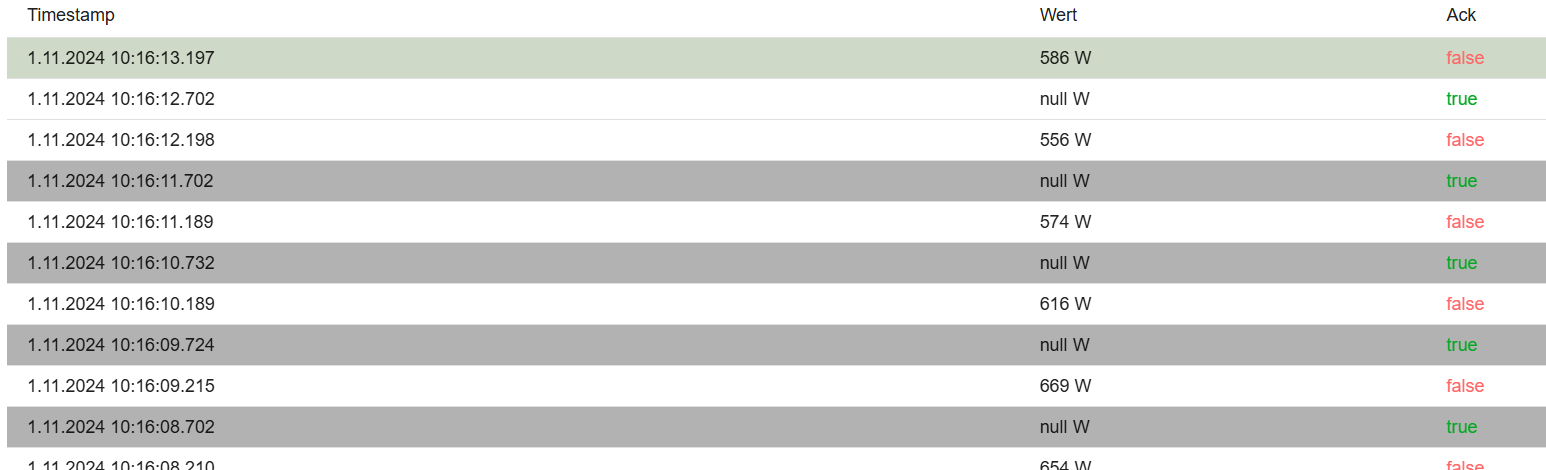
    @mcm1957 der Screenshot ist ncht von mir.... meiner sah so aus: [image: 1727105933999-d284bef5-ebac-4cdb-8ce5-6dac5ad2d2b8-1688374942497-0854d10d-2854-4c7d-807c-d6f8ea16e9d2-image.png] (aus https://forum.iobroker.net/topic/66672/gelöst-seltsame-anzeige-für-history ) und da gibt es auch kein Script das den ACK auf false setzt (wozu sollte sowas auch gut sein?), daher führte dieses Verhaltensbild zu meiner Hypothese.... Hast du irgendein Hinweis dass History zu anderen Zeitpunkten etwas erfasst als der Adapter oder eine andere Quelle etwas in einen State schreibt? Ich sag ja nicht, dass etwas anderes geschrieben wird, sondern, dass der Adapter nicht alles speichert was er zunächst anzeigt. Letztlich entspricht es der Einstellung in der Konfiguration. Die "Schwäche" ist m.E. dass es nicht gleich so angezeigt wird wie es gespeichert wird, oder dass man die Spalte ganz weg lässt, wenn man den ACK-zustand konfigurationsgemäß nicht mit dem Wert zusammen speichert.....
  • [gelöst] Vorgehensweise bei Umzug eines Slave

    5
    0 Stimmen
    5 Beiträge
    326 Aufrufe
    Meister MopperM
    @hunduster sagte in Umzug Slave System: OK, Kommando zurück kurz nachdem ich meinen Post abgeschickt habe, haben die zwei sich wohl durch das Custom Setup nun doch unterhalten. Der Slave ist wieder aufgetaucht, ich konnte das Zigbee Backup zurück spielen und der Master hat sich von seiner Auslastung auch wieder ein bekommen. Das freut mich ! Final wäre es für mich wünschenswert, wenn du im ersten Beitrag den thread auf [solved] setzt und den Titel für den thread z. B. auf 'Vorgehensweise bei Umzug eines Slave' oder nach deinem gusto so ähnlich änderst. Dann kann es mit den Suchbegriffen 'Umzug' und 'Slave' von anderen mit ähnlichen Problemen problemlos hier im Forum recherchiert werden .
  • Roborock Adapter lässt sich nicht updaten

    5
    2
    0 Stimmen
    5 Beiträge
    579 Aufrufe
    mcm1957M
    Hab copystring schon gebeten die node requirements zu dokumentieren. https://github.com/copystring/ioBroker.roborock/issues/657
  • [teilweise erledigt] Problem Alexa & Shelly

    Verschoben
    22
    6
    0 Stimmen
    22 Beiträge
    3k Aufrufe
    da_WoodyD
    @gaspode https://github.com/iobroker-community-adapters/ioBroker.shelly/issues/1046 k, habs dort mal unter bug reingestellt, mit erweiterung. finds halt schwer zu beschreiben, weil es das noch nie gegeben hat und somit auch nie im plan war. klappen muss es, sonst würds alexa nicht schaffen. den prog aufwand kann ich nicht beurteilen. will ja auch @haus-automatisierung nicht zu sehr auf die nerven gehn. er benutzt die teile nicht, macht aber tropsdem super arbeit.
  • History-Adapter .csv download PROBLEM

    csv history download
    27
    1
    0 Stimmen
    27 Beiträge
    3k Aufrufe
    K
    @chris299 Hier "as it is" Ein roher Klotz, no thrills, kein Komfort, keine Fehlerabfangen und für Windows-Verzeichnisse. Keine Ahnung wie man das auf Linux-Verzeichnisse umstellt. Aber auch da kann ChatGPT sicher helfen. Minimale Dialoge ohne Überprüfung. Ein einigermassen aktuelles Python muß auf dem Rechner laufen (bei mir 3.10.8) und der Python Pfad sollte dem System bekannt sein. Ich starte immer aus der Kommandozeile heraus (CMD), weil ich dann ggf Fehlermeldungen sehen. Bei mir aus einem Verzeichnis D:\auswerungen Das Script heisst z.B. iobroker-history-all-data-to-xls-V3-local-time.py dann starte ich es mit python iobroker-history-all-data-to-xls-V3-local-time.py Es werden einige Pakete benötigt. Steht im Programm als Kommentar. Vielleicht brauchst Du bei Deiner Installation noch weitere. Dann kann man das den Fehlermeldungen entnehmen. Kann am Anfang etwas Gefummel sein. ChatGPT kennt sich mit Python recht gut aus und hilft gerne - auch bei der Umstallung auf Linux, falls erforderlich :-) Ach ja, Python hat dieselbe Unart wie YAML. Man hat sich von Klammern als Strukturelement verabschiedet und nutzt stattdessen Einrücken. In Vielfachen von 4 Blanks. Hier eine Sctript-Version für local time: # created with the help of ChatGPT # Install openpyxl library if necessary # Make sure to install pandas using: pip install pandas import os import json import pandas as pd from datetime import datetime import pytz # Make sure to install pytz using: pip install pytz def read_json_file(file_path): with open(file_path, 'r') as file: data = json.load(file) return data def extract_data_from_json(json_data): data_list = [] for entry in json_data: if entry.get("val") is not None: val, ts = entry["val"], entry["ts"] data_list.append((val, ts)) return data_list def convert_timestamp(ts): local_tz = pytz.timezone('Europe/Berlin') # Adjust to your local time zone local_time = datetime.fromtimestamp(ts / 1000, local_tz) sample_date = local_time.strftime('%d.%m.%Y') sample_time = local_time.strftime('%H:%M') return sample_date, sample_time def generate_excel(start_date, end_date, iobroker_directory, filename_template, xls_directory, xls_name): # Prepare date range date_range = pd.date_range(start=start_date, end=end_date).strftime('%Y%m%d') # Initialize lists to store data all_data = [] # Counter for monitoring output counter = 0 dataset_counter = 0 # Display start and end dates print(f"Start Date: {start_date}") print(f"End Date: {end_date}") # Show default values print(f"ioBroker history directory: {iobroker_directory}") print(f"ioBroker - Filename: {filename_template}") print(f"Directory for xls Output: {xls_directory}") print(f" ") # Get user-defined xls_name user_defined_xls_name = input("Enter the user-defined xls_name (default: 'ioBroker-history'): ") or 'ioBroker-history' print(f" ") print(f"Data will be collected from files") # Iterate through directories and files for date in date_range: directory_path = os.path.join(iobroker_directory, date) if os.path.exists(directory_path): for root, dirs, files in os.walk(directory_path): for file in files: if file.startswith(filename_template) and file.endswith('.json'): file_path = os.path.join(root, file) json_data = read_json_file(file_path) data_list = extract_data_from_json(json_data) all_data.extend(data_list) # Monitor progress counter += 1 dataset_counter +=1 # print(f".", end="") # Check if 8 entries are printed and start a new line if counter % 150 == 0: print(f" {dataset_counter}") # Convert data to DataFrame print(f"conversion ongoing, please wait") df = pd.DataFrame(all_data, columns=['Value', 'Timestamp']) # Convert timestamp and add Date and Time columns df['Date'], df['Time'] = zip(*df['Timestamp'].apply(convert_timestamp)) # Replace dot with comma in the 'Value' column df['Value'] = df['Value'].astype(str).str.replace('.', ',') # Create complete xls_name xls_name += f'-from-{start_date}-to-{end_date}.xlsx' xls_complete_name = user_defined_xls_name + xls_name csv_name = "" csv_name += f'-from-{start_date}-to-{end_date}.csv' csv_complete_name = user_defined_xls_name + csv_name # Show complete path and file name output_path = os.path.join(xls_directory, xls_complete_name) output_path_csv = os.path.join(xls_directory, csv_complete_name) print(f"Location Excel File: {output_path}") print(f"Location CSV File: {output_path_csv}") # Save to CSV print(f"csv file will be created, please wait") df.to_csv(output_path_csv, index=False) print(f"\nCSV file created: {output_path_csv}") # Save to Excel print(f"xlsx file will be created, please wait") df.to_excel(output_path, index=False) print(f"\nExcel file created: {output_path}") print(f"job done") # Get user input print(f"Version 1.0 based on ChatGPT 3.5 with own debugs and mods") start_date = input("Enter the start date (YYYYMMDD): ") end_date = input("Enter the end date (YYYYMMDD): ") iobroker_directory = input("ioBroker history directory (default: 'd:\\ioBroker-data\\History\\'): ") or 'd:\\ioBroker-data\\History\\' filename_template = input("ioBroker json filename: (default: 'history.hm-rpc.1.CUX9000052.1.STATE.json'): ") or 'history.hm-rpc.1.CUX9000052.1.STATE.json' xls_directory = input("Directory for xls Output (default: 'D:\\Auswertungen'): ") or 'D:\\Auswertungen' generate_excel(start_date, end_date, iobroker_directory, filename_template, xls_directory, '') Viel Erfolg!
  • Kann IoBroker nicht mehr aufrufen

    36
    0 Stimmen
    36 Beiträge
    4k Aufrufe
    F
    @thomas-braun okay... es scheint auch alles wieder gut und normal zu laufen!!! Vielen vielen Dank für die schnelle Hilfe!!! LG

410

Online

32.7k

Benutzer

82.6k

Themen

1.3m

Beiträge