Skip to content
  • Home
  • Recent
  • Tags
  • 0 Unread 0
  • Categories
  • Unreplied
  • Popular
  • GitHub
  • Docu
  • Hilfe
Skins
  • Light
  • Brite
  • Cerulean
  • Cosmo
  • Flatly
  • Journal
  • Litera
  • Lumen
  • Lux
  • Materia
  • Minty
  • Morph
  • Pulse
  • Sandstone
  • Simplex
  • Sketchy
  • Spacelab
  • United
  • Yeti
  • Zephyr
  • Dark
  • Cyborg
  • Darkly
  • Quartz
  • Slate
  • Solar
  • Superhero
  • Vapor

  • Default (No Skin)
  • No Skin
Collapse
ioBroker Logo

Community Forum

donate donate
  1. ioBroker Community Home
  2. Deutsch
  3. ioBroker Allgemein
  4. Adapter: ebus

NEWS

  • Weihnachtsangebot 2025! 🎄
    BluefoxB
    Bluefox
    17
    1
    495

  • UPDATE 31.10.: Amazon Alexa - ioBroker Skill läuft aus ?
    apollon77A
    apollon77
    48
    3
    9.0k

  • Monatsrückblick – September 2025
    BluefoxB
    Bluefox
    13
    1
    2.3k

Adapter: ebus

Scheduled Pinned Locked Moved ioBroker Allgemein
ebus adapter
708 Posts 71 Posters 257.8k Views 59 Watching
  • Oldest to Newest
  • Newest to Oldest
  • Most Votes
Reply
  • Reply as topic
Log in to reply
This topic has been deleted. Only users with topic management privileges can see it.
  • C cactus-online

    Poste mal den Inhalt von

    /etc/default/ebusd

    von Deiner ebusd VM.

    S Online
    S Online
    saeft_2003
    Most Active
    wrote on last edited by
    #75

    @cactus-online sagte in Adapter: ebus:

    Poste mal den Inhalt von

    /etc/default/ebusd

    von Deiner ebusd VM.
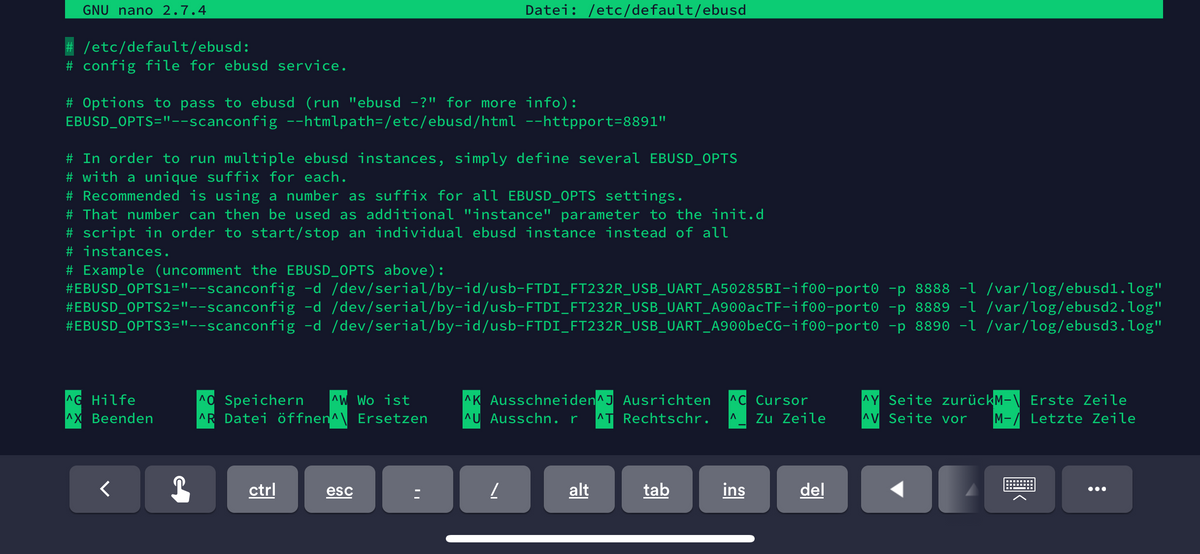
    FC5CF340-252F-47F3-BAA0-F0D823CA2F62.png

    1 Reply Last reply
    0
    • C Offline
      C Offline
      cactus-online
      wrote on last edited by
      #76

      Alles klar. Du hast Telnet nicht eingeschaltet ;-).

      füge vor --httpport=8891

      --port=8888

      ein und starte den ebusd neu.

      S 1 Reply Last reply
      0
      • S saeft_2003

        @Rene_HM

        Ok an was könnte das liegen das er in den timeout läuft?

        Rene_HMR Offline
        Rene_HMR Offline
        Rene_HM
        Developer
        wrote on last edited by
        #77

        @saeft_2003 Der Adapter macht ein

        request 192.168.178.102:8891/data
        

        und bekommt darauf keine Antwort. Deshalb meine Idee, dass der Adapter den ebusd im Netz nicht sieht. Der ebusd selbst läuft (auch auf dem richtigen http-Port), da er ja auf die gleiche Anfrage aus einem browser richtig antwortet.
        Hattest du evtl. bei der Installation des Adapters Probleme?
        Das ganze Thema Telnet können wir erst mal außer Acht lassen, da du ja gesagt hast, dass du Telnet auf dem ebusd nicht aktiviert hast. Das macht aber auch nichts. Darum kümmern wir uns später. Jetzt müssen wir erst mal Daten über http lesen können...

        1 Reply Last reply
        0
        • C cactus-online

          Alles klar. Du hast Telnet nicht eingeschaltet ;-).

          füge vor --httpport=8891

          --port=8888

          ein und starte den ebusd neu.

          S Online
          S Online
          saeft_2003
          Most Active
          wrote on last edited by
          #78

          @cactus-online sagte in Adapter: ebus:

          --port=8888

          Hab ich gemacht, ändert aber nichts...

          1 Reply Last reply
          0
          • C Offline
            C Offline
            cactus-online
            wrote on last edited by
            #79

            Kannst Du jetzt

            telnet 192.168.178.102 8888

            machen ?

            Geht

            telnet 192.168.178.102 8891

            GET /data HTTP/1.1

            von Deinem iobroker (Konsole) aus ?

            S 1 Reply Last reply
            0
            • C cactus-online

              Kannst Du jetzt

              telnet 192.168.178.102 8888

              machen ?

              Geht

              telnet 192.168.178.102 8891

              GET /data HTTP/1.1

              von Deinem iobroker (Konsole) aus ?

              S Online
              S Online
              saeft_2003
              Most Active
              wrote on last edited by
              #80

              @cactus-online sagte in Adapter: ebus:

              Kannst Du jetzt

              telnet 192.168.178.102 8888

              machen ?

              Geht

              telnet 192.168.178.102 8891

              GET /data HTTP/1.1

              von Deinem iobroker (Konsole) aus ?

              
              Debian GNU/Linux comes with ABSOLUTELY NO WARRANTY, to the extent
              permitted by applicable law.
              Last login: Sat Oct 26 17:04:50 2019 from 192.168.178.74
              root@iobroker:~# telnet 192.168.178.102 8888
              Trying 192.168.178.102...
              Connected to 192.168.178.102.
              Escape character is '^]'.


              Debian GNU/Linux comes with ABSOLUTELY NO WARRANTY, to the extent
              permitted by applicable law.
              Last login: Sat Oct 26 17:09:50 2019 from 192.168.178.74
              root@iobroker:~# telnet 192.168.178.102 8889
              Trying 192.168.178.102...
              telnet: Unable to connect to remote host: Connection refused
              root@iobroker:~#
              
              
              C 1 Reply Last reply
              0
              • S saeft_2003

                @cactus-online sagte in Adapter: ebus:

                Kannst Du jetzt

                telnet 192.168.178.102 8888

                machen ?

                Geht

                telnet 192.168.178.102 8891

                GET /data HTTP/1.1

                von Deinem iobroker (Konsole) aus ?

                
                Debian GNU/Linux comes with ABSOLUTELY NO WARRANTY, to the extent
                permitted by applicable law.
                Last login: Sat Oct 26 17:04:50 2019 from 192.168.178.74
                root@iobroker:~# telnet 192.168.178.102 8888
                Trying 192.168.178.102...
                Connected to 192.168.178.102.
                Escape character is '^]'.


                Debian GNU/Linux comes with ABSOLUTELY NO WARRANTY, to the extent
                permitted by applicable law.
                Last login: Sat Oct 26 17:09:50 2019 from 192.168.178.74
                root@iobroker:~# telnet 192.168.178.102 8889
                Trying 192.168.178.102...
                telnet: Unable to connect to remote host: Connection refused
                root@iobroker:~#
                
                
                C Offline
                C Offline
                cactus-online
                wrote on last edited by
                #81

                @saeft_2003

                telnet 192.168.178.102 8891

                GET /data HTTP/1.1

                Dein HTTP-Port ist 8891.

                S 1 Reply Last reply
                0
                • C cactus-online

                  @saeft_2003

                  telnet 192.168.178.102 8891

                  GET /data HTTP/1.1

                  Dein HTTP-Port ist 8891.

                  S Online
                  S Online
                  saeft_2003
                  Most Active
                  wrote on last edited by
                  #82

                  @cactus-online sagte in Adapter: ebus:

                  GET /data HTTP/1.1

                  Sorry falsch geschaut....

                  
                  Debian GNU/Linux comes with ABSOLUTELY NO WARRANTY, to the extent
                  permitted by applicable law.
                  Last login: Sat Oct 26 17:11:59 2019 from 192.168.178.74
                  root@iobroker:~# telnet 192.168.178.102 8891
                  Trying 192.168.178.102...
                  Connected to 192.168.178.102.
                  Escape character is '^]'.
                  GET /data HTTP/1.1
                  
                  HTTP/1.0 404 Not Found
                  Server: ebusd/2.4
                  
                  Connection closed by foreign host.
                  root@iobroker:~#
                  
                  
                  1 Reply Last reply
                  0
                  • C Offline
                    C Offline
                    cactus-online
                    wrote on last edited by
                    #83

                    Komisch

                    HTTP/1.0 404 Not Found

                    verusuch mal

                    GET /data HTTP/1.0

                    1 Reply Last reply
                    0
                    • S Online
                      S Online
                      saeft_2003
                      Most Active
                      wrote on last edited by
                      #84

                      Ich habe jetzt noch etwas seltsames nachgestellt, was ich bei mir am laptop handy und einem dritten pc hatte.

                      Wenn 192.168.178.102:8891/data zum ersten mal aufgerufen wird, wird nur eine leere weiße Seite angezeigt.

                      Gibt man dann 192.168.178.102:8891/data/m ein wird irgendwas angezeigt.

                      Danach geht auch 192.168.178.102:8891/data

                      Könnte dass mein Problem sein?

                      Rene_HMR 1 Reply Last reply
                      0
                      • C Offline
                        C Offline
                        cactus-online
                        wrote on last edited by
                        #85

                        Ich habe mich schlecht ausgedrückt:

                        1.)telnet 192.168.178.102 8891

                        dann kommt etwa sowasTrying 192.168.178.102...
                        Connected to 192.168.178.102.
                        Escape character is '^]'.

                        2.)GET /data HTTP/1.0 und zwei mal die <Enter>-Taste drücken

                        S 1 Reply Last reply
                        0
                        • S saeft_2003

                          Ich habe jetzt noch etwas seltsames nachgestellt, was ich bei mir am laptop handy und einem dritten pc hatte.

                          Wenn 192.168.178.102:8891/data zum ersten mal aufgerufen wird, wird nur eine leere weiße Seite angezeigt.

                          Gibt man dann 192.168.178.102:8891/data/m ein wird irgendwas angezeigt.

                          Danach geht auch 192.168.178.102:8891/data

                          Könnte dass mein Problem sein?

                          Rene_HMR Offline
                          Rene_HMR Offline
                          Rene_HM
                          Developer
                          wrote on last edited by
                          #86

                          @saeft_2003 ja, das könnte sein. Leere Seite heisst zwar, dass über http Daten gesendet wurden, ich prüfe im Adapter aber auf Fehlercode = 0 und Status = 200. Damit wird der Adapter auch nicht regulär beendet und geht in timeout...

                          S 1 Reply Last reply
                          0
                          • C Offline
                            C Offline
                            cactus-online
                            wrote on last edited by
                            #87

                            Kann es sein, das Du HTTP/1.1 verwendest ? Das würde es klären und das Problem könnte durch ein Update des ebusd gelöst werden.

                            1 Reply Last reply
                            0
                            • Rene_HMR Rene_HM

                              @saeft_2003 ja, das könnte sein. Leere Seite heisst zwar, dass über http Daten gesendet wurden, ich prüfe im Adapter aber auf Fehlercode = 0 und Status = 200. Damit wird der Adapter auch nicht regulär beendet und geht in timeout...

                              S Online
                              S Online
                              saeft_2003
                              Most Active
                              wrote on last edited by
                              #88

                              @Rene_HM sagte in Adapter: ebus:

                              @saeft_2003 ja, das könnte sein. Leere Seite heisst zwar, dass über http Daten gesendet wurden, ich prüfe im Adapter aber auf Fehlercode = 0 und Status = 200. Damit wird der Adapter auch nicht regulär beendet und geht in timeout...

                              Und wie könnte man das Problem beheben?

                              1 Reply Last reply
                              0
                              • C cactus-online

                                Ich habe mich schlecht ausgedrückt:

                                1.)telnet 192.168.178.102 8891

                                dann kommt etwa sowasTrying 192.168.178.102...
                                Connected to 192.168.178.102.
                                Escape character is '^]'.

                                2.)GET /data HTTP/1.0 und zwei mal die <Enter>-Taste drücken

                                S Online
                                S Online
                                saeft_2003
                                Most Active
                                wrote on last edited by
                                #89

                                @cactus-online sagte in Adapter: ebus:

                                Ich habe mich schlecht ausgedrückt:

                                1.)telnet 192.168.178.102 8891

                                dann kommt etwa sowasTrying 192.168.178.102...
                                Connected to 192.168.178.102.
                                Escape character is '^]'.

                                2.)GET /data HTTP/1.0 und zwei mal die <Enter>-Taste drücken

                                Ich habs nochmal probiert:

                                
                                Debian GNU/Linux comes with ABSOLUTELY NO WARRANTY, to the extent
                                permitted by applicable law.
                                Last login: Sat Oct 26 17:19:40 2019 from 192.168.178.74
                                root@iobroker:~# telnet 192.168.178.102 8891
                                Trying 192.168.178.102...
                                Connected to 192.168.178.102.
                                Escape character is '^]'.
                                GET /data HTTP/1.0
                                
                                HTTP/1.0 404 Not Found
                                Server: ebusd/2.4
                                
                                Connection closed by foreign host.
                                root@iobroker:~# telnet 192.168.178.102 8891
                                Trying 192.168.178.102...
                                Connected to 192.168.178.102.
                                Escape character is '^]'.
                                GET /data HTTP/1.1
                                
                                HTTP/1.0 404 Not Found
                                Server: ebusd/2.4
                                
                                Connection closed by foreign host.
                                root@iobroker:~#
                                
                                
                                1 Reply Last reply
                                0
                                • C Offline
                                  C Offline
                                  cactus-online
                                  wrote on last edited by
                                  #90

                                  Vielleicht ist Dein ebusd "kaputt"? Ich würde mal updaten. Ich verwende 3.3 und das klappt super.

                                  S 1 Reply Last reply
                                  0
                                  • C cactus-online

                                    Vielleicht ist Dein ebusd "kaputt"? Ich würde mal updaten. Ich verwende 3.3 und das klappt super.

                                    S Online
                                    S Online
                                    saeft_2003
                                    Most Active
                                    wrote on last edited by
                                    #91

                                    @cactus-online sagte in Adapter: ebus:

                                    Vielleicht ist Dein ebusd "kaputt"? Ich würde mal updaten. Ich verwende 3.3 und das klappt super.

                                    Ja kann ich machen... nutzt du http oder mqtt?

                                    1 Reply Last reply
                                    0
                                    • C Offline
                                      C Offline
                                      cactus-online
                                      wrote on last edited by
                                      #92

                                      mqtt sendet Dir nur die sich verändernden Daten, also alles, was Du ohne den Telnet Read des Adapters bekommen würdest. Ich empfehle die http Variante. mqtt muss beim compilieren meines Erachtens nach auch extra eingeschaltet werden.

                                      1 Reply Last reply
                                      0
                                      • S Online
                                        S Online
                                        saeft_2003
                                        Most Active
                                        wrote on last edited by
                                        #93

                                        @Lenny-CB @cactus-online

                                        Ich habs jetzt hinbekommen und habe die Daten über den ebus Adapter im iobroker, leider sind die csv Dateien für Wolf nicht so doll. Aber ein paar wichtige Sachen hab ich, wie z.b. Error.

                                        Die Lösung war das ich eine komplett neue VM erstellt habe und danach die neuste Version 3.4 von ebusd installiert habe. Danach musste ich mit den csv Dateien und den http Einstellungen ein bisschen rumprobieren und dann gings :-)

                                        Lenny.CBL 1 Reply Last reply
                                        0
                                        • S saeft_2003

                                          @Lenny-CB @cactus-online

                                          Ich habs jetzt hinbekommen und habe die Daten über den ebus Adapter im iobroker, leider sind die csv Dateien für Wolf nicht so doll. Aber ein paar wichtige Sachen hab ich, wie z.b. Error.

                                          Die Lösung war das ich eine komplett neue VM erstellt habe und danach die neuste Version 3.4 von ebusd installiert habe. Danach musste ich mit den csv Dateien und den http Einstellungen ein bisschen rumprobieren und dann gings :-)

                                          Lenny.CBL Offline
                                          Lenny.CBL Offline
                                          Lenny.CB
                                          Most Active
                                          wrote on last edited by
                                          #94

                                          @saeft_2003 super! Theoretisch könnte man sich aber eine "eigene" csv bauen?!

                                          1 Reply Last reply
                                          0
                                          Reply
                                          • Reply as topic
                                          Log in to reply
                                          • Oldest to Newest
                                          • Newest to Oldest
                                          • Most Votes


                                          Support us

                                          ioBroker
                                          Community Adapters
                                          Donate
                                          FAQ Cloud / IOT
                                          HowTo: Node.js-Update
                                          HowTo: Backup/Restore
                                          Downloads
                                          BLOG

                                          896

                                          Online

                                          32.5k

                                          Users

                                          81.6k

                                          Topics

                                          1.3m

                                          Posts
                                          Community
                                          Impressum | Datenschutz-Bestimmungen | Nutzungsbedingungen | Einwilligungseinstellungen
                                          ioBroker Community 2014-2025
                                          logo
                                          • Login

                                          • Don't have an account? Register

                                          • Login or register to search.
                                          • First post
                                            Last post
                                          0
                                          • Home
                                          • Recent
                                          • Tags
                                          • Unread 0
                                          • Categories
                                          • Unreplied
                                          • Popular
                                          • GitHub
                                          • Docu
                                          • Hilfe