




Conbee 2 Probleme mit Erreichbarkeit
-
Hallo,
ich nutze Iobroker + Deconz Adapter , mit der Phoscon Software. Seit ein paar Tagen habe ich Probleme mit der Erreichbarkeit der Sensoren und der Loginpage.
Ich nutze Iobroker (alles up to date)
Phoscon ver. 2.32.5, Firmware 26780700
Deconz Adapter v1.6.4nach einem Neustart läuft das System und auch wenn die Störung ist kann ich die Lichter schalten, aber Bewegungsmelder zB reagieren nicht.
Was habe ich Versucht=
- 2,4ghz Wlan ist Kanal 11 und Zigbee Kanal 15 (seit ewig lief das so)
- Neue SSD
- Raspberry Pi OS Lite 64 Bit (Trixie) neuinstalliert und Backup eingespielt
- Phoscon neuinstalliert und Backup aufgespielt
- EEE (Energy Efficient Ethernet) auf Fritzbox + Raspi deaktiviert
- neue USB verlängerung
- und gerade eben einen neuen Conbee 2 angeschlossen (und Backup eingespielt)
das einzige was ich in der letzten Zeit geändert habe war=
/usr/lib/systemd/system und dann in der deconz.service das --ws-port=441 angehängt da sonst keine Verbingung zu Deconz Adapter.siehe diesen Beitrag=
https://forum.iobroker.net/topic/83828/gelöst-deconz-adapter-verbindet-nicht-nach-phoscon-updatejetzt läuft wieder alles, aber wie lange ? Hat jemand hier eine Idee oder schonmal so etwas gehabt ? Bin für jeden Tipp dankbar.
hier noch ein Iob Diag:
Script v.2026-01-31 *** BASE SYSTEM *** Operating System: Debian GNU/Linux 13 (trixie) Static hostname: Raspberry Icon name: computer Kernel: Linux 6.12.62+rpt-rpi-v8 Architecture: arm64 OS is similar to: Model : Raspberry Pi 4 Model B Rev 1.2 Docker : false Virtualization : none Kernel : aarch64 Userland : 64 bit Systemuptime and Load: 21:11:17 up 41 min, 1 user, load average: 0.83, 0.37, 0.32 CPU threads: 4 *** LIFE CYCLE STATUS *** Operating System is the current Debian stable version codenamed 'trixie'! *** RASPBERRY THROTTLING *** Current issues: No throttling issues detected. Previously detected issues: No throttling issues detected. *** TIME AND TIMEZONES *** Local time: Wed 2026-03-04 21:11:17 CET Universal time: Wed 2026-03-04 20:11:17 UTC RTC time: n/a Time zone: Europe/Berlin (CET, +0100) System clock synchronized: yes NTP service: active RTC in local TZ: no *** Users and Groups *** User that called 'iob diag': marvman67 HOME=/home/marvman67 GROUPS=marvman67 adm dialout cdrom sudo audio video plugdev games users netdev gpio i2c spi render input iobroker User that is running 'js-controller': iobroker HOME=/home/iobroker SUDO_HOME=/home/marvman67 GROUPS=iobroker tty dialout audio video plugdev bluetooth gpio i2c *** DISPLAY-SERVER SETUP *** Display-Server: false Unit display-manager.service could not be found. Display-Manager: Desktop: Session: tty *** MEMORY *** total used free shared buff/cache available Mem: 4.0G 2.2G 1.3G 10M 572M 1.8G Swap: 2.1G 0B 2.1G Total: 6.1G 2.2G 3.4G Active iob-Instances: 20 3795 M total memory 2099 M used memory 2139 M active memory 231 M inactive memory 1237 M free memory 58 M buffer memory 487 M swap cache 2047 M total swap 0 M used swap 2047 M free swap *** top - Table Of Processes *** top - 21:11:18 up 41 min, 1 user, load average: 0.83, 0.37, 0.32 Tasks: 208 total, 1 running, 207 sleeping, 0 stopped, 0 zombie %Cpu(s): 0.0 us, 2.0 sy, 0.0 ni, 95.9 id, 2.0 wa, 0.0 hi, 0.0 si, 0.0 st MiB Mem : 3795.7 total, 1237.3 free, 2099.4 used, 546.2 buff/cache MiB Swap: 2048.0 total, 2048.0 free, 0.0 used. 1696.3 avail Mem *** FAILED SERVICES *** UNIT LOAD ACTIVE SUB DESCRIPTION 0 loaded units listed. *** DMESG CRITICAL ERRORS *** No critical errors detected *** FILESYSTEM *** Filesystem Type Size Used Avail Use% Mounted on udev devtmpfs 1.6G 0 1.6G 0% /dev tmpfs tmpfs 760M 9.3M 750M 2% /run /dev/sda2 ext4 229G 6.9G 213G 4% / tmpfs tmpfs 1.9G 0 1.9G 0% /dev/shm tmpfs tmpfs 5.0M 16K 5.0M 1% /run/lock tmpfs tmpfs 1.0M 0 1.0M 0% /run/credentials/systemd-journald.service tmpfs tmpfs 1.9G 660K 1.9G 1% /tmp /dev/sda1 vfat 510M 66M 445M 13% /boot/firmware tmpfs tmpfs 1.0M 0 1.0M 0% /run/credentials/getty@tty1.service tmpfs tmpfs 1.0M 0 1.0M 0% /run/credentials/serial-getty@ttyS0.service tmpfs tmpfs 380M 12K 380M 1% /run/user/1000 Messages concerning ext4 filesystem in dmesg: [Wed Mar 4 20:30:11 2026] EXT4-fs (sda2): orphan cleanup on readonly fs [Wed Mar 4 20:30:11 2026] EXT4-fs (sda2): mounted filesystem 21724cc6-e5a3-48a1-8643-7917dba3a9fb ro with ordered data mode. Quota mode: none. [Wed Mar 4 20:30:13 2026] EXT4-fs (sda2): re-mounted 21724cc6-e5a3-48a1-8643-7917dba3a9fb r/w. Show mounted filesystems: TARGET SOURCE FSTYPE OPTIONS / /dev/sda2 ext4 rw,noatime `-/boot/firmware /dev/sda1 vfat rw,relatime,fmask=0022,dmask=0022,codepage=437,iocharset=ascii,shortname=mixed,errors=remount-ro Files in neuralgic directories: /var: 2.5G /var/ 231M /var/cache 225M /var/cache/apt 187M /var/lib 145M /var/lib/apt/lists Archived and active journals take up 8M in the file system. /opt/iobroker/backups: 29M /opt/iobroker/backups/ /opt/iobroker/iobroker-data: 326M /opt/iobroker/iobroker-data/ 178M /opt/iobroker/iobroker-data/files 115M /opt/iobroker/iobroker-data/backup-objects 47M /opt/iobroker/iobroker-data/files/admin.admin 46M /opt/iobroker/iobroker-data/files/admin.admin/custom/assets The five largest files in iobroker-data are: 32M /opt/iobroker/iobroker-data/objects.jsonl 19M /opt/iobroker/iobroker-data/files/matter.admin/assets/index-DMt8RVCF.js 8.1M /opt/iobroker/iobroker-data/files/backitup.admin/assets/index-Djx0nwYT.js 4.6M /opt/iobroker/iobroker-data/files/javascript.admin/vs/language/typescript/tsWorker.js 4.6M /opt/iobroker/iobroker-data/backup-objects/2026-03-04_19-11_objects.jsonl.gz USB-Devices by-id: USB-Sticks - Avoid direct links to /dev/tty* in your adapter setups, please always prefer the links 'by-id': /dev/serial/by-id/usb-dresden_elektronik_ingenieurtechnik_GmbH_ConBee_II_DE2706986-if00 No nvbackup.json found. *** NodeJS-Installation *** /usr/bin/nodejs v22.22.0 /usr/bin/node v22.22.0 /usr/bin/npm 10.9.4 /usr/bin/npx 10.9.4 ✓ Node.js installation is correct nodejs: Installed: 22.22.0-1nodesource1 Candidate: 22.22.0-1nodesource1 Version table: *** 22.22.0-1nodesource1 1001 500 https://deb.nodesource.com/node_22.x nodistro/main arm64 Packages 100 /var/lib/dpkg/status 22.21.0-1nodesource1 1001 500 https://deb.nodesource.com/node_22.x nodistro/main arm64 Packages 22.20.0-1nodesource1 1001 500 https://deb.nodesource.com/node_22.x nodistro/main arm64 Packages 22.19.0-1nodesource1 1001 500 https://deb.nodesource.com/node_22.x nodistro/main arm64 Packages 22.18.0-1nodesource1 1001 500 https://deb.nodesource.com/node_22.x nodistro/main arm64 Packages 22.17.1-1nodesource1 1001 500 https://deb.nodesource.com/node_22.x nodistro/main arm64 Packages 22.17.0-1nodesource1 1001 500 https://deb.nodesource.com/node_22.x nodistro/main arm64 Packages 22.16.0-1nodesource1 1001 500 https://deb.nodesource.com/node_22.x nodistro/main arm64 Packages 22.15.1-1nodesource1 1001 500 https://deb.nodesource.com/node_22.x nodistro/main arm64 Packages 22.15.0-1nodesource1 1001 500 https://deb.nodesource.com/node_22.x nodistro/main arm64 Packages 22.14.0-1nodesource1 1001 500 https://deb.nodesource.com/node_22.x nodistro/main arm64 Packages 22.13.1-1nodesource1 1001 500 https://deb.nodesource.com/node_22.x nodistro/main arm64 Packages 22.13.0-1nodesource1 1001 500 https://deb.nodesource.com/node_22.x nodistro/main arm64 Packages 22.12.0-1nodesource1 1001 500 https://deb.nodesource.com/node_22.x nodistro/main arm64 Packages 22.11.0-1nodesource1 1001 500 https://deb.nodesource.com/node_22.x nodistro/main arm64 Packages 22.10.0-1nodesource1 1001 500 https://deb.nodesource.com/node_22.x nodistro/main arm64 Packages 22.9.0-1nodesource1 1001 500 https://deb.nodesource.com/node_22.x nodistro/main arm64 Packages 22.8.0-1nodesource1 1001 500 https://deb.nodesource.com/node_22.x nodistro/main arm64 Packages 22.7.0-1nodesource1 1001 500 https://deb.nodesource.com/node_22.x nodistro/main arm64 Packages 22.6.0-1nodesource1 1001 500 https://deb.nodesource.com/node_22.x nodistro/main arm64 Packages 22.5.1-1nodesource1 1001 500 https://deb.nodesource.com/node_22.x nodistro/main arm64 Packages 22.5.0-1nodesource1 1001 500 https://deb.nodesource.com/node_22.x nodistro/main arm64 Packages 22.4.1-1nodesource1 1001 500 https://deb.nodesource.com/node_22.x nodistro/main arm64 Packages 22.4.0-1nodesource1 1001 500 https://deb.nodesource.com/node_22.x nodistro/main arm64 Packages 22.3.0-1nodesource1 1001 500 https://deb.nodesource.com/node_22.x nodistro/main arm64 Packages 22.2.0-1nodesource1 1001 500 https://deb.nodesource.com/node_22.x nodistro/main arm64 Packages 22.1.0-1nodesource1 1001 500 https://deb.nodesource.com/node_22.x nodistro/main arm64 Packages 22.0.0-1nodesource1 1001 500 https://deb.nodesource.com/node_22.x nodistro/main arm64 Packages 20.19.2+dfsg-1 500 500 http://deb.debian.org/debian trixie/main arm64 Packages Temp directories causing deletion problem: 0 No problems detected Errors in npm tree: 0 No problems detected Checking for nodejs vulnerability: █████ ██ ██ ██████ ██████ ██████ ██████ ██ ██ ██ ██ ██ ██ ██ ██ ██ ██ ██ ██ ██ ██ ███████ ██ ██ ██ ███ ██ ██ ██ ██ ██ ██ ██ ██ ██ ██ ██ ██ ██ ██ ██ ██ ██ ██ ██ ██ ██ ██ ██ ███████ ███████ ██████ ██████ ██████ ██████ ██ *** ioBroker-Installation *** ioBroker Status iobroker is running on this host. Objects type: jsonl States type: jsonl Hosts: Raspberry Raspberry (version: 7.0.7, hostname: Raspberry , alive, uptime: 2453) Core adapters versions js-controller: 7.0.7 admin: 7.7.22 javascript: 9.0.18 nodejs modules from github: 0 Adapter State + system.adapter.admin.0 : admin : Raspberry - enabled, port: 8081, bind: 0.0.0.0 (SSL), run as: admin + system.adapter.admin.1 : admin : Raspberry - enabled, port: 8088, bind: 0.0.0.0, run as: admin + system.adapter.alexa2.0 : alexa2 : Raspberry - enabled + system.adapter.backitup.0 : backitup : Raspberry - enabled + system.adapter.cloud.0 : cloud : Raspberry - enabled + system.adapter.deconz.0 : deconz : Raspberry - enabled, port: 80 system.adapter.devices.0 : devices : Raspberry - disabled + system.adapter.email.0 : email : Raspberry - enabled + system.adapter.fritzdect.0 : fritzdect : Raspberry - enabled + system.adapter.history.0 : history : Raspberry - enabled system.adapter.ical.0 : ical : Raspberry - enabled system.adapter.iot.0 : iot : Raspberry - disabled + system.adapter.iqontrol.0 : iqontrol : Raspberry - enabled + system.adapter.javascript.0 : javascript : Raspberry - enabled + system.adapter.matter.0 : matter : Raspberry - enabled + system.adapter.rpi2.0 : rpi2 : Raspberry - enabled + system.adapter.simple-api.0 : simple-api : Raspberry - enabled, port: 8087, bind: 0.0.0.0, run as: admin + system.adapter.socketio.0 : socketio : Raspberry - enabled, port: 8084, bind: 192.168.178.42, run as: admin + system.adapter.telegram.0 : telegram : Raspberry - enabled, port: 8443, bind: 0.0.0.0 + system.adapter.tr-064.0 : tr-064 : Raspberry - enabled + system.adapter.trashschedule.0 : trashschedule : Raspberry - enabled + system.adapter.web.0 : web : Raspberry - enabled, port: 8082, bind: 0.0.0.0, run as: admin + instance is alive Enabled adapters with bindings + system.adapter.admin.0 : admin : Raspberry - enabled, port: 8081, bind: 0.0.0.0 (SSL), run as: admin + system.adapter.admin.1 : admin : Raspberry - enabled, port: 8088, bind: 0.0.0.0, run as: admin + system.adapter.deconz.0 : deconz : Raspberry - enabled, port: 80 + system.adapter.simple-api.0 : simple-api : Raspberry - enabled, port: 8087, bind: 0.0.0.0, run as: admin + system.adapter.socketio.0 : socketio : Raspberry - enabled, port: 8084, bind: 192.168.178.42, run as: admin + system.adapter.telegram.0 : telegram : Raspberry - enabled, port: 8443, bind: 0.0.0.0 + system.adapter.web.0 : web : Raspberry - enabled, port: 8082, bind: 0.0.0.0, run as: admin ioBroker-Repositories ┌─────────┬─────────────────┬─────────────────────────────────────────────────────────┬──────────────┐ │ (index) │ name │ url │ auto upgrade │ ├─────────┼─────────────────┼─────────────────────────────────────────────────────────┼──────────────┤ │ 0 │ 'stable' │ 'http://download.iobroker.net/sources-dist.json' │ false │ │ 1 │ 'Beta (latest)' │ 'http://download.iobroker.net/sources-dist-latest.json' │ false │ └─────────┴─────────────────┴─────────────────────────────────────────────────────────┴──────────────┘ Active repo(s): stable Upgrade policy: none Installed ioBroker-Adapters Used repository: stable Adapter "admin" : 7.7.22 , installed 7.7.22 Adapter "alexa2" : 3.27.4 , installed 3.27.4 Adapter "backitup" : 3.3.13 , installed 3.3.13 Adapter "cloud" : 5.0.1 , installed 5.0.1 Adapter "deconz" : 1.6.4 , installed 1.6.4 Adapter "devices" : 1.2.14 , installed 1.2.14 Adapter "email" : 2.0.4 , installed 2.0.4 Adapter "fritzdect" : 2.6.2 , installed 2.6.2 Adapter "history" : 3.0.1 , installed 3.0.1 Adapter "ical" : 1.18.1 , installed 1.18.1 Adapter "iot" : 5.0.7 , installed 5.0.7 Adapter "iqontrol" : 3.0.0 , installed 3.0.0 Adapter "javascript" : 9.0.18 , installed 9.0.18 Controller "js-controller": 7.0.7 , installed 7.0.7 Adapter "matter" : 0.5.6 , installed 1.0.0 Adapter "rpi2" : 2.4.0 , installed 3.0.1 Adapter "simple-api" : 2.8.0 , installed 2.8.0 Adapter "socketio" : 6.7.1 , installed 6.7.1 Adapter "telegram" : 4.1.0 , installed 4.1.0 Adapter "tr-064" : 4.3.0 , installed 4.3.0 Adapter "trashschedule": 3.3.0 , installed 3.3.0 Adapter "web" : 7.0.8 , installed 7.0.8 Adapter "ws" : 2.6.2 , installed 3.0.19 Objects and States Please stand by - This may take a while Objects: 5965 States: 4428 *** OS-Repositories and Updates *** Hit:1 http://deb.debian.org/debian trixie InRelease Hit:2 http://deb.debian.org/debian trixie-updates InRelease Hit:3 http://deb.debian.org/debian-security trixie-security InRelease Hit:4 http://phoscon.de/apt/deconz generic InRelease Hit:5 http://archive.raspberrypi.com/debian trixie InRelease Hit:6 https://deb.nodesource.com/node_22.x nodistro InRelease Reading package lists... Pending systemupdates: 0 *** Listening Ports *** Active Internet connections (only servers) Proto Recv-Q Send-Q Local Address Foreign Address State User Inode PID/Program name tcp 0 0 127.0.0.1:9001 0.0.0.0:* LISTEN 1001 7649 1158/iobroker.js-co tcp 0 0 127.0.0.1:9000 0.0.0.0:* LISTEN 1001 7654 1158/iobroker.js-co tcp 0 0 0.0.0.0:22 0.0.0.0:* LISTEN 0 9417 1171/sshd: /usr/sbi tcp 0 0 0.0.0.0:80 0.0.0.0:* LISTEN 1000 10648 633/deCONZ tcp 0 0 0.0.0.0:111 0.0.0.0:* LISTEN 0 3376 1/init tcp 0 0 192.168.178.42:8084 0.0.0.0:* LISTEN 1001 11300 1595/io.socketio.0 tcp 0 0 0.0.0.0:443 0.0.0.0:* LISTEN 1000 10649 633/deCONZ tcp 0 0 0.0.0.0:441 0.0.0.0:* LISTEN 1000 10119 633/deCONZ tcp6 0 0 :::8088 :::* LISTEN 1001 6934 1222/io.admin.1 tcp6 0 0 :::8082 :::* LISTEN 1001 9096 1621/io.web.0 tcp6 0 0 :::8081 :::* LISTEN 1001 9578 1215/io.admin.0 tcp6 0 0 :::8087 :::* LISTEN 1001 9077 1584/io.simple-api. tcp6 0 0 :::22 :::* LISTEN 0 9419 1171/sshd: /usr/sbi tcp6 0 0 :::111 :::* LISTEN 0 1345 1/init udp 0 0 0.0.0.0:5353 0.0.0.0:* 1001 11346 1573/io.matter.0 udp 0 0 0.0.0.0:5353 0.0.0.0:* 1001 11334 1573/io.matter.0 udp 0 0 192.168.178.42:5353 0.0.0.0:* 1001 10494 1482/io.tr-064.0 udp 0 0 0.0.0.0:5353 0.0.0.0:* 101 6316 627/avahi-daemon: r udp 0 0 0.0.0.0:5540 0.0.0.0:* 1001 11333 1573/io.matter.0 udp 0 0 0.0.0.0:52871 0.0.0.0:* 101 6318 627/avahi-daemon: r udp 0 0 0.0.0.0:1900 0.0.0.0:* 1001 15413 2173/io.deconz.0 udp 0 0 0.0.0.0:1900 0.0.0.0:* 1000 10125 633/deCONZ udp 0 0 0.0.0.0:111 0.0.0.0:* 0 235 1/init udp6 0 0 :::5353 :::* 1001 11347 1573/io.matter.0 udp6 0 0 :::5353 :::* 1001 11337 1573/io.matter.0 udp6 0 0 :::5353 :::* 101 6317 627/avahi-daemon: r udp6 0 0 :::5540 :::* 1001 11332 1573/io.matter.0 udp6 0 0 :::60934 :::* 101 6319 627/avahi-daemon: r udp6 0 0 :::1900 :::* 1001 15416 2173/io.deconz.0 udp6 0 0 :::1900 :::* 1001 15415 2173/io.deconz.0 udp6 0 0 :::1900 :::* 1001 15414 2173/io.deconz.0 udp6 0 0 :::111 :::* 0 236 1/init udp6 0 0 fe80::e65f:1ff:fe05:546 :::* 0 8587 842/NetworkManager *** Log File - Last 25 Lines *** Sensor ist wieder erreichbar 2026-03-04 20:47:19.366 - info: javascript.0 (1317) script.js.common.Tür_Fenster_Sensoren.Fenster-Tür_geöffnet: telegram[Michael]: Fenster_CZ wurde geöffnet. 2026-03-04 20:47:19.870 - info: fritzdect.0 (1543) DECT ID: 133560175984 identified for command (hkrmode) : 1 2026-03-04 20:47:20.870 - info: fritzdect.0 (1543) DECT ID: 099950696353 identified for command (hkrmode) : 1 2026-03-04 20:47:21.370 - info: fritzdect.0 (1543) DECT ID: 133560170728 identified for command (hkrmode) : 1 2026-03-04 20:47:21.622 - info: javascript.0 (1317) script.js.common.Tür_Fenster_Sensoren.Fenster-Tür_geöffnet: telegram[Michael]: Fenster_CZ wurde wieder geschlossen. 2026-03-04 20:47:22.125 - info: fritzdect.0 (1543) DECT ID: 133560175984 identified for command (hkrmode) : 0 2026-03-04 20:47:23.125 - info: fritzdect.0 (1543) DECT ID: 099950696353 identified for command (hkrmode) : 0 2026-03-04 20:47:23.624 - info: fritzdect.0 (1543) DECT ID: 133560170728 identified for command (hkrmode) : 0 2026-03-04 20:49:15.866 - info: javascript.0 (1317) script.js.common.Tür_Fenster_Sensoren.Fenster-Tür_geöffnet: telegram[Michael]: Fenster_CZ wurde geöffnet. 2026-03-04 20:49:16.370 - info: fritzdect.0 (1543) DECT ID: 133560175984 identified for command (hkrmode) : 1 2026-03-04 20:49:17.373 - info: fritzdect.0 (1543) DECT ID: 099950696353 identified for command (hkrmode) : 1 2026-03-04 20:49:17.873 - info: fritzdect.0 (1543) DECT ID: 133560170728 identified for command (hkrmode) : 1 2026-03-04 20:49:18.294 - info: javascript.0 (1317) script.js.common.Tür_Fenster_Sensoren.Fenster-Tür_geöffnet: telegram[Michael]: Fenster_CZ wurde wieder geschlossen. 2026-03-04 20:49:18.799 - info: fritzdect.0 (1543) DECT ID: 133560175984 identified for command (hkrmode) : 0 2026-03-04 20:49:19.797 - info: fritzdect.0 (1543) DECT ID: 099950696353 identified for command (hkrmode) : 0 2026-03-04 20:49:20.300 - info: fritzdect.0 (1543) DECT ID: 133560170728 identified for command (hkrmode) : 0 2026-03-04 20:49:54.936 - info: javascript.0 (1317) script.js.common.Tür_Fenster_Sensoren.Fenster-Tür_geöffnet: telegram[Michael]: Fenster_CZ wurde geöffnet. 2026-03-04 20:49:55.440 - info: fritzdect.0 (1543) DECT ID: 133560175984 identified for command (hkrmode) : 1 2026-03-04 20:49:56.444 - info: fritzdect.0 (1543) DECT ID: 099950696353 identified for command (hkrmode) : 1 2026-03-04 20:49:56.940 - info: fritzdect.0 (1543) DECT ID: 133560170728 identified for command (hkrmode) : 1 2026-03-04 20:49:57.845 - info: javascript.0 (1317) script.js.common.Tür_Fenster_Sensoren.Fenster-Tür_geöffnet: telegram[Michael]: Fenster_CZ wurde wieder geschlossen. 2026-03-04 20:49:58.350 - info: fritzdect.0 (1543) DECT ID: 133560175984 identified for command (hkrmode) : 0 2026-03-04 20:49:59.349 - info: fritzdect.0 (1543) DECT ID: 099950696353 identified for command (hkrmode) : 0 2026-03-04 20:49:59.848 - info: fritzdect.0 (1543) DECT ID: 133560170728 identified for command (hkrmode) : 0EDIT:
kann das was damit zu tun haben ? Dafür ist mein knowhow zu gering
https://github.com/dresden-elektronik/deconz-rest-plugin/issues/8494 -
Hi,
der Fehler war wieder da. Dieses mal habe ich auf die Uhr geschaut. Von 19.55 Uhr bis 20.35Uhr. In der Zeit wurde zB das Licht nicht bei Bewegung geschalten (aber laut Iqontrol haben die BWM reagiert) und wenn dann sehr verzögert und alles reagierte langsam. Die Loginseite von Phoscon ging nur sporadisch. Danach waren viele Sensoren nicht erreichbar und in Phoscon ausgegraut (mußte an denen dann einmal das Knöpfchen drücken) Bloß wie finde ich nun den Störer ?Das stand noch im Log=
deconz.0
	2026-03-05 20:33:30.663	warn	{"address":"/lights/17/state","description":"resource, /lights/17/state, is not modifiable. Device is not reachable.","type":202}
deconz.0
	2026-03-05 20:33:15.671	info	Code 404: Ressource not found set light state 17: <html><head></head><body><h1>This is not the page you are looking for</h1><p>The file /api/CEFA0EB7FB/lights/17/state couldn't be found.</p></body></html>
deconz.0
	2026-03-05 20:32:44.660	warn	Error: read ECONNRESET
Edit: hab jetzt mal das Leuchtmittel 17 getauscht und einen Luftreiniger der in der nähe stand weggestellt. Dann wieder warten bis morgen ;)
-
und wieder diesesmal ca eine Stunde später oh man hey
-
und woher kann das kommen ?
hab gerade mal "systemctl status deconz.service" gemacht und bekomme das, falls das was hilft.
marvman67@Raspberry:~ $ systemctl status deconz.service ● deconz.service - deCONZ: ZigBee gateway -- REST API Loaded: loaded (/usr/lib/systemd/system/deconz.service; enabled; preset: enabled) Active: active (running) since Thu 2026-03-05 23:34:20 CET; 21h ago Invocation: 6fbe25a67c2a49e0a0188c8b602ae67b Main PID: 73656 (deCONZ) Tasks: 9 (limit: 3924) CPU: 52min 50.401s CGroup: /system.slice/deconz.service └─73656 /usr/bin/deCONZ -platform minimal --http-port=80 --ws-port=441 Mar 05 23:33:50 Raspberry systemd[1]: deconz.service: Consumed 3min 4.761s CPU time. Mar 05 23:34:20 Raspberry systemd[1]: deconz.service: Scheduled restart job, restart counter is at 3. Mar 05 23:34:20 Raspberry systemd[1]: Started deconz.service - deCONZ: ZigBee gateway -- REST API. Mar 05 23:34:21 Raspberry deCONZ[73656]: This plugin does not support propagateSizeHints() Mar 05 23:34:21 Raspberry deCONZ[73656]: This plugin does not support propagateSizeHints() Mar 05 23:34:21 Raspberry deCONZ[73656]: This plugin does not support propagateSizeHints() Mar 05 23:34:25 Raspberry deCONZ[73656]: This plugin does not support propagateSizeHints() -
jetzt läuft es wieder, aber fast alles ist ausgegraut und muss wieder aufgeweckt werden
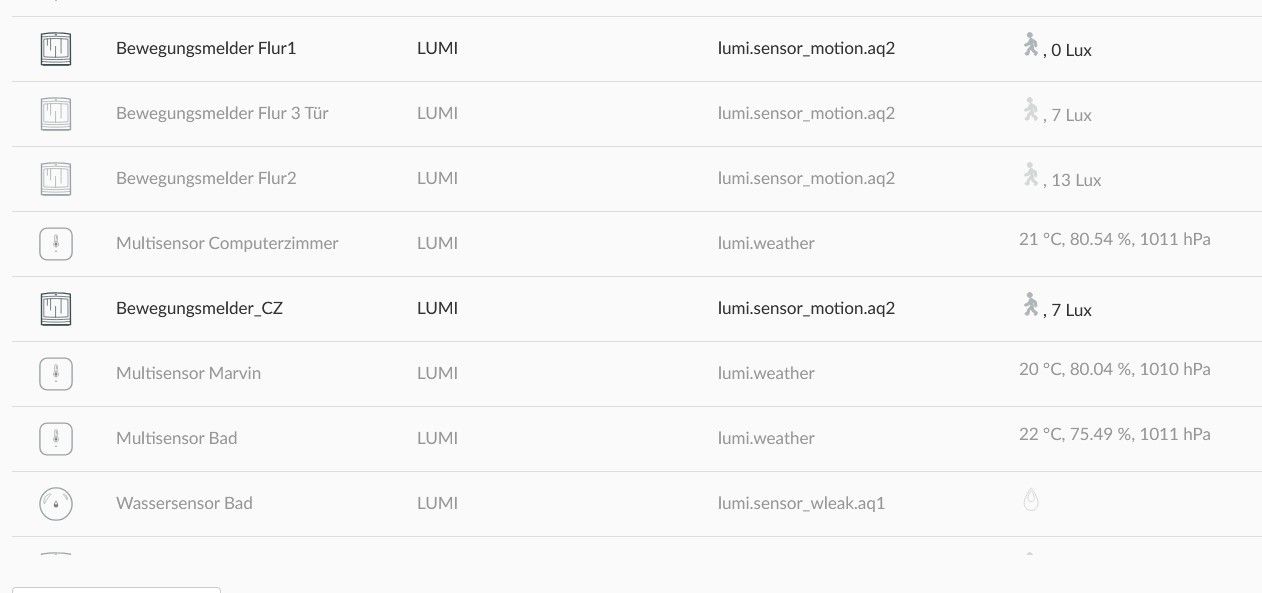
-
das hat deconz gemeldet
deconz.0 2026-03-06 21:19:34.677 warn Error: connect ECONNREFUSED 192.168.178.42:80 deconz.0 2026-03-06 21:19:23.692 warn Error: read ECONNRESET deconz.0 2026-03-06 21:19:23.692 warn Error: read ECONNRESET deconz.0 2026-03-06 21:19:23.691 warn Error: read ECONNRESET deconz.0 2026-03-06 21:19:23.689 warn Error: read ECONNRESET deconz.0 2026-03-06 21:19:23.688 warn Error: read ECONNRESET deconz.0 2026-03-06 21:19:23.687 warn Error: read ECONNRESET deconz.0 2026-03-06 21:19:23.668 warn Error: read ECONNRESET -
ist das der Fehler ?
https://github.com/dresden-elektronik/deconz-rest-plugin/issues/8494
-
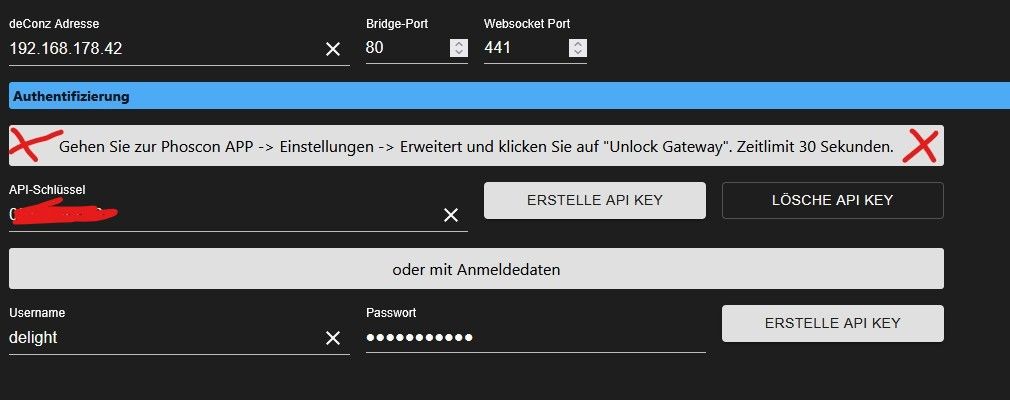
ist das normal ??
-
hat keiner ne Idee @asgothian @thomas-braun @ @jey-cee
-
hat keiner ne Idee @asgothian @thomas-braun @ @jey-cee
@Michael-Schmitt ist der pi jetzt mit WLAN verbunden oder per LAN?
Das geht aus deinem Eingangspost nicht eindeutig hervor.
Aber aufgrund deiner Schilderung vermute ich das dein PI per WLAN verbunden ist.
Die Vermutung basiert darauf das du Probleme mit der Erreichbarkeit von Phoscon hast und gleichzeitig auch mit den Zigbee Geräten.Davon ausgehend hast du einen Breitband Störer im 2,4 GHz Band, der ziemlich na an deinem PI sein dürfte. Würde sagen im Umkreis von 5-6m.
Der Störer muss nicht Zwangsweise ein Gerät mit Funk sein, kann auch ein Schaltnetzteil sein.
Da es Zeitlich begrenzt auftritt ist es sehr Wahrscheinlich ein Mobiles Gerät oder etwas das nur kurzzeitig genutzt wird.Also schau mal was zur entsprechenden Uhrzeit aktiv genutzt wird.
-
Ist per Lan verbunden
-
Wlan und Bt sind aus uns das Netzteil ist noch nicht so alt
-
Wlan und Bt sind aus uns das Netzteil ist noch nicht so alt
@Michael-Schmitt sagte in Conbee 2 Probleme mit Erreichbarkeit:
das Netzteil ist noch nicht so alt
und zeitgleich traten die Probleme auf?? 😉
auch ein neues Netzteil kann Interferenzen haben. -
So neu auch nicht und die Probleme kamen später. Iobroker läuft ja ganz normal
-
So neu auch nicht und die Probleme kamen später. Iobroker läuft ja ganz normal
@Michael-Schmitt sagte in Conbee 2 Probleme mit Erreichbarkeit:
Iobroker läuft ja ganz normal
Auf dem selben PI?
-
Ja der selbe



Hey! Du scheinst an dieser Unterhaltung interessiert zu sein, hast aber noch kein Konto.
Hast du es satt, bei jedem Besuch durch die gleichen Beiträge zu scrollen? Wenn du dich für ein Konto anmeldest, kommst du immer genau dorthin zurück, wo du zuvor warst, und kannst dich über neue Antworten benachrichtigen lassen (entweder per E-Mail oder Push-Benachrichtigung). Du kannst auch Lesezeichen speichern und Beiträge positiv bewerten, um anderen Community-Mitgliedern deine Wertschätzung zu zeigen.
Mit deinem Input könnte dieser Beitrag noch besser werden 💗
Registrieren AnmeldenSupport us
484
Online33.1k
Benutzende83.7k
Themen1.3m
Beiträge