Skip to content
  • Home
  • Recent
  • Tags
  • 0 Unread 0
  • Categories
  • Unreplied
  • Popular
  • GitHub
  • Docu
  • Hilfe
Skins
  • Light
  • Brite
  • Cerulean
  • Cosmo
  • Flatly
  • Journal
  • Litera
  • Lumen
  • Lux
  • Materia
  • Minty
  • Morph
  • Pulse
  • Sandstone
  • Simplex
  • Sketchy
  • Spacelab
  • United
  • Yeti
  • Zephyr
  • Dark
  • Cyborg
  • Darkly
  • Quartz
  • Slate
  • Solar
  • Superhero
  • Vapor

  • Default (No Skin)
  • No Skin
Collapse
ioBroker Logo

Community Forum

donate donate
  1. ioBroker Community Home
  2. Deutsch
  3. ioBroker Allgemein
  4. Uralt System updaten oder Umzug

NEWS

  • UPDATE 31.10.: Amazon Alexa - ioBroker Skill läuft aus ?
    apollon77A
    apollon77
    48
    3
    8.9k

  • Monatsrückblick – September 2025
    BluefoxB
    Bluefox
    13
    1
    2.2k

  • Neues Video "KI im Smart Home" - ioBroker plus n8n
    BluefoxB
    Bluefox
    16
    1
    3.4k

Uralt System updaten oder Umzug

Scheduled Pinned Locked Moved ioBroker Allgemein
148 Posts 13 Posters 12.4k Views 11 Watching
  • Oldest to Newest
  • Newest to Oldest
  • Most Votes
Reply
  • Reply as topic
Log in to reply
This topic has been deleted. Only users with topic management privileges can see it.
  • M Mr.X

    Danke für die weitere Unterstützung.
    Ihr habt alle Debian empfohlen. Also habe ich die aktuellste image Datei von der HP geladen und mit dieser Anleitung hier
    https://www.iobroker.net/#de/documentation/install/proxmox.md
    eine Virtuelle Maschine erstellt.

    Startet alles aber dann bekomme ich das beim nächsten Schritt

    tadek@ioBrokerVM:~$ sudo systemctl status qemu-guest-agent
    -bash: sudo: Kommando nicht gefunden.
    
    tadek@ioBrokerVM:~$ apt update
    Paketlisten werden gelesen… Fertig
    E: Sperrdatei /var/lib/apt/lists/lock konnte nicht geöffnet werden. - open (13: Keine Berechtigung)
    E: Das Verzeichnis /var/lib/apt/lists/ kann nicht gesperrt werden.
    W: Problem beim Entfernen (unlink) der Datei /var/cache/apt/pkgcache.bin - RemoveCaches (13: Keine Berechtigung)
    W: Problem beim Entfernen (unlink) der Datei /var/cache/apt/srcpkgcache.bin - RemoveCaches (13: Keine Berechtigung)
    tadek@ioBrokerVM:~$
    
    
    Thomas BraunT Online
    Thomas BraunT Online
    Thomas Braun
    Most Active
    wrote on last edited by
    #107

    @mr-x

    Dann dürftest du aber den Hinweis

    ACHTUNG! - Es darf kein root Passwort vergeben werden.

    übersehen haben. Sonst wäre nämlich sudo schon vorkonfiguriert und würde natürlich auch gefunden.

    Linux-Werkzeugkasten:
    https://forum.iobroker.net/topic/42952/der-kleine-iobroker-linux-werkzeugkasten
    NodeJS Fixer Skript:
    https://forum.iobroker.net/topic/68035/iob-node-fix-skript
    iob_diag: curl -sLf -o diag.sh https://iobroker.net/diag.sh && bash diag.sh

    M 1 Reply Last reply
    0
    • OliverIOO OliverIO

      @mr-x

      Apt update muss mit sudo aufgerufen werden.
      Das ist administrationstätigkeit

      Steht auch dran

      Keine Berechtigung

      Warum brauchst du den Quemu guest Agent
      In der vm?

      M Offline
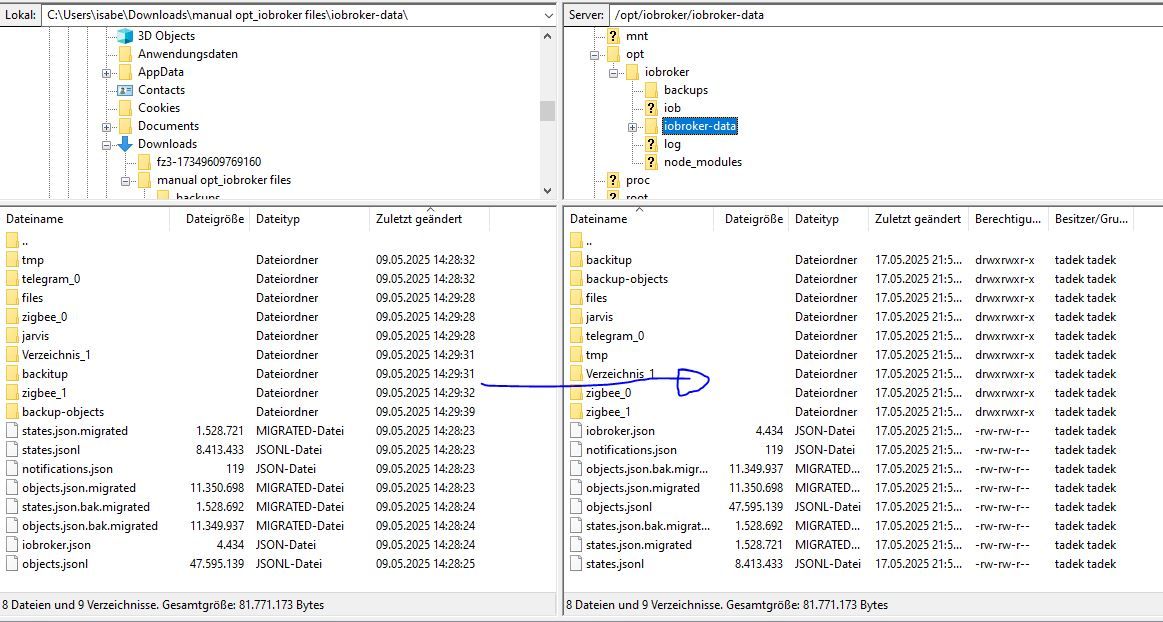
      M Offline
      Mr.X
      wrote on last edited by
      #108

      @oliverio sagte in Uralt System updaten oder Umzug:

      @mr-x

      Warum brauchst du den Quemu guest Agent
      In der vm?

      steht so in der ioBroker Anleitung.

      1 Reply Last reply
      0
      • Thomas BraunT Thomas Braun

        @mr-x

        Dann dürftest du aber den Hinweis

        ACHTUNG! - Es darf kein root Passwort vergeben werden.

        übersehen haben. Sonst wäre nämlich sudo schon vorkonfiguriert und würde natürlich auch gefunden.

        M Offline
        M Offline
        Mr.X
        wrote on last edited by
        #109

        @thomas-braun sagte in Uralt System updaten oder Umzug:

        @mr-x

        Dann dürftest du aber den Hinweis

        ACHTUNG! - Es darf kein root Passwort vergeben werden.

        übersehen haben. Sonst wäre nämlich sudo schon vorkonfiguriert und würde natürlich auch gefunden.

        Ohje, OK.
        Dann auf ein Neues. Hab ja sonst nichts zu tun......

        1 Reply Last reply
        0
        • M Offline
          M Offline
          Mr.X
          wrote on last edited by Mr.X
          #110

          @Thomas-Braun
          @Homoran
          OK. die VM mit Debian läuft wohl endlich gut. (hoffe ich).
          Mache weiter mit der Anleitung auf ioBroker Seite.
          Bin beim Schritt "USB durchreichen" angekommen.
          Zuvor eine generelle Frage:

          Ich möchte ja hoffentlich mein altes System portieren/wiederherstellen.
          Sollte ich nun den aktuellen Zigbee Stick vom Raspberry an den NUC anstecken, oder kann ich einen Sonoff dran machen und mit dem allens einrichten?
          Würden die Zigbee Geräte mit einem neuen Sonoff Stick weiterhin funktionieren? Oder muss es der alte sein?

          Vorteil wäre, dass ich das alte System weiterlaufen lassen kann. Es läuft ja alles.
          Und es wären hier nicht alle genervt.

          Und wenn das neue aufgesetzt ist einfach das andere abstecken und das Neu starten.

          Thomas BraunT 1 Reply Last reply
          0
          • M Mr.X

            @Thomas-Braun
            @Homoran
            OK. die VM mit Debian läuft wohl endlich gut. (hoffe ich).
            Mache weiter mit der Anleitung auf ioBroker Seite.
            Bin beim Schritt "USB durchreichen" angekommen.
            Zuvor eine generelle Frage:

            Ich möchte ja hoffentlich mein altes System portieren/wiederherstellen.
            Sollte ich nun den aktuellen Zigbee Stick vom Raspberry an den NUC anstecken, oder kann ich einen Sonoff dran machen und mit dem allens einrichten?
            Würden die Zigbee Geräte mit einem neuen Sonoff Stick weiterhin funktionieren? Oder muss es der alte sein?

            Vorteil wäre, dass ich das alte System weiterlaufen lassen kann. Es läuft ja alles.
            Und es wären hier nicht alle genervt.

            Und wenn das neue aufgesetzt ist einfach das andere abstecken und das Neu starten.

            Thomas BraunT Online
            Thomas BraunT Online
            Thomas Braun
            Most Active
            wrote on last edited by
            #111

            @mr-x sagte in Uralt System updaten oder Umzug:

            Sollte ich nun den aktuellen Zigbee Stick vom Raspberry an den NUC anstecken, oder kann ich einen Sonoff dran machen und mit dem allens einrichten?

            Dazu fragst du am besten mal @Asgothian
            Der weiß viel besser was da geht oder nicht. Würde ich aber in einem separaten Thread machen.

            Linux-Werkzeugkasten:
            https://forum.iobroker.net/topic/42952/der-kleine-iobroker-linux-werkzeugkasten
            NodeJS Fixer Skript:
            https://forum.iobroker.net/topic/68035/iob-node-fix-skript
            iob_diag: curl -sLf -o diag.sh https://iobroker.net/diag.sh && bash diag.sh

            1 Reply Last reply
            0
            • Thomas BraunT Thomas Braun

              @mr-x

              Durch das hin und her kopieren stimmen die Rechte und Besitzer nicht.
              Ich hätte auch nicht alles stumpf rüber kopiert sondern nur iobroker-data.

              chmod 755 /opt/iobroker/iobroker
              chown iobroker:iobroker /opt/iobroker/iobroker
              
              M Offline
              M Offline
              Mr.X
              wrote on last edited by
              #112

              @thomas-braun sagte in Uralt System updaten oder Umzug:

              @mr-x

              Durch das hin und her kopieren stimmen die Rechte und Besitzer nicht.
              Ich hätte auch nicht alles stumpf rüber kopiert sondern nur iobroker-data.

              chmod 755 /opt/iobroker/iobroker
              chown iobroker:iobroker /opt/iobroker/iobroker
              

              VM aufgesetzt und funktioniert, habe die iobroker-data Datein kopiert.
              Danach komme ich auf die Weboberfläche von ioBroker nicht mehr drauf, diese wird garnicht im browser geladen.
              sollte ich die Befehle nach deem kopieren ausführen?
              Dies wäre das Resultat:

              tadek@ioBrokerVM:~$ chmod 755 /opt/iobroker/iobroker
              chmod: Beim Setzen der Zugriffsrechte für '/opt/iobroker/iobroker': Die Operation ist nicht erlaubt
              tadek@ioBrokerVM:~$ chown iobroker:iobroker /opt/iobroker/iobroker
              chown: der Eigentümer von '/opt/iobroker/iobroker' wird geändert: Die Operation ist nicht erlaubt
              
              
              HomoranH 1 Reply Last reply
              0
              • M Offline
                M Offline
                Mr.X
                wrote on last edited by
                #113

                Da ioBroker nicht reagiert, würde ich das VM Backup einspielen und versuchen ein iobroker backup durch den Adapter wiederherstellen?
                Oder hätte jemand besser Ideen/Vorschläge?

                Thomas BraunT 1 Reply Last reply
                0
                • M Mr.X

                  Da ioBroker nicht reagiert, würde ich das VM Backup einspielen und versuchen ein iobroker backup durch den Adapter wiederherstellen?
                  Oder hätte jemand besser Ideen/Vorschläge?

                  Thomas BraunT Online
                  Thomas BraunT Online
                  Thomas Braun
                  Most Active
                  wrote on last edited by
                  #114

                  @mr-x sagte in Uralt System updaten oder Umzug:

                  Oder hätte jemand besser Ideen/Vorschläge?

                  Jag den

                  iob fix
                  

                  über das System.

                  Linux-Werkzeugkasten:
                  https://forum.iobroker.net/topic/42952/der-kleine-iobroker-linux-werkzeugkasten
                  NodeJS Fixer Skript:
                  https://forum.iobroker.net/topic/68035/iob-node-fix-skript
                  iob_diag: curl -sLf -o diag.sh https://iobroker.net/diag.sh && bash diag.sh

                  M 1 Reply Last reply
                  0
                  • Thomas BraunT Thomas Braun

                    @mr-x sagte in Uralt System updaten oder Umzug:

                    Oder hätte jemand besser Ideen/Vorschläge?

                    Jag den

                    iob fix
                    

                    über das System.

                    M Offline
                    M Offline
                    Mr.X
                    wrote on last edited by
                    #115

                    @thomas-braun
                    Leider hat dies nichts geändert.
                    Und für heute ist auch nun Schluss.
                    Danke

                    1 Reply Last reply
                    0
                    • M Mr.X

                      @thomas-braun sagte in Uralt System updaten oder Umzug:

                      @mr-x

                      Durch das hin und her kopieren stimmen die Rechte und Besitzer nicht.
                      Ich hätte auch nicht alles stumpf rüber kopiert sondern nur iobroker-data.

                      chmod 755 /opt/iobroker/iobroker
                      chown iobroker:iobroker /opt/iobroker/iobroker
                      

                      VM aufgesetzt und funktioniert, habe die iobroker-data Datein kopiert.
                      Danach komme ich auf die Weboberfläche von ioBroker nicht mehr drauf, diese wird garnicht im browser geladen.
                      sollte ich die Befehle nach deem kopieren ausführen?
                      Dies wäre das Resultat:

                      tadek@ioBrokerVM:~$ chmod 755 /opt/iobroker/iobroker
                      chmod: Beim Setzen der Zugriffsrechte für '/opt/iobroker/iobroker': Die Operation ist nicht erlaubt
                      tadek@ioBrokerVM:~$ chown iobroker:iobroker /opt/iobroker/iobroker
                      chown: der Eigentümer von '/opt/iobroker/iobroker' wird geändert: Die Operation ist nicht erlaubt
                      
                      
                      HomoranH Do not disturb
                      HomoranH Do not disturb
                      Homoran
                      Global Moderator Administrators
                      wrote on last edited by
                      #116

                      @mr-x sagte in Uralt System updaten oder Umzug:

                      habe die iobroker-data Datein kopiert.

                      wie?
                      mit welchem Befehl und welchem User?

                      @mr-x sagte in Uralt System updaten oder Umzug:

                      Danach komme ich auf die Weboberfläche von ioBroker nicht mehr drauf, diese wird garnicht im browser geladen.

                      was sagt dann iob diag?
                      Bitte Ausgabe der Langfassung in code-tags posten.

                      @mr-x sagte in Uralt System updaten oder Umzug:

                      Leider hat dies nichts geändert.

                      und warum nicht?
                      was kam als Ausgabe?

                      kein Support per PN! - Fragen im Forum stellen - es gibt fast nichts, was nicht auch für andere interessant ist.

                      Benutzt das Voting rechts unten im Beitrag wenn er euch geholfen hat.

                      der Installationsfixer: curl -fsL https://iobroker.net/fix.sh | bash -

                      M 1 Reply Last reply
                      0
                      • HomoranH Homoran

                        @mr-x sagte in Uralt System updaten oder Umzug:

                        habe die iobroker-data Datein kopiert.

                        wie?
                        mit welchem Befehl und welchem User?

                        @mr-x sagte in Uralt System updaten oder Umzug:

                        Danach komme ich auf die Weboberfläche von ioBroker nicht mehr drauf, diese wird garnicht im browser geladen.

                        was sagt dann iob diag?
                        Bitte Ausgabe der Langfassung in code-tags posten.

                        @mr-x sagte in Uralt System updaten oder Umzug:

                        Leider hat dies nichts geändert.

                        und warum nicht?
                        was kam als Ausgabe?

                        M Offline
                        M Offline
                        Mr.X
                        wrote on last edited by Mr.X
                        #117

                        @homoran
                        Also ich habe den inhalt von ioBroker data auf dem neuen System gelöscht und dann per filezilla mit normalen User vom alten System rein kopiert und neu gestartet.
                        iob fix ausgeführt.
                        Danach komme ich nicht mehr auf die Weboberfläche und diag sagt das:

                        ======================= SUMMARY =======================
                                                v.2025-02-23
                        
                        
                         Static hostname: ioBrokerVM
                               Icon name: computer-vm
                                 Chassis: vm 🖴
                          Virtualization: kvm
                        Operating System: Debian GNU/Linux 12 (bookworm)
                                  Kernel: Linux 6.1.0-35-amd64
                            Architecture: x86-64
                         Hardware Vendor: QEMU
                          Hardware Model: Standard PC _i440FX + PIIX, 1996_
                        Firmware Version: rel-1.16.3-0-ga6ed6b701f0a-prebuilt.qemu.org
                        
                        Installation:           kvm
                        Kernel:                 x86_64
                        Userland:               64 bit
                        Timezone:               Europe/Berlin (CEST, +0200)
                        User-ID:                1000
                        Display-Server:         false
                        Boot Target:            multi-user.target
                        
                        Pending OS-Updates:     0
                        Pending iob updates:    0
                        
                        Nodejs-Installation:
                        /usr/bin/nodejs         v20.19.2
                        /usr/bin/node           v20.19.2
                        /usr/bin/npm            10.8.2
                        /usr/bin/npx            10.8.2
                        /usr/bin/corepack       0.31.0
                        
                        Recommended versions are nodejs  and npm
                        nodeJS installation is correct
                        
                        MEMORY:
                                       total        used        free      shared  buff/cache   available
                        Mem:            4.1G        528M        3.3G        557K        530M        3.6G
                        Swap:           1.0G          0B        1.0G
                        Total:          5.1G        528M        4.3G
                        
                        Active iob-Instances:   1
                        Upgrade policy: none
                        
                        ioBroker Core:          js-controller           7.0.6
                                                admin                   7.6.3
                        
                        ioBroker Status:        iobroker is running on this host.
                        
                        
                        Objects type: jsonl
                        States  type: jsonl
                        
                        Status admin and web instance:
                          system.adapter.admin.0                  : admin                 : raspberrypi                              -  enabled, port: 8081, bind: 0.0.0.0 (SSL), run as: admin
                          system.adapter.web.0                    : web                   : raspberrypi                              -  enabled, port: 8082, bind: 0.0.0.0, run as: admin
                        
                        Objects:                9397
                        States:                 8041
                        
                        Size of iob-Database:
                        
                        21M     /opt/iobroker/iobroker-data/objects.jsonl
                        11M     /opt/iobroker/iobroker-data/objects.json.migrated
                        11M     /opt/iobroker/iobroker-data/objects.json.bak.migrated
                        3.3M    /opt/iobroker/iobroker-data/states.jsonl
                        1.5M    /opt/iobroker/iobroker-data/states.json.migrated
                        1.5M    /opt/iobroker/iobroker-data/states.json.bak.migrated
                        
                        
                        Operating System is the current Debian stable version codenamed 'bookworm'!
                        
                        =================== END OF SUMMARY ====================
                        
                        
                        HomoranH 1 Reply Last reply
                        0
                        • M Offline
                          M Offline
                          Mr.X
                          wrote on last edited by
                          #118
                          ```bash
                          Script v.2025-02-23
                          
                          *** BASE SYSTEM ***
                           Static hostname: ioBrokerVM
                                 Icon name: computer-vm
                                   Chassis: vm 🖴
                            Virtualization: kvm
                          Operating System: Debian GNU/Linux 12 (bookworm)
                                    Kernel: Linux 6.1.0-35-amd64
                              Architecture: x86-64
                           Hardware Vendor: QEMU
                            Hardware Model: Standard PC _i440FX + PIIX, 1996_
                          Firmware Version: rel-1.16.3-0-ga6ed6b701f0a-prebuilt.qemu.org
                          OS is similar to:
                          
                          model name      : QEMU Virtual CPU version 2.5+
                          Docker          : false
                          Virtualization  : kvm
                          Kernel          : x86_64
                          Userland        : 64 bit
                          
                          Systemuptime and Load:
                           11:10:46 up 11:15,  2 users,  load average: 0.08, 0.05, 0.01
                          CPU threads: 4
                          
                          
                          *** LIFE CYCLE STATUS ***
                          Operating System is the current Debian stable version codenamed 'bookworm'!
                          
                          *** TIME AND TIMEZONES ***
                                         Local time: Sun 2025-05-18 11:10:46 CEST
                                     Universal time: Sun 2025-05-18 09:10:46 UTC
                                           RTC time: Sun 2025-05-18 09:10:46
                                          Time zone: Europe/Berlin (CEST, +0200)
                          System clock synchronized: yes
                                        NTP service: active
                                    RTC in local TZ: no
                          
                          *** Users and Groups ***
                          User that called 'iob diag':
                          tadek
                          HOME=/home/tadek
                          GROUPS=tadek cdrom floppy sudo audio dip video plugdev users netdev iobroker
                          
                          User that is running 'js-controller':
                          iobroker
                          HOME=/home/iobroker
                          GROUPS=iobroker tty dialout audio video plugdev
                          
                          *** DISPLAY-SERVER SETUP ***
                          Display-Server: false
                          Desktop:
                          Terminal:       tty
                          
                          *** MEMORY ***
                                         total        used        free      shared  buff/cache   available
                          Mem:            4.1G        501M        3.3G        557K        530M        3.6G
                          Swap:           1.0G          0B        1.0G
                          Total:          5.1G        501M        4.3G
                          
                          Active iob-Instances:   1
                          
                                   3914 M total memory
                                    478 M used memory
                                    289 M active memory
                                    333 M inactive memory
                                   3156 M free memory
                                     93 M buffer memory
                                    412 M swap cache
                                    974 M total swap
                                      0 M used swap
                                    974 M free swap
                          
                          *** top - Table Of Processes  ***
                          top - 11:10:47 up 11:15,  2 users,  load average: 0.08, 0.05, 0.01
                          Tasks: 106 total,   1 running, 105 sleeping,   0 stopped,   0 zombie
                          %Cpu(s):  0.0 us,  0.0 sy,  0.0 ni,100.0 id,  0.0 wa,  0.0 hi,  0.0 si,  0.0 st
                          MiB Mem :   3914.7 total,   3155.2 free,    480.1 used,    506.1 buff/cache
                          MiB Swap:    975.0 total,    975.0 free,      0.0 used.   3434.6 avail Mem
                          
                          *** FAILED SERVICES ***
                          
                            UNIT LOAD ACTIVE SUB DESCRIPTION
                          0 loaded units listed.
                          
                          
                          *** DMESG CRITICAL ERRORS ***
                          No critical errors detected
                          
                          *** FILESYSTEM ***
                          Filesystem     Type      Size  Used Avail Use% Mounted on
                          udev           devtmpfs  1.9G     0  1.9G   0% /dev
                          tmpfs          tmpfs     392M  544K  391M   1% /run
                          /dev/sda1      ext4       62G  4.4G   55G   8% /
                          tmpfs          tmpfs     2.0G     0  2.0G   0% /dev/shm
                          tmpfs          tmpfs     5.0M     0  5.0M   0% /run/lock
                          tmpfs          tmpfs     392M     0  392M   0% /run/user/1000
                          
                          Messages concerning ext4 filesystem in dmesg:
                          [Sat May 17 23:54:51 2025] EXT4-fs (sda1): mounted filesystem with ordered data mode. Quota mode: none.
                          [Sat May 17 23:54:52 2025] EXT4-fs (sda1): re-mounted. Quota mode: none.
                          
                          Show mounted filesystems:
                          TARGET SOURCE    FSTYPE OPTIONS
                          /      /dev/sda1 ext4   rw,relatime,errors=remount-ro
                          
                          Files in neuralgic directories:
                          
                          /var:
                          459M    /var/
                          248M    /var/cache
                          241M    /var/cache/apt
                          172M    /var/lib
                          165M    /var/cache/apt/archives
                          
                          Hint: You are currently not seeing messages from other users and the system.
                                Users in groups 'adm', 'systemd-journal' can see all messages.
                                Pass -q to turn off this notice.
                          Archived and active journals take up 8.0M in the file system.
                          
                          /opt/iobroker/backups:
                          7.5M    /opt/iobroker/backups/
                          
                          /opt/iobroker/iobroker-data:
                          326M    /opt/iobroker/iobroker-data/
                          153M    /opt/iobroker/iobroker-data/files
                          123M    /opt/iobroker/iobroker-data/backup-objects
                          41M     /opt/iobroker/iobroker-data/files/javascript.admin
                          31M     /opt/iobroker/iobroker-data/files/javascript.admin/static/js
                          
                          The five largest files in iobroker-data are:
                          21M     /opt/iobroker/iobroker-data/objects.jsonl
                          11M     /opt/iobroker/iobroker-data/objects.json.migrated
                          11M     /opt/iobroker/iobroker-data/objects.json.bak.migrated
                          8.9M    /opt/iobroker/iobroker-data/files/scenes.admin/static/js/2.7de3299d.chunk.js.map
                          7.1M    /opt/iobroker/iobroker-data/files/ham.admin/static/js/main.2e2164eb.js.map
                          
                          USB-Devices by-id:
                          USB-Sticks -  Avoid direct links to /dev/tty* in your adapter setups, please always prefer the links 'by-id':
                          
                          /dev/serial/by-id/usb-ITead_Sonoff_Zigbee_3.0_USB_Dongle_Plus_2e66e30c326cef1192d399adc169b110-if00-port0
                          
                          *** ZigBee Settings ***
                          
                          HINT:
                          Your zigbee.0 COM-Port is NOT matching 'by-id'. Please check your setting:
                          /dev/ttyACM0
                          
                          HINT:
                          Your zigbee.1 COM-Port is NOT matching 'by-id'. Please check your setting:
                          /dev/ttyACM0
                          Zigbee Network Settings on your coordinator/in nvbackup are:
                          
                          zigbee.X
                          Extended Pan ID:
                          *** MASKED ***
                          Pan ID:
                          *** MASKED ***
                          Channel:
                          *** MASKED ***
                          Network Key:
                          *** MASKED ***
                          
                          To unmask the settings run 'iob diag --unmask'
                          
                          
                          *** NodeJS-Installation ***
                          
                          /usr/bin/nodejs         v20.19.2
                          /usr/bin/node           v20.19.2
                          /usr/bin/npm            10.8.2
                          /usr/bin/npx            10.8.2
                          /usr/bin/corepack       0.31.0
                          
                          nodejs:
                            Installed: 20.19.2-1nodesource1
                            Candidate: 20.19.2-1nodesource1
                            Version table:
                           *** 20.19.2-1nodesource1 1001
                                  500 https://deb.nodesource.com/node_20.x nodistro/main amd64 Packages
                                  100 /var/lib/dpkg/status
                               20.19.1-1nodesource1 1001
                                  500 https://deb.nodesource.com/node_20.x nodistro/main amd64 Packages
                               20.19.0-1nodesource1 1001
                                  500 https://deb.nodesource.com/node_20.x nodistro/main amd64 Packages
                               20.18.3-1nodesource1 1001
                                  500 https://deb.nodesource.com/node_20.x nodistro/main amd64 Packages
                               20.18.2-1nodesource1 1001
                                  500 https://deb.nodesource.com/node_20.x nodistro/main amd64 Packages
                               20.18.1-1nodesource1 1001
                                  500 https://deb.nodesource.com/node_20.x nodistro/main amd64 Packages
                               20.18.0-1nodesource1 1001
                                  500 https://deb.nodesource.com/node_20.x nodistro/main amd64 Packages
                               20.17.0-1nodesource1 1001
                                  500 https://deb.nodesource.com/node_20.x nodistro/main amd64 Packages
                               20.16.0-1nodesource1 1001
                                  500 https://deb.nodesource.com/node_20.x nodistro/main amd64 Packages
                               20.15.1-1nodesource1 1001
                                  500 https://deb.nodesource.com/node_20.x nodistro/main amd64 Packages
                               20.15.0-1nodesource1 1001
                                  500 https://deb.nodesource.com/node_20.x nodistro/main amd64 Packages
                               20.14.0-1nodesource1 1001
                                  500 https://deb.nodesource.com/node_20.x nodistro/main amd64 Packages
                               20.13.1-1nodesource1 1001
                                  500 https://deb.nodesource.com/node_20.x nodistro/main amd64 Packages
                               20.13.0-1nodesource1 1001
                                  500 https://deb.nodesource.com/node_20.x nodistro/main amd64 Packages
                               20.12.2-1nodesource1 1001
                                  500 https://deb.nodesource.com/node_20.x nodistro/main amd64 Packages
                               20.12.1-1nodesource1 1001
                                  500 https://deb.nodesource.com/node_20.x nodistro/main amd64 Packages
                               20.12.0-1nodesource1 1001
                                  500 https://deb.nodesource.com/node_20.x nodistro/main amd64 Packages
                               20.11.1-1nodesource1 1001
                                  500 https://deb.nodesource.com/node_20.x nodistro/main amd64 Packages
                               20.11.0-1nodesource1 1001
                                  500 https://deb.nodesource.com/node_20.x nodistro/main amd64 Packages
                               20.10.0-1nodesource1 1001
                                  500 https://deb.nodesource.com/node_20.x nodistro/main amd64 Packages
                               20.9.0-1nodesource1 1001
                                  500 https://deb.nodesource.com/node_20.x nodistro/main amd64 Packages
                               20.8.1-1nodesource1 1001
                                  500 https://deb.nodesource.com/node_20.x nodistro/main amd64 Packages
                               20.8.0-1nodesource1 1001
                                  500 https://deb.nodesource.com/node_20.x nodistro/main amd64 Packages
                               20.7.0-1nodesource1 1001
                                  500 https://deb.nodesource.com/node_20.x nodistro/main amd64 Packages
                               20.6.1-1nodesource1 1001
                                  500 https://deb.nodesource.com/node_20.x nodistro/main amd64 Packages
                               20.6.0-1nodesource1 1001
                                  500 https://deb.nodesource.com/node_20.x nodistro/main amd64 Packages
                               20.5.1-1nodesource1 1001
                                  500 https://deb.nodesource.com/node_20.x nodistro/main amd64 Packages
                               20.5.0-1nodesource1 1001
                                  500 https://deb.nodesource.com/node_20.x nodistro/main amd64 Packages
                               20.4.0-1nodesource1 1001
                                  500 https://deb.nodesource.com/node_20.x nodistro/main amd64 Packages
                               20.3.1-1nodesource1 1001
                                  500 https://deb.nodesource.com/node_20.x nodistro/main amd64 Packages
                               20.3.0-1nodesource1 1001
                                  500 https://deb.nodesource.com/node_20.x nodistro/main amd64 Packages
                               20.2.0-1nodesource1 1001
                                  500 https://deb.nodesource.com/node_20.x nodistro/main amd64 Packages
                               20.1.0-1nodesource1 1001
                                  500 https://deb.nodesource.com/node_20.x nodistro/main amd64 Packages
                               20.0.0-1nodesource1 1001
                                  500 https://deb.nodesource.com/node_20.x nodistro/main amd64 Packages
                               18.19.0+dfsg-6~deb12u2 500
                                  500 http://deb.debian.org/debian bookworm/main amd64 Packages
                               18.19.0+dfsg-6~deb12u1 500
                                  500 http://security.debian.org/debian-security bookworm-security/main amd64 Packages
                          
                          Temp directories causing deletion problem: 0
                          No problems detected
                          
                          Errors in npm tree: 0
                          No problems detected
                          
                          *** ioBroker-Installation ***
                          
                          ioBroker Status
                          iobroker is running on this host.
                          
                          
                          Objects type: jsonl
                          States  type: jsonl
                          
                          Hosts:
                          broker-slave        broker-slave (version: 3.1.6, hostname: broker-slave  , alive, uptime: 19)
                          ioBrokerVM          ioBrokerVM (version: 7.0.6, hostname: ioBrokerVM    , alive, uptime: 40548)
                          raspberrypi         raspberrypi (version: 4.0.23, hostname: raspberrypi   , alive, uptime: 4998)
                          
                          Core adapters versions
                          js-controller:  7.0.6
                          admin:          7.6.3
                          javascript:     8.8.3
                          
                          nodejs modules from github:     0
                          
                          Adapter State
                            system.adapter.admin.0                  : admin                 : raspberrypi                              -  enabled, port: 8081, bind: 0.0.0.0 (SSL), run                                                                                 as: admin
                            system.adapter.alexa2.0                 : alexa2                : raspberrypi                              -  enabled
                            system.adapter.backitup.0               : backitup              : raspberrypi                              -  enabled
                            system.adapter.blockly-plus.0           : blockly-plus          : raspberrypi                              -  enabled
                            system.adapter.cloud.0                  : cloud                 : raspberrypi                              -  enabled
                            system.adapter.devices.0                : devices               : raspberrypi                              -  enabled
                            system.adapter.discovery.0              : discovery             : raspberrypi                              -  enabled
                            system.adapter.flot.0                   : flot                  : raspberrypi                              - disabled
                            system.adapter.history.0                : history               : raspberrypi                              -  enabled
                            system.adapter.hm-rega.0                : hm-rega               : raspberrypi                              -  enabled
                            system.adapter.hm-rpc.0                 : hm-rpc                : raspberrypi                              -  enabled, port: 2010
                            system.adapter.iot.0                    : iot                   : raspberrypi                              -  enabled
                            system.adapter.javascript.0             : javascript            : raspberrypi                              -  enabled
                            system.adapter.mqtt.0                   : mqtt                  : raspberrypi                              - disabled, port: 1883, bind: 0.0.0.0
                            system.adapter.netatmo-crawler.0        : netatmo-crawler       : raspberrypi                              -  enabled
                            system.adapter.nuki-extended.0          : nuki-extended         : raspberrypi                              - disabled
                            system.adapter.openweathermap.0         : openweathermap        : raspberrypi                              -  enabled
                            system.adapter.scenes.0                 : scenes                : raspberrypi                              -  enabled
                            system.adapter.shelly.0                 : shelly                : raspberrypi                              -  enabled, port: 1882, bind: 0.0.0.0
                            system.adapter.simple-api.0             : simple-api            : raspberrypi                              -  enabled, port: 8087, bind: 0.0.0.0, run as: a                                                                                dmin
                            system.adapter.socketio.0               : socketio              : raspberrypi                              -  enabled, port: 8084, bind: 0.0.0.0, run as: a                                                                                dmin
                            system.adapter.statistics.0             : statistics            : raspberrypi                              -  enabled
                            system.adapter.tankerkoenig.0           : tankerkoenig          : raspberrypi                              -  enabled
                            system.adapter.telegram.0               : telegram              : raspberrypi                              -  enabled, port: 8443, bind: 0.0.0.0
                            system.adapter.tr-064.0                 : tr-064                : raspberrypi                              - disabled
                            system.adapter.tuya.0                   : tuya                  : raspberrypi                              - disabled
                            system.adapter.vis.0                    : vis                   : raspberrypi                              - disabled
                            system.adapter.weatherunderground.0     : weatherunderground    : raspberrypi                              -  enabled
                            system.adapter.web.0                    : web                   : raspberrypi                              -  enabled, port: 8082, bind: 0.0.0.0, run as: a                                                                                dmin
                            system.adapter.zigbee.0                 : zigbee                : raspberrypi                              -  enabled, port: /dev/ttyACM0
                            system.adapter.zigbee.1                 : zigbee                : broker-slave                             -  enabled, port: /dev/ttyACM0
                          
                          + instance is alive
                          
                          Enabled adapters with bindings
                            system.adapter.admin.0                  : admin                 : raspberrypi                              -  enabled, port: 8081, bind: 0.0.0.0 (SSL), run                                                                                 as: admin
                            system.adapter.hm-rpc.0                 : hm-rpc                : raspberrypi                              -  enabled, port: 2010
                            system.adapter.shelly.0                 : shelly                : raspberrypi                              -  enabled, port: 1882, bind: 0.0.0.0
                            system.adapter.simple-api.0             : simple-api            : raspberrypi                              -  enabled, port: 8087, bind: 0.0.0.0, run as: a                                                                                dmin
                            system.adapter.socketio.0               : socketio              : raspberrypi                              -  enabled, port: 8084, bind: 0.0.0.0, run as: a                                                                                dmin
                            system.adapter.telegram.0               : telegram              : raspberrypi                              -  enabled, port: 8443, bind: 0.0.0.0
                            system.adapter.web.0                    : web                   : raspberrypi                              -  enabled, port: 8082, bind: 0.0.0.0, run as: a                                                                                dmin
                            system.adapter.zigbee.0                 : zigbee                : raspberrypi                              -  enabled, port: /dev/ttyACM0
                            system.adapter.zigbee.1                 : zigbee                : broker-slave                             -  enabled, port: /dev/ttyACM0
                          
                          ioBroker-Repositories
                          ┌─────────┬────────────────────┬─────────────────────────────────────────────────────────┬──────────────┐
                          │ (index) │ name               │ url                                                     │ auto upgrade │
                          ├─────────┼────────────────────┼─────────────────────────────────────────────────────────┼──────────────┤
                          │ 0       │ 'Stable (default)' │ 'http://download.iobroker.net/sources-dist.json'        │ false        │
                          │ 1       │ 'Beta (latest)'    │ 'http://download.iobroker.net/sources-dist-latest.json' │ false        │
                          └─────────┴────────────────────┴─────────────────────────────────────────────────────────┴──────────────┘
                          
                          Active repo(s): Stable (default)
                          Upgrade policy: none
                          
                          Installed ioBroker-Adapters
                          Used repository: Stable (default)
                          Adapter    "admin"        : 7.6.3    , installed 7.6.3
                          Adapter    "backitup"     : 3.0.31   , installed 3.0.31
                          Adapter    "cloud"        : 5.0.1    , installed 5.0.1
                          Adapter    "discovery"    : 5.0.0    , installed 5.0.0
                          Adapter    "history"      : 3.0.1    , installed 3.0.1
                          Adapter    "iot"          : 3.3.0    , installed 3.3.0
                          Adapter    "javascript"   : 8.8.3    , installed 8.8.3
                          Controller "js-controller": 7.0.6    , installed 7.0.6
                          Adapter    "scenes"       : 3.2.3    , installed 3.2.3
                          Adapter    "telegram"     : 4.1.0    , installed 4.1.0
                          Adapter    "weatherunderground": 3.7.0, installed 3.7.0
                          
                          Objects and States
                          Please stand by - This may take a while
                          Objects:        9397
                          States:         8041
                          
                          *** OS-Repositories and Updates ***
                          Hit:1 http://security.debian.org/debian-security bookworm-security InRelease
                          Hit:2 http://deb.debian.org/debian bookworm InRelease
                          Hit:3 http://deb.debian.org/debian bookworm-updates InRelease
                          Hit:4 https://deb.nodesource.com/node_20.x nodistro InRelease
                          Reading package lists...
                          Pending Updates: 0
                          
                          *** Listening Ports ***
                          Active Internet connections (only servers)
                          Proto Recv-Q Send-Q Local Address           Foreign Address         State       User       Inode      PID/Program name
                          tcp        0      0 0.0.0.0:22              0.0.0.0:*               LISTEN      0          17819      545/sshd: /usr/sbin
                          tcp        0      0 0.0.0.0:111             0.0.0.0:*               LISTEN      0          15439      1/init
                          tcp        0      0 0.0.0.0:9001            0.0.0.0:*               LISTEN      1001       15785      520/iobroker.js-con
                          tcp        0      0 0.0.0.0:9000            0.0.0.0:*               LISTEN      1001       14807      520/iobroker.js-con
                          tcp6       0      0 :::22                   :::*                    LISTEN      0          17821      545/sshd: /usr/sbin
                          tcp6       0      0 :::111                  :::*                    LISTEN      0          236        1/init
                          udp        0      0 0.0.0.0:68              0.0.0.0:*                           0          14699      405/dhclient
                          udp        0      0 0.0.0.0:111             0.0.0.0:*                           0          14462      1/init
                          udp6       0      0 :::111                  :::*                                0          15440      1/init
                          
                          *** Log File - Last 25 Lines ***
                          
                          2025-05-17 23:31:47.804  - info: host.ioBrokerVM added notifications configuration of host
                          2025-05-17 23:31:48.169  - info: host.ioBrokerVM 31 instances found
                          2025-05-17 23:31:48.173  - warn: host.ioBrokerVM does not start any instances on this host
                          2025-05-17 23:47:48.075  - info: host.ioBrokerVM received SIGTERM
                          2025-05-17 23:47:48.098  - info: host.ioBrokerVM terminated
                          2025-05-17 23:52:30.769  - info: host.ioBrokerVM iobroker.js-controller version 7.0.6 js-controller starting
                          2025-05-17 23:52:30.771  - info: host.ioBrokerVM Copyright (c) 2014-2024 bluefox, 2014 hobbyquaker
                          2025-05-17 23:52:30.771  - info: host.ioBrokerVM hostname: ioBrokerVM, node: v20.19.2
                          2025-05-17 23:52:30.771  - info: host.ioBrokerVM ip addresses: 192.168.178.160 fd4c:16f3:42:5d6:be24:11ff:fe4d:a762 fe80::be24:11ff:fe4d:a762
                          2025-05-17 23:52:31.121  - info: host.ioBrokerVM Sets unsupported
                          2025-05-17 23:52:31.332  - info: host.ioBrokerVM connected to Objects and States
                          2025-05-17 23:52:31.340  - info: host.ioBrokerVM added notifications configuration of host
                          2025-05-17 23:52:31.611  - info: host.ioBrokerVM 31 instances found
                          2025-05-17 23:52:31.615  - warn: host.ioBrokerVM does not start any instances on this host
                          2025-05-17 23:54:38.715  - info: host.ioBrokerVM received SIGTERM
                          2025-05-17 23:54:38.741  - info: host.ioBrokerVM terminated
                          2025-05-17 23:54:55.361  - info: host.ioBrokerVM iobroker.js-controller version 7.0.6 js-controller starting
                          2025-05-17 23:54:55.363  - info: host.ioBrokerVM Copyright (c) 2014-2024 bluefox, 2014 hobbyquaker
                          2025-05-17 23:54:55.364  - info: host.ioBrokerVM hostname: ioBrokerVM, node: v20.19.2
                          2025-05-17 23:54:55.364  - info: host.ioBrokerVM ip addresses: 192.168.178.160 fd4c:16f3:42:5d6:be24:11ff:fe4d:a762 fe80::be24:11ff:fe4d:a762
                          2025-05-17 23:54:55.720  - info: host.ioBrokerVM Sets unsupported
                          2025-05-17 23:54:55.933  - info: host.ioBrokerVM connected to Objects and States
                          2025-05-17 23:54:55.942  - info: host.ioBrokerVM added notifications configuration of host
                          2025-05-17 23:54:56.311  - info: host.ioBrokerVM 31 instances found
                          2025-05-17 23:54:56.316  - warn: host.ioBrokerVM does not start any instances on this host
                          
                          
                          Thomas BraunT 1 Reply Last reply
                          0
                          • M Mr.X
                            ```bash
                            Script v.2025-02-23
                            
                            *** BASE SYSTEM ***
                             Static hostname: ioBrokerVM
                                   Icon name: computer-vm
                                     Chassis: vm 🖴
                              Virtualization: kvm
                            Operating System: Debian GNU/Linux 12 (bookworm)
                                      Kernel: Linux 6.1.0-35-amd64
                                Architecture: x86-64
                             Hardware Vendor: QEMU
                              Hardware Model: Standard PC _i440FX + PIIX, 1996_
                            Firmware Version: rel-1.16.3-0-ga6ed6b701f0a-prebuilt.qemu.org
                            OS is similar to:
                            
                            model name      : QEMU Virtual CPU version 2.5+
                            Docker          : false
                            Virtualization  : kvm
                            Kernel          : x86_64
                            Userland        : 64 bit
                            
                            Systemuptime and Load:
                             11:10:46 up 11:15,  2 users,  load average: 0.08, 0.05, 0.01
                            CPU threads: 4
                            
                            
                            *** LIFE CYCLE STATUS ***
                            Operating System is the current Debian stable version codenamed 'bookworm'!
                            
                            *** TIME AND TIMEZONES ***
                                           Local time: Sun 2025-05-18 11:10:46 CEST
                                       Universal time: Sun 2025-05-18 09:10:46 UTC
                                             RTC time: Sun 2025-05-18 09:10:46
                                            Time zone: Europe/Berlin (CEST, +0200)
                            System clock synchronized: yes
                                          NTP service: active
                                      RTC in local TZ: no
                            
                            *** Users and Groups ***
                            User that called 'iob diag':
                            tadek
                            HOME=/home/tadek
                            GROUPS=tadek cdrom floppy sudo audio dip video plugdev users netdev iobroker
                            
                            User that is running 'js-controller':
                            iobroker
                            HOME=/home/iobroker
                            GROUPS=iobroker tty dialout audio video plugdev
                            
                            *** DISPLAY-SERVER SETUP ***
                            Display-Server: false
                            Desktop:
                            Terminal:       tty
                            
                            *** MEMORY ***
                                           total        used        free      shared  buff/cache   available
                            Mem:            4.1G        501M        3.3G        557K        530M        3.6G
                            Swap:           1.0G          0B        1.0G
                            Total:          5.1G        501M        4.3G
                            
                            Active iob-Instances:   1
                            
                                     3914 M total memory
                                      478 M used memory
                                      289 M active memory
                                      333 M inactive memory
                                     3156 M free memory
                                       93 M buffer memory
                                      412 M swap cache
                                      974 M total swap
                                        0 M used swap
                                      974 M free swap
                            
                            *** top - Table Of Processes  ***
                            top - 11:10:47 up 11:15,  2 users,  load average: 0.08, 0.05, 0.01
                            Tasks: 106 total,   1 running, 105 sleeping,   0 stopped,   0 zombie
                            %Cpu(s):  0.0 us,  0.0 sy,  0.0 ni,100.0 id,  0.0 wa,  0.0 hi,  0.0 si,  0.0 st
                            MiB Mem :   3914.7 total,   3155.2 free,    480.1 used,    506.1 buff/cache
                            MiB Swap:    975.0 total,    975.0 free,      0.0 used.   3434.6 avail Mem
                            
                            *** FAILED SERVICES ***
                            
                              UNIT LOAD ACTIVE SUB DESCRIPTION
                            0 loaded units listed.
                            
                            
                            *** DMESG CRITICAL ERRORS ***
                            No critical errors detected
                            
                            *** FILESYSTEM ***
                            Filesystem     Type      Size  Used Avail Use% Mounted on
                            udev           devtmpfs  1.9G     0  1.9G   0% /dev
                            tmpfs          tmpfs     392M  544K  391M   1% /run
                            /dev/sda1      ext4       62G  4.4G   55G   8% /
                            tmpfs          tmpfs     2.0G     0  2.0G   0% /dev/shm
                            tmpfs          tmpfs     5.0M     0  5.0M   0% /run/lock
                            tmpfs          tmpfs     392M     0  392M   0% /run/user/1000
                            
                            Messages concerning ext4 filesystem in dmesg:
                            [Sat May 17 23:54:51 2025] EXT4-fs (sda1): mounted filesystem with ordered data mode. Quota mode: none.
                            [Sat May 17 23:54:52 2025] EXT4-fs (sda1): re-mounted. Quota mode: none.
                            
                            Show mounted filesystems:
                            TARGET SOURCE    FSTYPE OPTIONS
                            /      /dev/sda1 ext4   rw,relatime,errors=remount-ro
                            
                            Files in neuralgic directories:
                            
                            /var:
                            459M    /var/
                            248M    /var/cache
                            241M    /var/cache/apt
                            172M    /var/lib
                            165M    /var/cache/apt/archives
                            
                            Hint: You are currently not seeing messages from other users and the system.
                                  Users in groups 'adm', 'systemd-journal' can see all messages.
                                  Pass -q to turn off this notice.
                            Archived and active journals take up 8.0M in the file system.
                            
                            /opt/iobroker/backups:
                            7.5M    /opt/iobroker/backups/
                            
                            /opt/iobroker/iobroker-data:
                            326M    /opt/iobroker/iobroker-data/
                            153M    /opt/iobroker/iobroker-data/files
                            123M    /opt/iobroker/iobroker-data/backup-objects
                            41M     /opt/iobroker/iobroker-data/files/javascript.admin
                            31M     /opt/iobroker/iobroker-data/files/javascript.admin/static/js
                            
                            The five largest files in iobroker-data are:
                            21M     /opt/iobroker/iobroker-data/objects.jsonl
                            11M     /opt/iobroker/iobroker-data/objects.json.migrated
                            11M     /opt/iobroker/iobroker-data/objects.json.bak.migrated
                            8.9M    /opt/iobroker/iobroker-data/files/scenes.admin/static/js/2.7de3299d.chunk.js.map
                            7.1M    /opt/iobroker/iobroker-data/files/ham.admin/static/js/main.2e2164eb.js.map
                            
                            USB-Devices by-id:
                            USB-Sticks -  Avoid direct links to /dev/tty* in your adapter setups, please always prefer the links 'by-id':
                            
                            /dev/serial/by-id/usb-ITead_Sonoff_Zigbee_3.0_USB_Dongle_Plus_2e66e30c326cef1192d399adc169b110-if00-port0
                            
                            *** ZigBee Settings ***
                            
                            HINT:
                            Your zigbee.0 COM-Port is NOT matching 'by-id'. Please check your setting:
                            /dev/ttyACM0
                            
                            HINT:
                            Your zigbee.1 COM-Port is NOT matching 'by-id'. Please check your setting:
                            /dev/ttyACM0
                            Zigbee Network Settings on your coordinator/in nvbackup are:
                            
                            zigbee.X
                            Extended Pan ID:
                            *** MASKED ***
                            Pan ID:
                            *** MASKED ***
                            Channel:
                            *** MASKED ***
                            Network Key:
                            *** MASKED ***
                            
                            To unmask the settings run 'iob diag --unmask'
                            
                            
                            *** NodeJS-Installation ***
                            
                            /usr/bin/nodejs         v20.19.2
                            /usr/bin/node           v20.19.2
                            /usr/bin/npm            10.8.2
                            /usr/bin/npx            10.8.2
                            /usr/bin/corepack       0.31.0
                            
                            nodejs:
                              Installed: 20.19.2-1nodesource1
                              Candidate: 20.19.2-1nodesource1
                              Version table:
                             *** 20.19.2-1nodesource1 1001
                                    500 https://deb.nodesource.com/node_20.x nodistro/main amd64 Packages
                                    100 /var/lib/dpkg/status
                                 20.19.1-1nodesource1 1001
                                    500 https://deb.nodesource.com/node_20.x nodistro/main amd64 Packages
                                 20.19.0-1nodesource1 1001
                                    500 https://deb.nodesource.com/node_20.x nodistro/main amd64 Packages
                                 20.18.3-1nodesource1 1001
                                    500 https://deb.nodesource.com/node_20.x nodistro/main amd64 Packages
                                 20.18.2-1nodesource1 1001
                                    500 https://deb.nodesource.com/node_20.x nodistro/main amd64 Packages
                                 20.18.1-1nodesource1 1001
                                    500 https://deb.nodesource.com/node_20.x nodistro/main amd64 Packages
                                 20.18.0-1nodesource1 1001
                                    500 https://deb.nodesource.com/node_20.x nodistro/main amd64 Packages
                                 20.17.0-1nodesource1 1001
                                    500 https://deb.nodesource.com/node_20.x nodistro/main amd64 Packages
                                 20.16.0-1nodesource1 1001
                                    500 https://deb.nodesource.com/node_20.x nodistro/main amd64 Packages
                                 20.15.1-1nodesource1 1001
                                    500 https://deb.nodesource.com/node_20.x nodistro/main amd64 Packages
                                 20.15.0-1nodesource1 1001
                                    500 https://deb.nodesource.com/node_20.x nodistro/main amd64 Packages
                                 20.14.0-1nodesource1 1001
                                    500 https://deb.nodesource.com/node_20.x nodistro/main amd64 Packages
                                 20.13.1-1nodesource1 1001
                                    500 https://deb.nodesource.com/node_20.x nodistro/main amd64 Packages
                                 20.13.0-1nodesource1 1001
                                    500 https://deb.nodesource.com/node_20.x nodistro/main amd64 Packages
                                 20.12.2-1nodesource1 1001
                                    500 https://deb.nodesource.com/node_20.x nodistro/main amd64 Packages
                                 20.12.1-1nodesource1 1001
                                    500 https://deb.nodesource.com/node_20.x nodistro/main amd64 Packages
                                 20.12.0-1nodesource1 1001
                                    500 https://deb.nodesource.com/node_20.x nodistro/main amd64 Packages
                                 20.11.1-1nodesource1 1001
                                    500 https://deb.nodesource.com/node_20.x nodistro/main amd64 Packages
                                 20.11.0-1nodesource1 1001
                                    500 https://deb.nodesource.com/node_20.x nodistro/main amd64 Packages
                                 20.10.0-1nodesource1 1001
                                    500 https://deb.nodesource.com/node_20.x nodistro/main amd64 Packages
                                 20.9.0-1nodesource1 1001
                                    500 https://deb.nodesource.com/node_20.x nodistro/main amd64 Packages
                                 20.8.1-1nodesource1 1001
                                    500 https://deb.nodesource.com/node_20.x nodistro/main amd64 Packages
                                 20.8.0-1nodesource1 1001
                                    500 https://deb.nodesource.com/node_20.x nodistro/main amd64 Packages
                                 20.7.0-1nodesource1 1001
                                    500 https://deb.nodesource.com/node_20.x nodistro/main amd64 Packages
                                 20.6.1-1nodesource1 1001
                                    500 https://deb.nodesource.com/node_20.x nodistro/main amd64 Packages
                                 20.6.0-1nodesource1 1001
                                    500 https://deb.nodesource.com/node_20.x nodistro/main amd64 Packages
                                 20.5.1-1nodesource1 1001
                                    500 https://deb.nodesource.com/node_20.x nodistro/main amd64 Packages
                                 20.5.0-1nodesource1 1001
                                    500 https://deb.nodesource.com/node_20.x nodistro/main amd64 Packages
                                 20.4.0-1nodesource1 1001
                                    500 https://deb.nodesource.com/node_20.x nodistro/main amd64 Packages
                                 20.3.1-1nodesource1 1001
                                    500 https://deb.nodesource.com/node_20.x nodistro/main amd64 Packages
                                 20.3.0-1nodesource1 1001
                                    500 https://deb.nodesource.com/node_20.x nodistro/main amd64 Packages
                                 20.2.0-1nodesource1 1001
                                    500 https://deb.nodesource.com/node_20.x nodistro/main amd64 Packages
                                 20.1.0-1nodesource1 1001
                                    500 https://deb.nodesource.com/node_20.x nodistro/main amd64 Packages
                                 20.0.0-1nodesource1 1001
                                    500 https://deb.nodesource.com/node_20.x nodistro/main amd64 Packages
                                 18.19.0+dfsg-6~deb12u2 500
                                    500 http://deb.debian.org/debian bookworm/main amd64 Packages
                                 18.19.0+dfsg-6~deb12u1 500
                                    500 http://security.debian.org/debian-security bookworm-security/main amd64 Packages
                            
                            Temp directories causing deletion problem: 0
                            No problems detected
                            
                            Errors in npm tree: 0
                            No problems detected
                            
                            *** ioBroker-Installation ***
                            
                            ioBroker Status
                            iobroker is running on this host.
                            
                            
                            Objects type: jsonl
                            States  type: jsonl
                            
                            Hosts:
                            broker-slave        broker-slave (version: 3.1.6, hostname: broker-slave  , alive, uptime: 19)
                            ioBrokerVM          ioBrokerVM (version: 7.0.6, hostname: ioBrokerVM    , alive, uptime: 40548)
                            raspberrypi         raspberrypi (version: 4.0.23, hostname: raspberrypi   , alive, uptime: 4998)
                            
                            Core adapters versions
                            js-controller:  7.0.6
                            admin:          7.6.3
                            javascript:     8.8.3
                            
                            nodejs modules from github:     0
                            
                            Adapter State
                              system.adapter.admin.0                  : admin                 : raspberrypi                              -  enabled, port: 8081, bind: 0.0.0.0 (SSL), run                                                                                 as: admin
                              system.adapter.alexa2.0                 : alexa2                : raspberrypi                              -  enabled
                              system.adapter.backitup.0               : backitup              : raspberrypi                              -  enabled
                              system.adapter.blockly-plus.0           : blockly-plus          : raspberrypi                              -  enabled
                              system.adapter.cloud.0                  : cloud                 : raspberrypi                              -  enabled
                              system.adapter.devices.0                : devices               : raspberrypi                              -  enabled
                              system.adapter.discovery.0              : discovery             : raspberrypi                              -  enabled
                              system.adapter.flot.0                   : flot                  : raspberrypi                              - disabled
                              system.adapter.history.0                : history               : raspberrypi                              -  enabled
                              system.adapter.hm-rega.0                : hm-rega               : raspberrypi                              -  enabled
                              system.adapter.hm-rpc.0                 : hm-rpc                : raspberrypi                              -  enabled, port: 2010
                              system.adapter.iot.0                    : iot                   : raspberrypi                              -  enabled
                              system.adapter.javascript.0             : javascript            : raspberrypi                              -  enabled
                              system.adapter.mqtt.0                   : mqtt                  : raspberrypi                              - disabled, port: 1883, bind: 0.0.0.0
                              system.adapter.netatmo-crawler.0        : netatmo-crawler       : raspberrypi                              -  enabled
                              system.adapter.nuki-extended.0          : nuki-extended         : raspberrypi                              - disabled
                              system.adapter.openweathermap.0         : openweathermap        : raspberrypi                              -  enabled
                              system.adapter.scenes.0                 : scenes                : raspberrypi                              -  enabled
                              system.adapter.shelly.0                 : shelly                : raspberrypi                              -  enabled, port: 1882, bind: 0.0.0.0
                              system.adapter.simple-api.0             : simple-api            : raspberrypi                              -  enabled, port: 8087, bind: 0.0.0.0, run as: a                                                                                dmin
                              system.adapter.socketio.0               : socketio              : raspberrypi                              -  enabled, port: 8084, bind: 0.0.0.0, run as: a                                                                                dmin
                              system.adapter.statistics.0             : statistics            : raspberrypi                              -  enabled
                              system.adapter.tankerkoenig.0           : tankerkoenig          : raspberrypi                              -  enabled
                              system.adapter.telegram.0               : telegram              : raspberrypi                              -  enabled, port: 8443, bind: 0.0.0.0
                              system.adapter.tr-064.0                 : tr-064                : raspberrypi                              - disabled
                              system.adapter.tuya.0                   : tuya                  : raspberrypi                              - disabled
                              system.adapter.vis.0                    : vis                   : raspberrypi                              - disabled
                              system.adapter.weatherunderground.0     : weatherunderground    : raspberrypi                              -  enabled
                              system.adapter.web.0                    : web                   : raspberrypi                              -  enabled, port: 8082, bind: 0.0.0.0, run as: a                                                                                dmin
                              system.adapter.zigbee.0                 : zigbee                : raspberrypi                              -  enabled, port: /dev/ttyACM0
                              system.adapter.zigbee.1                 : zigbee                : broker-slave                             -  enabled, port: /dev/ttyACM0
                            
                            + instance is alive
                            
                            Enabled adapters with bindings
                              system.adapter.admin.0                  : admin                 : raspberrypi                              -  enabled, port: 8081, bind: 0.0.0.0 (SSL), run                                                                                 as: admin
                              system.adapter.hm-rpc.0                 : hm-rpc                : raspberrypi                              -  enabled, port: 2010
                              system.adapter.shelly.0                 : shelly                : raspberrypi                              -  enabled, port: 1882, bind: 0.0.0.0
                              system.adapter.simple-api.0             : simple-api            : raspberrypi                              -  enabled, port: 8087, bind: 0.0.0.0, run as: a                                                                                dmin
                              system.adapter.socketio.0               : socketio              : raspberrypi                              -  enabled, port: 8084, bind: 0.0.0.0, run as: a                                                                                dmin
                              system.adapter.telegram.0               : telegram              : raspberrypi                              -  enabled, port: 8443, bind: 0.0.0.0
                              system.adapter.web.0                    : web                   : raspberrypi                              -  enabled, port: 8082, bind: 0.0.0.0, run as: a                                                                                dmin
                              system.adapter.zigbee.0                 : zigbee                : raspberrypi                              -  enabled, port: /dev/ttyACM0
                              system.adapter.zigbee.1                 : zigbee                : broker-slave                             -  enabled, port: /dev/ttyACM0
                            
                            ioBroker-Repositories
                            ┌─────────┬────────────────────┬─────────────────────────────────────────────────────────┬──────────────┐
                            │ (index) │ name               │ url                                                     │ auto upgrade │
                            ├─────────┼────────────────────┼─────────────────────────────────────────────────────────┼──────────────┤
                            │ 0       │ 'Stable (default)' │ 'http://download.iobroker.net/sources-dist.json'        │ false        │
                            │ 1       │ 'Beta (latest)'    │ 'http://download.iobroker.net/sources-dist-latest.json' │ false        │
                            └─────────┴────────────────────┴─────────────────────────────────────────────────────────┴──────────────┘
                            
                            Active repo(s): Stable (default)
                            Upgrade policy: none
                            
                            Installed ioBroker-Adapters
                            Used repository: Stable (default)
                            Adapter    "admin"        : 7.6.3    , installed 7.6.3
                            Adapter    "backitup"     : 3.0.31   , installed 3.0.31
                            Adapter    "cloud"        : 5.0.1    , installed 5.0.1
                            Adapter    "discovery"    : 5.0.0    , installed 5.0.0
                            Adapter    "history"      : 3.0.1    , installed 3.0.1
                            Adapter    "iot"          : 3.3.0    , installed 3.3.0
                            Adapter    "javascript"   : 8.8.3    , installed 8.8.3
                            Controller "js-controller": 7.0.6    , installed 7.0.6
                            Adapter    "scenes"       : 3.2.3    , installed 3.2.3
                            Adapter    "telegram"     : 4.1.0    , installed 4.1.0
                            Adapter    "weatherunderground": 3.7.0, installed 3.7.0
                            
                            Objects and States
                            Please stand by - This may take a while
                            Objects:        9397
                            States:         8041
                            
                            *** OS-Repositories and Updates ***
                            Hit:1 http://security.debian.org/debian-security bookworm-security InRelease
                            Hit:2 http://deb.debian.org/debian bookworm InRelease
                            Hit:3 http://deb.debian.org/debian bookworm-updates InRelease
                            Hit:4 https://deb.nodesource.com/node_20.x nodistro InRelease
                            Reading package lists...
                            Pending Updates: 0
                            
                            *** Listening Ports ***
                            Active Internet connections (only servers)
                            Proto Recv-Q Send-Q Local Address           Foreign Address         State       User       Inode      PID/Program name
                            tcp        0      0 0.0.0.0:22              0.0.0.0:*               LISTEN      0          17819      545/sshd: /usr/sbin
                            tcp        0      0 0.0.0.0:111             0.0.0.0:*               LISTEN      0          15439      1/init
                            tcp        0      0 0.0.0.0:9001            0.0.0.0:*               LISTEN      1001       15785      520/iobroker.js-con
                            tcp        0      0 0.0.0.0:9000            0.0.0.0:*               LISTEN      1001       14807      520/iobroker.js-con
                            tcp6       0      0 :::22                   :::*                    LISTEN      0          17821      545/sshd: /usr/sbin
                            tcp6       0      0 :::111                  :::*                    LISTEN      0          236        1/init
                            udp        0      0 0.0.0.0:68              0.0.0.0:*                           0          14699      405/dhclient
                            udp        0      0 0.0.0.0:111             0.0.0.0:*                           0          14462      1/init
                            udp6       0      0 :::111                  :::*                                0          15440      1/init
                            
                            *** Log File - Last 25 Lines ***
                            
                            2025-05-17 23:31:47.804  - info: host.ioBrokerVM added notifications configuration of host
                            2025-05-17 23:31:48.169  - info: host.ioBrokerVM 31 instances found
                            2025-05-17 23:31:48.173  - warn: host.ioBrokerVM does not start any instances on this host
                            2025-05-17 23:47:48.075  - info: host.ioBrokerVM received SIGTERM
                            2025-05-17 23:47:48.098  - info: host.ioBrokerVM terminated
                            2025-05-17 23:52:30.769  - info: host.ioBrokerVM iobroker.js-controller version 7.0.6 js-controller starting
                            2025-05-17 23:52:30.771  - info: host.ioBrokerVM Copyright (c) 2014-2024 bluefox, 2014 hobbyquaker
                            2025-05-17 23:52:30.771  - info: host.ioBrokerVM hostname: ioBrokerVM, node: v20.19.2
                            2025-05-17 23:52:30.771  - info: host.ioBrokerVM ip addresses: 192.168.178.160 fd4c:16f3:42:5d6:be24:11ff:fe4d:a762 fe80::be24:11ff:fe4d:a762
                            2025-05-17 23:52:31.121  - info: host.ioBrokerVM Sets unsupported
                            2025-05-17 23:52:31.332  - info: host.ioBrokerVM connected to Objects and States
                            2025-05-17 23:52:31.340  - info: host.ioBrokerVM added notifications configuration of host
                            2025-05-17 23:52:31.611  - info: host.ioBrokerVM 31 instances found
                            2025-05-17 23:52:31.615  - warn: host.ioBrokerVM does not start any instances on this host
                            2025-05-17 23:54:38.715  - info: host.ioBrokerVM received SIGTERM
                            2025-05-17 23:54:38.741  - info: host.ioBrokerVM terminated
                            2025-05-17 23:54:55.361  - info: host.ioBrokerVM iobroker.js-controller version 7.0.6 js-controller starting
                            2025-05-17 23:54:55.363  - info: host.ioBrokerVM Copyright (c) 2014-2024 bluefox, 2014 hobbyquaker
                            2025-05-17 23:54:55.364  - info: host.ioBrokerVM hostname: ioBrokerVM, node: v20.19.2
                            2025-05-17 23:54:55.364  - info: host.ioBrokerVM ip addresses: 192.168.178.160 fd4c:16f3:42:5d6:be24:11ff:fe4d:a762 fe80::be24:11ff:fe4d:a762
                            2025-05-17 23:54:55.720  - info: host.ioBrokerVM Sets unsupported
                            2025-05-17 23:54:55.933  - info: host.ioBrokerVM connected to Objects and States
                            2025-05-17 23:54:55.942  - info: host.ioBrokerVM added notifications configuration of host
                            2025-05-17 23:54:56.311  - info: host.ioBrokerVM 31 instances found
                            2025-05-17 23:54:56.316  - warn: host.ioBrokerVM does not start any instances on this host
                            
                            
                            Thomas BraunT Online
                            Thomas BraunT Online
                            Thomas Braun
                            Most Active
                            wrote on last edited by
                            #119

                            @mr-x

                            iob start admin
                            

                            mal versucht?

                            Linux-Werkzeugkasten:
                            https://forum.iobroker.net/topic/42952/der-kleine-iobroker-linux-werkzeugkasten
                            NodeJS Fixer Skript:
                            https://forum.iobroker.net/topic/68035/iob-node-fix-skript
                            iob_diag: curl -sLf -o diag.sh https://iobroker.net/diag.sh && bash diag.sh

                            M 1 Reply Last reply
                            0
                            • Thomas BraunT Thomas Braun

                              @mr-x

                              iob start admin
                              

                              mal versucht?

                              M Offline
                              M Offline
                              Mr.X
                              wrote on last edited by Mr.X
                              #120

                              @thomas-braun sagte in Uralt System updaten oder Umzug:

                              @mr-x

                              iob start admin
                              

                              mal versucht?

                              Jap,
                              vor und nach einem reboot komme ich nicht drauf.

                              War denn das Vorgehen beim kopieren richtig?

                              1.iob stop
                              2.iobroker-data Inhalt komplett löschen (per file zilla mit standard user)
                              3.ioBroker-data Inhalt vom alten System rüber kopieren.
                              4. reboot (iob start)

                              das habe ich dahin kopiert:

                              iobroker file zilla.JPG

                              Thomas BraunT wendy2702W 2 Replies Last reply
                              0
                              • M Mr.X

                                @thomas-braun sagte in Uralt System updaten oder Umzug:

                                @mr-x

                                iob start admin
                                

                                mal versucht?

                                Jap,
                                vor und nach einem reboot komme ich nicht drauf.

                                War denn das Vorgehen beim kopieren richtig?

                                1.iob stop
                                2.iobroker-data Inhalt komplett löschen (per file zilla mit standard user)
                                3.ioBroker-data Inhalt vom alten System rüber kopieren.
                                4. reboot (iob start)

                                das habe ich dahin kopiert:

                                iobroker file zilla.JPG

                                Thomas BraunT Online
                                Thomas BraunT Online
                                Thomas Braun
                                Most Active
                                wrote on last edited by
                                #121

                                @mr-x sagte in Uralt System updaten oder Umzug:

                                (per file zilla mit standard user)

                                Was auch immer der Standard User ist.
                                Die Dateien müssen jedenfalls danach diese Rechte haben:

                                echad@chet:~ $ getfacl /opt/iobroker/iobroker-data/
                                getfacl: Removing leading '/' from absolute path names
                                # file: opt/iobroker/iobroker-data/
                                # owner: iobroker
                                # group: iobroker
                                user::rwx
                                group::r-x
                                group:iobroker:rwx
                                mask::rwx
                                other::r-x
                                default:user::rwx
                                default:group::r-x
                                default:group:iobroker:rwx
                                default:mask::rwx
                                default:other::r-x
                                
                                echad@chet:~ $ 
                                

                                Das macht der Fixer aber.
                                Es kann sein, das die Versionen einfach zu weit auseinanderliegen für so eine Aktion.

                                Linux-Werkzeugkasten:
                                https://forum.iobroker.net/topic/42952/der-kleine-iobroker-linux-werkzeugkasten
                                NodeJS Fixer Skript:
                                https://forum.iobroker.net/topic/68035/iob-node-fix-skript
                                iob_diag: curl -sLf -o diag.sh https://iobroker.net/diag.sh && bash diag.sh

                                M 1 Reply Last reply
                                0
                                • M Mr.X

                                  @thomas-braun sagte in Uralt System updaten oder Umzug:

                                  @mr-x

                                  iob start admin
                                  

                                  mal versucht?

                                  Jap,
                                  vor und nach einem reboot komme ich nicht drauf.

                                  War denn das Vorgehen beim kopieren richtig?

                                  1.iob stop
                                  2.iobroker-data Inhalt komplett löschen (per file zilla mit standard user)
                                  3.ioBroker-data Inhalt vom alten System rüber kopieren.
                                  4. reboot (iob start)

                                  das habe ich dahin kopiert:

                                  iobroker file zilla.JPG

                                  wendy2702W Online
                                  wendy2702W Online
                                  wendy2702
                                  wrote on last edited by
                                  #122

                                  @mr-x kannst du mal das logfile zeigen wenn du den Befehl zum starten vom Admin eingibst.

                                  Und auch nach einem Neustart von iobroker .

                                  Bitte keine Fragen per PN, die gehören ins Forum!

                                  Benutzt das Voting rechts unten im Beitrag wenn er euch geholfen hat.

                                  M 1 Reply Last reply
                                  0
                                  • Thomas BraunT Thomas Braun

                                    @mr-x sagte in Uralt System updaten oder Umzug:

                                    (per file zilla mit standard user)

                                    Was auch immer der Standard User ist.
                                    Die Dateien müssen jedenfalls danach diese Rechte haben:

                                    echad@chet:~ $ getfacl /opt/iobroker/iobroker-data/
                                    getfacl: Removing leading '/' from absolute path names
                                    # file: opt/iobroker/iobroker-data/
                                    # owner: iobroker
                                    # group: iobroker
                                    user::rwx
                                    group::r-x
                                    group:iobroker:rwx
                                    mask::rwx
                                    other::r-x
                                    default:user::rwx
                                    default:group::r-x
                                    default:group:iobroker:rwx
                                    default:mask::rwx
                                    default:other::r-x
                                    
                                    echad@chet:~ $ 
                                    

                                    Das macht der Fixer aber.
                                    Es kann sein, das die Versionen einfach zu weit auseinanderliegen für so eine Aktion.

                                    M Offline
                                    M Offline
                                    Mr.X
                                    wrote on last edited by
                                    #123

                                    @thomas-braun sagte in Uralt System updaten oder Umzug:

                                    @mr-x sagte in Uralt System updaten oder Umzug:

                                    (per file zilla mit standard user)

                                    Was auch immer der Standard User ist.
                                    Die Dateien müssen jedenfalls danach diese Rechte haben:

                                    echad@chet:~ $ getfacl /opt/iobroker/iobroker-data/
                                    getfacl: Removing leading '/' from absolute path names
                                    # file: opt/iobroker/iobroker-data/
                                    # owner: iobroker
                                    # group: iobroker
                                    user::rwx
                                    group::r-x
                                    group:iobroker:rwx
                                    mask::rwx
                                    other::r-x
                                    default:user::rwx
                                    default:group::r-x
                                    default:group:iobroker:rwx
                                    default:mask::rwx
                                    default:other::r-x
                                    
                                    echad@chet:~ $ 
                                    

                                    Das macht der Fixer aber.
                                    Es kann sein, das die Versionen einfach zu weit auseinanderliegen für so eine Aktion.

                                    Mit Standard meine ich den, den man beim aufsetzen von ioBroker erstellt.
                                    iob fix lief drüber, aber das ändert nichts. Vom Browser nicht erreichbar.
                                    Wenn du Recht hast mit den Versionen, dann würde das bedeuten, dass es mit dem kopieren somit nicht klappt, ja???

                                    1 Reply Last reply
                                    0
                                    • wendy2702W wendy2702

                                      @mr-x kannst du mal das logfile zeigen wenn du den Befehl zum starten vom Admin eingibst.

                                      Und auch nach einem Neustart von iobroker .

                                      M Offline
                                      M Offline
                                      Mr.X
                                      wrote on last edited by
                                      #124

                                      @wendy2702 sagte in Uralt System updaten oder Umzug:

                                      @mr-x kannst du mal das logfile zeigen wenn du den Befehl zum starten vom Admin eingibst.

                                      Und auch nach einem Neustart von iobroker .

                                      Sorry, aber ich bräuchte etwas genauere Anweisungen :-(
                                      Wärst du so nett die Befehle zu posten?
                                      Danke

                                      wendy2702W 1 Reply Last reply
                                      0
                                      • M Mr.X

                                        @homoran
                                        Also ich habe den inhalt von ioBroker data auf dem neuen System gelöscht und dann per filezilla mit normalen User vom alten System rein kopiert und neu gestartet.
                                        iob fix ausgeführt.
                                        Danach komme ich nicht mehr auf die Weboberfläche und diag sagt das:

                                        ======================= SUMMARY =======================
                                                                v.2025-02-23
                                        
                                        
                                         Static hostname: ioBrokerVM
                                               Icon name: computer-vm
                                                 Chassis: vm 🖴
                                          Virtualization: kvm
                                        Operating System: Debian GNU/Linux 12 (bookworm)
                                                  Kernel: Linux 6.1.0-35-amd64
                                            Architecture: x86-64
                                         Hardware Vendor: QEMU
                                          Hardware Model: Standard PC _i440FX + PIIX, 1996_
                                        Firmware Version: rel-1.16.3-0-ga6ed6b701f0a-prebuilt.qemu.org
                                        
                                        Installation:           kvm
                                        Kernel:                 x86_64
                                        Userland:               64 bit
                                        Timezone:               Europe/Berlin (CEST, +0200)
                                        User-ID:                1000
                                        Display-Server:         false
                                        Boot Target:            multi-user.target
                                        
                                        Pending OS-Updates:     0
                                        Pending iob updates:    0
                                        
                                        Nodejs-Installation:
                                        /usr/bin/nodejs         v20.19.2
                                        /usr/bin/node           v20.19.2
                                        /usr/bin/npm            10.8.2
                                        /usr/bin/npx            10.8.2
                                        /usr/bin/corepack       0.31.0
                                        
                                        Recommended versions are nodejs  and npm
                                        nodeJS installation is correct
                                        
                                        MEMORY:
                                                       total        used        free      shared  buff/cache   available
                                        Mem:            4.1G        528M        3.3G        557K        530M        3.6G
                                        Swap:           1.0G          0B        1.0G
                                        Total:          5.1G        528M        4.3G
                                        
                                        Active iob-Instances:   1
                                        Upgrade policy: none
                                        
                                        ioBroker Core:          js-controller           7.0.6
                                                                admin                   7.6.3
                                        
                                        ioBroker Status:        iobroker is running on this host.
                                        
                                        
                                        Objects type: jsonl
                                        States  type: jsonl
                                        
                                        Status admin and web instance:
                                          system.adapter.admin.0                  : admin                 : raspberrypi                              -  enabled, port: 8081, bind: 0.0.0.0 (SSL), run as: admin
                                          system.adapter.web.0                    : web                   : raspberrypi                              -  enabled, port: 8082, bind: 0.0.0.0, run as: admin
                                        
                                        Objects:                9397
                                        States:                 8041
                                        
                                        Size of iob-Database:
                                        
                                        21M     /opt/iobroker/iobroker-data/objects.jsonl
                                        11M     /opt/iobroker/iobroker-data/objects.json.migrated
                                        11M     /opt/iobroker/iobroker-data/objects.json.bak.migrated
                                        3.3M    /opt/iobroker/iobroker-data/states.jsonl
                                        1.5M    /opt/iobroker/iobroker-data/states.json.migrated
                                        1.5M    /opt/iobroker/iobroker-data/states.json.bak.migrated
                                        
                                        
                                        Operating System is the current Debian stable version codenamed 'bookworm'!
                                        
                                        =================== END OF SUMMARY ====================
                                        
                                        
                                        HomoranH Do not disturb
                                        HomoranH Do not disturb
                                        Homoran
                                        Global Moderator Administrators
                                        wrote on last edited by
                                        #125

                                        @mr-x sagte in Uralt System updaten oder Umzug:

                                        per filezilla mit normalen User vom alten System

                                        existiert dieser User auch im neuen System und ist in der Gruppe iobroker?

                                        kein Support per PN! - Fragen im Forum stellen - es gibt fast nichts, was nicht auch für andere interessant ist.

                                        Benutzt das Voting rechts unten im Beitrag wenn er euch geholfen hat.

                                        der Installationsfixer: curl -fsL https://iobroker.net/fix.sh | bash -

                                        M 1 Reply Last reply
                                        0
                                        • HomoranH Homoran

                                          @mr-x sagte in Uralt System updaten oder Umzug:

                                          per filezilla mit normalen User vom alten System

                                          existiert dieser User auch im neuen System und ist in der Gruppe iobroker?

                                          M Offline
                                          M Offline
                                          Mr.X
                                          wrote on last edited by
                                          #126

                                          @homoran sagte in Uralt System updaten oder Umzug:

                                          @mr-x sagte in Uralt System updaten oder Umzug:

                                          per filezilla mit normalen User vom alten System

                                          existiert dieser User auch im neuen System und ist in der Gruppe iobroker?

                                          Ich habe diesen user beim aufsetzen generiert.
                                          Ich habe für diesem user 'tadek' nachträglich keine weiteren Rechte eingetragen.

                                          HomoranH 1 Reply Last reply
                                          0
                                          Reply
                                          • Reply as topic
                                          Log in to reply
                                          • Oldest to Newest
                                          • Newest to Oldest
                                          • Most Votes


                                          Support us

                                          ioBroker
                                          Community Adapters
                                          Donate
                                          FAQ Cloud / IOT
                                          HowTo: Node.js-Update
                                          HowTo: Backup/Restore
                                          Downloads
                                          BLOG

                                          708

                                          Online

                                          32.4k

                                          Users

                                          81.5k

                                          Topics

                                          1.3m

                                          Posts
                                          Community
                                          Impressum | Datenschutz-Bestimmungen | Nutzungsbedingungen | Einwilligungseinstellungen
                                          ioBroker Community 2014-2025
                                          logo
                                          • Login

                                          • Don't have an account? Register

                                          • Login or register to search.
                                          • First post
                                            Last post
                                          0
                                          • Home
                                          • Recent
                                          • Tags
                                          • Unread 0
                                          • Categories
                                          • Unreplied
                                          • Popular
                                          • GitHub
                                          • Docu
                                          • Hilfe