




Skript für Mondphase, Mondauf- und Untergang
-
Moin @Ro75
habe das alte Script gegen das Neue getauschtjavascript.0 09:43:32.643 info Start JavaScript script.js.Wetter.Mondphase-Ro75 (Javascript/js) javascript.0 09:43:32.646 error ReferenceError: LATITUDE is not defined javascript.0 09:43:32.646 error at updateMoonTimes (script.js.Wetter.Mondphase-Ro75:64:56) javascript.0 09:43:32.646 error at updateMoonData (script.js.Wetter.Mondphase-Ro75:82:5) javascript.0 09:43:32.646 error at script.js.Wetter.Mondphase-Ro75:87:1 javascript.0 09:43:32.646 error at script.js.Wetter.Mondphase-Ro75:95:3@nashra habs korrigiert. Zeile 15 und 16 muss GROßGESCHRIEBEN werden
const LATITUDE = 51.18; // muss an deinen Standort angepasst werden
const LONGITUDE = 14.43; // muss an deinen Standort angepasst werden
Ro75
SERVER = Beelink U59 16GB DDR4 RAM 512GB SSD, FB 7490, FritzDect 200+301+440, ConBee II, Zigbee Aqara Sensoren + NOUS A1Z, NOUS A1T, Philips Hue ** ioBroker, REDIS, influxdb2, Grafana, PiHole, Plex-Mediaserver, paperless-ngx (Docker), MariaDB + phpmyadmin *** VIS-Runtime = Intel NUC 8GB RAM 128GB SSD + 24" Touchscreen
-
@nashra habs korrigiert. Zeile 15 und 16 muss GROßGESCHRIEBEN werden
const LATITUDE = 51.18; // muss an deinen Standort angepasst werden
const LONGITUDE = 14.43; // muss an deinen Standort angepasst werden
Ro75
@ro75 sagte in Skript für Mondphase, Mondauf- und Untergang:
@nashra habs korrigiert. Zeile 15 und 16 muss GROßGESCHRIEBEN werden
const LATITUDE = 51.18; // muss an deinen Standort angepasst werden
const LONGITUDE = 14.43; // muss an deinen Standort angepasst werden
Ro75
Läuft, danke

Gruß Ralf
Mir egal, wer Dein Vater ist! Wenn ich hier angel, wird nicht übers Wasser gelaufen!!Benutzt das Voting rechts unten im Beitrag wenn er euch geholfen hat.
-
@ro75 sagte in Skript für Mondphase, Mondauf- und Untergang:
@nashra habs korrigiert. Zeile 15 und 16 muss GROßGESCHRIEBEN werden
const LATITUDE = 51.18; // muss an deinen Standort angepasst werden
const LONGITUDE = 14.43; // muss an deinen Standort angepasst werden
Ro75
Läuft, danke
-
Ich habe hier noch mal eine neue Version , basierend auf der letzten 1.0.2 Version von @Ro75 erstellt.
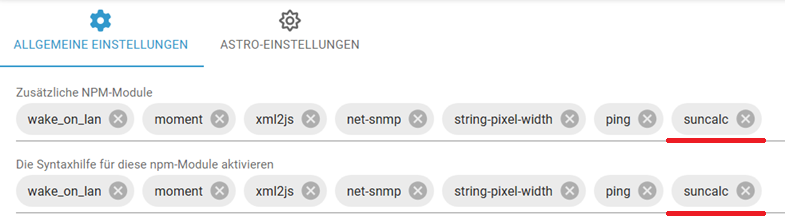
Bei dieser braucht man das extra NPM Modulsuncalcnicht hinzufügen, ich habe schlicht die 300 Zeilen davon mit in das Skript kopiert und Anfang + Ende angepasst damit die Funktionen aufrufbar sind.So ist das Skript Copy&Paste und läuft "out of the box".
Ich bin dadurch bisher immer drumherum gekommen irgendwelche NPM Module einbinden zu müssen. Wobei das hier mit 300 Zeilen schon ein längeres ist. Ggf. kann man auch dann noch was nicht genutzt wird wegkürzen.//Version 1.0.3 - 12.11.2025 //Ersteller Ro75. //Überarbeitet BananaJoe - Abhängigkeit suncalc entfernt, integriert statt zusätzliches Modul // Forum: https://forum.iobroker.net/topic/80342/skript-f%C3%BCr-mondphase-mondauf-und-untergang // suncalc: https://www.npmjs.com/package/suncalc?activeTab=code //Voraussetzungen (Version 1.0.1 getestet mit) //NodeJS: 20.x / 22.x //Javascript-Adapter: 8.9.2 //Admin-Adapter: 7.7.2 //JS-Controller: 7.0.7 // ####################################################################################################################################### // Suncalc direkt hier im Quellcode statt als zusätzliches Modul im JavaScript Adapter /* (c) 2011-2015, Vladimir Agafonkin SunCalc is a JavaScript library for calculating sun/moon position and light phases. https://github.com/mourner/suncalc */ 'use strict'; // shortcuts for easier to read formulas var PI = Math.PI, sin = Math.sin, cos = Math.cos, tan = Math.tan, asin = Math.asin, atan = Math.atan2, acos = Math.acos, rad = PI / 180; // sun calculations are based on http://aa.quae.nl/en/reken/zonpositie.html formulas // date/time constants and conversions var dayMs = 1000 * 60 * 60 * 24, J1970 = 2440588, J2000 = 2451545; function toJulian(date) { return date.valueOf() / dayMs - 0.5 + J1970; } function fromJulian(j) { return new Date((j + 0.5 - J1970) * dayMs); } function toDays(date) { return toJulian(date) - J2000; } // general calculations for position var e = rad * 23.4397; // obliquity of the Earth function rightAscension(l, b) { return atan(sin(l) * cos(e) - tan(b) * sin(e), cos(l)); } function declination(l, b) { return asin(sin(b) * cos(e) + cos(b) * sin(e) * sin(l)); } function azimuth(H, phi, dec) { return atan(sin(H), cos(H) * sin(phi) - tan(dec) * cos(phi)); } function altitude(H, phi, dec) { return asin(sin(phi) * sin(dec) + cos(phi) * cos(dec) * cos(H)); } function siderealTime(d, lw) { return rad * (280.16 + 360.9856235 * d) - lw; } function astroRefraction(h) { if (h < 0) // the following formula works for positive altitudes only. h = 0; // if h = -0.08901179 a div/0 would occur. // formula 16.4 of "Astronomical Algorithms" 2nd edition by Jean Meeus (Willmann-Bell, Richmond) 1998. // 1.02 / tan(h + 10.26 / (h + 5.10)) h in degrees, result in arc minutes -> converted to rad: return 0.0002967 / Math.tan(h + 0.00312536 / (h + 0.08901179)); } // general sun calculations function solarMeanAnomaly(d) { return rad * (357.5291 + 0.98560028 * d); } function eclipticLongitude(M) { var C = rad * (1.9148 * sin(M) + 0.02 * sin(2 * M) + 0.0003 * sin(3 * M)), // equation of center P = rad * 102.9372; // perihelion of the Earth return M + C + P + PI; } function sunCoords(d) { var M = solarMeanAnomaly(d), L = eclipticLongitude(M); return { dec: declination(L, 0), ra: rightAscension(L, 0) }; } var SunCalc = {}; // calculates sun position for a given date and latitude/longitude SunCalc.getPosition = function (date, lat, lng) { var lw = rad * -lng, phi = rad * lat, d = toDays(date), c = sunCoords(d), H = siderealTime(d, lw) - c.ra; return { azimuth: azimuth(H, phi, c.dec), altitude: altitude(H, phi, c.dec) }; }; // sun times configuration (angle, morning name, evening name) var times = SunCalc.times = [ [-0.833, 'sunrise', 'sunset' ], [ -0.3, 'sunriseEnd', 'sunsetStart' ], [ -6, 'dawn', 'dusk' ], [ -12, 'nauticalDawn', 'nauticalDusk'], [ -18, 'nightEnd', 'night' ], [ 6, 'goldenHourEnd', 'goldenHour' ] ]; // adds a custom time to the times config SunCalc.addTime = function (angle, riseName, setName) { times.push([angle, riseName, setName]); }; // calculations for sun times var J0 = 0.0009; function julianCycle(d, lw) { return Math.round(d - J0 - lw / (2 * PI)); } function approxTransit(Ht, lw, n) { return J0 + (Ht + lw) / (2 * PI) + n; } function solarTransitJ(ds, M, L) { return J2000 + ds + 0.0053 * sin(M) - 0.0069 * sin(2 * L); } function hourAngle(h, phi, d) { return acos((sin(h) - sin(phi) * sin(d)) / (cos(phi) * cos(d))); } function observerAngle(height) { return -2.076 * Math.sqrt(height) / 60; } // returns set time for the given sun altitude function getSetJ(h, lw, phi, dec, n, M, L) { var w = hourAngle(h, phi, dec), a = approxTransit(w, lw, n); return solarTransitJ(a, M, L); } // calculates sun times for a given date, latitude/longitude, and, optionally, // the observer height (in meters) relative to the horizon SunCalc.getTimes = function (date, lat, lng, height) { height = height || 0; var lw = rad * -lng, phi = rad * lat, dh = observerAngle(height), d = toDays(date), n = julianCycle(d, lw), ds = approxTransit(0, lw, n), M = solarMeanAnomaly(ds), L = eclipticLongitude(M), dec = declination(L, 0), Jnoon = solarTransitJ(ds, M, L), i, len, time, h0, Jset, Jrise; var result = { solarNoon: fromJulian(Jnoon), nadir: fromJulian(Jnoon - 0.5) }; for (i = 0, len = times.length; i < len; i += 1) { time = times[i]; h0 = (time[0] + dh) * rad; Jset = getSetJ(h0, lw, phi, dec, n, M, L); Jrise = Jnoon - (Jset - Jnoon); result[time[1]] = fromJulian(Jrise); result[time[2]] = fromJulian(Jset); } return result; }; // moon calculations, based on http://aa.quae.nl/en/reken/hemelpositie.html formulas function moonCoords(d) { // geocentric ecliptic coordinates of the moon var L = rad * (218.316 + 13.176396 * d), // ecliptic longitude M = rad * (134.963 + 13.064993 * d), // mean anomaly F = rad * (93.272 + 13.229350 * d), // mean distance l = L + rad * 6.289 * sin(M), // longitude b = rad * 5.128 * sin(F), // latitude dt = 385001 - 20905 * cos(M); // distance to the moon in km return { ra: rightAscension(l, b), dec: declination(l, b), dist: dt }; } SunCalc.getMoonPosition = function (date, lat, lng) { var lw = rad * -lng, phi = rad * lat, d = toDays(date), c = moonCoords(d), H = siderealTime(d, lw) - c.ra, h = altitude(H, phi, c.dec), // formula 14.1 of "Astronomical Algorithms" 2nd edition by Jean Meeus (Willmann-Bell, Richmond) 1998. pa = atan(sin(H), tan(phi) * cos(c.dec) - sin(c.dec) * cos(H)); h = h + astroRefraction(h); // altitude correction for refraction return { azimuth: azimuth(H, phi, c.dec), altitude: h, distance: c.dist, parallacticAngle: pa }; }; // calculations for illumination parameters of the moon, // based on http://idlastro.gsfc.nasa.gov/ftp/pro/astro/mphase.pro formulas and // Chapter 48 of "Astronomical Algorithms" 2nd edition by Jean Meeus (Willmann-Bell, Richmond) 1998. SunCalc.getMoonIllumination = function (date) { var d = toDays(date || new Date()), s = sunCoords(d), m = moonCoords(d), sdist = 149598000, // distance from Earth to Sun in km phi = acos(sin(s.dec) * sin(m.dec) + cos(s.dec) * cos(m.dec) * cos(s.ra - m.ra)), inc = atan(sdist * sin(phi), m.dist - sdist * cos(phi)), angle = atan(cos(s.dec) * sin(s.ra - m.ra), sin(s.dec) * cos(m.dec) - cos(s.dec) * sin(m.dec) * cos(s.ra - m.ra)); return { fraction: (1 + cos(inc)) / 2, phase: 0.5 + 0.5 * inc * (angle < 0 ? -1 : 1) / Math.PI, angle: angle }; }; function hoursLater(date, h) { return new Date(date.valueOf() + h * dayMs / 24); } // calculations for moon rise/set times are based on http://www.stargazing.net/kepler/moonrise.html article SunCalc.getMoonTimes = function (date, lat, lng, inUTC) { var t = new Date(date); if (inUTC) t.setUTCHours(0, 0, 0, 0); else t.setHours(0, 0, 0, 0); var hc = 0.133 * rad, h0 = SunCalc.getMoonPosition(t, lat, lng).altitude - hc, h1, h2, rise, set, a, b, xe, ye, d, roots, x1, x2, dx; // go in 2-hour chunks, each time seeing if a 3-point quadratic curve crosses zero (which means rise or set) for (var i = 1; i <= 24; i += 2) { h1 = SunCalc.getMoonPosition(hoursLater(t, i), lat, lng).altitude - hc; h2 = SunCalc.getMoonPosition(hoursLater(t, i + 1), lat, lng).altitude - hc; a = (h0 + h2) / 2 - h1; b = (h2 - h0) / 2; xe = -b / (2 * a); ye = (a * xe + b) * xe + h1; d = b * b - 4 * a * h1; roots = 0; if (d >= 0) { dx = Math.sqrt(d) / (Math.abs(a) * 2); x1 = xe - dx; x2 = xe + dx; if (Math.abs(x1) <= 1) roots++; if (Math.abs(x2) <= 1) roots++; if (x1 < -1) x1 = x2; } if (roots === 1) { if (h0 < 0) rise = i + x1; else set = i + x1; } else if (roots === 2) { rise = i + (ye < 0 ? x2 : x1); set = i + (ye < 0 ? x1 : x2); } if (rise && set) break; h0 = h2; } var result = {}; if (rise) result.rise = hoursLater(t, rise); if (set) result.set = hoursLater(t, set); if (!rise && !set) result[ye > 0 ? 'alwaysUp' : 'alwaysDown'] = true; return result; }; // ####################################################################################################################################### // const SunCalc = require("suncalc"); const DPMond = '0_userdata.0.Wetter.'; const LATITUDE = 51.18; // muss an deinen Standort angepasst werden const LONGITUDE = 14.43; // muss an deinen Standort angepasst werden const SYNODIC_MONTH = 29.530588; const FULLMOON_REFERENCE = new Date(2024, 11, 15, 10, 1, 42); // 15. Dezember 2024 const states = [ { id: 'MondphaseIcon', type: 'number' }, { id: 'MondphaseProz', type: 'number' }, { id: 'MondphaseDesc', type: 'string' }, { id: 'Mondaufgang', type: 'string' }, { id: 'Monduntergang', type: 'string' } ]; states.forEach(({ id, type }) => { createState(DPMond + id, type === 'number' ? 0 : '', { name: id, type, read: true, write: true }); }); function calculateMoonPhase() { const today = new Date(); const daysSinceReference = (today - FULLMOON_REFERENCE) / 86400000; const phaseFraction = (daysSinceReference / SYNODIC_MONTH) % 1; const phasePercent = Math.floor(phaseFraction * 100) || 100; const phaseDescriptions = [ { range: [0, 25], text: "abnehmender Mond" }, { range: [25, 25], text: "Halbmond (3. Viertel)" }, { range: [26, 49], text: "abnehmender Mond" }, { range: [50, 50], text: "Neumond (4. Viertel)" }, { range: [51, 74], text: "zunehmender Mond" }, { range: [75, 75], text: "Halbmond (1. Viertel)" }, { range: [76, 99], text: "zunehmender Mond" }, { range: [100, 100], text: "Vollmond (2. Viertel)" } ]; const description = phaseDescriptions.find(({ range }) => phasePercent >= range[0] && phasePercent <= range[1] )?.text || "unbekannt"; setState(DPMond + 'MondphaseIcon', phasePercent, true); setState(DPMond + 'MondphaseDesc', description, true); } function updateMoonTimes() { const moonTimes = SunCalc.getMoonTimes(new Date(), LATITUDE, LONGITUDE); setState(DPMond + 'Mondaufgang', moonTimes.rise ? formatTime(moonTimes.rise) : '--:--', true); setState(DPMond + 'Monduntergang', moonTimes.set ? formatTime(moonTimes.set) : '--:--', true); } function formatTime(date) { return date.toLocaleTimeString([], { hour: '2-digit', minute: '2-digit', hour12: false }); } function updateMoonIllumination() { const illumination = SunCalc.getMoonIllumination(new Date()); const percent = Math.round(illumination.fraction * 100); setState(DPMond + 'MondphaseProz', percent, true); } function updateMoonData() { calculateMoonPhase(); updateMoonTimes(); updateMoonIllumination(); } // Initial run updateMoonData(); // Scheduled updates schedule('10 * * * *', updateMoonData); -
Es gibt ja viele Möglichkeiten, aber Pirate-Weather ist nach meinem Dafürhalten empfehlenswert.
Proxmox und HA ...
Ich schreibe den Code nicht mehr selbst – ich schimpfe mit der KI, bis es funktioniert. -
Es gibt ja viele Möglichkeiten, aber Pirate-Weather ist nach meinem Dafürhalten empfehlenswert.
@meister-mopper Adapter sind schön, aber ich versuche da so sparsam wie möglich zu sein. Man muss nicht für alles einen separaten Adapter installieren - Thema Pflege, Update, Fehlerbehandlung, etc. Ich setze auf meinen Universal-Adapter, dem JS-Adapter. Kann man viel machen.
Ro75.
-
Hallo zusammen, ich bin neu in diesem Forum, habe aber schon eine Weile mitgelesen. Also genau gesagt bin ich ein blutiger Anfänger im Rentenalter, trotzdem würde ich gerne einige Dinge dazu lernen. Nur das ihr wisst, warum ich mich so ungeschickt anstelle.
@bananajoe @ro75 Erst einmal vielen Dank für eure Arbeit. Ich würde gerne das Script benutzen. Wo genau muss ich das Script hineinkopieren, in das tab js skripte?
jvfle -
Hallo zusammen, ich bin neu in diesem Forum, habe aber schon eine Weile mitgelesen. Also genau gesagt bin ich ein blutiger Anfänger im Rentenalter, trotzdem würde ich gerne einige Dinge dazu lernen. Nur das ihr wisst, warum ich mich so ungeschickt anstelle.
@bananajoe @ro75 Erst einmal vielen Dank für eure Arbeit. Ich würde gerne das Script benutzen. Wo genau muss ich das Script hineinkopieren, in das tab js skripte?
jvfle@jvfle du musst den JavaScript Adapter installiert haben, der taucht dann links als eigener Menüpunkt auf
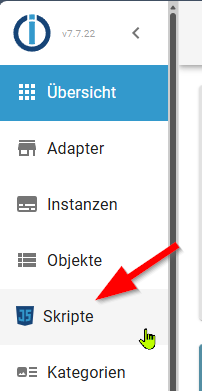
Dann kannst rechts daneben oben auf das+klicken,Da wählst du dann das gelbe, JavaScript.
Das Skript von oben dort hinein kopieren und dann starten.
Es startet dann auch bei einem Neustart von ioBroker wieder mit.Wenn du meine Version nimmst, denk daran in den Zeilen 334 bis 335 deine eigenen Koordinaten einzutragen
ioBroker@Ubuntu 24.04 LTS (Proxmox VM) für: >260 Geräte, 6 Switche, 7 AP, 10 IP-Cam, 1 NAS 42TB, 1 Proxmox 128GB 15TB, 2 Proxmox 32GB 1TB, 1 Hyper-V 52GB 42TB, 14 x Echo, 5x FireTV, 5 x Tablett/Handy VIS || >=160 Tasmota/Shelly || >=95 ZigBee || PV 8.1kW / Akku 14kWh || 2x USV APC 750W kaskadiert || Kobra S1 Max
-
Ich habe hier noch mal eine neue Version , basierend auf der letzten 1.0.2 Version von @Ro75 erstellt.
Bei dieser braucht man das extra NPM Modulsuncalcnicht hinzufügen, ich habe schlicht die 300 Zeilen davon mit in das Skript kopiert und Anfang + Ende angepasst damit die Funktionen aufrufbar sind.So ist das Skript Copy&Paste und läuft "out of the box".
Ich bin dadurch bisher immer drumherum gekommen irgendwelche NPM Module einbinden zu müssen. Wobei das hier mit 300 Zeilen schon ein längeres ist. Ggf. kann man auch dann noch was nicht genutzt wird wegkürzen.//Version 1.0.3 - 12.11.2025 //Ersteller Ro75. //Überarbeitet BananaJoe - Abhängigkeit suncalc entfernt, integriert statt zusätzliches Modul // Forum: https://forum.iobroker.net/topic/80342/skript-f%C3%BCr-mondphase-mondauf-und-untergang // suncalc: https://www.npmjs.com/package/suncalc?activeTab=code //Voraussetzungen (Version 1.0.1 getestet mit) //NodeJS: 20.x / 22.x //Javascript-Adapter: 8.9.2 //Admin-Adapter: 7.7.2 //JS-Controller: 7.0.7 // ####################################################################################################################################### // Suncalc direkt hier im Quellcode statt als zusätzliches Modul im JavaScript Adapter /* (c) 2011-2015, Vladimir Agafonkin SunCalc is a JavaScript library for calculating sun/moon position and light phases. https://github.com/mourner/suncalc */ 'use strict'; // shortcuts for easier to read formulas var PI = Math.PI, sin = Math.sin, cos = Math.cos, tan = Math.tan, asin = Math.asin, atan = Math.atan2, acos = Math.acos, rad = PI / 180; // sun calculations are based on http://aa.quae.nl/en/reken/zonpositie.html formulas // date/time constants and conversions var dayMs = 1000 * 60 * 60 * 24, J1970 = 2440588, J2000 = 2451545; function toJulian(date) { return date.valueOf() / dayMs - 0.5 + J1970; } function fromJulian(j) { return new Date((j + 0.5 - J1970) * dayMs); } function toDays(date) { return toJulian(date) - J2000; } // general calculations for position var e = rad * 23.4397; // obliquity of the Earth function rightAscension(l, b) { return atan(sin(l) * cos(e) - tan(b) * sin(e), cos(l)); } function declination(l, b) { return asin(sin(b) * cos(e) + cos(b) * sin(e) * sin(l)); } function azimuth(H, phi, dec) { return atan(sin(H), cos(H) * sin(phi) - tan(dec) * cos(phi)); } function altitude(H, phi, dec) { return asin(sin(phi) * sin(dec) + cos(phi) * cos(dec) * cos(H)); } function siderealTime(d, lw) { return rad * (280.16 + 360.9856235 * d) - lw; } function astroRefraction(h) { if (h < 0) // the following formula works for positive altitudes only. h = 0; // if h = -0.08901179 a div/0 would occur. // formula 16.4 of "Astronomical Algorithms" 2nd edition by Jean Meeus (Willmann-Bell, Richmond) 1998. // 1.02 / tan(h + 10.26 / (h + 5.10)) h in degrees, result in arc minutes -> converted to rad: return 0.0002967 / Math.tan(h + 0.00312536 / (h + 0.08901179)); } // general sun calculations function solarMeanAnomaly(d) { return rad * (357.5291 + 0.98560028 * d); } function eclipticLongitude(M) { var C = rad * (1.9148 * sin(M) + 0.02 * sin(2 * M) + 0.0003 * sin(3 * M)), // equation of center P = rad * 102.9372; // perihelion of the Earth return M + C + P + PI; } function sunCoords(d) { var M = solarMeanAnomaly(d), L = eclipticLongitude(M); return { dec: declination(L, 0), ra: rightAscension(L, 0) }; } var SunCalc = {}; // calculates sun position for a given date and latitude/longitude SunCalc.getPosition = function (date, lat, lng) { var lw = rad * -lng, phi = rad * lat, d = toDays(date), c = sunCoords(d), H = siderealTime(d, lw) - c.ra; return { azimuth: azimuth(H, phi, c.dec), altitude: altitude(H, phi, c.dec) }; }; // sun times configuration (angle, morning name, evening name) var times = SunCalc.times = [ [-0.833, 'sunrise', 'sunset' ], [ -0.3, 'sunriseEnd', 'sunsetStart' ], [ -6, 'dawn', 'dusk' ], [ -12, 'nauticalDawn', 'nauticalDusk'], [ -18, 'nightEnd', 'night' ], [ 6, 'goldenHourEnd', 'goldenHour' ] ]; // adds a custom time to the times config SunCalc.addTime = function (angle, riseName, setName) { times.push([angle, riseName, setName]); }; // calculations for sun times var J0 = 0.0009; function julianCycle(d, lw) { return Math.round(d - J0 - lw / (2 * PI)); } function approxTransit(Ht, lw, n) { return J0 + (Ht + lw) / (2 * PI) + n; } function solarTransitJ(ds, M, L) { return J2000 + ds + 0.0053 * sin(M) - 0.0069 * sin(2 * L); } function hourAngle(h, phi, d) { return acos((sin(h) - sin(phi) * sin(d)) / (cos(phi) * cos(d))); } function observerAngle(height) { return -2.076 * Math.sqrt(height) / 60; } // returns set time for the given sun altitude function getSetJ(h, lw, phi, dec, n, M, L) { var w = hourAngle(h, phi, dec), a = approxTransit(w, lw, n); return solarTransitJ(a, M, L); } // calculates sun times for a given date, latitude/longitude, and, optionally, // the observer height (in meters) relative to the horizon SunCalc.getTimes = function (date, lat, lng, height) { height = height || 0; var lw = rad * -lng, phi = rad * lat, dh = observerAngle(height), d = toDays(date), n = julianCycle(d, lw), ds = approxTransit(0, lw, n), M = solarMeanAnomaly(ds), L = eclipticLongitude(M), dec = declination(L, 0), Jnoon = solarTransitJ(ds, M, L), i, len, time, h0, Jset, Jrise; var result = { solarNoon: fromJulian(Jnoon), nadir: fromJulian(Jnoon - 0.5) }; for (i = 0, len = times.length; i < len; i += 1) { time = times[i]; h0 = (time[0] + dh) * rad; Jset = getSetJ(h0, lw, phi, dec, n, M, L); Jrise = Jnoon - (Jset - Jnoon); result[time[1]] = fromJulian(Jrise); result[time[2]] = fromJulian(Jset); } return result; }; // moon calculations, based on http://aa.quae.nl/en/reken/hemelpositie.html formulas function moonCoords(d) { // geocentric ecliptic coordinates of the moon var L = rad * (218.316 + 13.176396 * d), // ecliptic longitude M = rad * (134.963 + 13.064993 * d), // mean anomaly F = rad * (93.272 + 13.229350 * d), // mean distance l = L + rad * 6.289 * sin(M), // longitude b = rad * 5.128 * sin(F), // latitude dt = 385001 - 20905 * cos(M); // distance to the moon in km return { ra: rightAscension(l, b), dec: declination(l, b), dist: dt }; } SunCalc.getMoonPosition = function (date, lat, lng) { var lw = rad * -lng, phi = rad * lat, d = toDays(date), c = moonCoords(d), H = siderealTime(d, lw) - c.ra, h = altitude(H, phi, c.dec), // formula 14.1 of "Astronomical Algorithms" 2nd edition by Jean Meeus (Willmann-Bell, Richmond) 1998. pa = atan(sin(H), tan(phi) * cos(c.dec) - sin(c.dec) * cos(H)); h = h + astroRefraction(h); // altitude correction for refraction return { azimuth: azimuth(H, phi, c.dec), altitude: h, distance: c.dist, parallacticAngle: pa }; }; // calculations for illumination parameters of the moon, // based on http://idlastro.gsfc.nasa.gov/ftp/pro/astro/mphase.pro formulas and // Chapter 48 of "Astronomical Algorithms" 2nd edition by Jean Meeus (Willmann-Bell, Richmond) 1998. SunCalc.getMoonIllumination = function (date) { var d = toDays(date || new Date()), s = sunCoords(d), m = moonCoords(d), sdist = 149598000, // distance from Earth to Sun in km phi = acos(sin(s.dec) * sin(m.dec) + cos(s.dec) * cos(m.dec) * cos(s.ra - m.ra)), inc = atan(sdist * sin(phi), m.dist - sdist * cos(phi)), angle = atan(cos(s.dec) * sin(s.ra - m.ra), sin(s.dec) * cos(m.dec) - cos(s.dec) * sin(m.dec) * cos(s.ra - m.ra)); return { fraction: (1 + cos(inc)) / 2, phase: 0.5 + 0.5 * inc * (angle < 0 ? -1 : 1) / Math.PI, angle: angle }; }; function hoursLater(date, h) { return new Date(date.valueOf() + h * dayMs / 24); } // calculations for moon rise/set times are based on http://www.stargazing.net/kepler/moonrise.html article SunCalc.getMoonTimes = function (date, lat, lng, inUTC) { var t = new Date(date); if (inUTC) t.setUTCHours(0, 0, 0, 0); else t.setHours(0, 0, 0, 0); var hc = 0.133 * rad, h0 = SunCalc.getMoonPosition(t, lat, lng).altitude - hc, h1, h2, rise, set, a, b, xe, ye, d, roots, x1, x2, dx; // go in 2-hour chunks, each time seeing if a 3-point quadratic curve crosses zero (which means rise or set) for (var i = 1; i <= 24; i += 2) { h1 = SunCalc.getMoonPosition(hoursLater(t, i), lat, lng).altitude - hc; h2 = SunCalc.getMoonPosition(hoursLater(t, i + 1), lat, lng).altitude - hc; a = (h0 + h2) / 2 - h1; b = (h2 - h0) / 2; xe = -b / (2 * a); ye = (a * xe + b) * xe + h1; d = b * b - 4 * a * h1; roots = 0; if (d >= 0) { dx = Math.sqrt(d) / (Math.abs(a) * 2); x1 = xe - dx; x2 = xe + dx; if (Math.abs(x1) <= 1) roots++; if (Math.abs(x2) <= 1) roots++; if (x1 < -1) x1 = x2; } if (roots === 1) { if (h0 < 0) rise = i + x1; else set = i + x1; } else if (roots === 2) { rise = i + (ye < 0 ? x2 : x1); set = i + (ye < 0 ? x1 : x2); } if (rise && set) break; h0 = h2; } var result = {}; if (rise) result.rise = hoursLater(t, rise); if (set) result.set = hoursLater(t, set); if (!rise && !set) result[ye > 0 ? 'alwaysUp' : 'alwaysDown'] = true; return result; }; // ####################################################################################################################################### // const SunCalc = require("suncalc"); const DPMond = '0_userdata.0.Wetter.'; const LATITUDE = 51.18; // muss an deinen Standort angepasst werden const LONGITUDE = 14.43; // muss an deinen Standort angepasst werden const SYNODIC_MONTH = 29.530588; const FULLMOON_REFERENCE = new Date(2024, 11, 15, 10, 1, 42); // 15. Dezember 2024 const states = [ { id: 'MondphaseIcon', type: 'number' }, { id: 'MondphaseProz', type: 'number' }, { id: 'MondphaseDesc', type: 'string' }, { id: 'Mondaufgang', type: 'string' }, { id: 'Monduntergang', type: 'string' } ]; states.forEach(({ id, type }) => { createState(DPMond + id, type === 'number' ? 0 : '', { name: id, type, read: true, write: true }); }); function calculateMoonPhase() { const today = new Date(); const daysSinceReference = (today - FULLMOON_REFERENCE) / 86400000; const phaseFraction = (daysSinceReference / SYNODIC_MONTH) % 1; const phasePercent = Math.floor(phaseFraction * 100) || 100; const phaseDescriptions = [ { range: [0, 25], text: "abnehmender Mond" }, { range: [25, 25], text: "Halbmond (3. Viertel)" }, { range: [26, 49], text: "abnehmender Mond" }, { range: [50, 50], text: "Neumond (4. Viertel)" }, { range: [51, 74], text: "zunehmender Mond" }, { range: [75, 75], text: "Halbmond (1. Viertel)" }, { range: [76, 99], text: "zunehmender Mond" }, { range: [100, 100], text: "Vollmond (2. Viertel)" } ]; const description = phaseDescriptions.find(({ range }) => phasePercent >= range[0] && phasePercent <= range[1] )?.text || "unbekannt"; setState(DPMond + 'MondphaseIcon', phasePercent, true); setState(DPMond + 'MondphaseDesc', description, true); } function updateMoonTimes() { const moonTimes = SunCalc.getMoonTimes(new Date(), LATITUDE, LONGITUDE); setState(DPMond + 'Mondaufgang', moonTimes.rise ? formatTime(moonTimes.rise) : '--:--', true); setState(DPMond + 'Monduntergang', moonTimes.set ? formatTime(moonTimes.set) : '--:--', true); } function formatTime(date) { return date.toLocaleTimeString([], { hour: '2-digit', minute: '2-digit', hour12: false }); } function updateMoonIllumination() { const illumination = SunCalc.getMoonIllumination(new Date()); const percent = Math.round(illumination.fraction * 100); setState(DPMond + 'MondphaseProz', percent, true); } function updateMoonData() { calculateMoonPhase(); updateMoonTimes(); updateMoonIllumination(); } // Initial run updateMoonData(); // Scheduled updates schedule('10 * * * *', updateMoonData);@BananaJoe sagte in Skript für Mondphase, Mondauf- und Untergang:
Bei dieser braucht man das extra NPM Modul suncalc nicht hinzufügen, ich habe schlicht die 300 Zeilen davon mit in das Skript kopiert und Anfang + Ende angepasst damit die Funktionen aufrufbar sind.
man muss weder das Modul suncalc im JS-Adapter einbinden noch 300 Zeilen in das Script einfügen. Der JS-Adapter hat das Modul bereits onboard. Es reicht also schlicht ein:
Const suncalc = require("suncalc")zu Beginn eines Scripts.iobroker läuft unter Docker auf Windows (WSL2)
-
@BananaJoe sagte in Skript für Mondphase, Mondauf- und Untergang:
Bei dieser braucht man das extra NPM Modul suncalc nicht hinzufügen, ich habe schlicht die 300 Zeilen davon mit in das Skript kopiert und Anfang + Ende angepasst damit die Funktionen aufrufbar sind.
man muss weder das Modul suncalc im JS-Adapter einbinden noch 300 Zeilen in das Script einfügen. Der JS-Adapter hat das Modul bereits onboard. Es reicht also schlicht ein:
Const suncalc = require("suncalc")zu Beginn eines Scripts.@fastfoot Tatsache!
Es reicht also das Originalskript - ohne Einbindung.Kann man eigentlich irgendwo sehen was ab Werk an Modulen dabei ist?
ioBroker@Ubuntu 24.04 LTS (Proxmox VM) für: >260 Geräte, 6 Switche, 7 AP, 10 IP-Cam, 1 NAS 42TB, 1 Proxmox 128GB 15TB, 2 Proxmox 32GB 1TB, 1 Hyper-V 52GB 42TB, 14 x Echo, 5x FireTV, 5 x Tablett/Handy VIS || >=160 Tasmota/Shelly || >=95 ZigBee || PV 8.1kW / Akku 14kWh || 2x USV APC 750W kaskadiert || Kobra S1 Max
-
@fastfoot Tatsache!
Es reicht also das Originalskript - ohne Einbindung.Kann man eigentlich irgendwo sehen was ab Werk an Modulen dabei ist?
@BananaJoe jain, im JS.-Adapter source code wenn da ein require('modul') steht. Und dann probieren :-) Gesichert sind axios und suncalc, habe mich aber schon länger nicht mehr damit beschäftigt. Bevor man ein Modul einbindet lohnt es sich auf jeden Fall es ohne auszuprobieren
-
@fastfoot Tatsache!
Es reicht also das Originalskript - ohne Einbindung.Kann man eigentlich irgendwo sehen was ab Werk an Modulen dabei ist?
@BananaJoe sagte in Skript für Mondphase, Mondauf- und Untergang:
Kann man eigentlich irgendwo sehen was ab Werk an Modulen dabei ist?
das wäre hier,
aber soviel mehr ist es nicht
jsonata und jszip wären noch zu erwähnen.
das andere benötigt der adapter für sich.doppelt etwas eintragen schadet aber nicht, das wird dann herausgefiltert.
-
@jvfle du musst den JavaScript Adapter installiert haben, der taucht dann links als eigener Menüpunkt auf
Dann kannst rechts daneben oben auf das+klicken,Da wählst du dann das gelbe, JavaScript.
Das Skript von oben dort hinein kopieren und dann starten.
Es startet dann auch bei einem Neustart von ioBroker wieder mit.Wenn du meine Version nimmst, denk daran in den Zeilen 334 bis 335 deine eigenen Koordinaten einzutragen
@BananaJoe Das ging ja sehr schnell, vielen Dank. Ich hatte es schon vermutet, aber letztendlich nicht getraut.
-
@jvfle du musst den JavaScript Adapter installiert haben, der taucht dann links als eigener Menüpunkt auf
Dann kannst rechts daneben oben auf das+klicken,Da wählst du dann das gelbe, JavaScript.
Das Skript von oben dort hinein kopieren und dann starten.
Es startet dann auch bei einem Neustart von ioBroker wieder mit.Wenn du meine Version nimmst, denk daran in den Zeilen 334 bis 335 deine eigenen Koordinaten einzutragen
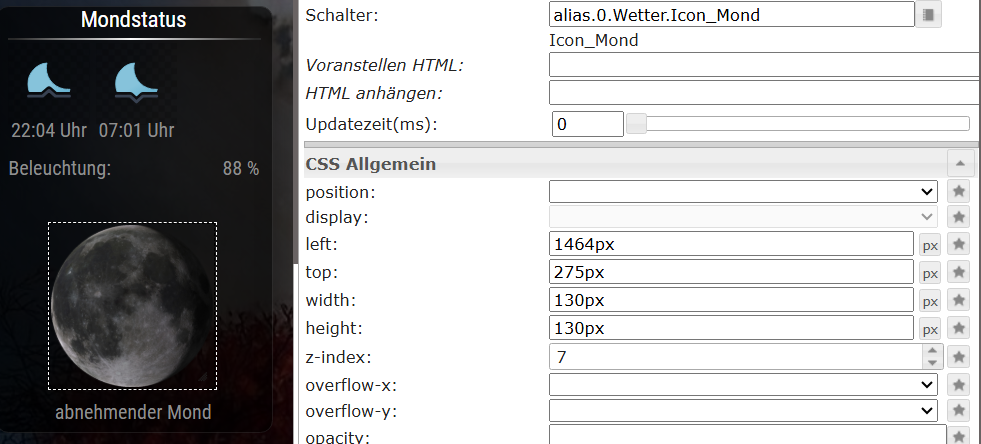
@BananaJoe Hallo, das Script funktioniert sehr gut. Alle Datenpunkte sind da und die Werte werden angezeigt. Super Script, vielen Dank. Einen Rat bräuchte ich noch. Die Mondphasenicons werden nicht angezeigt. Ich habe die Bilder in den Ordner VIS.0_mond kopiert. Ist wohl der falsche Ordner? Falsche Bezeichnung? Die Quelle habe ich im Widget angegeben.
-
Das Problem besteht immer noch. Ich kann die Bilder nicht einbinden. Probeweise Ordner und Namen gewechselt, hat aber nicht geholfen. Kann mir jemand helfen, die Mondbilder einzufügen? Vielen Dank.
@jvfle Du musst die Bilder nicht einfach hochkopieren sondern über den VIS-Editor hochladen
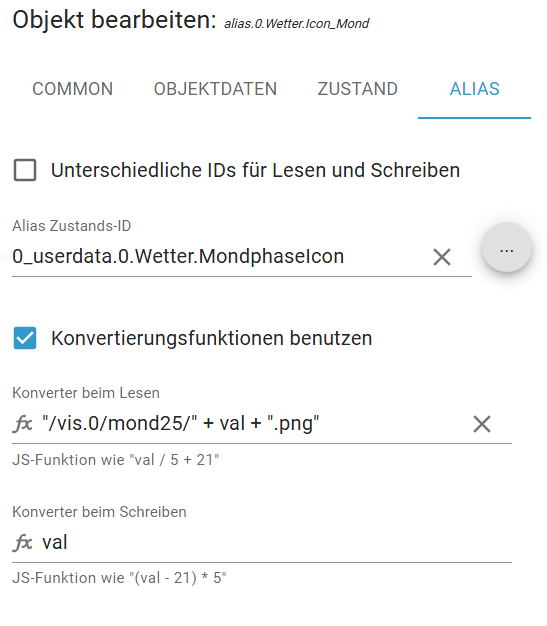
Zudem steht ja unter0_userdata.0.Wetter.MondphaseIconnur eine Nummer, z.B.
66Ich habe die Bilder nach
/vis.0/main/icons/moon2kopiert und verwende folgendes Skript:
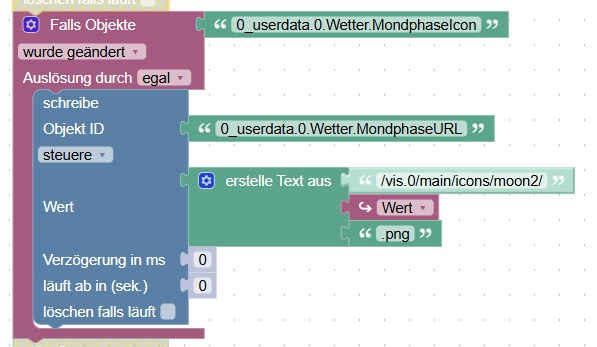
Den Datenpunkt0_userdata.0.Wetter.MondphaseURLmüsste man vorher anlegen und dieser kann dann in einem "Basic String - Image" verwendet werden.
oder als{0_userdata.0.Wetter.MondphaseURL}Alternativ, statt des Skripts, könnte man in der VIS als Bild-URL auch
/vis.0/main/icons/moon2/{0_userdata.0.Wetter.MondphaseIcon}.pngverwenden (vermutlich, aber ungetestet).
-
Vielen Dank, wie gesagt, ich bin nicht mehr der Jüngste, aber egal.
Deine vorgeschlagenen Schritte habe ich gemacht. Ich dachte das letzte Script, welches von dir überarbeitet wurde, enthält alle Anweisungen. Von dem Blockly-Script hatte ich nichts mitbekommen. Reicht dieser dargestellte Ausschnitt, wenn der nachgeschrieben wird, oder ist da noch mehr? -
Vielen Dank, wie gesagt, ich bin nicht mehr der Jüngste, aber egal.
Deine vorgeschlagenen Schritte habe ich gemacht. Ich dachte das letzte Script, welches von dir überarbeitet wurde, enthält alle Anweisungen. Von dem Blockly-Script hatte ich nichts mitbekommen. Reicht dieser dargestellte Ausschnitt, wenn der nachgeschrieben wird, oder ist da noch mehr? -
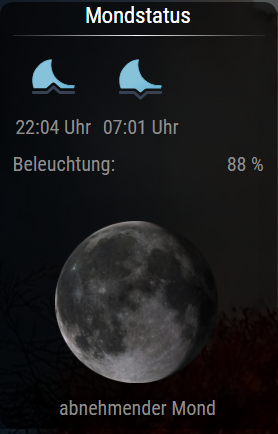
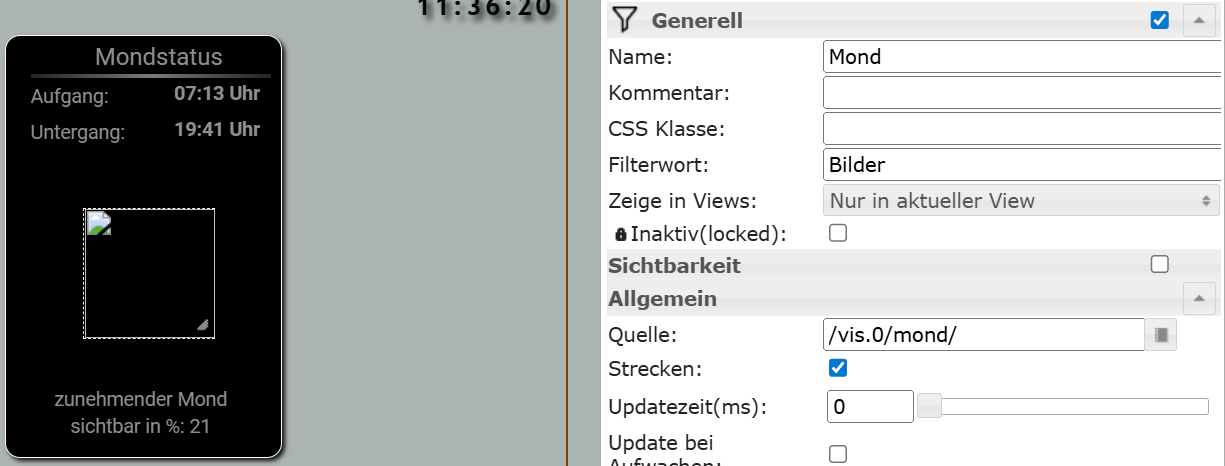
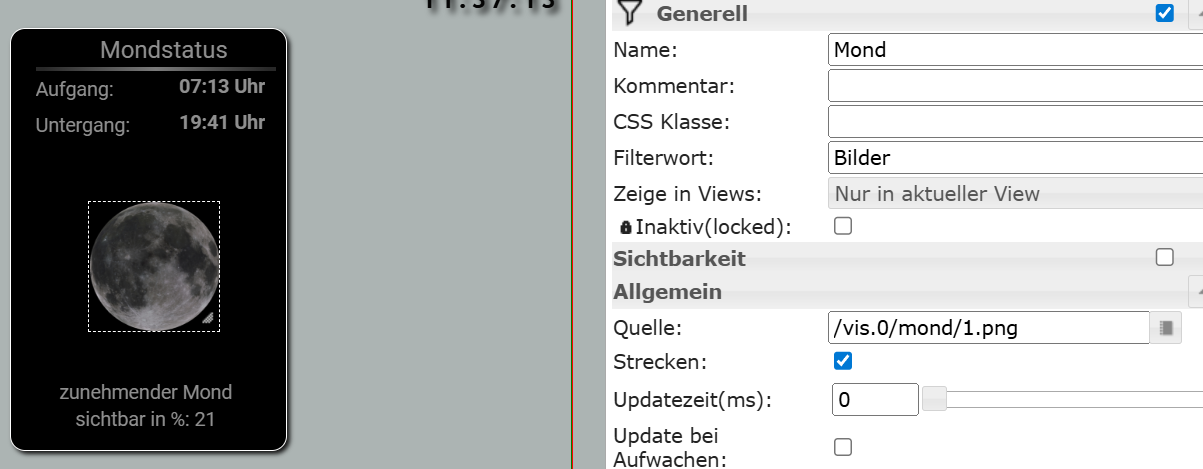
Irgendwie habe ich ein Verständnisproblem. Alle Datenpunkte aus deinem letzten Script sind vorhanden und können in der VIS auch visualisiert werden. Nur die 100 Bilder aus dem Ordner (/vis.0/mond/) wechseln nicht entsprechend der Mondphase in der VIS. Ein starres Bild kann ich anzeigen. Ich finde meinen Fehler nicht.
 ![Mondstatus_1.png]







Hey! Du scheinst an dieser Unterhaltung interessiert zu sein, hast aber noch kein Konto.
Hast du es satt, bei jedem Besuch durch die gleichen Beiträge zu scrollen? Wenn du dich für ein Konto anmeldest, kommst du immer genau dorthin zurück, wo du zuvor warst, und kannst dich über neue Antworten benachrichtigen lassen (entweder per E-Mail oder Push-Benachrichtigung). Du kannst auch Lesezeichen speichern und Beiträge positiv bewerten, um anderen Community-Mitgliedern deine Wertschätzung zu zeigen.
Mit deinem Input könnte dieser Beitrag noch besser werden 💗
Registrieren AnmeldenSupport us
436
Online33.0k
Benutzer83.6k
Themen1.3m
Beiträge