
NEWS




js-controller Lucy (Version 7.0) jetzt im Stable Repository
-
2ter Versuch, ioB läuft und keine Fehler im Webinterface Protokoll, iob diag:
Script v.2024-10-19

*** BASE SYSTEM ***
 Static hostname: manjaro-arm
       Icon name: computer
Operating System: Manjaro ARM Linux
          Kernel: Linux 6.6.59-1-MANJARO-RPI4
    Architecture: arm64
OS is similar to: arch

Model           : Raspberry Pi 4 Model B Rev 1.5
Docker          : false
Virtualization  : none
Kernel          : aarch64
Userland        : 64 bit

Systemuptime and Load:
 00:02:46 up 5 min,  2 users,  load average: 1.13, 1.00, 0.48
CPU threads: 4


*** LIFE CYCLE STATUS ***
Unknown release codenamed 'n/a'. Please check yourself if the Operating System is actively maintained.

*** RASPBERRY THROTTLING ***
Current issues:
No throttling issues detected.

Previously detected issues:
No throttling issues detected.

*** TIME AND TIMEZONES ***
               Local time: Sun 2024-12-01 00:02:47 CET
           Universal time: Sat 2024-11-30 23:02:47 UTC
                 RTC time: n/a
                Time zone: Europe/Berlin (CET, +0100)
System clock synchronized: yes
              NTP service: active
          RTC in local TZ: no

*** Users and Groups ***
User that called 'iob diag':
pi4m
HOME=/home/pi4m
GROUPS=sys network power users video storage lp input audio wheel pi4m iobroker

User that is running 'js-controller':
iobroker
HOME=/home/iobroker
SUDO_HOME=/home/pi4m
GROUPS=tty video uucp audio iobroker

*** DISPLAY-SERVER SETUP ***
Display-Server: false
Desktop:
Terminal:       tty

*** MEMORY ***
               total        used        free      shared  buff/cache   available
Mem:            8.2G        1.4G        6.2G        2.7M        660M        6.8G
Swap:            12G          0B         12G
Total:           20G        1.4G         18G

Active iob-Instances:   15

         7806 M total memory
         1335 M used memory
         1321 M active memory
          347 M inactive memory
         5950 M free memory
           77 M buffer memory
          552 M swap cache
        11709 M total swap
            0 M used swap
        11709 M free swap

*** top - Table Of Processes  ***
top - 00:02:48 up 5 min,  2 users,  load average: 1.13, 1.00, 0.48
Tasks: 177 total,   1 running, 176 sleeping,   0 stopped,   0 zombie
%Cpu(s):  2.0 us,  3.9 sy,  0.0 ni, 94.1 id,  0.0 wa,  0.0 hi,  0.0 si,  0.0 st
MiB Mem :   7806.6 total,   5949.5 free,   1336.6 used,    630.3 buff/cache
MiB Swap:  11710.0 total,  11710.0 free,      0.0 used.   6470.1 avail Mem

*** FAILED SERVICES ***

  UNIT LOAD ACTIVE SUB DESCRIPTION

0 loaded units listed.


*** DMESG CRITICAL ERRORS ***
No critical errors detected

*** FILESYSTEM ***
Filesystem     Type      Size  Used Avail Use% Mounted on
dev            devtmpfs  3.8G     0  3.8G   0% /dev
run            tmpfs     3.9G  744K  3.9G   1% /run
/dev/sda2      ext4      917G  7.1G  873G   1% /
tmpfs          tmpfs     3.9G  1.9M  3.9G   1% /dev/shm
tmpfs          tmpfs     3.9G   20K  3.9G   1% /tmp
tmpfs          tmpfs     1.0M     0  1.0M   0% /run/credentials/systemd-journald.service
tmpfs          tmpfs     1.0M     0  1.0M   0% /run/credentials/systemd-network-generator.service
tmpfs          tmpfs     1.0M     0  1.0M   0% /run/credentials/systemd-udev-load-credentials.service
tmpfs          tmpfs     1.0M     0  1.0M   0% /run/credentials/systemd-sysctl.service
tmpfs          tmpfs     1.0M     0  1.0M   0% /run/credentials/systemd-tmpfiles-setup-dev-early.service
tmpfs          tmpfs     1.0M     0  1.0M   0% /run/credentials/systemd-sysusers.service
tmpfs          tmpfs     1.0M     0  1.0M   0% /run/credentials/systemd-tmpfiles-setup-dev.service
tmpfs          tmpfs     1.0M     0  1.0M   0% /run/credentials/systemd-networkd.service
tmpfs          tmpfs     1.0M     0  1.0M   0% /run/credentials/systemd-vconsole-setup.service
/dev/sda1      vfat      458M   51M  407M  12% /boot
tmpfs          tmpfs     1.0M     0  1.0M   0% /run/credentials/systemd-tmpfiles-setup.service
tmpfs          tmpfs     1.0M     0  1.0M   0% /run/credentials/getty@tty1.service
tmpfs          tmpfs     781M  4.0K  781M   1% /run/user/1000

Messages concerning ext4 filesystem in dmesg:
[Sat Nov 30 23:57:45 2024] EXT4-fs (sda2): mounted filesystem 4f15f9f9-8c71-4493-986e-d850a02a0242 r/w with ordered data mode. Quota mode: none.
[Sat Nov 30 23:57:48 2024] EXT4-fs (sda2): re-mounted 4f15f9f9-8c71-4493-986e-d850a02a0242 r/w. Quota mode: none.

Show mounted filesystems:
TARGET  SOURCE    FSTYPE OPTIONS
/       /dev/sda2 ext4   rw,noatime
`-/boot /dev/sda1 vfat   rw,nodev,noexec,relatime,fmask=0022,dmask=0022,codepage=437,iocharset=ascii,shortname=mixed,showexec,errors=remount-ro

Files in neuralgic directories:

/var:
456M    /var/
428M    /var/log
427M    /var/log/journal/256940e9bd0e49078df2cc99156a71f7
427M    /var/log/journal
23M     /var/lib/pacman

Archived and active journals take up 426.2M in the file system.

/opt/iobroker/backups:
11M     /opt/iobroker/backups/

/opt/iobroker/iobroker-data:
1.1G    /opt/iobroker/iobroker-data/
950M    /opt/iobroker/iobroker-data/files
617M    /opt/iobroker/iobroker-data/files/javascript.admin
560M    /opt/iobroker/iobroker-data/files/javascript.admin/static
558M    /opt/iobroker/iobroker-data/files/javascript.admin/static/js

The five largest files in iobroker-data are:
24M     /opt/iobroker/iobroker-data/files/web.admin/static/js/main.135279a0.js.map
24M     /opt/iobroker/iobroker-data/files/vis-2/static/js/main.f305bc29.js.map
24M     /opt/iobroker/iobroker-data/files/vis-2/static/js/main.8e80ccb0.js.map
24M     /opt/iobroker/iobroker-data/files/vis-2/customWidgets.js.map
14M     /opt/iobroker/iobroker-data/objects.jsonl

USB-Devices by-id:
USB-Sticks -  Avoid direct links to /dev/tty* in your adapter setups, please always prefer the links 'by-id':

No Devices found 'by-id'

*** NodeJS-Installation ***

/usr/bin/nodejs         v20.18.0
/usr/bin/node           v20.18.0
/usr/bin/npm            10.9.0
/usr/bin/npx            10.9.0
/usr/bin/corepack       0.29.3

Temp directories causing deletion problem: 0
No problems detected

Errors in npm tree: 0
No problems detected

*** ioBroker-Installation ***

ioBroker Status
iobroker is running on this host.


Objects type: jsonl
States  type: jsonl

Hosts:
manjaro-arm         manjaro-arm (version: 7.0.3, hostname: manjaro-arm   , alive, uptime: 306)

Core adapters versions
js-controller:  7.0.3
admin:          7.1.5
javascript:     8.8.3

nodejs modules from github:     0

Adapter State
+ system.adapter.admin.0                  : admin                 : manjaro-arm                              -  enabled, port: 8081, bind: 0.0.0.0 (SSL), run as: admin
+ system.adapter.backitup.0               : backitup              : manjaro-arm                              -  enabled
  system.adapter.dwd.0                    : dwd                   : manjaro-arm                              -  enabled
+ system.adapter.email.0                  : email                 : manjaro-arm                              -  enabled
+ system.adapter.fullybrowser.0           : fullybrowser          : manjaro-arm                              -  enabled
  system.adapter.ical.0                   : ical                  : manjaro-arm                              -  enabled
  system.adapter.icons-fatcow-hosting.0   : icons-fatcow-hosting  : manjaro-arm                              - disabled
+ system.adapter.javascript.0             : javascript            : manjaro-arm                              -  enabled
+ system.adapter.mqtt.0                   : mqtt                  : manjaro-arm                              -  enabled, port: 1883, bind: 0.0.0.0
+ system.adapter.ping.0                   : ping                  : manjaro-arm                              -  enabled
+ system.adapter.shelly.0                 : shelly                : manjaro-arm                              -  enabled, port: 1882, bind: 0.0.0.0
+ system.adapter.simple-api.0             : simple-api            : manjaro-arm                              -  enabled, port: 8087, bind: 192.168.0.164, run as: admin
+ system.adapter.tr-064.0                 : tr-064                : manjaro-arm                              -  enabled
  system.adapter.vis-2-widgets-material.0 : vis-2-widgets-material: manjaro-arm                              -  enabled
+ system.adapter.vis-2.0                  : vis-2                 : manjaro-arm                              -  enabled
  system.adapter.vis-fancyswitch.0        : vis-fancyswitch       : manjaro-arm                              -  enabled
  system.adapter.vis-hqwidgets.0          : vis-hqwidgets         : manjaro-arm                              -  enabled
  system.adapter.vis-jqui-mfd.0           : vis-jqui-mfd          : manjaro-arm                              -  enabled
  system.adapter.vis-timeandweather.0     : vis-timeandweather    : manjaro-arm                              -  enabled
  system.adapter.vis.0                    : vis                   : manjaro-arm                              -  enabled
+ system.adapter.web.0                    : web                   : manjaro-arm                              -  enabled, port: 8082, bind: 0.0.0.0, run as: admin
+ system.adapter.yahka.0                  : yahka                 : manjaro-arm                              -  enabled
+ system.adapter.zwave2.0                 : zwave2                : manjaro-arm                              -  enabled

+ instance is alive

Enabled adapters with bindings
+ system.adapter.admin.0                  : admin                 : manjaro-arm                              -  enabled, port: 8081, bind: 0.0.0.0 (SSL), run as: admin
+ system.adapter.mqtt.0                   : mqtt                  : manjaro-arm                              -  enabled, port: 1883, bind: 0.0.0.0
+ system.adapter.shelly.0                 : shelly                : manjaro-arm                              -  enabled, port: 1882, bind: 0.0.0.0
+ system.adapter.simple-api.0             : simple-api            : manjaro-arm                              -  enabled, port: 8087, bind: 192.168.0.164, run as: admin
+ system.adapter.web.0                    : web                   : manjaro-arm                              -  enabled, port: 8082, bind: 0.0.0.0, run as: admin

ioBroker-Repositories
┌─────────┬────────────────────┬─────────────────────────────────────────────────────────┬──────────────┐
│ (index) │ name               │ url                                                     │ auto upgrade │
├─────────┼────────────────────┼─────────────────────────────────────────────────────────┼──────────────┤
│ 0       │ 'Stable (default)' │ 'http://download.iobroker.net/sources-dist.json'        │ false        │
│ 1       │ 'Beta (latest)'    │ 'http://download.iobroker.net/sources-dist-latest.json' │ false        │
└─────────┴────────────────────┴─────────────────────────────────────────────────────────┴──────────────┘

Active repo(s): Stable (default)
Upgrade policy: none

Installed ioBroker-Instances
Used repository: Stable (default)
Adapter    "admin"        : 7.1.5    , installed 7.1.5
Adapter    "backitup"     : 3.0.25   , installed 3.0.25
Adapter    "dwd"          : 2.8.5    , installed 2.8.5
Adapter    "email"        : 1.3.1    , installed 1.3.1
Adapter    "fullybrowser" : 3.0.12   , installed 3.0.12
Adapter    "ical"         : 1.16.1   , installed 1.16.1
Adapter    "icons-fatcow-hosting": 0.1.0, installed 0.1.0
Adapter    "javascript"   : 8.8.3    , installed 8.8.3
Controller "js-controller": 7.0.3    , installed 7.0.3
Adapter    "mqtt"         : 6.1.2    , installed 6.1.2
Adapter    "ping"         : 1.6.2    , installed 1.6.2
Adapter    "shelly"       : 8.2.1    , installed 8.2.1
Adapter    "simple-api"   : 2.8.0    , installed 2.8.0
Adapter    "socketio"     : 6.7.1    , installed 6.7.1
Adapter    "tr-064"       : 4.3.0    , installed 4.3.0
Adapter    "vis"          : 1.5.6    , installed 1.5.6
Adapter    "vis-2"        : 2.9.64   , installed 2.9.64
Adapter    "vis-2-widgets-material": 1.4.10, installed 1.4.10
Adapter    "vis-fancyswitch": 1.1.0  , installed 1.1.0
Adapter    "vis-hqwidgets": 1.5.1    , installed 1.5.1
Adapter    "vis-jqui-mfd" : 1.1.1    , installed 1.1.1
Adapter    "vis-timeandweather": 1.2.2, installed 1.2.2
Adapter    "web"          : 6.2.5    , installed 6.2.5
Adapter    "ws"           : 2.6.2    , installed 2.6.2
Adapter    "yahka"        : 1.0.3    , installed 1.0.3
Adapter    "zwave2"       : 3.1.0    , installed 3.1.0

Objects and States
Please stand by - This may take a while
Objects:        2325
States:         1952

*** OS-Repositories and Updates ***
No Debian-based Linux detected.

*** Listening Ports ***
Active Internet connections (only servers)
Proto Recv-Q Send-Q Local Address           Foreign Address         State       User       Inode      PID/Program name
tcp        0      0 127.0.0.1:38919         0.0.0.0:*               LISTEN      1001       15199      1131/io.yahka.0
tcp        0      0 127.0.0.1:9001          0.0.0.0:*               LISTEN      1001       7840       557/iobroker.js-con
tcp        0      0 127.0.0.1:9000          0.0.0.0:*               LISTEN      1001       1015       557/iobroker.js-con
tcp        0      0 127.0.0.1:4711          0.0.0.0:*               LISTEN      968        6421       571/pihole-FTL
tcp        0      0 0.0.0.0:22              0.0.0.0:*               LISTEN      0          919        559/sshd: /usr/bin/
tcp        0      0 0.0.0.0:53              0.0.0.0:*               LISTEN      968        7466       571/pihole-FTL
tcp        0      0 0.0.0.0:80              0.0.0.0:*               LISTEN      0          8248       471/lighttpd
tcp        0      0 192.168.0.164:8087      0.0.0.0:*               LISTEN      1001       15568      1092/io.simple-api.
tcp        0      0 0.0.0.0:1883            0.0.0.0:*               LISTEN      1001       6669       997/io.mqtt.0
tcp        0      0 0.0.0.0:42169           0.0.0.0:*               LISTEN      1001       15193      1131/io.yahka.0
tcp        0      0 127.0.0.1:5335          0.0.0.0:*               LISTEN      0          7390       460/unbound
tcp6       0      0 :::8081                 :::*                    LISTEN      1001       8446       789/io.admin.0
tcp6       0      0 :::8082                 :::*                    LISTEN      1001       15166      1112/io.web.0
tcp6       0      0 ::1:4711                :::*                    LISTEN      968        6422       571/pihole-FTL
tcp6       0      0 :::22                   :::*                    LISTEN      0          921        559/sshd: /usr/bin/
tcp6       0      0 :::53                   :::*                    LISTEN      968        7468       571/pihole-FTL
udp        0      0 127.0.0.1:5335          0.0.0.0:*                           0          7389       460/unbound
udp        0      0 0.0.0.0:5353            0.0.0.0:*                           1001       15195      1131/io.yahka.0
udp        0      0 0.0.0.0:5353            0.0.0.0:*                           1001       15194      1131/io.yahka.0
udp        0      0 192.168.0.164:5353      0.0.0.0:*                           1001       13543      1037/io.tr-064.0
udp        0      0 0.0.0.0:5683            0.0.0.0:*                           1001       11209      1026/io.shelly.0
udp        0      0 0.0.0.0:53              0.0.0.0:*                           968        7465       571/pihole-FTL
udp        0      0 0.0.0.0:68              0.0.0.0:*                           0          6273       457/dhcpcd: [networ
udp6       0      0 :::53                   :::*                                968        7467       571/pihole-FTL
udp6       0      0 :::546                  :::*                                0          6275       457/dhcpcd: [networ

*** Log File - Last 25 Lines ***

2024-12-01 00:00:00.111  - info: host.manjaro-arm instance system.adapter.ical.0 in version "1.16.1" started with pid 1177
2024-12-01 00:00:02.735  - info: admin.0 (789) failed connection to socket.io from ::ffff:192.168.0.45: Passport was not initialized
2024-12-01 00:00:03.497  - info: ical.0 (1177) starting. Version 1.16.1 in /opt/iobroker/node_modules/iobroker.ical, node: v20.18.0, js-controller: 7.0.3
2024-12-01 00:00:04.045  - info: ical.0 (1177) processing URL: AbfuhrkalenderMasholder https://art-trier.de/ics-feed/54634:Bitburg-Masholder::Masholder@.ics
2024-12-01 00:00:04.097  - info: javascript.0 (860) script.js.common.Abfall: <table class='Abfall'><tr><td class='Abfallimage'><img width='80' height='80' src='/vis-2.0/Abfall/gelber_sack_und_papierabfall.png'></td><td class='Abfallimage'><img width='80' height='80' src='/vis-2.0/Abfall/restmuell.png'></td><td class='Abfallimage'><img width='80' height='80' src='/vis-2.0/Abfall/restmuell.png'></td><td class='Abfallimage'><img width='80' height='80' src='/vis-2.0/Abfall/gelber_sack_und_papierabfall.png'></td></tr><tr><td class='AbfallText'>02.12.2024</td><td class='AbfallText'>12.12.2024</td><td class='AbfallText'>27.12.2024</td><td class='AbfallText'>30.12.2024</td></tr></table>
2024-12-01 00:00:07.559  - info: admin.0 (789) ==> Connected system.user.admin from ::ffff:192.168.0.45
2024-12-01 00:00:09.334  - info: ical.0 (1177) Terminated (NO_ERROR): Without reason
2024-12-01 00:00:10.238  - info: host.manjaro-arm instance system.adapter.ical.0 having pid 1177 terminated with code 0 (NO_ERROR)
2024-12-01 00:00:45.047  - info: host.manjaro-arm instance system.adapter.dwd.0 in version "2.8.5" started with pid 1280
2024-12-01 00:00:47.463  - info: dwd.0 (1280) starting. Version 2.8.5 in /opt/iobroker/node_modules/iobroker.dwd, node: v20.18.0, js-controller: 7.0.3
2024-12-01 00:00:48.030  - info: dwd.0 (1280) State value to set for "dwd.0.warning1.begin" has to be type "string" but received type "number"
2024-12-01 00:00:48.079  - info: dwd.0 (1280) State value to set for "dwd.0.warning1.end" has to be type "string" but received type "number"
2024-12-01 00:00:48.185  - info: dwd.0 (1280) Terminated (ADAPTER_REQUESTED_TERMINATION): Without reason
2024-12-01 00:00:48.769  - info: host.manjaro-arm instance system.adapter.dwd.0 having pid 1280 terminated with code 11 (ADAPTER_REQUESTED_TERMINATION)
2024-12-01 00:00:49.838  - info: web.0 (1112) ==> Connected system.user.admin from ::ffff:192.168.0.3
2024-12-01 00:00:52.057  - info: web.0 (1112) <== Disconnect system.user.admin from ::ffff:192.168.0.3 vis-2
2024-12-01 00:00:56.783  - info: web.0 (1112) ==> Connected system.user.admin from ::ffff:192.168.0.3
2024-12-01 00:00:57.410  - info: javascript.0 (860) script.js.common.tabletLadestatus: Tablet Akku 30%  -> Ladestrom einschalten
======================= SUMMARY ======================= v.2024-10-19 Static hostname: manjaro-arm Icon name: computer Operating System: Manjaro ARM Linux Kernel: Linux 6.6.59-1-MANJARO-RPI4 Architecture: arm64 Installation: native Kernel: aarch64 Userland: 64 bit Timezone: Europe/Berlin (CET, +0100) User-ID: 1000 Display-Server: false Boot Target: multi-user.target Pending OS-Updates: 0 Pending iob updates: 0 Nodejs-Installation: /usr/bin/nodejs v20.18.0 /usr/bin/node v20.18.0 /usr/bin/npm 10.9.0 /usr/bin/npx 10.9.0 /usr/bin/corepack 0.29.3 Recommended versions are nodejs 20.18.1 and npm 10.8.2 nodeJS installation is correct MEMORY: total used free shared buff/cache available Mem: 8.2G 1.5G 5.3G 2.7M 1.5G 6.7G Swap: 12G 0B 12G Total: 20G 1.5G 17G Active iob-Instances: 15 Upgrade policy: none ioBroker Core: js-controller 7.0.3 admin 7.1.5 ioBroker Status: iobroker is running on this host. Objects type: jsonl States type: jsonl Status admin and web instance: + system.adapter.admin.0 : admin : manjaro-arm - enabled, port: 8081, bind: 0.0.0.0 (SSL), run as: admin + system.adapter.web.0 : web : manjaro-arm - enabled, port: 8082, bind: 0.0.0.0, run as: admin Objects: 2325 States: 1952 Size of iob-Database: 14M /opt/iobroker/iobroker-data/objects.jsonl 728K /opt/iobroker/iobroker-data/states.jsonl Unknown release codenamed 'n/a'. Please check yourself if the Operating System is actively maintained. =================== END OF SUMMARY ====================Schaut doch gut aus.
Zu vis2 und cams kann ich aber nix sagen. -
Schaut doch gut aus.
Zu vis2 und cams kann ich aber nix sagen.OK, trotzdem vielen Dank für deine großartige Unterstützung und den Hinweis auf die "distro-info"!
Das mit dem Refresh der Bilder ist wirklich kurios. Mal sehen, ob es an mir liegt oder ob jemand anderes ein ähnliches Problem hat. Falls jemand das bestätigen oder eine Lösung anbieten kann, gerne Bescheid geben!
Ich habe mir das im Browser über die Konsole (F12) im Tab "Netzwerk" angesehen. Dort sehe ich, dass der Webcam-Snapshot geladen wird, aber es gibt scheinbar keinen "Refresh". Das könnte also an VIS2 liegen. Blöd, dass mir das nicht früher aufgefallen ist. Ich werde mal weiter nachforschen...
-
OK, trotzdem vielen Dank für deine großartige Unterstützung und den Hinweis auf die "distro-info"!
Das mit dem Refresh der Bilder ist wirklich kurios. Mal sehen, ob es an mir liegt oder ob jemand anderes ein ähnliches Problem hat. Falls jemand das bestätigen oder eine Lösung anbieten kann, gerne Bescheid geben!
Ich habe mir das im Browser über die Konsole (F12) im Tab "Netzwerk" angesehen. Dort sehe ich, dass der Webcam-Snapshot geladen wird, aber es gibt scheinbar keinen "Refresh". Das könnte also an VIS2 liegen. Blöd, dass mir das nicht früher aufgefallen ist. Ich werde mal weiter nachforschen...
Es scheint ein Bug in VIS2 zu sein. Tatsächlich ist mir das zunächst nicht aufgefallen – es handelt sich ja um Standbilder, die nur alle paar Sekunden wechseln. Ich lasse nun die Uhrzeit im Bild einblenden.
github Quellen:
Basic image does not refresh itself anymore when using a binding
und
Basic Image Updatezeit V2.9.50Sorry, dass ich den Thread dafür genutzt habe. Anfangs sah es so aus, als würde das Problem am neuen JS-Controller liegen – dieser läuft aber absolut problemlos!
Nachtrag: Ich habe als Workaround ein Script geschrieben, das mit mehreren Widgets funktioniert (GitHub Link).
-
Leider startet nach update des js-controllers mein Lupusec Adapter nicht mehr.
eine neuinstallation des Adapters hat nicht geholfen.
Was könnte ich denn da tun ?vg steinchen
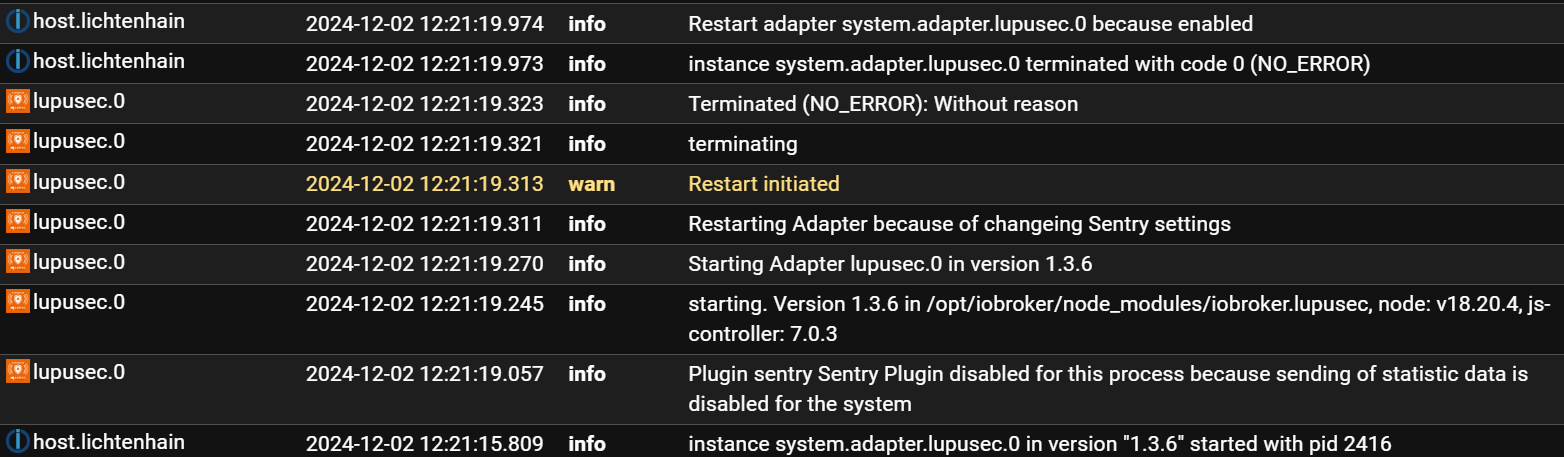
Du könntest den Text aus dem LogFile
iob logs --watchin Textform in CodeTags eingebettet posten und nicht als Screenshot.
Und du könntest die empfohlene nodejs-Version verwenden...iob nodejs-update -
Du könntest den Text aus dem LogFile
iob logs --watchin Textform in CodeTags eingebettet posten und nicht als Screenshot.
Und du könntest die empfohlene nodejs-Version verwenden...iob nodejs-updateso hier ein neuer Versuch
2024-12-02 13:22:07.346 - info: host.lichtenhain instance system.adapter.lupusec.0 terminated with code 0 (NO_ERROR) 2024-12-02 13:22:07.347 - info: host.lichtenhain Restart adapter system.adapter.lupusec.0 because enabled 2024-12-02 13:22:38.156 - info: host.lichtenhain instance system.adapter.lupusec.0 in version "1.3.6" started with pid 1867 2024-12-02 13:22:41.378 - info: lupusec.0 (1867) Plugin sentry Sentry Plugin disabled for this process because sending of statistic data is disabled for the system 2024-12-02 13:22:41.553 - info: lupusec.0 (1867) starting. Version 1.3.6 in /opt/iobroker/node_modules/iobroker.lupusec, node: v18.20.4, js-controller: 7.0.3 2024-12-02 13:22:41.579 - info: lupusec.0 (1867) Starting Adapter lupusec.0 in version 1.3.6 2024-12-02 13:22:41.693 - info: lupusec.0 (1867) Restarting Adapter because of changeing Sentry settings 2024-12-02 13:22:41.694 - warn: lupusec.0 (1867) Restart initiated 2024-12-02 13:22:41.704 - info: lupusec.0 (1867) terminating 2024-12-02 13:22:41.706 - info: lupusec.0 (1867) Terminated (NO_ERROR): Without reason 2024-12-02 13:22:42.202 - info: lupusec.0 (1867) terminating 2024-12-02 13:22:42.305 - info: host.lichtenhain instance system.adapter.lupusec.0 terminated with code 0 (NO_ERROR) 2024-12-02 13:22:42.306 - info: host.lichtenhain Restart adapter system.adapter.lupusec.0 because enabled -
Du könntest den Text aus dem LogFile
iob logs --watchin Textform in CodeTags eingebettet posten und nicht als Screenshot.
Und du könntest die empfohlene nodejs-Version verwenden...iob nodejs-update -
hab leider noch Debian Buster
Debian 10 'Buster' has reached End of Life and is not supported anymore. Recent versions of nodejs won't install. Please install the current Debian Stable@steinchen sagte in js-controller Lucy (Version 7.0) jetzt im Stable Repository:
hab leider noch Debian Buster
Dann musst du das als erstes ändern. Buster ist mehr als tot.
-
Leider startet nach update des js-controllers mein Lupusec Adapter nicht mehr.
eine neuinstallation des Adapters hat nicht geholfen.
Was könnte ich denn da tun ?vg steinchen
@steinchen said in js-controller Lucy (Version 7.0) jetzt im Stable Repository:
Leider startet nach update des js-controllers mein Lupusec Adapter nicht mehr.
eine neuinstallation des Adapters hat nicht geholfen.
Was könnte ich denn da tun ?vg steinchen
Welche Version des js-controllers hattest du vorher drauf?
An sich ist es bekannt, dass der Adapter Probleme macht:
https://github.com/schmupu/ioBroker.lupusec/issues/84
Versuch mal ausnahmsweise (!) die Version 2.0 von Github zu installieren - vorzugsweise auf einem Testsystem. Von dIrekten GitHub Installationen wird jedenfalls weiterhin abgeraten und ich sage ausdrücklich nur bei einwandfreiem Backup und unter dem Bewuußtsein eine ALPHA Version zu installieren eventuell ausprobieren.
Und schreib dem Maintainer an dass er doch bitte eine saubere Releas 2.x.x erstellen soll...
-
@steinchen said in js-controller Lucy (Version 7.0) jetzt im Stable Repository:
Leider startet nach update des js-controllers mein Lupusec Adapter nicht mehr.
eine neuinstallation des Adapters hat nicht geholfen.
Was könnte ich denn da tun ?vg steinchen
Welche Version des js-controllers hattest du vorher drauf?
An sich ist es bekannt, dass der Adapter Probleme macht:
https://github.com/schmupu/ioBroker.lupusec/issues/84
Versuch mal ausnahmsweise (!) die Version 2.0 von Github zu installieren - vorzugsweise auf einem Testsystem. Von dIrekten GitHub Installationen wird jedenfalls weiterhin abgeraten und ich sage ausdrücklich nur bei einwandfreiem Backup und unter dem Bewuußtsein eine ALPHA Version zu installieren eventuell ausprobieren.
Und schreib dem Maintainer an dass er doch bitte eine saubere Releas 2.x.x erstellen soll...
-
@mcm1957
jo, mit der 2.x von Github geht esich habe Ihn auf Git angeschrieben, hattest du ja auch :)
danke erstmal.
update wird auf einem pi5 gemacht, ist schon in der Vorbereitung.
trotzdem meinen Dank@steinchen sagte in js-controller Lucy (Version 7.0) jetzt im Stable Repository:
update wird auf einem pi5 gemacht
Neuinstallation. Vob Buster führt keine Weg zu Bookworm.
-
@steinchen sagte in js-controller Lucy (Version 7.0) jetzt im Stable Repository:
update wird auf einem pi5 gemacht
Neuinstallation. Vob Buster führt keine Weg zu Bookworm.
@thomas-braun
mein ich doch :)
neuer Pi mit Neuinstallation -
Seit dem Update auf Js-controller Lucy läuft der Radar2 Adapter nicht mehr, hat außer mir noch jemand dieses Problem?
@mrhary said in js-controller Lucy (Version 7.0) jetzt im Stable Repository:
Seit dem Update auf Js-controller Lucy läuft der Radar2 Adapter nicht mehr, hat außer mir noch jemand dieses Problem?
Bei mir läuft er auch nicht.
Kann aber daran liegen dass er nicht installiert ist ....Im Ernst:
Meinst du wirklich dass jemand eine Fehleranalyse vornehmen kann ohne dass due den Fehler auch nur irgendwie beschreibst? Und ohne dass du irgendwelche Versionsinfos nennst?Also:
Adapter version ?
js-controller jatz (7.0.3) / vor dem Upgrade: ?
Log mit Level DEBUG ? -
@mrhary said in js-controller Lucy (Version 7.0) jetzt im Stable Repository:
Seit dem Update auf Js-controller Lucy läuft der Radar2 Adapter nicht mehr, hat außer mir noch jemand dieses Problem?
Bei mir läuft er auch nicht.
Kann aber daran liegen dass er nicht installiert ist ....Im Ernst:
Meinst du wirklich dass jemand eine Fehleranalyse vornehmen kann ohne dass due den Fehler auch nur irgendwie beschreibst? Und ohne dass du irgendwelche Versionsinfos nennst?Also:
Adapter version ?
js-controller jatz (7.0.3) / vor dem Upgrade: ?
Log mit Level DEBUG ?Beim Upgrade von 7.0.3 auf 7.0.4 (Buanet-Container) über den Admin kam:
SyntaxError: JSON.parse: unexpected character at line 1 column 1 of the JSON dataGefunden habe ich das dazu:
https://github.com/ioBroker/ioBroker.js-controller/issues/2352 -
Seit dem Update auf Js-controller Lucy läuft der Radar2 Adapter nicht mehr, hat außer mir noch jemand dieses Problem?
-
Beim Upgrade von 7.0.3 auf 7.0.4 (Buanet-Container) über den Admin kam:
SyntaxError: JSON.parse: unexpected character at line 1 column 1 of the JSON dataGefunden habe ich das dazu:
https://github.com/ioBroker/ioBroker.js-controller/issues/2352@ofbeqnpolkkl6mby5e13 ja vermutlich passt iwas nicht auf dem Docker nur ich kanns nicht testen derzeit https://github.com/ioBroker/ioBroker.js-controller/issues/2964
-
Hallo,
bei mir schlägt das GUI gesteuerte Upgrade des JS-Controllers immer fehl. Die Logausgabe sieht so aus:
2024-12-08 10:30:15.728  - info: host.iobroker-lxc [CONTROLLER_AUTO_UPGRADE] Successfully stopped js-controller
2024-12-08 10:30:15.776  - error: host.iobroker-lxc [CONTROLLER_AUTO_UPGRADE] Uncaught Exception: Error: listen EACCES: permission denied 0.0.0.0:443
    at Server.setupListenHandle [as _listen2] (node:net:1886:21)
    at listenInCluster (node:net:1965:12)
    at Server.listen (node:net:2067:7)
    at UpgradeManager.startSecureWebServer (file:///opt/iobroker/node_modules/iobroker.js-controller/src/lib/upgradeManager.ts:331:21)
    at UpgradeManager.startWebServer (file:///opt/iobroker/node_modules/iobroker.js-controller/src/lib/upgradeManager.ts:242:18)
    at main (file:///opt/iobroker/node_modules/iobroker.js-controller/src/lib/upgradeManager.ts:446:20)
Der Fehler sieht für mich aus als wenn ich was falsch eingestellt hätte:
Error: listen EACCES: permission denied 0.0.0.0:443Weiß nur nicht was. :) Hm vielleicht im Admin die IP fest vorgeben auf der er erreichbar ist?
-
Hallo,
bei mir schlägt das GUI gesteuerte Upgrade des JS-Controllers immer fehl. Die Logausgabe sieht so aus:
2024-12-08 10:30:15.728  - info: host.iobroker-lxc [CONTROLLER_AUTO_UPGRADE] Successfully stopped js-controller
2024-12-08 10:30:15.776  - error: host.iobroker-lxc [CONTROLLER_AUTO_UPGRADE] Uncaught Exception: Error: listen EACCES: permission denied 0.0.0.0:443
    at Server.setupListenHandle [as _listen2] (node:net:1886:21)
    at listenInCluster (node:net:1965:12)
    at Server.listen (node:net:2067:7)
    at UpgradeManager.startSecureWebServer (file:///opt/iobroker/node_modules/iobroker.js-controller/src/lib/upgradeManager.ts:331:21)
    at UpgradeManager.startWebServer (file:///opt/iobroker/node_modules/iobroker.js-controller/src/lib/upgradeManager.ts:242:18)
    at main (file:///opt/iobroker/node_modules/iobroker.js-controller/src/lib/upgradeManager.ts:446:20)
Der Fehler sieht für mich aus als wenn ich was falsch eingestellt hätte:
Error: listen EACCES: permission denied 0.0.0.0:443Weiß nur nicht was. :) Hm vielleicht im Admin die IP fest vorgeben auf der er erreichbar ist?
@ticaki sagte in js-controller Lucy (Version 7.0) jetzt im Stable Repository:
Weiß nur nicht was.
Port 443 ist für HTTPS, also gesicherter Zugang. Vielleicht das mal deaktivieren?
-
Hallo,
bei mir schlägt das GUI gesteuerte Upgrade des JS-Controllers immer fehl. Die Logausgabe sieht so aus:
2024-12-08 10:30:15.728  - info: host.iobroker-lxc [CONTROLLER_AUTO_UPGRADE] Successfully stopped js-controller
2024-12-08 10:30:15.776  - error: host.iobroker-lxc [CONTROLLER_AUTO_UPGRADE] Uncaught Exception: Error: listen EACCES: permission denied 0.0.0.0:443
    at Server.setupListenHandle [as _listen2] (node:net:1886:21)
    at listenInCluster (node:net:1965:12)
    at Server.listen (node:net:2067:7)
    at UpgradeManager.startSecureWebServer (file:///opt/iobroker/node_modules/iobroker.js-controller/src/lib/upgradeManager.ts:331:21)
    at UpgradeManager.startWebServer (file:///opt/iobroker/node_modules/iobroker.js-controller/src/lib/upgradeManager.ts:242:18)
    at main (file:///opt/iobroker/node_modules/iobroker.js-controller/src/lib/upgradeManager.ts:446:20)
Der Fehler sieht für mich aus als wenn ich was falsch eingestellt hätte:
Error: listen EACCES: permission denied 0.0.0.0:443Weiß nur nicht was. :) Hm vielleicht im Admin die IP fest vorgeben auf der er erreichbar ist?





765
Online32.5k
Users81.7k
Topics1.3m
Posts