



Skip to content
  • Home
  • Recent
  • Tags
  • 0 Unread 0
  • Categories
  • Unreplied
  • Popular
  • GitHub
  • Docu
  • Hilfe
Skins
  • Light
  • Brite
  • Cerulean
  • Cosmo
  • Flatly
  • Journal
  • Litera
  • Lumen
  • Lux
  • Materia
  • Minty
  • Morph
  • Pulse
  • Sandstone
  • Simplex
  • Sketchy
  • Spacelab
  • United
  • Yeti
  • Zephyr
  • Dark
  • Cyborg
  • Darkly
  • Quartz
  • Slate
  • Solar
  • Superhero
  • Vapor

  • Default (No Skin)
  • No Skin
Collapse
ioBroker Logo

Community Forum

donate donate
  1. ioBroker Community Home
  2. Deutsch
  3. Off Topic
  4. Proxmox
  5. Proxmox Neuling - Hilfestellungen

NEWS

  • Weihnachtsangebot 2025! 🎄
    BluefoxB
    Bluefox
    22
    1
    1.2k

  • UPDATE 31.10.: Amazon Alexa - ioBroker Skill läuft aus ?
    apollon77A
    apollon77
    48
    3
    9.2k

  • Monatsrückblick – September 2025
    BluefoxB
    Bluefox
    14
    1
    2.5k

Proxmox Neuling - Hilfestellungen

Scheduled Pinned Locked Moved Proxmox
193 Posts 16 Posters 36.0k Views 14 Watching
  • Oldest to Newest
  • Newest to Oldest
  • Most Votes
Reply
  • Reply as topic
Log in to reply
This topic has been deleted. Only users with topic management privileges can see it.
  • C chuck2941

    @crunchip ja den Titel habe ich so benannt weil ich ursprünglich auf einen Rapy 5 umsteigen wollte, ist dann aber auf Empfehlungen anders gekommen, soll ich ihn lieber umbenennen?

    Bin mit Proxmox noch sehr unerfahren, habe im Moment wegen Renovierungen auch nicht so viel Zeit um mich in alles einzulesen.
    ioBroker habe ich seit knapp 2 Jahren, wollte was neues ausprobieren.

    Was meinst du damit das was mit dem RAM und sonst was nicht stimmt?

    crunchipC Away
    crunchipC Away
    crunchip
    Forum Testing Most Active
    wrote on last edited by
    #85

    @chuck2941 sagte in Umzug von Raspberry 4 auf 5:

    Was meinst du damit das was mit dem RAM und sonst was nicht stimmt

    die Ausgabe von iob diag passt nicht im geringsten zu deinem screen aus deinem Beitrag
    Swap: 1.6G, dein screen zeigt jedoch 8GB

    dein Laufwerk hat laut screen knapp 100GB, davon rund 68% belegt, jedoch
    diag zeigt

     63G  8.6G   51G  15%
    

    heißt, deine Platte ist 63Gb groß, davon 8.6Gb belegt

    umgestiegen von Proxmox auf Unraid

    C 1 Reply Last reply
    0
    • crunchipC crunchip

      @chuck2941 sagte in Umzug von Raspberry 4 auf 5:

      Was meinst du damit das was mit dem RAM und sonst was nicht stimmt

      die Ausgabe von iob diag passt nicht im geringsten zu deinem screen aus deinem Beitrag
      Swap: 1.6G, dein screen zeigt jedoch 8GB

      dein Laufwerk hat laut screen knapp 100GB, davon rund 68% belegt, jedoch
      diag zeigt

       63G  8.6G   51G  15%
      

      heißt, deine Platte ist 63Gb groß, davon 8.6Gb belegt

      C Offline
      C Offline
      chuck2941
      wrote on last edited by chuck2941
      #86

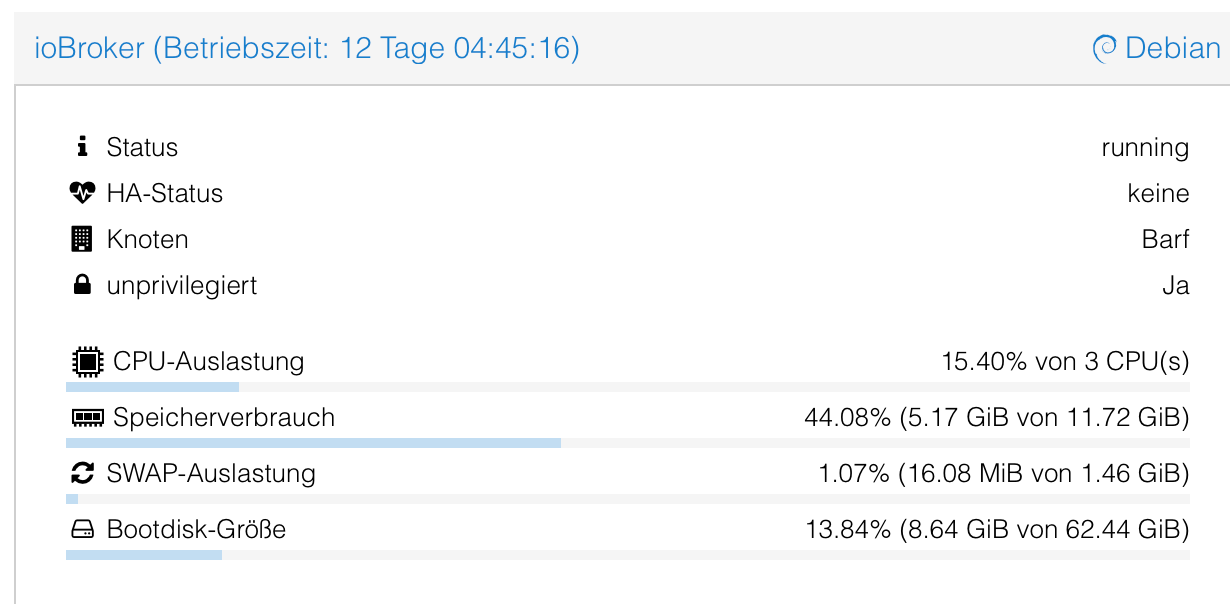
      @crunchip ich habe einen Container angelegt wo ioBroker läuft mit folgenden Daten
      d10aa7c0-384f-4d56-82dd-d3accb594b99-image.png

      Das System hat 1TB Speicher und 32GB RAM und 6 Kerne insgesamt.

      crunchipC 1 Reply Last reply
      0
      • C chuck2941

        @crunchip ich habe einen Container angelegt wo ioBroker läuft mit folgenden Daten

        d10aa7c0-384f-4d56-82dd-d3accb594b99-image.png

        Das System hat 1TB Speicher und 32GB RAM und 6 Kerne insgesamt.

        crunchipC Away
        crunchipC Away
        crunchip
        Forum Testing Most Active
        wrote on last edited by
        #87

        @chuck2941 ok und wo liegt jetzt genau das Problem bzw was funktioniert nicht?

        umgestiegen von Proxmox auf Unraid

        C 1 Reply Last reply
        0
        • crunchipC crunchip

          @chuck2941 ok und wo liegt jetzt genau das Problem bzw was funktioniert nicht?

          C Offline
          C Offline
          chuck2941
          wrote on last edited by
          #88

          @crunchip das mir hier als Laufwerksspeicher nur ca. 100GB Laufwerksspeicher angezeigt wird, müsste da nicht die 1TB angezeigt werden?
          Ist doch die Übersicht von allem oder?
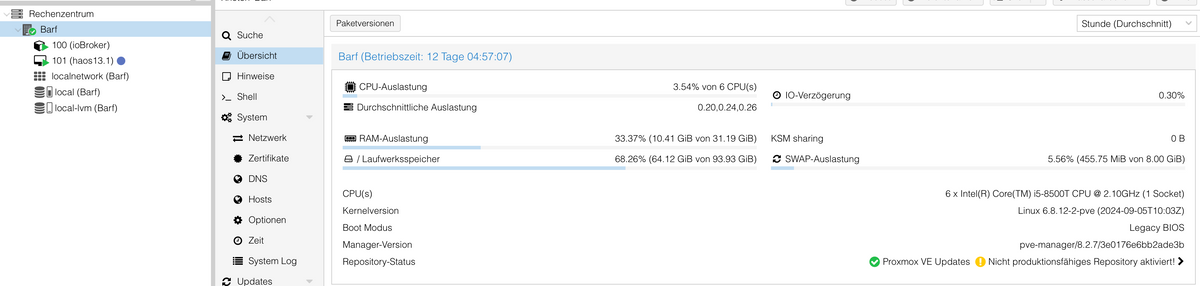
          4e5b401d-98de-4892-849e-067db5fc44cc-image.png

          crunchipC 1 Reply Last reply
          0
          • C chuck2941

            @crunchip das mir hier als Laufwerksspeicher nur ca. 100GB Laufwerksspeicher angezeigt wird, müsste da nicht die 1TB angezeigt werden?
            Ist doch die Übersicht von allem oder?

            4e5b401d-98de-4892-849e-067db5fc44cc-image.png

            crunchipC Away
            crunchipC Away
            crunchip
            Forum Testing Most Active
            wrote on last edited by
            #89

            @chuck2941 zeig mal bitte die Ausgabe von

            • pvdisplay
            • vgdisplay
            • lvdisplay

            umgestiegen von Proxmox auf Unraid

            C 1 Reply Last reply
            0
            • crunchipC crunchip

              @chuck2941 zeig mal bitte die Ausgabe von

              • pvdisplay
              • vgdisplay
              • lvdisplay
              C Offline
              C Offline
              chuck2941
              wrote on last edited by
              #90

              @crunchip

              --- Physical volume ---
                PV Name               /dev/nvme0n1p3
                VG Name               pve
                PV Size               930.51 GiB / not usable 4.69 MiB
                Allocatable           yes 
                PE Size               4.00 MiB
                Total PE              238210
                Free PE               4096
                Allocated PE          234114
                PV UUID               col1Mq-mjuv-7IaT-WTLb-PwF0-jbWc-J2Cb3c
              
              --- Volume group ---
                VG Name               pve
                System ID             
                Format                lvm2
                Metadata Areas        1
                Metadata Sequence No  77
                VG Access             read/write
                VG Status             resizable
                MAX LV                0
                Cur LV                6
                Open LV               5
                Max PV                0
                Cur PV                1
                Act PV                1
                VG Size               <930.51 GiB
                PE Size               4.00 MiB
                Total PE              238210
                Alloc PE / Size       234114 / <914.51 GiB
                Free  PE / Size       4096 / 16.00 GiB
                VG UUID               OHpOhh-JUJT-5Dm0-0xZc-rhks-m9xh-wnt4me
              
              --- Logical volume ---
                LV Path                /dev/pve/vm-101-disk-1
                LV Name                vm-101-disk-1
                VG Name                pve
                LV UUID                iB5Xsv-Vkj1-Yfu3-q23C-ta35-6f7l-dJXnEE
                LV Write Access        read/write
                LV Creation host, time Barf, 2024-10-10 05:20:16 +0200
                LV Pool name           data
                LV Status              available
                # open                 1
                LV Size                32.00 GiB
                Mapped size            22.64%
                Current LE             8192
                Segments               1
                Allocation             inherit
                Read ahead sectors     auto
                - currently set to     256
                Block device           252:8
              
              crunchipC 1 Reply Last reply
              0
              • C chuck2941

                @crunchip

                --- Physical volume ---
                  PV Name               /dev/nvme0n1p3
                  VG Name               pve
                  PV Size               930.51 GiB / not usable 4.69 MiB
                  Allocatable           yes 
                  PE Size               4.00 MiB
                  Total PE              238210
                  Free PE               4096
                  Allocated PE          234114
                  PV UUID               col1Mq-mjuv-7IaT-WTLb-PwF0-jbWc-J2Cb3c
                
                --- Volume group ---
                  VG Name               pve
                  System ID             
                  Format                lvm2
                  Metadata Areas        1
                  Metadata Sequence No  77
                  VG Access             read/write
                  VG Status             resizable
                  MAX LV                0
                  Cur LV                6
                  Open LV               5
                  Max PV                0
                  Cur PV                1
                  Act PV                1
                  VG Size               <930.51 GiB
                  PE Size               4.00 MiB
                  Total PE              238210
                  Alloc PE / Size       234114 / <914.51 GiB
                  Free  PE / Size       4096 / 16.00 GiB
                  VG UUID               OHpOhh-JUJT-5Dm0-0xZc-rhks-m9xh-wnt4me
                
                --- Logical volume ---
                  LV Path                /dev/pve/vm-101-disk-1
                  LV Name                vm-101-disk-1
                  VG Name                pve
                  LV UUID                iB5Xsv-Vkj1-Yfu3-q23C-ta35-6f7l-dJXnEE
                  LV Write Access        read/write
                  LV Creation host, time Barf, 2024-10-10 05:20:16 +0200
                  LV Pool name           data
                  LV Status              available
                  # open                 1
                  LV Size                32.00 GiB
                  Mapped size            22.64%
                  Current LE             8192
                  Segments               1
                  Allocation             inherit
                  Read ahead sectors     auto
                  - currently set to     256
                  Block device           252:8
                
                crunchipC Away
                crunchipC Away
                crunchip
                Forum Testing Most Active
                wrote on last edited by crunchip
                #91

                @chuck2941 sagte in Proxmox Neuling - Hilfestellungen:

                Logical volume

                da fehlt bisserl was, wie z.b. folgende
                /dev/pve/swap
                /dev/pve/root
                /dev/pve/vm-100

                der Rest oben passt eigentlich

                umgestiegen von Proxmox auf Unraid

                C 1 Reply Last reply
                0
                • crunchipC crunchip

                  @chuck2941 sagte in Proxmox Neuling - Hilfestellungen:

                  Logical volume

                  da fehlt bisserl was, wie z.b. folgende
                  /dev/pve/swap
                  /dev/pve/root
                  /dev/pve/vm-100

                  der Rest oben passt eigentlich

                  C Offline
                  C Offline
                  chuck2941
                  wrote on last edited by
                  #92

                  @crunchip

                   --- Logical volume ---
                    LV Name                data
                    VG Name                pve
                    LV UUID                nAC5az-bexV-CvMx-jmUe-ER2J-YfA0-wxmMx7
                    LV Write Access        read/write (activated read only)
                    LV Creation host, time proxmox, 2024-10-05 15:04:24 +0200
                    LV Pool metadata       data_tmeta
                    LV Pool data           data_tdata
                    LV Status              available
                    # open                 0
                    LV Size                794.30 GiB
                    Allocated pool data    8.66%
                    Allocated metadata     0.52%
                    Current LE             203342
                    Segments               1
                    Allocation             inherit
                    Read ahead sectors     auto
                    - currently set to     256
                    Block device           252:5
                     
                    --- Logical volume ---
                    LV Path                /dev/pve/swap
                    LV Name                swap
                    VG Name                pve
                    LV UUID                pp6OnP-nmzc-jl7K-Aal8-KYIr-a9w0-iAob4k
                    LV Write Access        read/write
                    LV Creation host, time proxmox, 2024-10-05 15:04:06 +0200
                    LV Status              available
                    # open                 2
                    LV Size                8.00 GiB
                    Current LE             2048
                    Segments               1
                    Allocation             inherit
                    Read ahead sectors     auto
                    - currently set to     256
                    Block device           252:0
                     
                    --- Logical volume ---
                    LV Path                /dev/pve/root
                    LV Name                root
                    VG Name                pve
                    LV UUID                1p75hY-Xwzl-qqV7-b2um-Clpb-EZ2O-ufK5VO
                    LV Write Access        read/write
                    LV Creation host, time proxmox, 2024-10-05 15:04:06 +0200
                    LV Status              available
                    # open                 1
                    LV Size                96.00 GiB
                    Current LE             24576
                    Segments               1
                    Allocation             inherit
                    Read ahead sectors     auto
                    - currently set to     256
                    Block device           252:1
                     
                    --- Logical volume ---
                    LV Path                /dev/pve/vm-100-disk-0
                    LV Name                vm-100-disk-0
                    VG Name                pve
                    LV UUID                qtlj3O-Ik8u-V09O-Mh84-GhwZ-DhNS-P9VhuE
                    LV Write Access        read/write
                    LV Creation host, time Barf, 2024-10-05 15:26:21 +0200
                    LV Pool name           data
                    LV Status              available
                    # open                 1
                    LV Size                64.00 GiB
                    Mapped size            96.10%
                    Current LE             16384
                    Segments               1
                    Allocation             inherit
                    Read ahead sectors     auto
                    - currently set to     256
                    Block device           252:6
                     
                    --- Logical volume ---
                    LV Path                /dev/pve/vm-101-disk-0
                    LV Name                vm-101-disk-0
                    VG Name                pve
                    LV UUID                e9A1OZ-uWk9-zPcT-o0Qm-vvcO-f1S8-3ZGKrp
                    LV Write Access        read/write
                    LV Creation host, time Barf, 2024-10-10 05:20:15 +0200
                    LV Pool name           data
                    LV Status              available
                    # open                 1
                    LV Size                4.00 MiB
                    Mapped size            0.00%
                    Current LE             1
                    Segments               1
                    Allocation             inherit
                    Read ahead sectors     auto
                    - currently set to     256
                    Block device           252:7
                     
                    --- Logical volume ---
                    LV Path                /dev/pve/vm-101-disk-1
                    LV Name                vm-101-disk-1
                    VG Name                pve
                    LV UUID                iB5Xsv-Vkj1-Yfu3-q23C-ta35-6f7l-dJXnEE
                    LV Write Access        read/write
                    LV Creation host, time Barf, 2024-10-10 05:20:16 +0200
                    LV Pool name           data
                    LV Status              available
                    # open                 1
                    LV Size                32.00 GiB
                    Mapped size            22.64%
                    Current LE             8192
                    Segments               1
                    Allocation             inherit
                    Read ahead sectors     auto
                    - currently set to     256
                    Block device           252:8
                  
                  crunchipC 1 Reply Last reply
                  0
                  • C Offline
                    C Offline
                    chuck2941
                    wrote on last edited by
                    #93

                    das hatte ich, glaube ich, vergessen

                    1 Reply Last reply
                    0
                    • C chuck2941

                      @crunchip

                       --- Logical volume ---
                        LV Name                data
                        VG Name                pve
                        LV UUID                nAC5az-bexV-CvMx-jmUe-ER2J-YfA0-wxmMx7
                        LV Write Access        read/write (activated read only)
                        LV Creation host, time proxmox, 2024-10-05 15:04:24 +0200
                        LV Pool metadata       data_tmeta
                        LV Pool data           data_tdata
                        LV Status              available
                        # open                 0
                        LV Size                794.30 GiB
                        Allocated pool data    8.66%
                        Allocated metadata     0.52%
                        Current LE             203342
                        Segments               1
                        Allocation             inherit
                        Read ahead sectors     auto
                        - currently set to     256
                        Block device           252:5
                         
                        --- Logical volume ---
                        LV Path                /dev/pve/swap
                        LV Name                swap
                        VG Name                pve
                        LV UUID                pp6OnP-nmzc-jl7K-Aal8-KYIr-a9w0-iAob4k
                        LV Write Access        read/write
                        LV Creation host, time proxmox, 2024-10-05 15:04:06 +0200
                        LV Status              available
                        # open                 2
                        LV Size                8.00 GiB
                        Current LE             2048
                        Segments               1
                        Allocation             inherit
                        Read ahead sectors     auto
                        - currently set to     256
                        Block device           252:0
                         
                        --- Logical volume ---
                        LV Path                /dev/pve/root
                        LV Name                root
                        VG Name                pve
                        LV UUID                1p75hY-Xwzl-qqV7-b2um-Clpb-EZ2O-ufK5VO
                        LV Write Access        read/write
                        LV Creation host, time proxmox, 2024-10-05 15:04:06 +0200
                        LV Status              available
                        # open                 1
                        LV Size                96.00 GiB
                        Current LE             24576
                        Segments               1
                        Allocation             inherit
                        Read ahead sectors     auto
                        - currently set to     256
                        Block device           252:1
                         
                        --- Logical volume ---
                        LV Path                /dev/pve/vm-100-disk-0
                        LV Name                vm-100-disk-0
                        VG Name                pve
                        LV UUID                qtlj3O-Ik8u-V09O-Mh84-GhwZ-DhNS-P9VhuE
                        LV Write Access        read/write
                        LV Creation host, time Barf, 2024-10-05 15:26:21 +0200
                        LV Pool name           data
                        LV Status              available
                        # open                 1
                        LV Size                64.00 GiB
                        Mapped size            96.10%
                        Current LE             16384
                        Segments               1
                        Allocation             inherit
                        Read ahead sectors     auto
                        - currently set to     256
                        Block device           252:6
                         
                        --- Logical volume ---
                        LV Path                /dev/pve/vm-101-disk-0
                        LV Name                vm-101-disk-0
                        VG Name                pve
                        LV UUID                e9A1OZ-uWk9-zPcT-o0Qm-vvcO-f1S8-3ZGKrp
                        LV Write Access        read/write
                        LV Creation host, time Barf, 2024-10-10 05:20:15 +0200
                        LV Pool name           data
                        LV Status              available
                        # open                 1
                        LV Size                4.00 MiB
                        Mapped size            0.00%
                        Current LE             1
                        Segments               1
                        Allocation             inherit
                        Read ahead sectors     auto
                        - currently set to     256
                        Block device           252:7
                         
                        --- Logical volume ---
                        LV Path                /dev/pve/vm-101-disk-1
                        LV Name                vm-101-disk-1
                        VG Name                pve
                        LV UUID                iB5Xsv-Vkj1-Yfu3-q23C-ta35-6f7l-dJXnEE
                        LV Write Access        read/write
                        LV Creation host, time Barf, 2024-10-10 05:20:16 +0200
                        LV Pool name           data
                        LV Status              available
                        # open                 1
                        LV Size                32.00 GiB
                        Mapped size            22.64%
                        Current LE             8192
                        Segments               1
                        Allocation             inherit
                        Read ahead sectors     auto
                        - currently set to     256
                        Block device           252:8
                      
                      crunchipC Away
                      crunchipC Away
                      crunchip
                      Forum Testing Most Active
                      wrote on last edited by
                      #94

                      @chuck2941 sagte in Proxmox Neuling - Hilfestellungen:

                      /dev/pve/root

                      passt doch, dein root(local) Laufwerk beträgt 96GB
                      und dein (local)lvm 794.30GB

                      du hast da aber auch noch ne /dev/pve/vm-101-disk-0 rum liegen, hattest du bei der VM Probleme? gelöscht, backup gemacht zurückgespielt...?
                      weil deine jetzige VM, disk-1 verwendet, anstatt disk-0

                      umgestiegen von Proxmox auf Unraid

                      1 Reply Last reply
                      0
                      • C chuck2941

                        Ich habe bei mir eine 1TB SSD verbaut, es werden hier aber nur ca. 100GB angezeigt, kann mir jemand sagen warum?
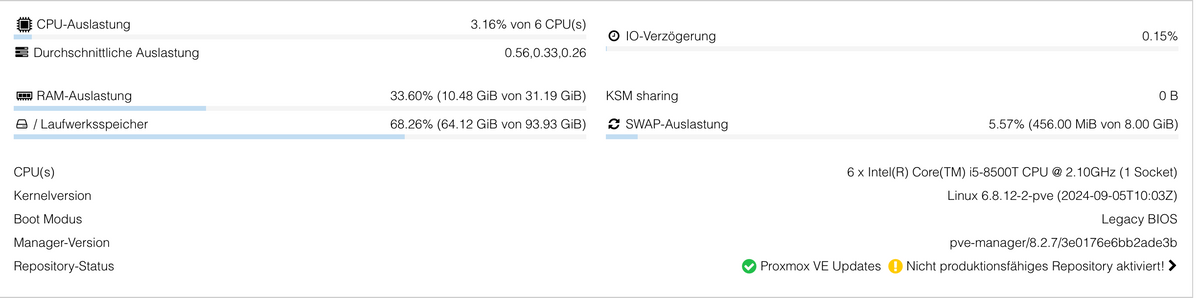
                        76852ea6-d575-477d-893b-f57edc90c7f2-image.png

                        Hier sieht man doch das eine 1TB Disk verbaut ist.

                        3b0a3e5c-5417-4a14-8e83-bc0cf04de470-image.png

                        Im Log kommt auch ständig diese Meldung, hat das was damit zu tun?
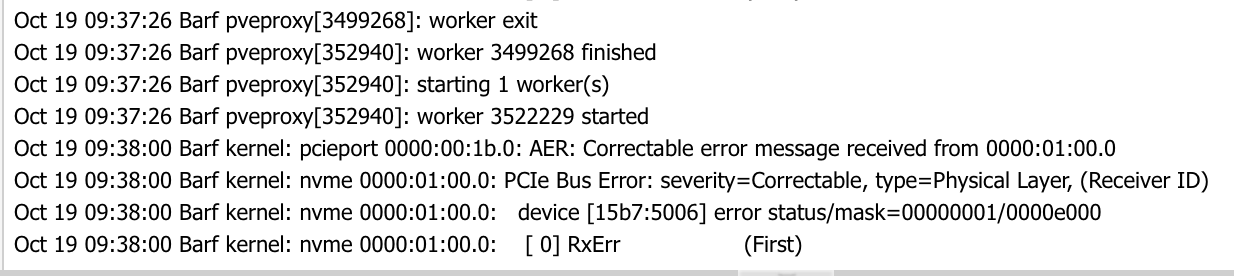
                        2dffbb9f-ec0c-49a1-ace4-d56b33ae2bdf-image.png

                        Dr. BakteriusD Offline
                        Dr. BakteriusD Offline
                        Dr. Bakterius
                        Most Active
                        wrote on last edited by
                        #95

                        @chuck2941 sagte in Proxmox Neuling - Hilfestellungen:

                        Ich habe bei mir eine 1TB SSD verbaut, es werden hier aber nur ca. 100GB angezeigt, kann mir jemand sagen warum?

                        Das passt schon so. Proxmox teilt die Platte bei der Installation auf. Die 100 GB reserviert sich Proxmox für sich selbst (local). Der Rest (local-lvm) steht dann für VMs und LXCs zur Verfügung.

                        1 Reply Last reply
                        0
                        • C Offline
                          C Offline
                          chuck2941
                          wrote on last edited by
                          #96

                          Also ich verstehe das nicht, ja bin auch noch ein Anfänger aber ich habe jetzt eine 2TB SSD extern angebunden um dort die Backups zu sichern.
                          Er zeigt mir nur die 100 GB an die fast voll sind.
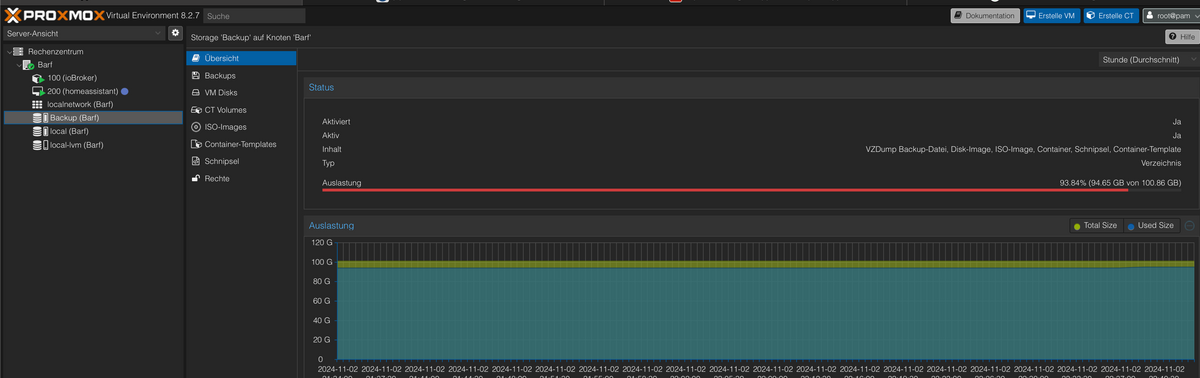
                          b0a5aca3-8b0a-4fcc-860f-e7342888bbd2-image.png

                          Was ist mit den restlichen 1,9TB?

                          crunchipC 1 Reply Last reply
                          0
                          • C chuck2941

                            Also ich verstehe das nicht, ja bin auch noch ein Anfänger aber ich habe jetzt eine 2TB SSD extern angebunden um dort die Backups zu sichern.
                            Er zeigt mir nur die 100 GB an die fast voll sind.
                            b0a5aca3-8b0a-4fcc-860f-e7342888bbd2-image.png

                            Was ist mit den restlichen 1,9TB?

                            crunchipC Away
                            crunchipC Away
                            crunchip
                            Forum Testing Most Active
                            wrote on last edited by
                            #97

                            @chuck2941 sagte in Proxmox Neuling - Hilfestellungen:

                            habe jetzt eine 2TB SSD extern angebunden

                            Wie?

                            @chuck2941 sagte in Proxmox Neuling - Hilfestellungen:

                            zeigt mir nur die 100 GB

                            Ich nehme an, das du da etwas falsch konfiguriert hast beim einbindet, daher zeigt es die Größe der local an und nicht die 2tb Platte

                            umgestiegen von Proxmox auf Unraid

                            C 1 Reply Last reply
                            0
                            • crunchipC crunchip

                              @chuck2941 sagte in Proxmox Neuling - Hilfestellungen:

                              habe jetzt eine 2TB SSD extern angebunden

                              Wie?

                              @chuck2941 sagte in Proxmox Neuling - Hilfestellungen:

                              zeigt mir nur die 100 GB

                              Ich nehme an, das du da etwas falsch konfiguriert hast beim einbindet, daher zeigt es die Größe der local an und nicht die 2tb Platte

                              C Offline
                              C Offline
                              chuck2941
                              wrote on last edited by
                              #98

                              @crunchip hier sieht man aber die 2 TB
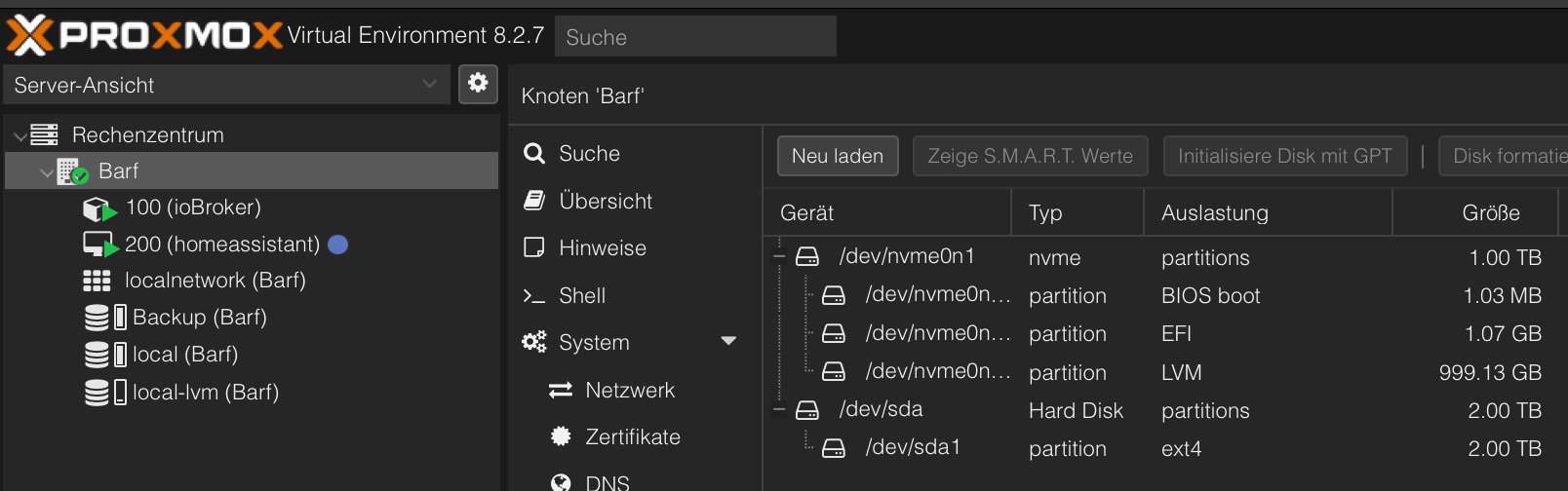
                              0310e20d-0017-4ce4-91d4-21f846b38b27-image.png

                              Ich habe die Festplatte in ext4 formatier und nach einer Anleitung eingebunden.
                              Was soll ich denn falsch gemacht haben?
                              Muss man den Speicher evtl. noch erweitern?

                              L crunchipC 2 Replies Last reply
                              0
                              • C chuck2941

                                @crunchip hier sieht man aber die 2 TB
                                0310e20d-0017-4ce4-91d4-21f846b38b27-image.png

                                Ich habe die Festplatte in ext4 formatier und nach einer Anleitung eingebunden.
                                Was soll ich denn falsch gemacht haben?
                                Muss man den Speicher evtl. noch erweitern?

                                L Offline
                                L Offline
                                Labersack
                                wrote on last edited by Labersack
                                #99

                                @chuck2941
                                Schau mal unter Datacenter(Rechenzentrum) -> Storage (Speicher?) auf welches Laufwerk du deine Backups gelegt hast, sollte auf local-lvm sein (oder noch besser extern), und ist bei dir ist es vermutlich auf local.

                                C 1 Reply Last reply
                                0
                                • L Labersack

                                  @chuck2941
                                  Schau mal unter Datacenter(Rechenzentrum) -> Storage (Speicher?) auf welches Laufwerk du deine Backups gelegt hast, sollte auf local-lvm sein (oder noch besser extern), und ist bei dir ist es vermutlich auf local.

                                  C Offline
                                  C Offline
                                  chuck2941
                                  wrote on last edited by
                                  #100

                                  @labersack Die Backups laufen auf die externe 2TB Platte

                                  L 1 Reply Last reply
                                  0
                                  • C chuck2941

                                    @crunchip hier sieht man aber die 2 TB
                                    0310e20d-0017-4ce4-91d4-21f846b38b27-image.png

                                    Ich habe die Festplatte in ext4 formatier und nach einer Anleitung eingebunden.
                                    Was soll ich denn falsch gemacht haben?
                                    Muss man den Speicher evtl. noch erweitern?

                                    crunchipC Away
                                    crunchipC Away
                                    crunchip
                                    Forum Testing Most Active
                                    wrote on last edited by
                                    #101

                                    @chuck2941 sagte in Proxmox Neuling - Hilfestellungen:

                                    nach einer Anleitung eingebunden.
                                    Was soll ich denn falsch gemacht haben?
                                    Muss man den Speicher evtl. noch erweitern?

                                    • nach welcher?
                                    • das Weiss ich nicht
                                    • nein

                                    umgestiegen von Proxmox auf Unraid

                                    C 1 Reply Last reply
                                    0
                                    • crunchipC crunchip

                                      @chuck2941 sagte in Proxmox Neuling - Hilfestellungen:

                                      nach einer Anleitung eingebunden.
                                      Was soll ich denn falsch gemacht haben?
                                      Muss man den Speicher evtl. noch erweitern?

                                      • nach welcher?
                                      • das Weiss ich nicht
                                      • nein
                                      C Offline
                                      C Offline
                                      chuck2941
                                      wrote on last edited by
                                      #102

                                      @crunchip ich meine das war diese hier.
                                      https://www.server-verstehen.de/festplatte-proxmox-einbinden/

                                      crunchipC 1 Reply Last reply
                                      0
                                      • C Offline
                                        C Offline
                                        chuck2941
                                        wrote on last edited by
                                        #103

                                        486cf5a4-e66c-4dfc-a840-0d525c3fb12d-image.png

                                        1 Reply Last reply
                                        0
                                        • C chuck2941

                                          @crunchip ich meine das war diese hier.
                                          https://www.server-verstehen.de/festplatte-proxmox-einbinden/

                                          crunchipC Away
                                          crunchipC Away
                                          crunchip
                                          Forum Testing Most Active
                                          wrote on last edited by
                                          #104

                                          @chuck2941 wenn du sie korrekt gemountet und in der fstab stehen hast, kontrolliere in Proxmox den Pfad


                                          umgestiegen von Proxmox auf Unraid

                                          1 Reply Last reply
                                          0
                                          Reply
                                          • Reply as topic
                                          Log in to reply
                                          • Oldest to Newest
                                          • Newest to Oldest
                                          • Most Votes


                                          Support us

                                          ioBroker
                                          Community Adapters
                                          Donate

                                          340

                                          Online

                                          32.5k

                                          Users

                                          81.7k

                                          Topics

                                          1.3m

                                          Posts
                                          Community
                                          Impressum | Datenschutz-Bestimmungen | Nutzungsbedingungen | Einwilligungseinstellungen
                                          ioBroker Community 2014-2025
                                          logo
                                          • Login

                                          • Don't have an account? Register

                                          • Login or register to search.
                                          • First post
                                            Last post
                                          0
                                          • Home
                                          • Recent
                                          • Tags
                                          • Unread 0
                                          • Categories
                                          • Unreplied
                                          • Popular
                                          • GitHub
                                          • Docu
                                          • Hilfe
