Skip to content
  • Home
  • Recent
  • Tags
  • 0 Unread 0
  • Categories
  • Unreplied
  • Popular
  • GitHub
  • Docu
  • Hilfe
Skins
  • Light
  • Brite
  • Cerulean
  • Cosmo
  • Flatly
  • Journal
  • Litera
  • Lumen
  • Lux
  • Materia
  • Minty
  • Morph
  • Pulse
  • Sandstone
  • Simplex
  • Sketchy
  • Spacelab
  • United
  • Yeti
  • Zephyr
  • Dark
  • Cyborg
  • Darkly
  • Quartz
  • Slate
  • Solar
  • Superhero
  • Vapor

  • Default (No Skin)
  • No Skin
Collapse
ioBroker Logo

Community Forum

donate donate
  1. ioBroker Community Home
  2. Deutsch
  3. Skripten / Logik
  4. JavaScript
  5. Request ablösen durch httpget

NEWS

  • Jahresrückblick 2025 – unser neuer Blogbeitrag ist online! ✨
    BluefoxB
    Bluefox
    17
    1
    2.9k

  • Neuer Blogbeitrag: Monatsrückblick - Dezember 2025 🎄
    BluefoxB
    Bluefox
    13
    1
    1.1k

  • Weihnachtsangebot 2025! 🎄
    BluefoxB
    Bluefox
    25
    1
    2.4k

Request ablösen durch httpget

Scheduled Pinned Locked Moved JavaScript
javascript
50 Posts 12 Posters 5.1k Views 9 Watching
  • Oldest to Newest
  • Newest to Oldest
  • Most Votes
Reply
  • Reply as topic
Log in to reply
This topic has been deleted. Only users with topic management privileges can see it.
  • G glitzi

    Ich hätte hier auch ein Script was ungestellt werden müsste, leider bin ich nicht so fit in Java.

    var options = {url: 'https://api.forecast.solar/estimate/51,11,23/9,12,54/30/28/12.73', method: 'GET', headers: { 'User-Agent': 'request' }};
     
    function GetSolar() {
        request(options, function(error, response, body) {
            if (!error && response.statusCode == 200) {
                let res = JSON.parse(body).result.watts;  // res ist ein Objekt
                for(let key in res) {
                    let ts = new Date(key).getTime(); 
                    let watt = res[key];
                    //log(ts + ': ' + watt);
                    sendTo('influxdb.0', 'storeState', {id: 'javascript.0.e3dc.PV_Forecast', state: {ts: ts, val: watt, ack: true, from: "javascript.0", q: 0}});
                    
                }
            }
        });
    }
     
    schedule('*/30 * * * *', GetSolar);
    
    
    haus-automatisierungH Online
    haus-automatisierungH Online
    haus-automatisierung
    Developer Most Active
    wrote on last edited by
    #3

    @glitzi Warum nutzt Du nicht https://github.com/iobroker-community-adapters/ioBroker.pvforecast

    🧑‍🎓 Autor des beliebten ioBroker-Master-Kurses
    🎥 Tutorials rund um das Thema DIY-Smart-Home: https://haus-automatisierung.com/
    📚 Meine inoffizielle ioBroker Dokumentation

    G 1 Reply Last reply
    0
    • G Offline
      G Offline
      glitzi
      wrote on last edited by
      #4

      Sorry,
      irgendwie konnte ich kein neues Thema erstellen und habe mich an ein anderes drangehangen, nach einem Browser Neustart funktioniert es jetzt.

      haus-automatisierungH 1 Reply Last reply
      1
      • G glitzi

        Sorry,
        irgendwie konnte ich kein neues Thema erstellen und habe mich an ein anderes drangehangen, nach einem Browser Neustart funktioniert es jetzt.

        haus-automatisierungH Online
        haus-automatisierungH Online
        haus-automatisierung
        Developer Most Active
        wrote on last edited by haus-automatisierung
        #5
         schedule('*/30 * * * *', () => {
            httpGet('https://api.forecast.solar/estimate/51,11,23/9,12,54/30/28/12.73', { timeout: 2000 }, (err, response) => {
                if (err) {
                    console.error(err);
                } else if (response.statusCode == 200) {
                    const res = JSON.parse(response.data).result.watts;  // res ist ein Objekt
                    for (const key in res) {
                        const ts = new Date(key).getTime(); 
                        const val = res[key];
        
                        sendTo('influxdb.0', 'storeState', {
                            id: 'javascript.0.e3dc.PV_Forecast',
                            state: {
                                ts,
                                val,
                                ack: true,
                                from: 'javascript.0',
                                q: 0
                            }
                        });
                    }
                }
            });
        });
        

        oder etwas eleganter

         schedule('*/30 * * * *', () => {
            httpGet('https://api.forecast.solar/estimate/51,11,23/9,12,54/30/28/12.73', { timeout: 2000 }, (err, response) => {
                if (err) {
                    console.error(err);
                } else if (response.statusCode == 200) {
                    const res = JSON.parse(response.data).result.watts;
        
                    for (const [key, val] of Object.entries(res)) {
                        sendTo('influxdb.0', 'storeState', {
                            id: 'javascript.0.e3dc.PV_Forecast',
                            state: {
                                ts: new Date(key).getTime(),
                                val,
                                ack: true,
                                from: 'javascript.0',
                                q: 0
                            }
                        });
                    }
                }
            });
        });
        

        🧑‍🎓 Autor des beliebten ioBroker-Master-Kurses
        🎥 Tutorials rund um das Thema DIY-Smart-Home: https://haus-automatisierung.com/
        📚 Meine inoffizielle ioBroker Dokumentation

        G 1 Reply Last reply
        1
        • haus-automatisierungH haus-automatisierung

          @glitzi Warum nutzt Du nicht https://github.com/iobroker-community-adapters/ioBroker.pvforecast

          G Offline
          G Offline
          glitzi
          wrote on last edited by
          #6

          @haus-automatisierung

          Perfekt,

          das ist die Lösung!
          Das ist ja viel bequemer wie mein altes Script.

          Danke !

          1 Reply Last reply
          2
          • G glitzi

            Ich hätte hier auch ein Script was ungestellt werden müsste, leider bin ich nicht so fit in Java.

            var options = {url: 'https://api.forecast.solar/estimate/51,11,23/9,12,54/30/28/12.73', method: 'GET', headers: { 'User-Agent': 'request' }};
             
            function GetSolar() {
                request(options, function(error, response, body) {
                    if (!error && response.statusCode == 200) {
                        let res = JSON.parse(body).result.watts;  // res ist ein Objekt
                        for(let key in res) {
                            let ts = new Date(key).getTime(); 
                            let watt = res[key];
                            //log(ts + ': ' + watt);
                            sendTo('influxdb.0', 'storeState', {id: 'javascript.0.e3dc.PV_Forecast', state: {ts: ts, val: watt, ack: true, from: "javascript.0", q: 0}});
                            
                        }
                    }
                });
            }
             
            schedule('*/30 * * * *', GetSolar);
            
            
            paul53P Offline
            paul53P Offline
            paul53
            wrote on last edited by paul53
            #7

            @glitzi sagte: Script was ungestellt werden müsste

            Welche Version des Javascript-Adapters? Mit neuer Version dürfte das Skript mit request so nicht mehr funktionieren.

            Bitte verzichtet auf Chat-Nachrichten, denn die Handhabung ist grauenhaft !
            Produktiv: RPi 2 mit S.USV, HM-MOD-RPI und SLC-USB-Stick mit root fs

            G 1 Reply Last reply
            1
            • paul53P paul53

              @glitzi sagte: Script was ungestellt werden müsste

              Welche Version des Javascript-Adapters? Mit neuer Version dürfte das Skript mit request so nicht mehr funktionieren.

              G Offline
              G Offline
              glitzi
              wrote on last edited by glitzi
              #8

              @paul53

              v8.3.1, glaube gestern erst ein update gemacht, daher bin ich aktiv geworden ;-)

              1 Reply Last reply
              0
              • haus-automatisierungH haus-automatisierung
                 schedule('*/30 * * * *', () => {
                    httpGet('https://api.forecast.solar/estimate/51,11,23/9,12,54/30/28/12.73', { timeout: 2000 }, (err, response) => {
                        if (err) {
                            console.error(err);
                        } else if (response.statusCode == 200) {
                            const res = JSON.parse(response.data).result.watts;  // res ist ein Objekt
                            for (const key in res) {
                                const ts = new Date(key).getTime(); 
                                const val = res[key];
                
                                sendTo('influxdb.0', 'storeState', {
                                    id: 'javascript.0.e3dc.PV_Forecast',
                                    state: {
                                        ts,
                                        val,
                                        ack: true,
                                        from: 'javascript.0',
                                        q: 0
                                    }
                                });
                            }
                        }
                    });
                });
                

                oder etwas eleganter

                 schedule('*/30 * * * *', () => {
                    httpGet('https://api.forecast.solar/estimate/51,11,23/9,12,54/30/28/12.73', { timeout: 2000 }, (err, response) => {
                        if (err) {
                            console.error(err);
                        } else if (response.statusCode == 200) {
                            const res = JSON.parse(response.data).result.watts;
                
                            for (const [key, val] of Object.entries(res)) {
                                sendTo('influxdb.0', 'storeState', {
                                    id: 'javascript.0.e3dc.PV_Forecast',
                                    state: {
                                        ts: new Date(key).getTime(),
                                        val,
                                        ack: true,
                                        from: 'javascript.0',
                                        q: 0
                                    }
                                });
                            }
                        }
                    });
                });
                
                G Offline
                G Offline
                glitzi
                wrote on last edited by
                #9

                @haus-automatisierung sagte in Request ablösen durch httpget:

                                                                                                                                             schedule('*/30 * * * *', () => {                                                                                                                                                                                httpGet('https://api.forecast.solar/estimate/51,11,23/9,12,54/30/28/12.73', { timeout: 2000 }, (err, response) => {                                                                                                                                                                                    if (err) {                                                                                                                                                                                        console.error(err);                                                                                                                                                                                    } else if (response.statusCode == 200) {                                                                                                                                                                                        const res = JSON.parse(response.data).result.watts;                                                                                                                                                                                                                                                                                                                                                                     for (const [key, val] of Object.entries(res)) {                                                                                                                                                                                            sendTo('influxdb.0', 'storeState', {                                                                                                                                                                                                id: 'javascript.0.e3dc.PV_Forecast',                                                                                                                                                                                                state: {                                                                                                                                                                                                    ts: new Date(key).getTime(),                                                                                                                                                                                                    val,                                                                                                                                                                                                    ack: true,                                                                                                                                                                                                    from: 'javascript.0',                                                                                                                                                                                                    q: 0                                                                                                                                                                                                }                                                                                                                                                                                            });                                                                                                                                                                                        }                                                                                                                                                                                    }                                                                                                                                                                                });                                                                                                                                                                            });                                            
                

                Funktioniert, Danke!

                metaxaM 1 Reply Last reply
                0
                • G glitzi

                  @haus-automatisierung sagte in Request ablösen durch httpget:

                                                                                                                                               schedule('*/30 * * * *', () => {                                                                                                                                                                                httpGet('https://api.forecast.solar/estimate/51,11,23/9,12,54/30/28/12.73', { timeout: 2000 }, (err, response) => {                                                                                                                                                                                    if (err) {                                                                                                                                                                                        console.error(err);                                                                                                                                                                                    } else if (response.statusCode == 200) {                                                                                                                                                                                        const res = JSON.parse(response.data).result.watts;                                                                                                                                                                                                                                                                                                                                                                     for (const [key, val] of Object.entries(res)) {                                                                                                                                                                                            sendTo('influxdb.0', 'storeState', {                                                                                                                                                                                                id: 'javascript.0.e3dc.PV_Forecast',                                                                                                                                                                                                state: {                                                                                                                                                                                                    ts: new Date(key).getTime(),                                                                                                                                                                                                    val,                                                                                                                                                                                                    ack: true,                                                                                                                                                                                                    from: 'javascript.0',                                                                                                                                                                                                    q: 0                                                                                                                                                                                                }                                                                                                                                                                                            });                                                                                                                                                                                        }                                                                                                                                                                                    }                                                                                                                                                                                });                                                                                                                                                                            });                                            
                  

                  Funktioniert, Danke!

                  metaxaM Offline
                  metaxaM Offline
                  metaxa
                  wrote on last edited by
                  #10

                  @Alle

                  Habe heute auch auf JS v8.3.1 upgedated.

                  Vor gefühlt 10 Jahren habe ich meine ersten und letzten Schritte in JS getan und bin nachwievor jeden Tag vom Ergebnis überrascht :blush:

                  Nun habe ich auch die Aufforderung "request" umzustellen und schaffe es nicht. Bitte um eure Hilfe!

                  Original, funkt immer noch jedoch mit "httpGet" Warnung:

                  // Original von Greogorius https://forum.iobroker.net/topic/20314/skripten-des-e-control-spritpreisrechners/188
                  
                  // schedule("2,32 * * * *", function (){       //jede 2. und 32 Minute
                  // schedule("*/10 * * * *", function (){    //alle 10 Minuten
                  schedule("* * * * *", function (){       //alle Minuten
                  
                  /// console.log("Start Infos holen");
                  var result = "";
                      try {
                          require("request")('https://api.e-control.at/sprit/1.0/search/gas-stations/by-address?latitude=48.xxxxxxxx&longitude=16.xxxxxxxxxx&fuelType=DIE&includeClosed=true', function (error, response, result) {
                          // require("httpGet")('https://api.e-control.at/sprit/1.0/search/gas-stations/by-address?latitude=48.xxxxxxx&longitude=16.xxxxxxxxxx&fuelType=DIE&includeClosed=true', function (error, response, result) {  
                            console.log(result);
                            createState("javascript.0.scriptDatenPunkte.Sprit_AT.Parser.JSON", 0,{type: 'mixed',name: 'JSON', read: true, write: true});
                            // setState("a_andreas.0.eigene_dp.Spritpreisrechner.JSON", result); //ich wollte die Ergebnisse in einer anderen Struktur haben, geht aber nicht weil über JS nur unter JS möglich
                            setState("javascript.0.scriptDatenPunkte.Sprit_AT.Parser.JSON", result);
                          }).on("error", function (e) {console.error(e);});
                      } catch (e) { console.error(e); }
                      console.debug("request: " + 'https://api.e-control.at/sprit/1.0/search/gas-stations/by-address?latitude=48.xxxxxxx&longitude=16.xxxxxxxx&fuelType=DIE&includeClosed=true');
                  /// console.log("Ende Infos holen");
                  });
                  
                  on({id: 'javascript.0.scriptDatenPunkte.Sprit_AT.Parser.JSON'/*Sprit JSON*/, change: 'any'}, function(obj)
                  // on({id: 'a_andreas.0.sys_variablen.Objekt_JSON'/*Sprit JSON*/, change: 'any'}, function(obj) //funktioniert vor selbst URL abholen
                  // on({id: 'parser.0.Spritpreisrechner'/*Sprit JSON*/, change: 'any'}, function(obj)
                  {
                      var index = 0;
                      // var price = "undefined";
                      var gasStation = JSON.parse(obj.state.val); 
                      if (gasStation.length === 0) return;
                   
                      /// console.log((String('Start Durchlauf')));
                      for (index = 0; index < gasStation.length; index++)
                      {
                          createState("javascript.0.scriptDatenPunkte.Sprit_AT.Tankstelle_"+index+".Index", 0,{type: 'number', name: 'ID', read: true, write: true});
                          setState("javascript.0.scriptDatenPunkte.Sprit_AT.Tankstelle_"+index+".Index", gasStation[index].id);
                  
                          createState("javascript.0.scriptDatenPunkte.Sprit_AT.Tankstelle_"+index+".name", 0,{type: 'string', name: 'Name', read: true, write: true});
                          setState("javascript.0.scriptDatenPunkte.Sprit_AT.Tankstelle_"+index+".name", gasStation[index].name);
                  
                          createState("javascript.0.scriptDatenPunkte.Sprit_AT.Tankstelle_"+index+".Preis", 0,{type: 'string', name: 'Preis', read: true, write: true});
                          if ((gasStation[index].prices[0])!=undefined){
                              setState("javascript.0.scriptDatenPunkte.Sprit_AT.Tankstelle_"+index+".Preis", (gasStation[index].prices[0].amount).toString().replace(".",","));
                          };
                  
                          createState("javascript.0.scriptDatenPunkte.Sprit_AT.Tankstelle_"+index+".PreisNumber", 0,{type: 'number', name: 'Preis', read: true, write: true});
                          if ((gasStation[index].prices[0])!=undefined){
                              setState("javascript.0.scriptDatenPunkte.Sprit_AT.Tankstelle_"+index+".PreisNumber", gasStation[index].prices[0].amount);
                          };
                  
                          createState("javascript.0.scriptDatenPunkte.Sprit_AT.Tankstelle_"+index+".Strasse", 0,{type: 'string', name: 'Strasse', read: true, write: true});
                          setState("javascript.0.scriptDatenPunkte.Sprit_AT.Tankstelle_"+index+".Strasse", gasStation[index].location.address);
                  
                          createState("javascript.0.scriptDatenPunkte.Sprit_AT.Tankstelle_"+index+".PLZ & Ort", 0,{type: 'string', name: 'PLZ & Ort', read: true, write: true});
                          setState("javascript.0.scriptDatenPunkte.Sprit_AT.Tankstelle_"+index+".PLZ & Ort", gasStation[index].location.postalCode + " "+ gasStation[index].location.city);
                  
                          createState("javascript.0.scriptDatenPunkte.Sprit_AT.Tankstelle_"+index+".Distanz", 0,{type: 'string', name: 'Luftlinie/km', read: true, write: true});
                          setState("javascript.0.scriptDatenPunkte.Sprit_AT.Tankstelle_"+index+".Distanz", ((Math.round((gasStation[index].distance)*100)/100).toString().replace(".",",")));
                  
                          createState("javascript.0.scriptDatenPunkte.Sprit_AT.Tankstelle_"+index+".Offen", 0,{type: 'boolean', name: 'Offen', read: true, write: true});
                          setState("javascript.0.scriptDatenPunkte.Sprit_AT.Tankstelle_"+index+".Offen", gasStation[index].open);
                      }
                      /// console.log((String('Ende Durchlauf')));
                  
                      /// console.log((String('Start eine Tankstelle finden')));
                      createState("javascript.0.scriptDatenPunkte.Sprit_AT.Favorit.Preis", 0,{type: 'string', name: 'Preis', read: true, write: true});
                      createState("javascript.0.scriptDatenPunkte.Sprit_AT.Favorit.Name", 0,{type: 'string', name: 'Name', read: true, write: true});
                      createState("javascript.0.scriptDatenPunkte.Sprit_AT.Favorit.Adresse", 0,{type: 'string', name: 'Adresse', read: true, write: true});
                      createState("javascript.0.scriptDatenPunkte.Sprit_AT.Favorit.Offen", 0,{type: 'boolean', name: 'Offen', read: true, write: true});
                      setState("javascript.0.scriptDatenPunkte.Sprit_AT.Favorit.Preis", "kein Preis verfügbar");
                      for (index = 0; index < gasStation.length; index++)
                      {
                          if (gasStation[index].id == 1469126) {    //Turmoil, Willergasse
                  
                              if ((gasStation[index].prices[0])!=undefined){
                                  setState("javascript.0.scriptDatenPunkte.Sprit_AT.Favorit.Preis", (gasStation[index].prices[0].amount).toString().replace(".",","));
                              };
                  
                              setState("javascript.0.scriptDatenPunkte.Sprit_AT.Favorit.Name", gasStation[index].name);
                              setState("javascript.0.scriptDatenPunkte.Sprit_AT.Favorit.Adresse", gasStation[index].location.postalCode + " " + gasStation[index].location.city + ", " + gasStation[index].location.address);
                              setState("javascript.0.scriptDatenPunkte.Sprit_AT.Favorit.Offen", gasStation[index].open);
                          }
                      }
                      /// console.log((String('Ende eine Tankstelle finden')));
                      
                  }
                  );
                  

                  Log:

                  javascript.0	23:35:00.002	warn	script.js.common.900-919_Information.904_Spritpreise_AT_von_e-Control: request package is deprecated - please use httpGet (or a stable lib like axios) instead!
                  javascript.0	23:35:00.202	info	script.js.common.900-919_Information.904_Spritpreise_AT_von_e-Control: [{"id":33395,"name":"SOCAR Perchtoldsdorf","location":{"address":"Ketzergasse 191a","postalCode":"2380","city":"Perchtoldsdorf","latitude":48.1301731,"longitude":16.2919418},"contact":{"telephone":"4318674570","fax":"4318674804","mail":"office-at@socarenergy.com","website":"https://www.socarenergy.at/"},"openingHours":[{"day":"MO","label":"Montag","order":1,"from":"00:00","to":"24:00"},{"day":"DI","label":"Dienstag","order":2,"from":"00:00","to":"24:00"},{"day":"MI","label":"Mittwoch","order":3,"from":"00:00","to":"24:00"},{"day":"DO","label":"Donnerstag","order":4,"from":"00:00","to":"24:00"},{"day":"FR","label":"Freitag","order":5,"from":"00:00","to":"24:00"},{"day":"SA","label":"Samstag","order":6,"from":"00:00","to":"24:00"},{"day":"SO","label":"Sonntag","order":7,"from":"00:00","to":"24:00"},{"day":"FE","label":"Feiertag","order":8,"from":"00:00","to":"24:00"}],"offerInformation":{"service":false,"selfService":true,"unattended":true},"paymentMethods":{"cash":true,"debitCard":true,"creditCard":true,"others":"UTA, DKV, Socarcard"},"paymentArrangements":{"cooperative":false,"clubCard":false},"position":1,"open":true,"distance":4.248287202581326,"prices":[{"fuelType":"DIE","amount":1.554,"label":"Diesel"}]},{"id":1469126,"name":"Turmöl Quick","location":{"address":"Breitenfurterstraße 473","postalCode":"1230","city":"Wien","latitude":48.137832,"longitude":16.257546},"contact":{"mail":"marketing-box@doppler.at"},"openingHours":[{"day":"MO","label":"Montag","o
                  

                  Mein diletanischer Versuch:

                  // Original von Greogorius https://forum.iobroker.net/topic/20314/skripten-des-e-control-spritpreisrechners/188
                  
                  // schedule("2,32 * * * *", function (){       //jede 2. und 32 Minute
                  // schedule("*/10 * * * *", function (){    //alle 10 Minuten
                  schedule("* * * * *", function (){       //alle Minuten
                  
                  /// console.log("Start Infos holen");
                  var result = "";
                      try {
                          // require("request")('https://api.e-control.at/sprit/1.0/search/gas-stations/by-address?latitude=48.xxxxxxx&longitude=16.xxxxxx&fuelType=DIE&includeClosed=true', function (error, response, result) {
                          require("httpGet")('https://api.e-control.at/sprit/1.0/search/gas-stations/by-address?latitude=48.xxxxxxx&longitude=16.xxxxxxxx&fuelType=DIE&includeClosed=true', function (error, response, result) {  
                            console.log(result);
                            createState("javascript.0.scriptDatenPunkte.Sprit_AT.Parser.JSON", 0,{type: 'mixed',name: 'JSON', read: true, write: true});
                            // setState("a_andreas.0.eigene_dp.Spritpreisrechner.JSON", result); //ich wollte die Ergebnisse in einer anderen Struktur haben, geht aber nicht weil über JS nur unter JS möglich
                            setState("javascript.0.scriptDatenPunkte.Sprit_AT.Parser.JSON", result);
                          }).on("error", function (e) {console.error(e);});
                      } catch (e) { console.error(e); }
                      console.debug("request: " + 'https://api.e-control.at/sprit/1.0/search/gas-stations/by-address?latitude=48.xxxxxxx&longitude=16.xxxxxxx&fuelType=DIE&includeClosed=true');
                  /// console.log("Ende Infos holen");
                  });
                  .............
                  

                  Log:

                  javascript.0	23:32:00.008	error	script.js.common.900-919_Information.904_Spritpreise_AT_von_e-Control: Error: Cannot find module 'httpGet'
                  javascript.0	23:32:00.008	error	at Object.<anonymous> (script.js.common.900-919_Information.904_Spritpreise_AT_von_e-Control:12:9)
                  javascript.0	23:32:00.008	error	script.js.common.900-919_Information.904_Spritpreise_AT_von_e-Control: TypeError: require(...) is not a function at Object.<anonymous> (script.js.common.900-919_Information.904_Spritpreise_AT_von_e-Control:13:27) at Job.job (/opt/iobroker/node_modules/iobroker.javascript/lib/sandbox.js:1769:34) at Job.invoke (/opt/iobroker/node_modules/iobroker.javascript/node_modules/node-schedule/lib/Job.js:171:15) at /opt/iobroker/node_modules/iobroker.javascript/node_modules/node-schedule/lib/Invocation.js:268:28 at Timeout._onTimeout (/opt/iobroker/node_modules/iobroker.javascript/node_modules/node-schedule/lib/Invocation.js:228:7) at listOnTimeout (node:internal/timers:569:17) at processTimers (node:internal/timers:512:7)
                  

                  In den JS Adapter Einstellungen kann ich nix mehr hinzufügen, dachte das wäre die Lösung. Geht aber nicht, oder ich raffe es nicht.
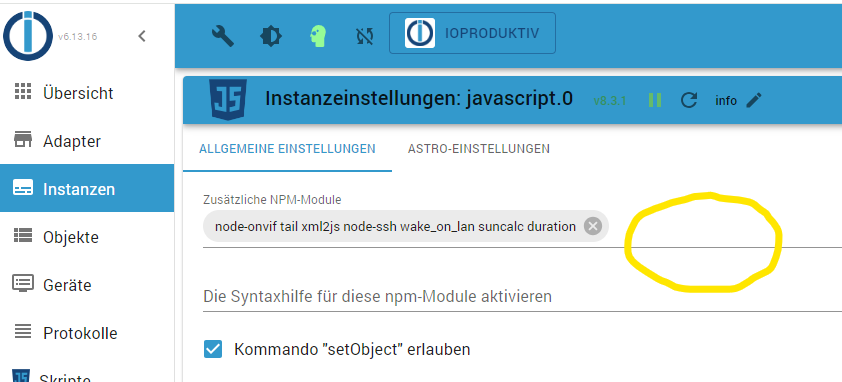
                  093af252-4cae-4bad-899e-91e938515758-image.png

                  Bitte um Eure Unterstzützung!

                  liv-in-skyL 1 Reply Last reply
                  0
                  • metaxaM metaxa

                    @Alle

                    Habe heute auch auf JS v8.3.1 upgedated.

                    Vor gefühlt 10 Jahren habe ich meine ersten und letzten Schritte in JS getan und bin nachwievor jeden Tag vom Ergebnis überrascht :blush:

                    Nun habe ich auch die Aufforderung "request" umzustellen und schaffe es nicht. Bitte um eure Hilfe!

                    Original, funkt immer noch jedoch mit "httpGet" Warnung:

                    // Original von Greogorius https://forum.iobroker.net/topic/20314/skripten-des-e-control-spritpreisrechners/188
                    
                    // schedule("2,32 * * * *", function (){       //jede 2. und 32 Minute
                    // schedule("*/10 * * * *", function (){    //alle 10 Minuten
                    schedule("* * * * *", function (){       //alle Minuten
                    
                    /// console.log("Start Infos holen");
                    var result = "";
                        try {
                            require("request")('https://api.e-control.at/sprit/1.0/search/gas-stations/by-address?latitude=48.xxxxxxxx&longitude=16.xxxxxxxxxx&fuelType=DIE&includeClosed=true', function (error, response, result) {
                            // require("httpGet")('https://api.e-control.at/sprit/1.0/search/gas-stations/by-address?latitude=48.xxxxxxx&longitude=16.xxxxxxxxxx&fuelType=DIE&includeClosed=true', function (error, response, result) {  
                              console.log(result);
                              createState("javascript.0.scriptDatenPunkte.Sprit_AT.Parser.JSON", 0,{type: 'mixed',name: 'JSON', read: true, write: true});
                              // setState("a_andreas.0.eigene_dp.Spritpreisrechner.JSON", result); //ich wollte die Ergebnisse in einer anderen Struktur haben, geht aber nicht weil über JS nur unter JS möglich
                              setState("javascript.0.scriptDatenPunkte.Sprit_AT.Parser.JSON", result);
                            }).on("error", function (e) {console.error(e);});
                        } catch (e) { console.error(e); }
                        console.debug("request: " + 'https://api.e-control.at/sprit/1.0/search/gas-stations/by-address?latitude=48.xxxxxxx&longitude=16.xxxxxxxx&fuelType=DIE&includeClosed=true');
                    /// console.log("Ende Infos holen");
                    });
                    
                    on({id: 'javascript.0.scriptDatenPunkte.Sprit_AT.Parser.JSON'/*Sprit JSON*/, change: 'any'}, function(obj)
                    // on({id: 'a_andreas.0.sys_variablen.Objekt_JSON'/*Sprit JSON*/, change: 'any'}, function(obj) //funktioniert vor selbst URL abholen
                    // on({id: 'parser.0.Spritpreisrechner'/*Sprit JSON*/, change: 'any'}, function(obj)
                    {
                        var index = 0;
                        // var price = "undefined";
                        var gasStation = JSON.parse(obj.state.val); 
                        if (gasStation.length === 0) return;
                     
                        /// console.log((String('Start Durchlauf')));
                        for (index = 0; index < gasStation.length; index++)
                        {
                            createState("javascript.0.scriptDatenPunkte.Sprit_AT.Tankstelle_"+index+".Index", 0,{type: 'number', name: 'ID', read: true, write: true});
                            setState("javascript.0.scriptDatenPunkte.Sprit_AT.Tankstelle_"+index+".Index", gasStation[index].id);
                    
                            createState("javascript.0.scriptDatenPunkte.Sprit_AT.Tankstelle_"+index+".name", 0,{type: 'string', name: 'Name', read: true, write: true});
                            setState("javascript.0.scriptDatenPunkte.Sprit_AT.Tankstelle_"+index+".name", gasStation[index].name);
                    
                            createState("javascript.0.scriptDatenPunkte.Sprit_AT.Tankstelle_"+index+".Preis", 0,{type: 'string', name: 'Preis', read: true, write: true});
                            if ((gasStation[index].prices[0])!=undefined){
                                setState("javascript.0.scriptDatenPunkte.Sprit_AT.Tankstelle_"+index+".Preis", (gasStation[index].prices[0].amount).toString().replace(".",","));
                            };
                    
                            createState("javascript.0.scriptDatenPunkte.Sprit_AT.Tankstelle_"+index+".PreisNumber", 0,{type: 'number', name: 'Preis', read: true, write: true});
                            if ((gasStation[index].prices[0])!=undefined){
                                setState("javascript.0.scriptDatenPunkte.Sprit_AT.Tankstelle_"+index+".PreisNumber", gasStation[index].prices[0].amount);
                            };
                    
                            createState("javascript.0.scriptDatenPunkte.Sprit_AT.Tankstelle_"+index+".Strasse", 0,{type: 'string', name: 'Strasse', read: true, write: true});
                            setState("javascript.0.scriptDatenPunkte.Sprit_AT.Tankstelle_"+index+".Strasse", gasStation[index].location.address);
                    
                            createState("javascript.0.scriptDatenPunkte.Sprit_AT.Tankstelle_"+index+".PLZ & Ort", 0,{type: 'string', name: 'PLZ & Ort', read: true, write: true});
                            setState("javascript.0.scriptDatenPunkte.Sprit_AT.Tankstelle_"+index+".PLZ & Ort", gasStation[index].location.postalCode + " "+ gasStation[index].location.city);
                    
                            createState("javascript.0.scriptDatenPunkte.Sprit_AT.Tankstelle_"+index+".Distanz", 0,{type: 'string', name: 'Luftlinie/km', read: true, write: true});
                            setState("javascript.0.scriptDatenPunkte.Sprit_AT.Tankstelle_"+index+".Distanz", ((Math.round((gasStation[index].distance)*100)/100).toString().replace(".",",")));
                    
                            createState("javascript.0.scriptDatenPunkte.Sprit_AT.Tankstelle_"+index+".Offen", 0,{type: 'boolean', name: 'Offen', read: true, write: true});
                            setState("javascript.0.scriptDatenPunkte.Sprit_AT.Tankstelle_"+index+".Offen", gasStation[index].open);
                        }
                        /// console.log((String('Ende Durchlauf')));
                    
                        /// console.log((String('Start eine Tankstelle finden')));
                        createState("javascript.0.scriptDatenPunkte.Sprit_AT.Favorit.Preis", 0,{type: 'string', name: 'Preis', read: true, write: true});
                        createState("javascript.0.scriptDatenPunkte.Sprit_AT.Favorit.Name", 0,{type: 'string', name: 'Name', read: true, write: true});
                        createState("javascript.0.scriptDatenPunkte.Sprit_AT.Favorit.Adresse", 0,{type: 'string', name: 'Adresse', read: true, write: true});
                        createState("javascript.0.scriptDatenPunkte.Sprit_AT.Favorit.Offen", 0,{type: 'boolean', name: 'Offen', read: true, write: true});
                        setState("javascript.0.scriptDatenPunkte.Sprit_AT.Favorit.Preis", "kein Preis verfügbar");
                        for (index = 0; index < gasStation.length; index++)
                        {
                            if (gasStation[index].id == 1469126) {    //Turmoil, Willergasse
                    
                                if ((gasStation[index].prices[0])!=undefined){
                                    setState("javascript.0.scriptDatenPunkte.Sprit_AT.Favorit.Preis", (gasStation[index].prices[0].amount).toString().replace(".",","));
                                };
                    
                                setState("javascript.0.scriptDatenPunkte.Sprit_AT.Favorit.Name", gasStation[index].name);
                                setState("javascript.0.scriptDatenPunkte.Sprit_AT.Favorit.Adresse", gasStation[index].location.postalCode + " " + gasStation[index].location.city + ", " + gasStation[index].location.address);
                                setState("javascript.0.scriptDatenPunkte.Sprit_AT.Favorit.Offen", gasStation[index].open);
                            }
                        }
                        /// console.log((String('Ende eine Tankstelle finden')));
                        
                    }
                    );
                    

                    Log:

                    javascript.0	23:35:00.002	warn	script.js.common.900-919_Information.904_Spritpreise_AT_von_e-Control: request package is deprecated - please use httpGet (or a stable lib like axios) instead!
                    javascript.0	23:35:00.202	info	script.js.common.900-919_Information.904_Spritpreise_AT_von_e-Control: [{"id":33395,"name":"SOCAR Perchtoldsdorf","location":{"address":"Ketzergasse 191a","postalCode":"2380","city":"Perchtoldsdorf","latitude":48.1301731,"longitude":16.2919418},"contact":{"telephone":"4318674570","fax":"4318674804","mail":"office-at@socarenergy.com","website":"https://www.socarenergy.at/"},"openingHours":[{"day":"MO","label":"Montag","order":1,"from":"00:00","to":"24:00"},{"day":"DI","label":"Dienstag","order":2,"from":"00:00","to":"24:00"},{"day":"MI","label":"Mittwoch","order":3,"from":"00:00","to":"24:00"},{"day":"DO","label":"Donnerstag","order":4,"from":"00:00","to":"24:00"},{"day":"FR","label":"Freitag","order":5,"from":"00:00","to":"24:00"},{"day":"SA","label":"Samstag","order":6,"from":"00:00","to":"24:00"},{"day":"SO","label":"Sonntag","order":7,"from":"00:00","to":"24:00"},{"day":"FE","label":"Feiertag","order":8,"from":"00:00","to":"24:00"}],"offerInformation":{"service":false,"selfService":true,"unattended":true},"paymentMethods":{"cash":true,"debitCard":true,"creditCard":true,"others":"UTA, DKV, Socarcard"},"paymentArrangements":{"cooperative":false,"clubCard":false},"position":1,"open":true,"distance":4.248287202581326,"prices":[{"fuelType":"DIE","amount":1.554,"label":"Diesel"}]},{"id":1469126,"name":"Turmöl Quick","location":{"address":"Breitenfurterstraße 473","postalCode":"1230","city":"Wien","latitude":48.137832,"longitude":16.257546},"contact":{"mail":"marketing-box@doppler.at"},"openingHours":[{"day":"MO","label":"Montag","o
                    

                    Mein diletanischer Versuch:

                    // Original von Greogorius https://forum.iobroker.net/topic/20314/skripten-des-e-control-spritpreisrechners/188
                    
                    // schedule("2,32 * * * *", function (){       //jede 2. und 32 Minute
                    // schedule("*/10 * * * *", function (){    //alle 10 Minuten
                    schedule("* * * * *", function (){       //alle Minuten
                    
                    /// console.log("Start Infos holen");
                    var result = "";
                        try {
                            // require("request")('https://api.e-control.at/sprit/1.0/search/gas-stations/by-address?latitude=48.xxxxxxx&longitude=16.xxxxxx&fuelType=DIE&includeClosed=true', function (error, response, result) {
                            require("httpGet")('https://api.e-control.at/sprit/1.0/search/gas-stations/by-address?latitude=48.xxxxxxx&longitude=16.xxxxxxxx&fuelType=DIE&includeClosed=true', function (error, response, result) {  
                              console.log(result);
                              createState("javascript.0.scriptDatenPunkte.Sprit_AT.Parser.JSON", 0,{type: 'mixed',name: 'JSON', read: true, write: true});
                              // setState("a_andreas.0.eigene_dp.Spritpreisrechner.JSON", result); //ich wollte die Ergebnisse in einer anderen Struktur haben, geht aber nicht weil über JS nur unter JS möglich
                              setState("javascript.0.scriptDatenPunkte.Sprit_AT.Parser.JSON", result);
                            }).on("error", function (e) {console.error(e);});
                        } catch (e) { console.error(e); }
                        console.debug("request: " + 'https://api.e-control.at/sprit/1.0/search/gas-stations/by-address?latitude=48.xxxxxxx&longitude=16.xxxxxxx&fuelType=DIE&includeClosed=true');
                    /// console.log("Ende Infos holen");
                    });
                    .............
                    

                    Log:

                    javascript.0	23:32:00.008	error	script.js.common.900-919_Information.904_Spritpreise_AT_von_e-Control: Error: Cannot find module 'httpGet'
                    javascript.0	23:32:00.008	error	at Object.<anonymous> (script.js.common.900-919_Information.904_Spritpreise_AT_von_e-Control:12:9)
                    javascript.0	23:32:00.008	error	script.js.common.900-919_Information.904_Spritpreise_AT_von_e-Control: TypeError: require(...) is not a function at Object.<anonymous> (script.js.common.900-919_Information.904_Spritpreise_AT_von_e-Control:13:27) at Job.job (/opt/iobroker/node_modules/iobroker.javascript/lib/sandbox.js:1769:34) at Job.invoke (/opt/iobroker/node_modules/iobroker.javascript/node_modules/node-schedule/lib/Job.js:171:15) at /opt/iobroker/node_modules/iobroker.javascript/node_modules/node-schedule/lib/Invocation.js:268:28 at Timeout._onTimeout (/opt/iobroker/node_modules/iobroker.javascript/node_modules/node-schedule/lib/Invocation.js:228:7) at listOnTimeout (node:internal/timers:569:17) at processTimers (node:internal/timers:512:7)
                    

                    In den JS Adapter Einstellungen kann ich nix mehr hinzufügen, dachte das wäre die Lösung. Geht aber nicht, oder ich raffe es nicht.

                    093af252-4cae-4bad-899e-91e938515758-image.png

                    Bitte um Eure Unterstzützung!

                    liv-in-skyL Offline
                    liv-in-skyL Offline
                    liv-in-sky
                    wrote on last edited by liv-in-sky
                    #11

                    @metaxa

                    teste mal das

                    // Original von Greogorius https://forum.iobroker.net/topic/20314/skripten-des-e-control-spritpreisrechners/188
                     
                    // schedule("2,32 * * * *", function (){       //jede 2. und 32 Minute
                    // schedule("*/10 * * * *", function (){    //alle 10 Minuten
                    schedule(" * * * * *", function (){       //alle Minuten
                     
                    /// console.log("Start Infos holen");
                    //var result = "";
                        try {
                            // require("request")('https://api.e-control.at/sprit/1.0/search/gas-stations/by-address?latitude=48.xxxxxxx&longitude=16.xxxxxx&fuelType=DIE&includeClosed=true', function (error, response, result) {
                            httpGet('https://api.e-control.at/sprit/1.0/search/gas-stations/by-address?latitude=48.11&longitude=16.22&fuelType=DIE&includeClosed=true', function (error, response) {  
                              console.log(response.data);
                              createState("javascript.0.scriptDatenPunkte.Sprit_AT.Parser.JSON", 0,{type: 'mixed',name: 'JSON', read: true, write: true});
                              // setState("a_andreas.0.eigene_dp.Spritpreisrechner.JSON", result); //ich wollte die Ergebnisse in einer anderen Struktur haben, geht aber nicht weil über JS nur unter JS möglich
                              setState("javascript.0.scriptDatenPunkte.Sprit_AT.Parser.JSON", response.data);
                            })
                        } catch (e) { console.error(e); }
                       // console.debug("request: " + 'https://api.e-control.at/sprit/1.0/search/gas-stations/by-address?latitude=48.11&longitude=16.22&fuelType=DIE&includeClosed=true');
                    /// console.log("Ende Infos holen");
                    });
                    

                    nach einem gelösten Thread wäre es sinnvoll dies in der Überschrift des ersten Posts einzutragen [gelöst]-... Bitte benutzt das Voting rechts unten im Beitrag wenn er euch geholfen hat. Forum-Tools: PicPick https://picpick.app/en/download/ und ScreenToGif https://www.screentogif.com/downloads.html

                    metaxaM 1 Reply Last reply
                    1
                    • liv-in-skyL liv-in-sky

                      @metaxa

                      teste mal das

                      // Original von Greogorius https://forum.iobroker.net/topic/20314/skripten-des-e-control-spritpreisrechners/188
                       
                      // schedule("2,32 * * * *", function (){       //jede 2. und 32 Minute
                      // schedule("*/10 * * * *", function (){    //alle 10 Minuten
                      schedule(" * * * * *", function (){       //alle Minuten
                       
                      /// console.log("Start Infos holen");
                      //var result = "";
                          try {
                              // require("request")('https://api.e-control.at/sprit/1.0/search/gas-stations/by-address?latitude=48.xxxxxxx&longitude=16.xxxxxx&fuelType=DIE&includeClosed=true', function (error, response, result) {
                              httpGet('https://api.e-control.at/sprit/1.0/search/gas-stations/by-address?latitude=48.11&longitude=16.22&fuelType=DIE&includeClosed=true', function (error, response) {  
                                console.log(response.data);
                                createState("javascript.0.scriptDatenPunkte.Sprit_AT.Parser.JSON", 0,{type: 'mixed',name: 'JSON', read: true, write: true});
                                // setState("a_andreas.0.eigene_dp.Spritpreisrechner.JSON", result); //ich wollte die Ergebnisse in einer anderen Struktur haben, geht aber nicht weil über JS nur unter JS möglich
                                setState("javascript.0.scriptDatenPunkte.Sprit_AT.Parser.JSON", response.data);
                              })
                          } catch (e) { console.error(e); }
                         // console.debug("request: " + 'https://api.e-control.at/sprit/1.0/search/gas-stations/by-address?latitude=48.11&longitude=16.22&fuelType=DIE&includeClosed=true');
                      /// console.log("Ende Infos holen");
                      });
                      
                      metaxaM Offline
                      metaxaM Offline
                      metaxa
                      wrote on last edited by
                      #12

                      @liv-in-sky Top Arbeit!

                      Ich bedanke mich herzlichst! Läuft ohne Fehlermeldung durch und liefert Daten.

                      Jetzt kann ich mich ohne Stress mit Blockly auseinandersetzen und schauen ob ich es dort nachbauen kann.

                      lg, mxa

                      liv-in-skyL 1 Reply Last reply
                      0
                      • metaxaM metaxa

                        @liv-in-sky Top Arbeit!

                        Ich bedanke mich herzlichst! Läuft ohne Fehlermeldung durch und liefert Daten.

                        Jetzt kann ich mich ohne Stress mit Blockly auseinandersetzen und schauen ob ich es dort nachbauen kann.

                        lg, mxa

                        liv-in-skyL Offline
                        liv-in-skyL Offline
                        liv-in-sky
                        wrote on last edited by
                        #13

                        @metaxa sagte in Request ablösen durch httpget:

                        ohne Stress mit Blockly auseinandersetzen

                        ist einfacher mit blockly - gibt schon einige beispiele im forum

                        nach einem gelösten Thread wäre es sinnvoll dies in der Überschrift des ersten Posts einzutragen [gelöst]-... Bitte benutzt das Voting rechts unten im Beitrag wenn er euch geholfen hat. Forum-Tools: PicPick https://picpick.app/en/download/ und ScreenToGif https://www.screentogif.com/downloads.html

                        1 Reply Last reply
                        2
                        • bergjetB Offline
                          bergjetB Offline
                          bergjet
                          wrote on last edited by
                          #14

                          Ich bräuchte hier jetzt auch einmal eure Hilfe.
                          Bekomme nun auch diesen Fehler: ReferenceError: request is not defined

                          request(
                            {
                              url: "http://admin:tester@192.168.1.214/record/current.jpg",
                              encoding: null,
                            },
                            (error, response, body) => {
                              if (!error && body) {
                              writeFile("vis.0", "/current.jpg", body);
                              }
                            }
                          );
                          

                          Bist jetzt hat es funktioniert, habe aber keine Ahnung, was ich da machen soll.

                          homee, ioBroker, iMac, iPhone, Sonos, Alaxa

                          T 1 Reply Last reply
                          0
                          • bergjetB bergjet

                            Ich bräuchte hier jetzt auch einmal eure Hilfe.
                            Bekomme nun auch diesen Fehler: ReferenceError: request is not defined

                            request(
                              {
                                url: "http://admin:tester@192.168.1.214/record/current.jpg",
                                encoding: null,
                              },
                              (error, response, body) => {
                                if (!error && body) {
                                writeFile("vis.0", "/current.jpg", body);
                                }
                              }
                            );
                            

                            Bist jetzt hat es funktioniert, habe aber keine Ahnung, was ich da machen soll.

                            T Offline
                            T Offline
                            TT-Tom
                            wrote on last edited by
                            #15

                            @bergjet

                            Schau dir das mal an , ist aus der Doku vom JavaScript Adapter.

                            httpGet('http://1.2.3.4/image.jpg', { responseType: 'arraybuffer' }, async (err, response) => {
                                if (!err) {
                                    writeFile('0_userdata.0', 'test.jpg', response.data, (err) => {
                                        if (err) {
                                            console.error(err);
                                        }
                                    });
                                } else {
                                    console.error(err);
                                }
                            });
                            

                            Sollte für dich passen, musst du nur mit deinen Werten anpassen.

                            Gruß Tom
                            https://github.com/tt-tom17
                            Wenn meine Hilfe erfolgreich war, benutze bitte das Voting unten rechts im Beitrag

                            NSPanel Script Wiki
                            https://github.com/joBr99/nspanel-lovelace-ui/wiki

                            NSPanel Adapter Wiki
                            https://github.com/ticaki/ioBroker.nspanel-lovelace-ui/wiki

                            bergjetB 1 Reply Last reply
                            0
                            • T TT-Tom

                              @bergjet

                              Schau dir das mal an , ist aus der Doku vom JavaScript Adapter.

                              httpGet('http://1.2.3.4/image.jpg', { responseType: 'arraybuffer' }, async (err, response) => {
                                  if (!err) {
                                      writeFile('0_userdata.0', 'test.jpg', response.data, (err) => {
                                          if (err) {
                                              console.error(err);
                                          }
                                      });
                                  } else {
                                      console.error(err);
                                  }
                              });
                              

                              Sollte für dich passen, musst du nur mit deinen Werten anpassen.

                              bergjetB Offline
                              bergjetB Offline
                              bergjet
                              wrote on last edited by
                              #16

                              @tt-tom Hervorragend, danke dir vielmals. Funktioniert.

                              homee, ioBroker, iMac, iPhone, Sonos, Alaxa

                              1 Reply Last reply
                              0
                              • A Offline
                                A Offline
                                ATARI
                                wrote on last edited by
                                #17

                                @all
                                Ich häng mich mal mit dran.
                                Nachfolgendes Script erstellt oder aktualisiert globale Variablen im Fibaro HomeController HC2.
                                Original Code von Nico Bode - www.iqHaus.de

                                Da hier das 'request' anders als im Example-Code verwendet wird und ich nicht so fit in JS bin,
                                kann ich das nicht nach 'httpGet' oder 'httpPut' umstellen.

                                Kann mir dabei bitte jemand helfen?

                                Gruß
                                ATARI

                                    var request = require('request');
                                    var fibaro_username = 'username';       // Fibaro Admin Loginname
                                    var fibaro_password = 'password';       // Fibaro Password
                                    var fibaro_ip = 'ip_adresse';           // Fibaro IP adresse
                                 
                                function fibaro_create_global_var(fibaro_global_name,fibaro_global_value,fibaro_create_when_not_exist=true) {
                                
                                request.post({
                                    url:     'http://'+fibaro_username+':'+fibaro_password+'@'+fibaro_ip+'/api/globalVariables/',
                                    form:    '{"name":"'+fibaro_global_name+'","value":"'+fibaro_global_value+'"}'
                                    
                                }, function(error, response, body) {
                                    if (error) {
                                     //log(error, 'error');   
                                    } else {
                                        if (response.statusCode == 201) {
                                            log('Variable '+ fibaro_global_name+' bei Fibaro mit dem Wert '+fibaro_global_value+' angelegt ','info');
                                        } else {
                                            log('HTTP Fehler2','info');
                                            log(JSON.stringify(response), 'error');            
                                        }
                                    }
                                });
                                }
                                
                                
                                function fibaro_update_global_var(fibaro_global_name,fibaro_global_value,fibaro_create_when_not_exist=true) {
                                    
                                String(fibaro_global_name);
                                String(fibaro_global_value);
                                
                                request.put({
                                    url:     'http://'+fibaro_username+':'+fibaro_password+'@'+fibaro_ip+'/api/globalVariables/'+fibaro_global_name,
                                    form:    '{"name":"'+fibaro_global_name+'","value":"'+fibaro_global_value+'","invokeScenes":true}'
                                    
                                }, function(error, response, body) {
                                    if (error) {
                                     log(error, 'error');   
                                    } else {
                                        if (response.statusCode == 200) {
                                            log('Variable '+ fibaro_global_name+' bei Fibaro mit dem Wert '+fibaro_global_value+' gespeichert ','info');
                                        } else {
                                            
                                            if(response.statusCode == 404 && fibaro_create_when_not_exist === true) {
                                                log('Variable wird angelegt','info');
                                                fibaro_create_global_var(fibaro_global_name,fibaro_global_value);
                                            } else {
                                                log('HTTP Fehler','info');
                                                log(JSON.stringify(response), 'error');            
                                            }
                                        }
                                    }
                                });
                                }
                                

                                Gruß
                                ATARI

                                Raspberry Pi 5B (ioB via pi OS_lite(64bit) | Synology NAS (ioB via Docker)
                                Fibaro Home Center 2 & Home Center 3 | Homematic IP | EMS-ESP32 Gateway
                                Aeotec Z-Wave | Tuya 4 in 1 Gateway | Zigbee & BLE Gateway

                                1 Reply Last reply
                                0
                                • Paulchen67P Offline
                                  Paulchen67P Offline
                                  Paulchen67
                                  wrote on last edited by Paulchen67
                                  #18

                                  Hallo Zusammen,
                                  Ich habe hier auch ein Script das umgestellt werden müsste.
                                  Habe es anhand der Beispiele hier schon selbst versucht bekomme es aber nicht hin.
                                  Vermutlich nur ne Kleinigkeit aber mir fehlt das nötige Wissen.

                                  var source_url = 'http://XXX.XXX.XXX.XXX:88/cgi-bin/CGIProxy.fcgi?cmd=snapPicture2&usr=XXX&pwd=XXX', // Kamerabild zB http://CamIP:Port/image1.jpg
                                      dest_path = '/opt/iobroker/iobroker-data/Bilder/';
                                  
                                  var request = require('request');
                                  var fs      = require('fs');
                                  
                                  
                                  // Bild an telegram schicken
                                  function sendImage (pfad) {
                                      setTimeout(function() {
                                          sendTo('telegram.0', 'send', {text: pfad, disable_notification: true});
                                          log('Webcam Bild per telegram verschickt');
                                      }, 2 * 1000)
                                  }
                                  
                                  // Bild speichern
                                  function saveImage() {
                                      request.get({url: source_url, encoding: 'binary'}, function (err, response, body) {
                                          fs.writeFile(dest_path + 'image3.jpg', body, 'binary', function(err) {
                                  
                                          if (err) {
                                              log('Fehler beim Bild speichern: ' + err, 'warn');
                                          } else {
                                              log('Webcam Bild gespeichert');
                                              sendImage(dest_path + 'image3.jpg');
                                          }
                                        }); 
                                      });
                                  }
                                  
                                  
                                  // bei Skriptstart ausführen
                                  saveImage();
                                  

                                  Das Script funktioniert noch, spuckt aber immer ne Warnung aus.

                                  Was muss ich wo ändern damit das Script immer noch macht was es soll,
                                  aber keine Warnung mehr raushaut.

                                  Vielen Dank.

                                  ioBroker mit Ubuntu auf Intel NUC
                                  piVCCU auf Raspberry Pi 3

                                  T 2 Replies Last reply
                                  0
                                  • Paulchen67P Paulchen67

                                    Hallo Zusammen,
                                    Ich habe hier auch ein Script das umgestellt werden müsste.
                                    Habe es anhand der Beispiele hier schon selbst versucht bekomme es aber nicht hin.
                                    Vermutlich nur ne Kleinigkeit aber mir fehlt das nötige Wissen.

                                    var source_url = 'http://XXX.XXX.XXX.XXX:88/cgi-bin/CGIProxy.fcgi?cmd=snapPicture2&usr=XXX&pwd=XXX', // Kamerabild zB http://CamIP:Port/image1.jpg
                                        dest_path = '/opt/iobroker/iobroker-data/Bilder/';
                                    
                                    var request = require('request');
                                    var fs      = require('fs');
                                    
                                    
                                    // Bild an telegram schicken
                                    function sendImage (pfad) {
                                        setTimeout(function() {
                                            sendTo('telegram.0', 'send', {text: pfad, disable_notification: true});
                                            log('Webcam Bild per telegram verschickt');
                                        }, 2 * 1000)
                                    }
                                    
                                    // Bild speichern
                                    function saveImage() {
                                        request.get({url: source_url, encoding: 'binary'}, function (err, response, body) {
                                            fs.writeFile(dest_path + 'image3.jpg', body, 'binary', function(err) {
                                    
                                            if (err) {
                                                log('Fehler beim Bild speichern: ' + err, 'warn');
                                            } else {
                                                log('Webcam Bild gespeichert');
                                                sendImage(dest_path + 'image3.jpg');
                                            }
                                          }); 
                                        });
                                    }
                                    
                                    
                                    // bei Skriptstart ausführen
                                    saveImage();
                                    

                                    Das Script funktioniert noch, spuckt aber immer ne Warnung aus.

                                    Was muss ich wo ändern damit das Script immer noch macht was es soll,
                                    aber keine Warnung mehr raushaut.

                                    Vielen Dank.

                                    T Offline
                                    T Offline
                                    TT-Tom
                                    wrote on last edited by TT-Tom
                                    #19

                                    @paulchen67

                                    Kannst du das Script in die codetags <|> packen, dann kann man auch besser helfen.

                                    Ansonsten schau mal ein paar Posts höher.

                                    Gruß Tom
                                    https://github.com/tt-tom17
                                    Wenn meine Hilfe erfolgreich war, benutze bitte das Voting unten rechts im Beitrag

                                    NSPanel Script Wiki
                                    https://github.com/joBr99/nspanel-lovelace-ui/wiki

                                    NSPanel Adapter Wiki
                                    https://github.com/ticaki/ioBroker.nspanel-lovelace-ui/wiki

                                    Paulchen67P 1 Reply Last reply
                                    0
                                    • T TT-Tom

                                      @paulchen67

                                      Kannst du das Script in die codetags <|> packen, dann kann man auch besser helfen.

                                      Ansonsten schau mal ein paar Posts höher.

                                      Paulchen67P Offline
                                      Paulchen67P Offline
                                      Paulchen67
                                      wrote on last edited by Paulchen67
                                      #20

                                      @TT-Tom
                                      Kann ich nachher machen wenn ich am PC sitze, am Tablet lässt sich das Script nicht markieren und in die Zwischenablage legen.
                                      Daher nur der Screenshot, dachte mir schon dass das vielleicht nicht so ideal ist.

                                      Edit!
                                      Ist jetzt in den Codetags.
                                      Habe es schon anhand den Posts selber versucht aber nicht hinbekommen.

                                      ioBroker mit Ubuntu auf Intel NUC
                                      piVCCU auf Raspberry Pi 3

                                      1 Reply Last reply
                                      0
                                      • Paulchen67P Paulchen67

                                        Hallo Zusammen,
                                        Ich habe hier auch ein Script das umgestellt werden müsste.
                                        Habe es anhand der Beispiele hier schon selbst versucht bekomme es aber nicht hin.
                                        Vermutlich nur ne Kleinigkeit aber mir fehlt das nötige Wissen.

                                        var source_url = 'http://XXX.XXX.XXX.XXX:88/cgi-bin/CGIProxy.fcgi?cmd=snapPicture2&usr=XXX&pwd=XXX', // Kamerabild zB http://CamIP:Port/image1.jpg
                                            dest_path = '/opt/iobroker/iobroker-data/Bilder/';
                                        
                                        var request = require('request');
                                        var fs      = require('fs');
                                        
                                        
                                        // Bild an telegram schicken
                                        function sendImage (pfad) {
                                            setTimeout(function() {
                                                sendTo('telegram.0', 'send', {text: pfad, disable_notification: true});
                                                log('Webcam Bild per telegram verschickt');
                                            }, 2 * 1000)
                                        }
                                        
                                        // Bild speichern
                                        function saveImage() {
                                            request.get({url: source_url, encoding: 'binary'}, function (err, response, body) {
                                                fs.writeFile(dest_path + 'image3.jpg', body, 'binary', function(err) {
                                        
                                                if (err) {
                                                    log('Fehler beim Bild speichern: ' + err, 'warn');
                                                } else {
                                                    log('Webcam Bild gespeichert');
                                                    sendImage(dest_path + 'image3.jpg');
                                                }
                                              }); 
                                            });
                                        }
                                        
                                        
                                        // bei Skriptstart ausführen
                                        saveImage();
                                        

                                        Das Script funktioniert noch, spuckt aber immer ne Warnung aus.

                                        Was muss ich wo ändern damit das Script immer noch macht was es soll,
                                        aber keine Warnung mehr raushaut.

                                        Vielen Dank.

                                        T Offline
                                        T Offline
                                        TT-Tom
                                        wrote on last edited by
                                        #21

                                        @paulchen67

                                        var source_url = 'http://XXX.XXX.XXX.XXX:88/cgi-bin/CGIProxy.fcgi?cmd=snapPicture2', // Kamerabild zB http://CamIP:Port/image1.jpg


                                        // Bild an telegram schicken
                                        function sendImage (pfad) {
                                            setTimeout(function() {
                                                sendTo('telegram.0', 'send', {text: pfad, disable_notification: true});
                                                log('Webcam Bild per telegram verschickt');
                                            }, 2 * 1000)
                                        }
                                         
                                        // Bild speichern
                                        function saveImage() {
                                        httpGet( source_url, {basicAuth: { user: 'xxxxx', password: 'xxxxxxx'}, responseType: 'arraybuffer' }, async (err, response) => {
                                            if (!err) {
                                                writeFile('0_userdata.0', 'image3.jpg', response.data, (err) => {
                                                if (err) {
                                                                log('Fehler beim Bild speichern: ' + err, 'warn');
                                                            } else {
                                                                log('Webcam Bild gespeichert');
                                                                sendImage('0_userdata.0/image3.jpg');
                                                            }
                                                });
                                            } else {
                                                console.error(err);
                                            }
                                        });
                                         
                                        // bei Skriptstart ausführen
                                        saveImage();


                                        das könnte so passen, mit den Speicherort bin ich mir nicht ganz sicher, mit der Schreibweise.

                                        Gruß Tom
                                        https://github.com/tt-tom17
                                        Wenn meine Hilfe erfolgreich war, benutze bitte das Voting unten rechts im Beitrag

                                        NSPanel Script Wiki
                                        https://github.com/joBr99/nspanel-lovelace-ui/wiki

                                        NSPanel Adapter Wiki
                                        https://github.com/ticaki/ioBroker.nspanel-lovelace-ui/wiki

                                        bahnuhrB 1 Reply Last reply
                                        0
                                        • T TT-Tom

                                          @paulchen67

                                          var source_url = 'http://XXX.XXX.XXX.XXX:88/cgi-bin/CGIProxy.fcgi?cmd=snapPicture2', // Kamerabild zB http://CamIP:Port/image1.jpg


                                          // Bild an telegram schicken
                                          function sendImage (pfad) {
                                              setTimeout(function() {
                                                  sendTo('telegram.0', 'send', {text: pfad, disable_notification: true});
                                                  log('Webcam Bild per telegram verschickt');
                                              }, 2 * 1000)
                                          }
                                           
                                          // Bild speichern
                                          function saveImage() {
                                          httpGet( source_url, {basicAuth: { user: 'xxxxx', password: 'xxxxxxx'}, responseType: 'arraybuffer' }, async (err, response) => {
                                              if (!err) {
                                                  writeFile('0_userdata.0', 'image3.jpg', response.data, (err) => {
                                                  if (err) {
                                                                  log('Fehler beim Bild speichern: ' + err, 'warn');
                                                              } else {
                                                                  log('Webcam Bild gespeichert');
                                                                  sendImage('0_userdata.0/image3.jpg');
                                                              }
                                                  });
                                              } else {
                                                  console.error(err);
                                              }
                                          });
                                           
                                          // bei Skriptstart ausführen
                                          saveImage();


                                          das könnte so passen, mit den Speicherort bin ich mir nicht ganz sicher, mit der Schreibweise.

                                          bahnuhrB Online
                                          bahnuhrB Online
                                          bahnuhr
                                          Forum Testing Most Active
                                          wrote on last edited by bahnuhr
                                          #22

                                          @tt-tom sagte in Request ablösen durch httpget:

                                          Speicherort bin ich mir nicht ganz sicher,

                                          speichern ist nicht mehr notwendig, geht auch einfacher:

                                          const ip = 159;
                                           httpGet(`http://192.168.243.${ip}:88/cgi-bin/CGIProxy.fcgi?cmd=snapPicture2&usr=xx&pwd=xx`, { responseType: 'arraybuffer' }, (err, response) => {
                                              if (err) {
                                                  console.error(err);
                                              } else {
                                                  sendTo('telegram.0', {
                                                      user: vUser,
                                                      text: createTempFile(`snap${ip}.jpg`, response.data),
                                                      caption: cam
                                                  });
                                              }
                                          });


                                          siehe:
                                          https://forum.iobroker.net/topic/74580/gelöst-skript-auf-axios-httpget-umbauen/18?_=1731647992175


                                          Wenn ich helfen konnte, dann Daumen hoch (Pfeil nach oben)!
                                          Danke.
                                          gute Forenbeiträge: https://forum.iobroker.net/topic/51555/hinweise-f%C3%BCr-gute-forenbeitr%C3%A4ge
                                          ScreenToGif :https://www.screentogif.com/downloads.html

                                          T Paulchen67P 2 Replies Last reply
                                          0
                                          Reply
                                          • Reply as topic
                                          Log in to reply
                                          • Oldest to Newest
                                          • Newest to Oldest
                                          • Most Votes


                                          Support us

                                          ioBroker
                                          Community Adapters
                                          Donate

                                          732

                                          Online

                                          32.6k

                                          Users

                                          82.3k

                                          Topics

                                          1.3m

                                          Posts
                                          Community
                                          Impressum | Datenschutz-Bestimmungen | Nutzungsbedingungen | Einwilligungseinstellungen
                                          ioBroker Community 2014-2025
                                          logo
                                          • Login

                                          • Don't have an account? Register

                                          • Login or register to search.
                                          • First post
                                            Last post
                                          0
                                          • Home
                                          • Recent
                                          • Tags
                                          • Unread 0
                                          • Categories
                                          • Unreplied
                                          • Popular
                                          • GitHub
                                          • Docu
                                          • Hilfe