Skip to content
  • Home
  • Recent
  • Tags
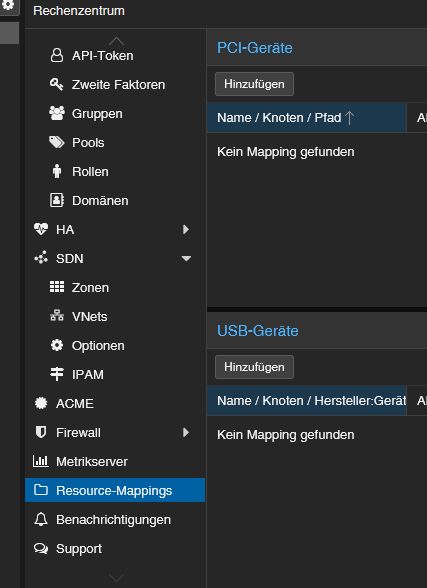
  • 0 Unread 0
  • Categories
  • Unreplied
  • Popular
  • GitHub
  • Docu
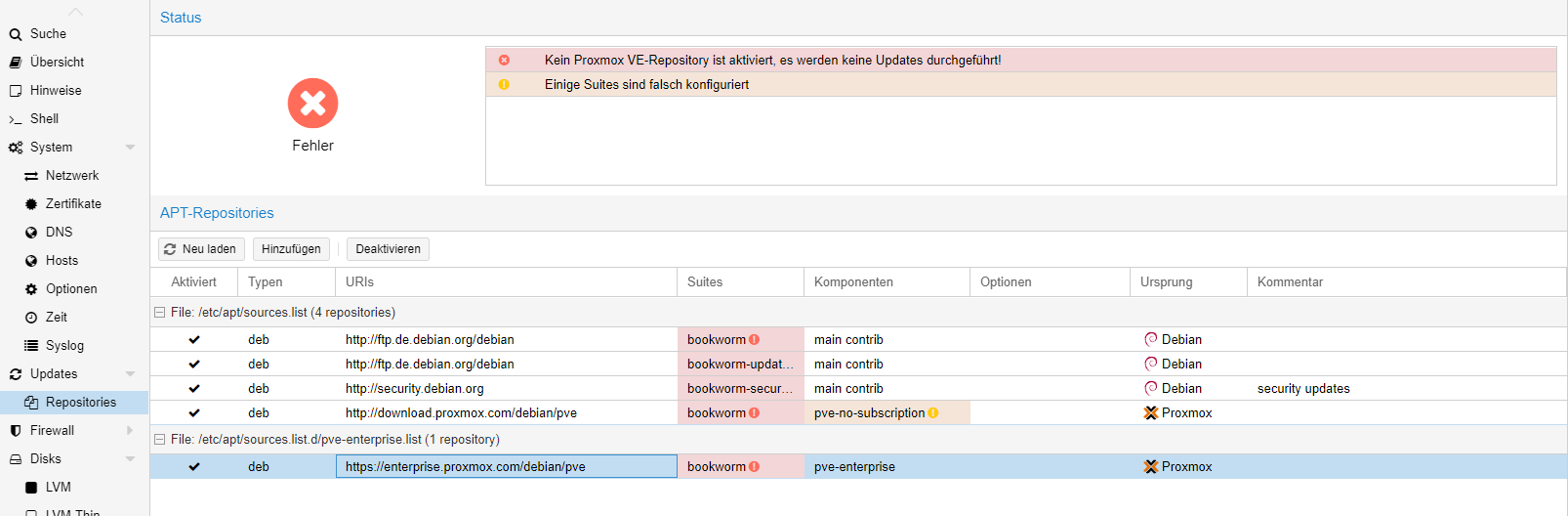
  • Hilfe
Skins
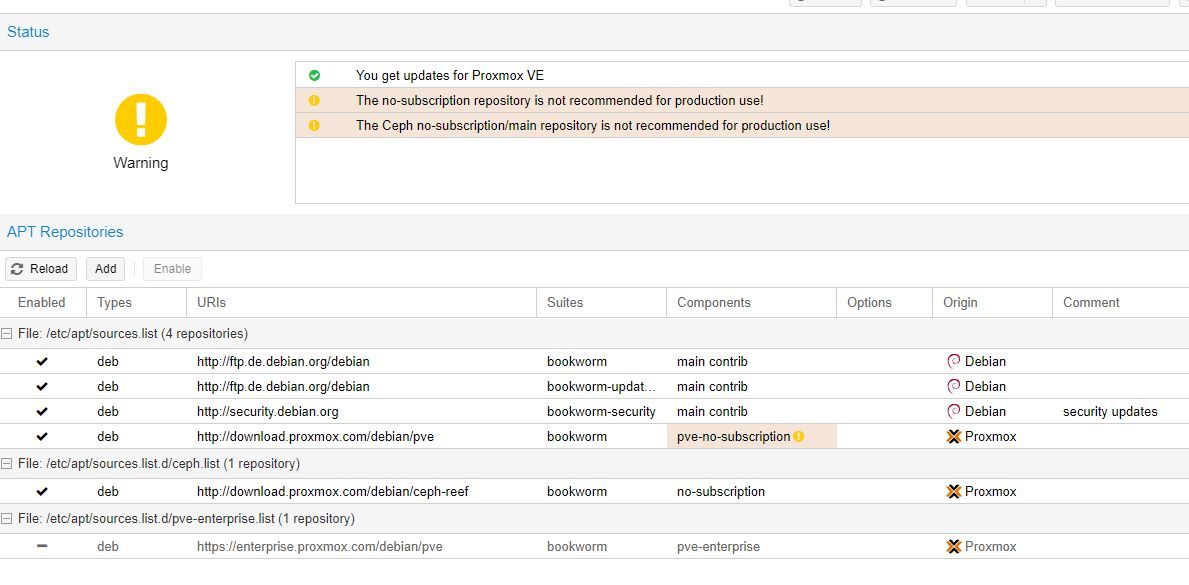
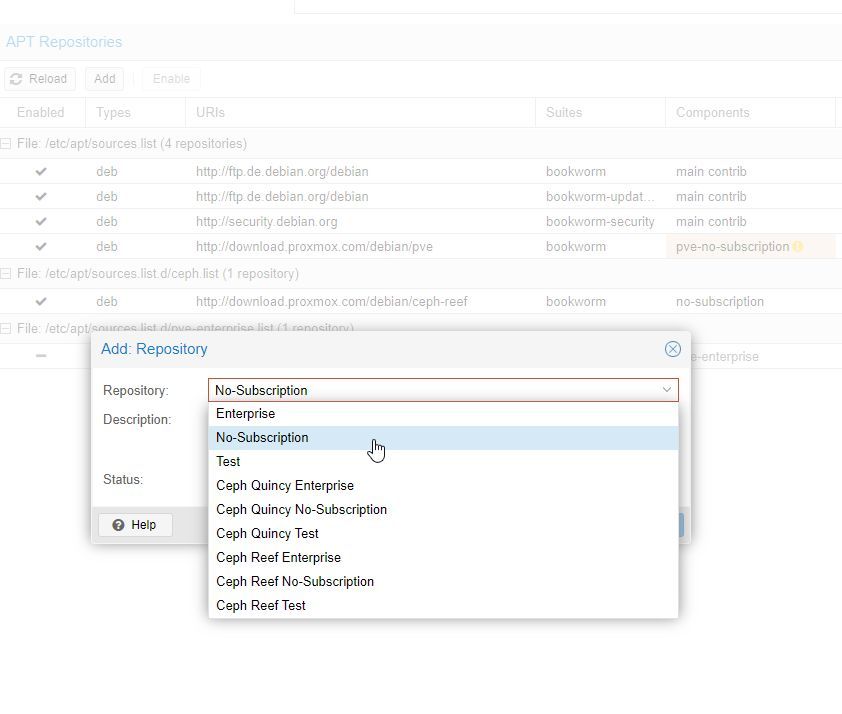
  • Light
  • Brite
  • Cerulean
  • Cosmo
  • Flatly
  • Journal
  • Litera
  • Lumen
  • Lux
  • Materia
  • Minty
  • Morph
  • Pulse
  • Sandstone
  • Simplex
  • Sketchy
  • Spacelab
  • United
  • Yeti
  • Zephyr
  • Dark
  • Cyborg
  • Darkly
  • Quartz
  • Slate
  • Solar
  • Superhero
  • Vapor

  • Default (No Skin)
  • No Skin
Collapse
ioBroker Logo

Community Forum

donate donate
  1. ioBroker Community Home
  2. Deutsch
  3. Hardware
  4. Conbee 3 Stick an Nuc mit Proxmox

NEWS

  • Jahresrückblick 2025 – unser neuer Blogbeitrag ist online! ✨
    BluefoxB
    Bluefox
    17
    1
    2.2k

  • Neuer Blogbeitrag: Monatsrückblick - Dezember 2025 🎄
    BluefoxB
    Bluefox
    13
    1
    944

  • Weihnachtsangebot 2025! 🎄
    BluefoxB
    Bluefox
    25
    1
    2.2k

Conbee 3 Stick an Nuc mit Proxmox

Scheduled Pinned Locked Moved Hardware
29 Posts 9 Posters 3.5k Views 8 Watching
  • Oldest to Newest
  • Newest to Oldest
  • Most Votes
Reply
  • Reply as topic
Log in to reply
This topic has been deleted. Only users with topic management privileges can see it.
  • L Offline
    L Offline
    lustig29
    wrote on last edited by
    #1

    Hallo,

    ich probiere gerade den Conbee 3 Stick durch zu reichen. Leider scheint da irgendwo der Wurm drin zu sein. Sobald ich die Config geändert habe, startet der Container nicht mehr. Ich bekomme folgenden Fehler.

    mount_entry: 2439 No such file or directory - Failed to mount "usb-dresden_elektronik_ConBee_III_DE03187847-if00-port0" on "/usr/lib/x86_64-linux-gnu/lxc/rootfs/dev/serial/by-id/usb-dresden_elektronik_ConBee_III_DE03187847-if00-port0"
    lxc_setup: 4412 Failed to setup mount entries
    do_start: 1272 Failed to setup container "104"
    sync_wait: 34 An error occurred in another process (expected sequence number 3)
    __lxc_start: 2107 Failed to spawn container "104"
    TASK ERROR: startup for container '104' failed
    
    arch: amd64
    cores: 3
    features: nesting=1
    hostname: IobrokerHauptinstallation
    memory: 7629
    net0: name=eth0,bridge=vmbr0,firewall=1,gw=192.168.0.1,hwaddr=8A:BF:24:06:74:2C,ip=192.168.0.80/24,type=veth
    ostype: ubuntu
    rootfs: local-lvm:vm-104-disk-0,size=8G
    swap: 7629
    unprivileged: 1
    lxc.cgroup2.devices.allow: c 189:* rwm
    lxc.mount.entry: usb-dresden_elektronik_ConBee_III_DE03187847-if00-port0 dev/serial/by-id/usb-dresden_elektronik_ConBee_III_DE03187847-if00-po>
    lxc.cgroup2.devices.allow: c 188:* rwm
    lxc.mount.entry: /dev/ttyUSB dev/ttyUSB none bind,optional,create=file
    
    S 1 Reply Last reply
    0
    • L lustig29

      Hallo,

      ich probiere gerade den Conbee 3 Stick durch zu reichen. Leider scheint da irgendwo der Wurm drin zu sein. Sobald ich die Config geändert habe, startet der Container nicht mehr. Ich bekomme folgenden Fehler.

      mount_entry: 2439 No such file or directory - Failed to mount "usb-dresden_elektronik_ConBee_III_DE03187847-if00-port0" on "/usr/lib/x86_64-linux-gnu/lxc/rootfs/dev/serial/by-id/usb-dresden_elektronik_ConBee_III_DE03187847-if00-port0"
      lxc_setup: 4412 Failed to setup mount entries
      do_start: 1272 Failed to setup container "104"
      sync_wait: 34 An error occurred in another process (expected sequence number 3)
      __lxc_start: 2107 Failed to spawn container "104"
      TASK ERROR: startup for container '104' failed
      
      arch: amd64
      cores: 3
      features: nesting=1
      hostname: IobrokerHauptinstallation
      memory: 7629
      net0: name=eth0,bridge=vmbr0,firewall=1,gw=192.168.0.1,hwaddr=8A:BF:24:06:74:2C,ip=192.168.0.80/24,type=veth
      ostype: ubuntu
      rootfs: local-lvm:vm-104-disk-0,size=8G
      swap: 7629
      unprivileged: 1
      lxc.cgroup2.devices.allow: c 189:* rwm
      lxc.mount.entry: usb-dresden_elektronik_ConBee_III_DE03187847-if00-port0 dev/serial/by-id/usb-dresden_elektronik_ConBee_III_DE03187847-if00-po>
      lxc.cgroup2.devices.allow: c 188:* rwm
      lxc.mount.entry: /dev/ttyUSB dev/ttyUSB none bind,optional,create=file
      
      S Offline
      S Offline
      SuFra
      wrote on last edited by
      #2

      @lustig29 welche Proxmox Version?
      Und wie hast du den USB Port durchgereicht?

      HA-Cluster 1x NUC11TNHI50L00, 2x NUC11TNHI30L00, 1x BSi3, 1x BSi5
      LXC's: ioBroker, (3x Redis), PiHole, Grafana, Heimdall, MariaDB, InfulxDB, TasmoAdmin, NTP Server, Zabbix, Frigate, nextCloud, PeaNUT
      VM's: PBS, trueNAS (Plex)

      L 1 Reply Last reply
      0
      • S SuFra

        @lustig29 welche Proxmox Version?
        Und wie hast du den USB Port durchgereicht?

        L Offline
        L Offline
        lustig29
        wrote on last edited by
        #3

        @sufra
        Proxmox Version 7.4.3

        Bin nach dieser Anleitung gegangen.
        link text

        Kann es sein, dass es mit dem ttyUsb zusammenhängt?

        S 1 Reply Last reply
        0
        • L lustig29

          @sufra
          Proxmox Version 7.4.3

          Bin nach dieser Anleitung gegangen.
          link text

          Kann es sein, dass es mit dem ttyUsb zusammenhängt?

          S Offline
          S Offline
          SuFra
          wrote on last edited by
          #4

          @lustig29 warum hast du nicht die neuste Version von Proxmox installiert?

          Bei der kannst du über die Benutzeroberfläche USB Ports und Geräte an Container durchreichnen.

          HA-Cluster 1x NUC11TNHI50L00, 2x NUC11TNHI30L00, 1x BSi3, 1x BSi5
          LXC's: ioBroker, (3x Redis), PiHole, Grafana, Heimdall, MariaDB, InfulxDB, TasmoAdmin, NTP Server, Zabbix, Frigate, nextCloud, PeaNUT
          VM's: PBS, trueNAS (Plex)

          MartinPM H 2 Replies Last reply
          0
          • S SuFra

            @lustig29 warum hast du nicht die neuste Version von Proxmox installiert?

            Bei der kannst du über die Benutzeroberfläche USB Ports und Geräte an Container durchreichnen.

            MartinPM Offline
            MartinPM Offline
            MartinP
            wrote on last edited by
            #5

            @sufra naja, dann ist die Anleitung veraltet.

            Intel(R) Celeron(R) CPU N3000 @ 1.04GHz 8G RAM 480G SSD
            Virtualization : unprivileged lxc container (debian 12 on Proxmox 8.4.14)
            Linux pve 6.8.12-16-pve
            6 GByte RAM für den Container
            Fritzbox 6591 FW 8.03 (Vodafone Leih-Box)
            Remote-Access über Wireguard der Fritzbox

            crunchipC 1 Reply Last reply
            0
            • MartinPM MartinP

              @sufra naja, dann ist die Anleitung veraltet.

              crunchipC Away
              crunchipC Away
              crunchip
              Forum Testing Most Active
              wrote on last edited by crunchip
              #6

              @martinp ne, denn diese verweist direkt auf die Proxmox Seite, von der das Image geladen wird, lediglich die Bilder zur Beschreibung sind mit Version 7 entstanden

              umgestiegen von Proxmox auf Unraid

              1 Reply Last reply
              0
              • S SuFra

                @lustig29 warum hast du nicht die neuste Version von Proxmox installiert?

                Bei der kannst du über die Benutzeroberfläche USB Ports und Geräte an Container durchreichnen.

                H Offline
                H Offline
                hansmeier
                wrote on last edited by
                #7

                @sufra sagte in Conbee 3 Stick an Nuc mit Proxmox:

                Bei der kannst du über die Benutzeroberfläche USB Ports und Geräte an Container durchreichnen.

                Das ist mir jetzt aber auch neu ! Kannst du etwas mehr dazu sagen ?
                Habe Proxmox 8.5.1. und bisher den Port durchgereicht.

                crunchipC 1 Reply Last reply
                0
                • H hansmeier

                  @sufra sagte in Conbee 3 Stick an Nuc mit Proxmox:

                  Bei der kannst du über die Benutzeroberfläche USB Ports und Geräte an Container durchreichnen.

                  Das ist mir jetzt aber auch neu ! Kannst du etwas mehr dazu sagen ?
                  Habe Proxmox 8.5.1. und bisher den Port durchgereicht.

                  crunchipC Away
                  crunchipC Away
                  crunchip
                  Forum Testing Most Active
                  wrote on last edited by
                  #8

                  @hansmeier 545aca37-c412-452b-9579-80b778c510e9-image.png

                  umgestiegen von Proxmox auf Unraid

                  L 1 Reply Last reply
                  0
                  • crunchipC crunchip

                    @hansmeier 545aca37-c412-452b-9579-80b778c510e9-image.png

                    L Offline
                    L Offline
                    lustig29
                    wrote on last edited by
                    #9

                    @crunchip
                    Jetzt habe ich das nächste Problem...

                    Ich wollte nach dieser Anleitung link text mein Proxmox upgraden.

                    Leider bekomme ich jetzt bei apt update, folgenden Fehler.

                    root@pve:~# apt update
                    Hit:1 http://security.debian.org bookworm-security InRelease
                    Hit:2 http://ftp.de.debian.org/debian bookworm InRelease       
                    Hit:3 http://ftp.de.debian.org/debian bookworm-updates InRelease
                    Err:4 https://enterprise.proxmox.com/debian/pve bookworm InRelease
                      401  Unauthorized [IP: 212.224.123.70 443]
                    Reading package lists... Done                            
                    E: Failed to fetch https://enterprise.proxmox.com/debian/pve/dists/bookworm/InRelease  401  Unauthorized [IP: 212.224.123.70 443]
                    E: The repository 'https://enterprise.proxmox.com/debian/pve bookworm InRelease' is not signed.
                    N: Updating from such a repository can't be done securely, and is therefore disabled by default.
                    N: See apt-secure(8) manpage for repository creation and user configuration details.
                    
                    G 1 Reply Last reply
                    0
                    • L lustig29

                      @crunchip
                      Jetzt habe ich das nächste Problem...

                      Ich wollte nach dieser Anleitung link text mein Proxmox upgraden.

                      Leider bekomme ich jetzt bei apt update, folgenden Fehler.

                      root@pve:~# apt update
                      Hit:1 http://security.debian.org bookworm-security InRelease
                      Hit:2 http://ftp.de.debian.org/debian bookworm InRelease       
                      Hit:3 http://ftp.de.debian.org/debian bookworm-updates InRelease
                      Err:4 https://enterprise.proxmox.com/debian/pve bookworm InRelease
                        401  Unauthorized [IP: 212.224.123.70 443]
                      Reading package lists... Done                            
                      E: Failed to fetch https://enterprise.proxmox.com/debian/pve/dists/bookworm/InRelease  401  Unauthorized [IP: 212.224.123.70 443]
                      E: The repository 'https://enterprise.proxmox.com/debian/pve bookworm InRelease' is not signed.
                      N: Updating from such a repository can't be done securely, and is therefore disabled by default.
                      N: See apt-secure(8) manpage for repository creation and user configuration details.
                      
                      G Offline
                      G Offline
                      Galen
                      wrote on last edited by
                      #10

                      @lustig29 Hast du ein Enterpriseabo? Wenn nicht schmeiß die raus und geh auf die pve-no-subscription-Sourcen

                      1 Reply Last reply
                      0
                      • L Offline
                        L Offline
                        lustig29
                        wrote on last edited by
                        #11

                        @galen
                        Wie mache ich das denn? Sorry, bin noch neu auf dem Gebiet.

                        G 1 Reply Last reply
                        0
                        • L lustig29

                          @galen
                          Wie mache ich das denn? Sorry, bin noch neu auf dem Gebiet.

                          G Offline
                          G Offline
                          Galen
                          wrote on last edited by
                          #12

                          @lustig29 Du gehst auf Repositories, disabelst da die beiden Enterprise-Sourcen und fügst dann über Add das pve-no-subscription hinzu

                          L 1 Reply Last reply
                          0
                          • G Galen

                            @lustig29 Du gehst auf Repositories, disabelst da die beiden Enterprise-Sourcen und fügst dann über Add das pve-no-subscription hinzu

                            L Offline
                            L Offline
                            lustig29
                            wrote on last edited by lustig29
                            #13

                            @galen

                            Das sieht bei mir so aus.

                            Pve_Proxmoxx.png

                            Da ist doch irgendwas verkehrt, oder?

                            G 1 Reply Last reply
                            0
                            • L lustig29

                              @galen

                              Das sieht bei mir so aus.

                              Pve_Proxmoxx.png

                              Da ist doch irgendwas verkehrt, oder?

                              G Offline
                              G Offline
                              Galen
                              wrote on last edited by
                              #14

                              @lustig29 Ich glaube wenn du noch Proxmox 7.x benutzt, ist Bookworm falsch, das ist Debian 12.

                              L 1 Reply Last reply
                              0
                              • G Galen

                                @lustig29 Ich glaube wenn du noch Proxmox 7.x benutzt, ist Bookworm falsch, das ist Debian 12.

                                L Offline
                                L Offline
                                lustig29
                                wrote on last edited by
                                #15

                                @galen Ja, das Bookworm habe ich ja eben erst bei dem versuchtem Update auf Proxmox 8 gemacht. Kannst du mir sagen wie ich vorgehen, damit ich es zum laufen bekomme?

                                1 Reply Last reply
                                0
                                • L Offline
                                  L Offline
                                  lustig29
                                  wrote on last edited by lustig29
                                  #16

                                  Bei pve7to8 bekomme ich jetzt folgende Ausgabe.

                                  FAIL: Found mixed old and new package repository suites, fix before upgrading! Mismatches:
                                      found suite bookworm at in /etc/apt/sources.list:1
                                      found suite bullseye at in /etc/apt/sources.list:10
                                    Configure the same base-suite for all Proxmox and Debian provided repos and ask original vendor for any third-party repos.
                                    E.g., for the upgrade to Proxmox VE 8 use the 'bookworm' suite.
                                  
                                  System booted in uefi mode but grub-efi-amd64 meta-package not installed, new grub versions will not be installed to /boot/efi! Install grub-efi-amd64.
                                  
                                  crunchipC 1 Reply Last reply
                                  0
                                  • L lustig29

                                    Bei pve7to8 bekomme ich jetzt folgende Ausgabe.

                                    FAIL: Found mixed old and new package repository suites, fix before upgrading! Mismatches:
                                        found suite bookworm at in /etc/apt/sources.list:1
                                        found suite bullseye at in /etc/apt/sources.list:10
                                      Configure the same base-suite for all Proxmox and Debian provided repos and ask original vendor for any third-party repos.
                                      E.g., for the upgrade to Proxmox VE 8 use the 'bookworm' suite.
                                    
                                    System booted in uefi mode but grub-efi-amd64 meta-package not installed, new grub versions will not be installed to /boot/efi! Install grub-efi-amd64.
                                    
                                    crunchipC Away
                                    crunchipC Away
                                    crunchip
                                    Forum Testing Most Active
                                    wrote on last edited by
                                    #17

                                    @lustig29 installiert doch einfach nochmal neu, mit dem richtigen image

                                    umgestiegen von Proxmox auf Unraid

                                    1 Reply Last reply
                                    0
                                    • S Offline
                                      S Offline
                                      SuFra
                                      wrote on last edited by
                                      #18

                                      Nein, erstmal nicht nötig.

                                      1. Repositories umstellen.

                                      So sollte es aussehen :
                                      Proxmox1.jpg

                                      Bei dir Enterprise anklicken... dann auf disable.

                                      Dann "add"...
                                      proxmox2.jpg

                                      Ceph ignorieren bei mir.

                                      Dann bei Updates ein Refresh und dann Upgrade.

                                      Dann sollte es klappen ;)

                                      HA-Cluster 1x NUC11TNHI50L00, 2x NUC11TNHI30L00, 1x BSi3, 1x BSi5
                                      LXC's: ioBroker, (3x Redis), PiHole, Grafana, Heimdall, MariaDB, InfulxDB, TasmoAdmin, NTP Server, Zabbix, Frigate, nextCloud, PeaNUT
                                      VM's: PBS, trueNAS (Plex)

                                      crunchipC 1 Reply Last reply
                                      0
                                      • S SuFra

                                        Nein, erstmal nicht nötig.

                                        1. Repositories umstellen.

                                        So sollte es aussehen :

                                        Proxmox1.jpg

                                        Bei dir Enterprise anklicken... dann auf disable.

                                        Dann "add"...

                                        proxmox2.jpg

                                        Ceph ignorieren bei mir.

                                        Dann bei Updates ein Refresh und dann Upgrade.

                                        Dann sollte es klappen ;)

                                        crunchipC Away
                                        crunchipC Away
                                        crunchip
                                        Forum Testing Most Active
                                        wrote on last edited by
                                        #19

                                        @sufra nötig nicht, jedoch bevor ich da mit nem Upgrade auf v8 hantiert und es eh ne frische Installation ist, würd ichs neu und richtig aufsetzen.

                                        umgestiegen von Proxmox auf Unraid

                                        L 1 Reply Last reply
                                        0
                                        • crunchipC crunchip

                                          @sufra nötig nicht, jedoch bevor ich da mit nem Upgrade auf v8 hantiert und es eh ne frische Installation ist, würd ichs neu und richtig aufsetzen.

                                          L Offline
                                          L Offline
                                          lustig29
                                          wrote on last edited by lustig29
                                          #20

                                          @crunchip Hab Angst. Das meine Container bei einer Neuinstallation weg sind, bzw. nicht mehr funktionieren.

                                          Wie müsste ich denn da genau vorgehen. Backups von allen Container habe ich bereits gemacht.

                                          Wenn neu, dann will ich es ja auch gleich richtig installieren.😃

                                          crunchipC 1 Reply Last reply
                                          0
                                          Reply
                                          • Reply as topic
                                          Log in to reply
                                          • Oldest to Newest
                                          • Newest to Oldest
                                          • Most Votes


                                          Support us

                                          ioBroker
                                          Community Adapters
                                          Donate

                                          385

                                          Online

                                          32.6k

                                          Users

                                          82.2k

                                          Topics

                                          1.3m

                                          Posts
                                          Community
                                          Impressum | Datenschutz-Bestimmungen | Nutzungsbedingungen | Einwilligungseinstellungen
                                          ioBroker Community 2014-2025
                                          logo
                                          • Login

                                          • Don't have an account? Register

                                          • Login or register to search.
                                          • First post
                                            Last post
                                          0
                                          • Home
                                          • Recent
                                          • Tags
                                          • Unread 0
                                          • Categories
                                          • Unreplied
                                          • Popular
                                          • GitHub
                                          • Docu
                                          • Hilfe