



Skip to content
  • Home
  • Recent
  • Tags
  • 0 Unread 0
  • Categories
  • Unreplied
  • Popular
  • GitHub
  • Docu
  • Hilfe
Skins
  • Light
  • Brite
  • Cerulean
  • Cosmo
  • Flatly
  • Journal
  • Litera
  • Lumen
  • Lux
  • Materia
  • Minty
  • Morph
  • Pulse
  • Sandstone
  • Simplex
  • Sketchy
  • Spacelab
  • United
  • Yeti
  • Zephyr
  • Dark
  • Cyborg
  • Darkly
  • Quartz
  • Slate
  • Solar
  • Superhero
  • Vapor

  • Default (No Skin)
  • No Skin
Collapse
ioBroker Logo

Community Forum

donate donate
  1. ioBroker Community Home
  2. Deutsch
  3. ioBroker Allgemein
  4. QNAP NAS Container ioBroker js-controller und node update
NEWS

  • Jahresrückblick 2025 – unser neuer Blogbeitrag ist online! ✨
    BluefoxB
    Bluefox
    17
    1
    2.0k

  • Neuer Blogbeitrag: Monatsrückblick - Dezember 2025 🎄
    BluefoxB
    Bluefox
    13
    1
    927

  • Weihnachtsangebot 2025! 🎄
    BluefoxB
    Bluefox
    25
    1
    2.2k

QNAP NAS Container ioBroker js-controller und node update

Scheduled Pinned Locked Moved ioBroker Allgemein
68 Posts 7 Posters 7.1k Views 4 Watching
  • Oldest to Newest
  • Newest to Oldest
  • Most Votes
Reply
  • Reply as topic
Log in to reply
This topic has been deleted. Only users with topic management privileges can see it.
  • GlasfaserG Glasfaser

    @holgercw sagte in QNAP NAS Container ioBroker js-controller und node update:

    Unsupported engine for iobroker.js-controller

    deshalb mein Edit dazu im oberen Beitrag , das erst Nodejs hochgezogen werden muß !!

    H Offline
    H Offline
    HolgerCW
    wrote on last edited by HolgerCW
    #38

    @glasfaser OK, da übersehe ich dann hier ständig was. Wie ziehe ich das hoch ? Kannst mir den Code dazu posten ?

    GlasfaserG 1 Reply Last reply
    0
    • H HolgerCW

      @glasfaser OK, da übersehe ich dann hier ständig was. Wie ziehe ich das hoch ? Kannst mir den Code dazu posten ?

      GlasfaserG Offline
      GlasfaserG Offline
      Glasfaser
      wrote on last edited by
      #39

      @holgercw sagte in QNAP NAS Container ioBroker js-controller und node update:

      @glasfaser OK, da übersehe ich dann hier ständig was.

      Ja , das sehe ich ..

      Wie ziehe ich das hoch ?

      lese doch bitte die Kommentare langsam durch , ich habe @Thomas-Braun um Hilfe gebeten !

      Synology 918+ 16GB - ioBroker in Docker v9 , VISO auf Trekstor Primebook C13 13,3" , Hikvision Domkameras mit Surveillance Station .. CCU RaspberryMatic in Synology VM .. Zigbee CC2538+CC2592 .. Sonoff .. KNX .. Modbus ..

      H 2 Replies Last reply
      0
      • GlasfaserG Glasfaser

        @holgercw sagte in QNAP NAS Container ioBroker js-controller und node update:

        @glasfaser OK, da übersehe ich dann hier ständig was.

        Ja , das sehe ich ..

        Wie ziehe ich das hoch ?

        lese doch bitte die Kommentare langsam durch , ich habe @Thomas-Braun um Hilfe gebeten !

        H Offline
        H Offline
        HolgerCW
        wrote on last edited by Homoran
        #40

        @glasfaser Habe jetzt apt update gemacht und dann kommt das:

        root@ioBroker:/opt/iobroker# apt update
        Ign:1 http://security.debian.org/debian-security stretch/updates InRelease
        Fehl:2 http://security.debian.org/debian-security stretch/updates Release
          404  Not Found
        Ign:3 http://deb.debian.org/debian stretch InRelease         
        Ign:4 http://deb.debian.org/debian stretch-updates InRelease
        Fehl:5 http://deb.debian.org/debian stretch Release
          404  Not Found
        Fehl:6 http://deb.debian.org/debian stretch-updates Release
          404  Not Found
        Holen:7 https://deb.nodesource.com/node_10.x stretch InRelease [4.585 B]
        Holen:8 https://deb.nodesource.com/node_10.x stretch/main amd64 Packages [767 B]                                                                                                                                                                                               
        Paketlisten werden gelesen... Fertig                                                                                                                                                                                                                                           
        E: The repository 'http://security.debian.org/debian-security stretch/updates Release' does not have a Release file.
        N: Updating from such a repository can't be done securely, and is therefore disabled by default.
        N: See apt-secure(8) manpage for repository creation and user configuration details.
        E: The repository 'http://deb.debian.org/debian stretch Release' does not have a Release file.
        N: Updating from such a repository can't be done securely, and is therefore disabled by default.
        N: See apt-secure(8) manpage for repository creation and user configuration details.
        E: The repository 'http://deb.debian.org/debian stretch-updates Release' does not have a Release file.
        N: Updating from such a repository can't be done securely, and is therefore disabled by default.
        N: See apt-secure(8) manpage for repository creation and user configuration details.
        root@ioBroker:/opt/iobroker# apt policy nodejs
        nodejs:
          Installiert:           10.18.1-1nodesource1
          Installationskandidat: 10.24.1-1nodesource1
          Versionstabelle:
             10.24.1-1nodesource1 500
                500 https://deb.nodesource.com/node_10.x stretch/main amd64 Packages
         *** 10.18.1-1nodesource1 100
                100 /var/lib/dpkg/status
        root@ioBroker:/opt/iobroker#
        
        GlasfaserG 1 Reply Last reply
        0
        • H HolgerCW

          @glasfaser Habe jetzt apt update gemacht und dann kommt das:

          root@ioBroker:/opt/iobroker# apt update
          Ign:1 http://security.debian.org/debian-security stretch/updates InRelease
          Fehl:2 http://security.debian.org/debian-security stretch/updates Release
            404  Not Found
          Ign:3 http://deb.debian.org/debian stretch InRelease         
          Ign:4 http://deb.debian.org/debian stretch-updates InRelease
          Fehl:5 http://deb.debian.org/debian stretch Release
            404  Not Found
          Fehl:6 http://deb.debian.org/debian stretch-updates Release
            404  Not Found
          Holen:7 https://deb.nodesource.com/node_10.x stretch InRelease [4.585 B]
          Holen:8 https://deb.nodesource.com/node_10.x stretch/main amd64 Packages [767 B]                                                                                                                                                                                               
          Paketlisten werden gelesen... Fertig                                                                                                                                                                                                                                           
          E: The repository 'http://security.debian.org/debian-security stretch/updates Release' does not have a Release file.
          N: Updating from such a repository can't be done securely, and is therefore disabled by default.
          N: See apt-secure(8) manpage for repository creation and user configuration details.
          E: The repository 'http://deb.debian.org/debian stretch Release' does not have a Release file.
          N: Updating from such a repository can't be done securely, and is therefore disabled by default.
          N: See apt-secure(8) manpage for repository creation and user configuration details.
          E: The repository 'http://deb.debian.org/debian stretch-updates Release' does not have a Release file.
          N: Updating from such a repository can't be done securely, and is therefore disabled by default.
          N: See apt-secure(8) manpage for repository creation and user configuration details.
          root@ioBroker:/opt/iobroker# apt policy nodejs
          nodejs:
            Installiert:           10.18.1-1nodesource1
            Installationskandidat: 10.24.1-1nodesource1
            Versionstabelle:
               10.24.1-1nodesource1 500
                  500 https://deb.nodesource.com/node_10.x stretch/main amd64 Packages
           *** 10.18.1-1nodesource1 100
                  100 /var/lib/dpkg/status
          root@ioBroker:/opt/iobroker#
          
          GlasfaserG Offline
          GlasfaserG Offline
          Glasfaser
          wrote on last edited by
          #41

          @holgercw sagte in QNAP NAS Container ioBroker js-controller und node update:

          @glasfaser Habe jetzt apt update gemacht

          Bitte kein Doppelpost ... eine Ausgabe reicht oben !

          Und Wichtig bitte keine Befehl quer ausführen ... !

          Also warten !

          Synology 918+ 16GB - ioBroker in Docker v9 , VISO auf Trekstor Primebook C13 13,3" , Hikvision Domkameras mit Surveillance Station .. CCU RaspberryMatic in Synology VM .. Zigbee CC2538+CC2592 .. Sonoff .. KNX .. Modbus ..

          1 Reply Last reply
          0
          • GlasfaserG Glasfaser

            @holgercw sagte in QNAP NAS Container ioBroker js-controller und node update:

            @glasfaser OK, da übersehe ich dann hier ständig was.

            Ja , das sehe ich ..

            Wie ziehe ich das hoch ?

            lese doch bitte die Kommentare langsam durch , ich habe @Thomas-Braun um Hilfe gebeten !

            H Offline
            H Offline
            HolgerCW
            wrote on last edited by Homoran
            #42

            @glasfaser UNd auch das mit iob nodejs-update. Dann kommt das:

            root@ioBroker:/opt/iobroker# iob stop
            iobroker controller daemon is not running
            root@ioBroker:/opt/iobroker# iob fix
            root@ioBroker:/opt/iobroker# iob nodejs-update
            iobroker [command]
            
            Commands:
              iobroker setup                                               Setup ioBroker
              iobroker start                                               Starts the js-controller
              iobroker stop                                                stops the js-controller
              iobroker restart                                             Restarts js-controller
              iobroker debug <adapter>[.<instance>]                        Starts a Node.js debugging session for the adapter instance
              iobroker info                                                Shows the host info
              iobroker logs [<adapter>]                                    Monitor log
              iobroker add <adapter> [desiredNumber]                       Add instance of adapter
              iobroker install <adapter>                                   Installs a specified adapter
              iobroker rebuild <adapter>|self                              Rebuilds a specified adapter
              iobroker url <url> [<name>]                                  Install adapter from specified url, e.g. GitHub
              iobroker del <adapter>                                       Remove adapter from system
              iobroker del <adapter>.<instance>                            Remove adapter instance
              iobroker update [<repositoryUrl>]                            Update repository and list adapters
              iobroker upgrade                                             Upgrade management
              iobroker upload                                              Upload management
              iobroker object                                              Object management
              iobroker state                                               State management
              iobroker message <adapter>[.instance] <command> [<message>]  Send message to adapter instance/s
              iobroker list <type> [<filter>]                              List all entries, like objects
              iobroker chmod <mode> <file>                                 Change file rights
              iobroker chown <user> <group> <file>                         Change file ownership
              iobroker touch <file>                                        Touch file
              iobroker rm <file>                                           Remove file
              iobroker file                                                File management
              iobroker user                                                User commands
              iobroker group                                               group management
              iobroker host <hostname>                                     Set host to given hostname
              iobroker set <adapter>.<instance>                            Change settings of adapter config
              iobroker license <license.file or license.text>              Update license by given file
              iobroker cert                                                Certificate management
              iobroker clean <yes>                                         Clears all objects and states
              iobroker backup                                              Create backup
              iobroker restore <backup name or path>                       Restore a specified backup
              iobroker validate <backup name or path>                      Validate a specified backup
              iobroker status [all|<adapter>.<instance>]                   Status of ioBroker or adapter instance
              iobroker repo [<name>]                                       Show repo information
              iobroker uuid                                                Show uuid of the installation
              iobroker unsetup                                             Reset license, installation secret and language
              iobroker fix                                                 Execute the installation fixer script, this updates your ioBroker installation
              iobroker multihost                                           Multihost management
              iobroker compact                                             compact group management
              iobroker plugin                                              Plugin management
              iobroker version [<adapter>]                                 Show version of js-controller or specified adapter
            
            Options:
                  --help     Show help  [boolean]
              -v, --version  Show version  [boolean]
            
            GlasfaserG 1 Reply Last reply
            0
            • H HolgerCW

              @glasfaser UNd auch das mit iob nodejs-update. Dann kommt das:

              root@ioBroker:/opt/iobroker# iob stop
              iobroker controller daemon is not running
              root@ioBroker:/opt/iobroker# iob fix
              root@ioBroker:/opt/iobroker# iob nodejs-update
              iobroker [command]
              
              Commands:
                iobroker setup                                               Setup ioBroker
                iobroker start                                               Starts the js-controller
                iobroker stop                                                stops the js-controller
                iobroker restart                                             Restarts js-controller
                iobroker debug <adapter>[.<instance>]                        Starts a Node.js debugging session for the adapter instance
                iobroker info                                                Shows the host info
                iobroker logs [<adapter>]                                    Monitor log
                iobroker add <adapter> [desiredNumber]                       Add instance of adapter
                iobroker install <adapter>                                   Installs a specified adapter
                iobroker rebuild <adapter>|self                              Rebuilds a specified adapter
                iobroker url <url> [<name>]                                  Install adapter from specified url, e.g. GitHub
                iobroker del <adapter>                                       Remove adapter from system
                iobroker del <adapter>.<instance>                            Remove adapter instance
                iobroker update [<repositoryUrl>]                            Update repository and list adapters
                iobroker upgrade                                             Upgrade management
                iobroker upload                                              Upload management
                iobroker object                                              Object management
                iobroker state                                               State management
                iobroker message <adapter>[.instance] <command> [<message>]  Send message to adapter instance/s
                iobroker list <type> [<filter>]                              List all entries, like objects
                iobroker chmod <mode> <file>                                 Change file rights
                iobroker chown <user> <group> <file>                         Change file ownership
                iobroker touch <file>                                        Touch file
                iobroker rm <file>                                           Remove file
                iobroker file                                                File management
                iobroker user                                                User commands
                iobroker group                                               group management
                iobroker host <hostname>                                     Set host to given hostname
                iobroker set <adapter>.<instance>                            Change settings of adapter config
                iobroker license <license.file or license.text>              Update license by given file
                iobroker cert                                                Certificate management
                iobroker clean <yes>                                         Clears all objects and states
                iobroker backup                                              Create backup
                iobroker restore <backup name or path>                       Restore a specified backup
                iobroker validate <backup name or path>                      Validate a specified backup
                iobroker status [all|<adapter>.<instance>]                   Status of ioBroker or adapter instance
                iobroker repo [<name>]                                       Show repo information
                iobroker uuid                                                Show uuid of the installation
                iobroker unsetup                                             Reset license, installation secret and language
                iobroker fix                                                 Execute the installation fixer script, this updates your ioBroker installation
                iobroker multihost                                           Multihost management
                iobroker compact                                             compact group management
                iobroker plugin                                              Plugin management
                iobroker version [<adapter>]                                 Show version of js-controller or specified adapter
              
              Options:
                    --help     Show help  [boolean]
                -v, --version  Show version  [boolean]
              
              GlasfaserG Offline
              GlasfaserG Offline
              Glasfaser
              wrote on last edited by
              #43

              @holgercw sagte in QNAP NAS Container ioBroker js-controller und node update:

              @glasfaser UNd auch das mit iob nodejs-update.

              Nochmal bitte Warten !

              der Befehl funktioniert nicht in Docker !

              Synology 918+ 16GB - ioBroker in Docker v9 , VISO auf Trekstor Primebook C13 13,3" , Hikvision Domkameras mit Surveillance Station .. CCU RaspberryMatic in Synology VM .. Zigbee CC2538+CC2592 .. Sonoff .. KNX .. Modbus ..

              H 1 Reply Last reply
              0
              • GlasfaserG Glasfaser

                @holgercw sagte in QNAP NAS Container ioBroker js-controller und node update:

                @glasfaser UNd auch das mit iob nodejs-update.

                Nochmal bitte Warten !

                der Befehl funktioniert nicht in Docker !

                H Offline
                H Offline
                HolgerCW
                wrote on last edited by
                #44

                @glasfaser Achso. Ich soll hier auf eine Antwort warten ? Ich danchte ich hätte was übersehen. Dann bin ich gespannt auf die Antwort.

                GlasfaserG 1 Reply Last reply
                0
                • H HolgerCW

                  @glasfaser Achso. Ich soll hier auf eine Antwort warten ? Ich danchte ich hätte was übersehen. Dann bin ich gespannt auf die Antwort.

                  GlasfaserG Offline
                  GlasfaserG Offline
                  Glasfaser
                  wrote on last edited by
                  #45

                  @holgercw sagte in QNAP NAS Container ioBroker js-controller und node update:

                  @glasfaser Achso. Ich soll hier auf eine Antwort warten ?

                  richtig ...er braucht diese zwei Ausgaben , dann gehts es weiter ... ( oder auch nicht ) !

                  Das Problem ist , das du auf Nodejs 10 bist !

                  Synology 918+ 16GB - ioBroker in Docker v9 , VISO auf Trekstor Primebook C13 13,3" , Hikvision Domkameras mit Surveillance Station .. CCU RaspberryMatic in Synology VM .. Zigbee CC2538+CC2592 .. Sonoff .. KNX .. Modbus ..

                  H 1 Reply Last reply
                  0
                  • GlasfaserG Glasfaser

                    @holgercw sagte in QNAP NAS Container ioBroker js-controller und node update:

                    @glasfaser Achso. Ich soll hier auf eine Antwort warten ?

                    richtig ...er braucht diese zwei Ausgaben , dann gehts es weiter ... ( oder auch nicht ) !

                    Das Problem ist , das du auf Nodejs 10 bist !

                    H Offline
                    H Offline
                    HolgerCW
                    wrote on last edited by
                    #46

                    @glasfaser Ok, die Ausgabe habe ich ja geliefert, richtig ? Dann warten wir mal ab.

                    Thomas BraunT 1 Reply Last reply
                    0
                    • H HolgerCW

                      @glasfaser Ok, die Ausgabe habe ich ja geliefert, richtig ? Dann warten wir mal ab.

                      Thomas BraunT Online
                      Thomas BraunT Online
                      Thomas Braun
                      Most Active
                      wrote on last edited by Thomas Braun
                      #47

                      @holgercw

                      Alles steinalt und die Repos sind natürlich auch abgeräumt worden...

                      Versuch mal in der Datei
                      /etc/apt/sources.list.d/nodesource.list
                      die 10 durch 16 zu ersetzen. Vielleicht lebt wenigstens das noch.

                      Der ganze Mist kommt von dem tollen 'never tatsch a running süstem'. Der Schwachsinn funktioniert nicht.

                      Linux-Werkzeugkasten:
                      https://forum.iobroker.net/topic/42952/der-kleine-iobroker-linux-werkzeugkasten
                      NodeJS Fixer Skript:
                      https://forum.iobroker.net/topic/68035/iob-node-fix-skript
                      iob_diag: curl -sLf -o diag.sh https://iobroker.net/diag.sh && bash diag.sh

                      H malorossM 2 Replies Last reply
                      0
                      • Thomas BraunT Thomas Braun

                        @holgercw

                        Alles steinalt und die Repos sind natürlich auch abgeräumt worden...

                        Versuch mal in der Datei
                        /etc/apt/sources.list.d/nodesource.list
                        die 10 durch 16 zu ersetzen. Vielleicht lebt wenigstens das noch.

                        Der ganze Mist kommt von dem tollen 'never tatsch a running süstem'. Der Schwachsinn funktioniert nicht.

                        H Offline
                        H Offline
                        HolgerCW
                        wrote on last edited by
                        #48

                        @thomas-braun sagte in QNAP NAS Container ioBroker js-controller und node update:

                        /etc/apt/sources.list.d/nodesource.list

                        Kannst Du mir sage, wo ich den PFad finde:
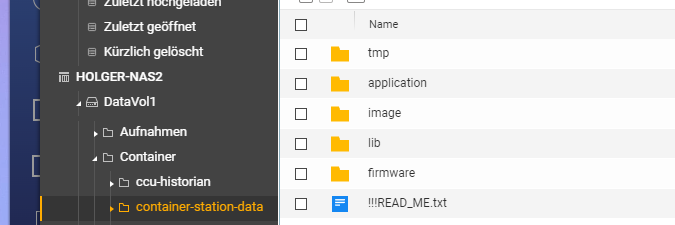
                        07aabbae-40ef-4df8-8947-93f6dbb94ad4-image.png

                        Thomas BraunT 1 Reply Last reply
                        0
                        • H HolgerCW

                          @thomas-braun sagte in QNAP NAS Container ioBroker js-controller und node update:

                          /etc/apt/sources.list.d/nodesource.list

                          Kannst Du mir sage, wo ich den PFad finde:

                          07aabbae-40ef-4df8-8947-93f6dbb94ad4-image.png

                          Thomas BraunT Online
                          Thomas BraunT Online
                          Thomas Braun
                          Most Active
                          wrote on last edited by
                          #49

                          @holgercw

                          Nein, kann ich nicht. Von Docker lass ich nämlich die Finger.

                          Linux-Werkzeugkasten:
                          https://forum.iobroker.net/topic/42952/der-kleine-iobroker-linux-werkzeugkasten
                          NodeJS Fixer Skript:
                          https://forum.iobroker.net/topic/68035/iob-node-fix-skript
                          iob_diag: curl -sLf -o diag.sh https://iobroker.net/diag.sh && bash diag.sh

                          H 1 Reply Last reply
                          0
                          • Thomas BraunT Thomas Braun

                            @holgercw

                            Alles steinalt und die Repos sind natürlich auch abgeräumt worden...

                            Versuch mal in der Datei
                            /etc/apt/sources.list.d/nodesource.list
                            die 10 durch 16 zu ersetzen. Vielleicht lebt wenigstens das noch.

                            Der ganze Mist kommt von dem tollen 'never tatsch a running süstem'. Der Schwachsinn funktioniert nicht.

                            malorossM Online
                            malorossM Online
                            maloross
                            wrote on last edited by
                            #50

                            @thomas-braun sagte in QNAP NAS Container ioBroker js-controller und node update:

                            Versuch mal in der Datei
                            /etc/apt/sources.list.d/nodesource.list
                            die 10 durch 16 zu ersetzen.

                            Das sollte über die Befehlskonsole funktionieren (Ansicht aus CS 3)
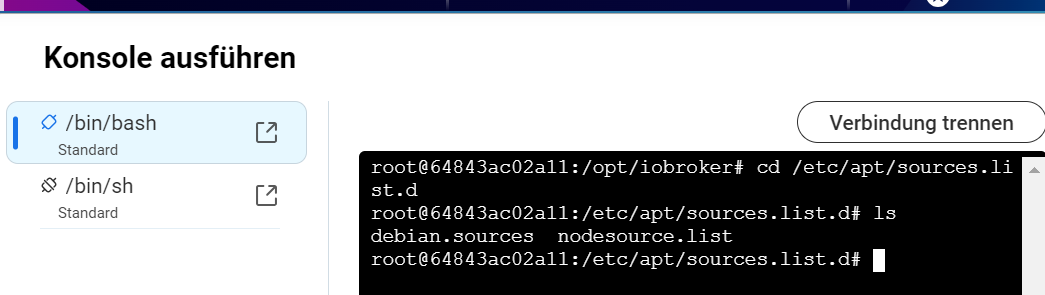
                            164c8f06-710d-4ed0-8948-80c13d069811-image.png

                            Auch Frauen können sich für Technik begeistern! ;)

                            Equipment:
                            diverse HM-, HMIP-, Aeotec- Tradfri- Sonos- und Fibaro-Geräte, Master-/Slavesystem auf 2 Raspi4, NAS

                            H 1 Reply Last reply
                            0
                            • malorossM maloross

                              @thomas-braun sagte in QNAP NAS Container ioBroker js-controller und node update:

                              Versuch mal in der Datei
                              /etc/apt/sources.list.d/nodesource.list
                              die 10 durch 16 zu ersetzen.

                              Das sollte über die Befehlskonsole funktionieren (Ansicht aus CS 3)
                              164c8f06-710d-4ed0-8948-80c13d069811-image.png

                              H Offline
                              H Offline
                              HolgerCW
                              wrote on last edited by
                              #51

                              @maloross Das habe ich gemacht und es klappt. Und nun ?

                              1 Reply Last reply
                              0
                              • Thomas BraunT Thomas Braun

                                @holgercw

                                Nein, kann ich nicht. Von Docker lass ich nämlich die Finger.

                                H Offline
                                H Offline
                                HolgerCW
                                wrote on last edited by HolgerCW
                                #52

                                @thomas-braun Habe da was gefunden. Ich glaube das ist der Pfad von Docker. Nun müsste ich noch geführt werden:
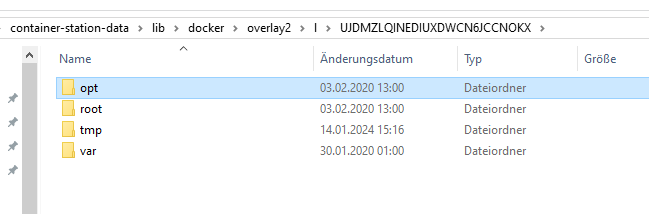
                                0f7e83ed-3a4a-4443-bcee-8e59dc36fe82-image.png

                                Vielleicht auch hier: S:\container-station-data\lib\docker\overlay2\l\UJDMZLQINEDIUXDWCN6JCCNOKX\opt\iobroker\node_modules ???

                                malorossM 1 Reply Last reply
                                0
                                • H HolgerCW

                                  @thomas-braun Habe da was gefunden. Ich glaube das ist der Pfad von Docker. Nun müsste ich noch geführt werden:

                                  0f7e83ed-3a4a-4443-bcee-8e59dc36fe82-image.png

                                  Vielleicht auch hier: S:\container-station-data\lib\docker\overlay2\l\UJDMZLQINEDIUXDWCN6JCCNOKX\opt\iobroker\node_modules ???

                                  malorossM Online
                                  malorossM Online
                                  maloross
                                  wrote on last edited by
                                  #53

                                  @holgercw vorweg: ich verfüge auch nur über Grundlagen-Kenntnisse sowohl QNAP als auch Container-Station.

                                  Wenn du auf der QNAP den Texteditor installiert hast, kannst du dich zu der oben genannten Datei durchhangeln und diese mit dem Texteditor bearbeiten. Ich selbst ändere solche Dinge meist über die Konsole.

                                  Auch Frauen können sich für Technik begeistern! ;)

                                  Equipment:
                                  diverse HM-, HMIP-, Aeotec- Tradfri- Sonos- und Fibaro-Geräte, Master-/Slavesystem auf 2 Raspi4, NAS

                                  H 1 Reply Last reply
                                  0
                                  • malorossM maloross

                                    @holgercw vorweg: ich verfüge auch nur über Grundlagen-Kenntnisse sowohl QNAP als auch Container-Station.

                                    Wenn du auf der QNAP den Texteditor installiert hast, kannst du dich zu der oben genannten Datei durchhangeln und diese mit dem Texteditor bearbeiten. Ich selbst ändere solche Dinge meist über die Konsole.

                                    H Offline
                                    H Offline
                                    HolgerCW
                                    wrote on last edited by
                                    #54

                                    @maloross Kein Probelm. Was muss ich jetzt hier noch tun um das zu ändern ?
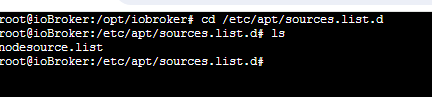
                                    8af63697-8ba7-45ba-8764-abdd91278a3f-image.png

                                    Das ist ein Screenshot von meiner Konsole

                                    malorossM 1 Reply Last reply
                                    0
                                    • H HolgerCW

                                      @maloross Kein Probelm. Was muss ich jetzt hier noch tun um das zu ändern ?

                                      8af63697-8ba7-45ba-8764-abdd91278a3f-image.png

                                      Das ist ein Screenshot von meiner Konsole

                                      malorossM Online
                                      malorossM Online
                                      maloross
                                      wrote on last edited by
                                      #55

                                      @holgercw
                                      mit nano nodesource.list sollte dir die Datei angezeigt werde
                                      61431440-7671-41a1-a285-7184e660a085-image.png

                                      Auch Frauen können sich für Technik begeistern! ;)

                                      Equipment:
                                      diverse HM-, HMIP-, Aeotec- Tradfri- Sonos- und Fibaro-Geräte, Master-/Slavesystem auf 2 Raspi4, NAS

                                      1 Reply Last reply
                                      0
                                      • haselchenH Offline
                                        haselchenH Offline
                                        haselchen
                                        Most Active
                                        wrote on last edited by haselchen
                                        #56

                                        @holgercw

                                        Bitte nicht böse sein oder persönlich nehmen!
                                        Ich lese so still seit 3 Seiten mit.
                                        Du hast Dich seit Jahren nicht ums System gekümmert, hängst also theoretisch diese Jahre auch wissentlich zurück.
                                        Die Helfenden versuchen Dich irgendwie wieder auf Stand zu bringen.
                                        Aber sind wir mal ehrlich, Du tippst die Befehle ein, ohne das Du weisst , was Du da machst.
                                        Es macht wirklich nur Sinn weiter Support zu leisten, wenn erkenntlich ist, dass Du "dabei" bist und nicht ein stiller Eingeber von Befehlen.
                                        Ich hab die Infos Deines Systems gesehen.
                                        Wenn ich jetzt Dein Wissen nehme + dem , was zu tun ist, dann verbringen wir hier Tage.
                                        Ich bin mir auch nicht sicher, ob, auch aufgrund Deiner vorhandenen Architektur (alter x64), dass überhaupt funktionieren würde.
                                        Eventuell kannst Du noch Skripte sichern.
                                        Ansonsten alles an Benutzernamen und Passwörtern aufschreiben, nebst Einstellungen der Adapter und dann lesen,lesen,lesen.

                                        Und dann frisch ans Werk.

                                        Ich betone nochmals, dass ist kein persönlicher Angriff oder sonst eine Beleidigung, sondern nur ein Hinweis bzw.Rat!

                                        Synology DS218+ & 2 x Fujitsu Esprimo (VM/Container) + FritzBox7590 + 2 AVM 3000 Repeater & Homematic & HUE & Osram & Xiaomi, NPM 10.9.4, Nodejs 22.21.0 ,JS Controller 7.0.7 ,Admin 7.7.19

                                        malorossM 1 Reply Last reply
                                        0
                                        • haselchenH haselchen

                                          @holgercw

                                          Bitte nicht böse sein oder persönlich nehmen!
                                          Ich lese so still seit 3 Seiten mit.
                                          Du hast Dich seit Jahren nicht ums System gekümmert, hängst also theoretisch diese Jahre auch wissentlich zurück.
                                          Die Helfenden versuchen Dich irgendwie wieder auf Stand zu bringen.
                                          Aber sind wir mal ehrlich, Du tippst die Befehle ein, ohne das Du weisst , was Du da machst.
                                          Es macht wirklich nur Sinn weiter Support zu leisten, wenn erkenntlich ist, dass Du "dabei" bist und nicht ein stiller Eingeber von Befehlen.
                                          Ich hab die Infos Deines Systems gesehen.
                                          Wenn ich jetzt Dein Wissen nehme + dem , was zu tun ist, dann verbringen wir hier Tage.
                                          Ich bin mir auch nicht sicher, ob, auch aufgrund Deiner vorhandenen Architektur (alter x64), dass überhaupt funktionieren würde.
                                          Eventuell kannst Du noch Skripte sichern.
                                          Ansonsten alles an Benutzernamen und Passwörtern aufschreiben, nebst Einstellungen der Adapter und dann lesen,lesen,lesen.

                                          Und dann frisch ans Werk.

                                          Ich betone nochmals, dass ist kein persönlicher Angriff oder sonst eine Beleidigung, sondern nur ein Hinweis bzw.Rat!

                                          malorossM Online
                                          malorossM Online
                                          maloross
                                          wrote on last edited by
                                          #57

                                          @haselchen

                                          Das ist sicher die beste und eleganteste Lösung. Ich denke aber, der TE hat Bedenken, alles bisherige zu verlieren, was ich verstehen kann.
                                          Ich habe den Eindruck, dass CS auch noch nicht aktuell ist.

                                          Auch Frauen können sich für Technik begeistern! ;)

                                          Equipment:
                                          diverse HM-, HMIP-, Aeotec- Tradfri- Sonos- und Fibaro-Geräte, Master-/Slavesystem auf 2 Raspi4, NAS

                                          haselchenH Thomas BraunT 2 Replies Last reply
                                          0
                                          Reply
                                          • Reply as topic
                                          Log in to reply
                                          • Oldest to Newest
                                          • Newest to Oldest
                                          • Most Votes


                                          Support us

                                          ioBroker
                                          Community Adapters
                                          Donate
                                          FAQ Cloud / IOT
                                          HowTo: Node.js-Update
                                          HowTo: Backup/Restore
                                          Downloads
                                          BLOG

                                          629

                                          Online

                                          32.6k

                                          Users

                                          82.2k

                                          Topics

                                          1.3m

                                          Posts
                                          Community
                                          Impressum | Datenschutz-Bestimmungen | Nutzungsbedingungen | Einwilligungseinstellungen
                                          ioBroker Community 2014-2025
                                          logo
                                          • Login

                                          • Don't have an account? Register

                                          • Login or register to search.
                                          • First post
                                            Last post
                                          0
                                          • Home
                                          • Recent
                                          • Tags
                                          • Unread 0
                                          • Categories
                                          • Unreplied
                                          • Popular
                                          • GitHub
                                          • Docu
                                          • Hilfe

