




proxmox - iobroker startet nicht mehr

-
@dp20eic
hier das iob diag, konnte das nicht sauber in code tags packen, daher hier als Anhang
Summary
======================= SUMMARY =======================
			v.2023-10-10


 Static hostname: pve-iobroker
       Icon name: computer-vm
         Chassis: vm 🖴
  Virtualization: kvm
Operating System: Debian GNU/Linux 12 (bookworm)
          Kernel: Linux 6.1.0-12-amd64
    Architecture: x86-64
 Hardware Vendor: QEMU
  Hardware Model: Standard PC _i440FX + PIIX, 1996_
Firmware Version: rel-1.16.1-0-g3208b098f51a-prebuilt.qemu.org

Installation: 		kvm
Kernel: 		x86_64
Userland: 		amd64
Timezone: 		Europe/Berlin (CEST, +0200)
User-ID: 		1000
X-Server: 		false
Boot Target: 		graphical.target

Pending OS-Updates: 	64
Pending iob updates: 	1

Nodejs-Installation: 	/usr/bin/nodejs 	v18.13.0
			/usr/local/bin/node 		v18.18.0
			/usr/local/bin/npm 		9.8.1
			/usr/local/bin/npx 		9.8.1
			/usr/local/bin/corepack 	0.19.0

Recommended versions are nodejs 18.18.2 and npm 9.8.1
*** nodejs is NOT correctly installed ***
Wrong installation path detected. This needs to be fixed.

Please check
https://forum.iobroker.net/topic/35090/howto-nodejs-installation-und-upgrades-unter-debian
for more information on how to fix these errors.

MEMORY:
               total        used        free      shared  buff/cache   available
Mem:             16G        3.6G         12G        552K        991M         12G
Swap:           1.0G          0B        1.0G
Total:           17G        3.6G         13G

Active iob-Instances: 	38
Active repo(s): Stable (default)

ioBroker Core: 		js-controller 		5.0.12
			admin 			6.10.1

ioBroker Status: 	iobroker is running on this host.


Objects type: jsonl
States  type: jsonl

Status admin and web instance:
+ system.adapter.admin.0                  : admin                 : pve-iobroker                             -  enabled, port: 8081, bind: 192.168.10.6, run as: admin
+ system.adapter.web.0                    : web                   : pve-iobroker                             -  enabled, port: 8082, bind: 192.168.10.6, run as: admin

Objects: 		31131
States: 		32406

Size of iob-Database:

36M	/opt/iobroker/iobroker-data/objects.jsonl
28M	/opt/iobroker/iobroker-data/objects.json.migrated
28M	/opt/iobroker/iobroker-data/objects.json.bak.migrated
63M	/opt/iobroker/iobroker-data/states.jsonl
8.4M	/opt/iobroker/iobroker-data/states.json.migrated
8.4M	/opt/iobroker/iobroker-data/states.json.bak.migrated
0	/opt/iobroker/iobroker-data/states.json.broken


=================== END OF SUMMARY ====================
das kann doch weg, backups sollten hier keine auflaufen, wie gesagt sind alle auf der NAS
/opt/iobroker/backups: 5.1G /opt/iobroker/backups/@dos1973 sagte in proxmox - iobroker startet nicht mehr:
das kann doch weg, backups sollten hier keine auflaufen, wie gesagt sind alle auf der NAS
Wenn das 'richtig' per Mount gemacht würde, dann wäre das Verzeichnis im nicht gemounteten Zustand leer.
mount | sortsagt?
-
@dos1973 sagte in proxmox - iobroker startet nicht mehr:
das kann doch weg, backups sollten hier keine auflaufen, wie gesagt sind alle auf der NAS
Wenn das 'richtig' per Mount gemacht würde, dann wäre das Verzeichnis im nicht gemounteten Zustand leer.
mount | sortsagt?
@thomas-braun
ein moment bitte, mach eben: iob nodejs-update -
@dos1973 sagte in proxmox - iobroker startet nicht mehr:
das kann doch weg, backups sollten hier keine auflaufen, wie gesagt sind alle auf der NAS
Wenn das 'richtig' per Mount gemacht würde, dann wäre das Verzeichnis im nicht gemounteten Zustand leer.
mount | sortsagt?
@thomas-braun sagte in proxmox - iobroker startet nicht mehr:
mount | sort
dos1973@pve-iobroker:/$ mount | sort binfmt_misc on /proc/sys/fs/binfmt_misc type binfmt_misc (rw,nosuid,nodev,noexec,relatime) bpf on /sys/fs/bpf type bpf (rw,nosuid,nodev,noexec,relatime,mode=700) cgroup2 on /sys/fs/cgroup type cgroup2 (rw,nosuid,nodev,noexec,relatime,nsdelegate,memory_recursiveprot) configfs on /sys/kernel/config type configfs (rw,nosuid,nodev,noexec,relatime) debugfs on /sys/kernel/debug type debugfs (rw,nosuid,nodev,noexec,relatime) devpts on /dev/pts type devpts (rw,nosuid,noexec,relatime,gid=5,mode=620,ptmxmode=000) /dev/sda1 on / type ext4 (rw,relatime,errors=remount-ro) fusectl on /sys/fs/fuse/connections type fusectl (rw,nosuid,nodev,noexec,relatime) hugetlbfs on /dev/hugepages type hugetlbfs (rw,relatime,pagesize=2M) mqueue on /dev/mqueue type mqueue (rw,nosuid,nodev,noexec,relatime) proc on /proc type proc (rw,nosuid,nodev,noexec,relatime) pstore on /sys/fs/pstore type pstore (rw,nosuid,nodev,noexec,relatime) ramfs on /run/credentials/systemd-sysctl.service type ramfs (ro,nosuid,nodev,noexec,relatime,mode=700) ramfs on /run/credentials/systemd-sysusers.service type ramfs (ro,nosuid,nodev,noexec,relatime,mode=700) ramfs on /run/credentials/systemd-tmpfiles-setup-dev.service type ramfs (ro,nosuid,nodev,noexec,relatime,mode=700) ramfs on /run/credentials/systemd-tmpfiles-setup.service type ramfs (ro,nosuid,nodev,noexec,relatime,mode=700) securityfs on /sys/kernel/security type securityfs (rw,nosuid,nodev,noexec,relatime) sunrpc on /run/rpc_pipefs type rpc_pipefs (rw,relatime) sysfs on /sys type sysfs (rw,nosuid,nodev,noexec,relatime) systemd-1 on /proc/sys/fs/binfmt_misc type autofs (rw,relatime,fd=30,pgrp=1,timeout=0,minproto=5,maxproto=5,direct,pipe_ino=16051) tmpfs on /dev/shm type tmpfs (rw,nosuid,nodev,inode64) tmpfs on /run/lock type tmpfs (rw,nosuid,nodev,noexec,relatime,size=5120k,inode64) tmpfs on /run type tmpfs (rw,nosuid,nodev,noexec,relatime,size=1598844k,mode=755,inode64) tmpfs on /run/user/1000 type tmpfs (rw,nosuid,nodev,relatime,size=1598840k,nr_inodes=399710,mode=700,uid=1000,gid=1000,inode64) tracefs on /sys/kernel/tracing type tracefs (rw,nosuid,nodev,noexec,relatime) udev on /dev type devtmpfs (rw,nosuid,relatime,size=7975172k,nr_inodes=1993793,mode=755,inode64) -
@dp20eic
hier das iob diag, konnte das nicht sauber in code tags packen, daher hier als Anhang
Summary
======================= SUMMARY =======================
			v.2023-10-10


 Static hostname: pve-iobroker
       Icon name: computer-vm
         Chassis: vm 🖴
  Virtualization: kvm
Operating System: Debian GNU/Linux 12 (bookworm)
          Kernel: Linux 6.1.0-12-amd64
    Architecture: x86-64
 Hardware Vendor: QEMU
  Hardware Model: Standard PC _i440FX + PIIX, 1996_
Firmware Version: rel-1.16.1-0-g3208b098f51a-prebuilt.qemu.org

Installation: 		kvm
Kernel: 		x86_64
Userland: 		amd64
Timezone: 		Europe/Berlin (CEST, +0200)
User-ID: 		1000
X-Server: 		false
Boot Target: 		graphical.target

Pending OS-Updates: 	64
Pending iob updates: 	1

Nodejs-Installation: 	/usr/bin/nodejs 	v18.13.0
			/usr/local/bin/node 		v18.18.0
			/usr/local/bin/npm 		9.8.1
			/usr/local/bin/npx 		9.8.1
			/usr/local/bin/corepack 	0.19.0

Recommended versions are nodejs 18.18.2 and npm 9.8.1
*** nodejs is NOT correctly installed ***
Wrong installation path detected. This needs to be fixed.

Please check
https://forum.iobroker.net/topic/35090/howto-nodejs-installation-und-upgrades-unter-debian
for more information on how to fix these errors.

MEMORY:
               total        used        free      shared  buff/cache   available
Mem:             16G        3.6G         12G        552K        991M         12G
Swap:           1.0G          0B        1.0G
Total:           17G        3.6G         13G

Active iob-Instances: 	38
Active repo(s): Stable (default)

ioBroker Core: 		js-controller 		5.0.12
			admin 			6.10.1

ioBroker Status: 	iobroker is running on this host.


Objects type: jsonl
States  type: jsonl

Status admin and web instance:
+ system.adapter.admin.0                  : admin                 : pve-iobroker                             -  enabled, port: 8081, bind: 192.168.10.6, run as: admin
+ system.adapter.web.0                    : web                   : pve-iobroker                             -  enabled, port: 8082, bind: 192.168.10.6, run as: admin

Objects: 		31131
States: 		32406

Size of iob-Database:

36M	/opt/iobroker/iobroker-data/objects.jsonl
28M	/opt/iobroker/iobroker-data/objects.json.migrated
28M	/opt/iobroker/iobroker-data/objects.json.bak.migrated
63M	/opt/iobroker/iobroker-data/states.jsonl
8.4M	/opt/iobroker/iobroker-data/states.json.migrated
8.4M	/opt/iobroker/iobroker-data/states.json.bak.migrated
0	/opt/iobroker/iobroker-data/states.json.broken


=================== END OF SUMMARY ====================
das kann doch weg, backups sollten hier keine auflaufen, wie gesagt sind alle auf der NAS
/opt/iobroker/backups: 5.1G /opt/iobroker/backups/@dos1973 sagte in proxmox - iobroker startet nicht mehr:
das kann doch weg, backups sollten hier keine auflaufen, wie gesagt sind alle auf der NAS
Moin,
wie hast Du das eingerichtet, so wie @Thomas-Braun sagte, als Mount oder schiebst Du die per FTP aufs NAS.
Denn ich sehe da keinen Mount, vom NAS!
VG
Bernd -
@thomas-braun sagte in proxmox - iobroker startet nicht mehr:
mount | sort
dos1973@pve-iobroker:/$ mount | sort binfmt_misc on /proc/sys/fs/binfmt_misc type binfmt_misc (rw,nosuid,nodev,noexec,relatime) bpf on /sys/fs/bpf type bpf (rw,nosuid,nodev,noexec,relatime,mode=700) cgroup2 on /sys/fs/cgroup type cgroup2 (rw,nosuid,nodev,noexec,relatime,nsdelegate,memory_recursiveprot) configfs on /sys/kernel/config type configfs (rw,nosuid,nodev,noexec,relatime) debugfs on /sys/kernel/debug type debugfs (rw,nosuid,nodev,noexec,relatime) devpts on /dev/pts type devpts (rw,nosuid,noexec,relatime,gid=5,mode=620,ptmxmode=000) /dev/sda1 on / type ext4 (rw,relatime,errors=remount-ro) fusectl on /sys/fs/fuse/connections type fusectl (rw,nosuid,nodev,noexec,relatime) hugetlbfs on /dev/hugepages type hugetlbfs (rw,relatime,pagesize=2M) mqueue on /dev/mqueue type mqueue (rw,nosuid,nodev,noexec,relatime) proc on /proc type proc (rw,nosuid,nodev,noexec,relatime) pstore on /sys/fs/pstore type pstore (rw,nosuid,nodev,noexec,relatime) ramfs on /run/credentials/systemd-sysctl.service type ramfs (ro,nosuid,nodev,noexec,relatime,mode=700) ramfs on /run/credentials/systemd-sysusers.service type ramfs (ro,nosuid,nodev,noexec,relatime,mode=700) ramfs on /run/credentials/systemd-tmpfiles-setup-dev.service type ramfs (ro,nosuid,nodev,noexec,relatime,mode=700) ramfs on /run/credentials/systemd-tmpfiles-setup.service type ramfs (ro,nosuid,nodev,noexec,relatime,mode=700) securityfs on /sys/kernel/security type securityfs (rw,nosuid,nodev,noexec,relatime) sunrpc on /run/rpc_pipefs type rpc_pipefs (rw,relatime) sysfs on /sys type sysfs (rw,nosuid,nodev,noexec,relatime) systemd-1 on /proc/sys/fs/binfmt_misc type autofs (rw,relatime,fd=30,pgrp=1,timeout=0,minproto=5,maxproto=5,direct,pipe_ino=16051) tmpfs on /dev/shm type tmpfs (rw,nosuid,nodev,inode64) tmpfs on /run/lock type tmpfs (rw,nosuid,nodev,noexec,relatime,size=5120k,inode64) tmpfs on /run type tmpfs (rw,nosuid,nodev,noexec,relatime,size=1598844k,mode=755,inode64) tmpfs on /run/user/1000 type tmpfs (rw,nosuid,nodev,relatime,size=1598840k,nr_inodes=399710,mode=700,uid=1000,gid=1000,inode64) tracefs on /sys/kernel/tracing type tracefs (rw,nosuid,nodev,noexec,relatime) udev on /dev type devtmpfs (rw,nosuid,relatime,size=7975172k,nr_inodes=1993793,mode=755,inode64)Wenn du sicher bist, dass die Backups auf dem NAS liegen:
rm /opt/iobroker/backups/*Und richte dir das Backup dann gescheit ein. Per NFS, zur Not per CIFS.
Und dann richte das ookla-Repo richtig ein sowie ganz wichtig: Räum die krumme nodejs-Installation weg.
Und lass die Finger vonn,nvmoder sonstigen Tools zu nodejs. -
@dos1973 sagte in proxmox - iobroker startet nicht mehr:
das kann doch weg, backups sollten hier keine auflaufen, wie gesagt sind alle auf der NAS
Moin,
wie hast Du das eingerichtet, so wie @Thomas-Braun sagte, als Mount oder schiebst Du die per FTP aufs NAS.
Denn ich sehe da keinen Mount, vom NAS!
VG
Bernd -
Wenn du sicher bist, dass die Backups auf dem NAS liegen:
rm /opt/iobroker/backups/*Und richte dir das Backup dann gescheit ein. Per NFS, zur Not per CIFS.
Und dann richte das ookla-Repo richtig ein sowie ganz wichtig: Räum die krumme nodejs-Installation weg.
Und lass die Finger vonn,nvmoder sonstigen Tools zu nodejs.@thomas-braun sagte in proxmox - iobroker startet nicht mehr:
rm /opt/iobroker/backups/*
gelöscht, habe jetzt wieder 6GB frei.
dos1973@pve-iobroker:/$ df -h Dateisystem Größe Benutzt Verf. Verw% Eingehängt auf udev 7,7G 0 7,7G 0% /dev tmpfs 1,6G 528K 1,6G 1% /run /dev/sda1 19G 12G 6,0G 67% / tmpfs 7,7G 0 7,7G 0% /dev/shm tmpfs 5,0M 0 5,0M 0% /run/lock tmpfs 1,6G 0 1,6G 0% /run/user/1000 -
@dos1973 sagte in proxmox - iobroker startet nicht mehr:
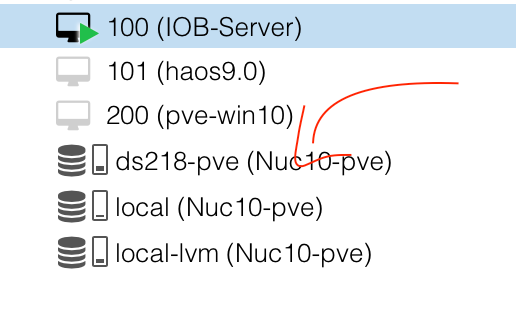
ich mach das backup direkt aus proxmox. dort habe ich mein nas verknüpft
Das ist kein gescheites Backup, das ist die 'Dampfwalzen'-Taktik. Vollkommener Overkill.
(Speicherplatz ist echt zu billig geworden.)
-
@dos1973 sagte in proxmox - iobroker startet nicht mehr:
ich mach das backup direkt aus proxmox. dort habe ich mein nas verknüpft
Moin,
wie hast Du das gemacht, zeig mal wie das bei Dir aussieht
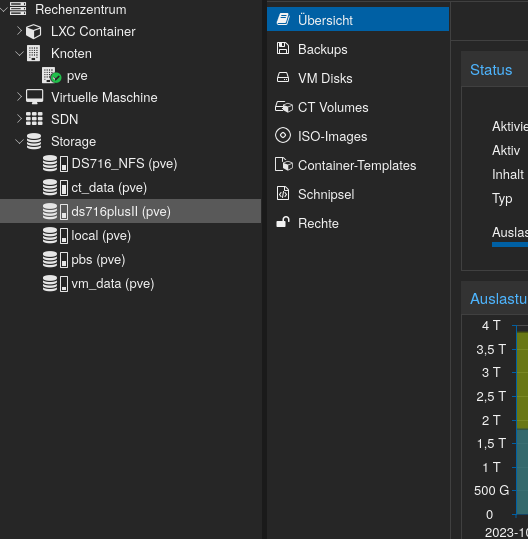
Das was man da per CIFS, NFS mounten kann ist eigentlich nur für den PVE und die dazugehörigen Inhalte.
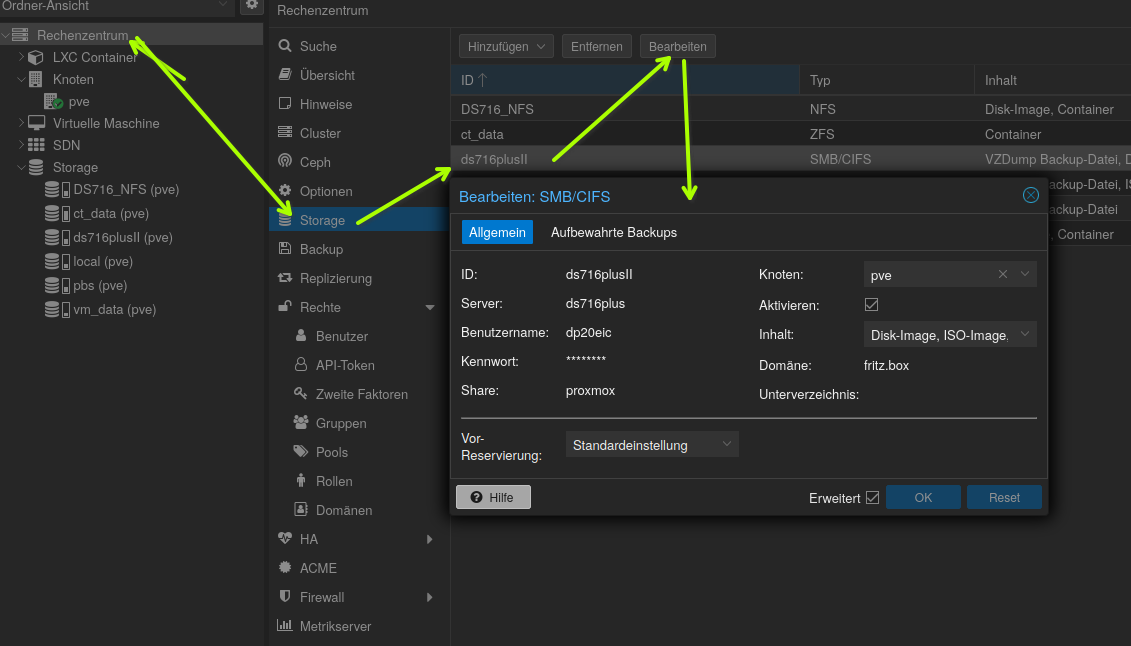
Oder meinst Du die VM Backups und nicht die
ioBroker - BakitUp?VG
BerndP.S.: installier dir trotzdem mal
ncduund schau nach wo die Speicherfresser liegen. -
@dos1973 sagte in proxmox - iobroker startet nicht mehr:
ich mach das backup direkt aus proxmox. dort habe ich mein nas verknüpft
Moin,
wie hast Du das gemacht, zeig mal wie das bei Dir aussieht
Das was man da per CIFS, NFS mounten kann ist eigentlich nur für den PVE und die dazugehörigen Inhalte.
Oder meinst Du die VM Backups und nicht die
ioBroker - BakitUp?VG
BerndP.S.: installier dir trotzdem mal
ncduund schau nach wo die Speicherfresser liegen. -
Um eine Backup-Strategie kannst du dich kümmern, wenn das Ding wieder senkrecht steht.
-
@dos1973 sagte in proxmox - iobroker startet nicht mehr:
ich mach das backup direkt aus proxmox. dort habe ich mein nas verknüpft
Das ist kein gescheites Backup, das ist die 'Dampfwalzen'-Taktik. Vollkommener Overkill.
(Speicherplatz ist echt zu billig geworden.)
ich habe das NAS im Proxmox eingebunden und führe um 5:30 via Proxmox automatisiert die Backupjobs aus

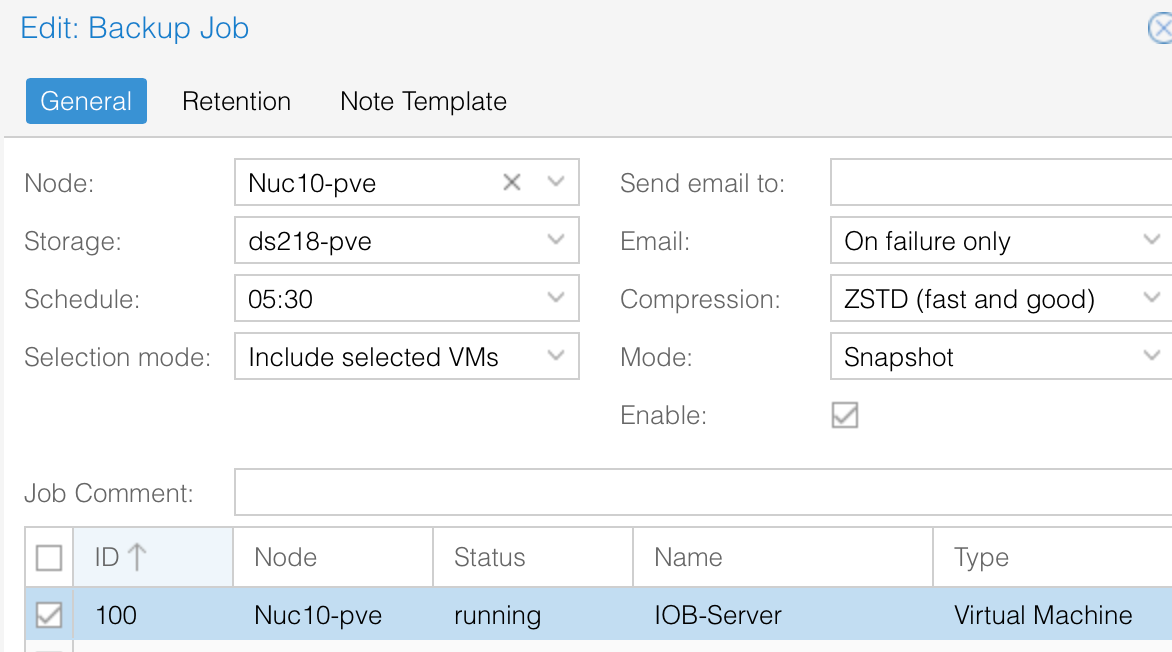
ich führe das jede Nacht aus und behalte die letzen 10 Dateien.
So ein File hat ca. 10-12GB: Ja, Platz habe ich auf der Nas mehr als genug, ;-)
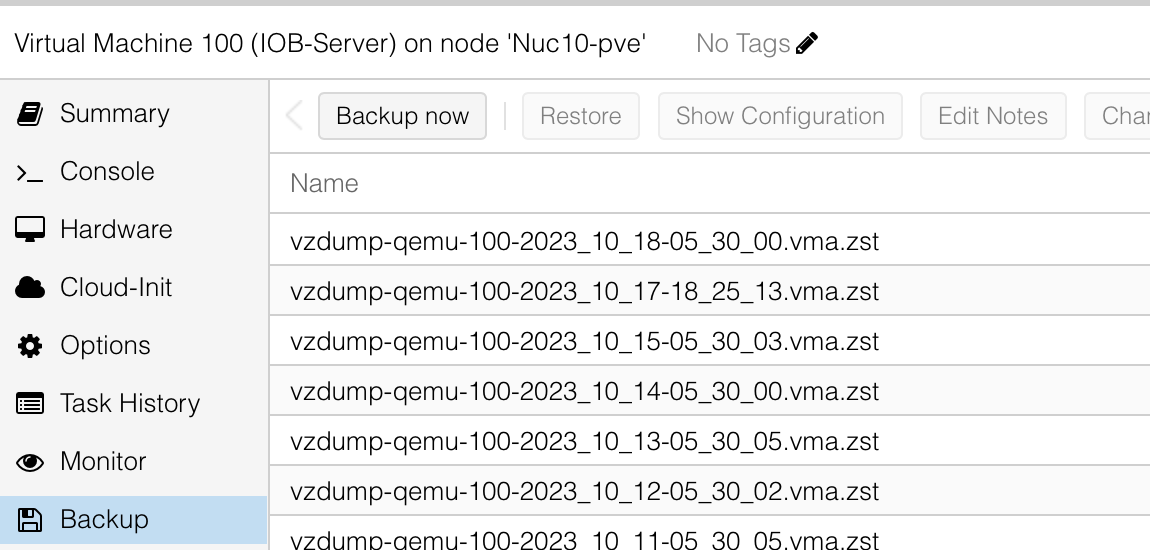
aber mit dem backup bin ich ehrlich gesagt zufrieden, im Fall der Fälle habe ich mit ein paar Klicks das System in 5 min wiederhergestellt.
ich habe mir das hier und da online zusammengesucht... ich probiere aus und wenn es läuft Klasse, ansonsten müsste ich ja jedes mal ein Hilfe Thread starten...
-
ich habe das NAS im Proxmox eingebunden und führe um 5:30 via Proxmox automatisiert die Backupjobs aus
ich führe das jede Nacht aus und behalte die letzen 10 Dateien.
So ein File hat ca. 10-12GB: Ja, Platz habe ich auf der Nas mehr als genug, ;-)
aber mit dem backup bin ich ehrlich gesagt zufrieden, im Fall der Fälle habe ich mit ein paar Klicks das System in 5 min wiederhergestellt.
ich habe mir das hier und da online zusammengesucht... ich probiere aus und wenn es läuft Klasse, ansonsten müsste ich ja jedes mal ein Hilfe Thread starten...
-
ich habe das NAS im Proxmox eingebunden und führe um 5:30 via Proxmox automatisiert die Backupjobs aus
ich führe das jede Nacht aus und behalte die letzen 10 Dateien.
So ein File hat ca. 10-12GB: Ja, Platz habe ich auf der Nas mehr als genug, ;-)
aber mit dem backup bin ich ehrlich gesagt zufrieden, im Fall der Fälle habe ich mit ein paar Klicks das System in 5 min wiederhergestellt.
ich habe mir das hier und da online zusammengesucht... ich probiere aus und wenn es läuft Klasse, ansonsten müsste ich ja jedes mal ein Hilfe Thread starten...
@dos1973 sagte in proxmox - iobroker startet nicht mehr:
ich führe das jede Nacht aus und behalte die letzen 10 Dateien.
So ein File hat ca. 10-12GBDann brauchst du ja keine Backups in /opt/iobroker/backups vorhalten.
Das ist ja dann alles doppelt. -
@dos1973 sagte in proxmox - iobroker startet nicht mehr:
*** nodejs is NOT correctly installed ***
iob stop iob fix iob nodejs-update@thomas-braun sagte in proxmox - iobroker startet nicht mehr:
iob stop
iob fix
iob nodejs-update
das klappt leider nicht.
ioBroker nodejs fixer 2023-10-13

Recommended nodejs-version is: 18.18.2
Checking your installation now. Please be patient!

Your current setup is:
/usr/bin/nodejs 	v18.13.0
/usr/bin/node 		v18.13.0
/usr/bin/npm 		9.2.0
/usr/bin/npx 		9.2.0

We found these nodejs versions available for installation:

nodejs:
  Installed: 18.13.0+dfsg1-1
  Candidate: 18.18.2-1nodesource1
  Version table:
     18.18.2-1nodesource1 1001
        500 https://deb.nodesource.com/node_18.x nodistro/main amd64 Packages
     18.18.1-1nodesource1 1001
        500 https://deb.nodesource.com/node_18.x nodistro/main amd64 Packages
     18.18.0-1nodesource1 1001
        500 https://deb.nodesource.com/node_18.x nodistro/main amd64 Packages
     18.17.1-1nodesource1 1001
        500 https://deb.nodesource.com/node_18.x nodistro/main amd64 Packages
     18.17.0-1nodesource1 1001
        500 https://deb.nodesource.com/node_18.x nodistro/main amd64 Packages
     18.16.1-1nodesource1 1001
        500 https://deb.nodesource.com/node_18.x nodistro/main amd64 Packages
     18.16.0-1nodesource1 1001
        500 https://deb.nodesource.com/node_18.x nodistro/main amd64 Packages
     18.15.0-1nodesource1 1001
        500 https://deb.nodesource.com/node_18.x nodistro/main amd64 Packages
     18.14.2-1nodesource1 1001
        500 https://deb.nodesource.com/node_18.x nodistro/main amd64 Packages
     18.14.1-1nodesource1 1001
        500 https://deb.nodesource.com/node_18.x nodistro/main amd64 Packages
     18.14.0-1nodesource1 1001
        500 https://deb.nodesource.com/node_18.x nodistro/main amd64 Packages
 *** 18.13.0+dfsg1-1 500
        500 http://deb.debian.org/debian bookworm/main amd64 Packages
        100 /var/lib/dpkg/status
     18.13.0-1nodesource1 1001
        500 https://deb.nodesource.com/node_18.x nodistro/main amd64 Packages
     18.12.0-1nodesource1 1001
        500 https://deb.nodesource.com/node_18.x nodistro/main amd64 Packages
     18.11.0-1nodesource1 1001
        500 https://deb.nodesource.com/node_18.x nodistro/main amd64 Packages
     18.10.0-1nodesource1 1001
        500 https://deb.nodesource.com/node_18.x nodistro/main amd64 Packages
     18.9.1-1nodesource1 1001
        500 https://deb.nodesource.com/node_18.x nodistro/main amd64 Packages
     18.9.0-1nodesource1 1001
        500 https://deb.nodesource.com/node_18.x nodistro/main amd64 Packages
     18.8.0-1nodesource1 1001
        500 https://deb.nodesource.com/node_18.x nodistro/main amd64 Packages
     18.7.0-1nodesource1 1001
        500 https://deb.nodesource.com/node_18.x nodistro/main amd64 Packages
     18.6.0-1nodesource1 1001
        500 https://deb.nodesource.com/node_18.x nodistro/main amd64 Packages
     18.5.0-1nodesource1 1001
        500 https://deb.nodesource.com/node_18.x nodistro/main amd64 Packages
     18.4.0-1nodesource1 1001
        500 https://deb.nodesource.com/node_18.x nodistro/main amd64 Packages
     18.3.0-1nodesource1 1001
        500 https://deb.nodesource.com/node_18.x nodistro/main amd64 Packages
     18.2.0-1nodesource1 1001
        500 https://deb.nodesource.com/node_18.x nodistro/main amd64 Packages
     18.1.0-1nodesource1 1001
        500 https://deb.nodesource.com/node_18.x nodistro/main amd64 Packages
     18.0.0-1nodesource1 1001
        500 https://deb.nodesource.com/node_18.x nodistro/main amd64 Packages


Nothing to do - Your installation is using the correct paths.

You are running nodejs v18.13.0. Do you want to install recommended version 18.18.2?

Press <y> to continue or any other key to quit
Trying to update your installation now. Please be patient.

Virtualization: kvm
Waiting for ioBroker to shut down - Give me a minute...
############################################################

*** These repos are active on your system:
Hit:1 http://security.debian.org/debian-security bookworm-security InRelease
Hit:2 http://deb.debian.org/debian bookworm InRelease
Hit:3 http://deb.debian.org/debian bookworm-updates InRelease
Ign:4 https://ookla.bintray.com/debian generic InRelease
Ign:4 https://ookla.bintray.com/debian generic InRelease
Ign:4 https://ookla.bintray.com/debian generic InRelease
Err:4 https://ookla.bintray.com/debian generic InRelease
  Certificate verification failed: The certificate is NOT trusted. The name in the certificate does not match the expected.  Could not handshake: Error in the certificate verification. [IP: 18.214.194.113 443]
Reading package lists... Done
W: Failed to fetch https://ookla.bintray.com/debian/dists/generic/InRelease  Certificate verification failed: The certificate is NOT trusted. The name in the certificate does not match the expected.  Could not handshake: Error in the certificate verification. [IP: 18.214.194.113 443]
W: Some index files failed to download. They have been ignored, or old ones used instead.

*** Installing ca-certificates, curl and gnupg, just in case they are missing.

*** Creating new /etc/apt/sources.list.d/nodesource.list and pinning source

deb [signed-by=/etc/apt/keyrings/nodesource.gpg] https://deb.nodesource.com/node_18.x nodistro main
Package: nodejs
Pin: origin deb.nodesource.com
Pin-Priority: 1001

*** These repos are active after the adjustments:
Hit:1 http://deb.debian.org/debian bookworm InRelease
Hit:2 http://security.debian.org/debian-security bookworm-security InRelease
Hit:3 http://deb.debian.org/debian bookworm-updates InRelease
Hit:4 https://deb.nodesource.com/node_18.x nodistro InRelease
Ign:5 https://ookla.bintray.com/debian generic InRelease
Ign:5 https://ookla.bintray.com/debian generic InRelease
Ign:5 https://ookla.bintray.com/debian generic InRelease
Err:5 https://ookla.bintray.com/debian generic InRelease
  Certificate verification failed: The certificate is NOT trusted. The name in the certificate does not match the expected.  Could not handshake: Error in the certificate verification. [IP: 18.232.172.199 443]
Reading package lists... Done
W: Failed to fetch https://ookla.bintray.com/debian/dists/generic/InRelease  Certificate verification failed: The certificate is NOT trusted. The name in the certificate does not match the expected.  Could not handshake: Error in the certificate verification. [IP: 18.232.172.199 443]
W: Some index files failed to download. They have been ignored, or old ones used instead.

Installing the recommended nodejs version now!

Installing the recommended nodejs version!
W: Failed to fetch https://ookla.bintray.com/debian/dists/generic/InRelease  Certificate verification failed: The certificate is NOT trusted. The name in the certificate does not match the expected.  Could not handshake: Error in the certificate verification. [IP: 18.214.194.113 443]
W: Some index files failed to download. They have been ignored, or old ones used instead.
E: Broken packages

*** You need to manually restart your container/virtual machine now! ***

We tried our best to fix your nodejs. Please run 'iob diag' again to verify.
dos1973@pve-iobroker:~$ node -v
v18.13.0
er fragt ob ich auf 18.18.2 update, macht er aber nicht.
iob Diag zeigt weiterhin Fehler bei nodjs*** NodeJS-Installation *** /usr/bin/nodejs v18.13.0 /usr/bin/node v18.13.0 /usr/bin/npm 9.2.0 /usr/bin/npx 9.2.0 /usr/local/bin/corepack 0.19.0 *** nodejs is NOT correctly installed *** -
@thomas-braun sagte in proxmox - iobroker startet nicht mehr:
iob stop
iob fix
iob nodejs-update
das klappt leider nicht.
ioBroker nodejs fixer 2023-10-13

Recommended nodejs-version is: 18.18.2
Checking your installation now. Please be patient!

Your current setup is:
/usr/bin/nodejs 	v18.13.0
/usr/bin/node 		v18.13.0
/usr/bin/npm 		9.2.0
/usr/bin/npx 		9.2.0

We found these nodejs versions available for installation:

nodejs:
  Installed: 18.13.0+dfsg1-1
  Candidate: 18.18.2-1nodesource1
  Version table:
     18.18.2-1nodesource1 1001
        500 https://deb.nodesource.com/node_18.x nodistro/main amd64 Packages
     18.18.1-1nodesource1 1001
        500 https://deb.nodesource.com/node_18.x nodistro/main amd64 Packages
     18.18.0-1nodesource1 1001
        500 https://deb.nodesource.com/node_18.x nodistro/main amd64 Packages
     18.17.1-1nodesource1 1001
        500 https://deb.nodesource.com/node_18.x nodistro/main amd64 Packages
     18.17.0-1nodesource1 1001
        500 https://deb.nodesource.com/node_18.x nodistro/main amd64 Packages
     18.16.1-1nodesource1 1001
        500 https://deb.nodesource.com/node_18.x nodistro/main amd64 Packages
     18.16.0-1nodesource1 1001
        500 https://deb.nodesource.com/node_18.x nodistro/main amd64 Packages
     18.15.0-1nodesource1 1001
        500 https://deb.nodesource.com/node_18.x nodistro/main amd64 Packages
     18.14.2-1nodesource1 1001
        500 https://deb.nodesource.com/node_18.x nodistro/main amd64 Packages
     18.14.1-1nodesource1 1001
        500 https://deb.nodesource.com/node_18.x nodistro/main amd64 Packages
     18.14.0-1nodesource1 1001
        500 https://deb.nodesource.com/node_18.x nodistro/main amd64 Packages
 *** 18.13.0+dfsg1-1 500
        500 http://deb.debian.org/debian bookworm/main amd64 Packages
        100 /var/lib/dpkg/status
     18.13.0-1nodesource1 1001
        500 https://deb.nodesource.com/node_18.x nodistro/main amd64 Packages
     18.12.0-1nodesource1 1001
        500 https://deb.nodesource.com/node_18.x nodistro/main amd64 Packages
     18.11.0-1nodesource1 1001
        500 https://deb.nodesource.com/node_18.x nodistro/main amd64 Packages
     18.10.0-1nodesource1 1001
        500 https://deb.nodesource.com/node_18.x nodistro/main amd64 Packages
     18.9.1-1nodesource1 1001
        500 https://deb.nodesource.com/node_18.x nodistro/main amd64 Packages
     18.9.0-1nodesource1 1001
        500 https://deb.nodesource.com/node_18.x nodistro/main amd64 Packages
     18.8.0-1nodesource1 1001
        500 https://deb.nodesource.com/node_18.x nodistro/main amd64 Packages
     18.7.0-1nodesource1 1001
        500 https://deb.nodesource.com/node_18.x nodistro/main amd64 Packages
     18.6.0-1nodesource1 1001
        500 https://deb.nodesource.com/node_18.x nodistro/main amd64 Packages
     18.5.0-1nodesource1 1001
        500 https://deb.nodesource.com/node_18.x nodistro/main amd64 Packages
     18.4.0-1nodesource1 1001
        500 https://deb.nodesource.com/node_18.x nodistro/main amd64 Packages
     18.3.0-1nodesource1 1001
        500 https://deb.nodesource.com/node_18.x nodistro/main amd64 Packages
     18.2.0-1nodesource1 1001
        500 https://deb.nodesource.com/node_18.x nodistro/main amd64 Packages
     18.1.0-1nodesource1 1001
        500 https://deb.nodesource.com/node_18.x nodistro/main amd64 Packages
     18.0.0-1nodesource1 1001
        500 https://deb.nodesource.com/node_18.x nodistro/main amd64 Packages


Nothing to do - Your installation is using the correct paths.

You are running nodejs v18.13.0. Do you want to install recommended version 18.18.2?

Press <y> to continue or any other key to quit
Trying to update your installation now. Please be patient.

Virtualization: kvm
Waiting for ioBroker to shut down - Give me a minute...
############################################################

*** These repos are active on your system:
Hit:1 http://security.debian.org/debian-security bookworm-security InRelease
Hit:2 http://deb.debian.org/debian bookworm InRelease
Hit:3 http://deb.debian.org/debian bookworm-updates InRelease
Ign:4 https://ookla.bintray.com/debian generic InRelease
Ign:4 https://ookla.bintray.com/debian generic InRelease
Ign:4 https://ookla.bintray.com/debian generic InRelease
Err:4 https://ookla.bintray.com/debian generic InRelease
  Certificate verification failed: The certificate is NOT trusted. The name in the certificate does not match the expected.  Could not handshake: Error in the certificate verification. [IP: 18.214.194.113 443]
Reading package lists... Done
W: Failed to fetch https://ookla.bintray.com/debian/dists/generic/InRelease  Certificate verification failed: The certificate is NOT trusted. The name in the certificate does not match the expected.  Could not handshake: Error in the certificate verification. [IP: 18.214.194.113 443]
W: Some index files failed to download. They have been ignored, or old ones used instead.

*** Installing ca-certificates, curl and gnupg, just in case they are missing.

*** Creating new /etc/apt/sources.list.d/nodesource.list and pinning source

deb [signed-by=/etc/apt/keyrings/nodesource.gpg] https://deb.nodesource.com/node_18.x nodistro main
Package: nodejs
Pin: origin deb.nodesource.com
Pin-Priority: 1001

*** These repos are active after the adjustments:
Hit:1 http://deb.debian.org/debian bookworm InRelease
Hit:2 http://security.debian.org/debian-security bookworm-security InRelease
Hit:3 http://deb.debian.org/debian bookworm-updates InRelease
Hit:4 https://deb.nodesource.com/node_18.x nodistro InRelease
Ign:5 https://ookla.bintray.com/debian generic InRelease
Ign:5 https://ookla.bintray.com/debian generic InRelease
Ign:5 https://ookla.bintray.com/debian generic InRelease
Err:5 https://ookla.bintray.com/debian generic InRelease
  Certificate verification failed: The certificate is NOT trusted. The name in the certificate does not match the expected.  Could not handshake: Error in the certificate verification. [IP: 18.232.172.199 443]
Reading package lists... Done
W: Failed to fetch https://ookla.bintray.com/debian/dists/generic/InRelease  Certificate verification failed: The certificate is NOT trusted. The name in the certificate does not match the expected.  Could not handshake: Error in the certificate verification. [IP: 18.232.172.199 443]
W: Some index files failed to download. They have been ignored, or old ones used instead.

Installing the recommended nodejs version now!

Installing the recommended nodejs version!
W: Failed to fetch https://ookla.bintray.com/debian/dists/generic/InRelease  Certificate verification failed: The certificate is NOT trusted. The name in the certificate does not match the expected.  Could not handshake: Error in the certificate verification. [IP: 18.214.194.113 443]
W: Some index files failed to download. They have been ignored, or old ones used instead.
E: Broken packages

*** You need to manually restart your container/virtual machine now! ***

We tried our best to fix your nodejs. Please run 'iob diag' again to verify.
dos1973@pve-iobroker:~$ node -v
v18.13.0
er fragt ob ich auf 18.18.2 update, macht er aber nicht.
iob Diag zeigt weiterhin Fehler bei nodjs*** NodeJS-Installation *** /usr/bin/nodejs v18.13.0 /usr/bin/node v18.13.0 /usr/bin/npm 9.2.0 /usr/bin/npx 9.2.0 /usr/local/bin/corepack 0.19.0 *** nodejs is NOT correctly installed ***iob stop sudo apt remove nodejs libnode* node-* sudo apt install nodejs iob startUnd dann nochmal
iob nodejs-update -
iob stop
sudo apt remove nodejs libnode* node-*
sudo apt install nodejs
iob start
Und dann nochmal
iob nodejs-updateschaut jetzt gut aus, Danke
*** NodeJS-Installation ***

/usr/bin/nodejs 	v18.18.2
/usr/bin/node 		v18.18.2
/usr/bin/npm 		9.8.1
/usr/bin/npx 		9.8.1
/usr/bin/corepack 	0.19.0
das Fehl:11 https://ookla.bintray.com/debian generic InRelease
habe ich hier gefunden unddos1973@pve-iobroker:/etc/apt/sources.list.d$ ls nodesource.list speedtest.list dos1973@pve-iobroker:/etc/apt/sources.list.d$GNU nano 7.2 speedtest.list #deb https://ookla.bintray.com/debian generic main -
schaut jetzt gut aus, Danke
*** NodeJS-Installation ***

/usr/bin/nodejs 	v18.18.2
/usr/bin/node 		v18.18.2
/usr/bin/npm 		9.8.1
/usr/bin/npx 		9.8.1
/usr/bin/corepack 	0.19.0
das Fehl:11 https://ookla.bintray.com/debian generic InRelease
habe ich hier gefunden unddos1973@pve-iobroker:/etc/apt/sources.list.d$ ls nodesource.list speedtest.list dos1973@pve-iobroker:/etc/apt/sources.list.d$GNU nano 7.2 speedtest.list #deb https://ookla.bintray.com/debian generic main@dos1973 sagte in proxmox - iobroker startet nicht mehr:
speedtest.list
Lösch die Datei. Das wird jetzt anders angelegt. Link hatte ich oben schon gepostet.
-
@dos1973 sagte in proxmox - iobroker startet nicht mehr:
speedtest.list
Lösch die Datei. Das wird jetzt anders angelegt. Link hatte ich oben schon gepostet.
ok, habe da jetzt auch
dos1973@pve-iobroker:/etc/apt/sources.list.d$ ls
nodesource.list  ookla_speedtest-cli.list
# this file was generated by packagecloud.io for # the repository at https://packagecloud.io/ookla/speedtest-cli deb [signed-by=/etc/apt/keyrings/ookla_speedtest-cli-archive-keyring.gpg] https://packagecloud.io/ookla/speedtest-cli/debian/ bookworm main deb-src [signed-by=/etc/apt/keyrings/ookla_speedtest-cli-archive-keyring.gpg] https://packagecloud.io/ookla/speedtest-cli/debian/ bookworm main -
ok, habe da jetzt auch
dos1973@pve-iobroker:/etc/apt/sources.list.d$ ls
nodesource.list  ookla_speedtest-cli.list
# this file was generated by packagecloud.io for # the repository at https://packagecloud.io/ookla/speedtest-cli deb [signed-by=/etc/apt/keyrings/ookla_speedtest-cli-archive-keyring.gpg] https://packagecloud.io/ookla/speedtest-cli/debian/ bookworm main deb-src [signed-by=/etc/apt/keyrings/ookla_speedtest-cli-archive-keyring.gpg] https://packagecloud.io/ookla/speedtest-cli/debian/ bookworm mainder Server sollte jetzt doch wieder laufen, noch eine Frage habe ich
ich habe ja die 6GB Daten gelöscht, es es üblich dass mein iobroker 12GB groß ist?woher kamen die backups in dem order
/opt/iobroker/backups/kommt das vom Backitup Adapter, hatte den überhaupt nicht auf dem Schirm.
wäre das die Backup Strategie den Adapter zu nutzen?

Hey! Du scheinst an dieser Unterhaltung interessiert zu sein, hast aber noch kein Konto.
Hast du es satt, bei jedem Besuch durch die gleichen Beiträge zu scrollen? Wenn du dich für ein Konto anmeldest, kommst du immer genau dorthin zurück, wo du zuvor warst, und kannst dich über neue Antworten benachrichtigen lassen (entweder per E-Mail oder Push-Benachrichtigung). Du kannst auch Lesezeichen speichern und Beiträge positiv bewerten, um anderen Community-Mitgliedern deine Wertschätzung zu zeigen.
Mit deinem Input könnte dieser Beitrag noch besser werden 💗
Registrieren AnmeldenSupport us
328
Online33.0k
Benutzer83.4k
Themen1.3m
Beiträge