



Skip to content
  • Home
  • Aktuell
  • Tags
  • 0 Ungelesen 0
  • Kategorien
  • Unreplied
  • Beliebt
  • GitHub
  • Docu
  • Hilfe
Skins
  • Light
  • Brite
  • Cerulean
  • Cosmo
  • Flatly
  • Journal
  • Litera
  • Lumen
  • Lux
  • Materia
  • Minty
  • Morph
  • Pulse
  • Sandstone
  • Simplex
  • Sketchy
  • Spacelab
  • United
  • Yeti
  • Zephyr
  • Dark
  • Cyborg
  • Darkly
  • Quartz
  • Slate
  • Solar
  • Superhero
  • Vapor

  • Standard: (Kein Skin)
  • Kein Skin
Einklappen
ioBroker Logo

Community Forum

donate donate
  1. ioBroker Community Home
  2. Deutsch
  3. Off Topic
  4. Proxmox
  5. proxmox - iobroker startet nicht mehr

NEWS

  • Weihnachtsangebot 2025! 🎄
    BluefoxB
    Bluefox
    21
    1
    956

  • UPDATE 31.10.: Amazon Alexa - ioBroker Skill läuft aus ?
    apollon77A
    apollon77
    48
    3
    9.1k

  • Monatsrückblick – September 2025
    BluefoxB
    Bluefox
    14
    1
    2.4k

proxmox - iobroker startet nicht mehr

Geplant Angeheftet Gesperrt Verschoben Proxmox
58 Beiträge 4 Kommentatoren 5.2k Aufrufe 4 Watching
  • Älteste zuerst
  • Neuste zuerst
  • Meiste Stimmen
Antworten
  • In einem neuen Thema antworten
Anmelden zum Antworten
Dieses Thema wurde gelöscht. Nur Nutzer mit entsprechenden Rechten können es sehen.
  • D dos1973

    @dp20eic
    ich mach das backup direkt aus proxmox. dort habe ich mein nas verknüpft
    Bildschirmfoto 2023-10-18 um 20.34.14.png

    ? Offline
    ? Offline
    Ein ehemaliger Benutzer
    schrieb am zuletzt editiert von
    #15

    @dos1973 sagte in proxmox - iobroker startet nicht mehr:

    ich mach das backup direkt aus proxmox. dort habe ich mein nas verknüpft

    Moin,

    wie hast Du das gemacht, zeig mal wie das bei Dir aussieht
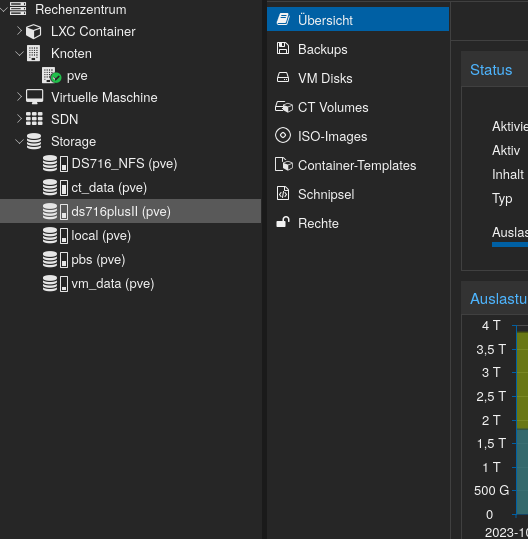
    008d7f2f-6fad-465d-8ff5-8fb0d37c0566-grafik.png

    Das was man da per CIFS, NFS mounten kann ist eigentlich nur für den PVE und die dazugehörigen Inhalte.
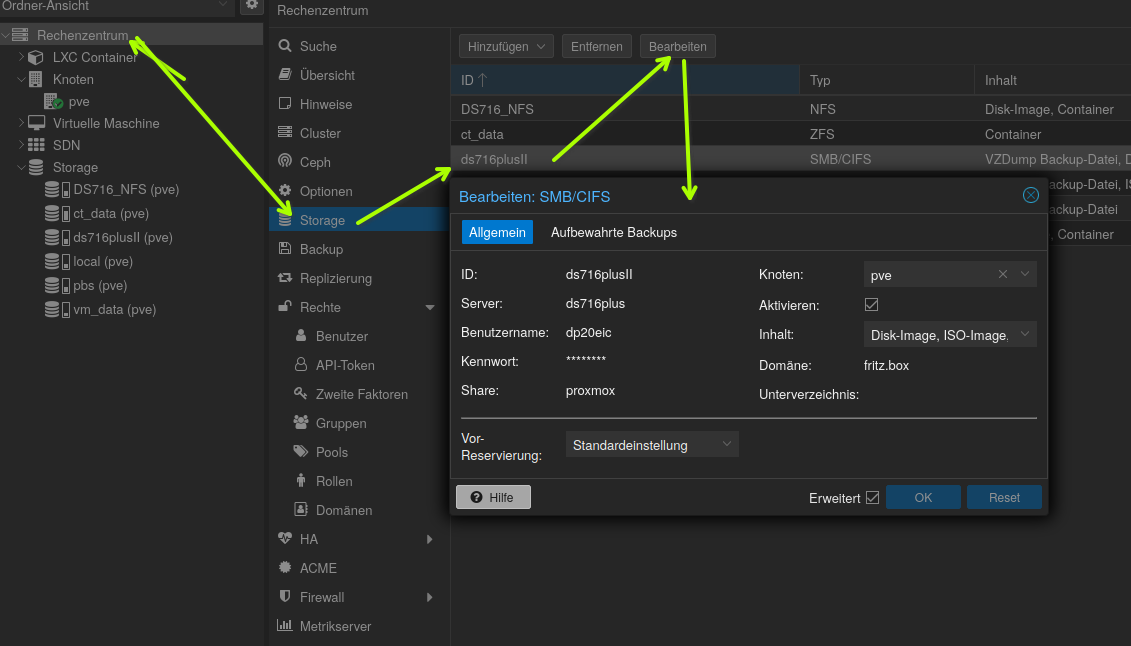
    005f3e24-416d-4a31-83a2-0da478daa6bb-grafik.png

    Oder meinst Du die VM Backups und nicht die ioBroker - BakitUp?

    VG
    Bernd

    P.S.: installier dir trotzdem mal ncdu und schau nach wo die Speicherfresser liegen.

    D 1 Antwort Letzte Antwort
    1
    • ? Ein ehemaliger Benutzer

      @dos1973 sagte in proxmox - iobroker startet nicht mehr:

      ich mach das backup direkt aus proxmox. dort habe ich mein nas verknüpft

      Moin,

      wie hast Du das gemacht, zeig mal wie das bei Dir aussieht
      008d7f2f-6fad-465d-8ff5-8fb0d37c0566-grafik.png

      Das was man da per CIFS, NFS mounten kann ist eigentlich nur für den PVE und die dazugehörigen Inhalte.
      005f3e24-416d-4a31-83a2-0da478daa6bb-grafik.png

      Oder meinst Du die VM Backups und nicht die ioBroker - BakitUp?

      VG
      Bernd

      P.S.: installier dir trotzdem mal ncdu und schau nach wo die Speicherfresser liegen.

      D Offline
      D Offline
      dos1973
      schrieb am zuletzt editiert von
      #16

      @dp20eic

      Ich melde mich gleich mit ein paar Screenshot … musste mal Taxidienst spielen

      Thomas BraunT 1 Antwort Letzte Antwort
      0
      • D dos1973

        @dp20eic

        Ich melde mich gleich mit ein paar Screenshot … musste mal Taxidienst spielen

        Thomas BraunT Online
        Thomas BraunT Online
        Thomas Braun
        Most Active
        schrieb am zuletzt editiert von
        #17

        @dos1973

        Um eine Backup-Strategie kannst du dich kümmern, wenn das Ding wieder senkrecht steht.

        Linux-Werkzeugkasten:
        https://forum.iobroker.net/topic/42952/der-kleine-iobroker-linux-werkzeugkasten
        NodeJS Fixer Skript:
        https://forum.iobroker.net/topic/68035/iob-node-fix-skript
        iob_diag: curl -sLf -o diag.sh https://iobroker.net/diag.sh && bash diag.sh

        1 Antwort Letzte Antwort
        0
        • Thomas BraunT Thomas Braun

          @dos1973 sagte in proxmox - iobroker startet nicht mehr:

          ich mach das backup direkt aus proxmox. dort habe ich mein nas verknüpft

          Das ist kein gescheites Backup, das ist die 'Dampfwalzen'-Taktik. Vollkommener Overkill.

          (Speicherplatz ist echt zu billig geworden.)

          D Offline
          D Offline
          dos1973
          schrieb am zuletzt editiert von dos1973
          #18

          @thomas-braun

          ich habe das NAS im Proxmox eingebunden und führe um 5:30 via Proxmox automatisiert die Backupjobs aus

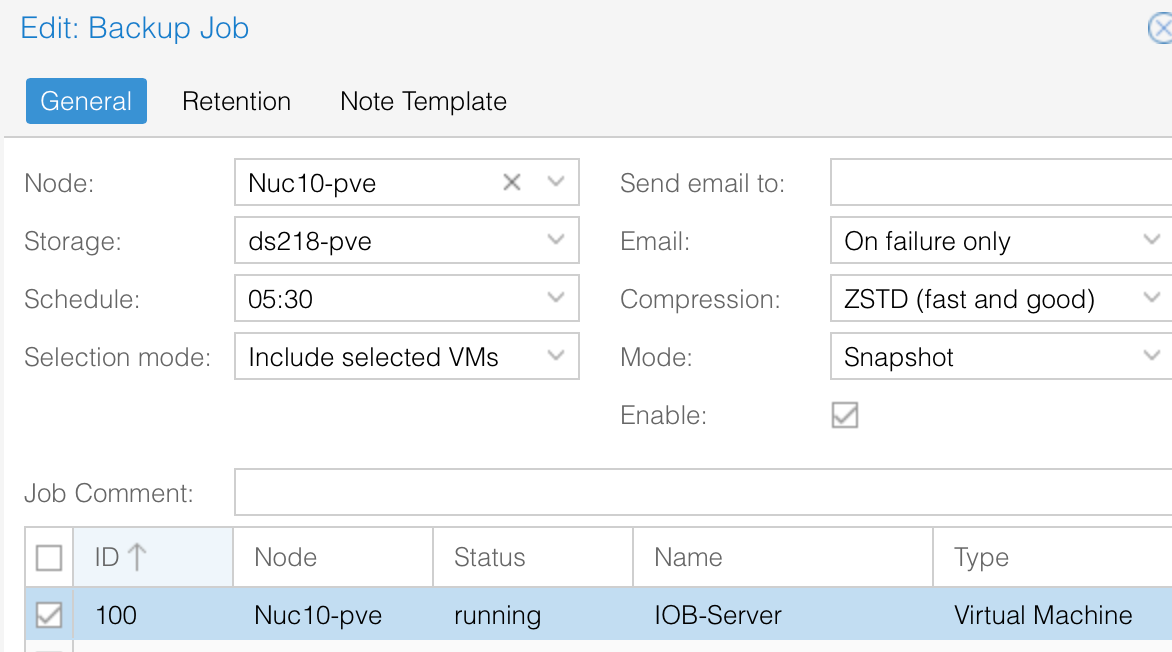
          Bildschirmfoto 2023-10-18 um 21.43.25.png

          Bildschirmfoto 2023-10-18 um 21.35.08.png

          ich führe das jede Nacht aus und behalte die letzen 10 Dateien.

          So ein File hat ca. 10-12GB: Ja, Platz habe ich auf der Nas mehr als genug, ;-)
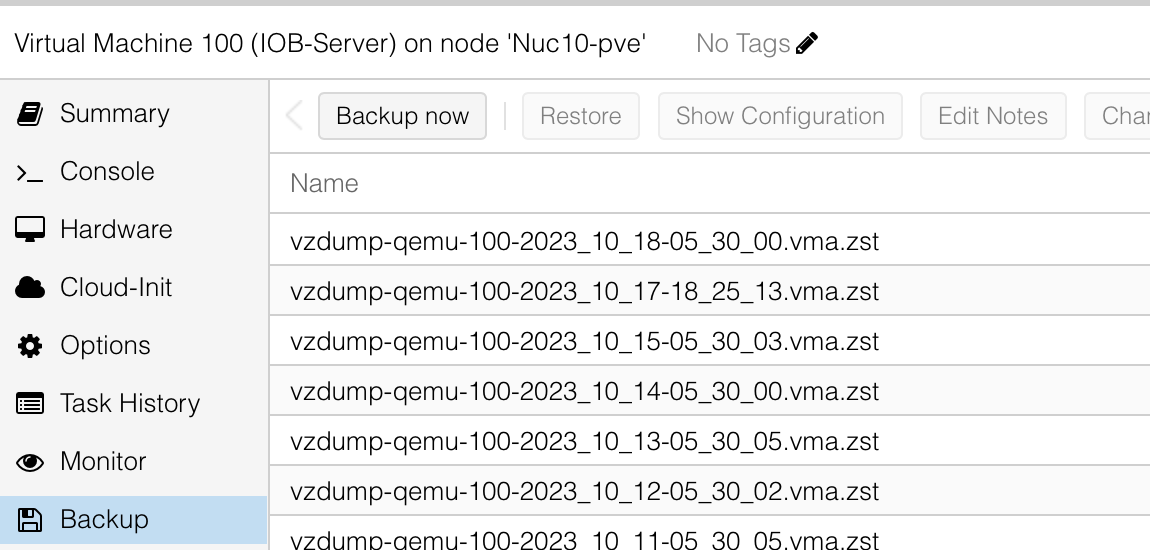
          Bildschirmfoto 2023-10-18 um 21.36.15.png

          aber mit dem backup bin ich ehrlich gesagt zufrieden, im Fall der Fälle habe ich mit ein paar Klicks das System in 5 min wiederhergestellt.

          ich habe mir das hier und da online zusammengesucht... ich probiere aus und wenn es läuft Klasse, ansonsten müsste ich ja jedes mal ein Hilfe Thread starten...

          Thomas BraunT 2 Antworten Letzte Antwort
          0
          • D dos1973

            @thomas-braun

            ich habe das NAS im Proxmox eingebunden und führe um 5:30 via Proxmox automatisiert die Backupjobs aus

            Bildschirmfoto 2023-10-18 um 21.43.25.png

            Bildschirmfoto 2023-10-18 um 21.35.08.png

            ich führe das jede Nacht aus und behalte die letzen 10 Dateien.

            So ein File hat ca. 10-12GB: Ja, Platz habe ich auf der Nas mehr als genug, ;-)
            Bildschirmfoto 2023-10-18 um 21.36.15.png

            aber mit dem backup bin ich ehrlich gesagt zufrieden, im Fall der Fälle habe ich mit ein paar Klicks das System in 5 min wiederhergestellt.

            ich habe mir das hier und da online zusammengesucht... ich probiere aus und wenn es läuft Klasse, ansonsten müsste ich ja jedes mal ein Hilfe Thread starten...

            Thomas BraunT Online
            Thomas BraunT Online
            Thomas Braun
            Most Active
            schrieb am zuletzt editiert von
            #19

            @dos1973

            Ist denn der iobroker wieder auf dem Damm?

            Repos gefixt? nodejs gefixt?

            iob diag
            

            sagt?

            Linux-Werkzeugkasten:
            https://forum.iobroker.net/topic/42952/der-kleine-iobroker-linux-werkzeugkasten
            NodeJS Fixer Skript:
            https://forum.iobroker.net/topic/68035/iob-node-fix-skript
            iob_diag: curl -sLf -o diag.sh https://iobroker.net/diag.sh && bash diag.sh

            1 Antwort Letzte Antwort
            0
            • D dos1973

              @thomas-braun

              ich habe das NAS im Proxmox eingebunden und führe um 5:30 via Proxmox automatisiert die Backupjobs aus

              Bildschirmfoto 2023-10-18 um 21.43.25.png

              Bildschirmfoto 2023-10-18 um 21.35.08.png

              ich führe das jede Nacht aus und behalte die letzen 10 Dateien.

              So ein File hat ca. 10-12GB: Ja, Platz habe ich auf der Nas mehr als genug, ;-)
              Bildschirmfoto 2023-10-18 um 21.36.15.png

              aber mit dem backup bin ich ehrlich gesagt zufrieden, im Fall der Fälle habe ich mit ein paar Klicks das System in 5 min wiederhergestellt.

              ich habe mir das hier und da online zusammengesucht... ich probiere aus und wenn es läuft Klasse, ansonsten müsste ich ja jedes mal ein Hilfe Thread starten...

              Thomas BraunT Online
              Thomas BraunT Online
              Thomas Braun
              Most Active
              schrieb am zuletzt editiert von
              #20

              @dos1973 sagte in proxmox - iobroker startet nicht mehr:

              ich führe das jede Nacht aus und behalte die letzen 10 Dateien.
              So ein File hat ca. 10-12GB

              Dann brauchst du ja keine Backups in /opt/iobroker/backups vorhalten.
              Das ist ja dann alles doppelt.

              Linux-Werkzeugkasten:
              https://forum.iobroker.net/topic/42952/der-kleine-iobroker-linux-werkzeugkasten
              NodeJS Fixer Skript:
              https://forum.iobroker.net/topic/68035/iob-node-fix-skript
              iob_diag: curl -sLf -o diag.sh https://iobroker.net/diag.sh && bash diag.sh

              1 Antwort Letzte Antwort
              0
              • Thomas BraunT Thomas Braun

                @dos1973 sagte in proxmox - iobroker startet nicht mehr:

                *** nodejs is NOT correctly installed ***

                iob stop
                iob fix
                iob nodejs-update
                
                D Offline
                D Offline
                dos1973
                schrieb am zuletzt editiert von
                #21

                @thomas-braun sagte in proxmox - iobroker startet nicht mehr:

                iob stop
                iob fix
                iob nodejs-update
                

                das klappt leider nicht.

                ioBroker nodejs fixer 2023-10-13
                
                Recommended nodejs-version is: 18.18.2
                Checking your installation now. Please be patient!
                
                Your current setup is:
                /usr/bin/nodejs 	v18.13.0
                /usr/bin/node 		v18.13.0
                /usr/bin/npm 		9.2.0
                /usr/bin/npx 		9.2.0
                
                We found these nodejs versions available for installation:
                
                nodejs:
                  Installed: 18.13.0+dfsg1-1
                  Candidate: 18.18.2-1nodesource1
                  Version table:
                     18.18.2-1nodesource1 1001
                        500 https://deb.nodesource.com/node_18.x nodistro/main amd64 Packages
                     18.18.1-1nodesource1 1001
                        500 https://deb.nodesource.com/node_18.x nodistro/main amd64 Packages
                     18.18.0-1nodesource1 1001
                        500 https://deb.nodesource.com/node_18.x nodistro/main amd64 Packages
                     18.17.1-1nodesource1 1001
                        500 https://deb.nodesource.com/node_18.x nodistro/main amd64 Packages
                     18.17.0-1nodesource1 1001
                        500 https://deb.nodesource.com/node_18.x nodistro/main amd64 Packages
                     18.16.1-1nodesource1 1001
                        500 https://deb.nodesource.com/node_18.x nodistro/main amd64 Packages
                     18.16.0-1nodesource1 1001
                        500 https://deb.nodesource.com/node_18.x nodistro/main amd64 Packages
                     18.15.0-1nodesource1 1001
                        500 https://deb.nodesource.com/node_18.x nodistro/main amd64 Packages
                     18.14.2-1nodesource1 1001
                        500 https://deb.nodesource.com/node_18.x nodistro/main amd64 Packages
                     18.14.1-1nodesource1 1001
                        500 https://deb.nodesource.com/node_18.x nodistro/main amd64 Packages
                     18.14.0-1nodesource1 1001
                        500 https://deb.nodesource.com/node_18.x nodistro/main amd64 Packages
                 *** 18.13.0+dfsg1-1 500
                        500 http://deb.debian.org/debian bookworm/main amd64 Packages
                        100 /var/lib/dpkg/status
                     18.13.0-1nodesource1 1001
                        500 https://deb.nodesource.com/node_18.x nodistro/main amd64 Packages
                     18.12.0-1nodesource1 1001
                        500 https://deb.nodesource.com/node_18.x nodistro/main amd64 Packages
                     18.11.0-1nodesource1 1001
                        500 https://deb.nodesource.com/node_18.x nodistro/main amd64 Packages
                     18.10.0-1nodesource1 1001
                        500 https://deb.nodesource.com/node_18.x nodistro/main amd64 Packages
                     18.9.1-1nodesource1 1001
                        500 https://deb.nodesource.com/node_18.x nodistro/main amd64 Packages
                     18.9.0-1nodesource1 1001
                        500 https://deb.nodesource.com/node_18.x nodistro/main amd64 Packages
                     18.8.0-1nodesource1 1001
                        500 https://deb.nodesource.com/node_18.x nodistro/main amd64 Packages
                     18.7.0-1nodesource1 1001
                        500 https://deb.nodesource.com/node_18.x nodistro/main amd64 Packages
                     18.6.0-1nodesource1 1001
                        500 https://deb.nodesource.com/node_18.x nodistro/main amd64 Packages
                     18.5.0-1nodesource1 1001
                        500 https://deb.nodesource.com/node_18.x nodistro/main amd64 Packages
                     18.4.0-1nodesource1 1001
                        500 https://deb.nodesource.com/node_18.x nodistro/main amd64 Packages
                     18.3.0-1nodesource1 1001
                        500 https://deb.nodesource.com/node_18.x nodistro/main amd64 Packages
                     18.2.0-1nodesource1 1001
                        500 https://deb.nodesource.com/node_18.x nodistro/main amd64 Packages
                     18.1.0-1nodesource1 1001
                        500 https://deb.nodesource.com/node_18.x nodistro/main amd64 Packages
                     18.0.0-1nodesource1 1001
                        500 https://deb.nodesource.com/node_18.x nodistro/main amd64 Packages


                Nothing to do - Your installation is using the correct paths.
                
                You are running nodejs v18.13.0. Do you want to install recommended version 18.18.2? 
                
                Press <y> to continue or any other key to quit
                Trying to update your installation now. Please be patient.
                
                Virtualization: kvm
                Waiting for ioBroker to shut down - Give me a minute...
                ############################################################
                
                *** These repos are active on your system:
                Hit:1 http://security.debian.org/debian-security bookworm-security InRelease
                Hit:2 http://deb.debian.org/debian bookworm InRelease     
                Hit:3 http://deb.debian.org/debian bookworm-updates InRelease
                Ign:4 https://ookla.bintray.com/debian generic InRelease
                Ign:4 https://ookla.bintray.com/debian generic InRelease
                Ign:4 https://ookla.bintray.com/debian generic InRelease
                Err:4 https://ookla.bintray.com/debian generic InRelease
                  Certificate verification failed: The certificate is NOT trusted. The name in the certificate does not match the expected.  Could not handshake: Error in the certificate verification. [IP: 18.214.194.113 443]
                Reading package lists... Done
                W: Failed to fetch https://ookla.bintray.com/debian/dists/generic/InRelease  Certificate verification failed: The certificate is NOT trusted. The name in the certificate does not match the expected.  Could not handshake: Error in the certificate verification. [IP: 18.214.194.113 443]
                W: Some index files failed to download. They have been ignored, or old ones used instead.
                
                *** Installing ca-certificates, curl and gnupg, just in case they are missing.
                
                *** Creating new /etc/apt/sources.list.d/nodesource.list and pinning source
                
                deb [signed-by=/etc/apt/keyrings/nodesource.gpg] https://deb.nodesource.com/node_18.x nodistro main
                Package: nodejs
                Pin: origin deb.nodesource.com
                Pin-Priority: 1001
                
                *** These repos are active after the adjustments:
                Hit:1 http://deb.debian.org/debian bookworm InRelease
                Hit:2 http://security.debian.org/debian-security bookworm-security InRelease                                               
                Hit:3 http://deb.debian.org/debian bookworm-updates InRelease                                                              
                Hit:4 https://deb.nodesource.com/node_18.x nodistro InRelease                                                              
                Ign:5 https://ookla.bintray.com/debian generic InRelease                  
                Ign:5 https://ookla.bintray.com/debian generic InRelease
                Ign:5 https://ookla.bintray.com/debian generic InRelease
                Err:5 https://ookla.bintray.com/debian generic InRelease
                  Certificate verification failed: The certificate is NOT trusted. The name in the certificate does not match the expected.  Could not handshake: Error in the certificate verification. [IP: 18.232.172.199 443]
                Reading package lists... Done
                W: Failed to fetch https://ookla.bintray.com/debian/dists/generic/InRelease  Certificate verification failed: The certificate is NOT trusted. The name in the certificate does not match the expected.  Could not handshake: Error in the certificate verification. [IP: 18.232.172.199 443]
                W: Some index files failed to download. They have been ignored, or old ones used instead.
                
                Installing the recommended nodejs version now!
                
                Installing the recommended nodejs version!
                W: Failed to fetch https://ookla.bintray.com/debian/dists/generic/InRelease  Certificate verification failed: The certificate is NOT trusted. The name in the certificate does not match the expected.  Could not handshake: Error in the certificate verification. [IP: 18.214.194.113 443]
                W: Some index files failed to download. They have been ignored, or old ones used instead.
                E: Broken packages
                
                *** You need to manually restart your container/virtual machine now! *** 
                
                We tried our best to fix your nodejs. Please run 'iob diag' again to verify.
                dos1973@pve-iobroker:~$ node -v
                v18.13.0
                

                er fragt ob ich auf 18.18.2 update, macht er aber nicht.
                iob Diag zeigt weiterhin Fehler bei nodjs

                *** NodeJS-Installation ***
                
                /usr/bin/nodejs 	v18.13.0
                /usr/bin/node 		v18.13.0
                /usr/bin/npm 		9.2.0
                /usr/bin/npx 		9.2.0
                /usr/local/bin/corepack 	0.19.0
                *** nodejs is NOT correctly installed ***
                
                Thomas BraunT 1 Antwort Letzte Antwort
                0
                • D dos1973

                  @thomas-braun sagte in proxmox - iobroker startet nicht mehr:

                  iob stop
                  iob fix
                  iob nodejs-update
                  

                  das klappt leider nicht.

                  ioBroker nodejs fixer 2023-10-13
                  
                  Recommended nodejs-version is: 18.18.2
                  Checking your installation now. Please be patient!
                  
                  Your current setup is:
                  /usr/bin/nodejs 	v18.13.0
                  /usr/bin/node 		v18.13.0
                  /usr/bin/npm 		9.2.0
                  /usr/bin/npx 		9.2.0
                  
                  We found these nodejs versions available for installation:
                  
                  nodejs:
                    Installed: 18.13.0+dfsg1-1
                    Candidate: 18.18.2-1nodesource1
                    Version table:
                       18.18.2-1nodesource1 1001
                          500 https://deb.nodesource.com/node_18.x nodistro/main amd64 Packages
                       18.18.1-1nodesource1 1001
                          500 https://deb.nodesource.com/node_18.x nodistro/main amd64 Packages
                       18.18.0-1nodesource1 1001
                          500 https://deb.nodesource.com/node_18.x nodistro/main amd64 Packages
                       18.17.1-1nodesource1 1001
                          500 https://deb.nodesource.com/node_18.x nodistro/main amd64 Packages
                       18.17.0-1nodesource1 1001
                          500 https://deb.nodesource.com/node_18.x nodistro/main amd64 Packages
                       18.16.1-1nodesource1 1001
                          500 https://deb.nodesource.com/node_18.x nodistro/main amd64 Packages
                       18.16.0-1nodesource1 1001
                          500 https://deb.nodesource.com/node_18.x nodistro/main amd64 Packages
                       18.15.0-1nodesource1 1001
                          500 https://deb.nodesource.com/node_18.x nodistro/main amd64 Packages
                       18.14.2-1nodesource1 1001
                          500 https://deb.nodesource.com/node_18.x nodistro/main amd64 Packages
                       18.14.1-1nodesource1 1001
                          500 https://deb.nodesource.com/node_18.x nodistro/main amd64 Packages
                       18.14.0-1nodesource1 1001
                          500 https://deb.nodesource.com/node_18.x nodistro/main amd64 Packages
                   *** 18.13.0+dfsg1-1 500
                          500 http://deb.debian.org/debian bookworm/main amd64 Packages
                          100 /var/lib/dpkg/status
                       18.13.0-1nodesource1 1001
                          500 https://deb.nodesource.com/node_18.x nodistro/main amd64 Packages
                       18.12.0-1nodesource1 1001
                          500 https://deb.nodesource.com/node_18.x nodistro/main amd64 Packages
                       18.11.0-1nodesource1 1001
                          500 https://deb.nodesource.com/node_18.x nodistro/main amd64 Packages
                       18.10.0-1nodesource1 1001
                          500 https://deb.nodesource.com/node_18.x nodistro/main amd64 Packages
                       18.9.1-1nodesource1 1001
                          500 https://deb.nodesource.com/node_18.x nodistro/main amd64 Packages
                       18.9.0-1nodesource1 1001
                          500 https://deb.nodesource.com/node_18.x nodistro/main amd64 Packages
                       18.8.0-1nodesource1 1001
                          500 https://deb.nodesource.com/node_18.x nodistro/main amd64 Packages
                       18.7.0-1nodesource1 1001
                          500 https://deb.nodesource.com/node_18.x nodistro/main amd64 Packages
                       18.6.0-1nodesource1 1001
                          500 https://deb.nodesource.com/node_18.x nodistro/main amd64 Packages
                       18.5.0-1nodesource1 1001
                          500 https://deb.nodesource.com/node_18.x nodistro/main amd64 Packages
                       18.4.0-1nodesource1 1001
                          500 https://deb.nodesource.com/node_18.x nodistro/main amd64 Packages
                       18.3.0-1nodesource1 1001
                          500 https://deb.nodesource.com/node_18.x nodistro/main amd64 Packages
                       18.2.0-1nodesource1 1001
                          500 https://deb.nodesource.com/node_18.x nodistro/main amd64 Packages
                       18.1.0-1nodesource1 1001
                          500 https://deb.nodesource.com/node_18.x nodistro/main amd64 Packages
                       18.0.0-1nodesource1 1001
                          500 https://deb.nodesource.com/node_18.x nodistro/main amd64 Packages


                  Nothing to do - Your installation is using the correct paths.
                  
                  You are running nodejs v18.13.0. Do you want to install recommended version 18.18.2? 
                  
                  Press <y> to continue or any other key to quit
                  Trying to update your installation now. Please be patient.
                  
                  Virtualization: kvm
                  Waiting for ioBroker to shut down - Give me a minute...
                  ############################################################
                  
                  *** These repos are active on your system:
                  Hit:1 http://security.debian.org/debian-security bookworm-security InRelease
                  Hit:2 http://deb.debian.org/debian bookworm InRelease     
                  Hit:3 http://deb.debian.org/debian bookworm-updates InRelease
                  Ign:4 https://ookla.bintray.com/debian generic InRelease
                  Ign:4 https://ookla.bintray.com/debian generic InRelease
                  Ign:4 https://ookla.bintray.com/debian generic InRelease
                  Err:4 https://ookla.bintray.com/debian generic InRelease
                    Certificate verification failed: The certificate is NOT trusted. The name in the certificate does not match the expected.  Could not handshake: Error in the certificate verification. [IP: 18.214.194.113 443]
                  Reading package lists... Done
                  W: Failed to fetch https://ookla.bintray.com/debian/dists/generic/InRelease  Certificate verification failed: The certificate is NOT trusted. The name in the certificate does not match the expected.  Could not handshake: Error in the certificate verification. [IP: 18.214.194.113 443]
                  W: Some index files failed to download. They have been ignored, or old ones used instead.
                  
                  *** Installing ca-certificates, curl and gnupg, just in case they are missing.
                  
                  *** Creating new /etc/apt/sources.list.d/nodesource.list and pinning source
                  
                  deb [signed-by=/etc/apt/keyrings/nodesource.gpg] https://deb.nodesource.com/node_18.x nodistro main
                  Package: nodejs
                  Pin: origin deb.nodesource.com
                  Pin-Priority: 1001
                  
                  *** These repos are active after the adjustments:
                  Hit:1 http://deb.debian.org/debian bookworm InRelease
                  Hit:2 http://security.debian.org/debian-security bookworm-security InRelease                                               
                  Hit:3 http://deb.debian.org/debian bookworm-updates InRelease                                                              
                  Hit:4 https://deb.nodesource.com/node_18.x nodistro InRelease                                                              
                  Ign:5 https://ookla.bintray.com/debian generic InRelease                  
                  Ign:5 https://ookla.bintray.com/debian generic InRelease
                  Ign:5 https://ookla.bintray.com/debian generic InRelease
                  Err:5 https://ookla.bintray.com/debian generic InRelease
                    Certificate verification failed: The certificate is NOT trusted. The name in the certificate does not match the expected.  Could not handshake: Error in the certificate verification. [IP: 18.232.172.199 443]
                  Reading package lists... Done
                  W: Failed to fetch https://ookla.bintray.com/debian/dists/generic/InRelease  Certificate verification failed: The certificate is NOT trusted. The name in the certificate does not match the expected.  Could not handshake: Error in the certificate verification. [IP: 18.232.172.199 443]
                  W: Some index files failed to download. They have been ignored, or old ones used instead.
                  
                  Installing the recommended nodejs version now!
                  
                  Installing the recommended nodejs version!
                  W: Failed to fetch https://ookla.bintray.com/debian/dists/generic/InRelease  Certificate verification failed: The certificate is NOT trusted. The name in the certificate does not match the expected.  Could not handshake: Error in the certificate verification. [IP: 18.214.194.113 443]
                  W: Some index files failed to download. They have been ignored, or old ones used instead.
                  E: Broken packages
                  
                  *** You need to manually restart your container/virtual machine now! *** 
                  
                  We tried our best to fix your nodejs. Please run 'iob diag' again to verify.
                  dos1973@pve-iobroker:~$ node -v
                  v18.13.0
                  

                  er fragt ob ich auf 18.18.2 update, macht er aber nicht.
                  iob Diag zeigt weiterhin Fehler bei nodjs

                  *** NodeJS-Installation ***
                  
                  /usr/bin/nodejs 	v18.13.0
                  /usr/bin/node 		v18.13.0
                  /usr/bin/npm 		9.2.0
                  /usr/bin/npx 		9.2.0
                  /usr/local/bin/corepack 	0.19.0
                  *** nodejs is NOT correctly installed ***
                  
                  Thomas BraunT Online
                  Thomas BraunT Online
                  Thomas Braun
                  Most Active
                  schrieb am zuletzt editiert von Thomas Braun
                  #22

                  @dos1973

                  iob stop
                  sudo apt remove nodejs libnode* node-*
                  sudo apt install nodejs
                  iob start
                  

                  Und dann nochmal

                  iob nodejs-update
                  

                  Linux-Werkzeugkasten:
                  https://forum.iobroker.net/topic/42952/der-kleine-iobroker-linux-werkzeugkasten
                  NodeJS Fixer Skript:
                  https://forum.iobroker.net/topic/68035/iob-node-fix-skript
                  iob_diag: curl -sLf -o diag.sh https://iobroker.net/diag.sh && bash diag.sh

                  D 1 Antwort Letzte Antwort
                  1
                  • Thomas BraunT Thomas Braun

                    @dos1973

                    iob stop
                    sudo apt remove nodejs libnode* node-*
                    sudo apt install nodejs
                    iob start
                    

                    Und dann nochmal

                    iob nodejs-update
                    
                    D Offline
                    D Offline
                    dos1973
                    schrieb am zuletzt editiert von
                    #23

                    @thomas-braun

                    schaut jetzt gut aus, Danke

                    *** NodeJS-Installation ***
                    
                    /usr/bin/nodejs 	v18.18.2
                    /usr/bin/node 		v18.18.2
                    /usr/bin/npm 		9.8.1
                    /usr/bin/npx 		9.8.1
                    /usr/bin/corepack 	0.19.0
                    

                    das Fehl:11 https://ookla.bintray.com/debian generic InRelease
                    habe ich hier gefunden und

                    dos1973@pve-iobroker:/etc/apt/sources.list.d$ ls
                    nodesource.list  speedtest.list
                    dos1973@pve-iobroker:/etc/apt/sources.list.d$ 
                    
                      GNU nano 7.2                                                                                       speedtest.list                                                                                                 
                    #deb https://ookla.bintray.com/debian generic main
                    
                    Thomas BraunT 1 Antwort Letzte Antwort
                    0
                    • D dos1973

                      @thomas-braun

                      schaut jetzt gut aus, Danke

                      *** NodeJS-Installation ***
                      
                      /usr/bin/nodejs 	v18.18.2
                      /usr/bin/node 		v18.18.2
                      /usr/bin/npm 		9.8.1
                      /usr/bin/npx 		9.8.1
                      /usr/bin/corepack 	0.19.0
                      

                      das Fehl:11 https://ookla.bintray.com/debian generic InRelease
                      habe ich hier gefunden und

                      dos1973@pve-iobroker:/etc/apt/sources.list.d$ ls
                      nodesource.list  speedtest.list
                      dos1973@pve-iobroker:/etc/apt/sources.list.d$ 
                      
                        GNU nano 7.2                                                                                       speedtest.list                                                                                                 
                      #deb https://ookla.bintray.com/debian generic main
                      
                      Thomas BraunT Online
                      Thomas BraunT Online
                      Thomas Braun
                      Most Active
                      schrieb am zuletzt editiert von
                      #24

                      @dos1973 sagte in proxmox - iobroker startet nicht mehr:

                      speedtest.list

                      Lösch die Datei. Das wird jetzt anders angelegt. Link hatte ich oben schon gepostet.

                      Linux-Werkzeugkasten:
                      https://forum.iobroker.net/topic/42952/der-kleine-iobroker-linux-werkzeugkasten
                      NodeJS Fixer Skript:
                      https://forum.iobroker.net/topic/68035/iob-node-fix-skript
                      iob_diag: curl -sLf -o diag.sh https://iobroker.net/diag.sh && bash diag.sh

                      D 1 Antwort Letzte Antwort
                      0
                      • Thomas BraunT Thomas Braun

                        @dos1973 sagte in proxmox - iobroker startet nicht mehr:

                        speedtest.list

                        Lösch die Datei. Das wird jetzt anders angelegt. Link hatte ich oben schon gepostet.

                        D Offline
                        D Offline
                        dos1973
                        schrieb am zuletzt editiert von
                        #25

                        @thomas-braun

                        ok, habe da jetzt auch

                        dos1973@pve-iobroker:/etc/apt/sources.list.d$ ls
                        nodesource.list  ookla_speedtest-cli.list
                        
                        # this file was generated by packagecloud.io for
                        # the repository at https://packagecloud.io/ookla/speedtest-cli
                        
                        deb [signed-by=/etc/apt/keyrings/ookla_speedtest-cli-archive-keyring.gpg] https://packagecloud.io/ookla/speedtest-cli/debian/ bookworm main
                        deb-src [signed-by=/etc/apt/keyrings/ookla_speedtest-cli-archive-keyring.gpg] https://packagecloud.io/ookla/speedtest-cli/debian/ bookworm main
                        
                        D 1 Antwort Letzte Antwort
                        0
                        • D dos1973

                          @thomas-braun

                          ok, habe da jetzt auch

                          dos1973@pve-iobroker:/etc/apt/sources.list.d$ ls
                          nodesource.list  ookla_speedtest-cli.list
                          
                          # this file was generated by packagecloud.io for
                          # the repository at https://packagecloud.io/ookla/speedtest-cli
                          
                          deb [signed-by=/etc/apt/keyrings/ookla_speedtest-cli-archive-keyring.gpg] https://packagecloud.io/ookla/speedtest-cli/debian/ bookworm main
                          deb-src [signed-by=/etc/apt/keyrings/ookla_speedtest-cli-archive-keyring.gpg] https://packagecloud.io/ookla/speedtest-cli/debian/ bookworm main
                          
                          D Offline
                          D Offline
                          dos1973
                          schrieb am zuletzt editiert von
                          #26

                          der Server sollte jetzt doch wieder laufen, noch eine Frage habe ich
                          ich habe ja die 6GB Daten gelöscht, es es üblich dass mein iobroker 12GB groß ist?

                          woher kamen die backups in dem order

                          /opt/iobroker/backups/
                          

                          kommt das vom Backitup Adapter, hatte den überhaupt nicht auf dem Schirm.
                          wäre das die Backup Strategie den Adapter zu nutzen?

                          Thomas BraunT 1 Antwort Letzte Antwort
                          0
                          • D dos1973

                            der Server sollte jetzt doch wieder laufen, noch eine Frage habe ich
                            ich habe ja die 6GB Daten gelöscht, es es üblich dass mein iobroker 12GB groß ist?

                            woher kamen die backups in dem order

                            /opt/iobroker/backups/
                            

                            kommt das vom Backitup Adapter, hatte den überhaupt nicht auf dem Schirm.
                            wäre das die Backup Strategie den Adapter zu nutzen?

                            Thomas BraunT Online
                            Thomas BraunT Online
                            Thomas Braun
                            Most Active
                            schrieb am zuletzt editiert von
                            #27

                            @dos1973 sagte in proxmox - iobroker startet nicht mehr:

                            kommt das vom Backitup Adapter, hatte den überhaupt nicht auf dem Schirm.

                            Natürlich. Aber wenn du eh den ganzen 'Stadtteil' backupst brauchst du die Baupläne von der Gartenhütte 'ioBroker' ja nicht auch noch sichern.

                            Linux-Werkzeugkasten:
                            https://forum.iobroker.net/topic/42952/der-kleine-iobroker-linux-werkzeugkasten
                            NodeJS Fixer Skript:
                            https://forum.iobroker.net/topic/68035/iob-node-fix-skript
                            iob_diag: curl -sLf -o diag.sh https://iobroker.net/diag.sh && bash diag.sh

                            D 1 Antwort Letzte Antwort
                            0
                            • Thomas BraunT Thomas Braun

                              @dos1973 sagte in proxmox - iobroker startet nicht mehr:

                              kommt das vom Backitup Adapter, hatte den überhaupt nicht auf dem Schirm.

                              Natürlich. Aber wenn du eh den ganzen 'Stadtteil' backupst brauchst du die Baupläne von der Gartenhütte 'ioBroker' ja nicht auch noch sichern.

                              D Offline
                              D Offline
                              dos1973
                              schrieb am zuletzt editiert von dos1973
                              #28

                              @thomas-braun
                              ich schau mir mal den Adapter an... das mit dem Stadteil habe ich laut losgelacht :-)

                              mir machen die nur noch 6GB freien Platz etwas Sorgen, daher würde ich gerne proaktiv auf 30GB erhöhen.

                              ich habe hier eine Anleitung gefunden. Könntest du mal draufschauen ob dass passt, insbesondere mit dem Tool "Gparted"

                              https://beyond.lol/disk-einer-vm-vergroessern-in-proxmox/#:~:text=Als erstes loggen wir uns,man die Disk vergrössern möchte.

                              Nochmals ein Herzliches Danke für eure bisherige Hilfe

                              Thomas BraunT 2 Antworten Letzte Antwort
                              0
                              • D dos1973

                                @thomas-braun
                                ich schau mir mal den Adapter an... das mit dem Stadteil habe ich laut losgelacht :-)

                                mir machen die nur noch 6GB freien Platz etwas Sorgen, daher würde ich gerne proaktiv auf 30GB erhöhen.

                                ich habe hier eine Anleitung gefunden. Könntest du mal draufschauen ob dass passt, insbesondere mit dem Tool "Gparted"

                                https://beyond.lol/disk-einer-vm-vergroessern-in-proxmox/#:~:text=Als erstes loggen wir uns,man die Disk vergrössern möchte.

                                Nochmals ein Herzliches Danke für eure bisherige Hilfe

                                Thomas BraunT Online
                                Thomas BraunT Online
                                Thomas Braun
                                Most Active
                                schrieb am zuletzt editiert von
                                #29

                                @dos1973 sagte in proxmox - iobroker startet nicht mehr:

                                mir machen die nur noch 6GB freien Platz etwas Sorgen, daher würde ich gerne proaktiv auf 30GB erhöhen.

                                Cleverer wäre es zu schauen wo die dicken Kinder wohnen und die auf Diät zu setzen statt XXXXXL-Klamotten zu beschaffen. Der Platz wird dir wieder ausgehen, wenn du die Datenvermehrung nicht stoppst.

                                Linux-Werkzeugkasten:
                                https://forum.iobroker.net/topic/42952/der-kleine-iobroker-linux-werkzeugkasten
                                NodeJS Fixer Skript:
                                https://forum.iobroker.net/topic/68035/iob-node-fix-skript
                                iob_diag: curl -sLf -o diag.sh https://iobroker.net/diag.sh && bash diag.sh

                                1 Antwort Letzte Antwort
                                0
                                • D dos1973

                                  @thomas-braun
                                  ich schau mir mal den Adapter an... das mit dem Stadteil habe ich laut losgelacht :-)

                                  mir machen die nur noch 6GB freien Platz etwas Sorgen, daher würde ich gerne proaktiv auf 30GB erhöhen.

                                  ich habe hier eine Anleitung gefunden. Könntest du mal draufschauen ob dass passt, insbesondere mit dem Tool "Gparted"

                                  https://beyond.lol/disk-einer-vm-vergroessern-in-proxmox/#:~:text=Als erstes loggen wir uns,man die Disk vergrössern möchte.

                                  Nochmals ein Herzliches Danke für eure bisherige Hilfe

                                  Thomas BraunT Online
                                  Thomas BraunT Online
                                  Thomas Braun
                                  Most Active
                                  schrieb am zuletzt editiert von
                                  #30

                                  @dos1973

                                  Zum Vergleich: Mein ganzes System inkl. 'alles' und ioBroker haust auf 5GB:

                                  echad@chet:~/iob_coding/ioBroker $ df -h
                                  Filesystem      Size  Used Avail Use% Mounted on
                                  udev            3.6G     0  3.6G   0% /dev
                                  tmpfs           782M  1.2M  780M   1% /run
                                  /dev/sda2       110G  5.0G   99G   5% /
                                  tmpfs           3.9G     0  3.9G   0% /dev/shm
                                  tmpfs           5.0M   20K  5.0M   1% /run/lock
                                  /dev/sda1       510M   61M  450M  12% /boot/firmware
                                  tmpfs           782M     0  782M   0% /run/user/1000
                                  

                                  Linux-Werkzeugkasten:
                                  https://forum.iobroker.net/topic/42952/der-kleine-iobroker-linux-werkzeugkasten
                                  NodeJS Fixer Skript:
                                  https://forum.iobroker.net/topic/68035/iob-node-fix-skript
                                  iob_diag: curl -sLf -o diag.sh https://iobroker.net/diag.sh && bash diag.sh

                                  D 1 Antwort Letzte Antwort
                                  0
                                  • Thomas BraunT Thomas Braun

                                    @dos1973

                                    Zum Vergleich: Mein ganzes System inkl. 'alles' und ioBroker haust auf 5GB:

                                    echad@chet:~/iob_coding/ioBroker $ df -h
                                    Filesystem      Size  Used Avail Use% Mounted on
                                    udev            3.6G     0  3.6G   0% /dev
                                    tmpfs           782M  1.2M  780M   1% /run
                                    /dev/sda2       110G  5.0G   99G   5% /
                                    tmpfs           3.9G     0  3.9G   0% /dev/shm
                                    tmpfs           5.0M   20K  5.0M   1% /run/lock
                                    /dev/sda1       510M   61M  450M  12% /boot/firmware
                                    tmpfs           782M     0  782M   0% /run/user/1000
                                    
                                    D Offline
                                    D Offline
                                    dos1973
                                    schrieb am zuletzt editiert von
                                    #31

                                    @thomas-braun

                                    ich hab mal das ncdu installiert

                                    .   5,1 GiB [##############################] /home
                                        3,1 GiB [##################            ] /opt
                                        2,7 GiB [###############               ] /usr
                                    . 401,8 MiB [##                            ] /var
                                       83,4 MiB [                              ] /boot
                                    .   4,2 MiB [                              ] /etc
                                    . 524,0 KiB [                              ] /run
                                    .  28,0 KiB [                              ] /tmp
                                    !  16,0 KiB [                              ] /lost+found
                                    

                                    in /home

                                    .   3,4 GiB [##############################] /iobroker
                                        1,7 GiB [###############               ] /dos1973
                                    

                                    in /dos1973

                                      954,6 MiB [##############################] /node_modules
                                      788,9 MiB [########################      ] /.npm
                                        6,9 MiB [                              ] /.cache
                                        3,3 MiB [                              ] /.nvm
                                       24,0 KiB [                              ] /.config
                                       12,0 KiB [                              ] /.local
                                       12,0 KiB [                              ]  package-lock.json
                                       12,0 KiB [                              ] /.iobroker
                                        8,0 KiB [                              ] /.gnupg
                                        8,0 KiB [                              ]  .bash_history
                                        4,0 KiB [                              ]  .bashrc
                                        4,0 KiB [                              ]  .profile
                                        4,0 KiB [                              ]  .bash_logout
                                        4,0 KiB [                              ]  .npmrc
                                        4,0 KiB [                              ]  .lesshst
                                        0,0   B [                              ]  .sudo_as_admin_successful


                                    irgendwas passt nicht mit /home /opt /user

                                    warum habe ich in home 3,4GB iobroker?

                                    D Thomas BraunT 2 Antworten Letzte Antwort
                                    0
                                    • D dos1973

                                      @thomas-braun

                                      ich hab mal das ncdu installiert

                                      .   5,1 GiB [##############################] /home
                                          3,1 GiB [##################            ] /opt
                                          2,7 GiB [###############               ] /usr
                                      . 401,8 MiB [##                            ] /var
                                         83,4 MiB [                              ] /boot
                                      .   4,2 MiB [                              ] /etc
                                      . 524,0 KiB [                              ] /run
                                      .  28,0 KiB [                              ] /tmp
                                      !  16,0 KiB [                              ] /lost+found
                                      

                                      in /home

                                      .   3,4 GiB [##############################] /iobroker
                                          1,7 GiB [###############               ] /dos1973
                                      

                                      in /dos1973

                                        954,6 MiB [##############################] /node_modules
                                        788,9 MiB [########################      ] /.npm
                                          6,9 MiB [                              ] /.cache
                                          3,3 MiB [                              ] /.nvm
                                         24,0 KiB [                              ] /.config
                                         12,0 KiB [                              ] /.local
                                         12,0 KiB [                              ]  package-lock.json
                                         12,0 KiB [                              ] /.iobroker
                                          8,0 KiB [                              ] /.gnupg
                                          8,0 KiB [                              ]  .bash_history
                                          4,0 KiB [                              ]  .bashrc
                                          4,0 KiB [                              ]  .profile
                                          4,0 KiB [                              ]  .bash_logout
                                          4,0 KiB [                              ]  .npmrc
                                          4,0 KiB [                              ]  .lesshst
                                          0,0   B [                              ]  .sudo_as_admin_successful


                                      irgendwas passt nicht mit /home /opt /user

                                      warum habe ich in home 3,4GB iobroker?

                                      D Offline
                                      D Offline
                                      dos1973
                                      schrieb am zuletzt editiert von dos1973
                                      #32

                                      bin drauf und dran das iobroker Verzeichnis in /home mit 3,4GB zu löschen.
                                      Habe ja den "Stadtteil" gesichert ...

                                      Thomas BraunT 1 Antwort Letzte Antwort
                                      0
                                      • D dos1973

                                        @thomas-braun

                                        ich hab mal das ncdu installiert

                                        .   5,1 GiB [##############################] /home
                                            3,1 GiB [##################            ] /opt
                                            2,7 GiB [###############               ] /usr
                                        . 401,8 MiB [##                            ] /var
                                           83,4 MiB [                              ] /boot
                                        .   4,2 MiB [                              ] /etc
                                        . 524,0 KiB [                              ] /run
                                        .  28,0 KiB [                              ] /tmp
                                        !  16,0 KiB [                              ] /lost+found
                                        

                                        in /home

                                        .   3,4 GiB [##############################] /iobroker
                                            1,7 GiB [###############               ] /dos1973
                                        

                                        in /dos1973

                                          954,6 MiB [##############################] /node_modules
                                          788,9 MiB [########################      ] /.npm
                                            6,9 MiB [                              ] /.cache
                                            3,3 MiB [                              ] /.nvm
                                           24,0 KiB [                              ] /.config
                                           12,0 KiB [                              ] /.local
                                           12,0 KiB [                              ]  package-lock.json
                                           12,0 KiB [                              ] /.iobroker
                                            8,0 KiB [                              ] /.gnupg
                                            8,0 KiB [                              ]  .bash_history
                                            4,0 KiB [                              ]  .bashrc
                                            4,0 KiB [                              ]  .profile
                                            4,0 KiB [                              ]  .bash_logout
                                            4,0 KiB [                              ]  .npmrc
                                            4,0 KiB [                              ]  .lesshst
                                            0,0   B [                              ]  .sudo_as_admin_successful


                                        irgendwas passt nicht mit /home /opt /user

                                        warum habe ich in home 3,4GB iobroker?

                                        Thomas BraunT Online
                                        Thomas BraunT Online
                                        Thomas Braun
                                        Most Active
                                        schrieb am zuletzt editiert von
                                        #33

                                        @dos1973 sagte in proxmox - iobroker startet nicht mehr:

                                        warum habe ich in home 3,4GB iobroker?

                                        Weil du da mal irgendwas dickes hineininstalliert hast:
                                        Ein Verzeichnis
                                        /home/iobroker/node_modules
                                        gibt es bei mir z. B. gar nicht.

                                        Linux-Werkzeugkasten:
                                        https://forum.iobroker.net/topic/42952/der-kleine-iobroker-linux-werkzeugkasten
                                        NodeJS Fixer Skript:
                                        https://forum.iobroker.net/topic/68035/iob-node-fix-skript
                                        iob_diag: curl -sLf -o diag.sh https://iobroker.net/diag.sh && bash diag.sh

                                        1 Antwort Letzte Antwort
                                        0
                                        • D dos1973

                                          bin drauf und dran das iobroker Verzeichnis in /home mit 3,4GB zu löschen.
                                          Habe ja den "Stadtteil" gesichert ...

                                          Thomas BraunT Online
                                          Thomas BraunT Online
                                          Thomas Braun
                                          Most Active
                                          schrieb am zuletzt editiert von
                                          #34

                                          @dos1973 sagte in proxmox - iobroker startet nicht mehr:

                                          bin drauf und dran das iobroker Verzeichnis in /home mit 3,4GB zu löschen.

                                          Nein! Das ist das home des iobrokers, das braucht es!
                                          Du kannst aber node_modules da raus löschen.
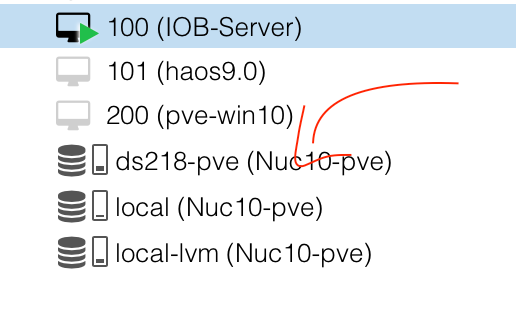
                                          Linux-Werkzeugkasten:
                                          https://forum.iobroker.net/topic/42952/der-kleine-iobroker-linux-werkzeugkasten
                                          NodeJS Fixer Skript:
                                          https://forum.iobroker.net/topic/68035/iob-node-fix-skript
                                          iob_diag: curl -sLf -o diag.sh https://iobroker.net/diag.sh && bash diag.sh

                                          D 1 Antwort Letzte Antwort
                                          0
                                          Antworten
                                          • In einem neuen Thema antworten
                                          Anmelden zum Antworten
                                          • Älteste zuerst
                                          • Neuste zuerst
                                          • Meiste Stimmen


                                          Support us

                                          ioBroker
                                          Community Adapters
                                          Donate

                                          610

                                          Online

                                          32.5k

                                          Benutzer

                                          81.6k

                                          Themen

                                          1.3m

                                          Beiträge
                                          Community
                                          Impressum | Datenschutz-Bestimmungen | Nutzungsbedingungen | Einwilligungseinstellungen
                                          ioBroker Community 2014-2025
                                          logo
                                          • Anmelden

                                          • Du hast noch kein Konto? Registrieren

                                          • Anmelden oder registrieren, um zu suchen
                                          • Erster Beitrag
                                            Letzter Beitrag
                                          0
                                          • Home
                                          • Aktuell
                                          • Tags
                                          • Ungelesen 0
                                          • Kategorien
                                          • Unreplied
                                          • Beliebt
                                          • GitHub
                                          • Docu
                                          • Hilfe