Weiter zum Inhalt
  • Home
  • Aktuell
  • Tags
  • 0 Ungelesen 0
  • Kategorien
  • Unreplied
  • Beliebt
  • GitHub
  • Docu
  • Hilfe
Skins
  • Hell
  • Brite
  • Cerulean
  • Cosmo
  • Flatly
  • Journal
  • Litera
  • Lumen
  • Lux
  • Materia
  • Minty
  • Morph
  • Pulse
  • Sandstone
  • Simplex
  • Sketchy
  • Spacelab
  • United
  • Yeti
  • Zephyr
  • Dunkel
  • Cyborg
  • Darkly
  • Quartz
  • Slate
  • Solar
  • Superhero
  • Vapor

  • Standard: (Kein Skin)
  • Kein Skin
Einklappen
ioBroker Logo

Community Forum

donate donate
  1. ioBroker Community Home
  2. Deutsch
  3. ioBroker Allgemein
  4. FLOT nicht mehr aufrufbar - Warnung im Protokoll

NEWS

  • Neuer ioBroker-Blog online: Monatsrückblick März/April 2026
    BluefoxB
    Bluefox
    8
    1
    559

  • Verwendung von KI bitte immer deutlich kennzeichnen
    HomoranH
    Homoran
    10
    1
    452

  • Monatsrückblick Januar/Februar 2026 ist online!
    BluefoxB
    Bluefox
    18
    1
    1.0k

FLOT nicht mehr aufrufbar - Warnung im Protokoll

Geplant Angeheftet Gesperrt Verschoben ioBroker Allgemein
60 Beiträge 3 Kommentatoren 4.8k Aufrufe 3 Beobachtet
  • Älteste zuerst
  • Neuste zuerst
  • Meiste Stimmen
Antworten
  • In einem neuen Thema antworten
Anmelden zum Antworten
Dieses Thema wurde gelöscht. Nur Nutzer mit entsprechenden Rechten können es sehen.
  • K Keulehd

    @homoran Danke das mit der Taste hatte ich übersehen :-)

    ======== Start marking the full check here =========

    Skript v.2023-06-20
    
    *** BASE SYSTEM ***
       Static hostname: HomeServer
             Icon name: computer-desktop
               Chassis: desktop
            Machine ID: 1592eab9854d408bb2ffeca18adb4314
               Boot ID: d4b9b898a4b24f82aed54e27b09ea7cd
      Operating System: Debian GNU/Linux 11 (bullseye)
                Kernel: Linux 5.10.0-25-amd64
          Architecture: x86-64
    
    model name      : Intel(R) Core(TM) i3-4160 CPU @ 3.60GHz
    Docker          : false
    Virtualization  : none
    Kernel          : x86_64
    Userland        : amd64
    
    Systemuptime and Load:
     10:30:29 up 16 days, 23:04,  2 users,  load average: 1.48, 1.24, 1.20
    CPU threads: 4
    
    
    *** Time and Time Zones ***
                   Local time: Mon 2023-10-02 10:30:29 CEST
               Universal time: Mon 2023-10-02 08:30:29 UTC
                     RTC time: Mon 2023-10-02 10:31:39
                    Time zone: Europe/Berlin (CEST, +0200)
    System clock synchronized: yes
                  NTP service: active
              RTC in local TZ: yes
    
    Warning: The system is configured to read the RTC time in the local time zone.
             This mode cannot be fully supported. It will create various problems
             with time zone changes and daylight saving time adjustments. The RTC
             time is never updated, it relies on external facilities to maintain it.
             If at all possible, use RTC in UTC by calling
             'timedatectl set-local-rtc 0'.
    
    *** User and Groups ***
    iobroker
    /home/iobroker
    iobroker tty dialout sudo audio video bluetooth
    
    *** X-Server-Setup ***
    X-Server:       true
    Desktop:
    Terminal:       tty
    Boot Target:    graphical.target
    
    *** MEMORY ***
                   total        used        free      shared  buff/cache   available
    Mem:            7.9G        5.5G        1.2G        2.0M        1.1G        2.0G
    Swap:           976M        950M         26M
    Total:          8.8G        6.5G        1.3G
    
             7862 M total memory
             5538 M used memory
             2740 M active memory
             3293 M inactive memory
             1245 M free memory
              311 M buffer memory
              766 M swap cache
              976 M total swap
              950 M used swap
               26 M free swap
    
    *** FILESYSTEM ***
    Filesystem                              Type      Size  Used Avail Use% Mounted on
    udev                                    devtmpfs  3.9G     0  3.9G   0% /dev
    tmpfs                                   tmpfs     787M  1.5M  785M   1% /run
    /dev/sda5                               ext4      135G   36G   93G  28% /
    tmpfs                                   tmpfs     3.9G   16K  3.9G   1% /dev/shm
    tmpfs                                   tmpfs     5.0M  4.0K  5.0M   1% /run/lock
    /dev/sda1                               vfat       96M   33M   64M  34% /boot/efi
    tmpfs                                   tmpfs     787M  100K  787M   1% /run/user/1001
    192.168.100.143:/mnt/pools/A/A0/Kameras nfs       5.4T  2.5T  3.0T  45% /media/nas
    
    Messages concerning ext4 filesystem in dmesg:
    [Fri Sep 15 11:26:09 2023] EXT4-fs (sda5): mounted filesystem with ordered data mode. Opts: (null)
    [Fri Sep 15 11:26:14 2023] EXT4-fs (sda5): re-mounted. Opts: errors=remount-ro
    
    Show mounted filesystems (real ones only):
    TARGET       SOURCE                                  FSTYPE OPTIONS
    /            /dev/sda5                               ext4   rw,relatime,errors=remount-ro
    |-/boot/efi  /dev/sda1                               vfat   rw,relatime,fmask=0077,dmask=0077,codepage=437,iocharset=ascii,shortname=mixed,utf8,errors=remount-ro
    `-/media/nas 192.168.100.143:/mnt/pools/A/A0/Kameras nfs    rw,relatime,vers=3,rsize=65536,wsize=65536,namlen=255,soft,nolock,proto=tcp,timeo=600,retrans=2,sec=sys,mountaddr=192.168.100.143,mountvers=3,mountport=895,mountproto=udp,local_lock=all,addr=192.168.100.143
    
    Files in neuralgic directories:
    
    /var:
    28G     /var/
    26G     /var/lib/motioneye/Camera1
    26G     /var/lib/motioneye
    26G     /var/lib
    7.2G    /var/lib/motioneye/Camera1/2023-06-10
    
    Hint: You are currently not seeing messages from other users and the system.
          Users in groups 'adm', 'systemd-journal' can see all messages.
          Pass -q to turn off this notice.
    Archived and active journals take up 416.1M in the file system.
    
    /opt/iobroker/backups:
    94M     /opt/iobroker/backups/
    
    /opt/iobroker/iobroker-data:
    498M    /opt/iobroker/iobroker-data/
    329M    /opt/iobroker/iobroker-data/files
    118M    /opt/iobroker/iobroker-data/backup-objects
    52M     /opt/iobroker/iobroker-data/files/javascript.admin
    42M     /opt/iobroker/iobroker-data/files/iot.admin/static
    
    The five largest files in iobroker-data are:
    35M     /opt/iobroker/iobroker-data/objects.jsonl
    33M     /opt/iobroker/iobroker-data/files/iot.admin/static/js/main.b86463fc.js.map
    21M     /opt/iobroker/iobroker-data/files/web.admin/static/js/main.edf7552a.js.map
    19M     /opt/iobroker/iobroker-data/files/scheduler.admin/static/js/main.df70fdfc.js.map
    18M     /opt/iobroker/iobroker-data/files/text2command.admin/static/js/main.274a4d8d.js.map
    
    *** NodeJS-Installation ***
    
    /usr/bin/nodejs         v19.9.0
    /usr/bin/node           v19.9.0
    /usr/bin/npm            9.6.3
    /usr/bin/npx            9.6.3
    
    
    nodejs:
      Installed: 19.9.0-deb-1nodesource1
      Candidate: 19.9.0-deb-1nodesource1
      Version table:
     *** 19.9.0-deb-1nodesource1 500
            500 https://deb.nodesource.com/node_19.x bullseye/main amd64 Packages
            100 /var/lib/dpkg/status
         12.22.12~dfsg-1~deb11u4 500
            500 http://security.debian.org/debian-security bullseye-security/main amd64 Packages
            500 http://deb.debian.org/debian bullseye-proposed-updates/main amd64 Packages
         12.22.12~dfsg-1~deb11u3 500
            500 http://deb.debian.org/debian bullseye/main amd64 Packages
    
    Temp directories causing npm8 problem: 0
    No problems detected
    
    Errors in npm tree: 0
    
    *** ioBroker-Installation ***
    
    ioBroker Status
    iobroker is running on this host.
    
    
    Objects type: jsonl
    States  type: jsonl
    
    No configuration change needed.
    
    
    Multihost discovery server: disabled
    Discovery authentication:   enabled
    Persistent activation:      disabled
    Objects:                    jsonl on 127.0.0.1
    States:                     jsonl on 127.0.0.1
    
    Core adapters versions
    js-controller:  5.0.12
    admin:          6.10.1
    javascript:     7.1.4
    
    Adapters from github:   3
    
    Adapter State
    + system.adapter.admin.0                  : admin                 : HomeServer                               -  enabled, port: 8085, bind: 0.0.0.0, run as: admin
      system.adapter.alarm.0                  : alarm                 : HomeServer                               - disabled
    + system.adapter.alexa2.0                 : alexa2                : HomeServer                               -  enabled
    + system.adapter.backitup.0               : backitup              : HomeServer                               -  enabled
    + system.adapter.bring.0                  : bring                 : HomeServer                               -  enabled
    + system.adapter.cloud.0                  : cloud                 : HomeServer                               -  enabled
      system.adapter.daswetter.0              : daswetter             : HomeServer                               -  enabled
    + system.adapter.discovery.0              : discovery             : HomeServer                               -  enabled
      system.adapter.dwd.0                    : dwd                   : HomeServer                               -  enabled
    + system.adapter.fb-checkpresence.0       : fb-checkpresence      : HomeServer                               -  enabled
      system.adapter.feiertage.0              : feiertage             : HomeServer                               -  enabled
      system.adapter.flot.0                   : flot                  : HomeServer                               - disabled
    + system.adapter.fritzdect.0              : fritzdect             : HomeServer                               -  enabled
    + system.adapter.fullybrowser.0           : fullybrowser          : HomeServer                               -  enabled
    + system.adapter.govee.0                  : govee                 : HomeServer                               -  enabled
    + system.adapter.heizoel.0                : heizoel               : HomeServer                               -  enabled
    + system.adapter.history.0                : history               : HomeServer                               -  enabled
    + system.adapter.homeconnect.0            : homeconnect           : HomeServer                               -  enabled
    + system.adapter.hue-extended.0           : hue-extended          : HomeServer                               -  enabled
    + system.adapter.hue.0                    : hue                   : HomeServer                               -  enabled, port: 443
      system.adapter.ical.0                   : ical                  : HomeServer                               -  enabled
      system.adapter.ical.1                   : ical                  : HomeServer                               -  enabled
      system.adapter.icons-icons8.0           : icons-icons8          : HomeServer                               -  enabled
      system.adapter.icons-mfd-png.0          : icons-mfd-png         : HomeServer                               - disabled
    + system.adapter.info.0                   : info                  : HomeServer                               -  enabled
    + system.adapter.iot.0                    : iot                   : HomeServer                               -  enabled
    + system.adapter.javascript.0             : javascript            : HomeServer                               -  enabled
    + system.adapter.linux-control.0          : linux-control         : HomeServer                               -  enabled
    + system.adapter.mediola-gateway.0        : mediola-gateway       : HomeServer                               -  enabled
    + system.adapter.mielecloudservice.0      : mielecloudservice     : HomeServer                               -  enabled
      system.adapter.mobile.0                 : mobile                : HomeServer                               - disabled
    + system.adapter.netatmo.0                : netatmo               : HomeServer                               -  enabled
    + system.adapter.nuki-extended.0          : nuki-extended         : HomeServer                               -  enabled
    + system.adapter.nuki.0                   : nuki                  : HomeServer                               -  enabled
    + system.adapter.nut.0                    : nut                   : HomeServer                               -  enabled
    + system.adapter.parcel.0                 : parcel                : HomeServer                               -  enabled
    + system.adapter.ping.0                   : ping                  : HomeServer                               -  enabled
      system.adapter.scenes.0                 : scenes                : HomeServer                               - disabled
      system.adapter.scheduler.0              : scheduler             : HomeServer                               - disabled
    + system.adapter.shelly.0                 : shelly                : HomeServer                               -  enabled, port: 1882, bind: 0.0.0.0
    + system.adapter.shuttercontrol.0         : shuttercontrol        : HomeServer                               -  enabled
    + system.adapter.simple-api.0             : simple-api            : HomeServer                               -  enabled, port: 8087, bind: 0.0.0.0, run as: admin
    + system.adapter.tankerkoenig.0           : tankerkoenig          : HomeServer                               -  enabled
    + system.adapter.telegram.0               : telegram              : HomeServer                               -  enabled, port: 8443, bind: 0.0.0.0
    + system.adapter.terminal.0               : terminal              : HomeServer                               -  enabled, port: 8088, bind: 0.0.0.0, run as: admin
    + system.adapter.text2command.0           : text2command          : HomeServer                               -  enabled
    + system.adapter.tr-064.0                 : tr-064                : HomeServer                               -  enabled
    + system.adapter.trashschedule.0          : trashschedule         : HomeServer                               -  enabled
    + system.adapter.tuya.0                   : tuya                  : HomeServer                               -  enabled
      system.adapter.tvspielfilm.0            : tvspielfilm           : HomeServer                               -  enabled
    + system.adapter.velux.0                  : velux                 : HomeServer                               -  enabled
      system.adapter.viessmannapi.0           : viessmannapi          : HomeServer                               - disabled
      system.adapter.vis-colorpicker.0        : vis-colorpicker       : HomeServer                               - disabled
      system.adapter.vis-google-fonts.0       : vis-google-fonts      : HomeServer                               -  enabled
      system.adapter.vis-hqwidgets.0          : vis-hqwidgets         : HomeServer                               - disabled
      system.adapter.vis-icontwo.0            : vis-icontwo           : HomeServer                               - disabled
    + system.adapter.vis-inventwo.0           : vis-inventwo          : HomeServer                               -  enabled
      system.adapter.vis-jqui-mfd.0           : vis-jqui-mfd          : HomeServer                               - disabled
      system.adapter.vis-metro.0              : vis-metro             : HomeServer                               - disabled
      system.adapter.vis-timeandweather.0     : vis-timeandweather    : HomeServer                               - disabled
      system.adapter.vis-weather.0            : vis-weather           : HomeServer                               - disabled
      system.adapter.vis.0                    : vis                   : HomeServer                               -  enabled
    + system.adapter.web.0                    : web                   : HomeServer                               -  enabled, port: 8083, bind: 0.0.0.0, run as: admin
    + system.adapter.web.1                    : web                   : HomeServer                               -  enabled, port: 20002, bind: 0.0.0.0, run as: admin
    + system.adapter.whatsapp-cmb.0           : whatsapp-cmb          : HomeServer                               -  enabled
    + system.adapter.zigbee.0                 : zigbee                : HomeServer                               -  enabled, port: /dev/serial/by-id/usb-ITead_Sonoff_Zigbee_3.0_USB_Dongle_Plus_b6218f1c57c9eb118db68d4f1d69213e-if00-port0
    
    + instance is alive
    
    Enabled adapters with bindings
    + system.adapter.admin.0                  : admin                 : HomeServer                               -  enabled, port: 8085, bind: 0.0.0.0, run as: admin
    + system.adapter.hue.0                    : hue                   : HomeServer                               -  enabled, port: 443
    + system.adapter.shelly.0                 : shelly                : HomeServer                               -  enabled, port: 1882, bind: 0.0.0.0
    + system.adapter.simple-api.0             : simple-api            : HomeServer                               -  enabled, port: 8087, bind: 0.0.0.0, run as: admin
    + system.adapter.telegram.0               : telegram              : HomeServer                               -  enabled, port: 8443, bind: 0.0.0.0
    + system.adapter.terminal.0               : terminal              : HomeServer                               -  enabled, port: 8088, bind: 0.0.0.0, run as: admin
    + system.adapter.web.0                    : web                   : HomeServer                               -  enabled, port: 8083, bind: 0.0.0.0, run as: admin
    + system.adapter.web.1                    : web                   : HomeServer                               -  enabled, port: 20002, bind: 0.0.0.0, run as: admin
    + system.adapter.zigbee.0                 : zigbee                : HomeServer                               -  enabled, port: /dev/serial/by-id/usb-ITead_Sonoff_Zigbee_3.0_USB_Dongle_Plus_b6218f1c57c9eb118db68d4f1d69213e-if00-port0
    
    ioBroker-Repositories
    Stable (default): http://download.iobroker.net/sources-dist.json
    Beta (latest) : http://download.iobroker.net/sources-dist-latest.json
    live          : http://iobroker.live/repo/sources-dist-latest.json
    
    Active repo(s): Stable (default)
    
    Installed ioBroker-Instances
    Used repository: Stable (default)
    Adapter    "admin"        : 6.10.1   , installed 6.10.1
    Adapter    "alarm"        : 3.3.12   , installed 3.3.12
    Adapter    "alexa2"       : 3.25.2   , installed 3.25.2
    Adapter    "backitup"     : 2.8.1    , installed 2.8.1
    Adapter    "bring"        : 1.8.1    , installed 1.8.1
    Adapter    "cloud"        : 4.4.1    , installed 4.4.1
    Adapter    "daswetter"    : 3.1.10   , installed 3.1.10
    Adapter    "discovery"    : 3.1.0    , installed 3.1.0
    Adapter    "dwd"          : 2.8.5    , installed 2.8.5
    Adapter    "fb-checkpresence": 1.2.2 , installed 1.2.2
    Adapter    "feiertage"    : 1.1.4    , installed 1.1.4
    Adapter    "flot"         : 1.12.0   , installed 1.12.0
    Adapter    "fritzdect"    : 2.3.1    , installed 2.3.1
    Adapter    "fullybrowser" : 2.1.2    , installed 2.1.2
    Adapter    "heizoel"      : 1.0.3    , installed 1.0.3
    Adapter    "history"      : 2.2.6    , installed 2.2.6
    Adapter    "homeconnect"  : 1.1.1    , installed 1.1.1
    Adapter    "hue"          : 3.10.0   , installed 3.10.0
    Adapter    "hue-extended" : 2.0.0    , installed 2.0.0
    Adapter    "ical"         : 1.13.3   , installed 1.13.3
    Adapter    "icons-icons8" : 0.0.1    , installed 0.0.1
    Adapter    "icons-mfd-png": 1.1.0    , installed 1.1.0
    Adapter    "info"         : 2.0.0    , installed 2.0.0
    Adapter    "iot"          : 1.14.5   , installed 2.0.3
    Adapter    "jarvis"       : 3.1.2    , installed 3.1.8
    Adapter    "javascript"   : 7.1.4    , installed 7.1.4
    Controller "js-controller": 5.0.12   , installed 5.0.12
    Adapter    "linux-control": 1.1.5    , installed 1.1.5
    Adapter    "mediola-gateway": 1.0.1  , installed 1.0.1
    Adapter    "mielecloudservice": 6.5.4, installed 6.5.4
    Adapter    "mobile"       : 1.0.1    , installed 1.0.1
    Adapter    "netatmo"      : 3.1.0    , installed 3.1.0
    Adapter    "nuki"         : 1.6.0    , installed 1.6.0
    Adapter    "nuki-extended": 2.6.5    , installed 2.6.5
    Adapter    "nut"          : 1.6.0    , installed 1.6.0
    Adapter    "parcel"       : 0.0.27   , installed 0.0.30
    Adapter    "ping"         : 1.6.2    , installed 1.6.2
    Adapter    "scenes"       : 2.3.9    , installed 2.3.9
    Adapter    "scheduler"    : 1.1.9    , installed 1.1.9
    Adapter    "shelly"       : 6.4.1    , installed 6.4.1
    Adapter    "shuttercontrol": 1.6.2   , installed 1.6.2
    Adapter    "simple-api"   : 2.7.2    , installed 2.7.2
    Adapter    "socketio"     : 6.5.5    , installed 6.5.5
    Adapter    "tankerkoenig" : 3.3.7    , installed 3.3.7
    Adapter    "telegram"     : 1.16.0   , installed 1.16.0
    Adapter    "terminal"     : 1.0.0    , installed 1.0.0
    Adapter    "text2command" : 3.0.2    , installed 3.0.2
    Adapter    "tr-064"       : 4.2.18   , installed 4.2.18
    Adapter    "trashschedule": 2.2.0    , installed 2.2.0
    Adapter    "tuya"         : 3.14.2   , installed 3.14.2
    Adapter    "tvspielfilm"  : 2.0.4    , installed 2.0.5
    Adapter    "velux"        : 0.0.7    , installed 0.0.7
    Adapter    "viessmannapi" : 2.0.9    , installed 2.1.1
    Adapter    "vis"          : 1.4.16   , installed 1.4.16
    Adapter    "vis-colorpicker": 2.0.3  , installed 2.0.3
    Adapter    "vis-google-fonts": 1.0.4 , installed 1.0.4
    Adapter    "vis-hqwidgets": 1.4.0    , installed 1.4.0
    Adapter    "vis-icontwo"  : 0.96.0   , installed 0.96.0
    Adapter    "vis-inventwo" : 3.3.3    , installed 3.3.3
    Adapter    "vis-jqui-mfd" : 1.0.12   , installed 1.0.12
    Adapter    "vis-metro"    : 1.2.0    , installed 1.2.0
    Adapter    "vis-timeandweather": 1.2.2, installed 1.2.2
    Adapter    "vis-weather"  : 2.5.6    , installed 2.5.6
    Adapter    "web"          : 6.1.2    , installed 6.1.2
    Adapter    "whatsapp-cmb" : 0.2.3    , installed 0.2.3
    Adapter    "ws"           : 2.5.5    , installed 2.5.5
    Adapter    "zigbee"       : 1.8.23   , installed 1.8.23
    
    Objects and States
    Please stand by - This may take a while
    Objects:        16232
    States:         13899
    
    *** OS-Repositories and Updates ***
    Hit:1 http://security.debian.org/debian-security bullseye-security InRelease
    Hit:2 http://deb.debian.org/debian bullseye InRelease
    Hit:3 http://deb.debian.org/debian bullseye-updates InRelease
    Hit:4 http://deb.debian.org/debian bullseye-proposed-updates InRelease
    Get:5 https://deb.nodesource.com/node_19.x bullseye InRelease [4586 B]
    Fetched 4586 B in 0s (11.0 kB/s)
    Reading package lists...
    Pending Updates: 54
    
    *** Listening Ports ***
    Active Internet connections (only servers)
    Proto Recv-Q Send-Q Local Address           Foreign Address         State       User       Inode      PID/Program name
    tcp        0      0 127.0.0.1:9001          0.0.0.0:*               LISTEN      1001       149471     15332/iobroker.js-c
    tcp        0      0 0.0.0.0:8554            0.0.0.0:*               LISTEN      998        17860      937/monocle-proxy
    tcp        0      0 0.0.0.0:8555            0.0.0.0:*               LISTEN      998        16298      514/monocle-gateway
    tcp        0      0 0.0.0.0:111             0.0.0.0:*               LISTEN      0          13159      1/init
    tcp        0      0 0.0.0.0:8080            0.0.0.0:*               LISTEN      0          16677      831/motion
    tcp        0      0 0.0.0.0:8082            0.0.0.0:*               LISTEN      0          16678      831/motion
    tcp        0      0 192.168.100.146:40499   0.0.0.0:*               LISTEN      1001       19849      1382/rygel
    tcp        0      0 0.0.0.0:22              0.0.0.0:*               LISTEN      0          16432      553/sshd: /usr/sbin
    tcp        0      0 127.0.0.1:631           0.0.0.0:*               LISTEN      0          28815763   3047962/cupsd
    tcp        0      0 0.0.0.0:1882            0.0.0.0:*               LISTEN      1001       19617265   2068566/io.shelly.0
    tcp        0      0 0.0.0.0:443             0.0.0.0:*               LISTEN      998        16299      514/monocle-gateway
    tcp        0      0 127.0.0.1:44829         0.0.0.0:*               LISTEN      1001       21534      1382/rygel
    tcp        0      0 0.0.0.0:8765            0.0.0.0:*               LISTEN      0          16224      471/python2
    tcp        0      0 127.0.0.1:7999          0.0.0.0:*               LISTEN      0          16679      831/motion
    tcp        0      0 127.0.0.1:3493          0.0.0.0:*               LISTEN      0          15121      838/upsd
    tcp        0      0 192.168.100.146:3493    0.0.0.0:*               LISTEN      0          15120      838/upsd
    tcp        0      0 127.0.0.1:9000          0.0.0.0:*               LISTEN      1001       151262     15332/iobroker.js-c
    tcp6       0      0 :::5900                 :::*                    LISTEN      1001       20538      1380/gnome-remote-d
    tcp6       0      0 :::111                  :::*                    LISTEN      0          13163      1/init
    tcp6       0      0 :::80                   :::*                    LISTEN      0          14883      573/apache2
    tcp6       0      0 fe80::921b:eff:fe:42737 :::*                    LISTEN      1001       21536      1382/rygel
    tcp6       0      0 :::8083                 :::*                    LISTEN      1001       29522344   3120517/io.web.0
    tcp6       0      0 :::8085                 :::*                    LISTEN      1001       7480811    803666/io.admin.0
    tcp6       0      0 :::22                   :::*                    LISTEN      0          16434      553/sshd: /usr/sbin
    tcp6       0      0 ::1:631                 :::*                    LISTEN      0          28815762   3047962/cupsd
    tcp6       0      0 :::8087                 :::*                    LISTEN      1001       157166     16518/io.simple-api
    tcp6       0      0 :::8088                 :::*                    LISTEN      1001       7496542    805968/io.terminal.
    tcp6       0      0 ::1:37885               :::*                    LISTEN      1001       19850      1382/rygel
    tcp6       0      0 :::20002                :::*                    LISTEN      1001       29540207   3122606/io.web.1
    tcp6       0      0 :::41767                :::*                    LISTEN      1001       20543      1416/apache2
    udp        0      0 0.0.0.0:111             0.0.0.0:*                           0          13160      1/init
    udp        0      0 0.0.0.0:631             0.0.0.0:*                           0          28817212   3048024/cups-browse
    udp        0      0 127.0.0.1:54408         0.0.0.0:*                           1001       19814      1382/rygel
    udp        0      0 0.0.0.0:5353            0.0.0.0:*                           110        12258      465/avahi-daemon: r
    udp        0      0 239.255.255.250:1900    0.0.0.0:*                           1001       19817      1382/rygel
    udp        0      0 192.168.100.146:1900    0.0.0.0:*                           1001       19816      1382/rygel
    udp        0      0 239.255.255.250:1900    0.0.0.0:*                           1001       19812      1382/rygel
    udp        0      0 127.0.0.1:1900          0.0.0.0:*                           1001       19811      1382/rygel
    udp        0      0 0.0.0.0:1902            0.0.0.0:*                           1001       19649119   2072136/io.mediola-
    udp        0      0 192.168.100.146:39339   0.0.0.0:*                           1001       19819      1382/rygel
    udp        0      0 0.0.0.0:6666            0.0.0.0:*                           1001       23130468   2438157/io.tuya.0
    udp        0      0 0.0.0.0:6667            0.0.0.0:*                           1001       23130469   2438157/io.tuya.0
    udp        0      0 0.0.0.0:47675           0.0.0.0:*                           1001       19649120   2072136/io.mediola-
    udp        0      0 0.0.0.0:35912           0.0.0.0:*                           110        12260      465/avahi-daemon: r
    udp6       0      0 :::111                  :::*                                0          13166      1/init
    udp6       0      0 fe80::921b:eff:fe45:546 :::*                                0          15918      468/NetworkManager
    udp6       0      0 :::5353                 :::*                                110        12259      465/avahi-daemon: r
    udp6       0      0 ::1:59194               :::*                                1001       19825      1382/rygel
    udp6       0      0 ::1:1900                :::*                                1001       19822      1382/rygel
    udp6       0      0 ff05::c:1900            :::*                                1001       19823      1382/rygel
    udp6       0      0 fe80::921b:eff:fe4:1900 :::*                                1001       19828      1382/rygel
    udp6       0      0 ff02::c:1900            :::*                                1001       19829      1382/rygel
    udp6       0      0 fe80::921b:eff:fe:47046 :::*                                1001       19831      1382/rygel
    udp6       0      0 :::35528                :::*                                110        12261      465/avahi-daemon: r
    
    *** Log File - Last 25 Lines ***
    
    2023-10-02 10:30:12.257  - info: host.HomeServer instance system.adapter.ical.0 started with pid 3128425
    2023-10-02 10:30:13.469  - info: tvspielfilm.0 (3128372) Terminated (NO_ERROR): Without reason
    2023-10-02 10:30:13.522  - info: ical.0 (3128425) starting. Version 1.13.3 in /opt/iobroker/node_modules/iobroker.ical, node: v19.9.0, js-controller: 5.0.12
    2023-10-02 10:30:13.982  - info: host.HomeServer instance system.adapter.tvspielfilm.0 terminated with code 0 (NO_ERROR)
    2023-10-02 10:30:14.099  - info: ical.0 (3128425) processing URL: 
    2023-10-02 10:30:15.447  - info: ical.0 (3128425) processing URL:
    2023-10-02 10:30:16.287  - info: host.HomeServer instance system.adapter.ical.1 started with pid 3128450
    2023-10-02 10:30:17.200  - info: ical.1 (3128450) starting. Version 1.13.3 in /opt/iobroker/node_modules/iobroker.ical, node: v19.9.0, js-controller: 5.0.12
    2023-10-02 10:30:17.449  - info: daswetter.0 (3128408) still wrong data structure from server received! repaired...
    2023-10-02 10:30:17.942  - info: ical.1 (3128450) processing URL: 
    2023-10-02 10:30:19.501  - info: daswetter.0 (3128408) Terminated (ADAPTER_REQUESTED_TERMINATION): All data handled, adapter stopped until next scheduled moment
    2023-10-02 10:30:20.014  - info: daswetter.0 (3128408) cleaned everything up...
    2023-10-02 10:30:20.029  - info: host.HomeServer instance system.adapter.daswetter.0 terminated with code 11 (ADAPTER_REQUESTED_TERMINATION)
    2023-10-02 10:30:20.937  - info: ical.0 (3128425) Terminated (NO_ERROR): Without reason
    2023-10-02 10:30:21.473  - info: host.HomeServer instance system.adapter.ical.0 terminated with code 0 (NO_ERROR)
    2023-10-02 10:30:23.078  - info: ical.1 (3128450) Terminated (NO_ERROR): Without reason
    2023-10-02 10:30:23.607  - info: host.HomeServer instance system.adapter.ical.1 terminated with code 0 (NO_ERROR)
    2023-10-02 10:30:33.947  - info: linux-control.0 (16739) getting data from Debian_11 (192.168.100.146:22)
    2023-10-02 10:30:37.374  - info: linux-control.0 (16739) successful received data from Debian_11 (192.168.100.146:22)
    2023-10-02 10:30:45.373  - info: admin.0 (803666) <== Disconnect system.user.admin from ::ffff:192.168.100.163 admin
    2023-10-02 10:30:46.837  - info: web.0 (3120517) <== Disconnect system.user.admin from ::ffff:192.168.100.163 flotEditDialog
    2023-10-02 10:30:47.216  - info: web.0 (3120517) <== Disconnect system.user.admin from ::ffff:192.168.100.163 flotEdit
    2023-10-02 10:30:48.519  - info: web.0 (3120517) <== Disconnect system.user.admin from ::ffff:192.168.100.163 flot
    2023-10-02 10:30:49.286  - info: web.0 (3120517) <== Disconnect system.user.admin from ::ffff:192.168.100.163 vis.0
    2023-10-02 10:30:52.809  - info: web.0 (3120517) <== Disconnect system.user.admin from ::ffff:192.168.100.163 vis.0


    ============ Mark until here for C&P =============

    iob diag has finished.

    Press any key for a summary

    HomoranH Nicht stören
    HomoranH Nicht stören
    Homoran
    Global Moderator Administrators
    schrieb am zuletzt editiert von
    #15

    @keulehd dem log nach warst du aber gerade in flot und flot edit ohne Fehler

    kein Support per PN! - Fragen im Forum stellen -
    Benutzt das Voting rechts unten im Beitrag wenn er euch geholfen hat.
    Das Forum freut sich über eine Spende. Benutzt dazu den Spendenbutton oben rechts. Danke!
    der Installationsfixer: curl -fsL https://iobroker.net/fix.sh | bash -

    K 1 Antwort Letzte Antwort
    0
    • Thomas BraunT Thomas Braun

      @keulehd

      Zusätzlich zum bisherigen:

      Deine Uhr ist falsch gesetzt.

      K Offline
      K Offline
      Keulehd
      schrieb am zuletzt editiert von
      #16

      @thomas-braun Im Protokoll stehen aber die richtigen Zeiten ? Wo stelle ich das ein ?

      Thomas BraunT 1 Antwort Letzte Antwort
      0
      • HomoranH Homoran

        @keulehd dem log nach warst du aber gerade in flot und flot edit ohne Fehler

        K Offline
        K Offline
        Keulehd
        schrieb am zuletzt editiert von
        #17

        @homoran Ja aber ich sehe keine Diagramme. Dreht sich nur kurz der blaue Kreis und das war es leider

        HomoranH 1 Antwort Letzte Antwort
        0
        • K Keulehd

          @thomas-braun Im Protokoll stehen aber die richtigen Zeiten ? Wo stelle ich das ein ?

          Thomas BraunT Online
          Thomas BraunT Online
          Thomas Braun
          Most Active
          schrieb am zuletzt editiert von
          #18

          @keulehd

          Steht doch da:

          If at all possible, use RTC in UTC by calling

          sudo timedatectl set-local-rtc 0
          

          Und meld dich nicht als 'iobroker' an sondern als der User mit der uid 1000. Wie auch immer der heißt. Und den User packst du dann in die Gruppe 'adm', wenn er da noch nicht drin sein sollte.

          Linux-Werkzeugkasten:
          https://forum.iobroker.net/topic/42952/der-kleine-iobroker-linux-werkzeugkasten
          NodeJS Fixer Skript:
          https://forum.iobroker.net/topic/68035/iob-node-fix-skript
          iob_diag: curl -sLf -o diag.sh https://iobroker.net/diag.sh && bash diag.sh

          1 Antwort Letzte Antwort
          0
          • K Keulehd

            @homoran Ja aber ich sehe keine Diagramme. Dreht sich nur kurz der blaue Kreis und das war es leider

            HomoranH Nicht stören
            HomoranH Nicht stören
            Homoran
            Global Moderator Administrators
            schrieb am zuletzt editiert von
            #19

            @keulehd sagte in FLOT nicht mehr aufrufbar - Warnung im Protokoll:

            @homoran Ja aber ich sehe keine Diagramme. Dreht sich nur kurz der blaue Kreis und das war es leider

            aber da ist die von dir angegebene Fehlermeldung

            @keulehd sagte in FLOT nicht mehr aufrufbar - Warnung im Protokoll:

            socket 1696234046996 changed socket name from selectID to flotEditDialog

            nicht zu sehen.

            über welchen Port bist du denn jetzt rein?
            laut log über web.0, also 8082

            kein Support per PN! - Fragen im Forum stellen -
            Benutzt das Voting rechts unten im Beitrag wenn er euch geholfen hat.
            Das Forum freut sich über eine Spende. Benutzt dazu den Spendenbutton oben rechts. Danke!
            der Installationsfixer: curl -fsL https://iobroker.net/fix.sh | bash -

            K 1 Antwort Letzte Antwort
            0
            • Thomas BraunT Thomas Braun

              @keulehd

              Desktop ausschalten, Updates einspielen und nodejs@18 installieren.

              K Offline
              K Offline
              Keulehd
              schrieb am zuletzt editiert von
              #20

              @thomas-braun Desktop ausschalten ?
              Updates mache ich
              nodejs downgrade ? Geht das so einfach ohne was kaputt zu machen ?

              Thomas BraunT HomoranH 2 Antworten Letzte Antwort
              0
              • K Keulehd

                @thomas-braun Desktop ausschalten ?
                Updates mache ich
                nodejs downgrade ? Geht das so einfach ohne was kaputt zu machen ?

                Thomas BraunT Online
                Thomas BraunT Online
                Thomas Braun
                Most Active
                schrieb am zuletzt editiert von
                #21

                @keulehd sagte in FLOT nicht mehr aufrufbar - Warnung im Protokoll:

                nodejs downgrade ?

                Geht z.B. mit dem Skript aus meiner Signatur.

                Linux-Werkzeugkasten:
                https://forum.iobroker.net/topic/42952/der-kleine-iobroker-linux-werkzeugkasten
                NodeJS Fixer Skript:
                https://forum.iobroker.net/topic/68035/iob-node-fix-skript
                iob_diag: curl -sLf -o diag.sh https://iobroker.net/diag.sh && bash diag.sh

                K 1 Antwort Letzte Antwort
                0
                • K Keulehd

                  @thomas-braun Desktop ausschalten ?
                  Updates mache ich
                  nodejs downgrade ? Geht das so einfach ohne was kaputt zu machen ?

                  HomoranH Nicht stören
                  HomoranH Nicht stören
                  Homoran
                  Global Moderator Administrators
                  schrieb am zuletzt editiert von
                  #22

                  @keulehd sagte in FLOT nicht mehr aufrufbar - Warnung im Protokoll:

                  nodejs downgrade ? Geht das so einfach ohne was kaputt zu machen ?

                  nimm das node-fix Skript bei @Thomas-Braun in der Signatur

                  kein Support per PN! - Fragen im Forum stellen -
                  Benutzt das Voting rechts unten im Beitrag wenn er euch geholfen hat.
                  Das Forum freut sich über eine Spende. Benutzt dazu den Spendenbutton oben rechts. Danke!
                  der Installationsfixer: curl -fsL https://iobroker.net/fix.sh | bash -

                  1 Antwort Letzte Antwort
                  0
                  • HomoranH Homoran

                    @keulehd sagte in FLOT nicht mehr aufrufbar - Warnung im Protokoll:

                    @homoran Ja aber ich sehe keine Diagramme. Dreht sich nur kurz der blaue Kreis und das war es leider

                    aber da ist die von dir angegebene Fehlermeldung

                    @keulehd sagte in FLOT nicht mehr aufrufbar - Warnung im Protokoll:

                    socket 1696234046996 changed socket name from selectID to flotEditDialog

                    nicht zu sehen.

                    über welchen Port bist du denn jetzt rein?
                    laut log über web.0, also 8082

                    K Offline
                    K Offline
                    Keulehd
                    schrieb am zuletzt editiert von
                    #23

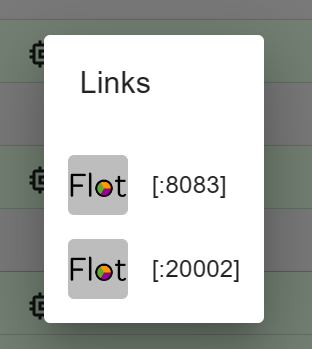
                    @homoran 8082 ist die VIS

                    1b7197d1-2268-47ec-9c2d-e125e59cf068-image.png

                    HomoranH Thomas BraunT 2 Antworten Letzte Antwort
                    0
                    • K Keulehd

                      @homoran 8082 ist die VIS

                      1b7197d1-2268-47ec-9c2d-e125e59cf068-image.png

                      HomoranH Nicht stören
                      HomoranH Nicht stören
                      Homoran
                      Global Moderator Administrators
                      schrieb am zuletzt editiert von Homoran
                      #24

                      @keulehd sagte in FLOT nicht mehr aufrufbar - Warnung im Protokoll:

                      8082 ist die VIS

                      wie soll das gehen?

                      und ja, 8083 ist im Web.0

                      ruf mal <DeineIobIP>:8083 auf

                      kein Support per PN! - Fragen im Forum stellen -
                      Benutzt das Voting rechts unten im Beitrag wenn er euch geholfen hat.
                      Das Forum freut sich über eine Spende. Benutzt dazu den Spendenbutton oben rechts. Danke!
                      der Installationsfixer: curl -fsL https://iobroker.net/fix.sh | bash -

                      K 1 Antwort Letzte Antwort
                      0
                      • K Keulehd

                        @homoran 8082 ist die VIS

                        1b7197d1-2268-47ec-9c2d-e125e59cf068-image.png

                        Thomas BraunT Online
                        Thomas BraunT Online
                        Thomas Braun
                        Most Active
                        schrieb am zuletzt editiert von
                        #25

                        @keulehd sagte in FLOT nicht mehr aufrufbar - Warnung im Protokoll:

                        8082 ist die VIS

                        Nein, da lauscht schon motion drauf.

                        Linux-Werkzeugkasten:
                        https://forum.iobroker.net/topic/42952/der-kleine-iobroker-linux-werkzeugkasten
                        NodeJS Fixer Skript:
                        https://forum.iobroker.net/topic/68035/iob-node-fix-skript
                        iob_diag: curl -sLf -o diag.sh https://iobroker.net/diag.sh && bash diag.sh

                        1 Antwort Letzte Antwort
                        0
                        • Thomas BraunT Thomas Braun

                          @keulehd sagte in FLOT nicht mehr aufrufbar - Warnung im Protokoll:

                          nodejs downgrade ?

                          Geht z.B. mit dem Skript aus meiner Signatur.

                          K Offline
                          K Offline
                          Keulehd
                          schrieb am zuletzt editiert von
                          #26

                          @thomas-braun So lieben Dank für die Hilfe. nodejs 18.18 sowie alle Updates installiert. Wie sehe ich das mit der falschen Uhrzeit ?

                          Thomas BraunT 1 Antwort Letzte Antwort
                          0
                          • K Keulehd

                            @thomas-braun So lieben Dank für die Hilfe. nodejs 18.18 sowie alle Updates installiert. Wie sehe ich das mit der falschen Uhrzeit ?

                            Thomas BraunT Online
                            Thomas BraunT Online
                            Thomas Braun
                            Most Active
                            schrieb am zuletzt editiert von
                            #27

                            @keulehd sagte in FLOT nicht mehr aufrufbar - Warnung im Protokoll:

                            Wie sehe ich das mit der falschen Uhrzeit ?

                            Im

                            iob diag
                            

                            steht es drin.

                            Linux-Werkzeugkasten:
                            https://forum.iobroker.net/topic/42952/der-kleine-iobroker-linux-werkzeugkasten
                            NodeJS Fixer Skript:
                            https://forum.iobroker.net/topic/68035/iob-node-fix-skript
                            iob_diag: curl -sLf -o diag.sh https://iobroker.net/diag.sh && bash diag.sh

                            1 Antwort Letzte Antwort
                            0
                            • HomoranH Homoran

                              @keulehd sagte in FLOT nicht mehr aufrufbar - Warnung im Protokoll:

                              8082 ist die VIS

                              wie soll das gehen?

                              und ja, 8083 ist im Web.0

                              ruf mal <DeineIobIP>:8083 auf

                              K Offline
                              K Offline
                              Keulehd
                              schrieb am zuletzt editiert von
                              #28

                              @homoran
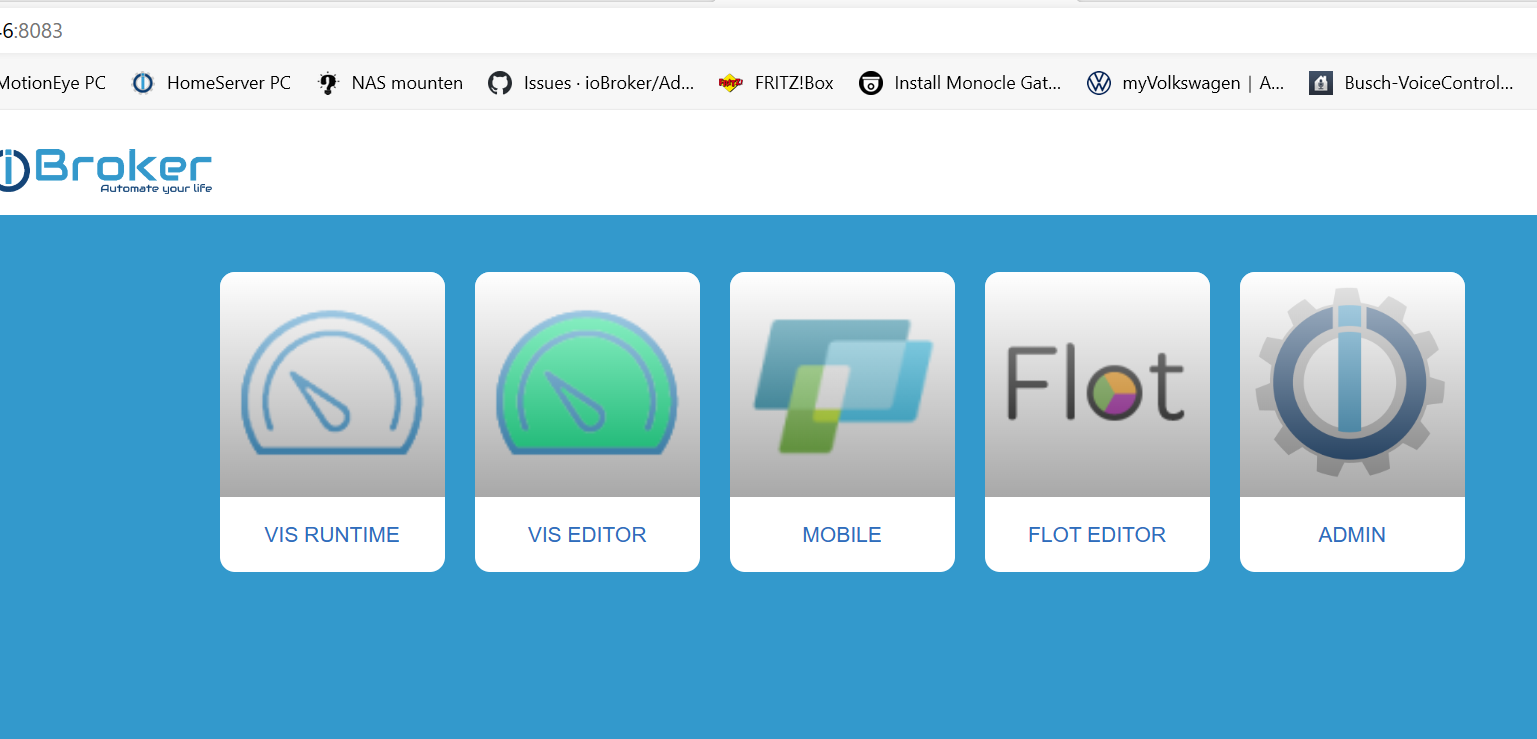
                              a838fcc1-dc85-4990-8658-dca33a0bae8c-image.png

                              Das kommt beim Aufruf von :8083

                              FLOT immer noch gleiches Problem nach Downgrade und Updates

                              HomoranH 1 Antwort Letzte Antwort
                              0
                              • K Keulehd

                                @homoran
                                a838fcc1-dc85-4990-8658-dca33a0bae8c-image.png

                                Das kommt beim Aufruf von :8083

                                FLOT immer noch gleiches Problem nach Downgrade und Updates

                                HomoranH Nicht stören
                                HomoranH Nicht stören
                                Homoran
                                Global Moderator Administrators
                                schrieb am zuletzt editiert von
                                #29

                                @keulehd sagte in FLOT nicht mehr aufrufbar - Warnung im Protokoll:

                                Das kommt beim Aufruf von :8083

                                und da ist vis und flot!

                                @keulehd sagte in FLOT nicht mehr aufrufbar - Warnung im Protokoll:

                                FLOT immer noch gleiches Problem nach Downgrade und Updates

                                auch wenn du da auf den Button klickst?

                                kein Support per PN! - Fragen im Forum stellen -
                                Benutzt das Voting rechts unten im Beitrag wenn er euch geholfen hat.
                                Das Forum freut sich über eine Spende. Benutzt dazu den Spendenbutton oben rechts. Danke!
                                der Installationsfixer: curl -fsL https://iobroker.net/fix.sh | bash -

                                K 2 Antworten Letzte Antwort
                                0
                                • HomoranH Homoran

                                  @keulehd sagte in FLOT nicht mehr aufrufbar - Warnung im Protokoll:

                                  Das kommt beim Aufruf von :8083

                                  und da ist vis und flot!

                                  @keulehd sagte in FLOT nicht mehr aufrufbar - Warnung im Protokoll:

                                  FLOT immer noch gleiches Problem nach Downgrade und Updates

                                  auch wenn du da auf den Button klickst?

                                  K Offline
                                  K Offline
                                  Keulehd
                                  schrieb am zuletzt editiert von
                                  #30

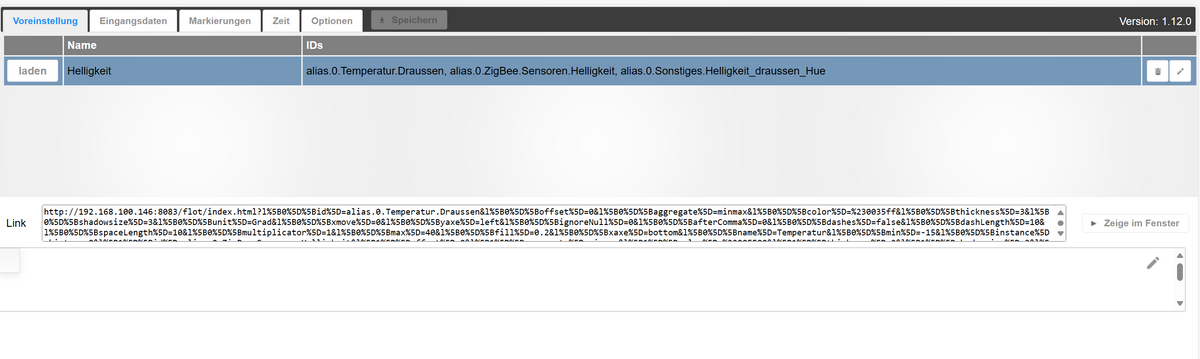
                                  @homoran VIS funktioniert. FLOT nicht. Beim Klicken auf den Button FLOT kommt seit gestern immer noch folgendes Bild:

                                  f76ef4f4-6533-4e74-839b-e3cead103a53-image.png

                                  1 Antwort Letzte Antwort
                                  0
                                  • HomoranH Homoran

                                    @keulehd sagte in FLOT nicht mehr aufrufbar - Warnung im Protokoll:

                                    Das kommt beim Aufruf von :8083

                                    und da ist vis und flot!

                                    @keulehd sagte in FLOT nicht mehr aufrufbar - Warnung im Protokoll:

                                    FLOT immer noch gleiches Problem nach Downgrade und Updates

                                    auch wenn du da auf den Button klickst?

                                    K Offline
                                    K Offline
                                    Keulehd
                                    schrieb am zuletzt editiert von
                                    #31

                                    @homoran Und wieder die Meldung:

                                    web.0
                                    2023-10-02 11:07:57.556 warn socket 1696237677712 changed socket name from selectID to flotEditDialog

                                    HomoranH 1 Antwort Letzte Antwort
                                    0
                                    • Thomas BraunT Thomas Braun

                                      @keulehd

                                      Zusätzlich zum bisherigen:

                                      Deine Uhr ist falsch gesetzt.

                                      K Offline
                                      K Offline
                                      Keulehd
                                      schrieb am zuletzt editiert von
                                      #32

                                      @thomas-braun Jetzt hab ich das mit der Uhr irgendwie total verstellt :-(

                                      *** Time and Time Zones ***
                                      Local time: Mon 2023-10-02 11:24:01 CEST
                                      Universal time: Mon 2023-10-02 09:24:01 UTC
                                      RTC time: Mon 2023-10-02 09:24:02
                                      Time zone: Europe/Berlin (CEST, +0200)
                                      System clock synchronized: yes
                                      NTP service: active
                                      RTC in local TZ: no

                                      Hast Du da noch nen Tipp für mich ?

                                      Thomas BraunT 1 Antwort Letzte Antwort
                                      0
                                      • K Keulehd

                                        @thomas-braun Jetzt hab ich das mit der Uhr irgendwie total verstellt :-(

                                        *** Time and Time Zones ***
                                        Local time: Mon 2023-10-02 11:24:01 CEST
                                        Universal time: Mon 2023-10-02 09:24:01 UTC
                                        RTC time: Mon 2023-10-02 09:24:02
                                        Time zone: Europe/Berlin (CEST, +0200)
                                        System clock synchronized: yes
                                        NTP service: active
                                        RTC in local TZ: no

                                        Hast Du da noch nen Tipp für mich ?

                                        Thomas BraunT Online
                                        Thomas BraunT Online
                                        Thomas Braun
                                        Most Active
                                        schrieb am zuletzt editiert von
                                        #33

                                        @keulehd

                                        Warum? Passt.

                                        Linux-Werkzeugkasten:
                                        https://forum.iobroker.net/topic/42952/der-kleine-iobroker-linux-werkzeugkasten
                                        NodeJS Fixer Skript:
                                        https://forum.iobroker.net/topic/68035/iob-node-fix-skript
                                        iob_diag: curl -sLf -o diag.sh https://iobroker.net/diag.sh && bash diag.sh

                                        K 1 Antwort Letzte Antwort
                                        0
                                        • Thomas BraunT Thomas Braun

                                          @keulehd

                                          Warum? Passt.

                                          K Offline
                                          K Offline
                                          Keulehd
                                          schrieb am zuletzt editiert von
                                          #34

                                          @thomas-braun Ah o.k. Vielen Dank. Aber mit meiner FLOT Geschichte hast Du grad auch keine Idee mehr oder ? :-(

                                          Thomas BraunT 1 Antwort Letzte Antwort
                                          0

                                          Hey! Du scheinst an dieser Unterhaltung interessiert zu sein, hast aber noch kein Konto.

                                          Hast du es satt, bei jedem Besuch durch die gleichen Beiträge zu scrollen? Wenn du dich für ein Konto anmeldest, kommst du immer genau dorthin zurück, wo du zuvor warst, und kannst dich über neue Antworten benachrichtigen lassen (entweder per E-Mail oder Push-Benachrichtigung). Du kannst auch Lesezeichen speichern und Beiträge positiv bewerten, um anderen Community-Mitgliedern deine Wertschätzung zu zeigen.

                                          Mit deinem Input könnte dieser Beitrag noch besser werden 💗

                                          Registrieren Anmelden
                                          Antworten
                                          • In einem neuen Thema antworten
                                          Anmelden zum Antworten
                                          • Älteste zuerst
                                          • Neuste zuerst
                                          • Meiste Stimmen


                                          Support us

                                          ioBroker
                                          Community Adapters
                                          Donate
                                          FAQ Cloud / IOT
                                          HowTo: Node.js-Update
                                          HowTo: Backup/Restore
                                          Downloads
                                          BLOG

                                          485

                                          Online

                                          32.8k

                                          Benutzer

                                          82.9k

                                          Themen

                                          1.3m

                                          Beiträge
                                          Community
                                          Impressum | Datenschutz-Bestimmungen | Nutzungsbedingungen | Einwilligungseinstellungen
                                          ioBroker Community 2014-2025
                                          logo
                                          • Anmelden

                                          • Du hast noch kein Konto? Registrieren

                                          • Anmelden oder registrieren, um zu suchen
                                          • Erster Beitrag
                                            Letzter Beitrag
                                          0
                                          • Home
                                          • Aktuell
                                          • Tags
                                          • Ungelesen 0
                                          • Kategorien
                                          • Unreplied
                                          • Beliebt
                                          • GitHub
                                          • Docu
                                          • Hilfe