



Test Adapter Pylontech v0.0.10
-
Ah, you mean this small note?:
Please note: The RS485 and Canbus interfaces are not for this adapter. They speak a different language.
Ok, maybe RS485 is modbus. By the way I had a technical onsite support at my system who has read the status with a cable to the RS485 connector here. They had used the normal own software to check the status of all cells.
Maybe there is a hidden RS232 on the port as well or it is possible to switch to a cli like interface.
I would like to check it. Any idea?Maybe it is possible to add support for low voltage force towers if the protocol becomes more clear.
-
Ah, you mean this small note?:
Please note: The RS485 and Canbus interfaces are not for this adapter. They speak a different language.
Ok, maybe RS485 is modbus. By the way I had a technical onsite support at my system who has read the status with a cable to the RS485 connector here. They had used the normal own software to check the status of all cells.
Maybe there is a hidden RS232 on the port as well or it is possible to switch to a cli like interface.
I would like to check it. Any idea?Maybe it is possible to add support for low voltage force towers if the protocol becomes more clear.
@tasuanetrukiat sagte:
Maybe there is a hidden RS232 on the port as well or it is possible to switch to a cli like interface.
I would like to check it. Any idea?Yes, RTFM would have solved that issue.
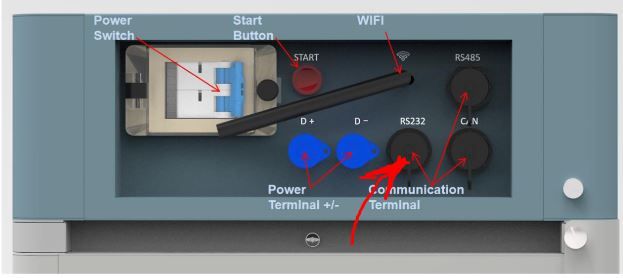
https://github.com/PLCHome/ioBroker.pylontech/blob/master/media/H2.JPG
-
Ok, I checked my Force-L1 Controller today an found out the connector is labeled as RS485/RS232 against described in my manual which is only shown RS485.
So looks like RS232 is connected on Pin 3 + 6 where RS485 is on Pin 7 + 8.
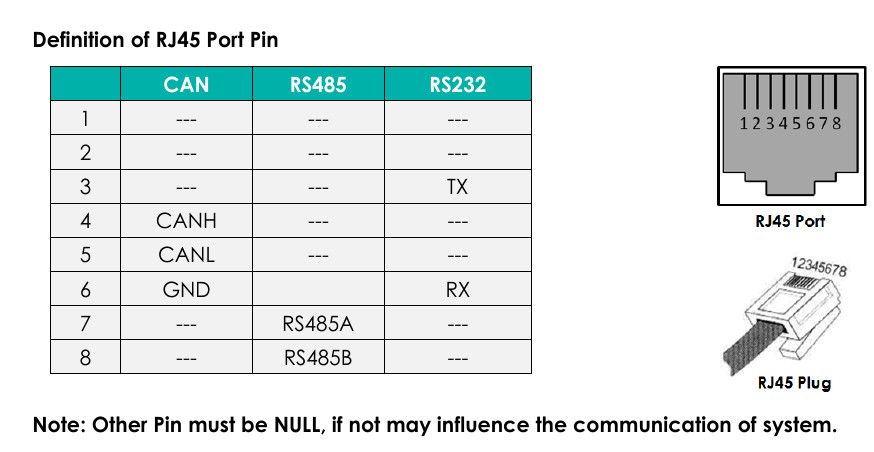
By the way where ist GND for RS232? It is not described in the manual which I found shortly. -
 H Homoran verschob dieses Thema von Tester am
-
H Homoran verschob dieses Thema von ...nicht in offiziellem Repo am
-
Hello, GND is on Pin 2. I used now a really short Force-L1 CAN Cable to connect a USR-DR162 with the Force-L1 Controllers RS485/RS232 Port.
The USR-DR162 Serial Setting was left as is with 115200 Baud at 8N1 and CTSRTS = Off, Pack Interval = 20, Pack Size = 1400, Com Heart = OFF, ModBus Enabled = OFF.
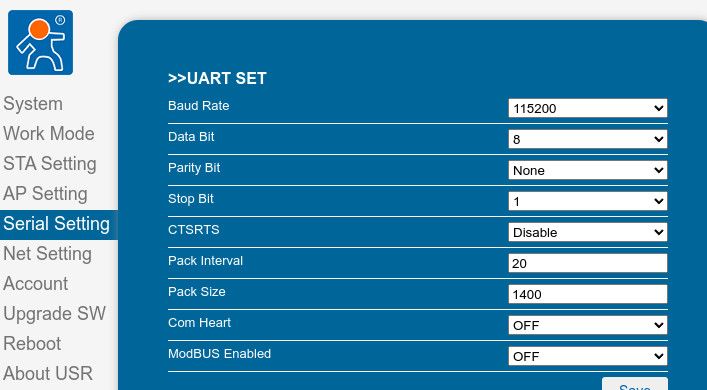
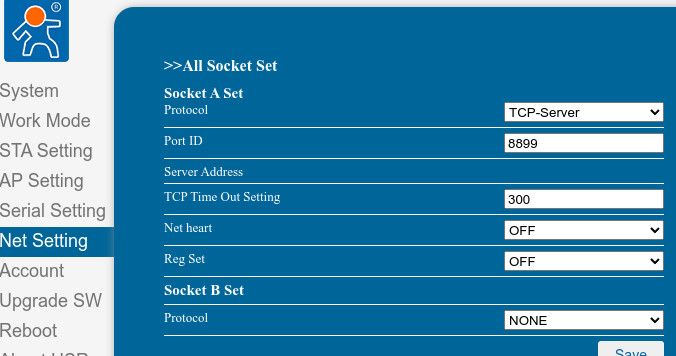
With this settings a telnet connection was possible and I got the PYLON prompt.But the enabling all possible request types in the pylontech instance settings results in an error.
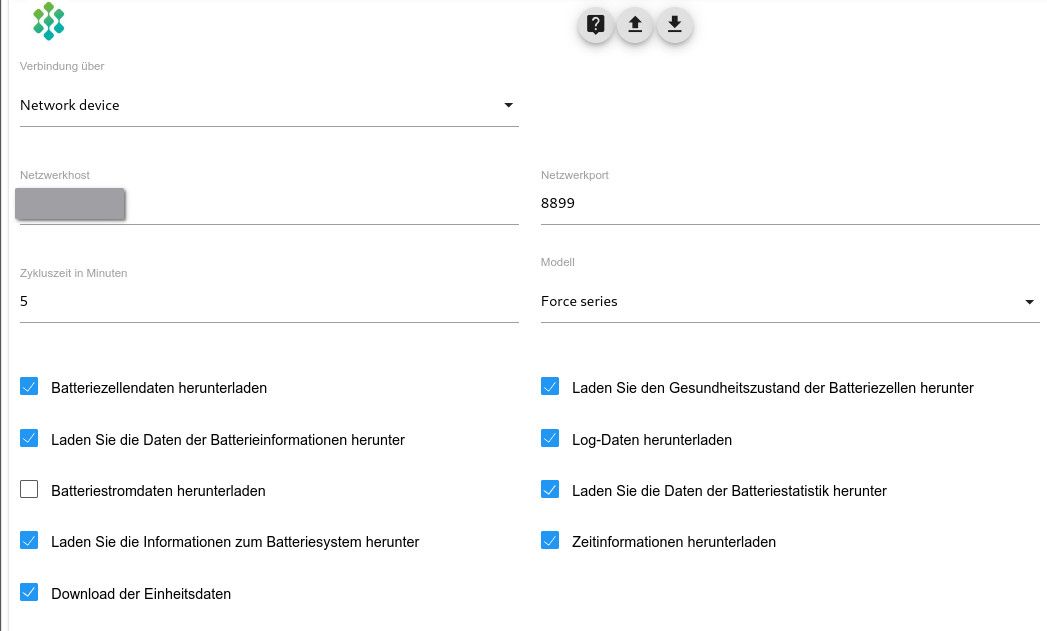
So I enabled on by one type and got the result that only without 'Download battery current data' enabled the adaptor is working without problems.
If I reenable the setting I get an error in the log and the Instance Icon becomes only yellow and than red: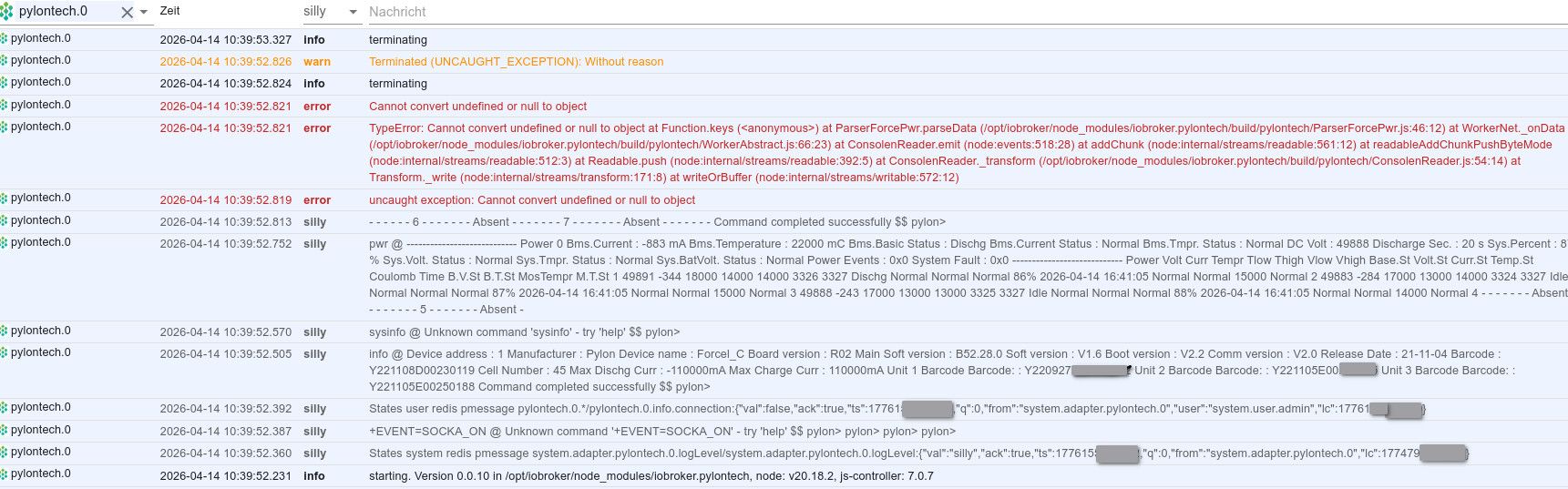
By the way without this setting it is working.
-
Was noch ein wenig komisch aussieht sind die Namen der Batterien. Des weiteren werden nur beim ersten Modul, also bei den ersten 15 Zellen mehr Werte abgefragt:
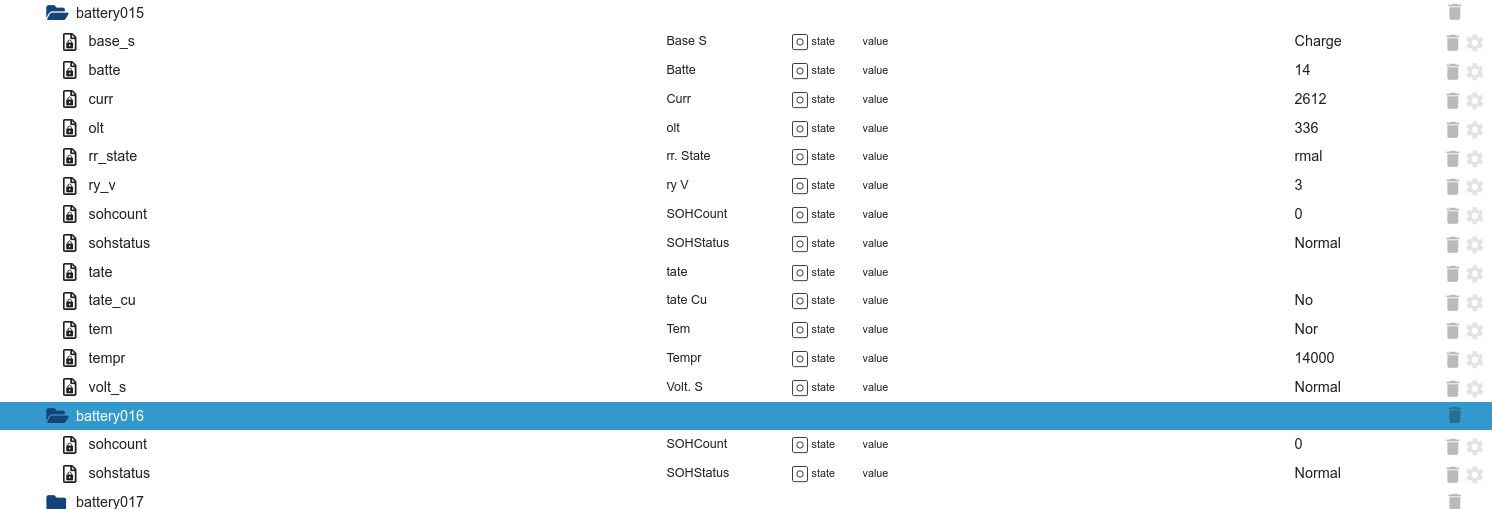
Hier mal die Stats aus der Console:
pylon>+EVENT=SOCKA_OFF @ Unknown command '+EVENT=SOCKA_OFF' - try 'help' $$ pylon> pylon>bat 1 bat 1 @ Battery Volt Curr Tempr Base State Volt. State Curr. State Temp. State SOC Coulomb BAL 0 3331 340 14000 Charge Normal Normal Normal 87% 64085 mAH N 1 3332 340 14000 Charge Normal Normal Normal 87% 64064 mAH N 2 3332 340 14000 Charge Normal Normal Normal 86% 63176 mAH N 3 3332 340 14000 Charge Normal Normal Normal 87% 64064 mAH N 4 3331 340 14000 Charge Normal Normal Normal 87% 64083 mAH N 5 3331 340 14000 Charge Normal Normal Normal 87% 64064 mAH N 6 3331 340 14000 Charge Normal Normal Normal 86% 63176 mAH N 7 3331 340 14000 Charge Normal Normal Normal 87% 64064 mAH N 8 3331 340 14000 Charge Normal Normal Normal 87% 64085 mAH N 9 3331 340 14000 Charge Normal Normal Normal 87% 64076 mAH N 10 3331 340 14000 Charge Normal Normal Normal 87% 64085 mAH N 11 3331 340 14000 Charge Normal Normal Normal 87% 64085 mAH N 12 3331 340 14000 Charge Normal Normal Normal 87% 64083 mAH N 13 3331 340 14000 Charge Normal Normal Normal 87% 64085 mAH N 14 3332 340 14000 Charge Normal Normal Normal 87% 64064 mAH N Command completed successfully $$ pylon> pylon>bat 2 bat 2 @ Battery Volt Curr Tempr Base State Volt. State Curr. State Temp. State SOC Coulomb BAL 0 3329 312 13000 Charge Normal Normal Normal 89% 65645 mAH N 1 3329 312 13000 Charge Normal Normal Normal 89% 65645 mAH N 2 3330 312 13000 Charge Normal Normal Normal 89% 65645 mAH N 3 3331 312 13000 Charge Normal Normal Normal 89% 65645 mAH N 4 3331 312 13000 Charge Normal Normal Normal 89% 65645 mAH N 5 3329 312 13000 Charge Normal Normal Normal 89% 65645 mAH N 6 3330 312 13000 Charge Normal Normal Normal 89% 65645 mAH N 7 3329 312 13000 Charge Normal Normal Normal 89% 65645 mAH N 8 3331 312 14000 Charge Normal Normal Normal 89% 65645 mAH N 9 3331 312 14000 Charge Normal Normal Normal 89% 65645 mAH N 10 3332 312 14000 Charge Normal Normal Normal 89% 65645 mAH N 11 3332 312 14000 Charge Normal Normal Normal 87% 64249 mAH N 12 3331 312 14000 Charge Normal Normal Normal 89% 65645 mAH N 13 3331 312 14000 Charge Normal Normal Normal 89% 65540 mAH N 14 3331 312 14000 Charge Normal Normal Normal 89% 65645 mAH N Command completed successfully $$ pylon> -
Das muss ich mir anschauen. Kannst du vielleicht das Skript build/moc/fetchCmdNet.js oder fetchCmdSerial.js für die Befehle ausführen? Und die Dateien als Zip-Datei zur Verfügung stellen?
bat, bmuinfo 0, bmuinfo 1 bis n, help, info, log, pwr, soh, stat, sysinfo, time, unit
Also Force war auf eien H2 zugeschnitten. Vielleicht hast du ja glück das deiner als US läuft.
-
bmuinfo und sysinfo kennt die Konsole nicht. Hier die Befehle die gehen sollten:
pylon>helphelp @ Local command: bat Battery data show - bat [pwr][index] cmdquit Quit the Console Mode shut Shut down - shut trst Test Soft Reset - trst data History data load - data [event/history/misc][item] datalist Show recorded data - datalist [event/history/misc][item/bat][batnun][volt/curr/temp/coul][item] disp Display Info at regular intervals - disp [(pwrs pwrNo)/val]/[(bats batNo)/volt/curr/temp] getpwr Get power Info - getpwr help Help [cmd] info Device infomation - info log Log information show - log login Login Admin mode - login [password] logout user mode - logout pwr Power data show - pwr unit Unit data show - unit sys system data show - sys pwrsys System Info - sysinfo [pwr] Command completed successfully $$Ich habe deinem Tipp mal auf US umgestellt. Die Instanz lässt sich nun mit allen Häckchen starten und der Adapter bricht auch nicht ab. In Objekts machen die Einträge nun auch Sinn. Vielleicht ist die Auswahl US / Force nicht ganz richtig und man muss eher LV (48V Parallel) zu HV (Seriell) unterscheiden

Was die beiden nicht funktionierenden Befehl genau bewirken weiss ich nicht. Es gibt aber zwei andere die noch vielleicht interessante Werte zeigen: pwrsys und data bzw. datalist. Oder werden die schon abgefragt? -
Mir ist gerade noch was aufgefallen, das das Balancing bei den battery## Werten nicht als eigner Wert auftaucht sondern im coulomb angehängt ist:
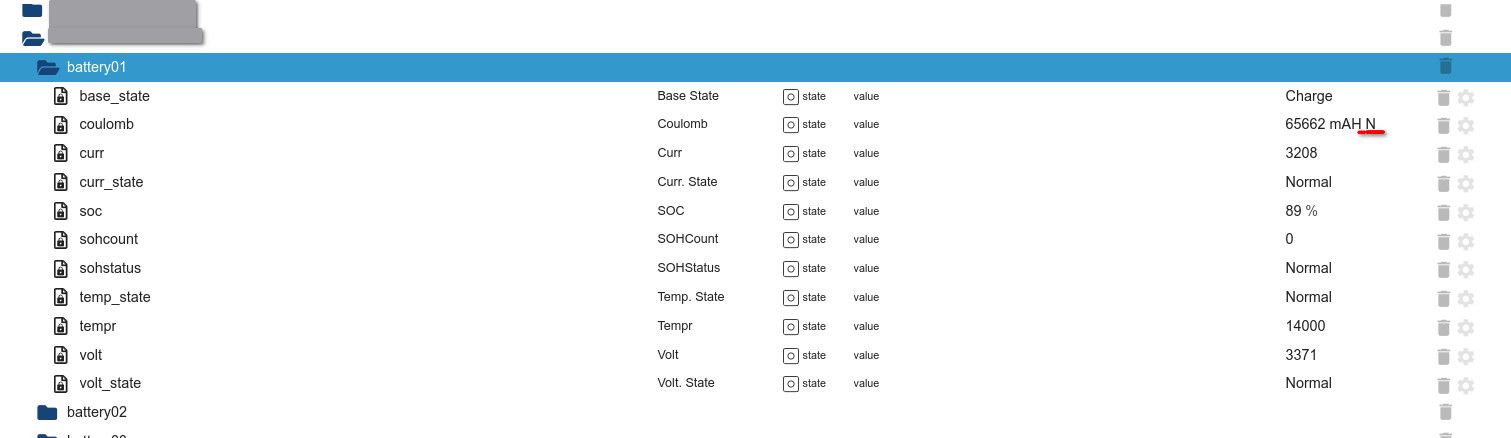
Beim Bat Befehl steht es hinter der Coulomb Spalte als BAL:
bat @ Battery Volt Curr Tempr Base State Volt. State Curr. State Temp. State SOC Coulomb BAL 0 3370 3368 14000 Charge Normal Normal Normal 89% 65662 mAH N 1 3365 3368 14000 Charge Normal Normal Normal 89% 65662 mAH N 2 3364 3368 14000 Charge Normal Normal Normal 89% 65662 mAH N 3 3365 3368 14000 Charge Normal Normal Normal 89% 65662 mAH N 4 3367 3368 14000 Charge Normal Normal Normal 89% 65662 mAH N 5 3365 3368 14000 Charge Normal Normal Normal 89% 65662 mAH N 6 3363 3368 14000 Charge Normal Normal Normal 89% 65662 mAH N 7 3365 3368 14000 Charge Normal Normal Normal 89% 65662 mAH N 8 3366 3368 14000 Charge Normal Normal Normal 89% 65662 mAH N 9 3365 3368 14000 Charge Normal Normal Normal 89% 65662 mAH N 10 3369 3368 14000 Charge Normal Normal Normal 89% 65662 mAH N 11 3372 3368 14000 Charge Normal Normal Normal 89% 65662 mAH N 12 3366 3368 14000 Charge Normal Normal Normal 89% 65662 mAH N 13 3366 3368 14000 Charge Normal Normal Normal 89% 65662 mAH N 14 3365 3368 14000 Charge Normal Normal Normal 89% 65662 mAH N Command completed successfully $$ -
Hallo, ich würde ja gerne eine zip-Datei generieren aber wie komme ich da nun ran? Gibt es eine Beschreibung irgendwo wie ich die Daten zusammen sammel?
build/moc/fetchCmdNet.js würde ich ja ausführen aber muss das nicht im iobroker Context geschehen? Woher bekommt das Script sonst seine Verbindungsparameter?
Und wie geschrieben läuft iob bei mir im Container. Da finde ich nicht mal das skript drin, habe aber ggf. einfach was übersehen?
Oder reicht es das Script einfach mit runter zu laden und auf einen beliebigen Rechner auszuführen? -
Ich habe mal gerate was zu tun wäre bin aber nicht weit gekommen:
user@host:~/test/pylontech$ git clone https://github.com/PLCHome/ioBroker.pylontech.git Klone nach 'ioBroker.pylontech' ... remote: Enumerating objects: 971, done. remote: Counting objects: 100% (31/31), done. remote: Compressing objects: 100% (24/24), done. remote: Total 971 (delta 14), reused 14 (delta 6), pack-reused 940 (from 1) Empfange Objekte: 100% (971/971), 888.60 KiB | 6.30 MiB/s, fertig. Löse Unterschiede auf: 100% (684/684), fertig. user@host:~/test/pylontech$ cd ioBroker.pylontech/build/moc/ user@host:~/test/pylontech/ioBroker.pylontech/build/moc$ node fetchCmdNet.js 192.168.2.44 8899 help internal/modules/cjs/loader.js:818 throw err; ^ Error: Cannot find module 'fs/promises' Require stack: - /home/user/test/pylontech/ioBroker.pylontech/build/moc/fetchCmdNet.js at Function.Module._resolveFilename (internal/modules/cjs/loader.js:815:15) at Function.Module._load (internal/modules/cjs/loader.js:667:27) at Module.require (internal/modules/cjs/loader.js:887:19) at require (internal/modules/cjs/helpers.js:74:18) at Object.<anonymous> (/home/user/test/pylontech/ioBroker.pylontech/build/moc/fetchCmdNet.js:24:23) at Module._compile (internal/modules/cjs/loader.js:999:30) at Object.Module._extensions..js (internal/modules/cjs/loader.js:1027:10) at Module.load (internal/modules/cjs/loader.js:863:32) at Function.Module._load (internal/modules/cjs/loader.js:708:14) at Function.executeUserEntryPoint [as runMain] (internal/modules/run_main.js:60:12) { code: 'MODULE_NOT_FOUND', requireStack: [ '/home/user/test/pylontech/ioBroker.pylontech/build/moc/fetchCmdNet.js' ] } -
Ok, mein Debian ist zu alt. Wird mal Zeit für ein Upgrade. Ich bekomme damit nur eine inkompatible Version mit apt installiert.
Ich konnte aber die Problematische Zeileconst fs = require('fs/promises');erfolgreich zuconst fs = require('fs').promises;ändern und damit das script zum laufen bewegen. Achja ich musste noch ein npm install ausführen. Wusste ich auch nicht.Das Skript erzeugt von sich aus keine zip-Datei. Daher rate ich noch mal:
Ich führe aus:user@host:~/test/pylontech/ioBroker.pylontech/build/moc$ for i in bat bmuinfo\ 0 bmuinfo\ 2 bmuinfo\ 2 help info log pwr soh stat sysinfo time unit ; do node fetchCmdNet.js 192.168.2.44 8899 "${i}" >"${i}" 2>&1 ; zip -u -m fetchCmdNet-output.zip "${i}" ; doneDa ich danach doch noch die txt-dateien gefunden habe packe ich die einfach mit in die Zip-Datei.
-
Hallo,
erstmal vielen Dank für den Adapter.
Ich betreibe ein PowerCube H1 - Sprich SC1000-100 mit 14xH48050 Packs.
Die Daten kommen, sind aber bissel verschoben und nicht immer 100% schlüssig (das kann aber an mir liegen).
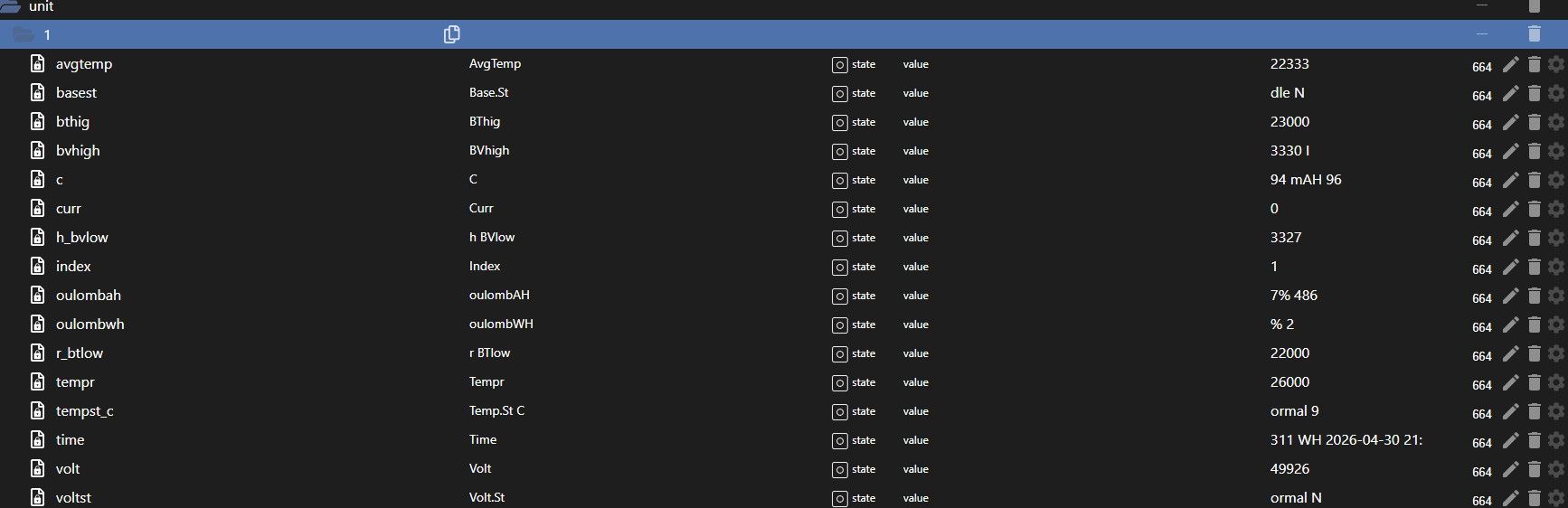
Ich hab mal die JSON der Objekte mit angehängt - bissel groß - sind in Summe 210 Zellen.
pylontech.jsonDanke
Helge
-
Bin gerade auf diesen tollen Adapter gestossen und es direkt mal ausgetestet. Mein 8x Pytes 48100R C16 werden direkt erkannt und auch jedes einzelne Zelle in den Datenpunkten erstellt.
Nur steht bei jeder Zeile der Wert (null) drin, was mache ich falsch?
installiert ist:node-js 22.23.2
npm 10.9.8
Adapter 0.0.10Edit:
Bei jeder Zeile kommt da:pylontech.0 2026-08-06 17:08:24.084 warn State "pylontech.0.ES1003338P119837.battery15.volt" has no existing object, this might lead to an error in future versions pylontech.0 2026-08-06 17:08:24.084 warn State "pylontech.0.ES1003338P119837.battery14.coulomb" has no existing object, this might lead to an error in future versions pylontech.0 2026-08-06 17:08:24.084 warn State "pylontech.0.ES1003338P119837.battery14.curr_state" has no existing object, this might lead to an error in future versionsIch gehe mal davon aus, das Pytes BMS möchte gerne anderst gefragt werden, aber genau da setzen meine Kentnisse aus.
Edit: 07.08.26 11:00
Mittels Minicom (auf der Konsole des Iobroker-Containers) konnte ich folgendes ermitteln:Welcome to minicom 2.10 OPTIONS: I18n Port /dev/ttyUSB1, 17:08:19 [U] Press CTRL-A Z for help on special keys PYTES_debug>bat 1 @ Battery Volt Tempr Base State Volt. State Curr. State Temp. State Coulomb 0 3470 30000 Charge Normal Normal Normal 97% 95920 mAH 1 3471 30000 Charge Normal Normal Normal 97% 96084 mAH 2 3469 30000 Charge Normal Normal Normal 97% 96249 mAH 3 3473 30000 Charge Normal Normal Normal 97% 96414 mAH 4 3460 30000 Charge Normal Normal Normal 95% 94283 mAH 5 3467 30000 Charge Normal Normal Normal 97% 96002 mAH 6 3466 30000 Charge Normal Normal Normal 97% 96578 mAH 7 3469 30000 Charge Normal Normal Normal 97% 96002 mAH 8 3459 30000 Charge Normal Normal Normal 95% 94142 mAH 9 3472 30000 Charge Normal Normal Normal 97% 96249 mAH 10 3464 29000 Charge Normal Normal Normal 96% 94904 mAH 11 3472 29000 Charge Normal Normal Normal 97% 96414 mAH 12 3461 29000 Charge Normal Normal Normal 95% 94424 mAH 13 3457 29000 Charge Normal Normal Normal 97% 96167 mAH 14 3462 29000 Charge Normal Normal Normal 95% 94565 mAH 15 3460 29000 Charge Normal Normal Normal 95% 94706 mAH Command completed successfully $$ PYTES_debug>bat 2Das heisst eigentlich es würde alles funktionieren, nur der Adapter macht entweder die Abfrage anderst, oder sortiert die erhaltenen Daten nicht richtig ein?


Hey! Du scheinst an dieser Unterhaltung interessiert zu sein, hast aber noch kein Konto.
Hast du es satt, bei jedem Besuch durch die gleichen Beiträge zu scrollen? Wenn du dich für ein Konto anmeldest, kommst du immer genau dorthin zurück, wo du zuvor warst, und kannst dich über neue Antworten benachrichtigen lassen (entweder per E-Mail oder Push-Benachrichtigung). Du kannst auch Lesezeichen speichern und Beiträge positiv bewerten, um anderen Community-Mitgliedern deine Wertschätzung zu zeigen.
Mit deinem Input könnte dieser Beitrag noch besser werden 💗
Registrieren AnmeldenSupport us
395
Online33.0k
Benutzende83.7k
Themen1.3m
Beiträge