




iob backup bricht mit Fehler ab
-
Skript v.2023-04-16

*** BASE SYSTEM ***
Model           : Raspberry Pi 3 Model B Rev 1.2
Architecture    : armv7l
Docker          : false
Virtualization  : none
Distributor ID: Raspbian
Description:    Raspbian GNU/Linux 11 (bullseye)
Release:        11
Codename:       bullseye

PRETTY_NAME="Raspbian GNU/Linux 11 (bullseye)"
NAME="Raspbian GNU/Linux"
VERSION_ID="11"
VERSION="11 (bullseye)"
VERSION_CODENAME=bullseye
ID=raspbian
ID_LIKE=debian
HOME_URL="http://www.raspbian.org/"
SUPPORT_URL="http://www.raspbian.org/RaspbianForums"
BUG_REPORT_URL="http://www.raspbian.org/RaspbianBugs"

Systemuptime and Load:
 22:05:10 up 2 days,  4:27,  1 user,  load average: 0.33, 0.23, 0.17
CPU threads: 4

Raspberry only:
throttled=0x20000
Other values than 0x0 hint to temperature/voltage problems
temp=55.8'C
volt=1.2938V

*** Time and Time Zones ***
               Local time: Tue 2023-08-15 22:05:10 CEST
           Universal time: Tue 2023-08-15 20:05:10 UTC
                 RTC time: n/a
                Time zone: Europe/Berlin (CEST, +0200)
System clock synchronized: yes
              NTP service: active
          RTC in local TZ: no

*** User and Groups ***
pi
/home/pi
pi adm dialout cdrom sudo audio video plugdev games users input render netdev gpio i2c spi iobroker

*** X-Server-Setup ***
X-Server:       false
Desktop:
Terminal:       tty
Boot Target:    graphical.target

*** MEMORY ***
               total        used        free      shared  buff/cache   available
Mem:            971M        583M        195M        0.0K        193M        324M
Swap:           511M        293M        218M
Total:          1.5G        876M        413M

          971 M total memory
          583 M used memory
          394 M active memory
          279 M inactive memory
          195 M free memory
           18 M buffer memory
          174 M swap cache
          511 M total swap
          293 M used swap
          218 M free swap

Raspberry only:
oom events: 0
lifetime oom required: 0 Mbytes
total time in oom handler: 0 ms
max time spent in oom handler: 0 ms

*** FILESYSTEM ***
Filesystem     Type      Size  Used Avail Use% Mounted on
/dev/root      ext4       15G  6.5G  7.0G  49% /
devtmpfs       devtmpfs  358M     0  358M   0% /dev
tmpfs          tmpfs     486M     0  486M   0% /dev/shm
tmpfs          tmpfs     195M  640K  194M   1% /run
tmpfs          tmpfs     5.0M  4.0K  5.0M   1% /run/lock
/dev/mmcblk0p1 vfat      253M   51M  202M  20% /boot
tmpfs          tmpfs      98M     0   98M   0% /run/user/1000

Messages concerning ext4 filesystem in dmesg:
[Sun Aug 13 17:37:22 2023] Kernel command line: coherent_pool=1M 8250.nr_uarts=0 snd_bcm2835.enable_headphones=0 snd_bcm2835.enable_headphones=1 snd_bcm2835.enable_hdmi=1 snd_bcm2835.enable_hdmi=0 video=Composite-1:720x480@60i vc_mem.mem_base=0x3f000000 vc_mem.mem_size=0x3f600000  console=ttyS0,115200 console=tty1 root=PARTUUID=501d671c-02 rootfstype=ext4 fsck.repair=yes rootwait
[Sun Aug 13 17:37:25 2023] EXT4-fs (mmcblk0p2): INFO: recovery required on readonly filesystem
[Sun Aug 13 17:37:25 2023] EXT4-fs (mmcblk0p2): write access will be enabled during recovery
[Sun Aug 13 17:37:25 2023] EXT4-fs (mmcblk0p2): orphan cleanup on readonly fs
[Sun Aug 13 17:37:26 2023] EXT4-fs (mmcblk0p2): 2 orphan inodes deleted
[Sun Aug 13 17:37:26 2023] EXT4-fs (mmcblk0p2): recovery complete
[Sun Aug 13 17:37:28 2023] EXT4-fs (mmcblk0p2): mounted filesystem with ordered data mode. Quota mode: none.
[Sun Aug 13 17:37:28 2023] VFS: Mounted root (ext4 filesystem) readonly on device 179:2.
[Sun Aug 13 17:37:36 2023] EXT4-fs (mmcblk0p2): re-mounted. Quota mode: none.

Show mounted filesystems (real ones only):
TARGET  SOURCE         FSTYPE OPTIONS
/       /dev/mmcblk0p2 ext4   rw,noatime
`-/boot /dev/mmcblk0p1 vfat   rw,relatime,fmask=0022,dmask=0022,codepage=437,iocharset=ascii,shortname=mixed,flush,errors=remount-ro

Files in neuralgic directories:

/var:
2.8G    /var/
1.5G    /var/log
1.4G    /var/log/journal/6ce9bd1f37ea42559463f35932da81c1
1.4G    /var/log/journal
809M    /var/cache

Archived and active journals take up 1.3G in the file system.

/opt/iobroker/backups:
5.7M    /opt/iobroker/backups/

/opt/iobroker/iobroker-data:
364M    /opt/iobroker/iobroker-data/
191M    /opt/iobroker/iobroker-data/history.0
116M    /opt/iobroker/iobroker-data/files
52M     /opt/iobroker/iobroker-data/files/javascript.admin
36M     /opt/iobroker/iobroker-data/backup-objects

The five largest files in iobroker-data are:
19M     /opt/iobroker/iobroker-data/files/iot.admin/static/js/main.2975a411.js.map
18M     /opt/iobroker/iobroker-data/objects.jsonl
8.2M    /opt/iobroker/iobroker-data/files/iot.admin/static/js/main.2975a411.js
6.9M    /opt/iobroker/iobroker-data/files/javascript.admin/static/js/610.312d98a8.chunk.js.map
6.3M    /opt/iobroker/iobroker-data/files/admin.admin/custom/static/js/vendors-node_modules_iobroker_adapter-react-v5_assets_devices_parseNames_js-node_modules_iobr-99c23e.847b8ad9.chunk.js.map

*** NodeJS-Installation ***

/usr/bin/nodejs         v18.17.1
/usr/bin/node           v18.17.1
/usr/bin/npm            9.6.7
/usr/bin/npx            9.6.7


nodejs:
  Installed: 18.17.1-deb-1nodesource1
  Candidate: 18.17.1-deb-1nodesource1
  Version table:
 *** 18.17.1-deb-1nodesource1 500
        500 https://deb.nodesource.com/node_18.x bullseye/main armhf Packages
        100 /var/lib/dpkg/status
     12.22.12~dfsg-1~deb11u4 500
        500 http://raspbian.raspberrypi.org/raspbian bullseye/main armhf Packages

Temp directories causing npm8 problem: 0
No problems detected

*** ioBroker-Installation ***

ioBroker Status
iobroker is running on this host.


Objects type: jsonl
States  type: jsonl

MULTIHOSTSERVICE/enabled: false

Core adapters versions
js-controller:  4.0.24
admin:          6.3.5
javascript:     7.0.3

Adapters from github:   0

Adapter State
+ system.adapter.admin.0                  : admin                 : RASPI3                                   -  enabled, port: 8081, bind: 0.0.0.0, run as: admin
+ system.adapter.admin.1                  : admin                 : RASPI3                                   -  enabled, port: 8090, bind: 0.0.0.0, run as: admin
+ system.adapter.alexa2.0                 : alexa2                : RASPI3                                   -  enabled
  system.adapter.backitup.0               : backitup              : RASPI3                                   - disabled
+ system.adapter.bosesoundtouch.0         : bosesoundtouch        : RASPI3                                   -  enabled
+ system.adapter.discovery.0              : discovery             : RASPI3                                   -  enabled
+ system.adapter.fb-checkpresence.0       : fb-checkpresence      : RASPI3                                   -  enabled
  system.adapter.flot.0                   : flot                  : RASPI3                                   -  enabled
+ system.adapter.history.0                : history               : RASPI3                                   -  enabled
  system.adapter.homeconnect.0            : homeconnect           : RASPI3                                   - disabled
+ system.adapter.info.0                   : info                  : RASPI3                                   -  enabled
+ system.adapter.iot.0                    : iot                   : RASPI3                                   -  enabled
+ system.adapter.javascript.0             : javascript            : RASPI3                                   -  enabled
+ system.adapter.panasonic-viera.0        : panasonic-viera       : RASPI3                                   -  enabled
+ system.adapter.rpi2.0                   : rpi2                  : RASPI3                                   -  enabled
+ system.adapter.shelly.0                 : shelly                : RASPI3                                   -  enabled, port: 1882, bind: 0.0.0.0
+ system.adapter.signal-cmb.0             : signal-cmb            : RASPI3                                   -  enabled
+ system.adapter.simple-api.0             : simple-api            : RASPI3                                   -  enabled, port: 8087, bind: 192.168.94.120, run as: admin
+ system.adapter.snmp.0                   : snmp                  : RASPI3                                   -  enabled
+ system.adapter.socketio.0               : socketio              : RASPI3                                   -  enabled, port: 8084, bind: 0.0.0.0, run as: admin
+ system.adapter.statistics.0             : statistics            : RASPI3                                   -  enabled
+ system.adapter.tr-064.0                 : tr-064                : RASPI3                                   -  enabled
+ system.adapter.tr-064.1                 : tr-064                : RASPI3                                   -  enabled
+ system.adapter.web.0                    : web                   : RASPI3                                   -  enabled, port: 8082, bind: 192.168.94.120, run as: admin

+ instance is alive

Enabled adapters with bindings
+ system.adapter.admin.0                  : admin                 : RASPI3                                   -  enabled, port: 8081, bind: 0.0.0.0, run as: admin
+ system.adapter.admin.1                  : admin                 : RASPI3                                   -  enabled, port: 8090, bind: 0.0.0.0, run as: admin
+ system.adapter.shelly.0                 : shelly                : RASPI3                                   -  enabled, port: 1882, bind: 0.0.0.0
+ system.adapter.simple-api.0             : simple-api            : RASPI3                                   -  enabled, port: 8087, bind: 192.168.94.120, run as: admin
+ system.adapter.socketio.0               : socketio              : RASPI3                                   -  enabled, port: 8084, bind: 0.0.0.0, run as: admin
+ system.adapter.web.0                    : web                   : RASPI3                                   -  enabled, port: 8082, bind: 192.168.94.120, run as: admin

ioBroker-Repositories
stable        : http://download.iobroker.net/sources-dist.json
beta          : http://download.iobroker.net/sources-dist-latest.json

Active repo(s): stable

Installed ioBroker-Instances
Used repository: stable
Cannot download repository hash file from "http://download.iobroker.net/sources-dist-hash.json": timeout of 10000ms exceeded
Cannot download repository hash file from "http://download.iobroker.net/sources-dist-hash.json": timeout of 10000ms exceeded
Cannot download repository file from "http://download.iobroker.net/sources-dist.json": timeout of 10000ms exceeded
Adapter    "admin"        : 6.3.5    , installed 6.3.5
Adapter    "alexa2"       : 3.24.1   , installed 3.24.1
Adapter    "backitup"     : 2.6.23   , installed 2.6.23
Adapter    "bosesoundtouch": 0.10.3  , installed 0.10.3
Adapter    "discovery"    : 3.1.0    , installed 3.1.0
Adapter    "fb-checkpresence": 1.2.2 , installed 1.2.2
Adapter    "flot"         : 1.12.0   , installed 1.12.0
Adapter    "history"      : 2.2.4    , installed 2.2.4
Adapter    "homeconnect"  : 1.1.1    , installed 1.1.1
Adapter    "info"         : 1.9.26   , installed 1.9.26
Adapter    "iot"          : 1.14.5   , installed 1.14.5
Adapter    "javascript"   : 7.0.3    , installed 7.0.3
Controller "js-controller": 4.0.24   , installed 4.0.24
Adapter    "panasonic-viera": 2.0.0  , installed 2.0.0
Adapter    "rpi2"         : 1.3.2    , installed 1.3.2
Adapter    "shelly"       : 6.4.1    , installed 6.4.1
Adapter    "signal-cmb"   : 0.3.0    , installed 0.3.0
Adapter    "simple-api"   : 2.7.2    , installed 2.7.2
Adapter    "snmp"         : 2.4.11   , installed 2.4.11
Adapter    "socketio"     : 4.2.0    , installed 4.2.0
Adapter    "statistics"   : 2.3.0    , installed 2.3.0
Adapter    "tr-064"       : 4.2.18   , installed 4.2.18
Adapter    "web"          : 4.3.0    , installed 4.3.0
Adapter    "ws"           : 1.3.0    , installed 1.3.0

Objects and States
Please stand by - This may take a while
Objects:        4084
States:         3363

*** OS-Repositories and Updates ***
Hit:1 http://raspbian.raspberrypi.org/raspbian bullseye InRelease
Hit:2 http://archive.raspberrypi.org/debian bullseye InRelease
Hit:3 https://deb.nodesource.com/node_18.x bullseye InRelease
Reading package lists...
Pending Updates: 5

*** Listening Ports ***
Active Internet connections (only servers)
Proto Recv-Q Send-Q Local Address           Foreign Address         State       User       Inode      PID/Program name
tcp        0      0 0.0.0.0:22              0.0.0.0:*               LISTEN      0          14047      485/sshd: /usr/sbin
tcp        0      0 192.168.94.120:8087     0.0.0.0:*               LISTEN      1001       1310455    12329/io.simple-api
tcp        0      0 192.168.94.120:8082     0.0.0.0:*               LISTEN      1001       1306610    12197/io.web.0
tcp        0      0 127.0.0.1:9001          0.0.0.0:*               LISTEN      1001       1308621    11924/iobroker.js-c
tcp        0      0 127.0.0.1:9000          0.0.0.0:*               LISTEN      1001       1309815    11924/iobroker.js-c
tcp6       0      0 :::22                   :::*                    LISTEN      0          14049      485/sshd: /usr/sbin
tcp6       0      0 :::8090                 :::*                    LISTEN      1001       1306421    11956/io.admin.1
tcp6       0      0 :::8081                 :::*                    LISTEN      1001       1306405    11945/io.admin.0
tcp6       0      0 :::8084                 :::*                    LISTEN      1001       1309411    12242/io.socketio.0
udp        0      0 0.0.0.0:46092           0.0.0.0:*                           1001       1314814    13151/io.snmp.0
udp        0      0 0.0.0.0:5683            0.0.0.0:*                           1001       1311052    12126/io.shelly.0
udp        0      0 0.0.0.0:68              0.0.0.0:*                           0          10881      579/dhcpcd
udp        0      0 0.0.0.0:49752           0.0.0.0:*                           108        10859      364/avahi-daemon: r
udp        0      0 0.0.0.0:5353            0.0.0.0:*                           108        10857      364/avahi-daemon: r
udp6       0      0 :::546                  :::*                                0          12692      579/dhcpcd
udp6       0      0 :::42159                :::*                                108        10860      364/avahi-daemon: r
udp6       0      0 :::5353                 :::*                                108        10858      364/avahi-daemon: r

*** Log File - Last 25 Lines ***

2023-08-15 19:02:27.242  - info: socketio.0 (12242) <== Disconnect system.user.admin from ::ffff:192.168.94.147 flot
2023-08-15 19:02:28.249  - info: socketio.0 (12242) ==> Connected system.user.admin from ::ffff:192.168.94.147
2023-08-15 19:07:26.234  - info: socketio.0 (12242) <== Disconnect system.user.admin from ::ffff:192.168.94.147 flot
2023-08-15 19:07:28.248  - info: socketio.0 (12242) ==> Connected system.user.admin from ::ffff:192.168.94.147
2023-08-15 19:12:26.244  - info: socketio.0 (12242) <== Disconnect system.user.admin from ::ffff:192.168.94.147 flot
2023-08-15 19:12:28.240  - info: socketio.0 (12242) ==> Connected system.user.admin from ::ffff:192.168.94.147
2023-08-15 19:14:28.731  - info: javascript.0 (12006) script.js.Fenster.DW2-Alarm2: true
2023-08-15 19:14:28.733  - warn: javascript.0 (12006) script.js.Fenster.DW2-Alarm2: false
2023-08-15 19:16:22.315  - info: javascript.0 (12006) script.js.Drucker.Tonerlevel: Tonerlevel wurden aktualisiert.
2023-08-15 19:17:26.243  - info: socketio.0 (12242) <== Disconnect system.user.admin from ::ffff:192.168.94.147 flot
2023-08-15 19:17:28.252  - info: socketio.0 (12242) ==> Connected system.user.admin from ::ffff:192.168.94.147
2023-08-15 19:24:24.250  - info: socketio.0 (12242) <== Disconnect system.user.admin from ::ffff:192.168.94.147 flot
2023-08-15 19:46:22.297  - info: javascript.0 (12006) script.js.Drucker.Tonerlevel: Tonerlevel wurden aktualisiert.
2023-08-15 20:16:22.296  - info: javascript.0 (12006) script.js.Drucker.Tonerlevel: Tonerlevel wurden aktualisiert.
2023-08-15 20:17:39.820  - info: admin.0 (11945) <== Disconnect system.user.admin from ::ffff:192.168.94.147
2023-08-15 20:17:39.844  - info: admin.0 (11945) <== Disconnect system.user.admin from ::ffff:192.168.94.147 admin
2023-08-15 20:17:40.392  - info: admin.0 (11945) ==> Connected system.user.admin from ::ffff:192.168.94.147
2023-08-15 20:17:44.430  - info: admin.0 (11945) ==> Connected system.user.admin from ::ffff:192.168.94.147
2023-08-15 20:17:47.312  - info: host.RASPI3 Updating repository "stable" under "http://download.iobroker.net/sources-dist.json"
2023-08-15 20:18:24.595  - info: admin.0 (11945) <== Disconnect system.user.admin from ::ffff:192.168.94.147
2023-08-15 20:21:09.256  - info: javascript.0 (12006) script.js.Fenster.DW2-Sensorwerte: 15.08.2023 20:21:09%0ATemparatur:25%0AHelligkeit:21%0AAuslöser:["sensor","temperature"]
2023-08-15 20:46:22.305  - info: javascript.0 (12006) script.js.Drucker.Tonerlevel: Tonerlevel wurden aktualisiert.
2023-08-15 21:16:22.302  - info: javascript.0 (12006) script.js.Drucker.Tonerlevel: Tonerlevel wurden aktualisiert.
2023-08-15 21:44:16.341  - info: javascript.0 (12006) script.js.Fenster.DW2-Sensorwerte: 15.08.2023 21:44:16%0ATemparatur:24%0AHelligkeit:0%0AAuslöser:["sensor","temperature"]
2023-08-15 21:46:22.297  - info: javascript.0 (12006) script.js.Drucker.Tonerlevel: Tonerlevel wurden aktualisiert.
Und noch das Summary
======================= SUMMARY ======================= v.2023-04-16 Operatingsystem: Raspbian GNU/Linux 11 (bullseye) Kernel: 6.1.21-v7+ Installation: Native Timezone: Europe/Berlin (CEST, +0200) User-ID: 1000 X-Server: false Boot Target: graphical.target Pending OS-Updates: 5 Cannot download repository hash file from "http://download.iobroker.net/sources-dist-hash.json": timeout of 10000ms exceeded Cannot download repository hash file from "http://download.iobroker.net/sources-dist-hash.json": timeout of 10000ms exceeded Cannot download repository file from "http://download.iobroker.net/sources-dist.json": timeout of 10000ms exceeded Pending iob updates: 0 Nodejs-Installation: /usr/bin/nodejs v18.17.1 /usr/bin/node v18.17.1 /usr/bin/npm 9.6.7 /usr/bin/npx 9.6.7 Recommended versions are nodejs 18.x.y and npm 9.x.y Your nodejs installation is correct MEMORY: total used free shared buff/cache available Mem: 971M 556M 88M 0.0K 326M 351M Swap: 511M 316M 195M Total: 1.5G 872M 284M Active iob-Instances: 22 Active repo(s): stable ioBroker Core: js-controller 4.0.24 admin 6.3.5 ioBroker Status: iobroker is running on this host. Objects type: jsonl States type: jsonl Status admin and web instance: + system.adapter.admin.0 : admin : RASPI3 - enabled, port: 8081, bind: 0.0.0.0, run as: admin + system.adapter.admin.1 : admin : RASPI3 - enabled, port: 8090, bind: 0.0.0.0, run as: admin + system.adapter.web.0 : web : RASPI3 - enabled, port: 8082, bind: 192.168.94.120, run as: admin Objects: 4084 States: 3363 Size of iob-Database: 18M /opt/iobroker/iobroker-data/objects.jsonl 4.5M /opt/iobroker/iobroker-data/states.jsonl =================== END OF SUMMARY ====================@klixy23 sagte in iob backup bricht mit Fehler ab:
Active iob-Instances: 22
bei
@klixy23 sagte in iob backup bricht mit Fehler ab:
Mem: 971M
?.?
ist doch nicht dein Ernst!?
spendier dem System mindestens 4GBkein Support per PN! - Fragen im Forum stellen -
Benutzt das Voting rechts unten im Beitrag wenn er euch geholfen hat.
Das Forum freut sich über eine Spende. Benutzt dazu den Spendenbutton oben rechts. Danke!
der Installationsfixer: curl -fsL https://iobroker.net/fix.sh | bash - -
@klixy23 sagte in iob backup bricht mit Fehler ab:
Active iob-Instances: 22
bei
@klixy23 sagte in iob backup bricht mit Fehler ab:
Mem: 971M
?.?
ist doch nicht dein Ernst!?
spendier dem System mindestens 4GB@homoran sagte in iob backup bricht mit Fehler ab:
spendier dem System mindestens 4GB
RPi3 hat nur 1GB.
-
@homoran sagte in iob backup bricht mit Fehler ab:
spendier dem System mindestens 4GB
RPi3 hat nur 1GB.
@thomas-braun sagte in iob backup bricht mit Fehler ab:
@homoran sagte in iob backup bricht mit Fehler ab:
spendier dem System mindestens 4GB
RPi3 hat nur 1GB.
klar, aber für diese Anzahl Adapter braucht @klixy23 ein System mit mindestens 4GB RAM
-
Skript v.2023-04-16

*** BASE SYSTEM ***
Model           : Raspberry Pi 3 Model B Rev 1.2
Architecture    : armv7l
Docker          : false
Virtualization  : none
Distributor ID: Raspbian
Description:    Raspbian GNU/Linux 11 (bullseye)
Release:        11
Codename:       bullseye

PRETTY_NAME="Raspbian GNU/Linux 11 (bullseye)"
NAME="Raspbian GNU/Linux"
VERSION_ID="11"
VERSION="11 (bullseye)"
VERSION_CODENAME=bullseye
ID=raspbian
ID_LIKE=debian
HOME_URL="http://www.raspbian.org/"
SUPPORT_URL="http://www.raspbian.org/RaspbianForums"
BUG_REPORT_URL="http://www.raspbian.org/RaspbianBugs"

Systemuptime and Load:
 22:05:10 up 2 days,  4:27,  1 user,  load average: 0.33, 0.23, 0.17
CPU threads: 4

Raspberry only:
throttled=0x20000
Other values than 0x0 hint to temperature/voltage problems
temp=55.8'C
volt=1.2938V

*** Time and Time Zones ***
               Local time: Tue 2023-08-15 22:05:10 CEST
           Universal time: Tue 2023-08-15 20:05:10 UTC
                 RTC time: n/a
                Time zone: Europe/Berlin (CEST, +0200)
System clock synchronized: yes
              NTP service: active
          RTC in local TZ: no

*** User and Groups ***
pi
/home/pi
pi adm dialout cdrom sudo audio video plugdev games users input render netdev gpio i2c spi iobroker

*** X-Server-Setup ***
X-Server:       false
Desktop:
Terminal:       tty
Boot Target:    graphical.target

*** MEMORY ***
               total        used        free      shared  buff/cache   available
Mem:            971M        583M        195M        0.0K        193M        324M
Swap:           511M        293M        218M
Total:          1.5G        876M        413M

          971 M total memory
          583 M used memory
          394 M active memory
          279 M inactive memory
          195 M free memory
           18 M buffer memory
          174 M swap cache
          511 M total swap
          293 M used swap
          218 M free swap

Raspberry only:
oom events: 0
lifetime oom required: 0 Mbytes
total time in oom handler: 0 ms
max time spent in oom handler: 0 ms

*** FILESYSTEM ***
Filesystem     Type      Size  Used Avail Use% Mounted on
/dev/root      ext4       15G  6.5G  7.0G  49% /
devtmpfs       devtmpfs  358M     0  358M   0% /dev
tmpfs          tmpfs     486M     0  486M   0% /dev/shm
tmpfs          tmpfs     195M  640K  194M   1% /run
tmpfs          tmpfs     5.0M  4.0K  5.0M   1% /run/lock
/dev/mmcblk0p1 vfat      253M   51M  202M  20% /boot
tmpfs          tmpfs      98M     0   98M   0% /run/user/1000

Messages concerning ext4 filesystem in dmesg:
[Sun Aug 13 17:37:22 2023] Kernel command line: coherent_pool=1M 8250.nr_uarts=0 snd_bcm2835.enable_headphones=0 snd_bcm2835.enable_headphones=1 snd_bcm2835.enable_hdmi=1 snd_bcm2835.enable_hdmi=0 video=Composite-1:720x480@60i vc_mem.mem_base=0x3f000000 vc_mem.mem_size=0x3f600000  console=ttyS0,115200 console=tty1 root=PARTUUID=501d671c-02 rootfstype=ext4 fsck.repair=yes rootwait
[Sun Aug 13 17:37:25 2023] EXT4-fs (mmcblk0p2): INFO: recovery required on readonly filesystem
[Sun Aug 13 17:37:25 2023] EXT4-fs (mmcblk0p2): write access will be enabled during recovery
[Sun Aug 13 17:37:25 2023] EXT4-fs (mmcblk0p2): orphan cleanup on readonly fs
[Sun Aug 13 17:37:26 2023] EXT4-fs (mmcblk0p2): 2 orphan inodes deleted
[Sun Aug 13 17:37:26 2023] EXT4-fs (mmcblk0p2): recovery complete
[Sun Aug 13 17:37:28 2023] EXT4-fs (mmcblk0p2): mounted filesystem with ordered data mode. Quota mode: none.
[Sun Aug 13 17:37:28 2023] VFS: Mounted root (ext4 filesystem) readonly on device 179:2.
[Sun Aug 13 17:37:36 2023] EXT4-fs (mmcblk0p2): re-mounted. Quota mode: none.

Show mounted filesystems (real ones only):
TARGET  SOURCE         FSTYPE OPTIONS
/       /dev/mmcblk0p2 ext4   rw,noatime
`-/boot /dev/mmcblk0p1 vfat   rw,relatime,fmask=0022,dmask=0022,codepage=437,iocharset=ascii,shortname=mixed,flush,errors=remount-ro

Files in neuralgic directories:

/var:
2.8G    /var/
1.5G    /var/log
1.4G    /var/log/journal/6ce9bd1f37ea42559463f35932da81c1
1.4G    /var/log/journal
809M    /var/cache

Archived and active journals take up 1.3G in the file system.

/opt/iobroker/backups:
5.7M    /opt/iobroker/backups/

/opt/iobroker/iobroker-data:
364M    /opt/iobroker/iobroker-data/
191M    /opt/iobroker/iobroker-data/history.0
116M    /opt/iobroker/iobroker-data/files
52M     /opt/iobroker/iobroker-data/files/javascript.admin
36M     /opt/iobroker/iobroker-data/backup-objects

The five largest files in iobroker-data are:
19M     /opt/iobroker/iobroker-data/files/iot.admin/static/js/main.2975a411.js.map
18M     /opt/iobroker/iobroker-data/objects.jsonl
8.2M    /opt/iobroker/iobroker-data/files/iot.admin/static/js/main.2975a411.js
6.9M    /opt/iobroker/iobroker-data/files/javascript.admin/static/js/610.312d98a8.chunk.js.map
6.3M    /opt/iobroker/iobroker-data/files/admin.admin/custom/static/js/vendors-node_modules_iobroker_adapter-react-v5_assets_devices_parseNames_js-node_modules_iobr-99c23e.847b8ad9.chunk.js.map

*** NodeJS-Installation ***

/usr/bin/nodejs         v18.17.1
/usr/bin/node           v18.17.1
/usr/bin/npm            9.6.7
/usr/bin/npx            9.6.7


nodejs:
  Installed: 18.17.1-deb-1nodesource1
  Candidate: 18.17.1-deb-1nodesource1
  Version table:
 *** 18.17.1-deb-1nodesource1 500
        500 https://deb.nodesource.com/node_18.x bullseye/main armhf Packages
        100 /var/lib/dpkg/status
     12.22.12~dfsg-1~deb11u4 500
        500 http://raspbian.raspberrypi.org/raspbian bullseye/main armhf Packages

Temp directories causing npm8 problem: 0
No problems detected

*** ioBroker-Installation ***

ioBroker Status
iobroker is running on this host.


Objects type: jsonl
States  type: jsonl

MULTIHOSTSERVICE/enabled: false

Core adapters versions
js-controller:  4.0.24
admin:          6.3.5
javascript:     7.0.3

Adapters from github:   0

Adapter State
+ system.adapter.admin.0                  : admin                 : RASPI3                                   -  enabled, port: 8081, bind: 0.0.0.0, run as: admin
+ system.adapter.admin.1                  : admin                 : RASPI3                                   -  enabled, port: 8090, bind: 0.0.0.0, run as: admin
+ system.adapter.alexa2.0                 : alexa2                : RASPI3                                   -  enabled
  system.adapter.backitup.0               : backitup              : RASPI3                                   - disabled
+ system.adapter.bosesoundtouch.0         : bosesoundtouch        : RASPI3                                   -  enabled
+ system.adapter.discovery.0              : discovery             : RASPI3                                   -  enabled
+ system.adapter.fb-checkpresence.0       : fb-checkpresence      : RASPI3                                   -  enabled
  system.adapter.flot.0                   : flot                  : RASPI3                                   -  enabled
+ system.adapter.history.0                : history               : RASPI3                                   -  enabled
  system.adapter.homeconnect.0            : homeconnect           : RASPI3                                   - disabled
+ system.adapter.info.0                   : info                  : RASPI3                                   -  enabled
+ system.adapter.iot.0                    : iot                   : RASPI3                                   -  enabled
+ system.adapter.javascript.0             : javascript            : RASPI3                                   -  enabled
+ system.adapter.panasonic-viera.0        : panasonic-viera       : RASPI3                                   -  enabled
+ system.adapter.rpi2.0                   : rpi2                  : RASPI3                                   -  enabled
+ system.adapter.shelly.0                 : shelly                : RASPI3                                   -  enabled, port: 1882, bind: 0.0.0.0
+ system.adapter.signal-cmb.0             : signal-cmb            : RASPI3                                   -  enabled
+ system.adapter.simple-api.0             : simple-api            : RASPI3                                   -  enabled, port: 8087, bind: 192.168.94.120, run as: admin
+ system.adapter.snmp.0                   : snmp                  : RASPI3                                   -  enabled
+ system.adapter.socketio.0               : socketio              : RASPI3                                   -  enabled, port: 8084, bind: 0.0.0.0, run as: admin
+ system.adapter.statistics.0             : statistics            : RASPI3                                   -  enabled
+ system.adapter.tr-064.0                 : tr-064                : RASPI3                                   -  enabled
+ system.adapter.tr-064.1                 : tr-064                : RASPI3                                   -  enabled
+ system.adapter.web.0                    : web                   : RASPI3                                   -  enabled, port: 8082, bind: 192.168.94.120, run as: admin

+ instance is alive

Enabled adapters with bindings
+ system.adapter.admin.0                  : admin                 : RASPI3                                   -  enabled, port: 8081, bind: 0.0.0.0, run as: admin
+ system.adapter.admin.1                  : admin                 : RASPI3                                   -  enabled, port: 8090, bind: 0.0.0.0, run as: admin
+ system.adapter.shelly.0                 : shelly                : RASPI3                                   -  enabled, port: 1882, bind: 0.0.0.0
+ system.adapter.simple-api.0             : simple-api            : RASPI3                                   -  enabled, port: 8087, bind: 192.168.94.120, run as: admin
+ system.adapter.socketio.0               : socketio              : RASPI3                                   -  enabled, port: 8084, bind: 0.0.0.0, run as: admin
+ system.adapter.web.0                    : web                   : RASPI3                                   -  enabled, port: 8082, bind: 192.168.94.120, run as: admin

ioBroker-Repositories
stable        : http://download.iobroker.net/sources-dist.json
beta          : http://download.iobroker.net/sources-dist-latest.json

Active repo(s): stable

Installed ioBroker-Instances
Used repository: stable
Cannot download repository hash file from "http://download.iobroker.net/sources-dist-hash.json": timeout of 10000ms exceeded
Cannot download repository hash file from "http://download.iobroker.net/sources-dist-hash.json": timeout of 10000ms exceeded
Cannot download repository file from "http://download.iobroker.net/sources-dist.json": timeout of 10000ms exceeded
Adapter    "admin"        : 6.3.5    , installed 6.3.5
Adapter    "alexa2"       : 3.24.1   , installed 3.24.1
Adapter    "backitup"     : 2.6.23   , installed 2.6.23
Adapter    "bosesoundtouch": 0.10.3  , installed 0.10.3
Adapter    "discovery"    : 3.1.0    , installed 3.1.0
Adapter    "fb-checkpresence": 1.2.2 , installed 1.2.2
Adapter    "flot"         : 1.12.0   , installed 1.12.0
Adapter    "history"      : 2.2.4    , installed 2.2.4
Adapter    "homeconnect"  : 1.1.1    , installed 1.1.1
Adapter    "info"         : 1.9.26   , installed 1.9.26
Adapter    "iot"          : 1.14.5   , installed 1.14.5
Adapter    "javascript"   : 7.0.3    , installed 7.0.3
Controller "js-controller": 4.0.24   , installed 4.0.24
Adapter    "panasonic-viera": 2.0.0  , installed 2.0.0
Adapter    "rpi2"         : 1.3.2    , installed 1.3.2
Adapter    "shelly"       : 6.4.1    , installed 6.4.1
Adapter    "signal-cmb"   : 0.3.0    , installed 0.3.0
Adapter    "simple-api"   : 2.7.2    , installed 2.7.2
Adapter    "snmp"         : 2.4.11   , installed 2.4.11
Adapter    "socketio"     : 4.2.0    , installed 4.2.0
Adapter    "statistics"   : 2.3.0    , installed 2.3.0
Adapter    "tr-064"       : 4.2.18   , installed 4.2.18
Adapter    "web"          : 4.3.0    , installed 4.3.0
Adapter    "ws"           : 1.3.0    , installed 1.3.0

Objects and States
Please stand by - This may take a while
Objects:        4084
States:         3363

*** OS-Repositories and Updates ***
Hit:1 http://raspbian.raspberrypi.org/raspbian bullseye InRelease
Hit:2 http://archive.raspberrypi.org/debian bullseye InRelease
Hit:3 https://deb.nodesource.com/node_18.x bullseye InRelease
Reading package lists...
Pending Updates: 5

*** Listening Ports ***
Active Internet connections (only servers)
Proto Recv-Q Send-Q Local Address           Foreign Address         State       User       Inode      PID/Program name
tcp        0      0 0.0.0.0:22              0.0.0.0:*               LISTEN      0          14047      485/sshd: /usr/sbin
tcp        0      0 192.168.94.120:8087     0.0.0.0:*               LISTEN      1001       1310455    12329/io.simple-api
tcp        0      0 192.168.94.120:8082     0.0.0.0:*               LISTEN      1001       1306610    12197/io.web.0
tcp        0      0 127.0.0.1:9001          0.0.0.0:*               LISTEN      1001       1308621    11924/iobroker.js-c
tcp        0      0 127.0.0.1:9000          0.0.0.0:*               LISTEN      1001       1309815    11924/iobroker.js-c
tcp6       0      0 :::22                   :::*                    LISTEN      0          14049      485/sshd: /usr/sbin
tcp6       0      0 :::8090                 :::*                    LISTEN      1001       1306421    11956/io.admin.1
tcp6       0      0 :::8081                 :::*                    LISTEN      1001       1306405    11945/io.admin.0
tcp6       0      0 :::8084                 :::*                    LISTEN      1001       1309411    12242/io.socketio.0
udp        0      0 0.0.0.0:46092           0.0.0.0:*                           1001       1314814    13151/io.snmp.0
udp        0      0 0.0.0.0:5683            0.0.0.0:*                           1001       1311052    12126/io.shelly.0
udp        0      0 0.0.0.0:68              0.0.0.0:*                           0          10881      579/dhcpcd
udp        0      0 0.0.0.0:49752           0.0.0.0:*                           108        10859      364/avahi-daemon: r
udp        0      0 0.0.0.0:5353            0.0.0.0:*                           108        10857      364/avahi-daemon: r
udp6       0      0 :::546                  :::*                                0          12692      579/dhcpcd
udp6       0      0 :::42159                :::*                                108        10860      364/avahi-daemon: r
udp6       0      0 :::5353                 :::*                                108        10858      364/avahi-daemon: r

*** Log File - Last 25 Lines ***

2023-08-15 19:02:27.242  - info: socketio.0 (12242) <== Disconnect system.user.admin from ::ffff:192.168.94.147 flot
2023-08-15 19:02:28.249  - info: socketio.0 (12242) ==> Connected system.user.admin from ::ffff:192.168.94.147
2023-08-15 19:07:26.234  - info: socketio.0 (12242) <== Disconnect system.user.admin from ::ffff:192.168.94.147 flot
2023-08-15 19:07:28.248  - info: socketio.0 (12242) ==> Connected system.user.admin from ::ffff:192.168.94.147
2023-08-15 19:12:26.244  - info: socketio.0 (12242) <== Disconnect system.user.admin from ::ffff:192.168.94.147 flot
2023-08-15 19:12:28.240  - info: socketio.0 (12242) ==> Connected system.user.admin from ::ffff:192.168.94.147
2023-08-15 19:14:28.731  - info: javascript.0 (12006) script.js.Fenster.DW2-Alarm2: true
2023-08-15 19:14:28.733  - warn: javascript.0 (12006) script.js.Fenster.DW2-Alarm2: false
2023-08-15 19:16:22.315  - info: javascript.0 (12006) script.js.Drucker.Tonerlevel: Tonerlevel wurden aktualisiert.
2023-08-15 19:17:26.243  - info: socketio.0 (12242) <== Disconnect system.user.admin from ::ffff:192.168.94.147 flot
2023-08-15 19:17:28.252  - info: socketio.0 (12242) ==> Connected system.user.admin from ::ffff:192.168.94.147
2023-08-15 19:24:24.250  - info: socketio.0 (12242) <== Disconnect system.user.admin from ::ffff:192.168.94.147 flot
2023-08-15 19:46:22.297  - info: javascript.0 (12006) script.js.Drucker.Tonerlevel: Tonerlevel wurden aktualisiert.
2023-08-15 20:16:22.296  - info: javascript.0 (12006) script.js.Drucker.Tonerlevel: Tonerlevel wurden aktualisiert.
2023-08-15 20:17:39.820  - info: admin.0 (11945) <== Disconnect system.user.admin from ::ffff:192.168.94.147
2023-08-15 20:17:39.844  - info: admin.0 (11945) <== Disconnect system.user.admin from ::ffff:192.168.94.147 admin
2023-08-15 20:17:40.392  - info: admin.0 (11945) ==> Connected system.user.admin from ::ffff:192.168.94.147
2023-08-15 20:17:44.430  - info: admin.0 (11945) ==> Connected system.user.admin from ::ffff:192.168.94.147
2023-08-15 20:17:47.312  - info: host.RASPI3 Updating repository "stable" under "http://download.iobroker.net/sources-dist.json"
2023-08-15 20:18:24.595  - info: admin.0 (11945) <== Disconnect system.user.admin from ::ffff:192.168.94.147
2023-08-15 20:21:09.256  - info: javascript.0 (12006) script.js.Fenster.DW2-Sensorwerte: 15.08.2023 20:21:09%0ATemparatur:25%0AHelligkeit:21%0AAuslöser:["sensor","temperature"]
2023-08-15 20:46:22.305  - info: javascript.0 (12006) script.js.Drucker.Tonerlevel: Tonerlevel wurden aktualisiert.
2023-08-15 21:16:22.302  - info: javascript.0 (12006) script.js.Drucker.Tonerlevel: Tonerlevel wurden aktualisiert.
2023-08-15 21:44:16.341  - info: javascript.0 (12006) script.js.Fenster.DW2-Sensorwerte: 15.08.2023 21:44:16%0ATemparatur:24%0AHelligkeit:0%0AAuslöser:["sensor","temperature"]
2023-08-15 21:46:22.297  - info: javascript.0 (12006) script.js.Drucker.Tonerlevel: Tonerlevel wurden aktualisiert.
Und noch das Summary
======================= SUMMARY ======================= v.2023-04-16 Operatingsystem: Raspbian GNU/Linux 11 (bullseye) Kernel: 6.1.21-v7+ Installation: Native Timezone: Europe/Berlin (CEST, +0200) User-ID: 1000 X-Server: false Boot Target: graphical.target Pending OS-Updates: 5 Cannot download repository hash file from "http://download.iobroker.net/sources-dist-hash.json": timeout of 10000ms exceeded Cannot download repository hash file from "http://download.iobroker.net/sources-dist-hash.json": timeout of 10000ms exceeded Cannot download repository file from "http://download.iobroker.net/sources-dist.json": timeout of 10000ms exceeded Pending iob updates: 0 Nodejs-Installation: /usr/bin/nodejs v18.17.1 /usr/bin/node v18.17.1 /usr/bin/npm 9.6.7 /usr/bin/npx 9.6.7 Recommended versions are nodejs 18.x.y and npm 9.x.y Your nodejs installation is correct MEMORY: total used free shared buff/cache available Mem: 971M 556M 88M 0.0K 326M 351M Swap: 511M 316M 195M Total: 1.5G 872M 284M Active iob-Instances: 22 Active repo(s): stable ioBroker Core: js-controller 4.0.24 admin 6.3.5 ioBroker Status: iobroker is running on this host. Objects type: jsonl States type: jsonl Status admin and web instance: + system.adapter.admin.0 : admin : RASPI3 - enabled, port: 8081, bind: 0.0.0.0, run as: admin + system.adapter.admin.1 : admin : RASPI3 - enabled, port: 8090, bind: 0.0.0.0, run as: admin + system.adapter.web.0 : web : RASPI3 - enabled, port: 8082, bind: 192.168.94.120, run as: admin Objects: 4084 States: 3363 Size of iob-Database: 18M /opt/iobroker/iobroker-data/objects.jsonl 4.5M /opt/iobroker/iobroker-data/states.jsonl =================== END OF SUMMARY ====================@klixy23 sagte in iob backup bricht mit Fehler ab:
Pending OS-Updates: 5
Updates einspielen und dann schau mal warum das iob-Repo nicht erreicht wird. Ggfls. auf den sog. live-Server gehen.
-
Systemdata Bitte Ausfüllen Hardwaresystem: Pi3 Arbeitsspeicher: 1GB Festplattenart: SD-Karte Betriebssystem: "Raspbian GNU/Linux 11 (bullseye)" Node-Version: v18.17.1 Nodejs-Version: v18.17.1 NPM-Version: 9.6.7 Installationsart: Skript/Manuell Image genutzt: Nein Von einer ssh Konsole aus starte ich:
iob backupund erhalte folgende Ausgabe:
host.RASPI3 3363 states saved
host.RASPI3 4088 objects saved
host.RASPI3 Backup not created: Invalid or unexpected token
Backup created: undefined
Es wird kein Backup erstellt. Wodurch wird dieser Fehler verursacht und wie kann ich den beheben? Lässt sich das "token" wiederherstellen oder neu erstellen? Fehlt eine Systemkomponente oder ist defekt?
Dadurch funktioniert auch der Backitup-Adapter nicht.
Folgendes ist im Vorfeld passiert:
- SD-Karte defekt
- letztes OS dd-Image (vorher täglich erstellt und auf NAS kopiert) auf neue Karte übertragen
- iob startete nicht mehr fehlerfrei
- iob neu installiert
- Adapter-Backups einzeln zurückgespielt
- iob startet ohne erkennbare Fehler
Für Unterstützung und Lösungsansätze vorab vielen Dank.
VG Klixy
@klixy23 sagte in iob backup bricht mit Fehler ab:
Für Unterstützung und Lösungsansätze vorab vielen Dank.
Moin,
wie Dir ja schon von @Homoran mitgeteilt wurde, ist 1 GB knapp bemessen, gerade dann, wenn Du Backups machen willst, da wird meist im Hauptspeicher versucht alles zu sammeln, was ins Backup hinein soll, um es dann zu komprimieren und auf Platte zu schreiben.
Ein Versuch wäre es wert, einmal folgendes zu versuchen:
iob stop
iob backup
iob start
Und natürlich, die kleinen Probleme beheben, die Dir @Thomas-Braun mit auf den Weg gegeben hat.
VG
Bernd -
@klixy23 sagte in iob backup bricht mit Fehler ab:
Pending OS-Updates: 5
Updates einspielen und dann schau mal warum das iob-Repo nicht erreicht wird. Ggfls. auf den sog. live-Server gehen.
@thomas-braun
Updates hatte ich kurz vor dem Post eingespielt, über die Weboberfläche wird das Repo erreicht. Auch nodejs und npm habe ich aktualisiert. Das Repo wird nur von der Konsole aus nicht erreicht, über den Browser geht es:
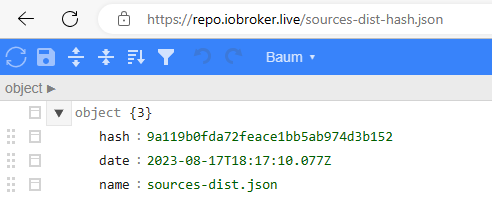
Warum das so ist, weiß ich nicht.
VG Klixy -
@thomas-braun
Updates hatte ich kurz vor dem Post eingespielt, über die Weboberfläche wird das Repo erreicht. Auch nodejs und npm habe ich aktualisiert. Das Repo wird nur von der Konsole aus nicht erreicht, über den Browser geht es:
Warum das so ist, weiß ich nicht.
VG KlixyDann trag mal die 'live'-Server ein:
beta : http://download.iobroker.net/sources-dist-latest.json live-stable : http://iobroker.live/repo/sources-dist.json live-beta : http://iobroker.live/repo/sources-dist-latest.json stable : http://download.iobroker.net/sources-dist.json -
Dann trag mal die 'live'-Server ein:
beta : http://download.iobroker.net/sources-dist-latest.json live-stable : http://iobroker.live/repo/sources-dist.json live-beta : http://iobroker.live/repo/sources-dist-latest.json stable : http://download.iobroker.net/sources-dist.json@thomas-braun
OK. Die "Cannot download repository..." Einträge werden jetzt beim Diag nicht mehr angezeigt. Ich habe in der Fritzbox das Profil für den Raspi geändert, deshalb kam auch der Timeout. -
@klixy23 sagte in iob backup bricht mit Fehler ab:
Für Unterstützung und Lösungsansätze vorab vielen Dank.
Moin,
wie Dir ja schon von @Homoran mitgeteilt wurde, ist 1 GB knapp bemessen, gerade dann, wenn Du Backups machen willst, da wird meist im Hauptspeicher versucht alles zu sammeln, was ins Backup hinein soll, um es dann zu komprimieren und auf Platte zu schreiben.
Ein Versuch wäre es wert, einmal folgendes zu versuchen:
iob stop
iob backup
iob start
Und natürlich, die kleinen Probleme beheben, die Dir @Thomas-Braun mit auf den Weg gegeben hat.
VG
Bernd -
Skript v.2023-04-16

*** BASE SYSTEM ***
Model           : Raspberry Pi 3 Model B Rev 1.2
Architecture    : armv7l
Docker          : false
Virtualization  : none
Distributor ID: Raspbian
Description:    Raspbian GNU/Linux 11 (bullseye)
Release:        11
Codename:       bullseye

PRETTY_NAME="Raspbian GNU/Linux 11 (bullseye)"
NAME="Raspbian GNU/Linux"
VERSION_ID="11"
VERSION="11 (bullseye)"
VERSION_CODENAME=bullseye
ID=raspbian
ID_LIKE=debian
HOME_URL="http://www.raspbian.org/"
SUPPORT_URL="http://www.raspbian.org/RaspbianForums"
BUG_REPORT_URL="http://www.raspbian.org/RaspbianBugs"

Systemuptime and Load:
 22:05:10 up 2 days,  4:27,  1 user,  load average: 0.33, 0.23, 0.17
CPU threads: 4

Raspberry only:
throttled=0x20000
Other values than 0x0 hint to temperature/voltage problems
temp=55.8'C
volt=1.2938V

*** Time and Time Zones ***
               Local time: Tue 2023-08-15 22:05:10 CEST
           Universal time: Tue 2023-08-15 20:05:10 UTC
                 RTC time: n/a
                Time zone: Europe/Berlin (CEST, +0200)
System clock synchronized: yes
              NTP service: active
          RTC in local TZ: no

*** User and Groups ***
pi
/home/pi
pi adm dialout cdrom sudo audio video plugdev games users input render netdev gpio i2c spi iobroker

*** X-Server-Setup ***
X-Server:       false
Desktop:
Terminal:       tty
Boot Target:    graphical.target

*** MEMORY ***
               total        used        free      shared  buff/cache   available
Mem:            971M        583M        195M        0.0K        193M        324M
Swap:           511M        293M        218M
Total:          1.5G        876M        413M

          971 M total memory
          583 M used memory
          394 M active memory
          279 M inactive memory
          195 M free memory
           18 M buffer memory
          174 M swap cache
          511 M total swap
          293 M used swap
          218 M free swap

Raspberry only:
oom events: 0
lifetime oom required: 0 Mbytes
total time in oom handler: 0 ms
max time spent in oom handler: 0 ms

*** FILESYSTEM ***
Filesystem     Type      Size  Used Avail Use% Mounted on
/dev/root      ext4       15G  6.5G  7.0G  49% /
devtmpfs       devtmpfs  358M     0  358M   0% /dev
tmpfs          tmpfs     486M     0  486M   0% /dev/shm
tmpfs          tmpfs     195M  640K  194M   1% /run
tmpfs          tmpfs     5.0M  4.0K  5.0M   1% /run/lock
/dev/mmcblk0p1 vfat      253M   51M  202M  20% /boot
tmpfs          tmpfs      98M     0   98M   0% /run/user/1000

Messages concerning ext4 filesystem in dmesg:
[Sun Aug 13 17:37:22 2023] Kernel command line: coherent_pool=1M 8250.nr_uarts=0 snd_bcm2835.enable_headphones=0 snd_bcm2835.enable_headphones=1 snd_bcm2835.enable_hdmi=1 snd_bcm2835.enable_hdmi=0 video=Composite-1:720x480@60i vc_mem.mem_base=0x3f000000 vc_mem.mem_size=0x3f600000  console=ttyS0,115200 console=tty1 root=PARTUUID=501d671c-02 rootfstype=ext4 fsck.repair=yes rootwait
[Sun Aug 13 17:37:25 2023] EXT4-fs (mmcblk0p2): INFO: recovery required on readonly filesystem
[Sun Aug 13 17:37:25 2023] EXT4-fs (mmcblk0p2): write access will be enabled during recovery
[Sun Aug 13 17:37:25 2023] EXT4-fs (mmcblk0p2): orphan cleanup on readonly fs
[Sun Aug 13 17:37:26 2023] EXT4-fs (mmcblk0p2): 2 orphan inodes deleted
[Sun Aug 13 17:37:26 2023] EXT4-fs (mmcblk0p2): recovery complete
[Sun Aug 13 17:37:28 2023] EXT4-fs (mmcblk0p2): mounted filesystem with ordered data mode. Quota mode: none.
[Sun Aug 13 17:37:28 2023] VFS: Mounted root (ext4 filesystem) readonly on device 179:2.
[Sun Aug 13 17:37:36 2023] EXT4-fs (mmcblk0p2): re-mounted. Quota mode: none.

Show mounted filesystems (real ones only):
TARGET  SOURCE         FSTYPE OPTIONS
/       /dev/mmcblk0p2 ext4   rw,noatime
`-/boot /dev/mmcblk0p1 vfat   rw,relatime,fmask=0022,dmask=0022,codepage=437,iocharset=ascii,shortname=mixed,flush,errors=remount-ro

Files in neuralgic directories:

/var:
2.8G    /var/
1.5G    /var/log
1.4G    /var/log/journal/6ce9bd1f37ea42559463f35932da81c1
1.4G    /var/log/journal
809M    /var/cache

Archived and active journals take up 1.3G in the file system.

/opt/iobroker/backups:
5.7M    /opt/iobroker/backups/

/opt/iobroker/iobroker-data:
364M    /opt/iobroker/iobroker-data/
191M    /opt/iobroker/iobroker-data/history.0
116M    /opt/iobroker/iobroker-data/files
52M     /opt/iobroker/iobroker-data/files/javascript.admin
36M     /opt/iobroker/iobroker-data/backup-objects

The five largest files in iobroker-data are:
19M     /opt/iobroker/iobroker-data/files/iot.admin/static/js/main.2975a411.js.map
18M     /opt/iobroker/iobroker-data/objects.jsonl
8.2M    /opt/iobroker/iobroker-data/files/iot.admin/static/js/main.2975a411.js
6.9M    /opt/iobroker/iobroker-data/files/javascript.admin/static/js/610.312d98a8.chunk.js.map
6.3M    /opt/iobroker/iobroker-data/files/admin.admin/custom/static/js/vendors-node_modules_iobroker_adapter-react-v5_assets_devices_parseNames_js-node_modules_iobr-99c23e.847b8ad9.chunk.js.map

*** NodeJS-Installation ***

/usr/bin/nodejs         v18.17.1
/usr/bin/node           v18.17.1
/usr/bin/npm            9.6.7
/usr/bin/npx            9.6.7


nodejs:
  Installed: 18.17.1-deb-1nodesource1
  Candidate: 18.17.1-deb-1nodesource1
  Version table:
 *** 18.17.1-deb-1nodesource1 500
        500 https://deb.nodesource.com/node_18.x bullseye/main armhf Packages
        100 /var/lib/dpkg/status
     12.22.12~dfsg-1~deb11u4 500
        500 http://raspbian.raspberrypi.org/raspbian bullseye/main armhf Packages

Temp directories causing npm8 problem: 0
No problems detected

*** ioBroker-Installation ***

ioBroker Status
iobroker is running on this host.


Objects type: jsonl
States  type: jsonl

MULTIHOSTSERVICE/enabled: false

Core adapters versions
js-controller:  4.0.24
admin:          6.3.5
javascript:     7.0.3

Adapters from github:   0

Adapter State
+ system.adapter.admin.0                  : admin                 : RASPI3                                   -  enabled, port: 8081, bind: 0.0.0.0, run as: admin
+ system.adapter.admin.1                  : admin                 : RASPI3                                   -  enabled, port: 8090, bind: 0.0.0.0, run as: admin
+ system.adapter.alexa2.0                 : alexa2                : RASPI3                                   -  enabled
  system.adapter.backitup.0               : backitup              : RASPI3                                   - disabled
+ system.adapter.bosesoundtouch.0         : bosesoundtouch        : RASPI3                                   -  enabled
+ system.adapter.discovery.0              : discovery             : RASPI3                                   -  enabled
+ system.adapter.fb-checkpresence.0       : fb-checkpresence      : RASPI3                                   -  enabled
  system.adapter.flot.0                   : flot                  : RASPI3                                   -  enabled
+ system.adapter.history.0                : history               : RASPI3                                   -  enabled
  system.adapter.homeconnect.0            : homeconnect           : RASPI3                                   - disabled
+ system.adapter.info.0                   : info                  : RASPI3                                   -  enabled
+ system.adapter.iot.0                    : iot                   : RASPI3                                   -  enabled
+ system.adapter.javascript.0             : javascript            : RASPI3                                   -  enabled
+ system.adapter.panasonic-viera.0        : panasonic-viera       : RASPI3                                   -  enabled
+ system.adapter.rpi2.0                   : rpi2                  : RASPI3                                   -  enabled
+ system.adapter.shelly.0                 : shelly                : RASPI3                                   -  enabled, port: 1882, bind: 0.0.0.0
+ system.adapter.signal-cmb.0             : signal-cmb            : RASPI3                                   -  enabled
+ system.adapter.simple-api.0             : simple-api            : RASPI3                                   -  enabled, port: 8087, bind: 192.168.94.120, run as: admin
+ system.adapter.snmp.0                   : snmp                  : RASPI3                                   -  enabled
+ system.adapter.socketio.0               : socketio              : RASPI3                                   -  enabled, port: 8084, bind: 0.0.0.0, run as: admin
+ system.adapter.statistics.0             : statistics            : RASPI3                                   -  enabled
+ system.adapter.tr-064.0                 : tr-064                : RASPI3                                   -  enabled
+ system.adapter.tr-064.1                 : tr-064                : RASPI3                                   -  enabled
+ system.adapter.web.0                    : web                   : RASPI3                                   -  enabled, port: 8082, bind: 192.168.94.120, run as: admin

+ instance is alive

Enabled adapters with bindings
+ system.adapter.admin.0                  : admin                 : RASPI3                                   -  enabled, port: 8081, bind: 0.0.0.0, run as: admin
+ system.adapter.admin.1                  : admin                 : RASPI3                                   -  enabled, port: 8090, bind: 0.0.0.0, run as: admin
+ system.adapter.shelly.0                 : shelly                : RASPI3                                   -  enabled, port: 1882, bind: 0.0.0.0
+ system.adapter.simple-api.0             : simple-api            : RASPI3                                   -  enabled, port: 8087, bind: 192.168.94.120, run as: admin
+ system.adapter.socketio.0               : socketio              : RASPI3                                   -  enabled, port: 8084, bind: 0.0.0.0, run as: admin
+ system.adapter.web.0                    : web                   : RASPI3                                   -  enabled, port: 8082, bind: 192.168.94.120, run as: admin

ioBroker-Repositories
stable        : http://download.iobroker.net/sources-dist.json
beta          : http://download.iobroker.net/sources-dist-latest.json

Active repo(s): stable

Installed ioBroker-Instances
Used repository: stable
Cannot download repository hash file from "http://download.iobroker.net/sources-dist-hash.json": timeout of 10000ms exceeded
Cannot download repository hash file from "http://download.iobroker.net/sources-dist-hash.json": timeout of 10000ms exceeded
Cannot download repository file from "http://download.iobroker.net/sources-dist.json": timeout of 10000ms exceeded
Adapter    "admin"        : 6.3.5    , installed 6.3.5
Adapter    "alexa2"       : 3.24.1   , installed 3.24.1
Adapter    "backitup"     : 2.6.23   , installed 2.6.23
Adapter    "bosesoundtouch": 0.10.3  , installed 0.10.3
Adapter    "discovery"    : 3.1.0    , installed 3.1.0
Adapter    "fb-checkpresence": 1.2.2 , installed 1.2.2
Adapter    "flot"         : 1.12.0   , installed 1.12.0
Adapter    "history"      : 2.2.4    , installed 2.2.4
Adapter    "homeconnect"  : 1.1.1    , installed 1.1.1
Adapter    "info"         : 1.9.26   , installed 1.9.26
Adapter    "iot"          : 1.14.5   , installed 1.14.5
Adapter    "javascript"   : 7.0.3    , installed 7.0.3
Controller "js-controller": 4.0.24   , installed 4.0.24
Adapter    "panasonic-viera": 2.0.0  , installed 2.0.0
Adapter    "rpi2"         : 1.3.2    , installed 1.3.2
Adapter    "shelly"       : 6.4.1    , installed 6.4.1
Adapter    "signal-cmb"   : 0.3.0    , installed 0.3.0
Adapter    "simple-api"   : 2.7.2    , installed 2.7.2
Adapter    "snmp"         : 2.4.11   , installed 2.4.11
Adapter    "socketio"     : 4.2.0    , installed 4.2.0
Adapter    "statistics"   : 2.3.0    , installed 2.3.0
Adapter    "tr-064"       : 4.2.18   , installed 4.2.18
Adapter    "web"          : 4.3.0    , installed 4.3.0
Adapter    "ws"           : 1.3.0    , installed 1.3.0

Objects and States
Please stand by - This may take a while
Objects:        4084
States:         3363

*** OS-Repositories and Updates ***
Hit:1 http://raspbian.raspberrypi.org/raspbian bullseye InRelease
Hit:2 http://archive.raspberrypi.org/debian bullseye InRelease
Hit:3 https://deb.nodesource.com/node_18.x bullseye InRelease
Reading package lists...
Pending Updates: 5

*** Listening Ports ***
Active Internet connections (only servers)
Proto Recv-Q Send-Q Local Address           Foreign Address         State       User       Inode      PID/Program name
tcp        0      0 0.0.0.0:22              0.0.0.0:*               LISTEN      0          14047      485/sshd: /usr/sbin
tcp        0      0 192.168.94.120:8087     0.0.0.0:*               LISTEN      1001       1310455    12329/io.simple-api
tcp        0      0 192.168.94.120:8082     0.0.0.0:*               LISTEN      1001       1306610    12197/io.web.0
tcp        0      0 127.0.0.1:9001          0.0.0.0:*               LISTEN      1001       1308621    11924/iobroker.js-c
tcp        0      0 127.0.0.1:9000          0.0.0.0:*               LISTEN      1001       1309815    11924/iobroker.js-c
tcp6       0      0 :::22                   :::*                    LISTEN      0          14049      485/sshd: /usr/sbin
tcp6       0      0 :::8090                 :::*                    LISTEN      1001       1306421    11956/io.admin.1
tcp6       0      0 :::8081                 :::*                    LISTEN      1001       1306405    11945/io.admin.0
tcp6       0      0 :::8084                 :::*                    LISTEN      1001       1309411    12242/io.socketio.0
udp        0      0 0.0.0.0:46092           0.0.0.0:*                           1001       1314814    13151/io.snmp.0
udp        0      0 0.0.0.0:5683            0.0.0.0:*                           1001       1311052    12126/io.shelly.0
udp        0      0 0.0.0.0:68              0.0.0.0:*                           0          10881      579/dhcpcd
udp        0      0 0.0.0.0:49752           0.0.0.0:*                           108        10859      364/avahi-daemon: r
udp        0      0 0.0.0.0:5353            0.0.0.0:*                           108        10857      364/avahi-daemon: r
udp6       0      0 :::546                  :::*                                0          12692      579/dhcpcd
udp6       0      0 :::42159                :::*                                108        10860      364/avahi-daemon: r
udp6       0      0 :::5353                 :::*                                108        10858      364/avahi-daemon: r

*** Log File - Last 25 Lines ***

2023-08-15 19:02:27.242  - info: socketio.0 (12242) <== Disconnect system.user.admin from ::ffff:192.168.94.147 flot
2023-08-15 19:02:28.249  - info: socketio.0 (12242) ==> Connected system.user.admin from ::ffff:192.168.94.147
2023-08-15 19:07:26.234  - info: socketio.0 (12242) <== Disconnect system.user.admin from ::ffff:192.168.94.147 flot
2023-08-15 19:07:28.248  - info: socketio.0 (12242) ==> Connected system.user.admin from ::ffff:192.168.94.147
2023-08-15 19:12:26.244  - info: socketio.0 (12242) <== Disconnect system.user.admin from ::ffff:192.168.94.147 flot
2023-08-15 19:12:28.240  - info: socketio.0 (12242) ==> Connected system.user.admin from ::ffff:192.168.94.147
2023-08-15 19:14:28.731  - info: javascript.0 (12006) script.js.Fenster.DW2-Alarm2: true
2023-08-15 19:14:28.733  - warn: javascript.0 (12006) script.js.Fenster.DW2-Alarm2: false
2023-08-15 19:16:22.315  - info: javascript.0 (12006) script.js.Drucker.Tonerlevel: Tonerlevel wurden aktualisiert.
2023-08-15 19:17:26.243  - info: socketio.0 (12242) <== Disconnect system.user.admin from ::ffff:192.168.94.147 flot
2023-08-15 19:17:28.252  - info: socketio.0 (12242) ==> Connected system.user.admin from ::ffff:192.168.94.147
2023-08-15 19:24:24.250  - info: socketio.0 (12242) <== Disconnect system.user.admin from ::ffff:192.168.94.147 flot
2023-08-15 19:46:22.297  - info: javascript.0 (12006) script.js.Drucker.Tonerlevel: Tonerlevel wurden aktualisiert.
2023-08-15 20:16:22.296  - info: javascript.0 (12006) script.js.Drucker.Tonerlevel: Tonerlevel wurden aktualisiert.
2023-08-15 20:17:39.820  - info: admin.0 (11945) <== Disconnect system.user.admin from ::ffff:192.168.94.147
2023-08-15 20:17:39.844  - info: admin.0 (11945) <== Disconnect system.user.admin from ::ffff:192.168.94.147 admin
2023-08-15 20:17:40.392  - info: admin.0 (11945) ==> Connected system.user.admin from ::ffff:192.168.94.147
2023-08-15 20:17:44.430  - info: admin.0 (11945) ==> Connected system.user.admin from ::ffff:192.168.94.147
2023-08-15 20:17:47.312  - info: host.RASPI3 Updating repository "stable" under "http://download.iobroker.net/sources-dist.json"
2023-08-15 20:18:24.595  - info: admin.0 (11945) <== Disconnect system.user.admin from ::ffff:192.168.94.147
2023-08-15 20:21:09.256  - info: javascript.0 (12006) script.js.Fenster.DW2-Sensorwerte: 15.08.2023 20:21:09%0ATemparatur:25%0AHelligkeit:21%0AAuslöser:["sensor","temperature"]
2023-08-15 20:46:22.305  - info: javascript.0 (12006) script.js.Drucker.Tonerlevel: Tonerlevel wurden aktualisiert.
2023-08-15 21:16:22.302  - info: javascript.0 (12006) script.js.Drucker.Tonerlevel: Tonerlevel wurden aktualisiert.
2023-08-15 21:44:16.341  - info: javascript.0 (12006) script.js.Fenster.DW2-Sensorwerte: 15.08.2023 21:44:16%0ATemparatur:24%0AHelligkeit:0%0AAuslöser:["sensor","temperature"]
2023-08-15 21:46:22.297  - info: javascript.0 (12006) script.js.Drucker.Tonerlevel: Tonerlevel wurden aktualisiert.
Und noch das Summary
======================= SUMMARY ======================= v.2023-04-16 Operatingsystem: Raspbian GNU/Linux 11 (bullseye) Kernel: 6.1.21-v7+ Installation: Native Timezone: Europe/Berlin (CEST, +0200) User-ID: 1000 X-Server: false Boot Target: graphical.target Pending OS-Updates: 5 Cannot download repository hash file from "http://download.iobroker.net/sources-dist-hash.json": timeout of 10000ms exceeded Cannot download repository hash file from "http://download.iobroker.net/sources-dist-hash.json": timeout of 10000ms exceeded Cannot download repository file from "http://download.iobroker.net/sources-dist.json": timeout of 10000ms exceeded Pending iob updates: 0 Nodejs-Installation: /usr/bin/nodejs v18.17.1 /usr/bin/node v18.17.1 /usr/bin/npm 9.6.7 /usr/bin/npx 9.6.7 Recommended versions are nodejs 18.x.y and npm 9.x.y Your nodejs installation is correct MEMORY: total used free shared buff/cache available Mem: 971M 556M 88M 0.0K 326M 351M Swap: 511M 316M 195M Total: 1.5G 872M 284M Active iob-Instances: 22 Active repo(s): stable ioBroker Core: js-controller 4.0.24 admin 6.3.5 ioBroker Status: iobroker is running on this host. Objects type: jsonl States type: jsonl Status admin and web instance: + system.adapter.admin.0 : admin : RASPI3 - enabled, port: 8081, bind: 0.0.0.0, run as: admin + system.adapter.admin.1 : admin : RASPI3 - enabled, port: 8090, bind: 0.0.0.0, run as: admin + system.adapter.web.0 : web : RASPI3 - enabled, port: 8082, bind: 192.168.94.120, run as: admin Objects: 4084 States: 3363 Size of iob-Database: 18M /opt/iobroker/iobroker-data/objects.jsonl 4.5M /opt/iobroker/iobroker-data/states.jsonl =================== END OF SUMMARY ====================@klixy23 schmeiß die folgenden nicht benötigten(überflüssigen) Adapter raus
admin.1
discovery.0
info.0
wenn die folgenden generell nicht mehr genutzt werden, die auch noch löschen
flot.0
homeconnect.0
eventuell im web Adapter simple api nutzen und den externen noch entfernen
-
@klixy23 schmeiß die folgenden nicht benötigten(überflüssigen) Adapter raus
admin.1
discovery.0
info.0
wenn die folgenden generell nicht mehr genutzt werden, die auch noch löschen
flot.0
homeconnect.0
eventuell im web Adapter simple api nutzen und den externen noch entfernen
-
@crunchip
Ja, aber das löst mein Problem auch nicht.
Kann man die Ausgabe erweitern, so dass man besser eingrenzen kann, wo das Problem liegt oder gibt es Logfiles die mehr Aufschluss geben?VG Klixy
dmesg -wTin einem Terminal anschauen, dann ein Backup machen. Ich habe die Vermutung dass da was auftauchen könnte.
-
@crunchip
Ja, aber das löst mein Problem auch nicht.
Kann man die Ausgabe erweitern, so dass man besser eingrenzen kann, wo das Problem liegt oder gibt es Logfiles die mehr Aufschluss geben?VG Klixy
@klixy23 sagte in iob backup bricht mit Fehler ab:
dass man besser eingrenzen kann, wo das Problem liegt
besser als "RAM zu wenig"?
1GB RAM reicht für ca. 10 Instanzen, wenn nichts anderes als iob läuft.
@klixy23 sagte in iob backup bricht mit Fehler ab:
Active iob-Instances: 22
sind damit definitiv viel zu viel.
dazu kommen noch die scheduled Instanzen, wie eben auch backitup.
Dieser benötigt richtig viel RAM für das Packen der Backupdaten.Was willst du denn hören?
-
@crunchip
Ja, aber das löst mein Problem auch nicht.
Kann man die Ausgabe erweitern, so dass man besser eingrenzen kann, wo das Problem liegt oder gibt es Logfiles die mehr Aufschluss geben?VG Klixy
@klixy23 war mehr oder wenig nur ein Vorschlag dein System "über Wasser" zu halten. Dazu kommt, Je weniger Instanzen desto weniger hat auch der Admin zu tun, ergo wird der Ram des admin auch kleiner.
Den Backitup Adapter starte/stoppe ich z.b per script für den Zeitraum des backups, da dieser ebenfalls rund 100Mb in Anspruch nimmt.Mein admin allein benötigt z.b schon rund 230Mb.
Hab allerdings auch 50 Instanzen laufen.Wie bereits erwähnt kommst du nicht drum herum, aufzurüsten, 4GB Ram sind mittlerweile üblich um iobroker vernünftig laufen zu lassen.
-
@klixy23 war mehr oder wenig nur ein Vorschlag dein System "über Wasser" zu halten. Dazu kommt, Je weniger Instanzen desto weniger hat auch der Admin zu tun, ergo wird der Ram des admin auch kleiner.
Den Backitup Adapter starte/stoppe ich z.b per script für den Zeitraum des backups, da dieser ebenfalls rund 100Mb in Anspruch nimmt.Mein admin allein benötigt z.b schon rund 230Mb.
Hab allerdings auch 50 Instanzen laufen.Wie bereits erwähnt kommst du nicht drum herum, aufzurüsten, 4GB Ram sind mittlerweile üblich um iobroker vernünftig laufen zu lassen.
@crunchip sagte in iob backup bricht mit Fehler ab:
war mehr oder wenig nur ein Vorschlag dein System "über Wasser" zu halten.
Moin,
ein einem Post -> https://forum.iobroker.net/topic/67640/iob-backup-bricht-mit-fehler-ab/10?_=1692425433874, habe ich dem TE ja gesagt, dass er alles stoppen soll, vom TE -> https://forum.iobroker.net/topic/67640/iob-backup-bricht-mit-fehler-ab/15?_=1692425433874 kam, das es nicht geholfen hat.
Ich verstehe das auch so, dass es nicht um denBackItUpAdapter geht, sondern um den Befehl, der mit Fehlern abbricht.iob backupHoffe, dass ich nicht wieder etwas falsch verstanden habe.
VG
Bernd -
@crunchip sagte in iob backup bricht mit Fehler ab:
war mehr oder wenig nur ein Vorschlag dein System "über Wasser" zu halten.
Moin,
ein einem Post -> https://forum.iobroker.net/topic/67640/iob-backup-bricht-mit-fehler-ab/10?_=1692425433874, habe ich dem TE ja gesagt, dass er alles stoppen soll, vom TE -> https://forum.iobroker.net/topic/67640/iob-backup-bricht-mit-fehler-ab/15?_=1692425433874 kam, das es nicht geholfen hat.
Ich verstehe das auch so, dass es nicht um denBackItUpAdapter geht, sondern um den Befehl, der mit Fehlern abbricht.iob backupHoffe, dass ich nicht wieder etwas falsch verstanden habe.
VG
Bernd@dp20eic sagte in iob backup bricht mit Fehler ab:
sondern um den Befehl, der mit Fehlern abbricht.
Richtig...wegen dem token
Allerdings kam ja als Nebenschauplatz zum Vorschein, das generell sein Ram nicht ausreicht um einen vernünftigen Betrieb des Systems zu gewährleisten
-
@crunchip sagte in iob backup bricht mit Fehler ab:
war mehr oder wenig nur ein Vorschlag dein System "über Wasser" zu halten.
Moin,
ein einem Post -> https://forum.iobroker.net/topic/67640/iob-backup-bricht-mit-fehler-ab/10?_=1692425433874, habe ich dem TE ja gesagt, dass er alles stoppen soll, vom TE -> https://forum.iobroker.net/topic/67640/iob-backup-bricht-mit-fehler-ab/15?_=1692425433874 kam, das es nicht geholfen hat.
Ich verstehe das auch so, dass es nicht um denBackItUpAdapter geht, sondern um den Befehl, der mit Fehlern abbricht.iob backupHoffe, dass ich nicht wieder etwas falsch verstanden habe.
VG
Bernd@dp20eic
Ja richtig, es geht um den Befehl auf der Kommandozeile. Und nur wenn das funktioniert, dann funktioniert auch Backitup.Und warum wird dann nicht als Fehler "Out of Memory" ausgegeben. In den Logs steht ja auch nix von wegen zu wenig Memory.
Ich werde mal eine neue SD-Karte besorgen und ein iob-System von Grund auf neu installieren. Dann werde ich Backups machen und einen Adapter nach dem anderen installieren und sehen, ab wie vielen wieder dieser Tokenfehler auftritt. Ich bin gespannt auf das Ergebnis.
VG Klixy
-
@dp20eic
Ja richtig, es geht um den Befehl auf der Kommandozeile. Und nur wenn das funktioniert, dann funktioniert auch Backitup.Und warum wird dann nicht als Fehler "Out of Memory" ausgegeben. In den Logs steht ja auch nix von wegen zu wenig Memory.
Ich werde mal eine neue SD-Karte besorgen und ein iob-System von Grund auf neu installieren. Dann werde ich Backups machen und einen Adapter nach dem anderen installieren und sehen, ab wie vielen wieder dieser Tokenfehler auftritt. Ich bin gespannt auf das Ergebnis.
VG Klixy
@klixy23 sagte in iob backup bricht mit Fehler ab:
einen Adapter nach dem anderen installieren und sehen, ab wie vielen wieder dieser Tokenfehler auftritt
Glaube nicht das der Tokenfehler abhängig der Adapteranzahl ist. Eher das aufgrund des Speichermangels es dir irgendwann etwas "zerschossen" hat.
@klixy23 sagte in iob backup bricht mit Fehler ab:
Und warum wird dann nicht als Fehler "Out of Memory" ausgegeben. In den Logs steht ja auch nix von wegen zu wenig Memory
Weil er gar nicht soweit kommt, aufgrund des Tokenfehlers.
Bei gestopptem iobroker gibt es ja auch keinen Speichermangel.@klixy23 sagte in iob backup bricht mit Fehler ab:
Ich werde mal eine neue SD-Karte besorgen und ein iob-System von Grund auf neu installieren
Wenn du das eh vorhast, würde ich versuchen auf dem jetztigen System den js-controller mal neu zu installieren, oder auch ein
iobroker setup firstauszuführen.
Anschliessend bei gestoppten iobroker nochmal das backup anzustoßen.



Hey! Du scheinst an dieser Unterhaltung interessiert zu sein, hast aber noch kein Konto.
Hast du es satt, bei jedem Besuch durch die gleichen Beiträge zu scrollen? Wenn du dich für ein Konto anmeldest, kommst du immer genau dorthin zurück, wo du zuvor warst, und kannst dich über neue Antworten benachrichtigen lassen (entweder per E-Mail oder Push-Benachrichtigung). Du kannst auch Lesezeichen speichern und Beiträge positiv bewerten, um anderen Community-Mitgliedern deine Wertschätzung zu zeigen.
Mit deinem Input könnte dieser Beitrag noch besser werden 💗
Registrieren Anmelden337
Online33.0k
Benutzer83.5k
Themen1.3m
Beiträge