




VIS nach einigen Monaten recht träge
-
Ich muss meine Aussage aus dem ersten Post teilweise verbessern.
Nachdem ich mit der Uhr die Zeiten gestoppt habe, musste ich feststellen, dass auch das Umschalten über das Objekt in ioBroker teilweise recht lange dauert. Sobald die Schaltungen auf den KNX-Bus kommen (Auswertung über Gruppenmonitor) werden die Befehle direkt umgesetzt.Es scheint also kein spezielles VIS-Problem, sondern ein Performance-Problem von iobroker zu sein. Gibt es hier evtl. Tipps wie ich iobroker beschleunigen kann?
@christobal0815 sagte in VIS nach einigen Monaten recht träge:
sondern ein Performance-Problem von iobroker zu sein. Gibt es hier evtl. Tipps wie ich iobroker beschleunigen kann?
bist du dir damit sicher?
@christobal0815 sagte in VIS nach einigen Monaten recht träge:
11 % RAM-Auslastung.
-
-
@christobal0815 sagte in VIS nach einigen Monaten recht träge:
sondern ein Performance-Problem von iobroker zu sein. Gibt es hier evtl. Tipps wie ich iobroker beschleunigen kann?
bist du dir damit sicher?
@christobal0815 sagte in VIS nach einigen Monaten recht träge:
11 % RAM-Auslastung.
@crunchip said in VIS nach einigen Monaten recht träge:
@christobal0815 sagte in VIS nach einigen Monaten recht träge:
sondern ein Performance-Problem von iobroker zu sein. Gibt es hier evtl. Tipps wie ich iobroker beschleunigen kann?
bist du dir damit sicher?
@christobal0815 sagte in VIS nach einigen Monaten recht träge:
11 % RAM-Auslastung.
Für mich gibt es als Fehlerquellen
- Endpoint (würde ich ausschließen, da ich mit verschiedenen Endgeräten getestet habe)
- iobroker
- VIS
- Netzwerk?
-
@christobal0815 bitte als text in code-tags posten.
-
@crunchip said in VIS nach einigen Monaten recht träge:
@christobal0815 sagte in VIS nach einigen Monaten recht träge:
sondern ein Performance-Problem von iobroker zu sein. Gibt es hier evtl. Tipps wie ich iobroker beschleunigen kann?
bist du dir damit sicher?
@christobal0815 sagte in VIS nach einigen Monaten recht träge:
11 % RAM-Auslastung.
Für mich gibt es als Fehlerquellen
- Endpoint (würde ich ausschließen, da ich mit verschiedenen Endgeräten getestet habe)
- iobroker
- VIS
- Netzwerk?
-
@crunchip said in VIS nach einigen Monaten recht träge:
@christobal0815 sagte in VIS nach einigen Monaten recht träge:
sondern ein Performance-Problem von iobroker zu sein. Gibt es hier evtl. Tipps wie ich iobroker beschleunigen kann?
bist du dir damit sicher?
@christobal0815 sagte in VIS nach einigen Monaten recht träge:
11 % RAM-Auslastung.
Für mich gibt es als Fehlerquellen
- Endpoint (würde ich ausschließen, da ich mit verschiedenen Endgeräten getestet habe)
- iobroker
- VIS
- Netzwerk?
@christobal0815 sagte in VIS nach einigen Monaten recht träge:
Für mich gibt es als Fehlerquellen
nen Pi mit nur 1Gb Ram
-
@christobal0815 sagte in VIS nach einigen Monaten recht träge:
Für mich gibt es als Fehlerquellen
nen Pi mit nur 1Gb Ram
Der Report läuft seit knapp einer viertel Stunde.
Okay- verstanden, dann werde ich wohl doch auf eine Proxmox VM migrieren müssen um mehr RAM zur Verfügung zu haben.
Sobald iob diag durch ist poste ich hier
-
======== Start marking the full check here =========
Skript v.2023-04-16

*** BASE SYSTEM ***
Model           : Raspberry Pi 2 Model B Rev 1.1
Architecture    : armv7l
Docker          : false
Virtualization  : none
Distributor ID: Raspbian
Description:    Raspbian GNU/Linux 11 (bullseye)
Release:        11
Codename:       bullseye

PRETTY_NAME="Raspbian GNU/Linux 11 (bullseye)"
NAME="Raspbian GNU/Linux"
VERSION_ID="11"
VERSION="11 (bullseye)"
VERSION_CODENAME=bullseye
ID=raspbian
ID_LIKE=debian
HOME_URL="http://www.raspbian.org/"
SUPPORT_URL="http://www.raspbian.org/RaspbianForums"
BUG_REPORT_URL="http://www.raspbian.org/RaspbianBugs"

Systemuptime and Load:
 12:32:33 up 30 days,  3:03,  2 users,  load average: 0.50, 0.41, 0.37
CPU threads: 4

Raspberry only:
throttled=0x0
Other values than 0x0 hint to temperature/voltage problems
temp=47.1'C
volt=1.3125V

*** Time and Time Zones ***
               Local time: Wed 2023-07-05 12:32:34 CEST
           Universal time: Wed 2023-07-05 10:32:34 UTC
                 RTC time: n/a
                Time zone: Europe/Berlin (CEST, +0200)
System clock synchronized: yes
              NTP service: active
          RTC in local TZ: no

*** User and Groups ***
pi
/home/pi
pi adm dialout cdrom sudo audio video plugdev games users input render netdev gpio i2c spi iobroker

*** X-Server-Setup ***
X-Server:       false
Desktop:
Terminal:       tty
Boot Target:    multi-user.target

*** MEMORY ***
               total        used        free      shared  buff/cache   available
Mem:            922M        733M         37M        0.0K        150M        178M
Swap:            99M         99M        0.0K
Total:          1.0G        833M         38M

          922 M total memory
          733 M used memory
          244 M active memory
          568 M inactive memory
           37 M free memory
           26 M buffer memory
          124 M swap cache
           99 M total swap
           99 M used swap
            0 M free swap

Raspberry only:
oom events: 0
lifetime oom required: 0 Mbytes
total time in oom handler: 0 ms
max time spent in oom handler: 0 ms

*** FILESYSTEM ***
Filesystem     Type      Size  Used Avail Use% Mounted on
/dev/root      ext4       59G  4.3G   52G   8% /
devtmpfs       devtmpfs  333M     0  333M   0% /dev
tmpfs          tmpfs     462M     0  462M   0% /dev/shm
tmpfs          tmpfs     185M  948K  184M   1% /run
tmpfs          tmpfs     5.0M  4.0K  5.0M   1% /run/lock
/dev/mmcblk0p1 vfat      255M   50M  206M  20% /boot
tmpfs          tmpfs      93M     0   93M   0% /run/user/1000

Messages concerning ext4 filesystem in dmesg:

Show mounted filesystems (real ones only):
TARGET  SOURCE         FSTYPE OPTIONS
/       /dev/mmcblk0p2 ext4   rw,noatime
`-/boot /dev/mmcblk0p1 vfat   rw,relatime,fmask=0022,dmask=0022,codepage=437,iocharset=ascii,shortname=mixed,errors=remount-ro

Files in neuralgic directories:

/var:
1.3G    /var/
903M    /var/log
897M    /var/log/journal/3db870b59c0848eca0d0a936b11e1d21
897M    /var/log/journal
160M    /var/cache

Archived and active journals take up 896.1M in the file system.

/opt/iobroker/backups:
315M    /opt/iobroker/backups/

/opt/iobroker/iobroker-data:
263M    /opt/iobroker/iobroker-data/
207M    /opt/iobroker/iobroker-data/files
72M     /opt/iobroker/iobroker-data/files/telegram.admin
52M     /opt/iobroker/iobroker-data/files/javascript.admin
48M     /opt/iobroker/iobroker-data/files/telegram.admin/custom/static/js

The five largest files in iobroker-data are:
15M     /opt/iobroker/iobroker-data/files/telegram.admin/rules/static/js/vendors-node_modules_iobroker_adapter-react-v5_assets_devices_parseNames_d_ts-node_modules_io-1d9f06.44fe4a3f.chunk.js.map
12M     /opt/iobroker/iobroker-data/objects.jsonl
7.2M    /opt/iobroker/iobroker-data/files/telegram.admin/rules/static/js/vendors-node_modules_iobroker_adapter-react-v5_assets_devices_parseNames_d_ts-node_modules_io-1d9f06.44fe4a3f.chunk.js
6.9M    /opt/iobroker/iobroker-data/files/telegram.admin/custom/static/js/vendors-node_modules_mui_icons-material_esm_index_js.8fdf8cb7.chunk.js.map
6.9M    /opt/iobroker/iobroker-data/files/javascript.admin/static/js/610.312d98a8.chunk.js.map

*** NodeJS-Installation ***

/usr/bin/nodejs         v14.20.1
/usr/bin/node           v14.20.1
/usr/bin/npm            6.14.17
/usr/bin/npx            6.14.17


nodejs:
  Installed: 14.20.1-deb-1nodesource1
  Candidate: 14.21.3-deb-1nodesource1
  Version table:
     14.21.3-deb-1nodesource1 500
        500 https://deb.nodesource.com/node_14.x bullseye/main armhf Packages
 *** 14.20.1-deb-1nodesource1 100
        100 /var/lib/dpkg/status
     12.22.12~dfsg-1~deb11u4 500
        500 http://raspbian.raspberrypi.org/raspbian bullseye/main armhf Packages

Temp directories causing npm8 problem: 0
No problems detected

*** ioBroker-Installation ***

ioBroker Status
iobroker is running on this host.


Objects type: jsonl
States  type: jsonl

MULTIHOSTSERVICE/enabled: false

Core adapters versions
js-controller:  4.0.24
admin:          6.3.5
javascript:     7.0.3

npm ERR! peer dep missing: tough-cookie@^4.0.0, required by http-cookie-agent@4.0.2
npm ERR! peer dep missing: buffer@>=6.0.3, required by crc@4.1.1
Adapters from github:   2

Adapter State
  system.adapter.adb.0                    : adb                   : raspberrypi                              - disabled
+ system.adapter.admin.0                  : admin                 : raspberrypi                              -  enabled, port: 8081, bind: 0.0.0.0, run as: admin
  system.adapter.backitup.0               : backitup              : raspberrypi                              - disabled
  system.adapter.cloud.0                  : cloud                 : raspberrypi                              - disabled
  system.adapter.daswetter.0              : daswetter             : raspberrypi                              -  enabled
+ system.adapter.discovery.0              : discovery             : raspberrypi                              -  enabled
+ system.adapter.doorbird.1               : doorbird              : raspberrypi                              -  enabled
  system.adapter.dwd.0                    : dwd                   : raspberrypi                              -  enabled
  system.adapter.firetv.0                 : firetv                : raspberrypi                              - disabled
  system.adapter.flot.0                   : flot                  : raspberrypi                              - disabled
+ system.adapter.history.0                : history               : raspberrypi                              -  enabled
+ system.adapter.homeconnect.0            : homeconnect           : raspberrypi                              -  enabled
  system.adapter.ical.0                   : ical                  : raspberrypi                              -  enabled
+ system.adapter.javascript.0             : javascript            : raspberrypi                              -  enabled
+ system.adapter.knx.0                    : knx                   : raspberrypi                              -  enabled, bind: 192.168.178.118
+ system.adapter.shelly.0                 : shelly                : raspberrypi                              -  enabled, port: 1882, bind: 0.0.0.0
+ system.adapter.shuttercontrol.0         : shuttercontrol        : raspberrypi                              -  enabled
+ system.adapter.telegram.0               : telegram              : raspberrypi                              -  enabled, port: 8443, bind: 0.0.0.0
+ system.adapter.tesla-motors.0           : tesla-motors          : raspberrypi                              -  enabled
+ system.adapter.tr-064.0                 : tr-064                : raspberrypi                              -  enabled
+ system.adapter.trashschedule.0          : trashschedule         : raspberrypi                              -  enabled
  system.adapter.vis-bars.0               : vis-bars              : raspberrypi                              - disabled
  system.adapter.vis-fancyswitch.0        : vis-fancyswitch       : raspberrypi                              - disabled
  system.adapter.vis-history.0            : vis-history           : raspberrypi                              - disabled
  system.adapter.vis.0                    : vis                   : raspberrypi                              -  enabled
+ system.adapter.web.0                    : web                   : raspberrypi                              -  enabled, port: 8082, bind: 0.0.0.0, run as: admin
+ system.adapter.yahka.0                  : yahka                 : raspberrypi                              -  enabled

+ instance is alive

Enabled adapters with bindings
+ system.adapter.admin.0                  : admin                 : raspberrypi                              -  enabled, port: 8081, bind: 0.0.0.0, run as: admin
+ system.adapter.shelly.0                 : shelly                : raspberrypi                              -  enabled, port: 1882, bind: 0.0.0.0
+ system.adapter.telegram.0               : telegram              : raspberrypi                              -  enabled, port: 8443, bind: 0.0.0.0
+ system.adapter.web.0                    : web                   : raspberrypi                              -  enabled, port: 8082, bind: 0.0.0.0, run as: admin

ioBroker-Repositories
stable        : http://download.iobroker.net/sources-dist.json
beta          : http://download.iobroker.net/sources-dist-latest.json

Active repo(s): stable

Installed ioBroker-Instances
Used repository: stable
 Objects database error: connect ECONNREFUSED 127.0.0.1:9001
 States database error: connect ECONNREFUSED 127.0.0.1:9000
 Objects database error: connect ECONNREFUSED 127.0.0.1:9001
 States database error: connect ECONNREFUSED 127.0.0.1:9000
 Objects database error: connect ECONNREFUSED 127.0.0.1:9001
 States database error: connect ECONNREFUSED 127.0.0.1:9000
 Objects database error: connect ECONNREFUSED 127.0.0.1:9001
 States database error: connect ECONNREFUSED 127.0.0.1:9000
 Objects database error: connect ECONNREFUSED 127.0.0.1:9001
 States database error: connect ECONNREFUSED 127.0.0.1:9000
 Objects database error: connect ECONNREFUSED 127.0.0.1:9001
 States database error: connect ECONNREFUSED 127.0.0.1:9000
Adapter    "adb"          : 0.0.7    , installed 0.0.7
Adapter    "admin"        : 6.3.5    , installed 6.3.5
Adapter    "backitup"     : 2.6.23   , installed 2.6.23
Adapter    "cloud"        : 4.4.1    , installed 4.4.1
Adapter    "daswetter"    : 3.1.8    , installed 3.1.8
Adapter    "discovery"    : 3.1.0    , installed 3.1.0
Adapter    "dwd"          : 2.8.3    , installed 2.8.3
Adapter    "firetv"       : 1.0.0    , installed 1.0.0
Adapter    "flot"         : 1.12.0   , installed 1.12.0
Adapter    "history"      : 2.2.4    , installed 2.2.4
Adapter    "homeconnect"  : 1.1.1    , installed 1.1.1
Adapter    "ical"         : 1.13.3   , installed 1.13.2 [Updatable]
Adapter    "javascript"   : 7.0.3    , installed 7.0.3
Controller "js-controller": 4.0.24   , installed 4.0.24
Adapter    "knx"          : 2.0.17   , installed 2.0.17
Adapter    "modbus"       : 5.0.11   , installed 5.0.11
Adapter    "shelly"       : 6.4.1    , installed 6.4.1
Adapter    "shuttercontrol": 1.5.0   , installed 1.5.0
Adapter    "simple-api"   : 2.7.2    , installed 2.7.2
Adapter    "socketio"     : 4.2.0    , installed 4.2.0
Adapter    "telegram"     : 1.15.6   , installed 1.15.6
Adapter    "tesla-motors" : 1.3.2    , installed 1.3.2
Adapter    "tr-064"       : 4.2.18   , installed 4.2.18
Adapter    "trashschedule": 2.2.0    , installed 2.2.0
Adapter    "vis"          : 1.4.16   , installed 1.4.16
Adapter    "vis-bars"     : 0.1.4    , installed 0.1.4
Adapter    "vis-fancyswitch": 1.1.0  , installed 1.1.0
Adapter    "vis-history"  : 1.0.0    , installed 1.0.0
Adapter    "web"          : 4.3.0    , installed 4.3.0
Adapter    "ws"           : 1.3.0    , installed 1.3.0
Adapter    "yahka"        : 0.17.0   , installed 0.17.0

Objects and States
Please stand by - This may take a while
Objects:        7479
States:         6052

*** OS-Repositories and Updates ***
Hit:1 http://archive.raspberrypi.org/debian bullseye InRelease
Hit:2 http://raspbian.raspberrypi.org/raspbian bullseye InRelease
Hit:3 https://deb.nodesource.com/node_14.x bullseye InRelease
Reading package lists...
Pending Updates: 95

*** Listening Ports ***
Active Internet connections (only servers)
Proto Recv-Q Send-Q Local Address           Foreign Address         State       User       Inode      PID/Program name
tcp        0      0 127.0.0.1:9000          0.0.0.0:*               LISTEN      1001       16498788   11085/iobroker.js-c
tcp        0      0 127.0.0.1:9001          0.0.0.0:*               LISTEN      1001       16496342   11085/iobroker.js-c
tcp        0      0 0.0.0.0:22              0.0.0.0:*               LISTEN      0          16936      1683/sshd: /usr/sbi
tcp6       0      0 :::22                   :::*                    LISTEN      0          16938      1683/sshd: /usr/sbi
udp        0      0 0.0.0.0:68              0.0.0.0:*                           0          13413      689/dhcpcd
udp        0      0 0.0.0.0:44703           0.0.0.0:*                           108        10618      305/avahi-daemon: r
udp        0      0 0.0.0.0:5353            0.0.0.0:*                           108        10616      305/avahi-daemon: r
udp6       0      0 :::546                  :::*                                0          10722      689/dhcpcd
udp6       0      0 :::36001                :::*                                108        10619      305/avahi-daemon: r
udp6       0      0 :::5353                 :::*                                108        10617      305/avahi-daemon: r

*** Log File - Last 25 Lines ***

2023-07-05 12:44:23.615  - error: trashschedule.0 (11490) trashschedule.0 already running
2023-07-05 12:44:23.638  - warn: trashschedule.0 (11490) Terminated (ADAPTER_ALREADY_RUNNING): Without reason
2023-07-05 12:44:26.486  - error: knx.0 (11472) knx.0 already running
2023-07-05 12:44:26.543  - warn: knx.0 (11472) Terminated (ADAPTER_ALREADY_RUNNING): Without reason
2023-07-05 12:44:28.057  - error: host.raspberrypi instance system.adapter.trashschedule.0 terminated with code 7 (ADAPTER_ALREADY_RUNNING)
2023-07-05 12:44:28.061  - info: host.raspberrypi Restart adapter system.adapter.trashschedule.0 because enabled
2023-07-05 12:44:28.106  - info: javascript.0 (11460) Plugin sentry Sentry Plugin disabled for this process because sending of statistic data is disabled for the system
2023-07-05 12:44:30.716  - error: yahka.0 (11501) yahka.0 already running
2023-07-05 12:44:30.732  - warn: yahka.0 (11501) Terminated (ADAPTER_ALREADY_RUNNING): Without reason
2023-07-05 12:44:31.214  - error: host.raspberrypi instance system.adapter.knx.0 terminated with code 7 (ADAPTER_ALREADY_RUNNING)
2023-07-05 12:44:31.217  - info: host.raspberrypi Restart adapter system.adapter.knx.0 because enabled
2023-07-05 12:44:31.771  - info: tr-064.0 (11516) Plugin sentry Sentry Plugin disabled for this process because sending of statistic data is disabled for the system
2023-07-05 12:44:31.761  - info: shelly.0 (11508) Plugin sentry Sentry Plugin disabled for this process because sending of statistic data is disabled for the system
2023-07-05 12:44:32.148  - info: telegram.0 (11483) Plugin sentry Sentry Plugin disabled for this process because sending of statistic data is disabled for the system
2023-07-05 12:44:32.565  - error: host.raspberrypi instance system.adapter.yahka.0 terminated with code 7 (ADAPTER_ALREADY_RUNNING)
2023-07-05 12:44:32.568  - info: host.raspberrypi Restart adapter system.adapter.yahka.0 because enabled
2023-07-05 12:44:32.858  - info: host.raspberrypi instance system.adapter.doorbird.1 started with pid 11752
2023-07-05 12:44:34.746  - info: admin.0 (11405) starting. Version 6.3.5 in /opt/iobroker/node_modules/iobroker.admin, node: v14.20.1, js-controller: 4.0.24
2023-07-05 12:44:35.171  - info: admin.0 (11405) requesting all states
2023-07-05 12:44:35.175  - info: admin.0 (11405) requesting all objects
2023-07-05 12:44:37.337  - error: tesla-motors.0 (11694) tesla-motors.0 already running
2023-07-05 12:44:37.367  - error: shuttercontrol.0 (11695) shuttercontrol.0 already running
2023-07-05 12:44:37.403  - warn: shuttercontrol.0 (11695) Terminated (ADAPTER_ALREADY_RUNNING): Without reason
2023-07-05 12:44:37.410  - warn: tesla-motors.0 (11694) Terminated (ADAPTER_ALREADY_RUNNING): Without reason
2023-07-05 12:44:37.536  - info: discovery.0 (11707) Plugin sentry Sentry Plugin disabled for this process because sending of statistic data is disabled for the system
============ Mark until here for C&P =============
iob diag has finished.
-
======== Start marking the full check here =========
Skript v.2023-04-16

*** BASE SYSTEM ***
Model           : Raspberry Pi 2 Model B Rev 1.1
Architecture    : armv7l
Docker          : false
Virtualization  : none
Distributor ID: Raspbian
Description:    Raspbian GNU/Linux 11 (bullseye)
Release:        11
Codename:       bullseye

PRETTY_NAME="Raspbian GNU/Linux 11 (bullseye)"
NAME="Raspbian GNU/Linux"
VERSION_ID="11"
VERSION="11 (bullseye)"
VERSION_CODENAME=bullseye
ID=raspbian
ID_LIKE=debian
HOME_URL="http://www.raspbian.org/"
SUPPORT_URL="http://www.raspbian.org/RaspbianForums"
BUG_REPORT_URL="http://www.raspbian.org/RaspbianBugs"

Systemuptime and Load:
 12:32:33 up 30 days,  3:03,  2 users,  load average: 0.50, 0.41, 0.37
CPU threads: 4

Raspberry only:
throttled=0x0
Other values than 0x0 hint to temperature/voltage problems
temp=47.1'C
volt=1.3125V

*** Time and Time Zones ***
               Local time: Wed 2023-07-05 12:32:34 CEST
           Universal time: Wed 2023-07-05 10:32:34 UTC
                 RTC time: n/a
                Time zone: Europe/Berlin (CEST, +0200)
System clock synchronized: yes
              NTP service: active
          RTC in local TZ: no

*** User and Groups ***
pi
/home/pi
pi adm dialout cdrom sudo audio video plugdev games users input render netdev gpio i2c spi iobroker

*** X-Server-Setup ***
X-Server:       false
Desktop:
Terminal:       tty
Boot Target:    multi-user.target

*** MEMORY ***
               total        used        free      shared  buff/cache   available
Mem:            922M        733M         37M        0.0K        150M        178M
Swap:            99M         99M        0.0K
Total:          1.0G        833M         38M

          922 M total memory
          733 M used memory
          244 M active memory
          568 M inactive memory
           37 M free memory
           26 M buffer memory
          124 M swap cache
           99 M total swap
           99 M used swap
            0 M free swap

Raspberry only:
oom events: 0
lifetime oom required: 0 Mbytes
total time in oom handler: 0 ms
max time spent in oom handler: 0 ms

*** FILESYSTEM ***
Filesystem     Type      Size  Used Avail Use% Mounted on
/dev/root      ext4       59G  4.3G   52G   8% /
devtmpfs       devtmpfs  333M     0  333M   0% /dev
tmpfs          tmpfs     462M     0  462M   0% /dev/shm
tmpfs          tmpfs     185M  948K  184M   1% /run
tmpfs          tmpfs     5.0M  4.0K  5.0M   1% /run/lock
/dev/mmcblk0p1 vfat      255M   50M  206M  20% /boot
tmpfs          tmpfs      93M     0   93M   0% /run/user/1000

Messages concerning ext4 filesystem in dmesg:

Show mounted filesystems (real ones only):
TARGET  SOURCE         FSTYPE OPTIONS
/       /dev/mmcblk0p2 ext4   rw,noatime
`-/boot /dev/mmcblk0p1 vfat   rw,relatime,fmask=0022,dmask=0022,codepage=437,iocharset=ascii,shortname=mixed,errors=remount-ro

Files in neuralgic directories:

/var:
1.3G    /var/
903M    /var/log
897M    /var/log/journal/3db870b59c0848eca0d0a936b11e1d21
897M    /var/log/journal
160M    /var/cache

Archived and active journals take up 896.1M in the file system.

/opt/iobroker/backups:
315M    /opt/iobroker/backups/

/opt/iobroker/iobroker-data:
263M    /opt/iobroker/iobroker-data/
207M    /opt/iobroker/iobroker-data/files
72M     /opt/iobroker/iobroker-data/files/telegram.admin
52M     /opt/iobroker/iobroker-data/files/javascript.admin
48M     /opt/iobroker/iobroker-data/files/telegram.admin/custom/static/js

The five largest files in iobroker-data are:
15M     /opt/iobroker/iobroker-data/files/telegram.admin/rules/static/js/vendors-node_modules_iobroker_adapter-react-v5_assets_devices_parseNames_d_ts-node_modules_io-1d9f06.44fe4a3f.chunk.js.map
12M     /opt/iobroker/iobroker-data/objects.jsonl
7.2M    /opt/iobroker/iobroker-data/files/telegram.admin/rules/static/js/vendors-node_modules_iobroker_adapter-react-v5_assets_devices_parseNames_d_ts-node_modules_io-1d9f06.44fe4a3f.chunk.js
6.9M    /opt/iobroker/iobroker-data/files/telegram.admin/custom/static/js/vendors-node_modules_mui_icons-material_esm_index_js.8fdf8cb7.chunk.js.map
6.9M    /opt/iobroker/iobroker-data/files/javascript.admin/static/js/610.312d98a8.chunk.js.map

*** NodeJS-Installation ***

/usr/bin/nodejs         v14.20.1
/usr/bin/node           v14.20.1
/usr/bin/npm            6.14.17
/usr/bin/npx            6.14.17


nodejs:
  Installed: 14.20.1-deb-1nodesource1
  Candidate: 14.21.3-deb-1nodesource1
  Version table:
     14.21.3-deb-1nodesource1 500
        500 https://deb.nodesource.com/node_14.x bullseye/main armhf Packages
 *** 14.20.1-deb-1nodesource1 100
        100 /var/lib/dpkg/status
     12.22.12~dfsg-1~deb11u4 500
        500 http://raspbian.raspberrypi.org/raspbian bullseye/main armhf Packages

Temp directories causing npm8 problem: 0
No problems detected

*** ioBroker-Installation ***

ioBroker Status
iobroker is running on this host.


Objects type: jsonl
States  type: jsonl

MULTIHOSTSERVICE/enabled: false

Core adapters versions
js-controller:  4.0.24
admin:          6.3.5
javascript:     7.0.3

npm ERR! peer dep missing: tough-cookie@^4.0.0, required by http-cookie-agent@4.0.2
npm ERR! peer dep missing: buffer@>=6.0.3, required by crc@4.1.1
Adapters from github:   2

Adapter State
  system.adapter.adb.0                    : adb                   : raspberrypi                              - disabled
+ system.adapter.admin.0                  : admin                 : raspberrypi                              -  enabled, port: 8081, bind: 0.0.0.0, run as: admin
  system.adapter.backitup.0               : backitup              : raspberrypi                              - disabled
  system.adapter.cloud.0                  : cloud                 : raspberrypi                              - disabled
  system.adapter.daswetter.0              : daswetter             : raspberrypi                              -  enabled
+ system.adapter.discovery.0              : discovery             : raspberrypi                              -  enabled
+ system.adapter.doorbird.1               : doorbird              : raspberrypi                              -  enabled
  system.adapter.dwd.0                    : dwd                   : raspberrypi                              -  enabled
  system.adapter.firetv.0                 : firetv                : raspberrypi                              - disabled
  system.adapter.flot.0                   : flot                  : raspberrypi                              - disabled
+ system.adapter.history.0                : history               : raspberrypi                              -  enabled
+ system.adapter.homeconnect.0            : homeconnect           : raspberrypi                              -  enabled
  system.adapter.ical.0                   : ical                  : raspberrypi                              -  enabled
+ system.adapter.javascript.0             : javascript            : raspberrypi                              -  enabled
+ system.adapter.knx.0                    : knx                   : raspberrypi                              -  enabled, bind: 192.168.178.118
+ system.adapter.shelly.0                 : shelly                : raspberrypi                              -  enabled, port: 1882, bind: 0.0.0.0
+ system.adapter.shuttercontrol.0         : shuttercontrol        : raspberrypi                              -  enabled
+ system.adapter.telegram.0               : telegram              : raspberrypi                              -  enabled, port: 8443, bind: 0.0.0.0
+ system.adapter.tesla-motors.0           : tesla-motors          : raspberrypi                              -  enabled
+ system.adapter.tr-064.0                 : tr-064                : raspberrypi                              -  enabled
+ system.adapter.trashschedule.0          : trashschedule         : raspberrypi                              -  enabled
  system.adapter.vis-bars.0               : vis-bars              : raspberrypi                              - disabled
  system.adapter.vis-fancyswitch.0        : vis-fancyswitch       : raspberrypi                              - disabled
  system.adapter.vis-history.0            : vis-history           : raspberrypi                              - disabled
  system.adapter.vis.0                    : vis                   : raspberrypi                              -  enabled
+ system.adapter.web.0                    : web                   : raspberrypi                              -  enabled, port: 8082, bind: 0.0.0.0, run as: admin
+ system.adapter.yahka.0                  : yahka                 : raspberrypi                              -  enabled

+ instance is alive

Enabled adapters with bindings
+ system.adapter.admin.0                  : admin                 : raspberrypi                              -  enabled, port: 8081, bind: 0.0.0.0, run as: admin
+ system.adapter.shelly.0                 : shelly                : raspberrypi                              -  enabled, port: 1882, bind: 0.0.0.0
+ system.adapter.telegram.0               : telegram              : raspberrypi                              -  enabled, port: 8443, bind: 0.0.0.0
+ system.adapter.web.0                    : web                   : raspberrypi                              -  enabled, port: 8082, bind: 0.0.0.0, run as: admin

ioBroker-Repositories
stable        : http://download.iobroker.net/sources-dist.json
beta          : http://download.iobroker.net/sources-dist-latest.json

Active repo(s): stable

Installed ioBroker-Instances
Used repository: stable
 Objects database error: connect ECONNREFUSED 127.0.0.1:9001
 States database error: connect ECONNREFUSED 127.0.0.1:9000
 Objects database error: connect ECONNREFUSED 127.0.0.1:9001
 States database error: connect ECONNREFUSED 127.0.0.1:9000
 Objects database error: connect ECONNREFUSED 127.0.0.1:9001
 States database error: connect ECONNREFUSED 127.0.0.1:9000
 Objects database error: connect ECONNREFUSED 127.0.0.1:9001
 States database error: connect ECONNREFUSED 127.0.0.1:9000
 Objects database error: connect ECONNREFUSED 127.0.0.1:9001
 States database error: connect ECONNREFUSED 127.0.0.1:9000
 Objects database error: connect ECONNREFUSED 127.0.0.1:9001
 States database error: connect ECONNREFUSED 127.0.0.1:9000
Adapter    "adb"          : 0.0.7    , installed 0.0.7
Adapter    "admin"        : 6.3.5    , installed 6.3.5
Adapter    "backitup"     : 2.6.23   , installed 2.6.23
Adapter    "cloud"        : 4.4.1    , installed 4.4.1
Adapter    "daswetter"    : 3.1.8    , installed 3.1.8
Adapter    "discovery"    : 3.1.0    , installed 3.1.0
Adapter    "dwd"          : 2.8.3    , installed 2.8.3
Adapter    "firetv"       : 1.0.0    , installed 1.0.0
Adapter    "flot"         : 1.12.0   , installed 1.12.0
Adapter    "history"      : 2.2.4    , installed 2.2.4
Adapter    "homeconnect"  : 1.1.1    , installed 1.1.1
Adapter    "ical"         : 1.13.3   , installed 1.13.2 [Updatable]
Adapter    "javascript"   : 7.0.3    , installed 7.0.3
Controller "js-controller": 4.0.24   , installed 4.0.24
Adapter    "knx"          : 2.0.17   , installed 2.0.17
Adapter    "modbus"       : 5.0.11   , installed 5.0.11
Adapter    "shelly"       : 6.4.1    , installed 6.4.1
Adapter    "shuttercontrol": 1.5.0   , installed 1.5.0
Adapter    "simple-api"   : 2.7.2    , installed 2.7.2
Adapter    "socketio"     : 4.2.0    , installed 4.2.0
Adapter    "telegram"     : 1.15.6   , installed 1.15.6
Adapter    "tesla-motors" : 1.3.2    , installed 1.3.2
Adapter    "tr-064"       : 4.2.18   , installed 4.2.18
Adapter    "trashschedule": 2.2.0    , installed 2.2.0
Adapter    "vis"          : 1.4.16   , installed 1.4.16
Adapter    "vis-bars"     : 0.1.4    , installed 0.1.4
Adapter    "vis-fancyswitch": 1.1.0  , installed 1.1.0
Adapter    "vis-history"  : 1.0.0    , installed 1.0.0
Adapter    "web"          : 4.3.0    , installed 4.3.0
Adapter    "ws"           : 1.3.0    , installed 1.3.0
Adapter    "yahka"        : 0.17.0   , installed 0.17.0

Objects and States
Please stand by - This may take a while
Objects:        7479
States:         6052

*** OS-Repositories and Updates ***
Hit:1 http://archive.raspberrypi.org/debian bullseye InRelease
Hit:2 http://raspbian.raspberrypi.org/raspbian bullseye InRelease
Hit:3 https://deb.nodesource.com/node_14.x bullseye InRelease
Reading package lists...
Pending Updates: 95

*** Listening Ports ***
Active Internet connections (only servers)
Proto Recv-Q Send-Q Local Address           Foreign Address         State       User       Inode      PID/Program name
tcp        0      0 127.0.0.1:9000          0.0.0.0:*               LISTEN      1001       16498788   11085/iobroker.js-c
tcp        0      0 127.0.0.1:9001          0.0.0.0:*               LISTEN      1001       16496342   11085/iobroker.js-c
tcp        0      0 0.0.0.0:22              0.0.0.0:*               LISTEN      0          16936      1683/sshd: /usr/sbi
tcp6       0      0 :::22                   :::*                    LISTEN      0          16938      1683/sshd: /usr/sbi
udp        0      0 0.0.0.0:68              0.0.0.0:*                           0          13413      689/dhcpcd
udp        0      0 0.0.0.0:44703           0.0.0.0:*                           108        10618      305/avahi-daemon: r
udp        0      0 0.0.0.0:5353            0.0.0.0:*                           108        10616      305/avahi-daemon: r
udp6       0      0 :::546                  :::*                                0          10722      689/dhcpcd
udp6       0      0 :::36001                :::*                                108        10619      305/avahi-daemon: r
udp6       0      0 :::5353                 :::*                                108        10617      305/avahi-daemon: r

*** Log File - Last 25 Lines ***

2023-07-05 12:44:23.615  - error: trashschedule.0 (11490) trashschedule.0 already running
2023-07-05 12:44:23.638  - warn: trashschedule.0 (11490) Terminated (ADAPTER_ALREADY_RUNNING): Without reason
2023-07-05 12:44:26.486  - error: knx.0 (11472) knx.0 already running
2023-07-05 12:44:26.543  - warn: knx.0 (11472) Terminated (ADAPTER_ALREADY_RUNNING): Without reason
2023-07-05 12:44:28.057  - error: host.raspberrypi instance system.adapter.trashschedule.0 terminated with code 7 (ADAPTER_ALREADY_RUNNING)
2023-07-05 12:44:28.061  - info: host.raspberrypi Restart adapter system.adapter.trashschedule.0 because enabled
2023-07-05 12:44:28.106  - info: javascript.0 (11460) Plugin sentry Sentry Plugin disabled for this process because sending of statistic data is disabled for the system
2023-07-05 12:44:30.716  - error: yahka.0 (11501) yahka.0 already running
2023-07-05 12:44:30.732  - warn: yahka.0 (11501) Terminated (ADAPTER_ALREADY_RUNNING): Without reason
2023-07-05 12:44:31.214  - error: host.raspberrypi instance system.adapter.knx.0 terminated with code 7 (ADAPTER_ALREADY_RUNNING)
2023-07-05 12:44:31.217  - info: host.raspberrypi Restart adapter system.adapter.knx.0 because enabled
2023-07-05 12:44:31.771  - info: tr-064.0 (11516) Plugin sentry Sentry Plugin disabled for this process because sending of statistic data is disabled for the system
2023-07-05 12:44:31.761  - info: shelly.0 (11508) Plugin sentry Sentry Plugin disabled for this process because sending of statistic data is disabled for the system
2023-07-05 12:44:32.148  - info: telegram.0 (11483) Plugin sentry Sentry Plugin disabled for this process because sending of statistic data is disabled for the system
2023-07-05 12:44:32.565  - error: host.raspberrypi instance system.adapter.yahka.0 terminated with code 7 (ADAPTER_ALREADY_RUNNING)
2023-07-05 12:44:32.568  - info: host.raspberrypi Restart adapter system.adapter.yahka.0 because enabled
2023-07-05 12:44:32.858  - info: host.raspberrypi instance system.adapter.doorbird.1 started with pid 11752
2023-07-05 12:44:34.746  - info: admin.0 (11405) starting. Version 6.3.5 in /opt/iobroker/node_modules/iobroker.admin, node: v14.20.1, js-controller: 4.0.24
2023-07-05 12:44:35.171  - info: admin.0 (11405) requesting all states
2023-07-05 12:44:35.175  - info: admin.0 (11405) requesting all objects
2023-07-05 12:44:37.337  - error: tesla-motors.0 (11694) tesla-motors.0 already running
2023-07-05 12:44:37.367  - error: shuttercontrol.0 (11695) shuttercontrol.0 already running
2023-07-05 12:44:37.403  - warn: shuttercontrol.0 (11695) Terminated (ADAPTER_ALREADY_RUNNING): Without reason
2023-07-05 12:44:37.410  - warn: tesla-motors.0 (11694) Terminated (ADAPTER_ALREADY_RUNNING): Without reason
2023-07-05 12:44:37.536  - info: discovery.0 (11707) Plugin sentry Sentry Plugin disabled for this process because sending of statistic data is disabled for the system
============ Mark until here for C&P =============
iob diag has finished.
@christobal0815 sagte in VIS nach einigen Monaten recht träge:
Raspberry Pi 2 Model B Rev 1.1
@christobal0815 sagte in VIS nach einigen Monaten recht träge:
ich verwende auf einem Raspi 3B
@christobal0815 sagte in VIS nach einigen Monaten recht träge:
werde ich wohl doch auf eine Proxmox VM migrieren müssen um mehr RAM zur Verfügung zu haben.
währe angebracht bei der Anzahl von Adaptern
-
@christobal0815 sagte in VIS nach einigen Monaten recht träge:
Raspberry Pi 2 Model B Rev 1.1
@christobal0815 sagte in VIS nach einigen Monaten recht träge:
ich verwende auf einem Raspi 3B
@christobal0815 sagte in VIS nach einigen Monaten recht träge:
werde ich wohl doch auf eine Proxmox VM migrieren müssen um mehr RAM zur Verfügung zu haben.
währe angebracht bei der Anzahl von Adaptern
@crunchip said in VIS nach einigen Monaten recht träge:
@christobal0815 sagte in VIS nach einigen Monaten recht träge:
Raspberry Pi 2 Model B Rev 1.1
@christobal0815 sagte in VIS nach einigen Monaten recht träge:
ich verwende auf einem Raspi 3B
@christobal0815 sagte in VIS nach einigen Monaten recht träge:
werde ich wohl doch auf eine Proxmox VM migrieren müssen um mehr RAM zur Verfügung zu haben.
währe angebracht bei der Anzahl von Adaptern
Das mit Mod. 2 habe ich beim Posten des Berichts auch gesehen. Ich war tatsächlich der Meinung dass das ein 3b ist. Danke Euch allen für die Hilfe
-
Der Report läuft seit knapp einer viertel Stunde.
Okay- verstanden, dann werde ich wohl doch auf eine Proxmox VM migrieren müssen um mehr RAM zur Verfügung zu haben.
Sobald iob diag durch ist poste ich hier
@christobal0815 sagte in VIS nach einigen Monaten recht träge:
dann werde ich wohl doch auf eine Proxmox VM migrieren müssen um mehr RAM zur Verfügung zu haben.
Dann pfleg das System dort besser als das jetzige.
-
@christobal0815 sagte in VIS nach einigen Monaten recht träge:
dann werde ich wohl doch auf eine Proxmox VM migrieren müssen um mehr RAM zur Verfügung zu haben.
Dann pfleg das System dort besser als das jetzige.
@thomas-braun said in VIS nach einigen Monaten recht träge:
@christobal0815 sagte in VIS nach einigen Monaten recht träge:
dann werde ich wohl doch auf eine Proxmox VM migrieren müssen um mehr RAM zur Verfügung zu haben.
Dann pfleg das System dort besser als das jetzige.
Bin für tipps dankbar.
-
@thomas-braun said in VIS nach einigen Monaten recht träge:
@christobal0815 sagte in VIS nach einigen Monaten recht träge:
dann werde ich wohl doch auf eine Proxmox VM migrieren müssen um mehr RAM zur Verfügung zu haben.
Dann pfleg das System dort besser als das jetzige.
Bin für tipps dankbar.
@christobal0815 sagte in VIS nach einigen Monaten recht träge:
Bin für tipps dankbar.
Was meinst du?
Ich spreche z. B. vonPending Updates: 95
nodejs v14.20.1 -
@christobal0815 sagte in VIS nach einigen Monaten recht träge:
Bin für tipps dankbar.
Was meinst du?
Ich spreche z. B. vonPending Updates: 95
nodejs v14.20.1@thomas-braun Ich habe darauf geachtet, dass regelmäßig die Instanzen oder Host upgedatet werden. Um das Linux System habe ich mich mangels Kenntnissen wenig gekümmert.
sind
apt-get update
apt-get upgradedie richtigen Befehle um die Baustelle mit Pending Updates zu fixen?
-
@thomas-braun Ich habe darauf geachtet, dass regelmäßig die Instanzen oder Host upgedatet werden. Um das Linux System habe ich mich mangels Kenntnissen wenig gekümmert.
sind
apt-get update
apt-get upgradedie richtigen Befehle um die Baustelle mit Pending Updates zu fixen?
sudo apt update
sudo apt full-upgrade
Für nodejs schau in meiner Signatur, da muss die nodesource.list angepasst werden.
Um eine potentere Lösung kommst du aber nicht herum. -
@thomas-braun said in VIS nach einigen Monaten recht träge:
@christobal0815 sagte in VIS nach einigen Monaten recht träge:
dann werde ich wohl doch auf eine Proxmox VM migrieren müssen um mehr RAM zur Verfügung zu haben.
Dann pfleg das System dort besser als das jetzige.
Bin für tipps dankbar.
@christobal0815 und die ein oder andere verzichtbare Instanz vorübergehend stilllegen, um Ram zu sparen
z.b. discovery -
@christobal0815 und die ein oder andere verzichtbare Instanz vorübergehend stilllegen, um Ram zu sparen
z.b. discoveryNach einem Hardware Update und Umzug auf besagte Hardware läuft das System wieder.
Leider hat sich die Performance nicht wesentlich verbessert. Ich bin der Meinung, dass das System damals wesentlich flotter war. Schade ... :(`` ======================= SUMMARY ======================= v.2023-04-16 Operatingsystem: Ubuntu 22.04.2 LTS Kernel: 5.15.0-76-generic Installation: kvm Timezone: Etc/UTC (UTC, +0000) User-ID: 1000 X-Server: false Boot Target: graphical.target Pending OS-Updates: 0 Pending iob updates: 0 Nodejs-Installation: /usr/bin/nodejs v18.16.1 /usr/bin/node v18.16.1 /usr/bin/npm 9.5.1 /usr/bin/npx 9.5.1 Recommended versions are nodejs 18.x.y and npm 9.x.y Your nodejs installation is correct MEMORY: total used free shared buff/cache available Mem: 5.8G 990M 3.9G 1.0M 934M 4.5G Swap: 0B 0B 0B Total: 5.8G 990M 3.9G Active iob-Instances: 14 Active repo(s): stable ioBroker Core: js-controller 4.0.24 admin 6.3.5 ioBroker Status: iobroker is running on this host. Objects type: jsonl States type: jsonl Status admin and web instance: + system.adapter.admin.0 : admin : ioBroker - enabled, port: 8081, bind: 0.0.0.0, run as: admin + system.adapter.web.0 : web : ioBroker - enabled, port: 8082, bind: 0.0.0.0, run as: admin Objects: 7488 States: 6064 Size of iob-Database: 8.2M /opt/iobroker/iobroker-data/objects.jsonl 2.1M /opt/iobroker/iobroker-data/states.jsonl =================== END OF SUMMARY ====================chris@ioBroker:~$ ======================= SUMMARY =======================
v.2023-04-16Operatingsystem: Ubuntu 22.04.2 LTS
Kernel: 5.15.0-76-generic
Installation: kvm
Timezone: Etc/UTC (UTC, +0000)
User-ID: 1000
X-Server: false
Boot Target: graphical.targetPending OS-Updates: 0
Pending iob updates: 0Nodejs-Installation: /usr/bin/nodejs v18.16.1
/usr/bin/node v18.16.1
/usr/bin/npm 9.5.1
/usr/bin/npx 9.5.1Recommended versions are nodejs 18.x.y and npm 9.x.y
Your nodejs installation is correctMEMORY:
total used free shared buff/cache available
Mem: 5.8G 990M 3.9G 1.0M 934M 4.5G
Swap: 0B 0B 0B
Total: 5.8G 990M 3.9GActive iob-Instances: 14
Active repo(s): stableioBroker Core: js-controller 4.0.24
admin 6.3.5ioBroker Status: iobroker is running on this host.
Objects type: jsonl
States type: jsonlStatus admin and web instance:
- system.adapter.admin.0 : admin : ioBroker - enabled, port: 8081, bind: 0.0.0.0, run as: admin
- system.adapter.web.0 : web : ioBroker - enabled, port: 8082, bind: 0.0.0.0, run as: admin
Objects: 7488
States: 6064Size of iob-Database:
8.2M /opt/iobroker/iobroker-data/objects.jsonl
2.1M /opt/iobroker/iobroker-data/states.jsonl=================== END OF SUMMARY ====================
-
Nach einem Hardware Update und Umzug auf besagte Hardware läuft das System wieder.
Leider hat sich die Performance nicht wesentlich verbessert. Ich bin der Meinung, dass das System damals wesentlich flotter war. Schade ... :(`` ======================= SUMMARY ======================= v.2023-04-16 Operatingsystem: Ubuntu 22.04.2 LTS Kernel: 5.15.0-76-generic Installation: kvm Timezone: Etc/UTC (UTC, +0000) User-ID: 1000 X-Server: false Boot Target: graphical.target Pending OS-Updates: 0 Pending iob updates: 0 Nodejs-Installation: /usr/bin/nodejs v18.16.1 /usr/bin/node v18.16.1 /usr/bin/npm 9.5.1 /usr/bin/npx 9.5.1 Recommended versions are nodejs 18.x.y and npm 9.x.y Your nodejs installation is correct MEMORY: total used free shared buff/cache available Mem: 5.8G 990M 3.9G 1.0M 934M 4.5G Swap: 0B 0B 0B Total: 5.8G 990M 3.9G Active iob-Instances: 14 Active repo(s): stable ioBroker Core: js-controller 4.0.24 admin 6.3.5 ioBroker Status: iobroker is running on this host. Objects type: jsonl States type: jsonl Status admin and web instance: + system.adapter.admin.0 : admin : ioBroker - enabled, port: 8081, bind: 0.0.0.0, run as: admin + system.adapter.web.0 : web : ioBroker - enabled, port: 8082, bind: 0.0.0.0, run as: admin Objects: 7488 States: 6064 Size of iob-Database: 8.2M /opt/iobroker/iobroker-data/objects.jsonl 2.1M /opt/iobroker/iobroker-data/states.jsonl =================== END OF SUMMARY ====================chris@ioBroker:~$ ======================= SUMMARY =======================
v.2023-04-16Operatingsystem: Ubuntu 22.04.2 LTS
Kernel: 5.15.0-76-generic
Installation: kvm
Timezone: Etc/UTC (UTC, +0000)
User-ID: 1000
X-Server: false
Boot Target: graphical.targetPending OS-Updates: 0
Pending iob updates: 0Nodejs-Installation: /usr/bin/nodejs v18.16.1
/usr/bin/node v18.16.1
/usr/bin/npm 9.5.1
/usr/bin/npx 9.5.1Recommended versions are nodejs 18.x.y and npm 9.x.y
Your nodejs installation is correctMEMORY:
total used free shared buff/cache available
Mem: 5.8G 990M 3.9G 1.0M 934M 4.5G
Swap: 0B 0B 0B
Total: 5.8G 990M 3.9GActive iob-Instances: 14
Active repo(s): stableioBroker Core: js-controller 4.0.24
admin 6.3.5ioBroker Status: iobroker is running on this host.
Objects type: jsonl
States type: jsonlStatus admin and web instance:
- system.adapter.admin.0 : admin : ioBroker - enabled, port: 8081, bind: 0.0.0.0, run as: admin
- system.adapter.web.0 : web : ioBroker - enabled, port: 8082, bind: 0.0.0.0, run as: admin
Objects: 7488
States: 6064Size of iob-Database:
8.2M /opt/iobroker/iobroker-data/objects.jsonl
2.1M /opt/iobroker/iobroker-data/states.jsonl=================== END OF SUMMARY ====================
@christobal0815 sagte in VIS nach einigen Monaten recht träge:
Leider hat sich die Performance nicht wesentlich verbessert. Ich bin der Meinung, dass das System damals wesentlich flotter war. Schade
Definiere es etwas genauer, was war flotter?
-
@christobal0815 sagte in VIS nach einigen Monaten recht träge:
Leider hat sich die Performance nicht wesentlich verbessert. Ich bin der Meinung, dass das System damals wesentlich flotter war. Schade
Definiere es etwas genauer, was war flotter?
@crunchip
Ich mache es einmal am Beispiel eines Bildes deutlich.
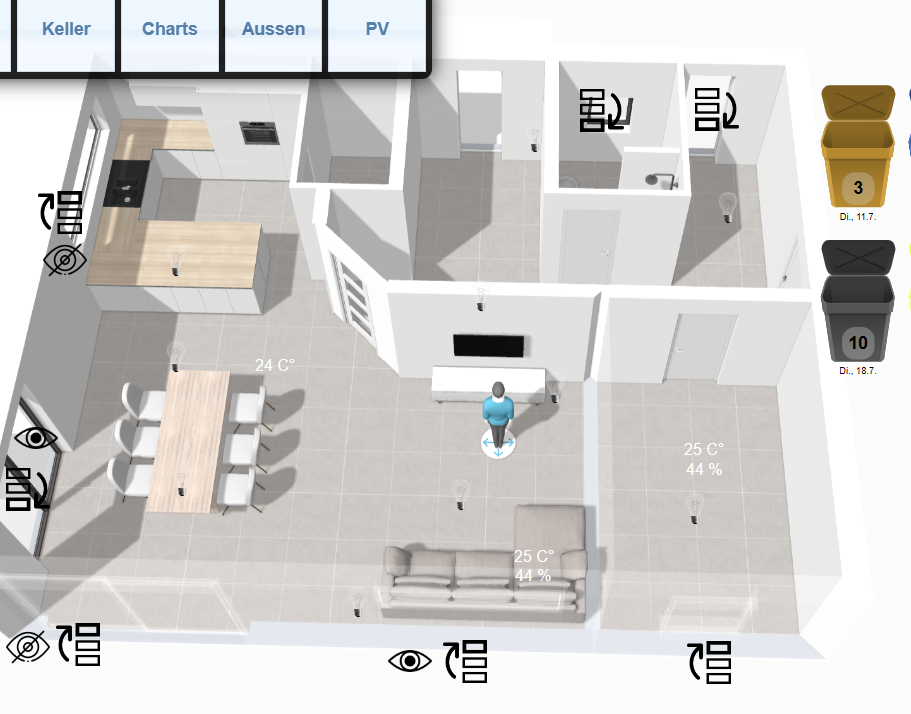
Früher konnte ich auf ein Rollo-Symbol drücken und die Jalousie fuhr nach ca. 2 oder 3 Sekunde nach ob bzw. nach unten.
Jetzt dauert es Handgestoppte 9 Sekunden bis nach Druck auf das Symbol etwas passiert. Das hat sich leider mit der neuen VM nicht verbessert.Prüfe ich im KNX-Monitor wann die Befehle auf den KNX-BUS kommen sehe ich, dass das Ansprechen der entsprechenden GA die besagten 9 Sekunden dauert. Sobald es auf dem KNX-BUS ist fährt die Jalousie direkt. Ich habe das früher nie im Detail analysiert. Jetzt ist es aber wirklich störend, weil man nach dem Absetzen der Befehle ewig warten muss.
Noch ein Phänomen: Fahre ich die selbe Jalousie über "Objekte" in ioBroker und nicht über VIS dauert das Hochfahren nach Klick auf set value 3 Sekunden, Verändere ich das Objekt wieder dauert es bis er darauf reagiert 7 Sekunden. Für mich macht das alles keinen Sinn.
Würde es helfen, wenn ich history-DB und das loggen gewisser datenpunkte deaktivieren würde und eine Slave-VM aufziehe, die solche Aktivitäten durchführt? Hauptsache meine Frau ist zufrieden ;)
-
@crunchip
Ich mache es einmal am Beispiel eines Bildes deutlich.
Früher konnte ich auf ein Rollo-Symbol drücken und die Jalousie fuhr nach ca. 2 oder 3 Sekunde nach ob bzw. nach unten.
Jetzt dauert es Handgestoppte 9 Sekunden bis nach Druck auf das Symbol etwas passiert. Das hat sich leider mit der neuen VM nicht verbessert.Prüfe ich im KNX-Monitor wann die Befehle auf den KNX-BUS kommen sehe ich, dass das Ansprechen der entsprechenden GA die besagten 9 Sekunden dauert. Sobald es auf dem KNX-BUS ist fährt die Jalousie direkt. Ich habe das früher nie im Detail analysiert. Jetzt ist es aber wirklich störend, weil man nach dem Absetzen der Befehle ewig warten muss.
Noch ein Phänomen: Fahre ich die selbe Jalousie über "Objekte" in ioBroker und nicht über VIS dauert das Hochfahren nach Klick auf set value 3 Sekunden, Verändere ich das Objekt wieder dauert es bis er darauf reagiert 7 Sekunden. Für mich macht das alles keinen Sinn.
Würde es helfen, wenn ich history-DB und das loggen gewisser datenpunkte deaktivieren würde und eine Slave-VM aufziehe, die solche Aktivitäten durchführt? Hauptsache meine Frau ist zufrieden ;)
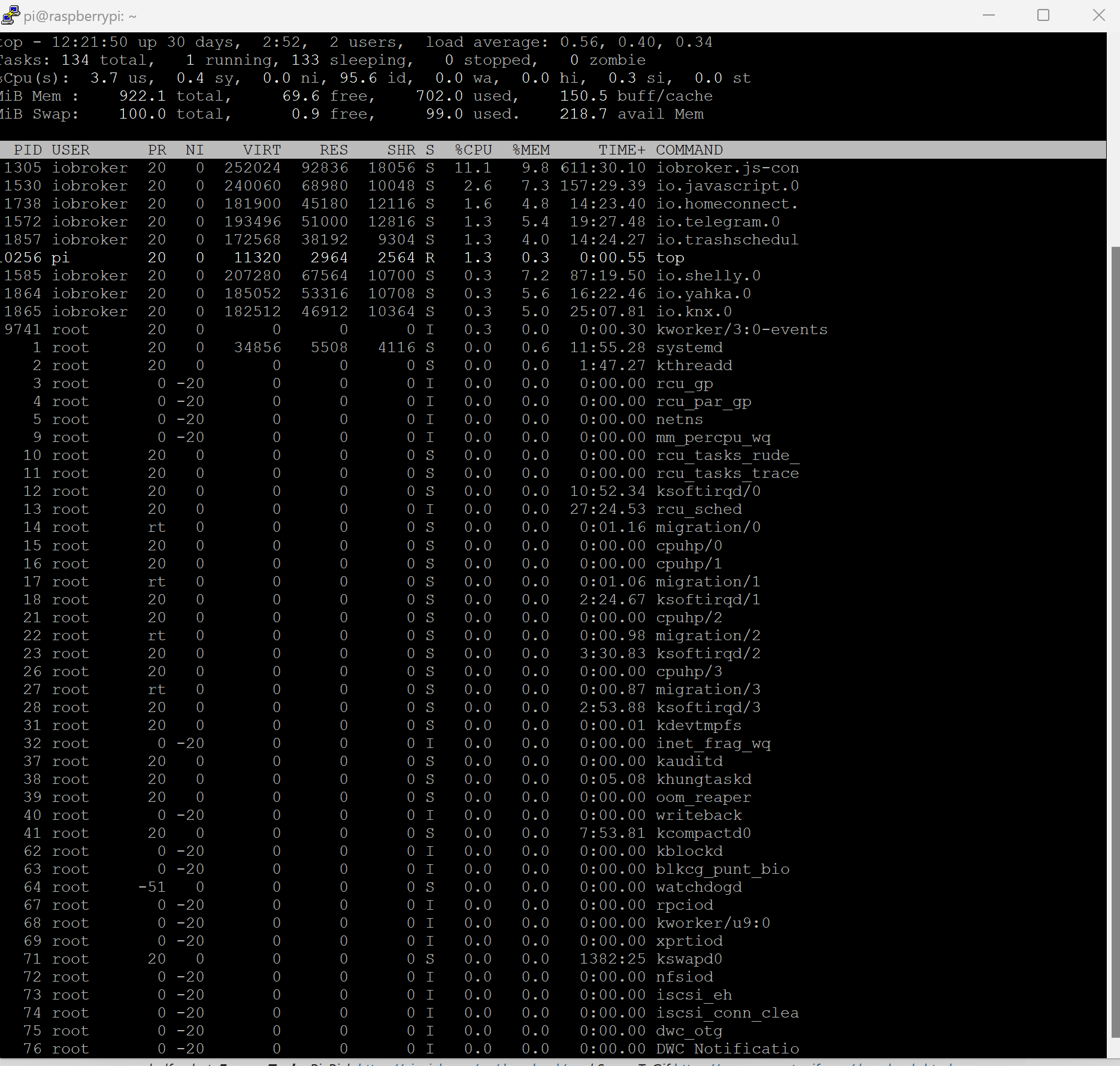
Bin leider kein Experte auf dem Gebiet.
Sind evtl. irgendwelche Services auffällig?
top - 07:12:24 up  7:28,  1 user,  load average: 0,06, 0,06, 0,02
Tasks: 118 total,   1 running, 117 sleeping,   0 stopped,   0 zombie
%Cpu(s):  1,5 us,  0,3 sy,  0,0 ni, 98,0 id,  0,0 wa,  0,0 hi,  0,2 si,  0,0 st
MiB Mem :   5779,9 total,   3387,7 free,   1237,9 used,   1154,4 buff/cache
MiB Swap:      0,0 total,      0,0 free,      0,0 used.   4275,1 avail Mem

    PID USER      PR  NI    VIRT    RES    SHR S  %CPU  %MEM     TIME+ COMMAND
   3979 iobroker  20   0 1149560 282348  43976 S   2,3   4,8  11:19.24 iobroker.js-con
   4159 iobroker  20   0  688388  80856  38736 S   1,0   1,4   0:18.80 io.doorbird.1
   4039 iobroker  20   0  832440 167532  43612 S   0,7   2,8   1:29.53 io.javascript.0
     14 root      20   0       0      0      0 I   0,3   0,0   0:05.97 rcu_sched
    416 root      20   0       0      0      0 I   0,3   0,0   0:04.59 kworker/0:4-mm_percpu_wq
   4099 iobroker  20   0  955992  90664  38720 S   0,3   1,5   1:47.48 io.tr-064.0
   4204 iobroker  20   0  683228  76548  39056 S   0,3   1,3   0:16.55 io.trashschedul
      1 root      20   0  102148  12940   8136 S   0,0   0,2   0:04.96 systemd
      2 root      20   0       0      0      0 S   0,0   0,0   0:00.00 kthreadd
      3 root       0 -20       0      0      0 I   0,0   0,0   0:00.00 rcu_gp
      4 root       0 -20       0      0      0 I   0,0   0,0   0:00.00 rcu_par_gp
      5 root       0 -20       0      0      0 I   0,0   0,0   0:00.00 slub_flushwq
      6 root       0 -20       0      0      0 I   0,0   0,0   0:00.00 netns
      8 root       0 -20       0      0      0 I   0,0   0,0   0:00.00 kworker/0:0H-events_highpri
     10 root       0 -20       0      0      0 I   0,0   0,0   0:00.00 mm_percpu_wq
     11 root      20   0       0      0      0 S   0,0   0,0   0:00.00 rcu_tasks_rude_
     12 root      20   0       0      0      0 S   0,0   0,0   0:00.00 rcu_tasks_trace
     13 root      20   0       0      0      0 S   0,0   0,0   0:00.68 ksoftirqd/0
     15 root      rt   0       0      0      0 S   0,0   0,0   0:00.32 migration/0
     16 root     -51   0       0      0      0 S   0,0   0,0   0:00.00 idle_inject/0
     18 root      20   0       0      0      0 S   0,0   0,0   0:00.00 cpuhp/0
     19 root      20   0       0      0      0 S   0,0   0,0   0:00.00 cpuhp/1
     20 root     -51   0       0      0      0 S   0,0   0,0   0:00.00 idle_inject/1
     21 root      rt   0       0      0      0 S   0,0   0,0   0:00.61 migration/1
     22 root      20   0       0      0      0 S   0,0   0,0   0:00.35 ksoftirqd/1
     24 root       0 -20       0      0      0 I   0,0   0,0   0:00.00 kworker/1:0H-events_highpri
     25 root      20   0       0      0      0 S   0,0   0,0   0:00.00 kdevtmpfs
     26 root       0 -20       0      0      0 I   0,0   0,0   0:00.00 inet_frag_wq
     27 root      20   0       0      0      0 S   0,0   0,0   0:00.00 kauditd
     28 root      20   0       0      0      0 S   0,0   0,0   0:00.02 khungtaskd
     29 root      20   0       0      0      0 S   0,0   0,0   0:00.00 oom_reaper
     30 root       0 -20       0      0      0 I   0,0   0,0   0:00.00 writeback
     31 root      20   0       0      0      0 S   0,0   0,0   0:01.94 kcompactd0
     32 root      25   5       0      0      0 S   0,0   0,0   0:00.00 ksmd
     33 root      39  19       0      0      0 S   0,0   0,0   0:00.00 khugepaged
     80 root       0 -20       0      0      0 I   0,0   0,0   0:00.00 kintegrityd
     81 root       0 -20       0      0      0 I   0,0   0,0   0:00.00 kblockd
     82 root       0 -20       0      0      0 I   0,0   0,0   0:00.00 blkcg_punt_bio
     83 root       0 -20       0      0      0 I   0,0   0,0   0:00.00 tpm_dev_wq
     84 root       0 -20       0      0      0 I   0,0   0,0   0:00.00 ata_sff
     85 root       0 -20       0      0      0 I   0,0   0,0   0:00.00 md
     86 root       0 -20       0      0      0 I   0,0   0,0   0:00.00 edac-poller
     87 root       0 -20       0      0      0 I   0,0   0,0   0:00.00 devfreq_wq
     88 root     -51   0       0      0      0 S   0,0   0,0   0:00.00 watchdogd
     90 root       0 -20       0      0      0 I   0,0   0,0   0:00.25 kworker/0:1H-kblockd
     91 root      20   0       0      0      0 S   0,0   0,0   0:00.00 kswapd0
     92 root      20   0       0      0      0 S   0,0   0,0   0:00.00 ecryptfs-kthrea
     94 root       0 -20       0      0      0 I   0,0   0,0   0:00.00 kthrotld
     95 root       0 -20       0      0      0 I   0,0   0,0   0:00.00 acpi_thermal_pm
     97 root      20   0       0      0      0 S   0,0   0,0   0:00.00 scsi_eh_0
     98 root       0 -20       0      0      0 I   0,0   0,0   0:00.00 scsi_tmf_0
     99 root      20   0       0      0      0 S   0,0   0,0   0:00.00 scsi_eh_1
    100 root       0 -20       0      0      0 I   0,0   0,0   0:00.00 scsi_tmf_1
    102 root       0 -20       0      0      0 I   0,0   0,0   0:00.00 vfio-irqfd-clea
    103 root       0 -20       0      0      0 I   0,0   0,0   0:00.00 mld
    104 root       0 -20       0      0      0 I   0,0   0,0   0:00.00 ipv6_addrconf


Hey! Du scheinst an dieser Unterhaltung interessiert zu sein, hast aber noch kein Konto.
Hast du es satt, bei jedem Besuch durch die gleichen Beiträge zu scrollen? Wenn du dich für ein Konto anmeldest, kommst du immer genau dorthin zurück, wo du zuvor warst, und kannst dich über neue Antworten benachrichtigen lassen (entweder per E-Mail oder Push-Benachrichtigung). Du kannst auch Lesezeichen speichern und Beiträge positiv bewerten, um anderen Community-Mitgliedern deine Wertschätzung zu zeigen.
Mit deinem Input könnte dieser Beitrag noch besser werden 💗
Registrieren AnmeldenSupport us
510
Online33.0k
Benutzer83.3k
Themen1.3m
Beiträge