Skip to content
  • Home
  • Recent
  • Tags
  • 0 Unread 0
  • Categories
  • Unreplied
  • Popular
  • GitHub
  • Docu
  • Hilfe
Skins
  • Light
  • Brite
  • Cerulean
  • Cosmo
  • Flatly
  • Journal
  • Litera
  • Lumen
  • Lux
  • Materia
  • Minty
  • Morph
  • Pulse
  • Sandstone
  • Simplex
  • Sketchy
  • Spacelab
  • United
  • Yeti
  • Zephyr
  • Dark
  • Cyborg
  • Darkly
  • Quartz
  • Slate
  • Solar
  • Superhero
  • Vapor

  • Default (No Skin)
  • No Skin
Collapse
ioBroker Logo

Community Forum

donate donate
  1. ioBroker Community Home
  2. Deutsch
  3. Off Topic
  4. Upgrade von Debian 11/Bullseye auf 12/Bookworm

NEWS

  • Monatsrückblick Januar/Februar 2026 ist online!
    BluefoxB
    Bluefox
    17
    1
    492

  • Jahresrückblick 2025 – unser neuer Blogbeitrag ist online! ✨
    BluefoxB
    Bluefox
    17
    1
    5.2k

  • Neuer Blogbeitrag: Monatsrückblick - Dezember 2025 🎄
    BluefoxB
    Bluefox
    13
    1
    1.4k

Upgrade von Debian 11/Bullseye auf 12/Bookworm

Scheduled Pinned Locked Moved Off Topic
upgrade bullseye bookworm
351 Posts 51 Posters 98.4k Views 52 Watching
  • Oldest to Newest
  • Newest to Oldest
  • Most Votes
Reply
  • Reply as topic
Log in to reply
This topic has been deleted. Only users with topic management privileges can see it.
  • D Diamand2k22

    @wendy2702 said in Upgrade von Debian 11/Bullseye auf 12/Bookworm:

    Hi,

    habe vor einiger Zeit nach der Anleitung meine PI's 3B von Bullseye auf Bookworm gebracht.

    Heute dann mal ein update & upgrade machen wollen und bekomme das:

    sudo apt update
    Hit:1 http://archive.raspberrypi.org/debian bookworm InRelease
    Hit:2 http://deb.debian.org/debian bookworm InRelease
    Hit:3 http://deb.debian.org/debian bookworm-updates InRelease
    Hit:4 http://security.debian.org/debian-security bookworm-security InRelease
    Hit:5 https://deb.nodesource.com/node_16.x bookworm InRelease
    Hit:6 https://deb.nodesource.com/node_18.x bookworm InRelease
    Reading package lists... Done
    Building dependency tree... Done
    Reading state information... Done
    1 package can be upgraded. Run 'apt list --upgradable' to see it.
    pi@pi-iobroker:~ $ sudo apt upgrade
    Reading package lists... Done
    Building dependency tree... Done
    Reading state information... Done
    Calculating upgrade... Done
    The following packages have been kept back:
      libcamera-apps-lite
    0 upgraded, 0 newly installed, 0 to remove and 1 not upgraded.
    2 not fully installed or removed.
    After this operation, 0 B of additional disk space will be used.
    Do you want to continue? [Y/n] y
    Setting up raspi-firmware (1:1.20231024+ds-1+rpt2) ...
    stat: cannot read file system information for '/boot/firmware': No such file or directory
    Error: missing /boot/firmware, did you forget to mount it?
    dpkg: error processing package raspi-firmware (--configure):
     installed raspi-firmware package post-installation script subprocess returned error exit status 1
    dpkg: dependency problems prevent configuration of rpi-eeprom:
     rpi-eeprom depends on raspi-firmware; however:
      Package raspi-firmware is not configured yet.
    
    dpkg: error processing package rpi-eeprom (--configure):
     dependency problems - leaving unconfigured
    Processing triggers for initramfs-tools (0.142) ...
    Errors were encountered while processing:
     raspi-firmware
     rpi-eeprom
    E: Sub-process /usr/bin/dpkg returned an error code (1)


    Hatte das sonst noch jemand?

    Habe mit Google diverse Lösungsansätze gefunden aber will jetzt nicht alle probieren.

    Wenn also jemand eine Lösung hat die dauerhaft ohne neu installation funktioniert wäre ich dankbar.

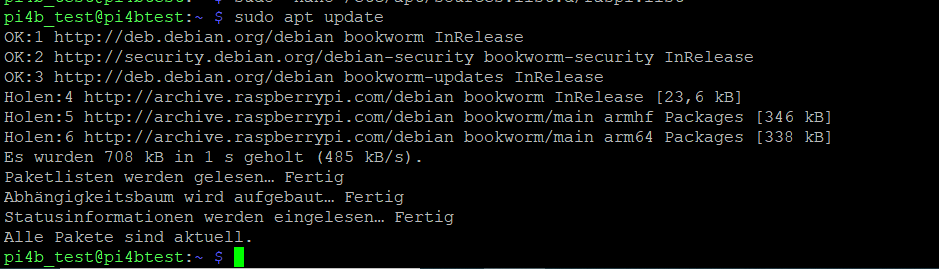
    kommt der Fehler nur bei Raspberry Model < 4?
    Bei meinem Raspberry 4B kam der Fehler mit der Firmware nicht!
    a4cef613-df36-4b0b-ab27-d47b027cb7e6-image.png

    W Online
    W Online
    Wildbill
    wrote on last edited by
    #298

    @diamand2k22 Bei meinem 3B mit Deconz und PiVVCU auch nicht. Ich vermute, das betrifft eher die 5er Generation?!

    Gruss, Jürgen

    un99known99U 1 Reply Last reply
    0
    • Siggi0904S Offline
      Siggi0904S Offline
      Siggi0904
      wrote on last edited by Siggi0904
      #299

      Nein, das Thema ist die verwendete Distribution.
      Wie ihr in den Screens seht, wird einmal Debian und einmal Raspberry.org also Raspberry OS verwendet.

      Bei Raspbian OS hat man wohl sehr viel geändert, sodass ein Upgrade auf das aktuelle Raspbian OS nicht empfohlen wird, sondern eine komplette Neuinstallation.

      Hebel zum möglich beheben wurden z.B. nier besprochen:
      https://forum.iobroker.net/topic/70165/raspi-firmware-update-nach-bookworm-update-gelöst/4?_=1700678987748

      https://forum.iobroker.net/topic/70165/raspi-firmware-update-nach-bookworm-update-gelöst/12?_=1700678987750

      1 Reply Last reply
      0
      • W Wildbill

        @diamand2k22 Bei meinem 3B mit Deconz und PiVVCU auch nicht. Ich vermute, das betrifft eher die 5er Generation?!

        Gruss, Jürgen

        un99known99U Offline
        un99known99U Offline
        un99known99
        wrote on last edited by
        #300

        @Wildbill

        Unmount your /boot directory with:
        umount /boot

        Make sure your /boot mount point is unmounted with the above command, "umount /boot" by doing:
        lsblk

        mkdir /boot/firmware

        /etc/fstab
        /boot => /boot/firmware

        systemctl daemon-reload

        mount -a

        W Thomas BraunT 2 Replies Last reply
        0
        • un99known99U un99known99

          @Wildbill

          Unmount your /boot directory with:
          umount /boot

          Make sure your /boot mount point is unmounted with the above command, "umount /boot" by doing:
          lsblk

          mkdir /boot/firmware

          /etc/fstab
          /boot => /boot/firmware

          systemctl daemon-reload

          mount -a

          W Online
          W Online
          Wildbill
          wrote on last edited by
          #301

          @un99known99 Was willst Du mir damit sagen? Bei mir läuft alles und ich bekomme bei apt update bzw apt upgrade keinerlei Fehler oder Warnungen angezeigt.

          Gruss, Jürgen

          1 Reply Last reply
          0
          • un99known99U un99known99

            @Wildbill

            Unmount your /boot directory with:
            umount /boot

            Make sure your /boot mount point is unmounted with the above command, "umount /boot" by doing:
            lsblk

            mkdir /boot/firmware

            /etc/fstab
            /boot => /boot/firmware

            systemctl daemon-reload

            mount -a

            Thomas BraunT Online
            Thomas BraunT Online
            Thomas Braun
            Most Active
            wrote on last edited by
            #302

            @un99known99

            Und die neuen Kernel-Pakete nicht vergessen.

            Linux-Werkzeugkasten:
            https://forum.iobroker.net/topic/42952/der-kleine-iobroker-linux-werkzeugkasten
            NodeJS Fixer Skript:
            https://forum.iobroker.net/topic/68035/iob-node-fix-skript
            iob_diag: curl -sLf -o diag.sh https://iobroker.net/diag.sh && bash diag.sh

            un99known99U 1 Reply Last reply
            0
            • Thomas BraunT Thomas Braun

              @un99known99

              Und die neuen Kernel-Pakete nicht vergessen.

              un99known99U Offline
              un99known99U Offline
              un99known99
              wrote on last edited by un99known99
              #303

              @thomas-braun

              was meinst Du damit? Kernel Upgrade kommt via apt update doch mit, oder?

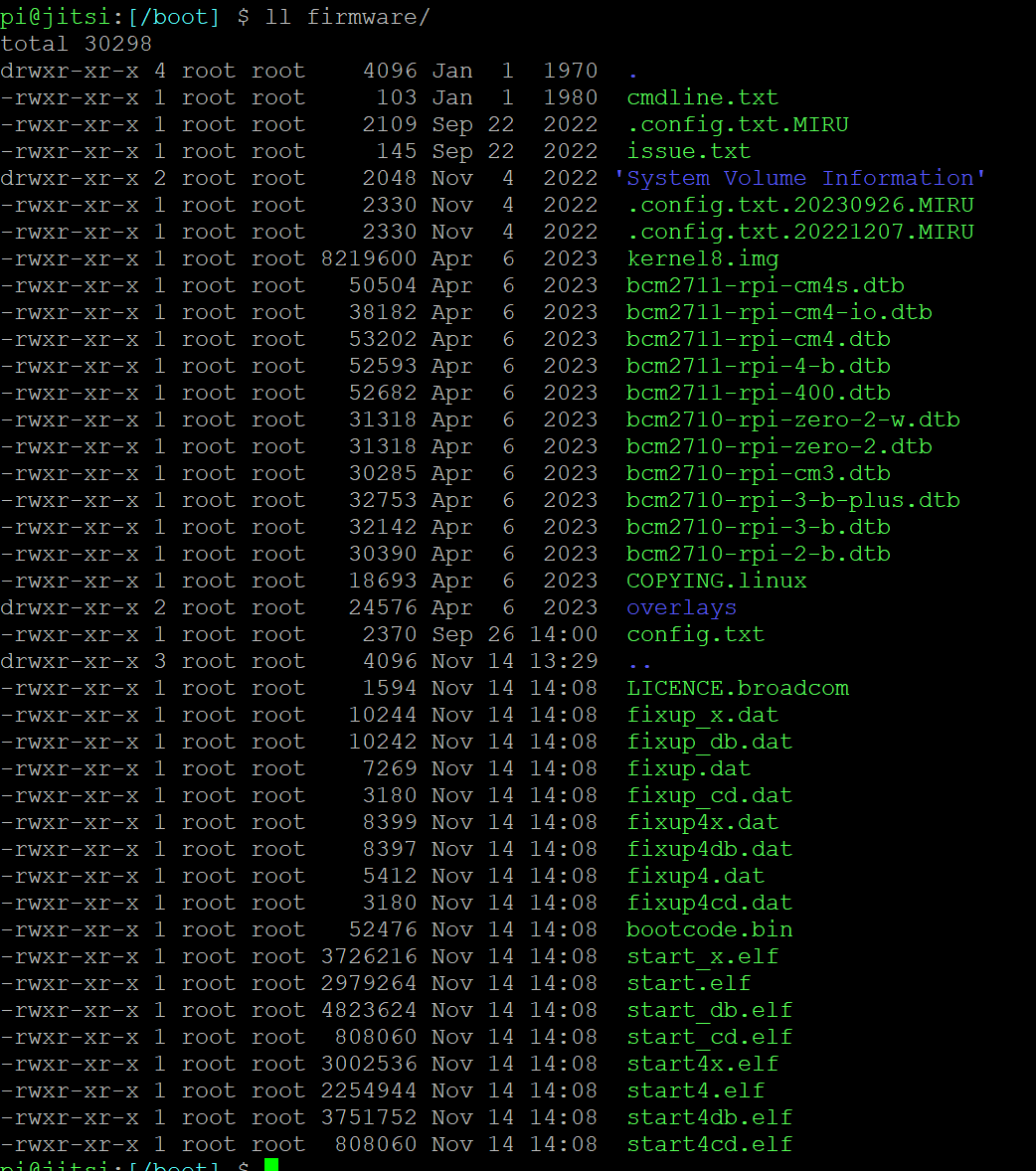
              raspi-firmware package und rpi-eeprom liessen sich problemlos installieren nach der Umstellung auf /boot/firmware - was / warum muss mit KERNEL gemacht werden?

              Verzeichnis sieht so aus:

              drwxr-xr-x 4 root root 4096 Jan 1 1970 firmware
              drwxr-xr-x 18 root root 4096 Oct 24 13:25 ..
              lrwxrwxrwx 1 root root 17 Nov 14 13:29 overlays -> firmware/overlays
              drwxr-xr-x 3 root root 4096 Nov 14 13:29 .
              62494af0-1c23-4062-9ecb-056811c88080-grafik.png

              sieht so aus als ob beim apt update/upgrade automatische Anlagen gemacht wurden

              Thomas BraunT 1 Reply Last reply
              0
              • un99known99U un99known99

                @thomas-braun

                was meinst Du damit? Kernel Upgrade kommt via apt update doch mit, oder?

                raspi-firmware package und rpi-eeprom liessen sich problemlos installieren nach der Umstellung auf /boot/firmware - was / warum muss mit KERNEL gemacht werden?

                Verzeichnis sieht so aus:

                drwxr-xr-x 4 root root 4096 Jan 1 1970 firmware
                drwxr-xr-x 18 root root 4096 Oct 24 13:25 ..
                lrwxrwxrwx 1 root root 17 Nov 14 13:29 overlays -> firmware/overlays
                drwxr-xr-x 3 root root 4096 Nov 14 13:29 .

                62494af0-1c23-4062-9ecb-056811c88080-grafik.png

                sieht so aus als ob beim apt update/upgrade automatische Anlagen gemacht wurden

                Thomas BraunT Online
                Thomas BraunT Online
                Thomas Braun
                Most Active
                wrote on last edited by
                #304

                @un99known99

                Das Paket mit dem Kernel heißt aber nun anders, nicht mehr 'raspberrypi-kernel'. Das muss also auch passend zur verwendeten Hardware installiert werden.

                Linux-Werkzeugkasten:
                https://forum.iobroker.net/topic/42952/der-kleine-iobroker-linux-werkzeugkasten
                NodeJS Fixer Skript:
                https://forum.iobroker.net/topic/68035/iob-node-fix-skript
                iob_diag: curl -sLf -o diag.sh https://iobroker.net/diag.sh && bash diag.sh

                un99known99U 1 Reply Last reply
                0
                • Thomas BraunT Thomas Braun

                  @un99known99

                  Das Paket mit dem Kernel heißt aber nun anders, nicht mehr 'raspberrypi-kernel'. Das muss also auch passend zur verwendeten Hardware installiert werden.

                  un99known99U Offline
                  un99known99U Offline
                  un99known99
                  wrote on last edited by
                  #305

                  @thomas-braun

                  d.h.

                  sudo apt install linux-image-rpi-v7 linux-headers-rpi-v7 # für 32bit?

                  Kommen dann KERNEL upgrades via apt-update?

                  Thomas BraunT 1 Reply Last reply
                  0
                  • un99known99U un99known99

                    @thomas-braun

                    d.h.

                    sudo apt install linux-image-rpi-v7 linux-headers-rpi-v7 # für 32bit?

                    Kommen dann KERNEL upgrades via apt-update?

                    Thomas BraunT Online
                    Thomas BraunT Online
                    Thomas Braun
                    Most Active
                    wrote on last edited by
                    #306

                    @un99known99 sagte in Upgrade von Debian 11/Bullseye auf 12/Bookworm:

                    Kommen dann KERNEL upgrades via apt-update?

                    Dann kommen natürlich auch Aktualisierungen wieder über apt. Aber das passende Paket muss zuvor installiert sein.

                    Linux-Werkzeugkasten:
                    https://forum.iobroker.net/topic/42952/der-kleine-iobroker-linux-werkzeugkasten
                    NodeJS Fixer Skript:
                    https://forum.iobroker.net/topic/68035/iob-node-fix-skript
                    iob_diag: curl -sLf -o diag.sh https://iobroker.net/diag.sh && bash diag.sh

                    un99known99U 1 Reply Last reply
                    0
                    • Thomas BraunT Thomas Braun

                      @un99known99 sagte in Upgrade von Debian 11/Bullseye auf 12/Bookworm:

                      Kommen dann KERNEL upgrades via apt-update?

                      Dann kommen natürlich auch Aktualisierungen wieder über apt. Aber das passende Paket muss zuvor installiert sein.

                      un99known99U Offline
                      un99known99U Offline
                      un99known99
                      wrote on last edited by
                      #307

                      @thomas-braun

                      pi@jitsi:[/boot] $ sudo apt list | grep -i linux-image-rpi-v8

                      WARNING: apt does not have a stable CLI interface. Use with caution in scripts.

                      linux-image-rpi-v8-dbg/stable 1:6.1.58-1+rpt2 arm64
                      linux-image-rpi-v8/stable 1:6.1.58-1+rpt2 arm64
                      pi@jitsi:[/boot] $ sudo apt list | grep -i linux-headers-rpi-v8

                      WARNING: apt does not have a stable CLI interface. Use with caution in scripts.

                      linux-headers-rpi-v8/stable 1:6.1.58-1+rpt2 arm64

                      ist schon da?

                      Thomas BraunT 1 Reply Last reply
                      0
                      • un99known99U un99known99

                        @thomas-braun

                        pi@jitsi:[/boot] $ sudo apt list | grep -i linux-image-rpi-v8

                        WARNING: apt does not have a stable CLI interface. Use with caution in scripts.

                        linux-image-rpi-v8-dbg/stable 1:6.1.58-1+rpt2 arm64
                        linux-image-rpi-v8/stable 1:6.1.58-1+rpt2 arm64
                        pi@jitsi:[/boot] $ sudo apt list | grep -i linux-headers-rpi-v8

                        WARNING: apt does not have a stable CLI interface. Use with caution in scripts.

                        linux-headers-rpi-v8/stable 1:6.1.58-1+rpt2 arm64

                        ist schon da?

                        Thomas BraunT Online
                        Thomas BraunT Online
                        Thomas Braun
                        Most Active
                        wrote on last edited by
                        #308

                        @un99known99 sagte in Upgrade von Debian 11/Bullseye auf 12/Bookworm:

                        ist schon da?

                        Dann ist ja gut. Wird der auch geladen?

                        uname -a
                        

                        Linux-Werkzeugkasten:
                        https://forum.iobroker.net/topic/42952/der-kleine-iobroker-linux-werkzeugkasten
                        NodeJS Fixer Skript:
                        https://forum.iobroker.net/topic/68035/iob-node-fix-skript
                        iob_diag: curl -sLf -o diag.sh https://iobroker.net/diag.sh && bash diag.sh

                        un99known99U 1 Reply Last reply
                        0
                        • Thomas BraunT Thomas Braun

                          @un99known99 sagte in Upgrade von Debian 11/Bullseye auf 12/Bookworm:

                          ist schon da?

                          Dann ist ja gut. Wird der auch geladen?

                          uname -a
                          
                          un99known99U Offline
                          un99known99U Offline
                          un99known99
                          wrote on last edited by
                          #309

                          @thomas-braun said in Upgrade von Debian 11/Bullseye auf 12/Bookworm:

                          uname -a

                          Linux jitsi 6.1.21-v8+ #1642 SMP PREEMPT Mon Apr 3 17:24:16 BST 2023 aarch64 GNU/Linux

                          Passt das?

                          Thomas BraunT 1 Reply Last reply
                          0
                          • un99known99U un99known99

                            @thomas-braun said in Upgrade von Debian 11/Bullseye auf 12/Bookworm:

                            uname -a

                            Linux jitsi 6.1.21-v8+ #1642 SMP PREEMPT Mon Apr 3 17:24:16 BST 2023 aarch64 GNU/Linux

                            Passt das?

                            Thomas BraunT Online
                            Thomas BraunT Online
                            Thomas Braun
                            Most Active
                            wrote on last edited by
                            #310

                            @un99known99
                            Bei mir wird der aktuelle Kernel so gemeldet

                            echad@chet:~ $ uname -a
                            Linux chet 6.1.0-rpi6-rpi-v8 #1 SMP PREEMPT Debian 1:6.1.58-1+rpt2 (2023-10-27)
                            aarch64 GNU/Linux
                            echad@chet:~ $
                            

                            Linux-Werkzeugkasten:
                            https://forum.iobroker.net/topic/42952/der-kleine-iobroker-linux-werkzeugkasten
                            NodeJS Fixer Skript:
                            https://forum.iobroker.net/topic/68035/iob-node-fix-skript
                            iob_diag: curl -sLf -o diag.sh https://iobroker.net/diag.sh && bash diag.sh

                            un99known99U 2 Replies Last reply
                            0
                            • Thomas BraunT Thomas Braun

                              @un99known99
                              Bei mir wird der aktuelle Kernel so gemeldet

                              echad@chet:~ $ uname -a
                              Linux chet 6.1.0-rpi6-rpi-v8 #1 SMP PREEMPT Debian 1:6.1.58-1+rpt2 (2023-10-27)
                              aarch64 GNU/Linux
                              echad@chet:~ $
                              
                              un99known99U Offline
                              un99known99U Offline
                              un99known99
                              wrote on last edited by Homoran
                              #311

                              @thomas-braun

                              kann ja mal versuchen, ob

                              # sudo apt install linux-image-rpi-v8 linux-headers-rpi-v8      # 64bit
                              

                              MOD-EDIT: Code in code-tags gesetzt!

                              was bewirkt, grundsätzlich sieht Dein KERNEL neuer aus

                              1 Reply Last reply
                              0
                              • Thomas BraunT Thomas Braun

                                @un99known99
                                Bei mir wird der aktuelle Kernel so gemeldet

                                echad@chet:~ $ uname -a
                                Linux chet 6.1.0-rpi6-rpi-v8 #1 SMP PREEMPT Debian 1:6.1.58-1+rpt2 (2023-10-27)
                                aarch64 GNU/Linux
                                echad@chet:~ $
                                
                                un99known99U Offline
                                un99known99U Offline
                                un99known99
                                wrote on last edited by Homoran
                                #312

                                @thomas-braun

                                pi@jitsi:[~] $ uname -a
                                Linux jitsi 6.1.0-rpi6-rpi-v8 #1 SMP PREEMPT Debian 1:6.1.58-1+rpt2 (2023-10-27) aarch64 GNU/Linux
                                

                                sieht jetzt besser aus nach

                                sudo apt install linux-image-rpi-v8 linux-headers-rpi-v8
                                
                                pi@jitsi:[/boot] $ ll
                                total 19736
                                drwxr-xr-x  4 root root     4096 Jan  1  1970 firmware
                                -rw-r--r--  1 root root  8729756 Oct 27 16:31 vmlinuz-6.1.0-rpi6-rpi-v8
                                -rw-r--r--  1 root root       83 Oct 27 16:31 System.map-6.1.0-rpi6-rpi-v8
                                -rw-r--r--  1 root root   230383 Oct 27 16:31 config-6.1.0-rpi6-rpi-v8
                                lrwxrwxrwx  1 root root       17 Nov 14 13:29 overlays -> firmware/overlays
                                drwxr-xr-x 18 root root     4096 Nov 23 11:01 ..
                                -rw-r--r--  1 root root 11225182 Nov 23 11:02 initrd.img-6.1.0-rpi6-rpi-v8
                                drwxr-xr-x  3 root root     4096 Nov 23 11:02 .
                                

                                MOD-EDIT: Code in code-tags gesetzt!

                                Sieht soweit gut aus oder?

                                D.h. jetzt sollte via apt update auch wieder "normal" KERNEL-Updates kommen?

                                Thomas BraunT 1 Reply Last reply
                                0
                                • un99known99U un99known99

                                  @thomas-braun

                                  pi@jitsi:[~] $ uname -a
                                  Linux jitsi 6.1.0-rpi6-rpi-v8 #1 SMP PREEMPT Debian 1:6.1.58-1+rpt2 (2023-10-27) aarch64 GNU/Linux
                                  

                                  sieht jetzt besser aus nach

                                  sudo apt install linux-image-rpi-v8 linux-headers-rpi-v8
                                  
                                  pi@jitsi:[/boot] $ ll
                                  total 19736
                                  drwxr-xr-x  4 root root     4096 Jan  1  1970 firmware
                                  -rw-r--r--  1 root root  8729756 Oct 27 16:31 vmlinuz-6.1.0-rpi6-rpi-v8
                                  -rw-r--r--  1 root root       83 Oct 27 16:31 System.map-6.1.0-rpi6-rpi-v8
                                  -rw-r--r--  1 root root   230383 Oct 27 16:31 config-6.1.0-rpi6-rpi-v8
                                  lrwxrwxrwx  1 root root       17 Nov 14 13:29 overlays -> firmware/overlays
                                  drwxr-xr-x 18 root root     4096 Nov 23 11:01 ..
                                  -rw-r--r--  1 root root 11225182 Nov 23 11:02 initrd.img-6.1.0-rpi6-rpi-v8
                                  drwxr-xr-x  3 root root     4096 Nov 23 11:02 .
                                  

                                  MOD-EDIT: Code in code-tags gesetzt!

                                  Sieht soweit gut aus oder?

                                  D.h. jetzt sollte via apt update auch wieder "normal" KERNEL-Updates kommen?

                                  Thomas BraunT Online
                                  Thomas BraunT Online
                                  Thomas Braun
                                  Most Active
                                  wrote on last edited by
                                  #313

                                  @un99known99

                                  Ja, jetzt rutschen die gleichnamigen Pakete nach.

                                  Linux-Werkzeugkasten:
                                  https://forum.iobroker.net/topic/42952/der-kleine-iobroker-linux-werkzeugkasten
                                  NodeJS Fixer Skript:
                                  https://forum.iobroker.net/topic/68035/iob-node-fix-skript
                                  iob_diag: curl -sLf -o diag.sh https://iobroker.net/diag.sh && bash diag.sh

                                  un99known99U Michael SchmittM 2 Replies Last reply
                                  0
                                  • Thomas BraunT Thomas Braun

                                    @un99known99

                                    Ja, jetzt rutschen die gleichnamigen Pakete nach.

                                    un99known99U Offline
                                    un99known99U Offline
                                    un99known99
                                    wrote on last edited by
                                    #314

                                    @thomas-braun

                                    Vielen Dank für die ganzen Tipps hier in dem Thread und Deine Anleitung :)

                                    R 1 Reply Last reply
                                    0
                                    • un99known99U un99known99

                                      @thomas-braun

                                      Vielen Dank für die ganzen Tipps hier in dem Thread und Deine Anleitung :)

                                      R Offline
                                      R Offline
                                      reutli
                                      wrote on last edited by
                                      #315

                                      @un99known99
                                      und das nächste mal die Konsoleneingaben in

                                      code tags
                                      

                                      dann kann man das besser lesen :grinning:

                                      BITTE BEACHTET DOCH DAS: https://forum.iobroker.net/topic/51555/hinweise-für-gute-forenbeiträge
                                      iobroker in Debian-VM auf Proxmox Server (Ryzen 7 / 32GB / 1TB NVMe SSD) als Master - mehrere Raspberry Pis (3+4) als Slaves. InfluxDB V2 und Grafana auf LXC.

                                      *Wer freundlich ist, dem wird freundlich geholfen *

                                      un99known99U 1 Reply Last reply
                                      0
                                      • R reutli

                                        @un99known99
                                        und das nächste mal die Konsoleneingaben in

                                        code tags
                                        

                                        dann kann man das besser lesen :grinning:

                                        un99known99U Offline
                                        un99known99U Offline
                                        un99known99
                                        wrote on last edited by
                                        #316

                                        @reutli

                                        Danke :)

                                        1 Reply Last reply
                                        0
                                        • Thomas BraunT Thomas Braun

                                          @un99known99

                                          Ja, jetzt rutschen die gleichnamigen Pakete nach.

                                          Michael SchmittM Online
                                          Michael SchmittM Online
                                          Michael Schmitt
                                          wrote on last edited by
                                          #317

                                          Hallo,
                                          was bedeutet das nun für die die Bookworm nicht komplett neu gemacht haben, sondern noch von Bullseye hochgezogen ? Muss ich nun um weiterhin updates/upgrades zu bekommen "alles" neu machen ?

                                          Alles platt machen ? Deconz/Phoscon, Bookworm, alleine das booten von SSD (das liegt so lange zurück, alles vergessen)


                                          Thomas BraunT 1 Reply Last reply
                                          0
                                          Reply
                                          • Reply as topic
                                          Log in to reply
                                          • Oldest to Newest
                                          • Newest to Oldest
                                          • Most Votes


                                          Support us

                                          ioBroker
                                          Community Adapters
                                          Donate

                                          279

                                          Online

                                          32.7k

                                          Users

                                          82.5k

                                          Topics

                                          1.3m

                                          Posts
                                          Community
                                          Impressum | Datenschutz-Bestimmungen | Nutzungsbedingungen | Einwilligungseinstellungen
                                          ioBroker Community 2014-2025
                                          logo
                                          • Login

                                          • Don't have an account? Register

                                          • Login or register to search.
                                          • First post
                                            Last post
                                          0
                                          • Home
                                          • Recent
                                          • Tags
                                          • Unread 0
                                          • Categories
                                          • Unreplied
                                          • Popular
                                          • GitHub
                                          • Docu
                                          • Hilfe