Skip to content
  • Home
  • Recent
  • Tags
  • 0 Unread 0
  • Categories
  • Unreplied
  • Popular
  • GitHub
  • Docu
  • Hilfe
Skins
  • Light
  • Brite
  • Cerulean
  • Cosmo
  • Flatly
  • Journal
  • Litera
  • Lumen
  • Lux
  • Materia
  • Minty
  • Morph
  • Pulse
  • Sandstone
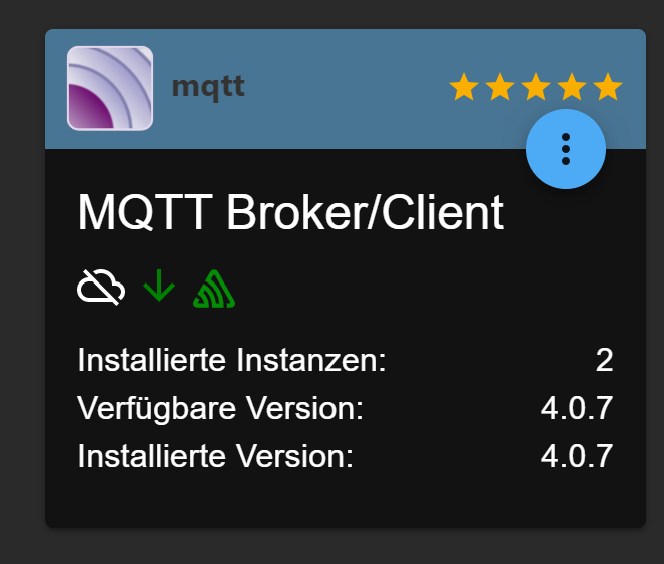
  • Simplex
  • Sketchy
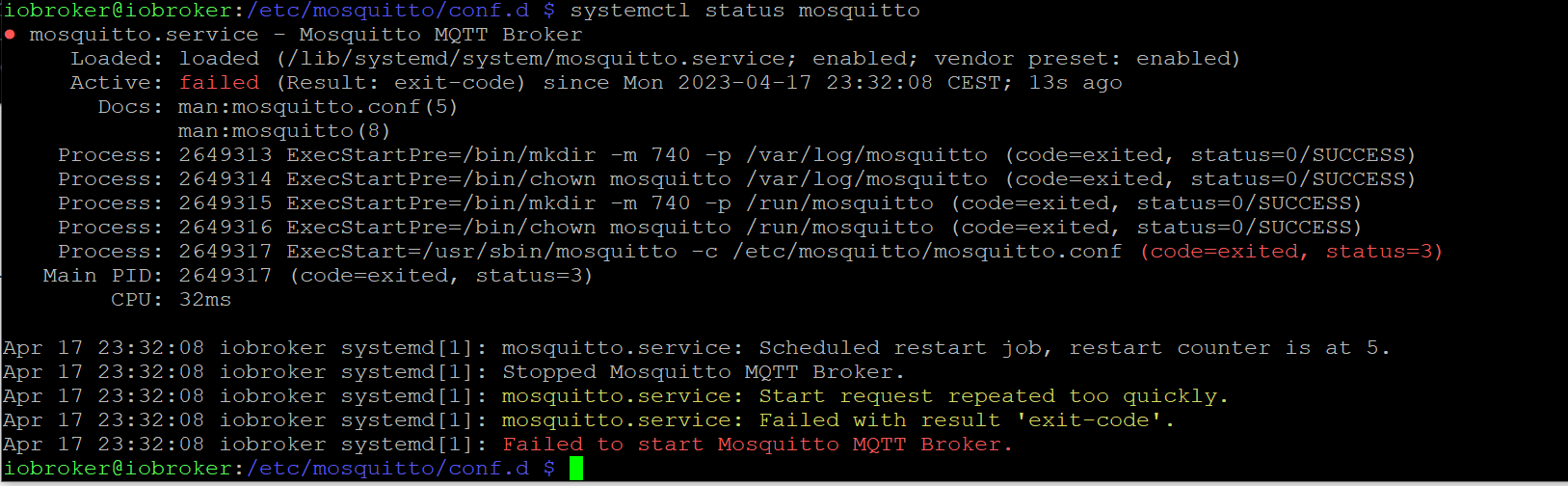
  • Spacelab
  • United
  • Yeti
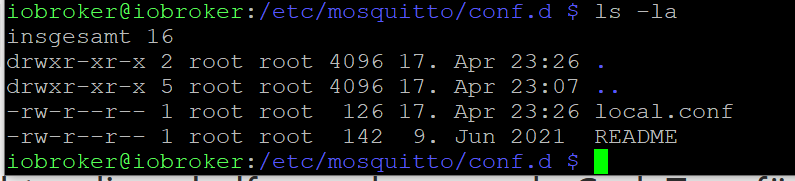
  • Zephyr
  • Dark
  • Cyborg
  • Darkly
  • Quartz
  • Slate
  • Solar
  • Superhero
  • Vapor

  • Default (No Skin)
  • No Skin
Collapse
ioBroker Logo

Community Forum

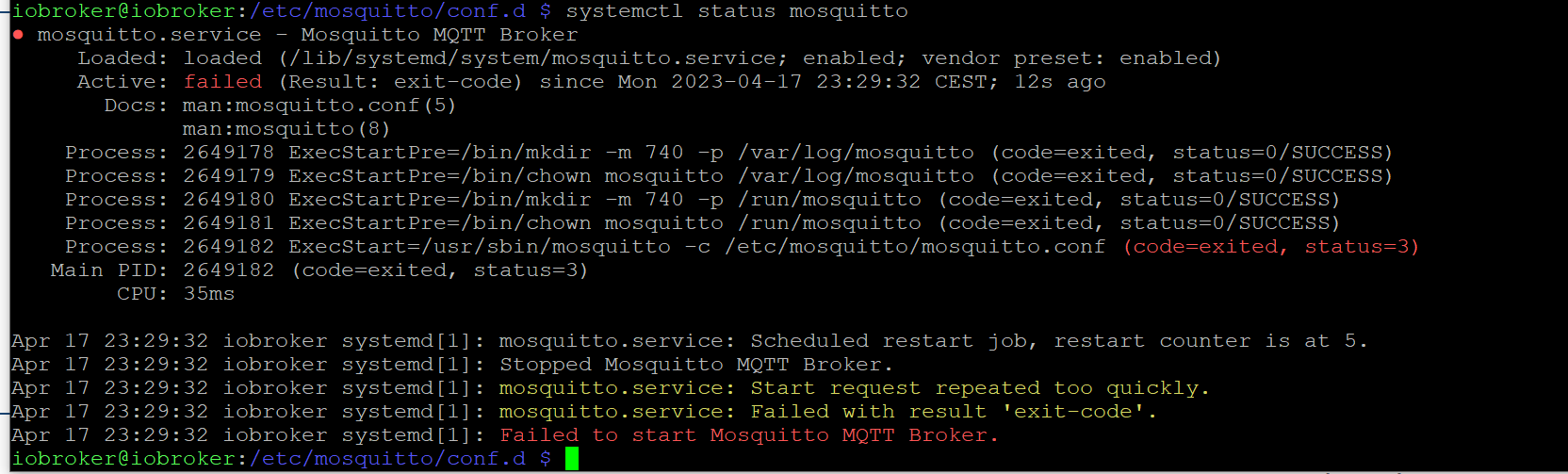
donate donate
  1. ioBroker Community Home
  2. Deutsch
  3. Skripten / Logik
  4. Node-Red
  5. Shelly addon über Node Red

NEWS

  • Monatsrückblick Januar/Februar 2026 ist online!
    BluefoxB
    Bluefox
    9
    1
    98

  • Jahresrückblick 2025 – unser neuer Blogbeitrag ist online! ✨
    BluefoxB
    Bluefox
    17
    1
    4.3k

  • Neuer Blogbeitrag: Monatsrückblick - Dezember 2025 🎄
    BluefoxB
    Bluefox
    13
    1
    1.2k

Shelly addon über Node Red

Scheduled Pinned Locked Moved Node-Red
97 Posts 3 Posters 9.3k Views 2 Watching
  • Oldest to Newest
  • Newest to Oldest
  • Most Votes
Reply
  • Reply as topic
Log in to reply
This topic has been deleted. Only users with topic management privileges can see it.
  • D Dirk 4

    @mickym OK Hab ich

    mickymM Online
    mickymM Online
    mickym
    Most Active
    wrote on last edited by
    #26

    Gut dann startest Du den mosquitto neu und lässt Dir dann den Status ausgeben:

    sudo systemctl restart mosquitto
    

    dann status überprüfen:

    systemctl status mosquitto
    

    Die Ausgabe dann wieder in CodeTags hier posten.

    Jeder Flow bzw. jedes Script, das ich hier poste implementiert jeder auf eigene Gefahr. Flows und Scripts können Fehler aufweisen und weder der Seitenbetreiber noch ich persönlich können hierfür haftbar gemacht werden. Das gleiche gilt für Empfehlungen aller Art.

    D 1 Reply Last reply
    0
    • mickymM mickym

      Gut dann startest Du den mosquitto neu und lässt Dir dann den Status ausgeben:

      sudo systemctl restart mosquitto
      

      dann status überprüfen:

      systemctl status mosquitto
      

      Die Ausgabe dann wieder in CodeTags hier posten.

      D Offline
      D Offline
      Dirk 4
      wrote on last edited by
      #27

      @mickym said in Shelly addon über Node Red:

      systemctl status mosquitto

      da9e8923-b913-4860-8179-086e5b911b24-grafik.png

      mickymM 1 Reply Last reply
      0
      • D Dirk 4

        @mickym said in Shelly addon über Node Red:

        systemctl status mosquitto

        da9e8923-b913-4860-8179-086e5b911b24-grafik.png

        mickymM Online
        mickymM Online
        mickym
        Most Active
        wrote on last edited by
        #28

        @dirk-4 dann nochmal

        sudo systemctl start mosquitto
        

        dann nochmal status

        systemctl status mosquitto
        

        Jeder Flow bzw. jedes Script, das ich hier poste implementiert jeder auf eigene Gefahr. Flows und Scripts können Fehler aufweisen und weder der Seitenbetreiber noch ich persönlich können hierfür haftbar gemacht werden. Das gleiche gilt für Empfehlungen aller Art.

        D 1 Reply Last reply
        0
        • mickymM mickym

          @dirk-4 dann nochmal

          sudo systemctl start mosquitto
          

          dann nochmal status

          systemctl status mosquitto
          
          D Offline
          D Offline
          Dirk 4
          wrote on last edited by
          #29

          @mickym said in Shelly addon über Node Red:

          systemctl status mosquitto

          46f3c83d-3f56-45b9-bdfb-e67774f1fe90-grafik.png

          D mickymM 2 Replies Last reply
          0
          • D Dirk 4

            @mickym said in Shelly addon über Node Red:

            systemctl status mosquitto

            46f3c83d-3f56-45b9-bdfb-e67774f1fe90-grafik.png

            D Offline
            D Offline
            Dirk 4
            wrote on last edited by
            #30

            @dirk-4 Hat der die config nicht gespeichert?

            Thomas BraunT 1 Reply Last reply
            0
            • D Dirk 4

              @mickym said in Shelly addon über Node Red:

              systemctl status mosquitto

              46f3c83d-3f56-45b9-bdfb-e67774f1fe90-grafik.png

              mickymM Online
              mickymM Online
              mickym
              Most Active
              wrote on last edited by mickym
              #31

              @dirk-4 dann bitte noch mal Deine Konfiguration posten:

              Dann schau mal - dort wo du bist:

              ls -la
              

              und dann Ausgabe von

              cat local.conf
              

              in Code-Tags posten.

              Jeder Flow bzw. jedes Script, das ich hier poste implementiert jeder auf eigene Gefahr. Flows und Scripts können Fehler aufweisen und weder der Seitenbetreiber noch ich persönlich können hierfür haftbar gemacht werden. Das gleiche gilt für Empfehlungen aller Art.

              1 Reply Last reply
              0
              • D Dirk 4

                @dirk-4 Hat der die config nicht gespeichert?

                Thomas BraunT Online
                Thomas BraunT Online
                Thomas Braun
                Most Active
                wrote on last edited by Thomas Braun
                #32

                @dirk-4

                Mach es bitte deinen Helfern leichter dir zu helfen und verwende CodeTags für Texte aus dem Terminal und keine Screenshots.
                https://forum.iobroker.net/topic/51555/hinweise-für-gute-forenbeiträge

                Linux-Werkzeugkasten:
                https://forum.iobroker.net/topic/42952/der-kleine-iobroker-linux-werkzeugkasten
                NodeJS Fixer Skript:
                https://forum.iobroker.net/topic/68035/iob-node-fix-skript
                iob_diag: curl -sLf -o diag.sh https://iobroker.net/diag.sh && bash diag.sh

                D 1 Reply Last reply
                0
                • Thomas BraunT Thomas Braun

                  @dirk-4

                  Mach es bitte deinen Helfern leichter dir zu helfen und verwende CodeTags für Texte aus dem Terminal und keine Screenshots.
                  https://forum.iobroker.net/topic/51555/hinweise-für-gute-forenbeiträge

                  D Offline
                  D Offline
                  Dirk 4
                  wrote on last edited by
                  #33

                  @thomas-braun ```
                  58302569-9ea4-4800-be4a-bacf60655fc2-grafik.png code_text

                  Thomas BraunT mickymM 2 Replies Last reply
                  0
                  • D Dirk 4

                    @thomas-braun ```
                    58302569-9ea4-4800-be4a-bacf60655fc2-grafik.png code_text

                    Thomas BraunT Online
                    Thomas BraunT Online
                    Thomas Braun
                    Most Active
                    wrote on last edited by
                    #34

                    @dirk-4

                    Text kopieren, keine Screenshots.

                    Linux-Werkzeugkasten:
                    https://forum.iobroker.net/topic/42952/der-kleine-iobroker-linux-werkzeugkasten
                    NodeJS Fixer Skript:
                    https://forum.iobroker.net/topic/68035/iob-node-fix-skript
                    iob_diag: curl -sLf -o diag.sh https://iobroker.net/diag.sh && bash diag.sh

                    1 Reply Last reply
                    0
                    • D Dirk 4

                      @thomas-braun ```
                      58302569-9ea4-4800-be4a-bacf60655fc2-grafik.png code_text

                      mickymM Online
                      mickymM Online
                      mickym
                      Most Active
                      wrote on last edited by
                      #35

                      @dirk-4 Du musst alles mit der Maus markieren und Eingabetaste drücken (unter Windows) - dann sollte alles in der Zwischenablage sein.

                      das dann in code-Tags setzen:

                      Code-Tags.gif

                      Jeder Flow bzw. jedes Script, das ich hier poste implementiert jeder auf eigene Gefahr. Flows und Scripts können Fehler aufweisen und weder der Seitenbetreiber noch ich persönlich können hierfür haftbar gemacht werden. Das gleiche gilt für Empfehlungen aller Art.

                      D 1 Reply Last reply
                      0
                      • mickymM mickym

                        @dirk-4 Du musst alles mit der Maus markieren und Eingabetaste drücken (unter Windows) - dann sollte alles in der Zwischenablage sein.

                        das dann in code-Tags setzen:

                        Code-Tags.gif

                        D Offline
                        D Offline
                        Dirk 4
                        wrote on last edited by
                        #36

                        @mickym ```
                        code_text

                        -rw-r--r-- 1 root root  142  9. Jun 2021  README
                        iobroker@iobroker:/etc/mosquitto/conf.d $ cat local.conf
                        listener 1884
                        allow_anonymous true


                        iobroker@iobroker:/etc/mosquitto/conf.d $
                        
                        ```
                        mickymM 1 Reply Last reply
                        0
                        • D Dirk 4

                          @mickym ```
                          code_text

                          -rw-r--r-- 1 root root  142  9. Jun 2021  README
                          iobroker@iobroker:/etc/mosquitto/conf.d $ cat local.conf
                          listener 1884
                          allow_anonymous true


                          iobroker@iobroker:/etc/mosquitto/conf.d $
                          
                          ```
                          mickymM Online
                          mickymM Online
                          mickym
                          Most Active
                          wrote on last edited by mickym
                          #37

                          @dirk-4 Das it den codetags schaut nun besser aus. Kannst du die Datei nochmal mit nano öffnen und schauen, dass Du nach dem allow_anonymous true noch ein Zeilenumbruch existiert.

                          Dann bitte das log anschauen:

                          sudo cat /var/log/mosquitto/mosquitto.log
                          

                          Jeder Flow bzw. jedes Script, das ich hier poste implementiert jeder auf eigene Gefahr. Flows und Scripts können Fehler aufweisen und weder der Seitenbetreiber noch ich persönlich können hierfür haftbar gemacht werden. Das gleiche gilt für Empfehlungen aller Art.

                          D 1 Reply Last reply
                          0
                          • mickymM mickym

                            @dirk-4 Das it den codetags schaut nun besser aus. Kannst du die Datei nochmal mit nano öffnen und schauen, dass Du nach dem allow_anonymous true noch ein Zeilenumbruch existiert.

                            Dann bitte das log anschauen:

                            sudo cat /var/log/mosquitto/mosquitto.log
                            
                            D Offline
                            D Offline
                            Dirk 4
                            wrote on last edited by
                            #38

                            @mickym ```
                            code_text

                            iobroker@iobroker:/etc/mosquitto/conf.d $ sudo systemctl start mosquitto
                            iobroker@iobroker:/etc/mosquitto/conf.d $ systemctl status mosquitto
                            ● mosquitto.service - Mosquitto MQTT Broker
                                 Loaded: loaded (/lib/systemd/system/mosquitto.service; enabled; vendor preset: enabled)
                                 Active: active (running) since Mon 2023-04-17 23:48:05 CEST; 10s ago
                                   Docs: man:mosquitto.conf(5)
                                         man:mosquitto(8)
                                Process: 2650140 ExecStartPre=/bin/mkdir -m 740 -p /var/log/mosquitto (code=exited, status=0/SUCCESS)
                                Process: 2650141 ExecStartPre=/bin/chown mosquitto /var/log/mosquitto (code=exited, status=0/SUCCESS)
                                Process: 2650142 ExecStartPre=/bin/mkdir -m 740 -p /run/mosquitto (code=exited, status=0/SUCCESS)
                                Process: 2650143 ExecStartPre=/bin/chown mosquitto /run/mosquitto (code=exited, status=0/SUCCESS)
                               Main PID: 2650144 (mosquitto)
                                  Tasks: 1 (limit: 4164)
                                    CPU: 42ms
                                 CGroup: /system.slice/mosquitto.service
                                         └─2650144 /usr/sbin/mosquitto -c /etc/mosquitto/mosquitto.conf
                            
                            Apr 17 23:48:05 iobroker systemd[1]: Starting Mosquitto MQTT Broker...
                            Apr 17 23:48:05 iobroker mosquitto[2650144]: 1681768085: Loading config file /etc/mosquitto/conf.d/local.conf
                            Apr 17 23:48:05 iobroker systemd[1]: Started Mosquitto MQTT Broker.
                            iobroker@iobroker:/etc/mosquitto/conf.d $
                            D mickymM 2 Replies Last reply
                            0
                            • D Dirk 4

                              @mickym ```
                              code_text

                              iobroker@iobroker:/etc/mosquitto/conf.d $ sudo systemctl start mosquitto
                              iobroker@iobroker:/etc/mosquitto/conf.d $ systemctl status mosquitto
                              ● mosquitto.service - Mosquitto MQTT Broker
                                   Loaded: loaded (/lib/systemd/system/mosquitto.service; enabled; vendor preset: enabled)
                                   Active: active (running) since Mon 2023-04-17 23:48:05 CEST; 10s ago
                                     Docs: man:mosquitto.conf(5)
                                           man:mosquitto(8)
                                  Process: 2650140 ExecStartPre=/bin/mkdir -m 740 -p /var/log/mosquitto (code=exited, status=0/SUCCESS)
                                  Process: 2650141 ExecStartPre=/bin/chown mosquitto /var/log/mosquitto (code=exited, status=0/SUCCESS)
                                  Process: 2650142 ExecStartPre=/bin/mkdir -m 740 -p /run/mosquitto (code=exited, status=0/SUCCESS)
                                  Process: 2650143 ExecStartPre=/bin/chown mosquitto /run/mosquitto (code=exited, status=0/SUCCESS)
                                 Main PID: 2650144 (mosquitto)
                                    Tasks: 1 (limit: 4164)
                                      CPU: 42ms
                                   CGroup: /system.slice/mosquitto.service
                                           └─2650144 /usr/sbin/mosquitto -c /etc/mosquitto/mosquitto.conf
                              
                              Apr 17 23:48:05 iobroker systemd[1]: Starting Mosquitto MQTT Broker...
                              Apr 17 23:48:05 iobroker mosquitto[2650144]: 1681768085: Loading config file /etc/mosquitto/conf.d/local.conf
                              Apr 17 23:48:05 iobroker systemd[1]: Started Mosquitto MQTT Broker.
                              iobroker@iobroker:/etc/mosquitto/conf.d $
                              D Offline
                              D Offline
                              Dirk 4
                              wrote on last edited by
                              #39

                              @dirk-4 jetzt aber

                              1 Reply Last reply
                              0
                              • D Dirk 4

                                @mickym ```
                                code_text

                                iobroker@iobroker:/etc/mosquitto/conf.d $ sudo systemctl start mosquitto
                                iobroker@iobroker:/etc/mosquitto/conf.d $ systemctl status mosquitto
                                ● mosquitto.service - Mosquitto MQTT Broker
                                     Loaded: loaded (/lib/systemd/system/mosquitto.service; enabled; vendor preset: enabled)
                                     Active: active (running) since Mon 2023-04-17 23:48:05 CEST; 10s ago
                                       Docs: man:mosquitto.conf(5)
                                             man:mosquitto(8)
                                    Process: 2650140 ExecStartPre=/bin/mkdir -m 740 -p /var/log/mosquitto (code=exited, status=0/SUCCESS)
                                    Process: 2650141 ExecStartPre=/bin/chown mosquitto /var/log/mosquitto (code=exited, status=0/SUCCESS)
                                    Process: 2650142 ExecStartPre=/bin/mkdir -m 740 -p /run/mosquitto (code=exited, status=0/SUCCESS)
                                    Process: 2650143 ExecStartPre=/bin/chown mosquitto /run/mosquitto (code=exited, status=0/SUCCESS)
                                   Main PID: 2650144 (mosquitto)
                                      Tasks: 1 (limit: 4164)
                                        CPU: 42ms
                                     CGroup: /system.slice/mosquitto.service
                                             └─2650144 /usr/sbin/mosquitto -c /etc/mosquitto/mosquitto.conf
                                
                                Apr 17 23:48:05 iobroker systemd[1]: Starting Mosquitto MQTT Broker...
                                Apr 17 23:48:05 iobroker mosquitto[2650144]: 1681768085: Loading config file /etc/mosquitto/conf.d/local.conf
                                Apr 17 23:48:05 iobroker systemd[1]: Started Mosquitto MQTT Broker.
                                iobroker@iobroker:/etc/mosquitto/conf.d $
                                mickymM Online
                                mickymM Online
                                mickym
                                Most Active
                                wrote on last edited by
                                #40

                                @dirk-4 na das schaut doch gut aus. :) - Was

                                @dirk-4 sagte in Shelly addon über Node Red:

                                @dirk-4 jetzt aber

                                Na das schaut doch gut aus, was hast Du geändert?

                                Jeder Flow bzw. jedes Script, das ich hier poste implementiert jeder auf eigene Gefahr. Flows und Scripts können Fehler aufweisen und weder der Seitenbetreiber noch ich persönlich können hierfür haftbar gemacht werden. Das gleiche gilt für Empfehlungen aller Art.

                                D 1 Reply Last reply
                                0
                                • mickymM mickym

                                  @dirk-4 na das schaut doch gut aus. :) - Was

                                  @dirk-4 sagte in Shelly addon über Node Red:

                                  @dirk-4 jetzt aber

                                  Na das schaut doch gut aus, was hast Du geändert?

                                  D Offline
                                  D Offline
                                  Dirk 4
                                  wrote on last edited by
                                  #41

                                  @mickym nur nochmal mit der leerzeile

                                  D mickymM 2 Replies Last reply
                                  0
                                  • D Dirk 4

                                    @mickym nur nochmal mit der leerzeile

                                    D Offline
                                    D Offline
                                    Dirk 4
                                    wrote on last edited by
                                    #42

                                    @dirk-4 ```
                                    code_text

                                    iobroker@iobroker:/etc/mosquitto/conf.d $ sudo cat /var/log/mosquitto/mosquitto.log
                                    1681765635: mosquitto version 2.0.11 starting
                                    1681765635: Config loaded from /etc/mosquitto/mosquitto.conf.
                                    1681765635: Starting in local only mode. Connections will only be possible from clients running on this machine.
                                    1681765635: Create a configuration file which defines a listener to allow remote access.
                                    1681765635: For more details see https://mosquitto.org/documentation/authentication-methods/
                                    1681765635: Opening ipv4 listen socket on port 1883.
                                    1681765635: Error: Address already in use
                                    1681765635: Opening ipv6 listen socket on port 1883.
                                    1681765635: mosquitto version 2.0.11 running
                                    1681766971: mosquitto version 2.0.11 terminating
                                    1681766971: Saving in-memory database to /var/lib/mosquitto//mosquitto.db.
                                    1681768085: mosquitto version 2.0.11 starting
                                    1681768085: Config loaded from /etc/mosquitto/mosquitto.conf.
                                    1681768085: Opening ipv4 listen socket on port 1884.
                                    1681768085: Opening ipv6 listen socket on port 1884.
                                    1681768085: mosquitto version 2.0.11 running
                                    iobroker@iobroker:/etc/mosquitto/conf.d $
                                    1 Reply Last reply
                                    0
                                    • D Dirk 4

                                      @mickym nur nochmal mit der leerzeile

                                      mickymM Online
                                      mickymM Online
                                      mickym
                                      Most Active
                                      wrote on last edited by
                                      #43

                                      @dirk-4 sagte in Shelly addon über Node Red:

                                      @mickym nur nochmal mit der leerzeile

                                      Na hatte ich die richtige Vermutung. ;)

                                      Das Log passt jetzt auch. Nun konfigurieren wir mosquitto noch dass es automatisch beim Systemstart mit startet:

                                      sudo systemctl enable mosquitto

                                      

                                      Jeder Flow bzw. jedes Script, das ich hier poste implementiert jeder auf eigene Gefahr. Flows und Scripts können Fehler aufweisen und weder der Seitenbetreiber noch ich persönlich können hierfür haftbar gemacht werden. Das gleiche gilt für Empfehlungen aller Art.

                                      D 1 Reply Last reply
                                      0
                                      • mickymM mickym

                                        @dirk-4 sagte in Shelly addon über Node Red:

                                        @mickym nur nochmal mit der leerzeile

                                        Na hatte ich die richtige Vermutung. ;)

                                        Das Log passt jetzt auch. Nun konfigurieren wir mosquitto noch dass es automatisch beim Systemstart mit startet:

                                        sudo systemctl enable mosquitto
                                        
                                        D Offline
                                        D Offline
                                        Dirk 4
                                        wrote on last edited by
                                        #44

                                        @mickym OK

                                        mickymM 1 Reply Last reply
                                        0
                                        • D Dirk 4

                                          @mickym OK

                                          mickymM Online
                                          mickymM Online
                                          mickym
                                          Most Active
                                          wrote on last edited by
                                          #45

                                          @dirk-4 Gut dann installieren wir nun den mqtt-Client/Server Adapter im iobroker.

                                          306a7b41-00a1-4ca7-a88a-c86d45d39cc5-image.png

                                          Du installierst nun diesen Adapter im iobroker.

                                          Jeder Flow bzw. jedes Script, das ich hier poste implementiert jeder auf eigene Gefahr. Flows und Scripts können Fehler aufweisen und weder der Seitenbetreiber noch ich persönlich können hierfür haftbar gemacht werden. Das gleiche gilt für Empfehlungen aller Art.

                                          D 1 Reply Last reply
                                          0
                                          Reply
                                          • Reply as topic
                                          Log in to reply
                                          • Oldest to Newest
                                          • Newest to Oldest
                                          • Most Votes


                                          Support us

                                          ioBroker
                                          Community Adapters
                                          Donate

                                          363

                                          Online

                                          32.7k

                                          Users

                                          82.4k

                                          Topics

                                          1.3m

                                          Posts
                                          Community
                                          Impressum | Datenschutz-Bestimmungen | Nutzungsbedingungen | Einwilligungseinstellungen
                                          ioBroker Community 2014-2025
                                          logo
                                          • Login

                                          • Don't have an account? Register

                                          • Login or register to search.
                                          • First post
                                            Last post
                                          0
                                          • Home
                                          • Recent
                                          • Tags
                                          • Unread 0
                                          • Categories
                                          • Unreplied
                                          • Popular
                                          • GitHub
                                          • Docu
                                          • Hilfe