




Backuperstellungproblem --> JavaScript heap out of memory
-
hier nun der vollständige output vom tool:
Skript v.2023-04-02 *** BASE SYSTEM *** Model : Raspberry Pi 4 Model B Rev 1.2 Architecture : armv7l Docker : false Virtualization : none Distributor ID: Raspbian Description: Raspbian GNU/Linux 10 (buster) Release: 10 Codename: buster PRETTY_NAME="Raspbian GNU/Linux 10 (buster)" NAME="Raspbian GNU/Linux" VERSION_ID="10" VERSION="10 (buster)" VERSION_CODENAME=buster ID=raspbian ID_LIKE=debian HOME_URL="http://www.raspbian.org/" SUPPORT_URL="http://www.raspbian.org/RaspbianForums" BUG_REPORT_URL="http://www.raspbian.org/RaspbianBugs" Systemuptime and Load: 12:39:46 up 1:21, 2 users, load average: 1.39, 1.82, 1.93 CPU threads: 4 *** Time and Time Zones *** Local time: Tue 2023-04-11 12:39:47 CEST Universal time: Tue 2023-04-11 10:39:47 UTC RTC time: n/a Time zone: Europe/Berlin (CEST, +0200) System clock synchronized: yes NTP service: active RTC in local TZ: no *** User and Groups *** pi /home/pi pi adm dialout cdrom sudo audio video plugdev games users input netdev lpadmin gpio i2c spi iobroker *** X-Server-Setup *** X-Server: false Desktop: Terminal: tty Boot Target: graphical.target *** MEMORY *** total used free shared buff/cache available Mem: 3.8G 2.8G 490M 5.0M 581M 1.2G Swap: 8.2G 401M 7.8G Total: 12G 3.2G 8.3G 3837 M total memory 2761 M used memory 694 M active memory 2528 M inactive memory 494 M free memory 127 M buffer memory 453 M swap cache 8191 M total swap 401 M used swap 7790 M free swap *** FILESYSTEM *** Filesystem Type Size Used Avail Use% Mounted on /dev/root ext4 220G 28G 184G 14% / devtmpfs devtmpfs 1.8G 0 1.8G 0% /dev tmpfs tmpfs 1.9G 0 1.9G 0% /dev/shm tmpfs tmpfs 1.9G 8.6M 1.9G 1% /run tmpfs tmpfs 5.0M 4.0K 5.0M 1% /run/lock tmpfs tmpfs 1.9G 0 1.9G 0% /sys/fs/cgroup /dev/sda1 vfat 253M 49M 204M 20% /boot tmpfs tmpfs 384M 0 384M 0% /run/user/1000 Messages concerning ext4 filesystem in dmesg: [Tue Apr 11 11:18:13 2023] Kernel command line: coherent_pool=1M 8250.nr_uarts=0 snd_bcm2835.enable_compat_alsa=0 snd_bcm2835.enable_hdmi=1 smsc95xx.macaddr=DC:A6:32:54:0B:45 vc_mem.mem_base=0x3eb00000 vc_mem.mem_size=0x3ff00000 console=ttyS0,115200 console=tty1 root=PARTUUID=74cbdb6a-02 rootfstype=ext4 elevator=deadline fsck.repair=yes rootwait quiet splash plymouth.ignore-serial-consoles [Tue Apr 11 11:18:15 2023] EXT4-fs (sda2): mounted filesystem with ordered data mode. Opts: (null) [Tue Apr 11 11:18:15 2023] VFS: Mounted root (ext4 filesystem) readonly on device 8:2. [Tue Apr 11 11:18:17 2023] EXT4-fs (sda2): re-mounted. Opts: (null) Show mounted filesystems (real ones only): TARGET SOURCE FSTYPE OPTIONS / /dev/sda2 ext4 rw,noatime |-/sys/fs/bpf none bpf rw,nosuid,nodev,noexec,relatime,mode=700 `-/boot /dev/sda1 vfat rw,relatime,fmask=0022,dmask=0022,codepage=437,iocharset=ascii,shortname=mixed,errors=remount-ro Files in neuralgic directories: /var: 6.6G /var/ 1.4G /var/cache/apt 1.4G /var/cache 1.3G /var/cache/apt/archives 826M /var/lib /opt/iobroker/backups: 1.8G /opt/iobroker/backups/ /opt/iobroker/iobroker-data: 2.0G /opt/iobroker/iobroker-data/ 1.2G /opt/iobroker/iobroker-data/files 716M /opt/iobroker/iobroker-data/files/vis-2-beta 680M /opt/iobroker/iobroker-data/files/vis-2-beta/static 678M /opt/iobroker/iobroker-data/files/vis-2-beta/static/js The five largest files in iobroker-data are: 64M /opt/iobroker/iobroker-data/objects.jsonl 50M /opt/iobroker/iobroker-data/states.jsonl 33M /opt/iobroker/iobroker-data/files/devices.admin/static/js/main.10538062.js.map 27M /opt/iobroker/iobroker-data/objects.json.migrated 27M /opt/iobroker/iobroker-data/objects.json.bak.migrated *** NodeJS-Installation *** /usr/bin/nodejs v16.19.0 /usr/bin/node v16.19.0 /usr/bin/npm 8.19.3 /usr/bin/npx 8.19.3 nodejs: Installed: 16.19.0-deb-1nodesource1 Candidate: 16.19.1-deb-1nodesource1 Version table: 16.19.1-deb-1nodesource1 500 500 https://deb.nodesource.com/node_16.x buster/main armhf Packages *** 16.19.0-deb-1nodesource1 100 100 /var/lib/dpkg/status 10.24.0~dfsg-1~deb10u3 500 500 http://raspbian.raspberrypi.org/raspbian buster/main armhf Packages Temp directories causing npm8 problem: 0 No problems detected *** ioBroker-Installation *** ioBroker Status iobroker is running on this host. Objects type: jsonl States type: jsonl Core adapters versions js-controller: 4.0.24 admin: 6.3.5 javascript: 6.1.4 Adapters from github: 5 Adapter State + system.adapter.accuweather.0 : accuweather : raspberrypi-iob - enabled + system.adapter.admin.0 : admin : raspberrypi-iob - enabled, port: 8081, bind: 0.0.0.0, run as: admin + system.adapter.alexa2.0 : alexa2 : raspberrypi-iob - enabled system.adapter.alias-manager.0 : alias-manager : raspberrypi-iob - enabled system.adapter.apple-find-me.0 : apple-find-me : raspberrypi-iob - disabled system.adapter.apple-find-me.1 : apple-find-me : raspberrypi-iob - disabled system.adapter.apple-find-me.2 : apple-find-me : raspberrypi-iob - disabled + system.adapter.backitup.0 : backitup : raspberrypi-iob - enabled system.adapter.bmw.0 : bmw : raspberrypi-iob - disabled system.adapter.bring.0 : bring : raspberrypi-iob - disabled + system.adapter.broadlink2.0 : broadlink2 : raspberrypi-iob - enabled + system.adapter.cloud.0 : cloud : raspberrypi-iob - enabled system.adapter.coronavirus-statistics.0 : coronavirus-statistics: raspberrypi-iob - disabled system.adapter.daswetter.0 : daswetter : raspberrypi-iob - disabled system.adapter.device-reminder.0 : device-reminder : raspberrypi-iob - disabled + system.adapter.device-watcher.0 : device-watcher : raspberrypi-iob - enabled system.adapter.devices.0 : devices : raspberrypi-iob - enabled system.adapter.discovery.0 : discovery : raspberrypi-iob - disabled system.adapter.dwd.0 : dwd : raspberrypi-iob - enabled + system.adapter.echarts.0 : echarts : raspberrypi-iob - enabled + system.adapter.email.0 : email : raspberrypi-iob - enabled + system.adapter.enigma2.1 : enigma2 : raspberrypi-iob - enabled system.adapter.fb-checkpresence.0 : fb-checkpresence : raspberrypi-iob - disabled system.adapter.feiertage.0 : feiertage : raspberrypi-iob - enabled + system.adapter.fhem.0 : fhem : raspberrypi-iob - enabled, port: 7072 + system.adapter.firetv.0 : firetv : raspberrypi-iob - enabled system.adapter.flot.0 : flot : raspberrypi-iob - enabled system.adapter.followthesun.0 : followthesun : raspberrypi-iob - disabled system.adapter.geofency.0 : geofency : raspberrypi-iob - disabled, port: 7999, bind: 0.0.0.0 + system.adapter.govee.0 : govee : raspberrypi-iob - enabled system.adapter.habpanel.0 : habpanel : raspberrypi-iob - enabled + system.adapter.ham.0 : ham : raspberrypi-iob - enabled + system.adapter.history.0 : history : raspberrypi-iob - enabled system.adapter.homekit-controller.0 : homekit-controller : raspberrypi-iob - disabled system.adapter.ical.0 : ical : raspberrypi-iob - enabled system.adapter.ico-cloud.0 : ico-cloud : raspberrypi-iob - enabled + system.adapter.influxdb.0 : influxdb : raspberrypi-iob - enabled, port: 8086 + system.adapter.info.0 : info : raspberrypi-iob - enabled system.adapter.intex.0 : intex : raspberrypi-iob - disabled + system.adapter.iot.1 : iot : raspberrypi-iob - enabled + system.adapter.javascript.0 : javascript : raspberrypi-iob - enabled + system.adapter.linux-control.0 : linux-control : raspberrypi-iob - enabled system.adapter.meater.0 : meater : raspberrypi-iob - disabled system.adapter.meross.0 : meross : raspberrypi-iob - disabled system.adapter.milight-smart-light.0 : milight-smart-light : raspberrypi-iob - disabled system.adapter.milight-smart-light.2 : milight-smart-light : raspberrypi-iob - disabled system.adapter.milight-smart-light.3 : milight-smart-light : raspberrypi-iob - disabled system.adapter.milight-smart-light.4 : milight-smart-light : raspberrypi-iob - disabled + system.adapter.mqtt.0 : mqtt : raspberrypi-iob - enabled, port: 1888, bind: 192.168.0.20 system.adapter.netatmo-crawler.0 : netatmo-crawler : raspberrypi-iob - enabled + system.adapter.nina.0 : nina : raspberrypi-iob - enabled system.adapter.openweathermap.0 : openweathermap : raspberrypi-iob - disabled system.adapter.parcel.0 : parcel : raspberrypi-iob - disabled system.adapter.pegelalarm.0 : pegelalarm : raspberrypi-iob - enabled + system.adapter.ping.0 : ping : raspberrypi-iob - enabled + system.adapter.pollenflug.0 : pollenflug : raspberrypi-iob - enabled + system.adapter.pushover.0 : pushover : raspberrypi-iob - enabled + system.adapter.reolink.0 : reolink : raspberrypi-iob - enabled + system.adapter.ring.0 : ring : raspberrypi-iob - enabled + system.adapter.rpi2.0 : rpi2 : raspberrypi-iob - enabled system.adapter.sayit.0 : sayit : raspberrypi-iob - disabled system.adapter.schoolfree.0 : schoolfree : raspberrypi-iob - enabled + system.adapter.shelly.0 : shelly : raspberrypi-iob - enabled, port: 1882, bind: 0.0.0.0 + system.adapter.simple-api.0 : simple-api : raspberrypi-iob - enabled, port: 8087, bind: 0.0.0.0, run as: admin system.adapter.smartcontrol.0 : smartcontrol : raspberrypi-iob - disabled + system.adapter.sonoff.0 : sonoff : raspberrypi-iob - enabled, port: 1883, bind: 0.0.0.0 system.adapter.sonos.0 : sonos : raspberrypi-iob - disabled + system.adapter.sourceanalytix.0 : sourceanalytix : raspberrypi-iob - enabled + system.adapter.spotify-premium.0 : spotify-premium : raspberrypi-iob - enabled system.adapter.sql.0 : sql : raspberrypi-iob - disabled, port: 3306 system.adapter.systeminfo.0 : systeminfo : raspberrypi-iob - enabled + system.adapter.tankerkoenig.0 : tankerkoenig : raspberrypi-iob - enabled system.adapter.terminal.0 : terminal : raspberrypi-iob - disabled, port: 8089, bind: 192.168.0.20, run as: admin + system.adapter.text2command.0 : text2command : raspberrypi-iob - enabled system.adapter.tr-064.0 : tr-064 : raspberrypi-iob - disabled + system.adapter.trashschedule.0 : trashschedule : raspberrypi-iob - enabled + system.adapter.tuya.0 : tuya : raspberrypi-iob - enabled system.adapter.twinkly.0 : twinkly : raspberrypi-iob - disabled system.adapter.vis-2-beta.0 : vis-2-beta : raspberrypi-iob - disabled system.adapter.vis-2-widgets-energy.0 : vis-2-widgets-energy : raspberrypi-iob - enabled system.adapter.vis-2-widgets-gauges.0 : vis-2-widgets-gauges : raspberrypi-iob - enabled system.adapter.vis-2-widgets-material.0 : vis-2-widgets-material: raspberrypi-iob - enabled system.adapter.vis-hqwidgets.0 : vis-hqwidgets : raspberrypi-iob - enabled system.adapter.vis-icontwo.0 : vis-icontwo : raspberrypi-iob - enabled system.adapter.vis-inventwo.0 : vis-inventwo : raspberrypi-iob - disabled system.adapter.vis-justgage.0 : vis-justgage : raspberrypi-iob - enabled system.adapter.vis-weather.0 : vis-weather : raspberrypi-iob - enabled system.adapter.vis.0 : vis : raspberrypi-iob - disabled system.adapter.weatherunderground.0 : weatherunderground : raspberrypi-iob - disabled + system.adapter.web.0 : web : raspberrypi-iob - enabled, port: 8082, bind: 0.0.0.0, run as: admin system.adapter.wled.0 : wled : raspberrypi-iob - disabled + system.adapter.yahka.0 : yahka : raspberrypi-iob - enabled + system.adapter.zigbee.0 : zigbee : raspberrypi-iob - enabled, port: /dev/serial/by-id/usb-dresden_elektronik_ingenieurtechnik_GmbH_ConBee_II_DE2219042-if00 + instance is alive Enabled adapters with bindings + system.adapter.admin.0 : admin : raspberrypi-iob - enabled, port: 8081, bind: 0.0.0.0, run as: admin + system.adapter.fhem.0 : fhem : raspberrypi-iob - enabled, port: 7072 + system.adapter.influxdb.0 : influxdb : raspberrypi-iob - enabled, port: 8086 + system.adapter.mqtt.0 : mqtt : raspberrypi-iob - enabled, port: 1888, bind: 192.168.0.20 + system.adapter.shelly.0 : shelly : raspberrypi-iob - enabled, port: 1882, bind: 0.0.0.0 + system.adapter.simple-api.0 : simple-api : raspberrypi-iob - enabled, port: 8087, bind: 0.0.0.0, run as: admin + system.adapter.sonoff.0 : sonoff : raspberrypi-iob - enabled, port: 1883, bind: 0.0.0.0 + system.adapter.web.0 : web : raspberrypi-iob - enabled, port: 8082, bind: 0.0.0.0, run as: admin + system.adapter.zigbee.0 : zigbee : raspberrypi-iob - enabled, port: /dev/serial/by-id/usb-dresden_elektronik_ingenieurtechnik_GmbH_ConBee_II_DE2219042-if00 ioBroker-Repositories stable : http://download.iobroker.net/sources-dist.json beta : http://download.iobroker.net/sources-dist-latest.json Active repo(s): stable Installed ioBroker-Instances Used repository: stable Adapter "accuweather" : 1.2.1 , installed 1.2.1 Adapter "admin" : 6.3.5 , installed 6.3.5 Adapter "alarm" : 3.3.9 , installed 3.3.9 Adapter "alexa2" : 3.23.2 , installed 3.23.2 Adapter "alias-manager": 1.2.4 , installed 1.2.4 Adapter "apple-find-me": 0.0.14 , installed 0.0.14 Adapter "backitup" : 2.6.16 , installed 2.6.16 Adapter "ble" : 0.13.0 , installed 0.13.0 Adapter "bmw" : 2.5.7 , installed 2.5.7 Adapter "bring" : 1.8.1 , installed 1.8.1 Adapter "broadlink2" : 2.1.5 , installed 2.1.5 Adapter "cloud" : 4.3.0 , installed 4.3.0 Adapter "coronavirus-statistics": 0.8.7, installed 0.8.7 Adapter "cul" : 2.0.2 , installed 2.0.2 Adapter "daswetter" : 3.1.7 , installed 3.1.7 Adapter "deconz" : 1.3.21 , installed 1.3.21 Adapter "device-reminder": 1.2.9 , installed 1.2.9 Adapter "device-watcher": 2.6.1 , installed 2.6.1 Adapter "devices" : 1.1.2 , installed 1.1.2 Adapter "discovery" : 3.1.0 , installed 3.1.0 Adapter "dwd" : 2.8.3 , installed 2.8.3 Adapter "echarts" : 1.0.12 , installed 1.0.12 Adapter "email" : 1.1.4 , installed 1.1.4 Adapter "fb-checkpresence": 1.1.25, installed 1.1.25 Adapter "feiertage" : 1.1.0 , installed 1.1.0 Adapter "fhem" : 1.6.3 , installed 1.6.3 Adapter "firetv" : 1.0.0 , installed 1.0.0 Adapter "flot" : 1.11.0 , installed 1.11.0 Adapter "followthesun" : 0.4.1 , installed 0.4.1 Adapter "fritzbox" : 0.2.1 , installed 0.2.1 Adapter "geofency" : 1.2.4 , installed 1.2.4 Adapter "habpanel" : 0.5.0 , installed 0.5.0 Adapter "ham" : 5.3.1 , installed 5.3.1 Adapter "history" : 2.2.4 , installed 2.2.4 Adapter "homekit-controller": 0.5.8, installed 0.5.8 Adapter "ical" : 1.13.2 , installed 1.13.2 Adapter "ico-cloud" : 1.0.0 , installed 1.0.0 Adapter "influxdb" : 3.2.0 , installed 3.2.0 Adapter "info" : 1.9.19 , installed 1.9.19 Adapter "intex" : 0.0.7 , installed 0.0.7 Adapter "iot" : 1.14.2 , installed 1.14.2 Adapter "javascript" : 6.1.4 , installed 6.1.4 Controller "js-controller": 4.0.24 , installed 4.0.24 Adapter "linux-control": 1.1.3 , installed 1.1.3 Adapter "luftdaten" : 2.2.4 , installed 2.2.4 Adapter "mclighting" : 0.1.2 , installed 0.1.2 Adapter "meross" : 1.14.0 , installed 1.14.0 Adapter "milight" : 0.3.6 , installed 0.3.6 Adapter "milight-smart-light": 1.2.2, installed 1.2.2 Adapter "mqtt" : 4.0.7 , installed 4.0.7 Adapter "mysensors" : 3.0.0 , installed 3.0.0 Adapter "netatmo-crawler": 0.8.1 , installed 0.8.1 Adapter "nina" : 0.0.25 , installed 0.0.25 Adapter "openweathermap": 0.3.3 , installed 0.3.3 Adapter "parcel" : 0.0.25 , installed 0.0.25 Adapter "pegelalarm" : 1.3.0 , installed 1.3.0 Adapter "ping" : 1.5.3 , installed 1.5.3 Adapter "pollenflug" : 1.0.6 , installed 1.0.6 Adapter "pushover" : 3.0.3 , installed 3.0.3 Adapter "radar2" : 2.0.3 , installed 2.0.3 Adapter "rest-api" : 1.0.4 , installed 1.0.4 Adapter "rflink" : 2.1.6 , installed 2.1.6 Adapter "ring" : 3.2.2 , installed 3.2.2 Adapter "rpi2" : 1.3.2 , installed 1.3.2 Adapter "sayit" : 1.12.3 , installed 1.12.3 Adapter "scenes" : 2.3.9 , installed 2.3.9 Adapter "schoolfree" : 1.1.1 , installed 1.1.1 Adapter "shelly" : 6.3.1 , installed 6.3.1 Adapter "simple-api" : 2.7.2 , installed 2.7.2 Adapter "smartcontrol" : 1.3.2 , installed 1.3.2 Adapter "socketio" : 4.2.0 , installed 6.3.3 Adapter "sonoff" : 2.5.1 , installed 2.5.1 Adapter "sonos" : 2.2.3 , installed 2.2.3 Adapter "spotify-premium": 1.2.1 , installed 1.2.1 Adapter "sql" : 2.2.0 , installed 2.2.0 Adapter "systeminfo" : 0.3.1 , installed 0.3.1 Adapter "tankerkoenig" : 3.3.7 , installed 2.1.1 [Updatable] Adapter "tapo" : 0.0.8 , installed 0.0.8 Adapter "telegram" : 1.15.2 , installed 1.15.2 Adapter "terminal" : 1.0.0 , installed 1.0.0 Adapter "text2command" : 2.3.0 , installed 2.3.0 Adapter "tr-064" : 4.2.18 , installed 4.2.18 Adapter "trashschedule": 2.2.0 , installed 2.2.0 Adapter "tuya" : 3.13.1 , installed 3.13.1 Adapter "twinkly" : 1.0.11 , installed 1.0.11 Adapter "vis" : 1.4.16 , installed 1.4.16 Adapter "vis-hqwidgets": 1.3.0 , installed 1.3.0 Adapter "vis-icontwo" : 0.93.0 , installed 0.93.0 Adapter "vis-inventwo" : 3.3.1 , installed 3.3.1 Adapter "vis-justgage" : 1.0.2 , installed 1.0.2 Adapter "vis-weather" : 2.5.6 , installed 2.5.6 Adapter "weatherunderground": 3.4.2, installed 3.4.2 Adapter "web" : 4.3.0 , installed 5.4.3 Adapter "whatsapp-cmb" : 0.2.3 , installed 0.2.3 Adapter "wled" : 0.6.7 , installed 0.6.7 Adapter "ws" : 1.3.0 , installed 2.3.5 Adapter "yahka" : 0.17.0 , installed 0.17.0 Adapter "zigbee" : 1.8.10 , installed 1.8.10 Objects and States Please stand by - This may take a while Objects: 40147 States: 33893 *** OS-Repositories and Updates *** W: An error occurred during the signature verification. The repository is not updated and the previous index files will be used. GPG error: https://packages.grafana.com/enterprise/deb stable InRelease: The following signatures couldn't be verified because the public key is not available: NO_PUBKEY 9E439B102CF3C0C6 W: An error occurred during the signature verification. The repository is not updated and the previous index files will be used. GPG error: https://repos.influxdata.com/debian buster InRelease: The following signatures couldn't be verified because the public key is not available: NO_PUBKEY D8FF8E1F7DF8B07E W: Failed to fetch https://packages.grafana.com/enterprise/deb/dists/stable/InRelease The following signatures couldn't be verified because the public key is not available: NO_PUBKEY 9E439B102CF3C0C6 W: Failed to fetch https://repos.influxdata.com/debian/dists/buster/InRelease The following signatures couldn't be verified because the public key is not available: NO_PUBKEY D8FF8E1F7DF8B07E W: Some index files failed to download. They have been ignored, or old ones used instead. Hit:1 http://archive.raspberrypi.org/debian buster InRelease Hit:2 http://raspbian.raspberrypi.org/raspbian buster InRelease Get:3 https://repos.influxdata.com/debian buster InRelease [7029 B] Hit:4 https://deb.nodesource.com/node_16.x buster InRelease Get:5 https://packages.grafana.com/enterprise/deb stable InRelease [5984 B] Err:3 https://repos.influxdata.com/debian buster InRelease The following signatures couldn't be verified because the public key is not available: NO_PUBKEY D8FF8E1F7DF8B07E Err:5 https://packages.grafana.com/enterprise/deb stable InRelease The following signatures couldn't be verified because the public key is not available: NO_PUBKEY 9E439B102CF3C0C6 Fetched 7029 B in 2s (4458 B/s) Reading package lists... W: An error occurred during the signature verification. The repository is not updated and the previous index files will be used. GPG error: https://repos.influxdata.com/debian buster InRelease: The following signatures couldn't be verified because the public key is not available: NO_PUBKEY D8FF8E1F7DF8B07E W: An error occurred during the signature verification. The repository is not updated and the previous index files will be used. GPG error: https://packages.grafana.com/enterprise/deb stable InRelease: The following signatures couldn't be verified because the public key is not available: NO_PUBKEY 9E439B102CF3C0C6 W: Failed to fetch https://packages.grafana.com/enterprise/deb/dists/stable/InRelease The following signatures couldn't be verified because the public key is not available: NO_PUBKEY 9E439B102CF3C0C6 W: Failed to fetch https://repos.influxdata.com/debian/dists/buster/InRelease The following signatures couldn't be verified because the public key is not available: NO_PUBKEY D8FF8E1F7DF8B07E W: Some index files failed to download. They have been ignored, or old ones used instead. Pending Updates: 58 *** Listening Ports *** Active Internet connections (only servers) Proto Recv-Q Send-Q Local Address Foreign Address State User Inode PID/Program name tcp 0 0 0.0.0.0:8083 0.0.0.0:* LISTEN 999 18723 623/perl tcp 0 0 0.0.0.0:22 0.0.0.0:* LISTEN 0 17963 521/sshd tcp 0 0 127.0.0.1:631 0.0.0.0:* LISTEN 0 16832 401/cupsd tcp 0 0 127.0.0.1:8088 0.0.0.0:* LISTEN 116 14871 493/influxd tcp 0 0 127.0.0.1:25 0.0.0.0:* LISTEN 0 20546 955/exim4 tcp 0 0 0.0.0.0:1883 0.0.0.0:* LISTEN 1001 58766 4644/io.sonoff.0 tcp 0 0 192.168.0.20:1888 0.0.0.0:* LISTEN 1001 58289 4857/io.mqtt.0 tcp 0 0 0.0.0.0:7072 0.0.0.0:* LISTEN 999 19639 623/perl tcp 0 0 127.0.0.1:45125 0.0.0.0:* LISTEN 1001 63008 5276/io.yahka.0 tcp 0 0 127.0.0.1:9000 0.0.0.0:* LISTEN 1001 50997 4517/iobroker.js-co tcp 0 0 127.0.0.1:9001 0.0.0.0:* LISTEN 1001 50990 4517/iobroker.js-co tcp 0 0 127.0.0.1:5037 0.0.0.0:* LISTEN 1001 80696 5548/adb tcp6 0 0 :::8081 :::* LISTEN 1001 56689 4535/io.admin.0 tcp6 0 0 :::8082 :::* LISTEN 1001 58356 4931/io.web.0 tcp6 0 0 :::8086 :::* LISTEN 116 22170 493/influxd tcp6 0 0 :::22 :::* LISTEN 0 18478 521/sshd tcp6 0 0 :::8087 :::* LISTEN 1001 61368 5105/io.simple-api. tcp6 0 0 ::1:631 :::* LISTEN 0 16831 401/cupsd tcp6 0 0 ::1:25 :::* LISTEN 0 20547 955/exim4 tcp6 0 0 :::3306 :::* LISTEN 115 14989 615/mysqld tcp6 0 0 :::42991 :::* LISTEN 1001 62970 5276/io.yahka.0 udp 0 0 0.0.0.0:57285 0.0.0.0:* 1001 61295 4925/io.broadlink2. udp 0 0 0.0.0.0:6666 0.0.0.0:* 1001 59033 4775/io.tuya.0 udp 0 0 0.0.0.0:6667 0.0.0.0:* 1001 59034 4775/io.tuya.0 udp 0 0 0.0.0.0:5683 0.0.0.0:* 1001 60742 4657/io.shelly.0 udp 0 0 0.0.0.0:68 0.0.0.0:* 0 21591 452/dhcpcd udp 0 0 0.0.0.0:631 0.0.0.0:* 0 18628 502/cups-browsed udp 0 0 0.0.0.0:37498 0.0.0.0:* 1001 155534 4925/io.broadlink2. udp 0 0 0.0.0.0:40088 0.0.0.0:* 108 14791 395/avahi-daemon: r udp 0 0 0.0.0.0:15001 0.0.0.0:* 1001 58288 4925/io.broadlink2. udp 0 0 0.0.0.0:5353 0.0.0.0:* 1001 61522 4821/io.ham.0 udp 0 0 0.0.0.0:5353 0.0.0.0:* 108 14789 395/avahi-daemon: r udp 0 0 0.0.0.0:43266 0.0.0.0:* 1001 58323 4925/io.broadlink2. udp6 0 0 :::546 :::* 0 21776 452/dhcpcd udp6 0 0 :::5353 :::* 108 14790 395/avahi-daemon: r udp6 0 0 :::57220 :::* 108 14792 395/avahi-daemon: r *** Log File - Last 25 Lines *** 2023-04-11 12:42:10.154 - debug: simple-api.0 (5105) POST-setBulk for id=javascript.0.Datenpunkte.SwimSpa.0.Sensoren.OZONE.State, oid=State, used=javascript.0.Datenpunkte.SwimSpa.0.Sensoren.OZONE.State, value=off 2023-04-11 12:42:10.155 - debug: simple-api.0 (5105) POST-setBulk for id=javascript.0.Datenpunkte.SwimSpa.0.Sensoren.SMART_WINTER_MODE_ACTIVE.State, oid=State, used=javascript.0.Datenpunkte.SwimSpa.0.Sensoren.SMART_WINTER_MODE_ACTIVE.State, value=false 2023-04-11 12:42:10.156 - debug: simple-api.0 (5105) POST-setBulk for id=javascript.0.Datenpunkte.SwimSpa.0.Sensoren.FILTER_STATUS_CLEAN.State, oid=State, used=javascript.0.Datenpunkte.SwimSpa.0.Sensoren.FILTER_STATUS_CLEAN.State, value=true 2023-04-11 12:42:10.156 - debug: simple-api.0 (5105) POST-setBulk for id=javascript.0.Datenpunkte.SwimSpa.0.Sensoren.FILTER_STATUS_PURGE.State, oid=State, used=javascript.0.Datenpunkte.SwimSpa.0.Sensoren.FILTER_STATUS_PURGE.State, value=false 2023-04-11 12:42:11.447 - debug: simple-api.0 (5105) Add to Response: {"id":"javascript.0.Datenpunkte.SwimSpa.0.Temperatureinheit","val":"°C"} 2023-04-11 12:42:11.449 - debug: simple-api.0 (5105) Add to Response: {"id":"javascript.0.Datenpunkte.SwimSpa.0.AktuelleTemperatur","val":34} 2023-04-11 12:42:11.449 - debug: simple-api.0 (5105) Add to Response: {"id":"javascript.0.Datenpunkte.SwimSpa.0.ZielTemperatur","val":34} 2023-04-11 12:42:11.450 - debug: simple-api.0 (5105) Add to Response: {"id":"javascript.0.Datenpunkte.SwimSpa.0.EchteZielTemperatur","val":34} 2023-04-11 12:42:11.450 - debug: simple-api.0 (5105) Add to Response: {"id":"javascript.0.Datenpunkte.SwimSpa.0.Heizer","val":"Idle"} 2023-04-11 12:42:11.451 - debug: simple-api.0 (5105) Add to Response: {"id":"javascript.0.Datenpunkte.SwimSpa.0.Wasserpflege","val":"Standard"} 2023-04-11 12:42:11.451 - debug: simple-api.0 (5105) Add to Response: {"id":"javascript.0.Datenpunkte.SwimSpa.0.WasserpflegeModi","val":"['Abwesend', 'Standard', 'Energiesparen', 'Energiesparen Plus', 'Wochenende']"} 2023-04-11 12:42:11.451 - debug: simple-api.0 (5105) Add to Response: {"id":"javascript.0.Datenpunkte.SwimSpa.0.WasserpflegeIndex","val":1} 2023-04-11 12:42:11.453 - debug: simple-api.0 (5105) Add to Response: {"id":"javascript.0.Datenpunkte.SwimSpa.0.Pumpen.Waterfall.Modus","val":"ON"} 2023-04-11 12:42:11.453 - debug: simple-api.0 (5105) Add to Response: {"id":"javascript.0.Datenpunkte.SwimSpa.0.Pumpen.Waterfall.Switch","val":1} 2023-04-11 12:42:11.454 - debug: simple-api.0 (5105) Add to Response: {"id":"javascript.0.Datenpunkte.SwimSpa.0.Pumpen.P2.Modus","val":"OFF"} 2023-04-11 12:42:11.454 - debug: simple-api.0 (5105) Add to Response: {"id":"javascript.0.Datenpunkte.SwimSpa.0.Pumpen.P2.Switch","val":0} 2023-04-11 12:42:11.454 - debug: simple-api.0 (5105) Add to Response: {"id":"javascript.0.Datenpunkte.SwimSpa.0.Pumpen.P1.Modus","val":"OFF"} 2023-04-11 12:42:11.468 - debug: simple-api.0 (5105) Add to Response: {"id":"javascript.0.Datenpunkte.SwimSpa.0.Pumpen.P1.Switch","val":0} 2023-04-11 12:42:11.470 - debug: simple-api.0 (5105) Add to Response: {"id":"javascript.0.Datenpunkte.SwimSpa.0.Lichter.LI.Is_On","val":false} 2023-04-11 12:42:11.471 - debug: simple-api.0 (5105) Add to Response: {"id":"javascript.0.Datenpunkte.SwimSpa.0.Lichter.LI.Switch","val":false} 2023-04-11 12:42:11.471 - debug: simple-api.0 (5105) Add to Response: {"id":"javascript.0.Datenpunkte.SwimSpa.0.Sensoren.CIRCULATING_PUMP.State","val":"on"} 2023-04-11 12:42:11.471 - debug: simple-api.0 (5105) Add to Response: {"id":"javascript.0.Datenpunkte.SwimSpa.0.Sensoren.OZONE.State","val":"off"} 2023-04-11 12:42:11.472 - debug: simple-api.0 (5105) Add to Response: {"id":"javascript.0.Datenpunkte.SwimSpa.0.Sensoren.SMART_WINTER_MODE_ACTIVE.State","val":false} 2023-04-11 12:42:11.474 - debug: simple-api.0 (5105) Add to Response: {"id":"javascript.0.Datenpunkte.SwimSpa.0.Sensoren.FILTER_STATUS_CLEAN.State","val":true} 2023-04-11 12:42:11.475 - debug: simple-api.0 (5105) Add to Response: {"id":"javascript.0.Datenpunkte.SwimSpa.0.Sensoren.FILTER_STATUS_PURGE.State","val":false} ============ Mark until here for C&P ============= iob diag has finished.Hier die Summary:
======================= SUMMARY ======================= v.2023-04-02 Operatingsystem: Raspbian GNU/Linux 10 (buster) Kernel: 5.10.103-v7l+ Installation: Native Timezone: Europe/Berlin (CEST, +0200) User-ID: 1000 X-Server: false Boot Target: graphical.target Pending OS-Updates: 58 Pending iob updates: 0 Nodejs-Installation: /usr/bin/nodejs v16.19.0 /usr/bin/node v16.19.0 /usr/bin/npm 8.19.3 /usr/bin/npx 8.19.3 Recommended versions are nodejs 18.x.y and npm 9.x.y MEMORY: total used free shared buff/cache available Mem: 3.8G 2.9G 383M 5.0M 570M 1.1G Swap: 8.2G 401M 7.8G Total: 12G 3.3G 8.2G Active iob-Instances: 41 Active repo(s): stable ioBroker Core: js-controller 4.0.24 admin 6.3.5 ioBroker Status: iobroker is running on this host. Objects type: jsonl States type: jsonl Status admin and web instance: + system.adapter.admin.0 : admin : raspberrypi-iob - enabled, port: 8081, bind: 0.0.0.0, run as: admin + system.adapter.web.0 : web : raspberrypi-iob - enabled, port: 8082, bind: 0.0.0.0, run as: admin Objects: 40147 States: 33893 Size of iob-Database: 64M /opt/iobroker/iobroker-data/objects.jsonl 27M /opt/iobroker/iobroker-data/objects.json.migrated 27M /opt/iobroker/iobroker-data/objects.json.bak.migrated 4.0K /opt/iobroker/iobroker-data/objects.json.old 0 /opt/iobroker/iobroker-data/objects.json.broken 49M /opt/iobroker/iobroker-data/states.jsonl 7.9M /opt/iobroker/iobroker-data/states.json.migrated 7.9M /opt/iobroker/iobroker-data/states.json.bak.migrated 6.3M /opt/iobroker/iobroker-data/states.json.old 0 /opt/iobroker/iobroker-data/states.json.broken@tklein sagte in Backuperstellungproblem --> JavaScript heap out of memory:
Pending OS-Updates: 58
Updaten, zuvor das grafana und das influx-Repository anpacken, da muss jeweils der key ausgetauscht werden.
Ich würde da aber direkt die große Lösung vorziehen:
das Betriebssystem komplett neuaufsetzen, dann direkt als 64bit 'Bullseye'.
-
@tklein sagte in Backuperstellungproblem --> JavaScript heap out of memory:
Pending OS-Updates: 58
Updaten, zuvor das grafana und das influx-Repository anpacken, da muss jeweils der key ausgetauscht werden.
Ich würde da aber direkt die große Lösung vorziehen:
das Betriebssystem komplett neuaufsetzen, dann direkt als 64bit 'Bullseye'.
@thomas-braun danke für die infos/einschätzung
-
wie kann ich herausfinden, ob meine blocky skripte evtl. rekursionen/memory leaks hervorrufen? kann man sich auf blocklyebene die spechernutzung anzeigen lassen?
Nein geht nicht so kleinteilig. Das läuft alles in einem Prozess ab.
-
@tklein Altes System. Buster ist tod, Node in V18 empfohlen wenn ich nicht täusche.
Speicher ist auch am Limit und Swappt schon:
*** MEMORY ***

              total        used        free      shared  buff/cache   available

Mem:           3.8G        3.0G        262M        3.0M        565M        1.0G

Swap:          8.2G        233M        8.0G

Total:          12G        3.2G        8.2G
Mal den Javascript Adapter gestoppt und geschaut ob Backup dann geht?
Läuft nur iob auf dem Pi ?
Gibt hier noch was:
https://forum.iobroker.net/topic/42792/javascript-heap-out-of-memory-workaround
@wendy2702 js-adapter ist gestoppt. Leider keine Änderung:
pi@raspberrypi-iob:/opt/iobroker $ iobroker backup host.raspberrypi-iob 33895 states saved host.raspberrypi-iob 39802 objects saved <--- Last few GCs ---> [21492:0x46a0cd0] 159707 ms: Mark-sweep (reduce) 599.7 (616.1) -> 599.7 (604.8) MB, 250.5 / 0.0 ms (+ 0.0 ms in 0 steps since start of marking, biggest step 0.0 ms, walltime since start of marking 3616 ms) (average mu = 0.963, current mu = 0.932) last [21492:0x46a0cd0] 159870 ms: Mark-sweep (reduce) 599.7 (604.8) -> 599.7 (604.3) MB, 163.5 / 0.0 ms (average mu = 0.942, current mu = 0.000) last resort GC in old space requested <--- JS stacktrace ---> FATAL ERROR: CALL_AND_RETRY_LAST Allocation failed - JavaScript heap out of memory /usr/bin/iobroker: line 10: 21491 Aborted sudo -H -u iobroker node /opt/iobroker/node_modules/iobroker.js-controller/iobroker.js "$@" pi@raspberrypi-iob:/opt/iobroker $ -
@wendy2702 js-adapter ist gestoppt. Leider keine Änderung:
pi@raspberrypi-iob:/opt/iobroker $ iobroker backup host.raspberrypi-iob 33895 states saved host.raspberrypi-iob 39802 objects saved <--- Last few GCs ---> [21492:0x46a0cd0] 159707 ms: Mark-sweep (reduce) 599.7 (616.1) -> 599.7 (604.8) MB, 250.5 / 0.0 ms (+ 0.0 ms in 0 steps since start of marking, biggest step 0.0 ms, walltime since start of marking 3616 ms) (average mu = 0.963, current mu = 0.932) last [21492:0x46a0cd0] 159870 ms: Mark-sweep (reduce) 599.7 (604.8) -> 599.7 (604.3) MB, 163.5 / 0.0 ms (average mu = 0.942, current mu = 0.000) last resort GC in old space requested <--- JS stacktrace ---> FATAL ERROR: CALL_AND_RETRY_LAST Allocation failed - JavaScript heap out of memory /usr/bin/iobroker: line 10: 21491 Aborted sudo -H -u iobroker node /opt/iobroker/node_modules/iobroker.js-controller/iobroker.js "$@" pi@raspberrypi-iob:/opt/iobroker $@tklein Dann stoppe den iob komplett. Oder zumindest alle Adapter, die nicht zum Backup benötigt werden.
-
@tklein Dann stoppe den iob komplett. Oder zumindest alle Adapter, die nicht zum Backup benötigt werden.
-
@thomas-braun muss z.B. der zigbee-adapter laufen, wenn der im backup includiert ist?
Nein. Es muss eigentlich bis auf den Backitup und dem Admin und web nichts laufen.
-
Nein. Es muss eigentlich bis auf den Backitup und dem Admin und web nichts laufen.
@thomas-braun thx
-
Nein. Es muss eigentlich bis auf den Backitup und dem Admin und web nichts laufen.
@thomas-braun wieder das problem :-(
Diesmal via GUI getriggered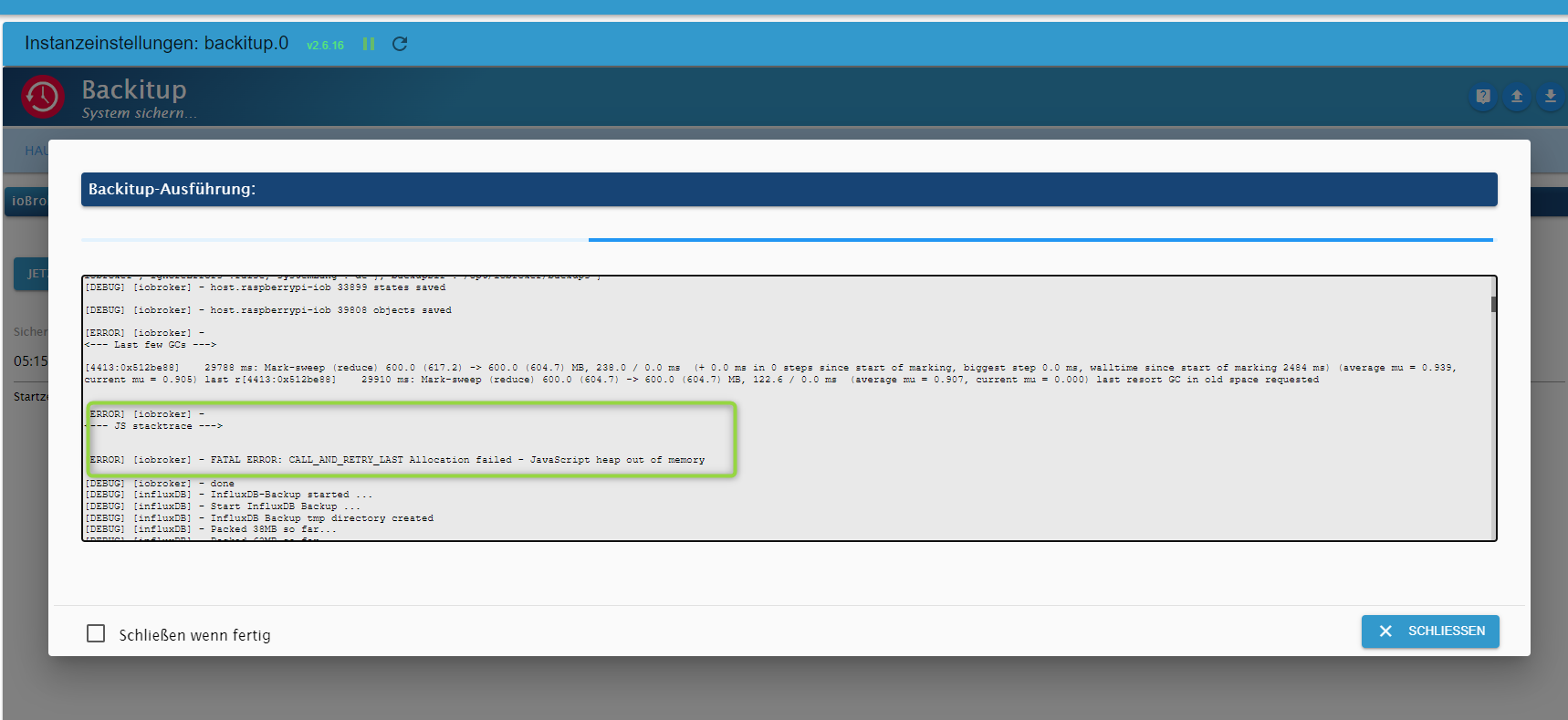
-
kann es sein, dass es evtl. mit einen Adapter zusammenhängt, der Probleme beim Packupen macht? Es knallt ja -"nur" beim iobroker, zigbee, db, javascript werden erstellt.
Bis zum 5.3.23 lief es noch:
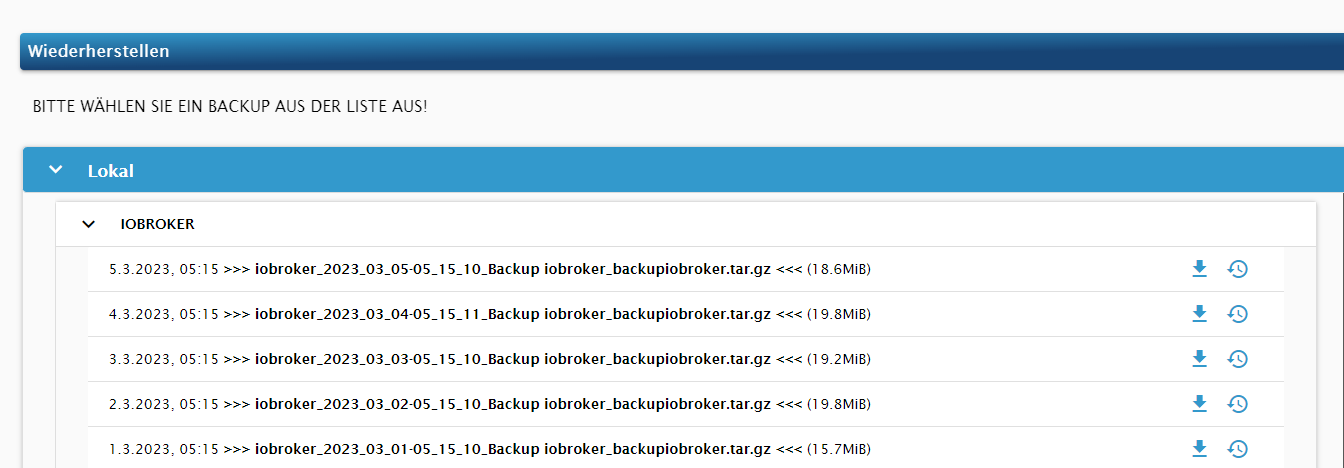
-
@thomas-braun said in Backuperstellungproblem --> JavaScript heap out of memory:
iobroker list instances | grep + | wc -l
pi@raspberrypi-iob:/opt/iobroker $ iobroker list instances | grep + | wc -l
30 -
@thomas-braun said in Backuperstellungproblem --> JavaScript heap out of memory:
iobroker list instances | grep + | wc -l
pi@raspberrypi-iob:/opt/iobroker $ iobroker list instances | grep + | wc -l
30Du solltest doch alles bis auf wenige Kern-Instanzen auf Eis legen. Da laufen ja 30 Dinger noch mit.
-
Du solltest doch alles bis auf wenige Kern-Instanzen auf Eis legen. Da laufen ja 30 Dinger noch mit.
@thomas-braun inzwischen habe ich die instanzen wieder gestartet. 2 versuche haben ja nix anders gebracht
-
Du solltest doch alles bis auf wenige Kern-Instanzen auf Eis legen. Da laufen ja 30 Dinger noch mit.
@thomas-braun jetzt sind es nur noch 4
-
@thomas-braun jetzt sind es nur noch 4
@tklein Das hört sich vernünftiger an.
-
@thomas-braun jetzt sind es nur noch 4
Welche Größe hatte die Backups eigentlich in der Vergangenheit?
Und hast du seit die nicht mehr funktionieren irgendwelche Daten-Dickschiff-Adapter installiert? Überwachungskameras oder sonst was mit reichlich Datenerzeugung? -
@tklein Das hört sich vernünftiger an.
@thomas-braun leider wieder keine änderung:
pi@raspberrypi-iob:/opt/iobroker $ iobroker stop pi@raspberrypi-iob:/opt/iobroker $ iobroker backup host.raspberrypi-iob 33899 states saved host.raspberrypi-iob 39808 objects saved <--- Last few GCs ---> [9086:0x4b25cd0] 37366 ms: Scavenge 887.2 (969.0) -> 887.1 (974.0) MB, 9.7 / 0.0 ms (average mu = 0.919, current mu = 0.812) allocation failure [9086:0x4b25cd0] 37394 ms: Scavenge 890.0 (974.0) -> 889.9 (975.0) MB, 14.2 / 0.0 ms (average mu = 0.919, current mu = 0.812) allocation failure [9086:0x4b25cd0] 37548 ms: Scavenge 890.9 (975.0) -> 890.6 (986.0) MB, 149.5 / 0.0 ms (average mu = 0.919, current mu = 0.812) allocation failure <--- JS stacktrace ---> FATAL ERROR: Reached heap limit Allocation failed - JavaScript heap out of memory /usr/bin/iobroker: line 10: 9085 Aborted sudo -H -u iobroker node /opt/iobroker/node_modules/iobroker.js-controller/iobroker.js "$@" pi@raspberrypi-iob:/opt/iobroker $ -
Welche Größe hatte die Backups eigentlich in der Vergangenheit?
Und hast du seit die nicht mehr funktionieren irgendwelche Daten-Dickschiff-Adapter installiert? Überwachungskameras oder sonst was mit reichlich Datenerzeugung?


Hey! Du scheinst an dieser Unterhaltung interessiert zu sein, hast aber noch kein Konto.
Hast du es satt, bei jedem Besuch durch die gleichen Beiträge zu scrollen? Wenn du dich für ein Konto anmeldest, kommst du immer genau dorthin zurück, wo du zuvor warst, und kannst dich über neue Antworten benachrichtigen lassen (entweder per E-Mail oder Push-Benachrichtigung). Du kannst auch Lesezeichen speichern und Beiträge positiv bewerten, um anderen Community-Mitgliedern deine Wertschätzung zu zeigen.
Mit deinem Input könnte dieser Beitrag noch besser werden 💗
Registrieren AnmeldenSupport us
347
Online33.0k
Benutzer83.5k
Themen1.3m
Beiträge