



Skip to content
  • Home
  • Recent
  • Tags
  • 0 Unread 0
  • Categories
  • Unreplied
  • Popular
  • GitHub
  • Docu
  • Hilfe
Skins
  • Light
  • Brite
  • Cerulean
  • Cosmo
  • Flatly
  • Journal
  • Litera
  • Lumen
  • Lux
  • Materia
  • Minty
  • Morph
  • Pulse
  • Sandstone
  • Simplex
  • Sketchy
  • Spacelab
  • United
  • Yeti
  • Zephyr
  • Dark
  • Cyborg
  • Darkly
  • Quartz
  • Slate
  • Solar
  • Superhero
  • Vapor

  • Default (No Skin)
  • No Skin
Collapse
ioBroker Logo

Community Forum

donate donate
  1. ioBroker Community Home
  2. Deutsch
  3. Einsteigerfragen
  4. Installation
  5. Troubleshooting NodeJS update

NEWS

  • Weihnachtsangebot 2025! 🎄
    BluefoxB
    Bluefox
    24
    1
    1.3k

  • UPDATE 31.10.: Amazon Alexa - ioBroker Skill läuft aus ?
    apollon77A
    apollon77
    48
    3
    9.3k

  • Monatsrückblick – September 2025
    BluefoxB
    Bluefox
    14
    1
    2.6k

Troubleshooting NodeJS update

Scheduled Pinned Locked Moved Installation
nodejs 18nodejs update
504 Posts 60 Posters 151.6k Views 52 Watching
  • Oldest to Newest
  • Newest to Oldest
  • Most Votes
Reply
  • Reply as topic
Log in to reply
This topic has been deleted. Only users with topic management privileges can see it.
  • T tony63526

    @homoran
    Okay, danke für die Info.
    Du siehst, ich habe mit Linux nichts am Hut, aber ich lerne immer gerne dazu.. :blush:
    Ich versuche, mein System immer auf dem neuesten Stand zu halten, um genau das zu vermeiden, aber jetzt hat mir mein altes Image einen Strich durch die Rechnung gemacht.

    Hab ich jetzt bissi was zu tun.

    Meister MopperM Offline
    Meister MopperM Offline
    Meister Mopper
    wrote on last edited by Meister Mopper
    #438

    @tony63526 sagte in Troubleshooting NodeJS update:

    aber jetzt hat mir mein altes Image einen Strich durch die Rechnung gemacht

    Image ziehen ist eh nicht optimal weil du auch alle Schwachstellen mitziehst.

    Besser sind Backups der laufenden Anwendungen, dann kannst du das Betriebssystem von 0 aufsetzen und hast ein frisches System mit den aktuellen Anwendungsdaten.

    Proxmox und HA

    HomoranH 1 Reply Last reply
    2
    • Meister MopperM Meister Mopper

      @tony63526 sagte in Troubleshooting NodeJS update:

      aber jetzt hat mir mein altes Image einen Strich durch die Rechnung gemacht

      Image ziehen ist eh nicht optimal weil du auch alle Schwachstellen mitziehst.

      Besser sind Backups der laufenden Anwendungen, dann kannst du das Betriebssystem von 0 aufsetzen und hast ein frisches System mit den aktuellen Anwendungsdaten.

      HomoranH Do not disturb
      HomoranH Do not disturb
      Homoran
      Global Moderator Administrators
      wrote on last edited by
      #439

      @meister-mopper mit Image scheint @tony63526 das Betriebssystem zu meinen.

      kein Support per PN! - Fragen im Forum stellen - es gibt fast nichts, was nicht auch für andere interessant ist.

      Benutzt das Voting rechts unten im Beitrag wenn er euch geholfen hat.

      der Installationsfixer: curl -fsL https://iobroker.net/fix.sh | bash -

      T 1 Reply Last reply
      0
      • HomoranH Homoran

        @meister-mopper mit Image scheint @tony63526 das Betriebssystem zu meinen.

        T Offline
        T Offline
        tony63526
        wrote on last edited by
        #440

        @homoran
        Ja genau...
        Sorry für das falsche wording

        1 Reply Last reply
        0
        • T Offline
          T Offline
          tony63526
          wrote on last edited by
          #441

          @thomas-braun

          hab jetzt Iob mal alles neu installiert.

          Der Hosts Adapter möchte gern noch das ich etwas aktualisiere.
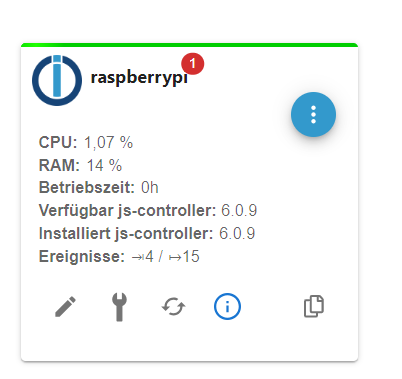
          Screenshot 2024-08-07 185129.png

          libgssapi-krb5-2/stable-security 1.20.1-2+deb12u2 arm64 [upgradable from: 1.20.1-2+deb12u1]
          libk5crypto3/stable-security 1.20.1-2+deb12u2 arm64 [upgradable from: 1.20.1-2+deb12u1]
          libkrb5-3/stable-security 1.20.1-2+deb12u2 arm64 [upgradable from: 1.20.1-2+deb12u1]
          libkrb5support0/stable-security 1.20.1-2+deb12u2 arm64 [upgradable from: 1.20.1-2+deb12u1]
          libssl3/stable 3.0.13-1~deb12u1+rpt1 arm64 [upgradable from: 3.0.13-1~deb12u1]
          openssl/stable 3.0.13-1~deb12u1+rpt1 arm64 [upgradable from: 3.0.13-1~deb12u1]
          raspberrypi-sys-mods/stable 20240807 arm64 [upgradable from: 20240624]
          raspi-config/stable,stable 20240708 all [upgradable from: 20240625]
          wpasupplicant/stable-security 2:2.10-12+deb12u2 arm64 [upgradable from: 2:2.10-12+deb12u1]
          2024-08-07 18:32:49.912
          

          Mit welchen Befehl mache ich das? Damit ging es nicht weg.
          sudo apt update && sudo apt full-upgrade
          sudo reboot

          Thomas BraunT 1 Reply Last reply
          0
          • T tony63526

            @thomas-braun

            hab jetzt Iob mal alles neu installiert.

            Der Hosts Adapter möchte gern noch das ich etwas aktualisiere.

            Screenshot 2024-08-07 185129.png

            libgssapi-krb5-2/stable-security 1.20.1-2+deb12u2 arm64 [upgradable from: 1.20.1-2+deb12u1]
            libk5crypto3/stable-security 1.20.1-2+deb12u2 arm64 [upgradable from: 1.20.1-2+deb12u1]
            libkrb5-3/stable-security 1.20.1-2+deb12u2 arm64 [upgradable from: 1.20.1-2+deb12u1]
            libkrb5support0/stable-security 1.20.1-2+deb12u2 arm64 [upgradable from: 1.20.1-2+deb12u1]
            libssl3/stable 3.0.13-1~deb12u1+rpt1 arm64 [upgradable from: 3.0.13-1~deb12u1]
            openssl/stable 3.0.13-1~deb12u1+rpt1 arm64 [upgradable from: 3.0.13-1~deb12u1]
            raspberrypi-sys-mods/stable 20240807 arm64 [upgradable from: 20240624]
            raspi-config/stable,stable 20240708 all [upgradable from: 20240625]
            wpasupplicant/stable-security 2:2.10-12+deb12u2 arm64 [upgradable from: 2:2.10-12+deb12u1]
            2024-08-07 18:32:49.912
            

            Mit welchen Befehl mache ich das? Damit ging es nicht weg.
            sudo apt update && sudo apt full-upgrade
            sudo reboot

            Thomas BraunT Online
            Thomas BraunT Online
            Thomas Braun
            Most Active
            wrote on last edited by
            #442

            @tony63526 sagte in Troubleshooting NodeJS update:

            sudo apt update
            sudo apt full-upgrade
            sudo reboot
            

            Zeig mal die Ausgaben dazu. Ohne Rückmeldungen kann ich dazu auch nix sagen.

            Linux-Werkzeugkasten:
            https://forum.iobroker.net/topic/42952/der-kleine-iobroker-linux-werkzeugkasten
            NodeJS Fixer Skript:
            https://forum.iobroker.net/topic/68035/iob-node-fix-skript
            iob_diag: curl -sLf -o diag.sh https://iobroker.net/diag.sh && bash diag.sh

            1 Reply Last reply
            0
            • T Offline
              T Offline
              tony63526
              wrote on last edited by
              #443

              @thomas-braun

              pi@raspberrypi:~ $ sudo apt update
              Hit:1 http://deb.debian.org/debian bookworm InRelease
              Hit:2 http://deb.debian.org/debian-security bookworm-security InRelease
              Hit:3 http://deb.debian.org/debian bookworm-updates InRelease
              Hit:4 http://archive.raspberrypi.com/debian bookworm InRelease
              Hit:5 https://deb.nodesource.com/node_20.x nodistro InRelease
              Reading package lists... Done
              Building dependency tree... Done
              Reading state information... Done
              All packages are up to date.
              pi@raspberrypi:~ $ sudo apt full-upgrade
              Reading package lists... Done
              Building dependency tree... Done
              Reading state information... Done
              Calculating upgrade... Done
              0 upgraded, 0 newly installed, 0 to remove and 0 not upgraded.
              pi@raspberrypi:~ $
              
              
              Thomas BraunT 1 Reply Last reply
              0
              • T tony63526

                @thomas-braun

                pi@raspberrypi:~ $ sudo apt update
                Hit:1 http://deb.debian.org/debian bookworm InRelease
                Hit:2 http://deb.debian.org/debian-security bookworm-security InRelease
                Hit:3 http://deb.debian.org/debian bookworm-updates InRelease
                Hit:4 http://archive.raspberrypi.com/debian bookworm InRelease
                Hit:5 https://deb.nodesource.com/node_20.x nodistro InRelease
                Reading package lists... Done
                Building dependency tree... Done
                Reading state information... Done
                All packages are up to date.
                pi@raspberrypi:~ $ sudo apt full-upgrade
                Reading package lists... Done
                Building dependency tree... Done
                Reading state information... Done
                Calculating upgrade... Done
                0 upgraded, 0 newly installed, 0 to remove and 0 not upgraded.
                pi@raspberrypi:~ $
                
                
                Thomas BraunT Online
                Thomas BraunT Online
                Thomas Braun
                Most Active
                wrote on last edited by
                #444

                @tony63526 sagte in Troubleshooting NodeJS update:

                All packages are up to date.
                0 upgraded, 0 newly installed, 0 to remove and 0 not upgraded.

                Alles prima, so soll es sein.
                Und GUIs lügen. Sag ich ja immer wieder. Klick die Meldung weg.

                Linux-Werkzeugkasten:
                https://forum.iobroker.net/topic/42952/der-kleine-iobroker-linux-werkzeugkasten
                NodeJS Fixer Skript:
                https://forum.iobroker.net/topic/68035/iob-node-fix-skript
                iob_diag: curl -sLf -o diag.sh https://iobroker.net/diag.sh && bash diag.sh

                T 1 Reply Last reply
                0
                • Thomas BraunT Thomas Braun

                  @tony63526 sagte in Troubleshooting NodeJS update:

                  All packages are up to date.
                  0 upgraded, 0 newly installed, 0 to remove and 0 not upgraded.

                  Alles prima, so soll es sein.
                  Und GUIs lügen. Sag ich ja immer wieder. Klick die Meldung weg.

                  T Offline
                  T Offline
                  tony63526
                  wrote on last edited by
                  #445

                  @thomas-braun
                  Alles klar, danke

                  1 Reply Last reply
                  0
                  • S Offline
                    S Offline
                    sol21
                    wrote on last edited by Homoran
                    #446

                    Habe Versucht NodeJS upzudaten.
                    Gemäss: https://forum.iobroker.net/topic/64032/update-nodejs-best-practise-supported-16-und-18

                    Seither wird mein IOBroker im Browser nicht mehr gefunden. Fehlermeldung"Fehler: Verbindung fehlgeschlagen"

                    iobroker diag:

                    ======================= SUMMARY =======================
                                            v.2024-05-22
                    
                    
                       Static hostname: raspberrypi
                             Icon name: computer
                      Operating System: Raspbian GNU/Linux 10 (buster)
                                Kernel: Linux 5.10.103-v7l+
                          Architecture: arm
                    
                    Installation:           native
                    Kernel:                 armv7l
                    Userland:               32 bit
                    Timezone:               Europe/Zurich (CEST, +0200)
                    User-ID:                1000
                    Display-Server:         false
                    Boot Target:            graphical.target
                    
                    Pending OS-Updates:     0
                    node: /lib/arm-linux-gnueabihf/libstdc++.so.6: version `GLIBCXX_3.4.26' not found (required by node)
                    Pending iob updates:    0
                    
                    Nodejs-Installation:
                    nodejs: /lib/arm-linux-gnueabihf/libstdc++.so.6: version `GLIBCXX_3.4.26' not found (required by nodejs)
                    /usr/bin/nodejs
                    nodejs: /lib/arm-linux-gnueabihf/libstdc++.so.6: version `GLIBCXX_3.4.26' not found (required by nodejs)
                    node: /lib/arm-linux-gnueabihf/libstdc++.so.6: version `GLIBCXX_3.4.26' not found (required by node)
                    /usr/bin/node
                    node: /lib/arm-linux-gnueabihf/libstdc++.so.6: version `GLIBCXX_3.4.26' not found (required by node)
                    node: /lib/arm-linux-gnueabihf/libstdc++.so.6: version `GLIBCXX_3.4.26' not found (required by node)
                    /usr/bin/npm
                    node: /lib/arm-linux-gnueabihf/libstdc++.so.6: version `GLIBCXX_3.4.26' not found (required by node)
                    node: /lib/arm-linux-gnueabihf/libstdc++.so.6: version `GLIBCXX_3.4.26' not found (required by node)
                    /usr/bin/npx
                    node: /lib/arm-linux-gnueabihf/libstdc++.so.6: version `GLIBCXX_3.4.26' not found (required by node)
                    node: /lib/arm-linux-gnueabihf/libstdc++.so.6: version `GLIBCXX_3.4.26' not found (required by node)
                    /usr/bin/corepack
                    node: /lib/arm-linux-gnueabihf/libstdc++.so.6: version `GLIBCXX_3.4.26' not found (required by node)
                    
                    Recommended versions are nodejs  and npm
                    Your nodejs installation is correct
                    
                    MEMORY:
                                  total        used        free      shared  buff/cache   available
                    Mem:           3.8G         65M        3.2G         15M        539M        3.6G
                    Swap:           99M          0B         99M
                    Total:         3.9G         65M        3.3G
                    
                    Active iob-Instances:   0
                    node: /lib/arm-linux-gnueabihf/libstdc++.so.6: version `GLIBCXX_3.4.26' not found (required by node)
                    
                    node: /lib/arm-linux-gnueabihf/libstdc++.so.6: version `GLIBCXX_3.4.26' not found (required by node)
                    ioBroker Core:          js-controller
                    node: /lib/arm-linux-gnueabihf/libstdc++.so.6: version `GLIBCXX_3.4.26' not found (required by node)
                                            admin
                    
                    node: /lib/arm-linux-gnueabihf/libstdc++.so.6: version `GLIBCXX_3.4.26' not found (required by node)
                    ioBroker Status:
                    
                    Status admin and web instance:
                    
                    Objects:                0
                    States:                 0
                    
                    Size of iob-Database:
                    
                    29M     /opt/iobroker/iobroker-data/objects.jsonl
                    8.4M    /opt/iobroker/iobroker-data/objects.json.migrated
                    8.4M    /opt/iobroker/iobroker-data/objects.json.bak.migrated
                    8.9M    /opt/iobroker/iobroker-data/states.jsonl
                    800K    /opt/iobroker/iobroker-data/states.json.migrated
                    800K    /opt/iobroker/iobroker-data/states.json.bak.migrated
                    0       /opt/iobroker/iobroker-data/states.json.broken


                    =================== END OF SUMMARY ====================
                    

                    Ich vermute nun mal das hat was mit der fehlenden "GLIBCXX_3.4.26" zu tun?
                    Wie kann ich die manuell nachinstallieren?

                    Ro75R Thomas BraunT 2 Replies Last reply
                    0
                    • S sol21

                      Habe Versucht NodeJS upzudaten.
                      Gemäss: https://forum.iobroker.net/topic/64032/update-nodejs-best-practise-supported-16-und-18

                      Seither wird mein IOBroker im Browser nicht mehr gefunden. Fehlermeldung"Fehler: Verbindung fehlgeschlagen"

                      iobroker diag:

                      ======================= SUMMARY =======================
                                              v.2024-05-22
                      
                      
                         Static hostname: raspberrypi
                               Icon name: computer
                        Operating System: Raspbian GNU/Linux 10 (buster)
                                  Kernel: Linux 5.10.103-v7l+
                            Architecture: arm
                      
                      Installation:           native
                      Kernel:                 armv7l
                      Userland:               32 bit
                      Timezone:               Europe/Zurich (CEST, +0200)
                      User-ID:                1000
                      Display-Server:         false
                      Boot Target:            graphical.target
                      
                      Pending OS-Updates:     0
                      node: /lib/arm-linux-gnueabihf/libstdc++.so.6: version `GLIBCXX_3.4.26' not found (required by node)
                      Pending iob updates:    0
                      
                      Nodejs-Installation:
                      nodejs: /lib/arm-linux-gnueabihf/libstdc++.so.6: version `GLIBCXX_3.4.26' not found (required by nodejs)
                      /usr/bin/nodejs
                      nodejs: /lib/arm-linux-gnueabihf/libstdc++.so.6: version `GLIBCXX_3.4.26' not found (required by nodejs)
                      node: /lib/arm-linux-gnueabihf/libstdc++.so.6: version `GLIBCXX_3.4.26' not found (required by node)
                      /usr/bin/node
                      node: /lib/arm-linux-gnueabihf/libstdc++.so.6: version `GLIBCXX_3.4.26' not found (required by node)
                      node: /lib/arm-linux-gnueabihf/libstdc++.so.6: version `GLIBCXX_3.4.26' not found (required by node)
                      /usr/bin/npm
                      node: /lib/arm-linux-gnueabihf/libstdc++.so.6: version `GLIBCXX_3.4.26' not found (required by node)
                      node: /lib/arm-linux-gnueabihf/libstdc++.so.6: version `GLIBCXX_3.4.26' not found (required by node)
                      /usr/bin/npx
                      node: /lib/arm-linux-gnueabihf/libstdc++.so.6: version `GLIBCXX_3.4.26' not found (required by node)
                      node: /lib/arm-linux-gnueabihf/libstdc++.so.6: version `GLIBCXX_3.4.26' not found (required by node)
                      /usr/bin/corepack
                      node: /lib/arm-linux-gnueabihf/libstdc++.so.6: version `GLIBCXX_3.4.26' not found (required by node)
                      
                      Recommended versions are nodejs  and npm
                      Your nodejs installation is correct
                      
                      MEMORY:
                                    total        used        free      shared  buff/cache   available
                      Mem:           3.8G         65M        3.2G         15M        539M        3.6G
                      Swap:           99M          0B         99M
                      Total:         3.9G         65M        3.3G
                      
                      Active iob-Instances:   0
                      node: /lib/arm-linux-gnueabihf/libstdc++.so.6: version `GLIBCXX_3.4.26' not found (required by node)
                      
                      node: /lib/arm-linux-gnueabihf/libstdc++.so.6: version `GLIBCXX_3.4.26' not found (required by node)
                      ioBroker Core:          js-controller
                      node: /lib/arm-linux-gnueabihf/libstdc++.so.6: version `GLIBCXX_3.4.26' not found (required by node)
                                              admin
                      
                      node: /lib/arm-linux-gnueabihf/libstdc++.so.6: version `GLIBCXX_3.4.26' not found (required by node)
                      ioBroker Status:
                      
                      Status admin and web instance:
                      
                      Objects:                0
                      States:                 0
                      
                      Size of iob-Database:
                      
                      29M     /opt/iobroker/iobroker-data/objects.jsonl
                      8.4M    /opt/iobroker/iobroker-data/objects.json.migrated
                      8.4M    /opt/iobroker/iobroker-data/objects.json.bak.migrated
                      8.9M    /opt/iobroker/iobroker-data/states.jsonl
                      800K    /opt/iobroker/iobroker-data/states.json.migrated
                      800K    /opt/iobroker/iobroker-data/states.json.bak.migrated
                      0       /opt/iobroker/iobroker-data/states.json.broken


                      =================== END OF SUMMARY ====================
                      

                      Ich vermute nun mal das hat was mit der fehlenden "GLIBCXX_3.4.26" zu tun?
                      Wie kann ich die manuell nachinstallieren?

                      Ro75R Offline
                      Ro75R Offline
                      Ro75
                      wrote on last edited by
                      #447

                      @sol21 Debian12 installieren (Bookworm)! Unter Buster (Debian10) geht das nicht!

                      Ro75.

                      SERVER = Beelink U59 16GB DDR4 RAM 512GB SSD, FB 7490, FritzDect 200+301+440, ConBee II, Zigbee Aqara Sensoren + NOUS A1Z, NOUS A1T, Philips Hue ** ioBroker, REDIS, influxdb2, Grafana, PiHole, Plex-Mediaserver, paperless-ngx (Docker), MariaDB + phpmyadmin *** VIS-Runtime = Intel NUC 8GB RAM 128GB SSD + 24" Touchscreen

                      1 Reply Last reply
                      0
                      • S sol21

                        Habe Versucht NodeJS upzudaten.
                        Gemäss: https://forum.iobroker.net/topic/64032/update-nodejs-best-practise-supported-16-und-18

                        Seither wird mein IOBroker im Browser nicht mehr gefunden. Fehlermeldung"Fehler: Verbindung fehlgeschlagen"

                        iobroker diag:

                        ======================= SUMMARY =======================
                                                v.2024-05-22
                        
                        
                           Static hostname: raspberrypi
                                 Icon name: computer
                          Operating System: Raspbian GNU/Linux 10 (buster)
                                    Kernel: Linux 5.10.103-v7l+
                              Architecture: arm
                        
                        Installation:           native
                        Kernel:                 armv7l
                        Userland:               32 bit
                        Timezone:               Europe/Zurich (CEST, +0200)
                        User-ID:                1000
                        Display-Server:         false
                        Boot Target:            graphical.target
                        
                        Pending OS-Updates:     0
                        node: /lib/arm-linux-gnueabihf/libstdc++.so.6: version `GLIBCXX_3.4.26' not found (required by node)
                        Pending iob updates:    0
                        
                        Nodejs-Installation:
                        nodejs: /lib/arm-linux-gnueabihf/libstdc++.so.6: version `GLIBCXX_3.4.26' not found (required by nodejs)
                        /usr/bin/nodejs
                        nodejs: /lib/arm-linux-gnueabihf/libstdc++.so.6: version `GLIBCXX_3.4.26' not found (required by nodejs)
                        node: /lib/arm-linux-gnueabihf/libstdc++.so.6: version `GLIBCXX_3.4.26' not found (required by node)
                        /usr/bin/node
                        node: /lib/arm-linux-gnueabihf/libstdc++.so.6: version `GLIBCXX_3.4.26' not found (required by node)
                        node: /lib/arm-linux-gnueabihf/libstdc++.so.6: version `GLIBCXX_3.4.26' not found (required by node)
                        /usr/bin/npm
                        node: /lib/arm-linux-gnueabihf/libstdc++.so.6: version `GLIBCXX_3.4.26' not found (required by node)
                        node: /lib/arm-linux-gnueabihf/libstdc++.so.6: version `GLIBCXX_3.4.26' not found (required by node)
                        /usr/bin/npx
                        node: /lib/arm-linux-gnueabihf/libstdc++.so.6: version `GLIBCXX_3.4.26' not found (required by node)
                        node: /lib/arm-linux-gnueabihf/libstdc++.so.6: version `GLIBCXX_3.4.26' not found (required by node)
                        /usr/bin/corepack
                        node: /lib/arm-linux-gnueabihf/libstdc++.so.6: version `GLIBCXX_3.4.26' not found (required by node)
                        
                        Recommended versions are nodejs  and npm
                        Your nodejs installation is correct
                        
                        MEMORY:
                                      total        used        free      shared  buff/cache   available
                        Mem:           3.8G         65M        3.2G         15M        539M        3.6G
                        Swap:           99M          0B         99M
                        Total:         3.9G         65M        3.3G
                        
                        Active iob-Instances:   0
                        node: /lib/arm-linux-gnueabihf/libstdc++.so.6: version `GLIBCXX_3.4.26' not found (required by node)
                        
                        node: /lib/arm-linux-gnueabihf/libstdc++.so.6: version `GLIBCXX_3.4.26' not found (required by node)
                        ioBroker Core:          js-controller
                        node: /lib/arm-linux-gnueabihf/libstdc++.so.6: version `GLIBCXX_3.4.26' not found (required by node)
                                                admin
                        
                        node: /lib/arm-linux-gnueabihf/libstdc++.so.6: version `GLIBCXX_3.4.26' not found (required by node)
                        ioBroker Status:
                        
                        Status admin and web instance:
                        
                        Objects:                0
                        States:                 0
                        
                        Size of iob-Database:
                        
                        29M     /opt/iobroker/iobroker-data/objects.jsonl
                        8.4M    /opt/iobroker/iobroker-data/objects.json.migrated
                        8.4M    /opt/iobroker/iobroker-data/objects.json.bak.migrated
                        8.9M    /opt/iobroker/iobroker-data/states.jsonl
                        800K    /opt/iobroker/iobroker-data/states.json.migrated
                        800K    /opt/iobroker/iobroker-data/states.json.bak.migrated
                        0       /opt/iobroker/iobroker-data/states.json.broken


                        =================== END OF SUMMARY ====================
                        

                        Ich vermute nun mal das hat was mit der fehlenden "GLIBCXX_3.4.26" zu tun?
                        Wie kann ich die manuell nachinstallieren?

                        Thomas BraunT Online
                        Thomas BraunT Online
                        Thomas Braun
                        Most Active
                        wrote on last edited by Thomas Braun
                        #448

                        @sol21 sagte in Troubleshooting NodeJS update:

                        Wie kann ich die manuell nachinstallieren?

                        Gar nicht.
                        Aktuelles Raspberry OS 12 komplett neu installieren.

                        Künftig dann nicht auf abgesoffenen Releases verharren sondern zeitnah den Absprung auf das aktuelle Stable-Release planen. Dann rennt man nämlich nicht in solche Situationen.

                        Linux-Werkzeugkasten:
                        https://forum.iobroker.net/topic/42952/der-kleine-iobroker-linux-werkzeugkasten
                        NodeJS Fixer Skript:
                        https://forum.iobroker.net/topic/68035/iob-node-fix-skript
                        iob_diag: curl -sLf -o diag.sh https://iobroker.net/diag.sh && bash diag.sh

                        1 Reply Last reply
                        0
                        • S Offline
                          S Offline
                          sol21
                          wrote on last edited by
                          #449

                          O.k. Danke Euch beiden.
                          Das war ich mir nicht bewusst. Hatte IOBroker immer die Stabel Version nachgeführt. Das Raspberry OS habe ich dabei nicht mehr bedacht...
                          Dann muss ich mich da mal durcharbeiten.
                          Danke

                          Thomas BraunT 1 Reply Last reply
                          0
                          • S sol21

                            O.k. Danke Euch beiden.
                            Das war ich mir nicht bewusst. Hatte IOBroker immer die Stabel Version nachgeführt. Das Raspberry OS habe ich dabei nicht mehr bedacht...
                            Dann muss ich mich da mal durcharbeiten.
                            Danke

                            Thomas BraunT Online
                            Thomas BraunT Online
                            Thomas Braun
                            Most Active
                            wrote on last edited by
                            #450

                            @sol21

                            Ich hab mal dazu was geschrieben. Such meinen 'Raspberry installieren - Einfacher geht's nicht' Thread.

                            Linux-Werkzeugkasten:
                            https://forum.iobroker.net/topic/42952/der-kleine-iobroker-linux-werkzeugkasten
                            NodeJS Fixer Skript:
                            https://forum.iobroker.net/topic/68035/iob-node-fix-skript
                            iob_diag: curl -sLf -o diag.sh https://iobroker.net/diag.sh && bash diag.sh

                            1 Reply Last reply
                            0
                            • E Offline
                              E Offline
                              eviltrooper
                              wrote on last edited by
                              #451

                              Hi leute.
                              ich hab aktuell "leider" noch debian Bullseye und will eigentlich ein Upgrade machen.

                              Allerdings sind meine ganzen Adapter jetzt auch veraltet und ich kann die nicht mehr updaten da ich node >=18 benötige aber noch 16 installiert habe.

                              dazu hab ich auch noch den JS-Controller auf 4.0.24

                              ja ich weiß.. hätte ich mal updaten sollen..

                              Ich denke ich sollte auf dem alten System erstmal alles "updaten" um dann von dort ein Update zu machen.

                              wie kann ich denn die nodesjs updaten?

                              sollte doch bei Bullseye mit "iob nodejs-update 18" funktionieren oder?

                              dann update ich alles, kauf mir den neuen Raspi5 mit 8GB und zieh alles auf den neuen Um inkl. natürlich das neuste RaspiOS.

                              so die Frage ist jetzt wie gesagt, wie bekomme ich nodesjs 18 auf das Bullseye System?

                              reicht da

                              iob nodejs-update 18
                              
                              Thomas BraunT 1 Reply Last reply
                              0
                              • E eviltrooper

                                Hi leute.
                                ich hab aktuell "leider" noch debian Bullseye und will eigentlich ein Upgrade machen.

                                Allerdings sind meine ganzen Adapter jetzt auch veraltet und ich kann die nicht mehr updaten da ich node >=18 benötige aber noch 16 installiert habe.

                                dazu hab ich auch noch den JS-Controller auf 4.0.24

                                ja ich weiß.. hätte ich mal updaten sollen..

                                Ich denke ich sollte auf dem alten System erstmal alles "updaten" um dann von dort ein Update zu machen.

                                wie kann ich denn die nodesjs updaten?

                                sollte doch bei Bullseye mit "iob nodejs-update 18" funktionieren oder?

                                dann update ich alles, kauf mir den neuen Raspi5 mit 8GB und zieh alles auf den neuen Um inkl. natürlich das neuste RaspiOS.

                                so die Frage ist jetzt wie gesagt, wie bekomme ich nodesjs 18 auf das Bullseye System?

                                reicht da

                                iob nodejs-update 18
                                
                                Thomas BraunT Online
                                Thomas BraunT Online
                                Thomas Braun
                                Most Active
                                wrote on last edited by
                                #452

                                @eviltrooper

                                Hier hat jemand die fast gleiche Konstellation:

                                https://forum.iobroker.net/topic/70370/passwort-iobroker-über-mac-terminal-anders/91?_=1729889757239

                                Lies dich da ein.

                                Linux-Werkzeugkasten:
                                https://forum.iobroker.net/topic/42952/der-kleine-iobroker-linux-werkzeugkasten
                                NodeJS Fixer Skript:
                                https://forum.iobroker.net/topic/68035/iob-node-fix-skript
                                iob_diag: curl -sLf -o diag.sh https://iobroker.net/diag.sh && bash diag.sh

                                E 1 Reply Last reply
                                0
                                • Thomas BraunT Thomas Braun

                                  @eviltrooper

                                  Hier hat jemand die fast gleiche Konstellation:

                                  https://forum.iobroker.net/topic/70370/passwort-iobroker-über-mac-terminal-anders/91?_=1729889757239

                                  Lies dich da ein.

                                  E Offline
                                  E Offline
                                  eviltrooper
                                  wrote on last edited by
                                  #453

                                  @thomas-braun ahh danke :)

                                  1 Reply Last reply
                                  0
                                  • E Offline
                                    E Offline
                                    el-lutschi
                                    wrote on last edited by
                                    #454

                                    Hallo zusammen,

                                    ich versuch gerade node.js in meinem Proxmox LXC auf Version 20 zu updaten. Leider klappt das einfach nicht. Führe ich den Befehl

                                    iob nodejs-update
                                    

                                    als normaler User aus erhalte ich

                                    bash: /home/iobroker/.nodejs-update.sh: Permission denied 
                                    

                                    Versuche ich es als root erhalte ich

                                    This script must not be run as root! Please use your standard user!"
                                    

                                    Dann habe ich

                                    su iobroker -s /bin/bash -c 'iob nodejs-update'
                                    

                                    versucht. Dann läuft das Skript zwar an aber ich erhalte die folgenden Fehler:

                                    *** Installing ca-certificates, curl and gnupg, just in case they are missing.
                                    sudo: a terminal is required to read the password; either use the -S option to read from standard input or configure an askpass helper
                                    sudo: a password is required
                                    sudo: a terminal is required to read the password; either use the -S option to read from standard input or configure an askpass helper
                                    sudo: a password is required
                                    
                                    *** Creating new /etc/apt/sources.list.d/nodesource.list and pinning source
                                    
                                    sudo: a terminal is required to read the password; either use the -S option to read from standard input or configure an askpass helper
                                    sudo: a password is required
                                    sudo: a terminal is required to read the password; either use the -S option to read from standard input or configure an askpass helper
                                    sudo: a password is required
                                    

                                    Ich steh grad irgendwie auf dem Schlauch und verstehe nicht warum es nicht klappt. Kann mir jemand helfen?

                                    Thomas BraunT 1 Reply Last reply
                                    0
                                    • E el-lutschi

                                      Hallo zusammen,

                                      ich versuch gerade node.js in meinem Proxmox LXC auf Version 20 zu updaten. Leider klappt das einfach nicht. Führe ich den Befehl

                                      iob nodejs-update
                                      

                                      als normaler User aus erhalte ich

                                      bash: /home/iobroker/.nodejs-update.sh: Permission denied 
                                      

                                      Versuche ich es als root erhalte ich

                                      This script must not be run as root! Please use your standard user!"
                                      

                                      Dann habe ich

                                      su iobroker -s /bin/bash -c 'iob nodejs-update'
                                      

                                      versucht. Dann läuft das Skript zwar an aber ich erhalte die folgenden Fehler:

                                      *** Installing ca-certificates, curl and gnupg, just in case they are missing.
                                      sudo: a terminal is required to read the password; either use the -S option to read from standard input or configure an askpass helper
                                      sudo: a password is required
                                      sudo: a terminal is required to read the password; either use the -S option to read from standard input or configure an askpass helper
                                      sudo: a password is required
                                      
                                      *** Creating new /etc/apt/sources.list.d/nodesource.list and pinning source
                                      
                                      sudo: a terminal is required to read the password; either use the -S option to read from standard input or configure an askpass helper
                                      sudo: a password is required
                                      sudo: a terminal is required to read the password; either use the -S option to read from standard input or configure an askpass helper
                                      sudo: a password is required
                                      

                                      Ich steh grad irgendwie auf dem Schlauch und verstehe nicht warum es nicht klappt. Kann mir jemand helfen?

                                      Thomas BraunT Online
                                      Thomas BraunT Online
                                      Thomas Braun
                                      Most Active
                                      wrote on last edited by
                                      #455

                                      @el-lutschi sagte in Troubleshooting NodeJS update:

                                      a terminal is required to read the password

                                      Wo und wie führst du das denn aus? Du musst da schon mit einem gescheiten Terminal anrücken.
                                      Dann funktioniert das auch ohne diese Verrenkungen, die du da fabrizierst.

                                      Linux-Werkzeugkasten:
                                      https://forum.iobroker.net/topic/42952/der-kleine-iobroker-linux-werkzeugkasten
                                      NodeJS Fixer Skript:
                                      https://forum.iobroker.net/topic/68035/iob-node-fix-skript
                                      iob_diag: curl -sLf -o diag.sh https://iobroker.net/diag.sh && bash diag.sh

                                      E 1 Reply Last reply
                                      0
                                      • Thomas BraunT Thomas Braun

                                        @el-lutschi sagte in Troubleshooting NodeJS update:

                                        a terminal is required to read the password

                                        Wo und wie führst du das denn aus? Du musst da schon mit einem gescheiten Terminal anrücken.
                                        Dann funktioniert das auch ohne diese Verrenkungen, die du da fabrizierst.

                                        E Offline
                                        E Offline
                                        el-lutschi
                                        wrote on last edited by
                                        #456

                                        @thomas-braun
                                        In einer SSH Session über Putty. Was ist für dich ein gescheiter Terminal?

                                        Thomas BraunT 1 Reply Last reply
                                        0
                                        • E el-lutschi

                                          @thomas-braun
                                          In einer SSH Session über Putty. Was ist für dich ein gescheiter Terminal?

                                          Thomas BraunT Online
                                          Thomas BraunT Online
                                          Thomas Braun
                                          Most Active
                                          wrote on last edited by
                                          #457

                                          @el-lutschi sagte in Troubleshooting NodeJS update:

                                          Was ist für dich ein gescheiter Terminal?

                                          PuTTY muss funktionieren. Auch wenn es nicht mein bevorzugtes Terminal ist.

                                          Linux-Werkzeugkasten:
                                          https://forum.iobroker.net/topic/42952/der-kleine-iobroker-linux-werkzeugkasten
                                          NodeJS Fixer Skript:
                                          https://forum.iobroker.net/topic/68035/iob-node-fix-skript
                                          iob_diag: curl -sLf -o diag.sh https://iobroker.net/diag.sh && bash diag.sh

                                          E 1 Reply Last reply
                                          0
                                          Reply
                                          • Reply as topic
                                          Log in to reply
                                          • Oldest to Newest
                                          • Newest to Oldest
                                          • Most Votes


                                          Support us

                                          ioBroker
                                          Community Adapters
                                          Donate

                                          400

                                          Online

                                          32.5k

                                          Users

                                          81.7k

                                          Topics

                                          1.3m

                                          Posts
                                          Community
                                          Impressum | Datenschutz-Bestimmungen | Nutzungsbedingungen | Einwilligungseinstellungen
                                          ioBroker Community 2014-2025
                                          logo
                                          • Login

                                          • Don't have an account? Register

                                          • Login or register to search.
                                          • First post
                                            Last post
                                          0
                                          • Home
                                          • Recent
                                          • Tags
                                          • Unread 0
                                          • Categories
                                          • Unreplied
                                          • Popular
                                          • GitHub
                                          • Docu
                                          • Hilfe

