Skip to content
  • Home
  • Recent
  • Tags
  • 0 Unread 0
  • Categories
  • Unreplied
  • Popular
  • GitHub
  • Docu
  • Hilfe
Skins
  • Light
  • Brite
  • Cerulean
  • Cosmo
  • Flatly
  • Journal
  • Litera
  • Lumen
  • Lux
  • Materia
  • Minty
  • Morph
  • Pulse
  • Sandstone
  • Simplex
  • Sketchy
  • Spacelab
  • United
  • Yeti
  • Zephyr
  • Dark
  • Cyborg
  • Darkly
  • Quartz
  • Slate
  • Solar
  • Superhero
  • Vapor

  • Default (No Skin)
  • No Skin
Collapse
ioBroker Logo

Community Forum

donate donate
  1. ioBroker Community Home
  2. Deutsch
  3. Entwicklung
  4. [Projekt] Admin-neo - die neue Oberfläche

NEWS

  • Monatsrückblick Januar/Februar 2026 ist online!
    BluefoxB
    Bluefox
    17
    1
    419

  • Jahresrückblick 2025 – unser neuer Blogbeitrag ist online! ✨
    BluefoxB
    Bluefox
    17
    1
    5.0k

  • Neuer Blogbeitrag: Monatsrückblick - Dezember 2025 🎄
    BluefoxB
    Bluefox
    13
    1
    1.4k

[Projekt] Admin-neo - die neue Oberfläche

Scheduled Pinned Locked Moved Entwicklung
54 Posts 22 Posters 12.6k Views
  • Oldest to Newest
  • Newest to Oldest
  • Most Votes
Reply
  • Reply as topic
Log in to reply
This topic has been deleted. Only users with topic management privileges can see it.
  • ldittmarL Offline
    ldittmarL Offline
    ldittmar
    Developer
    wrote on last edited by
    #19

    Ja, dann mache ich eine 3er-Teilung und wir sehen wie es aussieht. ;)

    1 Reply Last reply
    0
    • andreA Offline
      andreA Offline
      andre
      Developer
      wrote on last edited by
      #20

      @apollon77:

      AN sich hast Du 3 typen (um es mal noch generischer zu machen):

      1.) Echte Instanzen. DIe kann man Starten, Stoppen und so. Können auch einen Link zu "Ihrer" Seite haben

      2.) "Web"-Instanzen, also Adons die in einem der "Web"-Adapter laufen. Die kann man nicht Starten oder beenden, haben aber einen Link zu Ihrer Seite

      3.) Vis-Addons, weder Start/Stop noch ne eigene Seite

      Aber ja, eine solche Trennung (auch Deine Vorgeschlagene) macht Sinn. `

      Da stimme ich zu.

      Ich fände es übersichtlicher wenn man das dreiteilt. Also Adapter mit Status, Adapter ohne Status und Vis-addons…

      MfG Andre

      Gesendet von Unterwegs mit Tapatalk

      Bitte keine Support-Fragen per PN! Nutzt die öffentliche Kanäle damit auch andere von den Antworten profitieren können!

      1 Reply Last reply
      0
      • S Offline
        S Offline
        SchuetzeSchulz
        wrote on last edited by
        #21

        Finde eine solche Trennung auch sinnvoll.

        1 Reply Last reply
        0
        • P Offline
          P Offline
          pix
          wrote on last edited by
          #22

          Hallo,

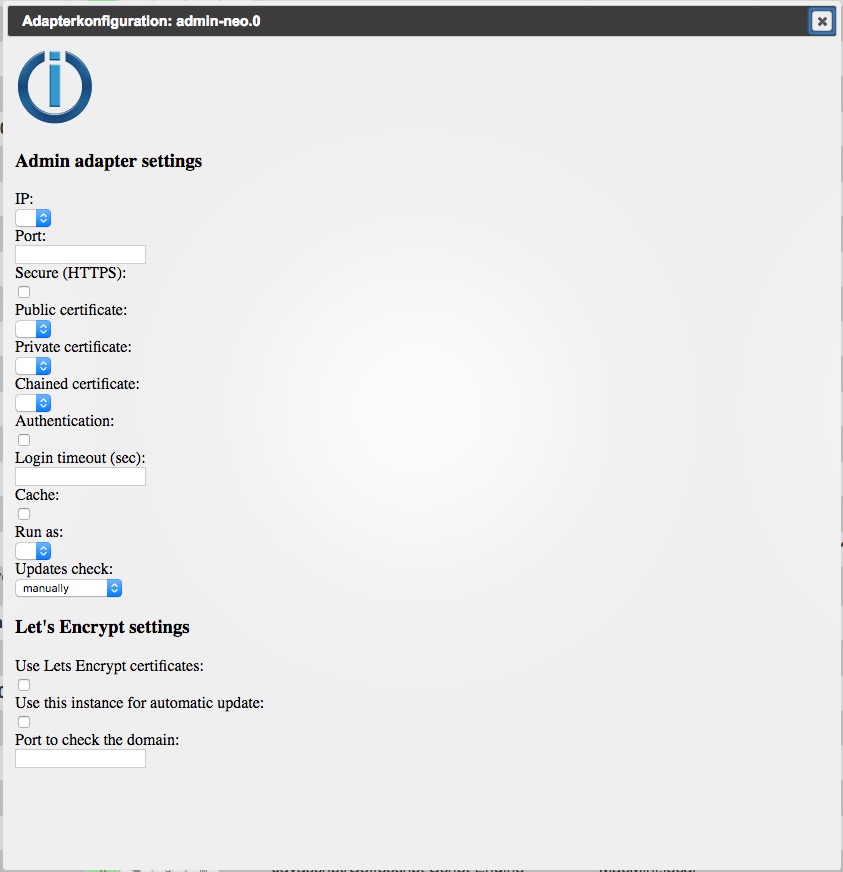
          habe ein Problem mit den Einstellungen: 261_bildschirmfoto_2017-05-23_um_23.42.54.jpg

          Das Fenster ist nicht formatiert und es lassen sich keine Optionen anwählen. Ebenso ist kein Speichern-Knopf vorhanden.

          js-controller 1

          admin-neo 0.0.1

          web 2.0.4

          node 4.8.0

          Gruß

          Pix

          ioBroker auf Ubuntu in Proxmox (früher Mac mini (bis OS X 10.12.6 Sierra), VIS via iOS; angeschlossen: Homematic CCU2, Homepilot 1, ConBee II, einige Wemos, Sonos, Unifi CK+Protect, Homekit, Homebridge; KEIN blockly! Github-Profil

          1 Reply Last reply
          0
          • ldittmarL Offline
            ldittmarL Offline
            ldittmar
            Developer
            wrote on last edited by
            #23

            Ja klar, denn das Fenster ist schon teilweise auf Bootstrap umgestellt und deswegen kannst du z.Z. dort nichts einstellen. Admin-neo übermimmt hat aber die gleiche Einstellungen wie das alte Admin. Du musst also nichts einstellen… einfach starten. Solltest du irgendwas anpassen müssen, dann mache es einfach im alten Admin. Im Neuen kannst du die Einstellungen noch nicht speichern. Bin aber dran... ;)

            Grüße,

            Ldittmar

            1 Reply Last reply
            0
            • V Offline
              V Offline
              vore
              wrote on last edited by
              #24

              Hallo!

              Wie kann ich die Oberfläche installieren? Download und "aus URL installieren"? Muss ich vorher das Paket entpacken?

              Hab alles versucht, bekomme aber Fehler. Daher die Frage wie es grundsätzlich gehen sollte.

              Gruß

              Vore

              1 Reply Last reply
              0
              • ldittmarL Offline
                ldittmarL Offline
                ldittmar
                Developer
                wrote on last edited by
                #25

                Hi Vore,

                was für ein Fehler bekommst du? Grundsätzlich über die URL. Habe es gerade eben nochmal probiert und es hat funktioniert.

                Grüße,

                ldittmar

                1 Reply Last reply
                0
                • HomoranH Do not disturb
                  HomoranH Do not disturb
                  Homoran
                  Global Moderator Administrators
                  wrote on last edited by
                  #26

                  Ich gehe mal von den EACCESS aus. Die sind aber nicht schlimm, da die Installation dann in einem temporären Ordner durchgeführt wird.

                  Gruß

                  Rainer

                  kein Support per PN! - Fragen im Forum stellen -
                  Benutzt das Voting rechts unten im Beitrag wenn er euch geholfen hat.
                  Das Forum freut sich über eine Spende. Benutzt dazu den Spendenbutton im Header. Danke!
                  der Installationsfixer: curl -fsL https://iobroker.net/fix.sh | bash -

                  1 Reply Last reply
                  0
                  • V Offline
                    V Offline
                    vore
                    wrote on last edited by
                    #27

                    Hallo!

                    Hier mal die Ausgaben bei der Installation. Sagt Euch das etwas?

                    $ ./iobroker url "/home/volker/Downloads/ioBroker.admin-neo-master.zip" --debug
                    install /home/volker/Downloads/ioBroker.admin-neo-master.zip
                    npm install /home/volker/Downloads/ioBroker.admin-neo-master.zip --production --prefix "/opt/iobroker" (System call)
                    npm
                     ERR! addLocal Could not install /home/volker/Downloads/ioBroker.admin-neo-master.zip
                    npm
                     ERR! Linux 4.9.12-sunxinpm ERR! argv "/usr/local/bin/node" "/usr/local/bin/npm" "install" "/home/volker/Downloads/ioBroker.admin-neo-master.zip" "--production" "--prefix" "/opt/iobroker"
                    npm ERR! node v7.2.1
                    npm ERR! npm  v3.10.10
                    
                    npm ERR! path /home/volker/Downloads/ioBroker.admin-neo-master.zipnpm ERR! code ENOENT
                    npm ERR! errno -2
                    npm ERR! syscall open
                    
                    npm ERR! enoent ENOENT: no such file or directory, open '/home/volker/Downloads/ioBroker.admin-neo-master.zip'npm ERR! enoent ENOENT: no such file or directory, open '/home/volker/Downloads/ioBroker.admin-neo-master.zip'
                    npm ERR! enoent This is most likely not a problem with npm itself
                    npm ERR! enoent and is related to npm not being able to find a file.
                    npm ERR! enoent 
                    
                    npm ERR! Please include the following file with any support request:npm ERR!     /npm-debug.log
                    
                    ERROR: host.cubietruck Cannot install /home/volker/Downloads/ioBroker.admin-neo-master.zip: 254
                    ERROR: process exited with code 25
                    
                    1 Reply Last reply
                    0
                    • apollon77A Offline
                      apollon77A Offline
                      apollon77
                      wrote on last edited by
                      #28

                      Das ".zip" der Installations-URL am Ende ist falsch

                      Beitrag hat geholfen? Votet rechts unten im Beitrag :-) https://paypal.me/Apollon77 / https://github.com/sponsors/Apollon77

                      • Debug-Log für Instanz einschalten? Admin -> Instanzen -> Expertenmodus -> Instanz aufklappen - Loglevel ändern
                      • Logfiles auf Platte /opt/iobroker/log/… nutzen, Admin schneidet Zeilen ab
                      1 Reply Last reply
                      0
                      • V Offline
                        V Offline
                        vore
                        wrote on last edited by
                        #29

                        > Das ".zip" der Installations-URL am Ende ist falsch

                        Klappt leider ohne .zip ebenfalls nicht :-(

                        $ ./iobroker url "/home/volker/Downloads/ioBroker.admin-neo-master" --debug
                        install /home/volker/Downloads/ioBroker.admin-neo-master
                        npm install /home/volker/Downloads/ioBroker.admin-neo-master --production --prefix "/opt/iobroker" (System call)
                        npm
                         ERR! addLocal Could not install /home/volker/Downloads/ioBroker.admin-neo-master
                        npm
                         ERR!
                         Linux 4.9.12-sunxinpm ERR! argv "/usr/local/bin/node" "/usr/local/bin/npm" "install" "/home/volker/Downloads/ioBroker.admin-neo-master" "--production" "--prefix" "/opt/iobroker"
                        
                        npm ERR! node v7.2.1npm ERR! npm  v3.10.10
                        npm ERR! path /home/volker/Downloads/ioBroker.admin-neo-master
                        npm ERR! code ENOENT
                        
                        npm ERR! errno -2npm
                         ERR! syscall open
                        
                        npm ERR!
                         enoent ENOENT: no such file or directory, open '/home/volker/Downloads/ioBroker.admin-neo-master'npm ERR! enoent ENOENT: no such file or directory, open '/home/volker/Downloads/ioBroker.admin-neo-master'
                        npm ERR! enoent This is most likely not a problem with npm itself
                        npm ERR! enoent
                         and is related to npm not being able to find a file.npm 
                        ERR! enoent 
                        
                        npm 
                        ERR!
                         Please include the following file with any support request:npm ERR!     /npm-debug.log
                        
                        ERROR: host.cubietruck Cannot install /home/volker/Downloads/ioBroker.admin-neo-master: 254
                        ERROR: process exited with code 25
                        
                        1 Reply Last reply
                        0
                        • HomoranH Do not disturb
                          HomoranH Do not disturb
                          Homoran
                          Global Moderator Administrators
                          wrote on last edited by
                          #30

                          Wenn ich das richtig sehe hast du in github das zip heruntergeladen und willst admin-neo jetzt daraus installieren.

                          Du musst im Octocat icon den Pfad zu der Github Seite eingeben.

                          Gruß

                          Rainer

                          kein Support per PN! - Fragen im Forum stellen -
                          Benutzt das Voting rechts unten im Beitrag wenn er euch geholfen hat.
                          Das Forum freut sich über eine Spende. Benutzt dazu den Spendenbutton im Header. Danke!
                          der Installationsfixer: curl -fsL https://iobroker.net/fix.sh | bash -

                          1 Reply Last reply
                          0
                          • V Offline
                            V Offline
                            vore
                            wrote on last edited by
                            #31

                            Hallo Rainer!

                            Ja, genau. Von Gihub geladen und jetzt über "URL" installieren vom PC. Geht das nicht?

                            Muss ich die Verwahrungsorte anpassen und dann von GitHub installieren? Konnte da aber leider nichts finden.

                            Gruß

                            Vore

                            1 Reply Last reply
                            0
                            • ldittmarL Offline
                              ldittmarL Offline
                              ldittmar
                              Developer
                              wrote on last edited by
                              #32

                              Hi Vore,

                              gebe mal in das Feld URL das hier ein:

                              https://github.com/ldittmar81/ioBroker.admin-neo

                              Grüße,

                              ldittmar

                              1 Reply Last reply
                              0
                              • htreckslerH Offline
                                htreckslerH Offline
                                htrecksler
                                Forum Testing
                                wrote on last edited by
                                #33

                                @Homoran:

                                Wenn ich das richtig sehe hast du in github das zip heruntergeladen und willst admin-neo jetzt daraus installieren. `
                                Bei mir hat das auch mit dem herunterladen und installieren geklappt.

                                Gruss Hermann

                                ioBroker auf Proxmox (Debian) auf IntelNuc als Produktivsystem

                                1 Reply Last reply
                                0
                                • V Offline
                                  V Offline
                                  vore
                                  wrote on last edited by
                                  #34

                                  > gebe mal in das Feld URL das hier ein:

                                  Hallo! Das wars.. jetzt wurde der Adapter geladen. Danke!

                                  Sehr schick das Ganze!

                                  Gruß

                                  Vore

                                  1 Reply Last reply
                                  0
                                  • cvidalC Offline
                                    cvidalC Offline
                                    cvidal
                                    Forum Testing
                                    wrote on last edited by
                                    #35

                                    Hi zusammen,

                                    Ich habe gerade auch mal installiert. Gefällt mir erstmal so ganz gut optisch mal eine sehr schöne alternative.

                                    Ich Persönlich finde aber das wenn man Adapter sucht man viel scrollen muss weil nur drei nebeneinander sind und ich da etwas die Übersicht verliere, dazu muss ich aber auch sagen das ich meinst mit dem Laptop arbeite ist dann mit Touchpad etwas umständlich, ich möchte Admin Neo keinesfalls schlecht machen wollte mich aber einfach mal dazu äußern ich hoffe das nimmt man mir nicht übel.

                                    Ich finde Neo ist sehr gut gelungen danke dafür.

                                    Gruß Christian

                                    1 Reply Last reply
                                    0
                                    • apollon77A Offline
                                      apollon77A Offline
                                      apollon77
                                      wrote on last edited by
                                      #36

                                      Eine Listen-Ansicht gibts bei Neo aber auch. Schau mal bei den Icons oben

                                      Beitrag hat geholfen? Votet rechts unten im Beitrag :-) https://paypal.me/Apollon77 / https://github.com/sponsors/Apollon77

                                      • Debug-Log für Instanz einschalten? Admin -> Instanzen -> Expertenmodus -> Instanz aufklappen - Loglevel ändern
                                      • Logfiles auf Platte /opt/iobroker/log/… nutzen, Admin schneidet Zeilen ab
                                      1 Reply Last reply
                                      0
                                      • ldittmarL Offline
                                        ldittmarL Offline
                                        ldittmar
                                        Developer
                                        wrote on last edited by
                                        #37

                                        Und falls ihr euch fragt warum der lahme Entwickler noch nicht fertig ist. Er kommt z.Z. einfach zu nichts… :cry:

                                        Grüße,

                                        ldittmar

                                        1 Reply Last reply
                                        0
                                        • S Offline
                                          S Offline
                                          simpixo
                                          wrote on last edited by
                                          #38

                                          Ich finde es definitiv super das Ihr Entwickler überhaupt in eurer FREIZEIT so viel für die Community macht! DANKE!!!!

                                          Gesendet von iPhone mit Tapatalk Pro

                                          1 Reply Last reply
                                          0
                                          Reply
                                          • Reply as topic
                                          Log in to reply
                                          • Oldest to Newest
                                          • Newest to Oldest
                                          • Most Votes


                                          Support us

                                          ioBroker
                                          Community Adapters
                                          Donate

                                          678

                                          Online

                                          32.7k

                                          Users

                                          82.5k

                                          Topics

                                          1.3m

                                          Posts
                                          Community
                                          Impressum | Datenschutz-Bestimmungen | Nutzungsbedingungen | Einwilligungseinstellungen
                                          ioBroker Community 2014-2025
                                          logo
                                          • Login

                                          • Don't have an account? Register

                                          • Login or register to search.
                                          • First post
                                            Last post
                                          0
                                          • Home
                                          • Recent
                                          • Tags
                                          • Unread 0
                                          • Categories
                                          • Unreplied
                                          • Popular
                                          • GitHub
                                          • Docu
                                          • Hilfe