Skip to content
  • Home
  • Recent
  • Tags
  • 0 Unread 0
  • Categories
  • Unreplied
  • Popular
  • GitHub
  • Docu
  • Hilfe
Skins
  • Light
  • Brite
  • Cerulean
  • Cosmo
  • Flatly
  • Journal
  • Litera
  • Lumen
  • Lux
  • Materia
  • Minty
  • Morph
  • Pulse
  • Sandstone
  • Simplex
  • Sketchy
  • Spacelab
  • United
  • Yeti
  • Zephyr
  • Dark
  • Cyborg
  • Darkly
  • Quartz
  • Slate
  • Solar
  • Superhero
  • Vapor

  • Default (No Skin)
  • No Skin
Collapse
ioBroker Logo

Community Forum

donate donate
  1. ioBroker Community Home
  2. Deutsch
  3. ioBroker Allgemein
  4. Iobroker Admin Webseite nicht erreichbar

NEWS

  • Weihnachtsangebot 2025! 🎄
    BluefoxB
    Bluefox
    21
    1
    834

  • UPDATE 31.10.: Amazon Alexa - ioBroker Skill läuft aus ?
    apollon77A
    apollon77
    48
    3
    9.0k

  • Monatsrückblick – September 2025
    BluefoxB
    Bluefox
    13
    1
    2.3k

Iobroker Admin Webseite nicht erreichbar

Scheduled Pinned Locked Moved ioBroker Allgemein
115 Posts 12 Posters 21.7k Views 11 Watching
  • Oldest to Newest
  • Newest to Oldest
  • Most Votes
Reply
  • Reply as topic
Log in to reply
This topic has been deleted. Only users with topic management privileges can see it.
  • HomoranH Homoran

    @schtallone sagte in Iobroker Admin Webseite nicht erreichbar:

    kein Zugriff unter http://iob_ip:8081/

    und welche iob_ip hast du benutzt?

    S Offline
    S Offline
    Schtallone
    wrote on last edited by
    #53

    @homoran 192.168.1.5, die des Nas

    GlasfaserG 1 Reply Last reply
    0
    • S Schtallone

      @homoran 192.168.1.5, die des Nas

      GlasfaserG Offline
      GlasfaserG Offline
      Glasfaser
      wrote on last edited by
      #54

      @schtallone sagte in Iobroker Admin Webseite nicht erreichbar:

      @homoran 192.168.1.5, die des Nas

      Was ist los , du hast ihm doch

      192.168.1.10 vergeben , also damit aufrufen !

      Synology 918+ 16GB - ioBroker in Docker v9 , VISO auf Trekstor Primebook C13 13,3" , Hikvision Domkameras mit Surveillance Station .. CCU RaspberryMatic in Synology VM .. Zigbee CC2538+CC2592 .. Sonoff .. KNX .. Modbus ..

      S 1 Reply Last reply
      0
      • HomoranH Homoran

        @schtallone sagte in Iobroker Admin Webseite nicht erreichbar:

        kein Zugriff unter http://iob_ip:8081/

        und welche iob_ip hast du benutzt?

        S Offline
        S Offline
        Schtallone
        wrote on last edited by
        #55

        @homoran ICh bekomme die Meldung, dass SSL verwendet werden muss. Aber mit https geht es ebenfalls nicht. Vorher war unter der 192.168.1.10 auch mit https nur möglich, aberes ging dann auch

        F 1 Reply Last reply
        0
        • GlasfaserG Glasfaser

          @schtallone sagte in Iobroker Admin Webseite nicht erreichbar:

          @homoran 192.168.1.5, die des Nas

          Was ist los , du hast ihm doch

          192.168.1.10 vergeben , also damit aufrufen !

          S Offline
          S Offline
          Schtallone
          wrote on last edited by
          #56

          @glasfaser
          das habe ich genau gemacht:

          iob set admin.0 --secure false --auth false --bind 0.0.0.0

          1 Reply Last reply
          0
          • S Schtallone

            @homoran ICh bekomme die Meldung, dass SSL verwendet werden muss. Aber mit https geht es ebenfalls nicht. Vorher war unter der 192.168.1.10 auch mit https nur möglich, aberes ging dann auch

            F Offline
            F Offline
            fastfoot
            wrote on last edited by
            #57

            @schtallone dann hast dunicht das komplette reset kommando benutzt oder du rufst mit https:// auf anstatt mit http://

            iobroker läuft unter Docker auf QNAP TS-451+
            SkriptRecovery: https://forum.iobroker.net/post/930558

            S 1 Reply Last reply
            0
            • F fastfoot

              @schtallone dann hast dunicht das komplette reset kommando benutzt oder du rufst mit https:// auf anstatt mit http://

              S Offline
              S Offline
              Schtallone
              wrote on last edited by
              #58

              @fastfoot

              root@iobroker:/opt/iobroker# iob set admin.0 --secure false --auth false --bind 0.0.0.0
              New secure for "admin.0" is: false
              New auth for "admin.0" is: false
              New bind for "admin.0" is: 0.0.0.0
              Instance settings for "admin.0" are changed.
              
              F GlasfaserG 2 Replies Last reply
              0
              • S Schtallone

                @fastfoot

                root@iobroker:/opt/iobroker# iob set admin.0 --secure false --auth false --bind 0.0.0.0
                New secure for "admin.0" is: false
                New auth for "admin.0" is: false
                New bind for "admin.0" is: 0.0.0.0
                Instance settings for "admin.0" are changed.
                
                F Offline
                F Offline
                fastfoot
                wrote on last edited by
                #59

                @schtallone genau! zeige mal noch die Ausgabe von ifconfig

                iobroker läuft unter Docker auf QNAP TS-451+
                SkriptRecovery: https://forum.iobroker.net/post/930558

                S 1 Reply Last reply
                0
                • S Schtallone

                  @fastfoot

                  root@iobroker:/opt/iobroker# iob set admin.0 --secure false --auth false --bind 0.0.0.0
                  New secure for "admin.0" is: false
                  New auth for "admin.0" is: false
                  New bind for "admin.0" is: 0.0.0.0
                  Instance settings for "admin.0" are changed.
                  
                  GlasfaserG Offline
                  GlasfaserG Offline
                  Glasfaser
                  wrote on last edited by
                  #60

                  @schtallone

                  Öffne den Browser im Inkonito Modus

                  dann

                  http://192.168.1.10:8081

                  Synology 918+ 16GB - ioBroker in Docker v9 , VISO auf Trekstor Primebook C13 13,3" , Hikvision Domkameras mit Surveillance Station .. CCU RaspberryMatic in Synology VM .. Zigbee CC2538+CC2592 .. Sonoff .. KNX .. Modbus ..

                  S 1 Reply Last reply
                  0
                  • F fastfoot

                    @schtallone genau! zeige mal noch die Ausgabe von ifconfig

                    S Offline
                    S Offline
                    Schtallone
                    wrote on last edited by
                    #61

                    @fastfoot

                    C:\Users\schta>ipconfig
                    
                    Windows-IP-Konfiguration
                    
                    
                    Ethernet-Adapter Ethernet:
                    
                       Verbindungsspezifisches DNS-Suffix: fritz.box
                       IPv6-Adresse. . . . . . . . . . . : fd00::9a4a:3fb6:8254:20b7
                       Temporäre IPv6-Adresse. . . . . . : fd00::b40f:790c:e253:2427
                       Verbindungslokale IPv6-Adresse  . : fe80::8c65:9cab:8394:ae1b%17
                       IPv4-Adresse  . . . . . . . . . . : 192.168.1.119
                       Subnetzmaske  . . . . . . . . . . : 255.255.255.0
                       Standardgateway . . . . . . . . . : 192.168.1.1
                    
                    Drahtlos-LAN-Adapter WLAN:
                    
                       Medienstatus. . . . . . . . . . . : Medium getrennt
                       Verbindungsspezifisches DNS-Suffix:
                    
                    Drahtlos-LAN-Adapter LAN-Verbindung* 9:
                    
                       Medienstatus. . . . . . . . . . . : Medium getrennt
                       Verbindungsspezifisches DNS-Suffix:
                    
                    Drahtlos-LAN-Adapter LAN-Verbindung* 10:
                    
                       Medienstatus. . . . . . . . . . . : Medium getrennt
                       Verbindungsspezifisches DNS-Suffix:
                    
                    Ethernet-Adapter Bluetooth-Netzwerkverbindung:
                    
                       Medienstatus. . . . . . . . . . . : Medium getrennt
                       Verbindungsspezifisches DNS-Suffix:
                    
                    
                    F 1 Reply Last reply
                    0
                    • S Schtallone

                      @fastfoot

                      C:\Users\schta>ipconfig
                      
                      Windows-IP-Konfiguration
                      
                      
                      Ethernet-Adapter Ethernet:
                      
                         Verbindungsspezifisches DNS-Suffix: fritz.box
                         IPv6-Adresse. . . . . . . . . . . : fd00::9a4a:3fb6:8254:20b7
                         Temporäre IPv6-Adresse. . . . . . : fd00::b40f:790c:e253:2427
                         Verbindungslokale IPv6-Adresse  . : fe80::8c65:9cab:8394:ae1b%17
                         IPv4-Adresse  . . . . . . . . . . : 192.168.1.119
                         Subnetzmaske  . . . . . . . . . . : 255.255.255.0
                         Standardgateway . . . . . . . . . : 192.168.1.1
                      
                      Drahtlos-LAN-Adapter WLAN:
                      
                         Medienstatus. . . . . . . . . . . : Medium getrennt
                         Verbindungsspezifisches DNS-Suffix:
                      
                      Drahtlos-LAN-Adapter LAN-Verbindung* 9:
                      
                         Medienstatus. . . . . . . . . . . : Medium getrennt
                         Verbindungsspezifisches DNS-Suffix:
                      
                      Drahtlos-LAN-Adapter LAN-Verbindung* 10:
                      
                         Medienstatus. . . . . . . . . . . : Medium getrennt
                         Verbindungsspezifisches DNS-Suffix:
                      
                      Ethernet-Adapter Bluetooth-Netzwerkverbindung:
                      
                         Medienstatus. . . . . . . . . . . : Medium getrennt
                         Verbindungsspezifisches DNS-Suffix:
                      
                      
                      F Offline
                      F Offline
                      fastfoot
                      wrote on last edited by
                      #62

                      @schtallone ich meinte vom container, will nur sicher gehen dass die ip sich nicht geändert hat

                      iobroker läuft unter Docker auf QNAP TS-451+
                      SkriptRecovery: https://forum.iobroker.net/post/930558

                      S 1 Reply Last reply
                      0
                      • GlasfaserG Glasfaser

                        @schtallone

                        Öffne den Browser im Inkonito Modus

                        dann

                        http://192.168.1.10:8081

                        S Offline
                        S Offline
                        Schtallone
                        wrote on last edited by
                        #63

                        @glasfaser
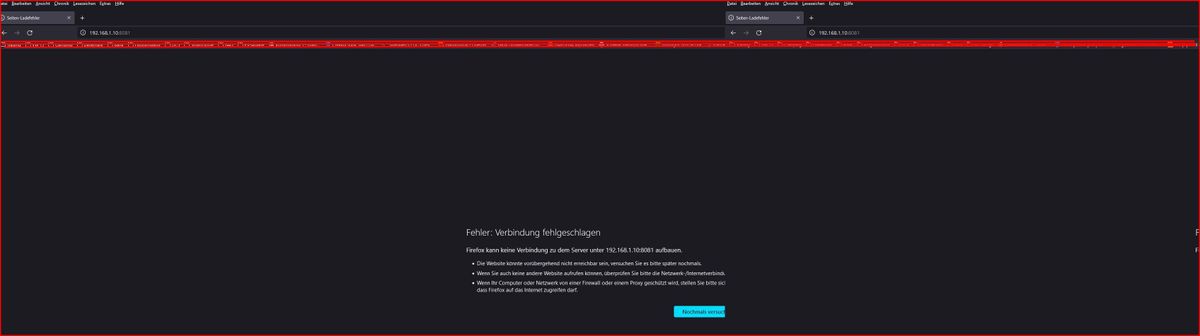
                        Firefox im privaten Modus mit der genannten IP http://192.168.1.10:8081 geht nicht

                        GlasfaserG 3 Replies Last reply
                        0
                        • S Schtallone

                          @glasfaser
                          Firefox im privaten Modus mit der genannten IP http://192.168.1.10:8081 geht nicht

                          GlasfaserG Offline
                          GlasfaserG Offline
                          Glasfaser
                          wrote on last edited by
                          #64

                          @schtallone sagte in Iobroker Admin Webseite nicht erreichbar:

                          geht nicht

                          was heißt geht nicht ... was kommt dann

                          Mehr Input

                          Synology 918+ 16GB - ioBroker in Docker v9 , VISO auf Trekstor Primebook C13 13,3" , Hikvision Domkameras mit Surveillance Station .. CCU RaspberryMatic in Synology VM .. Zigbee CC2538+CC2592 .. Sonoff .. KNX .. Modbus ..

                          S 1 Reply Last reply
                          0
                          • F fastfoot

                            @schtallone ich meinte vom container, will nur sicher gehen dass die ip sich nicht geändert hat

                            S Offline
                            S Offline
                            Schtallone
                            wrote on last edited by
                            #65

                            @fastfoot

                            root@iobroker:/opt/iobroker# ifconfig
                            eth0: flags=4163<UP,BROADCAST,RUNNING,MULTICAST>  mtu 1500
                                    inet 192.168.1.10  netmask 255.255.255.0  broadcast 192.168.1.255
                                    ether 02:42:c9:94:71:79  txqueuelen 1000  (Ethernet)
                                    RX packets 12911  bytes 3119016 (2.9 MiB)
                                    RX errors 0  dropped 2694  overruns 0  frame 0
                                    TX packets 864  bytes 58409 (57.0 KiB)
                                    TX errors 0  dropped 0 overruns 0  carrier 0  collisions 0
                            
                            lo: flags=73<UP,LOOPBACK,RUNNING>  mtu 65536
                                    inet 127.0.0.1  netmask 255.0.0.0
                                    loop  txqueuelen 1000  (Local Loopback)
                                    RX packets 13327  bytes 53611834 (51.1 MiB)
                                    RX errors 0  dropped 0  overruns 0  frame 0
                                    TX packets 13327  bytes 53611834 (51.1 MiB)
                                    TX errors 0  dropped 0 overruns 0  carrier 0  collisions 0
                            
                            1 Reply Last reply
                            0
                            • S Schtallone

                              @glasfaser
                              Firefox im privaten Modus mit der genannten IP http://192.168.1.10:8081 geht nicht

                              GlasfaserG Offline
                              GlasfaserG Offline
                              Glasfaser
                              wrote on last edited by
                              #66

                              @schtallone sagte in Iobroker Admin Webseite nicht erreichbar:

                              mit der genannten IP

                              das ist doch die IP vom Container ioBroker die du uns doch die ganze Zeit beschreibst und sogar ein Screenshot davon !

                              Synology 918+ 16GB - ioBroker in Docker v9 , VISO auf Trekstor Primebook C13 13,3" , Hikvision Domkameras mit Surveillance Station .. CCU RaspberryMatic in Synology VM .. Zigbee CC2538+CC2592 .. Sonoff .. KNX .. Modbus ..

                              1 Reply Last reply
                              0
                              • GlasfaserG Glasfaser

                                @schtallone sagte in Iobroker Admin Webseite nicht erreichbar:

                                geht nicht

                                was heißt geht nicht ... was kommt dann

                                Mehr Input

                                S Offline
                                S Offline
                                Schtallone
                                wrote on last edited by
                                #67

                                @glasfaser

                                Snap-2023-09-15-23-03-50.jpg

                                GlasfaserG HomoranH F 3 Replies Last reply
                                0
                                • S Schtallone

                                  @glasfaser

                                  Snap-2023-09-15-23-03-50.jpg

                                  GlasfaserG Offline
                                  GlasfaserG Offline
                                  Glasfaser
                                  wrote on last edited by
                                  #68

                                  @schtallone

                                  was sagt

                                  iob status
                                  

                                  Synology 918+ 16GB - ioBroker in Docker v9 , VISO auf Trekstor Primebook C13 13,3" , Hikvision Domkameras mit Surveillance Station .. CCU RaspberryMatic in Synology VM .. Zigbee CC2538+CC2592 .. Sonoff .. KNX .. Modbus ..

                                  S 1 Reply Last reply
                                  0
                                  • S Schtallone

                                    @glasfaser

                                    Snap-2023-09-15-23-03-50.jpg

                                    HomoranH Do not disturb
                                    HomoranH Do not disturb
                                    Homoran
                                    Global Moderator Administrators
                                    wrote on last edited by
                                    #69

                                    @schtallone sicher, dass Firefox da nicht https vorsetzt

                                    kein Support per PN! - Fragen im Forum stellen - es gibt fast nichts, was nicht auch für andere interessant ist.

                                    Benutzt das Voting rechts unten im Beitrag wenn er euch geholfen hat.

                                    der Installationsfixer: curl -fsL https://iobroker.net/fix.sh | bash -

                                    1 Reply Last reply
                                    0
                                    • S Schtallone

                                      @glasfaser

                                      Snap-2023-09-15-23-03-50.jpg

                                      F Offline
                                      F Offline
                                      fastfoot
                                      wrote on last edited by
                                      #70

                                      @schtallone da muss ein http:// davor(evtl. hat firefox das aber auch entfernt)

                                      prüfe nochmal die logs mit iob watch --logs und wenn ruhig mach mal einen container neustart.
                                      das muss jetzt funktionieren!

                                      iobroker läuft unter Docker auf QNAP TS-451+
                                      SkriptRecovery: https://forum.iobroker.net/post/930558

                                      HomoranH S 2 Replies Last reply
                                      0
                                      • GlasfaserG Glasfaser

                                        @schtallone

                                        was sagt

                                        iob status
                                        
                                        S Offline
                                        S Offline
                                        Schtallone
                                        wrote on last edited by
                                        #71

                                        @glasfaser said in Iobroker Admin Webseite nicht erreichbar:

                                        iob status

                                        root@iobroker:/opt/iobroker# iob status
                                        iobroker is running on this host.
                                        
                                        
                                        Objects type: jsonl
                                        States  type: jsonl
                                        root@iobroker:/opt/iobroker# 
                                        
                                        1 Reply Last reply
                                        0
                                        • F fastfoot

                                          @schtallone da muss ein http:// davor(evtl. hat firefox das aber auch entfernt)

                                          prüfe nochmal die logs mit iob watch --logs und wenn ruhig mach mal einen container neustart.
                                          das muss jetzt funktionieren!

                                          HomoranH Do not disturb
                                          HomoranH Do not disturb
                                          Homoran
                                          Global Moderator Administrators
                                          wrote on last edited by
                                          #72

                                          @fastfoot sagte in Iobroker Admin Webseite nicht erreichbar:

                                          @schtallone da muss ein http:// davor(evtl. hat firefox das aber auch entfernt)

                                          firefox ändert das gerne um in https, wenn es früher mal verwendet wurde

                                          kein Support per PN! - Fragen im Forum stellen - es gibt fast nichts, was nicht auch für andere interessant ist.

                                          Benutzt das Voting rechts unten im Beitrag wenn er euch geholfen hat.

                                          der Installationsfixer: curl -fsL https://iobroker.net/fix.sh | bash -

                                          S 1 Reply Last reply
                                          0
                                          Reply
                                          • Reply as topic
                                          Log in to reply
                                          • Oldest to Newest
                                          • Newest to Oldest
                                          • Most Votes


                                          Support us

                                          ioBroker
                                          Community Adapters
                                          Donate
                                          FAQ Cloud / IOT
                                          HowTo: Node.js-Update
                                          HowTo: Backup/Restore
                                          Downloads
                                          BLOG

                                          561

                                          Online

                                          32.5k

                                          Users

                                          81.6k

                                          Topics

                                          1.3m

                                          Posts
                                          Community
                                          Impressum | Datenschutz-Bestimmungen | Nutzungsbedingungen | Einwilligungseinstellungen
                                          ioBroker Community 2014-2025
                                          logo
                                          • Login

                                          • Don't have an account? Register

                                          • Login or register to search.
                                          • First post
                                            Last post
                                          0
                                          • Home
                                          • Recent
                                          • Tags
                                          • Unread 0
                                          • Categories
                                          • Unreplied
                                          • Popular
                                          • GitHub
                                          • Docu
                                          • Hilfe