



Skip to content
  • Home
  • Recent
  • Tags
  • 0 Unread 0
  • Categories
  • Unreplied
  • Popular
  • GitHub
  • Docu
  • Hilfe
Skins
  • Light
  • Brite
  • Cerulean
  • Cosmo
  • Flatly
  • Journal
  • Litera
  • Lumen
  • Lux
  • Materia
  • Minty
  • Morph
  • Pulse
  • Sandstone
  • Simplex
  • Sketchy
  • Spacelab
  • United
  • Yeti
  • Zephyr
  • Dark
  • Cyborg
  • Darkly
  • Quartz
  • Slate
  • Solar
  • Superhero
  • Vapor

  • Default (No Skin)
  • No Skin
Collapse
ioBroker Logo

Community Forum

donate donate
  1. ioBroker Community Home
  2. Deutsch
  3. Off Topic
  4. InfluxDB
  5. Benötige Hilfe bei Influx DB

NEWS

  • Jahresrückblick 2025 – unser neuer Blogbeitrag ist online! ✨
    BluefoxB
    Bluefox
    17
    1
    3.0k

  • Neuer Blogbeitrag: Monatsrückblick - Dezember 2025 🎄
    BluefoxB
    Bluefox
    13
    1
    1.1k

  • Weihnachtsangebot 2025! 🎄
    BluefoxB
    Bluefox
    25
    1
    2.4k

Benötige Hilfe bei Influx DB

Scheduled Pinned Locked Moved InfluxDB
109 Posts 7 Posters 15.2k Views 5 Watching
  • Oldest to Newest
  • Newest to Oldest
  • Most Votes
Reply
  • Reply as topic
Log in to reply
This topic has been deleted. Only users with topic management privileges can see it.
  • A Altersrentner

    @djmarc75 sagte in Benötige Hilfe bei Influx DB:

    Weisst DU noch welche Version Du vorher hattest ??

    Hallo,
    Bitte entschuldige, das ich mich erst jetzt melde.
    Hatte gestern einen dicken Hals:disappointed:
    Ich komme einfach mit der Version nicht klar.
    Es könnte auch sein, das dort irgend welche Module fehlen.
    Aber egal. Habe gerade mal in meinen Unterlagen gestöbert.
    Ich hatte Grafana 6.6.1(2020-02-06) installiert.
    Hier ist die Download Page.

    https://github.com/grafana/grafana/releases?page=14
    

    Wie kann ich das installieren?
    MfG Michael

    E Offline
    E Offline
    Einstein67
    wrote on last edited by Einstein67
    #70

    @altersrentner In der Version 9 ist das alte "Graph Panel" (war früher Standard) nicht mehr dabei.

    Kannst du aber problemlos über den Menüpinkt Plugins nachinstallieren. Danach umstellen von "Timeline" auf "Graph (old)"

    Dann gibts die "links/rechts" Auswahl wieder.
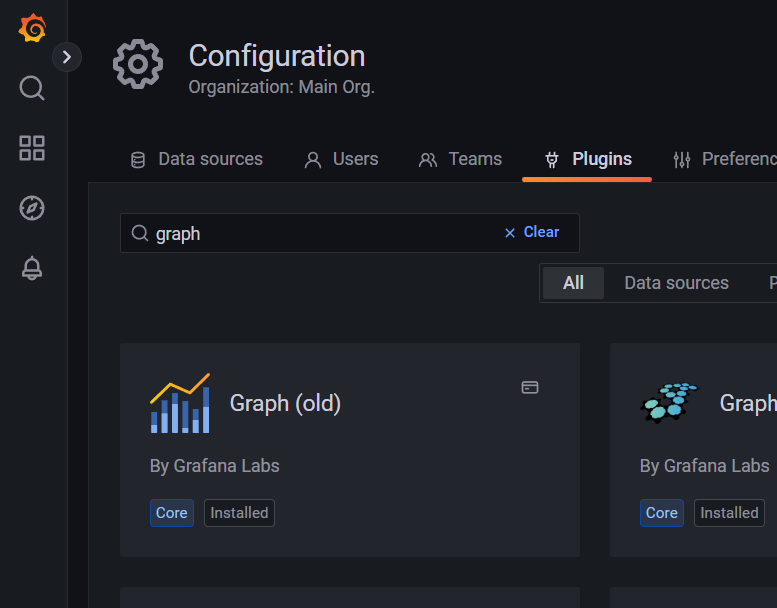
    graph.png

    A 1 Reply Last reply
    0
    • A Offline
      A Offline
      Altersrentner
      wrote on last edited by
      #71

      @einstein67
      Super,
      Aber wie bekomme ich das installiert?

      @einstein67 sagte in Benötige Hilfe bei Influx DB:

      Danach umstellen von "Timeline" auf "Graph (old

      Und wo ist das?
      Gruß Michael

      1 Reply Last reply
      0
      • E Einstein67

        @altersrentner In der Version 9 ist das alte "Graph Panel" (war früher Standard) nicht mehr dabei.

        Kannst du aber problemlos über den Menüpinkt Plugins nachinstallieren. Danach umstellen von "Timeline" auf "Graph (old)"

        Dann gibts die "links/rechts" Auswahl wieder.

        graph.png

        A Offline
        A Offline
        Altersrentner
        wrote on last edited by
        #72

        @einstein67

        Unter Configuration/Plugines ist es zu sehen.
        In der Mitte auf Alle Eingerichtet ist es aber nicht vorhanden

        DJMarc75D 1 Reply Last reply
        0
        • A Altersrentner

          @einstein67

          Unter Configuration/Plugines ist es zu sehen.
          In der Mitte auf Alle Eingerichtet ist es aber nicht vorhanden

          DJMarc75D Offline
          DJMarc75D Offline
          DJMarc75
          wrote on last edited by
          #73

          @altersrentner
          Graph(old) sollte eigentlich als Standard schon installiert sein (ist es laut Pluginübersicht auch) nur erscheint es auch bei mir nicht zum Auswählen in den Visualizations.
          Habe ja auch die Version 9.0.5 - das könnte ein BUG seitens Grafanaversion sein.
          Da bin ich dann aber raus weil ich mit der Timeline und Overrides arbeite und diesen Graph(old) nur ganz am Anfang benutzt habe.

          Lehrling seit 1975 !!!
          Beitrag geholfen ? dann gerne ein upvote rechts unten im Beitrag klicken ;)
          https://forum.iobroker.net/topic/51555/hinweise-f%C3%BCr-gute-forenbeitr%C3%A4ge

          A 1 Reply Last reply
          0
          • DJMarc75D DJMarc75

            @altersrentner
            Graph(old) sollte eigentlich als Standard schon installiert sein (ist es laut Pluginübersicht auch) nur erscheint es auch bei mir nicht zum Auswählen in den Visualizations.
            Habe ja auch die Version 9.0.5 - das könnte ein BUG seitens Grafanaversion sein.
            Da bin ich dann aber raus weil ich mit der Timeline und Overrides arbeite und diesen Graph(old) nur ganz am Anfang benutzt habe.

            A Offline
            A Offline
            Altersrentner
            wrote on last edited by Altersrentner
            #74

            @djmarc75
            Hallo,
            Ich möchte folgende Grafana Version installieren

            sudo apt-get install -y adduser libfontconfig1
            wget https://dl.grafana.com/enterprise/release/grafana-enterprise_6.6.1_amd64.deb
            sudo dpkg -i grafana-enterprise_6.6.1_amd64.deb
            

            Könntest Du mir bitte die weiteren Befehle so angepasst geben, das nicht immer die neuste Version geladen wird?
            z.B die

            #apt-Schlüssel zufügen
            wget -q -O - https://packages.grafana.com/gpg.key | sudo apt-key add -
            
            #grafana repository hinzufügen
            echo "deb https://packages.grafana.com/oss/deb stable main" | sudo tee -a /etc/apt/sources.list.d/grafana.list
            
            #installieren
            1 sudo apt-get update
            2 sudo apt-get install -y grafana
            
            #aktivieren und starten
            1 sudo /bin/systemctl enable grafana-server
            2 sudo /bin/systemctl start grafana-server


            Danke
            MfG Michael

            DJMarc75D E 2 Replies Last reply
            0
            • A Altersrentner

              @djmarc75
              Hallo,
              Ich möchte folgende Grafana Version installieren

              sudo apt-get install -y adduser libfontconfig1
              wget https://dl.grafana.com/enterprise/release/grafana-enterprise_6.6.1_amd64.deb
              sudo dpkg -i grafana-enterprise_6.6.1_amd64.deb
              

              Könntest Du mir bitte die weiteren Befehle so angepasst geben, das nicht immer die neuste Version geladen wird?
              z.B die

              #apt-Schlüssel zufügen
              wget -q -O - https://packages.grafana.com/gpg.key | sudo apt-key add -
              
              #grafana repository hinzufügen
              echo "deb https://packages.grafana.com/oss/deb stable main" | sudo tee -a /etc/apt/sources.list.d/grafana.list
              
              #installieren
              1 sudo apt-get update
              2 sudo apt-get install -y grafana
              
              #aktivieren und starten
              1 sudo /bin/systemctl enable grafana-server
              2 sudo /bin/systemctl start grafana-server


              Danke
              MfG Michael

              DJMarc75D Offline
              DJMarc75D Offline
              DJMarc75
              wrote on last edited by
              #75

              @altersrentner sagte in Benötige Hilfe bei Influx DB:

              Könntest Du mir bitte die weiteren Befehle so angepasst geben, das nicht immer die neuste Version geladen wird?

              Würde Dir ja gerne helfen aber das weiß ich leider auch nicht da ich eigentlich schon immer aus dem Grafana-Repo die neueste Version installiert habe.
              Zeig mal bitte

              sudo apt update
              

              Lehrling seit 1975 !!!
              Beitrag geholfen ? dann gerne ein upvote rechts unten im Beitrag klicken ;)
              https://forum.iobroker.net/topic/51555/hinweise-f%C3%BCr-gute-forenbeitr%C3%A4ge

              1 Reply Last reply
              0
              • A Altersrentner

                @djmarc75
                Hallo,
                Ich möchte folgende Grafana Version installieren

                sudo apt-get install -y adduser libfontconfig1
                wget https://dl.grafana.com/enterprise/release/grafana-enterprise_6.6.1_amd64.deb
                sudo dpkg -i grafana-enterprise_6.6.1_amd64.deb
                

                Könntest Du mir bitte die weiteren Befehle so angepasst geben, das nicht immer die neuste Version geladen wird?
                z.B die

                #apt-Schlüssel zufügen
                wget -q -O - https://packages.grafana.com/gpg.key | sudo apt-key add -
                
                #grafana repository hinzufügen
                echo "deb https://packages.grafana.com/oss/deb stable main" | sudo tee -a /etc/apt/sources.list.d/grafana.list
                
                #installieren
                1 sudo apt-get update
                2 sudo apt-get install -y grafana
                
                #aktivieren und starten
                1 sudo /bin/systemctl enable grafana-server
                2 sudo /bin/systemctl start grafana-server


                Danke
                MfG Michael

                E Offline
                E Offline
                Einstein67
                wrote on last edited by
                #76

                @altersrentner Einfach mit:

                sudo apt install grafana=6.6.1
                

                (drüber) installieren. Und mit:

                sudo apt-mark hold grafana
                

                zukünftige Updates verhindern.

                A 1 Reply Last reply
                0
                • E Einstein67

                  @altersrentner Einfach mit:

                  sudo apt install grafana=6.6.1
                  

                  (drüber) installieren. Und mit:

                  sudo apt-mark hold grafana
                  

                  zukünftige Updates verhindern.

                  A Offline
                  A Offline
                  Altersrentner
                  wrote on last edited by
                  #77

                  @einstein67
                  Etwas passt nicht

                  pi@raspberrypiioBroker:~ $ wget https://dl.grafana.com/enterprise/release/grafana-enterprise_6.6.1_amd64.deb
                  --2022-08-05 14:59:11--  https://dl.grafana.com/enterprise/release/grafana-enterprise_6.6.1_amd64.deb
                  Resolving dl.grafana.com (dl.grafana.com)... 2a04:4e42:1b::729, 151.101.114.217
                  Connecting to dl.grafana.com (dl.grafana.com)|2a04:4e42:1b::729|:443... connected.
                  HTTP request sent, awaiting response... 200 OK
                  Length: 63940356 (61M) [application/x-debian-package]
                  Saving to: ‘grafana-enterprise_6.6.1_amd64.deb’
                  
                  grafana-enterprise_6.6.1_amd64.d 100%[=========================================================>]  60.98M  6.83MB/s    in 8.9s
                  
                  2022-08-05 14:59:20 (6.81 MB/s) - ‘grafana-enterprise_6.6.1_amd64.deb’ saved [63940356/63940356]
                  
                  pi@raspberrypiioBroker:~ $ sudo dpkg -i grafana-enterprise_6.6.1_amd64.deb
                  dpkg: error processing archive grafana-enterprise_6.6.1_amd64.deb (--install):
                   package architecture (amd64) does not match system (arm64)
                  Errors were encountered while processing:
                   grafana-enterprise_6.6.1_amd64.deb
                  pi@raspberrypiioBroker:~ $ sudo apt install grafana=6.6.1
                  Reading package lists... Done
                  Building dependency tree... Done
                  Reading state information... Done
                  E: Unable to locate package grafana
                  pi@raspberrypiioBroker:~ $


                  Wenn ich aber das eingebe

                  wget -q -O - https://packages.grafana.com/gpg.key | sudo apt-key add -
                  
                  	curl -sL https://packages.grafana.com/gpg.key | sudo apt-key add 
                  
                  	echo "deb https://packages.grafana.com/oss/deb stable main" | sudo tee /etc/apt/sources.list.d/grafana.list 


                  Bin ich wieder auf der aktuellen Version

                  Hier noch "update"

                  pi@raspberrypiioBroker:~ $ sudo apt update
                  Hit:1 http://security.debian.org/debian-security bullseye-security InRelease
                  Hit:2 http://deb.debian.org/debian bullseye InRelease
                  Hit:3 http://deb.debian.org/debian bullseye-updates InRelease
                  Hit:4 http://archive.raspberrypi.org/debian bullseye InRelease
                  Hit:5 https://repos.influxdata.com/debian stretch InRelease
                  Reading package lists... Done
                  Building dependency tree... Done
                  Reading state information... Done
                  All packages are up to date.
                  pi@raspberrypiioBroker:~ $

                  
                  
                  E 1 Reply Last reply
                  0
                  • A Altersrentner

                    @einstein67
                    Etwas passt nicht

                    pi@raspberrypiioBroker:~ $ wget https://dl.grafana.com/enterprise/release/grafana-enterprise_6.6.1_amd64.deb
                    --2022-08-05 14:59:11--  https://dl.grafana.com/enterprise/release/grafana-enterprise_6.6.1_amd64.deb
                    Resolving dl.grafana.com (dl.grafana.com)... 2a04:4e42:1b::729, 151.101.114.217
                    Connecting to dl.grafana.com (dl.grafana.com)|2a04:4e42:1b::729|:443... connected.
                    HTTP request sent, awaiting response... 200 OK
                    Length: 63940356 (61M) [application/x-debian-package]
                    Saving to: ‘grafana-enterprise_6.6.1_amd64.deb’
                    
                    grafana-enterprise_6.6.1_amd64.d 100%[=========================================================>]  60.98M  6.83MB/s    in 8.9s
                    
                    2022-08-05 14:59:20 (6.81 MB/s) - ‘grafana-enterprise_6.6.1_amd64.deb’ saved [63940356/63940356]
                    
                    pi@raspberrypiioBroker:~ $ sudo dpkg -i grafana-enterprise_6.6.1_amd64.deb
                    dpkg: error processing archive grafana-enterprise_6.6.1_amd64.deb (--install):
                     package architecture (amd64) does not match system (arm64)
                    Errors were encountered while processing:
                     grafana-enterprise_6.6.1_amd64.deb
                    pi@raspberrypiioBroker:~ $ sudo apt install grafana=6.6.1
                    Reading package lists... Done
                    Building dependency tree... Done
                    Reading state information... Done
                    E: Unable to locate package grafana
                    pi@raspberrypiioBroker:~ $


                    Wenn ich aber das eingebe

                    wget -q -O - https://packages.grafana.com/gpg.key | sudo apt-key add -
                    
                    	curl -sL https://packages.grafana.com/gpg.key | sudo apt-key add 
                    
                    	echo "deb https://packages.grafana.com/oss/deb stable main" | sudo tee /etc/apt/sources.list.d/grafana.list 


                    Bin ich wieder auf der aktuellen Version

                    Hier noch "update"

                    pi@raspberrypiioBroker:~ $ sudo apt update
                    Hit:1 http://security.debian.org/debian-security bullseye-security InRelease
                    Hit:2 http://deb.debian.org/debian bullseye InRelease
                    Hit:3 http://deb.debian.org/debian bullseye-updates InRelease
                    Hit:4 http://archive.raspberrypi.org/debian bullseye InRelease
                    Hit:5 https://repos.influxdata.com/debian stretch InRelease
                    Reading package lists... Done
                    Building dependency tree... Done
                    Reading state information... Done
                    All packages are up to date.
                    pi@raspberrypiioBroker:~ $
                    
                    
                    E Offline
                    E Offline
                    Einstein67
                    wrote on last edited by
                    #78

                    @altersrentner said in Benötige Hilfe bei Influx DB:

                    Bin ich wieder auf der aktuellen Version

                    Jetzt nochmal den Befehl zum installieren ausführen.

                    A 2 Replies Last reply
                    0
                    • E Einstein67

                      @altersrentner said in Benötige Hilfe bei Influx DB:

                      Bin ich wieder auf der aktuellen Version

                      Jetzt nochmal den Befehl zum installieren ausführen.

                      A Offline
                      A Offline
                      Altersrentner
                      wrote on last edited by
                      #79

                      @einstein67 sagte in Benötige Hilfe bei Influx DB:

                      Jetzt nochmal den Befehl zum installieren ausführen.

                      Welchen Befehl

                      1 Reply Last reply
                      0
                      • E Einstein67

                        @altersrentner said in Benötige Hilfe bei Influx DB:

                        Bin ich wieder auf der aktuellen Version

                        Jetzt nochmal den Befehl zum installieren ausführen.

                        A Offline
                        A Offline
                        Altersrentner
                        wrote on last edited by
                        #80

                        @einstein67 sagte in Benötige Hilfe bei Influx DB:

                        Jetzt nochmal den Befehl zum installieren ausführen.

                        Das geht nicht

                        pi@raspberrypiioBroker:~ $ sudo apt install grafana=6.6.1
                        Reading package lists... Done
                        Building dependency tree... Done
                        Reading state information... Done
                        E: Unable to locate package grafana
                        pi@raspberrypiioBroker:~ $
                        
                        
                        Thomas BraunT 1 Reply Last reply
                        0
                        • A Altersrentner

                          @einstein67 sagte in Benötige Hilfe bei Influx DB:

                          Jetzt nochmal den Befehl zum installieren ausführen.

                          Das geht nicht

                          pi@raspberrypiioBroker:~ $ sudo apt install grafana=6.6.1
                          Reading package lists... Done
                          Building dependency tree... Done
                          Reading state information... Done
                          E: Unable to locate package grafana
                          pi@raspberrypiioBroker:~ $
                          
                          
                          Thomas BraunT Online
                          Thomas BraunT Online
                          Thomas Braun
                          Most Active
                          wrote on last edited by
                          #81

                          @altersrentner

                          apt policy grafana
                          

                          wirft dir alle verfügbaren Versionen um die Ohren.

                          Linux-Werkzeugkasten:
                          https://forum.iobroker.net/topic/42952/der-kleine-iobroker-linux-werkzeugkasten
                          NodeJS Fixer Skript:
                          https://forum.iobroker.net/topic/68035/iob-node-fix-skript
                          iob_diag: curl -sLf -o diag.sh https://iobroker.net/diag.sh && bash diag.sh

                          A 1 Reply Last reply
                          0
                          • Thomas BraunT Thomas Braun

                            @altersrentner

                            apt policy grafana
                            

                            wirft dir alle verfügbaren Versionen um die Ohren.

                            A Offline
                            A Offline
                            Altersrentner
                            wrote on last edited by
                            #82

                            @thomas-braun sagte in Benötige Hilfe bei Influx DB:

                            wirft dir alle verfügbaren Versionen um die Ohren.

                            pi@raspberrypiioBroker:~ $ sudo apt install grafana=6.6.1
                            Reading package lists... Done
                            Building dependency tree... Done
                            Reading state information... Done
                            E: Unable to locate package grafana
                            pi@raspberrypiioBroker:~ $ sudo apt-mark hold grafana
                            E: Unable to locate package grafana
                            E: No packages found
                            pi@raspberrypiioBroker:~ $ apt policy grafana
                            N: Unable to locate package grafana
                            pi@raspberrypiioBroker:~ $


                            Grafana ist nicht vorhanden

                            Thomas BraunT 1 Reply Last reply
                            0
                            • A Altersrentner

                              @thomas-braun sagte in Benötige Hilfe bei Influx DB:

                              wirft dir alle verfügbaren Versionen um die Ohren.

                              pi@raspberrypiioBroker:~ $ sudo apt install grafana=6.6.1
                              Reading package lists... Done
                              Building dependency tree... Done
                              Reading state information... Done
                              E: Unable to locate package grafana
                              pi@raspberrypiioBroker:~ $ sudo apt-mark hold grafana
                              E: Unable to locate package grafana
                              E: No packages found
                              pi@raspberrypiioBroker:~ $ apt policy grafana
                              N: Unable to locate package grafana
                              pi@raspberrypiioBroker:~ $


                              Grafana ist nicht vorhanden

                              Thomas BraunT Online
                              Thomas BraunT Online
                              Thomas Braun
                              Most Active
                              wrote on last edited by
                              #83

                              @altersrentner

                              Dann ist das Grafana-Repo nicht angelegt.

                              sudo apt update
                              

                              Linux-Werkzeugkasten:
                              https://forum.iobroker.net/topic/42952/der-kleine-iobroker-linux-werkzeugkasten
                              NodeJS Fixer Skript:
                              https://forum.iobroker.net/topic/68035/iob-node-fix-skript
                              iob_diag: curl -sLf -o diag.sh https://iobroker.net/diag.sh && bash diag.sh

                              A 1 Reply Last reply
                              0
                              • Thomas BraunT Thomas Braun

                                @altersrentner

                                Dann ist das Grafana-Repo nicht angelegt.

                                sudo apt update
                                
                                A Offline
                                A Offline
                                Altersrentner
                                wrote on last edited by
                                #84

                                @thomas-braun sagte in Benötige Hilfe bei Influx DB:

                                Dann ist das Grafana-Repo nicht angelegt.

                                pi@raspberrypiioBroker:~ $ sudo apt update
                                Hit:1 http://deb.debian.org/debian bullseye InRelease
                                Hit:2 http://deb.debian.org/debian bullseye-updates InRelease
                                Hit:3 http://security.debian.org/debian-security bullseye-security InRelease
                                Hit:4 http://archive.raspberrypi.org/debian bullseye InRelease
                                Hit:5 https://repos.influxdata.com/debian stretch InRelease
                                Reading package lists... Done
                                Building dependency tree... Done
                                Reading state information... Done
                                All packages are up to date.
                                pi@raspberrypiioBroker:~ $
                                
                                
                                Thomas BraunT 1 Reply Last reply
                                0
                                • A Altersrentner

                                  @thomas-braun sagte in Benötige Hilfe bei Influx DB:

                                  Dann ist das Grafana-Repo nicht angelegt.

                                  pi@raspberrypiioBroker:~ $ sudo apt update
                                  Hit:1 http://deb.debian.org/debian bullseye InRelease
                                  Hit:2 http://deb.debian.org/debian bullseye-updates InRelease
                                  Hit:3 http://security.debian.org/debian-security bullseye-security InRelease
                                  Hit:4 http://archive.raspberrypi.org/debian bullseye InRelease
                                  Hit:5 https://repos.influxdata.com/debian stretch InRelease
                                  Reading package lists... Done
                                  Building dependency tree... Done
                                  Reading state information... Done
                                  All packages are up to date.
                                  pi@raspberrypiioBroker:~ $
                                  
                                  
                                  Thomas BraunT Online
                                  Thomas BraunT Online
                                  Thomas Braun
                                  Most Active
                                  wrote on last edited by Thomas Braun
                                  #85

                                  @altersrentner

                                  Sag ich doch. Kein Repository angelegt.

                                  Und dein Influxdata-Repository ist auch falsch. Du hast kein 'stretch' laufen sondern offenbar 'bullseye'. Dann muss das auch auf bullseye lauten.

                                  Linux-Werkzeugkasten:
                                  https://forum.iobroker.net/topic/42952/der-kleine-iobroker-linux-werkzeugkasten
                                  NodeJS Fixer Skript:
                                  https://forum.iobroker.net/topic/68035/iob-node-fix-skript
                                  iob_diag: curl -sLf -o diag.sh https://iobroker.net/diag.sh && bash diag.sh

                                  A 1 Reply Last reply
                                  0
                                  • Thomas BraunT Thomas Braun

                                    @altersrentner

                                    Sag ich doch. Kein Repository angelegt.

                                    Und dein Influxdata-Repository ist auch falsch. Du hast kein 'stretch' laufen sondern offenbar 'bullseye'. Dann muss das auch auf bullseye lauten.

                                    A Offline
                                    A Offline
                                    Altersrentner
                                    wrote on last edited by
                                    #86

                                    @thomas-braun sagte in Benötige Hilfe bei Influx DB:

                                    Sag ich doch. Kein Repository angelegt.

                                    Das habe ich gemacht:

                                    pi@raspberrypiioBroker:~ $ sudo apt-get install -y adduser libfontconfig1
                                    Reading package lists... Done
                                    Building dependency tree... Done
                                    Reading state information... Done
                                    adduser is already the newest version (3.118).
                                    libfontconfig1 is already the newest version (2.13.1-4.2).
                                    libfontconfig1 set to manually installed.
                                    0 upgraded, 0 newly installed, 0 to remove and 0 not upgraded.
                                    pi@raspberrypiioBroker:~ $ wget https://dl.grafana.com/enterprise/release/grafana-enterprise_6.6.1_amd64.deb
                                    --2022-08-05 14:59:11--  https://dl.grafana.com/enterprise/release/grafana-enterprise_6.6.1_amd64.deb
                                    Resolving dl.grafana.com (dl.grafana.com)... 2a04:4e42:1b::729, 151.101.114.217
                                    Connecting to dl.grafana.com (dl.grafana.com)|2a04:4e42:1b::729|:443... connected.
                                    HTTP request sent, awaiting response... 200 OK
                                    Length: 63940356 (61M) [application/x-debian-package]
                                    Saving to: ‘grafana-enterprise_6.6.1_amd64.deb’
                                    
                                    grafana-enterprise_6.6.1_amd64.d 100%[=========================================================>]  60.98M  6.83MB/s    in 8.9s
                                    
                                    2022-08-05 14:59:20 (6.81 MB/s) - ‘grafana-enterprise_6.6.1_amd64.deb’ saved [63940356/63940356]
                                    
                                    pi@raspberrypiioBroker:~ $ sudo dpkg -i grafana-enterprise_6.6.1_amd64.deb
                                    dpkg: error processing archive grafana-enterprise_6.6.1_amd64.deb (--install):
                                     package architecture (amd64) does not match system (arm64)
                                    Errors were encountered while processing:
                                     grafana-enterprise_6.6.1_amd64.deb
                                    pi@raspberrypiioBroker:~ $ sudo apt install grafana=6.6.1
                                    Reading package lists... Done
                                    Building dependency tree... Done
                                    Reading state information... Done
                                    E: Unable to locate package grafana
                                    pi@raspberrypiioBroker:~ $ 
                                    
                                    Thomas BraunT DJMarc75D 2 Replies Last reply
                                    0
                                    • A Altersrentner

                                      @thomas-braun sagte in Benötige Hilfe bei Influx DB:

                                      Sag ich doch. Kein Repository angelegt.

                                      Das habe ich gemacht:

                                      pi@raspberrypiioBroker:~ $ sudo apt-get install -y adduser libfontconfig1
                                      Reading package lists... Done
                                      Building dependency tree... Done
                                      Reading state information... Done
                                      adduser is already the newest version (3.118).
                                      libfontconfig1 is already the newest version (2.13.1-4.2).
                                      libfontconfig1 set to manually installed.
                                      0 upgraded, 0 newly installed, 0 to remove and 0 not upgraded.
                                      pi@raspberrypiioBroker:~ $ wget https://dl.grafana.com/enterprise/release/grafana-enterprise_6.6.1_amd64.deb
                                      --2022-08-05 14:59:11--  https://dl.grafana.com/enterprise/release/grafana-enterprise_6.6.1_amd64.deb
                                      Resolving dl.grafana.com (dl.grafana.com)... 2a04:4e42:1b::729, 151.101.114.217
                                      Connecting to dl.grafana.com (dl.grafana.com)|2a04:4e42:1b::729|:443... connected.
                                      HTTP request sent, awaiting response... 200 OK
                                      Length: 63940356 (61M) [application/x-debian-package]
                                      Saving to: ‘grafana-enterprise_6.6.1_amd64.deb’
                                      
                                      grafana-enterprise_6.6.1_amd64.d 100%[=========================================================>]  60.98M  6.83MB/s    in 8.9s
                                      
                                      2022-08-05 14:59:20 (6.81 MB/s) - ‘grafana-enterprise_6.6.1_amd64.deb’ saved [63940356/63940356]
                                      
                                      pi@raspberrypiioBroker:~ $ sudo dpkg -i grafana-enterprise_6.6.1_amd64.deb
                                      dpkg: error processing archive grafana-enterprise_6.6.1_amd64.deb (--install):
                                       package architecture (amd64) does not match system (arm64)
                                      Errors were encountered while processing:
                                       grafana-enterprise_6.6.1_amd64.deb
                                      pi@raspberrypiioBroker:~ $ sudo apt install grafana=6.6.1
                                      Reading package lists... Done
                                      Building dependency tree... Done
                                      Reading state information... Done
                                      E: Unable to locate package grafana
                                      pi@raspberrypiioBroker:~ $ 
                                      
                                      Thomas BraunT Online
                                      Thomas BraunT Online
                                      Thomas Braun
                                      Most Active
                                      wrote on last edited by Thomas Braun
                                      #87

                                      @altersrentner

                                      Damit dübelst du dir 'irgendwas' am Paketmanager vorbei ins System.
                                      Finger weg von so einem Blödsinn.

                                      amd64 passt auch nicht zu deinem Raspberry Pi, der hat eine andere Prozessorarchitektur. Deswegen auch:

                                      package architecture (amd64) does not match system (arm64)
                                      

                                      Linux-Werkzeugkasten:
                                      https://forum.iobroker.net/topic/42952/der-kleine-iobroker-linux-werkzeugkasten
                                      NodeJS Fixer Skript:
                                      https://forum.iobroker.net/topic/68035/iob-node-fix-skript
                                      iob_diag: curl -sLf -o diag.sh https://iobroker.net/diag.sh && bash diag.sh

                                      1 Reply Last reply
                                      0
                                      • A Altersrentner

                                        @thomas-braun sagte in Benötige Hilfe bei Influx DB:

                                        Sag ich doch. Kein Repository angelegt.

                                        Das habe ich gemacht:

                                        pi@raspberrypiioBroker:~ $ sudo apt-get install -y adduser libfontconfig1
                                        Reading package lists... Done
                                        Building dependency tree... Done
                                        Reading state information... Done
                                        adduser is already the newest version (3.118).
                                        libfontconfig1 is already the newest version (2.13.1-4.2).
                                        libfontconfig1 set to manually installed.
                                        0 upgraded, 0 newly installed, 0 to remove and 0 not upgraded.
                                        pi@raspberrypiioBroker:~ $ wget https://dl.grafana.com/enterprise/release/grafana-enterprise_6.6.1_amd64.deb
                                        --2022-08-05 14:59:11--  https://dl.grafana.com/enterprise/release/grafana-enterprise_6.6.1_amd64.deb
                                        Resolving dl.grafana.com (dl.grafana.com)... 2a04:4e42:1b::729, 151.101.114.217
                                        Connecting to dl.grafana.com (dl.grafana.com)|2a04:4e42:1b::729|:443... connected.
                                        HTTP request sent, awaiting response... 200 OK
                                        Length: 63940356 (61M) [application/x-debian-package]
                                        Saving to: ‘grafana-enterprise_6.6.1_amd64.deb’
                                        
                                        grafana-enterprise_6.6.1_amd64.d 100%[=========================================================>]  60.98M  6.83MB/s    in 8.9s
                                        
                                        2022-08-05 14:59:20 (6.81 MB/s) - ‘grafana-enterprise_6.6.1_amd64.deb’ saved [63940356/63940356]
                                        
                                        pi@raspberrypiioBroker:~ $ sudo dpkg -i grafana-enterprise_6.6.1_amd64.deb
                                        dpkg: error processing archive grafana-enterprise_6.6.1_amd64.deb (--install):
                                         package architecture (amd64) does not match system (arm64)
                                        Errors were encountered while processing:
                                         grafana-enterprise_6.6.1_amd64.deb
                                        pi@raspberrypiioBroker:~ $ sudo apt install grafana=6.6.1
                                        Reading package lists... Done
                                        Building dependency tree... Done
                                        Reading state information... Done
                                        E: Unable to locate package grafana
                                        pi@raspberrypiioBroker:~ $ 
                                        
                                        DJMarc75D Offline
                                        DJMarc75D Offline
                                        DJMarc75
                                        wrote on last edited by
                                        #88

                                        @altersrentner

                                        wget -q -O - https://packages.grafana.com/gpg.key | sudo apt-key add -
                                        echo "deb https://packages.grafana.com/oss/deb stable main" | sudo tee -a /etc/apt/sources.list.d/grafana.list
                                        

                                        dann

                                        sudo apt update
                                        

                                        Lehrling seit 1975 !!!
                                        Beitrag geholfen ? dann gerne ein upvote rechts unten im Beitrag klicken ;)
                                        https://forum.iobroker.net/topic/51555/hinweise-f%C3%BCr-gute-forenbeitr%C3%A4ge

                                        A 1 Reply Last reply
                                        0
                                        • DJMarc75D DJMarc75

                                          @altersrentner

                                          wget -q -O - https://packages.grafana.com/gpg.key | sudo apt-key add -
                                          echo "deb https://packages.grafana.com/oss/deb stable main" | sudo tee -a /etc/apt/sources.list.d/grafana.list
                                          

                                          dann

                                          sudo apt update
                                          
                                          A Offline
                                          A Offline
                                          Altersrentner
                                          wrote on last edited by
                                          #89

                                          @djmarc75

                                          pi@raspberrypiioBroker:~ $ sudo apt update
                                          Hit:1 http://security.debian.org/debian-security bullseye-security InRelease
                                          Hit:2 http://archive.raspberrypi.org/debian bullseye InRelease
                                          Hit:3 https://repos.influxdata.com/debian stretch InRelease
                                          Get:4 https://packages.grafana.com/oss/deb stable InRelease [12.1 kB]
                                          Get:5 https://packages.grafana.com/oss/deb stable/main arm64 Packages [26.6 kB]
                                          Get:6 https://packages.grafana.com/oss/deb stable/main armhf Packages [36.1 kB]
                                          Hit:7 http://deb.debian.org/debian bullseye InRelease
                                          Hit:8 http://deb.debian.org/debian bullseye-updates InRelease
                                          Fetched 74.9 kB in 6s (13.1 kB/s)
                                          Reading package lists... Done
                                          Building dependency tree... Done
                                          Reading state information... Done
                                          All packages are up to date.
                                          pi@raspberrypiioBroker:~ $
                                          
                                          
                                          Thomas BraunT 1 Reply Last reply
                                          0
                                          Reply
                                          • Reply as topic
                                          Log in to reply
                                          • Oldest to Newest
                                          • Newest to Oldest
                                          • Most Votes


                                          Support us

                                          ioBroker
                                          Community Adapters
                                          Donate

                                          723

                                          Online

                                          32.7k

                                          Users

                                          82.3k

                                          Topics

                                          1.3m

                                          Posts
                                          Community
                                          Impressum | Datenschutz-Bestimmungen | Nutzungsbedingungen | Einwilligungseinstellungen
                                          ioBroker Community 2014-2025
                                          logo
                                          • Login

                                          • Don't have an account? Register

                                          • Login or register to search.
                                          • First post
                                            Last post
                                          0
                                          • Home
                                          • Recent
                                          • Tags
                                          • Unread 0
                                          • Categories
                                          • Unreplied
                                          • Popular
                                          • GitHub
                                          • Docu
                                          • Hilfe