
NEWS




-
@crunchip Hallo hab mal mitgelesen, bei der Anleitung die Du empfohlen hast, scheitere ich schon bei sudo pip install fritzcollectd mit folgender Meldung:
error: externally-managed-environment

× This environment is externally managed
╰─> To install Python packages system-wide, try apt install
    python3-xyz, where xyz is the package you are trying to
    install.

    If you wish to install a non-Debian-packaged Python package,
    create a virtual environment using python3 -m venv path/to/venv.
    Then use path/to/venv/bin/python and path/to/venv/bin/pip. Make
    sure you have python3-full installed.

    For more information visit http://rptl.io/venv

note: If you believe this is a mistake, please contact your Python installation or OS distribution provider. You can override this, at the risk of breaking your Python installation or OS, by passing --break-system-packages.
hint: See PEP 668 for the detailed specification.
Hast du ne Ahnung was ich tun muss?
Michael@michihorn hast du das befolgt?
https://forum.iobroker.net/post/793557 -
@michihorn hast du das befolgt?
https://forum.iobroker.net/post/793557@crunchip Ja habe ich, selbst mit "neu" aufgesetzter Maschine klappt es nicht
habe es jetzt mal so versucht:pip install fritzcollectd --break-system-packagesIst durch gelaufen, brachte am Ende aber folgende Meldung:
  note: This error originates from a subprocess, and is likely not a problem with pip.
error: legacy-install-failure

× Encountered error while trying to install package.
╰─> lxml

note: This is an issue with the package mentioned above, not pip.
hint: See above for output from the failure.
EDIT: So hat es geklappt:
Quelle
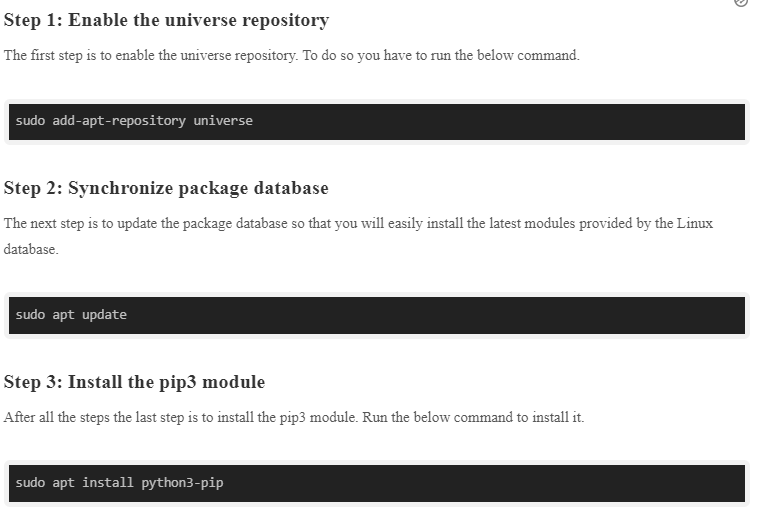
Eine TOP Anleitung zur Installation der Fritzbox Visualisierung findet man unter:
AnleitungKeine Panik die Anleitung trägt den Titel "Fritz!Box Monitoring mit Raspberry Pi Zero W" funktioniert aber auch top bei neueren Versionen. Kleiner Tip, sollte mal die Installation von collectd schiefgehen, kann die Installation komplett mit "sudo apt-get purge --auto-remove collectd" gelöscht werden.
-
@crunchip Ja habe ich, selbst mit "neu" aufgesetzter Maschine klappt es nicht
habe es jetzt mal so versucht:pip install fritzcollectd --break-system-packagesIst durch gelaufen, brachte am Ende aber folgende Meldung:
  note: This error originates from a subprocess, and is likely not a problem with pip.
error: legacy-install-failure

× Encountered error while trying to install package.
╰─> lxml

note: This is an issue with the package mentioned above, not pip.
hint: See above for output from the failure.
EDIT: So hat es geklappt:
Quelle
Eine TOP Anleitung zur Installation der Fritzbox Visualisierung findet man unter:
AnleitungKeine Panik die Anleitung trägt den Titel "Fritz!Box Monitoring mit Raspberry Pi Zero W" funktioniert aber auch top bei neueren Versionen. Kleiner Tip, sollte mal die Installation von collectd schiefgehen, kann die Installation komplett mit "sudo apt-get purge --auto-remove collectd" gelöscht werden.
@michihorn kann dir da aktuell nicht weiterhelfen, hab das schon lange nicht mehr laufen.
-
Moin in die Runde,
versuche mich gerade auch mal die Influx DB mit neuen Daten zu füttern.
Mein kleines Problem ist das ich das Script nicht mal zum laufen bekomme.
Traceback (most recent call last):
File "/opt/fritzinfluxdb/./fritzinfluxdb.py", line 27, in <module>
from fritzinfluxdb.classes.fritzbox.handler import FritzBoxHandler, FritzBoxLuaHandler
File "/opt/fritzinfluxdb/fritzinfluxdb/classes/fritzbox/handler.py", line 13, in <module>
import requests
ModuleNotFoundError: No module named 'requests'Hat jemand eine Idee was ihm fehlt ?
Gruß Tim


Support us
481
Online32.6k
Users82.2k
Topics1.3m
Posts