Skip to content
  • Home
  • Recent
  • Tags
  • 0 Unread 0
  • Categories
  • Unreplied
  • Popular
  • GitHub
  • Docu
  • Hilfe
Skins
  • Light
  • Brite
  • Cerulean
  • Cosmo
  • Flatly
  • Journal
  • Litera
  • Lumen
  • Lux
  • Materia
  • Minty
  • Morph
  • Pulse
  • Sandstone
  • Simplex
  • Sketchy
  • Spacelab
  • United
  • Yeti
  • Zephyr
  • Dark
  • Cyborg
  • Darkly
  • Quartz
  • Slate
  • Solar
  • Superhero
  • Vapor

  • Default (No Skin)
  • No Skin
Collapse
ioBroker Logo

Community Forum

donate donate
  1. ioBroker Community Home
  2. Deutsch
  3. ioBroker Allgemein
  4. ERROR: Process exited with code 25

NEWS

  • Jahresrückblick 2025 – unser neuer Blogbeitrag ist online! ✨
    BluefoxB
    Bluefox
    16
    1
    1.6k

  • Neuer Blogbeitrag: Monatsrückblick - Dezember 2025 🎄
    BluefoxB
    Bluefox
    13
    1
    852

  • Weihnachtsangebot 2025! 🎄
    BluefoxB
    Bluefox
    25
    1
    2.1k

ERROR: Process exited with code 25

Scheduled Pinned Locked Moved ioBroker Allgemein
updateerror
147 Posts 11 Posters 42.9k Views 11 Watching
  • Oldest to Newest
  • Newest to Oldest
  • Most Votes
Reply
  • Reply as topic
Log in to reply
This topic has been deleted. Only users with topic management privileges can see it.
  • J joeysch

    @thomas-braun
    Ich muß dich nochmal belästigen. Ich hab jetzt eine neues System eingerichtet Debian 11 usw. dann das Backup eingespielt.
    Jetzt kommt diese Meldung und alle Adapter werden nicht installiert. Kann es sein, ich hatte ja vorher die 16er NPM usw. drauf, das die nicht abwärtskompatible sind und es deshalb nicht funktioniert?

    [DEBUG] [iobroker] Start ioBroker Restore ...
    [DEBUG] [iobroker] iobroker controller daemon is not running
    [DEBUG] [iobroker] host.iobroker2 OK.
    [DEBUG] [iobroker] The current version of js-controller differs from the version in the backup.
    [DEBUG] [iobroker] The js-controller version of the backup can not be restored automatically.
    [DEBUG] [iobroker] Note, that your backup might differ in behavior due to this version change!
    [DEBUG] [iobroker] Removing current installation of iobroker.admin
    [DEBUG] [iobroker] removed 4 packages in 9.755s
    [DEBUG] [iobroker] 170 packages are looking for funding
    [DEBUG] [iobroker] run `npm fund` for details
    [DEBUG] [iobroker] Removing current installation of iobroker.backitup
    [DEBUG] [iobroker] removed 37 packages in 9.537s
    
    HomoranH Do not disturb
    HomoranH Do not disturb
    Homoran
    Global Moderator Administrators
    wrote on last edited by
    #61

    @joeysch sagte in ERROR: Process exited with code 25:

    Kann es sein, ich hatte ja vorher die 16er NPM usw. drauf, das die nicht abwärtskompatible sind und es deshalb nicht funktioniert?

    nein, du hast in der Neuinstallation eine aktuelle Controller version, die wahrscheinlich noch nicht im Backup drin war.
    Weiterhin vermutlich auch dadurch jsonl in der neuen und im Backup file als interne Datenbank

    kein Support per PN! - Fragen im Forum stellen - es gibt fast nichts, was nicht auch für andere interessant ist.

    Benutzt das Voting rechts unten im Beitrag wenn er euch geholfen hat.

    der Installationsfixer: curl -fsL https://iobroker.net/fix.sh | bash -

    J 1 Reply Last reply
    0
    • HomoranH Homoran

      @joeysch sagte in ERROR: Process exited with code 25:

      Kann es sein, ich hatte ja vorher die 16er NPM usw. drauf, das die nicht abwärtskompatible sind und es deshalb nicht funktioniert?

      nein, du hast in der Neuinstallation eine aktuelle Controller version, die wahrscheinlich noch nicht im Backup drin war.
      Weiterhin vermutlich auch dadurch jsonl in der neuen und im Backup file als interne Datenbank

      J Offline
      J Offline
      joeysch
      wrote on last edited by
      #62

      @homoran
      und wie krieg ich das jetzt zum laufen?

      Thomas BraunT 1 Reply Last reply
      0
      • J joeysch

        @homoran
        und wie krieg ich das jetzt zum laufen?

        Thomas BraunT Online
        Thomas BraunT Online
        Thomas Braun
        Most Active
        wrote on last edited by
        #63

        @joeysch

        Welche Datenbanktypen hattest du denn im alten js-controller? (Und welche Versionsnummer hatte der?)

        Linux-Werkzeugkasten:
        https://forum.iobroker.net/topic/42952/der-kleine-iobroker-linux-werkzeugkasten
        NodeJS Fixer Skript:
        https://forum.iobroker.net/topic/68035/iob-node-fix-skript
        iob_diag: curl -sLf -o diag.sh https://iobroker.net/diag.sh && bash diag.sh

        J 1 Reply Last reply
        0
        • Thomas BraunT Thomas Braun

          @joeysch

          Welche Datenbanktypen hattest du denn im alten js-controller? (Und welche Versionsnummer hatte der?)

          J Offline
          J Offline
          joeysch
          wrote on last edited by
          #64

          @thomas-braun
          wie kann ich das rauskriegen?

          Thomas BraunT 1 Reply Last reply
          0
          • J joeysch

            @thomas-braun
            wie kann ich das rauskriegen?

            Thomas BraunT Online
            Thomas BraunT Online
            Thomas Braun
            Most Active
            wrote on last edited by
            #65

            @joeysch

            iobroker status
            

            spuckt das für den laufenden Controller aus.

            Linux-Werkzeugkasten:
            https://forum.iobroker.net/topic/42952/der-kleine-iobroker-linux-werkzeugkasten
            NodeJS Fixer Skript:
            https://forum.iobroker.net/topic/68035/iob-node-fix-skript
            iob_diag: curl -sLf -o diag.sh https://iobroker.net/diag.sh && bash diag.sh

            J 1 Reply Last reply
            0
            • Thomas BraunT Thomas Braun

              @joeysch

              iobroker status
              

              spuckt das für den laufenden Controller aus.

              J Offline
              J Offline
              joeysch
              wrote on last edited by
              #66

              @thomas-braun sagte in ERROR: Process exited with code 25:

              iobroker status

              guido@iobroker:~$ iobroker status
              iobroker is running on this host.
              
              
              Objects type: jsonl
              States  type: jsonl
              guido@iobroker:~$
              
              Thomas BraunT 1 Reply Last reply
              0
              • J joeysch

                @thomas-braun sagte in ERROR: Process exited with code 25:

                iobroker status

                guido@iobroker:~$ iobroker status
                iobroker is running on this host.
                
                
                Objects type: jsonl
                States  type: jsonl
                guido@iobroker:~$
                
                Thomas BraunT Online
                Thomas BraunT Online
                Thomas Braun
                Most Active
                wrote on last edited by
                #67

                @joeysch
                Der alte Controller könnte file/file gewesen sein, wenn da nichts anderes eingestellt war.

                Linux-Werkzeugkasten:
                https://forum.iobroker.net/topic/42952/der-kleine-iobroker-linux-werkzeugkasten
                NodeJS Fixer Skript:
                https://forum.iobroker.net/topic/68035/iob-node-fix-skript
                iob_diag: curl -sLf -o diag.sh https://iobroker.net/diag.sh && bash diag.sh

                J 1 Reply Last reply
                0
                • Thomas BraunT Thomas Braun

                  @joeysch
                  Der alte Controller könnte file/file gewesen sein, wenn da nichts anderes eingestellt war.

                  J Offline
                  J Offline
                  joeysch
                  wrote on last edited by
                  #68

                  @thomas-braun
                  und kann man das migrieren oder umstellen?

                  HomoranH Thomas BraunT 2 Replies Last reply
                  0
                  • J joeysch

                    @thomas-braun
                    und kann man das migrieren oder umstellen?

                    HomoranH Do not disturb
                    HomoranH Do not disturb
                    Homoran
                    Global Moderator Administrators
                    wrote on last edited by
                    #69

                    @joeysch neu installieren, controller und ggf. admin auf die alte Version downgraden und erst dann das Backup wiederherstellen

                    kein Support per PN! - Fragen im Forum stellen - es gibt fast nichts, was nicht auch für andere interessant ist.

                    Benutzt das Voting rechts unten im Beitrag wenn er euch geholfen hat.

                    der Installationsfixer: curl -fsL https://iobroker.net/fix.sh | bash -

                    1 Reply Last reply
                    0
                    • J joeysch

                      @thomas-braun
                      und kann man das migrieren oder umstellen?

                      Thomas BraunT Online
                      Thomas BraunT Online
                      Thomas Braun
                      Most Active
                      wrote on last edited by
                      #70

                      @joeysch

                      Mit

                      iobroker setup custom
                      

                      geht das.

                      Linux-Werkzeugkasten:
                      https://forum.iobroker.net/topic/42952/der-kleine-iobroker-linux-werkzeugkasten
                      NodeJS Fixer Skript:
                      https://forum.iobroker.net/topic/68035/iob-node-fix-skript
                      iob_diag: curl -sLf -o diag.sh https://iobroker.net/diag.sh && bash diag.sh

                      J 1 Reply Last reply
                      1
                      • Thomas BraunT Thomas Braun

                        @joeysch

                        Mit

                        iobroker setup custom
                        

                        geht das.

                        J Offline
                        J Offline
                        joeysch
                        wrote on last edited by
                        #71

                        @thomas-braun
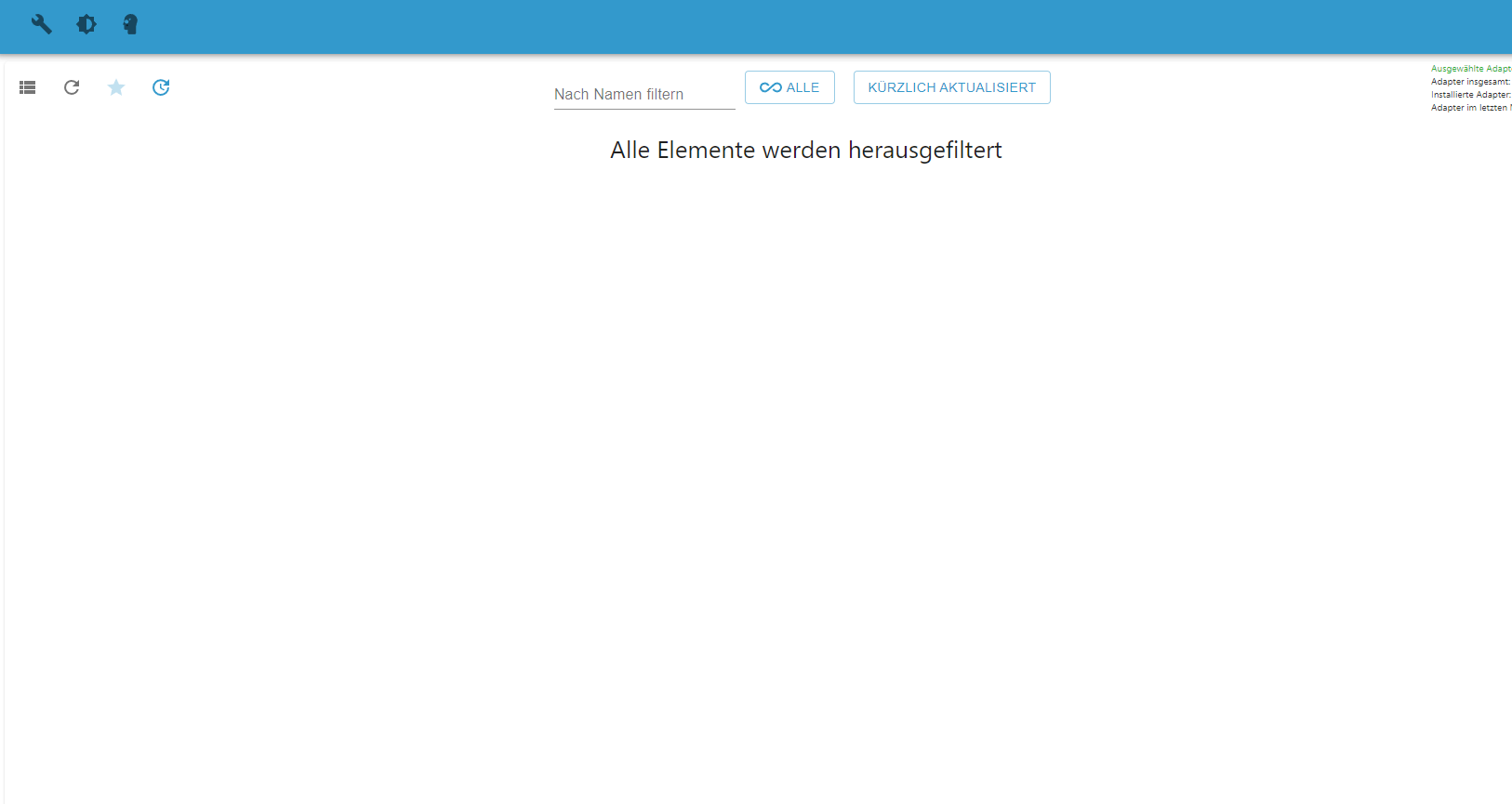
                        Ich verzweifel bald. In der Neuinstallation wird nur noch das angezeigt:
                        86eb2758-1246-418b-af77-d37ef7a87026-image.png

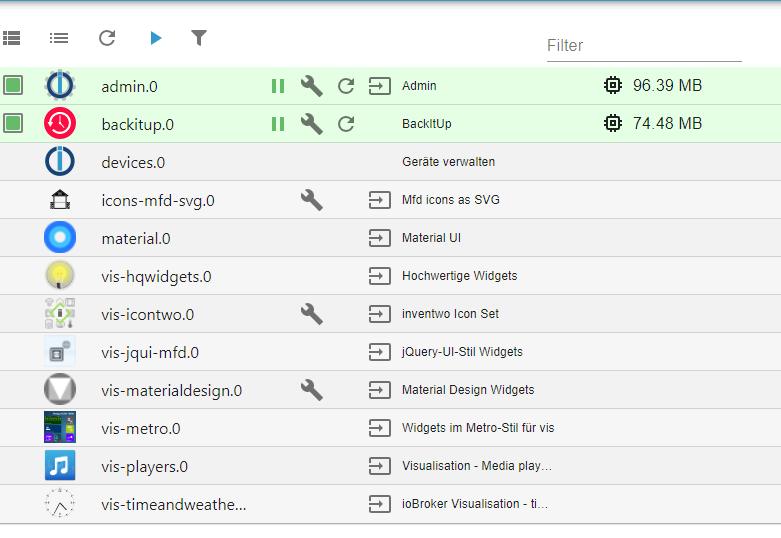
                        Adapter gibts auch keine mehr:
                        6d844c8b-c5d3-4186-bb3e-82a2a60dae5b-image.png

                        Thomas BraunT HomoranH 2 Replies Last reply
                        0
                        • J joeysch

                          @thomas-braun
                          Ich verzweifel bald. In der Neuinstallation wird nur noch das angezeigt:
                          86eb2758-1246-418b-af77-d37ef7a87026-image.png

                          Adapter gibts auch keine mehr:
                          6d844c8b-c5d3-4186-bb3e-82a2a60dae5b-image.png

                          Thomas BraunT Online
                          Thomas BraunT Online
                          Thomas Braun
                          Most Active
                          wrote on last edited by
                          #72

                          @joeysch

                          Das kann dauern.
                          Am besten im Terminal das log file beobachten:

                          iobroker logs --watch
                          

                          Und 'Ben Hur' in der Langfassung währenddessen schauen.

                          Linux-Werkzeugkasten:
                          https://forum.iobroker.net/topic/42952/der-kleine-iobroker-linux-werkzeugkasten
                          NodeJS Fixer Skript:
                          https://forum.iobroker.net/topic/68035/iob-node-fix-skript
                          iob_diag: curl -sLf -o diag.sh https://iobroker.net/diag.sh && bash diag.sh

                          1 Reply Last reply
                          0
                          • J joeysch

                            @thomas-braun
                            Ich verzweifel bald. In der Neuinstallation wird nur noch das angezeigt:
                            86eb2758-1246-418b-af77-d37ef7a87026-image.png

                            Adapter gibts auch keine mehr:
                            6d844c8b-c5d3-4186-bb3e-82a2a60dae5b-image.png

                            HomoranH Do not disturb
                            HomoranH Do not disturb
                            Homoran
                            Global Moderator Administrators
                            wrote on last edited by Homoran
                            #73

                            @joeysch sagte in ERROR: Process exited with code 25:

                            Adapter gibts auch keine mehr:

                            stimmt nicht
                            lies mal was da steht und schalt den Filter aus!

                            und warum soll es sich ändern?
                            @joeysch sagte in ERROR: Process exited with code 25:

                            alle Adapter werden nicht installiert.

                            was hast du verändert?

                            • iobroker setup custom
                            • downgrade des controllers?

                            kein Support per PN! - Fragen im Forum stellen - es gibt fast nichts, was nicht auch für andere interessant ist.

                            Benutzt das Voting rechts unten im Beitrag wenn er euch geholfen hat.

                            der Installationsfixer: curl -fsL https://iobroker.net/fix.sh | bash -

                            J 1 Reply Last reply
                            0
                            • HomoranH Homoran

                              @joeysch sagte in ERROR: Process exited with code 25:

                              Adapter gibts auch keine mehr:

                              stimmt nicht
                              lies mal was da steht und schalt den Filter aus!

                              und warum soll es sich ändern?
                              @joeysch sagte in ERROR: Process exited with code 25:

                              alle Adapter werden nicht installiert.

                              was hast du verändert?

                              • iobroker setup custom
                              • downgrade des controllers?
                              J Offline
                              J Offline
                              joeysch
                              wrote on last edited by
                              #74

                              @homoran
                              @thomas-braun

                              Ihr werdet lachen, ich habe heute morgen einfach mal Iobroker drüber gebügelt

                              curl -sLf https://iobroker.net/install.sh | bash -
                              

                              Jetzt ist alles auf Stand und funktioniert.

                              1 Reply Last reply
                              0
                              • D3ltoroxpD Online
                                D3ltoroxpD Online
                                D3ltoroxp
                                wrote on last edited by D3ltoroxp
                                #75

                                Ich würde mich hier gern mal mit anhängen. Ich wollte heute 2-3 Adapter updaten, einer ging, die anderen nicht mehr.

                                Beim Test gehts hier schon los.

                                smarthome@iobroker:/opt/iobroker$ npm ls | grep -E 'github|ERR'
                                ├── iobroker.device-watcher@0.0.6 (git+ssh://git@github.com/ciddi89/ioBroker.device-watcher.git#97c46db03ddc94d4e23b13ec6947ff2b9acc3077)
                                ├── iobroker.fully-tablet-control@0.3.6-1 (git+ssh://git@github.com/xXBJXx/ioBroker.fully-tablet-control.git#765ee8e1f0efcd737098394ec22df34c1c3fadec)
                                ├── iobroker.labcom@0.0.3 (git+ssh://git@github.com/LemonShock/ioBroker.labcom.git#4a6a73bb61731c98540b1a0391196f6261e7eb14)
                                npm ERR! code ELSPROBLEMS
                                npm ERR! invalid: iobroker.node-red@4.0.0 /opt/iobroker/node_modules/iobroker.node-red
                                
                                npm ERR! A complete log of this run can be found in:
                                npm ERR!     /home/iobroker/.npm/_logs/2022-08-20T07_57_38_124Z-debug-0.log
                                smarthome@iobroker:/opt/iobroker$


                                Bin mir aber sicher das ich das schon richtig geupdatet hatte auf die empfohlenen Versionen. Es lief danach alles und vor meinem Urlaub konnte ich auch noch die Adapter updaten.

                                Ich hatte es erfolgreich nach deiner Anleitung am 2.7. auf nodejs 16.x und nmp 8 aktualisiert und danach war auch alles so wie es in der Anleitung sein soll. Seit der Zeit konnte ich auch immer wieder ohne Probleme Adapter updaten.

                                EDIT::

                                x86_64
                                /usr/bin/nodejs
                                /usr/bin/node
                                /usr/bin/npm
                                v16.15.1
                                v16.15.1
                                8.11.0
                                smarthome
                                /opt/iobroker
                                OK:1 http://security.debian.org/debian-security buster/updates InRelease
                                OK:2 http://ftp.de.debian.org/debian buster InRelease
                                OK:3 https://deb.nodesource.com/node_14.x buster InRelease
                                OK:4 http://ftp.de.debian.org/debian buster-updates InRelease
                                OK:5 https://deb.nodesource.com/node_16.x buster InRelease
                                Paketlisten werden gelesen... Fertig
                                Abhängigkeitsbaum wird aufgebaut.
                                Statusinformationen werden eingelesen.... Fertig
                                Aktualisierung für 16 Pakete verfügbar. Führen Sie »apt list --upgradable« aus, um sie anzuzeigen.
                                nodejs:
                                  Installiert:           16.15.1-deb-1nodesource1
                                  Installationskandidat: 16.17.0-deb-1nodesource1
                                  Versionstabelle:
                                     16.17.0-deb-1nodesource1 500
                                        500 https://deb.nodesource.com/node_16.x buster/main amd64 Packages
                                 *** 16.15.1-deb-1nodesource1 100
                                        100 /var/lib/dpkg/status
                                     14.20.0-deb-1nodesource1 500
                                        500 https://deb.nodesource.com/node_14.x buster/main amd64 Packages
                                     10.24.0~dfsg-1~deb10u1 500
                                        500 http://ftp.de.debian.org/debian buster/main amd64 Packages
                                        500 http://security.debian.org/debian-security buster/updates/main amd64 Packages
                                
                                
                                1 Reply Last reply
                                0
                                • M Offline
                                  M Offline
                                  msiemers
                                  wrote on last edited by
                                  #76

                                  Moin zusammen, ich habe das Update auch wie beschrieben durchgeführt. Leider habe ich jetzt das Problem, das ich keine Adapter mehr aktualisieren kann.
                                  Ich erhalte immer einen Fehler ERROR: Process exited with code 25

                                  So sieht es bei mir aus:

                                  root@smarthome:/home/iobroker/.npm/_logs# uname -m && type -P nodejs node npm && nodejs -v && node -v && npm -v && whoami && pwd && sudo apt update &> /dev/null && sudo apt update && apt policy nodejs
                                  x86_64
                                  /usr/bin/nodejs
                                  /usr/bin/node
                                  /usr/bin/npm
                                  v16.17.0
                                  v16.17.0
                                  8.15.0
                                  root
                                  /home/iobroker/.npm/_logs
                                  Hit:1 http://archive.ubuntu.com/ubuntu jammy InRelease
                                  Hit:2 http://archive.ubuntu.com/ubuntu jammy-updates InRelease                                                                
                                  Hit:3 https://packages.grafana.com/enterprise/deb stable InRelease                                                            
                                  Hit:4 http://archive.ubuntu.com/ubuntu jammy-security InRelease                                
                                  Hit:5 https://deb.nodesource.com/node_16.x jammy InRelease
                                  Reading package lists... Done
                                  Building dependency tree... Done
                                  Reading state information... Done
                                  All packages are up to date.
                                  nodejs:
                                    Installed: 16.17.0-deb-1nodesource1
                                    Candidate: 16.17.0-deb-1nodesource1
                                    Version table:
                                   *** 16.17.0-deb-1nodesource1 500
                                          500 https://deb.nodesource.com/node_16.x jammy/main amd64 Packages
                                          100 /var/lib/dpkg/status
                                       12.22.9~dfsg-1ubuntu3 500
                                          500 http://archive.ubuntu.com/ubuntu jammy/universe amd64 Packages
                                  

                                  Ich weiß root. Aber das geht aktuell gerade nicht anders. Kann mir jemand sagen was ich falsch mache oder was meinem ioBroker fehlt damit ich wieder Adapter aktualisieren kann?

                                  Thomas BraunT 1 Reply Last reply
                                  0
                                  • M msiemers

                                    Moin zusammen, ich habe das Update auch wie beschrieben durchgeführt. Leider habe ich jetzt das Problem, das ich keine Adapter mehr aktualisieren kann.
                                    Ich erhalte immer einen Fehler ERROR: Process exited with code 25

                                    So sieht es bei mir aus:

                                    root@smarthome:/home/iobroker/.npm/_logs# uname -m && type -P nodejs node npm && nodejs -v && node -v && npm -v && whoami && pwd && sudo apt update &> /dev/null && sudo apt update && apt policy nodejs
                                    x86_64
                                    /usr/bin/nodejs
                                    /usr/bin/node
                                    /usr/bin/npm
                                    v16.17.0
                                    v16.17.0
                                    8.15.0
                                    root
                                    /home/iobroker/.npm/_logs
                                    Hit:1 http://archive.ubuntu.com/ubuntu jammy InRelease
                                    Hit:2 http://archive.ubuntu.com/ubuntu jammy-updates InRelease                                                                
                                    Hit:3 https://packages.grafana.com/enterprise/deb stable InRelease                                                            
                                    Hit:4 http://archive.ubuntu.com/ubuntu jammy-security InRelease                                
                                    Hit:5 https://deb.nodesource.com/node_16.x jammy InRelease
                                    Reading package lists... Done
                                    Building dependency tree... Done
                                    Reading state information... Done
                                    All packages are up to date.
                                    nodejs:
                                      Installed: 16.17.0-deb-1nodesource1
                                      Candidate: 16.17.0-deb-1nodesource1
                                      Version table:
                                     *** 16.17.0-deb-1nodesource1 500
                                            500 https://deb.nodesource.com/node_16.x jammy/main amd64 Packages
                                            100 /var/lib/dpkg/status
                                         12.22.9~dfsg-1ubuntu3 500
                                            500 http://archive.ubuntu.com/ubuntu jammy/universe amd64 Packages
                                    

                                    Ich weiß root. Aber das geht aktuell gerade nicht anders. Kann mir jemand sagen was ich falsch mache oder was meinem ioBroker fehlt damit ich wieder Adapter aktualisieren kann?

                                    Thomas BraunT Online
                                    Thomas BraunT Online
                                    Thomas Braun
                                    Most Active
                                    wrote on last edited by Thomas Braun
                                    #77

                                    @msiemers sagte in ERROR: Process exited with code 25:

                                    Aber das geht aktuell gerade nicht anders.

                                    Warum? Auf Ubuntu sollte ein root Login nicht gehen, ein User Login geht immer. Ist eine Grundeigenschaft von Ubuntu.

                                    Zum Thrma: Lösch die Verzeichnisse.

                                    Linux-Werkzeugkasten:
                                    https://forum.iobroker.net/topic/42952/der-kleine-iobroker-linux-werkzeugkasten
                                    NodeJS Fixer Skript:
                                    https://forum.iobroker.net/topic/68035/iob-node-fix-skript
                                    iob_diag: curl -sLf -o diag.sh https://iobroker.net/diag.sh && bash diag.sh

                                    M 1 Reply Last reply
                                    0
                                    • D3ltoroxpD Online
                                      D3ltoroxpD Online
                                      D3ltoroxp
                                      wrote on last edited by
                                      #78

                                      Hab mal rebooted, nun schaut es so aus.

                                      smarthome@iobroker:/opt/iobroker$ npm ls | grep -E 'github|ERR'
                                      ├── iobroker.device-watcher@0.0.6 (git+ssh://git@github.com/ciddi89/ioBroker.device-watcher.git#97c46db03ddc94d4e23b13ec6947ff2b9acc3077)
                                      ├── iobroker.fully-tablet-control@0.3.6-1 (git+ssh://git@github.com/xXBJXx/ioBroker.fully-tablet-control.git#765ee8e1f0efcd737098394ec22df34c1c3fadec)
                                      ├── iobroker.labcom@0.0.3 (git+ssh://git@github.com/LemonShock/ioBroker.labcom.git#4a6a73bb61731c98540b1a0391196f6261e7eb14)
                                      npm ERR! code ELSPROBLEMS
                                      npm ERR! extraneous: @types/caseless@0.12.2 /opt/iobroker/node_modules/@types/caseless
                                      npm ERR! extraneous: @types/request@2.48.8 /opt/iobroker/node_modules/@types/request
                                      npm ERR! extraneous: @types/tough-cookie@4.0.2 /opt/iobroker/node_modules/@types/tough-cookie
                                      npm ERR! extraneous: coffeescript@1.12.7 /opt/iobroker/node_modules/coffeescript
                                      npm ERR! invalid: iobroker.node-red@4.0.0 /opt/iobroker/node_modules/iobroker.node-red
                                      npm ERR! extraneous: node-inspect@2.0.0 /opt/iobroker/node_modules/node-inspect
                                      npm ERR! extraneous: picocolors@1.0.0 /opt/iobroker/node_modules/picocolors
                                      npm ERR! extraneous: virtual-tsc@0.6.2 /opt/iobroker/node_modules/virtual-tsc
                                      npm ERR! extraneous: wake_on_lan@1.0.0 /opt/iobroker/node_modules/wake_on_lan
                                      
                                      npm ERR! A complete log of this run can be found in:
                                      npm ERR!     /home/iobroker/.npm/_logs/2022-08-20T08_47_39_107Z-debug-0.log


                                      Das wollte ich beheben und die Pfade löschen.

                                      smarthome@iobroker:/opt/iobroker$ cd /opt/iobroker && npm prune
                                      npm ERR! code ENOTEMPTY
                                      npm ERR! syscall rename
                                      npm ERR! path /opt/iobroker/node_modules/acorn
                                      npm ERR! dest /opt/iobroker/node_modules/.acorn-zHERliMH
                                      npm ERR! errno -39
                                      npm ERR! ENOTEMPTY: directory not empty, rename '/opt/iobroker/node_modules/acorn' -> '/opt/iobroker/node_modules/.acorn-zHERliMH'
                                      
                                      npm ERR! A complete log of this run can be found in:
                                      npm ERR!     /home/iobroker/.npm/_logs/2022-08-20T08_36_18_667Z-debug-0.log
                                      
                                      Thomas BraunT 1 Reply Last reply
                                      0
                                      • D3ltoroxpD D3ltoroxp

                                        Hab mal rebooted, nun schaut es so aus.

                                        smarthome@iobroker:/opt/iobroker$ npm ls | grep -E 'github|ERR'
                                        ├── iobroker.device-watcher@0.0.6 (git+ssh://git@github.com/ciddi89/ioBroker.device-watcher.git#97c46db03ddc94d4e23b13ec6947ff2b9acc3077)
                                        ├── iobroker.fully-tablet-control@0.3.6-1 (git+ssh://git@github.com/xXBJXx/ioBroker.fully-tablet-control.git#765ee8e1f0efcd737098394ec22df34c1c3fadec)
                                        ├── iobroker.labcom@0.0.3 (git+ssh://git@github.com/LemonShock/ioBroker.labcom.git#4a6a73bb61731c98540b1a0391196f6261e7eb14)
                                        npm ERR! code ELSPROBLEMS
                                        npm ERR! extraneous: @types/caseless@0.12.2 /opt/iobroker/node_modules/@types/caseless
                                        npm ERR! extraneous: @types/request@2.48.8 /opt/iobroker/node_modules/@types/request
                                        npm ERR! extraneous: @types/tough-cookie@4.0.2 /opt/iobroker/node_modules/@types/tough-cookie
                                        npm ERR! extraneous: coffeescript@1.12.7 /opt/iobroker/node_modules/coffeescript
                                        npm ERR! invalid: iobroker.node-red@4.0.0 /opt/iobroker/node_modules/iobroker.node-red
                                        npm ERR! extraneous: node-inspect@2.0.0 /opt/iobroker/node_modules/node-inspect
                                        npm ERR! extraneous: picocolors@1.0.0 /opt/iobroker/node_modules/picocolors
                                        npm ERR! extraneous: virtual-tsc@0.6.2 /opt/iobroker/node_modules/virtual-tsc
                                        npm ERR! extraneous: wake_on_lan@1.0.0 /opt/iobroker/node_modules/wake_on_lan
                                        
                                        npm ERR! A complete log of this run can be found in:
                                        npm ERR!     /home/iobroker/.npm/_logs/2022-08-20T08_47_39_107Z-debug-0.log


                                        Das wollte ich beheben und die Pfade löschen.

                                        smarthome@iobroker:/opt/iobroker$ cd /opt/iobroker && npm prune
                                        npm ERR! code ENOTEMPTY
                                        npm ERR! syscall rename
                                        npm ERR! path /opt/iobroker/node_modules/acorn
                                        npm ERR! dest /opt/iobroker/node_modules/.acorn-zHERliMH
                                        npm ERR! errno -39
                                        npm ERR! ENOTEMPTY: directory not empty, rename '/opt/iobroker/node_modules/acorn' -> '/opt/iobroker/node_modules/.acorn-zHERliMH'
                                        
                                        npm ERR! A complete log of this run can be found in:
                                        npm ERR!     /home/iobroker/.npm/_logs/2022-08-20T08_36_18_667Z-debug-0.log
                                        
                                        Thomas BraunT Online
                                        Thomas BraunT Online
                                        Thomas Braun
                                        Most Active
                                        wrote on last edited by
                                        #79

                                        @d3ltoroxp

                                        Mit prune werden keine Verzeichnisse gelöscht.

                                        Linux-Werkzeugkasten:
                                        https://forum.iobroker.net/topic/42952/der-kleine-iobroker-linux-werkzeugkasten
                                        NodeJS Fixer Skript:
                                        https://forum.iobroker.net/topic/68035/iob-node-fix-skript
                                        iob_diag: curl -sLf -o diag.sh https://iobroker.net/diag.sh && bash diag.sh

                                        D3ltoroxpD 1 Reply Last reply
                                        0
                                        • Thomas BraunT Thomas Braun

                                          @d3ltoroxp

                                          Mit prune werden keine Verzeichnisse gelöscht.

                                          D3ltoroxpD Online
                                          D3ltoroxpD Online
                                          D3ltoroxp
                                          wrote on last edited by D3ltoroxp
                                          #80

                                          @thomas-braun said in ERROR: Process exited with code 25:

                                          @d3ltoroxp

                                          Mit prune werden keine Verzeichnisse gelöscht.

                                          Bereinigt meinte ich.

                                          Trotz allem stimmt hier aber was nicht. Soll ich einfach noch mal nach deiner Anleitung updaten ? Versteh nur nicht, warum es auf einmal wieder nicht klappt.

                                          Thomas BraunT 1 Reply Last reply
                                          0
                                          Reply
                                          • Reply as topic
                                          Log in to reply
                                          • Oldest to Newest
                                          • Newest to Oldest
                                          • Most Votes


                                          Support us

                                          ioBroker
                                          Community Adapters
                                          Donate
                                          FAQ Cloud / IOT
                                          HowTo: Node.js-Update
                                          HowTo: Backup/Restore
                                          Downloads
                                          BLOG

                                          590

                                          Online

                                          32.6k

                                          Users

                                          82.1k

                                          Topics

                                          1.3m

                                          Posts
                                          Community
                                          Impressum | Datenschutz-Bestimmungen | Nutzungsbedingungen | Einwilligungseinstellungen
                                          ioBroker Community 2014-2025
                                          logo
                                          • Login

                                          • Don't have an account? Register

                                          • Login or register to search.
                                          • First post
                                            Last post
                                          0
                                          • Home
                                          • Recent
                                          • Tags
                                          • Unread 0
                                          • Categories
                                          • Unreplied
                                          • Popular
                                          • GitHub
                                          • Docu
                                          • Hilfe