




Keine Möglichkeit auf die ioBroker Oberfläche zu kommen
-
@friedel01
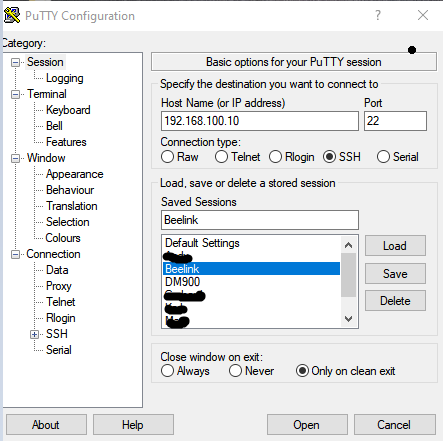
Bei Putty gibts einfach unter SSH Deine IP und das Login an, das noch speichern, dann ist Putty n ur ein sehr einfaches Tool mit dem man eben eine SSH Verbindung öffnet (unter anderem). Ich verwende es weil ich so einfach viel Verbindungen speichern kann und nur noch klicken muss.@jan1 sagte in Keine Möglichkeit auf die ioBroker Oberfläche zu kommen:
Ich verwende es weil ich so einfach viel Verbindungen speichern kann und nur noch klicken muss.
ich auch!
und bei putty käme in seinem Fall ein Hinweis, dass der Fingerprint der IP jetzt ein anderer sei und ob er den akzeptieren will.
Da muss dann nichts in den $hosts editiert werden -
@friedel01
Du sollst Doch in Code Tags posten und nicht einfach so rein ballern.Ob die Seite in englisch oder was sonst ist, spielt ja keine Rolle, man muss ja nur den DL finden und dann eben IP und Port eintragen. Das speichern und man muss in Zukunft nur noch klicken. Geht übrigens auch mit der normalen Eingabeaufforderung (CMD), also noch simpler als Powershell.
PowerShell finde ich 'besser', im puTTY Mäusekino werden zu gerne so komische Zeilensprünge fabriziert. Das hast du in der PowerShell nicht.
-
PowerShell finde ich 'besser', im puTTY Mäusekino werden zu gerne so komische Zeilensprünge fabriziert. Das hast du in der PowerShell nicht.
@thomas-braun
Putty ist lediglich ein Tool, dass eh die standard Konsole öffnet, somit weder Mäusekino noch sonstiges, was da komisch oder anders läuft ;)Übrigens hatte ich schon mal zu Beginn meine Zeit hier geschrieben, dass man zum Herstellen einer SSH Verbindung keine fremden Tools benötigt und das alles eh unter Windows schon funktioniert, also mich muss hier keine bekehren.
Mit Putty hast halt einfach viele gespeicherte Verbindungen zum Klicken und ich als Mausschieber bevorzuge nun mal diesen Weg LOL -
PowerShell finde ich 'besser', im puTTY Mäusekino werden zu gerne so komische Zeilensprünge fabriziert. Das hast du in der PowerShell nicht.
@thomas-braun sagte in Keine Möglichkeit auf die ioBroker Oberfläche zu kommen:
PowerShell finde ich 'besser', im puTTY Mäusekino werden zu gerne so komische Zeilensprünge fabriziert. Das hast du in der PowerShell nicht.
Das kann ich nicht nachvollziehen! Ich nutze puTTY schon seit vielen Jahren, nicht nur für SSH, sondern auch z.B. für serielle Verbindungen (Naja, nicht mehr so oft! :-) ), und habe da immer eine ganz "normale" Terminalsitzung.
Was meinst Du mit "Zeilensprünge"?
Mal abgesehen davon, dass jeder das nutzen soll, was ihm am Besten passt!
-
@thomas-braun
Putty ist lediglich ein Tool, dass eh die standard Konsole öffnet, somit weder Mäusekino noch sonstiges, was da komisch oder anders läuft ;)Übrigens hatte ich schon mal zu Beginn meine Zeit hier geschrieben, dass man zum Herstellen einer SSH Verbindung keine fremden Tools benötigt und das alles eh unter Windows schon funktioniert, also mich muss hier keine bekehren.
Mit Putty hast halt einfach viele gespeicherte Verbindungen zum Klicken und ich als Mausschieber bevorzuge nun mal diesen Weg LOL@jan1 sagte in Keine Möglichkeit auf die ioBroker Oberfläche zu kommen:
was da komisch oder anders läuft
wenn du nach dem Lauf der Konsole das Fenster nur minimal breiter machst, enstehen beim kopieren des Inhaltes seeeeehr unschöne Lücken im Text,
dann werden Leerzeichen an den Zeilenumbrüchen eingeschoben.Das passiert schon, wenn ban meim markieren an den Rand stösst
-
@thomas-braun sagte in Keine Möglichkeit auf die ioBroker Oberfläche zu kommen:
PowerShell finde ich 'besser', im puTTY Mäusekino werden zu gerne so komische Zeilensprünge fabriziert. Das hast du in der PowerShell nicht.
Das kann ich nicht nachvollziehen! Ich nutze puTTY schon seit vielen Jahren, nicht nur für SSH, sondern auch z.B. für serielle Verbindungen (Naja, nicht mehr so oft! :-) ), und habe da immer eine ganz "normale" Terminalsitzung.
Was meinst Du mit "Zeilensprünge"?
Mal abgesehen davon, dass jeder das nutzen soll, was ihm am Besten passt!
@andreas-5 sagte in Keine Möglichkeit auf die ioBroker Oberfläche zu kommen:
Was meinst Du mit "Zeilensprünge"?
Genauer: Beim Kopieren von Konsolenoutput in das Forum (in CodeTags) hast du da u.U. Sprünge in der Darstellung. Da sind dann Lücken drin. Bei der Powershell habe ich das noch nie gesehen.
-
@jan1 sagte in Keine Möglichkeit auf die ioBroker Oberfläche zu kommen:
was da komisch oder anders läuft
wenn du nach dem Lauf der Konsole das Fenster nur minimal breiter machst, enstehen beim kopieren des Inhaltes seeeeehr unschöne Lücken im Text,
dann werden Leerzeichen an den Zeilenumbrüchen eingeschoben.Das passiert schon, wenn ban meim markieren an den Rand stösst
@homoran
Ok, jetzt habe ich es verstanden, liegt aber auch nur daran, dass hier der Text nicht mit aufgezogen wird und ich deshalb, wenn ich was poste, mein Fenster vorher schon der zu erwartenden Textlänge anpasse, damit Thomas das dann auch schön lesen kann :) -
@andreas-5 sagte in Keine Möglichkeit auf die ioBroker Oberfläche zu kommen:
Was meinst Du mit "Zeilensprünge"?
Genauer: Beim Kopieren von Konsolenoutput in das Forum (in CodeTags) hast du da u.U. Sprünge in der Darstellung. Da sind dann Lücken drin. Bei der Powershell habe ich das noch nie gesehen.
@thomas-braun sagte in Keine Möglichkeit auf die ioBroker Oberfläche zu kommen:
@andreas-5 sagte in Keine Möglichkeit auf die ioBroker Oberfläche zu kommen:
Was meinst Du mit "Zeilensprünge"?
Genauer: Beim Kopieren von Konsolenoutput in das Forum (in CodeTags) hast du da u.U. Sprünge in der Darstellung. Da sind dann Lücken drin. Bei der Powershell habe ich das noch nie gesehen.
Ah ok.
Das kommt bei mir nicht so oft vor, weil ich dann beim Erzeugen des Konsolen-Output diesen schon direkt in eine Datei schreibe, damit ich diese als Informationsquelle zur Verfügung habe, wenn ich noch einmal etwas nachschauen will. -
@homoran
Ok, jetzt habe ich es verstanden, liegt aber auch nur daran, dass hier der Text nicht mit aufgezogen wird und ich deshalb, wenn ich was poste, mein Fenster vorher schon der zu erwartenden Textlänge anpasse, damit Thomas das dann auch schön lesen kann :)@jan1 sagte in Keine Möglichkeit auf die ioBroker Oberfläche zu kommen:
liegt aber auch nur daran, dass hier der Text nicht mit aufgezogen wird
wahrscheinlich, aber die Lücken im kopierten Code sind tlw. deutlich größer als der Platz zwischen Text und Rand
@jan1 sagte in Keine Möglichkeit auf die ioBroker Oberfläche zu kommen:
, mein Fenster vorher schon der zu erwartenden Textlänge anpasse
mache ich auch so
-
@jan1 sagte in Keine Möglichkeit auf die ioBroker Oberfläche zu kommen:
liegt aber auch nur daran, dass hier der Text nicht mit aufgezogen wird
wahrscheinlich, aber die Lücken im kopierten Code sind tlw. deutlich größer als der Platz zwischen Text und Rand
@jan1 sagte in Keine Möglichkeit auf die ioBroker Oberfläche zu kommen:
, mein Fenster vorher schon der zu erwartenden Textlänge anpasse
mache ich auch so
@homoran
Ich bin eh ein Freund von großen Fenstern und wundere mich auch auf Arbeit immer warum Kollegen zu Hause ein 100 Zoll TV an der Wand haben und am PC mit Mäusekino Fenster übereinander arbeiten und so nur den Überblick verlieren ;)So, aber jetzt ist auch wieder genug OT für heute :)
-
Hallo zusammen,
das "Update" sudo apt update && sudo apt full-upgrade ist wohl jetzt durch...
Jetzt wollte ich sudo reboot eingeben aber da bekomme ich folgende Meldung:
pi@raspberrypi:~ $ sudo reboot
Connection to 192.168.0.47 closed by remote host.
Connection to 192.168.0.47 closed.
PS C:\Windows\system32>
Was kann das nun wieder sein?
Und das haabe ich auch noch angezeigt bekommen:
pi@192.168.0.47's password: Linux raspberrypi 5.10.92-v7l+ #1514 SMP Mon Jan 17 17:38:03 GMT 2022 armv7l The programs included with the Debian GNU/Linux system are free software; the exact distribution terms for each program are described in the individual files in /usr/share/doc/*/copyright. Debian GNU/Linux comes with ABSOLUTELY NO WARRANTY, to the extent permitted by applicable law. Last login: Fri Jan 28 11:10:21 2022 SSH is enabled and the default password for the 'pi' user has not been changed. This is a security risk - please login as the 'pi' user and type 'passwd' to set a new password. Wi-Fi is currently blocked by rfkill. Use raspi-config to set the country before use. pi@raspberrypi:~ $ -
Hallo zusammen,
das "Update" sudo apt update && sudo apt full-upgrade ist wohl jetzt durch...
Jetzt wollte ich sudo reboot eingeben aber da bekomme ich folgende Meldung:
pi@raspberrypi:~ $ sudo reboot
Connection to 192.168.0.47 closed by remote host.
Connection to 192.168.0.47 closed.
PS C:\Windows\system32>
Was kann das nun wieder sein?
Und das haabe ich auch noch angezeigt bekommen:
pi@192.168.0.47's password: Linux raspberrypi 5.10.92-v7l+ #1514 SMP Mon Jan 17 17:38:03 GMT 2022 armv7l The programs included with the Debian GNU/Linux system are free software; the exact distribution terms for each program are described in the individual files in /usr/share/doc/*/copyright. Debian GNU/Linux comes with ABSOLUTELY NO WARRANTY, to the extent permitted by applicable law. Last login: Fri Jan 28 11:10:21 2022 SSH is enabled and the default password for the 'pi' user has not been changed. This is a security risk - please login as the 'pi' user and type 'passwd' to set a new password. Wi-Fi is currently blocked by rfkill. Use raspi-config to set the country before use. pi@raspberrypi:~ $@friedel01 sagte in Keine Möglichkeit auf die ioBroker Oberfläche zu kommen:
Was kann das nun wieder sein?
dass der reboot noch nicht fertig ist???
-
Hallo zusammen,
das "Update" sudo apt update && sudo apt full-upgrade ist wohl jetzt durch...
Jetzt wollte ich sudo reboot eingeben aber da bekomme ich folgende Meldung:
pi@raspberrypi:~ $ sudo reboot
Connection to 192.168.0.47 closed by remote host.
Connection to 192.168.0.47 closed.
PS C:\Windows\system32>
Was kann das nun wieder sein?
Und das haabe ich auch noch angezeigt bekommen:
pi@192.168.0.47's password: Linux raspberrypi 5.10.92-v7l+ #1514 SMP Mon Jan 17 17:38:03 GMT 2022 armv7l The programs included with the Debian GNU/Linux system are free software; the exact distribution terms for each program are described in the individual files in /usr/share/doc/*/copyright. Debian GNU/Linux comes with ABSOLUTELY NO WARRANTY, to the extent permitted by applicable law. Last login: Fri Jan 28 11:10:21 2022 SSH is enabled and the default password for the 'pi' user has not been changed. This is a security risk - please login as the 'pi' user and type 'passwd' to set a new password. Wi-Fi is currently blocked by rfkill. Use raspi-config to set the country before use. pi@raspberrypi:~ $1.) Das System startet neu, dabei wird die Verbindung via ssh natürlich abgeworfen.
2.) Der ganz normale Begrüßungsscreen eines Debian GNU/Linux Systems.
Mit
passwddas Passwort ändern.
-
Das Passwort ändere ich wenn ich mit der ganzen Intallation fertig bin.
Mom sieht es auf dem Pi so aus:
pi@raspberrypi:~ $ curl -sLf https://iobroker.net/install.sh | bash -
library: loaded
Library version=2021-12-27

==========================================================================

    Welcome to the ioBroker installer!
    Installer version: 2021-12-27

    You might need to enter your password a couple of times.

==========================================================================


==========================================================================
    Installing prerequisites (1/4)
==========================================================================

Hit:1 http://archive.raspberrypi.org/debian bullseye InRelease
Hit:2 http://raspbian.raspberrypi.org/raspbian bullseye InRelease
Reading package lists... Done

==========================================================================

    Node.js not found. Installing...

==========================================================================


## Installing the NodeSource Node.js 14.x repo...


## Populating apt-get cache...

+ apt-get update
Hit:1 http://archive.raspberrypi.org/debian bullseye InRelease
Hit:2 http://raspbian.raspberrypi.org/raspbian bullseye InRelease
Reading package lists... Done

## Confirming "bullseye" is supported...

+ curl -sLf -o /dev/null 'https://deb.nodesource.com/node_14.x/dists/bullseye/Release'

## Adding the NodeSource signing key to your keyring...

+ curl -s https://deb.nodesource.com/gpgkey/nodesource.gpg.key | gpg --dearmor | tee /usr/share/keyrings/nodesource.gpg >/dev/null

## Creating apt sources list file for the NodeSource Node.js 14.x repo...

+ echo 'deb [signed-by=/usr/share/keyrings/nodesource.gpg] https://deb.nodesource.com/node_14.x bullseye main' > /etc/apt/sources.list.d/nodesource.list
+ echo 'deb-src [signed-by=/usr/share/keyrings/nodesource.gpg] https://deb.nodesource.com/node_14.x bullseye main' >> /etc/apt/sources.list.d/nodesource.list

## Running `apt-get update` for you...

+ apt-get update
Hit:1 http://raspbian.raspberrypi.org/raspbian bullseye InRelease
Hit:2 http://archive.raspberrypi.org/debian bullseye InRelease
Get:3 https://deb.nodesource.com/node_14.x bullseye InRelease [4,586 B]
Get:4 https://deb.nodesource.com/node_14.x bullseye/main armhf Packages [780 B]
Fetched 5,366 B in 1s (6,400 B/s)
Reading package lists... Done

## Run `sudo apt-get install -y nodejs` to install Node.js 14.x and npm
## You may also need development tools to build native addons:
     sudo apt-get install gcc g++ make
## To install the Yarn package manager, run:
     curl -sL https://dl.yarnpkg.com/debian/pubkey.gpg | gpg --dearmor | sudo tee /usr/share/keyrings/yarnkey.gpg >/dev/null
     echo "deb [signed-by=/usr/share/keyrings/yarnkey.gpg] https://dl.yarnpkg.com/debian stable main" | sudo tee /etc/apt/sources.list.d/yarn.list
     sudo apt-get update && sudo apt-get install yarn
Ist die IOBroker software jetzt drauf oder ist die Intallation noch nicht fertig? Es geht nämlich nicht weiter...
-
Das Passwort ändere ich wenn ich mit der ganzen Intallation fertig bin.
Mom sieht es auf dem Pi so aus:
pi@raspberrypi:~ $ curl -sLf https://iobroker.net/install.sh | bash -
library: loaded
Library version=2021-12-27

==========================================================================

    Welcome to the ioBroker installer!
    Installer version: 2021-12-27

    You might need to enter your password a couple of times.

==========================================================================


==========================================================================
    Installing prerequisites (1/4)
==========================================================================

Hit:1 http://archive.raspberrypi.org/debian bullseye InRelease
Hit:2 http://raspbian.raspberrypi.org/raspbian bullseye InRelease
Reading package lists... Done

==========================================================================

    Node.js not found. Installing...

==========================================================================


## Installing the NodeSource Node.js 14.x repo...


## Populating apt-get cache...

+ apt-get update
Hit:1 http://archive.raspberrypi.org/debian bullseye InRelease
Hit:2 http://raspbian.raspberrypi.org/raspbian bullseye InRelease
Reading package lists... Done

## Confirming "bullseye" is supported...

+ curl -sLf -o /dev/null 'https://deb.nodesource.com/node_14.x/dists/bullseye/Release'

## Adding the NodeSource signing key to your keyring...

+ curl -s https://deb.nodesource.com/gpgkey/nodesource.gpg.key | gpg --dearmor | tee /usr/share/keyrings/nodesource.gpg >/dev/null

## Creating apt sources list file for the NodeSource Node.js 14.x repo...

+ echo 'deb [signed-by=/usr/share/keyrings/nodesource.gpg] https://deb.nodesource.com/node_14.x bullseye main' > /etc/apt/sources.list.d/nodesource.list
+ echo 'deb-src [signed-by=/usr/share/keyrings/nodesource.gpg] https://deb.nodesource.com/node_14.x bullseye main' >> /etc/apt/sources.list.d/nodesource.list

## Running `apt-get update` for you...

+ apt-get update
Hit:1 http://raspbian.raspberrypi.org/raspbian bullseye InRelease
Hit:2 http://archive.raspberrypi.org/debian bullseye InRelease
Get:3 https://deb.nodesource.com/node_14.x bullseye InRelease [4,586 B]
Get:4 https://deb.nodesource.com/node_14.x bullseye/main armhf Packages [780 B]
Fetched 5,366 B in 1s (6,400 B/s)
Reading package lists... Done

## Run `sudo apt-get install -y nodejs` to install Node.js 14.x and npm
## You may also need development tools to build native addons:
     sudo apt-get install gcc g++ make
## To install the Yarn package manager, run:
     curl -sL https://dl.yarnpkg.com/debian/pubkey.gpg | gpg --dearmor | sudo tee /usr/share/keyrings/yarnkey.gpg >/dev/null
     echo "deb [signed-by=/usr/share/keyrings/yarnkey.gpg] https://dl.yarnpkg.com/debian stable main" | sudo tee /etc/apt/sources.list.d/yarn.list
     sudo apt-get update && sudo apt-get install yarn
Ist die IOBroker software jetzt drauf oder ist die Intallation noch nicht fertig? Es geht nämlich nicht weiter...
@friedel01 sagte in Keine Möglichkeit auf die ioBroker Oberfläche zu kommen:
ist die Intallation noch nicht fertig?
ja
@friedel01 sagte in Keine Möglichkeit auf die ioBroker Oberfläche zu kommen:
Es geht nämlich nicht weiter...
Doch, aber du siehst es nur nicht
-
O.k. das ist dann wohl die Ungeduld....
Jetzt sieht es so aus.
Ich schätze das als "Fehlermeldungen" ein?
Verbessert mich wenn ich falsch liege========================================================================== Creating ioBroker user and directory (2/4) ========================================================================== User iobroker created Created /etc/sudoers.d/iobroker Directory /opt/iobroker created ========================================================================== Installing ioBroker (3/4) ========================================================================== In file included from ../../nan/nan.h:58, from ../src/main.cpp:3: /home/pi/.cache/node-gyp/14.18.3/include/node/node.h:787:7: warning: cast between incompatible function types from ‘void (*)(v8::Local<v8::Object>)’ to ‘node::addon_register_func’ {aka ‘void (*)(v8::Local<v8::Object>, v8::Local<v8::Value>, void*)’} [-Wcast-function-type] 787 | (node::addon_register_func) (regfunc), \ | ^~~~~~~~~~~~~~~~~~~~~~~~~~~~~~~~~~~~~ /home/pi/.cache/node-gyp/14.18.3/include/node/node.h:821:3: note: in expansion of macro ‘NODE_MODULE_X’ 821 | NODE_MODULE_X(modname, regfunc, NULL, 0) // NOLINT (readability/null_usage) | ^~~~~~~~~~~~~ ../src/main.cpp:42:1: note: in expansion of macro ‘NODE_MODULE’ 42 | NODE_MODULE(diskusage, Init) | ^~~~~~~~~~~ In file included from ../../nan/nan.h:58, from ../src/unix_dgram.cc:5: /home/pi/.cache/node-gyp/14.18.3/include/node/node.h:787:7: warning: cast between incompatible function types from ‘void (*)(v8::Local<v8::Object>)’ to ‘node::addon_register_func’ {aka ‘void (*)(v8::Local<v8::Object>, v8::Local<v8::Value>, void*)’} [-Wcast-function-type] 787 | (node::addon_register_func) (regfunc), \ | ^~~~~~~~~~~~~~~~~~~~~~~~~~~~~~~~~~~~~ /home/pi/.cache/node-gyp/14.18.3/include/node/node.h:821:3: note: in expansion of macro ‘NODE_MODULE_X’ 821 | NODE_MODULE_X(modname, regfunc, NULL, 0) // NOLINT (readability/null_usage) | ^~~~~~~~~~~~~ ../src/unix_dgram.cc:404:1: note: in expansion of macro ‘NODE_MODULE’ 404 | NODE_MODULE(unix_dgram, Initialize) | ^~~~~~~~~~~ ../src/serialport.cpp: In function ‘Nan::NAN_METHOD_RETURN_TYPE Open(Nan::NAN_METHOD_ARGS_TYPE)’: ../src/serialport.cpp:78:51: warning: cast between incompatible function types from ‘void (*)(uv_work_t*)’ {aka ‘void (*)(uv_work_s*)’} to ‘uv_after_work_cb’ {aka ‘void (*)(uv_work_s*, int)’} [-Wcast-function-type] 78 | uv_queue_work(uv_default_loop(), req, EIO_Open, (uv_after_work_cb)EIO_AfterOpen); | ^~~~~~~~~~~~~~~~~~~~~~~~~~~~~~~ ../src/serialport.cpp: In function ‘Nan::NAN_METHOD_RETURN_TYPE Update(Nan::NAN_METHOD_ARGS_TYPE)’: ../src/serialport.cpp:135:53: warning: cast between incompatible function types from ‘void (*)(uv_work_t*)’ {aka ‘void (*)(uv_work_s*)’} to ‘uv_after_work_cb’ {aka ‘void (*)(uv_work_s*, int)’} [-Wcast-function-type] 135 | uv_queue_work(uv_default_loop(), req, EIO_Update, (uv_after_work_cb)EIO_AfterUpdate); | ^~~~~~~~~~~~~~~~~~~~~~~~~~~~~~~~~ ../src/serialport.cpp: In function ‘Nan::NAN_METHOD_RETURN_TYPE Close(Nan::NAN_METHOD_ARGS_TYPE)’: ../src/serialport.cpp:175:52: warning: cast between incompatible function types from ‘void (*)(uv_work_t*)’ {aka ‘void (*)(uv_work_s*)’} to ‘uv_after_work_cb’ {aka ‘void (*)(uv_work_s*, int)’} [-Wcast-function-type] 175 | uv_queue_work(uv_default_loop(), req, EIO_Close, (uv_after_work_cb)EIO_AfterClose); | ^~~~~~~~~~~~~~~~~~~~~~~~~~~~~~~~ ../src/serialport.cpp: In function ‘Nan::NAN_METHOD_RETURN_TYPE Flush(Nan::NAN_METHOD_ARGS_TYPE)’: ../src/serialport.cpp:215:52: warning: cast between incompatible function types from ‘void (*)(uv_work_t*)’ {aka ‘void (*)(uv_work_s*)’} to ‘uv_after_work_cb’ {aka ‘void (*)(uv_work_s*, int)’} [-Wcast-function-type] 215 | uv_queue_work(uv_default_loop(), req, EIO_Flush, (uv_after_work_cb)EIO_AfterFlush); | ^~~~~~~~~~~~~~~~~~~~~~~~~~~~~~~~ ../src/serialport.cpp: In function ‘Nan::NAN_METHOD_RETURN_TYPE Set(Nan::NAN_METHOD_ARGS_TYPE)’: ../src/serialport.cpp:271:50: warning: cast between incompatible function types from ‘void (*)(uv_work_t*)’ {aka ‘void (*)(uv_work_s*)’} to ‘uv_after_work_cb’ {aka ‘void (*)(uv_work_s*, int)’} [-Wcast-function-type] 271 | uv_queue_work(uv_default_loop(), req, EIO_Set, (uv_after_work_cb)EIO_AfterSet); | ^~~~~~~~~~~~~~~~~~~~~~~~~~~~~~ ../src/serialport.cpp: In function ‘Nan::NAN_METHOD_RETURN_TYPE Get(Nan::NAN_METHOD_ARGS_TYPE)’: ../src/serialport.cpp:316:50: warning: cast between incompatible function types from ‘void (*)(uv_work_t*)’ {aka ‘void (*)(uv_work_s*)’} to ‘uv_after_work_cb’ {aka ‘void (*)(uv_work_s*, int)’} [-Wcast-function-type] 316 | uv_queue_work(uv_default_loop(), req, EIO_Get, (uv_after_work_cb)EIO_AfterGet); | ^~~~~~~~~~~~~~~~~~~~~~~~~~~~~~ ../src/serialport.cpp: In function ‘Nan::NAN_METHOD_RETURN_TYPE GetBaudRate(Nan::NAN_METHOD_ARGS_TYPE)’: ../src/serialport.cpp:366:58: warning: cast between incompatible function types from ‘void (*)(uv_work_t*)’ {aka ‘void (*)(uv_work_s*)’} to ‘uv_after_work_cb’ {aka ‘void (*)(uv_work_s*, int)’} [-Wcast-function-type] 366 | uv_queue_work(uv_default_loop(), req, EIO_GetBaudRate, (uv_after_work_cb)EIO_AfterGetBaudRate); | ^~~~~~~~~~~~~~~~~~~~~~~~~~~~~~~~~~~~~~ ../src/serialport.cpp: In function ‘Nan::NAN_METHOD_RETURN_TYPE Drain(Nan::NAN_METHOD_ARGS_TYPE)’: ../src/serialport.cpp:412:52: warning: cast between incompatible function types from ‘void (*)(uv_work_t*)’ {aka ‘void (*)(uv_work_s*)’} to ‘uv_after_work_cb’ {aka ‘void (*)(uv_work_s*, int)’} [-Wcast-function-type] 412 | uv_queue_work(uv_default_loop(), req, EIO_Drain, (uv_after_work_cb)EIO_AfterDrain); | ^~~~~~~~~~~~~~~~~~~~~~~~~~~~~~~~ ../src/serialport.cpp: At global scope: ../src/serialport.cpp:433:28: warning: unnecessary parentheses in declaration of ‘ToParityEnum’ [-Wparentheses] 433 | SerialPortParity NAN_INLINE(ToParityEnum(const v8::Local<v8::String>& v8str)) { | ^ ../src/serialport.cpp:452:30: warning: unnecessary parentheses in declaration of ‘ToStopBitEnum’ [-Wparentheses] 452 | SerialPortStopBits NAN_INLINE(ToStopBitEnum(double stopBits)) { | ^ In file included from ../../../nan/nan.h:58, from ../src/./serialport.h:13, from ../src/serialport.cpp:1: /home/pi/.cache/node-gyp/14.18.3/include/node/node.h:787:7: warning: cast between incompatible function types from ‘void (*)(Nan::ADDON_REGISTER_FUNCTION_ARGS_TYPE)’ {aka ‘void (*)(v8::Local<v8::Object>)’} to ‘node::addon_register_func’ {aka ‘void (*)(v8::Local<v8::Object>, v8::Local<v8::Value>, void*)’} [-Wcast-function-type] 787 | (node::addon_register_func) (regfunc), \ | ^~~~~~~~~~~~~~~~~~~~~~~~~~~~~~~~~~~~~ /home/pi/.cache/node-gyp/14.18.3/include/node/node.h:821:3: note: in expansion of macro ‘NODE_MODULE_X’ 821 | NODE_MODULE_X(modname, regfunc, NULL, 0) // NOLINT (readability/null_usage) | ^~~~~~~~~~~~~ ../src/serialport.cpp:486:1: note: in expansion of macro ‘NODE_MODULE’ 486 | NODE_MODULE(serialport, init); | ^~~~~~~~~~~ ../src/serialport_unix.cpp: In function ‘int setup(int, OpenBaton*)’: ../src/serialport_unix.cpp:179:82: warning: ‘%s’ directive output may be truncated writing up to 1023 bytes into a region of size 1005 [-Wformat-truncation=] 179 | snprintf(data->errorString, sizeof(data->errorString), "Error %s Cannot open %s", strerror(errno), data->path); | ^~ ../src/serialport_unix.cpp:179:13: note: ‘snprintf’ output 20 or more bytes (assuming 1043) into a destination of size 1024 179 | snprintf(data->errorString, sizeof(data->errorString), "Error %s Cannot open %s", strerror(errno), data->path); | ~~~~~~~~^~~~~~~~~~~~~~~~~~~~~~~~~~~~~~~~~~~~~~~~~~~~~~~~~~~~~~~~~~~~~~~~~~~~~~~~~~~~~~~~~~~~~~~~~~~~~~~~~~~~~~ ../src/serialport_unix.cpp: In function ‘void EIO_Open(uv_work_t*)’: ../src/serialport_unix.cpp:89:84: warning: ‘%s’ directive output may be truncated writing up to 1023 bytes into a region of size 1003 [-Wformat-truncation=] 89 | snprintf(data->errorString, sizeof(data->errorString), "Error: %s, cannot open %s", strerror(errno), data->path); | ^~ ../src/serialport_unix.cpp:89:13: note: ‘snprintf’ output 22 or more bytes (assuming 1045) into a destination of size 1024 89 | snprintf(data->errorString, sizeof(data->errorString), "Error: %s, cannot open %s", strerror(errno), data->path); | ~~~~~~~~^~~~~~~~~~~~~~~~~~~~~~~~~~~~~~~~~~~~~~~~~~~~~~~~~~~~~~~~~~~~~~~~~~~~~~~~~~~~~~~~~~~~~~~~~~~~~~~~~~~~~~~~ ATTENTION: Error reporting via Sentry will be activated on next start of ioBroker ioBroker wants to make sure to deliver the most stable smart home system. To allow this we decided to implement an automatic error and crash reporting solution into the js-controller and also into adapters. THIS REPORTING WILL BE ENABLED WITH THE NEXT START OF YOUR IOBROKER! For any error that leads to the crash of the js-controller or one of the relevant adapters the error details are send to a server. For the js-controller and core adapters this server is located and operated in germany. For community adapters please check the Github Readme of the affected adapter for details which Sentry server is used. If you want to disable the error reporting you can use the command 'iobroker plugin disable sentry' This command will also make sure that no adapter that runs on this host will send crash reporting data to sentry.....?
-
O.k. das ist dann wohl die Ungeduld....
Jetzt sieht es so aus.
Ich schätze das als "Fehlermeldungen" ein?
Verbessert mich wenn ich falsch liege========================================================================== Creating ioBroker user and directory (2/4) ========================================================================== User iobroker created Created /etc/sudoers.d/iobroker Directory /opt/iobroker created ========================================================================== Installing ioBroker (3/4) ========================================================================== In file included from ../../nan/nan.h:58, from ../src/main.cpp:3: /home/pi/.cache/node-gyp/14.18.3/include/node/node.h:787:7: warning: cast between incompatible function types from ‘void (*)(v8::Local<v8::Object>)’ to ‘node::addon_register_func’ {aka ‘void (*)(v8::Local<v8::Object>, v8::Local<v8::Value>, void*)’} [-Wcast-function-type] 787 | (node::addon_register_func) (regfunc), \ | ^~~~~~~~~~~~~~~~~~~~~~~~~~~~~~~~~~~~~ /home/pi/.cache/node-gyp/14.18.3/include/node/node.h:821:3: note: in expansion of macro ‘NODE_MODULE_X’ 821 | NODE_MODULE_X(modname, regfunc, NULL, 0) // NOLINT (readability/null_usage) | ^~~~~~~~~~~~~ ../src/main.cpp:42:1: note: in expansion of macro ‘NODE_MODULE’ 42 | NODE_MODULE(diskusage, Init) | ^~~~~~~~~~~ In file included from ../../nan/nan.h:58, from ../src/unix_dgram.cc:5: /home/pi/.cache/node-gyp/14.18.3/include/node/node.h:787:7: warning: cast between incompatible function types from ‘void (*)(v8::Local<v8::Object>)’ to ‘node::addon_register_func’ {aka ‘void (*)(v8::Local<v8::Object>, v8::Local<v8::Value>, void*)’} [-Wcast-function-type] 787 | (node::addon_register_func) (regfunc), \ | ^~~~~~~~~~~~~~~~~~~~~~~~~~~~~~~~~~~~~ /home/pi/.cache/node-gyp/14.18.3/include/node/node.h:821:3: note: in expansion of macro ‘NODE_MODULE_X’ 821 | NODE_MODULE_X(modname, regfunc, NULL, 0) // NOLINT (readability/null_usage) | ^~~~~~~~~~~~~ ../src/unix_dgram.cc:404:1: note: in expansion of macro ‘NODE_MODULE’ 404 | NODE_MODULE(unix_dgram, Initialize) | ^~~~~~~~~~~ ../src/serialport.cpp: In function ‘Nan::NAN_METHOD_RETURN_TYPE Open(Nan::NAN_METHOD_ARGS_TYPE)’: ../src/serialport.cpp:78:51: warning: cast between incompatible function types from ‘void (*)(uv_work_t*)’ {aka ‘void (*)(uv_work_s*)’} to ‘uv_after_work_cb’ {aka ‘void (*)(uv_work_s*, int)’} [-Wcast-function-type] 78 | uv_queue_work(uv_default_loop(), req, EIO_Open, (uv_after_work_cb)EIO_AfterOpen); | ^~~~~~~~~~~~~~~~~~~~~~~~~~~~~~~ ../src/serialport.cpp: In function ‘Nan::NAN_METHOD_RETURN_TYPE Update(Nan::NAN_METHOD_ARGS_TYPE)’: ../src/serialport.cpp:135:53: warning: cast between incompatible function types from ‘void (*)(uv_work_t*)’ {aka ‘void (*)(uv_work_s*)’} to ‘uv_after_work_cb’ {aka ‘void (*)(uv_work_s*, int)’} [-Wcast-function-type] 135 | uv_queue_work(uv_default_loop(), req, EIO_Update, (uv_after_work_cb)EIO_AfterUpdate); | ^~~~~~~~~~~~~~~~~~~~~~~~~~~~~~~~~ ../src/serialport.cpp: In function ‘Nan::NAN_METHOD_RETURN_TYPE Close(Nan::NAN_METHOD_ARGS_TYPE)’: ../src/serialport.cpp:175:52: warning: cast between incompatible function types from ‘void (*)(uv_work_t*)’ {aka ‘void (*)(uv_work_s*)’} to ‘uv_after_work_cb’ {aka ‘void (*)(uv_work_s*, int)’} [-Wcast-function-type] 175 | uv_queue_work(uv_default_loop(), req, EIO_Close, (uv_after_work_cb)EIO_AfterClose); | ^~~~~~~~~~~~~~~~~~~~~~~~~~~~~~~~ ../src/serialport.cpp: In function ‘Nan::NAN_METHOD_RETURN_TYPE Flush(Nan::NAN_METHOD_ARGS_TYPE)’: ../src/serialport.cpp:215:52: warning: cast between incompatible function types from ‘void (*)(uv_work_t*)’ {aka ‘void (*)(uv_work_s*)’} to ‘uv_after_work_cb’ {aka ‘void (*)(uv_work_s*, int)’} [-Wcast-function-type] 215 | uv_queue_work(uv_default_loop(), req, EIO_Flush, (uv_after_work_cb)EIO_AfterFlush); | ^~~~~~~~~~~~~~~~~~~~~~~~~~~~~~~~ ../src/serialport.cpp: In function ‘Nan::NAN_METHOD_RETURN_TYPE Set(Nan::NAN_METHOD_ARGS_TYPE)’: ../src/serialport.cpp:271:50: warning: cast between incompatible function types from ‘void (*)(uv_work_t*)’ {aka ‘void (*)(uv_work_s*)’} to ‘uv_after_work_cb’ {aka ‘void (*)(uv_work_s*, int)’} [-Wcast-function-type] 271 | uv_queue_work(uv_default_loop(), req, EIO_Set, (uv_after_work_cb)EIO_AfterSet); | ^~~~~~~~~~~~~~~~~~~~~~~~~~~~~~ ../src/serialport.cpp: In function ‘Nan::NAN_METHOD_RETURN_TYPE Get(Nan::NAN_METHOD_ARGS_TYPE)’: ../src/serialport.cpp:316:50: warning: cast between incompatible function types from ‘void (*)(uv_work_t*)’ {aka ‘void (*)(uv_work_s*)’} to ‘uv_after_work_cb’ {aka ‘void (*)(uv_work_s*, int)’} [-Wcast-function-type] 316 | uv_queue_work(uv_default_loop(), req, EIO_Get, (uv_after_work_cb)EIO_AfterGet); | ^~~~~~~~~~~~~~~~~~~~~~~~~~~~~~ ../src/serialport.cpp: In function ‘Nan::NAN_METHOD_RETURN_TYPE GetBaudRate(Nan::NAN_METHOD_ARGS_TYPE)’: ../src/serialport.cpp:366:58: warning: cast between incompatible function types from ‘void (*)(uv_work_t*)’ {aka ‘void (*)(uv_work_s*)’} to ‘uv_after_work_cb’ {aka ‘void (*)(uv_work_s*, int)’} [-Wcast-function-type] 366 | uv_queue_work(uv_default_loop(), req, EIO_GetBaudRate, (uv_after_work_cb)EIO_AfterGetBaudRate); | ^~~~~~~~~~~~~~~~~~~~~~~~~~~~~~~~~~~~~~ ../src/serialport.cpp: In function ‘Nan::NAN_METHOD_RETURN_TYPE Drain(Nan::NAN_METHOD_ARGS_TYPE)’: ../src/serialport.cpp:412:52: warning: cast between incompatible function types from ‘void (*)(uv_work_t*)’ {aka ‘void (*)(uv_work_s*)’} to ‘uv_after_work_cb’ {aka ‘void (*)(uv_work_s*, int)’} [-Wcast-function-type] 412 | uv_queue_work(uv_default_loop(), req, EIO_Drain, (uv_after_work_cb)EIO_AfterDrain); | ^~~~~~~~~~~~~~~~~~~~~~~~~~~~~~~~ ../src/serialport.cpp: At global scope: ../src/serialport.cpp:433:28: warning: unnecessary parentheses in declaration of ‘ToParityEnum’ [-Wparentheses] 433 | SerialPortParity NAN_INLINE(ToParityEnum(const v8::Local<v8::String>& v8str)) { | ^ ../src/serialport.cpp:452:30: warning: unnecessary parentheses in declaration of ‘ToStopBitEnum’ [-Wparentheses] 452 | SerialPortStopBits NAN_INLINE(ToStopBitEnum(double stopBits)) { | ^ In file included from ../../../nan/nan.h:58, from ../src/./serialport.h:13, from ../src/serialport.cpp:1: /home/pi/.cache/node-gyp/14.18.3/include/node/node.h:787:7: warning: cast between incompatible function types from ‘void (*)(Nan::ADDON_REGISTER_FUNCTION_ARGS_TYPE)’ {aka ‘void (*)(v8::Local<v8::Object>)’} to ‘node::addon_register_func’ {aka ‘void (*)(v8::Local<v8::Object>, v8::Local<v8::Value>, void*)’} [-Wcast-function-type] 787 | (node::addon_register_func) (regfunc), \ | ^~~~~~~~~~~~~~~~~~~~~~~~~~~~~~~~~~~~~ /home/pi/.cache/node-gyp/14.18.3/include/node/node.h:821:3: note: in expansion of macro ‘NODE_MODULE_X’ 821 | NODE_MODULE_X(modname, regfunc, NULL, 0) // NOLINT (readability/null_usage) | ^~~~~~~~~~~~~ ../src/serialport.cpp:486:1: note: in expansion of macro ‘NODE_MODULE’ 486 | NODE_MODULE(serialport, init); | ^~~~~~~~~~~ ../src/serialport_unix.cpp: In function ‘int setup(int, OpenBaton*)’: ../src/serialport_unix.cpp:179:82: warning: ‘%s’ directive output may be truncated writing up to 1023 bytes into a region of size 1005 [-Wformat-truncation=] 179 | snprintf(data->errorString, sizeof(data->errorString), "Error %s Cannot open %s", strerror(errno), data->path); | ^~ ../src/serialport_unix.cpp:179:13: note: ‘snprintf’ output 20 or more bytes (assuming 1043) into a destination of size 1024 179 | snprintf(data->errorString, sizeof(data->errorString), "Error %s Cannot open %s", strerror(errno), data->path); | ~~~~~~~~^~~~~~~~~~~~~~~~~~~~~~~~~~~~~~~~~~~~~~~~~~~~~~~~~~~~~~~~~~~~~~~~~~~~~~~~~~~~~~~~~~~~~~~~~~~~~~~~~~~~~~ ../src/serialport_unix.cpp: In function ‘void EIO_Open(uv_work_t*)’: ../src/serialport_unix.cpp:89:84: warning: ‘%s’ directive output may be truncated writing up to 1023 bytes into a region of size 1003 [-Wformat-truncation=] 89 | snprintf(data->errorString, sizeof(data->errorString), "Error: %s, cannot open %s", strerror(errno), data->path); | ^~ ../src/serialport_unix.cpp:89:13: note: ‘snprintf’ output 22 or more bytes (assuming 1045) into a destination of size 1024 89 | snprintf(data->errorString, sizeof(data->errorString), "Error: %s, cannot open %s", strerror(errno), data->path); | ~~~~~~~~^~~~~~~~~~~~~~~~~~~~~~~~~~~~~~~~~~~~~~~~~~~~~~~~~~~~~~~~~~~~~~~~~~~~~~~~~~~~~~~~~~~~~~~~~~~~~~~~~~~~~~~~ ATTENTION: Error reporting via Sentry will be activated on next start of ioBroker ioBroker wants to make sure to deliver the most stable smart home system. To allow this we decided to implement an automatic error and crash reporting solution into the js-controller and also into adapters. THIS REPORTING WILL BE ENABLED WITH THE NEXT START OF YOUR IOBROKER! For any error that leads to the crash of the js-controller or one of the relevant adapters the error details are send to a server. For the js-controller and core adapters this server is located and operated in germany. For community adapters please check the Github Readme of the affected adapter for details which Sentry server is used. If you want to disable the error reporting you can use the command 'iobroker plugin disable sentry' This command will also make sure that no adapter that runs on this host will send crash reporting data to sentry.....?
@friedel01 sagte in Keine Möglichkeit auf die ioBroker Oberfläche zu kommen:
Ich schätze das als "Fehlermeldungen" ein?
Fehleinschätzung!
@friedel01 sagte in Keine Möglichkeit auf die ioBroker Oberfläche zu kommen:
271:50: warning: cast
-
@friedel01 sagte in Keine Möglichkeit auf die ioBroker Oberfläche zu kommen:
was soll mir
271:50: warning: cast
sagen?nix
-



Hello! It looks like you're interested in this conversation, but you don't have an account yet.
Getting fed up of having to scroll through the same posts each visit? When you register for an account, you'll always come back to exactly where you were before, and choose to be notified of new replies (either via email, or push notification). You'll also be able to save bookmarks and upvote posts to show your appreciation to other community members.
With your input, this post could be even better 💗
Register Login400
Online32.8k
Users82.7k
Topics1.3m
Posts