



Skip to content
  • Home
  • Recent
  • Tags
  • 0 Unread 0
  • Categories
  • Unreplied
  • Popular
  • GitHub
  • Docu
  • Hilfe
Skins
  • Light
  • Brite
  • Cerulean
  • Cosmo
  • Flatly
  • Journal
  • Litera
  • Lumen
  • Lux
  • Materia
  • Minty
  • Morph
  • Pulse
  • Sandstone
  • Simplex
  • Sketchy
  • Spacelab
  • United
  • Yeti
  • Zephyr
  • Dark
  • Cyborg
  • Darkly
  • Quartz
  • Slate
  • Solar
  • Superhero
  • Vapor

  • Default (No Skin)
  • No Skin
Collapse
ioBroker Logo

Community Forum

donate donate
  1. ioBroker Community Home
  2. Deutsch
  3. ioBroker Allgemein
  4. Trashschedule Adapter läuft nach update nicht mehr
NEWS

  • Monatsrückblick Januar/Februar 2026 ist online!
    BluefoxB
    Bluefox
    17
    1
    378

  • Jahresrückblick 2025 – unser neuer Blogbeitrag ist online! ✨
    BluefoxB
    Bluefox
    17
    1
    4.9k

  • Neuer Blogbeitrag: Monatsrückblick - Dezember 2025 🎄
    BluefoxB
    Bluefox
    13
    1
    1.3k

Trashschedule Adapter läuft nach update nicht mehr

Scheduled Pinned Locked Moved ioBroker Allgemein
trash schedule
194 Posts 14 Posters 30.0k Views 13 Watching
  • Oldest to Newest
  • Newest to Oldest
  • Most Votes
Reply
  • Reply as topic
Log in to reply
This topic has been deleted. Only users with topic management privileges can see it.
  • ? A Former User

    @thomas-braun : Node-js v14.18.3
    npm 4.14.15
    Debian Bullseye
    IOB 5.2.3

    GlasfaserG Offline
    GlasfaserG Offline
    Glasfaser
    wrote on last edited by
    #146

    @joe-0 sagte in Trashschedule Adapter läuft nach update nicht mehr:

    npm 4.14.15

    ??

    Zeige mal :

    sudo ln -s /usr/bin/node /usr/bin/nodejs
    which nodejs node npm && nodejs -v && node -v && npm -v && sudo apt update && sudo apt update && apt policy nodejs
    

    Synology 918+ 16GB - ioBroker in Docker v9 , VISO auf Trekstor Primebook C13 13,3" , Hikvision Domkameras mit Surveillance Station .. CCU RaspberryMatic in Synology VM .. Zigbee CC2538+CC2592 .. Sonoff .. KNX .. Modbus ..

    ? 2 Replies Last reply
    0
    • ? A Former User

      @thomas-braun : Node-js v14.18.3
      npm 4.14.15
      Debian Bullseye
      IOB 5.2.3

      ? Offline
      ? Offline
      A Former User
      wrote on last edited by
      #147

      @joe-0 said in Trashschedule Adapter läuft nach update nicht mehr:

      @thomas-braun : Node-js v14.18.3
      npm 6.14.15
      Debian Bullseye
      IOB 5.2.3

      Thomas BraunT 1 Reply Last reply
      0
      • ? A Former User

        @joe-0 said in Trashschedule Adapter läuft nach update nicht mehr:

        @thomas-braun : Node-js v14.18.3
        npm 6.14.15
        Debian Bullseye
        IOB 5.2.3

        Thomas BraunT Online
        Thomas BraunT Online
        Thomas Braun
        Most Active
        wrote on last edited by
        #148

        @joe-0

        KOMPLETTE Ein- und Ausgaben.

        Linux-Werkzeugkasten:
        https://forum.iobroker.net/topic/42952/der-kleine-iobroker-linux-werkzeugkasten
        NodeJS Fixer Skript:
        https://forum.iobroker.net/topic/68035/iob-node-fix-skript
        iob_diag: curl -sLf -o diag.sh https://iobroker.net/diag.sh && bash diag.sh

        ? 1 Reply Last reply
        0
        • Thomas BraunT Thomas Braun

          @joe-0

          KOMPLETTE Ein- und Ausgaben.

          ? Offline
          ? Offline
          A Former User
          wrote on last edited by
          #149

          @thomas-braun : hm.... bin ich zu "blöd" für.... wie bekomme ich aus Putty diese "Fenster"...

          Thomas BraunT 1 Reply Last reply
          0
          • ? A Former User

            @thomas-braun : hm.... bin ich zu "blöd" für.... wie bekomme ich aus Putty diese "Fenster"...

            Thomas BraunT Online
            Thomas BraunT Online
            Thomas Braun
            Most Active
            wrote on last edited by
            #150

            @joe-0

            Text kopieren, </> -Icon anklicken, Text zwischen die Steuerzeichen kopieren, Beitrag absenden.

            Linux-Werkzeugkasten:
            https://forum.iobroker.net/topic/42952/der-kleine-iobroker-linux-werkzeugkasten
            NodeJS Fixer Skript:
            https://forum.iobroker.net/topic/68035/iob-node-fix-skript
            iob_diag: curl -sLf -o diag.sh https://iobroker.net/diag.sh && bash diag.sh

            ? 1 Reply Last reply
            0
            • Thomas BraunT Thomas Braun

              @joe-0

              Text kopieren, </> -Icon anklicken, Text zwischen die Steuerzeichen kopieren, Beitrag absenden.

              ? Offline
              ? Offline
              A Former User
              wrote on last edited by
              #151

              @thomas-braun ```
              pi@Raspi1:~ $ which nodejs && nodejs -v && which node && node -v && which npm & npm -v && apt policy nodejs
              [1] 26902
              /usr/bin/nodejs
              v14.18.3
              /usr/bin/node
              v14.18.3
              /usr/bin/npm
              6.14.15
              [1]+ Fertig which nodejs && nodejs -v && which node && node -v && which npm
              nodejs:
              Installiert: 14.18.3-deb-1nodesource1
              Installationskandidat: 14.18.3-deb-1nodesource1
              Versionstabelle:
              *** 14.18.3-deb-1nodesource1 500
              500 https://deb.nodesource.com/node_14.x buster/main armhf Packages
              100 /var/lib/dpkg/status
              10.24.0~dfsg-1~deb10u1 500
              500 http://raspbian.raspberrypi.org/raspbian buster/main armhf Packages
              pi@Raspi1:~ $

              ? 1 Reply Last reply
              0
              • ? A Former User

                @thomas-braun ```
                pi@Raspi1:~ $ which nodejs && nodejs -v && which node && node -v && which npm & npm -v && apt policy nodejs
                [1] 26902
                /usr/bin/nodejs
                v14.18.3
                /usr/bin/node
                v14.18.3
                /usr/bin/npm
                6.14.15
                [1]+ Fertig which nodejs && nodejs -v && which node && node -v && which npm
                nodejs:
                Installiert: 14.18.3-deb-1nodesource1
                Installationskandidat: 14.18.3-deb-1nodesource1
                Versionstabelle:
                *** 14.18.3-deb-1nodesource1 500
                500 https://deb.nodesource.com/node_14.x buster/main armhf Packages
                100 /var/lib/dpkg/status
                10.24.0~dfsg-1~deb10u1 500
                500 http://raspbian.raspberrypi.org/raspbian buster/main armhf Packages
                pi@Raspi1:~ $

                ? Offline
                ? Offline
                A Former User
                wrote on last edited by
                #152

                @joe-0 said in Trashschedule Adapter läuft nach update nicht mehr:

                @thomas-braun ```
                pi@Raspi1:~ $ which nodejs && nodejs -v && which node && node -v && which npm & npm -v && apt policy nodejs
                [1] 26902
                /usr/bin/nodejs
                v14.18.3
                /usr/bin/node
                v14.18.3
                /usr/bin/npm
                6.14.15
                [1]+ Fertig which nodejs && nodejs -v && which node && node -v && which npm
                nodejs:
                Installiert: 14.18.3-deb-1nodesource1
                Installationskandidat: 14.18.3-deb-1nodesource1
                Versionstabelle:
                *** 14.18.3-deb-1nodesource1 500
                500 https://deb.nodesource.com/node_14.x buster/main armhf Packages
                100 /var/lib/dpkg/status
                10.24.0~dfsg-1~deb10u1 500
                500 http://raspbian.raspberrypi.org/raspbian buster/main armhf Packages
                pi@Raspi1:~ $

                Hmm.... sieht nicht "hübsch" aus...

                ? 1 Reply Last reply
                0
                • ? A Former User

                  @joe-0 said in Trashschedule Adapter läuft nach update nicht mehr:

                  @thomas-braun ```
                  pi@Raspi1:~ $ which nodejs && nodejs -v && which node && node -v && which npm & npm -v && apt policy nodejs
                  [1] 26902
                  /usr/bin/nodejs
                  v14.18.3
                  /usr/bin/node
                  v14.18.3
                  /usr/bin/npm
                  6.14.15
                  [1]+ Fertig which nodejs && nodejs -v && which node && node -v && which npm
                  nodejs:
                  Installiert: 14.18.3-deb-1nodesource1
                  Installationskandidat: 14.18.3-deb-1nodesource1
                  Versionstabelle:
                  *** 14.18.3-deb-1nodesource1 500
                  500 https://deb.nodesource.com/node_14.x buster/main armhf Packages
                  100 /var/lib/dpkg/status
                  10.24.0~dfsg-1~deb10u1 500
                  500 http://raspbian.raspberrypi.org/raspbian buster/main armhf Packages
                  pi@Raspi1:~ $

                  Hmm.... sieht nicht "hübsch" aus...

                  ? Offline
                  ? Offline
                  A Former User
                  wrote on last edited by
                  #153

                  @joe-0 ```
                  code_text

                  pi@Raspi1:~ $ sudo ln -s /usr/bin/node /usr/bin/nodejs
                  ln: die symbolische Verknüpfung '/usr/bin/nodejs' konnte nicht angelegt werden: Die Datei existiert bereits
                  1 Reply Last reply
                  0
                  • GlasfaserG Glasfaser

                    @joe-0 sagte in Trashschedule Adapter läuft nach update nicht mehr:

                    npm 4.14.15

                    ??

                    Zeige mal :

                    sudo ln -s /usr/bin/node /usr/bin/nodejs
                    which nodejs node npm && nodejs -v && node -v && npm -v && sudo apt update && sudo apt update && apt policy nodejs
                    
                    ? Offline
                    ? Offline
                    A Former User
                    wrote on last edited by
                    #154

                    @glasfaser ```

                    pi@Raspi1:~ $ sudo ln -s /usr/bin/node /usr/bin/nodejs
                    ln: die symbolische Verknüpfung '/usr/bin/nodejs' konnte nicht angelegt werden: Die Datei existiert bereits
                    1 Reply Last reply
                    0
                    • GlasfaserG Glasfaser

                      @joe-0 sagte in Trashschedule Adapter läuft nach update nicht mehr:

                      npm 4.14.15

                      ??

                      Zeige mal :

                      sudo ln -s /usr/bin/node /usr/bin/nodejs
                      which nodejs node npm && nodejs -v && node -v && npm -v && sudo apt update && sudo apt update && apt policy nodejs
                      
                      ? Offline
                      ? Offline
                      A Former User
                      wrote on last edited by
                      #155

                      @glasfaser ```

                      pi@Raspi1:~ $ which nodejs && nodejs -v && which node && node -v && which npm & npm -v && apt policy nodejs
                      [1] 3523
                      /usr/bin/nodejs
                      v14.18.3
                      /usr/bin/node
                      v14.18.3
                      /usr/bin/npm
                      6.14.15
                      [1]+  Fertig                  which nodejs && nodejs -v && which node && node -v && which npm
                      nodejs:
                        Installiert:           14.18.3-deb-1nodesource1
                        Installationskandidat: 14.18.3-deb-1nodesource1
                        Versionstabelle:
                       *** 14.18.3-deb-1nodesource1 500
                              500 https://deb.nodesource.com/node_14.x buster/main armhf Packages
                              100 /var/lib/dpkg/status
                           10.24.0~dfsg-1~deb10u1 500
                              500 http://raspbian.raspberrypi.org/raspbian buster/main armhf Packages
                      1 Reply Last reply
                      0
                      • Thomas BraunT Thomas Braun

                        @graubi77

                        iobroker update -i
                        

                        Wenn

                        iobroker upload all
                        

                        nicht hilft, dann weiß ich auch nicht weiter.

                        graubi77G Offline
                        graubi77G Offline
                        graubi77
                        wrote on last edited by
                        #156

                        @thomas-braun

                        In meinem Fall habe ich jetzt eine neue Spur.
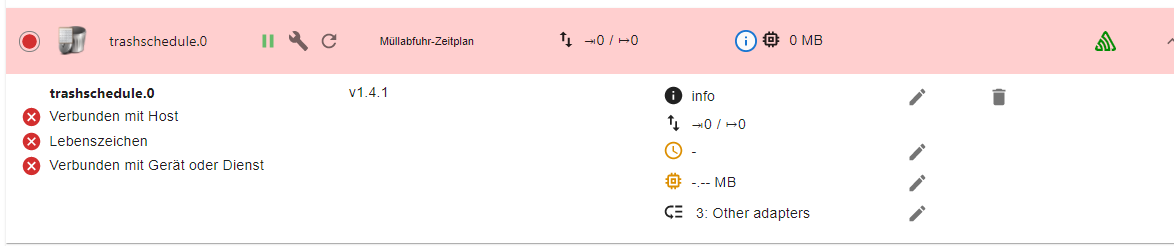
                        Ich hatte mal mit einer Host_slave Konfiguration rumexperimentiert. Damals hatte ich vom Admin eine zusätzliche Slave Instanz installiert. Diese Instanz steht - wie ich eben bemerkte - noch auf 5.1.25, obwohl sie gar nicht läuft. Den Slave habe ich nicht mehr, kann aber die Slave-Instanz leider nicht löschen.

                        Hat jemand einen Tipp, wie ich gezielt diese Instanz weg bekomme? Über die kleine Mülltonne geht's nicht.

                        3e1d83d5-ff10-4f1c-9762-99d580d6cba1-image.png

                        Thomas BraunT 1 Reply Last reply
                        0
                        • graubi77G graubi77

                          @thomas-braun

                          In meinem Fall habe ich jetzt eine neue Spur.
                          Ich hatte mal mit einer Host_slave Konfiguration rumexperimentiert. Damals hatte ich vom Admin eine zusätzliche Slave Instanz installiert. Diese Instanz steht - wie ich eben bemerkte - noch auf 5.1.25, obwohl sie gar nicht läuft. Den Slave habe ich nicht mehr, kann aber die Slave-Instanz leider nicht löschen.

                          Hat jemand einen Tipp, wie ich gezielt diese Instanz weg bekomme? Über die kleine Mülltonne geht's nicht.

                          3e1d83d5-ff10-4f1c-9762-99d580d6cba1-image.png

                          Thomas BraunT Online
                          Thomas BraunT Online
                          Thomas Braun
                          Most Active
                          wrote on last edited by
                          #157

                          @graubi77

                          iobroker list instances
                          

                          Linux-Werkzeugkasten:
                          https://forum.iobroker.net/topic/42952/der-kleine-iobroker-linux-werkzeugkasten
                          NodeJS Fixer Skript:
                          https://forum.iobroker.net/topic/68035/iob-node-fix-skript
                          iob_diag: curl -sLf -o diag.sh https://iobroker.net/diag.sh && bash diag.sh

                          graubi77G 1 Reply Last reply
                          0
                          • Thomas BraunT Thomas Braun

                            @graubi77

                            iobroker list instances
                            
                            graubi77G Offline
                            graubi77G Offline
                            graubi77
                            wrote on last edited by
                            #158

                            @thomas-braun

                            pi@raspberrypi:~ $ iobroker list instances
                            + system.adapter.admin.0                  : admin                 : raspberrypi                                                                                    -  enabled, port: 8081, bind: 0.0.0.0, run as: admi                                                      n
                              system.adapter.admin.1                  : admin                 : raspberry-sl                                                      ave                          - disabled, port: 8081, bind: 0.0.0.0, run as: admi                                                      n
                            
                            
                            Thomas BraunT 1 Reply Last reply
                            0
                            • graubi77G graubi77

                              @thomas-braun

                              pi@raspberrypi:~ $ iobroker list instances
                              + system.adapter.admin.0                  : admin                 : raspberrypi                                                                                    -  enabled, port: 8081, bind: 0.0.0.0, run as: admi                                                      n
                                system.adapter.admin.1                  : admin                 : raspberry-sl                                                      ave                          - disabled, port: 8081, bind: 0.0.0.0, run as: admi                                                      n
                              
                              
                              Thomas BraunT Online
                              Thomas BraunT Online
                              Thomas Braun
                              Most Active
                              wrote on last edited by Thomas Braun
                              #159

                              @graubi77 sagte in Trashschedule Adapter läuft nach update nicht mehr:

                              admin.1

                              Versuch mal

                              iobroker del admin.1
                              

                              Und bittte ohne Unterbrechungen posten. Kann man nicht gut lesen.

                              Linux-Werkzeugkasten:
                              https://forum.iobroker.net/topic/42952/der-kleine-iobroker-linux-werkzeugkasten
                              NodeJS Fixer Skript:
                              https://forum.iobroker.net/topic/68035/iob-node-fix-skript
                              iob_diag: curl -sLf -o diag.sh https://iobroker.net/diag.sh && bash diag.sh

                              HomoranH graubi77G 2 Replies Last reply
                              0
                              • Thomas BraunT Thomas Braun

                                @graubi77 sagte in Trashschedule Adapter läuft nach update nicht mehr:

                                admin.1

                                Versuch mal

                                iobroker del admin.1
                                

                                Und bittte ohne Unterbrechungen posten. Kann man nicht gut lesen.

                                HomoranH Do not disturb
                                HomoranH Do not disturb
                                Homoran
                                Global Moderator Administrators
                                wrote on last edited by
                                #160

                                @thomas-braun oder iobroker host this?

                                kein Support per PN! - Fragen im Forum stellen -
                                Benutzt das Voting rechts unten im Beitrag wenn er euch geholfen hat.
                                Das Forum freut sich über eine Spende. Benutzt dazu den Spendenbutton im Header. Danke!
                                der Installationsfixer: curl -fsL https://iobroker.net/fix.sh | bash -

                                1 Reply Last reply
                                0
                                • Thomas BraunT Thomas Braun

                                  @graubi77 sagte in Trashschedule Adapter läuft nach update nicht mehr:

                                  admin.1

                                  Versuch mal

                                  iobroker del admin.1
                                  

                                  Und bittte ohne Unterbrechungen posten. Kann man nicht gut lesen.

                                  graubi77G Offline
                                  graubi77G Offline
                                  graubi77
                                  wrote on last edited by
                                  #161

                                  @thomas-braun leider keine Veränderung

                                  Thomas BraunT 1 Reply Last reply
                                  0
                                  • graubi77G graubi77

                                    @thomas-braun leider keine Veränderung

                                    Thomas BraunT Online
                                    Thomas BraunT Online
                                    Thomas Braun
                                    Most Active
                                    wrote on last edited by
                                    #162

                                    @graubi77 Und welche 'keine Veränderung' konnte man in der Konsole sehen?

                                    Linux-Werkzeugkasten:
                                    https://forum.iobroker.net/topic/42952/der-kleine-iobroker-linux-werkzeugkasten
                                    NodeJS Fixer Skript:
                                    https://forum.iobroker.net/topic/68035/iob-node-fix-skript
                                    iob_diag: curl -sLf -o diag.sh https://iobroker.net/diag.sh && bash diag.sh

                                    graubi77G 1 Reply Last reply
                                    0
                                    • Thomas BraunT Thomas Braun

                                      @graubi77 Und welche 'keine Veränderung' konnte man in der Konsole sehen?

                                      graubi77G Offline
                                      graubi77G Offline
                                      graubi77
                                      wrote on last edited by
                                      #163

                                      @thomas-braun

                                      pi@raspberrypi:~ $ iobroker list instances
                                        system.adapter.admin.0                  : admin                 : raspberrypi                              -  enabled, port: 8081, bind: 0.0.0.0, run as: admin
                                        system.adapter.admin.1                  : admin                 : raspberry-slave                          - disabled, port: 8081, bind: 0.0.0.0, run as: admin
                                      
                                      Thomas BraunT 1 Reply Last reply
                                      0
                                      • graubi77G graubi77

                                        @thomas-braun

                                        pi@raspberrypi:~ $ iobroker list instances
                                          system.adapter.admin.0                  : admin                 : raspberrypi                              -  enabled, port: 8081, bind: 0.0.0.0, run as: admin
                                          system.adapter.admin.1                  : admin                 : raspberry-slave                          - disabled, port: 8081, bind: 0.0.0.0, run as: admin
                                        
                                        Thomas BraunT Online
                                        Thomas BraunT Online
                                        Thomas Braun
                                        Most Active
                                        wrote on last edited by
                                        #164

                                        @graubi77

                                        Rückmeldungen....

                                        iobroker del admin.1
                                        

                                        Linux-Werkzeugkasten:
                                        https://forum.iobroker.net/topic/42952/der-kleine-iobroker-linux-werkzeugkasten
                                        NodeJS Fixer Skript:
                                        https://forum.iobroker.net/topic/68035/iob-node-fix-skript
                                        iob_diag: curl -sLf -o diag.sh https://iobroker.net/diag.sh && bash diag.sh

                                        graubi77G 1 Reply Last reply
                                        0
                                        • Thomas BraunT Thomas Braun

                                          @graubi77

                                          Rückmeldungen....

                                          iobroker del admin.1
                                          
                                          graubi77G Offline
                                          graubi77G Offline
                                          graubi77
                                          wrote on last edited by
                                          #165

                                          @thomas-braun

                                          pi@raspberrypi:~ $ iobroker del admin.1
                                          Delete adapter "admin.1"
                                          
                                          
                                          Thomas BraunT 1 Reply Last reply
                                          0
                                          Reply
                                          • Reply as topic
                                          Log in to reply
                                          • Oldest to Newest
                                          • Newest to Oldest
                                          • Most Votes


                                          Support us

                                          ioBroker
                                          Community Adapters
                                          Donate
                                          FAQ Cloud / IOT
                                          HowTo: Node.js-Update
                                          HowTo: Backup/Restore
                                          Downloads
                                          BLOG

                                          515

                                          Online

                                          32.7k

                                          Users

                                          82.5k

                                          Topics

                                          1.3m

                                          Posts
                                          Community
                                          Impressum | Datenschutz-Bestimmungen | Nutzungsbedingungen | Einwilligungseinstellungen
                                          ioBroker Community 2014-2025
                                          logo
                                          • Login

                                          • Don't have an account? Register

                                          • Login or register to search.
                                          • First post
                                            Last post
                                          0
                                          • Home
                                          • Recent
                                          • Tags
                                          • Unread 0
                                          • Categories
                                          • Unreplied
                                          • Popular
                                          • GitHub
                                          • Docu
                                          • Hilfe

