




Trashschedule Adapter läuft nach update nicht mehr
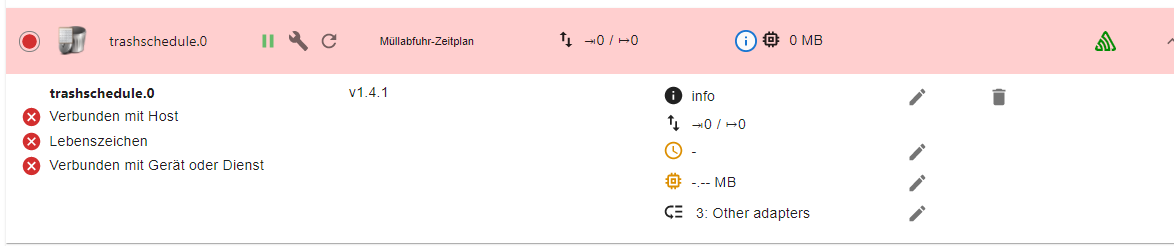
-
Warum eigentlich 1.3.x?
zrashschedule
github:	1.4.1
latest:	1.4.1 for 36 days
stable:	1.4.1 for 36 days
Issue eröffnet?
@thomas-braun ich habe bei 1.4.1 angefangen und mich immer weiter nach unten vorgearbeitet.
bei 1.3.2 hat das schließlich gefunzt.... -
@thomas-braun ich habe bei 1.4.1 angefangen und mich immer weiter nach unten vorgearbeitet.
bei 1.3.2 hat das schließlich gefunzt....System auf Stand?
OS und iobroker?Auf meinem System bekomme ich den nämlich installiert.
2022-01-29 20:53:36.454 - info: host.chet iobroker exit 0 2022-01-29 20:53:38.498 - info: host.chet instance system.adapter.trashschedule.0 started with pid 13082 2022-01-29 20:53:40.266 - info: trashschedule.0 (13082) starting. Version 1.4.1 in /opt/iobroker/node_modules/iobroker.trashschedule, node: v17.4.0, js-controller: 3.3.22 2022-01-29 20:53:40.336 - warn: trashschedule.0 (13082) No trash types configured -
Warum eigentlich 1.3.x?
zrashschedule
github:	1.4.1
latest:	1.4.1 for 36 days
stable:	1.4.1 for 36 days
Issue eröffnet?
@thomas-braun : Node-js v14.18.3
npm 4.14.15
Debian Bullseye
IOB 5.2.3 -
@thomas-braun : Node-js v14.18.3
npm 4.14.15
Debian Bullseye
IOB 5.2.3npm 4 ist falsch.
Da ist nodeJS vermutlich krumm installiert.which nodejs node npm && nodejs -v && node -v && npm -v && whoami && pwd && sudo apt update &> /dev/null && sudo apt update && apt policy nodejs -
@thomas-braun : Node-js v14.18.3
npm 4.14.15
Debian Bullseye
IOB 5.2.3@joe-0 sagte in Trashschedule Adapter läuft nach update nicht mehr:
npm 4.14.15
??
Zeige mal :
sudo ln -s /usr/bin/node /usr/bin/nodejs which nodejs node npm && nodejs -v && node -v && npm -v && sudo apt update && sudo apt update && apt policy nodejs -
@thomas-braun : Node-js v14.18.3
npm 4.14.15
Debian Bullseye
IOB 5.2.3@joe-0 said in Trashschedule Adapter läuft nach update nicht mehr:
@thomas-braun : Node-js v14.18.3
npm 6.14.15
Debian Bullseye
IOB 5.2.3 -
@joe-0 said in Trashschedule Adapter läuft nach update nicht mehr:
@thomas-braun : Node-js v14.18.3
npm 6.14.15
Debian Bullseye
IOB 5.2.3KOMPLETTE Ein- und Ausgaben.
-
KOMPLETTE Ein- und Ausgaben.
@thomas-braun : hm.... bin ich zu "blöd" für.... wie bekomme ich aus Putty diese "Fenster"...
-
@thomas-braun : hm.... bin ich zu "blöd" für.... wie bekomme ich aus Putty diese "Fenster"...
Text kopieren, </> -Icon anklicken, Text zwischen die Steuerzeichen kopieren, Beitrag absenden.
-
Text kopieren, </> -Icon anklicken, Text zwischen die Steuerzeichen kopieren, Beitrag absenden.
@thomas-braun ```
pi@Raspi1:~ $ which nodejs && nodejs -v && which node && node -v && which npm & npm -v && apt policy nodejs
[1] 26902
/usr/bin/nodejs
v14.18.3
/usr/bin/node
v14.18.3
/usr/bin/npm
6.14.15
[1]+ Fertig which nodejs && nodejs -v && which node && node -v && which npm
nodejs:
Installiert: 14.18.3-deb-1nodesource1
Installationskandidat: 14.18.3-deb-1nodesource1
Versionstabelle:
*** 14.18.3-deb-1nodesource1 500
500 https://deb.nodesource.com/node_14.x buster/main armhf Packages
100 /var/lib/dpkg/status
10.24.0~dfsg-1~deb10u1 500
500 http://raspbian.raspberrypi.org/raspbian buster/main armhf Packages
pi@Raspi1:~ $ -
@thomas-braun ```
pi@Raspi1:~ $ which nodejs && nodejs -v && which node && node -v && which npm & npm -v && apt policy nodejs
[1] 26902
/usr/bin/nodejs
v14.18.3
/usr/bin/node
v14.18.3
/usr/bin/npm
6.14.15
[1]+ Fertig which nodejs && nodejs -v && which node && node -v && which npm
nodejs:
Installiert: 14.18.3-deb-1nodesource1
Installationskandidat: 14.18.3-deb-1nodesource1
Versionstabelle:
*** 14.18.3-deb-1nodesource1 500
500 https://deb.nodesource.com/node_14.x buster/main armhf Packages
100 /var/lib/dpkg/status
10.24.0~dfsg-1~deb10u1 500
500 http://raspbian.raspberrypi.org/raspbian buster/main armhf Packages
pi@Raspi1:~ $@joe-0 said in Trashschedule Adapter läuft nach update nicht mehr:
@thomas-braun ```
pi@Raspi1:~ $ which nodejs && nodejs -v && which node && node -v && which npm & npm -v && apt policy nodejs
[1] 26902
/usr/bin/nodejs
v14.18.3
/usr/bin/node
v14.18.3
/usr/bin/npm
6.14.15
[1]+ Fertig which nodejs && nodejs -v && which node && node -v && which npm
nodejs:
Installiert: 14.18.3-deb-1nodesource1
Installationskandidat: 14.18.3-deb-1nodesource1
Versionstabelle:
*** 14.18.3-deb-1nodesource1 500
500 https://deb.nodesource.com/node_14.x buster/main armhf Packages
100 /var/lib/dpkg/status
10.24.0~dfsg-1~deb10u1 500
500 http://raspbian.raspberrypi.org/raspbian buster/main armhf Packages
pi@Raspi1:~ $Hmm.... sieht nicht "hübsch" aus...
-
@joe-0 said in Trashschedule Adapter läuft nach update nicht mehr:
@thomas-braun ```
pi@Raspi1:~ $ which nodejs && nodejs -v && which node && node -v && which npm & npm -v && apt policy nodejs
[1] 26902
/usr/bin/nodejs
v14.18.3
/usr/bin/node
v14.18.3
/usr/bin/npm
6.14.15
[1]+ Fertig which nodejs && nodejs -v && which node && node -v && which npm
nodejs:
Installiert: 14.18.3-deb-1nodesource1
Installationskandidat: 14.18.3-deb-1nodesource1
Versionstabelle:
*** 14.18.3-deb-1nodesource1 500
500 https://deb.nodesource.com/node_14.x buster/main armhf Packages
100 /var/lib/dpkg/status
10.24.0~dfsg-1~deb10u1 500
500 http://raspbian.raspberrypi.org/raspbian buster/main armhf Packages
pi@Raspi1:~ $Hmm.... sieht nicht "hübsch" aus...
@joe-0 ```
code_textpi@Raspi1:~ $ sudo ln -s /usr/bin/node /usr/bin/nodejs ln: die symbolische Verknüpfung '/usr/bin/nodejs' konnte nicht angelegt werden: Die Datei existiert bereits -
@joe-0 sagte in Trashschedule Adapter läuft nach update nicht mehr:
npm 4.14.15
??
Zeige mal :
sudo ln -s /usr/bin/node /usr/bin/nodejs which nodejs node npm && nodejs -v && node -v && npm -v && sudo apt update && sudo apt update && apt policy nodejs@glasfaser ```
pi@Raspi1:~ $ sudo ln -s /usr/bin/node /usr/bin/nodejs ln: die symbolische Verknüpfung '/usr/bin/nodejs' konnte nicht angelegt werden: Die Datei existiert bereits -
@joe-0 sagte in Trashschedule Adapter läuft nach update nicht mehr:
npm 4.14.15
??
Zeige mal :
sudo ln -s /usr/bin/node /usr/bin/nodejs which nodejs node npm && nodejs -v && node -v && npm -v && sudo apt update && sudo apt update && apt policy nodejs@glasfaser ```
pi@Raspi1:~ $ which nodejs && nodejs -v && which node && node -v && which npm & npm -v && apt policy nodejs [1] 3523 /usr/bin/nodejs v14.18.3 /usr/bin/node v14.18.3 /usr/bin/npm 6.14.15 [1]+ Fertig which nodejs && nodejs -v && which node && node -v && which npm nodejs: Installiert: 14.18.3-deb-1nodesource1 Installationskandidat: 14.18.3-deb-1nodesource1 Versionstabelle: *** 14.18.3-deb-1nodesource1 500 500 https://deb.nodesource.com/node_14.x buster/main armhf Packages 100 /var/lib/dpkg/status 10.24.0~dfsg-1~deb10u1 500 500 http://raspbian.raspberrypi.org/raspbian buster/main armhf Packages -
In meinem Fall habe ich jetzt eine neue Spur.
Ich hatte mal mit einer Host_slave Konfiguration rumexperimentiert. Damals hatte ich vom Admin eine zusätzliche Slave Instanz installiert. Diese Instanz steht - wie ich eben bemerkte - noch auf 5.1.25, obwohl sie gar nicht läuft. Den Slave habe ich nicht mehr, kann aber die Slave-Instanz leider nicht löschen.Hat jemand einen Tipp, wie ich gezielt diese Instanz weg bekomme? Über die kleine Mülltonne geht's nicht.

-
In meinem Fall habe ich jetzt eine neue Spur.
Ich hatte mal mit einer Host_slave Konfiguration rumexperimentiert. Damals hatte ich vom Admin eine zusätzliche Slave Instanz installiert. Diese Instanz steht - wie ich eben bemerkte - noch auf 5.1.25, obwohl sie gar nicht läuft. Den Slave habe ich nicht mehr, kann aber die Slave-Instanz leider nicht löschen.Hat jemand einen Tipp, wie ich gezielt diese Instanz weg bekomme? Über die kleine Mülltonne geht's nicht.
iobroker list instances -
iobroker list instancespi@raspberrypi:~ $ iobroker list instances + system.adapter.admin.0 : admin : raspberrypi - enabled, port: 8081, bind: 0.0.0.0, run as: admi n system.adapter.admin.1 : admin : raspberry-sl ave - disabled, port: 8081, bind: 0.0.0.0, run as: admi n -
pi@raspberrypi:~ $ iobroker list instances + system.adapter.admin.0 : admin : raspberrypi - enabled, port: 8081, bind: 0.0.0.0, run as: admi n system.adapter.admin.1 : admin : raspberry-sl ave - disabled, port: 8081, bind: 0.0.0.0, run as: admi n@graubi77 sagte in Trashschedule Adapter läuft nach update nicht mehr:
admin.1
Versuch mal
iobroker del admin.1Und bittte ohne Unterbrechungen posten. Kann man nicht gut lesen.
-
@graubi77 sagte in Trashschedule Adapter läuft nach update nicht mehr:
admin.1
Versuch mal
iobroker del admin.1Und bittte ohne Unterbrechungen posten. Kann man nicht gut lesen.
@thomas-braun oder
iobroker host this? -
@graubi77 sagte in Trashschedule Adapter läuft nach update nicht mehr:
admin.1
Versuch mal
iobroker del admin.1Und bittte ohne Unterbrechungen posten. Kann man nicht gut lesen.



Hey! Du scheinst an dieser Unterhaltung interessiert zu sein, hast aber noch kein Konto.
Hast du es satt, bei jedem Besuch durch die gleichen Beiträge zu scrollen? Wenn du dich für ein Konto anmeldest, kommst du immer genau dorthin zurück, wo du zuvor warst, und kannst dich über neue Antworten benachrichtigen lassen (entweder per E-Mail oder Push-Benachrichtigung). Du kannst auch Lesezeichen speichern und Beiträge positiv bewerten, um anderen Community-Mitgliedern deine Wertschätzung zu zeigen.
Mit deinem Input könnte dieser Beitrag noch besser werden 💗
Registrieren Anmelden430
Online33.0k
Benutzer83.5k
Themen1.3m
Beiträge